Category: Cloud Management

  • Complete Guide to AWS Savings Plans

    Complete Guide to AWS Savings Plans

    AWS Savings Plans are a flexible and cost-effective way to save on your Amazon Web Services (AWS) usage. These plans allow you to commit to a specific amount of compute capacity over a one- or three-year term in exchange for a significant discount on your AWS usage. Savings plans can help you reduce your AWS bill by up to 72%, depending on the type of plan and your level of commitment.

    Why Do You Need AWS Savings Plans?

    With the growing reliance on cloud infrastructure in modern IT, it is crucial for organizations to optimize cloud computing costs without compromising on performance or scalability. AWS Savings Plans address this need by providing a flexible and cost-effective solution that allows you to commit to a certain level of usage at a discounted rate.

    With AWS Savings Plans, by committing to a specific amount of compute capacity over a set time period, you can save up to 72% on your AWS usage. This can result in significant cost savings for your organization, freeing up resources to invest in other business-critical initiatives.

    Another benefit of AWS Savings Plans is the flexibility they offer. Unlike Reserved Instances, which require you to specify instance type, operating system and region, Savings Plans are more flexible and can be applied across different instance types, regions and operating systems. This flexibility makes it easier for you to optimize your cloud computing costs while still meeting your business needs.

    Difference Between AWS Savings Plans and Reserved Instances

    AWS Savings Plans and Reserved Instances are both designed to help you save on your AWS usage, but they offer different levels of flexibility and cost savings.

    Reserved Instances require you to commit to a specific instance type, operating system and region for a one- or three-year term in exchange for a discount on your AWS usage. While this can result in significant cost savings, it also limits your ability to optimize your cloud computing costs based on changing business needs.

    AWS Savings Plans offer a more flexible solution that allows you to commit to a certain level of usage across different instance types, regions and operating systems. Additionally, in most scenarios, Savings Plans can provide a higher level of cost savings compared to Reserved Instances.

    Types of AWS Savings Plans

    There are two types of AWS Savings Plans: Compute Savings Plans and EC2 Instance Savings Plans.

    Compute Savings Plans

    Compute Savings Plans are the most flexible type of Savings Plans, providing a significant discount on your AWS usage across any instance type, region or operating system. This flexibility makes it easy for you to optimize your cloud computing costs based on your changing business needs.

    Compute Savings Plans offer a discount of up to 66% compared to on-demand pricing, depending on the level of commitment you make. They can be used across all AWS services that are powered by Amazon EC2 instances, including Amazon EMR, AWS Lambda and Amazon ECS.

    EC2 Instance Savings Plans

    EC2 Instance Savings Plans are a more specific type of Savings Plan, offering a discount on your AWS usage for a specific instance type within a region. These plans provide a higher level of cost savings compared to Compute Savings Plans, with discounts of up to 72%.

    EC2 Instance Savings Plans are ideal for organizations that have a predictable workload and require specific instance types within a region. However, they offer less flexibility than Compute Savings Plans, as they cannot be applied across different instance types, regions or operating systems.

    AWS Savings Plans Pricing Models

    AWS Savings Plans offer three different payment options to suit your organization’s budget and commitment level: All Upfront, Partial Upfront and No Upfront.

    All Upfront

    With the All Upfront payment option, you pay for the entire term of your Savings Plan upfront, resulting in the highest discount compared to on-demand pricing. This option is ideal for organizations that have the budget available to make a significant upfront payment in exchange for maximum cost savings.

    Partial Upfront

    The Partial Upfront payment option allows you to pay a portion of your Savings Plan upfront and the remaining balance on a monthly basis. This option provides a balance between upfront commitment and ongoing flexibility, with a lower discount compared to the All Upfront option.

    No Upfront

    With the No Upfront payment option, you pay for your Savings Plan on a monthly basis, with no upfront payment required. This option provides the lowest discount compared to on-demand pricing but offers the greatest flexibility for organizations with limited budgets or uncertain future usage requirements.

    How to Monitor and Manage AWS Savings Plans

    Monitoring and managing your AWS Savings Plans, as part of your overall cloud operations strategy, is critical to ensuring that you are optimizing your cloud computing costs and maximizing your savings. AWS provides several tools and services to help you monitor and manage your Savings Plans effectively:

    • AWS Cost Explorer: A powerful tool that allows you to analyze your Savings Plans usage and costs, helping you identify opportunities to optimize your cloud computing costs. With Cost Explorer, you can view your Savings Plans coverage, utilization and savings, as well as forecast your future usage and costs.
    • AWS Budgets: This service allows you to set custom cost and usage budgets for your organization, helping you track your Savings Plans usage and ensure that you are staying within your budget.
    • Savings Plans Recommendations: This feature analyzes your past usage and recommends the optimal Savings Plans for your organization. It can help you make informed decisions about which Savings Plans to purchase and how much commitment to make.

    Conclusion

    AWS Savings Plans are an excellent solution for organizations looking to optimize their cloud computing costs and save on their AWS usage. With their flexibility, cost savings and easy monitoring and management options, AWS Savings Plans are a valuable tool for any organization using AWS services.

    To unlock the full potential of AWS Savings Plans, it’s crucial to understand the different types of plans, their pricing models and how to effectively monitor and manage your usage. By doing so, you can maximize your savings and ensure that your organization is getting the most out of its investment in AWS.


  • Google Announces Availability of iPaaS Service

    Google Announces Availability of iPaaS Service

    Google today made available an integration platform-as-a-service (iPaaS) capable of invoking a range of methods to integrate applications.

    Initially developed for the Apigee application programming interface (API) management platform Google acquired in 2016, the Application Integration service can now, for example, also consume a publish and subscribe event or an event driven through a Salesforce platform.

    Amit Zavery, vice president and general manager for Google Platform, said the Application Integration service provides IT organizations with all the benefits of an iPaaS without requiring them to stand up and manage an integration platform themselves.

    The Google Application Integration service also provides access to a Visual Integration Designer tool that can be used to build workflows using a low-code tool. In total, there are now more than 75 connectors that can be used to integrate multiple Google Cloud services and third-party platforms that can run in either a cloud or on-premises IT environment, said Zavery.

    In general, visual tools are transforming how integrations are created and expanded within organizations, noted Zavery. Rather than using lower-level procedural code, a visual tool enables developers to employ low-code to create integrations. That makes it simpler to collaborate with business users that can now more easily participate in developing workflows.

    In fact, in some cases, business users, otherwise known as citizen developers, have enough technical acumen to create their own workflows using low-code tools.

    There are, naturally, going to be plenty of complex integration challenges that will require procedural code, but the bulk of the integrations required today are not especially complex.

    Regardless of who creates the integration, the number of them being employed across an enterprise organization continues to increase as more digital business transformation initiatives are launched. Developers are not going to be able to keep pace with the demand for those integrations if they rely solely on procedural code. The only way to effectively reduce the backlog for integrations is to rely more on visual tools to construct them. In most cases, the integration being created is relatively trivial. The only reason it wasn’t created sooner is there are not enough developers available to complete that task using procedural code.

    There are, of course, no shortage of iPaaS options available. As more workloads are deployed in the cloud, Google is betting the center of gravity for integration will shift toward the places where modern microservices-based workloads are deployed to reduce overall latency.

    It’s not clear whether organizations still view integration as an afterthought versus employing an integration platform around which all applications revolve. That latter approach tends to reduce the total cost of integration when compared to using multiple point products that are not managed via single framework, noted Zavery.

    Ultimately, IT teams that adopt an iPaaS are able to focus more on higher-value IT tasks. The issue is determining which integration projects really require professional developers with lots of integration expertise and which, via a low-code tool, can be handled by almost any developer.

  • How to Keep Your IT Infrastructure Invisible

    How to Keep Your IT Infrastructure Invisible

    IT infrastructure is critical. IT infrastructure enables businesses to run—from day-to-day operational execution to visionary strategic innovation and everything in between. What’s interesting, though, is that people are only aware of it when there’s a problem: HR can’t access the payroll application, customers are complaining about how slow the transactional system is or this month’s cloud bill was double what you expected it to be.

    No one should notice a well-orchestrated environment, but once application performance slows or an outage occurs, people start to grumble. The same is true for IT infrastructure.

    The Top Four Ways Your IT Infrastructure Can Become Undesirably Visible

    Given the complexity of modern hybrid/multi-cloud environments and the applications they support, it’s no surprise that countless things can go wrong—and when they do, your IT team takes the flack.

    If your infrastructure is humming along nicely, that’s a testament to the IT infrastructure team’s hard work and expertise. Sadly, they don’t get the recognition because it’s all invisible to the rest of the organization. It’s only when *BAM!* something happens that the team is scrutinized.

    While there are many ways this can manifest, it usually falls under one of the following four categories:

    • Availability — This may be the most catastrophic because when systems are unavailable, people can’t do whatever it is they need to do.
    • Performance — A system might be available, but that doesn’t mean it’s performing to SLA or user expectations. The result can range from minor annoyance to lost revenue and customer churn.
    • Cost — Runaway expenditures don’t necessarily affect users, but you do not want to be called to account by the finance team or, worse, executive leadership.
    • Compliance — This is another area that may not have a broad impact on user experience, but the repercussions of non-compliance can be financially and reputationally significant.

    Common Infrastructure Culprits and How to Address Them

    To ensure the necessary availability, performance, cost control and compliance to keep your IT infrastructure under the radar, you must understand what can cause problems in these areas. Here are eight common culprits, along with ways you can address them, so your IT team stays invisible.

    Broken or Misunderstood Dependencies
    Your infrastructure is a complex web of interdependent applications and services. Every time you make a change, it could have a rippling effect on the categories mentioned above. Automated discovery and service mapping capabilities enable you to easily trace dependencies throughout your infrastructure to avoid unintended consequences.

    Cloud Waste
    Chances are very high that you’ve got cloud waste. This means that you could be getting billed for a storage block that’s attached to a stopped instance, for compute instances that are not being used, or for unattached load balancers. Finding idle and abandoned resources can keep your monthly cloud bill under control and on budget.

    Un-Breakdownable Cloud Costs
    Cloud bills are notoriously complex, and while cloud providers do offer tools to help you analyze your cloud spend, those tools often don’t answer all the questions your business might have. In addition to adding clarity to such opaque expenses, you need to be able to parse your cloud spend based on what makes business sense to your organization, not what makes technical sense to your cloud provider.

    Poor Capacity Planning
    Your infrastructure needs to meet your business needs, which are continuously evolving. As changes happen, whether it’s increased utilization of existing resources or modified/added resources to support new requirements, workloads could push current capacity and impact performance and stability. You need to be able to forecast infrastructure demands against business objectives to minimize potential issues before they happen.

    Poor Workload Placement Decisions
    Your infrastructure consists of various environments each with its own characteristics. If you migrate a workload without understanding the implications of that particular environment, you could risk performance problems or spiking costs. To prevent this, you need any-to-any migration insights to make better decisions about workload priorities, groups and deployments.

    Poor Reservation Planning
    Reservations (i.e., reserved instances or programmatic discounts) offer discounts for committing to a particular plan. If you plan well, the savings can be significant. But if you don’t use the capacity you’ve bought, the savings might not materialize. To improve cloud resource planning, you need to be able to evaluate your potential savings in varied scenarios.

    Workload Drift
    Over time, your workloads evolve due to changing demand, data volumes, etc. As a result, they can outgrow their current configurations, leading to performance issues or rising costs. This is a natural result of business growth, so the goal isn’t to prevent that drift. Instead, you want to optimize capacity and cost on an ongoing basis to keep your workloads right-sized.

    Slow Problem Troubleshooting and Remediation
    No matter how many precautions you take, something somewhere will inevitably go wrong. And once you become aware of the situation, the clock starts ticking to find the cause and fix it, all of which takes time. The longer the entire process takes, the longer your infrastructure will be visibly and painfully not working as expected. For those cases, you need full-stack visibility with application-centric, AI-based analytics to minimize impact duration as much as possible.

    Keeping the engine running behind the curtain can be a daunting task, but with proper planning and management, your IT team will remain visible to those responsible for managing it and invisible to those in the rest of the organization. Of course, the complexity of today’s cloud infrastructure makes that challenging, and there will be IT fire drills that take place, but it’s about how IT leaders react to the situation and resolve it in the quickest way possible, allowing themselves to return to their preferred place in the shadows.

  • Cloud Orchestration and its Impact on DevOps Teams

    Cloud Orchestration and its Impact on DevOps Teams

    Cloud orchestration refers to the coordination and management of various interconnected cloud services and resources to automate and streamline complex IT processes. In simple terms, it is the process of integrating, synchronizing, and automating various cloud-based components to create a seamless and unified workflow. 

    Cloud orchestration aims to optimize the deployment, management, and use of resources in a cloud environment, improving efficiency, reducing costs, and ensuring that cloud services are delivered in a timely and effective manner. It is related to the concept of CloudOps (cloud operations), which uses cloud orchestration concepts to allow more efficient management of cloud resources. Cloud orchestration is a critical aspect of modern IT infrastructure management, as it enables organizations to manage and control their cloud resources more effectively.

    Difference between Cloud Orchestration and Cloud Automation

    Though the terms cloud orchestration and cloud automation are often used interchangeably, they have distinct differences. 

    Cloud automation refers to the process of automating individual tasks and processes within the cloud environment. It involves the use of scripts, templates and other tools to automate repetitive tasks, such as provisioning resources, deploying applications and configuring environments. The primary goal of cloud automation is to reduce the time and effort needed to manage cloud resources.

    Cloud orchestration is a broader concept that encompasses not only the automation of tasks but also the coordination and management of the entire cloud ecosystem. It involves the integration of various cloud services, tools and resources to create a unified, streamlined workflow. Cloud orchestration ensures that all components in the cloud environment work together seamlessly, automating complex processes and managing dependencies between tasks.

    In essence, cloud automation is a subset of cloud orchestration. While cloud automation focuses on automating individual tasks, cloud orchestration takes a more holistic approach, orchestrating multiple tasks and resources to achieve a higher level of automation and efficiency.

    How Cloud Orchestration Enhances DevOps Practices

    Increased Efficiency and Speed

    One of the main benefits of cloud orchestration in a DevOps context is the ability to increase efficiency and speed in the software development and deployment process. By automating and streamlining various tasks, cloud orchestration eliminates manual processes, reduces the potential for human error and accelerates the overall development cycle. 

    Improved Collaboration and Communication

    Cloud orchestration fosters better collaboration and communication between development and operations teams by providing a unified platform for managing cloud resources. This shared platform enables teams to work together more effectively, breaking down traditional silos and ensuring that all stakeholders have visibility into the development and deployment process. 

    Enhanced Infrastructure and Application Management

    Cloud orchestration simplifies the management of complex cloud infrastructure by providing a single, unified platform for cloud optimization—improving the management of resources, applications and services in the cloud.

     This centralized management approach enables organizations to more easily monitor, control and optimize their cloud environment, ensuring that resources are used effectively and that applications are running smoothly. With cloud orchestration, organizations can more easily scale their infrastructure to meet changing demands, ensuring that they have the resources they need when they need them.

    Improved Monitoring and Troubleshooting

    Cloud orchestration provides improved monitoring and troubleshooting capabilities, enabling organizations to more effectively identify and address issues in their cloud environment. With comprehensive monitoring tools and dashboards, teams can gain insight into the performance of their applications, identify bottlenecks and pinpoint potential issues before they become critical.

    Challenges of Integrating Cloud Orchestration With DevOps

    Despite the numerous benefits of cloud orchestration, integrating it into DevOps practices can present several challenges. Some of the common challenges include:

    • Complexity: Cloud orchestration involves the integration of various cloud services, tools and resources, which can be complex and time-consuming. Organizations may struggle with complexity, particularly if they lack the necessary expertise or resources to effectively implement and manage the solution.
    • Resistance to change: Implementing cloud orchestration requires a change in mindset and approach to software development and deployment. As your organization migrates more systems to the cloud, some team members may be resistant to adopting new processes and tools, making it difficult to fully embrace and realize the benefits of cloud orchestration.
    • Security concerns: As with any cloud-based solution, security is a critical concern when integrating cloud orchestration into DevOps practices. Organizations must ensure that their solution is secure and that they have the necessary policies and procedures in place to protect their sensitive data and resources.
    • Cost and resource constraints: Implementing and managing a Cloud Orchestration solution can be resource-intensive, requiring significant investment in infrastructure, tools, and personnel. Organizations must carefully consider the costs and resources required to implement cloud orchestration and determine whether the benefits outweigh the investment.

    Best Practices to Integrate Cloud Orchestration Into DevOps

    To successfully integrate cloud orchestration into DevOps practices and overcome the challenges mentioned above, organizations should consider the following best practices:

    • Assess your organization’s readiness: Before implementation, evaluate your organization’s readiness for change. This includes assessing your existing infrastructure, processes and tools, as well as your team’s willingness and ability to adopt new practices and technologies.
    • Develop a clear strategy: Develop a clear strategy for integrating cloud orchestration into your DevOps practices. This should include defining your goals and objectives, identifying the tools and resources you will need and establishing a timeline for implementation.
    • Choose the right tools and technologies: Select the appropriate tools and technologies that best meet your organization’s needs and requirements. Consider factors such as ease of integration, scalability, security and cost when evaluating potential solutions.
    • Train and educate your team: Ensure that your team has the necessary knowledge and skills to effectively implement and manage cloud orchestration. This may involve providing training and education on new tools, processes and best practices, as well as fostering a culture of continuous learning and improvement.
    • Monitor and measure success: Continuously monitor and measure the success of your implementation. This includes tracking key performance indicators (KPIs), such as deployment speed, resource utilization and application performance, to ensure that your solution is delivering the desired results.

    Conclusion

    Cloud orchestration is an essential tool for organizations looking to streamline and optimize their IT infrastructure, particularly in the context of DevOps practices. By automating and coordinating complex cloud processes, organizations can improve efficiency, speed, collaboration and overall performance. 

    However, successfully integrating with DevOps can be challenging, requiring a clear strategy, the right tools and technologies and a commitment to continuous improvement. By following the best practices outlined in this guide, organizations can overcome these challenges and fully realize the benefits.


  • FinOps Gaining Ground, But Progress is Slow

    FinOps Gaining Ground, But Progress is Slow

    A CloudBolt Software survey found that while the majority (98%) of respondents worked for organizations with a formal FinOps team (82%) or are actively considering adding one (16%), realizing value from FinOps is slow. More than half of existing FinOps teams (54%) were formed just 12 months ago or less, the survey also found.

    The trouble is, only one in of 500 respondents claimed to achieve any material value from FinOps to date. More than three-quarters of respondents (76%) said they will have to wait two to three years to see real FinOps-driven results.

    The survey polled 500 executives, engineers and developers at companies with over 5,000 employees in the U.S., Canada, United Kingdom and Australia. It was conducted by Wakefield Research on behalf of CloudBolt Software, a provider of a platform for managing distributed computing environments.

    A total of 45% of respondents also questioned FinOps efficacy in the real world. Specifically, 15% flagged FinOps as being “theoretically easy but harder in practice,” with another 13% regarding it as “much ado about nothing.” Another 10% said it is “nothing more than a suggested framework,” while 7% labeled FinOps as “a necessary evil.”

    Nevertheless, a full 89% also described FinOps as the silver bullet for reining in the complexity of cloud cost management, with 68% noting that FinOps is among their organization’s most strategic priorities for 2023. The average size of a FinOps team is now 4.1 people, with the “director level” being the senior-most leader on the team 53% of the time, the survey noted.

    A total of 71% noted that achieving this year’s IT goals without a FinOps practice would pose a significant challenge, with 74% reporting that FinOps is now on par with ITOps, DevOps, SecOps and other IT disciplines.

    In addition, 71% of respondents said funding for FinOps initiatives increased in 2023, with 58% reporting key performance indicators (KPIs) and metrics to the C-suite or board of directors.

    CloudBolt Software CTO Kyle Campos said it’s clear that when it comes to reining in costs, large enterprises are struggling to effectively manage IT across multiple silos. In many cases, organizations were investing heavily in IT before and during the COVID-19 pandemic to drive digital business transformation initiatives without many cost controls being put in place, he added.

    Now that organizations are encountering economic headwinds, many chief financial officers are now asking IT leaders to be a lot more efficient, noted Campos.

    Developers, in particular, have for years been provisioning cloud infrastructure resources with little to no oversight. Unfortunately, developers are prone to leaving the proverbial lights on by, for example, leaving application development environments running over a weekend or simply forgetting that a virtual machine has been left to run for weeks—sometimes even months.

    Developers are also not especially good at alerting IT leaders of possible spikes in consumption due to, for example, a data-intensive workload being constructed. No finance team likes to be surprised by a monthly bill for a cloud service that is twice as much as the previous month.

    The one thing that is certain is that time is of the essence. FinOps, at its core, may not necessarily be a new idea, but IT organizations that fail to practice it may soon find themselves being held more accountable than any time in recent memory.

  • Survey Surfaces Raft of Enterprise IT Challenges

    Survey Surfaces Raft of Enterprise IT Challenges

    A survey of  enterprise IT leaders found less than a third (32%) are extremely confident that they have the right technology, processes and people in place to execute an effective approach to IT management.

    The survey, conducted by Rocket Software, polled 275 U.S. IT leaders in organizations with more than 1,000 employees. A full 93% of IT leaders are also committed to maximize the value of investments in existing platforms.

    As a result, the top priorities for IT leaders are hybrid cloud computing (65%), data and content management (68%) followed by DevOps and infrastructure and application modernization, tied at 58%, and automation (57%).

    A total of 62% noted they have a much greater focus on efficiency due to the economic landscape, with faster DevOps processes, automated processes and increasing overall output as the top three improvements that would be most impactful for increasing efficiency.

    The survey also suggested many organizations still have much work to do to achieve those goals, with 63% of respondents spending anywhere from six to 15 hours on manual data entry and analysis each week.

    Phil Buckellew, president of infrastructure modernization for Rocket Software, said most organizations are still trying to determine the right level of DevOps to adopt. Few organizations have implemented DevOps workflows on an end-to-end basis, with many employing a mix of DevOps and waterfall processes to build and deploy applications across a hybrid cloud computing environment, he noted.

    Overall, IT leaders are most worried about improving overall IT performance (60%), data security (50%), process risk and compliance (46%) and the need to improve agility (41%), the survey found. Respondents also noted that they measure success within their IT organization by increased efficiency (71%), optimized resources (67%) and reduced risk (63%).

    The survey makes it clear that, despite challenges, enterprise IT organizations are committed to hybrid cloud computing as they become more comfortable with using various platforms that are fit for purpose, said Buckellew.

    Mainframes, for example, continue to play a major role in running online transaction processing (OLTP) applications alongside analytics applications that are now being infused with artificial intelligence (AI) capabililities, noted Buckellew.

    A quarter of survey respondents also identified providing cloud applications with access to mainframe data as an area where they need additional tools, followed by automation (22%).

    The biggest automation obstacles are the complexity of implementing automation (18%), resistance to process change among workforce (18%) and lack of skillsets to implement automation (18%), the survey finds.

    As always, the biggest challenge in enterprise IT environments is often simple inertia. Organizations that have been building and deploying applications on mainframes, for example, have been relying on waterfall processes for decades. Many of them have now adopted DevOps processes to varying degrees, but few have completely replaced legacy approaches to building and deploying software, noted Buckellew.

    It’s not likely the management of complex hybrid cloud computing environments will be simplified any time soon, but progress continues to be made. Soon, AI may automate many existing manual tasks. In the meantime, however, the number of enterprise IT organizations standardizing on a single IT platform remains few and far between.

  • Bionic Extends Application Security Posture Management Platform

    Bionic Extends Application Security Posture Management Platform

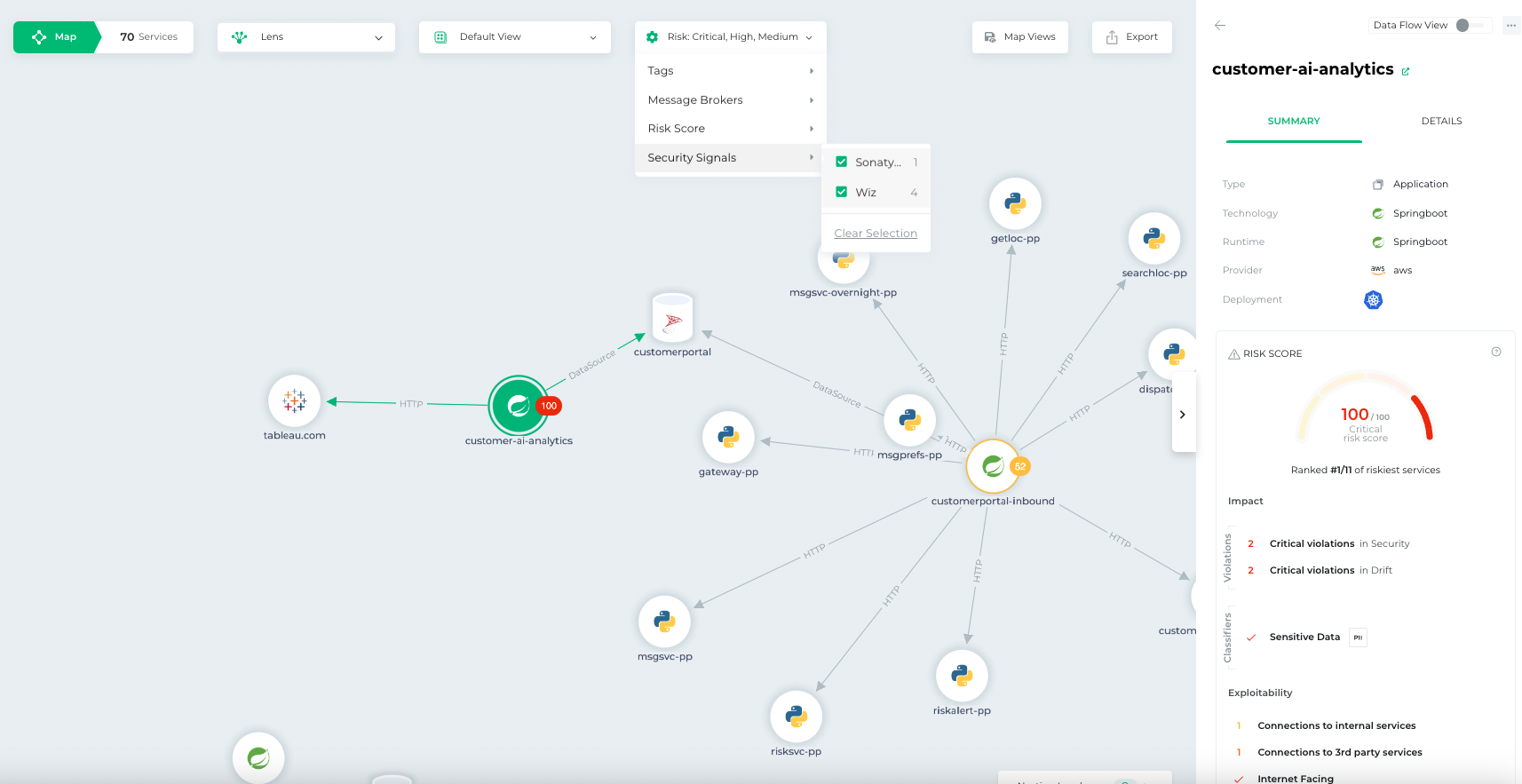
    Bionic this week added a pair of tools to its application security posture management (ASPM) platform that make it simpler to triage threats based on severity and attach a risk score.

    Josh Cho, senior director of global systems engineering at Bionic, said the Bionic Signals and Business Risk Scoring tools ingest data from third-party security tools to provide analytics capabilities. The first two vendors with which Bionic has integrated its ASPM platform are Wiz and Sonatype.

    The goal is to partner with additional vendors that provide unique cybersecurity capabilities that don’t compete with one another, said Cho.

    The agentless Bionic ASPM platform enables organizations to manage application risks by continuously collecting data from services and their dependencies, application programming interfaces (APIs) and DevOps data flows both in pre-production environments and after applications are deployed. Bionic then assesses any changes made to those environments based on a set of cybersecurity policies it provides. If an issue is discovered, the platform will create an alert informing the appropriate development team of best practices that eliminate the issue.

    While there is a lot of effort being made to shift more responsibility left toward application developers, there is often not enough cybersecurity context provided, said Cho. Bionic’s ASPM platform aggregates data from multiple tools to enable DevSecOps teams to better prioritize their remediation efforts, he added.

    It’s not clear how much organizations have embraced DevSecOps best practices, but one of the issues that needs to be addressed is the often-conflicting alerts generated by the various tools being used. Bionic is making a case for an ASPM platform that synthesizes data from multiple sources to streamline DevSecOps workflows.

    One way or another, more organizations will be embracing DevSecOps to better secure their software supply chains as more regulations are mandated. The challenge they face today is that most application developers—and the DevOps teams that support them—don’t have a lot of cybersecurity expertise. As a result, it becomes difficult to discern which vulnerabilities require immediate attention and which can be addressed in a regular update. In some instances, an alert generated by a cybersecurity team may not even been relevant—because the application in question is not internet-facing or the impacted module has not been loaded.

    In fact, it’s that very lack of context that often results in application developers disregarding the alerts generated by cybersecurity teams. Whenever there is a breach, however, cybersecurity teams always demand to know why their alert was ignored.

    No developer, of course, deliberately sets out to build and deploy vulnerable applications. In the race to meet delivery deadlines, there are always going to be tradeoffs. The issue then becomes keeping track of the cybersecurity technical debt that accumulates over time. An ASPM solution provides a means to keep track of that debt to enable DevSecOps teams to keep the risk in perspective.

  • How to Empower DevSecOps in a Complex Multi-Cloud Landscape

    How to Empower DevSecOps in a Complex Multi-Cloud Landscape

    Organizations are embracing cloud-based application delivery for speed of delivery and scale. However, the proliferation of multi-cloud systems to access and maximize the cloud’s capabilities is driving complexity in IT environments. Many organizations do not consider how multi-cloud adoption is expanding their attack surface—and the risk is growing: The 2023 CrowdStrike Global Threat Report found cloud exploitation cases grew by 95% year-over-year and cases involving threat actors targeting cloud environments were up 288% from a year prior.

    The expansion of cloud infrastructure and services has increased the pressure on organizations to protect assets within their multi-cloud environments. To alleviate this burden, more businesses are turning to DevSecOps, a practice that incorporates security at an earlier point in the development life cycle. This practice of shifting left helps improve the quality and reduces risk of applications, as well as makes the delivery of these applications more efficient since any potential issues are found earlier in the development process.

    DevSecOps is being adopted rapidly by organizations today to address the expanding array of threats and increasingly sophisticated attacks targeting multi-cloud environments. However, securing the cloud can be tricky due to its dynamic nature and multi-cloud makes shift left security even more complex. For DevSecOps to truly be effective, here are three things that organizations should consider doing.

    1. Strive for Complete Visibility in a Multi-Cloud Environment

    It is important that DevSecOps teams have a comprehensive understanding of their multi-cloud environment. Without it, they will not be able to identify a variety of security risks including vulnerabilities, privileged credentials, misconfigurations and other threats that may leave their organization’s cloud assets vulnerable.

    The best way to get full visibility across multi-cloud environments is through a cloud security posture management (CSPM) tool. With a CSPM tool, DevSecOps teams can identify misconfigurations and proactively detect threats. In addition, DevSecOps teams should also use a cloud infrastructure entitlement management tool (CIEM) to manage identities across all of their cloud infrastructure resources. The primary goal of a CIEM tool is to mitigate the risk that comes from the unintentional and unchecked granting of excessive permissions of user credentials.

    2. Visibility and Compliance Do Not Guarantee Security

    Organizations need to develop a comprehensive security strategy to mitigate issues within the development process. This may include implementing tools, automation and standards to enable developers to follow the desired security behavior. These approaches reduce developer friction, as well as diminish the likelihood that unsafe or default configurations will be used. Historically, DevOps teams have pushed back on integrating security since their concern is that it slows down the development lifecycle. However, DevSecOps is gaining traction in recent years because organizations are realizing integrating security sooner in the development lifecycle is more efficient than reactively patching problems as they arise.

    A tool that DevSecOps teams should look to leverage is cloud workload protection (CWP) because it offers breach protection for workloads, containers and Kubernetes, while enabling them to continue to build, run and secure applications with speed and confidence.

    3. Create Consistency With Security Tools

    Ideally, organizations should opt for a single platform that consolidates capabilities such as CSPM, CWP and CIEM. The reason for consolidation is to eliminate security gaps from having multiple security solutions. As a result, DevSecOps teams should turn to cloud-native application protection platform (CNAPP) tools to create more consistency within the multi-cloud environment.

    Securing multi-cloud environments can be complex. By empowering DevSecOps teams using these best practices, organizations will be able to move faster than today’s adversaries and have the agility to quickly adapt to present and future cybersecurity challenges in their multi-cloud environments.

  • Choosing the Right Software Deployment Tools

    Choosing the Right Software Deployment Tools

    Imagine this scenario: After investing countless hours in developing your software, it is finally ready for deployment. Now, you must select the appropriate software deployment tools to guarantee a seamless release.

    This article will guide you through the concept of software deployment and discuss various tools that cater to different needs—from dedicated deployment tools to comprehensive CI/CD pipeline solutions and GitOps approaches. By understanding these categories and their benefits, you’ll be well-prepared to make an informed decision on which tool is the best fit for your organization’s needs.

    What is Software Deployment?

    Software deployment plays a crucial role in the software development life cycle. It involves packaging, distributing and installing an application on target systems or environments, aiming to make your software accessible and usable for end-users seamlessly.

    In today’s fast-paced world, companies must be able to deliver applications rapidly and reliably. A well-planned software deployment strategy ensures that new features reach users promptly while minimizing downtime and errors during updates.

    What to Look For in a Software Deployment Tool

    When selecting the ideal software deployment tool, consider the following factors:

    • Automation: The tool should automate complex software deployments, making the deployment process faster and more efficient.
    • Continuous deployment: Continuous deployment tools allow you to deploy software repeatedly, ensuring consistent deployments. Choose a tool that automates release management and integrates automated builds throughout the development process.
    • Scalability: The tool should be capable of handling large-scale deployments and distributing software across multiple servers. Opt for a tool that enables applications to deploy to multiple servers simultaneously.
    • Integration: The tool should integrate with version control and other third-party tools, making the deployment process seamless. Look for a tool that integrates with modern DevOps processes and connects automated builds to configuration management.

    Full CI/CD Tools

    Bamboo

    Bamboo by Atlassian is a robust tool that integrates seamlessly with other Atlassian products, such as Jira and Bitbucket.

    It offers first-class support for multiple languages and platforms while providing built-in deployment projects for smooth releases.

    GitLab CI/CD

    GitLab CI/CD, an integral part of GitLab, simplifies pipeline management using YAML configuration files stored within your project repository.

    This approach enables easy collaboration among team members while ensuring consistent build environments across all stages of development.

    Codefresh

    Codefresh is a cloud-native solution designed specifically for Kubernetes deployments, It provides a modern interface to manage pipelines visually, along with advanced real-time debugging capabilities.

    Dedicated Deployment Tools

    Jenkins

    Jenkins was originally conceived as a continuous integration (CI) tool, but many organizations use it mainly for deployment. It is an open source automation server that provides support for building and deploying software projects, as well as to schedule and run tasks at regular intervals. Learn more about Jenkins in this in-depth blog post.

    Harness

    Harness is an intelligent software delivery platform that simplifies deployments through automation and machine learning. Their continuous delivery-as-a-service (CDaaS) approach helps you deploy faster while minimizing risks and errors.

    AWS CodeDeploy

    If you’re using Amazon Web Services (AWS), AWS CodeDeploy might be a perfect fit for your needs. This completely managed service automates code deployments to any instance or serverless Lambda function in AWS, guaranteeing consistent results every time.

    Spinnaker

    An open source project backed by Netflix and Google, Spinnaker offers powerful multi-cloud continuous delivery capabilities for deploying applications at scale across various cloud providers like AWS, GCP, Azure, Kubernetes clusters, etc.

    GitOps Tools

    Argo CD

    Argo CD is a declarative, Kubernetes-native continuous delivery tool that uses Git repositories as the source of truth for application definitions. It simplifies rollbacks, provides audit trails and enforces consistency across environments.

    Flux CD

    Flux CD, another Kubernetes-focused option, automates deployments by monitoring your code repository for changes and applying them to your cluster accordingly. Bonus: It supports multi-tenancy and integrates with Helm charts.

    Weave GitOps Core

    Lastly, Weave GitOps Core offers an open source foundation for managing Kubernetes applications using the power of GitOps workflows. This versatile tool can be extended to fit various use cases while maintaining simplicity in its core functionality.

    Conclusion

    There are many software deployment tools available that can help automate the software delivery process, reduce errors and improve collaboration between development and operations teams. From open source tools like Jenkins to cloud-native solutions like AWS CodeDeploy, each tool has its own strengths and features that make it suitable for different use cases.

    When selecting a software deployment tool, it is important to consider factors such as compatibility, automation, scalability, security, monitoring, deployment environment compatibility, integration with existing tools and support and documentation. By carefully evaluating these factors and choosing the right tool for your specific needs, you can ensure that your software deployment process is efficient, reliable and successful.

    Image Source: Freepik

  • HashiCorp Releases Slew of Updates to Improve DevSecOps

    HashiCorp Releases Slew of Updates to Improve DevSecOps

    At a HashiDays event this week, HashiCorp launched updates to its Terraform implementation and a software-as-a-service offering, dubbed HCP Vault Secrets, that promise to simplify infrastructure security and ensure that secrets are not leaked.

    In addition, HashiCorp has added a self-hosted edition of its remote access security tool, Boundary, that can now also record SSH sessions. The company is also announcing general availability of Vault Secrets Operator, which provides a high level of abstraction for managing secrets in a Kubernetes environment and which synchronizes with the secrets management interfaces defined by the Kubernetes Technical Oversight Committee.

    Finally, HashiCorp is making available in beta a 1.16 update to the Consul service mesh for containers and virtual machines that adds a Sameness Groups capability to improve the resiliency of microservices by redirecting requests to an identical service. HashiCorp has also added a transparent proxy mode to enable failover between services along with a permissive mutual TLS (mTLS) that enables a service to be configured to accept both mTLS traffic from mesh-enabled services and non-Consul mTLS traffic from external downstream applications.

    Chris Van Wesep, senior director of product marketing for HashiCorp, said Version 1.5 of HashiCorp Terraform adds config-driven import workflow and check blocks capabilities that make it possible to declaratively use code to add existing resources into a Terraform state. Previously, the only way to update a Terraform state was to use an import command that could only be applied to one resource at a time. Terraform 1.5 also adds automatic code-generation capabilities for imported resources.

    In addition, version 1.5 of Terraform also includes a tool to validate that provisioned infrastructure is behaving as intended. That latter capability makes it possible to reduce the number of misconfigurations created by developers that might one day be exploited by cybercriminals to breach an IT environment.

    HCP Vault Secrets, meanwhile, provides a beta release of a SaaS edition of the existing Vault offering specifically designed to enable organizations to better manage application secrets that might inadvertently be exposed to cybercriminals in a production environment, said Van Wesep.

    HashiCorp is moving toward providing a portfolio of tools that enable DevOps teams to securely provision and manage hybrid cloud computing environments using a common workflow, he noted. A Forrester Consulting survey found nearly three-quarters (73%) of respondents are reporting this strategy is helping them reach their business goals, with another 19% adding they expected this strategy to help them achieve their business goals in the next year.

    It’s not clear whether organizations are fully embracing multi-cloud computing, but each additional cloud added to an enterprise IT environment increases the total cost of IT. The only way to mitigate those costs is to define a set of best practices for building and deploying applications that can be applied to any cloud computing environment.

    Unfortunately, many organizations will discover that, as they attempt to define those best practices, they have inadvertently become dependent on a set of proprietary application programming interfaces (APIs) that thwart those efforts.