Category: Features

  • A How to Guide on Modern Monitoring and Alerting

    A How to Guide on Modern Monitoring and Alerting

    syslog-ng, riemann, collectd-notifications, elasticsearch: putting it all together

    Context

    At our organization (CCIN2P3) we are building an event-based infrastructure to push structured messages to different subsystems for alerting, reporting and storage. Using syslog-ng, each message is normalized into a structured event, optionally correlated with other messages, and conditionally routed to the next systems, including:

    • a synchronous web-dashboard,
    • different asynchronous alerting systems, and
    • a searchable storage backend.

    The events which are collected are essentially system and application logs. Here’s a few examples of interesting messages:

    puppet-agent[16528]: Finished catalog run in 44.06 seconds
    kernel: Killed process 29959, UID 42046, (hadd) total-vm:202363492kB, anon-rss:13069860kB, file-rss:60kB
    ata2.00: exception Emask 0x0 SAct 0xffff SErr 0x0 action 0x0
    EXT3-fs error (device dm-1): ext3_journal_start_sb: Detected aborted journal
    

    The unified nature of this pipeline makes it possible for a human to easily identify an event in all the available back- and frontends.

    In this post you’ll learn a way to implement this model, and achieve the following:

    • Collect system metrics
    • Monitor events for outliers
    • Normalize and Correlate these events
    • Route the events to a real-time stream processor and to a searchable storage backend

    We’ll describe the configuration files you’ll have to change, and explain the workflow that processes an event. For the impatient, we’ll illustrate the final result in a short recorded demo.

    Demo
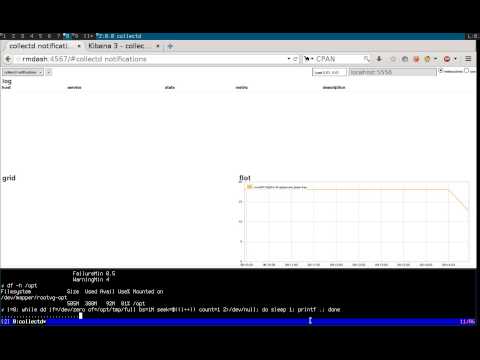
    Realtime monitoring using riemann, syslog-ng, collectd and elasticsearch

    Requirements

    We will assume you have basic knowledge of the following tools, as well as a running instance of each:

    The tools

    Here’s a list of all the tools we’ll be using, along with a short summary, and their main functions in the pipeline:

    On the client:

    • collectd: “a daemon that receives system statistics and makes them available in a number of ways”
      • periodically poll system metrics
      • trigger notifications based on predefined thresholds
    • (any)syslog: “system error logging protocol”
      • listen for syslog messages, including collectd notifications
      • forward them to a remote destination

    On the server(s):

    • syslog-ng: “a flexible and highly scalable system logging application”
      • listen for remote notification messages
      • patterndb: create structured events by parsing the flat collectd notification messages
      • route the events to the next stages (riemann, Elasticsearch, Nagios, Email, …)
    • riemann: “aggregates events from your servers and applications with a powerful stream processing language”
      • listen for remote structured messages (protocol-buffers)
      • expose a websocket and/or sse service for subscriptions
      • send asynchronous alerts to the next stages (e.g. Nagios or Email)
    • riemann-dash: “a javascript, websockets-powered dashboard for Riemann”
      • synchronous realtime in-browser display
      • web application to subscribe to collectd streams using websockets or sse
    • elasticsearch: “a flexible and powerful open source, distributed, real-time search and analytics engine”
      • store and index all events
      • expose an API for query e.g. by Kibana
      • “You know, for search!“
    • kibana: “Elasticsearch’s data visualization engine for the browser”
      • browser-based search interface to query elasticsearch

    Architecture

    To make things crystal-clear, we’ll choose an example: let’s track filesystem’s usage. The collectd-df plugin collects this information. Here’s a diagram depicting the dataflow: you can follow how an event is evolving from a user perspective on the left column, as it travels the pipeline (right column):
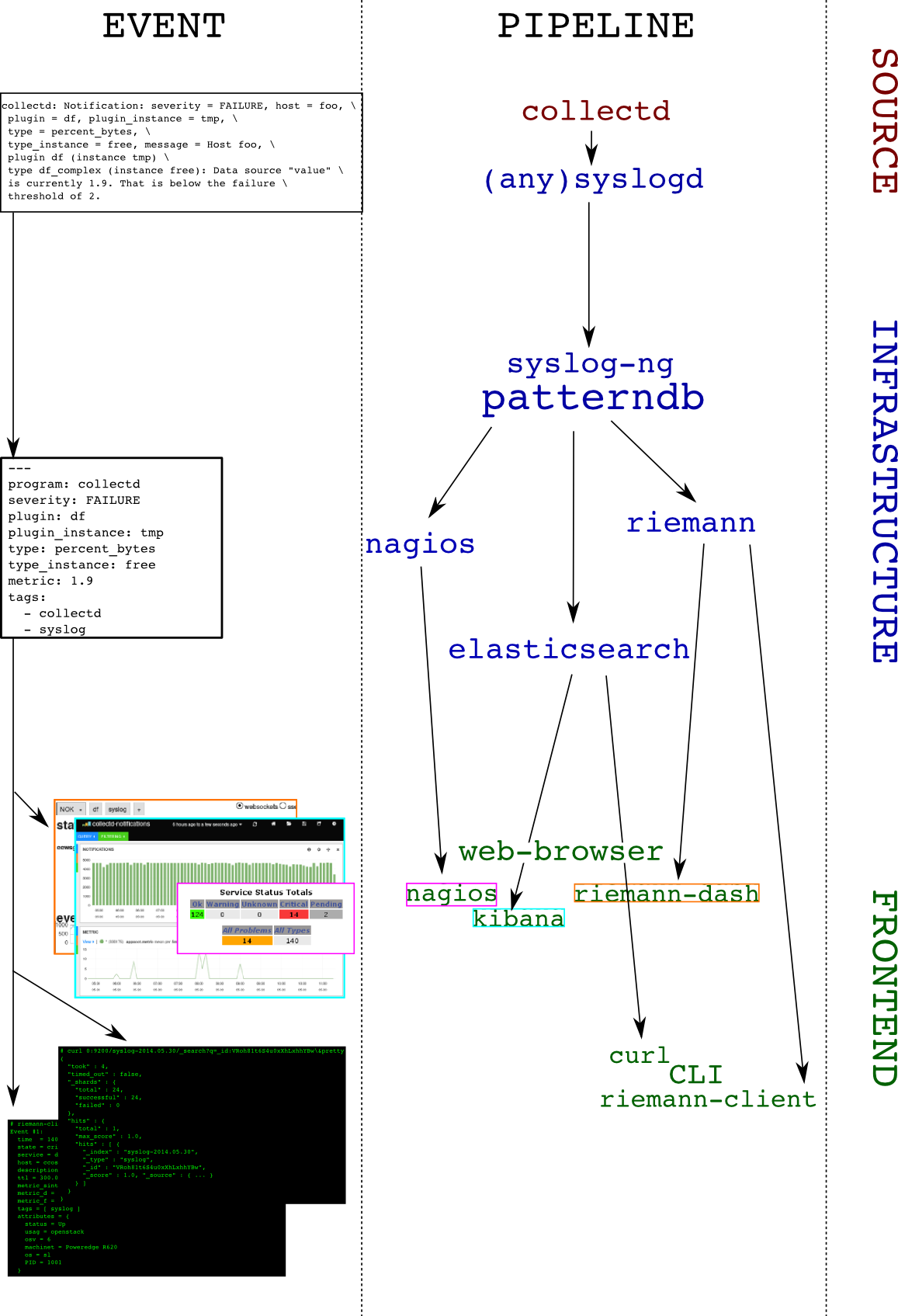
    architecture

    And the details:

    1. collectd-df plugin polls the filesystem utilization:
      df-tmp/percent_bytes-free is 1.9
    2. collectd-threshold plugin issues a notification as the failure threshold is reached: Notification: severity = FAILURE, host = foo, plugin = df, plugin_instance = tmp, type = df_complex, type_instance = free, message = Host foo, plugin df (instance tmp) type df_complex (instance free): Data source "value" is currently 1.9. That is below the failure threshold of 2.0
    3. collectd-network plugin receives this notification and sends it over to the local syslog server
    4. the local syslog server forwards the flat message to a remote destination
    5. the remote syslog-ng server receives the message and parses it using patterndb
    6. the patterndb extracts relevant values and creates a hash table (name-value pairs):
    • program: collectd
    • host: foo
    • tags: syslog, collectd
    • collectd.plugin: df
    • collectd.plugin_instance: tmp
    • collectd.type: percent_bytes
    • collectd.type_instance: free
    • collectd.thresh_type: the thresh type (above/below)
    • collectd.thresh_value: the failure thresh: 2
    • collectd.metric: the value of the current reading: 1.9

    This structured event is then routed to syslog-ng destinations, in our case riemann and elasticsearch. Both of these applications can then be used to query the event in a comprehensive manner, for example, “show me all collectd notifications concerning the plugin df and the instance tmp“

    Configuration

    Due to formatting issues, and for detailed examples on configuring the components of this solution, see the folowing link.

    Conclusion

    In this article we showed how to send collectd threshold notification messages to a central syslog-ng server, and how to extract numeric metric information from it. We also showed how to route the result to two backends, one of which can be used to view the data in real-time (riemann), and the other to query historical data (elasticsearch). This system could be extended in multiple ways, for instance:

    • by compiling a large patterndb to match multiple subsystem messages
    • by tagging important messages, and routing them to relevant destinations. For instance: “send all hardware errors to nagios“
    • by using the correlation context information to generate alerts, excluding self-healing components: “send an email if a filesystem is full and doesn’t come back to normal in less than 5 minutes”
    • by using the correlation context information to generate alerts upon reaching a threshold on the number of messages: “run this command if the same scsi device is referenced in more than 100 messages every minute”
    • send metric data to graphite

    Configuration files

    tarball

    Here‘s a transcript from a shell session working on these configuration files.
    Link to full article including configuration on github

  • Being Agile is all about controlling the flow

    Being Agile is all about controlling the flow

    For businesses, Agile is the new fashionable initiative as was E-business was in the 2000’s, Six Sigma was in the 90’s and Total Quality Management (TQM) was in the 80’s. If we look back across the spectrum of these initiatives, we need to examine how many of these initiatives met the goals the business was looking for and, more importantly, if they were fully adopted, remembering that many were derailed, did they deliver the value the business was seeking?

    Of course we cannot answer this question with generalities—it’s a spectrum. For some businesses, these initiatives were red herrings, some did not follow through to completion, but certain changes adopted as part of these initiatives had a very positive impact, while others succeeded wildly. It’s a Harvard Business Review case study as to why a business ended up at the point on the spectrum that they did.

    Clearly, one fundamental aspect that is consistent across all these initiatives is the ability for a business to embrace change. In a previous blog, “Cloud Computing, DevOps and Business Velocity,” I addressed the issue of business velocity—the rate at which an organization can embrace a particular disruptive technology change. Underestimating your business’ ability to adopt a new technology or process will most likely have a strong negative impact on the outcome. In a recent conversation with a client, the non-IT business areas has been very successful at adopting lean practices, but IT short-circuited shortly after starting. It didn’t outright fail, but after a strong start, they took a break from which they never started back up. Without a post-mortem, we don’t know why this specific initiative fell flat, but we can intimate that if something is difficult and feels unnatural, we’re more easily able to focus our attention elsewhere—think dieting and exercise programs in your own life.

    This seems to be the decade of Agility. Businesses want to be more dynamic and fluid. They want the organization to be prepared to respond to market changes more quickly, introduce new products faster, and respond to problems that occur more rapidly. To accomplish this goal, the business will have to let go of some of the ways that they do things today. They will have to re-engineer processes to be more compose-able and componentized so that they are less static. For example, a manufacturer goes through a lot of planning to deliver a new product to market. They go through steps for design, prototype, test, source, manufacture and distribute. The entire cycle may take upwards of a year and is highly automated once it reaches the manufacture stage. Tweaking the product between batches would cause  significant delays and pain because the process is static. It effectively amounts to restarting the entire cycle. So, what if they discovered that by simply elongating the body by 2 cm the product was far more useful their intended audience? In this case, agility might equate to being able to complete the design-to-manufacture process faster.

    In the previous example, this latter step of being able to tweak the product is called continuous improvement and is a key element of fostering agility. If a product isn’t selling well in the market, many companies will just abandon the product completely due to the costs associated with making the product viable. The reason being that most manufacturers consider that each product is a project and when it reaches the manufacturing stage it moves under the control of operations. That is, the creative team that includes marketing, finance, and other stakeholders view their position as “completed” with regard to getting that product to market and they then move onto other projects. With this mindset, there’s no room for the group to review the process, think about how it could have been done better and then iterate with the improvements incorporated. Hence, they just keep taking their “this is the way we do it” to the next project.

    Being agile means being able to control the flow. There’s no way to change how products come to market if there’s a culture of accepting finality once a product has reached a certain point in the cycle.

    The other aspect of controlling the flow is managing how products and services enter and exit the development pipeline.  I spend a lot of my time helping IT organizations unlock their potential to deliver by helping them to understand that there’s only so much that can be done to improve managing the work-in-progress (WIP). The only way to make gains beyond a certain point is to enable transparency with those that are responsible for inserting work into the pipeline or who are demanding that work completes and exits the pipeline at a certain time.

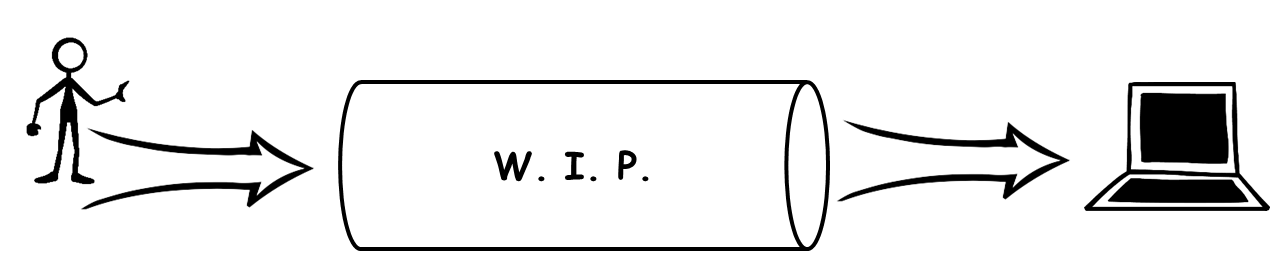
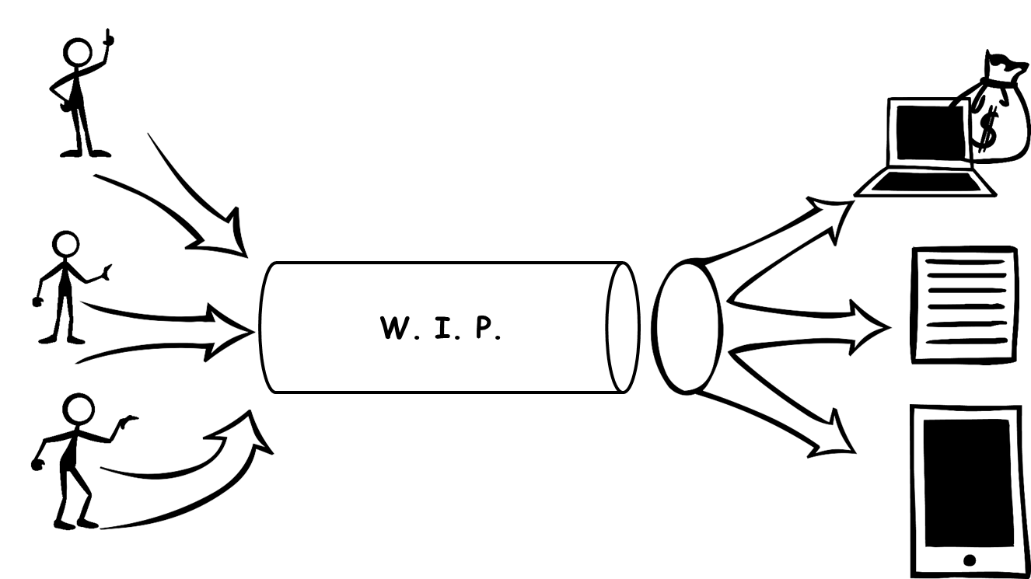
    The following two figures express well the reason transparency is a requirement. I believe most people would agree that managing production is a far easier task in Figure 1 than Figure 2. In Figure 1, there is one input and one expected output. Managing WIP for this pipeline is a matter of optimizing just the process for completing that one deliverable. In Figure 2, there are many more variables at work. There could be contention for resources within the pipeline to support the multiple inputs.

    wip


    wip2


    Likewise, there may be a request to reprioritize what gets completed when to meet certain business goals. Perhaps a particular report is required urgently to support a key business decision. I personally dealt with this very scenario when the business I was working for years ago was suddenly engaging in acquiring another company. All focus was transferred to producing the needed financial statements and everything else was put on the backlog. In that particular case, the CEO and CFO were the customer, so no one questioned the delays to their projects, but for many IT organizations reprioritization requests are never that clear making it very difficult to manage the control of the flow. Hence, transparency and communication between those consuming the services of the pipeline and those who own the control of the flow of the pipeline is an imperative for agility.

    Like TQM, Six Sigma, and E-Business, Agility will require changes to the fundamental way that a business operates. An analogy of this process can be as benign as a person recovering from knee surgery or as complex as recovering from a stroke depending upon what the business wants to accomplish and how they are organized currently. Along the way, people will most likely be the biggest hurdles to success.

    When change of this magnitude occurs, employees tend to become very myopic of their own situation. To mitigate this risk, it is critical that changes are reviewed with employees prior to change, during implementation and after the change is enacted. Management must gauge if employees are struggling because the complexity of the change or because they personally don’t agree with the change. The former can be overcome with education and support while the latter should be dealt with quickly through removal.

    Businesses can succeed with their Agility initiatives given they identify and mitigate key risk factors prior to starting and are willing to commit to looking critically at the way they have been operating the business. In agile software development, developers are trained to think about ways their code can break and then write unit tests to ensure that the software is sustainable in light of these possibilities. Creating an agile business means looking at ways to ensure sustainability in light of market changes, new competitors, supplier changes, and changing customer demands.

  • Four open source tools to help keep you cooking with Chef

    Four open source tools to help keep you cooking with Chef

    If you’re even a little familiar with DevOps concepts, you’ve probably heard of Chef. If you’ve started experimenting with or implementing DevOps, there’s a pretty good chance you’re using Chef. Chef is an awesome platform for managing a DevOps environment, but it isn’t perfect.

    Thankfully, missing features or gaps in the capabilities of a platform like Chef are just opportunities for other developers to step in and save the day. For some organizations, that may be a double-edged sword. It can be overwhelming to investigate the myriad options out there, and to choose tools that add value, without also adding more complexity and headaches than they’re worth.

    Let’s take a closer look at four of the most popular open source tools you can use in conjunction with Chef to make your life easier.

    1. Foodcritic

    One of the coolest things about Chef—at least from a geek humor perspective—is how the various tools and features all seem to have food-related names that play off of Chef. For example, Foodcritic.

    The goal of Foodcritic is to make it automate checks for common problems in your Chef cookbooks. The idea is to be able to analyze code quality, and identify issues that will cause Chef to have heart failure if you try to deploy them. Foodcritic ensures that your cookbook code is clean, and flags issues before you deploy them and cause Chef to blow up.

    Foodcritic can be configured to work with continuous integration tools like Travis and Jenkins as well. Doing so enables you to combine the automated checking of Foodcritic with the automated deployment pipeline of Travis or Jenkins to keep everything running smoothly.

    2. Test Kitchen

    Continuing with the Chef / food-related naming conventions, next we have Test Kitchen. Just as restaurants and food companies have test kitchens where chefs can experiment with new flavors and recipes without disrupting food production or affecting the menu, Test Kitchen offers DevOps developers a means of executing a Chef cookbook without actually running code on the Chef Server.

    Test Kitchen has drivers and plugins that allow it work with most cloud platforms and virtualization technologies, including Amazon EC2, Blue Box, CloudStack, Digital Ocean, Rackspace, OpenStack, Vagrant, Docker, LXC Containers, and more. It is also designed to support testing frameworks like Bats, shUnit2, RSpec, and Serverspec right out of the box.

    3. Berkshelf

    The food / Chef connection is a bit more of a stretch on this one, but once you understand what it does it makes more sense. A chef typically has cookbooks, and those cookbooks are stored on a bookshelf. A Chef deployment also uses cookbooks, and those cookbooks can be managed using Berkshelf. Do you see what they did there?

    Berkshelf ensures that the right versions of Chef cookbooks are being run by managing how the cookbooks are fetched and deployed to the Chef Server. While there are some unique elements to each Chef cookbook (It wouldn’t make sense to have a completely identical cookbook), there are still common elements as well. It is tedious to manually copy those common elements every time you want to use them so Berkshelf simplifies the process.

    4. Nagios

    You might be wondering if Nagios is some exotic food, or perhaps a tool used by gourmet chefs that you’ve just never heard of. It’s not. Sadly, Nagios breaks the trend of cooking or food related naming. The name Nagios is actually a recursive acronym that stands for “Nagios Ain’t Gonna Insist On Sainthood”—a reference to its original name, NetSaint, which was changed following a legal / trademark dispute.

    Nagios is also less Chef-centric than the other tools listed here. It is an IT infrastructure monitoring tool—a pioneer of sorts in the field of continuous monitoring that is gaining in popularity now. Nagios monitors your IT infrastructure for changes in order to spot problems before they occur, and alert the appropriate personnel.

    Continuous monitoring has a variety of potential benefits. The data gathered from Nagios can help reduce downtime and business losses, or help organizations plan and budget for IT upgrades. It is also an effective tool for detecting security incidents because the continuous monitoring can identify anomalous activity or unauthorized changes and issue alerts in real-time.

    If you are using Chef in your DevOps environment, check out these four tools. As great as Chef is, you might find these tools valuable in helping to streamline and maintain a stable infrastructure.

    Find out how Rally Software uses Chef to achieve business agility at a special devopsy.kinsta.cloud webinar on September 4th!

  • The DevOps Litmus Test: Is Your Company’s Culture Ready to Get Agile?

    The DevOps Litmus Test: Is Your Company’s Culture Ready to Get Agile?

    New ideas don’t come to those who are afraid of breaking the rules. Improving something usually means you’ll have to push the status quo aside and try something that hasn’t been done before. What may be a standard operating procedure will have to make way for a brand-new approach with its own set of rules and goals.

    This applies directly to DevOps, which requires changes in how departments operate, how employees interact and how problems get solved. DevOps may be an idea your company is considering, but if the culture isn’t compatible with it, DevOps will never become an active part of your day-to-day operations.

    If DevOps Is the Engine, Culture Is the Fuel

    Let’s say two employees who don’t normally work together wind up taking an unprecedented approach to solving a problem. To their surprise, this new way of working together is incredibly efficient and a big improvement over their usual methods. The two recommend this kind of collaboration to others in their respective departments when it comes to spotting problems, fixing them and preparing for future ones.

    That’s the moment when you’ll know how receptive your company is to DevOps. This kind of cultural litmus test determines whether department silos can be broken down and new avenues of teamwork can happen. No matter the company or industry, its culture is the foundation for DevOps adoption. When that culture fits, DevOps is an ideal vehicle for improved productivity, with culture being the fuel moving it forward.

    Getting the Right Cultural Fit

    In order for DevOps to happen, you need the right conditions, similar to how certain plants only grow in the right ecosystem. Team members must be able to interact in ways they may not have in the past. The right culture is one that allows flexibility, spontaneity and resourcefulness to take place.

    On the flip side, DevOps won’t work in a rigid environment where departments are siloed and methods can’t be questioned. DevOps has a slim chance of taking off in a company that wants to hold onto previously established rules about divisions between departments. Anyone who stands up to say, “That’s not how we do things,” will be a hindrance to progress. Greater benefits are in reach, but to make them a reality, a company and its employees have to be willing to make some changes and allow agile collaborations to flourish.

    DevOps Culture in the Real World

    For those who have already put DevOps in action, culture was, and continues to be, a central issue. Household names like Twitter and Netflix may be known for their DevOps practices, but many lesser-known businesses have found that their cultures identify with DevOps collaborations. The recently published e-book from Rackspace, The DevOps Mindset: Real-World Insights from Tech Leaders features interviews with a variety of DevOps practitioners. The importance of culture is a common theme throughout these discussions.

    These firsthand accounts emphasize how encouraging new ways of solving problems depends on the proper culture. As James Kenigsberg of 2U explains, “You don’t have to be in Silicon Valley to embrace the DevOps culture; anyone can do it anywhere with the right people.” Bharat Krish, CIO of HBO Latin America, also emphasizes culture as an essential factor. “When I think of a DevOps culture,” Krish says, “for me it’s building a foundation where development can happen in a more agile fashion.”

    Start with the Biggest DevOps Requirement

    Knowing that DevOps benefits one company doesn’t necessarily mean it will automatically benefit another. Company processes, structure and communication standards all play a part in determining whether DevOps is right for your business. DevOps isn’t a product that can simply be plugged in – it requires a new way of thinking about agile software deployment.

    Culture has to be at the center of a DevOps adoption, and assessing your company’s culture is a crucial first step in determining whether DevOps will be a good fit for your organization. As long as your company is flexible enough to allow some cross-departmental collaboration and silos to be broken, then prepare for DevOps to take you to new levels of productivity. You’ll find that breaking the rules isn’t such a bad thing.

  • SoftLayer Bare Metal Servers: Does the Cloud have to be virtual?

    SoftLayer Bare Metal Servers: Does the Cloud have to be virtual?

    SoftLayer announced new service level and features to their Bare Metal Servers today. Continuing their march towards delivering dedicated servers at virtual server pricing and service levels, SoftLayer announced that they will now offer setup in under 30 minutes and hourly billing options. The 30 minute set up is available on a variety of pre-configured hardware platforms with a choice of CentOS, Debian, FreeBSD, or Ubuntu operating systems.

    I had a chance to speak with Marc Jones, CTO of SoftLayer about the new offering. Jones and SoftLayer have long held the belief that a hypervisor is not necessary for a cloud. In fact by giving customers their own dedicated hardware, it is SoftLayer’s view that they are providing a superior platform for their customers cloud requirements. The SoftLayer bare metal servers are integrated into the entire SoftLayer/IBM platform including storage, virtual and other assets.

    Two areas where virtual hypervisor based cloud solutions did offer an advantage perhaps was the time to get up and running and the flexibility of on demand computing billing.  Those are the two areas SoftLayer is hitting head on with this latest offering.

    By having pre-configured hardware specs, it makes it much easier for SoftLayer to spin up the server.  Imagine these different server configurations already mounted in a data center. Now when an order is placed it is just a matter of installing OS and other required software.  This could be done via scripts. In fact Jones mentioned that SoftLayer uses a variety of tools like Chef/Puppet and some home grown tools to accomplish server configuration. This automation is what is allowing SoftLayer to offer 30 minute set ups.

    The configurations available and the hourly rates for them are as follows:

    Processor Cores Core Speed RAM Storage Price/hour
    Intel 1270 4 3.4GHz 8GB 2x1TB SATA $0.46
    Intel 1270 4 3.4GHz 32GB 2x400GB SSD $1.09
    Intel 2620 12 2.0GHz 32GB 4x1TTB SATA $1.24
    Intel 1270 16 2.0GHz 64GB 4x1TB SATA $1.30


    Depending on who you speak to, spinning up a new server on AWS or other public cloud providers can take as little 10 minutes. So that is still significantly faster than having a dedicated server provisioned on SoftLayer. But really is there such a big penalty in waiting less than 30 minutes versus 10 minutes? In exchange you are getting a dedicated piece of hardware. Also from an hourly price perspective, the bare metal server option is still more expensive. But again with this latest release SoftLayer is moving closer to approaching virtual, hypervisor based IaaS levels.

    Jones said that further refinements and improvements will hopefully see SoftLayer continue to narrow the gap between speed of setup and pricing with virtual cloud offerings. But he firmly believes that the advantages to having your own server outweigh the shrinking set up gap and pricing difference.

    Another big plus in the SoftLayer model is its integration with IBM’s offerings. Blue Mix, IBM’s PaaS offering runs on SoftLayer. In fact most of IBM’s cloud offerings are powered by SoftLayer. As part of this SoftLayer is opening up 15 new data centers with the 6th of these in Melbourne, Australia opening today.

    To be sure there are critics who say that without the hypervisor, SoftLayer’s flavor of cloud is not “true” cloud. But as the old saying goes, if it quacks like a duck, walks like a duck, it must be a duck.  With hourly pricing, rapid fulfillment, scalability and more, bare metal servers is more than enough cloud with some distinct advantages.

  • Internet of Things (IoT) poses challenges for DevOps and security

    Internet of Things (IoT) poses challenges for DevOps and security

    One of the hottest things in tech today is the Internet of Things (IoT).  Everything will be connected including every gadget, kitchen appliance, wearable device and vehicle. But one of the biggest areas for IoT are controllers embedded into just about everything. These controllers will report back, generating reports and information that can be analyzed and acted upon.  IDC says technology and services revenues rooted in components, processes, and IT support for the IOT will reach US$7.3 trillion by 2017, up from US$4.8 trillion in 2012. When you are throwing around numbers in the trillions that is no small feat.

    New IoT implementations require projects (such as application development and backend integration, for example) that many enterprise customers don’t have the resources or custom development experience for. Vendors such as Microsoft and AT&T are responding with IoT consulting services. These vendors must be flexible to meet the needs of enterprise customers whose IoT can include machines and devices from a variety of makers. As such the bigger vendors are generally agnostic towards partnering  with otherwise competing vendors in order to pool the necessary resources to complete an IoT project.

    When management contracts a vendor / consultant for this kind of engagement, a DevOps mindset really helps to ensure the new IoT ‘glove’ fits the existing IT and information security ‘hand’. As challenges appear, a DevOps approach utilizing best practices is the best way to meet them.

    A common challenge with IoT projects is the disconnect between management desires and IT realities. IoT projects often begin because management has a goal to receive specific information. Many IoT projects involve installing controllers in business and manufacturing to retrieve data from their IoT. The controllers themselves are of course hardware. This of course is a challenge to traditional DevOps approaches. By its very nature IoT is dealing with hardware that is difficult to upgrade. Of course more and more it is the software that is driving the innovation

    “In many cases, management may hear good things from a competitive company they know who uses a specific controller device that they really like,” says Jerry Irvine, CIO, Prescient Solutions. Management may request that the vendor pull in that maker and product and that IT work with them to make it work. Unfortunately, IT will often find that the device is not compatible with the proprietary systems they use. Then the business will often ask them to find a compatible substitute and may still want it by a given deadline. This is not how anyone should acquire controllers.

    The best practice solution is for the enterprise to have an R&D team including IT set up to work in an on-going fashion to provide requirements for the IT environment and the business function. “In this way, IT and executive management can proactively and consistently look for new offerings with compatible features and functionality,” says Irvine.

    Another way DevOps can help in IoT projects is to maintain the environment in the least customized way possible. When a vendor puts in a controller, they will certainly be able to customize it to provide the specific reports and functionality that the customer wants. If the customer wants to go beyond the standard reports and capabilities however it now can pose a challenge to automation and further development.

    The issue is that when the enterprise needs to apply updates to the hardware, device software, or management application, the vendor must customize that as well, and the updates come at a hefty premium rather than standard (gratis) with the product. The best practice solution, says Irvine, is for the enterprise to take the entire report that the controller can provide standard, and customize the data from the report on the end afterwards. Customize as little as possible.

    Security is another challenge for IoT projects. The fact that these devices are connected via the Internet can make them a target for hackers. Companies deploying controllers should ask themsevles “how sensitive is the data that IoT devices and wireless communications will handle, and how dangerous can the IoT machine or device be? ” If developers/IT and operations can say with a certainty that the IoT application will never handle extremely sensitive data such as credit card numbers, and that the IoT device is not a car, dangerous machinery, or a potentially dangerous medical device, for example, then of course security is less of a concern. But part of goal of DevOps should be how do we build security organically into the device, software and process.

    John Pescatore, Director of Emerging Security Trends, the SANS Institute. IT and management says we will have to limit what IoT applications can do. If the application must use sensitive data, it has to be encrypted and the end device has to have enough processing power to do encryption or it cannot be part of this application. Likewise, for security of life and death critical applications, there is a part of the DevOps model that does not make sense. That part is the “build a little/fail a little/fix” type model of the evolution and perfection of the device. “Letting your customers find failures in MRI machines or 787 Dreamliners is not a good idea,” says Pescatore.

    So how do we reconcile the DevOps model, along with security when building components for the IoT? The challenges are there, but they can be overcome when we are talking about trillions of dollars at stake.

  • Using DevOps to Achieve Business Agility – A Webinar with Rally Software and Chef

    Using DevOps to Achieve Business Agility – A Webinar with Rally Software and Chef

    We are kicking off our devopsy.kinsta.cloud webinars with a real blockbuster! Join Colin Campbell of Chef and Jonathan Chauncey and Jeff Smith of Rally Software as they discuss:

    Using DevOps to Achieve Business Agility

    In today’s digital economy, leading companies are turning to software to deliver new services in response to customer demand and competition. Technology can enable and expedite innovation, but it requires business leaders, software developers and IT operations teams to closely collaborate around shared goals, at new speeds, and with the flexibility to change on a dime to customer needs and market shifts. In this webinar, Rally Software, a leading global provider of enterprise-class software and services solutions, will discuss how it has institutionalized DevOps and how it uses Chef to support its speed-focused approach to delivering business agility. You’ll learn firsthand how Rally automates its virtualized infrastructure, accelerates application development and tightens customer feedback loops.

    Date and Time: Thursday, September 4 at 11am PT/2pm ET

    Register at: http://devops.megameeting.com/registration/?id=1949-232488

    The webinar will be hosted by devopsy.kinsta.cloud and moderated by devopsy.kinsta.cloud editor-in-chief, Alan Shimel.  Speakers include:

    •  Jonathan Chauncey, developer at Rally Software. He’s been involved in Web application development for almost 10 years, four of which have been at Rally. His technical interests include: automation, testing, clojure, Ruby and search.

    • Jeff Smith, development manager at Rally Software. He’s been involved in Web application development for almost 20 years, 11 of which have been at Rally. His technical interests include: test automation, continuous deployment and infrastructure automation.

    • Colin Campbell, director of patterns and practices at Chef. He has worked on advanced model-based testing and analysis techniques for a number of years in industry. He is currently involved in developing and documenting Chef best practices and design patterns.

    Registration is required to attend the webinar. You can register here.

    pic-chef-logorally-software-social-image

  • Transition to a new human ecology? We still need managers

    Transition to a new human ecology? We still need managers

    Recently I replied to an article “DevOps Cuts Out The Middleman” that excoriated Middle Managers as a cancer. I commented that I disagreed.  Nicely, I was invited to make further comment as the loyal opposition. I guess that makes me a sanctioned Troll. Hopefully I am informed enough to make a useful comment. FYI, I have developed software since the time of using x86 assembly gotoxy to move the cursor location on an amber screen. I consider MVC wonderful, but trivial. I have seen many, many projects, much good, much bad, some serious ugly and I have patiently watched like a Troll does. Worse than any Troll, I recently published a book on Philosophy, so asking me a question is generally contraindicated. Sew, you say Middle Mangers are an evil waste of time. May I politely disagree… and go down hill from there. The entire vision is deeply flawed and note they were described as “cancer”. How emotive. From strength comes weakness. From weakness comes strength. Know your weaknesses so they don’t bite you in the byte.

    In a perfect world, no, we would have no use for Middle Mangers. The philosophy behind that critique of them was based on that. It is not a perfect world though and managers provide critical, useful leadership.

    The description of a DevOps team in the article was the description of a machine. Why not? Machines are notoriously efficient and who is to argue with that? Except that we are humans and on deep levels trying to imitate a machine is something to be very cautious about. In the long run, it is a disaster. Machines are different. Machines are static, humans are not. Humans are far more random, so the system itself has built in risks. Face it, we’re developers and we are often best at imitating machines, which has its own liabilities, but we are not machines and even machines have problems. Human systems have problems sooner than machines, especially when acting like machines and trying to provide the performance of one. Managers are the repairman and lubricants of human based machines. They do the Configuration and Release Management for the team. They are the long term employees that know what is going on and how to handle the unexpected. Their job is providing continuity that only they can. They have the breadth of view that we lose at our keyboards. They smooth things over when a shock to the company comes like loss of a critical system or employee. Someone has to take responsibility. Who do you want it to be… Oh, stake holders. Yah right, they never did before they were called stake holders and still usually don’t. Another thing middle management can do (and I have seen this repeatedly) is when upper management makes a mistake (and they do), it is only the middle managers that can compensate. I won’t mention training and entry level, but obviously there is no consideration of that no matter how critical it is in the real world.

    I will just refer to a Middle Manager as a manager, because in this day and age, you have management that are financial planners and you have management that produce a product, whether you call them managers, middle managers, project leaders or what not. That kind of manager provides many functions, hopefully. Think of it this way. Their importance is illustrated by the disaster that ensues when they fail. We all dread that. Leadership is a great skill and of great value.

    The article assumed that everyone was proficient at their task. No, that is not the case. Skills and knowledge vary. I used the predecessor to .Net, the C++ Builder, but I am still learning C# now (await). Always a manager’s job is to get the job done with the resources they have. You may not have a team made of master developers. I have always appreciated a good manager, defined as one who gives me direction. A great manager is one that makes me more than I am. A good manager can make very good use of a weak employee and if the employee has the potential, a good manager can make them a strong strong, valuable asset. I know, Brian did that for me.

    Developers are not known for our people skills. Those are the skills of a manager. Managers must be psychologists. Developers are smart and most know how to cooperate, but don’t tell me ego problems don’t arise. You can’t even get in the same room with some of the Prima Dona egos I have worked with. In any decent team, you likely have one Aspergers and likely a couple people with a problem dealing with it. Is it possible that anyone is immature? So, do you have someone who refuses to go to meetings? By the arguments of the article, meetings are very like Middle Managers. Then there are team members who need to catch the 4PM bus in Mumbai as well as the one who may not even speak English. Software development is like science. People think it isn’t personal, but it is. Someone has to manage the personal. Managers are a lubricant and without it, the gears of the machine are very likely to rub and grind. They can make a team succeed that could not operate without them.

    A manager is a brain. Most team members are necessarily working on the details. Even the designer is swamped. The Scrum Master, besides being a Middle Manager anyway, has varying degrees of authority. An enforcer is needed. Someone has to tell people what the standards are … and enforce them. Someone has to decide how exceptions will be handled consistently. It provides its own efficiency. Chaos is never efficient. The manager provides the focus and order. That is their function. They must provide a focus that no one else on a team can provide. Systems help, but like there are no perfect laws, there are no perfect systems. Who enforces code reviews? Don’t tell me they just happen. I’ve been on great teams that were not under pressure and sorry, they were lax. How many times have I heard “we didn’t need to go down that rabbit hole”. A manager is like a judge that interjects the essential human element to a non-human system. A good project manager makes sure that the project is delivered. That is the preview of all team members, but just as we all have our special strengths, A good project manager will be the one that keeps the project focused and is going to deliver it come what may.  We all know just how common a skill among developers it is to be able to interface with senior, non-technical management. Sure, anyone can do it or would you rather have someone with the skills.

    OK, I’m a troll, so in respect for the thorough job I always do, it’s time for the mandatory ad homin attack. Lemme get to trashing the author of this article, Tony Bradly. Definite ignoramus. So he authored a few … well maybe a few dozen books. That means nothing! Decades of Security, Communications, Compliance and Systems Administrations leadership. Dum Dum Dum! Consults on systems for a bunch of Fortune … err … Fortune Rarefied companies. So what! Founded the Bradley Strategy Group. Anyone could do that. TV and Radio. A Celeb! Celebs always have opinions. So where does he get off thinking he needs to speak up? Actually, that’s not so funny. The guy is genius in a group of some of the brightest. Have you ever met anyone like him? I haven’t and I’ve worked on many teams and I remember a few truly incredible people, but not in that class. The article makes the assumption that the members of the team are all extremely competent, but that the manager is necessarily not. I don’t get it… or maybe I do. I reviewed the article to make sure I knew what it said. Odd, it said little. It did say middle managers were lazy, useless and a cancer. How very emotive. Ah yes, it looks like ideology. I recognise that flavor. That is a philosophy descended from Ayn Rand. I hear it is popular in Silicon Valley and much of IT culture. This is a model of a team of perfect individuals in a perfect world operating in a specific time frame. It is mostly illusionary, risky in the short run and self destructive in the long run by its static nature. The real flaw of the concept underlying the article is philosophically very deep. I know where this originates. Just remember the end of Ayn Rand’s story. They kept their ideological purity, but it resulted in the fall of darkness. This concept is based on a static illusion and like the story, there is no room for imperfection. I bet Tony has little need for managers or leadership, but he is one. Sorry, but most humans are imperfect and it works better to work with that than live an illusion that ends up fraught with danger.

    About the author

    MB1ccMichael Breeden is a software engineer with over 15 years of demonstrated success providing a wide range of software solutions including the complete software application life cycle, relational database development, business objects and business support. He can be contacted at a1swdeveloper@yahoo.com or visit his website at http://a1swdeveloper.com/

  • Developing and enabling a DevOps culture in your team

    Developing and enabling a DevOps culture in your team

    We’ve all been there. You stare at an application that was built over the last four or five years. You look at the code, which is ugly, full of all sorts of workarounds and hacks built up over time, and you say to yourself, “If we just rewrite this from scratch, it will fix a whole bunch of edge cases and be easier to maintain.” But most of the time, starting over is the wrong approach.

    That’s even more true when you look at creating a team to work in a more DevOps-y manner. People think of some platonic ideal of a DevOps team and say, “If we just hire people with these skills, everything will be perfect.” They look at the current state of affairs between developers and IT and say, “There’s no way we can get from here to DevOps with the people we have. Let’s start over.”

    The people with the skills and experience you need to create a DevOps team are probably already in your organization. In our 2014 State of DevOps report, 57 percent of  of our 9,200+ survey respondents said they were already using DevOps practices, compared with 16 percent who said they were part of a DevOps department. It’s pretty clear that you don’t have to be in a named DevOps department to be committed to using these practices. Since the term “DevOps” is pretty recent, but the practices are not, it’s also safe to assume that these named departments weren’t formed by a super class of engineers, but by people who were practicing DevOps before it was a thing.

    Starting over is a clean-slate approach

    People want to replace the team for the same reason that they want to replace all of their code: “Our application is warty.” All working code has bugs, workarounds and messy encounters with reality. Sure, some of your workarounds can disappear with a new design, but it’s not likely all of them will. Most of us feel a strong temptation from time to time to chuck it all, and start from scratch as if nothing were already in place — design and build a new, clean pristine system, and move forward from there.

    Bringing in a new team to support DevOps is also a clean-slate approach, and it’s one that guarantees you will lose all the accumulated domain knowledge you have built up over the years: knowledge of the code base, of the business needs that drove development of this code base, and of how to work with others across the company. All this knowledge is not only valuable, it’s critical. A team of new people, whatever their technical skills, don’t have that knowledge, and can’t obtain it instantly.

    The problems you’re facing are not all due to particular individuals on your teams; often, they originate in your organizational culture. That’s what you need to change. However the odds are good that you already have at least some of the people you need to create a functional DevOps environment. After all, your team has already had some successes, otherwise you wouldn’t still be in business, and it’s likely they’ve had to work collaboratively across the dev/ops divide to achieve these. Our 2014 State of DevOps survey showed that the longer a company has been using DevOps practices, the better its IT performance. It’s likely that you have individuals and teams succeed due to practices that fall under the DevOps umbrella, even if they weren’t using that term then.


    Cultural changes (especially for management)

    There are cultural changes involved in bringing DevOps to an organization, and sometimes these can seem insurmountable. These changes can be harder on management than they are on staff, because they represent values that are often quite different from how management teams traditionally work, or expect their teams to work. Taking a DevOps approach requires you to be comfortable with working in the open, with a much higher degree of transparency. Managers need to enable and support different kinds of information flow, across to peers instead of, or at least in addition to, the traditional flow of information from the top of the hierarchy down, and back up through the chain of command. Managers and technical leads also need to become much more comfortable with failure on their teams, viewing it as a sign of growth and a way to learn.

    Start simple

    How do you start building a DevOps culture? I recommend that you take a simple, easy-to-solve pain point and automate it away. Your existing staff are the ones who know what that pain point is, and you can’t automate a process without understanding what it’s meant to do.

    Automating away one pain point will start the ball rolling, help staff feel more successful in their roles, and allow them to reclaim time to make further improvements. Done right, this is a self-sustaining process.

    Create good interfaces between teams, and introduce reliable measurement so your team can improve day to day. That will help everyone feel greater trust in new tools and processes.

    A window into what’s happening, and when

    Get used to working transparently by putting in place a single and accessible ticketing system for tracking work and prioritizing it. The rest of the company should be able to see exactly what you’re doing, particularly the consumers of your services. People coming from a service desk background may have to adjust to providing more frequent updates and more details around issues, and for these updates to be visible to a much larger group than they are accustomed to.

    Use your ticket system to drive buy-in across the organization. It will make prioritization of work highly visible. Anyone can go look at the ticketing system (however it is implemented), and say, “Ah, it looks like they planned to deliver this in the next two weeks but have pushed it out by a week due to an unexpected security issue.” The trust engendered by this visibility is critical when you’re trying to instill new values.

    Across the silos

    Get comfortable with horizontal connections in your company, with one team deciding that they need help from another, and asking for it directly. Don’t make information travel up and down a hierarchy — it’s a time-waster. Plus, remember the telephone game? The information that comes out the far end of the chain doesn’t bear much resemblance to what went in.

    Encouraging people to work more laterally can be a really difficult change for a lot of managers. It doesn’t necessarily mean that they’re micromanagers; it just means they are used to information flowing up before it flows back down to another part of the organization.

    Your DevOps efforts will probably fail unless your entire management team buys into the required changes, and executives recognize that they’re going to have to change the way they operate, as well.

    A single source of truth

    What makes large-scale system administration possible is automation and a single source of truth. That source of truth is the description of the desired state of the system.

    The infrastructure-as-code movement really calls for a declarative approach: “This is the state a given machine should be in. It should have these services running, these packages installed, and configuration files that look like this.” Once you have a simple text-based description of that information, you can then check it into version control, you can create version tags, and you can cheaply maintain release discipline. At that point, you can actually start applying software engineering principles to managing infrastructure, another key DevOps principle.

    What wakes you up at night?

    We need to ask what causes manual work — especially work that ends up having to be done in the middle of the night — and how we can prevent it. What actually happens that makes us wake people at 3:00 AM to log onto a box and fix something? How do we prevent the change at its source? How do we test whether a given change will cause someone to be woken up at 3:00 AM to fix something?

    For an operations team, these questions really matter. If you start thinking about everything framed by, “How will this behave at 3:00 AM? How will I understand what’s actually being changed?” and (better yet), “How can I stop my team from being woken up at all?” you have a pretty strong incentive to start writing effective tests.

    Cultural barriers

    The technical aspects of DevOps are not beyond anybody’s skills. It’s the cultural aspects that are going to make people uncomfortable up and down the line. The road to DevOps will be much smoother if you work at it incrementally to overcome these cultural discomforts, rather than throwing out all the institutional knowledge that you have, and bringing in people who are culturally comfortable with DevOps but know nothing about your business.

    Just as DevOps is about incremental improvement of your infrastructure, you should be incrementally improving your people. It’s going to keep them happier, you’re going to make them more valuable employees, and it sends a really strong signal to the rest of the organization that you’re the kind of company that grows people according to organizational needs, and doesn’t just deal with change by hiring from the outside.

    If you’d like to dive more into the data behind the suggestions in this article, or are looking for more concrete recommendations for managers and individual contributors, check out the 2014 State of DevOps Report


    About the author

    nigelNigel Kersten, CIO (@nigelkersten) came to Puppet Labs from Google HQ in Mountain View, where he was responsible for the design and implementation of one of the largest Puppet deployments in the world. He’s been a sysadmin for Linux and Mac deployments since before Mac OS became a UNIX, and was voted one of the 25 Most Influential People in the Mac Technical Community in 2006.


  • Driving Product Innovation, a Q&A With Arcweb’s Chris Cera

    Driving Product Innovation, a Q&A With Arcweb’s Chris Cera

    Founded in 2011, Philadelphia, PA-based Arcweb is an enterprise software development firm that specializes in mobile and cloud computing. Arcweb’s team is experienced in product management, agile software development, and lean startup methodologies, and helps clients to manage the product lifecycle, including design, architecture, development, deployment, and support.

    We recently had a conversation with Chris Cera, the CTO at Arcweb about balancing security and usability, building new products, and the evolution of development practices. Here is our conversation:

    devopsy.kinsta.cloud: Can you tell us a little bit about Arcweb?

    Cera: We specialize in the product design and development of enterprise software. The majority of the work that we do, from a vertical perspective, is in financial technology solutions. We service three micro verticals within financial technology. One is bank operations, which people sometimes call retail bank operations. The second is investment management software, so we do a lot of broker–dealer and broker and financial advisor software. And the third is insurance, such as claims management, sales enablement on the insurance side.

    That’s the majority of our business; the other side is general enterprise software. That runs the gamut of the business, including operations, marketing, and sales. From a technology perspective, about a third of our business is mobile application deployment – a lot of iOS enterprise-focused applications. We also do traditional web application software development.

    devopsy.kinsta.cloud: Well, since you’re there, let’s start there. I mean, what do you see as the key to obtaining that right balance among usability, security, and compliance?

    Cera: Naturally, we encounter a lot of security-oriented scenarios, and we’re always dealing with challenges there. I find that design and security are almost diametrically opposite. If you want something that’s really usable, that usually means it’s also kind of insecure. In the banking space, this is a huge challenge for innovators and disruptors; you’re trying to build something that is easy to use but it also needs to have bank-level security. Usability and security are always on opposite paths, so we’re always toeing the line of those two worlds to produce products that meet those needs.

    DevOps: When releasing a new app, or product, what separates successful innovation from ideas that fall flat?

    Cera: It ultimately depends on the end users. They’re number one, and number two is the customer. We were recently working on a mobile application project that got killed. The risk, security, and compliance people killed it because innovation often scares people.

    I think a lot of it comes down to education, because if a big company doesn’t do it, then a small company is going do that innovation. That’s a challenge for any large company: it wants to innovate in its space but it often is not really able to.

    devopsy.kinsta.cloud: There always seems to be a struggle between innovation and the status quo, so how do you bring security people in early in the design process?

    Cera: It usually takes someone who is much more visionary at the customer site to push something like this through. That usually means the executives of the business need to really endorse what’s happening. Ultimately, it’s a very high-level business decision to make innovation work in a large company. The products I see getting killed are those in which product managers have a budget.

    They’ll try a test market and the feedback on the product is great. Next, they want to get it through product governance, or whatever that company calls the division that has to approve any new product development. That’s where the product gets killed – that because someone who works in risk and compliance will give 100 reasons why it will cause legal or fraud risk.

    devopsy.kinsta.cloud: How have these challenges changed as development methodologies changed from those of 10 years ago to today’s agile and continuous integration/deployment organizations?

    Cera: I would say people are getting smarter and smarter about how to launch software projects. I think if you looked at how many software projects failed 15 years ago versus how many fail now, I’m positive you’ll see that we’re learning how to increase the success and minimize the risk of projects. Obviously, there are always outliers, and failed projects, but we are getting better.

    Also, agile software development has been around for 15-plus years, and a big part of that was focusing on tighter iterations and continuous integrations or continuous deployment. I think that’s largely believed to be a good thing, but a lot of the big enterprises still have not adopted it. If you have a large multinational workforce, trying to get them to do one or two week iterations is nearly impossible. There are just too many challenges with it.

    From a security perspective, it also means that the security people who might have been invoked once a quarter to do reviews, penetration testing, etcetera, now need to be involved much more frequently. That means much more focus on automated testing tools. I mean that there has been tons of innovation on automated testing tools in just normal development cycles.

    Good security just requires the investment and for the business to understand that this is how you have to invest time and energy into a project. Security tests would just be part of the building process. So, if you talk to agile project managers, everything is focused on iterations. The security test just becomes a part of the deployment process. Then, of course, you’ll always want to do some manual test. I mean that even though we tried to automate as much as possible, some tests are too expensive to automate, so you just need to have a trusted party run a manual test plan. We do that with every product we build.

    devopsy.kinsta.cloud: How do you like to start a product? Do you like to build a minimum viable product and just try it, see how people kick it around and use it?

    Cera: For one of our customers, we literally went into coffee shops and just asked people to test out some apps for us. It wasn’t real data or anything; it was a simulation. We were trying to get a sense of whether the design made sense to the customers. Do they understand it? Would they actually use it? This is something that we specialize in because we’re oftentimes trying to prove that a business is viable rather than just assume that the product is viable and then just go build it. That is a huge assumption, by the way, and I think modern-day entrepreneurs know better than to assume straight off the bat that this product or this vision is going to work.

    So, in my opinion, your first level of testing should always be a paper-based prototype thing to see if the business is viable. Then, you should create a vaporware mobile app.
    Put it in front of you: you can actually click it; you can swipe; you can move it around; there’s no coding involved. I can have one of our better designers whip that up in like three days, whereas it might take me three months to have an engineering team build it. Then, test its viability. If it makes sense, move on until you’ve validated the business model and you’ve proven demand for the product. Now, you can have more confidence investing in the process.