Category: Features

  • devopsy.kinsta.cloud Pitches a Big Tent

    devopsy.kinsta.cloud Pitches a Big Tent

    If you are reading this you have already discovered one way or another, that the new devopsy.kinsta.cloud website has launched. I am proud to say that I have been one of a team of folks who have been working hard on devopsy.kinsta.cloud for many months and weeks now.  I will serve as editor-in-chief and as a co-founder. Anyone who has started a business knows that I am also chief cook and bottle washer. That is OK though. This is not my first start up. Staying up until 2:30 or 3:00 am working on the site reminded me of how alive you feel when you are building a business. If only you could bottle that. We know we have much more to do to realize our vision. But we think we have enough to introduce you, the DevOps community to devopsy.kinsta.cloud

    So what is devopsy.kinsta.cloud? Frankly, it is a big tent.  What we have tried to do is create a destination for the burgeoning DevOps community to gather.  Our goal is to have something for everyone with an interest in DevOps. We realize that many DevOps devotees are highly technical.  All of the culture and business discussions are nice, but how can you do more, faster and better? Our aim is to give you lots of information, education and resources to help in your everyday work. We want bloggers and writers who are living the DevOps life and are sharing their own experiences with you.  In fact, we also welcome you to participate fully by sharing your own experiences and thoughts as well. We are always looking for people who have something to add to the conversation.  That last phrase says it all. We want to add to the conversation.  But that conversation can’t be just for those who are technical. We want a bigger tent than that.

    I have met and there are many people who know little about DevOps. They have heard the name and are curious though. What they do know is that somehow this could help them transform their organizations into what my friend Gene Kim calls a high powered IT organization.  They are faced with a world where the rules have changed. Iterations take place daily if not hourly, automation is not nice to have, it is mandatory, software has replaced hardware for many. How can they succeed in this environment? DevOps is a key. We want devopsy.kinsta.cloud to have a place under our big tent for these people.  Whether they are C-level executives looking to leverage DevOps in their business, VCs looking for insights into their next investment or even job seekers, exploring what talents and skills they will need to succeed, devopsy.kinsta.cloud has a place for them under our big tent.

    Another goal of devopsy.kinsta.cloud is to be more than just a place with great articles, stories and DevOps related content.  We want to be a linchpin of the community.  Though not ready in time for our launch, you will shortly be seeing several other parts of devopsy.kinsta.cloud.  We will have a community forum Q&A section shortly.  If you have a question you can ask. Either someone from our staff or maybe someone in the community will answer. Maybe more than one person will answer even.  Maintaining these Q&As will over time build up a great knowledge base which will always be available to the community.

    Additionally, we want to facilitate and help all of the great meetup and user groups that are out there dedicated to DevOps.  I have spent a lot of time these past months going to meetings, observing, listening and understanding.  We know that these groups need speakers for monthly meetings, sponsors to supply food, drink and often a place to meet. Help with local community outreach and connecting with other groups to share ideas, experience and learning are also somethings these groups need.  The good news is there are plenty of people and organizations out there who want to help you.  Our mission will be to help match these groups together to strengthen these grass root groups. We have lots of room under the big tent to help in this mission.

    Holding a local DevOps Days or workshop?  Need sponsors, speakers, logistic support? devopsy.kinsta.cloud can help you too.  Local groups do more to further the DevOps cause than anyone. We want to help and encourage more of it.

    In the not too distant future devopsy.kinsta.cloud will also be more involved with conferences that play on bigger stages. Whether it be as a media sponsor, covering and reporting on the goings on or providing speakers and content ourselves, we will be on the scene. We plan on holding our own conferences with multi-track sessions, keynotes, exhibits and of course social activities.  Stay tuned for details in the coming months.

    Is this an ambitious agenda? You bet it is.  But if you aren’t going to go big, you might as well stay home.  We are being helped by some people who know how to succeed.  We will be announcing shortly some of the people who are behind devopsy.kinsta.cloud and who will be helping out.  I am proud to call these people my friends and am honored that they are lending a hand. One person I want to mention now though is my devopsy.kinsta.cloud  co-founder, Martin Logan.  When I first started talking about the idea of a DevOps community site I registered a bunch of domains, but knew that devopsy.kinsta.cloud would be the best domain name.  I found Martin as owning the domain and reached out to see if he would perhaps sell it for a reasonable sum.  A few hours later we were partners!  Martin is a real, live DevOps dude.  He understands what DevOps is about. None of this is possible without him.

    For now take a look around our site. Be sure to sign up for our newsletter in the top right column.  The site look and feel will be changing daily as we continue to iterate in the DevOps way.  Most of all there will always be fresh content.  We should be averaging about 100+ new content articles a month.  There will be something for everyone!

    You can reach out to me anytime with comments, suggestions, complaints or questions at ashimmy@devops.com.

    Thanks for stopping by and enjoy!

     

  • Data Driven Observations on AWS Usage from CloudCheckrs User Survey

    Data Driven Observations on AWS Usage from CloudCheckrs User Survey

    This is a guest post by Aaron Klein from CloudCheckr

    We were heartened when AWS made Trusted Advisor free for the month of March. This was an implicit acknowledgement of what many have long known: AWS is complex and can be challenging for users to provision and control their AWS infrastructure effectively.

    We took the AWS announcement as an opportunity to conduct an internal survey of our customers’ usage. We compared the initial assessments of 400 of our users’ accounts against our 125+ best practice checks for proper configurations and policies. Our best practice checks span 3 key categories: Cost, Availability, and Security.  We limited our survey to users with 10 or more running EC2 instances.  In aggregate, the users were running more than 16,000 EC2 instances.

    We were surprised to discover that nearly every customer (99%) experienced at least one serious exception.  Beyond this top level takeaway, our primary conclusion was that controlling cost may grab the headlines, but users also need to button up a number of availability and security issues.

    When considering availability, there were serious configuration issues that were common across a high percentage of users. Users repeatedly failed to optimally configure Auto Scaling and ELB. The failure to create sufficient EBS snapshots was an almost universal issue.

    Although users passed more of our security checks, the exceptions which did arise were serious. Many of the most commons security issues were found in configurations for S3, where nearly 1 in 5 users allowed unfettered access to their buckets through “Upload /Delete” or “Edit Permissions” set to everyone. As we explained in an earlier whitepaper, anyone using a simple bucket finder tool could locate and access these buckets.

    Beyond the numbers, we also interviewed customers to gather qualitative feedback from users on some of the more interesting data points.

    If the findings of this survey sparks questions about how well your AWS account is configured, CloudCheckr offers a free account that you can set up in minutes.  Simply enter read only credentials from your AWS account and CloudCheckr will assess your configurations and policies in just a few minutes:  https://app.cloudcheckr.com/LogOn/Registration

    Conclusions by Area

    Conclusions based upon Cost Exceptions:

    As noted, our sample was comprised of 16,047 instances. The sample group spent a total of $2,254,987 per month on EC2 (and its associated costs) for average monthly cost per customer of $7516. Of course, we noted the mismatch between quantity and cost – spot instances represent 8% of the quantity but only 1.4% of the cost. This is due to the significantly less expensive price of spot instances compared to on demand.

    When we looked at the Cost Exceptions, we found that 96% of all users experienced at least 1 exception (with many experiencing multiple exceptions). In total, we found that users who adopted our recommended instance sizing and purchasing type were able to save an average of $3974 per month for an aggregate total of $1,192,212 per month.

    This suggested that price optimization remains a large hurdle for AWS users who rely on native AWS tools. Users consistently fail to optimize purchasing and also fail to optimize utilization. These combined issues meant that the average customer pays nearly twice as much as necessary for resources to achieve proper performance for their technology.

    To further examine this behavior, we interviewed a number of customers.  We interviewed customers who exclusively purchased on-demand and customers who used multiple purchasing types.

    Here were their answers (summarized and consolidated):

    • Spot instances worry users – there is a general concern of: “what if the price spikes and my instance is terminated?” This fear exists despite the fact that spikes occur very rarely, warnings are available, and proper configuration can significantly mitigate this “surprise termination” risk.
    • It is difficult and time consuming to map the cost scenarios for purchasing reserved instances. The customers who did make this transition had cobbled together home grown spreadsheets as a way of supporting this business decision.  The ones who didn’t make this effort made a gut estimate that it wasn’t worth the time.  AWS was cost effective enough and the time and effort for modeling the transition was an opportunity cost taken away from building and managing their technology.
    • The intricacies of matching the configurations between on demand instances and reserved instances while taking into consideration auto scaling and other necessary configurations were daunting. Many felt it was not worth the effort.
    • Amazon’s own process for regularly lowering prices is a deterrent to purchasing RIs. This is especially true for RIs with a 3 year commitment.  In fact, within the customers who did purchase RI, none expressed a desire to purchase RIs with a 3 year commitment. All supported their decision by referencing the regular AWS price drops combined with the fact that they could not accurately predict their business requirements 3 years out.

    Conclusions based upon Availability Exceptions:

    We compared our users against our Availability best practices and found that nearly 98% suffered from at least 1 exception. We hypothesized that this was due to the overall complexity of AWS and interviewed some of our users for confirmation. Here is what we found from those interviews:

    • Users were generally surprised with the exceptions. They believed that they “had done everything right” but then realized that they underestimated the complexity of AWS.
    • Users were often unsure of exactly why something needed to be remedied. The underlying architecture of AWS continues to evolve and users have a difficult time keeping up to speed with new services and enhancements.
    • AWS dynamism played a large role in the number of exceptions. Users commented that they often fixed exceptions and, after a week of usage, found new exceptions had arisen.
    • Users remained very happy with the overall level of service from AWS. Despite the exceptions which could diminish overall availability, the users still found that AWS offered tremendous functionality advantages.

    Conclusion bases upon Security Exceptions:

    Finally, we looked at security. Here we found that 44% of our users had at least one serious exception present during the initial scan. The most serious and common exceptions occurred within S3 usage and bucket permissioning. Given the differences in cloud v. data center architecture, this was not entirely surprising. We interviewed our users about this area and here is what we found:

    • The AWS management console offered little functionality for helping with S3 security. It does not provide a use friendly means of monitoring and controlling S3 inventory and usage. In fact, we found that most of our users were surprised when the inventory was reported. They often had 300-500% more buckets, objects and storage than they expected.
    • Price = Importance, S3 is often an afterthought for users. Because it is so inexpensive users do not audit it as closely as EC2 and other more expensive services and rarely create and implement formal policies for S3 usage.  The time and effort required to log into each region one by one to collect S3 information and download data through the Management console was not worth the effort relative to spend.
    • Given the low cost and lack of formal policies, team members throw up high volumes of objects and buckets knowing that they can store huge amounts of data at a minimal cost.  Since users did not audit what they had stored, they could not determine the level of security.

    cloudforestfinal

    aaronkleinAuthor Info: Aaron is the Co-Founder/COO of CloudCheckr Inc. (CCI). With over 20 years of managerial experience and vision, he directs the company’s operations.

    Aaron has held key leadership roles at diverse organizations ranging from small entrepreneurial start-ups to multi-billion dollar enterprises. Aaron graduated from Brandeis University and holds a J.D. from SUNY Buffalo.

    Underlying Data Summary

    Cost:                                                                                                       Any exception 96%

    The total of 16,047 instances was broken in the following categories:

    • On Demand:       78%    (12,517 instances)
    • Reserved:             14%    (2,247 instances)
    • Spot:                        8%      (1,284 instances)

    The instance purchasing was broken down as follows:

    • On Demand:        89.7%  ($2,023,623)
    • Reserved:             8.9%     ($199,803)
    • Spot:                        1.4%     ($31,561)

    Common Cost Exceptions we found:

    • Idle EC2 Instances                                                                                                      36%
    • Underutilized EC2 Instances                                                                               84%
    • EC2 Reserved Instance Possible Matching Mistake                                             17%
    • Unused Elastic IP                                                                                                        59%


    Availability:                                                                                              Any exception 98%

    Here, broken out by service, are some highlights of common and serious exceptions that we found:

    Service Type:                                                                                      Customers with Exceptions

    EC2:                                                                                                           Any exception   95%


    • EBS Volumes That Need Snapshots                                                                91%
    • Over Utilized EC2 Instances                                                                                                   22%

    Auto Scaling:                                                                                              Any exception   66%


    • Auto Scaling Groups Not Being Utilized  For All EC2 Instances                       57%
    • All Auto Scaling Groups Not Utilizing Multiple Availability Zones                34%
    • Auto Scaling Launch Configuration Referencing Invalid Security Group                   22%
    • Auto Scaling Launch Configuration Referencing Invalid AMI                           18%
    • Auto Scaling Launch Configuration Referencing Invalid Key Pair                 16%

    ELB:                                                                                                        Any exception   42%


    • Elastic Load Balancers Not Utilizing Multiple Availability Zones                 37%
    • Elastic Load Balancers With Fewer Than Two Healthy Instances               21%

    Security:                                                                                                    Any exception   46%


    These were the most common exceptions that we found:

    • EC2 Security Groups Allowing Access To Broad IP Ranges                                 36%
    • S3 Bucket(s) With ‘Upload/Delete’ Permission Set To Everyone                   16%
    • S3 Bucket(s) With ‘View Permissions’ Permission Set To Everyone            24%
    • S3 Bucket(s) With ‘Edit Permissions’ Permission Set To Everyone               14%
  • Approaches to Application Release Automation

    Approaches to Application Release Automation

    This is a guest post by Phil Cherry from Nolio

    A discussion of process-based, package-based, declarative, imperative and generic approaches to application release automation.

    Application Release Automation is a relatively new, but rapidly maturing area of IT. As with all new areas there is plenty of confusion around what Application Release Automation really is and the best way to go about it. There are those who come at it with a very developer-centric mind-set, there are those who embrace the modern DevOps concept and even those who attempt to apply server based automation tools to the application space.

    Having worked with many companies of various sizes, technologies, cultures and mind-sets; both as they select an ARA (Application Release Automation) tool and as they move on to implement their chosen tool, I have had many opportunities to assess the various approaches. In this short blog I will discuss the pro’s and con’s of each approach.

    Package-Based

    Package-based automation is a technique that was originally designed for automating the server layer. Due to its success at this, some have attempted to adapt it to automate the application layer as well. Packages encapsulate all the changes that need to be performed on a single server, and can include the pre-requisite checks that need to take place, as well as the post-deployment verifications. When patching a server this makes complete sense, there are no dependencies between the patched server and all the others in the same data centre, and so applying all the required changes for that patch (or patches) in a bundle in one go is possible. The package can then be applied to all appropriate servers without modification. At this layer there is little difference between one Windows Server 2008 and the next, even though the applications on top may be completely different.
    The benefit of this packaging approach is the easy rollback capability. If required the package can be easily rolled back to the original server state, but on the other hand it treats each server as an island with no dependency to another server. It assumes that all changes on that server can be done in one go. This type of automation is offered by companies like BMC Bladelogic and IBM Tivoli Provisioning Manager (TPM).

    Declarative-Based

    Declarative-based automation comes from a similar mindset to package-based but takes a different route to the solution. It also originally came out of the need to automate the server layer and a subsequent attempt to apply it to the application layer. With declarative-based automation, the desired state of the server is defined down to every individual configuration item (registry key, dll, config file entry) etc. Most declarative-based tools require you to describe the desired state by writing what is effectively a piece of ‘code’. Some solutions, for example Puppet, offer a simplified proprietary DSL (Domain Specific Language) but this does not allow you to do everything, and so keeps Ruby as a backup. The downside of this is that the user has to learn at least one programming language (or you have to employ people with that knowledge already) and so does not readily open the automation to non-developers. This approach also has the same downside as package-based automation in that it assumes each server can be configured independently and all in one go. But it also has the same benefits, in that automatic rollback is conceptually a lot easier.

    Imperative-Based

    Imperative-based automation is more familiar as the structure of the language is closer to traditional programming languages (such as Java, C++, Perl etc). In this approach a programming language is used to describe what needs to be done to the target servers in a series of steps executed in a specific sequence. Chef is an example of an imperative automation tool (the programming language which is based on Ruby). As with declarative-based, the code created (or recipe as it is called in Chef) is still very much focused on making changes to a single isolated server, and the assumption is that those same changes will be applied to multiple servers of the same type. There is limited understanding of making dependant changes across multiple servers, because that was not required at the server layer. It is only important when you move up to the application layer. And of course, the current offerings available still require you to be familiar with, or learn, a programming language to use them.

    Generic and Custom-Built Approaches

    Often, people try to apply generic approaches (such as Powershell, DOS batch scripts, Perl etc) to the task of automation, or even to write their own automation tool using a compiled language such as Java, C++ etc. As any developer will tell you, they can go and write something that will deploy your application. They can use their preferred language rather than having to use the language supported by the automation platform being employed. And they are right, a development team can indeed write a fully capable deployment tool but the question is: does it really benefit the company to take up development time building and maintaining a deployment tool rather than focusing on the development of their own applications? Even then they will have many issues to face in enabling parallel execution, reporting and auditing, access and permissions control, and importantly synchronising activity across multiple servers. The original intention of these approaches was once again focused on a specific server and not on the cross-server nature of application deployment.

    Process-Based

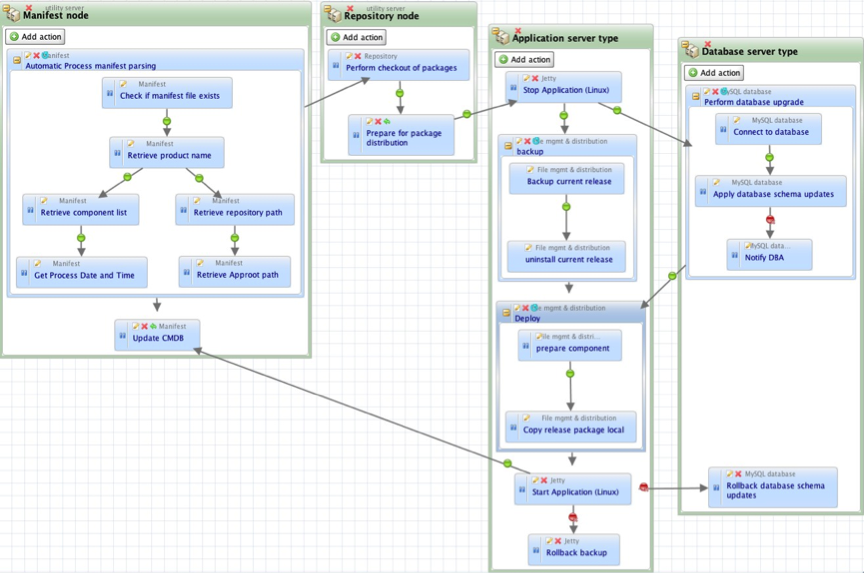
    Process-based automation is a different approach, which was created more recently, to address the needs of application release automation. ARA platforms such as DeployIt and UrbanDeploy and, of course, our own tool Nolio all take this approach. These tools seek to support currently existing application deployment processes, the ones that operators could/would normally step through manually. The focus is on processes, and the tools allow an operator to define them in a visual way, with an understanding of the cross-server nature of application deployments. Let’s say that you need to do something on an application’s web server, then the application server, then update tables in the database, then a second change to the application server and finally another change to the web server. With a server-centric approach (such as those discussed above) it is very hard to orchestrate activities across multiple different servers, to synchronise the changes so they happen at the right time in relation to each other, and even to pass information between those servers. With a process-based system this is straightforward – you define the different server types, drop the relevant steps onto each one and draw links to define the synchronisation points (i.e. only do the db steps once the application server steps have been completed).

    process-based-automation

    Diagram 1 – Screenshot of a Nolio deployment process, including activity on 4 different server types.

    The issues mentioned above such as parallel execution, cross-server synchronisation etc. should already have been dealt with by the ARA platform, rather than having to be created on top of a more generic platform. As you see from the diagram above, with an ARA platform cross-server synchronisation is simply a case of drawing a dependency link between an action on one server type to an action on another server type. Now “Stop Application” action on the “Application Server Type” will not run until “Prepare for package distribution” on “Repository node” has been completed.

    In addition to this, process-based automation brings the following benefits: there is no need to modify the deployment process to fit the automation tools’ inability to synchronise activity across multiple servers, thus ensuring the consistency between manual and automated approaches is maintained; the defined process can be used as documentation for how the deployment should be done as it is inherently very readable; there is a detailed and relevant audit trail because the process is inline with how the deployment would be done manually, and it is much easier to diagnose issues because the process follows the expected steps.

    You can read more articles on Application Release Automation on Nolio’s Blog Site.

  • The State of DevOps: Accelerating Adoption

    The State of DevOps: Accelerating Adoption

    By James Turnbull (@kartar), VP of Technology Operations, Puppet Labs Inc.

    A sysadmin’s time is too valuable to waste resolving conflicts between operations and development teams, working through problems that stronger collaboration would solve, or performing routine tasks that can – and should – be automated. Working more collaboratively and freed from repetitive tasks, IT can – and will – play a strategic role in any business.

    At Puppet Labs, we believe DevOps is the right approach for solving some of the cultural and operational challenges many IT organizations face. But without empirical data, a lot of the evidence for DevOps success has been anecdotal.

    To find out whether DevOps-attuned organizations really do get better results, Puppet Labs partnered with IT Revolution Press IT Revolution Press to survey a broad spectrum of IT operations people, software developers and QA engineers.

    The data gathered in the 2013 State of DevOps Report proves that DevOps concepts can make companies of any size more agile and more effective. We also found that the longer a team has embraced DevOps, the better the results. That success – along with growing awareness of DevOps – is driving faster adoption of DevOps concepts.

    DevOps is everywhere

    Our survey tapped just over 4,000 people living in approximately 90 countries. They work for a wide variety of organizations: startups, small to medium-sized companies, and huge corporations.

    Most of our survey respondents – about 80 percent – are hands-on: sysadmins, developers or engineers. Break this down further, and we see more than 70 percent of these hands-on folks are actually in IT Ops, with the other 30 percent in development and engineering.

    DevOps orgs ship faster, with fewer failures

    DevOps ideas enable IT and engineering to move much faster than teams working in more traditional ways. Survey results showed:

    • More frequent and faster deployments. High-performing organizations deploy code 30 times faster than their peers. Rather than deploying every week or month, these organizations deploy multiple times per day. Change lead time is much shorter, too. Rather than requiring lead time of weeks or months, teams that embrace DevOps can go from change order to deploy in just a few minutes. That means deployments can be completed up to 8,000 times faster.
    • Far fewer outages. Change failure drops by 50 percent, and service is restored 12 times faster.

    Organizations that have been working with DevOps the longest report the most frequent deployments, with the highest success rates. To cite just a few high-profile examples, Google, Amazon, Twitter and Etsy are all known for deploying frequently, without disrupting service to their customers.

    Version control + automated code deployment = higher productivity, lower costs & quicker wins

    Survey respondents who reported the highest levels of performance rely on version control and automation:

    • 89 percent use version control systems for infrastructure management
    • 82 percent automate their code deployments

    Version control allows you to quickly pinpoint the cause of failures and resolve issues fast. Automating your code deployment eliminates configuration drift as you change environments. You save time and reduce errors by replacing manual workflows with a consistent and repeatable process. Management can rely on that consistency, and you free your technical teams to work on the innovations that give your company its competitive edge.

    What are DevOps skills?

    More recruiters are including the term DevOps in job descriptions. We found a 75 percent uptick in the 12-month period from January 2012 to January 2013. Mentions of DevOps as a job skill increased 50 percent during the same period.

    In order of importance, here are the skills associated with DevOps:

    • Coding & scripting. Demonstrates the increasing importance of traditional developer skills to IT operations.
    • People skills. Acknowledges the importance of communication and collaboration in DevOps environments.
    • Process re-engineering skills. Reflects the holistic view of IT and development as a single system, rather than as two different functions.

    Interestingly, experience with specific tools was the lowest priority when seeking people for DevOps teams. This makes sense to us: It’s easier for people to learn new tools than to acquire the other skills.

    It makes sense on a business level, too. After all, the tools a business needs will change as technology, markets and the business itself shift and evolve. What doesn’t change, however, is the need for agility, collaboration and creativity in the face of new business challenges.

    —-
    About the author:

    james-turnbull-portraitA former IT executive in the banking industry and author of five technology books, James has been involved in IT Operations for 20 years and is an advocate of open source technology. He joined Puppet Labs in March 2010.

  • Fresh Stats Comparing Traditional IT and DevOps Oriented Productivity

    Fresh Stats Comparing Traditional IT and DevOps Oriented Productivity

    This is a guest post by Krishnan Badrinarayanan (@bkrishz), ZeroTurnaround

    The word “DevOps” has been thrown around quite a lot lately. Job boards are awash with requisitions for “DevOps Engineers” with varying descriptions. What is DevOps, really?

    In order to better under what the fuss is all about, we surveyed 620 engineers to examine what they do to keep everything running like clockwork – from day-to-day activities, key processes, tools and challenges they face. The survey asked for feedback on how much time is spent improving infrastructure and setting up automation for repetitive tasks; how much time is typically spent fighting fires and communicating; and what it takes to keep the lights on. We then compared responses belonging to those from traditional IT and DevOps teams. Here are the results, in time spent each week carrying out key activities:

    DevOps Oriented Productivity Stats

    Conclusions we can draw from the results

    DevOps oriented teams spend slightly more time automating tasks

    Writing scripts and automating processes have been a part of the Ops playbook for decades now. The likes of shell scripts, Python and PERL, are often used to automate repetitive configuration tasks but with the newer tools like Chef and Puppet, Ops folk perform more sophisticated kinds of automation such as spinning up virtual machines and tailoring them to the app’s needs using Chef or Puppet recipes.

    Both Traditional IT and DevOps oriented teams communicate actively

    Respondents belonging to a DevOps oriented team spend 2 fewer hours communicating each week, possibly because DevOps fosters better collaboration and keeps Dev and Ops teams in sync with each other. However, Dev and Ops folk in Traditional IT teams spend over 7 hours each week communicating. This active dialogue helps them better understand challenges, set expectations and triage issues. How much of this communication can be deemed inefficient is subjective, but it is necessary to get both teams to onboard. Today, shared tooling, instant messaging, task managers and social tools also help bring everyone closer together in real-time.

    DevOps oriented teams fight fires less frequently

    A key tenet of the DevOps methodology is to embrace the possibility of failures, and be prepared for it. With alerts, continuous testing, monitoring and feedback loops that expose vulnerabilities and key metrics, teams are enabled to act quickly and proactively. Programmable infrastructure and automated deployments provide a quick recovery while minimizing user impact.

    DevOps oriented teams spend less time on administrative support

    This could be a result of better communication, higher level of automation and the availability of self-service tools and scripts for most support tasks. If there’s a high level of provisioning and automation, there’s no reason why admin support shouldn’t dwindle down to a very small time drain. It could also mean that members of DevOps oriented teams help themselves more often than expecting to be supported by the system administrator.

    DevOps oriented teams work fewer days after-hours

    We asked our survey takers how many days per week they work outside of normal business hours. Here’s what we learned:

    Days worked after hours Traditional IT DevOps Oriented
    Average 2.3 1.5
    Standard Deviation 1.7 1.7

    According to these results, DevOps team members lead a more balanced life, spend more time on automation and infrastructure improvement, spend less time fighting fires, and work less hours (especially outside of normal business hours).

    DevOps-related initiatives came up on top in 2012 and 2013, according to our survey. There’s a strong need for agility to respond to ever-changing and expanding market needs. Software teams are under pressure to help meet them and the chart above validates its benefits.

    Rosy Stats, but hard to adopt

    How we got here

    IT Organizational structures – typically Dev, QA, and Ops – have come to exist for a reason. The dev team focuses on innovating and creating apps. The QA team ensures that the app behaves as intended. The operations team keeps the infrastructure running – from the apps, network, servers, shared resources to third party services. Each team requires a special set of skills in order to deliver a superior experience in a timely manner.

    The challenge

    Today’s users increasingly rely on software and expect it to meet their constantly evolving needs 24/7, whether they’re at their desks or on their mobile devices. As a result, IT teams need to respond to change and release app updates quickly and efficiently without compromising on quality. Fail to do so, and they risk driving users to competitors or other alternatives.

    However, releasing apps quickly comes with its own drawbacks. It strains functionally siloed teams and often results in software defects, delays and stress. Infrequent communication across teams further exacerbates the issue, leading to a snowball effect of finger-pointing and bad vibes.

    Spurring cultural change

    Both Dev and Ops teams bring a unique set of skills and experience to software development and delivery. DevOps is simply a culture that brings development and operations teams together so that through understanding each others’ perspectives and concerns, they can build and deliver resilient software products that are production ready, in a timely manner. DevOps is not NoOps. Nor is it akin to putting a Dev in Ops clothing. DevOps is synergistic, rather than cannibalistic.

    DevOps is a journey

    Instilling a DevOps oriented culture within your organization is not something that you embark on and chalk off as success at the end. Adopting DevOps takes discipline and initiative to bring development and operations teams together. Read up on how other organizations approach adopting DevOps as a culture and learn from their successes and failures. Put to practice what makes sense within your group. Develop a maturity model that can guide you through your journey.

    The goal is to make sure that dev and ops are on the same page, working together on everything, toward a common goal: continuous delivery of working software without handoffs, hand-washing, or finger-pointing.

    Support the community and the cause

    Dev and Ops need to look introspectively to understand their strengths and challenges, and look for ways to contribute towards breaking down silos. Together, they should seek to educate each other, culturally evolve roles, relationships, incentives, and processes and put end user experience first.

    The DevOps community is small but burgeoning, and it’s easy to find ways to get involved, like with the community-driven explosion of DevOpsDays conferences that occur around the world.

    Set small goals to be awesome

    Teams should collaborate to set achievable goals and milestones that can get them on the path to embracing a DevOps culture. Celebrate small successes and focus on continuous improvement. Before you know it, you will surely but gradually reap the benefits of bringing in a DevOps approach to application development and delivery.

    Start here

    For deeper insights into IT Ops and DevOps Productivity with a focus on people, methodologies and tools, download a 35-page report filled with stats and charts.