Category: Enterprise DevOps

  • Languages and DevOps: Traditional

    Languages and DevOps: Traditional

    For quite a while now, all the cool kids have been going on and on about “full stack development,” “API first,” and a ton of similar methodologies/practices. And yet, a huge swath of applications are still targeted at a single system to do a specific job. There are fat clients, there are internal servers, there are standalone apps. All are still in development, and the hype machine doesn’t account for them much, though they’re pretty pervasive.

    We still have to maintain them, or write yet another. They’re not going anywhere, because there are some problems for which they are the right solution. So let’s talk about them.

    For clarity, I’m defining traditional as, “Targets a specific OS/hardware platform, and is not primarily web-based.” We’ll exclude mainframe, because the toolsets and integration with DevOps are still different enough to warrant their own blog.

    Online forums are full of people trying to re-target traditional apps (perceived Windows 10 issues caused many to want to move from Windows, and the growing Linux trend of making distros into beta – or even alpha – testers has many wanting to move from Linux), while others are just trying to keep them running as the world changes underneath their feet.

    Easy Integrations

    While these dev tools are the ones that Agile grew up around, that makes them well-integrated into Agile and DevOps. The feeds to/from compilers and various build tools are the same as other spaces we’re looking at (or, more precisely, the others are the same as traditional), so integration of AppDev is generally not an issue. Integration of Ops is harder, but exists. The various DevOps tools with an emphasis on operations (I like to call it devOPS as opposed to DEVops) are available to traditional development, and you can certainly deploy through them, but they’re like the second cousin to “full stack.” Good Enough rules the day, and a little work will be required. Thankfully, tools like Ansible and Puppet smooth the way a bit for deployment, not caring much if you’re deploying a traditional app or a web service, as long as you tell them what to do to successfully deploy.

    You got to move it, move it…

    Portability is increasingly becoming an issue. The rise and fall of “preferred” Linux distros, the costs of being a Microsoft shop … there are a lot of reasons to want to move your app around. The best first step to this (and the only step some will need, IMO) is containerization. Put it in a container, and your underlying hardware can run on whatever OS the corporation settles on, while your apps will run in containers on the OS they need. For most organizations, this will only be a stop-gap; a way to quickly move servers away from one OS and onto another, but the apps will have to move fully to the new OS, eventually. Microsoft has Windows Subsystem for Linux, which can help move from Linux to Windows, and Linux has Wine to help run Windows apps on Linux. Both have come a long way toward interoperability, but neither is perfect – or even easy. It will take a bit of work, but far less than rewriting for the target OS top-down. Tools like Cygwin are also available to get your Linux app running on Windows if you don’t want to use Microsoft’s solution. In the end, you are going to have to modify code, but you are porting an application, so no surprises there.

    Consider the future

    A place I worked in the late 90s/early 2000s had an OS/2 machine that was critical infrastructure. We were not allowed to touch the box. I think if the admins had their way, we wouldn’t have been allowed to look at the physical box. Of course, we virtualized it just as soon as we could in a step similar to my “containerize” advice above. Now is a good time to consider writing your apps with an eye toward portability, so you can remove this type of system from the equation. That RHEL 5, or Windows XP app should really be modernized or eliminated at this point. The tools for cross-platform development are out there, from Mono to Java to Xojo; platform-dependent bits can be isolated for rapid retargeting. It’s up-front work that pays off in spades when the time comes to change the targeted platform.

    You. Rock.

    Whatever your language of choice, in the end, it will likely be your build tool that links it to DevOps. Your biggest concern for DevOps will probably be portability in the near future. Meanwhile, keep rocking it. You’re doing the work that needs doing, even if it isn’t the part of DevOps everyone is currently buzzing about.

  • 5 Steps to Successful DevOps Culture

    5 Steps to Successful DevOps Culture

    The late business management guru Peter Drucker coined the phrase, “Culture eats strategy for breakfast,” and the phrase has endured through the years. Your people must be passionate and enthusiastic about executing business strategy, or it – and your business – is doomed to fail. But remember that company culture itself needs a strategy to complement the business.

    DevOps, too, will not succeed without the right culture. As I said in my book “Engineering DevOps,” “Culture is a door to Engineering DevOps,” because if leaders and people do not work in accordance with DevOps principles, then no tool or engineering process will be sufficient to succeed with DevOps. In my (and others’) experience, culture challenges are the No. 1 obstacle that many organizations need to overcome to succeed with DevOps. But changing culture is not easy. Values, beliefs, behaviors and work habits are deeply ingrained in organizations. Organizational inertia and deep-rooted habits are much harder to change than tools or process changes. Transforming organizational culture for success with DevOps requires a strategy, goals and sustained commitment.

    In her article, “5 Steps to Change Your Company Culture,” Kate Heinz prescribes five practical steps for cultural change which also are highly applicable to DevOps culture transformation.

    Step 1: Determine Core Values

    Start by clarifying the values that are most important to accomplishing the long-term strategic goals of the organization. With DevOps, typical strategic core values could be responsiveness to customer needs, speed of innovation, technology leadership and software products and services resiliency, for example. Collaborate with all the key stakeholders including executives, long-term employees, sales teams, key suppliers and HR to obtain alignment on core values before executing the next steps.

    Step 2: Set Your Culture Goals

    In his article, “7 Key Principles for a Successful DevOps Culture,” Kaya Ismail identified seven principles that can form a framework for determining your DevOps culture goals.

    1. Foster a Collaborative Environment – Break down silos to bring people, processes and tools towards a unified focus on the customer.
    2. End-to-End Responsibility – All people in the value stream need to be fully accountable for the application and outcomes from beginning to end.
    3. Encourage Continuous Improvement – Optimize value streams using integration toolchains and automated processes to realize quick lead times and fast customer feedback to continuously improve performance.
    4. Automate Almost Everything – Automated CI/CD processes, infrastructure provisioning, testing, deployment and security compliance require a skilled workforce.
    5. Focus on Customer Needs – DevOps teams must continuously pay close attention to ever-changing consumer demands and be ready to respond quickly.
    6. Embrace Failure and Learn – A “climate for learning” in which failures are viewed as opportunities to learn makes people feel safe and empowered to transform their work.
    7. Unite Teams and Expertise – The scope and complexity of DevOps requires team members to share knowledge and cross-train so they are well-rounded and have a balanced set of skills.

    Step 3: Assess Your Existing Culture

    Conduct interviews and surveys with employees and key stakeholders to determine where there are deviances from the culture goals set in Step 2. Communicate an analysis of the assessment findings to all stakeholders, pointing out important gaps, areas for improvement and the general plan to close the gaps.

    Step 4: Map Out the Plan

    Develop a roadmap to address the gaps identified in Step 3. Include specific tasks, timelines, benchmarks and responsibilities. Tasks and items may include targeted workshops, training, selective new hires, organizational changes and, most importantly, rewards and consequences – the real drivers of behavior and culture. One caution about training: as Thane Bellomo explained in his article, “Training Doesn’t Change Culture,” training alone does not have the power to fundamentally change culture.

    Step 5: Evaluate Your Progress

    Communication, surveys and interviews are important so individuals can provide feedback and track progress. Use the feedback you receive to verify that culture goals are being improved upon, and to reinforce to everyone that the culture changes are important. Use DevOps metrics such as lead time, release frequency and time-to-restore service to demonstrate that the culture changes are helping the organization achieve the strategic values set in Step 1. As you monitor progress, be mindful of pitfalls. As Larry Senn explained, “The Top 4 Reasons Culture Change Initiatives Fail” are: lack of consistent leadership from top management, inadequate personal involvement, disconnected initiatives and lack of top-to-bottom momentum. Be prepared to make corrections based on the evaluations to ensure your culture transformation stays true to your DevOps strategic values and culture goals.

    What This All Means

    Success with DevOps requires the right kind of culture. Changing culture is no small feat, but it can be done if approached strategically. The five steps described in this article provide a framework for organizational culture change that supports DevOps.

  • How Open Source Software Powers Digital Innovation

    How Open Source Software Powers Digital Innovation

    Open source has permanently altered how we work and conduct business. Linux, and thousands of other open source projects and open standards, now dominate the software landscape, supporting emerging technologies like artificial intelligence and edge computing. Without open source, the DevOps tooling ecosystem would lack Docker, Kubernetes, service mesh, popular databases, and many CI/CD tools used by DevOps teams daily.

    Now, more than ever, companies are searching for ways to meet escalating user demands. The pandemic has amplified this urgency, accelerating existing digital transformation initiatives. Arguably, open source is the engine that now powers the digital innovation required to compete. Leveraging open source could also help check rising cloud costs. With proprietary solutions falling out of favor, many enterprise leaders are adopting open source alternatives for infrastructure modernization and application development.

    Red Hat recently released its third annual State of Enterprise Open Source report. The report surveyed 1,250 IT leaders worldwide on their open source adoption and usage patterns. The findings validate what most of us already know — open source is now fundamental to most technology stacks. Without it, most development projects would fall flat in an instant.

    Open Source Use Cases

    Open source is at the heart of modern software development. According to the report, 90% of enterprise IT leaders are using open source. So, where is open source being applied? Well, 64% of enterprises use open source software for IT infrastructure modernization. The report surmised that this could be due to Linux and open source infrastructure replacing proprietary systems.

    The report also found 54% of enterprises use open source for application development. This is no surprise, as engineers routinely adopt open source libraries and packages to construct B2B and user-facing experiences. In a digital-only environment, applications are the lifeblood for many businesses, and open source is critical scaffolding.

    The third top use case for enterprise open source is digital transformation, at 53%. This figure has increased by 11 percentage points in the last two years alone. Open source will likely continue to replace non-digital or manual processes with software-based, automated processes.

    In the enterprise, open source is used in networking, adopted by 54% of enterprises, databases, at 53% and security, at 52%. Other areas mentioned in the report include big data analytics and cloud management tools.

    In recent years, multi-cloud has become a notable trend. The idea is that organizations will seek out multiple cloud vendors to support different use cases. The Red Hat report confirmed that hypothesis, finding that 69% of respondents prefer to use multiple vendors for their cloud. As hybrid, multi-cloud setups profligate, cloud expertise and smart multi-cloud economic practices continue to gain importance.

    Containers and K8s

    Open source components are the foundation for containers and container management utilities. As reliance on containers grows, so will the dependence on open source technology. The report found just under half of enterprises now use containers in production. An additional 37% also use containers for development-only purposes.

    To orchestrate these containers, IT teams have coalesced around Kubernetes. Sixty-six percent of respondents view Kubernetes as very or extremely important. As Kubernetes becomes ubiquitous, growth in container usage is slated to continue — about one in three respondents reported their container usage will increase significantly in the next 12 months.

    “Kubernetes has become the de facto standard for Linux container development,” said Michael Hinterland, team lead, ICS cloud & automation and ICS system & middleware, Porsche Informatik.

    While Kubernetes is flourishing, there are certainly variances across industries. For example, 62% of financial services and telecommunications respondents adopted containers in production, while other sectors, such as health care and retail, saw a lower adoption of containers in production, at 47% and 50%, respectively. The highly-regulated financial services sector also scored high on Database DevOps, a separate report recently concluded.

    Open Source Benefits and Barriers

    There are numerous benefits to using enterprise open source software. For one, a commitment to open source brings transparency and collaboration improvements. Respondents also cited higher quality software, access to the latest innovations and improved security as being among the top benefits to adopting open source software.

    But open source has its drawbacks, too; 42% of tech leaders reported a lack of support as a top hurdle to enterprise open source adoption. This checks out – community-driven projects don’t typically offer traditional support systems. Without accessible frameworks for learning, creating a Center of Excellence at scale becomes difficult.

    Other top barriers to enterprise open source adoption include compatibility, code security and a lack of internal skills. Introducing open source within an enterprise means upskilling the workforce and encouraging secure-by-default settings to avoid costly misconfigurations. It could also mean working with trusted allies that further open source initiatives, the report recommended.

    Open Source Fuels Emerging Tech

    “Open source has solidified itself as an innovation engine for the software industry,” wrote Paul Cormier, president and CEO, Red Hat.

    Indeed, open source is at the heart of most cutting-edge emerging technologies. For example, 55% of respondents report using enterprise open source in edge computing and internet of things (IoT) settings. Simultaneously, 48% of respondents use open source for artificial intelligence and machine learning (AI/ML). Amid open source projects like OpenAI and GPT–3, AI is eating the software world, Forbes reported.

    Both categories are slated to increase by nearly 20 percentage points in the next two years, whereas the use of proprietary solutions for AI/ML will decrease. Open source will continue to affect buying decisions, as 83% of IT leaders are more likely to choose a vendor that has contributed to the open source community.

    Within a COVID-19-influenced world, “the problems are too big for one person, one company or one organization to solve,” said Cormier. “But it’s in moments like this where open source truly shows its power.”

  • LogDNA Adds Usage Quota Tools to Help Control Costs

    LogDNA Adds Usage Quota Tools to Help Control Costs

    LogDNA announced today it will enable IT teams to apply usage quotas to help rein in log management costs.

    Tucker Callaway, CEO, LogDNA, said as applications become more complex – thanks, in part, to the rise of microservices – the amount of log data that a DevOps team can collect has significantly increased. IT teams can now assign DevOps teams both hard and soft quotas to limit the amount of log data collected during a specific time period, Callaway said.

    IT teams can set a daily or monthly hard limit on the volume of logs stored or, alternatively, they can also set soft daily or monthly quotas that can apply throttling logic to ensure mission-critical log data will continue flowing through LogDNA as usage volume approaches the limit threshold. It will then be up to each IT team to determine, based on the tasks at hand, whether to enable a DevOps team to exceed those thresholds, Callaway said.

    IT teams can also make use of soft limits to reallocate storage resources from one DevOps teams to another based on how much log data might be generated in a specific time period, Callaway noted.

    LogDNA will notify team members any time a quota is hit, or when an exclusion rule is triggered because a quota has been reached. Those alerts can also be integrated with email systems or the Slack messaging platform. Logs that are not retained are not counted toward the monthly bill, but are displayed and will trigger other relevant alerts.

    In the wake of the economic downturn brought on by the COVID-19 pandemic, IT organizations are, generally, more sensitive to costs. At the same time, many of them are encouraging developers to assume more responsibility for application life cycle management as they embrace DevOps best practices. The usage quotas are intended to enable IT teams to strike a better balance between what can be two competing agendas, Callaway said. IT leaders are not necessarily trying to discourage DevOps teams from collecting log data as much as they are trying to make sure costs are predictable, Callaway added.

    Log data, of course, is one of the core elements of any observability strategy. While observability has always been a core DevOps principle, the number of organizations that have been able to meaningfully achieve it has been limited. However, as organizations start to deploy microservices with multiple dependencies, the need to provide context when troubleshooting those applications has become more acute.

    It’s not clear to what degree more granular control over log data might sway an IT organization toward one platform versus another. However, when it comes time to justify a choice to senior IT and business leaders, it’s always a good idea to address, at some point, how one decision versus another might have a more positive impact on the bottom line.

  • IaC Frameworks: Vendor-Specific or Multi-Cloud?

    IaC Frameworks: Vendor-Specific or Multi-Cloud?

    Over the past few years, I have been watching the shift to infrastructure as code (IaC) frameworks closely. With the shift from monolithic to microservices, and with the shift from mostly virtual machines (VMs) to cloud-native architecture, applications are much more complicated, making it much more important to automate infrastructure to respond with speed.

    In that sense, I refer to IaC as “The third cloud revolution.” Looking at the history of cloud transformation, the shift from physical servers to virtual machines (led by VMware about 20 years ago) would be the first cloud revolution. The move from virtualized data centers to the public cloud (led by AWS about 10 years ago) would be the second cloud revolution. With the shift to public clouds, people were suddenly able to click buttons to provision new resources, including “hardware.”

    In the last few years however, we see fewer clicks and more code. Engineers write and maintain that IaC, and something executes that code. Engineers influence the infrastructure much more than they used to – that is the third cloud revolution. We mainly see four IaC frameworks that drove this revolution – Terraform and Pulumi (both multi-cloud), CloudFormation and ARM (vendor specific).

    I recently talked with Joe Duffy, CEO, Pulumi, Mark Russinovich, CTO, Azure and Anton Babenko, AWS community hero and Hashicorp ambassador, the head of Terraform at Microsoft, the head of Terraform at IBM Cloud and one of the founders at Gruntwork. After our brainstorming session, it’s clear we all agree that IaC will have a huge effect on cloud operations. In this blog, I’ll share my point of view regarding multi-vendor IaC versus single-vendor IaC frameworks; discuss how they compare to the differences between iOS and Android and which direction I believe will win the day.

    The big cloud vendors seem to go “all-in” and create full ecosystem, iOS-style, and they have everything working nicely with the relevant services and tools. AWS just released AWS Proton, which works with CloudFormation. They say that Terraform is on their roadmap, but time will tell. Microsoft seems to offer more solutions that are ARM-based, like Bicep. When I talk with executives at those companies, they strongly believe in the great value of this vendor lock-in/closed approach. They truly believe that this will help their customers in the best way possible. Perhaps they are right.

    On the other hand, when I talk with the community, I hear different opinions. DevOps engineers at Azure customers do not debate whether to choose Terraform or ARM. DevOps engineers at AWS customers do not debate whether to choose Cloudformation or Terraform. While this was the case three years ago, it is not, anymore. Now, the real debate is whether to choose Terraform or Pulumi. Engineers prefer a language that is multi-vendor, open-source, no vendor lock-in and that is compatible with other open source solutions built on top, like Open Policy Agent and Terragrunt, to help Terraform users. This is the Android-style approach – open platform.

    Moreover, I hear new phrases from the community that make me think the future is going in this direction. Erik Osterman at Cloud Posse started using the acronym  TACOS – Terraform Automation and Collaboration Software (see the video here). It takes time, but, going forward, developers and the community will hold the key to the future of IaC, not executives and large vendors.

    You can, of course, challenge this by replying that, “iOS is a great OS.” This is obviously true, but I think there is one big difference here as to why the Android approach is winning the IaC market. The answer lies with the end user; the Apple ecosystem is a solution for the end user and consumer, and IaC is about larger-scale infrastructure decisions. Like the shift from monolith to microservices, developers prefer small and isolated parts, not one big system. With Terraform and Pulumi, developers get more freedom. Maybe the company will move from AWS to GCP or Azure or vice versa. Maybe IT will need an Auth0 provider, as well, and will want to manage it the same way. Maybe the use of Open Policy Agent to govern deployments becomes the status quo. Developers need freedom, whereas consumers just need a great product.

    But the question has still not been answered: Terraform or Pulumi? It is still too early to tell, and, frankly, there is more than enough room in the IaC space for both. Maybe more open-source and multi-vendor frameworks will emerge and one that’s yet unknown will rule the day. Terraform provides a great ecosystem of providers, support and maintainers. Pulumi has started to provide all of those, together with its imperative approach, which seems to be a bit more appealing to developers.

  • DevOps Myths Debunked

    DevOps Myths Debunked

    Leaders need not be DevOps experts, but they need to distinguish DevOps myths and realities to lead their digital transformation projects.

    As I indicated in a recent article, Engineering Practices Can Overcome DevOps Challenges, leaders need to set an inspiring DevOps directional vision for the organization, and proactively stimulate and sponsor team activities toward goals. To be credible, communication from leaders need to distinguish between myth and reality. It is easy for leaders to get confused, because there are many popular myths surrounding DevOps. It’s important to remember that, in DevOps, definitions and engineering best practices for DevOps have not entirely been nailed down.

    As Doug Miller, senior director strategic partnerships, Perforce Software, said “Working in an industry that has yet to settle on an accepted ‘definition’ for DevOps makes each day a challenge. The ever-morphing landscape makes it difficult for technology vendors and consumers alike to ensure we’re all talking about the same thing in the same way.”

    Here are some of the most important myths that leaders need to be aware of.

    Debunking DevOps Myths

    Myth: “DevOps is a cultural movement.”

    The truth is that implementing DevOps requires a careful and balanced engineering approach that considers a wide array of people, process and technology aspects. In my article, The Time Has Come for an Engineering Approach to DevOps, I explained that while culture is a critical success factor, DevOps is much more than just culture. Furthermore, DevOps is not just a movement. In the larger context of software engineering history, the word “DevOps” is new, and perhaps it will be replaced by another word someday, but the underlying engineering principles and practices that constitute DevOps could apply to almost any engineering project throughout the ages.

    Myth: “DevOps requires continuous deployments.”

    The truth is that DevOps enables continuous delivery of release artifacts to a staging environment to be ready to deploy safely, but frequent deployments to production is not always a goal. There are valid customer use cases that do not desire frequent deployments to production. For example, customers may not want to receive a new version of a software platform product frequently, because each new version may be disruptive and risky for reasons beyond the scope of the product itself. The engineering benefits of delivering complete releases to staging without deployment to production are still considerable. Each release is produced and validated in a pre-production environment, and made ready for deployment on demand without disrupting customers that do not want to take a new release.

    Myth: “DevOps applies to any software product, service or application.”

    The truth is that DevOps engineering yields high ROI in many circumstances, but some cases do not warrant investment in the people, process, and technology changes needed for DevOps. For example, applications that rarely change do not warrant the cost of DevOps changes. Organizations that are heavily siloed will find it too frustrating and counterproductive to implement DevOps. The application of DevOps to some commercial off-the-shelf (COTS) products may not yield sufficient ROI, because business-to-business barriers may behave as impenetrable organizational silos. Applications that have few tools in their toolchains suitable for DevOps may find the transition to DevOps too expensive.

    Myth: “DevOps requires Agile.”

    The truth is that DevOps and Agile can be either complementary or competitive. The notions of working with small, incremental changes is common to both Agile and DevOps. However, organizations that embrace Agile are focused on optimization of the development end of the pipeline, and may struggle with DevOps, which emphasizes engineering of end-to-end process optimizations.

    Myth: “The scope of DevOps is the same as CI/CD.”

    The truth is that a well-engineered DevOps implementation encompasses continuous integration/continuous delivery (CI/CD), but also extend beyond integration and delivery into other practice areas such as planning, operations, governance, disaster recovery and other practices that must work together with CI/CD to accomplish business goals.

    Myth: “DevOps does not apply to platform products such as software code embedded in manufactured products.”

    The truth is that DevOps does apply to embedded code products, as well as web services, business applications and other types of products. It even applies to development of software and services for DevOps itself! In the case of platform products, typically, deployments are planned. They are not continuous, but, instead, continuous deliveries of candidate releases are delivered to a staging environment to make sure the changes implemented for the platform are fully developed and verified as the platform is built, instead of waiting for a big-bang release.

    Myth: “DevOps is an elimination of IT operations.”

    Jeremy Bosch, in his article, Top 9 Debunked DevOps Myths, “As per the NoOps concept, the IT sector will become so automated that it will not require any in-house team to manage the software. However, no matter how automated the services may become, there will always be a need for operations. Although there may be changes in operations, they will still hold significance in DevOps.”

    There are many persistent myths about DevOps, such as the examples in this article, that can confuse and misdirect uninformed leaders. Leaders that learn to distinguish between DevOps myths and realities are better able to communicate realistic goals to lead their digital transformation projects.

  • Datadog to Meld Observability and DevSecOps

    Datadog to Meld Observability and DevSecOps

    Datadog is planning to expand the scope of the security and observability services it provides following the acquisitions of Sqreen, an application security platform provider, and Timber Technologies, a provider of a tool, called Vector, for collecting and normalizing log data.

    Ilan Rabinovitch, vice president of product and community for Datadog, said Vector makes it possible to collect, enrich and transform logs and other observability data from both on-premises and in-cloud environments in a way that makes it easier to route that data to wherever it is needed via a data pipeline.

    Sqreen is a provider of a software-as-a-service (SaaS) platform that detects, blocks and responds to application-level attacks using runtime application self-protection (RASP) capabilities enabled by a web application firewall (WAF) embedded within an application.

    Rabinovitch said as IT continues to evolve, it’s clear organizations are looking to embrace DevSecOps best practices in a way that will require security tools that can be embedded within an application, coupled with observability tools that provide more context about the overall IT environment. That context is especially critical, given the amount of data that needs to be analyzed to determine the potential scope of a security threat to an IT environment, Rabinovitch said.

    The Datadog platform is already widely employed to monitor cloud computing environments. There is an industry wide effort to take monitoring to the next level by enabling observability, which applies analytics to provide more context. Surfacing that context, however, requires the ability to normalize data across a pipeline using Vector, Rabinovitch said.

    Of course, the Vector tools are equally applicable to DevOps workflows that have yet to incorporate security technologies. The goal, now, is to make it easier for IT teams, made up of developers, IT operations teams and security specialists, to collaborate by breaking down the various data silos created by IT and security management tools.

    It’s too early to tell what impact the rise of DevSecOps will have on roles within IT organizations. Most organizations will continue to employ a range of specialists that will be able to work more closely with IT generalists, Rabinovitch said. Managing IT is becoming the equivalent of a barn raising, in that it requires members of a community with different skills to come together for a certain amount of time to accomplish a specific task, Rabinovitch added.

    It’s also not clear whether IT organizations view observability as a distinct capability separate from monitoring, or whether they will simply view observability as the next logical extension of existing tools. At the core of that issue is debate over whether observability platforms need to be acquired separately, as part of an effort to replace existing monitoring tools, or whether those tools will evolve over time to provide observability capabilities.

    Regardless of the path forward, it’s apparent the increased complexity of modern IT environments – made up of microservices, containers and serverless computing frameworks – is about to force that issue.

  • Puppet Adds DevOps Consulting Practice

    Puppet Adds DevOps Consulting Practice

    Puppet has launched a DevOps consulting service that promises to help organizations implement best practices that will ultimately make their IT organizations more efficient.

    Nigel Kersten, field CTO, Puppet, said the Scaling DevOps Service is especially focused on improving workflows among organizations that have already started down the DevOps path.

    Most IT organizations that embrace DevOps eventually encounter bottlenecks that conspire to limit the rate at which they can build and deploy applications. Puppet will make available DevOps experts capable of assessing DevOps workflows as part of an effort to reduce operational friction, said Kersten.

    Those consultants can also identify integration opportunities that might further streamline workflows, in addition to providing an overall assessment of an organization’s DevOps maturity based on a model Puppet developed.

    Kersten said in many cases, enterprise IT organizations, especially, are trying to adapt DevOps principles that were originally created for small startup companies, with mixed success. Puppet consultants, using observations gleaned from their own engagements with customers that have embraced its tools for automating the management of IT, are often in a better position to identify ways to optimize DevOps workflows across larger IT organizations, Kersten said.

    It’s also easy for large enterprise IT organizations to misinterpret how one DevOps principle or another should actually be implemented, Kersten said.

    DevOps consulting, of course, has become a cottage industry within the IT services sector over the last decade. Now, almost every systems integrator has a DevOps practice. Most of those practices are focused on enabling organizations to embrace DevOps, versus helping organizations optimize workflows after they have already begun the transition, said Kersten.

    It’s not clear to what degree organizations that have not embraced Puppet’s automation framework will embrace consulting services based on a DevOps model created by observing Puppet’s customers. However, it’s apparent many IT organizations have inconsistently implemented DevOps practices across various departments. In many cases, bottlenecks that result in various departments within a larger IT organization are being addressed using a set of manual processes that have been created as a workaround to a specific problem.

    Of course, optimizing DevSecOps best processes is only going to become more challenging as emergent technologies such as containers, Kubernetes clusters and serverless computing frameworks are added to the IT mix. More challenging still, many organizations are now trying to shift responsibility for security further left as part of a DevSecOps workflow.

    Many IT teams are, naturally, resistant to paying for advice, while others routinely hire small armies of consultants in the hope that ideas and concepts that have worked well elsewhere can make their IT teams more efficient. Regardless of the approach pursued, IT leaders need to remember that DevOps is a continuous journey. Every time a new platform is added to an IT environment, a DevOps workflow will need to evolve. The real issue IT leaders need to come to terms with is how long it will take for their internal teams to adapt, whether it’s via the school of hard knocks or relying on external expertise that has handled most of the issues an internal IT team is likely to encounter.

  • Too Many Organizations Get Public Cloud Wrong

    Too Many Organizations Get Public Cloud Wrong

    The cloud has been getting a lot of press in the past few years—and with good reason. The elasticity and flexibility of resources are transformational for businesses. However, there are also drawbacks. For most enterprises, it’s a significant undertaking to migrate on-premises applications into a public cloud environment.

    Modern applications today are rarely self-contained entities. Application dependencies occur when software components, applications and servers rely on one another to deliver a service. The typical enterprise manages hundreds, or even thousands, of interconnected components and services, forming a complex web of dependencies.

    If an application is migrated to the public cloud without understanding the dependent services, severe performance degradation can occur with applications that are still on-premises. For example, moving an e-commerce shopping application to the public cloud but leaving a key database on-premises will result in consumers experiencing a slower response.

    The Repatriation Problem

    IDC research shows that fewer than 20% of enterprise applications have been moved from onsite data centers to the public cloud, not because companies do not see value in the cloud, but because the process of getting those applications to the cloud is complicated.

    A survey of 350 cloud decision-makers in the United States and UK commissioned by Virtana and fielded by Arlington Research in November 2020 confirmed this. More than two-thirds (68%) of respondents have already migrated 25% or more of their applications to public clouds, supporting the IDC finding.

    Clearly, businesses recognize the value of the cloud. But another surprising result confirms that the migration process may be problematic. A whopping 72% of respondents said they have moved one or more applications from the public cloud back on-premises. Considering the time and effort cloud migrations require, this is a striking result. While there may be cases where repatriation is undertaken strategically to support evolving business needs, the reasons cited by respondents show most were rollbacks required because of unanticipated problems.

    There Is No Single Reason Why

    Almost half (41%) of respondents said they repatriated applications that should have stayed on-premises. The reality is that not all workloads are a good fit for the public cloud environment. You need a solid understanding of the various attributes of different workloads, such as data, back end, privacy and security requirements, to determine their inherent suitability for a public cloud environment.

    Technical provisioning issues challenged 36% of respondents. The sheer number of configuration options available—combined with the variety of computing dimensions that you have to take into account—means there are a lot of puzzle pieces that have to fit together, or you could run into problems.

    Almost one-third (29%) of respondents reported application performance degradation in the public cloud. The public cloud is a fundamentally different environment than an on-premises data center, and creating a hybrid environment further alters the nature of the infrastructure, so you cannot simply expect workloads to attain the same performance levels as you migrate them. And if performance slows to an unacceptable level, any benefits you gain by moving applications to the cloud are overshadowed.

    Around one-fifth (21%) admitted that they selected the wrong public cloud provider. Cloud providers are not all the same, and picking the wrong one, for any reason, can be an expensive and disruptive mistake.

    Finally, one-fifth (20%) of respondents repatriated applications because of unexpected costs in the public cloud. The public cloud’s pay-for-what-you-use model is appealing compared to the on-premises capex model, where you pay for capacity regardless of whether you use it. But there is a dark side; you have to pay for what you use in the cloud even when that usage is unexpected. Whether that is due to poor planning, an unanticipated surge or workload drifts over time, getting a nasty surprise in your end-of-month bill can put a big dent in your cloud budget.

    Eliminate Repatriation With Better Planning and Observability

    Any one of these reasons alone reflects a challenging setback to overcome. Unfortunately, many organizations run into more than one of these problems. In fact, one-third of respondents cited two or more of these reasons for repatriation, and 12% experienced three or more of these issues. This seems to indicate that organizations’ migration planning efforts are inadequate. It is not for lack of investment—78% of survey respondents said that even during the current challenging economic climate, they are continuing their migration to the public cloud at the same or an accelerated pace, signaling they believe public cloud deployments to be a strategic investment.

    The real problem is a lack of precision in observability—of workload characteristics in the data center pre-migration and of workload utilization and performance in the public cloud post-migration. The better you understand your applications, in minute detail, within the context of the environments they are moving from and to—a ‘know before you go’ approach—the less likely you will have to hit the “undo” button on your public cloud migration.

  • New Monitoring Features in PostgreSQL 13

    New Monitoring Features in PostgreSQL 13

    Every monitoring solution is limited by the information the system allows to be collected. PostgreSQL DBMS provides many metrics reflecting its internal state, running queries and background processes, and each release brings the community more monitoring-related features. PostgreSQL 13, which was released in September of 2020, added key improvements, including query sampling, improved WAL usage statistics and new system views. Let’s look at the benefits of each of these new features.

    Query Sampling

    Those who regularly monitor database queries are familiar with the following parameters:

    log_statement controls what SQL statements are logged
    log_min_duration_statement enables logging of statements that ran for at least the specified amount of time.

    These parameters help users track down unoptimized queries in applications. However, it is important to recognize that excessive log traffic may impact performance, especially when analyzing workloads with a lot of short queries. To help address this, PostgreSQL 13 introduced two new GUC parameters to allow logging of sampling statements.

    log_statement_sample_rate controls the sample rate (0.0 – 1.0). That is, it allows users to control the percent of queries that are logged.
    log_min_duration_sample defines the minimum required statement duration of queries to sample

    Only statements with a duration exceeding log_min_duration_sample are considered for sampling. Because of this, to enable sampling, both GUCs need to be set correctly. Further, the existing log_min_duration_statement GUC has a higher priority than log_min_duration_sample, so statements with a duration exceeding log_min_duration_statement will always be logged, no matter how the sampling is configured. This means that only configurations with log_min_duration_sample < log_min_duration_statement actually sample the statements, instead of logging everything. Note that only superusers can change these settings.

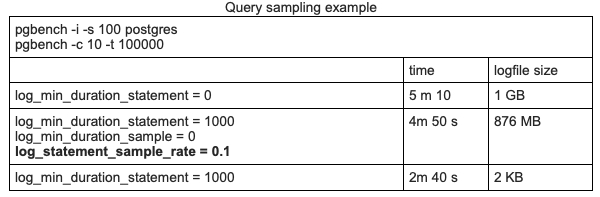
    Consider the following synthetic query sampling test using pgbench on a laptop.

    PostgreSQL 13

    • 1st Row: No sampling. All queries are logged
    • 2nd Row: Log all queries longer than 1 second, plus 10 percent of all other queries
    • 3rd Row: Log all queries longer than 1 second

    In this example, sampling improves timing slightly, but since the test was run on a personal laptop, this measurement does not signify much.

    However, the size difference is very interesting. Sampling helps make the logfile size approximately 10 times smaller. We can figure out that most of the queries in this test lasted less than 1 second. And if we log only long queries, the logfile remains almost empty (third row). The difference here is significant. Even if disk space consumption isn’t a concern, sampling can help speed up tools that analyze PostgreSQL logs.

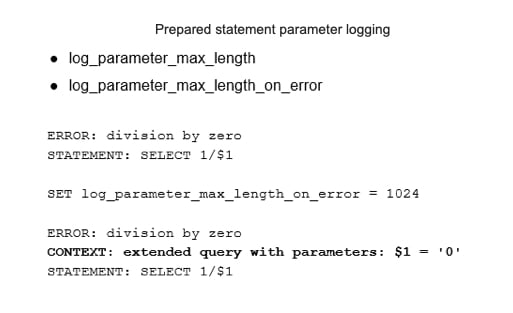
    PostgreSQL 13 also introduced settings to improve control over prepared statement parameter logging.

    If log_parameter_max_length is set, bind parameter values will be trimmed to this many bytes.
    log_parameter_max_length_on_error adds context for the failure of parameterized queries.

    Previously, prepared statement parameters were never logged during errors. Note, since these logging features can impact performance, they should be used with care.

    PostgreSQL 13

    Write-Ahead Log Usage Statistics

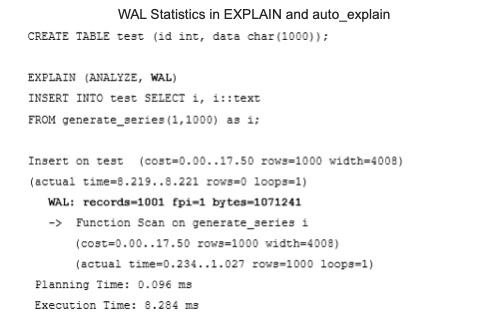
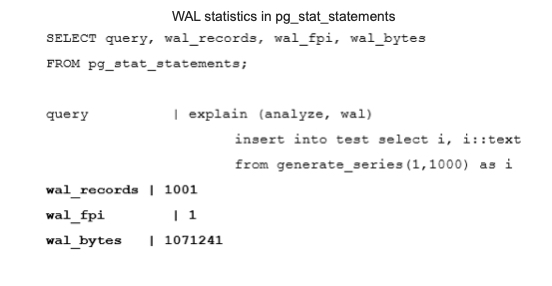
    A write-ahead log (WAL) is crucial to database system durability, and is also used for physical replication. This makes monitoring the WAL important. PostgreSQL 13 allows users to explore WAL usage per query using the EXPLAIN command. The following example shows that the insertion of a thousand rows generates 1001 records and takes about 1 Mb of space. Note that auto_explain also shows this statistic.

    PostgreSQL 13

    It is also possible to find WAL usage statistics in autovacuum log messages. However, this works only when autovacuum logging is enabled with the log_autovacuum_min_duration parameter.

    Probably the most useful place to see WAL statistics for a monitoring plugin is in pg_stat_statements. PostgreSQL 13 has new columns that show WAL usage statistics per query.

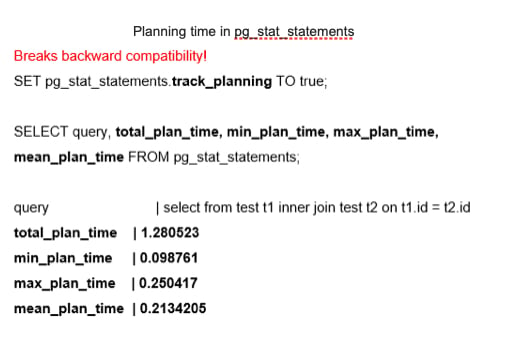
    Another addition to pg_stat_statements is a group of fields to track planning time. This feature is disabled by default because it can cause a noticeable decrease in performance. When enabled, it shows total, minimal, maximal and mean planning time. The pg_stat_statements.track_planning parameter enables this feature. It is important to note that this feature breaks backward compatibility. Previously, existing “time” fields — min_time, max_time, total_time and mean_time — had their suffixes changed from “time” to “exec_time.” As a result, all monitoring tools that rely on pg_stat_statements should be adjusted accordingly.

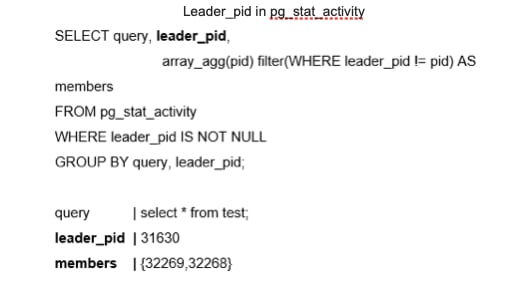
    The next feature provides more information about parallel queries. In the past, parallel queries did not reveal which back end was related to the parallel query or provide easy insight into all the processes involved in a query. It is now possible to show the parallel group leader information, at the SQL level, using the leader_pid in the pg_stat_activity system view.

    New System Views

    PostgreSQL 13 offers new system views that can be used for PostgreSQL monitoring. The first group improves progress reporting.

    pg_stat_progress_basebackup helps to estimate the progress of a base backup of a PostgreSQL cluster.
    pg_stat_progress_analyze shows information about backends running the ANALYZE operation, including autovacuum workers. It can help administrators understand how long it will take to collect statistics.

    Another group of new system views helps answer the following question: “How does Postgres spend its allocated memory?” These views will be mostly useful for DBMS admins and low-level support engineers who inspect bottlenecks and optimize memory usage.

    pg_shmem_allocation can be enabled for a deeper inspection of how shared memory is used for internal DBMS structures, including a lock table, process array, data about various background processes and so on.
    pg_stat_slru is related to the inspection of SLRU caches. SLRU is a special buffer cache where non-user data is stored, such as the state of each transaction, as well as information about subtransactions. Asynchronous notifications also use SLRU.

    Wait Events Changes

    PostgreSQL 13 introduced the renaming of various wait events to improve consistency. The brief reference to this in the release notes does not do justice to the importance of this change. Wait events were added in Postgres 9.6, and are usually needed to diagnose bottlenecks that occur because of interprocess locks. Previously, wait events were named in all possible styles. Now, the naming is more consistent, and the wait events are better documented and, hopefully, more understandable. However, admins need to update any monitoring scripts that use wait events, including the following:

    Hash/Batch/Allocating → HashBatchAllocate
    ControlFileLock → ControlFile
    clog → XactBuffer
    AsyncCtlLock → NotifySLRU

    Several new wait events were also introduced in PostgreSQL 13, including:

    VacuumDelay
    BackupWaitWalArchive, RecoveryPause
    RecoveryConflictSnapshot, RecoveryConflictTablespace

    Upper Limit for the track_activity_query_size Parameter

    One final small improvement in PostgreSQL 13 is worth noting: an updated upper limit for the track_activity_query_size parameter. This parameter specifies the amount of memory reserved to store the text of the command. The previous maximum was 100 KB, which could be too small when monitoring applications that generate large SQL queries.

    The new upper limit is 1 MB. However, keep in mind that the database allocates the amount of memory specified in track_activity_query_size in advance for all potential sessions. Thus, higher values can increase memory consumption.

    The Importance of These Features

    These significant updates in PostgreSQL 13 are vital for admins that run the database and want to tune the system, optimize applications, forecast system growth and do resource planning. However, the new features are also extremely important for DBMS developers who need to gather more information and collect real production statistics about various parts of PostgreSQL in order to find bottlenecks and opportunities to make improvements. As always, we look forward to even more great new features in future releases of PostgreSQL.