Category: Enterprise DevOps

  • Shhhh! It’s a Secret

    Shhhh! It’s a Secret

    In one of our regular back-and-forth breaks, Lori and I were talking shop a week or two ago, and she shared an excellent report by GitGuardian with me. Frankly, none of the information in the report was a huge surprise for me–Git is filled with information that companies probably don’t want out there, but that is nearly impossible to track proactively. That’s what GitGuardian tries to do for you, but honestly, I’ve not yet dug into them, so caveat emptor. Or, read someone else’s opinion to help you decide if they’re a good idea – I’m just going to talk about the report.

    The key takeaway is that you are asking your DevOps teams to move faster and faster. Putting a section of code they are working on into a public repository is an easy way to “take work home” or share it, especially during lockdowns. It is also a good way to hand over critical information to anyone searching for it—about your infrastructure, or even critical bits of data like SSL keys or credentials. And with the current level of cyberattacks against nearly every industry, I’d say there are people looking for that information, no matter what industry you are in.

    This is not really a DevOps-specific issue–credentials and such in code has been a problem for IT for as long as I’ve been working in the field. At some point, any automated system needs to perform AAA, and that means the data required is stored somewhere. A multitude of approaches have been attempted to resolve the problem technologically, but none have been a silver bullet. Yet. Eventually, someone will figure out a way to make it work; then a whole new attack vector will arrive, probably aimed at the tool that is settled on to protect this very data.

    This is a personnel/policy issue that is exacerbated by the speed of Agile and DevOps. Your best solution, at this time, is to write a clear policy that contains consequences for putting secret data into a public repository. We’re short on “consequences” right now, preferring to say, “Right, let’s make sure that can’t happen again,” but in the case of putting secrets out in public, it is a different level of ‘bad’ than a coding error getting checked in. Those secrets can actively be used against the organization, and if the not-to-be-shared data is clearly delineated, any violation can be viewed as intentional, be it because of convenience or malfeasance.

    According to the report, there are millions of bits of privileged information out there. Not all of them are from enterprise IT shops—but some are. And some might be from your organization. Set expectations, get feedback. Make it clear you do not want to stop progress on delivery of systems, but you also don’t want to implement a system with a built-in back door for attackers to use. It is easy enough to use alternative delivery methods for those few bits of data, and put the bulk of the source out where it is needed.

    And keep rocking it. Toward Data Science says there are 128 million public repositories out there (Q1, 2021). Think how many lines of code are in those repositories, and how many secrets potentially are, too. Just make certain yours are not included in the list. No sense keeping your next great solution from running because your critical data leaked.

  • A New DevOps Database Platform is Needed

    A New DevOps Database Platform is Needed

    The diverse number of database platforms, deployment environments and data variants needed to support the plethora of applications and services required for rapid DevOps continuous delivery lead times, coupled with the challenges of integrating database changes for application pipelines, is a growing challenge for many organizations as they strive to accelerate their DevOps transformations.

    When you stand back and look at the bigger picture, an enterprise with many databases and various data requirements for DevOps continuous delivery presents a problem. At best, it makes things chaotic; at worst, it is a gross impediment to overall organization agility—which undermines the very purpose that DevOps is meant to serve.

    In my book, Engineering DevOps, I explained that databases offer several challenges for CI/CD pipelines.

    In the simplest case, when a database is used solely by one application or microservice, the database pipeline can be integrated with the application pipeline to ensure its changes use the same version management system and change controls to ensure the database changes are kept in sync with the application. However, many database platforms are not as responsive to changes as the applications themselves and become a bottleneck for the pipeline.

    If a database is used by several applications, each with its own DevOps pipeline, then changes to the database must be coordinated with all applications that depend on it. Maintaining a separate database pipeline linked to the application pipelines through CI/CD toolchains, as a strategy, is overly complicated and can often introduce additional bottlenecks and synchronization issues.

    Another challenge with database pipelines is the management of data in the database during the CI and CD stages. Data in production needs to be persistent and is ever-changing, even while the underlying database code is changing. During the CI process, sample data from production needs to be used to ensure testing is realistic, and new test data must be introduced to verify new database capabilities are working.

    During the CD stages, rollbacks to prior versions of database code must avoid rolling back to versions that are no longer compatible with production data. This is a key reason why database changes must follow a disciplined approach that fully tests database changes with applications prior to full deployment. Rolling deployments, in which applications and database changes are deployed gradually in separate clusters, can minimize the blast radius in case of problems. The required coordination of separate systems adds complexity and bottlenecks.

    So, why not simply integrate database changes as artifacts within the same DevOps pipeline as the application?

    Gilad David Maayan’s September 2020 article DevOps Database Strategies and Challenges: Automation, Scalability, and More explained some of the specific challenges that arise with integration of traditional databases with DevOps.

    Database tools were not designed for integration with DevOps tools. These tools tend to be database- and environment-specific, which can make it difficult to incorporate into pipelines designed for flexibility.

    Database performance and ease of management often do not perform well in DevOps environments where multiple applications need to use the database in a short time, such as in the accelerated lead times for DevOps continuous delivery. This is especially true with larger-scale databases. If an application change must sync with a database schema, changing the pipeline can become complicated especially if there is a need to sync across multiple application pipelines to meet continuous delivery goals.

    While DevOps processes are proven for continuous delivery of applications, incorporating database changes into the DevOps pipeline is hindered by large data sets, limited database automation and security concerns. As a result, database development and testing continue to rely on outdated processes, with fixed and often shared instances refreshed from backups. A new DevOps Database platform is needed to provide highly dynamic and efficient cloud-native database solutions for modern enterprise digital transformations, and that platform must include DataOps use cases for DevOps, DevSecOps, continuous testing and governance. This new kind of data repository must be designed to integrate seamlessly with DevOps CI/CD pipelines through flexible APIs and cloud-native architectures.

    Given the points above, traditional database solutions and parallel data pipeline strategies are not sufficient to meet the challenges of enterprise DevOps transformations. What is needed is a new kind of DevOps database platform that allows the database, and database changes, to be as agile as any other artifact in the DevOps pipeline.

    Paul Stanton, VP of product management at Windocks, in his June 2021 YouTube video Windock DevOps Data Repo, said, “Imagine terabyte class database environments managed as DevOps artifacts with entire versioned databases available in seconds.” That’s what we need.

    The following are examples of the capabilities required for such a new DevOps database platform.

    • Automated database provisioning
    • Distributed repositories support
    • Simple declarative builds
    • Dynamically scalable
    • Virtual hard drive images for a wide variety of DBs – Linux, SQL, Oracle and others
    • Distributed versioned database environments working on standard file systems and storage systems delivery writeable data at the speed of DevOps – in other words, in seconds.
    • Deploys equally to all operating systems and cloud environments, Docker containers and Kubernetes.
    • Many clones per virtual machine (VM)
    • Security features including access management, data masking and encryption
    • Compatible with and easily integrates with CI/CD platforms
    • Compatible with multi-cloud (AWS, Azure, GCS)
    • Built-in data security and governance into DevOps data.

    I will explain these more completely in a subsequent article.

    What This Means

    Digital transformations are imperative for modern enterprises and organizations if they are to remain competitive. However, the transformations of many enterprises and organizations are being seriously impeded by having too many database platforms and tools that do not integrate well and that bottleneck continuous delivery goals. A new kind of DevOps database platform, in which the database is treated as any other artifact, is needed to resolve technical problems with database integration to DevOps application pipelines. A new DevOps database platform solution is needed to accelerate time-to-value and realize efficient, safe operation for digitally transforming enterprises and organizations.

  • BMC Extends DevOps Reach from the Mainframe

    BMC Extends DevOps Reach from the Mainframe

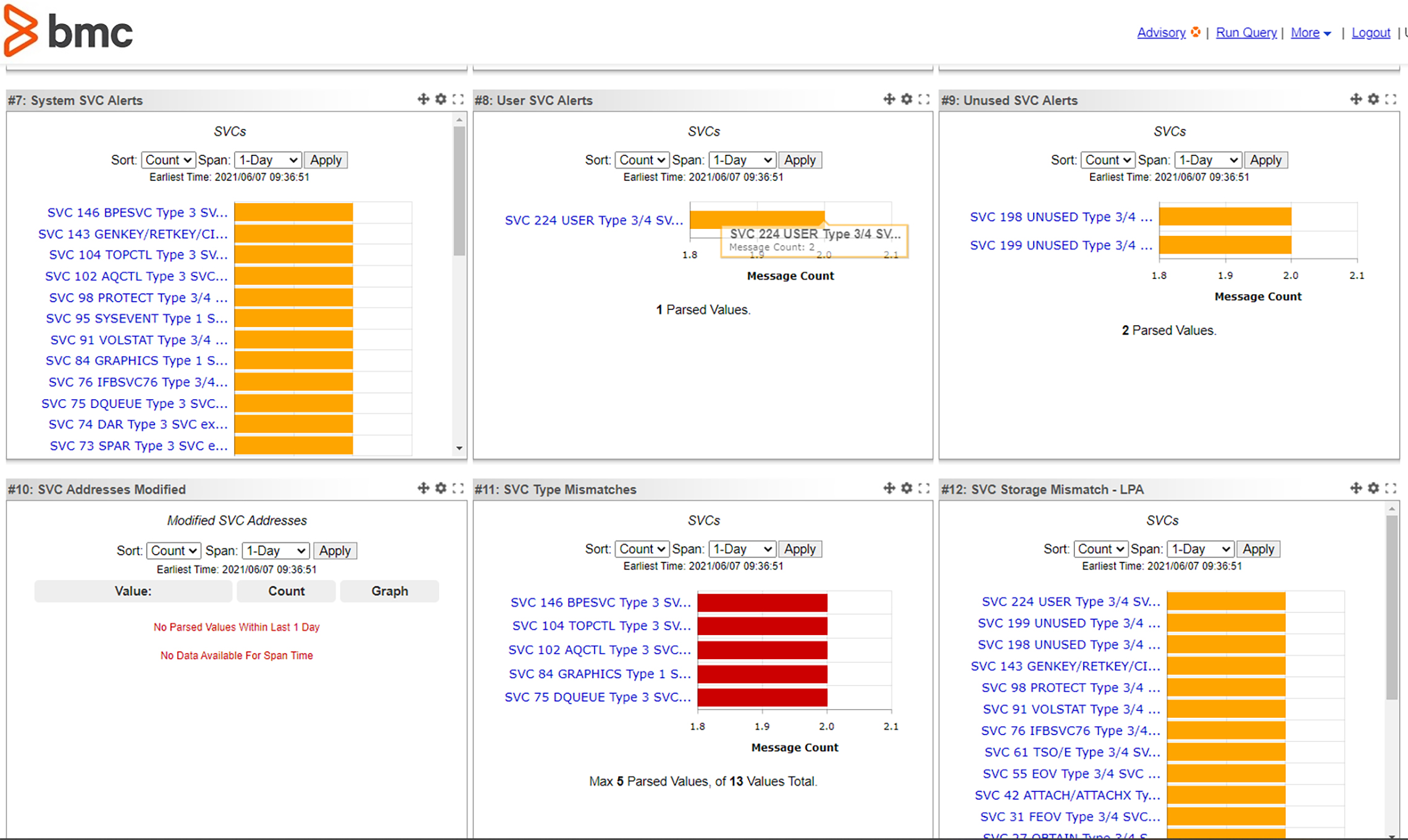
    BMC today announced it has extended its DevOps platform for mainframe environments to provide integrations with GitHub Actions, a framework for managing workflows, and HCL Launch, a continuous delivery platform from HCL Software. BMC gained the DevOps platform with the acquisition of Compuware in June 2020.

    John McKenny, senior vice president and general manager for intelligent Z optimization and transformation at BMC, said those integrations—along with existing support for DevOps platforms such as Jenkins, GitLab and VS Code—make it possible to accelerate the development of applications that include mainframes as part of a larger distributed computing environment. DevOps teams, for example, can now employ an HCL Launch plug-in for the BMC AMI DevOps for Db2 tool to automatically capture and propagate database changes across IBM Db2 databases.

    At the same time, BMC also enhanced a BMC AMI Ops Monitor for Java Environments that automatically discovers all Java virtual machines (JVMs) running on z/OS environments on a mainframe. The BMC AMI Ops Monitor for Java Environments now includes the ability to discover the application programming interfaces (APIs) and services invoked by those JVMs.

    BMC also revealed today that its Workflow WiZard tool has been accepted as part of the open source Zowe initiative launched by the Open Mainframe Project. The Workflow WiZard makes it easier to install, configure and maintain software installed on mainframes running z/OS.

    Finally, BMC revealed it has extended its privileged access management (PAM) tools by enhancing the supervisor call screener and Unix System Service (USS) data enrichment capabilities of BMC AMI Security software. Based on technology BMC gained with the acquisition of RSM Partners, this enhancement increases the level of protection BMC AMI Security software provides to thwart attacks by surfacing suspicious activity, such as from malicious insiders that may have compromised administrator credentials, said McKenny.

    BMC mainframe

    These days, McKenny noted, everything is under attack because the minute cybercriminals discover a way to compromise one platform, they almost immediately try to apply that same technique against other platforms. Mainframe environments, which tend to process an organization’s most valuable data, naturally are a high-value target, added McKenny.

    In general, McKenny said IT organizations that rely on mainframes continue to make steady progress toward embracing DevOps best practices. A recent survey conducted by Forrester on behalf of BMC found 80% of respondents said their mainframe development tools needed significant improvement to provide more value.

    The need to accelerate digital transformation initiatives, which typically require access to data that resides on mainframes, are, in many cases, forcing the DevOps issue within many organizations. Software development teams that build mainframe applications are almost always required to create APIs that make it easier for other applications to consume that data.

    Not every organization, of course, has a mainframe. However, as digital business transformation continues to evolve, the number of applications that need to consume mainframe data will steadily increase. The challenge facing mainframe application management teams is finding a way to provide that access without using traditional waterfall processes to build the required APIs.

  • Best Practices for AWS Tagging With Yor

    Best Practices for AWS Tagging With Yor

    On the surface, AWS resource tags are simple, informational key:value metadata that you can assign to most AWS resources. They also have many hidden benefits, as outlined in this AWS Tagging Best Practices guide for improving cloud operations. There are six use cases author Brian Yost calls out in particular:

    1. AWS console organization and resource groups
    2. Operations support
    3. Cost allocation
    4. Access control
    5. Automation
    6. Security risk management

    In summary, tags can simplify operational processes, improve security posture, speed up mean time to resolution (MTTR) and even save money if implemented consistently and persistently. But, unfortunately, in large organizations, that’s a tedious and often faulty process.

    To help teams overcome that challenge and make the most of cloud resource tags, Bridgecrew (recently acquired by Palo Alto Networks) recently launched a new open source tool, Yor. Yor is designed to automatically add consistent, helpful tags to infrastructure-as-code (IaC) templates starting with Terraform, CloudFormation and Serverless Framework. If run locally or added to a continuous integration (CI) pipeline, Yor will add tags like git organization and repository, unique trace ID and commit modifier details to IaC resources that carry through to cloud resources. For example, with Yor, you can tag your aws_instance code block in Terraform, and those tags will show up in your running EC2 instances.

    This post will explore how to leverage Yor to achieve the six tagging use cases outlined in the AWS Tagging Best Practices guide.

    AWS Console Organization and Resource Groups

    Using tags to organize and filter resources is the simplest and most common use case for tags. If you add tags to resources, such as EC2 instances or database resources, you can filter based on those tags. 

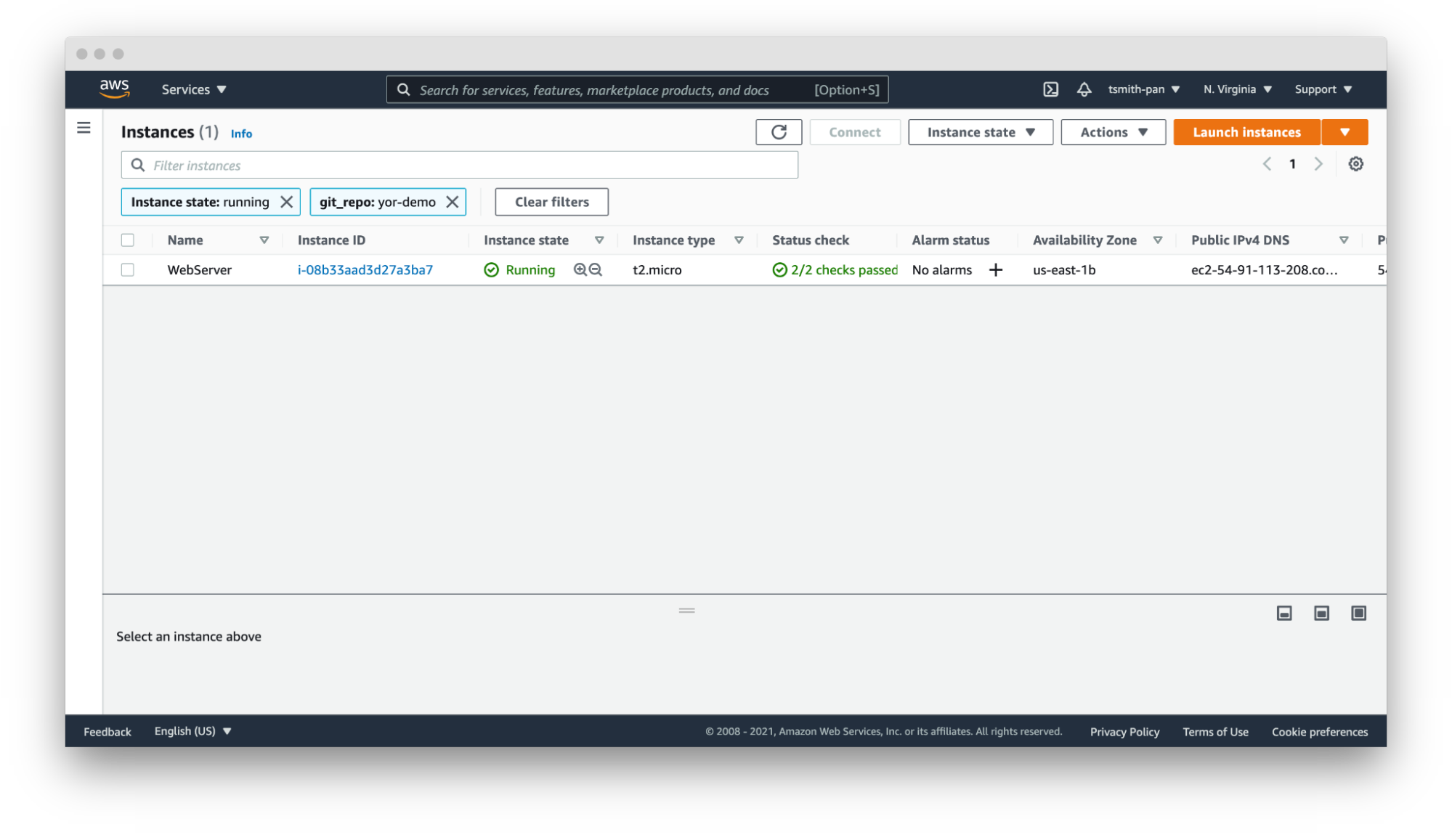
    If your AWS account has thousands or tens of thousands of resources in a region, filtering is necessary to manage those resources. For example, if you have hundreds of web servers, filter by the git_repo tag Yor added to quickly filter down to the web server(s) for your application.
    Yor

    In that same vein, you can set up resource groups to organize multiple resources across AWS services based on tags. For example, if you want to hunt down the VPC, EC2, internet gateway or database created by your Terraform repository, use Yor’s git_repo tag to group together multiple resources into a single resource group.


    Yor 

    Operations Support

    Yor excels at simplifying and speeding up operations support. In the words of Brian Yost, “For example, Level 1 support teams could use tags to direct workflow and perform business service mapping as part of the triage process when a monitoring system triggers an alarm.” Yor automatically tags resources with the git organization and modifiers of the cloud resource. This makes it easier to identify the right team and user to patch issues. 

    If you work in a GitOps organization, this is even more critical. Following GitOps best practices means all changes should be performed in the IaC template, not directly on the cloud resource. So if your security team identifies an open port 22 in runtime using policy-as-code or CSPM tools, such as Bridgecrew, Yor’s tags will make finding the owner of the IaC template easier and faster, lowering MTTR.

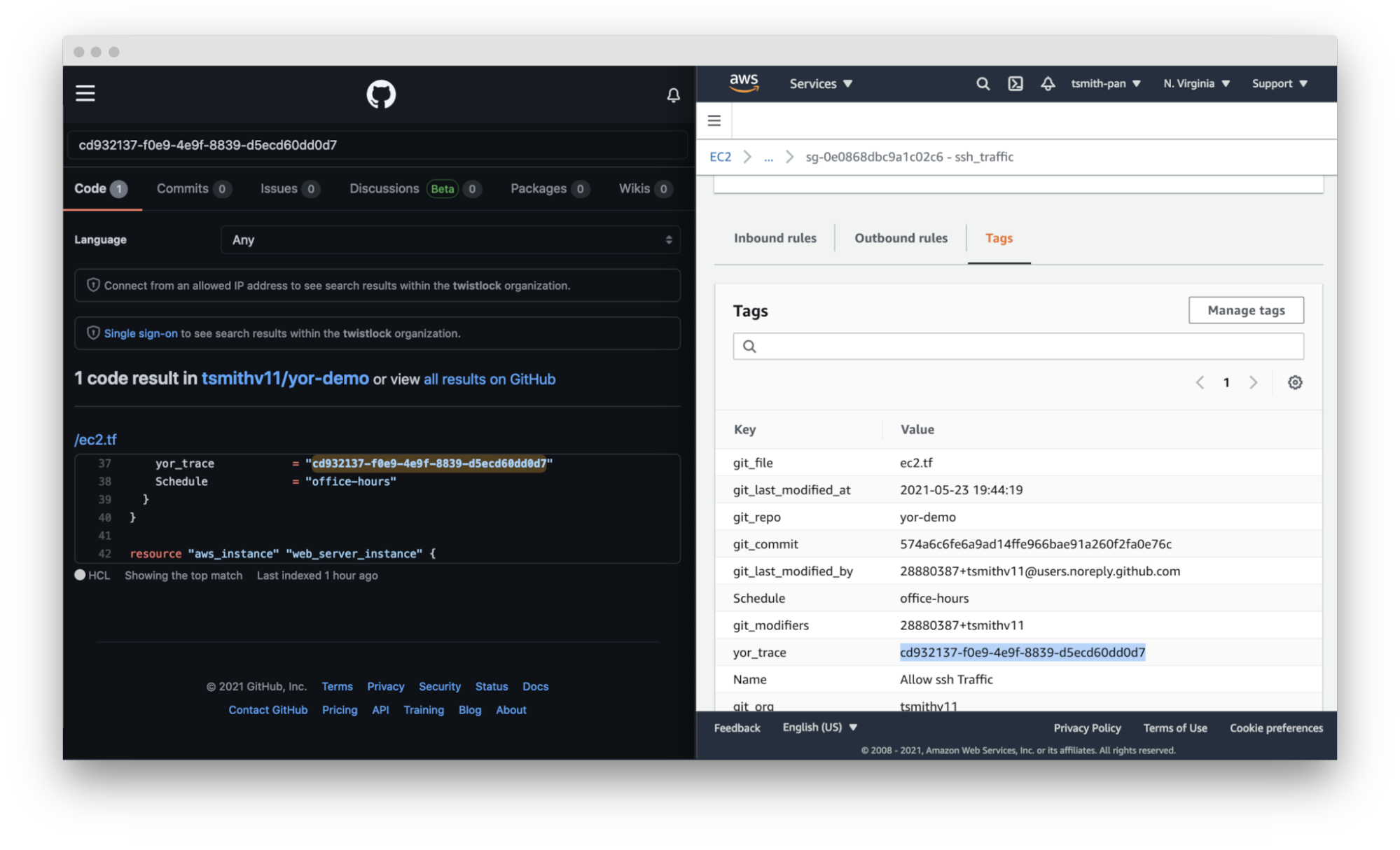
    Yor takes this a step further. By adding the repository, file and trace tags, Yor helps teams identify not only the code owner but also the exact file and resource block that created that resource misconfiguration.
    Yor

    Cost Allocation

    Large companies often have different profit and loss (P&L) statements for each of their business units. At the end of a reporting period, such as a fiscal quarter, finance teams allocate the expenditures made across the company to the various cost centers.

    For traditional IT teams, this usually involves very broad, general estimates. For example, if two organizations share a server rack, you could allocate costs based on virtual CPU time or disk space. Once that scales into dozens of organizations and ephemeral workloads, that allocation is much more difficult. Cloud costs can be just as difficult to allocate. If you have thousands of resources across types (virtual machines, serverless, managed Kubernetes workloads, managed databases, streams, CDNs, etc.) with differing life cycles and life spans, tying those resource costs back to a cost center is difficult.

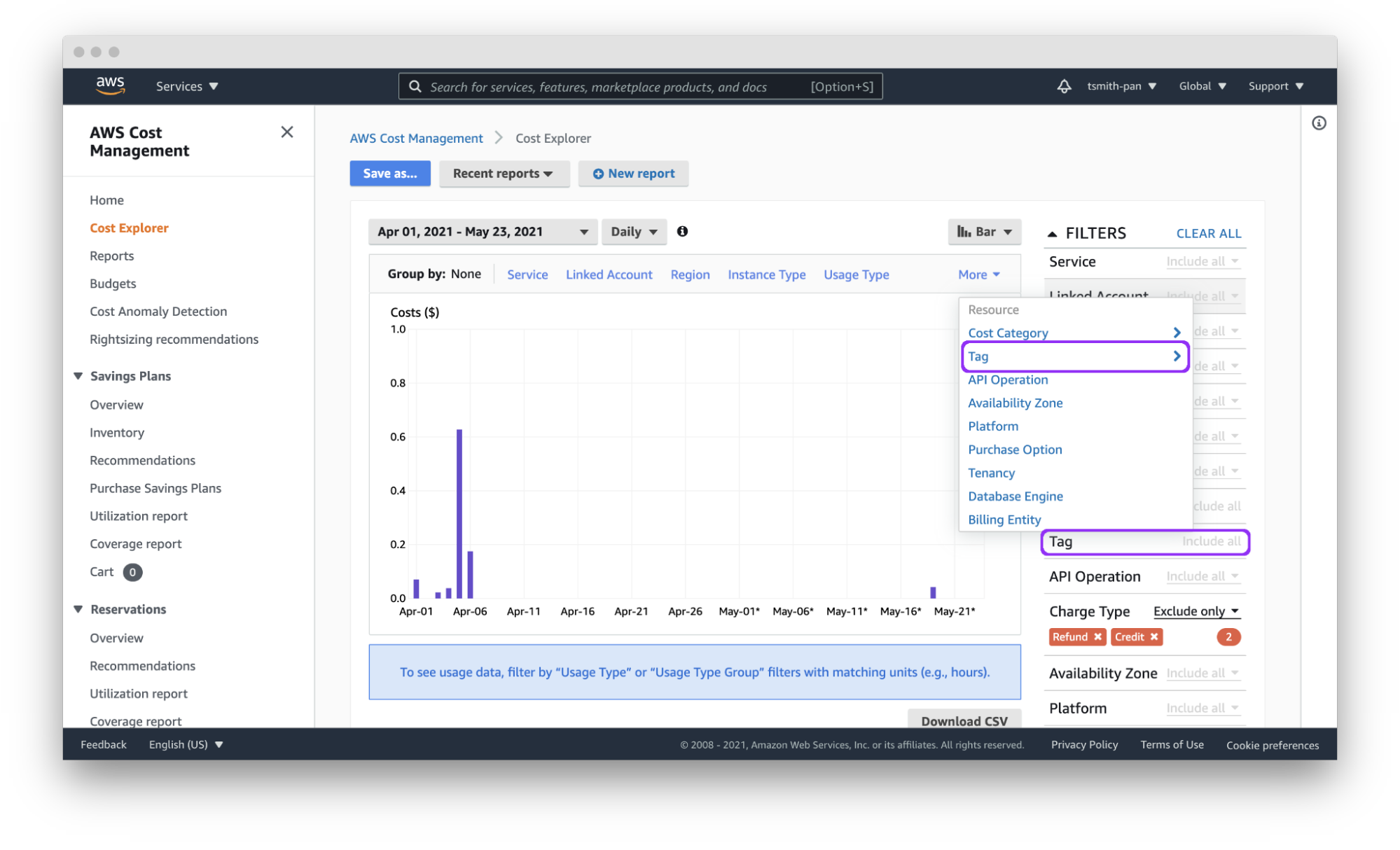
    Cloud tagging simplifies that process. Assuming each team has a git organization, Yor will automatically tag resources with the git_org or custom tags can group git_modifiers into cost center tags, and AWS Cost Explorer will let you filter by those tags to easily allocate costs. You can also export those costs by tag(s) to a CSV file for import into other tools for analysis.

    Yor applies those tags reliably and consistently so that finance teams don’t need to dig through different organization name versions, such as combining dev_team_one and devTeam1, or manually categorizing untagged resources.
    Yor

     Access Control

    AWS identity and access management (IAM) policies support the ability to limit control of resources using tags. This simplifies dividing up resources by teams using complex IAM rules.

    For example, if you want developers to access only the EC2 instances they provisioned, you can use the git_modifiers tag added by Yor. Yor will automatically tag resources with the git users who edited the IaC code. Then, Yor will add an AWS IAM policy to limit access based on that tag.  You’ll also want to add a policy to deny actions such as ec2:CreateTags and ec2:DeleteTags so users can’t just add themselves to other resources.

    This is where Checkov, an open source policy-as-code tool, can be leveraged for additional control. Yor can enrich the context for Checkov’s checks, enabling finer-grained policy control. For example, Yor will populate the user identification of whoever modified an IaC template, and Checkov can make sure that only approved team members modified the code. The following is an example of a custom check to determine that only security personnel modified CloudTrail settings.

    If the git_modifier tag added by Yor is anything other than “Nimrod,” “Rotem,” or “Naor,” Checkov will show a failed policy check for that custom check for that resource.

    Automation

    By leveraging tags in combination with other tools, such as Lambda functions and backup plans, you can apply automation to specific resources, such as targeting resources for archive, update or deletion.

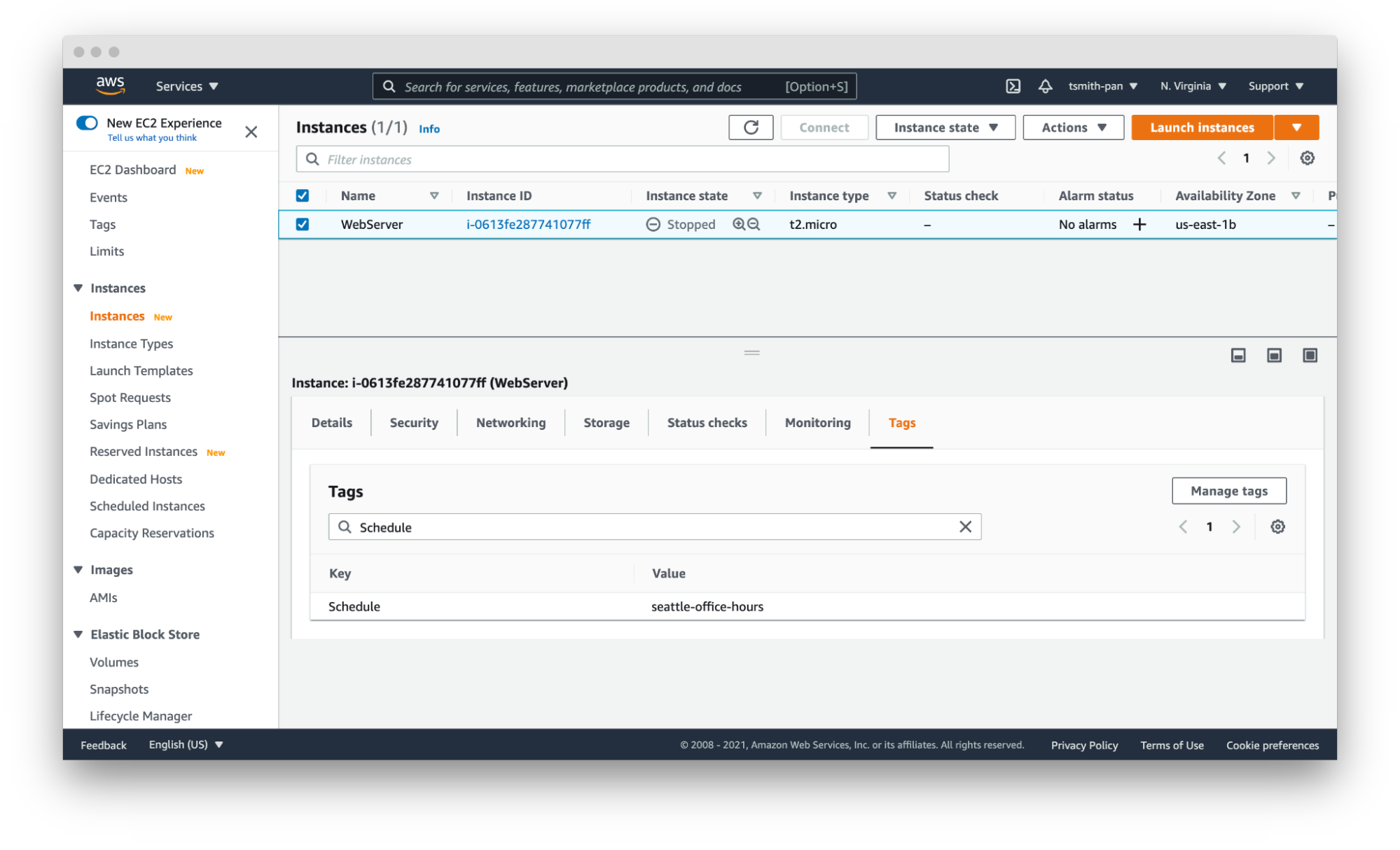
    The AWS Tagging Best Practices guide uses as an example a situation where development resources are turned off during non-business hours. AWS recently released a tool called Instance Scheduler for just such a use case. It is a CloudFormation stack with a Lambda function and DynamoDB instance that automatically starts and stops EC2 and RDS instances based on a pre-defined schedule. 

    Instance Scheduler takes a tag with a key:value pair; for example, “Schedule” (or a custom key) as the key and the schedule as the value. The schedules can be either one of the preconfigured schedules in the DynamoDB table, like office-hours, or a custom one.

    Using simple custom tags in Yor, you can tag every resource in a repository with a schedule by using environment variables such as adding the following to the Yor GitHub Action YAML file:

    This results in tags being added to every resource in that IaC directory. With the seattle-office-hours tag, Instance Scheduler will turn off EC2 instances at 5:00 pm Pacific Time and on again at 9:00 am Pacific Time Monday through Friday. This saves money by stopping instances automatically during downtime.
    Yor

    Another popular automation use case is for backups and archival plans. AWS can automatically apply different backup plans based on the tags applied to resources, such as storage and database resources. For example, if certain organizations, such as those that process financial data, need things archived forever, but others only need one year of backup, applying backup plans can move the short-term storage to cheaper options, such as Glacier, and eventually delete them on a schedule.

    Security Risk Management

    The final use case is risk management. The risk level of cloud resources differs based on whether they are in test or production environments and the sensitivity of the data those resources process and hold. This is another area where you can use simple tags like git_repo to filter down to repositories for applications that deal with sensitive data. You can also leverage complex custom tags. For example, EC2 instances attached to databases with “customer” in the name will get a data_level:sensitive tag.

    IT service management tools can apply higher priority to patching and updating resources with tags denoting sensitive data. This is another area where you can leverage Checkov’s graph-based checks in combination with Yor tags to assign higher severity levels to policy violations for resources with sensitive data tags or production environment tags. Assigning priority helps to focus developer attention and mitigate risk faster.

    These six tagging use cases are just a few examples of how you can leverage tags to be more efficient and improve your cloud security posture in AWS. The power of Yor’s tracing capabilities enables development and operations teams to work together without requiring complex triage to find the right person and IaC templates. With Yor’s extensibility and custom tagging capabilities, we can’t wait to see what other use cases the community comes up with!


  • Leveraging the Cloud for Mainframe Access

    Leveraging the Cloud for Mainframe Access

    Now more than ever, organizations around the world are looking to extend their existing mainframe investments as part of larger digital transformation initiatives. As core systems of record and reliability, mainframes continue to run many organizations’ most important applications and the idea of replacing these systems comes with greater risk than reward. While organizations are considering modernization of their mainframe investments, it’s important to remember that maintaining mainframe access and offering new ways for their users to work with the data and systems is a vital part of the larger project.

    Leveraging the Cloud for Mainframe Access

    With the recent increase in remote work, it’s no surprise that more companies are looking to leverage the cloud for mainframe access. This has many benefits from increasing scalability, availability and performance, to reducing application costs and improving security. Implementing modern mainframe access as part of a larger cloud project ensures that an organization’s modernization journey is not only transformational but also secure.

    If making the decision to leverage the private or public cloud for mainframe access, the integration of a secure host access solution ensures teams have access to the systems and applications needed to do their jobs, wherever they may be located. Deploying this secure access in a cloud environment is made easier by host access administration being integrated and centralized with the corporate user directory. Along with simplifying provisioning and management, centrally managed host access is, most importantly, more secure than other forms of access.

    The extension of enterprise security to the mainframe is sometimes overlooked in a transformation, but it is an integral part of the larger process of strengthening data and system security. In a perfect world, this can best be done through the integration of a host access solution with the existing identity and access management (IAM) system. If this is possible, the authentication credentials that are already in use for authorizing or denying access to the mainframe can be leveraged successfully.

    There are numerous benefits to an IAM integration with regard to access, data, stronger passwords, application security settings and system configurations. With IAM, the benefit of least privilege access means that users can access only the mainframe systems and data that are needed to do their jobs. Additionally, application security settings and session configurations can be changed from a central point by using the user directory. Finally, the stronger credential requirements of the IAM integration get rid of weaker eight-character passwords, strengthening security as a whole.

    Host Access Improves User Experience

    When it comes to host access, having a secure and centralized solution not only improves the mainframe access experience for the user, but also for the administrator. With zero-footprint secure access, users can be moved to a more secure web with higher security standards if needed. Security is also stronger with enterprise credentials that leverage mainframe session authorization to automatically sign them in. The integration of a host access solution gives administrators the ability to quickly deploy secure browser-based sessions, as well as providing web interfaces with no Java required, eliminating workstation dependencies as a result. This is also paired with the use of containers to enable deployment to countless users and support for mobile devices. For these reasons, a host access solution should be a common component in any cloud journey.

    The mainframe and its data, applications and user access remain vital for organizations and it is important that they remain protected and connected. With security being an ever-evolving issue, keeping these core systems secure while ensuring employees are able to access the systems and data they need should always be a priority. In conclusion, organizations looking to leverage the public or private cloud for their mainframe will have more success if they also strengthen their data and system security as part of the process.

  • Continuous Testing Practices Gap Assessment

    Continuous Testing Practices Gap Assessment

    Continuous testing is an essential part of DevOps. To get the maximum value from continuous testing, it is important to use recommended best practices, inclusive of people, processes and technologies. A gap assessment is a great way to efficiently evaluate an organization’s practices for DevOps and determine a strategy for improvement. Gap analysis provides valuable input for formulating a strategy and a roadmap to improve continuous testing.

    My SlideShare, Gap Survey, Assessment and Analysis For Continuous Testing, explains how my continuous testing gap assessment tool greatly speeds up the gap survey, gap assessment and gap analysis process for continuous testing.

    It is important to clarify a few definitions for this blog because I have found that different people and organizations use these terms differently. In this blog, and in my consulting work, I use the following definitions.

    • Gap survey is a discovery tool used to collect information about the current state of practices for a topic such as continuous testing.
    • Gap assessment is a process to determine differences (gaps) between current practices and recommended practices for a topic. Gap assessment is also used to refer to the entire collection of activities in this list.
    • Gap assessment workshop is a meeting in which the gap assessment is validated prior to gap analysis.
    • Gap analysis is the process of determining priorities for reducing gaps found during a gap assessment.
    • Gap assessment tool is software that helps perform gap surveys, gap assessments and gap analysis.

    I define and use a seven-step process for gap assessments.

    The steps are as follows:

    1. Pick a topic to analyze. The same processes and tools can be applied equally well to almost any topic, such as continuous testing.
    2. Determine recommended practices for the topic. Something that is worth doing a gap assessment for, such as continuous testing, will normally be fairly complex with tens if not hundreds of practices. Categorize the practices into groups (I call the groups “pillars”) to make the list of practices more understandable and meaningful. To do this requires some research and discovery work. For example, I have a database of practices and pillars for DevOps, continuous testing, DevSecOps and SRE as well as some other topics.
    3. Enter the practices from step two into a gap assessment tool. The tool can be a simple survey tool you create, a commercial survey tool or something custom-made.
    4. Determine who needs to be included in the gap survey.
    5. Collect data using the gap survey.
    6. Perform a gap assessment.
    7. Perform a gap analysis.

    For the remainder of this blog, I will explain in detail the seven steps for continuous testing.

    Step One: Pick a Topic to Analyze

    In this blog, the topic is continuous testing.

    Step Two: Determine Recommended Practices for Continuous Testing

    For an example continuous testing assessment, I used the 15 practices categories described in this three-part series:
    Continuous Testing Practices Part 1
    Continuous Testing Practices Part 2
    Continuous Testing Practices Part 3

    The 15 practice category pillars are:

    • Continuous testing tenets
    • Leadership
    • Culture
    • Test strategy and plans
    • Test management
    • Test automation
    • Test tools
    • Test infrastructure management
    • Test scripts
    • Test results
    • Security tests
    • Pre-flight testing
    • Integration testing
    • Pre-production testing
    • Test in production

    Step Three: Enter the Practices from Step Two Into a Gap Assessment Tool

    A gap assessment tool, pre-loaded with sample continuous testing practices, can be found in a file called “Continuous Test Practices Assessment Tool v2. It can be downloaded for free from one of the resource pages found on my website Engineering DevOps.

    You can edit the practices categories and add/delete practices from each category if you prefer to make changes.

    Step Four: Determine Who to Include in the Gap Survey

    For the gap analysis to be comprehensive, people in roles that are affected by continuous testing practices need to be surveyed, or at least represented, to ensure their perspectives are included. The following are example roles that typically are included.

    • Business leaders – because they influence culture and budgets for continuous testing.
    • Developers – because they need to design in accordance with continuous testing practices.
    • Project owners – because they influence product work priorities.
    • QA testers – because they need to test in accordance with continuous testing practices.
    • Ops – because continuous testing practices affect operations.
    • Security – because continuous testing affects security practices.

    The survey can be conducted for an individual application, a group of applications, or all the applications in the enterprise. However, it is important that the gap assessment and gap analysis be performed on the organizational segment that is being targeted for improvement.

    Step Five: Collect Data Using the Gap Survey

    A gap survey should allow each surveyed person to enter an importance level score, a practice level score and comments for each practice. All this information is essential for the gap assessment and gap analysis. In the gap survey included within my gap assessment tool, survey respondents are asked to score the importance of each practice as one of 0=Not relevant, 1=not Important, 2=Nice to have, 3=Important, 4=Very important or 5=Critical. Practice level choices are 0=Not sure, 1=Rarely, if ever, 2= Sometimes, 3=Most of the time, 4=Always or 5=We are really good at this. Comments that are relevant to qualify or explain the scores entered for each practice should also be entered, especially if there is any doubt or ambiguity.

    Step Six: Perform a Gap Assessment

    The gap assessment process requires all the practices scores collected from the surveys to be collected and assembled to calculate an aggregate set of scores. Gap scores are calculated using a formula that weights each practice level score with the corresponding importance level score. A visual representation helps to identify practices areas and individual practices that have the highest, most important gaps.

    No matter how professionally written the practices and score definitions are, it is not unusual for some people to misunderstand and to enter scores that they would not have otherwise. For this reason, it is important to ensure that the data collected is validated before conducting the gap analysis. The preferred approach is to conduct a gap assessment workshop with key representatives from each role that participated in the survey. During the workshop, the scores for each practice that have a high deviation between survey responses are discussed and, if necessary, adjusted.

    Step Seven: Perform a Gap Analysis

    The gap analysis process involves extracting the high gap practices and tagging and ranking each of them against solution categories determined by a consultant or topic expert. The results of the gap analysis indicate where solution strategies and implementation roadmaps need to be focused to reduce the most important gaps.

    What This Means

    Those who are serious about DevOps will do well to learn from others and be serious about using recommended continuous testing practices. This blog explained a gap assessment approach, which uses my 15 categories of continuous testing practices. My free Continuous Testing Gap Assessment Tool facilitates performing a gap analysis for continuous testing and outlines priorities to improve DevOps practices for an organization. For those that want to dig deeper on this topic, additional definitions and contextual information related to the way I do gap assessments are clarified in my book Engineering DevOps.

  • Managing Cloud Governance Costs Collaboratively

    Managing Cloud Governance Costs Collaboratively

    For those responsible for managing infrastructure, the concept of governance is common, especially as it relates to cloud services. For cloud services, it’s defined as a framework that guides how end users use these services by defining and creating policies to control costs, minimize security risks, improve efficiency and accelerate deployment.

    The term is often associated with “rules” or “compliance” and can restrain innovation within an organization, as it typically is mixed with regulatory bodies and governance procedures that add cycles to required tasks. But what if we could flip the script and make governance more of a collaborative effort? What if we used an approach wherein teams across an organization share information and feedback for better business outcomes?

    This collaborative approach can be beneficial in ensuring everyone is on the same page, enabling businesses to get the most out of their cloud infrastructure while ensuring costs stay within budgets.

    Legacy Governance Overshadows Growth and Creativity

    Legacy governance is an extremely paranoid way of running your business. For example, blocking people or departments from making buying decisions is a perceived best practice to avoid overspending on cloud infrastructure. Unfortunately, this is actually the opposite of what organizations with cloud infrastructure should do.

    The advantage of the cloud is that it gives your organization the ability to develop and bring products to market faster—and at a lower price point—than traditional methods. Following legacy governance processes—adding more steps to the process for provisioning resources—results in slower launch times and overprovisioning of resources (since there is a lack of visibility and teams are not sure when they will get more), negating the cost benefits of on-demand cloud infrastructure over traditional data centers.

    Empowered Employees Produce the Best Results

    Think about it: An overbearing manager or boss makes you feel like you’re walking on eggshells when it comes to your work. Sometimes, this is the same effect legacy governance policies can have on employees.

    Removing access barriers and giving team members the freedom to easily request and use resources should be a cloud operator’s ultimate ambition. It’s also cost management that’s collaborative.

    The idea behind a collaborative approach to managing costs is that the individuals who work on the projects themselves–whether that is the engineering team, DevOps teams, etc.–are best suited to manage them and provide the proper infrastructure recommendations because they know what their needs are.

    To receive the full financial and organizational benefits from a collaborative approach, there are three simple steps to take:

    Have a Consistent Source of Truth

    Have a consistent and agreed-upon source of truth for decision-making and self-evaluation against key metrics. This means that everyone in the business—executives, finance, managers and individual contributors—are aligned and looking at the same numbers. When this happens, teams spend less time haggling about ownership and more time looking at how they can improve. When this doesn’t happen, the focus turns to storytelling about why the numbers are wrong, not solving the underlying inefficiency problem.

    Trust the Team

    Trust the members of your organization to leverage this information for the best possible business outcomes.

    Collaborate

    Encourage collaboration inside and between layers of the business to ensure the decisions are made with the complete picture in mind.

    Implicit tradeoffs are made every day at every business level for teams to align their work to organizational priorities. Encouraging collaboration between different layers, viewpoints and skillsets in the business helps to highlight these implicit decisions and make them explicit, intentional and agreed-upon

    Moving away from legacy governance to a more collaborative approach is within reach for any organization. The key is understanding what methods are required for the transition to be a seamless and positive experience that teams will embrace.

  • The Forces Massing Against the Data Center

    The Forces Massing Against the Data Center

    We’ve come a long way over the last few decades. A ton of stuff about IT has changed, even in the last five years. And it is true in IT that the only constant is change.

    We like to have control of our environment to provide the most stable platform for user satisfaction that we can and simplify troubleshooting when things do go wrong. But even such a simple desire has been stripped away in the flood of changes we face. To be certain, some areas of IT within most enterprises are very stable environments that only change after careful consideration, but much of the rest of IT–both within and outside of the enterprise–has become the wild west again.

    And there is a lot of good in this cycle. Trying new things solves old problems and drives innovation, there can be no doubt. The changes we’re making address things like, “There was never enough testing,” or “We don’t have the security staff,” which means our apps are better because of the wave of changes we’re currently riding. The cloud is a standard option for new development even in the most stodgy enterprises, and some enterprises are moving older apps to the cloud as time permits.

    That last bit is going to force some hard choices in the future. As many of you know, I spent several years writing exclusively about storage, so when I see something happening in the storage space, I get interested. A former coworker of mine recently wrote about Kubernetes storage options from an angle I hadn’t considered before, and it drove me to look deeper into what’s going on today.

    In case you missed it, storage–specifically, data gravity–has tethered a large number of applications to enterprise data centers. The app needs access to the data; if the data is in the data center, the app has to be there and have secure, ready access to the data somehow. Cloud and containers offered some options/workarounds to deal with this issue, but they’ve lagged far behind the rest of the agile infrastructure.

    That is changing. Higher-speed, distributed datasets are here and are being used. I have not followed the space closely, but my immediate thought is, “They have to be proven.” They’re going to have to show that they’re as stable and secure as the DBMS in the data center and that you can get your data out of them no matter what. In the end, data is a company resource–a very valuable company resource. In some cases, the data a company owns is worth more than the company’s products. So, total control and security of that data is imperative and must be proven on the ground.

    But it will be. Because there is a need. And that will be the final step in making data centers far less critical for the average enterprise. Some enterprises already don’t need a data center, but most still do, largely because of data control and the resulting data gravity. Apps can be shifted from cloud to cloud or cloud to on-premises, or from cloud to hosting via Kubernetes, almost as an afterthought. But data is far less agile. In the end, a couple terabytes (or petabytes, depending on dataset) of data aren’t just flung over to a new cloud. Distributed, though; copies could be done in parallel, at high speed, making them far more mobile.

    Vendors already recognize that subscription models are easier to sell, with far fewer user maintenance headaches. IT enjoys not having to go through huge checklists to make sure every bit of supporting software is up-to-date with the right version–in a hosted environment, it’s done for you. Enterprises already recognize that a fair number of applications can be cloud-native and are putting them out there. Slowly, over time, more and more applications–even data-heavy applications–will be viable in the cloud for your average organization. The bottleneck, as I see it, will be cloud storage costs. Cloud storage is both more cryptic than other cloud costs and more expensive. Ingress, egress, storage, instance … all these things add up, and the more instances required to achieve parallelism, the more they cost. Until that issue is resolved, don’t expect any mass migrations. But migrations will come, eventually. Kubernetes is preparing to do its part and make data easier to use and move; cloud vendors will just have to find a way to rationalize the bandwidth implications with the costs we, the users, are charged.

    But over time, it will be less profitable to produce hardware and software targeted at individual enterprises. We’ve already seen some moves to hosted models that should open your eyes to the direction your vendors are headed–Atlassian and pretty much the entire source code scanning industry, for example, come to mind.

    For most organizations that have been around awhile, the key to making the move will come from internal motivations. They’ll have to figure out how to manage containers with virtual storage internally, in their data center, before they’re comfortable throwing that architecture out onto the public cloud. It’s a good path, but for the short to mid-term, data gravity will slow or even halt the “To The Cloud!” charge for core applications.

    For most large and established organizations, the ROI just isn’t there to move tons of data around. The core systems that work will be kept and may be improved, and only when they need to be replaced will things like a full-on container architecture be considered. But, again, this is likely to be an internal architecture, to start, (and often, will be forever) simply because that’s where the important data is.

    For newer organizations, the opposite will be true for the short to mid-term. As the data lake grows in the cloud, the costs to keep it there grow in a non-linear fashion, eventually biting into profitability. This group will also want to understand how to run a fully agile container infrastructure internally, complete with virtual data access.

    Whichever group you belong to, consider adding on-site Kubernetes or local cloud skills to your talent repertoire. Those are the skills that overlap; the juncture where all of these paths seem to cross, and the agility that full-on container automation with storage offers will not negatively impact the organization.

    And keep rocking it. We’re enjoying your apps. Thank you for keeping them humming along!

  • Continuous Testing Practices – Part 3

    Continuous Testing Practices – Part 3

    In my prior blog, Continuous Testing – The Quest for Quality at Speed, I described five tenets and some of the practices for continuous testing to help with understanding what continuous testing is. In my consulting work, I find it necessary to use 15 categories of practices to assess an organizations’ continuous testing capabilities. Given the large number of practices, I am publishing the complete list in three parts.

    This article is part three, which covers the following categories of continuous testing practices.

    • Security tests
    • Pre-flight testing
    • Integration testing
    • Pre-production testing
    • Test in production

    You can read part one here and part two here.

    Security Tests

    • Credentials and secrets needed to operate any test are vaulted.
    • Customer sensitive data in application databases used for testing is obfuscated from misuse by people involved in testing.
    • New security tests that are necessary to test a software change are created together with the code and integrated into the trunk branch at the same time the code is. The new tests are then used to test the code after integration.
    • Security tests for each DevOps pipeline stage are automated and may be selected automatically according to predefined criteria.
    • Test results that indicate possible security concerns are tagged for security analysis.
    • Dynamic or interactive application security tests exercise the application to check for security vulnerabilities. Results of these tests are delivered to developers through tools and feedback loops native to their organization.
    • Attack patterns, abuse cases and tests are built according to application module profiles.
    • Unit, functional and integration tests around—and especially outside—boundary conditions are tested. Tests include error handling, exception handling logic and negative tests.

    Pre-Flight Testing

    • Products are architected to support modular independent packaging, testing and releases. In other words, the product itself is partitioned into modules with minimal dependencies between modules. In this way the modules can be built, tested and released without requiring the entire product to be built, tested and released all at once.
    • Prior to committing software changes into the integration or trunk branch, pre-flight tests are conducted on the software change integrated with the tip of the integration branch within a private instance, to ensure the changes will not break the integration branch.
    • Requirements for testing are included in agile backlog planning procedures.
    • Pre-flight tests include unit testing, static code analysis scanning, functional, regression and performance tests. During this stage, feature flags or toggles may be installed in the software and each flag setting is verified to make sure the flags work. New automated tests that validate the changed software are created and tested, for use in later stages of the pipeline and subsequent regression tests.
    • Pre-flight tests, conducted prior to integration, include unit testing, static code analysis scanning, functional, regression, performance and security tests. During this stage, feature flags or toggles may be installed in the software and each flag setting is verified to make sure the flags work. New automated tests that validate the changed software are created and tested for use in later stages of the pipeline and subsequent regression tests.
    • Prior to committing software changes into the integration or trunk branch, pre-flight tests are conducted on the software change integrated with the tip of the integration branch within a private instance to ensure the changes will not break the integration branch.
    • Test-driven development (TDD) is used to ensure tests are created ahead of the code to be tested. TDD is most often applied for unit level tests but may also be applied for functional testing. A key advantage of TDD is that it ensures working tests are available for use in all pipeline stages. Without using TDD, there is a tendency for test creation to fall behind the code. Another advantage of TDD is that tests are created without the bias of knowing how the code was written, because it hasn’t been written yet.
    • From a testing point of view, microservices introduce the requirement to validate the contract of each service with any other services that use it. The independence of the microservice or any interservice dependencies need to be well tested. Performance and reliability considerations of operating services over a network need to be verified. If the application changes, affected microservices, or any dependent group(s) of microservices also need to be regression tested.
    • Containers offer the opportunity to package test resources in special test containers so they can be conveniently and immutably invoked on-demand for testing changes with elastic scaling benefits.
    • A strategy ensures that changes to a database, or changes to an application that uses a database, perform as expected, during each stage in the continuous delivery pipeline.

    Integration Testing

    • Software changes are tested incrementally by a cross-functional team over all stages of the continuous delivery pipeline.
    • During the code commit stage, assessments are conducted on the committed code to validate that the pre-flight test results satisfy acceptance criteria for integration into the integration branch.
    • During the build stage, a select group of tests are run on each build to ensure the integrated build satisfies build integration acceptance testing criterion.
    • Containers offer the opportunity to package test resources in special test containers so they can be conveniently and immutably invoked on-demand for testing changes with elastic scaling benefits.
    • API contract testing is used to test microservices interfaces.
    • Test code and data for each application are stored and maintained in test containers so they can be managed using the same container creation, orchestration and monitoring capabilities as the application.

    Pre-Production Testing

    • After the integration and build stage, functional, performance, regression, customer acceptance and security tests are conducted to ensure the images resulting from the build or set of builds satisfy functional, performance, security and delivery assessment criteria.
    • Testing during deployment include dark launch strategies such as A/B testing. feature flag rollouts, green/blue deployments and canary testing.
    • Release assessment criteria are defined and use test results to decide whether a release meets release acceptance criterion.

    Test In Production

    • Testing during deployment uses strategies that minimize the impact of failures such as A/B testing. feature flag rollouts, green/blue deployments and canary testing.
    • Automated tests verify each deployment.
    • Chaos engineering is used for testing the resiliency of applications, deployment infrastructure and pipelines.
    • Tests for disaster recovery and restoration of services, infrastructure and pipelines are conducted periodically.
    • Fire drills on applications, pipelines and infrastructures are used to test procedures for detection and recovery of applications, pipelines and infrastructures.

    What This Means

    Continuous testing (CT) practices are critical to success with DevOps. Many organizations underestimate both the importance and the practices needed to engineer Continuous Testing. This article is part of a three-part series that provides a comprehensive list of practices that can be used to understand and assess an organization’s Continuous Testing capabilities. To learn more about my blueprint for continuous testing, refer to my book Engineering DevOps.

  • Continuous Testing Practices – Part 2

    Continuous Testing Practices – Part 2

    In my prior blog, Continuous Testing – The Quest for Quality at Speed, I described five tenets and some of the practices for continuous testing to help explain what continuous testing is. In my consulting work, I find it necessary to use 15 categories of practices to assess an organizations’ continuous testing capabilities. Given the large number of practices, I am publishing the complete list in three parts.

    This article is part two, which covers the following categories of continuous testing practices:

    • Test automation
    • Test tools
    • Test infrastructure management
    • Test scripts
    • Test results

    You can read part one here.

    Test Automation

    • Test automation requirements are defined.
    • New automated tests are created for each new feature in compliance with the test strategies for the product or service.
    • Automated test cases are reviewed and tested to ensure they satisfy the purpose of the test.
    • Automated test cases are compliant with test case standards for the product or service.
    • Automated test cases are designed to run independent of each other.

    Test Tools

    • All testing tools in a pipeline are integrated into a common framework which enables orchestration of test resources and automation of test tasks.
    • A test framework supports automation of everything needed for testing including test cases, test tools, applications, test infrastructures, and test data.
    • A test framework can be invoked, controlled and released through an application programming interface (API) so that it can be integrated into a DevOps continuous delivery toolchain.
    • Features provided by test frameworks include capabilities to orchestrate the test infrastructure, select tests, control the execution of tests, monitor tests in progress and report test results, logs and verdict data.
    • A selection criterion is defined for test tools. The criterion includes requirements for coverage, automation features, support, compatibility with the automation framework, compatibility with test progress reporting systems.
    • Test tool software versions are maintained in a source version management system.
    • A common test automation framework is defined for the entire organization to ensure all test tools can integrate and be orchestrated with common test automation practices.
    • Test automation tools are available for testing all features of an application that can be automated.
    • Manual testing tools are available for testing features that must be tested manually. These tools can report results to a common test management reporting system.
    • Test authoring tools support input error checking and features which help encourage scripts development according to best practices. Examples of such features include the ability to create and use a repository of known good test utilities for control and analysis of the system under test.
    • DevOps-ready test tools are employed that easily integrate into a test framework and toolchain and elastically scale on demand vertically or horizontally, to match the varying capacity and workload demands of tests of software changes going through the continuous delivery pipeline.
    • DevOps-ready tools can be orchestrated, scaled, invoked, controlled and monitored from an API.

    Test Infrastructure Management

    • Standards for describing resources and topologies for test configurations are documented.
    • Techniques used to accelerate the time for executing tests are used such as vertical and horizontal scaling of test campaigns.
    • Test resources and topology files are maintained in a software version management system.
    • Orchestration and automation tests are conducted to verify the software that supports orchestration and automation layers satisfy their assessment criterion
    • The test infrastructure used for each stage in the pipeline is a replica of production configuration variations, as much as is practical.
    • Infrastructures for testing are elastic, with the ability to stand up and release (i.e. orchestrate) infrastructure configurations as needed for use with specific tests. Typical techniques that are employed to orchestrate test environments include dynamic infrastructure configuration tools, infrastructure-as-code (IaC) strategies, cloud services, testing-as-a-service (TaaS) providers and use of tools to stand up and release applications and test resources packaged in immutable containers.
    • Database migration, replication and restore tools also need to be tested to ensure they can function quickly enough to keep up with the speed of the DevOps continuous deployment pipeline cadence.
    • Health checks on the test environment are used to reduce the chance of false negative test verdicts that could be caused by test environment failures.

    Test Scripts

    • Test scripts are maintained in a software version management system.
    • Guidelines for test scripts and test suites practices are documented.
    • Test utilities, tests and test suites follow guidelines for documentation, test results reporting, reuse and maintenance practices.
    • Test script peer reviews are conducted to encourage collaboration and to ensure test script best practices are used.
    • Each test script has a unique identification.
    • The test type of the script is identified (for example, sanity test, build test, smoke test, security, acceptance test, conformance test, functional test, unit test, patch test, bug fix test, integration test, regression test, performance test, system test, other).
    • Evidence, including an execution log, demonstrates that each verdict of tests work.
    • Tests determine at least one verdict, which may be ‘Pass,’ ‘Fail’ or ‘Inconclusive.’
    • Verdict and assertions priorities are recorded or reported.
    • Tests are data-driven. Data inputs control execution of the test.
    • Each test script is is tagged with a codified risk level.
    • Failure verdicts reported by the script include a tag for risk priority.

    Test Results

    • Techniques are used to ensure test results analysis keeps up with accelerated tests. For example, test design techniques, analysis tools built into test frameworks, test results dashboards and/or test results analyzers that run in parallel with the tests.
    • Quality assurance goals include specific thresholds for test coverage prior to release such as run-to-plan (RTP) and pass-to-plan (PTP) minimum thresholds. RTP is a measure of how many tests of the total planned tests have completed. PTP is a measure of how many of the completed tests pass. For example, 95% RTP and 90% PTP.
    • Quality goals include a measurement and threshold for reliability. For example, S-curves for pass rates can indicate reliability when the pass rate stabilizes for a period. Example: 95% pass rate for three consecutive test cycles.
    • Time to recover a failed service is routinely tested and used to calculate mean-time-to-recover (MTTR).
    • Monitoring and management tests are conducted to verify monitoring and management capabilities of the pipeline satisfy their assessment criterion.
    • Technical and business metrics are designed to monitor the success of DevOps testing for technical continuous improvement and to justify business cases needed to implement those improvements.
    • Input and output metrics and acceptance criterion exist for each stage in the value stream.

    What This Means

    Continuous testing (CT) practices are critical to success with DevOps. Many organizations underestimate both the importance and the practices needed to engineer continuous testing. This article is the second in a three-part series that provides a comprehensive list of practices that can be used to understand and assess an organization’s continuous testing capabilities. To learn more about my blueprint for continuous testing, refer to my book Engineering DevOps.