Category: Enterprise DevOps

  • Dell Updates AIOps Platform to Better Automate IT Ops

    Dell Updates AIOps Platform to Better Automate IT Ops

    Dell Technologies this week updated its IT operations platform infused with artificial intelligence, dubbed CloudIQ, to add support for its PowerEdge servers. In addition, Dell pledged to add support for its PowerSwitch networking hardware next month as part of an ongoing effort to extend the reach of its AIOps platform across the entire Dell EMC portfolio.

    At the same time, Dell next month also plans to employ webhooks and a REST application programming interface (API) to both integrate the CloudIQ cloud service with third-party platforms and share notifications and recommended actions via tools and platforms such as ServiceNow, Slack, Microsoft Teams, Ansible and vRealize.

    Dell has also defined an autonomous operations framework that defines the various stages of AIOps capabilities that organizations should be able to take advantage of as CloudIQ continues to evolve.

    Dell AIOps

    Drew Schulke, vice president of product management for Dell Technologies, said CloudIQ currently enables IT organizations to achieve level three of that framework. As Dell continues to update CloudIQ alongside delivering ongoing infrastructure upgrades, additional capabilities will be steadily added, noted Schulke.

    Dell is making a case for standardizing on both its infrastructure and the IT operations platform it provides. Whether acquired and managed by an internal IT team or consumed as-a-service provided by Dell, the goal is to convince IT teams to reduce their reliance on rival infrastructure platforms that are not as tightly integrated with CloudIQ. In effect, Dell is delivering continuous intelligence as an AIOps service, said Schulke.

    Of course, IT operations teams could opt to standardize on an AIOps platform that is integrated with infrastructure provided by multiple vendors. However, Dell is betting that an AIOps framework optimized for its platforms will reduce the total cost of IT in a way that IT organizations will not be able to ignore.

    Each IT organization will need to decide for themselves what path forward makes the most sense for them. However, as more AI capabilities are infused into IT operations platforms, it’s becoming clear that many of the tasks routinely performed by IT teams are becoming increasingly automated. Most organizations will need to make a decision in the months ahead about the degree to which they are comfortable waiting for their existing IT operations platform to be enhanced with AI capabilities versus acquiring a new one that might be more advanced.

    Regardless of the path forward, the level of cultural disruption AIOps will bring to IT teams will be high. DevOps teams, naturally, have always been at the forefront of IT automation. However, most of the recent advances in IT operations have generally been applied in a piecemeal fashion. Platforms such as CloudIQ are designed to be implemented on a more end-to-end basis.

    Thate level of automation will have a profound impact on everything from the number of applications an IT team can support to the roles of the individuals that make up that team. It’s not likely that AIOps will replace the need for those IT teams as much as augment them and redefines the job they are being asked to perform.

  • …And all Those Other DevOps Tools

    …And all Those Other DevOps Tools

    When we started going through the DevOps toolchain for our new project, we found a ton of bits that normally we (and most likely you) wouldn’t pay too much attention to, because they don’t matter—until they do. Then we all pay attention. That’s why we added them to the toolchain list of options before they became a problem.

    It is time to stop, take a look around, make sure you have an inventory of what tools are going into the process of making your secret sauce. The easy one is IDE. For the last little while—say, a decade—we’ve let this largely be a team or an individual decision, but the steps required to do things and the add-ons/libraries used make this less and less about individual choice and more of at least a team, often an organizational decision. We’re doing it at the project level, so functionally equivalent to team. Our Java/Spring app is done in Eclipse because most of you are doing the same for that architecture. But our new Godot project will be in the built-in Godot editor (for Godot Script) and VS Code for C#. Again, because that’s all the rage in several languages, including C#.

    Here is the thing though – if you are using VS Code, you should keep a detailed and current list of plug-ins. I’m not a fan of their whole extension installing methodology through the command palette and want to make sure everyone has the tools needed at hand. In an enterprise setting, the ROI is there to just set it up and distribute to developers what they need in a package. But this is only a real possibility if most developers are on the same platform.

    What Git Desktop client is in use? While all of them support Git command line in the same format, helping each other use the UI for different operations kind of begs for standardization. Our team doesn’t change much, so I’m not terribly worried about this particular issue. We’re officially using GitHub Desktop, but as long as I’m not doing tech support (because you have a tool that you can’t use well), I don’t care if people stick to it. You might care more about that than we do—in this regard, we’re more like a startup than an enterprise. Since they share a command line, we can afford not to care. If you, as an enterprise, are providing ready-to-code environments, that is a different story.

    A couple of years ago we would have had to worry about containers, but these days we’re okay saying Docker locally and Kubernetes for production. While the Godot app doesn’t have a server component (hence the reason we’re keeping the Java/Spring app around), the build environment will be containers because we want to be able to build wherever we need to.

    Keep rocking it. I just thought I’d drop a list of what we’re going over—there is more, of course; this bit was focused on the developer tools side of things. I’ll eventually update with the final full stack, but for now, this bit is being put on the back burner while I look at some other areas. ::waves at security peeps::

  • Clubhouse Becomes Shortcut to Transform Software Project Management

    Clubhouse Becomes Shortcut to Transform Software Project Management

    Shortcut, formerly known as Clubhouse Software, today announced that its project management software for software development teams has been expanded to include additional workflow capabilities.

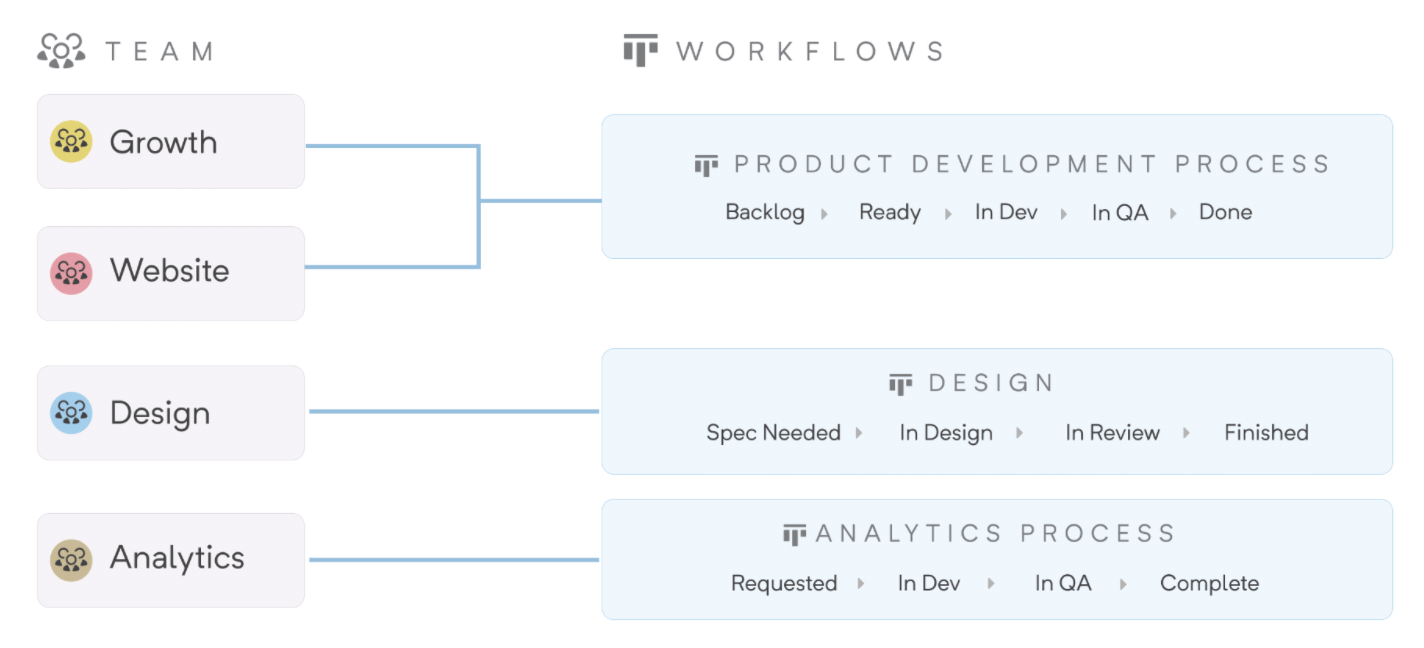
    CEO Kurt Schrader said team-to-workflow functionality is being added to the software-as-a-service (SaaS) platform and will make it easier to share workflows across software development teams in a more standardized way.

    Organizations can standardize workflows across multiple teams while still giving each team the ability to customize workflows for their own unique processes. As work gets created and assigned, it automatically moves into a workflow without having to manually update processes.

    Shortcut is designed to make it simpler for development teams to collaborate in a way that maintains transparency with other teams working on projects that are part of the same larger initiative, said Schrader. It allows product managers, engineers and designers to plan, track and measure their work without friction as the organization continues to grow in size, he added.

    For example, Shortcut will surface what teams need to focus on as priorities and timetables change within a specific project in addition to allowing users to define sprints using start and end dates, and the tool then sends reminders so the team can reserve time to focus on specific projects.

    Shortcut will also integrate with continuous integration/continuous delivery (CI/CD) platforms via application programming interfaces (APIs) to enable the development of custom workflows that include, for example, integration with real-time conversations occurring via the Slack collaboration service.

    Most of the project management software DevOps teams employ today is too complex and intimidating for the average business executive. Rather than forcing business users to learn how to master these applications, a case can be made for a more intuitive set of project management tools for both software development teams and the product managers they ultimately serve.

    As more organizations realize how dependent they are on software to drive business processes, many of them are reviewing the tools they currently rely on to manage software development. The goal is to not only reduce friction and enable more transparency across teams but also to provide stakeholders outside of the development team with more visibility into the status of any given project.

    At the same time, organizations are simultaneously launching more software development projects that have many dependencies. Many of those initiatives are based on microservices that are being built in isolation from one another before being aggregated to create an application. The dependencies between those microservices require organizations to make sure they are developed and deployed in a way that doesn’t leave one software development team waiting on another to finish a project before they can complete their work.

    Shortcut

    Schrader said that humans, as a species, are bad at organization. Project management applications should make it simpler for companies to understand how projects are not only organized but also all the dependencies that exist between them.

    Regardless of how software development projects are managed the need for greater visibility is obvious to all. Less clear is the best way to go about achieving that given all the communications channels available.

  • 5 App Modernization Best Practices

    5 App Modernization Best Practices

    An organization’s digital transformation is ineffectual if it doesn’t bring out the best from its applications. This is a near-universal concern since most enterprises still have core applications that are architected primarily to work in legacy IT landscapes in an on-premises dedicated environment, slowing down IT and business performance, stymieing innovation and increasing vulnerability to risk. Businesses are paying the price of their technical debt by forsaking agility, adaptability and competitiveness. That’s bad enough in regular times; in a post-pandemic scenario, this can have devastating consequences. 

    Acquiring a few cloud-native applications that are not integrated with existing systems is of limited value and, at best, provides just part of the answer. On the other hand, overhauling the legacy application landscape is usually out of the question. The only reasonable solution, then, is application modernization. But where does an enterprise begin?

    Pick and Shift

    A great place to start is by examining existing applications. Understanding every application’s function, performance and issues and what it can gain from modernization will help to establish a ‘universal set’ to pick from. The candidates for modernization can be prioritized based on technology factors—for example, when the architecture adds cost, vulnerability or complexity—as well as business considerations, such as compromised agility or value potential. Finally, the enterprise needs to weigh the potential benefits, especially ROI, against the difficulty of modernization.  

    Typically, the biggest, most important applications at the core of the enterprise are the hardest to modernize. But without their involvement, the transformation will most often be incomplete. Rather than lifting and shifting these monolithic applications and their vast data to the cloud, the enterprise can enclose them in an API layer to connect them to all the other applications that are being migrated as well as any new applications that are deployed. Using APIs to expose the functions and data of a legacy core system, such as ERP, allows it to be widely used, reused and modified, as well as leveraged to build new solutions and services. 

    Split Into Microservices

    Refactoring is a useful way of modernizing legacy applications that involves breaking them into microservices, which are then connected to cloud infrastructure such as Docker or Kubernetes. These microservices, which are loosely coupled, can be ‘called’ and scaled individually. Since refactoring requires significant rewriting and restructuring of the code, it is best done progressively over several iterations to make sure everything is functioning properly.  

    Provide Full-Stack Visibility 

    Even when an application is modernized into microservices on the cloud, it needs to communicate with other legacy systems in the enterprise. The problem is that now there are more services and environments to monitor and secure, not to mention single points of failure, which not only increases complexity but also denies the enterprise full-stack visibility. But visibility across environments—edge to core (on-premises) to cloud—is imperative for success. This is achieved by ensuring that the modernized applications fit within the organization’s data fabric. The enterprise needs to capture data across the stack, from end to end, and process it in real-time to have an uninterrupted view of the performance and availability  of its applications.

    Modernize the Process Landscape

    A perfectly executed application modernization program can fail to deliver results if the surrounding requirements—for example, planning and meeting quality standards—are not met. Legacy processes can be a drag on modernization efforts. It is therefore necessary to address this issue by rearchitecting processes to fit a more automated setup by supporting code developers with teammates who understand the business requirements, adopt best practices and follow the example of successful digital natives. 

    Track Performance Metrics

    Going back to the point about visibility; enterprises need to establish key metrics to track so they can monitor the performance of applications right down to the code level. And it’s not just applications—the entire infrastructure, from cloud to databases to networks, needs to be tracked continuously to identify problems before they blow up. The performance of applications needs to be compared with the corresponding pre-modernization values to understand the benefits as well as identify areas needing optimization.

    Balance and Act

    Application modernization approaches range from rehosting and refactoring to rearchitecting and replacing, which are progressively costlier and riskier, but also progressively more impactful. Enterprises need to decide what’s best for them based on considerations of effort, cost, risk and result. While some enterprises may go slower than others, eventually they will have to modernize all their applications to be competitive and meet their customers’ needs in the most effective way.

  • Zero-Trust Network Access Platforms Slash DevOps Bottlenecks

    Zero-Trust Network Access Platforms Slash DevOps Bottlenecks

    In a prior article, I indicated why a new remote zero-trust platform is needed to support DevOps teams.

    Traditional remote access configurations are not well-suited for DevOps given a shifting user population comprised of employees, contractors and other third parties often using their own devices; the large number of tools and systems to which access must be provided and the hybrid nature of the infrastructure itself (on-premises, hybrid and multi-cloud).

    DevOps Pain Points

    Three pain points are associated with traditional approaches when used with DevOps.

    1. DevOps user experience is poor in traditional remote access configurations. Each DevOps service must be accessed as separate secured sessions, which is confusing and tedious.
    2. System management requires IP whitelisting rules in VPN, static SSH keys in Bastion, firewall rules controlled by different teams and application-specific authentication. The coordination and execution of so many touchpoints for common actions—including the onboarding of new team members, changing roles or adding a new service—invites mistakes that cause productivity issues and introduces unforeseen security holes.
    3. Security is complex and error-prone. DevOps users must be granted restricted access to the individual services they need to be productive. Administering restricted access for individuals and groups is time-consuming. Security policies typically require monitoring detailed audit logs of user access.

    How a Zero-Trust Remote Access Platform Works with DevOps

    In my whitepaper, Zero-Trust-Remote Access-For-DevOps, I explain how a zero-trust remote access platform can resolve the requirements for improved DevOps user experience, consistent and manageable administration and simplified, less error-prone security.

    Improved DevOps User Experience

    By replacing the need for the user to tediously set up separate sessions for each DevOps service they need to use, a client-side DevOps service catalog enables all DevOps services to be accessed with a single click. This service catalog approach is more convenient for DevOps users and provides a form of DevOps governance. It does this by encouraging DevOps teams to select choices that are available in the catalog instead of creating new choices that result in expensive DevOps tool sprawl.

    Simplified DevOps Management

    Management of remote DevOps users is simplified by consolidating access for all DevOps users and services under a single unified service manager and connector. The need to manage each user and service with different teams, each with their own processes, is unified and streamlined when the management requirements for DevOps users and services are consolidated under a common zero-trust remote access platform.

    In addition, this approach makes it much easier to implement more adaptive policies across the breadth of users and services.

    With a zero-trust remote access platform, onboarding new DevOps users and groups is accomplished within a single session—not separate sessions for each onboarding requirement.

    Simplified and Less Error-Prone Security

    Consolidating access to DevOps services under a common zero-trust remote access platform with unified services and services connectors enables simplified and less error-prone security controls, improved security monitoring and policy management. Audit logs of access are reported consistently for all services. Monitoring and changing access rules can be supported for individuals or groups when adjusting a policy. Trust-based access controls can be implemented consistently. Granular policies ensure access is predicated on appropriate device trust score thresholds being met. Rather than a single check prior to granting access, these production services policies continuously assess the security of the users and devices accessing the services.

    Transforming to a Zero-Trust Remote Access platform for DevOps

    Transformations of all types, and especially those for DevOps, are made more certain by following a
    seven-step transformation process, described in my book Engineering DevOps. This process serves as a framework for implementing the zero-trust remote access platform.

    The first two steps, vision and team alignment, involve getting the leaders, key influencers and implementers of an organization to recognize and establish actionable goals for the implementation of the zero-trust remote access platform.

    The third step, assessment, requires taking inventory of the current state of DevOps users, DevOps services and policies that need to be supported by the new platform.

    The fourth step, road map, requires determining the plan for implementation. Typically, it makes sense to start with one application. Start with a set of DevOps users and DevOps services needed for a single application or pipeline which can serve as a model to drive adoption to other applications as the solution is proved and accepted.

    The fifth step, realize, is the step in which the zero-trust remote access platform is installed and set up for the initial model application or pipeline. Banyan Security explains how an example tool vendor helps to simplify this step.

    Capabilities to look in for in zero-trust remote access tools include:

    • Deploys in minutes, with no integration requirements on any existing DevOps services or infrastructure.
    • No need to set up VPNs, open inbound firewall ports or manage DNS.
    • Use existing DevOps user devices without diminishing security.
    • DevOps service catalog provides users visibility and one-click access to DevOps services.
    • Support for bundled services, favorites, and autorun capabilities.

    In step six, operationalize, the procedures for commissioning and using the zero-trust remote access platform are proven, benefits are measured and playbooks are hardened for the organization.

    In step seven, expansion, the zero-trust remote access platform deployment is expanded to other DevOps applications pipelines, DevOps users and DevOps services across the enterprise.

    What This Means

    Traditional remote access configurations are not well suited for DevOps administrators or users given the dynamic nature of services, team members, and environments. A zero-trust remote access platform addresses the need for an improved DevOps admin and user experience, simplified access management to DevOps services and simpler, less error-prone security practices and monitoring.


    I want to express my appreciation for the time spent with the Banyan Security team, who has pioneered many of the concepts outlined in this blog and contributed valuable insight.

  • Google DORA Report Shows Modest DevOps Gains

    Google DORA Report Shows Modest DevOps Gains

    Google today published the annual Accelerate State of DevOps Report created by its DevOps Research and Assessment (DORA) team that finds 26% of DevOps teams surveyed can now be classified as elite performers. That compares to 20% the last time the study was conducted in 2019.

    DevOps teams, made up of a total of 32,000 IT professionals from around the globe, were evaluated based on their ability to frequently deploy, code, lead time for changes, time to restore service, change failure rates and operational performance. An elite team is expected to be able to restore service in the event of an outage in less than an hour.

    Dr. Dustin Smith, a user experience researcher for Google, said the increased rate suggests steady gains in DevOps maturity continue to be made despite all the challenges the COVID-19 pandemic presented. A full 96% of respondents said that prior to the pandemic they had not worked from home on a regular basis.

    The DORA report finds high and elite performers make up two-thirds of respondents. Elite performers were able to collectively decrease their lead time for changes when compared to previous studies. It’s also worth noting only elite performers have minimized their change failure rate. In previous years, medium and high performers were able to do the same.

    Overall, more than half of respondents (52%) report they have adopted site reliability engineering (SRE) best practices to some degree.

    Elite performers deploy code 973 times more frequently than low performers, who reported deploying less than once every six months. The normalized annual deployment numbers range from 1,460 deploys per year for the highest performers to 1.5 deploys per year for low performers. Not surprisingly, for elite performers, the lead times from commit to deploy are 6,570 times faster than low performers.

    Security practices have also improved with 60% conducting security reviews, with 58% reporting that the reviews include testing. Nearly two-thirds (63%) said they work closely with information security teams. The report finds teams with high-quality documentation were 3.8 times more likely to integrate security throughout their development process.

    Reliance on cloud platforms has also increased, with 56% of respondents indicating they employ a public cloud, a 5% increase from 2019. Only 21% of respondents reported deploying to multiple public clouds. Over a quarter (26%) of respondents did so to leverage the unique benefits of each cloud provider, followed closely by 22% that cited availability.

    Just over a third (34%) report they are using a hybrid cloud, while 29% have a private cloud. A total of 21% still don’t use a public cloud.

    The report also finds elite performers were 3.5 times more likely to have met all essential cloud characteristics defined by the National Institute for Standards and Technology (NIST). Those characteristics are defined as on-demand self-service, broad network access, resource pooling, rapid elasticity or expansion and measured service. Only 32% of respondents who said they were using cloud infrastructure agreed or strongly agreed that they met all five of the essential characteristics of cloud computing defined by NIST, an increase of 3% from 2019. Overall, usage of those characteristics of cloud computing have increased by 14% to 19%, with rapid elasticity showing the largest gain.

    The DORA report makes it clear there is still a long way to go before DevOps nirvana is more widely achieved. On the plus side, however, the number of organizations that have embraced DevOps to some degree continues to steadily increase.

  • OpsRamp Extends AI Reach to Incident Management

    OpsRamp Extends AI Reach to Incident Management

    OpsRamp today extended its IT operations platform infused with machine learning algorithms, also known as AIOps, into the realm of incident management.

    The Summer 2021 release of the company’s namesake platform adds alert predictions for preventing outages and incidents, alert enrichment policies for faster incident troubleshooting and enhancements for automatically ingesting metrics data collected from the Alibaba Cloud environment and open source Prometheus monitoring software as well as Hitachi, Poly, VMware and Dell EMC platforms.

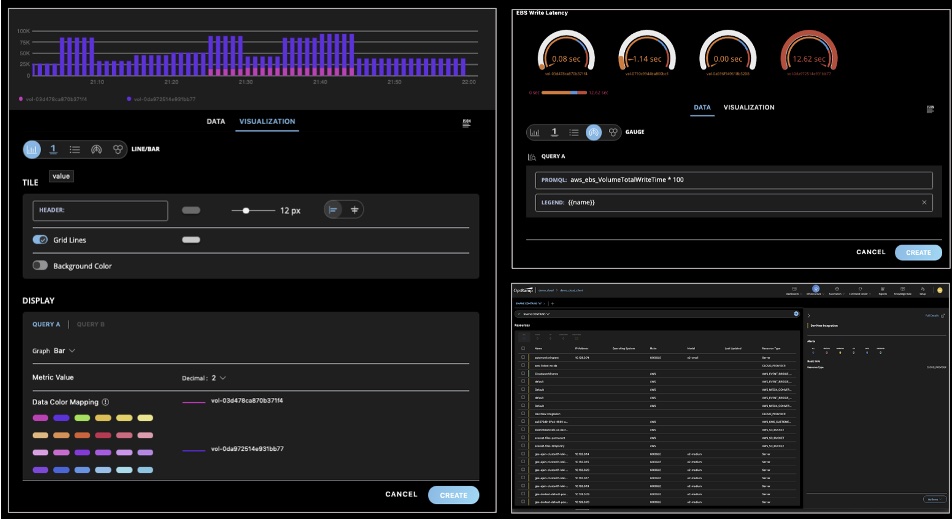
    IT operations teams can now also visualize metric values that can increase or decrease within a fixed range using Gauge charts. IT teams can also now add alert context details to provide more relevant information. There’s also now a mobile app for both Apple iOS and Google Android devices through which IT teams can now respond to alerts and incidents.

    Finally, OpsRamp is also making available a beta release of dynamic Workflows, which enable IT team to maintain a single decision table to address specific operational scenarios.

    Sheen Khoury, chief revenue officer at OpsRamp, said the goal is to leverage artificial intelligence (AI) to increase application availability by enabling IT teams to better predict when there are indicators of an incident caused by, for example, higher volumes of seasonal traffic that could lead to an outage.

    At the same time, IT operations teams can improve overall time-to-value by leveraging the automatic monitoring tools that are embedded in the platform, he added.

    OpsRamp is betting that rather than waiting for incumbent providers of IT operations platforms to add AI capabilities, many IT teams will opt to deploy a new IT management framework altogether. Many of the manual tasks IT operations teams regularly perform today can then be automated faster, noted Khoury.

    Naturally, it takes time for machine learning algorithms to be trained, so the benefits of AIOps are not instantaneous. However, those algorithms will continuously learn the unique attributes of an IT environment in a way that makes it easier for IT teams to manage an IT environment more proactively. The algorithms provide the added benefit of making it easier for new members to join an IT operations team without having to spend months learning all the nuances that are unique to that environment.

    Each IT team will need to decide for itself the degree to which they want to rely on an AIOps platform to manage their IT environment. Initially, most IT teams will need to evaluate the recommendations made by an AI platform. However, as they gain confidence in the recommendations, they will trust the platform to automate more processes in response to events occurring in the IT environment in real-time.

    Regardless of how much faith IT teams put in AI, it has become apparent that enterprise IT environments are only going to become more complex. Many IT teams will not be able to manage some environments without the aid of an AI platform. Many IT professionals may not want to work for organizations that don’t provide some way to augment their skills using AI—the stress level would simply be too high.

    One way or another, DevOps teams that are highly committed to ruthlessly applying automation will be at the forefront of AI adoption in the enterprise.

  • Empowering Pro and Citizen Developers

    Empowering Pro and Citizen Developers

    When I was the CISO years ago, we had a talented team build the incident management system for our new CIRT. The team built intake forms, interfaces with some of our tools and the workflow to hold it all together. We were fortunate to have the resources of one of the largest companies in the world (at the time), which we used to make our incident response processes faster and more efficient. Thanks to this system, we saved many thousands of hours per year.

    That was 15 years ago, and now organizations are automating processes without the need for talented (and expensive) developers. In fact, this year’s moniker is “Year of Low-Code”—the beginning of a new era. Gartner predicts low-code will continue to evolve, stating that by 2025:

    • 70% of new applications developed by enterprises will use low-code or no-code technologies (up from less than 25% in 2020) and
    • 75% of large enterprises will be using at least four low-code development tools for both IT application development and citizen development initiatives.

    As Gartner’s forecast on low-code applications comes to fruition, product and IT leaders collectively have a lot of work to do to not only provide these tools to customers but internally for their teams, as well. As organizations rise to meet the demand for automation to streamline their customers’ and their own processes, it’s important to remember that this is new territory for many.

    The absence of a well-established route for migrating to automated processes can create challenges if not done correctly. As organizations look to pioneer low-code, I’d like to offer a two-step guide for leadership to begin this low-code journey through personal insights and real-life examples–providing an “automation blueprint” for IT leaders.

    Getting Developers on Board

    Although low-code is about bringing capabilities to non-technical resources, don’t neglect the importance of getting your existing developers on board early. Chris Byers wrote this great piece on why developers should not be worried they will become “extinct” by this new outlook. On the contrary, your core developers are going to benefit from these changes–freeing them up from tedious low-value work and allowing them to focus on higher-order challenges.

    Change of any sort can be daunting, and as with any shift like this, transparency is key. I often write quick blogs in our project management system or update my developer community in their dedicated collaboration platform channel to update the team on any new processes or changes with complete transparency. My team can ask me questions directly on the platform, and they are usually pretty direct. This visibility is key, allowing everyone to feel like they have a say and stake in how the company is accomplishing shared goals.

    It’s instrumental to partner with your DevOps team and ask their advice, as they are your “low-code” experts while you navigate these waters—either creating software with these offerings in your product portfolio for your customer base or deploying tech internally with low-code tools. With the former, your developers really should have no problem getting on board.

    Introducing the Concept to Citizen Developers

    Next, we must empower people to adopt the role of citizen developer by equipping them with the knowledge they need to be successful. Otherwise, we will find ourselves back at square one with the work developers did to create low-code workflows wasted. Whether you’re working with customers, partners, or your internal teams, here are a few ways to building your citizen developer crew:

    • Bring back the lunch-and-learn (hey, they were popular for a reason) via videoconference or collaboration channel: Send out gift cards for participants to order lunch and host a live session to walk through workflows and answer questions.

    • Provide on-demand tutorials: Beef up your company’s video library with a couple of “how-to” videos on using workflows for ongoing reference. Everyone loves an excellent how-to explainer.

    • Write a guide of your own: One of our technical partners is known for its workflow, and they’ve written a guide to their low-code product’s capabilities. It’s available online, and it’s geared towards citizen developers. So it might be worth taking the time to do one in-house; a one-stop-shop for everything low-code.

    Workflows are everywhere you look – not one team in an organization operates without interacting with identity workflows. Take HR, for instance; you might think, “HR deals with people; they don’t need to build workflows.” This overlooks how many HR processes are workflow-driven. Imagine if an organization could tap HR as citizen developers—the department could establish a workflow unique to onboarding, for example. A new hire’s manager receives an automatic prompt to approve access to applications needed for that role. Imagine the time saved, which means more time spent on other business-essential tasks like recruiting quality candidates.

    The investment you make today getting buy-in from developers and educating your citizen developers will pay off in the long run. Now is the time to get started. The road of innovation is always bumpy, but that doesn’t mean you shouldn’t try to make it as streamlined as possible. To play a role in pushing boundaries forward amidst the digital transformation we are experiencing, you will need everyone—developers and citizen developers—on the same (web)page.

  • Is AI Taking Over DevOps Functions?

    Is AI Taking Over DevOps Functions?

    Artificial intelligence has taken the tech world to a new level of automation. Today, almost every specialization demands the intervention of machine learning to develop AI technologies that help businesses do more with less time and resources. Still, some organizations question whether leading with AI is a good investment. 

    For DevOps, the answer is a resounding yes. AI can enhance DevOps practices to accelerate the pace of software releases, helping businesses achieve continuous delivery. This enables programmers to release software about 10 times faster and allows programs to be reviewed before they are released. 

    AI also has improved DevOps culture, from enabling more efficient decision-making processes to code quality enhancements and automated operations. So, let’s take a deeper dive into how AI impacts DevOps.

    Recent Changes in DevOps

    Monitoring and managing all the data generated in DevOps environments involves a high degree of complexity, making it difficult for teams to collect and use data effectively. In addition, the volume of data any given team may receive can reach well into exabytes, so AI tools provide much-needed assistance. After all, analyzing massive data sets manually would take too much time for a human and won’t meet the demands of modern businesses.  

    What’s more, surveys show that 57% of developers in the United States have less than five years of experience. For this reason, software testing must be an ongoing and in-depth process to check and double-check that no vulnerabilities impact the security of the code. AI can supplement manual review to increase speed and accuracy in finding bugs. 

    That being said, integrating AI into DevOps functions doesn’t mean developers aren’t necessary, even though their roles have evolved considerably. Backend developers are involved in the development and operations sides as they take on ops tasks and tests, especially around cloud-based infrastructure and cybersecurity. And frontend developers will always be needed for the technical support of creative design—which no one can do better than humans. 

    In today’s dynamic and fast-paced world, developers need to release code faster than they used to while the operations teams ensure that the existing systems function with minimal disruption. This partnership is easier when integrating AI, as it makes the collaboration between development and operations teams more efficient. AI-powered systems provide a unified view into systems and glitches in the complex chain of DevOps. 

    Is AI Taking Over DevOps?

    Short answer: No. AI is supplementing human activity in DevOps to make things more efficient and secure. 

    Due to the complexity of DevOps requirements, people have been looking for a more automated solution that could assist humans in performance and accelerate the processes. What’s more, you can expect to pay around $60 an hour for an experienced backend developer in the U.S. This means using AI to automate the grunt work can be a big cost saver as well.

    Here are a few ways AI transforms DevOps functions:

    Enhanced Security

    Distributed denial of service (DDoS) and related attacks have become a widespread threat to the security of websites and online services these days. AI-powered tools have the ability to identify and mitigate these threats. In addition, AI can help in the pivot to DevSecOps in teams still using traditional DevOps.

    AI security tools detect anomalies and threats based on real-time data and by analyzing past behavior. In this way, AI has played a vital role in protecting many organizations, including schools and colleges, from cyberattacks by supplementing human security experts.

    Improved Data Access

    The massive amount of data that needs to be collected, organized and analyzed in DevOps is beyond human capabilities. However, AI has resolved this issue by compiling data from multiple sources and organizing it for analysis. This drastically improves and accelerates the process of DevOps.

    Rapid Software Testing

    Software development and software testing has accelerated with the integration of AI. As a result, various testing types used by DevOps, such as user acceptance testing, regression testing, and functional testing, are more efficient and accurate than ever.

    These tests produce a large amount of data that would take humans ages to identify and collect manually. With the help of AI, identifying patterns and coding practices that lead to errors and vulnerabilities has become convenient and fast. This data can then be used later by the DevOps team to increase their efficiency and improve development practices. 

    Timely Alerts

    DevOps teams sometimes struggle to react and respond to the alerts during incident response. With no priority tags attached, it becomes challenging for the team to prioritize incidents effectively. A more efficient, comprehensive alert system should be capable of spotting flaws instantly and marking the more severe ones as higher priority. That way, the team can tackle the issues more systematically and resolve them without failure.

    AI can assist in prioritizing the responses to alerts based on certain factors, including the intensity of the alert, the source of the alerts and past behavior. This leads to efficient management in situations where systems get flooded with massive amounts of data and have to respond immediately. AI-powered alerts are particularly important in DevOps security, so this is a critical benefit of AI in the discipline. 

    Superior Implementation Efficiency

    DevOps teams are often burdened by the managerial tasks of a rule-based environment which decreases their time spent in more innovative and creative areas. When AI takes over, these tasks become self-governed, increasing efficiency and reducing human intervention. AI systems can work on their own, sparing humans from these tasks to focus more on innovation and creativity.

    This way, AI has turned the DevOps into self-governed systems that no longer require the rule-based, human management of analysis. This should resolve the complexity of research that DevOps teams were struggling to achieve and enable faster adaptation.

    Feedback Loops

    The primary function of DevOps is to use monitoring tools to gather feedback from every stage of operations and then use that to improve software development and delivery processes. Performance monitoring tools use machine learning to gather information such as performance matrices, log files, datasheets, etc. The feedback collected is then used to track potential issues in advance and make suggestions to resolve them accordingly. The application is then altered by applying these suggestions to make it more efficient.

    Artificial intelligence is driving increased efficiency in DevOps functions. However, it would be a stretch to say that it is taking over, as there are still many areas that require human intervention. The idea behind AI integration is not to change the players but to change the game.

    Even though AI is assisting humans in accelerating software development, developers still lead many aspects of the craft. But it also seems impossible to perform DevOps functions at the required pace without the integration of AI. So, if you wish to release software at a pace that keeps up with modern tech trends, you need to incorporate AI in your DevOps functions.

  • DevOps World: Forget Doc, it’s All About Dev

    DevOps World: Forget Doc, it’s All About Dev

    This year for DevOps World, we’re heading back to the future. Doc Brown won’t be there with his souped-up time machine, but plenty of devs will. As the world is coming to realize, developers are keeping everything running, from the apps we use on a daily basis to check the weather, bank online or order food to the self-parking features on autonomous cars and artificial intelligence that’s augmenting human intelligence. Software and technology are the future, which means the future starts with the creative mind of the developer. 

    The theme of this year’s DevOps World show is “Building the Future of Software, Together.” For developers, this cannot ring more true: Across the globe, dev teams are working to code new software pipelines that will power the world’s next great innovations. We’ve already seen voyages into space and breakthrough life-saving medicines this year—what more do developers have in store for us?

    As we look ahead to DevOps World 2021 on Sept. 28 to 30, we are putting the focus on developers by offering a number of sessions to help sharpen their skills and prepare them to build the future of software. In particular, we are looking at some of the recent challenges that have been affecting code, including cybersecurity, scalability and CI/CD best practices. 

    On the security front, we’ve seen a number of cyberattacks dominate news headlines this year. As a result, companies are hyper-focused on securing their software pipelines and ensuring business and customer data are safe. Developers now need to double as the first line of defense for their organizations, ensuring their code and pipelines are as secure as possible. We’ve geared a number of sessions towards helping developers sharpen their security chops—from CloudBees customer success stories to tips for building more secure code. 

    As DevOps professionals know, software today is about continuous everything. We’ve designed a number of sessions to share best practices for CI/CD, progressive delivery and balancing speed, innovation and safety. Imagine if the DeLorean didn’t need the plutonium and just ran continuously—that’s what we’re hoping developers will learn and take away from these sessions!

    Lastly, scalability has always been a hot topic in tech. Startups continue to pop up everywhere and as these companies grow, they need to scale accordingly. We want developers to be scaling pros when they need to be, so we have a number of sessions (including keynote presentations) on scalability. 

    DevOps World is the event for developers looking to sharpen their skills, learn new abilities and network with other dev professionals. As we look to build the future of software together, the people making the magic behind the code will be driving changes and innovation, and we want to celebrate that.  While Doc Brown may be a fun character who goes back to the future, it’s dev where the future truly is. Register for DevOps World now!