Category: Enterprise DevOps

  • Git for Mainframe: Back to the Future 

    Git for Mainframe: Back to the Future 

    Software delivery modernization should be done with care, especially with mission-critical mainframe apps. But for some, modernization will feel like a trip back to the future.

    Mainframe applications are typically systems of record with high-value transactions, significant compliance risk and an essential need for stability and security. They’ve been running reliably, often for decades, with code changes made by teams of dedicated developers using time-tested interfaces like ISPF (green screens) and Eclipse integrated with mainframe-based source management tools—Endevor is the most widely used example.

    So Why Modernize?

    Three primary drivers of change are present:

    • Business Agility: Digital disruption is generating an increased volume and velocity of business demands often resulting in cross-platform application architectures. It’s increasingly common to have cloud/mobile customer-facing apps calling back-end mainframe services for seamless experiences.
    • Staffing: A talent crunch resulting from career mainframers retiring while traditional mainframe practices and tools lack appeal for the next generation. Backfilling is a challenge as next-gens would rather be using popular, cloud-native tools that offer broader career potential.
    • Performance: DevOps adoption has raised the bar in terms of productivity, delivery velocity, quality, lead times, etc. The opportunity to achieve comparable performance levels with mainframe development is entirely possible but requires modernization.

    The confluence of these drivers leads to an obvious conclusion—the time for modernizing mainframe application development is now. Version control is the foundation of software development, acting as the focal point with IDEs/code editors, Agile tools, DevOps automation tools (like code scanners and CI/CD orchestrators) and service management tools. This article focuses specifically on the adoption of Git as a critical enabler of modernization.

    The Role of Git

    The next generation of talent, typically millenials and Gen Zs, know and love Git. With 94% of professional developers viewing Git as a fundamental development tool per Stack Overflow, it has become the de facto standard for enterprise IT, eclipsing all alternatives. Built initially for open source development of Linux, it offers a decentralized model where devs can work independently in branches yet collaborate closely through pull requests, issue management, etc.

    It has become so dominant that popular editors like VS Code have built-in Git capabilities. With the introduction of the free Code4z extension pack by Broadcom, VS Code and compatible tools (e.g., cloud-hosted GitHub Codespaces) are now viable options for mainframe developers, making Git adoption a natural, ‘parallel’ modernization opportunity. The Developer Cockpit Simulator illustrates the Git-ready experience using VS Code for mainframe application development.

    Back to the Future

    Beyond version control, leading Git platforms like GitHub and GitLab have expanded to become comprehensive DevOps platforms (e.g., GitHub Issues, Actions, Codespaces, Projects, etc.).  Yet the precedent for this evolution was set decades ago when Endevor was envisioned as an environment for development and operations with SCM at its core. Yes, DevOps before ‘DevOps’ ever existed. For many mainframers, seeing the Git version control tools evolve into comprehensive platforms comes with a distinct feeling of déja vu.

    With automation that has stood the test of time, Endevor delivers code changes reliably and, with workflows optimized for the platform, does so very efficiently and securely. And while Endevor is continuously updated with new DevOps capabilities—including the recently introduced Dynamic Environments to facilitate developer self-service—there is no denying that Git is valuable from an enterprise perspective. In addition to attracting next-gens and facilitating onboarding, a Git experience empowers any developer, if authorized, to easily update mainframe apps. All they need is a few mainframe basics and experience with the relevant languages (e.g., COBOL, PL/I).

    Back when the mainframe was the sole enterprise platform, a single, common experience was the norm, but IT evolved along many dimensions resulting in a sometimes disparate and siloed environment. Today, however, most developers are comfortable using multiple languages in a hybrid environment, so normalizing around a modern developer experience makes sense and brings things full circle.

    Git-Native Approach

    One option to take advantage of Git is to move source code to a Git enterprise server, but the inherent costs and risks associated with this approach should be carefully considered. Career mainframers are some of the most productive developers around and moving to a new paradigm will naturally be disruptive. In addition to changing workflows, this approach reestablishes build and deployment automation that has been working reliably for decades, which is both time-consuming and risky. Mainframe applications are often monolithic and complex with career mainframers’ expertise often filling gaps in documentation, so preserving this institutional knowledge should be a priority.

    Career mainframers can, of course, learn Git, but training takes time. And as many are nearing the end of their careers, will they be motivated to embrace the change? Repo migration may have the unintended consequence of accelerating the retirement of a critical knowledge base. As Deloitte forewarns in their Modernization and the Aging Workforce paper, “Don’t underestimate the value of legacy coders.”

    There are also costs associated with the migration—testing, documentation, training, project management—so the opportunity cost of porting code rather than investing in other high-priority business initiatives further qualifies this option.

    With these factors taken into consideration, migration should start with applications that are both stable (e.g., infrequent change requests) and pose a low risk to the business (e.g., lower dependence on career mainframers).

    A Git-native approach would require a specific tool such as Team Build, for example; a lightweight processor-based build engine that enables teams to collaborate natively using enterprise Git repositories while building on the z/OS platform. It is independent of Endevor and can be used for any build-and-ship needs for z/OS. It converts build logic in JCL and makes it maintainable off-platform with JavaScript.

    Hybrid Git Experience

    This ‘risk-managed’ option offers the benefits of Git—easier recruiting and onboarding, increased collaboration, etc.—while eliminating many of the costs and risks outlined above. With it, career mainframers continue working as they always have with existing tools and practices, without disruption, while next-gens use the tool they prefer, Git.

    Endevor Bridge for Git enables the Git experience with Endevor continuing to serve as the main repository. It accomplishes this by synchronizing a ‘source control mirror’ on the Git enterprise server. With this option, those who prefer to use Git can do so while colleagues using native Endevor can work on the same codebase at the same time. They can use Eclipse, VS Code or VS Code-compatible cloud-based IDEs, which offer the added benefit of working in Git without a local copy of the code.

    And with enablers like the Zowe CLI, modernizing-in-place offers the best of both worlds: Mainframe and off-platform tooling. For example, run Jenkins CI/CD pipelines for code scanning, testing and other functions off-host following a code change while allowing developers to continue to use the ISPF interface. To summarize, this option offers the advantages of the Git-native model without repo migration.

    Recommendations

    Due to the nature of mainframe applications, risk management is usually paramount so a thoughtful, pragmatic approach to the adoption of Git is recommended. Provide those career mainframers that are open to adoption with the time they need to embrace the technology by introducing Bridge for Git, for example. As organizations become more comfortable with the hybrid model and are satisfied they have enough Git-based developers with institutional knowledge of their codebase, they can identify apps to port to their Git enterprise servers.

    At the other end of the spectrum, for companies with a Git-only imperative, one option is migrating an initial set of applications quickly using, for example, Team Build. However, a cold cut-over at the portfolio level could be excessively disruptive and it’s not recommended. Accelerated retirements and/or increased retention costs are a real risk, so a phased approach over time is the best approach. The key to success with Git adoption is recognizing it is a journey for the organization that requires a well-thought-out plan.

    For a third-party perspective on the adoption of Git for mainframe apps, IDC has published an Infobrief, Git for Mainframe: Considerations for Enterprises, highlighting the opportunities and the challenges.

    There are many paths to modernization, so take advantage of others who have blazed the trail.  But whatever the approach to Git adoption, younger team members should be prepared for a “We were doing that way back when” story or two.

  • Why We Still Need Specialists

    Why We Still Need Specialists

    A few years back, I wrote here that specialists—particularly infrastructure specialists—were not going anywhere.

    I think it is worth updating that prediction and reminding you all that specialists across the bulk of DevOps subdomains are still necessary—even if you have broken down their silos.

    Spend time in any of the variety of places that DevOps folks hang out and listen to/read what they actually say. When they express their sentiments as a real-time activity, the idea that we made one team responsible for most, if not all, of an application’s life cycle seems rather brutal.

    In most industries, we have increasing specialization as complexity increases. Even if it was allowed, most carpenters are not qualified to do plumbing or electrical work. Oh, most know the basics and could do it in a pinch, but they aren’t the expert that the plumber or electrician is. IT, for the last many years, has tried to do the opposite, with a decent rate of success. But practicality wins out over rigidity to make that success.

    We still have specialists. And you should ignore people that suggest they need to go away. The situation is already bad enough without having a person you can turn to for help with a harsh issue in this language, or on that piece of networking gear. While some of this—language specialists are the easy example—is merged into a DevOps team, some of them—network admins, for instance—only partially are. The networking within/between containers is often handled by the DevOps team (using one set of specialties), while the networking that allows all of the organization to run is still handled by operations. But I can’t think of an org I deal with regularly that doesn’t house these specializations somewhere.

    This is one of the things that has traditionally held back low-code/no-code solutions—they assume these specializations and will require specialists in whatever the underlying technologies are when things inevitably go wrong. The same is true (to a lesser extent) of DevOps, AI and automation. Someone has to know what is going on underneath—they must have specialized knowledge—in order to fix it when things go wrong.

    Remember, you are asking your DevOps teams to be both Jack of all trades and master of some. That is a recipe for failure, but DevOps is designed to withstand or overcome failure in short order, so I only mention this so you understand why new hires seem wild-eyed at times and old hands seem jaded—there is a lot going on that they’re mastering and remastering.

    So, stand up if you’re one of the “sailing against the wind” crowd. Be proud you’ve managed to thrive in an environment with a ton of specialist parts and make sure you know who to ask for help when something goes wrong and you end up out of your depth. Even if the answer to “Who can I ask for help?” ends up being “Learn it for yourself and then be prepared to help others,” you’ll rock it either way and the rest of us who have struggled through it feel your pain and respect your work. So, thanks—for those who’ve never experienced it, but rely upon your work.

  • vFunction Tool Uses AI to Help Convert Monolithic Java Apps

    vFunction Tool Uses AI to Help Convert Monolithic Java Apps

    vFunction today added the ability to employ artificial intelligence (AI) to automatically assess the level of effort required to convert a monolithic Java application into a set of microservices.

    Bob Quillin, chief ecosystem officer for vFunction, said the goal is to make it simpler for IT teams to more effectively employ the company’s vFunction Application Transformation Engine by using a vFunction Assessment Hub that assesses the level of technical debt involved.

    Legacy monolithic Java applications tend to have a lot of technical debt and dependencies that make them a challenge to convert into microservices, he noted. Most simpler Java applications have either already been converted or are in process, Quillin added.

    The vFunction Assessment Hub enables IT teams to better predict the outcome of refactoring a Java application to better prioritize which Java application should be converted first based on, for example, the level of scalability that can be achieved, said Quillin. Current assessment approaches involve a lot of manual effort and which typically requires organizations to hire external contractors to perform, he added.

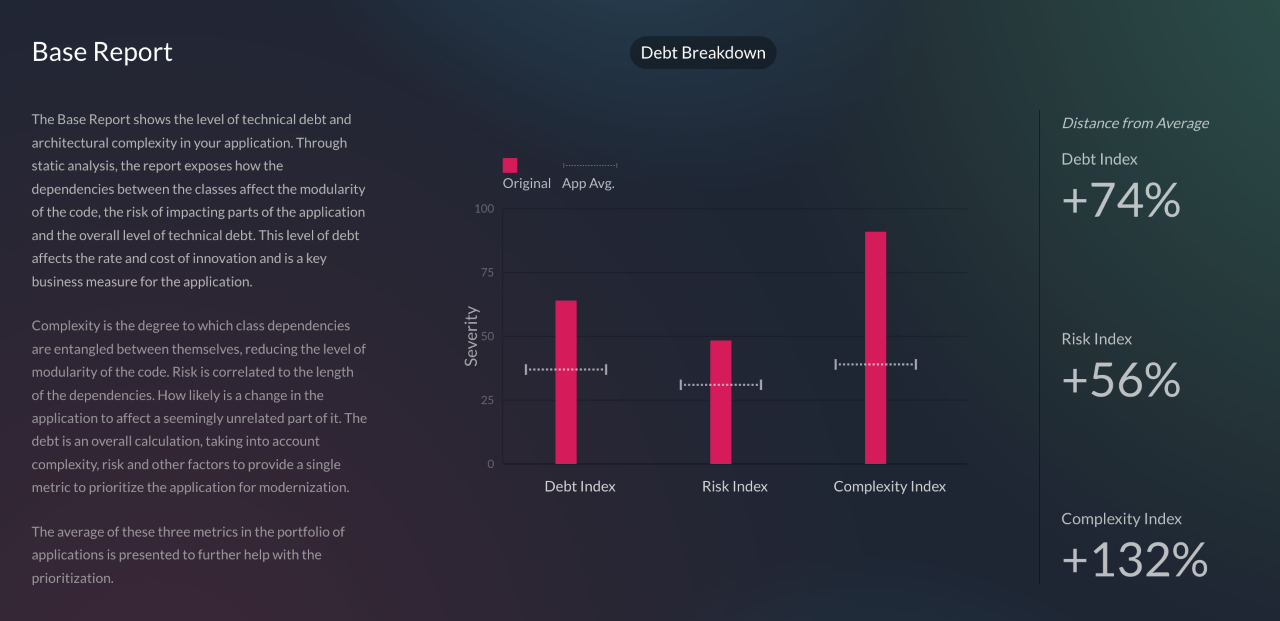
    An AI-based approach reduces the total cost of creating a business case and constructing a roadmap for modernizing existing Java applications, said Quillin. The vFunction Assessment Hub measures application complexity based on code modularity and dependency entanglements and then assesses the level of risk changes might have on the stability of the application based on the depth and length of the dependency chains. It then surfaces benchmarks for debt, risk and complexity in addition to identifying aging frameworks that could create security risks and licensing issues.

    Thus far most organizations have been content to lift and shift Java applications into the cloud without modernizing them. The application simply now runs on infrastructure that is managed by an external cloud service provider. That approach does little to improve the scalability of a monolithic Java application, noted Quillin. The goal should be to convert that Java application into a set of microservices that run natively in the cloud, he added.

    The vFunction Assessment Hub is already being used within a Java Refactoring Service for the Azure cloud provided by Microsoft that is based on agent software to analyze code and the vFunction Application Transformation Engine.

    In general, organizations are embracing microservices to build applications that are both more scable and resilient. In the event a microservice becomes unavailable, requests for services are rerouted to another microservice to make sure the application degrades gracefully, rather than simply crashing altogether. The challenge, of course, is that the dependencies that can exist between hundreds of microservices can be more challenging to manage over time than those of the monolithic application being replaced.

    It’s not likely that microservices-based applications will entirely replace monolithic applications any time soon, but the bulk of new applications are being built on top of a microservices-based framework. As such, many DevOps teams are now managing a broad mix of monolithic and microservices-based applications across IT environments that become increasingly more complex to manage with each passing day.

  • Database Migration From Microsoft Azure to Snowflake on AWS: Part 2

    Database Migration From Microsoft Azure to Snowflake on AWS: Part 2

    In part one of this blog series, we looked at our approach to migration by leveraging the Azure data factory, tuning the performance of Data Factory Pipeline, using Parquet files and increasing computing power. 

    In this blog, we’ll look at some of the challenges encountered during the migration, cost-saving actions and our approach to data validation.

    Challenges Encountered 

    • Data Factory export failed for tables if the column name had spaces or special characters. In such cases, aliases were used (replacing spaces with an underscore) for column names and the query method was used as a source.
    • Data Factory export failed for the column data type “Geography” and had to be cast to varchar and then exported to Blob.
    • Some column names in SQL server were keywords in Snowflake, which didn’t allow it to migrate. For example, ‘LOCALTIME’ is a column name in SQL but is also a keyword in Snowflake, and it is addressed using inverted commas as escape characters (“”) while creating the Snowflake table.
    • During ingestion into Snowflake, the flat files were named after tables, listing files based on the name pattern. For example, if we wanted to list the file with table name test_1, Snowflake would list all the files starting with the name test_1. It is essential to make sure that each file name is unique.
    • If the file to be ingested was incorrect with respect to the table, Snowflake did not return any error messages or warnings. It simply ingested the file and put NULL wherever column mapping was not found.
    • While creating the tables, if the column name had spaces, escape characters were used so that the same spaces could be maintained. But for ingestion of such columns, the column mapping from a flat file would be the same aliases that were used in the source query.
    • Triggers and compute columns were not supported in Snowflake and had to be eliminated while creating the tables.
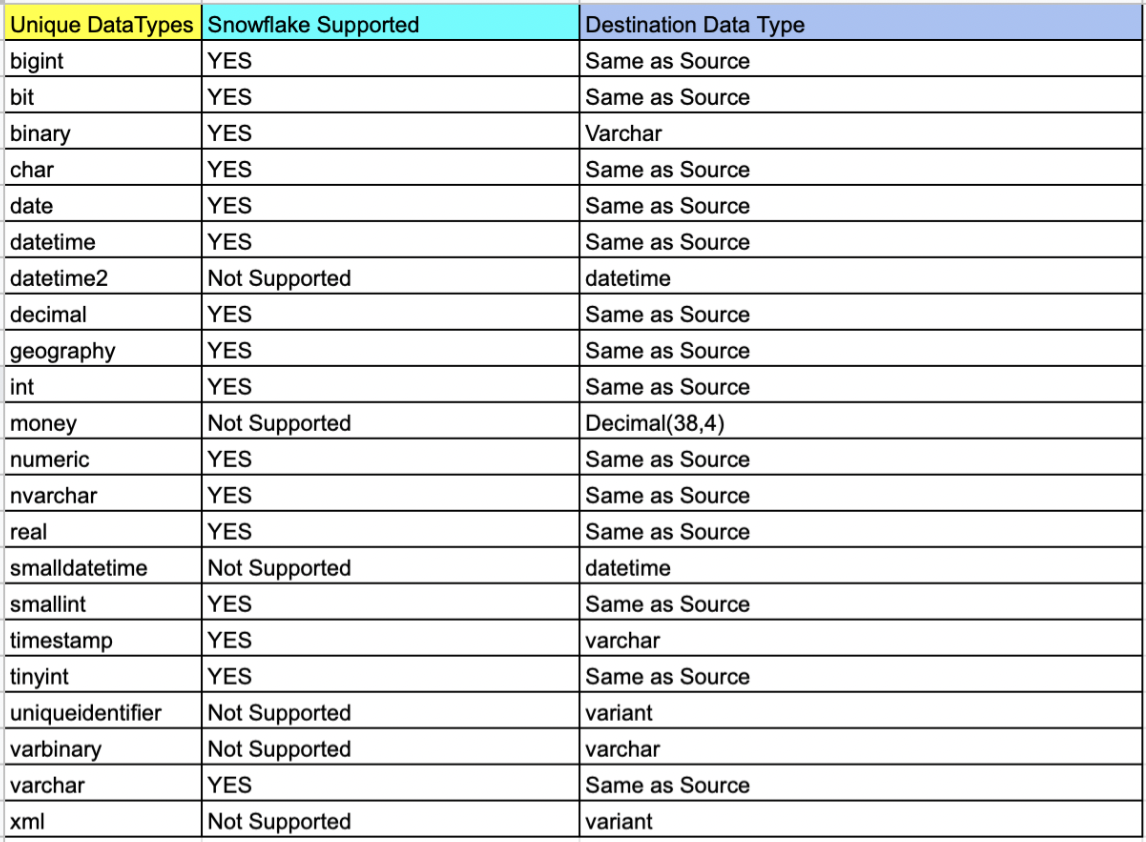
    • Also, data types that did not exist in the Snowflake schema had to be changed, keeping in mind the correctness of data.

    Cost-Saving Actions

    • Use of the Parquet file facilitated a compression rate of up to 75%. The 800GB of data was compressed to 234GB in multiple files which reduced the storage cost of Blobs.
    • Detailed POC and analysis discovered that Snowflake ingestion was optimal with Small for moderate sized tables and Medium for large sized tables which kept Snowflake costs in check.
    • Self-hosted IR saved on the data pipeline operating cost as the compute power of Azure VM was used.

    Cost Estimation 


    Data Validation

    The vital part of the project was ensuring that the integrity and correctness of the data were maintained during the migration process. As a part of standard DataOps best practices, a thorough data validation activity was performed to make sure that the data stayed meaningful and remained of use to drive business decisions.

    The approach to data validation was two-fold:

    In the first approach, all the distinct data types in the SQL server that were part of the db migration were listed and sampled randomly across one row per data type. The same row was fetched from Snowflake and matched.

    List of tables based on data type

    select table_catalog,table_schema,table_name,COLUMN_NAME,* from
    INFORMATION_SCHEMA.COLUMNS
    where DATA_TYPE = 'money' and TABLE_NAME not like 'sys%'

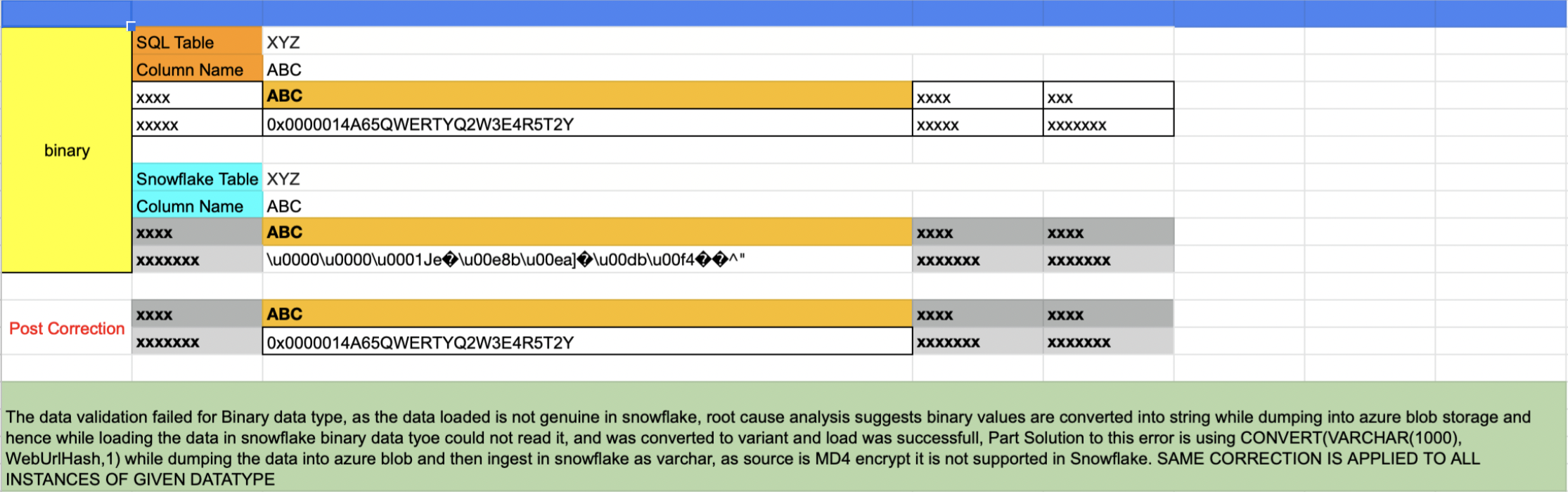
    Issues like that shown below were uncovered in this validation process and were corrected for all instances of the data type.

    The second approach involved writing an automated script that accomplished the following results (More details can be found here):

    • Script touched each table of each database
    • A set of five records were randomly sampled from both sides and matched
    • If the tables were empty, it was recorded as tables with zero records
    • If the sample sets did not match the script, it wrangled the sets and sorted them one column at a time. If the sample matched the script, it was recorded. This wrangle took care of the scenario wherein the first n number of columns had duplicate records
    • Any failed validation attempt would be visible in a generated log report:

    Validation Started for Table: Test1

    —-> Validation Passed for table Test1

    Validation Started for Table: Test2

    —-> Validation Passed for table Test2

    Validation Started for Table: Test3

    —-> Table has 0 records

    Validation Started for Table: Test4

    —-> Validation Failed for table Test4

    Validation Started for Table: Test5

    —-> Validation Passed for table Test5

    ============= Report =============

    # Total Number of Tables Scanned: 5

    # Tables with 0 records: 1

    # Passed: 3

    # Failed: 1

    # Percentage 60.5556123

  • BMC Integrates DevOps Mainframe Portfolio With Git

    BMC Integrates DevOps Mainframe Portfolio With Git

    BMC has expanded its efforts to bring DevOps best practices to the development of mainframe applications by integrating the BMC Compuware ISPW continuous integration/continuous delivery (CI/CD) platform with Git repositories.

    In addition, the company tightened integration between BMC Compuware ISPW and BMC AMI Ops platform and integrated BMC Compuware Topaz Workbench for building applications with code scanning tools from Vercacode.

    Finally, there is also now a BMC Enterprise Connector for Illumio that provides a bi-directional interface between the zero-trust segmentation platform from Illumio and the mainframe. In addition, the BMC AMI Command Center for Security system can now also surface malicious performance activity to accelerate incident response.

    John McKenny, senior vice president and general manager for intelligent Z optimization and transformation at BMC, said the overall goal is to make the mainframe just another platform where IT teams can apply DevOps best practices to build applications faster. That’s more critical than ever because mainframes are often at the core of digital business transformation initiatives and require integration with a wide range of distributed computing platforms. A recent survey published by BMC found two-thirds of respondents (66%) are investing in new technologies such as AIOps and artificial intelligence/machine learning (AI/ML), DevOps and integrations.

    That approach enables organizations to leverage existing mainframes in a way that minimizes technical debt rather than duplicating functionality, added McKenny.

    When it comes to DevOps in mainframe environments, the biggest challenge these days has more to do with culture than the maturity of the tools being provided, he said. Many of the IT teams building mainframe applications still rely on waterfall processes mainly because of simple inertia and a general fear of change, McKenny noted.

    There is, however, a new generation of IT professionals that have embraced modern development practices across all platforms to accelerate the rate at which applications are built and deployed, said McKenny. That shift is leading to the wider adoption of DevOps best practices within both mainframe and distributed computing environments, he added. In fact, as a result, enterprise IT has never been more hybrid, he noted.

    IBM continues to invest in mainframes, so the platform should remain relevant well through this decade and into the next. Though it’s been nearly 60 years since the venerable platform was introduced, it continues to host mission-critical applications for a broad range of enterprise IT organizations. Most recently, IBM added an IBM z16 edition of the mainframe that adds a dedicated on-chip AI accelerator in addition to quantum-safe cryptography. It’s not clear how quickly organizations that have mainframes will upgrade, but that level of investment suggests IBM is still investing heavily in mainframe research and development.

    Regardless of how—or even who—builds applications for the mainframe, tools such as Git repositories will be more widely used if for no other reason than to more easily share code. Now, the issue is improving the overall level of DevOps maturity within mainframe environments to keep up with the rapid pace at which applications are being built and updated across the rest of the enterprise.

  • The Future of Low-Code Development

    The Future of Low-Code Development

    The days when IT teams relied on clunky software development processes and labor-intensive hand-coding to build tangible, reliable and modern applications are coming to an end. With the rise of new automation technology, rapidly rising expectations and demands from innovation-craving customers and end users and a shortage of developers, the software sector has been forced to seek alternative approaches to not only deliver their services and products but to also remain digitally-current. Now, overcoming this challenge is possible with low-code development platforms.

    What is Low-Code Development and Why all the Fuss? 

    Low-code development is a software development practice that empowers digital product teams and citizen developers to build apps without time-consuming hand-coding. In general, a typical low-code platform includes a visual integrated development environment (IDE), connectors to various backends or services, an application life cycle manager and an integrated design-to-code system.

    With these features and attributes, low-code platforms:

    • Abstract away the code behind complex commands and actions
    • Streamline how projects are being innovated and distributed in the span of weeks, not months
    • Enable citizen developers to build apps

    These tools are so effective because they break the mold and automate the app development cycle by providing reusable building blocks. These building blocks can easily be assembled into an entire app, allowing both experienced and beginner technical minds to handle a bigger volume of projects faster than ever. This flexibility is handy, especially when the digital world expects over 500 million apps and digital services to be built and deployed by the end of 2023, according to IDC FutureScape. That is more than all of the software solutions created in the last four decades. 

    A report by Gartner forecasts that by 2024, low-code adoption will be so widespread that 75% of the software solutions built around the world will be made with the help of such tools. While these tools won’t entirely replace traditional software development, they deliver a contemporary, simpler and faster approach to building apps.

    Benefits of Low-Code Development

    Whether it is automating individual manual tasks, eliminating old development models like waterfall methodology or making it easier for a tech newbie to build a prototype or a flexible app, low-code development has many benefits.

    The benefits of low-code software include:     

    Innovative projects can be assembled by a non-technical audience 

    Low-code app builders are game-changers. The need for experienced coders is reduced as this type of tool provides the necessary components and building blocks for non-technical audiences to be involved in full-cycle app development. Another recent Gartner report said that 80% of technology products and services will be created by people outside of tech-driven fields by 2024. And in times when the demand for commercial software, new progressive solutions and skilled developers exceeds the supply, low-code tools are a perfect fit for citizen developers, designers, professional developers, non-technical stakeholders and others.

    Velocity and optimized development cost

    Today, speed is everything. IT businesses and clients require their software to be built within short timeframes and within a strict budget. Legacy systems need rapid modernization without a big investment. One of the greatest advantages of low-code tools is that they let people build at scale without incurring heavy costs or consuming too much time. Automation apps, mission-critical systems and mobile applications can all be created with low-code software.

    Reinventing traditional processes and reshaping how software is built

    Using these automation tools, you don’t have to worry about HTML/CSS, scalability, coding rules, page layout, branding or screen sizes. As mentioned above, some low-code development platforms come with a system that covers everything from design to code and generates production-ready code in the end. Designers and developers come together to use a single platform that simultaneously:

    • Allows them to create solutions that are easy to maintain and that scale on cloud-native architecture
    • Modernizes and facilitates their work 
    • Improves productivity and collaboration
    • Fits their workflow and skills

    Low-code/no-code tools are quickly becoming the next prototyping tools in the enterprise—without needing the technical skills in traditional UX/visual designer-focused tooling. With low-code or no-code tools, screen design is typically done using drag-and-drop, WYSIWYG design-time experience; it’s usually as simple as making a PowerPoint deck. The main difference between this and a UX/visual design tool is that the low-code/no-code tool is building a running app in the background, with real code, connected data, real screen interactions and more. This means that any team member with an idea can express the design, not just a person who has access to a designer.

    No special skills are needed to build something tangible and real—while at the same time going beyond what a mockup or prototype can deliver.

    The future of tools in this space will include connectors and adapters to popular design tools, such as Sketch, Figma and Adobe XD. These connectors and adapters will enable digital product teams—designers and developers—to use a design process and then import designs, interactions, branding and themes into low-code tools, while still obtaining the considerable benefits of time and cost savings of not having to re-build screens that have already been designed pixel-perfect.

  • Digital.ai Extends Scope and Reach of DevOps Platform

    Digital.ai Extends Scope and Reach of DevOps Platform

    Digital.ai today unveiled the Ascension release of its namesake DevOps platform that adds pre-built metrics and best practices dashboards using a Test Lens capability to more easily employ analytics to identify software delivery bottlenecks.

    In addition, the company has added autonomous testing tools that automatically generate performance and security tests for mobile applications. These tools can be run by DevOps teams, developers or business users. An enhanced Change Risk Prediction capability enables machine learning algorithms to make more extensive use of historical data.

    Finally, Digital.ai has also added integrations with the open source Argo continuous integration/continuous delivery (CI/CD) platform and made available an Agility Sync tool for building custom integration with legacy application environments and opened an online marketplace for integrations.

    Jeff Moloughney, chief marketing officer for Digital.ai, said the goal is to extend the reach of the company’s DevOps platform. At its core, the platform has a value stream management (VSM) and version control software originally developed by XebiaLabs and CollabNet VersionOne before the two companies merged to create Digital.ai. The combined company subsequently acquired Numerify, a provider of analytics tools infused with artificial intelligence (AI), Experitest, a set of testing tools, and Arxan, a provider of an application security platform. The company claims that its platforms are used by more than 1,500 organizations.

    In general, DevOps is entering a new era as organizations realize how dependent they are on software to drive business processes, noted Moloughney. Historically, the adoption of DevOps practices has been driven from the bottom up within most organizations. Now, business and IT leaders are also looking to drive the adoption of a consistent set of DevOps best practices to gain more visibility into software delivery, he added.

    That does not mean, however, that organizations can dictate what tools individual developers can use, so the DevOps platform employed has to be extensible in terms of the available integrations, said Moloughney.

    At the same time, Molougney added that more DevOps processes will be automated using machine learning algorithms. Digital.ai is embedding these algorithms within its core platform to both uncover software delivery bottlenecks and automate routine tasks such as testing.

    It’s not clear to what degree organizations that have already embraced DevOps might be considering replacing their existing platforms but, regardless of size, most of them are encountering issues. On the plus side, the number of organizations that are adopting DevOps practices more broadly is increasing as more digital business transformation initiatives are launched. As those practices evolve, the expectation is many of those organizations will embrace analytics in the form of VSM to better optimize their efforts.

    In the meantime, the rate of DevOps adoption across enterprises will continue to vary widely. Each development team within an organization tends to define a set of DevOps practices based on their own requirements. The challenge, given all the dependencies that exist between those projects, is determining the actual rate of progress the organization is making as each of those isolated initiatives progresses.

  • The Great Market Convergence is Coming

    The Great Market Convergence is Coming

    When you look around tech markets—almost any tech market—you can see an obvious overlap. Tons of markets that are complementary and that take different approaches to solving the same problem, or markets that have grown into each other over time.

    This happens in highly active marketplaces. People have great ideas and implement them but someone else thinks a different approach is warranted, and the two don’t directly compete until they have to. There is competition within a market, and then there is competition of markets. I think we are about to see a massive increase in competition of IT and, specifically, DevOps markets. I admit to trying to write this without veering into topics I’m currently covering, so bear with me.

    Let’s take dynamic app protection as a topic. You can do that through your DevSecOps vendor, you can do that through your WAF vendor, you can ask around about AAP vendors if your WAF vendor isn’t one, you can do that through a variety of plug-ins and tools offered for web hosting software like Apache or NGINX … Indeed, IDP is actually just attempting to protect your apps dynamically. I’m sure I’ve missed several other markets that have rushed to fill the gap where live applications were getting nailed by hackers. I chose one market, but pick one in DevOps and start digging. You’ll find the same crazy amount of overlap.

    The thing is, we don’t need fifteen solutions to one problem; we need one or two—a handful at most. And combining the fact that most of these markets are way overdue for consolidation (considering the stresses the global economy is placing on trade) and I suspect we’re going to see a fair amount of that consolidation happen in a relatively short period of time.

    This matters to you for a couple reasons. First, if you think one approach to solving a problem is significantly better than the others currently available, your organization should be investing money there by paying for products and services. “More of us should have bought Betamax” is not a great look. Second, someone needs to keep an eye on how these changes impact the IT environment. If one of your DevOps tool’s vendors is in a merger, inevitably one of the merged organizations takes over and everyone does things their way. That’s not necessarily bad, but can be a scary time if, suddenly, you get an email about a change to a system that’s core to your department. Be aware of what’s going on out there and at least have thought about how you would respond if apps—or an entire market—disappear or are significantly changed.

    And, honestly, because it is the apps we are always talking about—DevOps, mostly—that are most likely to converge with a nearby market, it can seem huge. But remember that the core systems went through this long ago, and while they may go through another iteration of “merge this with that” in the future, it won’t be a huge volume like what the currently very active and young markets appear to be about to suffer.

    So don’t worry too much about which make/gradle/whatever variants you are using or what languages, which overlap incredibly, but tend toward niches. Focus on market spaces still growing and expanding. Know what might be at risk, and have awareness of whether you need to care today or you still have time before the market in question implodes or merges with nearby ones.

    And own it. We both know that when the time comes, whether you were prepared or not, you’ll rock a solution out—because that’s what you do, and there is no one behind IT to hand off to. So keep making your organization look great and just stay aware of the wider IT market trends so you’re not caught completely off-guard.

  • What Should Elon Musk Do? | Passwordless Future: Tense | WebKit iOS Monopoly Ends?

    What Should Elon Musk Do? | Passwordless Future: Tense | WebKit iOS Monopoly Ends?

    Welcome to The Long View—where we peruse the news of the week and strip it to the essentials. Let’s work out what really matters.

    This week: Everyone has Twitter advice for Elon, passwordless vision is vacuous, and Apple prevented from forcing Safari. (more…)

  • Report Finds Most Log4Shell Vulnerabilities Unpatched

    Report Finds Most Log4Shell Vulnerabilities Unpatched

    A report published today by Rezilion, a provider of a platform for tracking and analyzing software vulnerabilities, found that despite all the attention the Java zero-day Log4Shell vulnerability attracted, it appears that nearly 60% of the affected software packages remain unpatched.

    Rezilion used Google’s Open Source Insights tool to scan open source software packages, including dependencies, and found that out of a total of 17,840 affected Java software packages, only 7,140 have been patched.

    In addition, the Rezilion report cited a Log4j vulnerability resource center maintained by Sonatype indicated that 36% of the vulnerable versions of the Log4j Java log management tool that were actively downloaded from Maven Central are still vulnerable to Log4Shell.

    Rezilion also made use of dive, an open source tool for exploring Docker container images, to verify what version of Log4j might be present in containers, and Shodan.io, a search engine for discovering internet-connected devices.

    Yotam Perkal, director of vulnerability research for Rezelion, said that the results suggested that many organizations that have deployed a Java application have no way of knowing whether it includes the widely used open source Log4j tool for tracking logs within Java application. Many of the instances of that tool are subject to a recently discovered zero-day vulnerability that can be easily used to execute malicious code within a Java application.

    The challenge is that many organizations are using Java software components provided to them by a third party, and they assume that software is secure. However, that third party is often not aware of how that software may have been deployed, noted Perkal.

    More troubling still, many organizations that deploy software today don’t actively manage anything that might be considered a software supply chain, he added. Software is deployed as needed with little to no regard for provenance, said Perkal.

    Even when organizations can track software components, patching Log4j is a challenge. Java files can be nested layers deep into other files. Java applications can also be packaged in ways that make searching for vulnerabilities more difficult.

    Naturally, much of the responsibility for discovering instances of vulnerable Java applications falls to DevOps teams. As organizations embrace DevSecOps best practices that revolve around a software bill of materials (SBOM), it becomes easier to track vulnerable software packages. The issue is that most organizations either don’t have an SBOM or fail to update it as applications are upgraded. In the absence of an SBOM, many DevOps teams are still looking for instances of Log4jShell four months after the initial vulnerability was disclosed.

    Unfortunately, this latest vulnerability crisis doesn’t appear to be the wake-up call that drives more organizations to implement DevSecOps workflows, said Perkal. While some organizations are proactively patching applications, many others are still waiting on updates from a third party they hope will address the issue. Those updates, however, may not arrive in time to prevent cybercriminals that know about the Log4jShell vulnerability from wreaking havoc.