Category: Enterprise DevOps

  • Best of 2018: The Beauty of the COBOL Programming Language

    Best of 2018: The Beauty of the COBOL Programming Language

    As we close out 2018, we at devopsy.kinsta.cloud wanted to highlight the five most popular articles of the year. Following is the first in our weeklong series of the Best of 2018.

    Well-written code is a work of art. Always has been, always will be. A programmer pulls a thought pretty much out of nowhere and transforms it into a working idea that can be used by others. It’s abstract expression made real. Computer programming requires a depth of creativity and discipline of logic that is hard to find elsewhere. Maybe architecture and the theoretical sciences come close, but computer programming stands apart. Computer programming is special and I love it!


    Thus, I am always interested to learn a new programming language. Every programming language offers a new way to expand my thinking. It’s always time well-spent.

    Recently I decided to learn COBOL, for no other reason than the fact that there are a lot of mainframe installations out there and it’s the mainstay language for many of them. Mainframes are critical to the operations of many banks, insurance companies, transportation systems and governmental agencies. Learning COBOL been on my Bucket List for while.  So I took the plunge.


    What does the term, COBOL stand for? Common Business-Oriented Language

    Working with COBOL in a Modern IDE

    The first thing I needed in my journey to learn COBOL was an IDE. I am a big supporter of coding in an integrated development environment (IDE). I like being able to write, test and run code all in one place. Also, I find the support features that an IDE provides, such as visual code structure analysis, code completion and inline syntax checking, allow me to program and debug efficiently.

    The IDE I found is an open source product, OpenCobolIDE, as shown below in Figure 1.
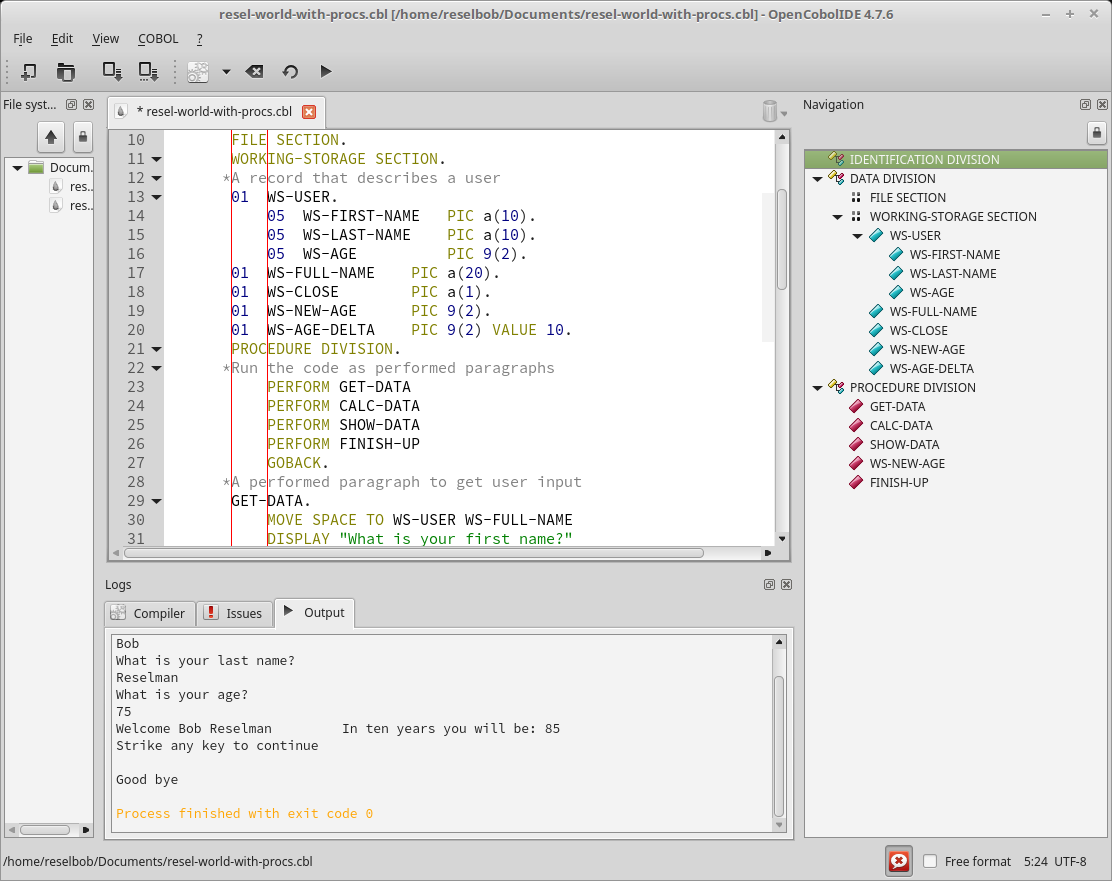
    Figure 1: OpenCobolIDE provides many tools to make COBOL programming easier

    OpenCobolIDE allows me to write, compile and run code all in one place, without having to go out to the command line, which is very good because I am the world’s worst typist!

    Programming COBOL in the Real World

    When it comes time to do real world, mainframe based COBOL programming, you will do well to look at the IDEs that IBM provides. The tools are designed to go about against its Z Systems environment seamlessly as a set of Eclipse plugins. These tools allow COBOL developers working in the mainframe environment to code, debug, unit test and do problem determination.

    Having set up my development environment, the next thing to do was design my first project.

    Designing My First COBOL Program

    Typically when learning a new language I like to start small and work my way up into more complex tasks. I did the typical Hello World program. You write the code to display string, Hello World, to standard output. Every developer does one. It’s a trivial program, as shown below in Listing 1

    beauty-of-cobol-listing-01
    Listing 1: A Hello World program written COBOL


    While the Hello World required that I learn about the concept of a DIVISION, which I will discuss in detail below, in the scheme of things, I needed more. I wanted to write a program that would force me to learn how the following:

    • How to create and use variables.
    • How to structure data into a hierarchy.
    • How to structure code into encapsulated procedures.
    • How to do some basic arithmetic.
    • How to accept user input and then do some manipulation around that input.

    Thus, I create the program, RESEL-WORLD, as shown in Listing 2, below.

    beauty-of-COBOL-Listing-02

    Listing 2: The COBOL program, RESEL-WORLD accepts and manipulates users’ input

    The user input and program output is shown below in Figure 2.


    Figure 2: The RESEL-WORLD COBOL program asks a user for first name, last name and age, then manipulates the input

    The RESEL-WORLD program taught me a lot about COBOL and how to program in the language. In the spirit of giving, I am going to share what I learned from writing the program. However, before I delve into the details, please be advised that the information I’m presenting is but a high-level overview. As with any programming language, it takes about a year of consistent coding to become an entry-level professional. My sincere hope is that the information I provide gives the reader a good sense of the language and enough motivation to want to learn more. As I mentioned early, learning COBOL is worth the effort.

    COBOL is Code in a Structured Document

    The most important thing to understand when learning COBOL is that is very strict in terms of code layout. The layout rules relate to the use of columns and characters. Also, the format uses a hierarchical outline structure. The following sections describe the details of layout specification.

    The COBOL Column Specification

    In COBOL a line of code can be no longer than 80 columns in length. You can also think of a column as a character. Columns are segmented into groups, with each group serving a particular purpose. The columns groups are as follows:

    Columns 1-6 is the group in which a programmer defines a sequence number. A sequence number is similar to a line number.

    Column 7 is reserved for special characters. Asterisk (*) starts a line of comment. Hyphen (-) indicates line continuation and slash (/) is form feed.

    Columns 8-11 is called Area A. Area A is the group of columns in which you start a DIVISION, PARAGRAPH and SECTION. We’ll talk more about these below in the next section, The COBOL Structural Hierarchy.

    Columns 12-72, also known as Area B, is where you write code statements.

    Columns 73-80 is reserved for developer use. You can write poetry in there, if you so desire. Just make sure you don’t go past column 80.


    Figure 3, below illustrates the columns grouping described above.

    Figure 3: Each column in a COBOL file is specified to serve a specific purpose


    COBOL is a compiled language. When it’s time to run your code, the compiler will check to make sure that the code layout adheres to the column grouping specification. If there is a violation, the compiler will error.

    Understanding Performance in Terms of Compilation and Compilers

    COBOL is a compiled language, as are others such as Java, C# and C++. Compilation is the process of taking textual source code and converting into a binary format that the computer can understand.

    There’s a lot of variety in the COBOL world when it comes to compilers, particularly when it comes to cost and performance efficiency. For example, how a compiler orchestrates the way numbers are loaded and then computed in memory matters a lot! A good compiler will make code run really fast.

    IBM has been in the COBOL business for a long time and has a keen understanding about making compilers that are fast and cost-effective. For example, the z14 System compilers improve efficiency by taking advantage of almost 24 new low-level instructions. As a result, computation speeds improve dramatically.

    As you work more with COBOL, you’ll come to appreciate the power that an industry-leading compiler such the IBM Z Systems brings to the coding experience.

    The COBOL Structural Hierarchy

    The concept behind the file format of a COBOL program is based on the structure of a document outline, with a single top-level heading followed by subordinate levels. The organizational units that make up the hierarchy are PROGRAM, DIVISION, SECTION, PARAGRAPH, SENTENCE, STATEMENT and CHARACTER. Figure 4 illustrates the hierarchy.
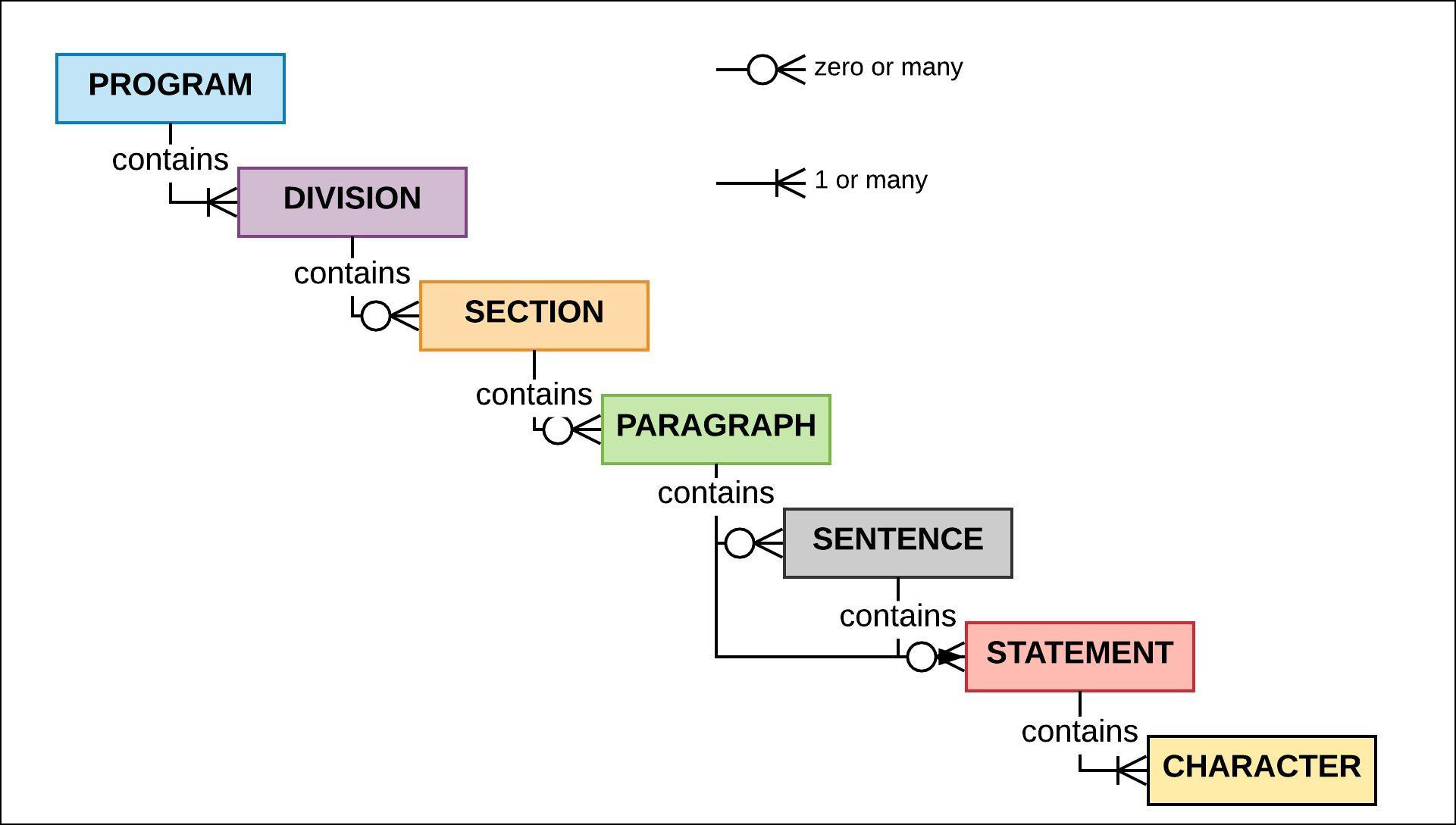
     

    Figure 4: The structural hierarchy of COBOL program entities

    PROGRAM is the root level of the COBOL code hierarchy. PROGRAM represents the unit of code that the mainframe job scheduler, the JCL, loads into memory to run. The program is identified by the PROGRAM ID statement in the IDENTIFICATION DIVISION. The IDENTIFICATION DIVISION is part of the next level of hierarchy that descends from PROGRAM. PROGRAM must contain the IDENTIFICATION DIVISION.

    There are other DIVISIONs that can be included. These other DIVISIONs are: ENVIRONMENT DIVISION, DATA DIVISION and PROCEDURE DIVISION,  which occur after IDENTIFICATION. Also, these subsequent DIVISIONs must appear in the order defined: ENVIRONMENT, DATA and then PROCEDURE. You can read a detailed description of each DIVISION here. DIVISION names are terminated with a period, for example,

    DATA DIVISION.

    The next organizational level down from DIVISION is SECTION. (Please see Figure 5.) Each DIVISION will contain SECTIONs that are special to it. For example, the DATA DIVISION can contain FILE SECTION, a, WORKING-STORAGE SECTION and/or the LINKAGE SECTION. You can read the details about DIVISIONs and SECTIONs here.


    Figure 5: A COBOL program is structured in a hierarchical manner

    A SECTION name is terminated with a period, for example:

    WORKING-STORAGE SECTION.

    A SECTION contains zero or many PARAGRAPHs. (Typically a SECTION will have at least one PARAGRAPH.) A PARAGRAPH name is terminated with a period, similar to a DIVISION and a SECTION.

    A PARAGRAPH contains SENTENCEs or STATEMENTs. A SENTENCE is a group of STATEMENTs. Usually a PARAGRAPH contains one or more STATEMENTs. A STATEMENT is a line of execution. A STATEMENT is made up of CHARACTERs. A CHARACTER can be an alphanumeric symbol or a special character. CHARACTER is at the bottom of the COBOL code format hierarchy.

    Variable and Data Types

    COBOL allows you to declare variables in a variety of data types. Special to COBOL is the concept of a variable level as represented by a level number. A level number defines a variable in terms of being or having a parent variable. (You’ll see more about this in the section, COBOL Supports Hierarchical Data, later on.)

    The following statement, which will be declared in the WORKING-STORAGE SECTION of the DATA DIVISION, is the declaration of a variable, WS-QUANTITY. WS-QUANTITY will hold a numeric value.

    01  WS-QUANTITY PIC 9(2) VALUE 12

    The expression above above declares a variable , WS-QUANTITY to be a two-digit value with an initial value of 12. Also, the variable is declared to be at level 01, which is the highest level possible. The variable has no parent. The way we know that WS-QUANTITY is a variable for a two-digit value is due to the PIC (Picture) clause. You can think of a PIC clause as a type declaration. Table 1 provides a high-level description of the various PIC clause symbols.

    Symbol Description Example Declaration Sample Value
    9 A numeric value where each occurance of 9 represents a digit 99 or 9(2) 35
    a Alphabetic aaa or a(3) “Bob”
    x Alphanumeric xxxx or x(4) “R2D2?”
    v Implicit decimal* v(3) .175
    s Sign s9(2) -76
    p Assumed decimal* p9 .6

    Table 1: Symbols for a PIC Clause

    *COBOL has a special way of storing numbers such that the numeric conversion take place when the characters are loaded into memory. For example, a variable with a PIC of p9(2) will be stored as 56 and loaded into memory as .56. For a more detailed discussion of usage and the PIC clause, go here.

    COBOL Supports Hierarchical Data

    Storing data in a named group of variables makes programing easier. For example, in the C programming language, we can use a struct to name a group of variables, as shown below in Listing 3.

    struct User { 
      char  first_name[10]; 
      char  last_name[10] 
      int   user_id; 
    };

    Listing 3: A simple structure in C


    One of the real nice things about COBOL is that it allows you to organize data according to a named group of values similar to that of a C struct. What’s interesting in a historical sense is that COBOL has had this capability well before Kernighan and Ritchie created the C programming language.

    The way COBOL accomplishes named data grouping is with construct called a record. Figure 6 below shows a graphical representation of a record named, WS-USER.

    Figure 6: The record, WS-USER contains subordinate variable, WS-FIRST-NAME, WS-LAST-NAME, WS-AGE

    The code snippet in Listing 4, which is from the RESEL-WORLD program at the start of this article, shows the COBOL code that declares the record, WS-USER.


    beauty-of-COBOL-Listing-04

    Listing 4: The record, WS-USER contains 3 subordinate elements, WS-FIRST-NAME, WS-LAST-NAME, WS-AGE

    Notice in Listing 4 above the there are two levels of data variables in play: 01 WS-USER and 05  WS-FIRST-NAME, 05 WS-LAST-NAME, 05 WS-AGE. The variable, WS-USER is a parent to the subordinate, level 05 variables, WS-FIRST-NAME, WS-LAST-NAME, and WS-AGE.

    Assigning variable to a numeric level is special to COBOL. The declaration logic is that a record variable (the root of the record) has a level number of 01.  Levels 02 to 49 are used to declare subordinates elements. (You can think of a element as a member of the record.)

    You use the reserved word OF to access an element of a record. Listing 5 below shows two statements. The first asks a user to input their first name. The second statement takes the value entered and assigns it to the element, WS-FIRST-NAME of the record, WS-USER.

    DISPLAY "What is your first name?".
    ACCEPT WS-FIRST-NAME OF WS-USER.

    Listing 5: Accessing an element of a record in COBOL


    It make sense that records were part of COBOL from the start. COBOL was intended to be a language used for business application. Businesses have been organizing values according to named groups since before the customer form was created. COBOL was designed to reflect business needs. It’s interesting that the fundamental needs of businesses in terms of logical data structures have been surprisingly consistent over time.

    COBOL Has a Natural Language Syntax

    Expressing a statement in COBOL is very similar to the way a person speaks naturally. Listing 6 below shows the statement that adds together the values of the two variables, WS-AGE-DELTA and WS-AGE (from the record WS-USER), and stores the result in the variable, WS-NEW-AGE.

    
    ADD  WS-AGE-DELTA WS-AGE OF WS-USER TO WS-NEW-AGE.

    Listing 6: Adding two integers, WS-AGE-and DELTA WS-AGE, then storing the sum in the variable, WS-NEW-AGE

    Notice that the statement in Listing 6 is very close to saying, “Add WS-AGE-DELTA and WS-AGE from WS-USER to WS-NEW-AGE.”


    What I find pretty astounding is that many modern programming paradigms try to capture the ease of natural language expression that COBOL has had for years. What comes to mind immediately is the use of natural language expressions in the NodeJS Chai package. Chai is used in NodeJS unit testing to express BDD assertions. Here’s a Chai expression that checks a variable, myVar to assert that it’s a string.

    expect(myVar).to.be.a('string');
    
    FAST FACT: Is COBOL a case-sensitive language?

    No. COBOL will consider a variable named WS-FIRST-NAME to be the same as one named ws-first-name.

    COBOL supports DRY

    For programming language to be really useful, it needs to support DRY. DRY is an acronym for Don’t Repeat Yourself. Most programmers don’t want to write the same code over and over again, nor should they. What you want to do is to encapsulate code in to a single area of execution that can be called repeatedly. Being able to program by DRY is common for most languages—BASIC, Java, C#, Javascript, Python, to name a few and … you guessed it: COBOL.

    COBOL supports code segmentation and reuse in a variety of ways. One way is through linkage, calling routines between programs. Another way is to segment code inline under a PARAGRAPH in the PROCEDURE DIVISION and then call that PARAGRAPH. (See Figure 7.)

    Figure 7: You can make code reusable in COBOL PARAGRAPHs

    The little RESEL-WORLD program I wrote uses the inline PARAGRAPH technique. Before I go in to the details of calling code encapsulated into a PARAGRAPH, it’s important that you know that in COBOL the entry point of execution into a program is the first line of code after the declaration of the PROCEDURE DIVISION, as shown below in Listing 7.

    beauty-of-COBOL-Listing-07
    Listing 7: COBOL supports reusable code by using PARAGRAPHS to segment execution

    Notice the PERFORM statements right after PROCEDURE DIVISION. These four statements are calling PARAGRAPHs. (For those of you familiar with JavaScript, you can think of each PARAGRAPH as a function definition.) Essentially what the code is saying is, “Execute the code at the paragraph named, GET-DATA, then perform the code at CALC-DATA, SHOW-DATA and then FINISH-UP.”

    Encapsulating code into STATEMENTs within a PARAGRAPH prevents code from become spaghetti that is hard to maintain. Also, the encapsulation enforces the sensibility of DRY. Any language worth its salt needs to support some sort of encapsulation. COBOL meets the need with room to spare.

    An Expressive Language for Now and the Future

    The more I learn about COBOL, the more I like it. The language continues to evolve to meet the needs of our fast-changing times, with revisions as recent as 2014. Since its inception there have been a dozen enhancements to COBOL including a continuing stream of formal standards.

    Today’s COBOL supports modern programming paradigms such as object orientation. The IDEs have grown to keep pace with the demands of modern users. And, given the immense installation base out there, there is a lot of money to be made doing COBOL programming. To quote Wikipedia:

    In 2006 and 2012, Computerworld surveys found that over 60% of organizations used COBOL (more than C++ and Visual Basic .NET) and that for half of those, COBOL was used for the majority of their internal software.


    What’s even more amazing to me is the cleverness of engineering the language has promoted. COBOL developers addressed problems in the past that still vex many today. We modern developers can fall prey to thinking that before we came along, there was no cool stuff. It’s like the young, aspiring guitarist who thinks thinks he has his chops down and can shred to the top of the heap. Then one day his music teacher gives him a 1936 recording of Django Reinhardt playing guitar, and playing with only two functional fingers on his left hand! At that point the young artist realizes that virtuosity transcends era and that creativity has no bounds. This is what it’s like for me as I learn COBOL. It’s a beautiful, expressive language that was cool then and is very cool now. Learning it is making me appreciate how much amazing thinking went on back then and continues to emerge. There’s a lot of rich opportunity at hand to make great code for mainframes using COBOL. It’s only a matter of mastery, creativity and discovery.

    Special Thanks

    If I have seen further it is by standing on the shoulders of giants.

    —Isaac Newton, Letter to Robert Hooke, February 5, 1675

    Learning any programming language is hard work. Years ago, when I wanted to learn a new language, I would get a few books on the topic and then hunker down to spend the hours necessary to absorb the required knowledge. If I had the time, I might take a course. Maybe I had an expert friend I could call up when I hit a wall or needed real-world guidance.

    We’ve come a long way since that time. The internet is a game-changer. Online tutorials, videos and interactive, digital books make things a whole lot easier than in earlier times. My experience learning COBOL testifies to the value of these modern benefits. But still, as I’ve been learning, I’ve hit more than one wall that required professional guidance and review. Allan Kielstra and Roland Koo at IBM (who also wrote this great article) provided the expertise that made my learning COBOL not only less difficult, but also fun. I am in their debt. Their enthusiasm for COBOL was infectious. Their commitment to technical excellence is inspiring.


    — Bob Reselman

  • The Limiting Factors of Microservices Also Apply to FaaS

    The Limiting Factors of Microservices Also Apply to FaaS

    In enterprise development and deployment, the pattern is easy to detect. A big monolithic application is targeted for re-architecting as a microservices architecture. People excited about microservices get together and break up the design to make it far less monolithic and far more loosely coupled.

    If your organization is lucky, it is at this stage that those responsible realize that breaking a monolithic application down too far is bad for complexity, performance, monitoring and maintenance—pretty much everything re-architecting is supposed to fix.

    Far too many organizations don’t realize this until the implementation phase, though. First, a metric ton of little tiny microservices are deployed, then the organization realizes that functionality such as database access can be applied much more efficiently through one larger service that handles all interaction with the database for the app, rather than through five or 10 smaller services that replicate code and end up calling each other anyway.

    Function as a service (FaaS) has much the same issue. It is an astounding solution for some uses, but in the end, users must consider what access the function requires to other parts of the system and what task is being achieved. The early uses of FaaS are well-documented; longer running independent jobs such as image or video processing were a bit early hit, for example, particularly for services that have highly varying traffic rates. But other uses, such as handling bottlenecks in traffic spikes (hello holiday shopping season!) or out-of-band operations processing, are less documented at this point. Entire applications have been designed from the ground up in serverless, but they are relatively few in terms of overall applications out there.

    FaaS is highly suited to DevOps, because upgrading the function is as simple as redeploying code. There are no concerns about OS or library version, because those are largely beyond your control. But that is as big a negative as it is a positive. There is no flexibility in OS version or library inclusion because those are beyond your control—for the most part, anyway.

    As with the vast majority of new technologies, expect adoption of serverless to grow and the hype to grow more quickly. It is definitely in the market where we have seen massive shifts—virtualization and then containers really did live up to the hype in terms of usage—but it needs to have a driving reason for adoption. Look closely at what your application and its DevOps toolchain are doing before hopping into the deep end. For some uses, FaaS is the fastest/easiest/lowest-maintenance solution. But that does not make it the Swiss army knife that virtualization and containers have proven to be. Indeed, if you think persistent storage is painful under containers, try it in a FaaS environment—as just one example.

    FaaS is useful in many scenarios, but just remember where/when/why you are adding FaaS into your DevOps processes, and take advantage of on-demand processing with few scaling limitations while avoiding seeing everything as a FaaS problem because FaaS is the FaD.

    — Don Macvittie

  • Containers: All Your Base are Belong to Us

    Containers: All Your Base are Belong to Us

    The world is still changing. No surprise there, but the direction and velocity have been modified by the growth of container usage. Back in 2015, we at devopsy.kinsta.cloud showcased a survey we performed that said container usage was staged to take off. That it did, with a vengeance. No matter the category—pilot programs, test, production—it seems to have a greater penetration each year.

    And why not? There are a whole collection of benefits to containers—smaller footprint than VMs, more portable than cloud instances, more agile than … well, any of the alternatives. And the weaknesses—the use (and abuse) of IPTables and persistent problems with persistent storage—are being addressed at a rapid clip.

    But It’s Not All Roses

    Sorry to say that there is, as always, a fly in the ointment. We have to identify weaknesses in new architectures to plan for them and overcome them. And container infrastructure is not immune to this process. Nothing is perfect.

    The first problem is with overall security. Your container management system is now the center of the world. A single point of penetration that could yield dozens to thousands of infected servers. It is like a magnet to ne’er-do-wells. Protect it, lock it down, follow advice on Container Journal and Security Boulevard about how to keep your system as protected as possible.

    That was the easy one. We have a ton of experience protecting important central systems.

    The more difficult ones all revolve around your physical infrastructure and where it meets your virtual container infrastructure. Look at all the boxes in your data center and the services they provide, then map out how those services integrate with your containers. Once you’ve mapped them, work the mappings into your DevOps projects. Load balancing and storage provisioning are two areas in which what a traditional DC does is duplicated inside the container environment, and where that processing is to occur should be a conscious choice about what is best for the application, not a decision based on what is easiest/in front of you.

    It is an (arguably) bigger issue with storage. Just because the container can grow or shrink its internal storage does not make it the right place to position a fair selection of your data. Think about what will be needed in the future—with or without the application that this container or container set represents—and make a conscious choice about what is ephemeral data that can go away should an instance die versus what is needed long-term. Work those choices into DevOps processes. It can be a pain to access persistent data that is remote to a container, so make the painful parts automated via your DevOps processes.

    Both of these problems are compounded in most (but not all) cloud environments. Too much cloud functionality is designed to lock users in. While that has been a standard practice in IT for decades, the problem with containers is that they are inherently portable. Build them to be so. Yes, lock-in functionality always brings benefits, but mobility lets a team choose where best to deploy a container system with each inflection point (purposely being vague here—a highly agile/DevOps shop could have daily inflection points, while a single team just piloting containers in their DevOps environment may only have them on occasion when something large changes with the system). Should something change at a preferred cloud vendor that makes them no longer preferred, the fewer modifications required to move to another platform the better. So building default container/container management into the DevOps toolchain is preferred to building in vendor-specific options when a choice is available. Storage is an easy one to point at and say “choice might not be available.” Allocating disk is not very portable between platforms, but if that’s one of only a handful of things that must change, portability is still an option.

    In short, containers are coming, and they’re coming fast. Build them into your DevOps toolchain as portable solutions that automate the worst of the speed bumps. Make conscious choices about where infrastructure-based functionality should reside, and implement based upon those choices.

    And keep rocking it. If moving from any other environment (with the arguable exception of cloud), containers will be faster to spin up and to spin down. Just address the issues before they hit you, and all will be well.

    — Don Macvittie

  • Reducing Poverty in the Age of Automation

    Reducing Poverty in the Age of Automation

    In 1966, more than half of the people in the world lived in extreme poverty. I don’t mean public housing, food stamps, subsidized school lunch, free health clinic poverty. I mean the type of poverty in which there’s no electricity, no running water, no toilets and open sewers, and most children never see a doctor or the inside of a classroom. Back then, people living in extreme poverty had a daily diet of gruel; not rice and beans, mind you, but mushy, flavorless, boring gruel. Violence was rampant. Infant mortality was high and living to 65 was more the exception than the rule.

    While it’s true that there were pockets of prosperity to be found in the Third World, for most people, if you didn’t live in Australia, Japan, North America or Europe, the odds were your life was not that different from a peasant living in the Middle Ages, except that maybe you had access to a TV or radio in the village square.

    Cheap Technology Contributes to Declining Rates of Poverty

    But things changed. In 1997, the number of those living in extreme poverty dropped to 42 percent of the people in China and India. By 2017, the number dropped again, this time to an amazing 12 percent in India and .07 percent in China. Now, this doesn’t mean that everybody in India and China rode around in Toyota Camrys and spent their evenings gazing at a 52-inch high-def TV, but it does mean that just about everybody went to school, saw a doctor and had some choice in what they ate for dinner. It might not seem like a lot, but when you consider that their great grandmothers could barely read a newspaper, it’s a big deal.

    This progress didn’t happen by magic, and there’s a good argument to be made that it didn’t happen because of politics. My opinion is that it’s due in good part to the proliferation of cheap technology brought about by automation.

    The Toothbrush as an Agent of Change

    Small pieces of cheap technology can make a big difference. Take the toothbrush, for example. Not that long ago, a personal toothbrush was a luxury item for many. Today there are machines that make them automatically by the dozens, for pennies in material cost. Anybody can buy one and those who can’t many times can get one for free. Think what it must be like for a 7-year-old child in a classroom trying to learn how to read while in the throes of dental pain. There wouldn’t be a lot of learning happening.

    Studies have shown that a leading indicator of good health in the long term is the practice of good dental hygiene on a daily basis. Giving a child a toothbrush and some toothpaste early in life makes a big difference. Children who brush their teeth regularly fare better. A toothbrush might seem like a trivial consumer good, but it is actually a high-impact technology that has lifted many people out of poverty.

    Faster Credit Reporting Means Less Poverty

    Another example of a small piece of automation that’s improved the lives of billions is credit reporting. Thirty years ago it took a few days to get the credit rating of a company, and getting the credit rating of a sovereign state could take longer. Today, getting a credit report takes seconds. Automated credit reporting accelerates financing, which not only makes it easier for a consumer to get a home mortgage or car loan, but also for sovereign states such as India to get large-scale, industrial goods such as bulldozers. More bulldozers translates into more roads; more roads lead to more commerce and more commerce leads to prosperity for more people. It’s a pattern that’s difficult to ignore. Just take a look at the economic growth that accompanied the expansion of the U.S. interstate highway system in the last century. In this century, the same growth pattern is underway as China grows its One Belt, One Road (OBOR) transportation infrastructure on a global scale.

    The Cellphone: A Tool for Prosperity on a Global Scale

    Which brings us to the cellphone. The first mobile phone cost $4,000. Today, you can buy a prepaid, throwaway one with service for around $50. Given the technical infrastructures required to build the phone and networking infrastructure necessary to provide service, selling a fully functional cellphone profitably at $50 is a near miracle. And, its impact goes way beyond a simple, “What time will you be home for dinner?” conversation. There’s a big difference between living in poverty and living in poverty yet having a cellphone. A cellphone puts a person on the grid even when living in a hut in a remote village in Niger. Having a cellphone means being able to solicit paying work. It means having access to simple bank services. It means being able to get medical care in an emergency. And, a cellphone can connect users with online learning resources that can enhance the educational experience for those living in parts of the world where access to secondary education is rare. It’s no wonder the Gates Foundation is focusing on programs that use cellphone technology to address issues in poverty stricken areas.

    Not only has cheap technology reduced the cost of cellphones to nearly free, it also has reduced the cost of dental crowns through 3D printing technology and international trade through automated navigation systems for ocean-going vessels. Cheap technology also has brought about free online college courses and built-in writing assistants for email clients that have had the surprising effect of giving people better command of the written word.

    The Fall of Global Death and Destruction

    Our technological achievements allow us to grow more food, educate more people and reduce the level of violence to an all-time low. Remember, 20 million Russians were killed in World War II. That’s 5 million people a year over from the beginning of hostilities in June of 1941 until the war’s end in August of 1945. We’ve not seen slaughter in such numbers since that time. Yet, news of today’s conflicts is broadcasted on a global scale, so it can seem as though millions are dying everywhere. But the actual number of people killed in armed conflicts today comes nowhere close to the number casualties that were the result of the world wars of the last century.

    As the Numbers Go Down, the Risks Become Greater

    Things are getting better for more people and we technologists have been significant contributors to these improvements. Yet, new risks are on the horizon that could stifle the upward trends. One of the biggest potential dangers is a worldwide pandemic. While cheap air travel has removed the barriers of international travel for more people, it also has made it easier for a highly contagious disease such as Ebola to spread faster.

    And then there’s always the risk of nuclear catastrophe. The number of nuclear weapons has decreased, but technology has made possible nuclear devices that are the size of a suitcase. Whereas it takes the resources of a sophisticated sovereign state to create and deliver missiles capable of a nuclear strike across continents, all that is required for a non-state belligerent to deliver a nuclear blow is a small device hidden in the trunk of a car driven across an unguarded frontier. It’s a remote possibility but a possibility nonetheless, and one that can have a catastrophic outcome of unimaginable dimensions. Fortunately, for better and worse, we in technology have created planetary surveillance systems that make it possible to guard against such an occurrence.

    Considering the Big Picture

    Technology grows in complexity every year, particularly for those of us in DevOps. The rate of innovation can be overwhelming. We’ve got to know more to do more. As such, many of us give most of our attention to the details that make the technology work. Sometimes we lose sight of the big picture. But, here’s something to consider: As weird as it may sound given current perceptions, there’s a good argument to be made that, given the increasing rate of technological innovation and the reduced costs of mainstream technology produced by such innovation, we might eradicate extreme poverty in our lifetime, if not the lifetime of our children. In the past such thinking was considered grandiose. But, as the $50 cellphone demonstrates, it’s a goal we can look forward to achieving.

    Authors note: The source of the data on the reduced rates of poverty worldwide described in the opening of this article comes from the book, “Factfulness” (pages 52-53) by Hans Rosling , Anna Rosling Rönnlund and Ola Rosling.

    — Bob Reselman

  • Breaking Down Data Silos in Your Organization

    Breaking Down Data Silos in Your Organization

    Today’s organizations can finally use advanced technologies to unlock the true value of all of their data. This enables them to make better decisions, serve up better customer experiences, accelerate innovation and respond to crises faster—even preventing them from occurring in the first place.

    Even so, many organizations are unable to do this because their systems are too isolated from each other. Getting the most value out of your data starts with shattering data silos, or isolated “islands” of data that the majority of folks in your organization aren’t aware even exist.

    Created by the increasing use of multiple systems to store and analyze data, data silos are have become all too common in today’s organizations. Data silos create disjointed customer views that result in sub-par data analytics, which worsens the customer experience.

    Without the ability to access and analyze all of your data in a fluid manner, it becomes very difficult to deliver exemplary customer experiences and uncover what your customers truly want.

    Ridding the Data Silos

    Getting rid of data silos isn’t as hard as a lot of organizations think—in fact, there are many ways for organizations to break down data silos to make the most of their data. Here are the five best ways to break them down:

    Make it a Top Priority

    Data silos won’t get rid of themselves. If you want to eliminate data silos at your organization, make it a top priority. Develop a comprehensive plan as to how exactly you’ll get rid of them and make sure all involved employees are aware of your intentions. If necessary, put together a cross-functional team to oversee the consolidation process to ensure smoother sailing and quicker results.

    Encourage Communication and Collaboration

    Many data silos are created due to a lack of communication between teams in different departments. A marketing team, for example, might maintain a repository of content in a random Google Drive folder while sales might have a ton of assets stashed on Dropbox. Both groups might be unaware of where the other is storing their files.

    Get rid of data silos by encouraging your employees to communicate with one another regularly. It’s also important to embrace a company culture that celebrates collaboration. You’ll get better results, and the increased chatter will reduce the chances data silos go unnoticed.

    Simplify and Consolidate Tech Infrastructure

    The number of technologies requires by modern organizations to capture revenue these days is staggering. Many major organizations use more than five databases at once, with countless applications spread across them, forming an endless tangle of data silos.

    There’s an easy fix: Simplify and consolidate your tech infrastructure as much as you can. As a result, you don’t have to rely on several different databases to store, process and analyze all of your data—helping you avoid data silos.

    Avoid Costly Vendor Lock-in

    By 2020, 75 percent of organizations managing their data in a public cloud will be subject to vendor lock-in—making it costly and time-consuming to migrate data from one platform to another. Break down data silos—or avoid them in the first place—by using platforms that give you the ability to transfer this data easily.

    Develop New Processes and Procedures for Storing Data

    If your employees aren’t sure where to store data or what systems to use, can you really blame them for storing files in various locations and inadvertently creating data silos? Make sure your employees understand, very explicitly, how they are supposed to handle data and which platforms are approved. That way, you’ll reduce the chances data silos are created—while reducing or eliminating shadow IT.

    Data silos are common in businesses across all industries. The good news is that if your organization has data silos, all hope is not lost.

    By developing a plan on how to store data, encouraging employees to communicate with each other frequently and using the right tools, you can avoid data silos—making it that much easier to tap into the full power of your data.

    — Jonathan Lacefield

  • DevOps and Security: Focus on Importance

    DevOps and Security: Focus on Importance

    Why have I written “DevOps and Security” and not DevSecOps or one of the other names that floats around? Because this post is aimed to apply to everyone—not just those far enough along to have melded some of their security practices into DevOps.

    Note: After I wrote this article but before I posted it, Bill Doerrfeld wrote this excellent example/solution post. It’s worth a read.

    From the beginning, DevOps has struggled with a couple of touch points that don’t give themselves easily to the “frenetic movement” of DevOps. Security is one of those items. If your organization does manual vulnerability assessments, it is unlikely that this testing slips well into the DevOps process chain.

    Most organizations that are dead set on making DevOps their primary dev/test/deliver platform have simply put limitations on security—limiting what long-running processes can be part of DevOps or dropping unaccommodating processes altogether. Some spectacular failures have occurred because of this type of thinking—and more will come—but for many the benefits of DevOps outweigh the risks. Will I get flamed for this paragraph? No doubt. That doesn’t make it untrue.

    Given that IT has almost never given security the full leeway/authority that they want—and in shops where IT did, business often stepped in to say no—this really is not a massive change from how we have always done business. Just in the modern development environment, where a ton of libraries come from outside and configuration is software or data, there is a greater risk from running roughshod over the security team.

    So what can security do to minimize the risk? Start looking more at enterprisewide and architectural risk. Accept that app or app portfolio team X is not going to give you time/resources to thoroughly vet their product and focus on things such as configuration files and malicious code embedded in that external library “Bob’s Really Good GIF Drawer™” that the team insists on using. Focus on the database configuration being in GIT or a shared (public/private) repository and what mischief might come about should attackers get at that repository. Run some of the increasingly sophisticated checkers against external libraries and review the results. As has been the growing case for years now, use automation to at least minimally check apps for things such as SQL Injection, but focus actual man-hours in places that might impact more of the organization. It might be worth the fight to get a full-on security review for applications or an application portfolio that touches the customer database, but perhaps not so much for the app used to schedule a conference room, even if customers are using it (unless it touches the customer database, of course; then see the first part of that statement).

    Worry about network configuration as code, database configuration as code and the whole slew of unique security issues that come from public cloud. They’re manageable, and there are tools to help. Just make sure you have it down, because architecture is going to be the new target. A hacker doesn’t have to hack your DC if you left a public cloud storage bucket misconfigured and the data they want is in that bucket.

    In too many organizations, the CISO is increasingly treated as chief compliance officer (assuming compliance does not interfere with DevOps cycles) with less to do with security and more to do with legal protection should security fail. Don’t be that organization. Security doesn’t have to be perfect; it just has to make you a hard enough target that only someone who really has it in for your company will keep trying.

    As for Devs doing Agile and Ops doing DevOps, as has been true from the beginning, some of the security burden needs to fall to you. Security doesn’t have its hands in what you do every day, so ask them for guidance, learn from them; make it so they need to be active in every step, then include them in every step, because the security environment changes faster than almost anything else in IT. And when you are implementing monitoring, include security monitoring. In most DevOps shops, the question isn’t, “What can we monitor?” but rather, “In this wealth of data, what do we want to monitor?” Well, the answer should include, “What security thinks will help protect us and our customers’ data.”

    As automation continues to increase, this tension will continue to ease, and focus can increasingly shift to locking down the really important bits such as database configurations and repositories. Until then, keep fighting the good fight and protect your customers’ ass(ets).

    — Don Macvittie

  • Survey Says: Digital Transformation is Hard

    Survey Says: Digital Transformation is Hard

    IDG and Insight Datalink recently conducted a survey into how companies were doing on their digital transformation journey. Like so much in technology these days, it is easy to feel as though you’ll be left behind if you aren’t well on your way with digital transformation.

    You’re not.

    Who Are You People, Anyway?

    The survey had decent industry distribution and was focused on director level and above in larger organizations, with more than a third of respondents in financial services or high tech. So in short, a third of respondents are the very organizations most motivated to implement a digital transformation project.

    Nearly Half of Respondents Haven’t Even Started

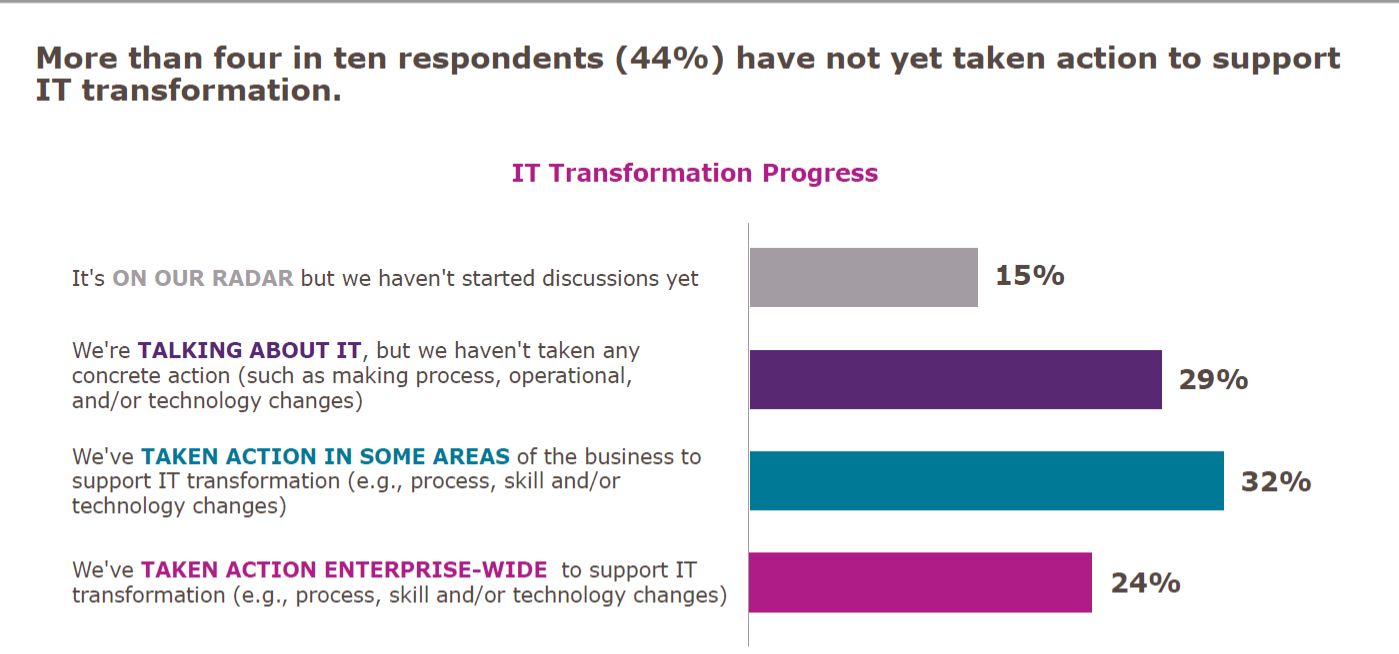
    Let’s get the easy one out of the way first: The survey showed that a significant proportion of companies had done nothing more than talk about digital transformation.

    Adding up “It’s on our radar” and “We’re talking about it,” we get to 44 percent of respondents who haven’t even started. In fact, due to the nature of digital transformation, I would argue that less than 1 in 4 are actually doing it. Then there is the 24 percent who are undertaking enterprise-wide transformation: You can convert projects, but that isn’t transforming the way you do business. It is a start, so I admit this is well and truly a debatable statement, but true transformation is cross-app, cross-team, agile and locale-mobile.

    Why So Small?

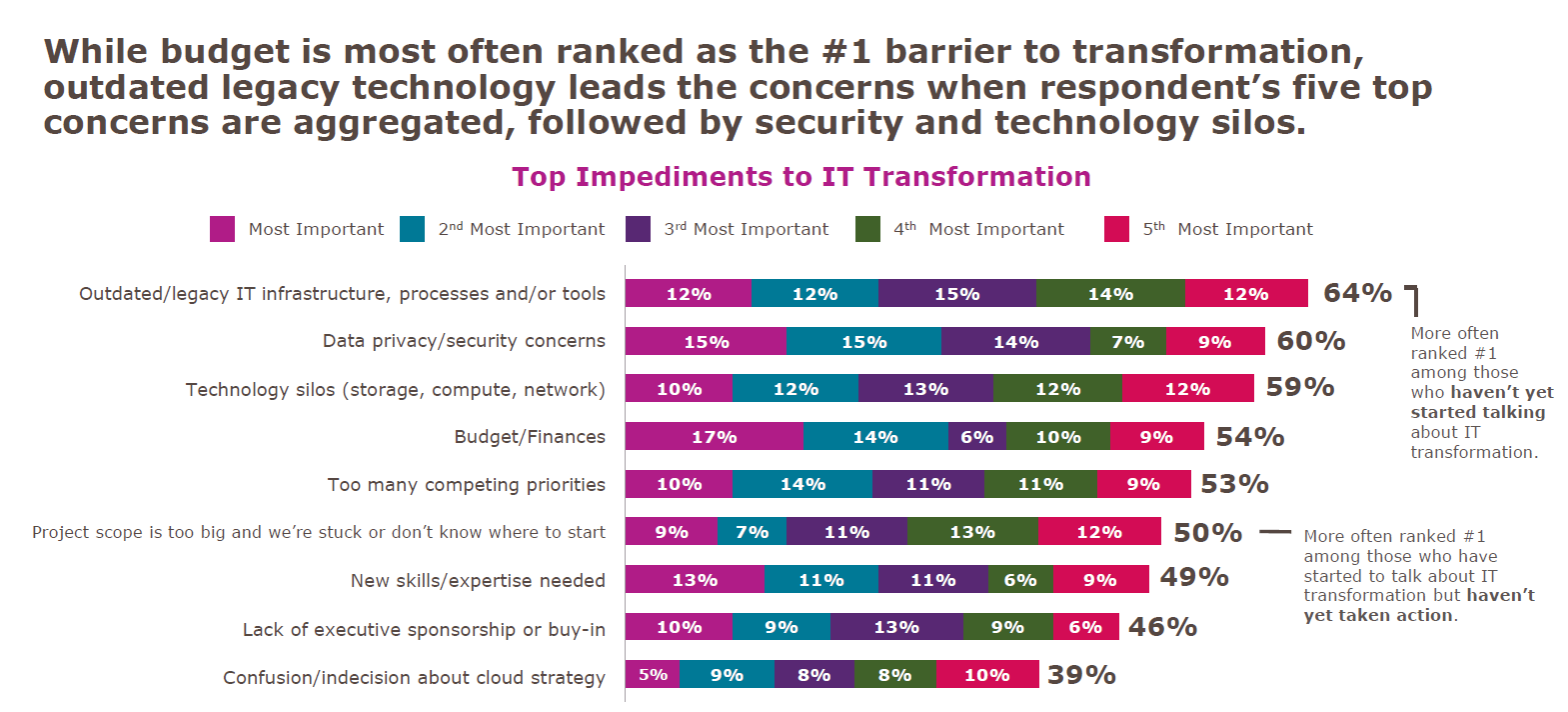
    Since we frequently hear about digital transformation and how important it is, “Why are the numbers so low?” is a valid question. The truth is that transformation of complex infrastructures is difficult. There just isn’t any way to get around that fact. When there is a mainframe with heaps of data and a midtier that often has replication of mainframe functionality on it, then separate apps that are doing web-based transactions in (insert language here, but normally Java in the above environment), there are many parts that are complex, and something as simple as moving and/or rationalizing data stores can be majorly complex.

    But I won’t go on and on here, I’ll simply show you what IDG found.

    Looking at mainframe toolsets in particular, there have been massive steps forward over the last several years to make them more compatible with modern development and deployment practices. But making use of those changes often requires updating systems that are not otherwise broken. And there is always the risk that such updates will break something. The more research an organization does into modernization tools, the more comfortable they are that there is a valid path—but that doesn’t make it easy when it is added work.

    Data privacy also ranks high, and that is because IT has been dealing with locking down data in a data center for ages. Additionally, some spectacular configuration mistakes in public cloud datastores have made us all gun-shy. There are solutions to data security in public cloud from a variety of companies, but that doesn’t change that we’ve all followed “due to bucket misconfiguration” stories while cringing.

    Technology silos are a fact of IT. There can be some breaking down of those silos, but they are unlikely to disappear completely. The EMC specialist or Cisco specialist are unlikely candidates for elimination in the quest for reduced silos. (I just picked two roles whose knowledge sometimes astounds me—both for the depth these people can have, and for the requirement that they need that depth.) Working your network and storage teams into the digital transformation without undermining the thing that makes them valuable—their silo-specific knowledge and insight—is a challenge that can be achieved, but not by “breaking silos”; more like, “increasing communications between silos while reducing silo behavior.”

    If You Dive Like That, You’ll Stall!

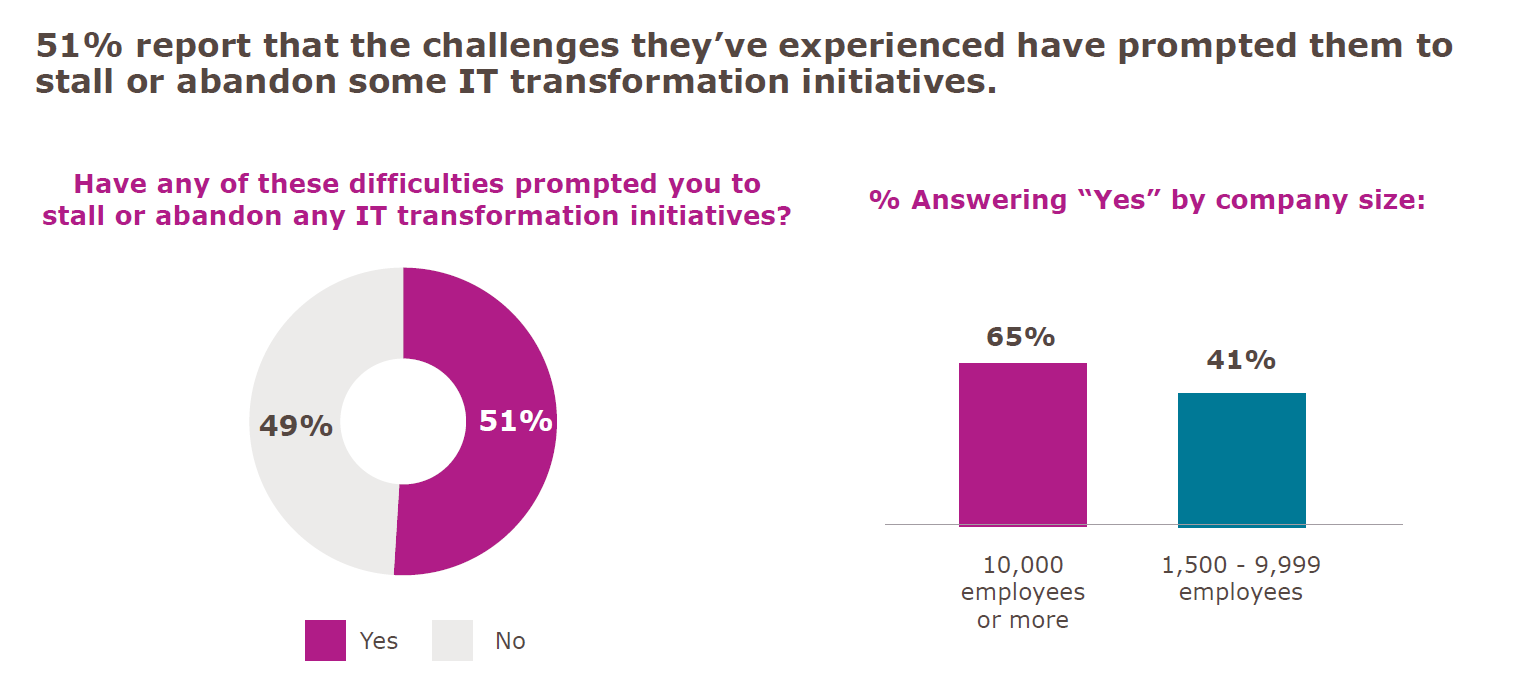
    The last point in this survey that I’d like to address is the “Stalled Digital Transformation Initiatives” slide. (There is a ton of good data in this survey, but these three fit together really well, so I pulled them out.) The fact is that if you are attempting to transform a complex system, you will have wins and losses. Some things will work out better than you planned, while others will not work out as you had hoped at all. I believe that, due to the question’s wording, that is what we are seeing here:

    Yes, 51 percent would be appalling in any other context, but the question was, “Have any of these difficulties prompted you to stall or abandon any IT transformation initiatives?”

    Any is a big word. In fact, any is the largest word in that question. If it were worded with “your” instead of “any,” I will guess the positive answers would be a limit approaching zero.

    If you pronounce a large reorganization and implementation of a slew of new processes, statements such as “that doesn’t fit our infrastructure” are going to shake out. That doesn’t spell doom and gloom for digital transformation; it is simply another obstacle to overcome. Dropping it for now, while focusing on the more viable portions of the plan is common sense, unless whatever isn’t working is core to the transformation. Then it still causes you to stall while figuring it out.

    Honorable Mention

    On average, respondents said they expected more than one-third of their digital transformation activities to be conducted by third parties. That’s a big chunk. Not “off-shoring” big, but still a large portion of work they expect to outsource to get the job done.

    So. Much. Typing.

    Okay, I’m about to shut up now. The takeaway is pretty straightforward. Contrary to hype, you’re not behind on your digital transformation. It’s a tough job, and knowing what you hope to get out of it before starting will help you to continue when things get rough. And they will get rough. The word “transformation” should tell you that. But keep going: There is better/faster/smarter/more mobile out there if you can stay on track, and because they are complex systems getting complex modifications, slow and steady does indeed win the race.

    And just remember, you’re responsible for those horribly complex, hard-to-transform systems doing what they do. Every day. Making them better and easier to manage is a no-brainer, but so is taking a moment to bask in the idea that you’re keeping things running in an environment that is complex.

    — Don Macvittie

  • The (Tool)Chains That Bind

    The (Tool)Chains That Bind

    As DevOps functionality continues to expand, we’re looking at a new vista for freedom of applications. Our apps can be moved around as we need them; we can build-test-deploy on the fly; and we have the ability to monitor whatever is needed. The price we pay is one we gladly take up: implementing new toolchains to drive the transition and getting those toolchains integrated into the entire development and operations process. Yes, we have an entire organizational side, too, but for this blog, we’ll talk about tools.

    Why Tools?

    Why are we going to discuss tools alone if this is about DevOps? Because it is a different set of problems to move from one organizational structure to another versus moving from one toolset to another. While DevOps is giving us independence from a lot of traditional infrastructure issues, the reality is that it is creating dependencies upon the very tools/toolchains we are using to gain that independence.

    Confusing? Let’s try looking at it differently. The new vendor lock-in will be DevOps tools. While they are freeing us from vendor lock-in on several fronts, you are unlikely to make a quick move from, say, Ansible to Puppet or vice versa. It can be done, and some organizations even do a little of both to make sure their options are open. But most shops will pick one and run with it, because that creates a single training and maintenance direction.

    Why Now?

    I (and others) have alluded to this issue in the past, but it is of growing importance as vendors start to take what should be cross-portable tools and customize them to limit portability. Container management, for example, is available on every major cloud vendor these days, but using the vendor’s bundled container service is convenient and more difficult to move away from. That is but one example of many.

    And the importance of these tools/toolchains is growing at the same time that their use is growing. Soon, in a DevOps-heavy shop they will be essential and locked-in as if they were cemented.

    So, What Are You Saying?

    Pick DevOps tools as if they will be there for decades. This is not how DevOps teams are encouraged to think, but you are building a DevOps infrastructure that, if adopted broadly in the organization, will be difficult to move away from to any significant degree. Just like these days you would need a driving reason to port thousands or hundreds of thousands of lines of code, DevOps scripts are growing and the number of DevOps scripts are multiplying. As you fold security, storage and networking into that environment, and build real-time reporting that you are going to rely on for years to come, make certain what you have is good, if not great. In many ways, DevOps thrives on “good enough” without thought to long-term futures, but the investment required to have a fully developed DevOps environment strongly implies that what an average enterprise is doing today will be what it is stuck with for a good long while. That’s not a place for “good enough” if you know there is better out there.

    It’s Not All Unchangeable

    Some bits of the environment can change over time, of course. Better data collation/integration technologies no doubt will take over for whatever you are using for reporting now, as well as AI-based solutions that can plow through the growing pile of machine-generated data to get a systemic view of what is happening. But for the most part, build it like you’ll be maintaining it for years to come, because much of the environment you will be.

    — Don Macvittie

  • Using Netflix’s HubCommander to Automate GitHub Organizations

    Using Netflix’s HubCommander to Automate GitHub Organizations

    Netflix owes a great deal of its exponential growth to its phenomenal tech stack. Throttling its content through a single internal API, the company was able to deliver content agnostic of device type and quickly disrupt its contemporary competitors in the consumer entertainment industry.

    We’re intrigued, then, when Netflix exposes some of its internal architecture for others to use. HubCommander is just one recent addition to Netflix’s growing collection of open source tools. It’s a ChatOps tool for GitHub management.

    We’ve previously covered an open source approach to ChatOps, tracking how to bring free operational tools into the conversation for increased transparency and efficiency. In this article, we’ll resume this research by learning how Netflix has utilized HubCommander and delve into its open source iteration to see how others might leverage it to automate its GitHub organization.

    Problems

    Managing many GitHub repositories while working in a large organization can be frustrating; especially difficult is the task of managing permission levels between various user subsets. Not only are various user permission levels difficult to trace, but there is an intrinsic security problem to address as well, especially when working with external teams.

    “One of the biggest challenges with using GitHub organizations is user management.” — Netflix

    Project managers need to administer different organizations, and GitHub requires admin privileges to manage such repository settings; if onboarding thousands of employees, editing this manually could be an extremely tedious job.

    Benefits!

    At Netflix, HubCommander standardizes its user management approach, enabling automation for GitHub repo permissions across development teams.

    “Management of many users on GitHub can be a challenge without tooling. We needed to provide enhanced security capabilities while maintaining developer agility. As such, we created HubCommander to provide these capabilities in a method optimized for Netflix.”

    HubCommander thereby provides this missing link, granting admins the ability to quickly grant privileges. Easily to embeddable into chat, the HubCommander is made with ChatOps in mind. Therefore, privileged GitHub organization management tasks can be performed from the Slack channel, “without granting administrative or owner privileges to your GitHub organization members.”

    Using HubCommander

    To use HubCommander, first, you must have Python 3.5+, Slack, a GitHub organization, and a GitHub bot user with ownership level privileges.

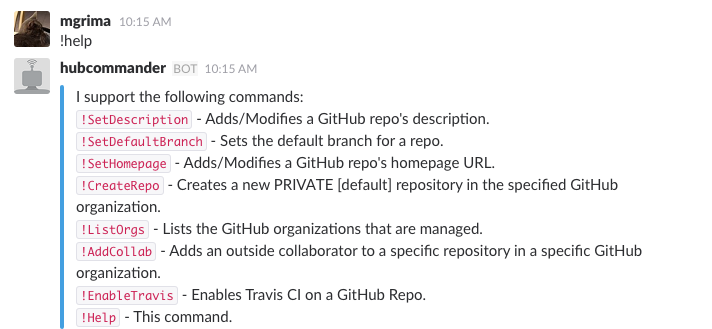
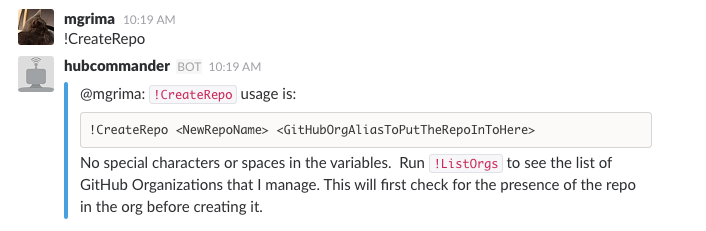
    Next, Slack channels with HubCommander installed can make the call !help to return a list of bot commands:

    Source: Netflix

    To create a repo, for example, you can simply use the command !CreateRepo:

    Source: Netflix

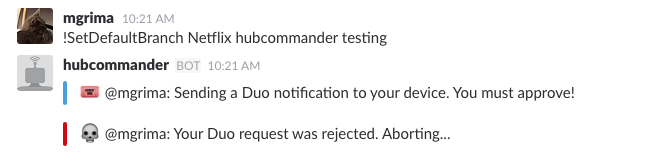
    Utilizing HubCommander also has security benefits as it reduces the number of GitHub API permissions granted per user—reducing attack vectors inherently increases security. Another point on security is HubCommander’s integration with Duo for additional authentication:

    Source: Netflix

    The total list of HubCommander features include:

    • Repository creation
    • Repository deletion
    • Repository description and website modification
    • Granting outside collaborators specific permissions to repositories
    • Repository default branch modification
    • Repository PR listing
    • Repository deploy Key listing/creation/deletion
    • Repository topics creation/deletion
    • Repository branch protection enabling/disabling
    • Enable Travis CI on a GitHub repo
    • Safeguard commands with 2FA via Duo

    Automating GitHub With ChatOps

    If your code resides in multiple Git repositories, like Netflix, having a method to configure permissions across all entities in a convenient way becomes a necessity. With a bot to perform operational tasks on GitHub repositories, Netflix is benefiting from automatic manipulation and a wider team access, adding to its agile goals:

    “The reduction in administrative overhead has significantly simplified our open source efforts.”

    Netflix operates with three development channels (a core Netflix OSS, Spinnmaker and a skunkworks project for new ideas). Thus, having a consistent permissions model across organizations can decrease friction. Also, since Netflix collaborates with third parties, such as contractors or other open source contributors, HubCommander also acts as an effective way to maintain security.

    Final Thoughts

    Netflix recognizes a growing popularity in the ChatOps approach and cites other benefits such as team transparency, a timestamp for each event and a self-service nature—all reasons for adopting a ChatOps strategy into its developer tooling.

    HubCommander appears like a good ChatOps tool for GitHub repository management. However, GitHub Actions (still in beta at the time of writing) is a new feature that will aid development workflows, offering automation for the GitHub operational duties themselves. This may spark alternative bots to be developed, especially in terms of workflows that respond to events.

    For now, with open source utilities such as HubCommander, certain GitHub duties can be quickened, stimulating a culture of more efficient management to decrease redundant tasks. While shorthand for GitHub repository management might not seem at first glance as a priority, it could scale down operational headaches tremendously.

    — Bill Doerrfeld

  • Boxes vs. Services: The Infrastructure Equation

    Boxes vs. Services: The Infrastructure Equation

    Infrastructure is changing as more services replace the need for hardware-based architectures

    There has been a lot of change in the last few years, and that change shows no sign of slowing down. I’m one of those people who likes to know they could work offline if needed, yet in this day and age if you want me to install a fat client on my laptop, I go looking at your competition.

    Granted, for me the selection of these apps is small—I like having Office on my desktop to be able to use it to write or create presentations at will, regardless of whether I’m connected—but for most people, it is growing at a faster pace. The idea of buying a monolithic system that you have to install and maintain is becoming less and less appealing.

    That same syndrome is occurring in the data center, too, but with a twist. It is largely infrastructure that is feeling this pinch. Just prior to cloud/container mania, the idea was that each non-compute box in your infrastructure was a platform. It offered you a ton of functionality, all designed to simultaneously lock you in and help you get your job done. All in all, it wasn’t a bad trade-off, and we can see the same idea in the large public cloud vendors.

    The difference is, with an infrastructure box, you were making a serious investment upfront that offered you other functionality to sweeten the deal. Once that investment was made, it was natural and realistic to want to take advantage of the bundled platform functionality rather than search for yet another box to drop in your network.

    Containers and what survived of software-defined networking (SDN) have changed all of that. The ability to quickly spin up something in software that fits your needs perfectly and can be automated with your DevOps toolchain makes the idea of a platform box—with its high cost of entry and bells and whistles you will never use but might have to lock down—seem quaint.

    In the agile/DevOps world, boxes for low-level infrastructure are still necessary. Don’t get me wrong on that. If you are a large org, you are using one of a few vendors to do core switching and routing. But top-level (layer 4-7 and 8) networking is not something you would use those static boxes for.

    It used to be that all networking functionality was the same—it needed to be rock-solid and slow to change to guarantee that apps were functional. Over the last few years we have seen a move from “all networking is networking” to “this is low-level stuff that must be rock-solid, that is closer to application layer stuff that we can change rapidly, and thus need not be in the ‘rock solid’ category.” Load balancing is a great example of this (and yeah, I used to work for F5, which is the king of load-balancing): Load balancing was a network function that you went to a hardware vendor for if you were beyond a certain size. The resulting physical box might serve one or 100 apps and required specialized training or experience to manage.

    Today, load balancers are a systems function that you go to a software vendor for and work into your network with as many copies of the software load balancing as you needed. Or you turn on load balancing within your container management system and manage it there. Either way, it fits in with your agile/DevOps environment better, and is easier to get budget for your project.

    I expect to see this change intensifying. There is power in physical boxes for some things, but there is also power in portability and packaged deployment scripts. And a physical box is not portable to a public cloud, nor is it readily dropped into container management tools (though container management integration is getting better in most network security/performance appliances). Portability and ease of use will win over technical edge, in my opinion. Not because people are cheap and lazy, but because portability is key to agility and they are too busy.

    There are still things that just aren’t that portable, and I have yet to see convincing tools to make them that portable. Data is my go-to example because it is easy. If you have 2TB of data, your portability options are limited. For those with 2PB of data, there is no real option; the app is going where ever the data is, and that data is unlikely to move. Oh, if you were motivated, there are ways to move that much data, but then you’ve just shifted the problem to the new platform, because the data is still largely non-portable, and apps will have to go where the data is. Again.

    But for most functionality? Anything that can be made into highly portable software will be. And that software will run wherever it is most needed or most beneficial to the user.

    All in all, this is a good result. Multi-core, multi-network, multi-terabytes of memory PCs can rival many appliances for speed and functionality, and portability plus ease of integration makes software a winner. Just stay aware of where/when a physical box still makes sense, because the world doesn’t change as fast as high-tech marketing wants you to believe. A working appliance that does what is needed quickly should not be ripped out just because a software solution is available.

    But you knew that. Because you all rock. Keep kicking it, and use whatever solution serves the business best—which is a different equation for every business.

    — Don Macvittie