Completing a large-scale agile transition can seem intimidating for any business. Agile pushes teams to change their cultural expectations and work processes—a combination that is tough on any work environment. Larger organizations, however, often face an especially daunting migration.
The good news is that businesses don’t have to face these migrations alone. In my work, I’ve overseen plenty of examples of successful agile projects. Those efforts have taught me many lessons—with one major project standing out.
An Agile Migration at a Glance
I recently worked with a large automotive company to help it scale out to a more sophisticated agile development scheme. We applied a customized Scaled Agile Framework (SAFe) to the project. In doing so, we established a development environment with:
15 scrum groups divided under four release trains.
A product feature team configuration to define user responsibilities.
Two-week sprint cycles.
A quarterly innovation and planning (IP) sprint.
A transition from VersionOne to Rally.
Weekly production deadlines.
After six months, the company had a continuous delivery (CD) pipeline in place and we had laid the groundwork for a successful project. Of course, plenty of bumps arose along the road to a solid agile environment. Here are five lessons we learned during the project:
Don’t Allow for Missed Connections Between Scrum-to-Scrum Teams
We established a feature team setup for this project. In the setup, teams worked on specific feature sets instead of simply dividing components of the software and hoping it all worked when put together.
The initial plan was to have quick sprints and an emphasis on features that would allow for relatively simple dependency management. In action, however, different understandings of features between groups led to some challenges, including issues linking feature teams and eventual defects after integration. This challenge reinforced the importance of a few key best practices, including:
The vital role of a “Scrum of Scrums” team featuring representatives from each scrum to provide cross-team collaboration and ensure work is coordinated.
The need to build out retrospective cross teams to minimize dependencies and identify the universal issues within the agile system.
The necessity of end-to-end testing that is clearly set forth in the Definition of Done (DoD) project framework. Creating clear DoD parameters can help teams ensure they minimize redundant work while avoiding mismatched data within the QA environment when compared to production.
Continuously Inspect Sprint Expectations and Right-Size Project Guidelines
Throughout the project, we found that, in some instances, teams struggled to identify the best velocity for sprints, even after four or five iterations. There was a lack of transparency into whether timelines were actually working because formal discussions around scrum velocity weren’t taking place. This resulted in technical debt adding up over time and incorrect ideas about what constitutes a completed project.
Struggles to identify the right speed for scrum sprints created instability. We learned to counter this problem by formalizing scrum event planning so teams could identify the right velocity for their tasks and recognize times when they may need to adjust how they were working in light of shifting project demands. This included honestly assessing technical debt and setting timelines for dealing with it.
Identify When ‘Done’ Doesn’t Really Mean Done
A great deal of effort goes into identifying the DoD for a project. However, teams can easily struggle to pin down the Definition of Ready (DoR) for backlogged items that arise as the result of technical work. This situation can spiral as small items are left incomplete over multiple sprints until, near the end of the project timeline, testing and similar practices get less attention because everybody is scrambling to complete work. A few ways we overcame this issue included:
Using the INVEST criteria to prioritize tasks when trying to identify DoR. This is particularly important as teams that neglect small issues of technical debt risk falling into waterfall habits toward the end of project cycles.
Trying to minimize how many work-in-progress items we left unresolved at any time to avoid situations where dev teams are spending more time on backlog items than active sprint work.
Creating visualizations of the shared scrum space for better coordination and monitoring across teams.
Establishing consistent analysis and updates to the DoD to better reflect real results. This was best accomplished during the sprint retrospective event.
Don’t Neglect Training
Agile is all about getting projects moving quickly and eliminating waste. In that vein, many organizations will try to reduce training and spend a couple of weeks teaching workers about agile and expecting them to mature through their experiences on scrum teams.
In action, scrums need an opportunity to go through storming mode together to develop their agile skill sets, but companies typically don’t set aside time for that type of training. Businesses must establish realistic expectations in terms of training, particularly for cross-functional and self-organizing groups, as these users need a deep understanding of best practices to work well together. Employees need time to adapt to change. Businesses that want to scale agile effectively must establish their core values, reduce direct accountability within new teams that feature interdependencies and, in general, be patient with employees as they adapt.
Within this transition to agile, it is also important to train users on how to work effectively as a team. Technical skills and process education is key, but those capabilities can fall flat if employees are unable to work well together. For example, the landmark book, “5 Dysfunctions of a Team,” highlights a variety of typical challenges that teams face, including lack of trust or unwillingness to face up to conflict. Businesses need to train workers to counter these types of issues.
Leverage Efficiency Tools, but Not with Excessive Rigidity
In this project, we used Rally, an enterprise-class platform built to help businesses scale agile teams. Even in Rally, there are some limitations to how much the technology can support collaboration between teams and identify project dependencies.
In practice, no single tool will be an agile silver bullet. Instead of expecting a platform to solve your problems, consider adopting practices that make sense for your situation, such as tracking dependencies on a whiteboard. Within this environment, it is vital that businesses also clearly define and manage their development and release processes through ongoing training that establishes a culture of transparency.
With serverless, you delegate the responsibility of running your infrastructure to a platform provider as much as possible. This frees your engineers to focus on building what your customers want from you—the features that differentiate your business from your competitors’. For this philosophy to work, however, the platform needs to not only give you the tools to build those features, but also deliver the performance that will keep engineers satisfied.
Yes, services such as AWS Lambda are powerful, but they have a number of well-documented limitations that make them unsuitable for some workloads. These include:
Cold starts and high latency make them unsuitable for real-time applications that require consistent and millisecond-level response times.
The pay-per-invocation model makes them costly in high throughput scenarios.
The event-driven model, coupled with a max execution time or data size restrictions, makes them unsuitable for long-running tasks or heavy data or AI processing.
They are limited to triggers and event sources that are specific to the cloud provider.
Enter Nuclio, an open source serverless platform that is built on top of Kubernetes and comes in both managed platform-as-a-service (PaaS) and self-hosted flavors. In this post, we will compare Nuclio with AWS Lambda, see how Nuclio addresses the above limitations and explore the new use cases Nuclio is unlocking, such as:
High throughput data processing pipelines or ETL.
Serving machine learning models in real time.
Real-time applications such as multiplayer games.
Long-running jobs and services.
Nuclio vs. AWS Lambda
Concurrency
One of the biggest shifts from traditional application development to AWS Lambda is how concurrency is managed. An Express.js web application running in a container/VM can handle multiple requests concurrently. In other words, your application manages its own concurrency. You scale the application by increasing the number of concurrent requests it can handle (scaling up) and then increasing the number of containers (scaling out).
Figure 1: Traditional applications scale up the currency within the application, then scale out the number of nodes running the application.
With AWS Lambda, concurrency is managed by the platform, and a concurrent execution would process only one request at a time—much like an actor in the actor model, which would process one message at a time. The application can scale out by increasing the number of concurrent executions of the function.
Lambda’s concurrency model has its advantages:
It simplifies application development. Concurrency is a constant source of bugs and performance issues, as developers struggle with writing highly concurrent applications.
It allows you to price each invocation individually because you don’t have resource contention from handling concurrent requests. This enables the pay-per-use pricing model and is one of the cornerstones of findev.
Still, Lambda also has some disadvantages:
You can’t make use of idle CPU cycles when a function is waiting on IO. Since most functions are IO-heavy, this results in significant inefficiencies.
It requires more scaling, which means more cold starts. To handle X concurrent requests, you need X concurrent executions, which equates to X cold starts. This makes it nearly impossible to achieve predictable performance.
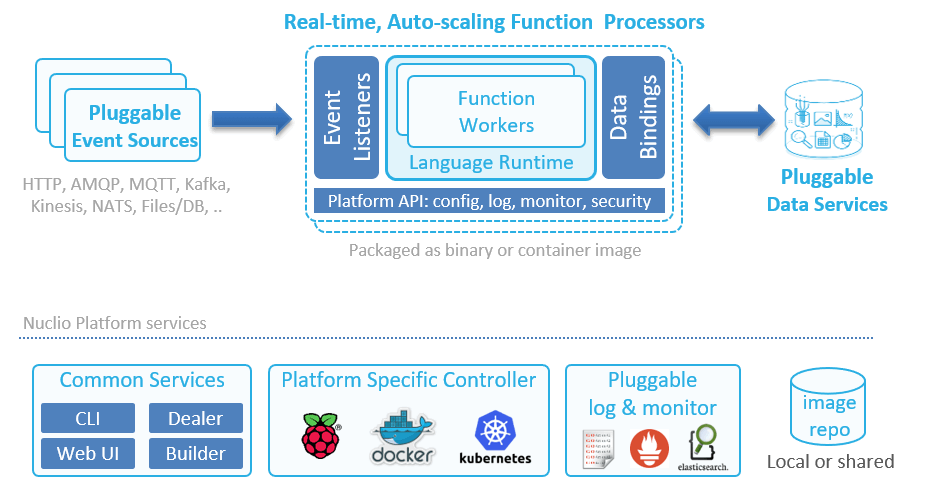
Nuclio, on the other hand, can scale up as well as out. A function processor (analogous to a container) can host multiple function workers. Each worker is then able to process one message at a time. This system supports concurrency within the same processor, and then autoscales the number of replicas of the processor based on load.
Figure 2: The architecture of a Nuclio function.
Another interesting difference between Lambda and Nuclio is that Nuclio lets you specify both the minimum and maximum number of replicas. And as an aside, Nuclio also supports GPUs.
Figure 3: Nuclio lets you configure both the minimum and maximum number of replicas.
With Lambda, you can configure a reserved concurrency for a function, which (counterintuitively) sets its max concurrent executions. But there is no way to tell the system to always keep a certain number of concurrent executions running at all times. The system always scales to zero when there is no traffic—behavior that is highly undesirable for systems that experience regular spikes in traffic.
For example, my employer, DAZN, is in the sports streaming business. We see huge spikes in traffic all the time, as millions of users flood in seconds before a sporting event starts.
Figure 4: Sports streaming platforms, such as DAZN, experience huge spikes in traffic just before a sporting event kicks off.
Without the ability to configure the minimum number of concurrent executions, these spikes result in large numbers of cold starts. Also, in these cases, Lambda has to scale out the number of concurrent executions quickly to meet the surge in demand. Here, we also run into the 500/minute limit on how quickly Lambda is able to scale out. As such, we are currently not able to use Lambda on the critical path of our system, which has to shoulder these spikes.
With Nuclio, you can programmatically update the minimum replica count prior to the event so that when the spikes come, you don’t have to worry about hitting scaling limits or enduring the performance hit from cold starts. You can also tell Nuclio to scale to zero immediately via API calls, which saves resources.
Figure 5: Adjusting the minimum number of replicas enables you to deal with predictable spikes in traffic.
Timeout
Another major difference between Lambda and Nuclio is how timeout is handled. With Lambda, an invocation can run for up to 15 minutes. While it’s possible for you to use recursive functions or step functions to extend this limit, both approaches have their own problems. As such, Lambda functions are great for event-driven architectures and performing short, ephemeral tasks.
With Nuclio, there is no max execution time. The containers can keep on running, which in turn allows you to go beyond the constraints of the event-driven model. You can now turn a function into a long-running service, which unlocks some interesting use cases such as long-running ETL jobs and training machine learning (ML) models.
Caching State Between Invocations
Both Lambda and Nuclio functions accept an event and context during an invocation.
Figure 6: Both Nuclio and Lambda functions accept an invocation event and context as arguments.
With Lambda, the context object is ephemeral and does not persist between invocations. If you want to persist data between invocations (e.g. static configurations, database connections), then you need to declare them as global variables outside of the function handler.
With Nuclio, the execution context itself is persisted between invocations and can be used to cache state. The context object also includes a built-in logger, which supports structured logging with JSON and four log levels: DEBUG, INFO, WARN and ERROR.
You can configure the default log level for a function and can even override this default log level per invocation—which is very useful for debugging. You also have the ability to export your logs to external services such as Elasticsearch.
Figure 7: With Nuclio, you can select the default log level for every function.Figure 8: You can also override the default log level for an invocation.
In addition, there are hooks for performing context initialization, which is called before the first invocation on the function. This allows you to perform initialization logic before the container is put into active use and removes the dreaded cold start problem that Lambda suffers from.
Data Volumes and Persistent Data Connections
With Lambda, functions only run when they are triggered by events. Furthermore, concurrent executions are garbage-collected when they have been idle for a few minutes. This behavior makes life difficult when you are working with relational database management systems (RDBMS) and other systems that require persistent connections. Indeed, a set of guidelines has been developed to help you avoid the many pitfalls of using Lambda with RDBMS. Furthermore, Lambda doesn’t allow you to use persistent data in standard file system mounts, which forces you to copy to/from object storage before working on large files such as images, logs, ML models, etc.
With Nuclio, however, you can use the context object to maintain persistent connections to databases. Since the context is maintained at the processor level, you get better reuse, as they are shared across invocations. You can also take care of other aspects of data-fetching with data bindings, including batching and caching, which helps improve IO performance of the application. Additionally, you can mount volumes to functions, which is useful for working with ML models or Tensorflow, and you can mount Kubernetes secrets as volumes. Indeed, Nuclio supports all of the volume types that Kubernetes supports.
Runtimes
Both Lambda and Nuclio support popular languages such as Go, Node.js, Python, .Net Core, Java and Ruby. Also, both platforms offer a way for you to customize the execution runtime.
With Lambda, you can create a custom runtime and distribute it through AWS Lambda Layers. This lets you introduce additional language runtimes that are not natively supported by the Lambda platform. Several vendors have published runtimes for PHP, Rust, Erlang and Elixir, to name a few.
With Nuclio, you can run functions on your own Docker image (see Figure 9), which can come from a private image repository. This allows you to tailor the execution environment itself.
You can also support additional language runtimes through a Shell function, which allows you to handle invocation events with any executable binary. See this example for more details.
Figure 9: Nuclio lets you run functions on top of your own Docker image, which can come from a private image repository.
Nuclio ships with 13 triggers, including cron, HTTP, Kafka, Kinesis and RabbitMQ. Since Nuclio is open source, you can also write your own trigger for services that you want to integrate with and leverage other people’s contributions. The HTTP trigger gives you an easy way to integrate Nuclio with other event sources that support HTTP as target, such as SNS. Also, since Nuclio supports the CNCF CloudEvents standard, it can arguably support many more event sources that are CloudEvents-compliant.
Nuclio triggers are all normalized to the same Event object. This removes the need to understand the specific event signature for each event source, which is often confusing when working with Lambda. It also makes it easy to switch a function between different triggers.
Built-In HTTP Trigger
With Lambda, you need to use API Gateway to create an HTTP endpoint for your functions. API Gateway is a feature-rich service, but it’s also complicated and often costs more to run than the Lambda invocations themselves. It also adds another source of latency to your API, which, at the minimum, is around 5ms to 10ms, and it can overhead spike to more than 100ms. This cost and latency overhead make it unsuitable for applications with high throughput or hard real-time requirements.
With Nuclio, every function gets a private HTTP interface by default. To expose the endpoint publicly, you need to specify an HTTP trigger similar to API Gateway. However, unlike API Gateway, this HTTP trigger does not incur extra costs and has minimal latency overhead.
Figure 10: With Nuclio, every function gets a private HTTP interface by default.
Unlocking New Use Cases with Nuclio
As you can see from our comparison, Nuclio differs from Lambda in a number of important areas, such as its concurrency model and that it has no max execution time. This opens the door to a whole range of use cases. Let’s take a moment to look at a few.
High-Throughput Data Processing Pipelines or APIs
For a high-throughput API, the cost of both API Gateway and Lambda is drastically higher than an equivalent application running in containers. This cost discrepancy has lead many to rewrite their applications.
Nuclio’s concurrency model makes more efficient use of available resources, which significantly reduces operational cost when running at scale. Functions have built-in HTTP interfaces so you also don’t need to pay for an expensive API Gateway service.
The ability to mount a volume to your function also lets you read and write data to/from a mounted volume at high speed and enables building stateful applications. Again, you can’t do this with Lambda today, as it doesn’t allow you to attach Amazon Elastic File System (Amazon EFS) volumes to functions.
These features make it economically feasible to run high-throughput and high-performance APIs on Nuclio functions. The same can also be said about high-throughput data processing pipelines that have to process multiple terabytes of data per hour.
APIs with Predictable Spikes in Traffic
Nuclio gives you the ability to configure a minimum number of replicas. This allows systems that experience predictable spikes in traffic to reserve sufficient resources ahead of time and avoid degrading the user experience when the spikes happen. Examples include food ordering services such as Just Eat or Deliveroo or sports streaming services such as DAZN.
At the same time, Nuclio still lets you scale to zero by setting the minimum number of replicas to zero. It gives you the control to optimize for resource usage or latency, depending on the situation.
Real-Time Applications
Nuclio does not suffer from cold starts and is able to deliver consistent and sub-millisecond response times on invocations. This makes it a suitable solution for applications with a hard, real-time requirement such as multiplayer games and real-time bots.
Serving Machine Learning Models in Real Time
To serve ML models in real time, you need to have both strong and predictable API latency and the ability to load and work with ML models that often are large in size (GBs).
Nuclio lets you attach Kubernetes volumes to your functions, and there are no size limits on these volumes. Combined with the performance characteristics, it’s possible to implement these demanding workloads with Nuclio functions.
Nuclio also has native integration with Jupyter, and lets you automatically deploy Jupyter notebooks and ML models as Nuclio functions.
Long-Running Jobs and Services
Nuclio does not impose a max execution timeout on function invocations. This allows you to turn your functions into long-running services and perform long-running ETL jobs.
Nuclio’s init_context() hook lets you create long-running services, such as an application that constantly reads off a Twitter feed (e.g. loads the TwythonStreamer with the context, which is polling an external service, versus becoming triggered by an event).
Conclusion
As we discussed, Nuclio is one of the few open source solutions that are also business-viable. It has key architectural advantages for higher performance or data-driven applications, including:
Nuclio is cloud-agnostic. It can be used in multi-cloud/hybrid-cloud scenarios. You can also run Nuclio on a laptop using plain Docker, which makes debugging easier.
Nuclio’s concurrency model and the ability to mount file volumes lets you build high-performance APIs and high-throughput data processing pipelines.
Nuclio gives you greater control over the concurrency of your application, which makes it viable even for applications with very spiky traffic.
Nuclio’s execution contexts are persisted between invocations, and it doesn’t impose a max execution time on invocations. This allows you to create long-running stateful applications such as ETL jobs.
Nuclio lets you attach Kubernetes volumes to your functions and has no limitations on the size of the volume. This makes it possible for you to work with large ML models that often are GBs in size. Nuclio also has native integration with Jupyter and can automatically deploy your Jupyter notebooks and models as functions.
Nuclio provides a good out-of-the-box developer experience. It has a built-in logger with structured logging support, and you can easily export your logs to an external log aggregation service.
If you are looking for a serverless platform that is not tied to a specific cloud provider, Nuclio is worth a look.
Consumers expect to be able to do anything, anywhere and at any time in our digital world. They’ve grown accustomed to this level of speed and efficiency because business-to-consumer (B2C) companies have been delivering a frictionless customer experience for years. PayPal and Venmo are great examples of frictionless transactions and instant gratification through digital platforms: There is no need to coordinate, get approval or wait for someone else to execute the transaction. These companies ensure the most efficient payment option by allowing consumers to be autonomous.
The ease that we’ve come to expect in our consumer transactions is only now starting to become available in the enterprise. Business-to-business (B2B) buyers are the same people who participate in B2C transactions on their own time. They don’t become different people with different preferences when they go to work, so they are looking for the same quality of experience they’ve grown accustomed to in their everyday life. However, the enterprise software-as-a-service (SaaS) world is still evolving toward a model that doesn’t require contacting sales or negotiating a contract prior to delivering value. That said, there are still a few questions around how to manage customers, revenue streams and products that vendors need to answer.
Before Making the Move
Migrating to frictionless allows companies to get out of their customers’ way and enables complete autonomy. To do that, customers have to be able to be successful with a product on their own in a relatively short time period. It’s possible to cover up some product user experience challenges with a traditional sales, demo and heavy-handed onboarding process, but there’s no way around that with a frictionless model. Until companies have a great UX, frictionless won’t work.
One example is ezCater, a nationwide marketplace for business catering that generates a lot of data from more than a dozen applications and needed to replicate it all into its data warehouse. Using a frictionless model, ezCater was able to get started with its data tool in minutes and replicate data into its Amazon Redshift data warehouse. Once the company was successful with its first data sources, it went deeper and got involved in the Singer open source project, building its own integrations to run on Stitch as well.
Frictionless isn’t right for every situation, and a multi-product company may benefit from only adopting it with certain products. When evaluating the frictionless model, companies should prioritize their product where a fast time to value without help is most realistic and focus on making that product successful with a frictionless model. It is not beneficial to spread these efforts across the entire portfolio. Ideally, a small team can focus on this one product autonomously and to iterate quickly without being constrained by the rest of the organization.
Friction Points of Frictionless
Enterprise companies may be hesitant to implement a frictionless model because their products are generally more complex and costly. While there is high risk, there is also the potential for high reward. Making the shift to a frictionless model enables a faster time to value, better customer experience and increased efficiency.
While this is appealing, there are some product categories where frictionless isn’t an option. For example, a large public company isn’t going to sign up for a free 14-day trial of a new accounting system and swipe a credit card at the end if it goes well.
Committing to Success in Frictionless B2B
Transitioning to frictionless involves giving up control and venturing into uncharted territory, so it’s natural to be cautious about taking the plunge. Frictionless requires different skill sets from the traditional sales model, and success requires employees to learn new things. While some initially may not be sure where they fit in, a larger number of happy customers typically makes everyone at the company more effective at their jobs. Instant gratification is extremely valuable, and it allows customers the flexibility to operate on their own schedule.
The frictionless model allows a more accurate evaluation of product capabilities and experience. It creates a higher velocity of customer acquisition, better customer experience, faster sales cycles and a more productive sales team. To take advantage of these benefits, it’s critical to ensure that the move to frictionless will be an intentional and committed one. If companies can devote themselves to frictionless, both the company and their customers will cash out on the transition—just like PayPal and Venmo.
Immersive: providing, involving or characterized by deep absorption or immersion in something (such as an activity or a real or artificial environment) — Merriam Webster Dictionary
We immerse a teabag into hot water to brew tea, but when we speak of the “immersive experience” we’re not planning to boil anyone. We may, however, make them feel as if they’d been boiled, or frozen, or hurtling through space, enjoying the beach or any of many other experiences. What we are really talking about are digital-based immersive experiences.
The First Immersive Experience
From July 1930 when Orson Welles first asked, “Who knows what evil lurks in the hearts of men? The Shadow knows …” or January 1933 when actor Brace Beemer first intoned, “Return with us now to those thrilling days of yesteryear, when from out of the past come the thundering hoofbeats of the great horse Silver! The Lone Ranger rides again!” radio was the first analog immersive experience.
It was immersive because the audience employed their imaginations to add imagery to the spoken word and the sound effects. While listeners knew these were fictional tales about fictional characters, they became immersed in the stories because they exhibited what poet and aesthetic philosopher Samuel Taylor Coleridge first described in 1817 as “the willing suspension of disbelief.”
Coleridge posited that if a writer could infuse a “human interest and a semblance of truth” into a fantastic tale, the reader would suspend judgment concerning the implausibility of the narrative.
Television and movies leveraged that same willingness to achieve even more immersive experiences.
While these are all examples of entertaining immersive experiences, it wasn’t long before these turned up in practical applications. As an example, astronauts learning to rocket to the heavens first experienced those travels in a flight simulator that combined film imagery and audio to create the impression that the user was actually in the rocket.
Digital Immersive Experiences
The actual word “immersive” wasn’t used much until the mid- to late-1980s, a time when Atari, Nintendo, Sega, Apple, IBM and others were busily introducing new personal computers and game consoles.
Computer-based gaming was perhaps the precursor, or even the first example, of digital immersive experiences. Players often entered a catharsis in which they perceived themselves to be existing in a fantasy world. The image quality created by the software continued to become more and more lifelike and real to enhance that perception of participation.
Now retailers are beginning to leverage immersive experience technology to help customers shop by showing them what garments might look like—on themselves. Varying colors and accessories instantly by clicking at a kiosk or computer screen.
Many training courses and support activities are leveraging immersive technologies to augment the student or practitioner experience. A technician in the field can don a headset and see the support expert’s hands showing them exactly what to do and where. NASA has astronauts walking around on a virtual Mars. Students sitting at home feel like they’re in a classroom with the instructor and other students. Peloton customers mount their home spin-cycle in their family room and participate in a class now occurring in a New York studio.
Many producers of software describe the importance of the user experience to the success of their products. Citrix, for example, designed its entire product suite around the idea that the mobile user experience should closely approximate the on-premises user experience, even though available bandwidth differed widely between the two. Today’s virtual desktop experience, which manifests in many ways, follows that design ethic. It’s worth noting that Citrix continues, to this day, to find ways to improve video and audio transmissions between the data center and the user in a constant effort to enhance the user experience.
Extending the DevOps Model
Beyond the “continuous improvement” goals of the DevOps model of computer and software management is the idea that the developers who write the code and the operators who make sure it runs well on the network infrastructure must work in concert to rapidly identify, quantify and resolve all issues.
Immersive experiences take this concept further, extending the integrated team to include not only the coders and operators, but also the artists and writers who create the written, audio and visual content and the subject matter experts who assure the veracity and integrity.
Like game developers, this extended team must work together in concert to assure that the content is appropriate, the code is efficient and the delivery is continuous, flawless and totally secure. Even the slightest latency may damage the user’s willingness to believe.
Channel Choosing
This team must also determine best practices for developing and delivering experiences through appropriate, effective and impactful channels. In the 1930s, the only vehicle was radio. In the 1940s, image was added to sound with the introduction of television. Opportunities exploded starting in 1969, with the introduction of what would become the global internet.
Today we can categorize virtual reality, augmented reality, mixed reality and more into immersive experience options. It’s one thing to have a 360-degree camera; it’s another to put it into the hands of a talented 360-degree photographer or videographer. Developers are starting to design impactfully for Oculus Rift, Microsoft HoloLens and other immersive devices.
Even the tools people use for everyday communications are becoming more immersive. Where once you could text someone, but then had to change to other software and hardware to call them, today’s unified communication solutions create a far more immersive environment. Now you can start by texting to each other, then switch to voice and/or video with a click, share applications and edit content together with a click and even add other users by click.
How to Increase Immersion
It stands to reason that the more human senses you stimulate, the more immersive the experience becomes. Adding image to sound as we moved from radio to television certainly resulted in greater audience immersion. Theaters are experimenting with combining 3-D projection with seats that move and shake in accordance with the on-screen action. Only the olfactory sense has not been treated yet, but how long can it be before the introduction of “smell-o-vision”?
Effective creation of immersive experiences requires software developers, network designers and implementers, writers, photographers, graphic layout experts, subject matter experts, social engineers and behaviorists to work together effectively. The combined creativity in a team like that will, itself, be thoroughly immersive.
Lean project management is rooted in cost-saving manufacturing methodologies. The ultimate goal of lean methodology is to reduce waste. Companies in all industries have adopted lean principles into their own processes, but lean is most suited toward physical manufacturing, engineering and related industries.
Regardless of your company’s size or the activities of your organization, lean project management principles can be extraordinarily helpful in optimizing your everyday operations.
Below are the five core principles that guide lean thinking for project managers.
Identify Value
Defining the value of a given product is crucial. Before beginning any manufacturing project, or any project for that matter, the amount of value a finished product will generate must be assessed accurately. How much customers expect from a given product must also be ironed out.
Value questions that lean teams will ask:
What do customers want?
How will they benefit from our product?
How much are they willing to pay for the benefits of our product?
Lean teams can, for example, estimate how much customers are willing to pay based on related data points, then set costs low enough to reach an agreeable price. The goal is to eliminate all waste in every process. Any area where value is not added—or worse, cost is exceeding value—must be addressed early on using lean management principles.
Map the Value Stream
The value is the end goal of the project. Once you’ve established value as a definite endpoint, you can begin mapping the way to get there (or value stream). Every single process and every single step involved in getting to the end product is part of the value stream. From gathering the materials needed for production to coordinating efforts with PR, every related process is represented in the value stream.
Kanban is one of the most popular ways to map value streams. Tasks are broken down and are posted in a “just-in-time” fashion. That way, each task is taken one at a time and only done when it is absolutely necessary to complete.
Using Kanban flowcharts and other diagrams, managers can set up visual aids for value streams, mapping every single step onto a single page. By mapping the flow of activities, lean project managers can easily identify waste and inefficiencies with the process, allowing them to ameliorate these issues swiftly.
Create Flow
By mapping the value stream, project managers can spot waste. Any tasks that are done too early, too late or too often creates waste. By analyzing the map and removing waste, lean project managers can create the optimal flow of activities.
Lean project managers check for possible bottlenecks and delays. If there are any inefficiencies present, tasks may have to be reordered. Sometimes, project managers may even decide to append value-adding tasks to improve processes.
Ideally, every step should flow into the other, beginning at the factory (or organization) and arriving smoothly as an end product to the customer.
Employ a Pull Approach
Many organizations use a push approach, stockpiling supplies in anticipation of demand. Lean organizations, however, employ a pull approach, wherein production increases as demand increases. Customers can “pull” directly from the manufacturer, getting what they need in an on-demand fashion.
The pull approach requires extremely accurate market research and exceptionally efficient dissemination of information within the organization. Also, all processes must be streamlined; otherwise, it will take too long to ramp up production to meet demand.
Seek Perfection
At its core, lean management is about continuous improvement. Lean management requires a thoughtful approach to every action. Optimization must be part of the corporate culture itself. Every member of the organization must be working toward removing waste, adding value and delivering quality. There is always room for improvement in lean organizations.
Conclusion
Lean organizations are removing waste. Lean project managers ensure that activities within the organization flow properly, without interruption, delays or bottlenecks.
Identifying value means finding out what your product will do and how much customers will pay for it. Value streams are then mapped, following every step in production. Project managers ensure that tasks flow and processes run smoothly. Market data is collected during development and these data points drive production. The most important principle that guides lean thinking is to seek perfection. The lean management philosophy demands a dedication to continual improvement.
TL/DR: Highly controlled change is sometimes the best answer.
For much of my career, I’ve worked in mainframe shops. I have never worked on a mainframe team, but I have worked closely with them. I’m in Northeast Wisconsin, and at one point we had the highest per-capita number of mainframes in the world, so pretty much anyone from this area can say the same. They were the “stable core” of the system for which I was the “new shiny”—and at times, that was painful.
If you’re an established enterprise, even after years of trying to eliminate the mainframe, you probably still have one. They don’t go away so easily because, despite frustrations with rate of change, they do host core systems in established organizations and are reliable. I have seen similar in client server systems that are core to the business.
We are reaching a point where there are some great products out there to help modernize the mainframe and/or split up client/server applications. Some of them have been around a while (Linux) and are coming into wider adoption, some of them are building on that bit of more familiar interface and many are simply making the UI more familiar to developers like me that only ever developed in a mainframe terminal for college, if at all.
One of the main reasons why mainframes and future iteration’s applications are “sticky” is because they, and the systems they host, are generally reliable. No matter what you think of the timeline for updates, the data coming out of the mainframe and more controlled distributed applications is considered accurate in most organizations, over most other sources.
To be clear, there are groups like this from each successive wave of computing. The client/server app that replaced your mainframe customer information system has learned over time that a fault in their system impacts the core of the business, for example.
The goal is to increase the rate of change, without undermining the reliability. You hear a lot about throw-away instances and “fail fast,” but dropping your billing system isn’t really an option, so these need to be tempered with the knowledge of what failure implies in core systems.
Make the change, do the modernization, but listen to lessons learned on core systems. Take into account that your informational website being down is a serious problem for marketing, but the billing system being down is a disaster for the company. There is a degree of difference, and the approach should be less about continuous deployment and more about stable deployment. Yes, it can be a scale, and you can start the motion from one to the other slowly to make sure you’re covering your bases.
In short, assess the risk levels of these systems before deciding how to proceed. This is pretty much common-sense advice—but better to read it and not need it, than to find out when corporate revenues are impacted.
I worked at one shop where a certain core application was using technology that was a couple of generations old and no longer supported. The pool of available developers was shrinking, but it was an important application. This type of thing is where modernization is critical; having someone say, “We don’t touch that,” is no longer acceptable. That story ends in disaster when the system fails, and no one knows how to troubleshoot—let alone fix—it.
As with so many things, the balancing act is up to you; determine your organization’s level of risk acceptance, then determine the impacts of this application being unavailable and proceed from there.
Each step of mainframe development is a little different from what developers coming out of college expect, but there are new tools and mechanisms available of which these developers can take advantage.
This is part two of a series of three articles on building and delivering amazing apps at the edge. To read part one, click here.
There are millions of apps available today, and it’s incredibly easy for any user to download and install any of them with just a few taps on a screen or click of a mouse. If you want to build and deliver an app that will amaze users, you need to be able to differentiate from the rest of the pack.
Over the past 14 years, I’ve been working closely with the top companies delivering the most popular apps, helping them optimize their apps for speed and scale so users get a great experience. In this three-part series, we’ll explore the fundamental steps you must take to build and deliver your own amazing app at scale that will keep users coming back for more.
We’ll break these steps down into three key areas:
Front end: Covers the parts of the app that end users interact with.
Back end: Looks at the required origin infrastructure to support the app, including databases, application, web servers and more.
Middle-mile: Explores the internet, where all the information needs to traverse back and forth between the front end and back end.
In this article, we are going to explore five things you can do on the back end.
Distributed Architecture
In a nutshell, distributed architecture means having origin (back end) infrastructure that is geographically dispersed to maximize availability and performance.
There are three main types of back end configurations:
On-premises: This is where the hardware and software are owned and managed by your organization. This type of back-end architecture is often more expensive and resource-intensive to maintain but offers a higher degree of security and flexibility because you have full control of the hardware and software.
Cloud-hosted: This is where the hardware and software are hosted on a third-party cloud provider. This type of architecture runs on dedicated or multi-tenant servers, and is usually more cost-effective to create and manage because some of the cloud providers include efficient infrastructure configuration/orchestration tools.
Hybrid: This is where your architecture is a mix of on-premises and cloud-hosted. This is the most flexible and common solution, since most companies that traditionally have relied upon all on-premises architecture are slowly migrating some of their back end to the cloud. For this type of solution, it’s best to use open source, multi-cloud tool solutions.
The goal for your configuration should be having a back-end system that is geographically dispersed enough (with most locations close to your users) to ensure low network latency, while at the same time avoiding a single-point-of-failure to ensure the service runs, despite any localized outage.
Regardless of your configuration, the general idea of distributed architecture remains the same: Using data centers where the load is distributed via a global load balancer, and where critical information is replicated across the data centers via fast, fiber-optic private links.
Here are some concepts you can research that will help you to choose the most optimal, distributed architecture for your needs: virtual machines, containers, microservices, data replication, stateless apps, serverless, distributed processing, etc. devopsy.kinsta.cloud is an excellent resource to learn more about them.
Generally speaking, you can simplify your origin infrastructure and maximize end-user performance by putting a content delivery network (CDN) between your end users and your back end. A CDN is a super-distributed network of reverse proxies that allows you to put your content very close to end users, minimizing network latency to achieve rapid app interactions, especially when the CDN caches your content on its edge servers.
Auto-Scaling
You can optimize costs and performance by choosing an architecture that auto-scales (up and down) depending on current traffic demands. To implement this effectively, you need to monitor global traffic and set triggers that launch infrastructure on-demand so it is ready when needed. Most of the largest cloud services companies support auto-scaling services, and some of them even allow you to tune your settings to favor either costs or performance. One of the easiest ways to implement effective auto-scaling is with CDNs, which can automatically scale traffic with minimal effort just by configuring a set of rules that define what content should be handled completely by the CDN (either dynamically generated at the edge or cached) and what content should be pulled from your origin infrastructure.
Continuous Monitoring
Continuous monitoring helps maintain the quality of service. There are many open source tools for continuous monitoring that fall mostly into the following four categories:
Infrastructure monitoring: This allows you to keep track of compute resources, storage, network usage, etc.
Cloud providers: Most of the largest cloud providers have integrated tools for monitoring your back end in each respective cloud platform.
Application performance monitoring (APM): To monitor your application’s framework.
Aggregators: Tools that allow you to aggregate and analyze data across several monitoring tools.
In addition, it’s a good idea to complement server-side monitoring with real user monitoring (RUM) tools to identify whether a specific code deployment impacts performance.
Performance
A faster back end makes for a faster front end, and, as we know from part one of this series, performance is a major contributor to user experience. In addition to focusing on improving metrics including latency, throughput and errors (all of which are directly correlated with back-end performance), it’s critical to have a “culture of performance” in your company. José Pérez provides an overview of that concept in his article, “Fostering a Web Performance Culture.” This is a perfect example of how you could implement a culture of performance in your organization, by having performance tools integrated into your IDEs—this can provide instant feedback to developers on how new code performs against a defined performance baseline so that any code that might degrade performance is identified before it is deployed.
For content that is not personalized, such as a product catalog, news or media assets, you can easily improve performance by putting a CDN in front of your back end (and caching that content on the CDN’s edge servers). Those edge servers are distributed around the world, located much closer to end users than your back-end infrastructure, to minimize network latency and maximize throughput.
DevOps Automation
Finally, a big part of setting up monitoring that works (and in responding to failures quickly) is DevOps automation. Building automated DevOps tooling allows you to react to changing conditions automatically, in real time.
For example, you can use DevOps automation to alert your team via a chat system such as Slack when a deployment impacts the service, with an option to roll back easily the deployment within the chat app. Another great example of DevOps automation is Pinterest’s implementation of a “performance detective” that runs a binary search (similar to git bisect) to determine the offending commit that is degrading app performance after a release. If you combine these two automations, you could detect a performance degradation caused by a release; let the DevOps team know that it has been rolled back and track the offending code in the version control repository. That’s just one specific example among the many ways that DevOps automation can further optimize your back end.
Coming up next in this three-part series: Everything you need to know about optimizing the middle-mile.
Most organizations that I deal with have a similar story for the promulgation of DevOps in their data center. The story is similar for bringing in most new technology and techniques: A team that usually does a new project without any attachments—relatively small compared to projects at the center of the business—adopted DevOps from the start. A smaller (by far) number shoehorned DevOps into an existing project as a first taste. Some decided to go “all-in” and “convert” IT to DevOps. This is a painful method; I can’t say I recommend it. I suspect my friends at those organizations wouldn’t recommend it, either.
When I say “DevOps” in this sense, I am talking more about process and procedure changes, even cultural changes, rather than tools. My experience is that most companies that have been around longer than the last spring shower started adopting the tools of DevOps before they started looking at ways to streamline the process. And that isn’t a terrible thing at all. It doesn’t matter what marketing spin is used to sell the product; if it makes your life better or allows you to react faster, implementing it is worth consideration. I just wanted to be clear what we’re talking about here.
Those companies that started small generally grew small, also. It is a big deal to move that 20-year-old codebase with a ton of processes that touches everything into DevOps when compared to saying, “New projects will use DevOps.” This, too, is in line with what we’ve always done. Iterative replacement has always been the case, where the large, important systems are concerned. In a couple of industries I am familiar with, I’d even argue that those large, important systems weren’t completely upgraded to Customer Information Control System (CICS), so don’t hold your breath on seeing them completely upgraded to DevOps. But that is a different blog.
Once a critical mass has been hit, these shops start referring to themselves as a “DevOps shop” or “DevOps first shop.” This is the point I want to talk about today (though it took me a bit to get here).
You’ve got a bunch of apps or a couple of application portfolios that are now running under DevOps. In most organizations, the tool sets are not a perfect match. Indeed, in some organizations the DevOps toolchains look like they were assembled on opposite day. Teams tend to be more standardized, but even team composition varies from project to project, as do communications.
This is the next point of inflection in DevOps growth. You have it in your grasp to jump again, from amazing to truly amazing.
Time to smash the DevOps stack.
Get the teams together, build a list of each system used at each step in the process for each app, each manual intervention, each communications channel—essentially each difference between DevOps teams—and start to look for synergy. If one team is using ChatOps, check out what benefits they perceive from doing so and if ChatOps fits all teams. Does one team have a standard process to roll from continuous delivery to continuous deployment? Check it out. If you have several disparate DevOps teams, it is almost guaranteed that one team will handle DevSecOps better than the others. Take a look at what/how they’re doing and promulgate it to less security-intensive projects as needed.
Basically, build the corporate process/toolchain from what is successful. That sounds like simple advice, but it isn’t. Teams often love their tools and processes, and are certain their choices are better than others. It takes work to get to a common understanding and there are always exceptions in a complex environment: “Well, yes that works, but for our app, we have this thing over here that makes it not possible/feasible/affordable.” It requires extra work, but that’s always true. Because the environment is complex and has been for a long time, these issues have always existed; you’re just dealing with them with new processes.
Keep kicking it! Keeping the virtual lights on is as important as keeping the physical lights on in today’s environment. Unless your company is listed in “haveibeenpwned” emails, or your website has been suffering catastrophic outages, you are kicking it.
I’m going to start this week’s blog out with a very clear statement that regular readers will already be aware of: I fall on the automation side of the DevOps equation. I see DevOps as automation first, process second. The problem is getting to that “second” part. The act of automating the entire pipeline should, by example, show the benefits of integrating these disparate tools and disparate teams. But it seems it often does not.
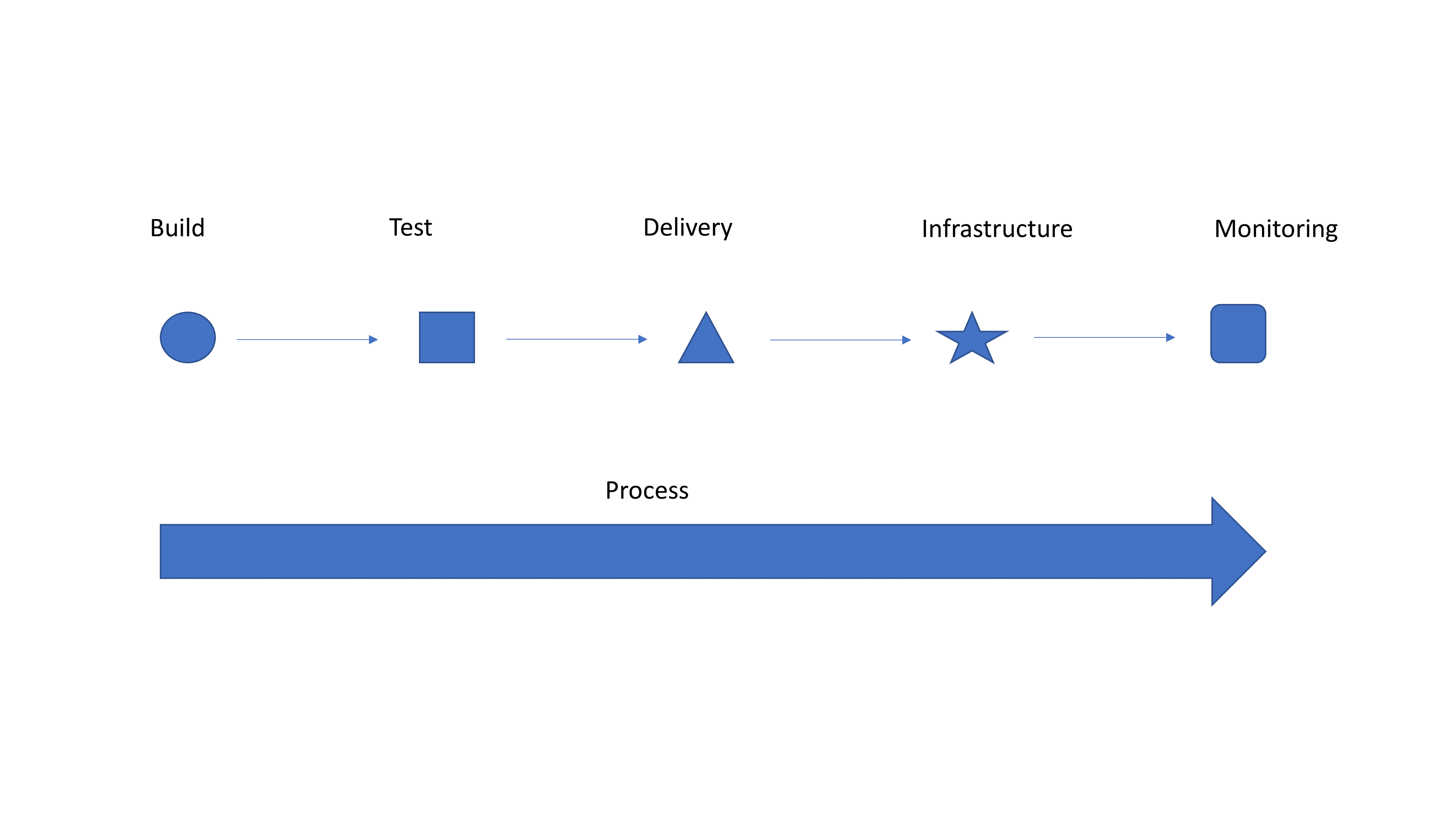
Simple Graphic for Discussion
So I’m going to take a second to tell you why it should. If you have integrated tools and teams, kudos! Hopefully you get absolutely nothing out of this blog, and you are enjoying a drink on a beach somewhere while your entire operation is taking care of itself. Everyone else, please read on.
Look at the generic graphic. Notice how each step on the top is a different shape? That’s because they are individually implemented with limited integration of both people and processes. So you have a tool to submit for testing … Does testing (or monitoring at the end) feed back into your bug tracking system? Does it create tickets to get stuff done? When a container fails, is it simply dropped and a new one spun up to replace it because “they’re just cattle”? If so, does the system take steps to keep the failed container—or at least information about it—alive so troubleshooting can occur? Ignoring failed instances that were replaced and their impact on users was low is exactly how CloudBleed happened a couple years ago.
Automate first, get the benefits of automation and drive faster delivery. Then take advantage of all that automation and make it into a streamlined process. It’s a massively complex system, even if you deliver everything on a single “platform,” so it will never be perfect. But issues that occur with regularity can be automated also to provide integration between systems. Isolating an instance and sending a notice to the defect tracking system that it is alive but not communicating (because it has been replaced) is something that is relatively easy to script/integrate and offers the ability to find what actually went wrong. Contrasted with just dropping the instance and starting a new one, this process is an order of magnitude better, and with integrated teams, Dev and Ops can work together to resolve whatever caused the instance to go down.
Strong integration and a smooth pipeline is what technologies such as application release automation are designed to deal with, but most shops see these tools as “unnecessary” overhead. I disagree. Find one you like—there are a million of them—and use it to connect things. It’s just one step, but it is a step to transforming your operational delivery systems from unique snowflakes to part of a collection that works together.
That’s it. Automate first because the gains are phenomenal, but don’t stop there. Really—don’t. You are doing yourself a disservice if you do. The whole “We’re going to change your world!” crowd is annoying, because changing your world is your decision, but listen to them anyway, and see which of their ideas fit your organization. You’ll be surprised once automation is solidly in place how much of what the process side of DevOps offers makes sense.
A recent HBR survey shows there is work to be done to advance DevOps in organizations
A survey of 654 subscribers to the Harvard Business Review found that while 86 percent of respondents said it is important for their organizations to be able to build and deploy software quickly, only 10 percent said they are successful at it.
Conducted by Harvard Business Review Analytic Services on behalf of Google, the survey found nearly half (48 percent) of respondents said their organization always relies on DevOps methodologies when deploying software, while another 21 percent rely on DevOps selectively. An additional 8 percent said their organization plans to adopt DevOps practices.
Among those respondents employing DevOps practices, the top benefits cited were increased speed to market (70 percent), productivity (67 percent), customer relevance (67 percent), innovation (66 percent) and product/service quality (64 percent). Despite those benefits, however, most organizations still have a significant amount of work to do in terms of implementing best DevOps practices—the three biggest hurdles organizations face are organizational silos (50 percent), legacy technologies (49 percent) and resistance to change (46 percent).
Melody Meckfessel, vice president of engineering for Google Cloud Platform (GCP), said these issues are precisely why Google is sharing how it operates in the form of site reliability engineering (SRE) principles, which are a prescriptive set of guidelines for implementing best DevOps practices. Not every organization needs to implement those principles to the same level, but just about every organization can benefit from adopting a set of well-defined engineering principles, said Meckfessel.
The challenge many organizations face is the fact that most of the IT staff are not engineers by trade. Most IT staffs are made up of administrators who tend to have limited programming skills. But Meckfessel said even IT organizations that don’t necessarily have a lot of engineering expertise still can benefit from automating operations based on the SRE principles.
Many of those organizations will need to slow down the rate at which they are building applications today to be able to speed up tomorrow. It takes time for organizations to master the cultural change required to implement DevOps practices. But once they begin to master DevOps, the benefits to the organization compound quickly. Meckfessel said two of the most important attributes of DevOps is adopting an immersive approach to training and establishing a no-blame culture within the IT organization when it comes time to conduct post-mortems. That latter goal is especially difficult to achieve sometimes, because most interactions between developers and IT operations teams historically have been less than positive.
Meckfessel also noted it’s critical now for organizations to incorporate cybersecurity into its DevOps processes as well, which requires not only additional training for developers but also closer alignment with cybersecurity teams.
It’s now only a matter of time before the complexity associated with emerging technologies such as microservices based on containers force many organizations to dive deeper in DevOps. The real challenge now is charting a path of least resistance that also generates the maximum level of benefit for all concerned.