Category: DevSecOps

  • WhiteSource Becomes Mend, Launches Automated Remediation Platform

    WhiteSource Becomes Mend, Launches Automated Remediation Platform

    WhiteSource rechristened itself Mend today and launched a remediation platform that automatically resolves security issues for application developers.

    Rami Sass, co-founder and CEO of Mend, said now the company is going beyond just identifying vulnerabilities in open source software using software composition analysis (SCA) tools and is also fixing them. The overall goal is to make it simpler for developers to address security issues without taking time away from writing code or slowing down the rate at which applications are developed, he added.

    To further that effort, Mend also announced today it is making available a plug-in for JFrog Artifactory that enables Mend Supply Chain Defender, formerly WhiteSource Diffend, to enable detection of malicious open source code. Last year the company acquired Diffend followed by the acquisition of two startup providers of static analysis security testing (SAST) tools.

    Collectively, those applications enabled the company to build the Mend Application Security Platform, a software-as-a-service (SaaS) offering that combines SCA and SAST tools to create an automated remediation framework that can be applied to both open source and proprietary code residing in a repository.

    Mend claimed it added more than 350 customers in the last year to bring its total to more than 1,000 organizations. Most recently, the company raised an additional $75 million in financing to continue investing in a platform specifically designed to address application security issues. In the wake of a series of high-profile security breaches involving software supply chains, Sass noted there is now a much greater appreciation for securing applications and that demand for application security solutions is growing. That demand, in turn, is fueling a wave of consolidation that is, in part, enabled by the convergence of application security tools made available via a SaaS platform, he added.

    Historically, much of the focus on application security focused on discovering vulnerabilities that developers are asked to patch. The issue is that developers are being asked to patch the same modules repeatedly. The Mend Application Security Platform keeps track of what modules have been successfully updated to give developers higher confidence in the updates being applied, said Sass.

    Those recommendations are not being surfaced using machine learning algorithms but rather by the data analytics capabilities that have been added to the company’s portfolio of tools over time, he noted.

    While there may never be such a thing as perfect security it’s apparent that most application security issues can be traced back to relatively common mistakes that developers routinely make. The more those issues are surfaced within a developer workflow, the less dependent organizations will need to be on embedding guardrails within DevSecOps workflows to prevent vulnerabilities from finding their way into production environment. The Mend Application Security Platform doesn’t eliminate the need for those guardrails as much as it reduces the sheer volume of security issues that might otherwise need to be addressed.

    It may be a while before these more advanced developer security tools achieve that result, but it’s clear from how quickly advances are being made that such tools should have a material impact on the overall state of application security.

  • Survey Surfaces Challenges Ahead on National DevOps Day

    Survey Surfaces Challenges Ahead on National DevOps Day

    A survey published today for National DevOps Day found nearly two-thirds (63%) have seen an increase in the frequency of service incidents that have affected their customers over the course of the last 14 months.

    The survey polled 1,046 engineering, IT operations, DevOps and site reliability engineering (SRE) professionals at organizations with more than 300 employees. The research was conducted by Transposit, a provider of a platform for connecting DevOps workflows, and found well over half (58%) of respondents reported the cost of downtime for their organization could be, on average, up to $499,999 per hour, with 40% of respondents noting that the cost of downtime has increased in the last year.

    Respondents said the top contributing factors to the increase in service incidents were digital transformation (61%), new product rollouts or product updates (55%) and methods and tools for collaboration that do not adequately support their team working remotely (49%). A full 90% of respondents reported there has been an increased focus on digital transformation during the last year with 73% having expanded the technology stack they support. More than half (55%) have increased the size of their DevOps teams.

    Overall, 46% of organizations reported they have experienced between six and 19 major incidents over the course of the last 12 months. More than half (53%) also reported an increase in the amount of time it takes to resolve incidents over the course of the last year, even though three-quarters of respondents (75%) said their organization increased their adoption of SRE practices in the last 12 months. Additionally, 65.1% of those organizations planned to hire site reliability engineers in the next 12 months. However, only just over a third of those respondents said their organization planned to expand their SRE efforts in 2022.

    A full 83% said up to 50% of their engineering operations processes are automated, but over half of the respondents that use SRE practices noted they still manually enter data into an IT service management (ITSM) application or other system-of-record to keep track of actions that were taken by humans during the resolution of an incident. Nearly two-thirds said their approach to automation was incremental, in which they begin by codifying processes and worked up to more advanced, fully automated scenarios.

    The top three tasks respondents would like to automate were service requests (53%), change requests (43%) and user provisioning (40%).The top barriers to implementing automation were cited as inadequate documentation of institutional knowledge and existing processes (56%), lack of clarity about what to automate (55%) and an inability to share knowledge (52%).

    Investments to improve their incident management processes over the next 12 months are focused on automation tools or applications (48%), communications/collaboration tools or applications (42%) and integration tools or applications (41%). Only a quarter (25%) said their tools are integrated through one tool or platform.

    Lack of unified communication with teammates (45%), processes that have changed or are harder to follow while working remotely (42%) and lack of visibility into dependencies and what teams or people are responsible for the code or infrastructure (38%) are all cited as reasons why serviced requests are now more complex.

    Transposit CEO Divanny Lamas said despite all the challenges facing DevOps teams, it’s fortunate that advances in low-code automation are making it simpler to more widely implement DevOps best practices. The challenge is finding a way to implement those best practices faster at a time when IT environments are becoming more complex.

  • Competing Priorities Prevent Devs From Creating Secure Code

    Competing Priorities Prevent Devs From Creating Secure Code

    The recently released Secure Code Warrior State of Developer-Driven Security Survey revealed that developers continue to wrestle with secure coding practices in a working environment that has long prioritized features and functionality and speed at the expense of security. 

    Of the more than 1,200 developers who took part in the survey, only 14% named security as their top priority. Security was seen as a bottleneck—an astonishing 67% of these developers said they routinely left known vulnerabilities and exploits in their code and 48% shipped products with known vulnerabilities.

    These statistics raise eyebrows, sure, but they are also unsurprising. In the survey, application security fell behind creating quality code, application performance and the ability to solve real-world problems on the list of developers’ priorities.

    In many cases, these results showed that security is either ignored in favor of meeting demanding timelines, developers would rather improve an application’s performance or they simply lack the required training to fix security problems. Regardless of the reason, it is a continuing problem.

    The Need to Balance Security in Development

    As the survey showed, developers often worked with secure code in silos. Security controls were limited to a single category instead of a holistic view of fundamentals. In many cases, developers relied on existing or pre-approved code rather than writing new code free from vulnerabilities. This assumed that the code inserted meets proper security needs, but that assumption often fell short.

    That said, developers who write code often find themselves inadvertently introducing vulnerabilities. This is not entirely the fault of those developers, but some of the blame lies with the cultural risk acceptance of the organization.

    The software organizations themselves must put more onus on secure development. As we saw from the SolarWinds attack, deficiencies in code can lead to massive disruptions. While not all application vulnerabilities have the reach of SolarWinds, businesses often allow for too much risk to pass in their code; that gets passed on to customers and developers are made the scapegoats.

    Provide Developers With the Right Skills

    Security leaders must first ensure developers have the requisite skills to code securely and to make improvements. That includes not just writing the code but also how code is committed through the entire development process. Developers often need hands-on training in proper coding patterns created in the languages and frameworks they commonly use.

    Organizations can no longer overlook security and ship potentially exploitable software. Security must be added earlier in the development process and be seen as imperative to success. The survey showed that many developers believe secure coding is out of their realm of expertise. A staggering 86% said they found it challenging to practice secure coding, while 92% of developer managers said their teams needed more training in security frameworks.

    This highlighted that developers do not get the right kind of training—nor are they get enough exposure to security best practices. It also underscores that designing for security is not seen as an essential skill for developers to have.

    Reasons for Optimism

    While our survey highlighted a disturbing trend, it also offered reasons for hope. The survey showed that attitudes have changed, and 66% of developers expected security to become a more significant priority over the next 12 to 18 months. Hiring managers echoed this sentiment—82% expressed an interest in hiring developers who are knowledgeable in security over those who are not.

    Businesses today have put themselves and their customers in a risky situation; organizational leaders must be agents of change to mitigate this risk. They need to apply a security-first mindset and empower their developers to better integrate security into the development process. Timelines must be revised to allow this to happen. If it continues, the current state of application security will only lead to more (and more severe) breaches. Now is the time to ensure DevOps teams and developers have better access to security training and more time to put those practices into action to ensure long term success. 

  • DevSecOps Deluge: Choosing the Right Tools

    DevSecOps Deluge: Choosing the Right Tools

    In the last few years, DevSecOps has become the security process of choice for many forward-thinking enterprises. 

    These organizations have come to understand that fixing bugs in the latter stages of product and application development offers no favors to anyone but cybercriminals. So, they have overhauled traditional processes and united development, operations and security teams to form DevSecOps where the teams now work in tandem, cooperating to embed security into the entire process of application and software development.

    The benefits of this are clear; finding and fixing bugs early closes doors on cybercriminals while bringing peace of mind, cost savings and better products to customers. However, one of the challenges many organizations face when transitioning to DevSecOps is making the process seamless, ensuring it doesn’t slow down the software development life cycle, make security checks more cumbersome or cause frustration among teams. 

    Security teams need to ensure their DevSecOps program is delivering value to the culture of the organization while speeding up time-to-fix, capturing the right metrics, and categorizing and prioritizing issues based on their risk so that nothing goes live that could cause major damage.   

    Additionally, they also need to select the correct DevSecOps toolkit to carry out application security testing while ensuring the tools easily integrate into software development and can be used across multiple projects. When identifying tools for testing, DevSecOps teams are often overwhelmed by the huge range and volume available, which makes choosing which ones to use and learning how to use them a minefield, even for those with the right training and know-how. 

    A DevSecOps automation program needs lots of technical tools and cultural aspects to come together to make it work. Security teams need static analysis tools to check the code, third-party library analysis to check the dependencies, separate analysis to check the infrastructure-as-code (IaC) configuration, scanners to check containers for issues, tools to test the running system, cloud security checks and infrastructure testing for patches and ports. They also need to match these tools up to the right technology each team is using and keep up with the constant changes.

    Given all of these complexities, how can DevSecOps teams overcome these challenges and build out an effective DevSecOps program with the correct toolset? 

    Here are some top tips to help them along the way.

    Keep Security Processes Flexible 

    Your teams are going to be using different technology stacks, different languages, frameworks, and so on. If you tie your process too tightly to a few tools, it’ll be harder to slot in new checks when things change. Remember that the aim is a consistent, repeatable security process with the right visibility—the technical tools feed into that, but they are not the whole process. What security checks will you need in 12 months that you don’t have now? What about 36 months? These are questions that must be asked continuously. 

    Automation is Your Friend

    If development pipelines are running smoothly and automatically, then any manual security steps are not going to fit in with the process. Automating security tools together—from orchestrating their running to aggregating their responses and managing issues—will save a lot of time and give you the results you need in line with your releases.

    Keep an Eye On Your ROI

    It’s very common for big-ticket commercial tools to be underused; you have the licenses for repeated testing and you have frequent code drops, but the processes or the integrations mean testing isn’t applied as often as needed or the results take time to collect and process. Explore ways to bring commercial tools easily into the existing processes.

    There’s No Such Thing as a Free Lunch

    The open source community provides great security tools, but remember: There is a cost associated with the time it takes your teams to use them and to manage the outputs. From developers learning how to run them to the time it takes to actually run them or extract the results or manage false positives—these aren’t free. A ‘free’ tool that costs two hours of work every release might not be worth it.

    DevSecOps is All About Collaboration

    Weaving security checks into development processes, CI/CD pipelines, ticketing systems and sprint meetings help security to be part of the development process, but not every developer is—or wants to be—a security expert. Think about how the aims of development and security can meet in the middle. How can developers include security without much effort or thought? How can security help supply the tooling and help triage issues in developer pipelines? How can the process conform to auditors’ tools and with correct profiles, not just turned down to zero to avoid reporting issues? How can security add value at scale to help developers fix issues faster regardless of the tooling being used?

  • Managing Hardcoded Secrets to Shrink Your Attack Surface 

    Managing Hardcoded Secrets to Shrink Your Attack Surface 

    The practice of hardcoding secrets—such as authentication credentials, passwords, API tokens and SSH Keys—as non-encrypted plain text into source code or scripts has been common in software development for many years. It is an easy way to save time and labor, but it is also highly insecure. The issue is that anyone with access to the code also has access to these hardcoded (or embedded) credentials, meaning your code is supremely vulnerable to attack.  

    Of course, today’s DevOps-oriented software development life cycles are all about velocity and efficiency—the goal is to advance and launch products not in weeks or months, but in days or even hours. Anything that might slow that pipeline is to be avoided, which is why hardcoded secrets are not going anywhere. They are going to be with us for many years to come.  

    At the same time, cybersecurity experts are right to be alarmed about the growing problem of secrets sprawl, which occurs when an organization stores secrets in a variety of locations, including source code, text files and spreadsheets. In today’s multi-cloud DevOps environments, it is simple arithmetic: As the number of users grows, your attack surface grows, too, in many cases expanding exponentially. 

    The Right Tools to Manage Secrets

    According to Gartner, “Hard-coded secrets embedded in source code and scattered throughout the DevOps pipeline pose significant risk. Technical professionals responsible for DevSecOps must introduce tools that securely store and manage secrets and enforce access controls without disrupting automated DevOps workflows.”

    What has come to the fore as many organizations have adopted cloud infrastructure, containerization and microservices architecture—especially regarding the software development life cycle (SDLC)—is that conventional technologies for secrets governance and entitlements management are not at all adequate in the cloud. Vault technology for static secrets is a well-understood set of capabilities that has been a cornerstone of cybersecurity best practices for many years. SecOps and DevOps teams realize that they need to adapt vaulting to cloud environments, but progress toward effective cloud secrets governance has been held back by several challenges.

    Just-In-Time For the Cloud 

    First, as noted above, disrupting continuous integration/continuous delivery (CI/CD) processes is not seen as an acceptable practice. DevSecOps teams very much expect to deploy secrets management capabilities without slowing or otherwise impeding the development process and without having to expend additional resources. Yet many standalone vaulting services are cost-prohibitive for most SMBs. Further, in many cases, conventional approaches to secrets management cannot deliver full governance capabilities, including clear visibility and attestation, across multiple vaults or within cross-cloud environments.  

    The good news is that today’s advanced dynamic permissioning platforms incorporate just-in-time (JIT) secrets provisioning capabilities and zero standing privilege (ZSP) enforcement mechanisms and can overcome these obstacles. The automated granting and revocation or expiring of permissions—JIT privilege grants—is highly effective at minimizing attack surfaces. These solutions—increasingly grouped under the banner of cloud infrastructure entitlement management (CIEM)—work based on the concept of zero-trust, which means no one and nothing is trusted with standing access to your cloud accounts and data.  

    With JIT, elevated privileges can extend either for the duration of a session or task, for a set amount of time or when the user checks the profile back in manually. Once the task is complete, those elevated privileges are automatically revoked—all without sysadmin involvement. Where a user previously had standing access privileges potentially extending around the clock for months or years at a time, converting to JIT granting compresses that attack surface to several hours per month.  

    Even better, as cloud-native entities, these solutions can support highly effective secrets governance initiatives for SMBs and enterprises alike. CIOs, engineering managers, CISOs and other IT security officers looking to better protect their multi-cloud DevOps environments should be looking to adopt an automated secrets governance platform that enables them to deliver on these four priorities: Visibility, enforcement, automation and investigation. 

    Visibility 

    Cross-vault visibility into all your secrets, secrets owners and secrets users is a must-have. You need to be aware, at any given time, of every human and machine user that has access to a secret, and you need to be able to uncover and monitor your highest-risk secrets or accounts across vaults.  

    Enforcement 

    You need to be able to enforce your secrets policies across vaults, which necessarily includes the ability to automatically rotate your static secrets across all vaults based on organizational policy. JIT permissioning is key here because it enables users to generate temporary credentials on the fly, and necessarily incorporates the automated granting and expiring or revocation of permissions—JIT privilege grants—which is highly effective at minimizing attack surfaces. 

    Automation 

    You need to be able to manage the identity life cycle for your secrets—preferably through an automated joiner/mover/leaver process. Consider, for example, if several people have access to a shared secret. Sharing accounts is not a best practice from a security standpoint, but it is common (and becoming more so) with the growing use of cloud resources within DevOps organizations. If one of those individuals in the shared secrets group leaves the organization, that permission/privilege then becomes a potential vulnerability. Automated shared secrets rotation that is invoked by policy directly addresses this issue. 

    Investigation 

    Security incidents are an inevitable eventuality in any organization. When an incident occurs—data breach, lost device, ransomware attack—you need to be able to tie secrets back to identities for proactive monitoring and post-incident investigation. Understanding which identities or individuals were exploited—and how—is essential for addressing vulnerabilities or bad practices. Analysis and reporting are also a critical capability for looking into access changes, addressing policy drift and identifying risky behaviors. 

    There’s no question that secrets governance in cloud environments requires rethinking and retooling established vault technologies and best practices for securing static secrets. JIT permissioning and secrets grants based on ZSP precepts provides an effective path forward. Consider that with JIT and ZSP, elevated privileges are circumscribed, and time-limited to minimize the permissioning and privilege threat surface. Taken together, these capabilities can deliver highly effective secrets governance to secure your entire organizations, without slowing or otherwise impacting your DevOps teams. 

  • 15 Ways Software Becomes a Cyberthreat

    15 Ways Software Becomes a Cyberthreat

    Software is an integral part of private and commercial life; there is no way around it. You need software to do your taxes, book a flight or browse the internet. Software has made our lives much easier in so many ways. However, as we become more reliant on software we also become more vulnerable to cyberattacks.

    This article will explore 15 different ways that software can end up becoming a cybersecurity threat. By understanding these risks, you can take steps to protect yourself and your business.

    Lack of Security Features

    Many popular software programs either lack basic security features or the features that are present lose functionality, leaving users vulnerable to attack. For example, Adobe Reader and Microsoft Word have both been found to have security vulnerabilities. If you use these programs, make sure you keep them up to date with the latest security patches.

    If you are worried about having to deal with downtime while installing new software updates, you can always schedule them for a time when you know you won’t be using your computer. This way, you can be sure that your software is always up-to-date and secure.

    Poor Password Security

    One of the most common ways users’ accounts get hacked is through the use of weak or easily guessed passwords. If you use a program that requires a password, make sure to use a strong one that would be difficult for someone to guess.

    Additionally, if you use the same password for multiple accounts, an attacker only needs to figure out that one password to gain access to all of your accounts. This is why it’s important to use different passwords for different services. If you can’t remember all of your different passwords, you can use a password manager to help you keep track of them.

    Consider using both a password manager—to take advantage of the more robust security these applications typically have—as well as a password randomizer, which will generate long, random passwords for you. Many password managers include a randomizer feature.

    Phishing Attacks

    Phishing attacks can impact any type of software program. In a phishing attack, an attacker will try to trick you into giving them your password or other sensitive information by masquerading as a legitimate website or program. Be very careful about any emails or messages you receive that ask for personal information, and never click on links in these messages unless you’re absolutely sure they’re legitimate.

    Phishing that takes place through software programs can also happen through messaging programs, like Skype or Facebook Messenger, or through email programs, like Gmail. Be sure to be cautious about any links or attachments you receive through these programs, as well.

    Keyloggers

    Keyloggers are malicious programs that are installed on your computer without your knowledge. Once they’re installed, they can track every keystroke you make, which means they can easily steal passwords and other sensitive information. Keyloggers can be installed through email attachments, malicious websites or even infected USB drives.

    To protect yourself from keyloggers, never install software from untrustworthy sources. Be very careful about what emails you open and what websites you visit. If you do get a keylogger on your computer, make sure to run a malware scan as soon as possible to remove it.

    Drive-by Downloads

    Drive-by downloads are another type of malicious software that can be installed on your computer without your knowledge. These types of programs are usually downloaded when you visit a malicious website or click on a malicious link. Once they’re installed, they can do things like steal your passwords or track your web browsing.

    To protect yourself from drive-by downloads, be careful about what websites you visit and what links you click on. If you think you may have downloaded a malicious program, run a malware scan as soon as possible.

    Malware

    Malware is malicious software that can infect your computer without you even knowing about it and, once it’s there, it can do things like steal your passwords or data or give an attacker remote access to your machine. From there, attackers can potentially access your organization’s IT infrastructure. Be very careful about what email attachments you open and what websites you visit, as these are two of the most common ways malware can end up on your computer.

    The software you use can also be used to introduce ransomware into your system. A malicious actor could create a fake version of a popular software program and distribute it online. When users download and install the fake software, they unknowingly grant the attacker access to their system. Or, an attacker could exploit vulnerabilities in software programs to gain access to a user’s system. Once inside, the attacker could install ransomware and encrypt the user’s files.

    Unsecured Wi-Fi Networks

    If you use public Wi-Fi networks to connect to the internet, you may be putting yourself and your organization at risk. These networks are often unsecured, which means that anyone else on the network can snoop on your traffic and see what you’re doing. If you need to use public Wi-Fi, make sure to connect to a secure VPN first so that your traffic is encrypted and private.

    Social Engineering

    Social engineering is a type of attack where an attacker tries to trick you into doing something that will give them access to your account or data. For example, they may pretend to be a customer support agent for a program you use and ask you for your password so they can “fix” an issue with your account.

    Or, they may send you an email that looks like it’s from a trusted source but actually contains a malicious link. Be very careful about any communications you receive, even if they appear to be from a legitimate source.

    Unsafe Browser Extensions

    If you use a web browser like Google Chrome or Mozilla Firefox, you may have installed some extensions to add additional features or functionality. But some of these extensions can actually introduce security risks. For example, an extension might have access to all of the websites you visit and the data you enter into them. Be very selective about which extensions you install, and only install ones from trusted sources.

    WordPress Plugins

    If you have a WordPress website, be careful about which plugins you install. Some plugins can introduce security risks, for example, by giving attackers access to your website or database. Install only trusted plugins, and make sure to keep them up-to-date. Also, while browsing new plugins, it is important that you ensure you are downloading and installing plugins that are regularly updated. Take a look at the last time the software was updated before deciding to install it.

    Adware

    Adware is a type of software that displays advertising on your computer, often in the form of pop-up ads. While not all adware is malicious, some forms of it can track your online activities and even collect sensitive information like your passwords or credit card numbers. Be careful about what programs you install, and always read the EULA before agreeing to anything.

    Google Docs

    Google Docs is a popular cloud-based word processing application that is part of Google Workspace. While it’s generally safe to use, there have been some reports of malicious actors using it to spread malware or launch phishing attacks. If you use Google Docs, be sure to only open documents from trusted sources and never click on any links in a document unless you’re absolutely sure they’re safe.

    Third-Party App Stores

    If you use an Android device, you may be tempted to download apps from a third-party app store instead of the official Google Play store. While there are some legitimate app stores out there, many of them are full of malware and other malicious programs. It’s always best to stick to the official app store for your device to avoid these risks.

    Outdated Software

    One of the most important things you can do to keep your computer safe is to make sure all of your software is updated to the latest version. Software developers regularly release updates that patch security vulnerabilities, so it’s important to install these updates as soon as they’re available. You can typically set your software to update automatically or you can check for updates manually on a regular basis.

    Commandeering For Loops

    Commandeering for loops is a type of attack where an attacker takes control of your computer by sending malicious commands through the command-line interface. This can happen if you accidentally download and run a malicious program or if you visit a website that has been compromised by an attacker. To protect yourself from this type of attack, be careful about the programs you download and run and only visit websites that you trust.

    Conclusion

    Software, in its myriad forms, is crucial to running both our businesses and enhancing our personal lives. There is almost no way to avoid using several, if not dozens, of different programs on a daily basis. But as we’ve seen, even the most innocuous-seeming software can pose a serious security risk if it’s not used properly. But understanding the attack vectors ahead of time can help protect yourself and your organization from these risks and keep your data safe.

  • Progress Expands Scope of Compliance-as-Code Capabilities

    Progress Expands Scope of Compliance-as-Code Capabilities

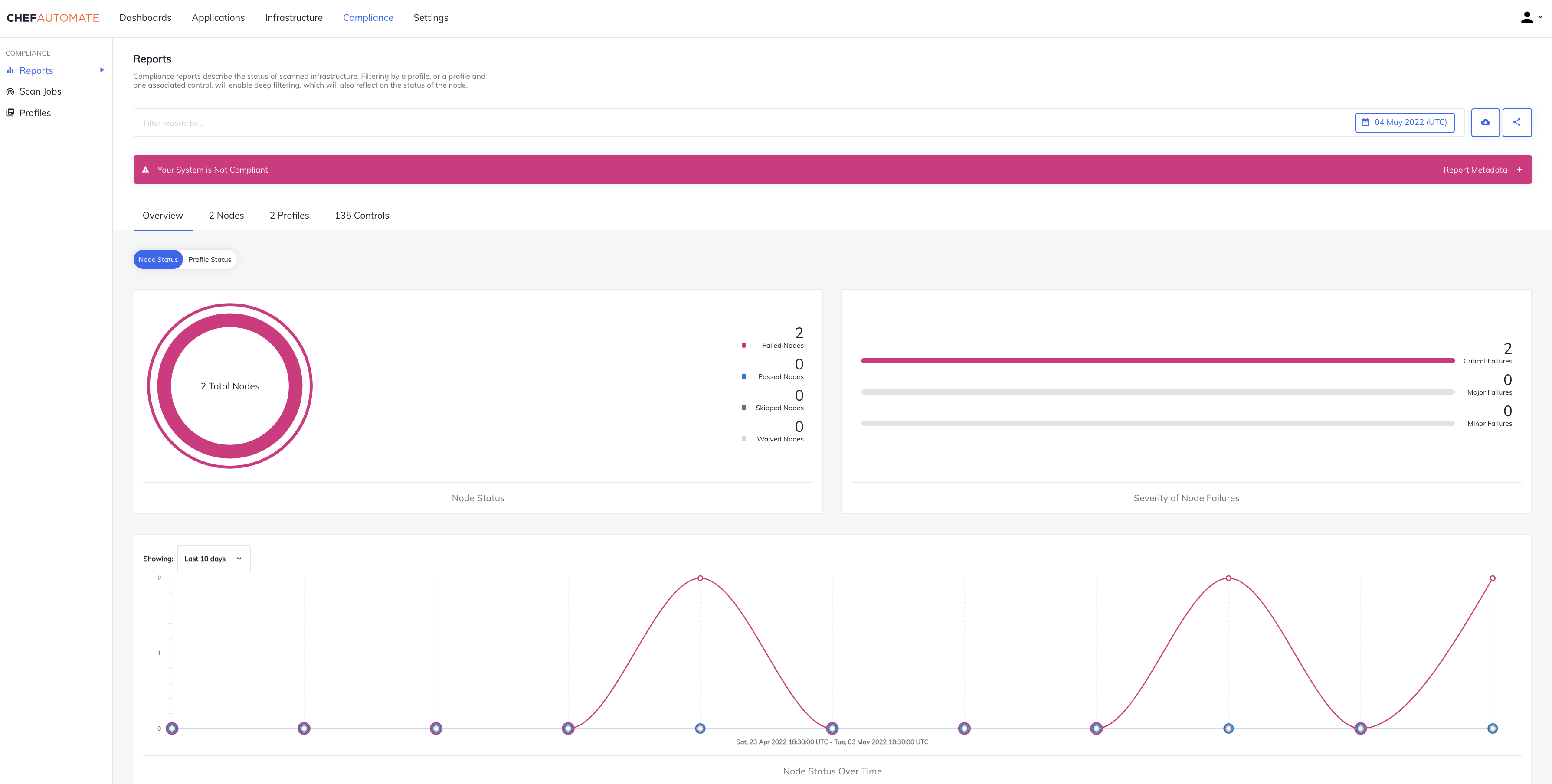
    Progress this week extended its DevSecOps portfolio—built atop the Chef automation framework it acquired in 2020—to now include the ability to programmatically address compliance mandates.

    At the same time, Progress has updated the Progress Chef InSpec framework for automating the discovery of compliance issues to add support for SAP ASE, IBM DB2, Mongo, Cassandra, Oracle, MS SQL platforms along with RHEL, CentOS, Ubuntu and macOS Monterey.

    Progress has also updated the Progress Chef Enterprise Automation Stack (EAS) to add the ability to combine infrastructure configuration processing with compliance audits within a single consolidated policy definition along with a high availability capability that makes certain the platform is always accessible.

    Prashanth Nanjundappa, vice president of product management for Progress, said Progress Chef Cloud Security enables DevOps teams to take advantage of a single policy-as-code platform to consistently implement compliance policies alongside security controls across both multiple public clouds and on-premises IT environments.

    Progress Chef Cloud Security leverages certified industry benchmarks, such as the Center for Internet Security (CIS) benchmark, to continually scan and automatically detect security configuration issues at multiple stages within a DevOps pipeline. Progress has now expanded CIS benchmark profile coverage for Amazon Web Services (AWS), Microsoft Azure and Google Cloud Platform (GCP) to include more than 100 customizable pre-built service and resource templates. DevOps teams can take advantage of automated creation of code, test and documentation artifacts for those resources. Finally, visibility into the status and expected completion time for compliance scans has been added along with advanced Shell command support for control and testing without file output.

    In general, the ability to address compliance requirements within a DevSecOps workflow has become crucial because the number of misconfigurations that occur in the cloud has exploded. Developers that often have little to no security or compliance expertise are programmatically provisioning cloud infrastructure in a way that, for example, leaves ports wide open. As IT organizations embrace more cloud computing platforms, that security issue only compounds, noted Nanjundappa.

    More challenging still, cloud computing environments are becoming more complex with the rise of cloud-native applications based on platforms such as Kubernetes. The odds a developer is going to make a mistake only increase with each microservice deployed.

    Progress is betting that, as cloud computing evolves, responsibility for security and compliance will increasingly shift left toward DevOps teams; they’ll be responsible for implementing polices defined by cybersecurity and compliance specialists. The goal is to provide a set of guardrails that make configuration mistakes less likely because policies are being tested within the context of a DevSecOps workflow, said Nanjundappa.

    It’s only a matter of time before software supply chain security reviews that are occurring in the wake of a series of high-profile breaches force the DevSecOps issue within more organizations. The goal, of course, should be to eliminate the need to identify DevSecOps as separate from a DevOps workflow. Regardless of the approach, however, the one good thing about all this attention is that application environments will inevitably become a lot more secure.

  • How to Secure CI/CD Pipelines With DevSecOps

    How to Secure CI/CD Pipelines With DevSecOps

    Many companies are adopting a DevOps approach in their workflows as IT moves toward a more automated and cloud-native world—but for some industries, this migration isn’t easy. Many of these companies—in finance, health care, government—are obligated to meet compliance requirements. For these organizations, DevSecOps adds necessary security focus to the DevOps methodology.

    Compliance means adhering to certain standards and controls to ensure that applications are secure. But compliance only goes so far. How many applications contain third-party dependencies inside? How expensive would it be for a company in the financial industry, for example, to fail to meet compliance standards?

    Initially, containerizing an application while complying with requirements of whichever framework or standards apply to your organization could seem close to impossible. Within the cloud-native landscape, however, technologies are also rapidly evolving to enable healthy migration and ensure that applications can meet compliance standards without being rewritten from scratch.

    First, let’s look at the standards organizations must adhere to in terms of compliance.

    CIS Benchmarks for Kubernetes and Docker

    The Center for Internet Security (CIS) benchmarks offer guidelines for the correct use of containers in applications. The CIS benchmarks specifically discuss Docker and Kubernetes.

    NIST SP 800-190

    The U.S. government’s National Institute of Standards and Technology (NIST) defines containers as a form of virtualized operating systems within its application container security guide.

    PCI

    The payment card industry (PCI) standards are a framework that helps protect data in the e-commerce and retail areas.

    HIPAA

    The Health Insurance Portability and Accountability Act (HIPAA) sets the compliance standard for patient data protection in health care.

    Securing Infrastructure via CI/CD Pipelines

    All these standards guide organizations to keep their infrastructure secure and compliant with their specific industry best practices, but security doesn’t end (or even start) there.

    Secure systems start from the design stage and from the code itself; you should aim to have security controls and enforcement built in as early as possible in the development life cycle. The practice of moving security checks earlier in the development pipeline (and, thus, nearer the source code) is known as shift left.

    You likely already have CI/CD pipelines in place for your application(s), and this is a great place to shift left your security checks. There are some great tools in the CNCF portfolio to help you achieve this.

    Enter Containers

    In the cloud-native world, containers are first-class citizens. From the DevSecOps point of view, containers represent a new attack surface to consider, starting with how the container image is defined and what ends up inside the container (the Dockerfile) to how the container evolves over time in response to new vulnerabilities that might be found.

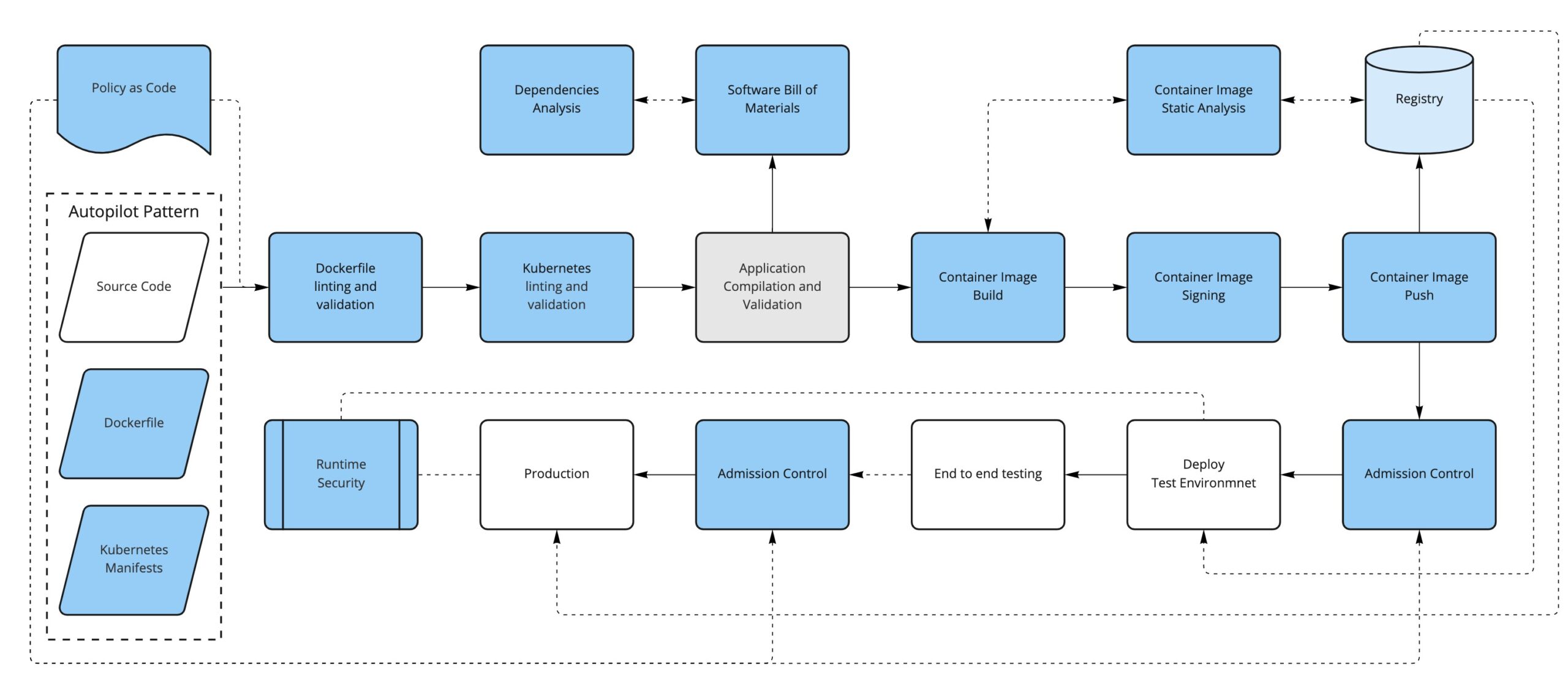
    The first thing we can do is to convert our written policies to something that we can automate (such as code); for example, using a tool like OPA/conftest and a Dockerfile linter like hadolint, we can validate that the Dockerfile is compliant with our security policies.

    For instance, we could have a policy in place to limit the base images used to build new containers (limiting the FROM directive in the Dockerfile, for example).

    The second thing to consider is that, depending on how it has been built, a container image can have not only our application but also additional software included, like dependencies and operating system binaries.

    This additional software could have new vulnerabilities discovered in the future, so we should monitor the images that we have already built and pushed to our registry by periodically scanning them to find if they are open to any vulnerabilities that weren’t known at the time of building the container image.

    Just as before, we could sign our application artifacts. Now, our deliverable artifact is a container image, so it is preferable to be able to sign container images. In this way, we can trust that the container image we run comes from us and that it has been through our security process. There are projects like Notary, Grafeas and sigstore/cosign that can help with the container signature process.

    Running Containers in Kubernetes

    If we are running containers, the next logical step is to consider how we run them. Kubernetes use is on the rise as a solution to orchestrating containers across several machines. Introducing Kubernetes into the equation requires considering yet another attack surface in our DevSecOps workflow.

    Manifests

    Alongside our application’s source code, we will have the Kubernetes manifests that define how to deploy our application into a Kubernetes cluster.

    We can take the same approach as the container definition: Define some policies-as-code to enforce early in the process so our manifests are aligned with our security policies (not running untagged images, running images only from our trusted sources, ingress must have TLS, not using node port services, for example) and lint the YAML files to fail early if there are syntax problems, for example.

    We could also enforce most of the same policies and some additional ones at runtime when the manifests get applied to the cluster via a Kubernetes Admission Controller.

    Some tools that can help us with these enforcements are OPA/conftest, kubeval or kubelinter for linting and validation and, for the admission controls, we can use OPA/Gatekeeper or Kyverno, in addition to the API server admission plugins.

    Secrets

    Secrets require special attention since they contain sensitive information.

    If you’re using a GitOps approach, application secrets are often stored in repositories. Here are some resources that discuss sealed secrets in GitOps and Kubernetes secrets. 

    RBAC

    Do not use default service accounts: Define explicit service accounts associated with their permissions so you know exactly who can do what.

    Avoid the use of wildcards in roles and cluster roles; with RBAC you can define fine-grained permissions for users and for service accounts, as well.

    Know Your Dependencies

    Another attack surface that we need to consider is the application’s dependencies. It is important to first know what they are and if they have any known vulnerabilities. To help us with that, we can create a software bill of materials for the application and run an analysis on it.

    Finally, just like we periodically check for the images stored in the registry, we can continuously analyze what’s running in our Kubernetes cluster. This will ensure that there is no suspicious activity like abnormal network requests, images with critical CVEs running, etc.

    Conclusion

    By now, you should have a better idea of what it takes to secure your pipeline. Keep in mind, however, that this is mostly about process and cultural change.

    First of all, you need to know your attack surface—that is not only a technological choice, it’s also about what you think is important.

    These concepts are hard to apply from the beginning, so a better approach is to introduce changes, get used to them and think about how to improve the existing process step by step.


    Join us for KubeCon + CloudNativeCon Europe 2022 in Valencia, Spain (and virtual) from May 16-20—the first in-person European event in three years!

  • Does GraphQL Introduce New Security Risks?

    Does GraphQL Introduce New Security Risks?

    The GraphQL query language is an excellent tool for increasing the ease of data sharing. The premise is that you request the fields you need in a single bundled request, avoiding multiple network calls. Due to its usability, GraphQL is a growing area of development. Yet, as with any new technology, it comes with caveats.

    REST APIs function as a request-and-response paradigm in which the receiver accesses one resource at a time. On the other hand, GraphQL exposes many fields at once, requiring additional rate-limiting and time-outs to avoid nefarious queries. Additionally, the ability to traverse the entire schema could be abused by attackers to expose intricate data linkages. There are also some usability features with GraphQL that could be abused if misconfigured.

    GraphQL is a friendly alternative to REST. But how do we handle the security implications of GraphQL? I recently chatted with Mike Benjamin, vice president of security research, Fastly, to dive deeper into the security repercussions of adopting GraphQL. Below, we’ll consider the unique insecurities associated with GraphQL and suggest specific steps to limit the impact of these risks.

    Four GraphQL Security Vulnerabilities

    1. Introspection

    GraphQL provides built-in documentation that tells developers what the fields are, providing a schema of everything you can query. You’ve essentially given the entire dataset schema to a developer, meaning they can perform introspection to capture attack surface information. Hackers will most commonly look for injection or mutation capabilities that they can exploit, explained Benjamin. Or, they might seek to leverage the interlinkages between data to map a way through to classified information.

    To mitigate this problem, Benjamin cautioned against over-exposing all documentation publicly. Instead, he suggested using a restrictive security model for external viewers. “Provide appropriate user documentation in a different method,” he says. This may end up looking more like the standard REST API view of documentation.

    2. Field Suggestions

    Another usability benefit in GraphQL could also be a potential security concern—field suggestions. Field suggestions occur when you don’t enter the correct field name or enter a partial input and the system returns a hint. You might type in 0 or user, and the system makes a suggestion to fill out the rest of the field.

    This user interaction improves the developer experience, but, unfortunately, it could be abused by a hacker, said Benjamin. Thus, he recommended disabling hints after initial development. Or, if you decide to keep it in, he recommended placing a limit on its use. For example, if you try this more than five times in a second, the system could flag it as a bot.

    Right now, this attack vector is pretty limited, but Benjamin anticipated that, over time, hackers could automate this introspection with mass scanners to divulge more information.

    3. Denial-of-Service-Oriented Attacks

    Without the proper guardrails, all web APIs are prone to denial-of-service (DoS) attacks. Such an attack may pummel a service with a million queries per second to shut it off completely. In the case of GraphQL, these queries can dive very deep in a nested data relationship. A social network, for example, might expose friends of users, friends of users’ friends and so on.

    Or, hackers might utilize GraphQL’s bulk query ability to perform reconnaissance, brute-forcing the enumeration of data to query hundreds of user IDs to see which are valid. If you’re allowing unlimited data retrieval bundled within a single request, you could be inviting hundreds of bundled queries that could expose large swaths of the underlying database in one fell swoop.

    To counter these actions, Benjamin recommended limiting the testing depth. This could involve placing limits on how long a query can run, which would cause a time-out for requests that require suspiciously high degrees of processing. Another option is to limit how deep the bundling can get, said Benjamin. For example, perhaps the system restricts going three levels deep into a graph database, as that could expose millions of interconnected endpoints.

    4. Lack of Object-Level Authorization

    Another vulnerability that GraphQL endpoints may be prone to is a lack of object-level authorization, which hackers could leverage to get at a datapoint through its edges, said Benjamin. Since the idea is that you can access any data from one all-encompassing endpoint, authorization rules are often too abstracted away from the actual data. Queries may be able to access nested data or query relationships between data, too, which may unintentionally divulge information.

    Benjamin recommended placing authorization closer to your objects or data to rectify this issue. Use authorization-level controls that align permissions structure and roles with users. “Everyone needs a common authorization model,” said Benjamin.

    Future Evolution: GraphQL Security Matures

    As I’ve written before, the greatest strength of GraphQL is also its greatest weakness. Using GraphQL with default settings is a security trade-off in favor of usability. But according to Benjamin, we’re seeing more GraphQL servers disabling some introspection features, which he sees as a very positive move and a sign of maturity of the base configuration.

    GraphQL might suffer from similar threats that all APIs are vulnerable to, such as XSS, injection, DDoS attacks and broken authorization. However, Benjamin stressed that the added complexity of GraphQL makes it a unique case. “The most important thing for folks to consider is that GraphQL is more complicated than a REST endpoint—much more complicated,” said Benjamin. “GraphQL is unique in that it has linkages of data which contributes to complexity. It takes a little more time to think about how that’s confirmed, how it’s presented and how it would be attacked.”

    In other words, with great power comes great responsibility.

    Although exploits in public GraphQL APIs are still rare, we should stay vigilant. Benjamin encouraged developers to continue reading about, understanding and thinking about these attack vectors when designing their interfaces, as these risks will become more prominent as GraphQL usage grows and hackers become more familiar with these specific frailties.

  • OpenSSF Adds Open Source Package Analysis Tool Prototype

    OpenSSF Adds Open Source Package Analysis Tool Prototype

    The Open Source Security Foundation (OpenSSF) has made available a prototype of a package analysis tool that has already identified more than 200 malicious packages uploaded to PyPI and npm software components.

    Caleb Brown, an OpenSSF maintainer of the project, said the goal is to understand the behavior and capabilities of packages available on open source repositories. It also tracks how packages behave over time to make it easier to identify when previously safe software began to act in a suspicious manner.

    Most of the malicious packages detected are employing dependency confusion and typosquatting techniques, Brown said. They usually contain a simple script that runs during installation and provides a few details about the host to an external command-and-control system. Most of these packages are not exfiltrating meaningful data except the name of the machine or a username, but they make no attempt to disguise their behavior. The issue is that any one of these packages could have done far more damage, noted Brown.

    Future goals for the project include detecting differences in package behavior over time; automating the processing of the package analysis results; storing the packages themselves as they are processed for long-term analysis and improving the reliability of the pipeline. As such, the OpenSSF is looking for application developers and cybersecurity researchers to contribute to the project. The expectation is that many providers of application security tools will incorporate the package analysis tool within their offerings rather than requiring each vendor to create their own version of the same tool, said Brown.

    The OpenSSF has launched a series of initiatives to improve the overall state of open source security. Most recently, it added an Alpha-Omega Project to automate security testing processes for open source software using a $5 million initial investment provided by Microsoft and Google. The core challenge is that many organizations are dependent on open source software projects created and maintained by just a handful of volunteer maintainers and contributors. The individuals that created those projects don’t always have a lot of cybersecurity expertise. In fact, many of them would argue that the onus for securing open source software is on the organizations that use what amounts to free software. It’s not the responsibility of the contributors and maintainers to, for example, drop everything and immediately create a patch to address a zero-day vulnerability.

    It’s not clear how easily open source software could be compromised by cybercriminals that insert malware into downstream applications that rely on that code. However, in the wake of a series of high-profile breaches, it’s safe to assume that more cybercriminals than ever are trying to compromise open source software projects. While some organizations may opt to limit their dependency on open source code that has not been properly vetted, there is no way to entirely avoid using open source code. The challenge is finding a more efficient way to ensure the integrity of that code for all concerned.