Category: DevSecOps

  • How to Adopt an SRE Practice (When You’re not Google)

    How to Adopt an SRE Practice (When You’re not Google)

    Site reliability engineering (SRE) isn’t a new term or practice. The practice of applying software engineering skills and principles to operations problems and tasks happened even before site reliability engineer was a defined job title. But organizing a proactive approach to building and maintaining software drives long-term success in improving operational efficiency, data-driven roadmap planning and general uptime and reliability. All these advantages account for the widespread adoption of SRE. 

    In this article, I’ll dive into what it takes to get into site reliability engineering, how to adopt it within your own organization and some of the core principles and best practices you’ll need to keep in mind as you move forward in your SRE maturity journey.

    What is SRE?

    SRE, or site reliability engineering, is the practice of applying software engineering expertise to DevOps and operations problems. Often, this means proactively writing code and developing internal applications or services to combat reliability and performance concerns. SRE has been a practice for many years but has been more recently popularized by Google when they first published Site Reliability Engineering: How Google Runs Production Systems in March 2016.

    SRE is a complicated acronym because it both relates to a job title, site reliability engineer,  as well as a general practice adopted by development and IT teams, site reliability engineering. SRE teams are often organized differently depending on the organization and the services they support. Sometimes site reliability engineers (SREs) are sprinkled among development teams. This means they can vocalize concerns during roadmap planning and work closely with QA teams, collaborating on everything from shipping features to staging to managing production environments. 

    Another approach organizes an SRE team as a standalone group. The SRE team as a whole is focused on responsibilities including monitoring applications and infrastructure, establishing reliability metrics, tracking issues with new releases and handling on-call duties. No matter how they are organized, what remains the same for all these SREs is their initiative—reliability and performance.  

    DevOps Vs. SRE

    The rapid adoption of DevOps practices may have you wondering, “How is SRE different from DevOps?” Commonly, the two terms go hand-in-hand. SRE is a practice that doesn’t necessarily have to be part of DevOps culture and adoption but is often implemented by organizations that are further along in their DevOps journey. The further along on your DevOps maturity model, the more likely you are to have bought into SRE practices.

    The conversation isn’t ‘SRE versus DevOps; the conversation is about establishing a proactive SRE team and operating model to help strengthen your DevOps practice. Whether you choose an SRE framework integrated into your development and IT teams, or you want to make SRE a standalone business unit, you need to understand their general responsibilities.

    SRE Team Responsibilities

    Site reliability engineers are responsible for defining what performant and reliable really mean when you talk about your applications, services and infrastructure. The day-to-day tasks can range anywhere from instrumenting new monitoring solutions to building custom apps for technical support teams. They might ship new code to production to fix bugs or deliver new features, or they might respond to incidents in real-time and work closely with support teams to deliver positive customer experiences.

    At the end of the day, site reliability engineers are the key to understanding exactly how customers experience your product and how to track system performance and reliability through your customers’ eyes. SRE teams need to figure out exactly where service boundaries exist between what development teams ship and what customers experience. From there, they need to find ways to monitor reliability and performance concerns in a way that helps your internal teams proactively identify risks and deliver better software. 

    SRE teams spread knowledge across the product and development teams to consistently define reliability across the entire organization. With everyone on the same page, the engineering teams can make data-driven decisions when it comes to releasing new features or improving current experiences in production. 

    Site Reliability Engineering Principles and Practices

    At a very high level, Google defines the core of SRE principles and practices as an ability to ’embrace risk.’ Site reliability engineers balance the organizational need for constant innovation and delivery of new software with the reliability and performance of production environments. 

    The practice of SRE grows as the adoption of DevOps grows because they both help balance the sometimes opposing needs of the development and operations teams. Site reliability engineers inject processes into the CI/CD and software delivery workflows to improve performance and reliability but they will know when to sacrifice stability for speed. By working closely with DevOps teams to understand critical components of their applications and infrastructure, SREs can also learn the non-critical components.

    Creating transparency across all teams about the health of their applications and systems can help site reliability engineers determine a level of risk they can feel comfortable with. The level of desired service availability and acceptable performance issues that you can reasonably allow will depend on the type of service you support as well. SRE principles and practices embrace experimentation and require a dedication to proactively understanding the health of the services they support.

    An SRE Operating and Maturity Model

    You can perform a lot of the responsibilities asked of a site reliability engineer and still have a software engineer job title. So, how do you know how mature your site reliability engineering practice is? Luckily for you, we’ll lay out a quick way to build an effective SRE operating model and track your maturity against it. An SRE operating model typically includes three elements, which you might achieve in phases:

    1. A team (or at least one person) dedicated to the practice of SRE.
    2. Deep integration and influence across product, development and operations teams.
    3. Autonomy to automate workflows and write code for nearly any part of your application or system.

    Your SRE maturity depends on where your organization falls along these three elements of an SRE operating model. If you’ve taken the steps to make an SRE team or hire your first site reliability engineer, you’re at the beginning of your journey. If you have a team and they are a valued part of roadmap discussions, QA, deployment workflows, incident management processes, then you have a somewhat mature SRE practice. 

    An organization only reaches complete SRE maturity when the SRE business unit has the autonomy to automate workflows, build applications, own monitoring and alerting solutions, or interject themselves into nearly any conversation. Vocalizing performance and reliability concerns upfront and having a proactive discussion about those concerns is always better than simply ignoring them until it’s too late.

    Monitoring, CI/CD and Organizational Automation

    Site reliability engineers can and will automate just about anything and everything. If it can proactively detect, remediate or resolve an issue, it needs to be automated. From continuous integration and delivery practices to production environment monitoring, SREs should have some visibility into all of it. If they can identify ways to proactively uncover performance and reliability issues, then they need to have the authority to implement those changes.

    Today’s DevOps and IT capabilities around automation, monitoring, artificial intelligence and machine learning give SRE teams a huge advantage when identifying issues, responding to them and fixing them. Organizations with mature DevOps and SRE practices can catch problems in staging and they can also build automated incident management workflows and self-correcting systems. By determining critical components in your applications and infrastructure, SREs can narrow down the scope of things that can cause major problems.

    The Practice of Service Levels (SLIs, SLOs and SLAs)

    Service levels come into play to help SRE teams communicate the true health of digital products and services to all stakeholders. This is done by identifying and measuring critical components that are key to delivering positive customer experiences. In particular, they need to know when one or more components expose functionality to external customers. We call these intersection points system boundaries. System boundaries are the place where site reliability engineers need to apply service-level indicators and objectives to their metrics in order to tell the real story of system performance and reliability. 

    • Service-level indicators (SLIs) are the key measurements to determine the availability of a system.
    • Service-level objectives (SLOs) are goals you set for how much availability you expect out of a system.
    • Service-level agreements (SLAs) are the legal contracts that explain what happens if the system doesn’t meet its SLO.

    While SREs aren’t always responsible for managing service levels, it often falls within their purview. By tracking SLIs and tying them to SLOs, you can set goals around the performance of a system. Google’s SRE book defines the four golden signals of service levels as latency, traffic, errors and saturation. So, for example, you could look at an API call and track its number of successful/failed requests (the SLI) against a general percentage of requests that need to be successful for customers to have a good experience (the SLO).

    SRE teams will often set strict SLOs on critical components within their applications and services to better understand how strict of an SLA they can agree to with customers. From here, the team can apply error budgets as a way to understand how quickly they must resolve issues in order to stay compliant with their SLOs. Service levels allow teams to aggregate metrics and create a transparent view of uptime, performance, and reliability across the entire organization. At a glance, business leaders can use service levels to monitor compliance across multiple teams, applications, services, etc. to gain a comprehensive understanding of their system’s health.

    Adopting SRE Best Practices

    Adopting SRE best practices and principles won’t happen overnight. It takes time and effort to proactively monitor your teams and systems for performance and reliability concerns. But, in the end, your DevOps teams and especially your customers will thank you for deciding to take advantage of site reliability engineering.

  • Why is Security Still in the Way? A Look at DevSecOps Right Now

    Why is Security Still in the Way? A Look at DevSecOps Right Now

    According to industry trend reports for 2022, DevSecOps is now considered to be one of the most effective approaches to building software quickly and securely. This effort, of course, means development, security and operations teams commit to addressing security as early as possible in the software development life cycle (SDLC). The goal of the shift into DevSecOps revolves around the need for more automation, streamlined CI/CD pipelines, less friction among teams and plenty of time for productive innovation. Incorporating DevSecOps practices into an organization unites security, compliance and development issues into a collaborative concern, one that allows DevOps to move fast without jeopardizing code quality. 

    As we approach the middle of 2022, it’s worth looking back and considering why security is still standing in the way of smooth software development. Security vulnerabilities have always been present in the process, and yet these pesky bugs continue to be the biggest threat to software performance. The question is, why?

    The Truth About Security

    Software has always been deployed and shipped with some existing bugs. But as software and services continue to dominate our everyday lives, the reality of this statement continues to plague both businesses and the end user. On some level, software development has yet to evolve into the next phase of security. Code is still rolled out regularly, only to discover security vulnerabilities in production. Some say the way software is developed today actually lends itself to defects, mostly because the pace of work required supersedes best practices around AppSec. 

    While the larger cybersecurity industry—and every DevSecOps team in the world—is striving to make software more secure, many organizations still prioritize speed and productivity over digital risk. This means the state of security (and, to some extent, the DevSecOps world) has become somewhat lopsided, with some enterprises making great efforts while others embrace a more lackadaisical approach. To make matters worse, many professionals today believe there has been a general under-investment in cybersecurity over the past several decades. 

    The Next Phase of DevSecOps

    The shift to remote and hybrid work models has led to mass adoption of cloud technologies and digital transformation, across all sectors and industries. As a result of this evolution, organizations today need to bear in mind that the more services they use, the more digital threats and overall risk they face. As this exposure to vulnerabilities increases, so does the need for new approaches to security. 

    The majority of modern enterprises do, in fact, have a security process in place, as well as other risk management solutions. But with the cybersecurity reckoning of 2021 and the stakes of cloud computing being higher than ever, businesses right now are feeling the pressure to think long and hard about why security still isn’t a guarantee. The trend of slowing down software development to address security more thoroughly, also known as the secret sauce of DevSecOps, is not free from roadblocks—but it is also far from optional. For many organizations, the implementation of DevSecOps practices feels less like security and more like speed bumps that just slow down the shipping of software. 

    Even so, the effort to improve security is happening now. Organizations do not need several solution platforms or tools to get started. They can begin right away; evolving their security tools and practices as they grow the business. With this growth comes one of security’s biggest challenges—scalability. Because toolchains across the cloud have become more and more complicated, setting policies and/or workflows in one tool is challenging. While these issues can be largely addressed by the adoption of an end-to-end security solution, organizations must continue to focus on strengthening supply chains, improving security oversight, and bolstering their approach to DevSecOps. Some ways to make this happen include:

    • Making sure CI/CD pipelines are integrated with DAST and SAST testing in development
    • Ensuring developers and DevOps teams complete vulnerability scanning before commit or merge, as they write code
    • Minimize manual security as much as possible with automated AI/ML tools to support more effective scanning and monitoring
    • Invest in management solutions that improve security in a multi-cloud environment

    Addressing the Supply Chain

    According to an industry survey, 60% of companies have decided securing the software supply chain should be a top priority for 2022. When we think about software supply chain attacks, we need to think about better controls to validate its integrity through all stages of the SDLC. Obviously, DevOps and automation have provided considerable help in this area; however, they cannot pull all the weight of security without proper governance and guardrails. 

    With a secure supply chain comes better security, as well as compliance, privacy and transparency. When a supply chain is secure, it can automatically enforce policy requirements for things like instrumentation, testing and architecture. As a result, software development and deployment become a repeatable process that is also reliable. Teams across the organization can rest assured that the products and services they are building comply with security expectations, such as validating code before production with static analysis and scanning tools. 

  • Contrast Security Adds Free Code-Scanning Tool

    Contrast Security Adds Free Code-Scanning Tool

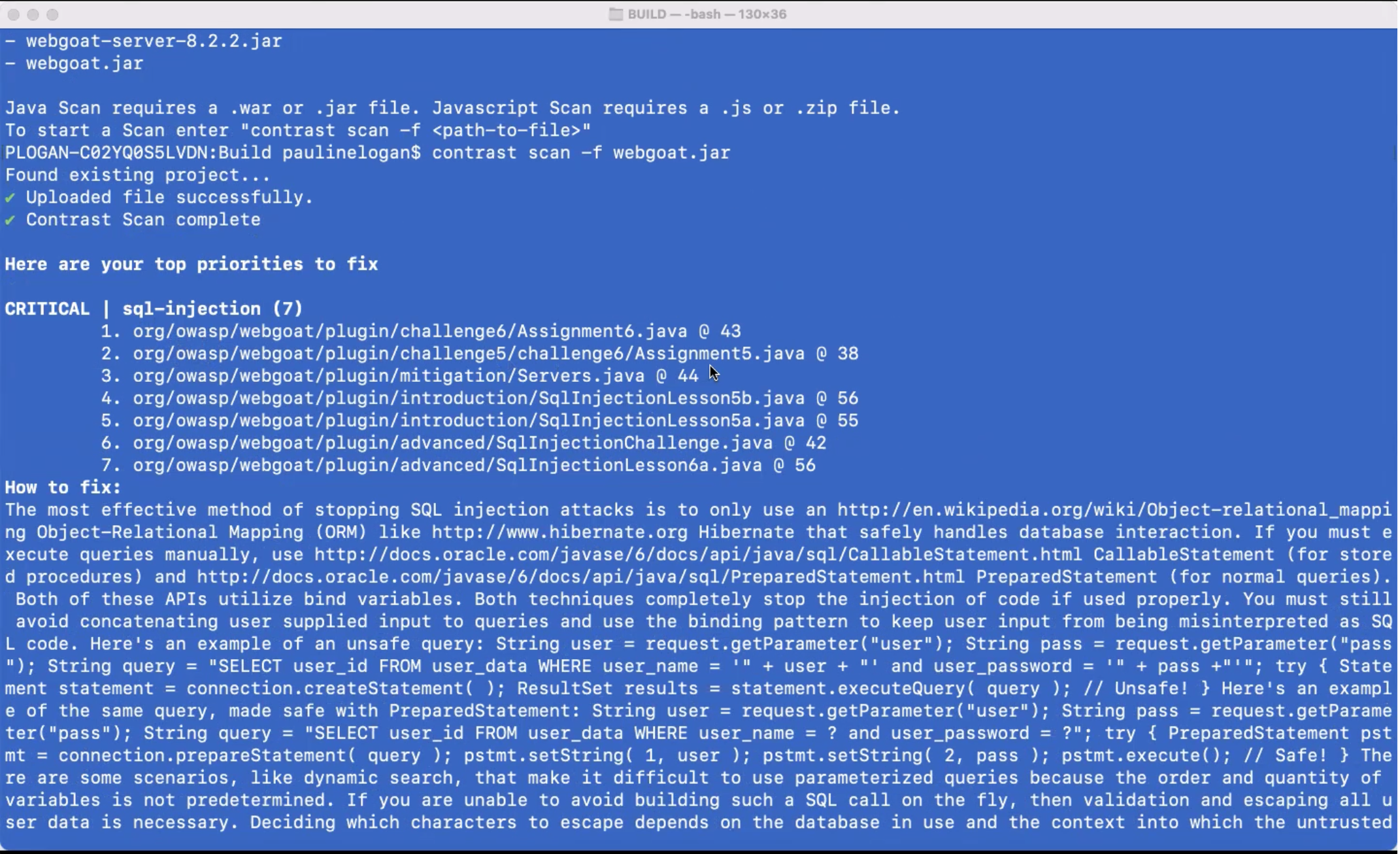
    Contrast Security this week made available a free security tool that enables developers to scan their code using the same core engine used by the cybersecurity team within their organization.

    Steven Phillips, vice president of product marketing for Contrast Security, said while there is no shortage of free tools for scanning code these days, the majority are not especially accurate. The scanning engine in CodeSec by Contrast Security is more than 10 times more accurate, Phillips said, because it is optimized to identify true positives versus generating a lot of false negatives, he claimed. He added that CodeSec is not just another freemium offering for developers that is a hobbled version of a commercial offering.

    CodeSec also differs from Contrast Security’s existing application security tool because it provides access to a command-line interface (CLI) that makes it easier to integrate within the context of a DevOps workflow. That approach makes it simpler for organizations to shift more responsibility for application security further left toward developers, noted Phillips.

    However, shifting responsibility left toward developers is not a panacea, Phillips said. The Contrast Security approach enables more collaboration between development and cybersecurity teams that are using the same scanning engine via a software-as-a-service (SaaS) platform to discover vulnerabilities, he noted.

    It’s difficult to determine just how far cybersecurity might shift left, but every vulnerability discovered by an application development team is one less for cybersecurity teams to ask developers to fix in a production environment. The challenge is making it as simple as possible for developers to discover those vulnerabilities.

    One way or another, the amount of time and effort being applied to application security has increased sharply in recent months following the disclosure of a series of high-profile breaches. Cybercriminals are now targeting software supply chains as part of an effort to compromise a wide range of downstream applications. Many of the modules that developers routinely reuse are being compromised by surreptitiously inserted malware. The fundamental challenge organizations are trying to address is how to build and deploy more secure applications without slowing down the rate at which they are built.

    Naturally, training developers to recognize security issues is a big part of the equation. However, no two developers are ever going to have the same level of cybersecurity expertise. Tools that identify vulnerabilities in ways that developers can act on are critical for advancing the adoption of DevSecOps best practices. Those tools require some level of acceptance among developers because they tend to prefer CLI tools.

    In the meantime, organizations will most likely have to scan a wide range of already-deployed applications for vulnerabilities. Applications running both inside and outside the cloud have been routinely deployed with a minimum level of scanning. The truth is that many developers have tended to view cybersecurity policies as an impediment to building and deploying applications. Unfortunately, cybercriminals now appreciate and take full advantage of the opportunity to wreak havoc.

  • Orca Security Adds CLI to Improve Cloud Security

    Orca Security Adds CLI to Improve Cloud Security

    Orca Security has extended its cloud security platform via a command-line interface (CLI) that makes it simpler to integrate with a wide range of DevOps tools.

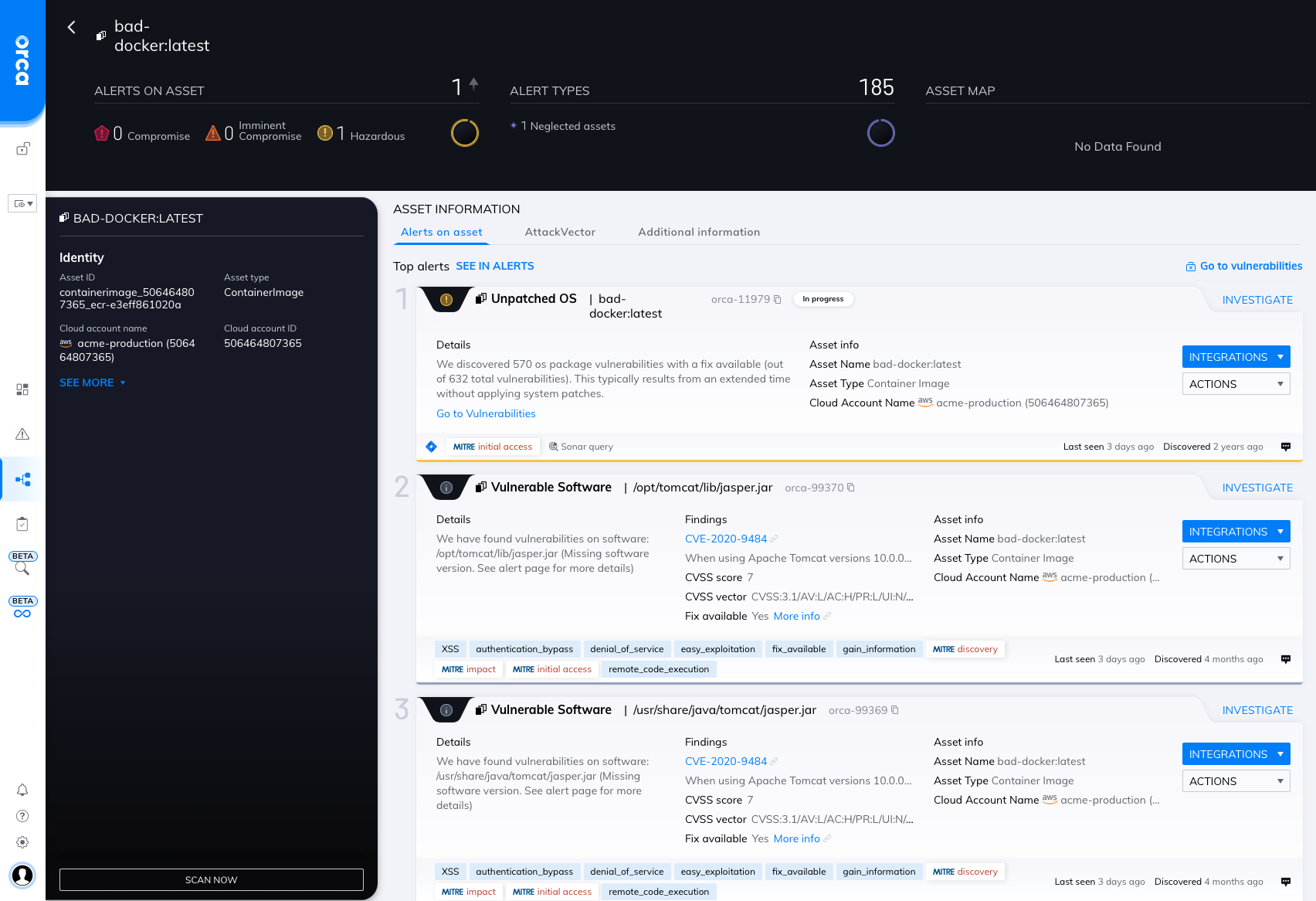
    Rather than relying on agents, the Orca Security platform creates a risk profile using read-only access to block storage accessed via a runtime hosted on Amazon Web Services (AWS), Microsoft Azure or Google Cloud Platform. That approach, dubbed SideScanning, eliminates the need for DevOps teams to deploy and maintain agent software to ensure cloud security.

    The platform then scans both workloads and cloud configuration metadata to build a map of risks that better enables DevOps teams to prioritize cloud security efforts.

    Orca Security CEO Avi Shua said the CLI will now make it easier to shift responsibility for cloud security further left toward developers and the DevOps teams that support them by making it easier to scan for vulnerabilities with the context of a larger set of DevSecOps best practices.

    Cloud security remains a major challenge because infrastructure is often provisioned by developers that have little to no security expertise. It’s almost inevitable that mistakes will be made. Orca Security is making a case for a tool that enables organizations to identify those security issues without deploying additional agent software across a wide area network.

    The challenge, of course, is determining how far left to shift responsibility for application security. Even when alerted to a security issue, many developers may not fully appreciate the severity of that issue, noted Shua. Many developers also assume their cloud service provider is providing a level of security that they actually don’t. It’s the responsibility of the entity deploying the application to secure it and the associated configurations used to deploy it. Integrating a cloud security tool within a DevOps workflow becomes critical because it enables more members of a DevOps team to evaluate potential risk to the business as the application is being built rather than after it’s running in a production environment, he added.

    Many existing DevSecOps tools don’t provide enough context; all they do is provide static analysis of the code that’s been deployed, Shua noted. Developers need to have a deeper understanding of which issues represent a level of risk that requires their immediate attention, he said.

    There is, of course, more focus than ever on cloud security as more organizations review how their software supply chains are constructed in the wake of a series of high-profile cybersecurity breaches. Many are discovering that the level of security visibility they have into cloud computing environments is limited, at best.

    It’s not likely security concerns will slow down the rate at which applications are now being deployed in the cloud. Instead, the challenge is better understanding how to secure those applications using substantially different tools and processes than those used to secure applications within an on-premises IT environment.

  • 5 Testing Strategies For Deploying Microservices

    5 Testing Strategies For Deploying Microservices

    With rigorous development and pre-production testing, your microservices will perform as they should. However, microservices need to be continuously tested against actual end-user activity to adapt the application to changing preferences and requests. This article will cover five deployment strategies that will help developers and DevOps teams when releasing new features or making changes to microservices-based applications.

    Always Test in Production

    A staging environment is a necessary but insufficient step toward building a robust microservices infrastructure. Although indicative, it is not a substitute for evolving user traffic and behavior. When real users interact with the software during production, the services may not perform as efficiently.

    Users are unpredictable. They may make requests you have not accounted for when drawing up communication paths. Or your microservices architecture may not sustain the actual production traffic. When testing with real end-users, you are sure of your software’s performance and can improve it or add new functionality. 

    The disadvantage of working with real users is that they will be impacted by any errors. However, with specific deployment strategies, you can identify the issues and minimize their impact on those users. 

    Depending on your goals, you can implement the following testing strategies in the deployment stage. They can be performed individually or in various combinations, as each approach varies in its contribution to deployment.

    Blue-Green Deployment

    A blue-green deployment uses two distinct yet identical production environments. For example, you deploy an inactive version of your application in the blue environment. At the same time, the latest version available to end users runs in the green environment. Next, you push code to add new functionality to the blue environment. 

    At this stage, you test the services in the blue environment to ensure that they are running smoothly. You can automate this process by using basic smoke tests. When the microservices pass these tests, you can instruct the load balancer to gradually redirect user traffic to this new environment.

    If the new functionality poses no problems, the router moves all traffic from the green to blue environment, but can immediately revert traffic in case of any errors. 

    Due to the identical nature of both environments and their reliance on each other, there is little to no downtime. The end user’s experience is largely unaffected and the developers can move quickly to fix any bugs.

    The old environment serves as a backup, making it possible to execute a rollback without any downtime. After releasing the latest version, you can decide to kill the old instances, but only after you are confident that the new environment will continue running without errors. You can also clone both blue and green environments to repeat the process with other feature deployments in the future.

    Canary Deployment

    Canary deployment is similar to blue-green testing in that it protects against release-related risks.

    The phrase “canary deployment” originates from an old mining practice of placing caged birds in mine shafts to detect the presence of harmful gases. If present, the gases would kill the canary before affecting the miners, thus providing an early warning to vacate the mine immediately.

    A canary deployment works on a similar principle. Instead of creating two separate environments, a canary deployment operates within the same microservice or infrastructure. The developers roll out a new service or application version with changes only to a fraction of the end-users.

    You can quickly detect errors or vulnerabilities while using the new service. The impact is temporary and minimal as the experiment is only run on a subset of users with most remaining unaffected. Once they are working and have passed verification, you can scale up the changes. 

    The biggest challenge for those running canary deployments is the requirement to run multiple versions of the same microservices so that they can be deployed to a few users at a time. Implementing multiple versions also means you need to keep track of which users are on which versions to run accurate business metrics and analytics. Such monitoring can get increasingly complex with multiple canary deployments within the same application.

    Feature Flags

    A feature flag or feature toggle is a change or feature written inside conditional code. Developers can turn the feature on or off depending on their testing requirements while the application is running and in use.

    The code is already deployed and there are two code paths: One with the code that implements the feature and one without it. The developer only needs to choose one of the two paths. When the switch is toggled on, the code chunk is executed as part of the flow. When switched off, that code is skipped and the feature is not implemented. The rest of the source code continues to run as usual, independent of the feature flag’s condition, with no disturbances in the end user’s experience.

    Once integrated, a feature flag allows you to turn on a feature for a select group of users. Unlike a canary deployment where the selection is random, feature toggles are usually employed in specific cases. For example, developers do not create two separate applications to implement free and paid subscription tiers. Instead, operating a feature flag allows you to make a particular feature accessible only to subscription users.

    Feature flags are especially attractive during testing as developers can use them to run small experiments throughout the application without relinquishing control. Being able to flip the switch remotely also makes rollbacks easier. The risk is negligible as the application is self-sufficient in that it can continue to run without the feature. 

    Feature flags generate complex user-to-service paths by way of permutations and combinations. For a specific user, it is difficult to determine the exact route they took when using the services. Feature flags complicate this by allowing each user to have a different experience, ultimately making the application hard to debug. These toggles are easy to get started with minimal risks, but their maintenance can quickly become complex. It is best to use them only when needed and with other deployment strategies.

    Traffic Shadowing

    With traffic shadowing or mirroring, the router duplicates incoming traffic to an already-released service and gives the copy to another service. The request and response mechanism between the user and the existing service remains intact. On the other hand, the second service with a copy of the traffic contains new features that require testing. Consequently, it does not interfere with the existing process. Instead, the copy is used to test its functionality.

    Its most significant benefit is that it allows the new version to receive the same traffic that is currently being received by the service it seeks to replace. There is no need to create test data or worry about replicating scale. This accuracy comes with little risk, as there is no tangible impact on the existing services. Developers can run all relevant tests on this production environment, such as testing for errors and performance metrics. The new version’s responses, which are not sent to users, can also be compared to those of the production service. Both versions operate independently of each other with different end goals. This can happen in real-time or a copy can be saved and replayed for future testing.

    Traffic shadowing can be used with other deployment techniques like blue-green or canary deployments. After successfully shadowing a production environment, the changes can be rolled out gradually using a canary deployment to gain maximum confidence before a full release.

    Shadowing can have unintended consequences, though, so you should exercise caution when deploying this strategy with services that have third-party dependencies. 

    A/B Testing

    Unlike blue-green and canary deployments, A/B testing is focused on user perception and experience of new features. It measures if and how end users are interacting with these features, whether they are easy to notice and use and gauges the application’s overall functionality. It provides developer teams with business-level insight to improve their application as the features are ultimately implemented using code.

    A/B testing divides users into groups that access different features. Group A, for example, sees a different user interface than group B, although members in both groups are making the same requests to access the application. Traffic is routed to separate builds or different configurations on a common build. This is done by considering aspects like the users’ operating systems and user agents. It must be run on a sample that is representative of your end users. The test also needs to display statistically significant results to be valid.

    This test can be combined with blue-green or canary deployments as they handle the actual feature deployments that this strategy tests. After comparing the versions shown to the groups, the one that has performed better can be pushed to release for all users. 

    Building your Deployment Strategy

    Each strategy outlined can be used independently or together in a combination that best suits your goals, workflow and microservices requirements. They allow you to identify and reduce the impact of any vulnerabilities that may only surface at the final stage of your software’s release. Implementing them can be a somewhat complex process, especially with larger architectures and dependencies. But by implementing any of these strategies, your team will release the best possible version of your application. 

  • The APIs You Really Don’t Know About

    The APIs You Really Don’t Know About

    A few years ago, we were rightly warned about the amount of exposure our APIs created. A massive attack surface that often used “security by obscurity” as its primary method of protection. We’ve come a long way since then, building secrets, tokens, RBAC and even more into our API interfaces.

    We’re still behind in getting comprehensive lists of APIs, but this bit is getting better as time moves on. Increasingly, both API management and DevSecOps markets are helping to catalog new APIs, and both the API management and application and API protection markets are helping to protect APIs that are unknown by tracking calls moving through the network. By using proxies, it is relatively easy to capture calls to APIs and report the list of APIs (and sometimes much more; about parameters and data transport, for example) to security or operations staff.

    In summary. the API management and security market has been doing great work, searching out the various APIs that are active in our systems, and cataloging new APIs as they are created. This gives us a comfortable and complete look at our current API environment and how it is protected. Most of these tools help protect what isn’t currently well protected.

    If only that really were all of the APIs in our networks. Unfortunately, that’s not the case. Because the ones not in this “complete list” can be the most insidious. As always, it is what you don’t know that poses the biggest risk.

    You see, there are APIs that are not currently maintained and are not currently actively accessed. Say you have an application that you installed from a third party—open source or purchased, either one—and then stopped accessing. Well, it is still sitting out there. The APIs are available—not necessarily documented and not necessarily secured. For security staff, this is how nightmares begin.

    Historically, we could count on these interfaces to be private. Those days are long gone in the hybrid environment. They might be private, but the definition of “private” is much looser than it has historically been and if there is a route from the internet to the API, it’s not private, and for well-known applications, is a time-bomb.

    This is another reason to clear out old versions and/or redundant installations of things like web servers and databases. Don’t make excuses—just upgrade them to the most recent version or remove them entirely. You can do this by merging what they do with a newer/better-protected installation or by just stopping them and fixing the apps that this impacts. “Turn it off and see what breaks” is admittedly a risky step, but sometimes will prove necessary to lock down the environment. If you don’t know what is using it, I’d argue your security risks are larger than an unprotected API hanging about, but that’s a topic for another blog.

    Meanwhile, keep rocking it. There is so much in your purview that we have to discuss what you don’t know about in the domain you are the specialist in. That’s not a weakness in you, that’s a statement about how much crap is tossed on your plate while making the org more competitive. And you’re dealing with it. So smile, keep kicking and lock down the scary bits.


  • The Risks of Shadow Code

    The Risks of Shadow Code

    As the economy struggles to recover after the last two years of the COVID-19 pandemic, we have all learned a thing or two about supply chains—and what happens when they break down. But many people do not realize that modern websites also have digital supply chains, third-party ones that can be compromised in myriad ways. And just like the disruption of the physical supply chain affects things like pricing, availability and inventory, digital supply chains found on today’s websites play a big role in critical areas like site performance, customer experience and overall analytics. As a result, businesses today need to be aware of how the digital supply chain can introduce significant risk, especially when third parties do not adhere to their own set of stringent standards around security and compliance.

    According to a recent study by Source Defense, organizations that collect and use sensitive data—such as health care, finance, travel and online retailers—need to strengthen their focus on third-party risk management. As a result of mandates like GDPR and PCS DSS, these companies are now bound by compliance requirements to ensure their client-side threats are avoided and/or mitigated. This effort means recognizing more than just how to protect private data—it means understanding the properties of malicious code known as “shadow code” on modern websites and how it generates risk from dynamic and unpredictable scripts. Companies dealing in data today need to be aware of the different ways shadow code can affect their security, as well as the productivity and integrity of their DevOps teams.

    Third-Party Scripts and Shadow Code

    Shadow code refers to code that is baked into an application without proper vetting by the website’s IT department. This malicious code thrives in the cloud landscape, primarily because it allows for ease of deployment through CI/CD automation.

    When a web page calls in a third-party script, it loads directly into the browser from a remote server, which means general security controls such as firewalls and network monitoring tools are bypassed. And if one of these scripts has been compromised by a bad actor, shadow code can be embedded within. Sometimes these scripts include open source software that hasn’t been tested well—or at all. Other times, the code may be pulled from another layer of the organization where malicious code is hiding.

    Shadow code presents an array of threat opportunities, including the ability to mount an attack through digital supply chain partners. When these compromised scripts are used to steal data, redirect web traffic,or any other malicious activity, a clear path is essentially created into thousands of different websites, in almost every industry that collects data or deals in digital transactions. When a third-party script with shadow code enters a system, it gains the ability to:

    • Record keystrokes
    • Redirect visitors to malicious websites
    • Monitor clicks and track website activity
    • Change content on websites, including images and text
    • Steal credentials, such as personal logins and social security numbers

    As we know, these digital activities can lead to big consequences, like data breaches, fraud, theft, compliance violations, loss of reputation and hefty fines. Although code reviews can provide some software quality assurance, the process is not effective against shadow code, mostly because these scripts are constantly altered by third-parties. And when the threat is underestimated and unattended, these malicious scripts have the potential to permeate every area of a company’s web property.

    Because the benefits of using these types of third-party scripts are considerable, it can be hard to find a modern enterprise or agency that does not rely on at least a few to run web applications. In fact, many enterprises and government agencies today are running third-party scripts on every page of their sites. Even though these organizations are technically not responsible for this harmful code, regulators can (and do) hold web property owners accountable for any digital maleficence on their sites.

    DevOps Teams and Shadow Code

    Websites can provide rich experiences to visitors largely because developers use client-side JavaScript to improve the look and feel of these digital properties—all without the need for ongoing maintenance. Today, DevOps professionals can access vast libraries of these free and low-cost scripts from many different sources, such as allied coder groups, open source organizations, social media companies, web analytics firms, content delivery networks and more.

    But the reality is, code libraries accessed by DevOps teams are not always secure or trustworthy. Considering these packages often contain code from fourth and fifth parties, DevOps folks face the unavoidable possibility of tainted code—hard to identify and dangerous to use. In fact, the Source Defense report revealed that one in four scripts represented fourth- or fifth-party code, on average. Because developers tend to focus on keeping their code updated and as capable as possible, they often pull from the dynamic library from their repository. If there is a CI/CD process happening, DevOps teams will pull their library from that point. This is where shadow code introduces new vulnerabilities for developers.

    Shadow code also jeopardizes the integrity of DevOps work. Most developers take pride in what they do and are not interested in creating unsecure or low-quality code—not purposefully, anyway. And given that speed, productivity and constant innovation are all business goals for DevOps teams, it’s important to recognize how problematic shadow code can be for those in the business of building secure and high-quality software.

  • Architecting an Auth System for Applications

    Architecting an Auth System for Applications

    Applications today use many login and authentication methods and workflows. Here, I’ll share the most relevant and proven authentication workflows, which you can use as a basis for architecting and designing an authentication system for traditional web applications, single-page applications and native mobile applications.

    Authentication Workflows for Traditional Web Applications

    Traditional web applications load a web page and provide user functionality using a message-based model where a browser makes an HTTP request to a web server based on the URL in the address bar. The server responds to this request with HTML, CSS and JavaScript and then displays a resource in the browser. Along with traditional web apps, new web apps often still provide functionality in this manner.

    When a user submits a form or clicks a link or button, the browser sends a new HTTP request to the web server and changes the URL in the address bar. The server again responds by returning HTML, CSS and JavaScript and then displaying a resource in the browser.

    Browsers support only two HTTP methods for traditional web apps: GET and POST. GET is used to request data from a specified resource and POST is used to send data to a server to create or update a resource.

    Below are several workflows you can use for traditional web app login and authentication. Note that the application backend is the backend of the application (not the identity provider, or IdP) and native login form is a form built directly into the application instead of an external login form.

    Native login form to the application backend using …

    JWTs and refresh tokens stored in cookies

    Sessions

    Sessions plus refresh tokens stored in cookies

    OAuth 2 authorization code grant using …

    JWTs and refresh tokens stored in cookies (RECOMMENDED)

    Sessions (RECOMMENDED)

    Sessions plus refresh tokens stored in cookies

    OAuth 2 resource owner password credentials grant using …

    JWTs and refresh tokens stored in cookies

    Sessions

    Sessions plus refresh tokens stored in cookies

    Authentication Workflows for Single-Page Applications

    A single-page web app (SPA, pronounced as “spa” or “S-P-A”) runs entirely in the browser after loading the HTML, CSS and JavaScript source code from a web page. After retrieving the HTML, CSS and JavaScript that make up the application, the browser invokes a JavaScript framework that bootstraps and then renders the application.

    SPAs call APIs to handle user interactions and input. For example, if a user clicks a link or submits a form, the SPA might render a different page or form.

    APIs are invoked using XMLHttpRequest, a built-in browser object that can make HTTP requests in JavaScript. When the server responds, the JavaScript running in the browser updates the data dynamically without performing a  full page refresh.

    SPAs use a single request and response model. Since the browser uses XMLHttpRequest, it can support GET and POST, as well as other standard HTTP methods, such as PUT and DELETE. (PUT is used to replace all current representations of the specified resource and DELETE is used to, well, delete the specified resource.) The HTTP method chosen tells the server how to handle the request.

    Here are some workflows you can use for SPA login and authentication.

    Native login form to the application backend using …

    JWTs and refresh tokens stored in cookies

    Sessions

    Sessions plus refresh tokens stored in cookies

    Native login form to FusionAuth using …

    JWTs stored in local storage and refresh tokens stored in cookies

    JWTs and refresh tokens stored in cookies

    JWTs and refresh tokens stored in cookies

    OAuth 2 authorization code grant using …

    JWTs and refresh tokens stored in cookies (RECOMMENDED)

    Sessions (RECOMMENDED)

    Sessions plus refresh tokens stored in cookies

    OAuth 2 implicit grant using …

    JWTs stored in cookies

    JWTs stored in local storage

    Sessions

    OAuth 2 resource owner password credentials grant using …

    JWTs and refresh tokens stored in cookies

    Sessions

    Sessions plus refresh tokens stored in cookies

    When using OAuth for SPAs, note that the browser navigates away from the SPA to the OAuth provider. Once the OAuth workflow is complete, the browser is sent back to the SPA page where it quickly restarts the SPA with cached assets.

    Authentication Workflows for Native Mobile Applications

    Native mobile applications are usually installed on a mobile device or any smart device through an online marketplace like App Store and Google Play Store. Clicking the application icon on the device launches the device operating system, which starts the application and its user interface.

    Almost all native applications call APIs on the server to handle user interactions and input, such as button clicks and form submissions. Native applications often use libraries designed to directly access all of the classes, objects, functions and methods of the source code to communicate quickly with APIs and simplify API calls.

    auth mobile

    Here are a few workflows you can use for native mobile application login and authentication:

    Native login form to the application backend using JWTs and refresh tokens

    Native login form to FusionAuth using JWTs and refresh tokens (RECOMMENDED)

    OAuth 2 resource owner password credentials grant using JWTs and refresh tokens

    Note that native mobile applications can also use the OAuth authorization code grant to exchange an authorization code for an access token. This workflow works with many IdPs and is essentially the same as described in the preceding traditional web application and single-page application sections. The main difference is that the native application pulls the JWT and refresh tokens from the web view at the end of the OAuth workflow.

    Authentication System Best Practices

    The workflows listed above should give you a baseline for following authentication system best practices and architecting a sound login and authentication system for your applications. While these examples use FusionAuth as the IdP, any IdP can be used. Most IdPs are capable of a wide variety of login and authentication workflows, and the examples here are not meant to be exhaustive.

    As you’re designing an authentication system for traditional web applications, single-page applications or native mobile applications, keep in mind that some IdP login workflows can pose serious security risks. As with all things having to do with digital identities and user and data security, it’s important to choose both your IdP and your authentication workflow wisely.

  • Why DevSecOps Should Be Top Priority

    Why DevSecOps Should Be Top Priority

    DevOps culture and process are integral to maintaining the pace of cloud-native software development for organizations, especially when code deployments might take place many times a day. The ability to instantly create, populate and scale cloud applications and infrastructure, often automated through code, allows enormous agility and incredible speed. But moving this quickly means security is often left in the dust.

    The reality is many organizations still haven’t come to grips with how to properly secure the cloud. A lack of cloud security experience, coupled with legacy security policies that don’t encompass the cloud and a shortage of cybersecurity expertise relevant to cloud environments, presents a challenge. And cybercriminals are moving quickly to exploit these gaps: a 2021 report showed that almost half of the more than 2,500 disclosed cloud-related vulnerabilities recorded were disclosed in the last 18 months. 

    Due to the agile nature of cloud technologies, security must be integrated at every stage of the DevOps life cycle—also known as DevSecOps. A DevSecOps mindset is an absolute necessity for any organization that is leveraging the cloud, and requires new security guidelines, policies, practices and tools.

    The Cloud is Vulnerable

    Data breaches are among the most urgent concerns of any organization today. A 2021 report revealed that data breach costs rose from $3.86 million USD in 2020 to $4.24 million USD in 2021. The techniques that adversaries used to infiltrate the cloud differ from on-premises environments. Malware attacks are far less prevalent; instead, attackers exploit misconfigurations and other vulnerabilities.

    Another major concern is that organizations are usually using multi-cloud, which can cause a visibility issue. It can result in cloud workloads and traffic that are not properly monitored, leaving security gaps to be exploited by attackers. Also, DevOps teams tend to provide employees with far more privileges and permissions than needed to perform their job, which increases identity-based threats. According to research, nearly 80% of cyberattacks leveraged identity-based attacks to compromise legitimate credentials. 

    Threat actors will also deploy a variety of attack methods to compromise an organization’s cloud environment. Lateral movement is a common technique that involves threat actors going from the point of entry to the rest of the network (for example, infiltrating an end user or system hosted on-premises and then shifting their access to the cloud). Research showed that adversaries move quickly—in just 98 minutes they can move laterally from a compromised instance to another instance within the victim environment. 

    Alternatively, another way for attackers to profit from cloud vulnerabilities is by installing cryptominers onto a company’s system. Cryptocurrency mining is an activity that requires large amounts of computing power. Threat actors will use compromised cloud accounts to carry out this process and extract as much profit as possible, while simultaneously using up the company’s resources. 

    Shifting Security Left

    Protecting the cloud means securing an increasingly large attack surface that ranges from cloud workloads to virtual servers and other technologies that underpin the cloud environment. Attackers are always looking for soft spots they can exploit, particularly vulnerable cloud applications. With organizations moving to the cloud now more than ever to meet the needs of a remote workforce, opportunities to exploit cloud apps have increased. 

    Traditionally, code is subjected to security as the last phase before release. When vulnerabilities are exposed, either the release is delayed or the development team has to scramble to correct each security issue while the security team has to scramble to check the revisions. For DevOps teams, shifting security left ensures vulnerable code is identified as it is developed rather than in the testing phase, which reduces costs and results in secure cloud apps.

    The concept of shift left security is an essential part of the software development life cycle, and getting it right must be a top priority. By embedding security into the earliest phases of the development process, organizations can achieve DevSecOps and significantly reduce the security concerns around cloud-native software and application development. 

    Effective Cloud Security can Enable DevSecOps 

    Organizations that use DevSecOps tools and practices can build a powerful and secure cloud foundation. Unifying the visibility of multi-cloud environments and continuous intelligent monitoring of all cloud resources are essential in cloud security. That unified visibility must be able to detect misconfigurations, vulnerabilities and security threats while providing actionable insights and automated remediation for developers and DevOps teams. 

    Additionally, it’s essential to have the right security policies in place that enforce cloud security standards to meet (or exceed) industry and government regulations across the entire infrastructure. This includes everything from multi-factor authentication to general security best practices for all employees and robust incident response that ensures the company is prepared for an attack.

    However, the core of any effective cloud security strategy should always be up-to-date threat intelligence. Adversaries are constantly finding new ways to target the cloud and search for any weaknesses they can exploit. Having the latest data about threat actors and their tactics, and then applying it to breach detection is an absolute must. Threat intelligence enables security teams to anticipate threats and prioritize defense, mitigation and remediation effectively to preempt them. Delivering all this functionality from the cloud and for the cloud through DevSecOps provides organizations with the prevention, detection, visibility and response capabilities they need to beat attackers.

  • Go Language is Popular? | VMware Sells to Broadcom? | Unlimited PTO?

    Go Language is Popular? | VMware Sells to Broadcom? | Unlimited PTO?

    Welcome to The Long View—where we peruse the news of the week and strip it to the essentials. Let’s work out what really matters.

    This week: Golang goes from zero to hero, will Broadcom buy VMware? And limitless vacation is still a Thing. (more…)