Solo.io has created a WebAssembly Hub registry designed to make it easier to discover and share extensions to the open source Envoy proxy server.
Now being developed under the auspices of the Cloud Native Computing Foundation (CNCF) after being created by Lyft, Envoy is gaining traction as a proxy server in IT environments that have embraced microservices.
Solo.io CEO Idit Levine said DevOps teams are challenged by finding a way to extend the Envoy platform, which was developed using the C++ programming language. WebAssembly Hub provides an alternative approach to extending Envoy by employing the portable WebAssembly (Wasm) binary instruction format, known as a Wasm stack machine, that can be embedded as an execution environment in other platforms.
Wasm, which itself was developed under the auspices of the World Wide Web Consortium (W3C), provides a portable target for compilation of high-level languages such as C, C++ and Rust for building applications in a way that enables DevOps teams to add or modify extensions dynamically by moving code into a running Envoy process without having to stop a process or recompile code, said Levine.
That approach provides the added benefit of isolating extensions from Envoy, which means if the extension crashes it will not take down Envoy with it, added Levine.
Levine said Solo.io already employs Wasm to facilitate the development of extensions to Solo Gloo, an open source API gateway optimized for Kubernetes environments built on top of Envoy. Solo Gloo already supports the WebAssembly Hub registry.
As it turns out, however, Envoy is also at the base of the Istio service mesh. Any platform that employs Envoy now can take advantage of WebAssembly Hub to build and distribute extensions, said Levine. Among other use cases, Solo.io envisions DevOps teams using WebAssembly Hub to discover a web application firewall that can be added to, for example, an Istio service mesh via a few clicks of a mouse—which could significantly advance the adoption of best DevSecOps processes.
It’s not clear whether IT organizations will replace legacy proxy servers with rival offerings such as Envoy that claim to be more optimized for microservices architectures. In many cases, developers are making decisions based on personal preferences, which results in organizations soon discovering they are supporting multiple proxy servers across a range of classes of applications. Whatever the path chosen, however, those same organizations also may soon discover that a raft of extensions that were built for an Envoy-based platform may usurp a whole range of security, network and application services that today are all invoked in isolation from one another. The one thing that is clear, however, is that most of those services will be invoked programmatically instead of relying on an administrator who has mastered all the nuances of a specific graphical user interface for a single-function platform.
It may take a while for a new generation of proxy servers to achieve critical mass. However, at this point, it’s no so much about whether they will as much as it is to what degree.
Most businesses are moving toward making their business processes more user-friendly, through digitization. This shift of business modernization comes with a heavy price for them in terms of money and in terms of time. It is going to take time and a great amount of investment in new innovative technologies.
Cloud computing is the biggest trend in digital transformation due to its ability to make business applications and infrastructure easily accessible. In the roadmap toward cloud migration, businesses are looking to save capital investment or expenses (CAPEX) and operational expenses (OPEX).
Open source technologies come to rescue for such businesses. Be those who are present at public cloud platforms such as AWS, Azure or Google Cloud, or private data centers. The role and emergence of open source technologies simplified the equation of overall expenditure for all enterprises and organizations of any industry domains. Year by year, more open source projects are coming up and solve major challenges which businesses are facing. Companies such as Red Hat and communities like Linux Foundation have a major role in promoting open source projects at the heart of digital transformation.
Why Open Source at Cloud?
The main reason to adopt open source technologies in the process of cloud migration can be avoiding vendor lock-in in the future. Most public cloud vendors have a similar portfolio of open source supports in their offerings. As open-source projects are not owned by one company and its overall framework is common to all of its consumers, any updates to its core files have an impact on all projects. And businesses can simply move their application environment from one cloud to another without worrying about backend environment that is powered by open-source projects. There can be a seamless integration of applications and services developed or deployed by different businesses and vendors.
Open source adoption for cloud will help in interoperability with other enterprise solutions that can be located in different data centers. Though, other data centers should be equipped with the same open source projects. This interoperability enables the reuse of software stacks, libraries and components. Such interoperability can help deploy multi-cloud environment for businesses.
The Cloud-Native Approach in Cloud
Application containerization has been adopted by many solutions providers and vendors in the last few years and has become significantly popular. This containerization surge has triggered the use of cloud-native applications. Most of the popular cloud-native projects are hosted in Linux Foundation’s CNCF (Cloud Native Foundation) community which nurtures the development of various open source projects. Some of the popular projects are Kubernetes, Prometheus, Envoy, Helm, rkt, Linkerd, Etcd, Jaeger, etc.
The cloud-native approach involves the utilization of tools for handling containers, micro-services, service mesh, DevOps and continuous integration (CI) and continuous deployment (CD). Cloud-native tools for CI/CD can be Check, Ansible, puppet, etc., and service mesh can be Istio, Linkerd, etc.
Most of the enterprises tend to involve open source projects from various umbrella’s to build the Cloud migration strategy. Moving to cloud-native management of application can be a prominent requirement for many enterprises.
Open Source Cloud Migration Tools
There are open source tools and frameworks that help with cloud data migration. These tools require modification in terms of coding to make the migration process that suits your infrastructure. To make coding customizations in these tools you might need investment for skilled resources.
The above projects help enterprises to move data.Bluethroat is an open source project which can be used for migration of overall infrastructure from data center to data center, data center to the cloud, cloud to data center and cloud to cloud. Currently it is powered with limited features and used specifically for AWS. It offers the following features:
Migration of infrastructure to AWS.
Agentless.
Environment discovery.
Automatic network creation and server deployment.
Linux server migration.
Conclusion
Cloud migration has its own challenges in terms of uptime, security and data loss. Most public clouds are evolved to handle data as well as application workload migrations. There are many benefits to open source projects, as discussed in this article. The main advantages of migrating open source frameworks to the cloud are cutting back on expenses and avoiding bottlenecks.
HashiCorp this week updated its Consul service mesh to make it easier to manage namespaces across multiple services.
Previously, DevOps teams would have to manually ensure each namespace assigned to a group of services did not conflict with each other. The release of 1.7 of Consul enables teams to restrict access to services residing in isolated environments on a shared cluster, eliminating the issue.
In addition, DevOps teams can now delegate administrative privileges for a given namespace to individual teams, which enables them to manage their own services in keeping with best DevOps practices, rather than having to rely on a cybersecurity team to manage that process for them.
With the rise of microservices based on containers, interest in service meshes to provide a means to discover and manage services is on the rise. However, services span both emerging microservices-based applications and legacy monolithic applications. Rather than adopting a service mesh that only runs on one platform, HashiCorp is opting for an open source service mesh that spans multiple platforms and is easier to deploy and manage than rival offerings such as Istio.
Amith Nair, vice president of product marketing at HashiCorp, said that approach also makes it easier to deploy a service mesh at scale across multiple clouds and on-premises IT environments. Because Consul is designed to deployed on top of proxy servers such as Envoy or NGNIX, it can be deployed almost anywhere to manage services sprawl across the extended enterprise, noted Nair.
As far as the adoption of service meshes are concerned, it is still early days. Many organizations are in the process of shifting away from managing applications to focusing on services that span multiple applications. Given all the dependencies that exist between various services, that shift represents a major challenge. A service mesh alleviates some of that challenge by providing a mechanism for both discovering and governing services that are increasingly interdependent.
That approach also provides the added benefit of allowing teams tasked with governing and auditing IT environments to focus more on higher levels of abstractions versus updates to every line of code on which those services are constructed.
For now, there are no standards, de facto or otherwise, in terms of service meshes. Many organizations may find themselves adopting multiple frameworks, which may lead to further advances in interoperability specifications such as the Service Mesh Interface between rival platforms.
Less clear for now is who inside an IT organization will be responsible for acquiring and managing a service mesh. In some organizations it might be a network operations or cybersecurity team. In other organizations, those roles may have already been incorporated within a larger DevOps team.
Regardless of the approach, the need for some type of service mesh is becoming more apparent. The good news is there is now no shortage of options. However, DevOps teams should note that in terms of overall complexity and amount of compute resources consumed, not all services meshes are the same.
DevOps is a cultural and process transformation—the goal of it is to achieve a higher rate of change and quality of software. There are categories of tools to help facilitate this transformation through automation and increased measurement and visibility. You can’t have or observe progress without measurement, and throughout your transformation you need to maintain a high degree of visibility in order to move quickly, safely. Not only is the idea of cultural and process transformation daunting for many organizations, adopting the tools to help you on that journey is even more so, as it requires a great deal of learning.
An integrated set of DevOps tools for monitoring has the power to improve visibility and productivity, achieve higher-performing systems and establish cross-functional collaboration. The right toolset is more than the tools themselves—it’s about developing the culture, discipline and practices that come to define your product/service and your workplace.
This article will outline some of the best DevOps tools and practices when it comes to the monitoring ecosystem that help developer and operations teams work together effectively.
Monitoring Tools
A good monitoring platform lets you monitor infrastructure and application performance, whether on-prem, in the cloud or across containerized environments—so you have complete visibility into every system, all the time. Whether you want to monitor Kubernetes, IoT devices or bare metal, the right monitoring tool helps make it possible.
An effective monitoring tool improves system performance and productivity, and helps you reduce downtime. You can adequately plan for upgrades and new projects, and better allocate your time and resources. You can detect problems—and solve them—before they impact users.
There are a ton of great monitoring tools out there; I won’t go into them all here, but I’ll highlight the top three in terms of popularity.
Love it or hate it, Nagios is still very much a widely used tool and formed the foundation for monitoring as we know it today. Plus, the Nagios service check is actually awesome (and underappreciated). Where Nagios falls short, however, is when it comes to monitoring ephemeral environments, such as Kubernetes and Docker, at scale. In reality, Nagios falls short when it comes to monitoring at scale in any environment, whether that’s virtualized or not. Enter Prometheus, an open source monitoring tool (and, like Kubernetes, a part of the CNCF) that uses a pull-based architecture. Instead of pushing metrics to the monitoring tool, it pulls metrics from services. Due to Kubernetes’ built-in exporters, Prometheus is often the go-to for monitoring Kubernetes, but it falls short when it comes to monitoring older infrastructure (see more pros and cons of Prometheus here).
That brings me to Sensu, which offers the best of both worlds: you can reuse Nagios service checks in Sensu and monitor ephemeral environments at scale. If you have a strictly container-based environment, then Prometheus is a good choice; if you have a mix of multi-generational infrastructure (which we’re finding more often than not with our customers), then Sensu is the way to go.
Configuration Management Tools
Configuration management tools allow you to automate the provisioning and deployment of systems, enforce desired configurations and remediate configuration drift. By modeling your infrastructure as code, you can apply software delivery practices such as version control, automated testing and continuous delivery to infrastructure and applications.
Automating work that used to be manual, repetitive and error-prone results in greater speed, predictability and scalability—and the assurance of standardized configurations across test, developer and production environments. Eliminating snowflake servers reduces time (and headaches) and lets you deploy software faster and more reliably.
Popular configuration management tools include: Ansible, which is written in Python, agent-less and utilizes an imperative (as opposed to a declarative) approach. Puppet is another popular choice—it relies on a declarative config management approach and uses domain-specific language and an agent/master architecture. Finally, there’s Chef, which is written in Ruby and Erlang, and is modeled similar to Puppet.
Alerting Tools
Alerting tools provide both actionable and informational system alerts, and can be customized to fit the complexities of your systems. For example, your alerting system needs to be sensitive enough to cover an outage—but not so sensitive that you’re catching frequent, intermittent problems that users aren’t going to see and that would inundate you with needless alerts.
Alerting tools help lay the foundation for your alerting policies, so you can determine who to notify, how to track issues and outcomes and how to prioritize remediation. Popular tools include PagerDuty, which offers an on-call management platform with add-ons for analytics, event intelligence and automated incident response. There’s also ServiceNow, which utilizes automated workflows for ITSM as well as customer service and business processes. You can send your alerts into Slack to consolidate alerts into the same platform you use for collaborating with your team.
Metrics Storage
Once you’ve automated configuration management, alerting and monitoring, you’ll have a whole lot of data at your disposal to learn from. The challenge: How do you securely store and analyze it? You need a storage system that lets you aggregate and learn from system capacity, user behavior, service levels, security risks and more.
The insights you gain from your metrics inform decisions across all layers of your business, improving your ability to meet SLAs, satisfy customer expectations and make the case for new strategic investments. Data-driven decisions promote a culture of continuous learning and improvement.
Popular tools for storing metrics includes InfluxDB and TimescaleDB, time-series databases (TSDBs) that are well suited for long-term storage, and Splunk, which uses a search engine database model to store and query your data. Amazon Web Services (AWS) supports a wide range of storage purposes, including relational and non-relational databases, a data warehouse for analytics, a TSDB, a leger database to store transactions and more.
Visualization Tools
A visualization tool might be considered the pièce de résistance of your DevOps toolchain for monitoring: You get to combine all of your data, sort and visualize it, and display it on customizable dashboards.
Visualization tools provide context and meaning, allow you to track changes and improvements over time and give management a real-time view that helps guide strategic decisions. Customization options make it easy for team members to design and share their own dashboards.
Grafana is a popular open source visualization tool and can be used on top of a variety of different data stores, including Graphite, InfluxDB and Elasticsearch. For more on how Grafana can integrate with your monitoring and TSDB, check out this use case.
Evaluating Your DevOps Tools
No matter where you are in your DevOps journey, it’s wise to re-evaluate the tools you’re using and identify where you can fine tune. Think about the DevOps tools in the monitoring ecosystem as more than their capabilities. How you use them begins to define your habits, values and work culture—and accordingly, the quality of your product or service and the value you bring to your users.
As 2019 comes to an end, it’s safe to say that multi-cloud strategies are here to stay. We can predict that 2020 will bring an ever-increasing demand for application performance management (APM) tools and services.
So what does the future of APM look like? Let’s dive in.
Multi-Cloud Strategies Increase the Demand for APM Tool Adoption
Companies are increasingly adopting more than one platform—either for financial leverage or to create a time-to-market or feature race between the platforms. To remain competitive, public cloud providers must offer unique features or capabilities differentiating them from competitors. This has created an upsurge in new and more complex technologies, increasing the need for APM tool adoption.
Logs Will Be Recognized as Key Aspects of APM
APM is a puzzle made up of user experience, metrics and traces, and logs—and each piece must be incorporated to achieve full-stack visibility and ultimately seamless app performance. However, a healthy app is not characterized solely by top performance, but also availability—making a log management solution that monitors availability, enables proactivity and reacts quickly to remediate problems key.
In 2020, implementing solutions that achieve integrated application performance and availability management for any type of organization, including those operating on-premises and/or cloud-based applications across all mixes of cloud environments, will become increasingly important and prioritized.
APM Skills in a Cloud-First World
The nouns have changed, but the verbs remain the same: APM skills are among the top skills tech pros want to develop in the coming year, according to the recent SolarWinds IT Pro Day survey, Building Confidence for Tech Pros of Tomorrow. However, in 2020 tech pros will begin to recognize that many of the skills they already possess are sufficient to manage the new realm of integrated solutions in the cloud. Tech pros can leverage some of the same skills they could before as the nouns have changed, but the verbs remain the same. Where we used to have server or virtual machine, now we have containers. But the verbs? They’ve always been focused on optimizing performance, ensuring availability and planning capacity.
In 2020, the extent to which tech pros will discover they don’t need to fear new nouns (more than they did when they moved from client virtualization) will increase.
Universal Adoption of APM Tools
As environments become more dynamic and complex, the opportunity for applications to break increases—creating the need for robust monitoring tools. In 2020, as buyers see the benefit of leveraging APM tools on a regular basis rather than only in critical moments, the market will adjust accordingly. We can expect easier-to-implement solutions that are more highly valuable and affordable. The paradigm that APM tools have to be expensive will be broken once and for all.
Want to learn more about what to expect in 2020? Join us Jan. 23 for ourPredict 2020 Virtual Summit featuring discussions from some of the industry’s best and brightest offering up their visions for the future. Sign up today for this free daylong virtual event.
Modern enterprise software architecture is growing increasingly complex. Organizations are jumping on the digital transformation bandwagon in growing numbers. They are striving to become more agile and continuously deliver new code, whether on-premises or to support cloud migration efforts. In the process, IT teams are amassing an ever-growing inventory of applications and databases, which generally includes a blend of custom code, open source and commercial applications.
“Spaghetti code” is what some call a tangled mess of a program—one that is difficult to follow, poorly documented and almost impossible for anyone but the original developer to troubleshoot or upgrade. Even today, when managers and developers take a more structured and disciplined approach to implementing code, the enterprise remains a patchwork of technology, a kind of spaghetti that can be difficult to understand and detangle.
Given these layers of complexities, it is imperative for organizations to be equipped with the right processes and tools to map out their IT assets. They need to understand how programs and databases interconnect and how a change in one can have implications across the network that imperil availability, performance or security and negatively impact employees and customers. Here are some best practices that enterprises looking for an easier digital transformation journey can follow.
Gleaning the Impact of Enterprise Software Changes
Implementing a software change or embracing a new application that has a puzzling code makeup has plenty of inherent challenges—not to mention potential long-term disruptions for multiple departments, functions and processes within an enterprise. Whether an organization is dealing with inherited applications from a merger or acquisition or simple system migrations, much depends on how it is coded. As a result, enterprises must familiarize themselves with the overall layout of the enterprise architecture, down to the code level. This comprehensive level of analysis aids organizations in identifying the full scope and impact of the desired changes or updates.
This is especially important for software teams who are operating on tight budgets and strict deadlines. Some important factors to consider in a comprehensive analysis include:
Identifying the impact of a change request on the software development project or on a business’s IT infrastructure.
Determining which software resources must be modified to implement the requested change.
Calculating the cost, time and effort needed to perform the change request.
Ensuring that the requested change complies with internal and external regulations.
Eliminating or minimizing any security risks associated with the change.
Decoding the Spaghetti With Automated Discovery and Code Mapping
A study by research firm Enterprise Management Associates (Next-Generation ITAM) found that the average IT organization uses 11 or more different inventory and discovery tools—some even more than 40. However, none deliver the full picture and they can often contradict each other. As a result, the average IT organization spends 15 hours every week manually resolving discrepancies among its various discovery tools. These hours translate to hefty costs.
Fortunately, new approaches to discovery blend static and dynamic analysis methods that can operate in real-time to decompose software dependencies down to the code level. These new tools provide significant improvements in discovery and mapping, eliminating the need for multiple, redundant tool use and wasteful manual deconflicting.
According to a recent Forrester survey, 56% of IT managers don’t have a complete view of dependencies between applications or between applications and infrastructure. However, today’s evolving business landscape dictates that technologies must evolve to keep up with an organization’s shifting needs. Software changes, when implemented strategically, can help businesses be more productive, efficient and profitable.
To ensure that software changes serve this purpose, IT project managers need to implement a solid software change assessment system. With the help of technology, checklists and processes, organizations can outline a path that yields efficiency. They can understand and decode that tangled mess of software called the modern enterprise tech stack.
NetFoundry, at the recent KubeCon + CloudNativeCon 2019 conference, announced the general availability of a developer platform designed to make it easier for organizations to bake a zero trust networking framework within their applications.
Company CEO Galeal Zino said NetFoundry has created a network fabric overlay to manage and secure communications between endpoints and applications. Developers now can embed a programmable zero trust networking framework within their applications using a NetFoundry Developer Platform, which consists of software development kits, application programming interfaces (APIs) and connectors, said Zino. DevOps teams can either consume the entire NetFoundry Developer Platform or only the open source components that have been included.
At the same time, NetFoundry announced it has joined the Cloud Native Computing Foundation (CNCF) to advance the adoption of open source networking services for containerized applications.
Rather than having to become intimately familiar with networking protocols, Zino says NetFoundry provides a layer of abstraction using software to eliminate the need to rely on virtual private networks (VPNs) or network address translation (NAT) tools.
As the number of endpoints and applications they need to connect to have significantly increased, DevOps teams are finding they need to master each type of dedicated network established for endpoints ranging from mobile computing devices to internet of things (IoT). That endeavor can be cumbersome at best. NetFoundry is making the case for a programmable network overlay that allows endpoints to access applications over public internet connections securely.
As programmable overlays become more widely available, the rate at which network operations will be incorporated into best DevOps processes is likely to increase. Network managers will continue to set up the physical underlay that enables networking; however, how applications employ that underlay increasingly will be determined by invoking a programmable overlay. A programmable network overlay also provides the benefit of further separation of duties between DevOps teams and networking professionals in a way that doesn’t require networking teams to become deeply involved in every application development project.
That approach should reduce significantly the amount of time now required to deploy or update a distributed computing application. DevOps teams today may be able to push code into production faster than ever. However, configuring the networking services those applications require remains a set of manual tasks that have become a significant bottleneck to making IT teams more agile.
It remains to be seen to what degree programmable network overlays will provide something of a demilitarized zone (DMZ) between DevOps teams and networking professionals. Today most networking services are provided via either directly on top of networking infrastructure or using network overlays controlled by networking teams. But it still takes days to weeks for networking professionals to respond to requests for services from DevOps teams. It’s clear the way networking services are provisioned across the enterprise needs to change substantially.
At first glance, your IT infrastructure might seem like your house’s basement. It supports everything, but you don’t pay much attention to it or spend much time or energy trying to make it beautiful. Instead, you treat it as a generic component and lavish your attention on other parts of your IT landscape (or your house, as it were).
But the fact is that infrastructure is not so simple and generic. The way you design your infrastructure, as well as your ability to integrate it with the ever-changing set of tools that you need to keep workloads running efficiently, plays a critical role in defining overall business success.
To prove this point and encourage you to give your infrastructure some much-needed love, keep reading for an overview of why well-integrated infrastructure is so crucial, and why implementing an infrastructure that integrates seamlessly with the rest of your solution stack is an important best practice.
What Is Integrated Infrastructure?
By integrated infrastructure, we mean infrastructure that seamlessly connects with the entire ecosystem of tools you use to deploy and manage applications.
To put that into context, consider some examples of how infrastructure interfaces with tools:
Your CI/CD pipeline needs to be able to integrate effectively with the infrastructure that hosts CI servers, testing tools and build tools.
Release automation software must be able to deploy seamlessly to the infrastructure that will host live applications.
Monitoring and performance optimization tools need to work easily with whichever infrastructure hosts your workloads, since monitoring the underlying infrastructure is one critical component of application monitoring.
Security and access-control tools must be able to apply security policies and restrictions to host infrastructure to help keep applications secure.
The list could go on, but you get the idea: an integrated infrastructure is one that can easily interface with all of the tools you use to create, deploy, manage and secure the workloads you host on that infrastructure.
Agnostic Infrastructure Versus Integrated Infrastructure
You may be thinking, “It’s 2019, and most infrastructure is agnostic. My tools don’t care which cloud I use to host my workloads.”
You’d be right that most modern, cloud-native infrastructures are designed to be agnostic toward the tools that are used with it. Although there are certainly exceptions, the majority of infrastructure solutions available today—whether they are from a public cloud vendor, or local infrastructures built using standard operating systems and hypervisors—can be configured to work with pretty much any mainstream tool you throw at them.
But agnostic infrastructure is not the same as integrated infrastructure. An integrated infrastructure is one in which the connections between your tools and your infrastructure are not only possible to create, but happen seamlessly.
This difference is easiest to see if you compare public cloud vendors’ native tools with tools from third-party vendors that work with those clouds, but don’t always integrate seamlessly with them. For example, pretty much every modern APM tool can be configured to work with AWS. But setting them up takes time, and there is no guarantee they will always be compatible.
In contrast, there is CloudWatch, AWS’s native monitoring tool. It falls far short of being a complete APM solution, but it is seamlessly integrated with any AWS infrastructure. You don’t need to configure or install anything to use it, and it scales automatically with your AWS footprint.
Achieving Infrastructure Integration
My point here is not that you need to choose between a feature-limited native toolset and a third-party one that offers more features but does not integrate as well. Instead, you should strive to build an infrastructure and a toolset that offers the best of both worlds: rich features and tight integration.
The best way to do that is to take a toolset-first approach. By that, I mean identifying which tools you need and designing your infrastructure around them. That is preferable to the strategy that most organizations use by default, which is to choose an infrastructure (usually a cloud provider) and then figure out how to reconcile their toolset with it. Not only does this approach limit your choice and inflate your costs (because you may end up having to use native tools from your cloud vendor that are less cost-effective than third-party alternatives), but it also makes integration between your tools and your infrastructure more difficult.
Before you go and migrate all of your workloads to one public cloud or another, identify the various tools you depend on and evaluate how well each of them integrates with the clouds (or other infrastructure solutions) available to you. You may find that you should choose an infrastructure strategy built on multi-cloud or hybrid cloud to achieve better integration with your toolsets. This type of approach will make infrastructure architecture more complex, but it enables better infrastructure integration, which delivers more value in the long run.
Integrate for Today and the Future
Keep in mind, too, the tools you use today can, and probably will, change in the future. Thus, you want to ensure that your strategy enables tight infrastructure integration over the long term.
Here again, a multi-cloud or hybrid cloud strategy is probably the best approach for maximizing flexibility and integrability, although you’ll need to assess your specific needs by looking at your tools first, and then plan an infrastructure strategy that will accommodate them as they evolve and grow.
Conclusion
The bottom line is this: Although infrastructure might seem like a mundane and largely interchangeable part of your IT landscape, the extent to which it is well integrated with your tools can make or break the overall effectiveness of your IT strategy. Don’t choose infrastructure first and then shoehorn your tools to fit it. Instead, design your infrastructure architecture around the tools you need, and make sure it can continue to accommodate them as your strategy evolves.
This sponsored article was written on behalf of Eplexity.
Over the past 20 years, Salesforce has become the fastest growing enterprise software platform, and a market leader in sales, service, marketing, integration and custom application development among other areas. Although there are many reasons why a company might adopt or consider using Salesforce, the overriding value proposition is that it provides tons of capabilities out of the box, releases new capabilities at an ambitious pace and allows for virtually endless customization and innovation.
Unlike with traditional platforms, there’s no need to manage infrastructure for computing, data, network or security, and no need to invest in generic system administration that adds no value for the organization. Add to this the accessible and supportive community and learning culture based around Salesforce’s Trailhead, which enables rapid onboarding and skill development, and it’s easy to see the attraction of this platform.
Salesforce’s mantra throughout the 2000’s was “Clicks not Code,” and their logo was the “No Software” image which became embodied as SaaSy, Salesforce’s first mascot. You could be a declarative developer using clicks alone and build a data model, business process automation and user interface using drag-and-drop interfaces. This opened the door to an entire new job specialization: Salesforce admins and app builders—citizen developers who were empowered to directly customize the platform to meet their company’s needs.
As Salesforce grew, they recognized the need to enable custom coding on their platform and launched Apex Triggers, followed by Apex Classes and Visualforce in 2008. Admins continued to configure rich business capabilities, while low-code developers and professional developers were empowered to create customizations beyond the scope of what could be built declaratively. Initially, the code developed on Salesforce was rudimentary: a few hundred lines here and there to accommodate unusual calculations and data processing. But gradually, companies began to accumulate tens of thousands of lines of custom code, especially as legacy applications were migrated from other systems. Needless to say, the “No Software” motto no longer strictly applies.
In the decade since the launch of Apex, 150,000 companies have adopted Salesforce and moved a staggering number of legacy systems onto Salesforce—which now processes billions of transactions per day. Many of these transactions are part of the core CRM and customer service applications, but a huge number relate to custom applications, making Salesforce one of the largest Platform as a Service (PaaS) providers.
How is DevOps Different for Salesforce?
As mentioned before, Salesforce provides both SaaS (Software as a Service) and a PaaS (Platform as a Service). By contrast, much of the focus elsewhere in the DevOps world is in moving from on-premise infrastructure to using IaaS (Infrastructure as a Service). This diagram shows an illustration of the differences between these four modes, and how they represent progressive simplifications of what companies themselves have to manage.
Figure 1: On-premise systems require you to manage all of the resources yourself. IaaS, PaaS and SaaS delegate progressively.
Managing the Salesforce development lifecycle requires a unique skill set and approach compared to most other platforms. You can say the DevOps movement was jointly realized by both developers (working in traditional languages such as Java) and system admins or operators (working on traditional infrastructure such as servers and databases). There are thus a vast range of well-established tools and techniques in the DevOps world for developing and deploying code, and for managing and updating infrastructure. Unfortunately, almost none of them can directly be used for Salesforce.
To illustrate this, let’s look at how teams would manage infrastructure using AWS, or deploy an application onto Heroku (a PaaS product also owned by Salesforce). Every aspect of AWS infrastructure can be represented using JSON configuration. JSON can be used to define which AWS services are used, which data centers they are running in and how they’re configured. The AWS CLI (command-line interface) can be used in a continuous integration tool such as GitLab CI to automatically deploy updates to AWS infrastructure every time the JSON configuration changes.
Similarly, Heroku provides a platform to deploy custom application code (in Java, PHP, Ruby, etc.) and to specify which services (such as Postgres databases) are needed to support that application. The Heroku CLI can be used to automatically update the application whenever the codebase changes. Heroku also provides a tool called Pipelines that allows you to visualize and manage the entire development lifecycle without requiring a third party CI tool.
AWS’s infrastructure as code approach is a delight for sysadmins, since it allows them to track changes and automate updates. Similarly, Heroku removes the vast majority of the setup and dependencies that developers would need to deploy their applications. Heroku provides a true PaaS that is ready to receive custom-coded applications built in a traditional way: from the ground up.
Although we can say Salesforce’s Lightning Platform is a PaaS, it actually works extremely different from true PaaS systems such as Heroku. The Lightning Platform allows you to write custom server-side or client-side code, but that code can only run on Salesforce. Although it allows you to define custom database tables and fields, that schema cannot be loaded into any database other than Salesforce’s. These customizations are effectively just changes to the configuration of one Salesforce instance. It’s therefore more accurate to say every customization you can make to Salesforce is basically a Salesforce configuration change.
Salesforce is actually just a big application that happens to allow for infinite customization. But this means the tools used for managing other IaaS and PaaS products cannot be used to customize Salesforce. Fortunately however, the release of Salesforce DX means the techniques and principles used with other technologies can now be ported over to Salesforce. That is the focus of the book Mastering Salesforce DevOps that I’ve recently released.
DevOps in the Salesforce World
Moving from on-premises CRM software to Salesforce removes the need for servers and manual software upgrades. Consolidating customer support and online community management onto the CRM platform removes the need to integrate sales, support and community applications. Migrating legacy applications onto the Salesforce platform allows those applications to share data and processes with the rest of the business.
Because moving to the cloud dramatically simplifies many of the challenges in delivering IT functionality, many Salesforce customers have been able to innovate quickly without having DevOps practices in place. But even without the hassle of managing servers and building software from scratch, the inevitable growth of complexity eventually causes companies to struggle with issues such as organizations getting out of sync and delays in deploying functionality.
Salesforce solves so many IT headaches, it’s almost easy to overlook the fact that it’s created some new ones.
Salesforce has unleashed the ability for companies to focus on their core competencies, instead of struggling to provide basic IT services. Salesforce admins and developers are empowered to spend their time directly creating business value. But with multiple Salesforce admins and developers working at companies year after year, more and more Salesforce customers are finding themselves drowning in all of that business value.
If you have tens of thousands of components, each providing business value, but no systematic way of tracking, managing or deploying them, you now have a new form of business pain and chaos. Far too much of a good thing.
What is Salesforce DX?
Salesforce DX (Development eXperience) is an initiative begun by Salesforce in 2016 and launched publicly at Dreamforce 2017. The goal of the initiative is to re-envision the development experience on Salesforce with a focus on how to empower their development community with the tools and processes needed to develop safely and effectively.
Salesforce DX is a very broad initiative, including several main teams at Salesforce focused on environment management, custom coding, developer tooling, APIs and more. Although the Salesforce DX teams tackle very diverse needs, their main focus (at least initially) is to improve the developer tooling and development lifecycle.
The tools and capabilities included in Salesforce DX are made available for free to all Salesforce customers. In that sense, Salesforce DX is an important complement to Trailhead, Salesforce’s free, self-paced, gamified, interactive learning platform. Trailhead is also a major investment for the corporation. Together these are intended to support the growth of skilled Salesforce professionals and to make it easier for those workers to build and innovate on the platform. These multi-year strategic initiatives help ensure that talent shortages and worker inefficiency will not be the limiting factor on the company’s aggressive 30% annual growth.
Summary
Salesforce is an extremely powerful and versatile platform. But it’s unique in many ways and it hasn’t been easy for professional developers to adapt their tools and techniques to working on this platform.
Salesforce DX is a major strategic initiative to ensure that industry best practices such as DevOps and modular architecture are possible on the platform. But making something possible doesn’t mean the process is straightforward. It’s still early days for most teams working to enable DevOps for Salesforce. Fortunately, there is an enormous amount of research and experience that can be borrowed from the broader IT industry. Combining a flexible, powerful platform like Salesforce with the speed and reliability of DevOps processes can open up entirely new levels of efficiency and effectiveness for teams.
ServiceNow today announced it is extending the reach of its IT operations management platform to integrate with a variety of DevOps platforms.
Richard Hawes, director of product marketing for ServiceNow, said ServiceNow DevOps will provide IT operations teams relying on an ITIL-based framework accessed as a software-as-a-service (SaaS) application visibility into DevOps processes and events occurring in on-premises environments or public clouds.
At present, ServiceNow DevOps is available for financial services organizations based in the Northeast region of the United States and the UK. The service gradually will be rolled out to additional ServiceNow customers over the course of 2020. ServiceNow DevOps initially integrates with Jira Software, GitHub, BitBucket and Jenkins, with more integrations expected to be rolled out periodically.
Hawes said ServiceNow recognizes that IT organizations are building and deploying applications at rates that are faster than existing ITIL-based approaches can track. However, ITIL-based frameworks provide the highly structured set of processes around which the bulk of IT environments are managed. ServiceNow DevOps enables IT teams to automate change management tasks such as planning, development, testing, deployment and operations via a single dashboard surfacing a common set of metrics, he said. He added in many cases, those preset rules and policies will eliminate manual processes that often conspire to slow the rate at which applications can be deployed and updated within any IT environment, said Hawes.
No developers need to be involved in those processes because IT operations teams can set rules and policies, and developers will see their code running in production environments in a matter of minutes regardless of what tools they employ, said Hawes. That approach also will make it easier to scale DevOps across an enterprise IT organization at a time when adoption of DevOps is still uneven at best, he noted.
At the same time, that level of integration should also make it easier for IT teams to audit DevOps processes using a common framework to capture events such as when code is checked into a DevOps platform, he said. That capability is a critical requirement for any company trying to apply best DevOps processes with the context of a highly regulated industry such as financial services.
Hawes said the majority of organizations that have adopted ServiceNow to manage IT have also adopted a DevOps platform. Overall, Forrester Research reports 56% of global infrastructure decision-makers now report that their organizations are implementing, have implemented or are actively expanding their DevOps initiatives. ServiceNow doesn’t expect DevOps processes to supplant ITIL-based frameworks as much as it anticipates both approaches co-existing as they continue to evolve, he said.
With the release of the latest version of the ITIL framework, it’s apparent that the proponents of ITIL have come to recognize that IT needs to become more agile to meet the needs of digital business. The challenge they face is finding ways to enable IT teams to become more agile without sacrificing the gains in stability achieved over the course of the last two decades. With the launch of ServiceNow DevOps, the effort to find a middle ground between those two extremes can now begin in earnest.





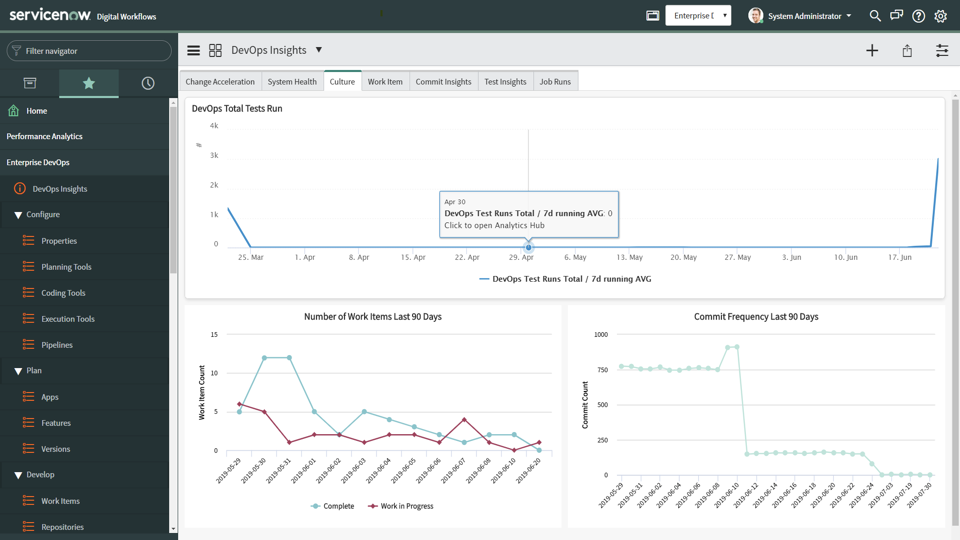 Hawes said ServiceNow recognizes that IT organizations are building and deploying applications at rates that are faster than existing ITIL-based approaches can track. However, ITIL-based frameworks provide the highly structured set of processes around which the bulk of IT environments are managed. ServiceNow DevOps enables IT teams to automate change management tasks such as planning, development, testing, deployment and operations via a single dashboard surfacing a common set of metrics, he said. He added in many cases, those preset rules and policies will eliminate manual processes that often conspire to slow the rate at which applications can be deployed and updated within any IT environment, said Hawes.