Category: DevOps Toolbox

  • Best Practices for Digital Experience Management

    Best Practices for Digital Experience Management

    The COVID-19 pandemic put digital services in the spotlight. The winners in 2020 and beyond will be those organizations which provide awesome user experiences for online products, services and apps. There is scant room for error, as digital leaders before the pandemic have upped their game even more.

    For example, streaming service provider Netflix’s 2020 Q4 revenue reached $6.64 billion – almost $14 million more than expected – and added 8.5 million paid subscribers. The company had more than 200 million users in the quarter and saw viewership for non-English titles jump 50% during the year as U.S. viewers sought new content from around the globe.

    Companies in more traditional sectors, such as restaurants and hospitality, also grew by investing further in digital strategies. Chipotle’s 2020 revenue increased 7.1% to $6 billion, with digital sales skyrocketing 174.1% and accounting for more than 46% of sales. Target’s digital sales increased 155% in Q4 while Costco grew e-commerce sales by 91% in FY20, as online ordering and curbside pickup became the new normal.

    Digital Experience Monitoring Basics

    To manage this onslaught of online customers and transactions, IT organizations are turning to digital experience monitoring (DEM). DEM is a broad area, but it comes down to delivering the best experience for your customers and employees by monitoring your IT assets and addressing issues that arise before they become problems. DEM allows you to mimic and test the end-to-end customer and worker experience. Such solutions can be used in on-premises data centers or run in multi-cloud and hybrid cloud environments.

    There are two key methods for DEM:

    Real user monitoring (RUM): This entails using real users’ devices to measure the performance of a page. A script is injected on each page to measure data on page load performance for every request made, monitoring the interaction of an application and the users. The data shows such aspects as how an application is being used and the geographic distribution of users.

    Synthetic monitoring: This technique tests the performance of a page using an automation tool rather than users’ actual experiences. Scripts are used to simulate how a user might move through a web application and then reports are created based on that performance.

    In a recent report, Gartner analysts said DEM products are evolving, moving from a focus on performance and availability to correlating infrastructure and operations (I&O) and business outcomes. Currently, fewer than 15% of digital business initiatives will require I&O leaders to report on business metrics from digital experience; that will jump to 70% by 2025, Gartner says.

    For years, organizations have been using monitoring tools to measure various aspects of their infrastructure. For example, IT operations management (ITOM) solutions track metrics and manage alerts and events for infrastructure hosted on-premises or in the cloud, including servers, networking systems, storage appliances and databases. The data also can be used for historical data analysis and to map out trends.

    DEM is specifically focused on the end user experience, giving IT professionals the visibility to run diagnostics, fix issues and measure performance at each point of contact between the users and the application. Acquiring a new customer is an expensive effort, and a customer can be lost because of a single poor experience. DEM is designed to ensure the optimal experience.

    Getting Started with DEM

    There are two common approaches for implementing DEM:

    Point tools: Domain-specific monitoring tools track and measure different layers of the technology stack, such as networks and applications. The upside to this approach is you get more in-depth coverage from the point tools, but it can lead to tool sprawl, which impairs visibility and increases costs.

    Platform: This approach provides native monitoring for many areas and integrates with other tools, as needed, to deliver a central, unified view that makes it easier to see everything at once. However, it doesn’t include best-of-breed performance or the deepest analysis capabilities you will want in every area.

    An important first step is to identify the metrics and outcomes priorities for your organization. Then spend time researching the proper toolset for the goals you want to achieve. If you decide on deploying multiple single-domain monitoring tools, remember that you will need an integration strategy. The tools will need to easily share data and display that centrally, to deliver a holistic view of digital experience. Integration is also critical for troubleshooting and connecting metrics to a specific business service. You also will need subject matter experts in these technology domains who can ensure that the DEM tool(s) keep pace with advancements in IT infrastructure and development technologies.

    The Future of Digital Experience Monitoring

    The DEM field is evolving, with more parts of the I&O stack coming under its purview. Solutions will offer more capabilities and be easier to integrate out of the box with other tools because the end-to-end flow doesn’t stop with monitoring and collecting metrics. ITOps staff need to take action on critical alerts with efficient workflows and intelligent recommendations. AIOps and machine learning analytics are playing a growing role here.

    DEM can reduce time-to-value for customers and workers, simplify and ease onboarding to new sites and apps and ultimately increase interactions and sales. Advanced solutions can fuel predictive analytics, form a deeper understanding of user behavior to optimize websites and apps in step with user requirements and dynamic infrastructure changes. In a digital-centric world, DEM capabilities are critical to the health and future of organizations in every sector.

  • Visualization Shines a Light on IT Metrics

    Visualization Shines a Light on IT Metrics

    Modern IT departments operate in a pressure cooker. Their highly distributed infrastructures are spread across legacy data centers and hybrid and multiple public clouds. Now, the Internet of Things (IoT) and the edge are part of the mix.

    Massive amounts of data are flowing through these multifaceted environments, and it falls on IT to make sense of it all, ensuring that issues don’t become problems and that it’s viable to produce measurable outcomes for the business. Dashboards are instrumental for visualizing and quickly making sense of that data.

    Metrics – numeric representations of data measured over time – give IT operators and site reliability engineers (SREs) a window into how a system has historically behaved. That data provides insights as to how the system(s) should perform in the future, and aids investigations when something goes awry. IT monitoring tools act as giant data lakes, holding time series data, while dashboards give everyone from IT administrators to C-level executives ways to easily digest the data.

    The visualization market is evolving. We’re seeing different kinds of databases, such as Prometheus, which bring with them new tools to leverage the data. Prometheus (PromQL) is growing in popularity in the DevOps space and becoming the standard for monitoring containers and microservices because it makes it easier to manage time series data. PromQL also comes with client libraries that include four core metric types:

    • Counter: Represents a single monotonically increasing counter where the value can only increase or be reset to zero on restart.
    • Gauge: Represents a single numerical value that can arbitrarily go up and down, such as CPU utilization.
    • Histogram: Samples observations and counts them in configurable buckets. It also can provide a sum of all observed values.
    • Summary: Samples observations and provides a total count of observations and a sum of all observed values. Configurable quantiles are calculated over a sliding time window.

    Selecting Visualization Charts

    Selecting the appropriate visualization dashboard for each user is important to maximize the value of the data. There are traditional line and bar charts, single value tiles – which display a single data point at a specific point in time – and lists and gauges, which offer a single value at a specific point in time in a series.

    Newer visualization types are now becoming common to address the various use cases in ITOps and DevOps. Let’s walk through a few:

    1. Honeycombs offer big-picture views of IT infrastructure, yet also display detail. The hexagonal display mirrors those in a honeycomb, and helps DevOps pros slice and dice the data based on attributes or tags. Each hexagon represents a specific host or resource, and can be organized in logical groups of elements. The colors change when thresholds are reached, and the hexagons can be sized differently based on the value of the metric. Consider a case of many AWS EC2 instances scattered across the globe. Each hexagon can represent an individual instance, and they can be grouped based on the “region” attribute. This honeycomb chart would let administrators see how each infrastructure site is performing.
    2. Gauge metrics use a language like PromQL to set a ceiling and a floor. If the user creates alert conditions based on particular thresholds, the dashboard will indicate if a certain resource has reached its threshold by changing the color. A gauge that turns red may indicate a critical problem, for example. Managed service providers have SLAs with clients to maintain uptime. If a problem arises, a red indicator on a gauge tile lets the IT administrator know immediately that the SLA agreement has been breached, and that an issue needs to be addressed.
    3. Heatmaps provide a graphical representation of the volume of data points within bucketed ranges. The color of each cell of a heatmap directly reflects the density of certain metric value ranges. Heatmaps are used to display group trends and spot outliers, which make them useful when viewing metrics with a wide distribution of values.

    Role-Based Requirements

    Picking the right chart depends in part upon the people viewing the data. CXOs, IT managers, sysadmins, SREs, network engineers and network operations center (NOC) operators will have different, yet overlapping, requirements.

    For instance, SREs want to ensure the reliability and resiliency of the infrastructure, so, through their dashboards, they look at everything from availability and latency to performance, efficiency and capacity planning. They can quickly spot outliers like server downtimes or memory issues and immediately begin to troubleshoot.

    CXOs, conversely, don’t need to get into the weeds of infrastructure operations. They use dashboards to gain a macro view of metrics for performance over time across websites and networks. They need to understand the correlation between IT metrics and business services and applications. Dashboards should be able to connect those dots.

    Other Considerations

    Finding the right visualization option is important. Once that is done, there are some other steps to take to ensure you get the insights you need from your dashboard:

    Positioning and ordering: Dashboard tiles should be placed in a logical order, with important high-level statistics near the top and the deeper, and more granular metrics progressively moving to the bottom to give users a quick understanding of system performance.

    Design: A well-designed dashboard with consideration paid to color schemes and themes also will make it easier for stakeholders to digest and understand the data.

    IT infrastructure performance is crucial to the health of a company. Massive amounts of data streaming out of systems can help IT administrators and others keep up-to-date about that performance and the overall end-user experience. Dashboards offer flexible ways to quickly view and understand the metrics; IT organizations now have a growing range of charts to choose from that can present the data they need in a way that works best for them.

  • Grafana Labs Aligns with Elastic on Observability

    Grafana Labs Aligns with Elastic on Observability

    Elastic and Grafana Labs have allied to create a plugin through which DevOps teams that are employing Elasticsearch within a DevOps workflow will be able to invoke a monitoring platform, based on Prometheus, that is managed by Grafana Labs.

    Raj Dutt, Grafana Labs CEO, said both companies are dedicating engineering resources to building and maintaining a plug-in for a service, based on open source Prometheus software, that is rapidly becoming a de facto standard for observability in DevOps environments. One of the primary reasons for that expanded usage is that Grafana Labs doesn’t require DevOps teams to move data into a central repository to analyze it, Dutt said.

    The overall goal is to eliminate the “tunnel vision” that results when relying on tools that only visualizes a narrow set of metrics, Dutt added.

    The cloud platform provided by Grafana Labs is based on open source Grafana visualization tools. The primary tool for visualizing Elasticsearch data is based on open source Kibana tools. Grafana, however, is based on a fork of Kibana, so the plug-in represents an effort to bring those two open source communities closer together. The two companies plan to collaborate on including more aggregations, broader query language support and support for space-saving constructs like rollups as the partnership evolves.

    Grafana Labs provides a cloud service that aggregates data, pulled from multiple instances of Prometheus, deployed on clusters and servers. Prometheus, especially, gained a lot of traction as organizations began to deploy Kubernetes clusters that are also based on open source software. Both Kubernetes and Prometheus are being developed under the auspices of the Cloud Native Computing Foundation (CNCF).

    Once DevOps team initially employ Prometheus to monitor Kubernetes, they frequently expand deployments to monitor additional platforms. That shift has resulted in many providers of proprietary monitoring tools to extend the data they consume to include the metrics captured locally by Prometheus. Grafana Labs claims it has more 1,000 customers, including Bloomberg, JP Morgan Chase, eBay, PayPal and Sony, for a total of more 650,000 active installations of Grafana around the globe. Existing customers of Elastic that are paying for Elasticsearch support include Cisco, eBay, Goldman Sachs, Microsoft, The Mayo Clinic, NASA, The New York Times, Wikipedia and Verizon.

    It’s not clear to what degree Grafana and Kibana might ultimately re-converge one day, but it’s clear there will be a fair amount of ongoing cross-pollination across the two projects. In the meantime, DevOps teams should be able to opt for whichever open source visualization framework they prefer alongside Elasticsearch.

    In the longer term, it’s clear greater appreciation for observability platforms that provide more context will drive a wave of consolidation among all the monitoring tools that enterprise IT teams rely on today. As part of the transition, enterprise IT teams might even standardize on a set of visualization tools that would eliminate the need to master different user interfaces. After all, the only way to actually achieve observability is through a set of tools that makes surfacing the context required easier to consume.

  • Copado Acquires New Context to Drive DevSecOps Adoption

    Copado Acquires New Context to Drive DevSecOps Adoption

    Copado, a provider of a DevOps platform for building applications deployed on the Salesforce cloud platform, announced today it has acquired New Context as part of an effort to expand the scope of its portfolio into the realm of DevSecOps best practices.

    Andrew Leigh, chief marketing officer for Copado, said the acquisition brings Copado tools and professional services expertise that will be applied to help organizations build and deploy secure, custom applications on top of the same cloud platform they already use to access a range of software-as-a-service (SaaS) applications.

    The New Context Lean Security Intelligence Platform enables developers to achieve that goal by analyzing code and then surfacing recommendations for when developers should apply specific security controls, Leigh explained. Existing New Context customers include Blue Shield of California, GE, Kaiser Permanente and Royal Dutch Shell.

    Like most organizations that have embraced DevOps best practices, it’s still early days as far as adoption of DevSecOps are concerned. However, it’s already apparent that Copado is well-positioned to advance adoption of a complementary Lean Security Intelligence Platform, said Leigh. Copado, which claims to have more than 1,000 customers, recently raised an additional $96 million in funding to help fuel those efforts. The company also claims it recorded 120% growth in annual recurring revenue (ARR).

    In the wake of the COVID-19 pandemic, more organizations are employing SaaS applications to drive digital business transformation initiatives. Rather than building every application from the ground up, it is often simpler to extend, for example, a Salesforce customer relationship management (CRM) application.

    Once organizations reach a certain level of scale, they then start to apply DevOps best practices to those builds. These efforts, however, are often uneven. A recent survey, conducted on behalf of Copado, found that while 82% have increased or maintained the size of their Salesforce development teams, the change fail rate jumped from 23% last year to 33% in 2020 when compared to a similar survey conducted a year ago. The survey also notes time to recover increased from 110 hours in 2019 to nearly 196 hours in 2020.

    The next major challenge facing organizations that have embraced DevOps is, of course, DevSecOps. The challenge is that, since Salesforce environments are unique, applications are constructed using a set of objects and tables that are specific to that platform. As such, Salesforce environments generally require a DevOps platform designed from the ground up to work with objects and tables.

    Salesforce, in its most recent fourth quarter, reported revenue of $5.82 billion, up 20% year-over-year despite the lingering economic impact of the COVID-19 pandemic. As such, the number of custom applications being developed on top of Salesforce should steadily increase, especially as low-code tools become more widely adopted. It’s now only a matter of time before more organizations reach application development initiative critical mass that warrants investing in a DevOps platform to manage them.

  • JumpCloud Brings Zero-Touch Provisioning to the Mac

    JumpCloud Brings Zero-Touch Provisioning to the Mac

    JumpCloud today announced it is adding a zero-touch enrollment for Macs capability to its cloud directory platform that will also be extended over time to applications.

    Greg Keller, JumpCloud CTO, said this new capability extends Apple Business Manager, formerly known as Apple Device Enrollment Program (DEP), all the way down to specific users by leveraging data that resides in the JumpCloud platform.

    Whenever a user logs into a new Mac, it can automatically be synchronized with the JumpCloud Directory, which then uses the identity of that end user to configure the device in addition to providing the appropriate access to all corporate resources via their JumpCloud credentials.

    Keller said the need for zero-touch approaches to IT administration has become more acute in the wake of the COVID-19 pandemic. With employees working from home more frequently even after the pandemic eventually subsides, Keller noted the days when IT teams could physically provision a Mac are on the wane.

    While Apple Macs still represent less than 10% of all the PCs shipped in a year, Keller noted small-to-medium (SMB) businesses are adopting Macs at a faster rate than large enterprises. As the endpoints become more diverse, Keller said the JumpCloud platform provides an alternative to Microsoft Active Directory for managing both Windows and Mac devices. Apple, of course, last year acquired Fleetsmith to gain access to provisioning tools. However, those tools are not yet integrated with any type of directory.

    Most recently, JumpCloud has added a tool that enables IT teams to remotely install software onto end user Windows devices, as well as integrations with Slack, Salesforce, Atlassian, GitHub and Amazon Web Services (AWS).

    Fresh from raising an additional $100 million in funding, JumpCloud is making a case for a zero-trust approach to managing endpoints using a directory that verifies the identity of each end user. JumpCloud, which makes a free edition of its platform available for individuals and small teams, is already being used by more than 100,000 organizations spanning more than a hundred countries. More than 3,700 of those organizations, including Cars.com, GoFundMe, Nimbus Therapeutics, Grab, Pulselive, SlimPay, Foursquare, Beyond Finance and Funding Societies, are paying customers.

    In the longer term, there may come a day when verbal commands are employed to provision endpoints for specific end users. In the meantime, the process of configuring and provisioning those endpoints is becoming more automated. IT teams are now able to remotely manage fleets of endpoint devices without having to physically touch them. In fact, there may be no need for IT managers to return to an office, as tasks become increasingly automated and able to be performed remotely.

    While there are a lot of options available to achieve that goal, Keller said the number of them that are tightly integrated with a directory to ensure the right system winds up in the right end user’s hands is few and far between. The challenge now is getting organizations to rethink their directory requirements at a time when IT teams are increasingly expected to deliver personalized, white-glove services regardless of where an end user is located.

  • Measuring the Value of DevOps-as-a-Service (DaaS)

    Measuring the Value of DevOps-as-a-Service (DaaS)

    The late great W. Edwards Deming, statistician, professor, author, lecturer, and consultant said, “In God we trust. All others must bring data.” The point is, if you want people to trust your information, then you need to present measured data. This is true for countless circumstances. As a DevOps consultant, I am often asked by my clients what data should be used to show the value of their DevOps capabilities, in a way that is acceptable to the stakeholders of those DevOps capabilities. A lot of excellent research results, published by DORA and others, describes metrics that demonstrate the value that DevOps provides to application development. More and more enterprises are embracing the idea of providing DevOps capabilities, such as pipelines, tools, hardened containers and tech stacks, as a centralized service to support their many application teams. The question then becomes, “What metrics should be used to show the value of DevOps-as-a-Service (DaaS)?”

    Before measuring the value of anything, you need to know two things: “What is it?” and “Why is it important?”

    What is DevOps-as-a-Service?

    In high-level terms, DaaS is DevOps capabilities made available to the users of those capabilities through portals and APIs. There is no standard set of services; DevOps capabilities offered vary from organization to organization. In my SlideShare, DevOps-as-a-Service (DaaS) Values, I illustrate a generic blueprint for DaaS.

    The DaaS blueprint has four layers, as follows:

    • Stakeholders – There are three types of stakeholders: business, app-dev users and DaaS teams.
    • Service access layer – This layer consists of user portals, APIs, and access security.
    • Service layer – The service layer consists of user services and management services. User services include things such as repositories, CI/CD pipelines, sandboxes, test data, configuration data, guides and training. Management services include service catalogs, issues and change requests, SLOs, SLIs, governance policies, experience monitoring and automated tasks.
    • Resources layer – This layer includes application stacks, infrastructure resources, tools, infrastructure code and topology data.

    Why is DaaS Important?

    The value of DaaS, as perceived by different stakeholders, can be summarized as follows:

    • Business – DaaS makes the business competitive.
    • App-dev Users – DaaS improves application development.
    • DaaS team(s) – DaaS improves management of DevOps capabilities.

    What Service Level Objectives (SLOs) Demonstrate the Value of DaaS?

    The SLOs need to be chosen to best fit the requirements of each application. The following are examples.

    Business value can be demonstrated by:
    ROI based on tracking cost savings relative to a benchmark comparing prior non-DaaS, trend cost per developer and per release.
    SLO agility of services – Lead time for changes, and frequency of releases.
    SLO reliability of services – change failure rate, time to restore services.
    SLO governance, compliance and security scores.

    App-dev user value can be demonstrated by:
    SLO availability of DaaS, service level indicators (SLIs) depend on service components and architecture.
    SLO service response time.
    SLO experience scores.
    SLO change request response time.

    DaaS team value can be demonstrated by:
    SLO scope of applications – number of apps supported, number of users per month.
    SLO number of requests served per month.
    SLO critical events per month.

    How Does an Organization Develop DaaS Metrics?

    Start by picking an application that is supported by DaaS. Do not try to boil the ocean and measure all applications at once. Then, appoint a DaaS SLO/SLI team to work on metrics development for the application. The team should include stakeholders from business, app-dev and DaaS support teams associated with the application.

    DaaS SLO/SLI team members determine the SLOs of DaaS that each class of stakeholder values the most, and then decomposes the services to identify sources of data that will form the most important service level indicators (SLIs).

    With the SLIs in hand, instrumentation, telemetry and analysis requirements can be determined and used to design monitoring agents, communication, analyzers, alerts and dashboards.

    Then, roles, policies, playbooks and responsibilities will complete the solution. Test the solution for the chosen application. As you gain confidence in the solution, adapt and expand the solution for use with other applications.

    Continue to monitor the progress and performance of the SLO metrics, and continuously improve them with experience and as newer technologies become available.

    What This Means

    DevOps-as-a-Service provides many valuable capabilities to business, app-dev users and DaaS teams. Metrics that demonstrate value to each class of stakeholder should be determined for each application that consumes the capabilities offered by each unique DaaS. A DaaS SLO/SLI team can determine the best metrics and system design for the implementation for an example application. The SLOs can be adapted and evolved for other applications in the organization, and used as a basis for continuous improvement.

  • Lightrun Tool Now Debugs On-Premises Apps

    Lightrun Tool Now Debugs On-Premises Apps

    Lightrun today announced it has made its namesake debugging tools available for applications deployed in on-premises IT environments that, for one reason or another, can’t be deployed on a cloud platform.

    lan Peleg, CEO of Lightrun, said Lightrun is unique in that software teams can capture live production data from software installed on their customers’ sites via a set of command line interfaces (CLIs). That approach eliminates the need for the end customer to set up a separate environment to troubleshot an application, said Peleg.

    Instead, software teams can troubleshoot their software without requiring on-site visits by support engineers or even a phone call, Peleg said.

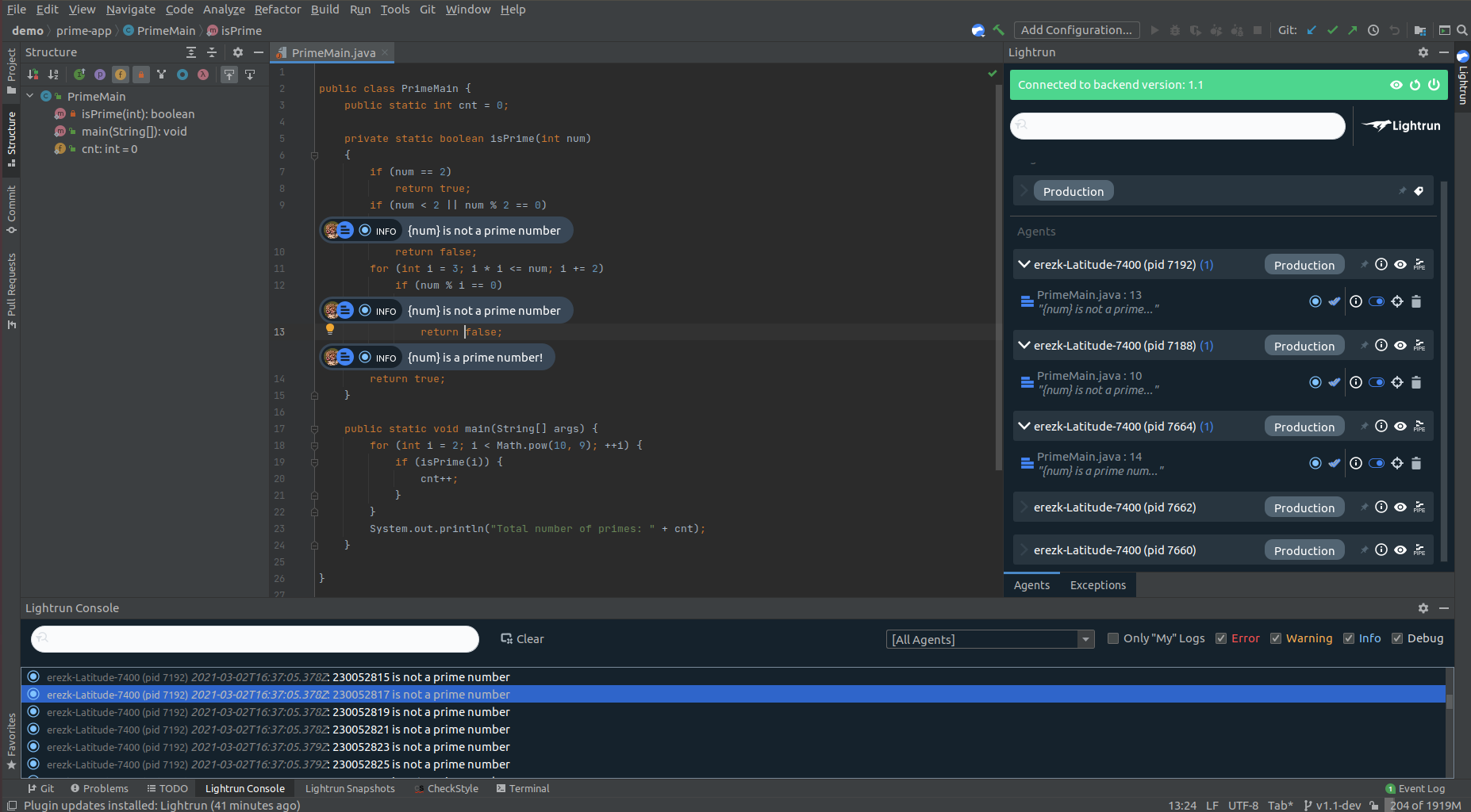
    Lightrun makes it possible to add logs, virtual “breakpoints” and metrics while an application is running. Those capabilities are critical because many applications are not fully instrumented. Lightrun makes it simpler to triage issues by adding a missing log line, instrumenting a new metric or taking a snapshot of an application as it runs in a production environment. Those capabilities make it possible to find bottlenecks and errors without requiring the application to stop running.

    The performance impacts of Lightrun range from tens to hundreds of microseconds per invocation to minimize overhead, Peleg said.

    In general, Peleg said, debugging applications is becoming more challenging. Monolithic applications continue to grow in size while emerging microservices-based applications have dependencies that make them challenging to debug. Many organizations are employing application performance management (APM) platforms and other observability tools to try and address these issues. However, those platforms require IT teams to continuously collect data, and even then there is no guarantee the insights needed to troubleshoot an application will be surfaced. Lightrun, conversely, makes it possible for developers to troubleshoot an application and capture the metrics needed in real-time. That data can then be shared with an APM platform to make it easier to address similar issues if required, Peleg said.

    As developers become more accountable for application performance, many of them are not going to want to employ the same tools and processes that IT operations teams have historically relied on. Lightrun provides a lighter-weight approach to troubleshooting applications, within the context of a DevOps workflow, that doesn’t require as much overhead, said Peleg.

    Although observability is a core DevOps principle, many organizations have been unable to achieve it in a meaningful way. There is no shortage of tools for monitoring IT environments, but correlating all the data those tools generate is problematic. It’s not uncommon for organizations to spend weeks trying to identify the source of an issue that only takes a few minutes to fix. Now that developers are assuming more responsibility for managing the entire lifecycle of an application it is likely different approaches to achieving observability will be considered.

    In the meantime, as the number of applications deployed in production environments continues to increase, different approaches to debugging software will be required. Otherwise, at the current rate of deployment, it won’t be long before developers find themselves spending most of their time debugging existing applications, versus actually writing new code.

  • Datadog to Meld Observability and DevSecOps

    Datadog to Meld Observability and DevSecOps

    Datadog is planning to expand the scope of the security and observability services it provides following the acquisitions of Sqreen, an application security platform provider, and Timber Technologies, a provider of a tool, called Vector, for collecting and normalizing log data.

    Ilan Rabinovitch, vice president of product and community for Datadog, said Vector makes it possible to collect, enrich and transform logs and other observability data from both on-premises and in-cloud environments in a way that makes it easier to route that data to wherever it is needed via a data pipeline.

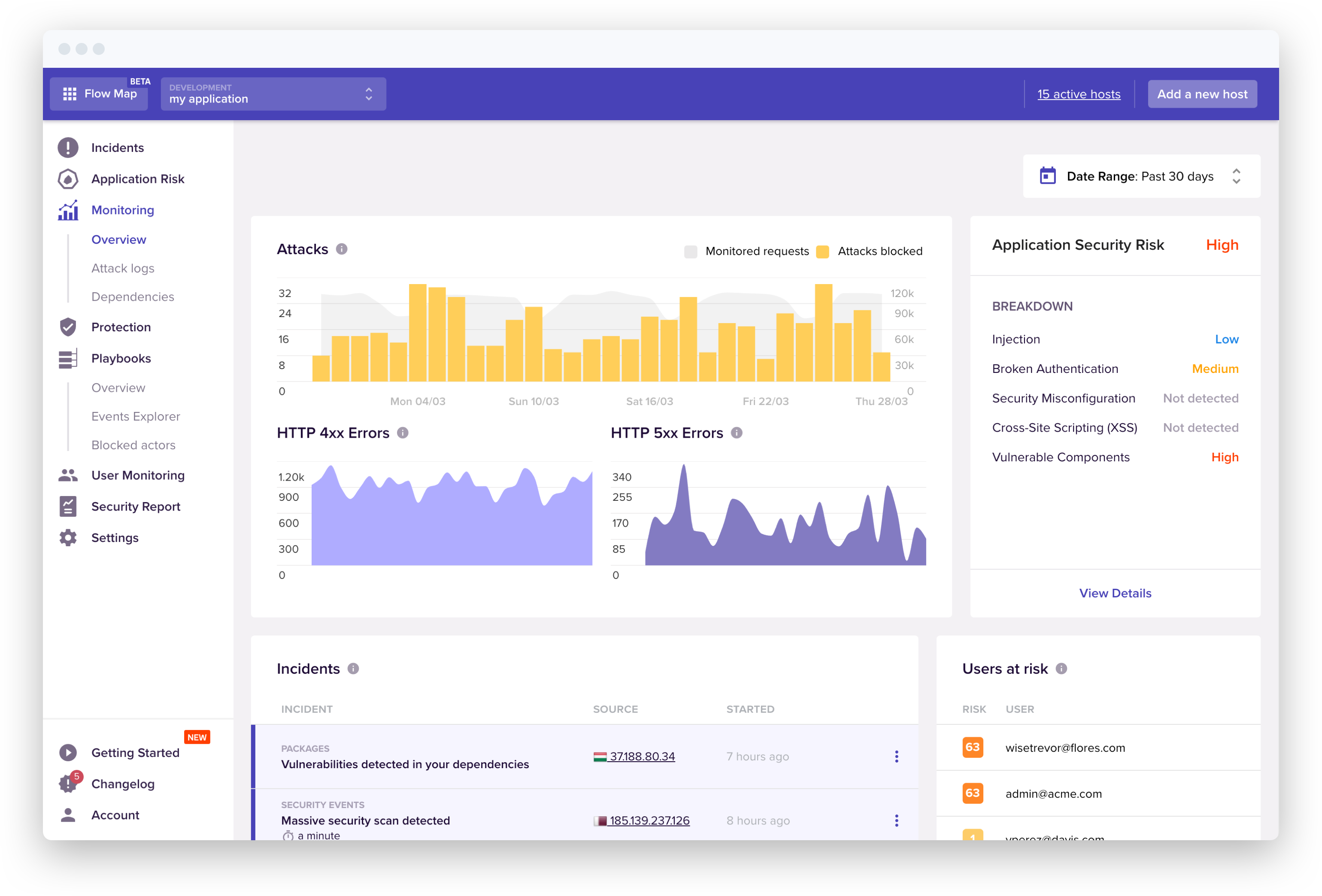
    Sqreen is a provider of a software-as-a-service (SaaS) platform that detects, blocks and responds to application-level attacks using runtime application self-protection (RASP) capabilities enabled by a web application firewall (WAF) embedded within an application.

    Rabinovitch said as IT continues to evolve, it’s clear organizations are looking to embrace DevSecOps best practices in a way that will require security tools that can be embedded within an application, coupled with observability tools that provide more context about the overall IT environment. That context is especially critical, given the amount of data that needs to be analyzed to determine the potential scope of a security threat to an IT environment, Rabinovitch said.

    The Datadog platform is already widely employed to monitor cloud computing environments. There is an industry wide effort to take monitoring to the next level by enabling observability, which applies analytics to provide more context. Surfacing that context, however, requires the ability to normalize data across a pipeline using Vector, Rabinovitch said.

    Of course, the Vector tools are equally applicable to DevOps workflows that have yet to incorporate security technologies. The goal, now, is to make it easier for IT teams, made up of developers, IT operations teams and security specialists, to collaborate by breaking down the various data silos created by IT and security management tools.

    It’s too early to tell what impact the rise of DevSecOps will have on roles within IT organizations. Most organizations will continue to employ a range of specialists that will be able to work more closely with IT generalists, Rabinovitch said. Managing IT is becoming the equivalent of a barn raising, in that it requires members of a community with different skills to come together for a certain amount of time to accomplish a specific task, Rabinovitch added.

    It’s also not clear whether IT organizations view observability as a distinct capability separate from monitoring, or whether they will simply view observability as the next logical extension of existing tools. At the core of that issue is debate over whether observability platforms need to be acquired separately, as part of an effort to replace existing monitoring tools, or whether those tools will evolve over time to provide observability capabilities.

    Regardless of the path forward, it’s apparent the increased complexity of modern IT environments – made up of microservices, containers and serverless computing frameworks – is about to force that issue.

  • SolarWinds Unveils Revamped APM Platform

    SolarWinds Unveils Revamped APM Platform

    SolarWinds is unifying its various application performance management (APM) tools within a single suite accessed via a software-as-a-service (SaaS) platform.

    Denny LeCompte, senior vice president for products at SolarWinds, said the APM Integrated Experience offering combines the company’s AppOptics, Loggly and Pingdom tools to collect metrics, traces and logs along with real user monitoring capabilities and tools to simulate application traffic.

    APM Integrated Experience also provides access to a landing page that identifies what has changed in an IT environment over the previous week and highlights which of those changes might become an issue. As most IT professionals well understand, most IT issues can be traced directly back to a recent change made to an IT environment that was previously running as intended.

    Other capabilities include advanced search tools and the ability to inspect lists and maps for hosts, containers and plugins for web servers and databases. In addition, APM Integrated Experience is integrated with both Amazon Web Services (AWS) and the Microsoft Azure cloud.

    LeCompte said the goal is to make it less expensive for the average IT organization to broadly instrument applications using an agent developed by SolarWinds that can automatically be installed.

    Ultimately, the goal is to enable organizations to better manage their software supply chains, LeCompte added. Of course, SolarWinds is at the heart of the software supply chain breach that involved its Orion network management software. That software runs on-premises. In comparison, APM Integrated Experience is a SaaS platform that is more secure. In fact, LeCompte said, IT professionals that manage software supply chains are generally sympathetic to the challenge the company currently faces. Most of those organizations have dealt with similar software supply chain issues, albeit on a smaller scale, LeCompte added.

    In general, LeCompte said it’s apparent most organizations need access to an APM platform that costs substantially less than rival platforms and still delivers 90% of the capabilities they require. In many cases, IT organizations are paying for extra capabilities that only very high-end enterprises require, LeCompte noted. In fact, one of the primary reasons APM platforms are not as widely employed is most organizations have found rival APM platforms simply too expensive to deploy, said LeCompte.

    LeCompte declined to speculate whether there is a meaningful difference between what has been historically known as monitoring and so-called observability platforms that have emerged in recent months. Regardless of approach, however, it’s clear as distributed IT environments become more diverse and complex, the number of organizations that need more visibility into their application environment is steadily increasing, said LeCompte.

    Of course, with the rise of microservices-based applications, that level of IT complexity is only going to increase. As applications grow and expand, the number of dependencies between microservices starts to increase. Understanding how an issue with one microservice is impacting a distributed computing environment will undoubtedly require more instrumentation. The challenge, going forward, will be determining how best to achieve that goal at a reasonable cost.

  • Applause Automates App Testing via SaaS Platform

    Applause Automates App Testing via SaaS Platform

    Applause today unfurled a software-as-a-service (SaaS) platform that makes it easier to automatically create test automation scripts without having to write code.

    At the same time, the company is adding support for an application programming interface (API) through which DevOps teams can send new features to be tested by the Applause platform.

    Both offerings are now being included with a rebranded Product Excellence Platform (PEP) offering, a suite of tools and platform through which Applause is making its portfolio of offerings more accessible.

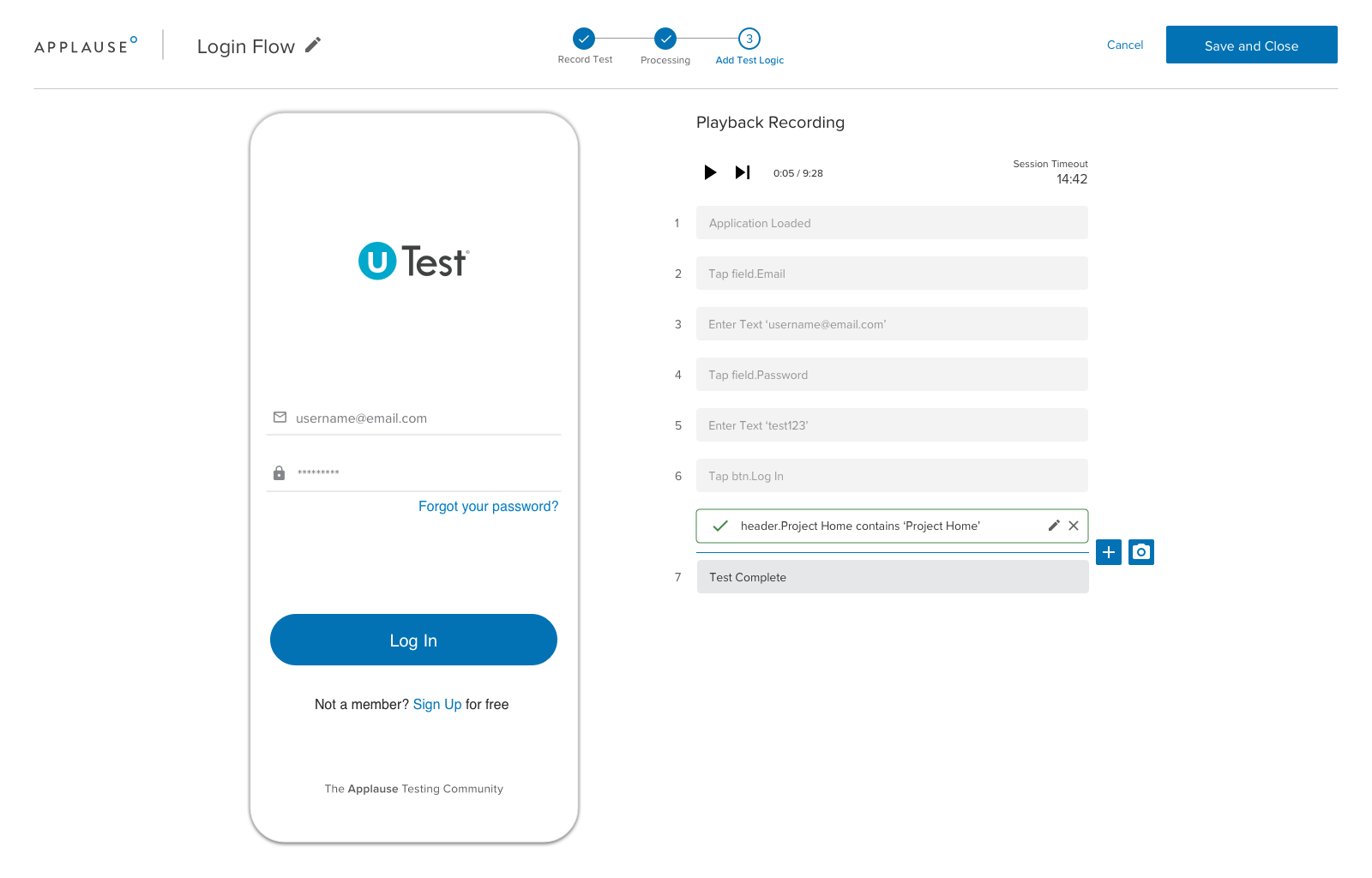
    Rob Mason, Applause CTO, said the Applause Codeless Automation (ACA) platform makes it possible for testers to record a series of test case scenarios using a SaaS platform that translates those sessions into an automation script without anyone having to write any code. The current offering supports Android and Apple iOS applications with support for web applications planned, Mason said.

    An Applause In-Sprint Testing capability, meanwhile, makes the testing process more iterative using a bi-directional API that can be plugged into any software development life cycle (SDLC) process, Mason said. That bi-directional capability makes it possible to embed the feedback from the testing process into any bug tracking system implemented by an application development team, said Mason.

    Mason said that capability is critical, because it enables DevOps teams to identify issues earlier, thereby avoiding late-stage bug fixes that are more costly to fix. It also provides the added benefit of making it easier for developers to address issues in the moment applications are being written, versus days or weeks later when the context around that issue has long since been lost, Mason added. The SaaS platform provide developers with a just-in-time testing capability, Mason said.

    Ultimately, Mason said the goal is to make it simpler for a wider range of individuals to participate in application testing by making it easier to reuse tests. In addition, he said, it will allow subject matter experts to record tests that can be turned into test scripts on their behalf. That approach will enable organizations to push testing further left, beyond the developers that originally created an application, to include the owners of that application, Mason added.

    The rate at which applications are being built to drive digital business transformation initiatives is increasing, and makes testing more problematic. Automation is the only way to close the gap between the number of application testers an organization can dedicate and all the applications being developed. The automated approach not only reduces the time and effort required to create a test, it also makes it easier to reuse tests across different application use cases.

    Ultimately, it’s only a matter of time before machine learning (ML) algorithms and other AI capabilities play a larger role in application testing. The challenge will be finding exactly where the interface between humans and machines should lie in the context of application testing.

    In the meantime, the more automated testing becomes, the more widely it will be conducted. The results of those tests may not always be welcome news, but the issues they raise are always better addressed sooner than later.