Category: DevOps Toolbox

  • Learning ‘The First Way’ of DevOps – Continuous Flow

    Learning ‘The First Way’ of DevOps – Continuous Flow

    Many organizations are struggling to realize well-engineered DevOps, even ‘the first way’ of DevOps – continuous flow.

    DevOps is an evolving body of knowledge. There is no one-stop shop that covers all roles and the complete range of skills required for DevOps. A DevOps-competent workforce requires an ongoing commitment to DevOps skills development and mastery. Enterprises must approach DevOps training strategically to leverage training resources to their best advantage.

    Learning Continuous Flow

    The first way of DevOps, continuous flow, is the foundation for DevOps.

    Why Is Learning Continuous Flow Important to Engineering DevOps?

    A knowledgeable, skilled workforce is needed to meet strategic objectives. Without a solid understanding of DevOps concepts and terminology, communication between people and teams is inefficient and a source of bottlenecks and misunderstandings. Developing hands-on skills for the tools and workflows is needed to understand and implement DevOps pipelines. There is an industry-wide shortage of skilled DevOps candidates. New skills foster innovation. Knowledge workers reduce production costs and reduce mistakes. Having skilled coworkers makes for a satisfying working environment. Employee retention is better. Competitive advantages are derived from knowledge.

    How Is Learning Continuous Flow Accomplished?

    The following are recommended engineering practices for learning continuous flow.

    People are encouraged to be continuous learners with an ongoing commitment to DevOps skills development. DevOps training is approached strategically to ensure DevOps training is well aligned to business goals. DevOps skills gap assessments are conducted and used to define and refine the training strategy. Leaders and cross-functional teams are encouraged to take DevOps fundamentals training. Leaders define a training strategy that best fits the needs and priorities of the organization to meet critical skills gaps.

    The training strategy considers which skills and roles can be covered by inexpensive self-study resources. Determine which skills and roles warrant more costly training. DevOps training has a distinct budget. Compliance to DevOps training programs are tracked. DevOps leadership training is offered to management and staff that have a role relevant to DevOps. DevOps tools training includes the recommended engineering practices for using each DevOps tool in the Service Catalog. Staff are encouraged and supported to take DevOps certifications that are relevant to their assigned roles.

    A DevOps training program is defined and includes a recommended curriculum for each role including leaders, developers, QA, Ops, and infrastructure and security staff that are operating in a DevOps environment. Recommended DevOps training resources are cataloged, and the catalog is visible for all stakeholders. Merit and recognition programs encourage employees to master DevOps skills.

    All staff is allocated time for DevOps training. DevOps mentoring programs supplement formal training. Job swapping and immersive training is encouraged and planned. People are encouraged to attend external conferences and meetups and share what they learn with other team members.

    What Is Needed to Implement Learning for Continuous Flow?

    The following are recommended engineering practices for implementing a learning program for continuous flow.
    Assign roles and responsibilities for DevOps training leadership (e.g., DevOps Sensei, Training PM, evangelist). Conduct a DevOps skills gap assessment. Define a training strategy that best addresses the gaps and fits the needs and priorities of the organization. Define a training budget that includes expenses and time allocations per role and skill.

    Determine which skills and roles can be covered by inexpensive self-study resources. Determine which skills and roles warrant more costly commercial training. Identify training goals for each role. Ensure job recruiting profiles match skill requirements for DevOps skills that are most relevant to the organization strategic goals. Put in place the means to make training resources visible and available. Set training goals for teams and individuals. Put in place incentives and recognition programs for completion of training.

    Some of the best sources of DevOps training resources are listed below:

    1. The DevOps Institute
    2. Partners of The DevOps Institute, such as Learning Tree International and Xellentro
    3. Udemy
    4. Recorded talks and publications available through IT Revolution
    5. Books such as my own Engineering DevOps, by Marc Hornbeek.

    What this Means

    Organizations need a trained workforce to succeed with DevOps—even ‘The First Way’ of DevOps—continuous flow. Organizations need to approach DevOps training strategically to leverage DevOps training resources to their best advantage. To learn more about my blueprint for learning all things DevOps, refer to my book Engineering DevOps.

  • How IT Can Use AI To Prepare For Uncertainty

    How IT Can Use AI To Prepare For Uncertainty

    The past year has been unpredictable for businesses – from migrating to remote work to planning for a return to offices to keeping pace with shifting government guidelines. With so much in flux, it was and is a good reminder that organizations must be prepared for the unexpected and have contingency plans in place.

    From an IT standpoint, this means ensuring that employees are well equipped to work efficiently and safely, no matter what work may look like in the year ahead. Fortunately, artificial intelligence (AI) technologies are evolving quickly, enabling enterprises to better manage an ever-changing hybrid workforce.

    The following are three AI-enabled strategies that organizations should implement to help prepare for times of uncertainty:

    Invest in Self-Driving Networks

    When companies quickly and unexpectedly moved their employees to remote work last year, networks experienced increased pressure on multiple fronts: usage, quality and issue remediation. These factors compounded on top of the fact that networks have continued to become more complex in the past few years as workloads become more distributed across public and private clouds. Even under the best circumstances, building and maintaining a traditional network requires a team of dedicated experts and can be time consuming. Due to their complexity and the increasing amount of data, networks are becoming more difficult to manage via command-line interface (CLI) and are required to adapt to changing workloads and employee connectivity – this is where AI comes into play.

    A self-driving network eases complexity by using AI and automation to run the network’s end-to-end user experience with minimal human intervention. This includes monitoring for issues such as bad cables and capacity hotspots within the network and solving them before they impact the end user. By ensuring networks are running smoothly on the foundational level, self-driving networks allow IT teams to spend their valuable time tackling more complex problems and driving innovation.

    Empower IT With AI Assistants

    Another way to free up the IT team’s time is to make a new hire – not a traditional employee, but rather an AI assistant. More specifically, an AI assistant that can answer questions and manage networks on par with a network domain expert – one that learns and improves as you work with it. As AI truly delivers on completing functions on par with humans, this is where AI and machine learning are disrupting industries.

    Today’s AI assistants, through conversational interfaces, are delivering more than simple “yes” and “no” answers to IT questions – they are able to answer complex open-ended questions such as, “Why is Bob having a poor Zoom experience?” They’re even learning to solve more complex problems, helping IT teams minimize the number of support tickets issued by frustrated remote workers. As businesses recognize the value AI assistants bring to their team, they now see them as members of the IT team that help them simplify the ever-growing complexity of IT networks.

    Educate Employees on the Benefits of AI

    In 2021, we expect the adoption of AI in networking to accelerate. Ensuring the right AI technologies are property executed starts with trust. Therefore, getting teams to perceive AI assistants as more of a teammate and less as a job-threatening technology is an important step toward successful AI implementation. The end-user experience is more important than ever, and AI is becoming more crucial for enterprises to manage this experience.

    To many employees, the concept of AI can be scary. A common misunderstanding is that AI will take over humans’ jobs. However, people are starting to understand the importance of AI by seeing it solve real problems. As companies implement AI technologies into their solutions, they should first prioritize open conversations about the business benefits of AI. By ensuring everyone is on the same page, teams can work toward building a better process together. After all, the goal is for AI to ultimately make their jobs easier.

    The last year has been difficult to navigate, but it serves as a reminder of the importance of planning for the unexpected – this is necessary to continue running a business efficiently and supporting employees remotely. Though there are sure to be more uncertain times ahead, we have the tools to prepare the best we can today.

    By taking steps toward building a self-driving network, investing in AI assistants and educating employees on AI, organizations can have peace of mind that they’re on the path to building themselves, their employees and their stakeholders a stable future that’s prepared for whatever uncertainties come their way.

  • Turbocharge Enterprise Apps With Contextual Analytics

    Turbocharge Enterprise Apps With Contextual Analytics

    Software product managers and developers typically treat analytics as a standalone capability—something to be integrated into their application’s dashboard or reporting module. As a product feature, analytics is undoubtedly a valuable tool. But offering it merely as a tacked-on function is an approach that lags behind where your users are today.

    When data analytics is limited to dashboards, users must switch away from their transactional environment whenever they need to interrogate data or derive insight. This disrupts workflows and interrupts trains of thought, creating friction for the user. Moreover, a standalone analytics capability doesn’t provide context or guided analysis. Users must look for anomalies or trends manually. As a result they’re less likely to dive into analytics to support good business decision making.

    Contextual analytics, on the other hand, gives users a powerful tool right at the point of their daily work. Contextual analytics is defined as any analytics solution that is integrated directly into an application’s core workflows. This approach delivers the benefits of analytics in the situational framework where decisions must be made.

    Embedding analytics in this fashion creates significant value for the user. Charts, tables and metrics sit side-by-side on the screen, alongside the application’s central functions. With one click, the user gains instant, guided and dynamic insight.

    Such an improvement is helpful for all kinds of business activity. Retail store managers can instantly access demand forecasts while creating weekly work schedules. Inventory managers can view trends and analyze stock without leaving their ordering screen. Supply chain, finance, logistics, sales and marketing, manufacturing—any process involving routine data processing can profit from contextual analytics.

    A Rich Workflow Asset

    When embedded into transactional workflows, contextual analytics can deliver two forms of understanding. The first comes from predefined visualizations, ranging from simple KPI numbers to line and bar charts and even contextual dashboards. These visualizations are presented based on user action; a customer’s purchase history, for example, can pop up in chart format while viewing the account record, enabling the user to make decisions about sales incentives or priorities for service.

    Second are dynamic analyses and alerts. These indicate that either thresholds have been crossed or anomalies in a record have been discovered, prompting the user to explore and take further action. Pop-up alerts can be invaluable in sales, production, finance or many other disciplines.

    For both predefined and dynamic contextual analytics, outcomes can be based on simple aggregations of transactional data or as the result of sophisticated data science modeling (e.g., propensity to purchase). Specific outcomes can be set by either the product manager or the user to maximize utility.

    Contextual analysis is ideal for supporting or triggering actions according to any business need. The capability enhances transactional workflows by providing metrics pertaining to a particular transaction; it will also trigger a new workflow via an alert or suggestion for action, based on the output of a data science model.

    contextual analytics

    Of course, none of this means that dashboard-based analytics aren’t still important. Users will always need to conduct broad data analysis. Dashboards and/or report analytics allow users to monitor overall business performance, drilling down when necessary into the details behind the numbers.

    With the secondary addition of contextual analytics, however, users can be continually guided in their decision making as they work. They receive a constant flow of deeper insight, supporting management tasks intuitively at a granular level.

    Deployment Framework for Developers

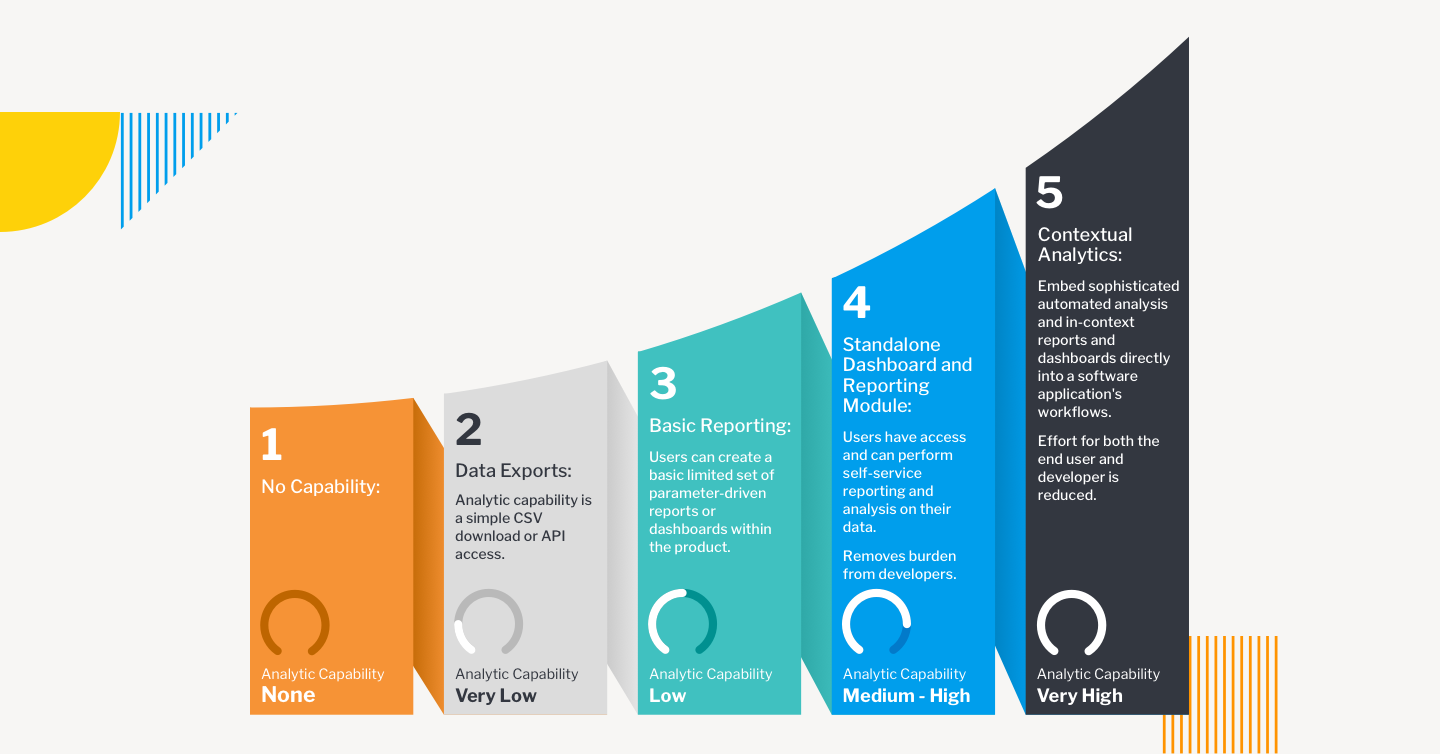
    Embedding transactional analytics into enterprise applications can be directed according to a maturity model. There are five possible stages of product development:

    • Stage One: No Capability. The main engineering focus is on bringing a new application to market. Minimal Viable Product (MVP) attributes lead development, and reporting capabilities are rarely included.
    • Stage Two: Data Exports. Analytics are provided based on customer feedback, but only through a CSV download or API access that allows the end user to analyze data in their preferred tool. The burden of building analyses rests with the customer.
    • Stage Three: Basic Reporting. A limited set of reports are supported by analytics, and in-house developers are tasked with creating the capability, often to the detriment of new features for the core product.
    • Stage Four: Standalone Dashboard and Reporting Module. This is often the end journey for most enterprise applications. Self-service reporting and analysis are available via out-of-the-box dashboards and reports.
    • Stage Five: Contextual Analytics. Sophisticated, automated analysis is available as part of the application’s core workflows, as well as at the dashboard. Users are guided to optimal decision-making at both the transactional and reporting level.

    These stages are not mutually exclusive. Especially for stages four and five they can be additive, so that end users will have a variety of mechanisms to access the data they need, at the time they need it.

    contextual analytics

    Accelerating Implementation

    Elevating the end user analytics experience is easier to achieve than it once was, thanks to BI vendors that specialize in embedded and contextual analytics built on an open platform. The best vendors are able to adapt quickly and easily to product development roadmaps, aligning features to meet specific needs and following up with administrative tools and automation processed to support the lowest possible cost of ownership.

    Working with an analytics vendor means development teams will have maximum support from prototype and design to integration, deployment and subsequent iteration. Options for Windows and Linux, on-premises or cloud will ensure the versatility, security and scalability required for highly marketable offerings.

    How Customers View Analytics

    As a product feature, analytics can often be dismissed as an afterthought—but your users don’t see it that way. BI analytics is increasingly seen as critical to business governance. Users want to glean as much insight as possible from the data they’re collecting—and on multiple levels. This means your users want to get more from your product, even in ways they haven’t yet imagined. Contextual analytics can provide that enhanced appeal for your application, putting your product out in front at a time when enterprise applications are more essential—and more competitive—than ever before.

  • Atlassian Delivers on Forge App Dev Platform Promise

    Atlassian Delivers on Forge App Dev Platform Promise

    Atlassian this week made available a Forge platform for building applications that complements its existing portfolio.

    Mike Tria, head of platform engineering for Atlassian, said Forge is intended to provide an application development environment to both IT organizations and third-party partners. It provides developers with access to an integrated Atlassian DevOps toolchain to accelerate testing, deployment, debugging and to capture log data, added Tria. Forge also presents developers with a command line interface through which they can be onboarded to the Atlassian cloud where Forge runs to access documentation and application samples. It uses OAuth 2.0 to ensure applications deployed on the Atlassian cloud only access data they have permission to access.

    The overall goal is to provide developers with a more modern application development environment as an alternative to the application development platform the company previously made available.

    Once an application is built, developers can then publish their applications on the Atlassian Marketplace as free or commercial offerings. There are already more than 3,500 Forge apps that were created during a beta process that began late last year. Forge will soon be extended to the rest of the Atlassian portfolio, noted Tria.

    Forge is intended to complement an Open DevOps initiative launched earlier this month that tightens integration between the Jira project tracking and management tools provided by Atlassian and a wide range of other tools commonly employed by DevOps teams. The goal is to not only make it easier to correlate issues that are listed in Jira with artifacts found in various software platforms, but also to collect data from DevOps tools to automatically update Jira.

    That data will then be employed to inform key performance indicators (KPIs), based on graphs that Atlassian provides within Jira, to keep track of value streams. Rather than having to acquire a separate value stream management (VSM) platform to track software development progress, the insights needed to understand the impact of, for example, a delay to one project becomes a dividend of using Jira.

    Like most providers of software-as-a-service (SaaS) applications, Atlassian has been making available a platform for building applications on top of the same platform it employs to build its own applications. Atlassian claims there are more than 1,200 partners building applications in addition to internal IT that teams that have built custom extensions to its applications. Atlassian has already shown a proclivity for acquiring independent software vendors (ISVs) that build applications on its platform. As part of the overall Forge initiative, Tria said Atlassian will be working more closely to identify the white space that won’t be addressed by the Atlassian product roadmap at some future date.

    In the meantime, independent software vendors and internal IT teams will need to determine to what degree they will prefer to stand up their own application development environment versus opting to be dependent on Atlassian. In theory at least, applications built on Forge should be more tightly integrated with the rest of the Atlassian portfolio. The only potential downside is, of course, any potential conflict that might emerge with a provider of an application development platform that also happens to sell application software.

  • Serverless Computing Brings New Security Risks

    Serverless Computing Brings New Security Risks

    Attracted by lower costs and less operational overhead, serverless computing is an unmistakable undercurrent in the world of DevOps. Developers are drawn to the innovation because it requires no architecture to manage while offering continuous scaling for anything from a few requests per day to hundreds of thousands of requests per second.

    More than 50% of the developers using serverless functions today started using the computing model in the last three years. By some estimates, serverless computing is the fastest-growing segment in the cloud services market.

    While businesses are drawn by the opportunity to extend and integrate cloud applications at greater scale, there’s a dark underbelly to this DevOps phenomenon: security. In fact, organizations cite security concerns as the leading reason why they haven’t yet adopted serverless computing. For good reason!

    Serverless functions are introducing a new breed of threats – misconfigurations, code-level risks, injections and weaknesses – many of which are the underlying risk factors for a software supply chain attack. With adoption of this technology accelerating, organizations need security that delivers more than just visibility into these dynamic environments. They also need the ability to detect and block code-level vulnerabilities and misconfigurations that occur during development and through to production. Most importantly, this needs to happen seamlessly and with little to no impact on DevOps.

    Dynamic Environments Create Complex Security Risks

    The nature of applications has evolved, creating a new paradigm of security risk. In serverless environments, code sprawl makes it harder to identify vulnerabilities and patch them before they become business-level risks.

    In a monolithic application environment, an identified vulnerability could be efficiently patched by the developer through upgrading a single package, pushing a deployment and then testing and deploying the app.

    In a serverless computing model, patching and resolving vulnerabilities becomes a lot more complicated, given that there may be several hundred (or more) environments across different providers and regions. So, instead of having to patch a single application, developers will need to patch, deploy and test hundreds of individual functions that rely on that library.

    With 39% of developers saying they’re now fully responsible for security, it means they’ll carry the burden of having to patch an identified vulnerability – often taking them away from development work.

    With Serverless, You Need to Rethink Your Approach to Security

    Given the distributed nature of serverless functions – essentially, the reason for its flexibility and scalability – many existing security tools will provide little to no visibility, nor the control capabilities, for these computing environments. Many of the security attacks that will occur in serverless functions will be a result of misconfigurations and mistakes that happen outside the purview of the security team and due to legacy solutions which don’t translate to serverless architectures. Further, because abstracted workloads create blind spots, attackers will have more room to maneuver undetected.

    Serverless functions will even render some traditional DevSecOps tools less useful. Scanning tools must monitor hundreds of individual repositories instead of a single monolithic repository, while application performance monitoring (APM) tools lack security proficiency and cannot protect from the OWASP Serverless Top 10 risks.

    The challenge for security teams will be implementing solutions in a way that does not modify workloads or require changing business logic — both of which slow development. When applying security to serverless functions, it’ll be critical that the solution can do the following:

    • Go beyond monitoring and actually detect and block vulnerabilities without elaborate or manual steps involved. The scale of serverless functions will make it nearly impossible for security analysts to manage and keep up with every alert they receive. Instead, they need a tool that delivers actual security and can help them block malicious activity without stopping development altogether.
    • Enable a positive security model that provides protection against malicious changes, like zero-day exploits, within the function. This approach gives security teams more control by automatically detecting and blocking anything that isn’t explicitly allowed in a given function.
    • Provide forensic detail from log-level information so security analysts can fully understand the context of every attack with virtually no impact on latency. Further, with the risk of supply chain attacks soaring, security teams need the ability to identify and map third-party dependencies used during runtime.

    For many organizations, serverless architecture is a very different and unique computing environment – unlike anything they’ve experienced or had to protect before now. That reality means that organizations need a fresh approach to securing these environments and will need to look beyond the traditional tools they have in their tech stack today.

    Above all, developers and security teams will need to work together to ensure security is built-in from the start. Otherwise, serverless functions will quickly become a playground for cybercriminals.

  • Digital.ai Deepens Value Stream Management Integration

    Digital.ai Deepens Value Stream Management Integration

    Digital.ai announced today it has expanded usage of machine learning algorithms within its namesake value stream management (VSM) platform to include modules to optimize flow and improve application quality in addition to enhancing its risk prediction and process optimization modules.

    In addition, Digital.ai has expanded the number of pre-built integrations it now provides for hundreds of DevOps tools and platforms.

    Derek Holt, general manager of agile and DevOps for Digital.ai, said the goal is to expand the bi-directional flow of data between the core Digital.ai platform and modules and tools provided by the company and its third-party DevOps partners.

    Digital.ai was formed from the merger of XebiaLabs and CollabNet VersionOne. The combined company has rolled up Numerify, a provider of analytics tools infused with artificial intelligence (AI), Experitest, a set of testing tools and Arxan, a provider of an application security platform. With the latest release, these capabilities have been integrated into the core Digital.ai platform in a way that goes well beyond merely providing access via a common user interface, said Holt.

    The goal is to provide organizations with a VSM platform through which better decisions can be made to optimize software development and delivery by first collecting data from all the DevOps tools employed and then using machine learning algorithms to surface optimization recommendations, noted Holt. As application development environments become more complex to manage, it’s already apparent that most IT teams will require AI capabilities embedded in a VSM platform to manage interdependent projects, noted Holt.

    Armed with those recommendations, it becomes simpler to reallocate resources in the event a critical project is going to be completed later than planned or shift resources to make sure that project is completed on time. A VSM platform also enables IT organizations to assess the impact those decisions will have on the rest of the business at a time when organizations have never been more financially dependent on the timely delivery of software. The late delivery of a single application module can wind up having a profound impact on revenue projections for organizations that increasingly rely on digital processes to engage customers.

    A recent survey conducted by Digital.ai found that many digital transformation initiatives are struggling, to some degree. Nearly half of respondents (49%) said they are not seeing the results they expected from their digital transformation efforts, and 54% admitted they were worried about their ability to compete. Over 90% need to see a better return on their digital transformation investments.

    Digital.ai claims it currently has more than 1,200 customers, including Allianz, Commerzbank, eBay, Janus Henderson and Levi’s that are using elements of the Digital.ai platform to better manage software development projects. Many of the users of those tools now include business executives and other application stakeholders that are employing a VSM platform to track the progress of application development projects. Digital.ai Analytics Lenses that are domain-specific make it simpler for different classes of end users to access pre-built dashboards and metrics, noted Holt.

    The market research firm Gartner has predicted that 70% of organizations will employ a value stream management platform by 2023 to improve flows across their DevOps pipelines. However, as DevOps platforms and project management applications continue to evolve, many are also adding many of the analytics capabilities found in a VSM platform. Each IT organization will need to decide which approach makes the most sense for them, but Digital.ai is clearly betting that as application development becomes more challenging, the need for an integrated VSM platform will become much more apparent.

  • Oracle and Allies Launch ARM-Based Cloud Service

    Oracle and Allies Launch ARM-Based Cloud Service

    Oracle announced today it will make available for the first time ARM-based processors on the Oracle Cloud Infrastructure (OCI) that will also be supported as targets for deploying applications using GitHub, GitLab or Jenkins platforms. The latest Oracle service is based on processors from Ampere Computing.

    The company also revealed today it has joined the Continuous Delivery Foundation (CDF), an arm of the Linux Foundation that oversees the development of open source DevOps platforms and tools such as Jenkins and Spinnaker.

    Matt Leonard, vice president of compute for OCI, said the OCI Ampere A1 Compute provides an alternative to existing support for the x86-based processors that Oracle provides. That service will be offered at a cost of one cent per core hour with virtual machine sizes ranging from one to 80 OCPUs configured with one to 64 GB of memory per core or as a bare-metal service with 160 core and 1 TB of memory. Pricing per GB of RAM per hour is $0.0015. At that price point, Leonard said Oracle is now offering the lowest price per core of any cloud service provider.

    The growing availability of ARM-based processors is starting to have an impact on cloud economics at a time when organizations are significantly increasing the number of applications being built and deployed on public clouds. Many of those organizations, to reduce overall costs, are now actively evaluating ARM-based services, noted Leonard.

    To help jumpstart application development on the platform, Oracle is providing organizations with three classes of OCI Ampere A1 Compute services. An Oracle Cloud Free Tier gives developers $300 in free credits for 30 days. The Always Free ARM option gives developers four A1 cores and 24 GB memory, while an ARM Accelerator option provides open source developers, independent software vendors (ISV) partners, customers and universities with ARM-based development projects that need additional resources beyond what the Oracle Cloud Free Tier provides with credits for a 12-month period.

    Oracle Linux, Java, MySQL, GraalVM and the Oracle Container Engine for Kubernetes (OKE) service are also all available on the OCI Ampere A1 Compute along with integrations with DevOps platforms from GitHub, GitLab and/or Jenkins. Other vendors providing support for OCI Ampere A1 Compute include SUSE, Datadog, OnSpecta, NGINX and Genymobile.

    Oracle has also made available an Oracle Linux Cloud Developer image that enables DevOps teams to install, configure and launch a development environment via an OCI console that includes OCI client tools, utilities and common programming languages such as Java, GraalVM, Python, PHP, Node.js, Go and C/C++.

    Finally, each Ampere core is single threaded by design with its own 64 KB L1 I-cache, 64 KB L1 D-cache and a huge one MB L2 D-cache to eliminate any ‘noisy neighbor’ issues that IT organizations might otherwise encounter.

    Oracle is clearly betting that ARM-based processors will present the company with an opportunity to gain share at the expense of larger infrastructure-as-a-service (IaaS) rivals such as Amazon Web Services (AWS) and Microsoft Azure. It’s not clear to what degree IT teams might employ a different cloud service just to access ARM-based processors. However, in a world where IT teams now routinely employ multiple clouds, as far as Oracle is concerned, the playing field has never been more level.

  • Rethinking Your Tool Chain in the Cloud

    Rethinking Your Tool Chain in the Cloud

    Every IT shop has a “tool chain” – all of the software other than the OS and the application that fills in the gaps and keeps everything running. This includes solutions for monitoring the application, data protection, software development, release management, provisioning and de-provisioning resources and more. These tools build up over time, often evolving from homemade solutions to commercially available software as the company grows.

    The cloud presents another inflection point: a new way to manage systems and applications. When a company is considering moving applications to the cloud, IT and application development teams should take the opportunity to reevaluate their tool chain. Are their existing solutions still the right fit in this new cloud-based world, or are there better alternatives available? Here is a process for making that decision, and some important questions to consider when assessing whether a change is in an organization’s best interests.

    Step One: Take Inventory of the Current Tool Chain

    First, IT teams should perform a full inventory of their current stack to ensure they don’t overlook anything. This audit should include the following areas:

    • Provisioning tools (like Ansible or Terraform).
    • Identity and access management (IAM) solutions that allow IT to restrict access to servers, resources and software to only relevant users.
    • Development tools including IDEs, continuous integration/continuous delivery (CI/CD), source control and more.
    • Data protection, high availability, disaster recovery and backup software.
    • Monitoring and auditing software (like Datadog).

    Step Two: Assess How Well Each Tool is Meeting IT’s Needs

    Next, consider how well each product is meeting IT’s needs now, and how those needs will change as workloads move to the cloud. The first and most important question: is the tool and/or version you’re on still supported by the vendor? Changes like this migration to the cloud are rare, so the likelihood that one or more products are no longer supported is higher than one might think. Second, consider the licensing terms of the software and whether they allow for its use in the cloud. For instance, some tools are licensed to a specific physical server and some vendors require their hardware to be owned by the same entity which holds the license. Neither of these scenarios work well in the cloud. Third, will the application be managed in the same way after the migration? The cloud typically removes constraints; it offers nearly unlimited compute and storage, dynamic workloads, new APIs and multiple regions around the world. IT teams may want to take advantage of these capabilities by moving to a cloud-based tool (replacing an on-premises application log reporting solution, for example), or they may want to keep management as consistent as possible to minimize the amount of retraining required for employees.

    Don’t forget to consider non-technical arguments. Is the team happy and productive with the current solution, or do they feel forced to use it? Is it meeting the business needs of the organization? Will the change create more work in the short term? These reasons aren’t enough to keep a tool on their own, but they should be part of the discussion.

    Step Three: Create a Map of Alternatives

    Next, look at the potential alternatives to the tools that may need to be replaced. This can be a good opportunity to consolidate, so start by looking at what other teams in the organization are already using in the destination cloud. The most common decision IT must make here is whether to switch to a cloud-based tool (either one offered by their cloud vendor or a separate SaaS product). These typically offer pay-as-you-go licensing and are usually easier to scale up or down, move workloads around and to expand to other regions. Licensing for legacy vendors varies widely; some now offer consumption-based options to compete with the cloud, while some are sticking with perpetual licenses. These factors may make a cloud-based tool more or less attractive for specific companies based on their needs. Last, consider if making a change would allow the IT team to expand their skill set. For engineers that like learning new things, adding new products could actually increase satisfaction and retention because it gives them a chance to learn something new.

    Step Four: Talk to Existing Tool Vendors

    Even if a different option seems like the better choice, it always pays to check in with the current vendor and give them a chance to keep your business. It’s possible they may offer more flexible terms to keep you as a customer. The opposite is also possible; some vendors won’t budge on their licensing because they see the cloud as a threat. Even if a vendor conversation doesn’t change what they are willing to offer, it will usually reveal useful insight about how they approach their customers.

    Step Five: Create a Plan for Each Tool

    Based on the information gathered in the last four steps, it is time to decide what to do with each tool and make a plan for each transition. Where necessary, note products that will need to be replaced soon, ones where more research is required, and compile any other useful information learned during the process so that the larger IT team can access it. Also consider if teams will need training, if internal documentation or playbooks need to be updated, and how new tools will plug into existing authorization/authentication solutions. Each change will also need a migration plan of some kind that details how and when the organization will move from the old product to the new one, what scripts will need to be rewritten and what to do with historical data like log files from the old product.

    Cloud-based tools won’t be a fit for everyone, but their flexibility, potential cost savings and ease of scalability shouldn’t be underestimated. While no one is eager to add more work to a cloud migration project, taking the time to go through this process could uncover useful new options that better fit the new cloud model that the business is moving toward.

  • Tiering Cold Data to the Cloud Without Tears

    Tiering Cold Data to the Cloud Without Tears

    The cloud provides inexpensive storage. But like everything else in the cloud, there are hidden costs. Cloud storage providers (CSPs) charge to put data into and retrieve data from the cloud. They charge for the API calls and they generally charge an egress cost when the data is extracted from the CSP. So, to keep enterprise storage costs low, infrequently accessed data such as snapshots, logs, backups and cold data are best suited for tiering to the cloud.

    By tiering data, on-premises storage arrays need to only keep hot data and the most recent logs and snapshots. Typically, 60% to 80% of enterprise data has not been accessed in over a year. By tiering the cold data as well as older log files and snapshots, the capacity of the storage array, mirrored storage array (if mirroring/replication is being used) and backup storage is reduced dramatically. This is why tiering cold data can reduce overall storage costs by as much as 70%.

    The many advantages of this approach include:

    • Lower acquisition cost. Flash storage, used for fast access to hot data, is expensive. By tiering off infrequently used data, you can purchase a much smaller amount of flash storage, thereby reducing acquisition costs.
    • Lower backup and mirroring costs. By continuously tiering cold data, you can reduce your footprint, license costs and storage costs for backups and replication if the cold data is placed in robust storage (such as that provided by the major CSPs).
    • Improve performance and lower capacity of your storage array. By running storage at a lower capacity and by moving access to cold data to another storage device or service, you can increase the performance of your storage array and get by with a smaller storage array.
    • Enable processing of cold data without burdening the storage array. Processing and feeding your cold data into your AI/ML/BI engines is critical to staying competitive. With cold data in the cloud, you’re also reducing the load on your storage array, thereby extending its life.

    Know First, Then Tier

    A key challenge of cloud tiering is determining what data to tier. End users should not have to decide which data to archive or handle the management of shared files. This issue may result in IT organizations keeping too much data in expensive, hot storage. One way around this is to automate the process through business policies dictating when and how the process is applied. It’s also helpful to provide transparency of the data by keeping it in the existing namespace. Users can still find the data and access it as if it had never been tiered. Transparency enables IT to tier cold data continuously and systemically across all storage devices in the entire organization without requiring end user assistance.

    To help IT make the right decisions, analytics is needed to see just how much data you have, and how much has not been touched in three, six or 12 months. It will be even more compelling if IT can run what-if scenarios to determine how much they will save with cloud tiering. The last thing you want to do is tier data in the dark. Take time to understand your data assets before you invest in the effort.

    Here are other considerations, beyond analytics, when embarking on a cloud tiering initiative:

    • Transparent, continuous tiering. Tiering should be transparent to the user. If someone can still search for and access data that’s tiered without any change to the experience, IT can realistically tier data systemically across the enterprise. Without transparent tiering, it’s an onerous process to tier data because you will need user permissions.
    • Flexible tiering policies. You need the flexibility to exclude certain data sets, include others and select from a large range of data ages. Be aware that many tiering solutions provide an extremely limited set of policies.
    • Tiering across multi-vendor storage arrays. Most enterprises have storage arrays from multiple vendors, and each appliance will have different tiering solutions if any. This makes it difficult to roll out a consistent, global tiering policy across the organization. Look for a solution which can encompass all the storage devices you have today and might acquire tomorrow.
    • Fast access to tiered data. Accessing data from the cloud will incur a much higher latency than accessing data on the local storage array. But once the cold data has been retrieved you can cache it locally to eliminate future latency and reduce egress costs. If the data set is large, the tiering solution should stream it so that users can access it even while the rest of it is being recalled.
    • Native cloud access to tiered data. The tiering solution should allow access to the cold data directly using the cloud storages native access tools. For instance, if you tier cold data to AWS S3, you should be able to access the data directly from AWS using a standard S3 browser like CloudBerry. Unfortunately, most storage array tiering devices store the data in a proprietary format, meaning that you can only access it from the source storage array.

    Cloud tiering is a practical and easy step on the path to the cloud. When done right, it gets you into the cloud while reducing storage costs. There are new solutions available that make this approach seamless with no disruption to users and your existing data protection workflows. By running an analysis of data assets across your storage ecosystem, and setting up policies for migration of cold data, you can ensure that data is always living in the best places from both a cost and business perspective.

  • Unqork Extends Automated No-Code SDLC Platform

    Unqork Extends Automated No-Code SDLC Platform

    Unqork today announced it has extended a no-code platform for managing the software development life cycle (SDLC) to include the ability to automatically document changes to application programming interfaces (APIs) and data models in addition to adding a point-in-time rollback capability.

    Ken Gavranovic, head of strategy and engineering for Unqork, said Unqork 2021.5 also adds a range of dashboards for monitoring application dependencies, service logs, revisions, logs and metrics.

    Finally, Unqork is adding tools to analyze, test and debug configurations along with enabling workflows to subscribe to events and adding a search capability for release candidates.

    Unqork is designed to present IT teams with a set of visual tools through which they can manage SDLC processes without having to build and maintain a platform made up of disparate offerings that they need to then integrate, said Gavranovic. The goal is to reduce the overall size of the team required to maintain an application development environment to enable organizations to allocate more time and resources to building applications, he added.

    The auto documentation for APIs is being added at a time when IT organizations are starting to employ a larger number of APIs as they transition toward building and deploying microservices-based applications. In addition to making it easier to reuse APIs, Unqork also now makes sure documentation for those APIs is always current, said Gavranovic.

    At the same time, Unqork is now providing a means to automatically document changes to data models based on a data store that is integrated in the platform, noted Gavranovic. That capability enables organizations to implicitly add governance capabilities to workflows with a minimal amount of friction.

    As organizations look to accelerate the rate at which applications are being developed to enable multiple digital business transformation initiatives, Gavranovic said more of them are starting to realize their existing processes are too complex and cumbersome to achieve that goal. Unqork is based on a data store that is shared by all the modules that make up the platform, which, in addition to enabling reusability, makes Unqork easier to deploy and manage, added Gavranovic.

    In addition, Gavranovic also noted that, over time, complex processes only increase the overall burnout rate of the development team. It’s hard enough to hire and retain developers today without requiring them to navigate a complex application development environment, he added. Eventually, the best talent will migrate to organizations that make it as easy for them to write code as possible, said Gavranovic.

    It’s not clear to what degree IT organizations will be revisiting the way they build software in the months ahead but as more of them realize how dependent the business now is on the timely delivery of software it’s only a matter of time before pressure to automate as much of the software development process as possible starts to mount. The cost of replacing an application development environment is, of course, not insubstantial. However, continuing to do the same thing with the expectation of producing a different result is, by definition, insanity.