Category: DevOps Toolbox

  • LF Networking (LFN) Adds to Open Source Portfolio

    LF Networking (LFN) Adds to Open Source Portfolio

    At the online Open Networking & Edge Summit + Kubernetes on Edge Day event LF Networking (LFN), an arm of the Linux Foundation focused on networking, today added several projects that promise to make it simpler to programmatically manage networking services based on open source software.

    Walmart is contributing a L3AF project for managing network applications that make use of an extended Berkeley Packet Filter (eBPF) capability that allows applications to run in a sandbox at the microkernel level of an operating system. Intel and Aarna Networks, meanwhile, are donating the seed code from an EMCO project that provides a universal control plane to securely connect and deploy workloads across distributed computing environments that span everything from the edge to the cloud.

    Arpit Joshipura, general manager for networking, edge and internet of things (IoT) for the Linux Foundation, said the L3AF project adds a control plane for managing those applications to the LFN portfolio that addresses load balancing, rate limiting, traffic mirroring, flow exporter, packet manipulation, performance tuning and other management tasks. Earlier this year, the Linux Foundation set up a separate eBPF Foundation to further advance development and adoption of eBPF across multiple operating systems.

    At the same time, LFN also revealed today that Project Alvarium, a tool for measuring how well data is being delivered to devices that was originally created by Dell, and eKuiper, an existing open source lightweight IoT data analytics and streaming platform, are now part of the LF EDGE portfolio of projects.

    Finally, an open source mobile edge computing project, dubbed Edge Gallery, that was originally created by Huawei has been contributed to the Linux Foundation.

    Joshipura said the LFN continues to gain momentum as more vendors contribute core technologies that, ultimately, don’t provide them with enough differentiated value to continue to develop on their own. The LFN today also revealed that VMware and F5 Networks have joined the LF EDGE consortium as premier members, while mimik and Veena, Inc. have become general members of LFN and the Eclipse Foundation has become an associate member.

    The LFN also provides a mechanism that promotes adoption of those technologies more widely than any one vendor can achieve on its own. The total cost of delivering next-generation edge computing platforms based on wireless 5G networks will also be sharply reduced as LFN projects continue to mature, said Joshipura.

    In general, the rate at which various LFN projects are updated continues to accelerate, said Joshipura. The Akraino project for creating blueprints for edge computing platforms recently delivered its fifth update to address use cases involving smart cities, cloud-native multi-tenant environments and vehicular networks. An EdgeX Foundry project for IoT platforms, meanwhile, recently revamped its application programming interfaces (APIs) to make them more secure and enable more message-based communications. The Home Edge project will also soon issue a Drewberries update that will address code stabilization, scripting, APIs, data synchronization and security.

    It’s now only a matter of time before these LFN projects become more integrated with DevOps workflows as IT teams seek to give developers more programmatic control over network services. The issue now is deciding not so much whether to integrate network operations and DevOps teams but rather determining to what degree those teams will need to fold into each other.

  • Perforce Charts Testing Course After BlazeMeter Acquisition

    Perforce Charts Testing Course After BlazeMeter Acquisition

    Perforce Software has acquired BlazeMeter from Broadcom as part of an effort to extend the scope of its testing tools beyond the Perfecto tools for testing mobile and web applications it acquired in 2018.

    Broadcom gained control over BlazeMeter after it acquired CA Technologies in 2018. CA Technologies acquired BlazeMeter in 2016. Terms of the latest acquisition involving BlazeMeter were not disclosed.

    Tim Russell, chief product officer for Perforce, said BlazeMeter adds a complete platform that spans everything from load and performance testing to application programming interface (API) testing. The goal is to enable DevOps teams to push continuous testing further left as part of an effort to accelerate the development and deployment of applications, added Russell.

    The need for continuous testing has become more pronounced as more organizations launch multiple digital business transformation initiatives, noted Russell. The real challenge will be finding ways to embed continuous testing within DevOps processes at a sufficient level of scale, added Russell.

    In fact, the quality of the digital experience those applications provide ultimately determines the degree to which those efforts are likely to succeed, which Russell noted is why so many enterprise IT organizations are reengineering their application testing processes.

    In general, organizations are taking two paths to shift testing further left. Some are giving application performance testing tools to developers to employ during DevOps sprints while others are trying to bring application testers into the application development process earlier. In some cases, organizations are doing both as part of a comprehensive effort to discover issues before applications are deployed in a production environment. Those issue are naturally more expensive to fix after an application has been deployed.

    Perforce, for now, expects to continue to make BlazeMeter and Perfecto available as a set of complementary cloud-based services with some cross-pollination of capabilities occurring over time, said Russell.

    In the longer term, it’s apparent that more artificial intelligence (AI)-based analytics will be embedded within cloud-based platforms that can collect enough data to build meaningful models of development processes. IT teams should also expect to see testing tools make greater use of computer vision algorithms to surface issues.

    One away or another, the entire application testing process is about to become a lot more automated as more organizations are simultaneously building multiple applications. That may not necessarily reduce the need for either a developer or tester to create and manage that process, but it does mean the amount of testing time required for each application should continue to steadily decline in the months and years ahead.

    Hopefully, all that effort will lead to better application experiences being provided to end users more consistently. There is nothing quite as frustrating for any application development team than to discover that 90% of the functionality of an application is not being used because end users are not able to easily surface it. Worse yet, of course, is when an application turns out to be too slow once it is deployed. In either case, it’s difficult to regain that initial end-user enthusiasm for any new application experience after it’s been lost, simply because no one thought through all the use cases that should have been tested much earlier in the application development life cycle.

  • How to Pivot and Join Time-Series Data in Flux

    How to Pivot and Join Time-Series Data in Flux

    Merging multiple time-series in InfluxDB using Flux may seem like a daunting task. This in-depth Flux tutorial will explain how to pivot, time shift and join time series in InfluxDB.

    In this InfluxDB tutorial, we will show you how to create an accurate overview of multiple time series with industrial data captured in consecutive production steps. Doing this requires a proper join mechanism for combining the time series into one after aligning them with respect to time.

    This tutorial is based on a real-world case we solved at Factry.io with InfluxDB in an industrial setting.

    Every second of the day, production sites all around the world are generating inconceivable amounts of process data. This data is directly acquired from production lines on-site and captured in the form of process parameters. Being able to reliably keep track of these process parameters throughout the production process is essential to continuously improving manufacturing operations.

    Industrial process parameters are represented as concurrent time series. They do not necessarily provide data points at a similar pace, nor are they always aligned over time. Obtaining a trustworthy overview of captured process parameters during consecutive production steps can be daunting.

    Time-Series Data Explained

    In brief, time-series data represents a number of different data points indexed by time. As time is a constituent of anything that is observable in our world, time-series data is everywhere. When narrowed down to a production environment, captured process parameters are distributed in time in order to become distinguishable from the process data preceding or following it.

    What is the difference between time-series and relational data? In contrast to time-series data, relational data holds records that are generally referenced by an artificial identifier. These identifiers can interrelate, which crafts the relational aspect.

    Pivot and Join Time-Series Data in Flux

    Before you get started

    On a production line, be aware that a product batch cannot be in two different production steps at the same point in time. As a result, time series measured in different production steps are naturally unaligned. Hence, before properly joining these time series into one, many of them will need to be shifted over time to get the overview right.

    Furthermore, retrieving data stored in a time-series database is commonly done by using the dedicated query language Flux.

    Two points about this:

    1. In Flux, a join can only make use of an inner join mechanism to melt multiple time series into one. As an inner join solely retains the data points for shared timestamps in multiple time series, data loss is unavoidable when dealing with unaligned time series or time series captured at different rates.
    2. In most use cases, only time series extracted from sensors at different production steps need to be joined. This is due to the ability to differentiate between multiple tables within one time series.

    Hence, reading in sensor data generated by multiple sensors at the same production step, table by table, allows us to bundle the sensor data. By ‘pivoting’ the tables into one, a time series is forged. Prior to being joined with the sensor data captured from another production step, the time series is shifted to align with respect to time. However, note that this requires all sensor data (potentially from different sensors) from one production step to be aggregated in the same way, omitting any differences in the rate at which it has been captured.

    Use Case: Welcome to the Cardboard Factory

    There are some best practices for pivoting and joining time series data in Flux from consecutive production steps. In this example, sensor data is captured from a replicated production site that is manufacturing cardboard panels out of recycled paperboard rolls.

    The production process of the cardboard factory consists of three different steps, which we’ll refer to as entries A, B and C.

    • In entry A, production starts with recycled paperboard rolls; the width and diameter of which is being measured by two separate sensors.
    • In entry B, the recycled paperboard rollsare cut into paperboard sheets and processed into cardboard using a certain temperature and pressure.
    • In entry C, the cardboard is cut into shape. For this entry, the height and the thickness of the panels are the key elements to be measured in terms of sensor data.

    With respect to time, it takes approximately one minute for the first sheet of recycled paperboard roll to reach entry B. Further, about two minutes elapse before the paperboard sheet is processed and shaped into a cardboard panel.

    Note that, in this production site, it is assumed that the speed of the production line is more or less fixed over time, making it possible to shift time series captured in different entries in order to get them aligned.

    Merging Multiple Time Series Into One Using Flux

    The goal in this use case is to create one trustworthy overview of all sensor data captured in each entry. Imagine today is May 4 at around 3:10 p.m. The overview should be reflecting all sensor data from the past ten minutes of the production site.

    Fortunately, we are aware that the sensor data between each entry is unaligned by a few minutes. Therefore, we should be fetching data between 3:00 and 3:10 with respect to the last entry (entry C); thereby trying to align these time series with the ones from both entry A and entry B.

    Think about it as being teleported to 3:10 on May 4. At that time, for a recycled paperboard roll in entry A or for a paperboard sheet in entry B, we do not yet have the sensor data for entry C. This is obviously because this sensor data will be captured only a few minutes later on the line.

    With this cleared up, a recycled paperboard roll delivered by one of the suppliers is referred to in the use case as a material lot. In contrast, a paperboard sheet derived from the recycled paperboard roll resulting in a cardboard panel is mentioned as a material sublot.

    At the end of the production line, a pile of cardboard panels is manufactured out of one material lot. To sum it up: In this use case, a material sublot can never be in two different entries at the same point in time, which means we need to align time series over consecutive entries.

    1. Reading in the Sensor Data

    First, we start by reading in the sensor data of both the width sensor and the diameter sensor for entry A. By reading in sensor data of both sensors in the same ‘filter’ (image: code snippet), we reduce this data to one time series for entry A.

    In this way, we hold different tables per sensor in one time series arranged by the group key consisting of ‘_field’ and ‘_measurement’. By reducing all sensor data from one entry to one time series holding multiple tables, the opportunity arises to pivot the tables into one unified table later on.

    Fetching the corresponding sensor data from entry A with respect to entry C is fulfilled by using a ‘range’ with sensor data that was captured between 2:57 and 3:07. This is applied by shifting the time range of entry A three minutes backward using ‘SHIFT_A’. Hence, for a cardboard panel at entry C, the corresponding sensor data at entry A was captured three minutes earlier.

    In essence, we are mapping the time range between 2:57 and 3:07 of entry A onto the time range between 3:00 and 3:10 of entry C and, thus, onto the overview.

    Note that for operations between a timestamp and a duration in ‘FROM_A’, you need to convert both the timestamp and the duration to an unsigned int to get Unix timestamps in ns prior to performing the calculation.

    Entry A sensor data – code snippet

    Entry A sensor data

    Regular and Irregular Time Series

    In most use cases, the sensor data will generate a regular time series (metrics), as the time period between captured data points will be fixed. However, when working with irregular time series (events) or time series generated at a different rate, these need to be transformed into a regular time series with an ‘aggregateWindow’ to eventually build up a nice overview.

    In this use case, there is only a regular time series. Therefore, retaining the ‘last’ data point for each time window of one minute should do the trick. In the case of an irregular time series, taking a ‘mean’ over a fixed time window would be the better choice.

    2. Pivoting the Time-Series Data

    After the sensor data from both sensors of entry A is collected into one time series with multiple tables, we now need to pivot the tables to become one. Therefore, the group key of each table needs to hold the same schema.

    In this use case, the group keys schema for all tables in the time series is as follows: ‘[‘_field’, ‘_measurement’]’. To make sure that the group keys schema is identical for all tables, we can use a ‘keep’ in front of the pivot to eliminate fields that are not present in all tables.

    Possible Deal-Breakers

    Bear in mind that the constraint for holding an identical schema for each table in the time series can be a deal-breaker for using the pivot. Another constraint lies in the lack of being able to pivot more than one value field, although when reading in sensor data from InfluxDB, there is typically only one value field.

    However, after adding some processing to the time series in Flux, chances are that an additional processed value column is present, eliminating the ability to use a pivot once more.

    When performing a pivot on multiple tables in the time series of entry A, for the table rows holding a shared timestamp (row key: ‘_time’), the data point in the value field (value column: ‘_value’) will be ingested into a column determined by the name of the measurement (column key: ‘_measurement’).

    In the use case, this means that the tables with the measurements ‘lot_ID’, ‘A_width’ and ‘A_diam’ will get their data points from the ‘_value’ field ingested into a separate column in the unified table, determined by their measurement names.

    In terms of performance, a pivot can suffer from having too many tables in the time series to be pivoted, which corresponds to the number of active sensors in one entry. Next to that, an extensive group key schema in the pivot will also take its toll. Having a considerable amount of rows per table in the time series of an entry with ns precision timestamps can easily blow up the pivot, as well.

    Finally, a small footnote on the functionality of the pivot in Flux. Keep in mind that the fields and tags that are not included in the pivot will not be ingested into the unified table. Additionally, the term pivot appears deceiving when being compared to its functionality in a relational database.

    Entry A pivot – code snippet

    Entry A shift


    3. Time Shifting the Time Series Data

    Entry A

    After pivoting the sensor data of entry A into one unified table, the entry A sensor data with time range between 2:57 and 3:07 gets aligned with the time range of the overview between 15:00 and 15:10 by performing a time shift of three minutes forward on the _time column.

    To preserve the original timestamps of entry A, we take a duplicate of the _time column in the unified table and refer to it as the time for which a sublot actually started at entry A, mentioned as entry_A.

    entry A shifted – code snippet

    Entry A Shift – Code Snippet

    Entry A Shift

    Entry B & C

    The same procedure for reading in the sensor data of entry A applies for entry B and entry C. While the sensor data for the former is shifted by two minutes to get its time range between 2:58 and 3:08 aligned with the time range of the overview, the sensor data of the latter is already in sync for the overview.

    Entry B – code snippet


    Entry B

    Entry C – code snippet


    Entry C


    4a. Joining the Time Series

    After pivoting the sensor data for each entry, three distinct time series are held, each containing one table with a separate schema and multiple value columns; for example, ‘C_height’ and ‘C_thickness’ for entry C. To create one overview, these three time series must be joined together, visualizing the data points of different sensors side-by-side with respect to time. Since the sensor data of the different entries has been formerly aligned by reading in the corresponding time ranges for each entry followed by a ‘timeshift’, the three time series can now be joined on the synced ‘_time’ column present in each of them.

    Possible Issues

    Since the schema differs between the three time series tables, you would encounter significant overhead when trying to pivot these three tables into one after appending them to a single new time series. Besides the superfluous complexity added, the tables of all time series are each holding more than one value column, which makes the pivot unusable in this case.

    A plausible solution would be to use a ‘join’ provided by Flux on the aligned ‘_time’ column. As discussed in the pivot and join section, the ‘join’ is represented as an inner join mechanism, solely retaining data points for shared timestamps between joined tables.

    In this use case, the inner join mechanism would not trigger any data loss, since only regular and aligned time series are present after the pivot. However in case of irregular time series (not using ‘aggregateWindow’ on events), time series captured at a different rate or regular yet unaligned time series, data points would get lost in the inner join mechanism.

    Next to that, the ‘join’ in Flux is only letting two time series be joined together at once, which constrains the possibilities. Moreover, seen from a performance perspective, the ‘join’ is considerably less optimized compared to dedicated functions in Flux, like the ‘aggregateWindow’.

    4b. Solution: Outer Join

    To tackle the issues subject to the ‘join’ provided by Flux, an outer join mechanism is proposed, retaining data points for both shared and unshared timestamps between tables of multiple joined time series with respect to time. After appending the three time series to a single new time series holding one table, the outer join mechanism groups all data points by time into ‘timetables’ prior to filling up rows with the appropriate data points. Furthermore, the single complete row per timetable is extracted, preceding the ungrouping of timetables to one overview table.

    Union

    Once the aligned sensor data is available into a dedicated time series per entry consisting of one table, the three time series are appended by a ‘union’ to a single new time series holding one table. The ‘union’ is ingesting the sensor data of each entry vertically (image: union), meaning the table rows per entry are placed underneath each other while the resulting table schema is the union of the separate table schemas of the three time series. In this manner, you can witness ‘data point blocks’ in the resulting table referring to sensor data of each entry in the production site. Note that the ‘union’ allows more than two time series to be appended to a new single time series at once.

    union – code snippet

    union


    Timetables

    The sensor data of all three entries in the single time series table is grouped by the ‘_time’ column to group the sensor data of different entries together in timetables. The ‘timetables’ refer to the tables that arise by using the group key ‘_time’ (image timetables). The forthcoming sort is fundamental to order the rows of a certain entry at the bottom of a timetable prior to starting to fill data points. In this use case the row originating from entry C is positioned at the bottom of each timetable’ by sorting for the ‘entry_C’ column in ascending order. In fact, regardless of sorting the ‘entry_C’ column in ascending or descending order, the empty data points in the ‘entry_C’ column of the rows originating from entry A or entry B will always be on top in Flux since they hold a null value.

    Timetables – code snippet

    Timetables 

    Fill

    Moving forward, the data points of the columns originating from entry A and entry B are copied into subsequent rows using the ‘fill’ with ‘usePrevious’ set to ‘true’. Since the data points are filled through the bottom, the mutual order of the rows originating from entry A and entry B is not important. Note that at the bottom of each timetable, the row originating from entry C is now a complete row holding all data points for all three entries (image: fill).

    fill – code snippet 

    fill

    Extract

    Finally, only the complete row at the bottom of each timetable is extracted by using the ‘tail’ with ‘n’ set to ‘1’. The timetables are ungrouped to one joined table by using the ‘group’ without any parameters to empty the group key. Check out the joined table (image: extract) and you’ll see that all sensor data originating from the three entries of the production site is visualized into one trustworthy overview with respect to the time behavior induced by a sublot passing through the production entries on site.

    Extract – code snippet 

    Extract


    4c. Outer Join Mechanism for Unaligned Sensor Data

    To illustrate the outer join mechanism, one can join unaligned sensor data for the corresponding time ranges from the 3 entries in the production site into one overview. This can be arranged by removing both the ‘timeShift’ of three minutes for entry A and the ‘timeShift’ of two minutes for entry B when compared to entry C.

    In that case, the sensor data of entry A will retain its time range between 2:57 and 3:07, while entry B will have a time range between 2:58 and 3:08, followed by a time range between 3:00 and 3:10 for entry C. The result is a broader overall time range for the overview than requested (image: outer join on unshifted sensor data). Besides, only unaligned sensor data is present for all three entries in the time range between 3:00 and 3:07.

    Note that for the top and the bottom rows, the unavailable sensor data for a certain entry is replaced by the ingestion of null values as data points in the columns are originating from the corresponding entry. As mentioned earlier, the same principles apply for an outer join when dealing with irregular time series or time series captured at a different rate. Ideally, such an outer join mechanism should be the default behavior in Flux when performing a ‘join’.

    Outer join on unshifted sensor data 

    Conclusion

    When creating a trustworthy overview of captured sensor data at a production site in consecutive production steps, take these four elements into account:

    1. The step in the production process where the sensor data is captured is key to understanding the time behavior of a product batch going through the different production steps on site.
    2. How sensor data is captured in production indicates the urgency of using a specific time window and which selection/aggregation of data points you should obtain. Hence, sensor data can generate a regular or irregular time series or can be captured at a different rate.
    3. Sensor data per production step is pivoted to a time series holding one unified table of sensor data for that production step. The pivot stands out in unifying the sensor data per production step, since the different tables each referencing a sensor in that production step typically hold an identical schema when reading them in.
      • Next to that, generally speaking, there will only be one data stream per sensor and thus only one value field per table in the time series derived from a production step.
      • Performing an outer join on the multiple time series originating from multiple production steps, gives you the ability to create a trustworthy overview in the end. To make the most out of it, make sure to align the time series first before joining them.

  • Global Next-Generation Software Engineering Conference

    Global Next-Generation Software Engineering Conference

    GNGSEC sounds the clarion call for software engineering change!

    The pandemic made 2020 the year where we see some of this decade’s most exciting digital technologies become commercially viable, and others finally go mainstream. Software is the core of digital transformation. In the digital era, the methods by which we produce software also need to be digitized. In the software engineering field, the adoption of AI, big data, cloud computing and cloud-native are accelerating the digitization for businesses.

    Global Next Generation Software Engineering Conference (GNSEC) focuses on a full range of software engineering technologies and is committed to defining the standard of the next generation of software engineering. The event will gather 1000+ Attendees and it will be live with virtual experience where senior software engineers, architects, and team leads connect, learn, and grow. Experts and developers from various backgrounds will be sharing their cutting-edge technical practical experience and cases.

    The majority of the attendees of this event will be from the Southeast Asia region (Singapore, Thailand, Indonesia, Philippines, Malaysia, Vietnam), India and China. Due to the current travel restriction, GNSEC 2021 will be virtually presented via Airmeet. It will offer attendees with virtual exhibitions, virtual conference, peer networking session, business matching session, virtual discussion group.

    Global Next Generation Software Engineering Conference (GNSEC) is co-presented by DAOPS Foundation and Escom Events. The event is part of digital innovation series events that features AI, DevOps, Cybersecurity and digital transformation. Previously the event was presented in Shanghai, Shenzhen, Beijing, California and Hong Kong.

    There will be more than 30 speakers from DBS Bank, ING, IBM, Daimler, Tencent, JD.COM, DevOps Institute, Gitlab, New Relic, SUSE and more to share ideas, experiences and case studies in software engineering.

    Register here to join​​ the event with us to rebuild software engineering.

  • ReleaseIQ Adds Orchestration Tool for Multiple Instances of Jenkins

    ReleaseIQ Adds Orchestration Tool for Multiple Instances of Jenkins

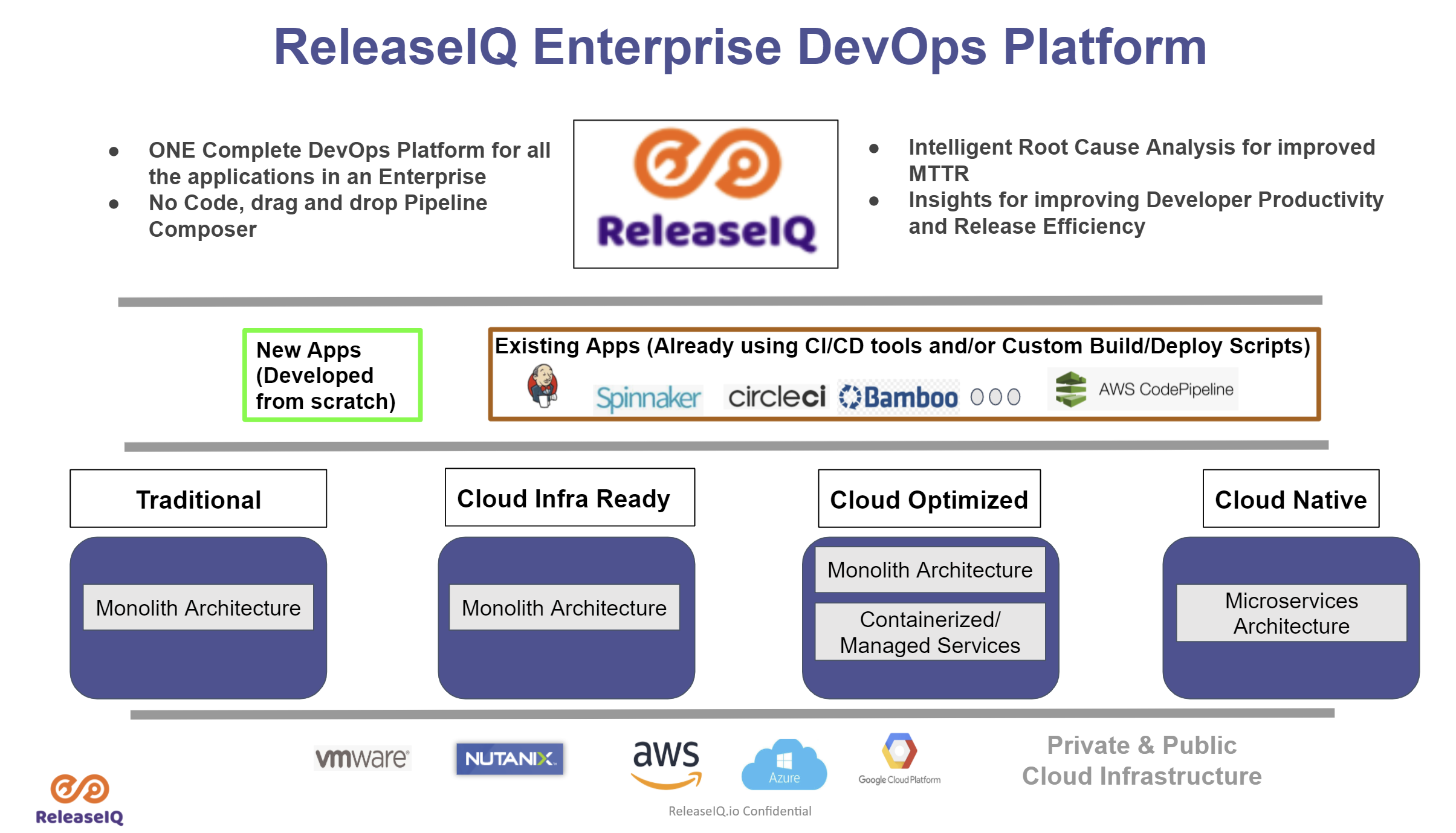
    ReleaseIQ has launched an orchestration framework for the open source continuous integration/continuous delivery (CI/CD) environment that makes it possible for DevOps teams to orchestrate pipelines across multiple instances of Jenkins.

    Seetharam Param, ReleaseIQ CEO, said ReleaseIQ Essentials for Jenkins is an implementation of an existing orchestration platform that enables DevOps teams to orchestrate pipelines across heterogeneous CI/CD platforms.

    The challenge is that organizations that have standardized on Jenkins typically have multiple instances being used by not only different IT operations teams but also owners of, for example, ancillary quality assurance processes. ReleaseIQ Essentials for Jenkins provides an alternative approach to the orchestration tools that CloudBees, the original developer for Jenkins, provides, said Param.

    Jenkins today is being advanced independently of CloudBees as an open source project managed by the Continuous Delivery (CD) Foundation, which is an arm of the Linux Foundation. Founding members of the CD Foundation include CloudBees along with Alauda, Alibaba, Anchore, Armory, Autodesk, Capital One, CircleCI, DeployHub, GitLab, Google, Huawei, JFrog, Netflix, Puppet, Red Hat, SAP and Snyk.

    ReleaseIQ Essentials for Jenkins optimizes execution of jobs and pipelines and also provides DevOps teams with a no-code graphical interface to build pipelines.

    DevOps teams can also import and execute Jenkins pipelines and jobs in addition to being able to pre-merge pipelines.
    Finally, DevOps teams are provided insights based on key metrics the platform automatically tracks on their behalf. Those metrics make it possible to quickly discover and fix pipeline issues across multiple Jenkins instances via console log aggregation, noted Param.

    It’s not clear to what degree DevOps teams that have standardized on Jenkins might swap out one orchestration tool for another. However, Param said more organizations are either wary of becoming locked into a specific CI/CD platform or now find themselves in a position where they need to continue employing multiple CI/CD platforms from different vendors. The ReleaseIQ platform provides a means for orchestrating pipelines regardless of how many different CI/CD platforms are employed, noted Param.

    It’s clear the need to embrace orchestration tools is becoming more pronounced. DevOps teams are spending too much time manually maintaining DevOps pipelines. The need for tools to automate the management of DevOps workflows is becoming critical as the number of application development projects that are simultaneously being launched continues to grow. Arguably one of the reasons that DevOps processes are not as widely embraced as they might be is the level of expertise required today to manage all the pipelines that make up a workflow.

    Of course, the level of DevOps maturity varies greatly by organization. It’s not uncommon for even different teams within the same organizations to have significantly different levels of proficiency. The challenge and the opportunity now is to provide those DevOps teams with tools that operate at a high enough level of abstraction to make DevOps accessible to every IT professional regardless of the level of programming expertise they may or may not have.

  • Perforce Melds Artifact Package Manager with Version Control Platform

    Perforce Melds Artifact Package Manager with Version Control Platform

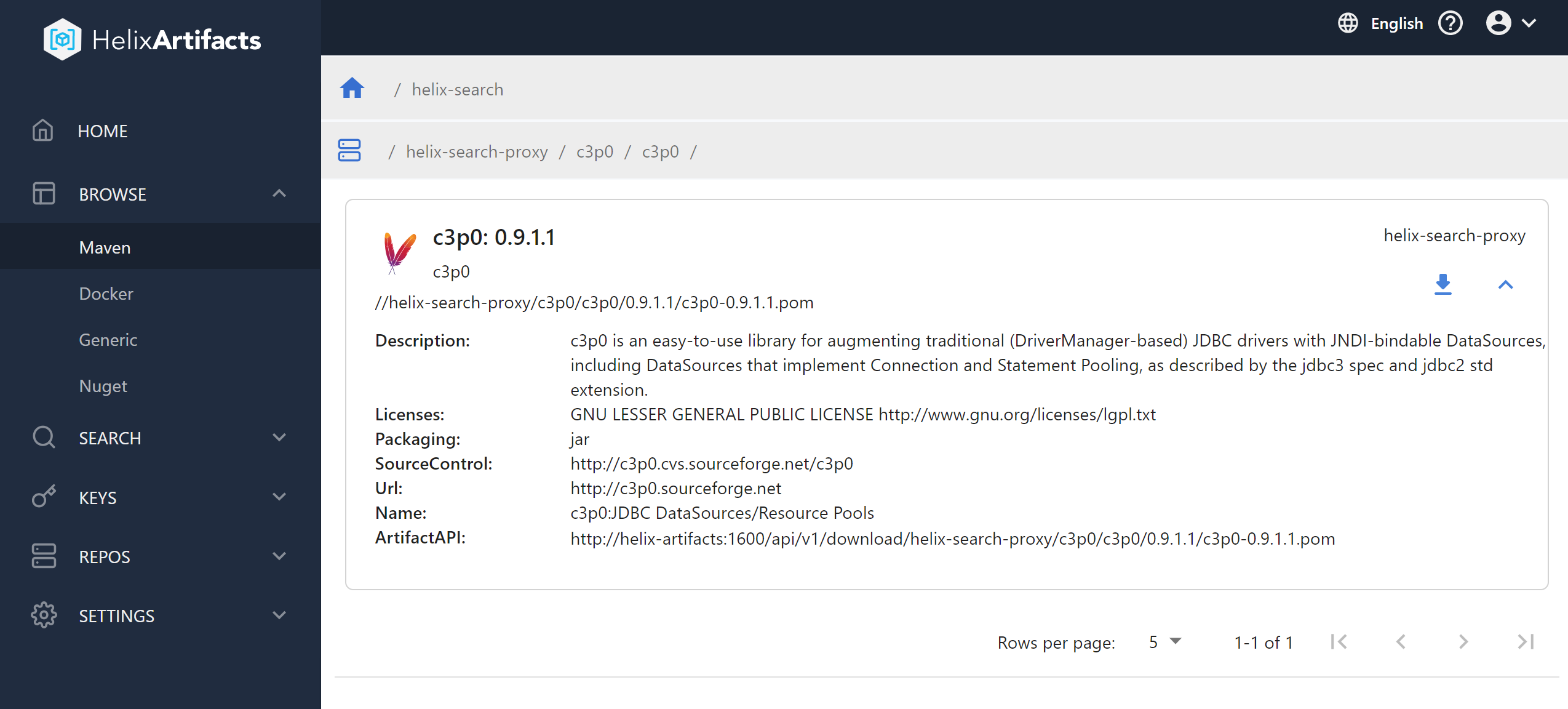
    Perforce Software has added a universal package manager, dubbed Helix Artifacts, to its portfolio that enables users of its Helix Core version control platform to store and track source code.

    Gerhard Krüger, product manager for Helix Core digital asset management at Perforce Software, said the goal is to enable DevOps teams that employ Helix Core to access a package manager without having to exit Helix Core.

    That approach also provides a more secure and cost-effective way to store, consume and distribute artifacts that also serves to improve developer productivity, he added. The ability to manage artifacts on top of a version control platform also means DevOps teams will not need to set up additional storage infrastructure or configure separate security permissions just to distribute software packages, noted Krüger.

    Perforce

    Helix Artifacts is a self-hosted package manager that functions as a translator for packages such as NuGet, Maven or Docker that enables them to communicate directly with Helix Core as well as build systems and integrated developer environments (IDEs). Helix Artifacts is made available via a per-server subscription model that costs substantially less than rival approaches to managing artifacts, Perforce Software claims.

    Most DevOps teams are trying to strike a balance between employing best-of-breed tools to build applications and the need to reduce complexity and, ultimately, cost. As such, any time a tool becomes a feature of another platform that a DevOps team uses, there will be a review of the processes being employed. Many DevOps teams are trying to reduce the amount of time they spent maintaining tool integrations.

    There’s also now a lot more focus on software supply chain security. Each new tool generally creates yet another set of credentials that need to be protected as cybercriminals continue to aggressively attempt to inset malware into applications before they are deployed in a production environment. It’s not clear to what degree DevOps teams are looking to consolidate toolchains, but given those rising security concerns, it’s only a matter of time before security teams start to ask why the DevOps toolchain attack surface is so wide.

    In the meantime, the number of organizations that have widely embraced DevOps best practices across the enterprise continues to steadily grow. Over the past decade, most organizations have had at least one application development team embrace DevOps. However, as the pressure to build software to drive digital business transformation initiatives has steadily increased since the onslaught of the COVID-19 pandemic, the need to apply DevOps best practices to accelerate application development has become more pronounced. As a result, more organizations than ever are looking to standardize their application development efforts on a smaller number of platforms to reduce friction.

    It’s too early to say whether the rate at which applications are being developed and deployed since the start of the pandemic has actually increased. The one thing that is certain, however, is the bulk of organizations are now trying to accelerate like never before.

  • Why an Embedded Analytics Maturity Framework is Essential

    Why an Embedded Analytics Maturity Framework is Essential

    Contextual analytics, or embedding analytics directly into a business application’s transactional environment and core workflows, is the most sophisticated stage of business intelligence (BI) currently available to organizations today. It is one level ahead of the traditional integration of analytics, which is a standalone capability presented as a separate dashboard or reporting module.

    Today, there is an increasing shift among organizations toward embedding transactional analytics into their enterprise applications. Because contextual analytics is the most advanced option in the market, there is also an increasing need for assessing our analytics readiness first.

    The fundamental difference of contextual analytics lies in how it offers analytics to the user to explore data or derive insight within their transactional environment rather than accessed as an external tool. This approach requires a deeper evaluation of the product’s analytical maturity level using a formal framework. Having such a framework can act as a deployment guide for your developers for every stage of embedded BI implementation, including contextual analytics.

    But first, what makes contextual analytics so different that it necessitates a readiness evaluation?

    Contextual Analytics Vs. Embedded Analytics

    With contextual analytics, dashboards, reports and charts are no longer separated but are part of the main user experience. This integral change necessitates a closer look at your data and integration capabilities to align what it brings with all aspects of your software, including existing analytics.

    Embedding these elements directly into core software workflows isn’t a replacement for any existing analytics, but is instead another big step toward making data and analytics a more seamless part of your end users’ everyday work.

    It should be stressed that contextual analytics accommodates various levels of implementation and business requirements. Analytics can be embedded lightly, such as in the form of basic in-line charts and graphs users can see as they explore your software, or embedded deeper to offer AI-assisted insights and real-time alerts that trigger action from users while they work. It can be integrated with an experienced BI vendor partner or in-house if you possess the skill set internally.

    Avoidable Pitfalls of an Improvised Approach

    The need to assess your application’s analytical maturity and readiness for embedding analytics directly into the transactional workflow comes down to avoiding unnecessary BI roadblocks. 

    For many organizations, BI and analytical capabilities are traditionally lower in priority than other aspects of the software. Intending to add BI features later is well-meaning and understandable, but leaving developers to add in features intermittently and leaving it to your users to demand them when needed creates an issue of visibility. Vendors typically lose sight of what their application currently is capable of analytically, or what development needs to make the addition of a new feature not only technically achievable but worth the time and cost investment.

    If you take the time to reassess your application’s analytical capability, your developers and leaders can better understand that your product could be at an earlier stage of readiness than previously believed, and prepare accordingly before seeking out a contextual or other BI solution.

    For example, approaching contextual analytics ad-hoc could mean you find an unexpected older dashboard module, a cost that could have been accounted for in a formal maturity assessment. 

    What it comes down to is this: Implementing a basic dashboard module or data export feature, completely separate product features, is fundamentally different from fully embedded analytics in your users’ core workflow experience. Pursuing a formal evaluation to guide the introduction of contextual analytics—or even a form of embedded analytics at an earlier stage—means your users and product receive the best type of analytical capability your business is ready for today.

    The Five Stages of Embedded Analytics Maturity

    Based on our experience, there are five possible stages of product development, as illustrated in the embedded analytics maturity curve below. As contextual analytics is the final, most advanced stage of an embedded analytics integration available to product owners, the need for a formal assessment of maturity is most important, should it be the target state.

    Accelerating the implementation of contextual analytics comes down to your skillset, which will allow you to identify and evaluate your state of readiness accurately and determine a BI solution’s flexibility. If you do not have the internal expertise, implementing contextual analytics is easier with the help of specialized BI vendors that can help you in your assessment, and offer a contextual analytics platform built around openness. We recommend you look for vendors and partners that allow for:

    • Advanced APIs that lower total integration time and ensure the need to rearchitect the software is minimal to zero.
    • Customized experiences to make your desired contextual linkages, such as showing a user a relevant embedded chart when they click on a table of a client, possible.
    • An open platform that allows for options for on-premises, cloud, multiple operating systems that guarantee long-term security, scalability and flexibility with your analytics.
    • Rapid adaptation to your product development roadmaps with automated processes and administrative tools to lower total cost of ownership
    • White-labelling to make the rebranding and blending of the analytical solution and your native application components seamless.

    Ultimately, having an awareness of your product’s readiness and taking the time to examine your application’s current state means you avoid costly integration mistakes, save time and ensure developers implement the best solution according to your exact needs now.

  • Sumo Logic Extends Observability Scope and Reach

    Sumo Logic Extends Observability Scope and Reach

    During the online Illuminate user conference, Sumo Logic revealed how it is integrating capabilities it gained with the June 2021 acquisition of Sensu, a provider of open source monitoring tools, with its continuous intelligence platform in addition to adding support for data collected via open source OpenTelemetry software.

    Sensu Go, a set of tools for implementing monitoring-as-code, is now a core part of the Continuous Intelligence Platform. The company is also now making available in beta Sumo Logic OpenTelemetry Distro and Ecosystem Support, a single agent through which all logs, metrics and traces can be collected from instrumented applications. Sumo Logic is also supports the AWS OpenTelemetry Distro, an offering from AWS that provides similar capabilities. Sumo Logic has also increased the capabilities of Sumo Logic Free to include monitoring-as-code tools created Sensu.

    Bruno Kurtic, vice president of product and strategy, said as responsibility for managing applications shifts left toward developers it’s critical to provide observability capabilities that can be programmatically infused into applications. As part of that effort, Sumo Logic is now also offering Sensu Plus, which provides access to an analytics engine for the data the platform collects.

    Sumo Logic is also adding machine learning algorithms to provide more context to the alerts the platform generated via an Alert Response feature that is part of the core platform.

    The company is also adding support for the operator software that Red Hat created to make it simple to deploy Sumo Logic Continuous Intelligence Platform alongside the Red Hat OpenShift platform for building and deploying applications on top of Kubernetes clusters. In addition, Sumo Logic is also providing integration with a total of 38 either new or updated observability applications that integrate with a wide range of third-party platforms.

    Finally, Sumo Logic is extending the security observability platform it provides based on its platform to add support for containers and serverless computing functions alongside virtual machines and integrations with third-party endpoint detection and response (EDR), network detection and response (NDR), threat intelligence and managed detection and response (MDR) platforms. The company has also added or updated 26 applications for specific third-party platforms.

    Kurtic said Sumo Logic makes it possible for developers and IT operations teams alike to observe an IT environment on an end-to-end basis via a single pane of glass. In some cases, the members of an IT operations team will require a user interface to manage that environment. Developers, meanwhile, might prefer an application programming interface (API) through which observability data is made accessible from within a continuous integration/continuous delivery (CI/CD) platform.

    Regardless of the type of user, however, IT teams should not have to hire their own data science team to analyze observability data. Instead, the observability platform should embed machine learning algorithms that surface all the benefits of data science without the need to hire additional headcount, he said.

    One way or another, DevOps teams will soon routinely benefit from the additional levels of context that observability platforms provide. The challenge will then be determining how best to fix a raft of issues that many DevOps teams today simply didn’t know existed.

  • Harnessing the Value of Log Data Analytics

    Harnessing the Value of Log Data Analytics

    Each day, the average enterprise’s cloud applications, containers, compute nodes and other components throw off millions of tiny logs. Each log is a file whose data describes an event such as a user action, service request, application task or compute error. Logs also capture messages that applications and other components send to one another.

    There’s a wealth of information and value hidden in those logs, which is why businesses are so keen on using them to address business needs like customer engagement, IT security and cloud operations. 

    The need for understanding and managing this data is so high that Markets and Markets valued the market for log analytics data at $1.9 billion in 2020. Analysts predict this to grow to $3.7 billion by 2025. It’s not just the sheer growth of data driving this market—it’s also the demand to gain business insights. 

    That’s why ChaosSearch recently conducted a survey to better understand how businesses are currently using and managing their log data. Insights were collected from practitioners at 50 medium-to-large enterprise organizations. What the survey found is that organizations see a lot of value from tapping into their log data to achieve better outcomes across both business and IT functions. That said, these practitioners face challenges handling the scale requirements and they know there are still more opportunities for them to expand the scope and discipline for log management.

    Top Use Cases

    This study confirmed that businesses are using log data in a number of ways, spanning both business and IT functions. We see that more than 90% of respondents are using log management and analytics for at least two primary use cases. It’s not surprising that the top use cases for log management are security (70%) and IT monitoring (68%), but many are prioritizing BI & analytics (46%) and business operations (28%) as well.  


    It’s interesting to look more closely at the security use cases: Investigations (45%) and insider threats (45%) top the list of SecOps uses for log data. Audits and compliance (32%), threat hunting (32%) and anomaly detection (30%) also made the list. 

    Growing Desire to Support Business Operations

    We also saw that these practitioners want to use log data to support business operations—specifically to drive better business outcomes and improve competitiveness. For example:

    1. A global industrial equipment manufacturer attached IoT devices to farm equipment to track weather, temperature, humidity, time of day, depth of planting, soil conditions, seeds planted and geo-routing on farms. This raw data is continually collected and analyzed within the central log analytics solution, thereby allowing the vendor to deliver farm productivity reporting and recommendations back to their clients.
    2. A biopharmaceutical firm tracks cell culture logs with alerts on temperature and humidity. The company uses its log analytics platform to store long-term data to run queries that help in hypothesis testing. They also conduct various long-tail analyses that reveal trends and allow scientists to make informed decisions about future experiments. 
    3. A large online retailer leverages log data from web visits and other customer activities to develop 360-degree profiles of customers and analyze the steps in the “customer journey” to identify opportunities for improved efficiency and increased revenue capture.

    Tackling Challenges of Growth and Complexity

    Even with more interest in using log data for security and business operations, the surveyed practitioners called out a range of challenges. The top three being: Complex infrastructure (48%), managing costs (42%) and managing growth (34%). They also said the lack of centralization, reporting and data quality were problems. These challenges are perhaps exacerbated by the expectation that data will continue to grow and data retention will increase. 


    There are a lot of variables that drive the volume of log data generation, like the number of users, devices, applications, IT environments and infrastructure elements. The survey found two things were universal—data growth rates are high and are a source of pain and data retention is an increasing priority. 

    Among the participants, 94% ingest at least one TB or more of data per day, with 18% in the 10TB + range. Consider this—the average daily ingest volume for these companies was 7.9 TB! 

    The problem is, despite the massive amounts of data being ingested daily, only 28% of respondents are capturing 80% of log data or more today. And 78% believe that capturing more than 80% of log data is ideal. That’s a big gap. 

    Practitioners Rate Most Important Log Management Capabilities

    We also learned that these practitioners are generally satisfied with their existing solutions, but many of them still expect to bring in a new solution for log management and analytics within the next three years. That’s because they want better scale and a cloud-native solution. 

    When we asked about important capabilities for a log management platform, scalability (58%), resilience (54%) and advanced analytics (52%) topped the list. 


    Budgets Increase to Meet Demand for Log Analytics

    To address these challenges and opportunities before them, survey respondents are growing their budgets; 86% anticipate their budgets will grow by at least 20% and 36% expect an increase of 50% or more. These budgets will not only support more data capture and increase retention periods but also help them go after the growing use cases for supporting the business. In fact, 68% said they expect the number of use cases to grow in the next 12 months.

    There is no doubt: Companies who value log data and invest in capturing data will harness insights that will propel their businesses forward.

  • DataOps: How to Turn Data into Actionable Insights

    DataOps: How to Turn Data into Actionable Insights

    Enterprises‌ ‌have‌ ‌struggled‌ ‌to‌ ‌collaborate‌ ‌well ‌around‌ ‌their‌ ‌data, which can impact everything from digital transformation to advanced concepts like AI and ML.‌ ‌DataOps is not without challenges; building, managing and scaling data pipelines requires careful thought around reusability, portability across infrastructure and applications and long-term maintenance and governance. And these are just a few of the issues facing enterprises. For this reason, DataOps technology stacks need to focus on providing key capabilities include data extraction, integration, transformation and analysis.

    The Importance of DataOps

    The enterprise is undergoing a seismic shift from siloed application development and data repositories to more composable and reusable architectures. Additionally, there is a growing demand for speed and agility as well as the influx of disruptive technologies such as the cloud, IoT and AI. Organizations that want to win big must act and adapt quickly to deploy and scale new software and solutions that provide customers with a superior experience and satisfy their rapidly evolving needs. To do that, they also must be able to rapidly aggregate, integrate and analyze data sources.

    Even with this need for speed, the tools and processes for the creation and processing of data are not standardized‌ in‌ a way that promotes rapid innovation‌ and ultimately helps organizations transform. DataOps is critical to address the challenges involved in acquiring, storing and governing data. In addition, companies are dealing with increasing complexity in their IT environments. In a recent survey, more than 80% of enterprises have a hybrid cloud or multi-cloud strategy. In order to have cost-effective and secure management of increasingly large amounts of data, enterprises must adopt DataOps.

    Managing Data Growth

    DataOps has been around for about a decade, but has recently gained momentum because of the overwhelming challenges companies face today in dealing with large, complex sets of data that are being generated at increasingly faster rates. With new technologies like the internet of things (IoT), cloud computing and the power of big data now integrated into everyday use, companies are generating at least 50 times more data than they were just five years ago. And with more data comes a need for greater efficiency and higher demand for data experts.

    DataOps potential impact on businesses might lead you to think of it as a radical new methodology. But many companies have already been using similar practices to deal with some aspects of data management, particularly around data warehousing and analytics. And just like DevOps, DataOps isn’t a product, but rather a cultural shift supported by many products—many existing products. So it’s important for businesses looking to adopt DataOps to consider what they already have, such as enterprise data warehouses and ETL tools, and what they may need to acquire, replace or modernize. In the end, companies will end up with several systems to support the data pipeline.

    DataOps and Big Data Challenges

    Most enterprises have invested in significant data infrastructure to extract, load and store their data to take advantage of Big Data analytics and technologies. However, these infrastructures are often layered, hard to manage and full of legacy tools that hinder the transfer and integration of data. Additionally, organizations have invested significant resources in tools such as data warehousing and data marts. These data warehouses have been used to model data but have been typically implemented with a predefined data model. A business intelligence (BI) system, an enterprise data warehouse or any other set of tools might assist in the execution of a data transformation job.

    The technological revolution is creating unprecedented opportunities to make things happen with data. By analyzing the data that powers modern business, we are able to provide value in every dimension of our organizations. As is the case with every transformation, the benefits of building an integrated, self-service analytics environment will be realized by users rather than IT. Leveraging the power of data science, business leaders can achieve operational excellence and compete effectively against the growing waves of competitors. For the data science and analytics staff to be successful, they must be exposed to all of the necessary technology and processes to support effective use of data.