Category: DevOps Toolbox

  • Orgs Shift Toward Centralizing Automation Initiatives

    Orgs Shift Toward Centralizing Automation Initiatives

    A survey published today found that 75% of respondents recognized that automation silos hamper their ability to unify cloud operations across functions.

    Conducted by CloudBolt Software, the survey polled 350 senior IT and DevOps leaders at organizations with more than 3,000 employees. On a positive note, the survey found 57% of respondents were starting to pursue a more centralized approach to automation, with a total of 88% acknowledging that having all previous and new automation centralized for the entire organization would ensure compliance, bolster security, enable business continuity, encourage reuse and reduce risk.

    Rather than taking a more holistic approach, well over half of respondents (57%) reported automation efforts are limited to specific silos. On average, organizations are employing 27 different automation tools their organizations have deployed, using one or a few as they see fit, with little to no consistency across teams. More than half (55%) of respondents said they have four or more separate automation teams, with 95% noting that each of those teams operates in their own silo.

    CloudBolt CTO Rick Kilcoyne said that lack of continuity clearly creates inefficiencies and redundancies that conspire to raise the total cost of IT. The challenge is that each team tends to favor one approach to automating a silo with little to no regard for a larger overall strategy to create an automation standard, he said.

    That approach also creates issues whenever a member of one of those teams leaves an organization, he noted. In fact, the survey found 77% of respondents reported that continuity is at risk any time a vital member of the team leaves.

    CloudBolt has been making a case for a federated automation platform that can be invoked either via application programming interfaces (APIs) or a graphical user interface (GUI) that provides access to low-code tools. The goal is to make the platform equally accessible to DevOps teams or IT administrators that tend to lack programming skills, and do so in a way that doesn’t require individual teams to replace their automation platform of choice. Instead, each of the automation platforms can be programmatically invoked via a central framework, said Kilcoyne. That approach eliminates any political debate over the potential need to replace one team’s favored automation platform with another, noted Kilcoyne.

    Regardless of who is accessing the platform, most organizations would be well-advised to develop a center of excellence for automation, he added.

    DevOps teams have always been committed to ruthlessly automating as many IT processes as possible, but in many cases, that has resulted in a plethora of automation tools being employed. In effect, automation may have become too much of a good thing. One approach to regaining control over those platforms is to create a platform engineering team that centralizes the management of DevOps workflows.

    Regardless of approach, Kilcoyne said the most important thing for any team to do before automating an IT workflow is to first understand how to manually set it up. Too many IT teams are trying to apply automation to processes they don’t really understand with mixed results, he added.

    The one thing that is certain, especially with the rise of artificial intelligence (AI), is the management of IT is going to become more automated.

  • CodeSee Extends Reach of Code Visualization Platform

    CodeSee Extends Reach of Code Visualization Platform

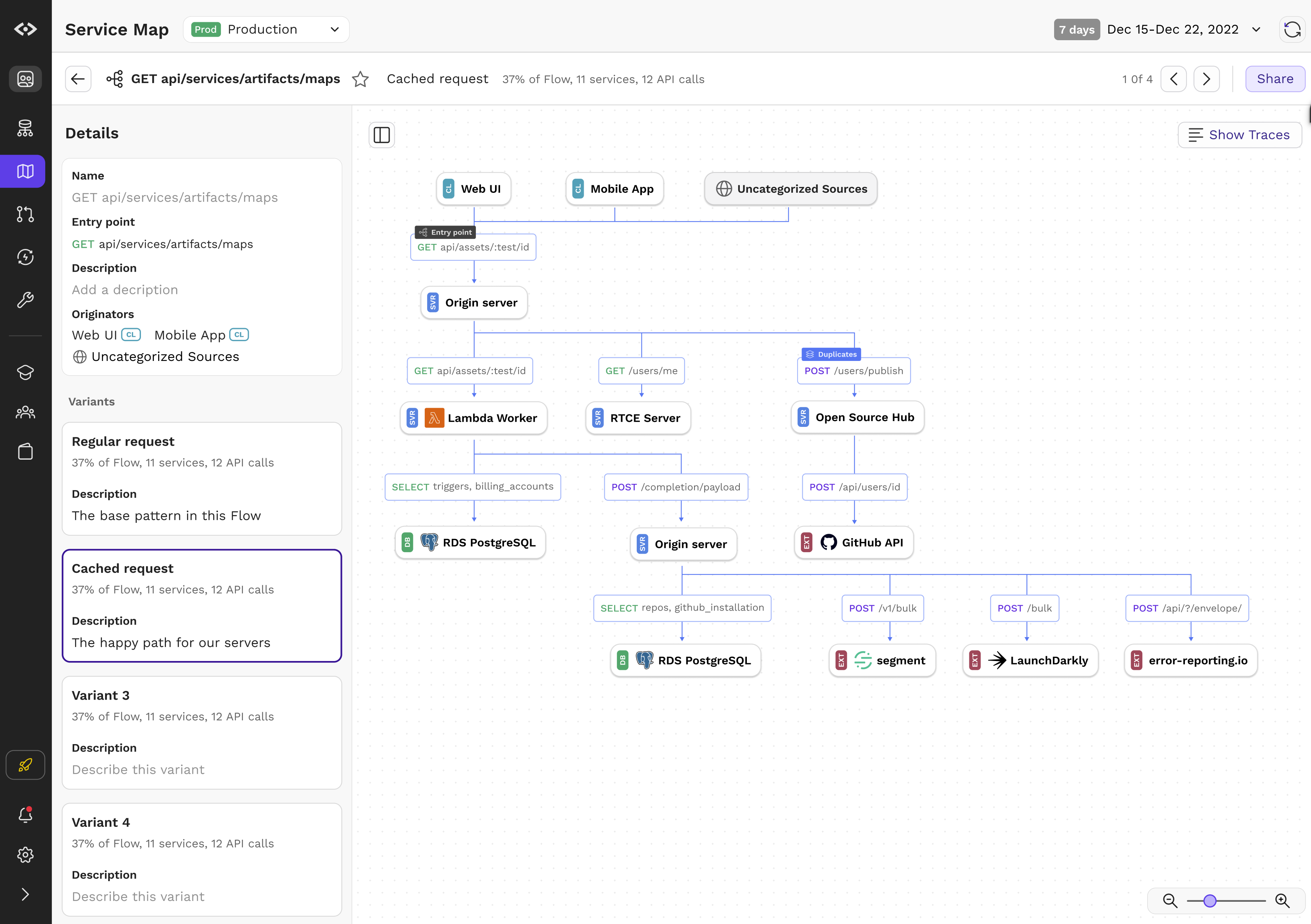
    CodeSee updated its code visibility platform to enable instant mapping of application services, directories, file dependencies and code changes.

    CodeSee CEO Shanea Leven said CodeSee Enterprise 2.0 should extend the appeal of the platform beyond developers to include software engineers managing DevOps workflows.

    CodeSee Enterprise 2.0 provides real-time visibility across multiple repositories regardless of whether the application is a monolith or based on a microservices architecture, she noted.

    In addition, a Code Automations module enables developers to set granular conditions and actions down to the function level, requiring checklists to be complete before allowing developers to move on.

    CodeSee Maps now includes the ability to click to view code directly, while a streamlined Review Maps module has decreased code review time by 30%. Developers can easily share maps to discuss proposed changes or keep necessary code changes as automatic permanent artifacts.

    Additional languages including C#, VB.NET, ASP.NET, Blazor, Java, JavaScript, Go, Python and TypeScript are now supported.

    Finally, CodeSee is making available a dedicated solutions engineering team that provides guidance to connect an organization’s Datadog or OpenTelemetry trace data to CodeSee in less than an hour without storing code or having to first dive deep into traces, noted Leven.

    The core open source CodeSee tool was created because it takes too long today for most developers to pore over a codebase to understand where they might contribute. The larger a codebase becomes, the longer it takes for a developer or software engineer to be onboarded to a new project.

    The overall goal is to improve developer productivity, noted Leven. That’s become a critical issue because many organizations are hesitant to hire additional developers during uncertain economic times; they first want to ensure they maximize the utilization of the teams they already have.

    Application development, of course, is now a team sport. The days when a lone developer cared for an entire application are long over. The issue is finding a way for teams of developers to collaborate more easily in an era where many of them may never have met in person.

    In the longer term, Leven said she also expects that generative artificial intelligence (AI) platforms such as ChatGPT will supplement code visualization tools. Many developers are already starting to use these tools to help generate code faster. That code should, in theory, have fewer errors because it has essentially been copied from other previously validated sources. CodeSee provides a means to visualize that code before deploying it to ensure it will function as promised in increasingly complex application environments.

    One way or another, the tools being provided to developers to boost productivity are advancing. It’s not clear what metrics should be employed to track developer productivity, but the amount of code simultaneously moving through DevOps workflows is going to increase. The challenge DevOps teams face now is keeping track of all the dependencies that exist in that code as application environments are continuously updated.

  • The Benefits of a Streaming Database

    The Benefits of a Streaming Database

    Streaming databases offer an innovative approach to data processing that combines the familiarity of traditional models with a powerful data transformation engine. This hybrid system provides DevOps and DataOps teams with extremely fast results for complex SQL queries, aggregations and transformations that are impossible or take hours to process in the traditional batch computation model.

    By pre-specifying query results upfront (in materialized views) and then incrementally updating them as new data comes in, streaming databases offer a valuable alternative to traditional databases that require complex ETL pipelines or overnight batch processing.

    As the demand for faster results continues to rise, streaming databases are emerging as a fundamental new building block for data-driven organizations.

    streaming database

    History

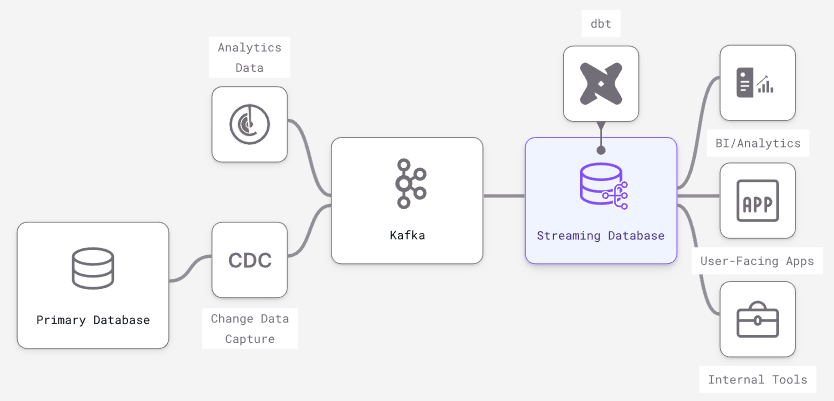
    Streaming database concepts originated in capital markets, where fast computation over continuous data is highly valued. The first products were basic event processing frameworks that addressed specific needs within hedge funds and trading desks. However, their creators quickly recognized that SQL works as the declarative language for streaming data just as well as it does for traditional static databases.

    Today, modern streaming databases are most often used downstream of primary transactional databases and/or message brokers, similar to how a Redis cache or a data warehouse might be used.

    Trade-Offs

    Experienced engineers understand that no software stack or tooling is perfect and comes with a series of trade-offs for each specific use case. With that in mind, let’s examine the particular trade-offs inherent to streaming databases to understand better the use cases they align best with.

    Unique Features

    • Incrementally updated materialized views – Streaming databases build on different dataflow paradigms that shift limitations elsewhere and efficiently handle incremental view maintenance on a broader SQL vocabulary. Other databases like Oracle, SQLServer and Redshift have varying levels of support for incrementally updating a materialized view. They could expand support, but will hit walls on fundamental issues of consistency and throughput.
    • True streaming inputs – Because they are built on stream processors, streaming databases are optimized to individually process continuous streams of input data (e.g., messages from Kafka). Scaling streaming inputs involves batching them into larger transactions, slowing down data and losing granularity. In traditional databases (especially OLAP data warehouses), larger, less frequent batch updates are more performant.
    • Streaming outputs on queries – Many databases have some form of streaming output (e.g., the Postgres WAL), but what’s missing is output streams involving any kind of data transformation. Streaming databases allow for streaming output of complex joins, aggregations and computations expressed in SQL.
    • Subscribe to changes in a query – As a side effect of streaming outputs, streaming databases can efficiently support subscriptions to complex queries: Updates can be pushed to connected clients instead of forcing inefficient polling. This is a key building block for pure event-driven architectures.

    Missing Features

    • Columnar optimization – OLAP databases have advanced optimization techniques to speed up batch computation across millions of rows of data. Streaming databases have no equivalent because the focus is on fast incremental updates to results prompted by a change to a single row.
    • Non-deterministic SQL functions – Non-deterministic functions like “RANDOM()” are common and straightforward in traditional databases. But imagine running a non-deterministic function continuously, resulting in chaotic noise. Therefore, streaming databases don’t support non-deterministic SQL functions like “RANDOM().”

    Performance Gained

    • Minimized time from input update to output update – The time between when data first arrives in the streaming database (input) and when changes to results reflect the change (output) is sub-second. Additionally, it keeps up as the dataset scales because results are incrementally updated.
    • Repeated read query response times – When a query or query pattern is known and pre-computed as a persistent transformation, reads are fast because they require no computation: You’re just doing key-value lookups in memory, similar to a cache like Redis.
    • Aggregations – The resources needed to handle persistent transformations are often proportionate to the number of rows in the output, not the scale of the input. This can lead to dramatic improvements in performance in aggregations in a streaming DB versus a traditional DB.

    Performance Sacrifices

    • Ad-hoc query response times – While running ad-hoc queries in a streaming database is possible, response times will be much slower because the computation plan is optimized for continuously maintaining results, not answering point-in-time results.
    • Window functions – A window function performs calculations across table rows that are related to the current row. They are less performant in streaming databases because updating a single input row requires updating every output row. Consider a “RANK()” window function that ranks output by a computation. A single update can force an update to every row in the output.

    Factors Impacting Scalability

    • Throughput of changes – The changes or updates to input data are what triggers work in the system, so changing data will often require more CPU than data that changes rarely.
    • Cardinality of the dataset – The total number of unique keys will slow down read queries in traditional databases. In streaming databases, high cardinality increases the initial “cold-start” time when a persistent SQL transformation is first created and requires more memory on an ongoing basis.
    • Complexity of transformations – Unlike the on-request model in a traditional DB, SQL transformations are always running in a streaming database in scale in two ways:
      • Memory required to maintain intermediate state – Imagine how you would incrementally maintain a join between two datasets: You never know what new keys will appear on each side, so you must keep the entirety of each dataset in memory. This means that joins over large datasets can take a significant amount of memory.
      • Quantity and complexity of transformations – When a single change in inputs needs to trigger a change in outputs in many views, or when many layers of views depend on each other, more CPU is required for each update.

    Use Cases

    Like any software primitive, there are many use cases. Here are some categories of products and services particularly well-suited to streaming databases:

    • Real-time analytics – Use the same ANSI SQL from data warehouses to build real-time views that serve internal and customer-facing dashboards, APIs and apps.
    • Automation and alerting – Build user-facing notifications, fraud and risk models, and automated services using event-driven SQL primitives in a streaming database.
    • Segmentation and personalization – Build engaging experiences with customer data aggregations that are always up-to-date: personalization, recommendations, dynamic pricing and more.
    • Machine learning in production – Power online feature stores with continually updated data, monitor and react to changes in ML effectiveness – all in standard SQL.

    Conclusion

    Streaming databases offer a powerful yet accessible way for data and software teams to leverage stream processing capabilities. By using familiar SQL DB concepts and a stream processor to compute SQL transformations, data and software teams can focus on shipping complex data-driven products quickly, with improved performance and scalability. With a streaming database, organizations have the power to transform data in real-time and build the applications of tomorrow.

  • npm is Scam-Spam Cesspool ¦ Google in Microsoft Antitrust Thrust

    npm is Scam-Spam Cesspool ¦ Google in Microsoft Antitrust Thrust

    Welcome to The Long View—where we peruse the news of the week and strip it to the essentials. Let’s work out what really matters.

    This week: The npm registry suffers spam infestation, and Microsoft makes Google sad. (more…)

  • Salesforce Spring 2023 Release: Out With the Old, A Lot of the New

    Salesforce Spring 2023 Release: Out With the Old, A Lot of the New

    Salesforce is the connector and enabler of so many critical business functions. But that doesn’t mean it doesn’t come with its headaches. The environment is so complex that it really takes a conscious, focused effort to properly leverage all that Salesforce has to offer, as well as stay up-to-speed on everything that’s new and evolving.

    The Salesforce spring ‘23 release brought a lot of change. Some old tools disappeared and new products, dashboards and automation tools were introduced that admins will have to adapt to. There’s a lot to catch up on.

    Combing through the 600+ pages of release notes, there are three main themes represented in the spring release that will be useful to the entire organization, from DevOps and RevOps to sales and marketing teams, including: 1) new admin and developer tools and dashboards, 2) doubling down on low-code/no-code with enhancement to Flow and 3) commitment to security and permissions best practices.

    Admin and Developer Updates

    From an administrator’s and developer’s perspective, there are some exciting new features that will undoubtedly improve DevOps’ day-to-day. For instance:

    • Flows – allows you to migrate your old automations.
      • Connect to external data source (beta)
      • Support for lookup fields
      • Reactive screens (reduce the number of “Next” clicks)
      • Removal of “Iteration Limit Exceeded” governor limits
      • Element descriptions are now visible on the canvas
      • Migrate to Flow from Process Builder

    • DevOps Center – Still in V1, but it provides developers with a new interface.
      • Getting on the software development life cycle bandwagon so we can all say goodbye to change sets – finally!
    • Dashboards – Now you can insert text and graphics around charts.
      • Collections – organize reports and dashboard into logical collections that are free from their folder hierarchy. While they will still “live” in their folders, they can be accessed from a collection as well.
      • Add image and text components in your Dashboard to make better experiences with additional information, descriptions, instructions or whatever you want.

    These updates are not only useful for DevOps but, from an executive viewpoint, are extremely useful to showcase the business’s data with a clearer perspective. In other words, the new dashboards have more options to provide additional context and insight. In general, the user interface is not only more organized but can be navigated at a significantly faster rate than before.

    Doubling Down on Flow

    As the old adage goes, “Out with the old, in with the new;” Salesforce will be retiring the automation tools Workflows and Process Builders and converting them to Flow. The reason Salesforce is making this move—and ultimately forcing users to Flow—is because Workflows and Process Builders don’t have the flexibility or functionality that Flow does. Flow can create automation and provide great screen experiences that derive a far greater bandwidth of context and situational logic. The additions made to this much-anticipated migration tool will help administrators convert their current automation into Flow with less stress and hassle than rebuilding them all from scratch.

    So what is the timeline for this migration? Salesforce plans on blocking the ability to create new Process Builders in the Summer ‘23 release but has admitted that it’s not a hard date and will look at the success of customers’ migrations to Flow and feedback from the community. They have not yet announced a date for complete retirement but expect it to come sometime in 2025. That said, users should start doing this now. With any major change to your Salesforce environment, a plan is always recommended, especially with such a huge migration like this one. Given the amount of data and processes most organizations already have in place, we suggest taking time to strategize and test your migration prior to releasing it directly to Flow to make sure your order of operations for your automation is clear and follows best practices. Analyze your business processes and confirm with your users that these processes are still accurate.

    Commitment to Security

    As organizations lean more on Salesforce as their primary business operating system, Salesforce is becoming a critical piece of infrastructure rather than just software that businesses consume. It is also the “build-and-develop” nature of Salesforce that has more companies treating Salesforce as software they build rather than just software they use. The ripple effect is that as companies build within Salesforce, more developers are responsible for deploying and managing data. With that comes the responsibility for security and compliance.

    This has traditionally been handled as an administrative task, but now, Salesforce has created the tools for true enterprise infrastructure security and data management with permission sets and permission set groups. Even though permission sets have been around a while, the introduction of permission set groups and the growing need to transition permissions into more complex structures have changed the way permission sets are being consumed. Permission sets were previously used for basic exceptions to the permissions provided by profiles, but now they are front and center, providing even more organizational capability with Permission Set Groups (and their muting capability, but that’s a different story).

    Salesforce has taken note and announced the partial end of permissions within profiles as they lean into the new, better way to manage permissions. Profiles won’t be gone entirely, as they will still be needed for basic defaults, i.e., defining users’ default app selections. However, while Permission Sets will still have the responsibility for what apps you have access to, it will be the Profile that states which one is your default. This is also true for other types of assignments where there needs to be a single source of truth, like page layout assignments.

    Salesforce said they will be enforcing this plan in 2026 but are beginning to make sure everyone gets on board now by releasing great new tools to make this transition smoother, including user access policies and access to Permission Sets when adding new fields (currently only available for profiles). For large organizations, three years is just around the corner when it means implementing major overhauls in technology and philosophy to the business. While some are heading to building Permission Sets based on each object, I’d recommend basing them on features or functional areas to have the most control and the clearest overview of your new vast area of Permission Sets.

    Next Salesforce Release

    Overall, the spring ‘23 release was jam-packed with content to boost productivity, strengthen security, enhance the user experience and improve the overall business functionality. There are two Salesforce releases still to come in 2023, and I’ll be dissecting them both to highlight the most critical changes that can help you better your business. I’m looking forward to seeing what the summer ‘23 release has in store – any predictions on what Salesforce will come up with next? I’ve got a few guesses…

  • A Seven Point Checklist for Getting SAST Right

    A Seven Point Checklist for Getting SAST Right

    With so many physical products—from automobiles to airplanes and medical devices to industrial control systems—now being driven by software, product security has become a top-level concern for manufacturers. Software flaws can not only affect security by introducing vulnerabilities that can be exploited by attackers but also impact safety by compromising a product’s functional operation.

    In addition, product security has significant financial implications. For example, fixing a vulnerability in development costs 10 times less than in testing and 100 times less than fixing it in production. This explains why static application security testing (SAST) has become a cornerstone of product security and the engine for implementing code analysis at the earliest stages of development, commonly known as shift left security.

    Unlike other forms of application security testing (AST), SAST scans 100% of the code, including configuration files, not just the code that is executed at runtime. SAST can also provide additional benefits, such as quality and architectural testing. Software quality and security are inextricably linked since poorly written software typically is insecure software.

    With the stakes so high, getting SAST right is the tipping point for any product security program. To evaluate SAST tools, consider the following checklist to make sure they align with your business requirements:

    1. Deep Language Support: C/C++, Java, C#, etc.

    Languages are often selected based on the programmatic requirements of the software producer, the needs of the consumer and the hardware associated with the product. For example, developing software for safety-critical applications like aerospace requires different capabilities than languages used to build web applications.

    2. Compiler and Embedded OS Platform Compatibility

    Compilers used for embedded software development implement unique flags for configuration, such as performance optimizations, code size, error checking and the diagnostic information emitted. Since embedded OS platforms typically include compiler and debugging tools plus the various OS files and configuration options, make sure the SAST tool can integrate with the development environment used.

    3. Actionable Alerts

    For the DevOps team to embrace security, embedding security in the software factory life cycle cannot slow down development velocity or hinder developers’ ability to meet software release timelines. False positives redirect developer attention away from writing software to investigating potential defects. Too many false positives result in developers losing faith in true positives and paying less attention to security alerts of real substance.

    4. Built-In DevOps Integration

    The software development life cycle employs an extensive toolset that provides automation to help developers get products to the production stage faster—not unlike a manufacturing plant or factory. Make sure the SAST tool supports and integrates with distinct tool categories including collaboration and management, source control and repositories, IDEs, compilers, orchestration and automation and business intelligence.

    5. Flexible Deployment

    Depending on the organization and industry, SAST may need to support a variety of deployment options, including on-premises, cloud, hybrid, etc. For example, air-gapped deployments are often required in security-sensitive environments where the data protection uncertainty associated with multitenant public clouds is unacceptable. Meanwhile, cloud-based SAST can provide benefits like scalability and elasticity and reduce infrastructure capital investments.

    6. Developer-friendly UI

    Shift left security is accomplished by integrating security warnings into the integrated development environment (IDE) used by engineers. A SAST tool that works within existing IDEs can reduce the number of errors presented to testers, which subsequently reduces the volume of kickbacks to engineering and leads to faster time-to-market.

    7. Standards

    Many organizations use—and some must comply with—standards for software coding best practices such as SEI CERT, MISRA, etc., which provide a framework for improving the safety, reliability and security of software systems. In addition, a company may need to satisfy functional safety standards such ISE 61508, as well as derivative industry specific standards including IEC 62304 (Medical), ISO 26262 (Automotive),  DO-178C (Avionics) and IEC 62434 (Security). A SAST tool should provide integration with key standards that govern an organization’s products and, where appropriate, be certified for them.

    Using these guidelines for evaluating SAST tools will help ensure that the product you select meets your organization’s business, technology, safety and security requirements.

  • GraphQL Documentation Generators: How They Work and Why They Matter

    GraphQL Documentation Generators: How They Work and Why They Matter

    GraphQL is an open source query language developed by Facebook that provides a more efficient, powerful and flexible alternative to traditional REST APIs for fetching and manipulating data over the web. It allows clients to specify the shape and structure of the data they need and receive exactly that, no more and no less.

    Unlike REST APIs, which expose fixed endpoints for specific resources, GraphQL enables clients to construct complex queries that describe the exact data they need, with the server returning only that data in response. This allows for more efficient network usage and improved integration with CI/CD pipelines, as changes to the data requirements can be easily made without breaking existing clients.

    GraphQL also offers real-time capabilities through subscriptions, allowing clients to receive live updates as data changes on the server and supports a range of programming languages and platforms through a variety of libraries and tools.

    What are Documentation Generators?

    Documentation generators are tools that automatically create documentation from source code, making it easier for developers and other stakeholders to understand and work with a codebase. These tools parse the source code and extract information about the structure, behavior and dependencies of the code and use this information to generate documentation in various formats, such as HTML, PDF or markdown.

    Documentation generators can help improve the quality of code documentation by automating the process and reducing the risk of errors or omissions. They can also save time and effort for developers, as they can quickly generate documentation without having to write it manually.

    There are different types of document generation techniques, each with its own advantages and use cases. Let’s discuss some of them:

    • Batch generation: A generic technique that involves generating documents in bulk using a set of rules and templates. It’s commonly used for generating reports, invoices and other similar documents that follow a specific format. Batch generation can save time and effort by automating the document creation process and reducing errors.
    • Text block correspondence: Involves creating documents based on pre-defined text blocks. These text blocks can be customized and combined to create different types of documents, such as contracts, letters, and proposals. Text block correspondence is commonly used in document assembly tools, which allow users to create documents by selecting the appropriate text blocks and filling in the necessary information.
    • Forms: A type of document generation that involves creating web-based forms that users can fill out to generate documents. Forms can be used for a variety of purposes, such as generating applications, registrations and surveys. Forms can be customized to match the specific needs of the organization or business.
    • Documentation synthesis: Involves combining data from multiple sources to create comprehensive documentation. This technique is commonly used in software development where documentation needs to be created for different parts of the system. Documentation synthesis can save time and effort by automating the documentation process and ensuring consistency across different parts of the system.

    Documentation Generators for GraphQL

    Documentation generators for GraphQL work by analyzing the GraphQL schema and generating documentation based on the information in the schema. The GraphQL schema defines the structure of the data and the available operations, and it serves as the basis for generating documentation.

    Documentation generators typically follow a similar process:

    • Analyze the schema: The documentation generator analyzes the GraphQL schema to identify the available types, fields and operations.
    • Generate documentation: Based on the information in the schema, the documentation generator generates documentation in a specific format, such as HTML, markdown or PDF. The documentation typically includes information about the available types, fields and operations, as well as any associated documentation, such as descriptions or examples.
    • Include additional information: Some documentation generators may also include additional information, such as query examples, error handling information or performance considerations.
    • Update the documentation: The documentation generator can be run periodically to update the documentation based on changes to the GraphQL schema.

    Documentation generators for GraphQL are typically designed to be flexible and customizable so that developers can customize the generated documentation to meet their specific needs. For example, developers may be able to customize the format of the documentation, include additional information or exclude certain information.

    Documentation Generators for GraphQL: Why They Matter

    Documentation generators for GraphQL are important tools for DevOps teams for a number of reasons:

    • Efficiency: Documentation generators automate the process of creating and updating documentation for GraphQL APIs. This can save DevOps teams a significant amount of time and effort, particularly when working with large or complex APIs.
    • Consistency: Documentation generators can help ensure that documentation is consistent with the GraphQL API and up-to-date. This can help reduce confusion among developers and other stakeholders and improve the overall quality of the documentation.
    • Collaboration: Documentation generators can help improve collaboration among DevOps teams by making it easier to share and review documentation. This can help ensure that everyone has access to the most up-to-date information and that documentation is reviewed and approved by all stakeholders.
    • Accessibility: Good documentation is essential for developers who are working with GraphQL APIs, and documentation generators can help ensure that documentation is clear, concise, and accessible. This can help reduce the learning curve for new developers and make it easier for developers to understand and work with the API.
    • Scalability: Documentation generators can help DevOps teams manage the documentation of large or complex GraphQL APIs, making it easier to keep up with changes and ensure that the documentation is accurate and up-to-date.

    Conclusion

    In conclusion, by automating the documentation process, documentation generators can save time and effort for developers, reduce the risk of errors and inconsistencies in the documentation and provide a common source of truth for different teams and stakeholders. In addition, documentation generators can help DevOps teams better understand the API, improve collaboration and communication and speed up development cycles. 

  • Postman Releases Tool for Building Apps Using APIs

    Postman Releases Tool for Building Apps Using APIs

    Postman today made generally available a visual tool infused with artificial intelligence (AI) that makes it simpler to build software by invoking application programming interfaces (APIs) found on its network.

    Shamasis Bhattacharya, chief software architect for Postman API, said Postman Flows makes it possible to use a low-code tool to build software using tens of thousands of APIs that can be found on the Postman API network.

    The goal is to reduce the amount of toil required to build applications of moderate to medium complexity in a way that doesn’t require developers to have deep programming expertise, he added.

    Instead, developers are presented with “blocks” that they can drag and drop to create an application and deploy the associated workflows. Postman Flows leverages AI to manipulate data returned by APIs using a natural language interface that reduces the level of technical acumen required to create those workflows.

    That approach provides developers with a reactive experience that is embedded within a visual tool, noted Bhattacharya.

    Many developers still have a natural bias toward writing code, but as demand for applications continues to increase, Postman Flows provides a means to significantly increase developer productivity, said Bhattacharya. There may still be instances where writing code is required, but as developers save more time using Postman Flows, many of them will switch over to a visual tool to build software faster by essentially gluing blocks together, he added.

    There’s naturally a lot of focus these days on developer productivity during uncertain economic times. More organizations than ever are dependent on software, but their ability to hire armies of developers is limited. Low-code tools have emerged to provide a means for accelerating application development, but Postman is now looking to apply that concept directly to the network of curated APIs that it provides to application developers.

    The one thing that is certain is that as the pace at which applications are being built increases, the number of them running in production environments will steadily increase. DevOps teams will find themselves maintaining a wide range of applications that were constructed using both procedural code and low-code platforms.

    In the meantime, IT organizations may want to start evaluating which types of applications lend themselves to being built by development teams that may not require as much experience writing actual code. Much of the application development backlog organizations are struggling with today could be reduced using tools that automate a wide range of development tasks. That should free up developers with more advanced skills to work on more complex applications. That approach might also reduce developer turnover as much of the fatigue associated with building more routine applications is reduced.

    Regardless of how applications are built, there will be a need to manage them in production environments. DevOps teams may soon be able to focus more of their time and expertise on optimizing application performance in production environments versus continuing to shepherd massive amounts of code through continuous integration/continuous delivery (CI/CD) pipelines.

  • 5 Unusual Ways to Improve Code Quality

    5 Unusual Ways to Improve Code Quality

    Code quality refers to how well-written and maintainable software code is. It encompasses factors such as readability, efficiency, scalability, reliability, maintainability and security. High code quality ensures that software is easy to understand, modify and extend, has fewer bugs and is less likely to break down. It also reduces development time and costs and improves the overall user experience. One common approach to determine code quality is to use automated tools that analyze the code based on predefined quality standards and generate a report with a numerical score.

    Why is Code Quality Important?

    Generating high-quality code ultimately enhances the end user’s experience. Focusing on creating quality code can also help consumers understand the safety and reliability of the software or program they’re using.

    Low-quality code can affect user experience and satisfaction, making it critical to write high-quality code that functions properly. When developers write low-quality code, it can create vulnerabilities that expose the software to cybersecurity threats, resulting in bugs and functionality issues and impacting the software’s reliability. 

    Here are some additional reasons high-quality code is important: 

    • Enhances code readability: Readability is important because it leads to higher rates of understanding among other developers. A code that’s easy to read is also easy to improve.
    • Improves the level of program sustainability: Program sustainability measures how long a code can survive with minimal changes. High-quality code can last for years, making it more sustainable.
    • Increases transferability: Transferring code from one platform to another is a complicated process. It’s much easier for developers to transfer high-quality code, as they only need to make minimal changes.
    • Lowers costs related to program or software: When software lasts for a long time with few errors, it can save a company money. Instead of paying for additional time to rewrite low-quality code, the company can rely on the original, high-quality source code.

    5 Unusual Ways to Improve Code Quality

    Here are a few ways you may not have thought of which can help your development team improve code quality and end-user satisfaction.

    Bug Bounty

    A bug bounty program is a type of crowdsourced security testing in which an organization offers rewards to independent security researchers or ethical hackers for identifying and reporting vulnerabilities in their software or systems. By offering rewards for vulnerabilities, organizations can incentivize security researchers to find and report security issues before they can be exploited by attackers.

    Bug bounty programs can improve code quality in several ways:

    • Incentivize security testing: Bug bounty programs incentivize security researchers to test an organization’s software or systems for vulnerabilities. This can increase the amount and quality of security testing that is done, leading to a more secure product.
    • Encourage responsible disclosure: Bug bounty programs encourage security researchers to report vulnerabilities directly to the organization rather than publishing them publicly or selling them on the black market. This allows organizations to fix vulnerabilities before they are exploited by attackers.
    • Provide feedback on code quality: Security researchers who participate in bug bounty programs can provide feedback on code quality which can help organizations to improve their development practices and write more secure code in the future.

    Auto-Generated Documentation

    Auto-generated documentation is a type of documentation that is generated from code comments and metadata as part of an automated development pipeline. It is typically generated using tools such as Javadoc, Doxygen, or Sphinx, which parse code comments and metadata to generate HTML, PDF, or other formats of documentation.

    Auto-generated documentation can improve code quality in several ways:

    • Improved code readability: Auto-generated documentation can provide clear and concise descriptions of code functionality, making it easier for developers to understand the code and its purpose.
    • Better code organization: Auto-generated documentation can help developers organize their code by providing a clear hierarchy of classes, methods, and functions, making it easier to navigate and maintain the codebase.
    • Consistency: Auto-generated documentation can ensure that documentation is consistent across the codebase, reducing the risk of errors and misunderstandings.
    • Quality assurance: Auto-generated documentation can be used as a quality assurance tool, helping developers to identify errors and omissions in their code comments and metadata.

    Coding Conventions

    Coding conventions are a set of guidelines and standards that outline how code should be written and formatted to promote consistency and readability. They typically cover aspects such as naming conventions, code structure, formatting, and documentation. 

    By following coding conventions, developers can improve code quality and make their code easier to read and understand, which makes it easier to maintain and modify. They also help ensure that code is consistent across a project or organization, which can make collaboration and integration of different code segments easier.

    Typical elements that coding conventions dictate include:

    • Naming conventions for variables, functions, and classes.
    • Indentation and formatting of code blocks.
    • Use of whitespace and comments to improve readability.
    • Guidelines for handling exceptions, errors, and input/output.

    Quality Gates

    Quality gates are a set of checkpoints or criteria that software must meet before it can progress to the next stage of development. They are typically used in software development processes to ensure that the software is of a certain quality and is ready for release.

    Quality gates can be automated or manual, and they are typically implemented at key points in the development process, such as after unit testing, integration testing, or acceptance testing. They can include metrics such as code coverage, code quality, functionality, performance and security.

    By enforcing quality gates, development teams can catch and address issues earlier in the development process, which can reduce rework, save time and ensure that the final software product meets the required quality standards.

    Smart Code Snippets

    Smart code snippets, also known as intelligent code snippets or live templates, are pre-written code fragments that can be inserted into a code file with placeholders for variables or user-defined inputs. They are designed to help developers write code more efficiently and accurately by reducing the amount of repetitive or boilerplate code they need to write and by providing contextual awareness and intelligence.

    Regular code snippets are static pieces of code that can be inserted into a file as needed. They typically contain pre-written code blocks or templates that can be customized to fit the specific use case.

    In contrast, smart code snippets are dynamic and can adapt to the context of the code being written. For example, a smart code snippet might include placeholders for variables that need to be defined or automatically fill in common code constructs based on the context of the code. 

    Conclusion

    The five lesser-known ways to improve code quality discussed in this article offer a starting point for teams looking to take a fresh perspective on their development process. Improving code quality is critical for the success of any software development project. While there are many established methods and best practices for improving code quality, there are also some less conventional approaches that can be surprisingly effective. By adopting a creative and open-minded approach to software development, teams can identify new ways to improve code quality and build more reliable, efficient and secure software.

    Image Source 

  • DevOps Adoption in Salesforce Environments is Advancing

    DevOps Adoption in Salesforce Environments is Advancing

    A global survey of DevOps professionals building apps in Salesforce environments found 44% of respondents reported their organization has a continuous integration/continuous delivery (CI/CD) platform in place, with another 39% planning to adopt one.

    The survey, conducted by Gearset, a provider of a DevOps platform for building custom applications in Salesforce environments, polled 1,254 DevOps professionals that are building and deploying custom applications on top of the Salesforce software-as-a-service (SaaS) platform. The survey also found nearly half (49%) implemented change monitoring, with another 33% planning to follow suit. More than half (52%) implemented source-drive workflows, with another 33% similarly planning to follow suit. A total of 41% of respondents noted that, over the last 12 months, they have more custom code to manage.

    Overall, the survey found 54% of respondents reported increased productivity, followed by improved quality and faster releases at 41% each. Nearly three-quarters (72%) reported they are able to deploy changes from one environment to another within four hours. Well over a third (39%) of this group are able to complete a deployment in less than an hour. Just under a quarter (23%) are also able to release code multiple times a week.

    However, only 18% can release a new feature to production in less than a day. Nearly half can complete the release within one day to a week. A total of 43% claimed that less than 10% of releases include a bug or error, with 46% reporting they can roll back a release in a day or less, if needed. Just over a third can restore a process in a day or less.

    The biggest obstacle to DevOps adoption is lack of experience (41%), followed by a third (29%) of respondents that reported difficulties with collaboration and another 29% that experienced limited buy-in from the rest of the application development team. Only 30% received DevOps training once a month, with 50% citing additional CI/CD and automation training as their biggest need.

    Despite these issues, a full 98% are generating a return on their DevOps investments, with 59% of teams reporting returns of over $10,000 per month and 40% reporting returns in excess of $50,000 per month. The top two priorities for the next 12 months are to consolidate systems and processes and improve flexibility, tied at 47% each, followed closely by 43% that noted that digital business transformation is a top priority.

    David Runciman, technical content manager for Gearset, said that while Salesforce applications are based on unique object architecture, it’s apparent that organizations are extending those applications using, for example, low-code tools more quickly. The issue that creates is, as organizations move to deploy these applications, they are encountering bottlenecks that conspire to slow the pace of innovation, he noted.

    The maturity level of DevOps teams building these applications will naturally vary. However, as the number of applications being built—especially by professional developers—increases, it’s only a matter of time before more organizations embrace DevOps best practices to bring order to the chaos, noted Runciman. While there may be some citizen developers building applications in Salesforce environments, the bulk of enterprise-class applications are built by professional developers that typically appreciate DevOps best practices, he added.

    The issue remaining is just how quickly those DevOps teams will be able to implement DevOps best practices as demand for additional applications grows.