Category: DevOps Toolbox

  • What Are You Securing?

    What Are You Securing?

    Every once in a while, I think it is important to look at the available technologies and tooling and ask, “What are we trying to do?” In the case of information security, we need to ask, “What, exactly, are we trying to protect?”

    The answers to that question are seriously limited. Availability, reputation, data. Since reputation is a business mapping of the other two, that leaves us with availability and data. Of the two, data is more important. Our systems being down absolutely costs us money, but leaking customers’ private data or our corporate secrets, like source code or technology designs, is worse in the long run.

    The problem with these observations is that if we are here to protect the data, and data is the more important piece of security, then why do we have far better application security than data leak prevention? Almost all of you have policies and processes to run an application through the wringer and get an “as secure as possible” result at the end. But data? The purpose of applications is to expose it. And in the process, we risk exposing too much of it or allowing tons of it out of a valid endpoint. I remember in the early days of login-based websites, there was a spectacular leak that let an attacker get hundreds of valid user credentials per page submission (there were a surprising number of these for a couple of years there; this one was at a college). We are facing much the same thing via APIs these days or even via pages meant to make access easier for users.

    Locking all of this behind logins is a useful step, but to use one of the many phrases we’ve stolen from military science, it is only a part of ‘defense in depth.’

    Once it is agreed that data is one of the two key things we need to protect, then the focus should be on how to do so. There are some amazing DLP products, both standalone and integrated into other technologies, that are worth looking into. There are also some great advances in automated response under the guise of AI/ML that should be watched closely because they are changing rapidly. Limiting the maximum number of responses allowed from a query is almost mandatory for application stability and for data leak prevention. And it isn’t that hard to implement.

    I assure you that ne’er-do-wells—particularly state-sponsored and corporate espionage hackers, but also amateurs—are using AI to make attacks more successful and less detectable. The least you can do is respond in kind, with some of the tools that can now do things like notify you about low-and-slow data leak attacks.

    Keep focused on what the goals are. Reiterate them often, and keep rocking it. That’s a lot of data splashing around the organization that your team is responsible for; make sure it’s as safe as possible.

  • VMware Preps Generative AI Assistants to Automate IT Workflows

    VMware Preps Generative AI Assistants to Automate IT Workflows

    At its VMware Explore 2023 conference today, VMware previewed what will become a suite of intelligent assistants that use generative artificial intelligence (AI) to automate the management of a wide range of IT tasks.

    Krish Prasad, senior vice president and general manager for cloud infrastructure at VMware, said VMware will eventually build out assistants for managing individual platforms such as VMware vSphere and the integrated VMware Cloud Foundation (VCF) platform through which the company aggregates those offerings into a single platform.

    VMware is creating those assistants, also known as co-pilots, using multiple large language models (LLMs) that the company uses to train AI models using code written by site reliability engineers (SREs), said Prasad. That approach ensures that the recommendations being made along with the code generated are of the highest quality, he added.

    That approach will enable IT teams to identify configuration drift that might be adversely impacting performance or that could create a cybersecurity risk, for example, noted Prasad. The first of those assistants is being made available in beta for VMware Tanzu, a platform based on Kubernetes. VMware is also building an assistant for its NSX virtual networking software that analyzes security events to generate policies and rules that can be applied to firewalls in real-time as threats are identified.

    It will then be up to each IT team to decide whether to implement those recommendations. Over time, it’s clear that the management of IT infrastructure is going to become increasingly automated as confidence in those recommendations increases, he added. In fact, the ultimate goal is to fulfill the promise of ‘lights-out’ IT management, said Prasad.

    In effect, advances such as these will lead to the democratization of DevOps workflows as it becomes simpler to manage IT infrastructure at scale. IT organizations will be able to invest more resources in building and deploying applications rather than hiring specialists to manage IT infrastructure, noted Prasad.

    In fact, the pace at which applications are built and deployed should dramatically increase in the months ahead, Prasad predicted.

    The rise of generative AI creates a unique opportunity for IT teams to become more relevant than ever to their organizations. It will soon be possible to build and deploy a wide range of distributed applications capable of processing and analyzing data at the point where it is created and consumed.

    While generative artificial intelligence (AI) has captured the popular imagination, it’s becoming apparent that multiple forms of AI will soon be used together to automate DevOps workflows at levels of unprecedented scale.

    Machine learning algorithms, of course, are already used by many organizations to automate everything from analyzing log data to identifying security issues to surfacing patterns in tests made using multiple regression, function and unit testing tools. With the rise of generative AI, it is now possible to automatically generate code and create summaries of reports that multiple stakeholders can more easily understand. Generative AI doesn’t replace the need for previous use cases involving machine learning algorithms. Instead, generative AI makes use of a form of deep learning algorithms to create different types of AI models.

    As a result, DevOps workflows will soon be invoking multiple classes of AI models to automate workflows in ways that should enable IT teams to automate processes at unprecedented levels of scale.

  • AI: A Game-Changer for SRE Work-Sharing and Technical Debt

    AI: A Game-Changer for SRE Work-Sharing and Technical Debt

    In my recent blog, Revolutionizing the Nine Pillars of SRE with AI-Engineered Tools, I indicated that AI can assist work-sharing and incremental technical debt. For example, AI can help analyze code and infrastructure changes to assess their impact on technical debt. In this blog, I explain in more detail how AI-engineered tools can be used to improve the SRE work-sharing and technical debt pillar of practice.

    AI Use Cases for SRE Work-Sharing and Technical Debt

    Sharing Wisdom of Production: AI tools like Splunk and Datadog can analyze log files and telemetry data to uncover hidden patterns and trends, improving system understanding and enabling knowledge sharing. Challenges include integrating these tools into existing infrastructure and managing the vast amount of data generated. Clear data governance policies and proper tool configuration can help overcome these.

    Collaboration with Development, QA and Security: AI-powered platforms like GitHub and GitLab can automate code reviews, identify security risks and even suggest code improvements, fostering collaboration. Integrating these tools into existing workflows can be challenging, but this can be mitigated by providing proper training and phased integration.

    Backlog Grooming: Tools like Atlassian’s Jira, powered by machine learning algorithms, can prioritize the backlog by predicting issue impact, allowing SREs to focus on higher-priority tasks. The challenge is to integrate these tools seamlessly into the workflow, which can be achieved through comprehensive onboarding and training sessions.

    Participation in Sprints: AI tools like Tara.AI can predict sprint velocity based on historical data, helping teams adjust their workload. The challenge lies in adjusting to the predictions and estimates provided by these tools, which can be managed by slowly incorporating AI guidance into sprint planning and review processes.

    Participation in Testing: AI in testing tools like Testim.io and mabl can automate test cases and intelligently adapt to changes in the system, reducing the time and effort required for manual testing. The challenge lies in selecting and configuring the right AI testing tools for your specific context, which can be mitigated by conducting a thorough needs and gap analysis before tool selection.

    Participation in Automation of Environments: AI tools like Hashicorp Terraform can help automate infrastructure provisioning and management. The main challenge is understanding and defining infrastructure-as-code (IaC), which can be overcome with training and leveraging IaC best practices.

    Participation in Release Management: Tools like UrbanCode Velocity harness AI to provide insights into the release management process, enabling better decision-making. However, integrating these insights into existing release management workflows can be challenging. Slow, phased integration of AI tooling supported by training can help.

    Sharing On-Call Duties and Incident Response Activities: AI tools like PagerDuty and xMatters use machine learning to automate incident response, helping reduce on-call burnout. The challenge is ensuring the AI doesn’t overlook critical incidents due to false positives or negatives, which can be mitigated by continuous tuning of the AI model and maintaining a human in the loop.

    RoadMap for SREs to Transform Incident Response Using AI

    Here is a practical roadmap an organization can follow to implement AI tools for SRE work-sharing and technical debt:

    Identify the Need and Set Goals: The first step involves identifying the specific areas where AI tools could help in work-sharing and technical debt management. It’s essential to set clear, measurable goals for what you hope to achieve with AI.

    Conduct a Gap Analysis: Understand your current tooling and processes and identify where the gaps are. Evaluate how AI could fill those gaps and improve your processes.

    Select the Right Tools: Some tools that could be helpful include Splunk or Datadog for data analysis and sharing production wisdom, Jira for backlog grooming, Tara.AI for sprint planning, Testim.io or mabl for automated testing, Terraform for automating infrastructure and PagerDuty or xMatters for incident response. However, the exact selection will depend on the specific needs and context of your organization.

    Phased Implementation: Start by introducing AI tools in the areas where they can provide the most immediate benefit. A phased approach helps manage the transition and reduces the risk of disruption.

    Training and Support: Ensure your team is trained in using the new tools and understands how to interpret the insights they provide. This may involve external training or bringing in experts to provide in-house training and support.

    Measure and Adjust: Continuously evaluate the effectiveness of the AI tools against your initial goals. It’s likely that you’ll need to make adjustments along the way, either to the tools themselves or to the way you’re using them.

    Iterate and Expand: Once the tools have proven their effectiveness in one area, you can start to expand their use into other areas of work sharing and technical debt management.

    Summary

    Transforming the way we approach work-sharing and technical debt management within SRE practices through AI can propel teams toward increased efficiency and better outcomes. By leveraging intelligent tools, we can automate routine tasks, predict and manage technical debt more effectively, enhance our decision-making in sprints and deployments and create a more collaborative and insight-driven environment. AI tools such as Splunk, Datadog, Jira, Tara.AI, Testim.io, mabl, Terraform, PagerDuty and xMatters provide an arsenal of capabilities that can revolutionize how we handle everything from backlog grooming to sharing production wisdom and incident response.

    Embracing this transformation requires a well-thought-out strategy. A roadmap that begins with identifying needs and goals, conducting a gap analysis, selecting the right tools, implementing in phases, training teams and continuously measuring and adjusting for effectiveness can guide the journey. It’s about ensuring that AI serves its purpose in empowering SRE teams, fostering a culture of shared responsibility and knowledge and, ultimately, improving the reliability and efficiency of our systems. This evolution holds immense potential, and we are just starting to tap into it.

  • 80% of Bosses ‘Regret’ Stopping WFH ¦ PSA: Disable STS!

    80% of Bosses ‘Regret’ Stopping WFH ¦ PSA: Disable STS!

    Welcome to The Long View—where we peruse the news of the week and strip it to the essentials. Let’s work out what really matters.

    This week: Rethinking return-to-office mandates and a ridiculous, ancient Windows bug. (more…)

  • Unleashing AI in SRE: A New Dawn for Incident Management

    Unleashing AI in SRE: A New Dawn for Incident Management

    In my recent blog, Revolutionizing the Nine Pillars of SRE with AI-Engineered Tools, I indicated that AI could assist with incident management by automating the detection and triage of incidents and helping to quickly identify the root cause. In this blog, I explain in more detail how AI-engineered tools can be used to improve the SRE incident management pillar of practice.

    AI Use Cases for Incident Management

    Here are use cases for SREs to use AI to assist with software deployments.

    Detection of Incidents: AI can be instrumental in identifying and predicting incidents before they cause severe damage. Tools like Moogsoft and Datadog use AI to analyze system behavior and predict potential failures. However, a challenge could be ensuring these AI models are correctly trained to understand what constitutes an incident. To overcome this, invest time in training these models with historical incident data and continuously fine-tune them.

    Communication of Incidents: AI can automate the process of notifying the right teams when an incident occurs based on its severity and impact. Tools like PagerDuty use machine learning to streamline incident communication. A challenge might be setting up correct escalation policies. This can be overcome by carefully analyzing past incidents, understanding their impact and setting up escalation rules accordingly.

    Triage of Incidents: AI can assist in categorizing and prioritizing incidents based on their potential impact on the business. IBM’s Watson AIOps uses AI for effective triaging. However, defining the right parameters for triaging could be a challenge. It can be overcome by understanding the nature of incidents, their potential impact on the business and defining the rules for triaging accordingly.

    Identify the Root Cause: AI can help quickly identify the root cause of incidents by analyzing patterns in historical data. Tools like RunWhen and Zebrium use machine learning for root cause analysis. A potential challenge is ensuring that the AI model has access to all necessary data for analysis. You can overcome this by setting -p comprehensive logging and monitoring systems that collect all relevant data.

    Blameless Postmortems: AI can provide data-driven insights to facilitate blameless postmortems, helping teams understand what went wrong and why. OverOps and Blameless are examples of such tools. The challenge here is ensuring an unbiased analysis. Overcome this by setting up AI models that rely on factual data rather than assumptions.

    Documentation of Incidents: AI can help in auto-documenting incidents, capturing important details that could be crucial for future reference. JupiterOne, for instance, uses AI for this purpose. However, capturing all relevant details in documentation can be a challenge. To overcome this, configure the AI tools to collect comprehensive details about the incidents.

    Automation of Playbooks: AI can help automate the execution of incident response playbooks, reducing human intervention and response time. Tools such as StackStorm and Blameless Insights are tools that can help here. A potential challenge is ensuring the right playbook is executed for the right incident. Overcome this by training the AI model with historical incident data and the corresponding successful playbook execution.

    RoadMap for SREs to Transform Incident Response Using AI

    Needs Assessment and Gap Analysis: Start by understanding the current incident management process and identifying areas where AI can improve. Also, analyze the types of incidents you face most frequently and the time taken to resolve them. This will help create a clear problem statement and set expectations from AI implementations.
    Tool Selection: Based on the needs assessment, identify the right AI tools. Look at AI tools specializing in incident detection, communication, triage, root cause analysis and automation. Tools such as Moogsoft, PagerDuty, IBM’s Watson AIOps, Zebrium, OverOps, JupiterOne, RunWhen, Blameless and StackStorm might be good starting points.
    Model Training and Configuration: Configure the chosen AI tools as per your incident management process. You’ll need to train the models using historical incident data so they accurately reflect your environment.
    Integration with Existing Systems: Ensure the chosen AI tools can integrate seamlessly with your existing systems, such as your ITSM tool, monitoring and logging systems and communication channels. This is crucial for the automation of the incident management process.
    Pilot Implementation: Start with a pilot implementation on a small scale, maybe for a single service or a part of your infrastructure. This will help you understand the effectiveness of the AI tools and make necessary adjustments before a full-scale rollout.
    Measure and Optimize: Regularly measure the performance of the AI tools and their impact on your incident management process. Make necessary optimizations based on feedback and performance metrics.
    Full-Scale Rollout: Once you’re confident about the performance of the AI tools and their effectiveness in improving the incident management process, plan for a full-scale rollout.
    Continuous Learning and Improvement: The power of AI lies in its ability to learn and improve over time. Keep feeding it new incident data and train the models for better accuracy and effectiveness. Also, keep an eye on new advancements and features in AI tools and update your implementations accordingly.

    Summary

    Modern incident management is being revolutionized by AI, bringing unprecedented improvements in detection, communication, root cause analysis, postmortem reporting and automation of playbooks. The power of AI lies in its ability to learn and adapt, making it a powerful ally for SRE teams dealing with complex and evolving systems. But the journey to effective AI-based incident management isn’t without challenges. With the right tools like Moogsoft, PagerDuty, IBM’s Watson AIOps, Zebrium, OverOps, JupiterOne and StackStorm and a well-planned implementation roadmap, organizations can successfully overcome these challenges and unlock the full potential of AI in incident management.

    The roadmap to AI-based incident management starts with a thorough needs assessment and gap analysis, followed by tool selection and configuration. An integration with existing systems ensures seamless data flow, while a pilot implementation allows for tweaks and adjustments. Measuring and optimizing the performance of AI tools is a crucial step before a full-scale rollout. And the journey doesn’t end there—continuous learning and improvement is key to harnessing the full potential of AI. With the right approach and tools, the transformation to AI-based incident management can significantly reduce downtime, speed up resolution times and improve system reliability—a win-win for both SRE teams and their users.

  • Google’s Shiny New AI Dev Environment — the ‘Experimental’ Project IDX

    Google’s Shiny New AI Dev Environment — the ‘Experimental’ Project IDX

    Welcome to The Long View—where we peruse the news of the week and strip it to the essentials. Let’s work out what really matters.

    This week: Google’s full-stack, browser based development environment in the cloud. It’s not just a Copilot clone, but aims to help you “get an app from zero to production.” (more…)

  • Datadog Updates Aim to Improve Logging, Testing Efficiency

    Datadog Updates Aim to Improve Logging, Testing Efficiency

    At its recent DASH 2023 conference, Datadog revealed Flex Logs and Intelligent Test Runner, two major new capabilities aimed at improving logging and testing efficiency for engineering teams.

    Omri Sass, director of product management at Datadog, said Flex Logs introduces a new middle tier of log storage between real-time querying and cold archives. As Sass explained, this provides a cheaper option for retaining logs beyond the typical two weeks for occasional analytics and investigations. By decoupling storage from compute for reading logs, teams can independently scale each based on their needs. This enables retaining rich log data for months or years to uncover long-term trends, he said.

    In addition, Sass noted that Flex Logs helps address common log analysis limitations around storage costs and rehydrating archives. The feature better aligns log pricing with specific use cases beyond just troubleshooting. According to Sass, this evolution in log storage tiers will likely shift more logs from legacy on-premises systems to its cloud platform.

    The second capability, Intelligent Test Runner, leverages observability signals to optimize CI test suites. As Sass explained, comprehensive test automation in CI pipelines often increases deployment times and flakes. Intelligent Test Runner inspects code changes to determine associated tests, ignoring irrelevant ones, which helps avoid long wait times for minor changes just to exercise unaffected areas.

    By tapping into existing telemetry around code commits, test health and runtimes, the feature adapts testing to each code modification. Sass explained that observability data has matured enough to enable real-time optimization like this. The end result is faster CI validation, so engineering teams can ship updates more rapidly.

    Sass highlighted how Flex Logs and Intelligent Test Runner are Datadog’s attempts to address real pain points developers face around managing log data life cycles and CI speed bumps. Sass said he believes this combination of depth in core disciplines like logs and application performance monitoring (APM), along with expanding into adjacent developer workflows, is key to solving these issues through innovation.

    Looking to the future, the observability space continues to evolve rapidly as emerging technologies and practices expand monitoring beyond traditional IT infrastructure. Companies handling modern workloads expect their observability platform to provide comprehensive visibility as development toolchains and architectures grow more complex, with the next generation of observability likely incorporating advanced analytics, automation and AI to help engineers tame systems at ever-increasing scale and speed. 

  • DevOps Guide to the Salesforce Summer 2023 Release

    DevOps Guide to the Salesforce Summer 2023 Release

    The second installment of Salesforce’s 2023 releases provides some great eye candy for DevOps pros. From new admin features to user enhancements and the anticipated Flow updates, a lot is covered in the nearly 700-page Salesforce Summer ‘23 release. Let’s break down the highlights of some appealing features, why these updates will save all Salesforce users time and energy and explore key details of the impending transition to Flows.

    First, we’ll break down notable updates from this release that will save you time, help DevOps teams automate faster and enhance the experience for both you and your customers.

    User Enhancements

    There are lots of great adjustments to some tools we know you’ve been waiting for and some we hope will be made available to all users.

    ● Mass Quick Actions on Related Lists: This is a beta feature that you can opt-in to try. You can now add and update records directly from a related list—a time and tab saver! This feature has been requested many times and will decrease the need for custom-built interfaces. For instance, if you’re on an Account and want to edit the related Contacts, you can add, edit or mass update directly from the Account screen. This saves clicks and stops new tabs from opening and losing your spot, etc. Allowing users to update in bulk is a major win!

    ● Einstein Search: Advance your search capabilities by having additional field types to search within, such as picklist, which were not previously searchable. For example, if you have a picklist field on Contact, you can search for one of the values and any records with that selected value will appear. Users will get more relevant results in their search. This new enhancement is in beta, so we’d highly suggest opting in to give it a test drive.

    ● Lightning reports and dashboards improvements, including:

    Enhanced reports and dashboards with images and text descriptions let you add visualizations to your dashboards with company logos, helpful imagery or clarifying text. Explain exactly what the Dashboard is providing with helpful messaging or encourage the sales team with positive feedback about their work. This will not only better guide end users throughout the dashboard but will also increase engagement and personalization.

    Additional dashboard filters permitted: Dashboard filter allowance jumped from 3 to 5, making dashboards more configurable and customizable for different views and end users.

    A new ‘post to Slack’ option on dashboards: share analytics across your Slack workspaces so your colleagues can view, share, and subscribe to dashboard details and view in real-time.

    Note: While all of these improvements to reports and dashboards are amazing features, they are only available to unlimited edition users. We hope Salesforce will trickle this down to enterprise users soon.

    ● MFA auto-enablement continues: Unless you’re using a single sign-on (SSO) solution like Okta, Salesforce mandates the use of multifactor authentication (MFA). Hard enforcement is coming by spring 2024 when Salesforce initiates a full rollout, so we’d suggest getting ahead of it by implementing this now.

    Flows

    With the forthcoming transition to Flows, we find that the more Salesforce does with Flows, the better. In general, it gives users better tools to deliver to customers and offers better experiences overall. These Flow Builder updates are key:

    ● Send API callouts without using code (this is in beta). This is like having Postman-like capabilities right in Flow!

    ● Create screens that react to changes from other components on the same screen. This is huge, since you can’t create reactive screens in Flows right now. Workflow optimization is all about reducing clicks, which users can now achieve with reactive forms (this is also in beta).

    ● Log emails and use email templates with the ‘Send Email’ action. This was rigid before, as users had to pull in their own templates or make very basic emails in Flows. This is a basic but hugely helpful upgrade.

    Honorable Mentions

    • The new Undo field change feature: A lot of you have been waiting for this (ourselves included) since there is no such thing as “undo” in Salesforce … until now!
    • New Salesforce connect adapter for GraphQL: Developers and system architects will be happy to see this feature that allows you to access your external data by connecting to AWS Aurora via GraphQL queries from Salesforce as if the data were native. This saves you from having to copy and store your external data in Salesforce with complicated syncs.

    We’re all always hunting for ways to save time and simplify processes. Once again, Salesforce delivered with the Summer ‘23 release. Fewer clicks, bulk actions and more sharing and collaboration capabilities. And this one has a little bit of excitement for everyone–admins, developers and end users.

    The best thing you can do is to experiment with ways to optimize. There’s a lot in beta, so roll your sleeves up and dig in! Happy summer!

  • How to Prevent Zombie APIs

    How to Prevent Zombie APIs

    There is a growing reliance on web APIs. A full 92% of organizations plan to increase their investments into APIs over the next year, the 2023 Postman State of the API Report found. APIs are powering everything from internal microservices strategies to partner strategies and fully-fledged products.

    Yet, this newfound API sprawl has consequences; a looming threat that might rise from the grave to haunt you …

    I’m talking, of course, about zombie APIs. Zombie APIs are endpoints that are no longer maintained yet are still active. They may be unused endpoints, old features never officially deprecated or forgotten development or testing environments. Regardless, zombie APIs are a type of technical debt that could pose a legitimate threat if left to rot.

    The sudden growth of APIs, along with immature inventory management and a lack of internal communication, can contribute to creating countless shadowy endpoints. Below, I’ll review some of the issues that zombie APIs might cause and consider some actionable steps DevOps teams can take to prevent them.

    Understanding Zombie API Risks

    Forgotten APIs can cause a number of issues. For example, suppose an insecure testing environment was accidentally left exposed to the public. An attacker using automated endpoint scanning could find authentication and authorization holes to exploit, potentially exfiltrating sensitive data.

    It’s also a bad idea to let any piece of technology go unmaintained, given the daily influx of new exploits and vulnerabilities. This point is accentuated by the connected nature of APIs, which may plug into a vast network of databases and allow both read and write privileges to the backend infrastructure.

    Insecure APIs can cause a business both economic harm and damage reputation. Just consider the high number of API-related data breaches in recent years, which occurred at companies like Optus, Dropbox, Twitter and Zendesk. It’s even estimated that somewhere between $12 billion to $23 billion was lost in 2022 due to compromises in web APIs.

    Zombie APIs are an easy target for these sorts of cyberattacks because they tend to have insecure designs that are easier to crack. They also tend to use immature monitoring systems, which means hackers can act under the radar more easily than with actively used endpoints.

    Tips to Avoid Zombie APIs

    Keep an Active Inventory of APIs

    As they say, you can’t secure what you don’t know about. In fact, OWASP lists improper inventory management as one of the ten top API security risks. Therefore, proper inventory management is a good first step to avoiding zombie APIs. Scan your service portfolio for forgotten endpoints, catalog them and update the catalog regularly.

    It’s also a good practice to thoroughly document your services to aid in internal discoverability. If possible, adopting specification-first practices can also ensure the documentation and implementation are based on a single source of truth, thus avoiding mismatched versions and documentation drift.

    “The key to preventing zombie APIs is visibility,” said Jeremy Snyder, CEO, FireTail. “Many organizations lack ongoing, up-to-date inventories of all the APIs that are running in either production or staging environments.”

    Use Proper Versioning and Life Cycle Strategies

    Another method to reduce the chance of zombie APIs is to adopt mature API life cycle management practices. The chosen API versioning strategy should be clearly defined and codified. And versioning changes should be clearly communicated to all stakeholders.

    On that note, it’s just as important to plan out a sunsetting, retirement and deprecation strategy from the onset. Then, remove deprecated services when they have reached their end of life! This is not a glamorous task, but it should be baked into someone’s assignments.

    “Good cyber hygiene is an often overlooked strategy,” explained Snyder. “A second requirement is to have a policy around versioning and how many versions of an API can exist at any given moment. For instance, that policy may state that only the latest version can exist or the latest plus the previous. However, this relies on having visibility in order to maintain compliance.”

    Other areas of proper life cycle management include employing governance around development and deployment and utilizing automated testing in continuous deployment (CI/CD) pipelines. Both of these could help set policies and security requirements, which should also bolster API safety.

    Share Knowledge of Internal and Third-Party Services

    Tribal knowledge is the antithesis of DevOps culture. As such, it’s a good practice to de-silo and share internal knowledge of API-powered services to limit the propagation of rogue endpoints. This could be done through private network repositories or even an internal Postman Collection or Workspace.

    “Internal processes like organizational coordination and communication are critical,” added Snyder. “If teams don’t tell each other about new APIs being developed and launched into production, security teams can’t assess or audit them. Conversely, if app teams don’t know about network infrastructure resources designed to cover various API security aspects, developers don’t know what security controls need to be baked into the API code.”

    Visibility is Required to Avoid Zombie APIs

    A recent CISO survey revealed that API security was the number one concern for CISOs. For many reasons, web APIs are still low-hanging fruit for attackers. This is underscored by the 400% spike in malicious API attack traffic recorded by Salt Labs earlier this year.

    Many of these attacks, we’ve also learned, are occurring over authenticated APIs. This shows that greater accountability and visibility are required to begin to stem the tide of API-related security incidents.

    To reach an adequate level of visibility, leaders should consider adopting tooling that helps determine if there are outdated APIs or APIs with multiple live versions, said Snyder. “These tools should help display what security live APIs have and provide recommendations around how to fix them, if not providing the necessary code or modules to secure the APIs directly.”

  • Datadog Adds Additional Generative AI Capabilities to Platform

    Datadog Adds Additional Generative AI Capabilities to Platform

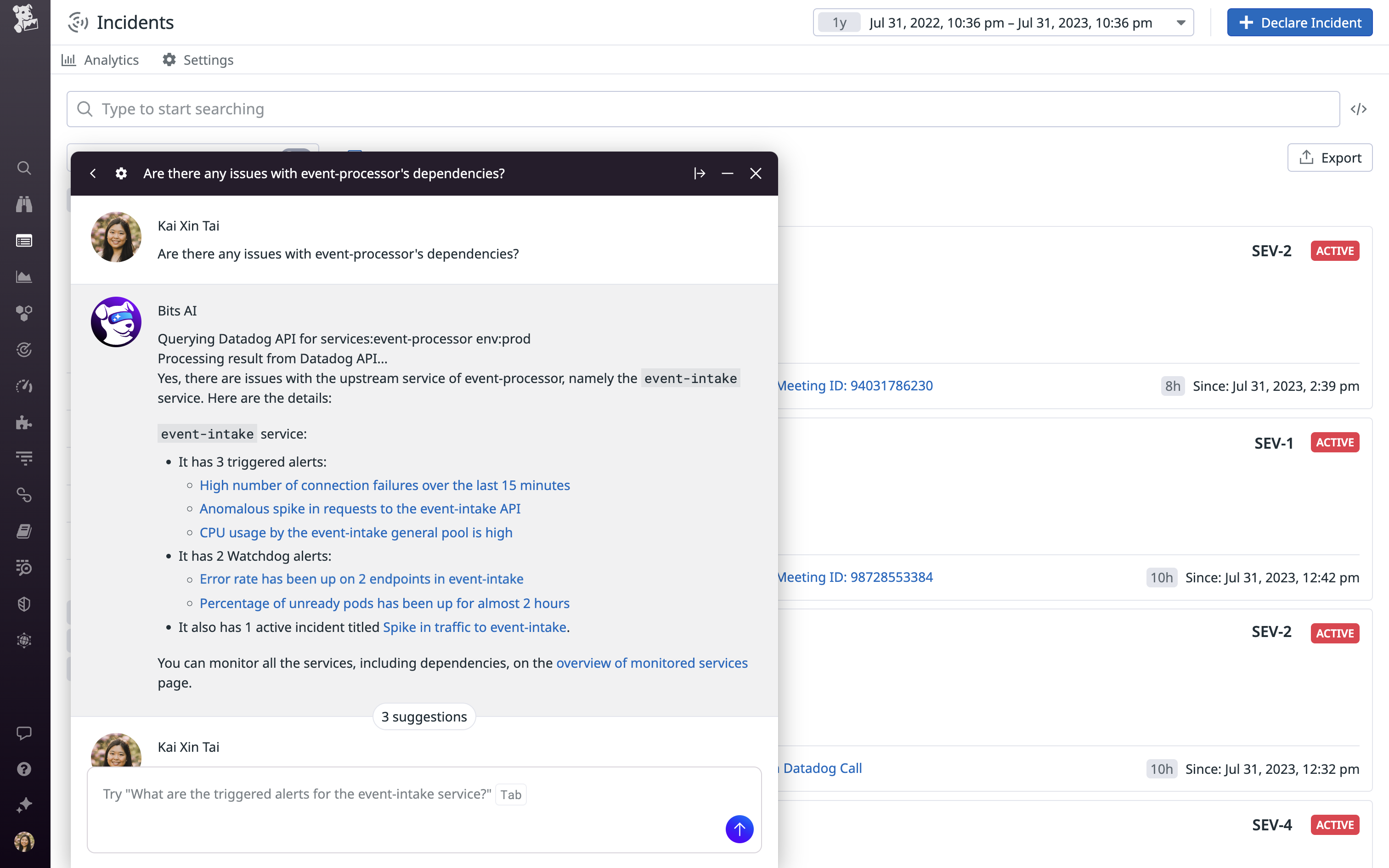
    At its DASH 2023 conference, Datadog today launched Bits, a digital assistant that uses generative artificial intelligence (AI) from OpenAI’s ChatGPT platform to provide real-time recommendations to resolve issues surfaced by the company’s observability platform.

    At the same time, the company announced it is extending the reach of that platform to enable IT organizations to monitor the large language models (LLMs) many are now embedding within custom applications.

    Datadog also released an LLM Observability platform in beta, which brings together data from applications, models and various integrations to help engineers discover and resolve AI issues in applications such as performance degradations, drift and hallucinations in real-time.

    Those extensions complement an existing ability to monitor the usage patterns of application programming interfaces (APIs) making calls to the OpenAI ChatGPT platform.

    Yrieix Garnier, vice president of product at Datadog, said the generative AI capabilities in beta are enabled by data the company used to extend the core capabilities of OpenAI’s ChatGPT platform.

    Bits AI learns from both customer data and other sources to answer queries via a natural language interface that makes the Datadog platform more accessible to a much wider range of IT professionals, noted Garnier.

    The overall goal is to reduce the mean-time-to-resolution for issues by, for example, explaining errors and suggesting code fixes that can be easily shared with developers via a Slack communication channel.

    Those capabilities extend the functionality of the machine learning algorithms that Datadog has already embedded within its platform, noted Garnier.

    While the generative AI capabilities added to the core Datadog platform will make DevOps teams more efficient, it’s not quite clear what role those teams will play in monitoring LLMs created by data science teams. In theory, DevOps teams should be responsible for optimizing the performance of any element of an application, but most DevOps engineers today don’t tend to have much experience with LLMs that are created by data science teams.

    At the very least, however, DevOps engineers should be able to share the root cause of an issue that is adversely affecting those LLMs with those data science teams.

    It’s not clear how quickly LLMs will be incorporated into applications, but most DevOps teams should expect them to soon be pervasive. In effect, Datadog is now providing DevOps teams with the AI tools they will need to effectively monitor applications infused with AI capabilities. The issue is not so much whether DevOps teams will be taking advantage of AI to better manage application environments but how quickly. Given the overall level of complexity DevOps teams regularly encounter, few are likely to want to take on that challenge without some level of AI augmentation.

    The challenge is determining exactly what DevOps tasks might be best handled by a machine that enables software engineers to focus on more complex issues they previously didn’t have the time to address.