Category: DevOps Practice

  • JFrog Aligns With New Relic to Improve Observability

    JFrog Aligns With New Relic to Improve Observability

    JFrog and New Relic jointly announced today they will provide a free integration tool that will enable New Relic’s observability platform to consume log data from JFrog platforms for building and deploying applications securely.

    Announced at the Futurestack conference hosted by New Relic, this integration eliminates the manual effort that was previously required to integrate these platforms. Preconfigured New Relic dashboards provide a comprehensive view of performance data, artifact usage and security metrics in real-time that is automatically collected from JFrog Artifactory and JFrog Xray environments and then displayed alongside other telemetry data.

    Omer Cohen, executive vice president of strategy at JFrog, said that capability will make it easier to identify performance issues, urgent vulnerabilities and malicious users in a way that reduces the amount of time required to remediate those issues across the software supply chain.

    The goal now is to eventually provide similar levels of integration between JFrog platforms that enable DevOps teams to manage and secure application binaries with other observability platforms, added Cohen.

    It’s still early days as far as the adoption of observability platforms is concerned, but it’s apparent that as application environments become more complex the plethora of monitoring tools that DevOps teams rely on need to be augmented. Observability platforms promise to unify logs, metrics and traces in a way that makes it simpler to launch queries to identify the root cause of an issue. The rate at which DevOps teams will embrace observability will naturally vary, but the biggest obstacle might not be the platforms themselves. The biggest challenge is understanding which queries to actually launch to identify an issue that might later cause a major disruption. In the longer term, it’s expected that machine learning algorithms will leverage the data collected by observability platforms to automatically identify those issues. In the meantime, much still depends on the acumen of the DevOps team employing an observability platform.

    In fact, a recent New Relic survey found only 27% of respondents have achieved full-stack observability, with only 5% claiming they have a mature observability practice in place. A third (33%) of respondents also said they still primarily detect outages manually or based on complaints, the survey found. More than half (52%) of respondents also admitted they experienced high-business-impact outages once per week or more and 29% said they take more than an hour to resolve those outages.

    On the plus side, nearly three-quarters (72%) expected to maintain or increase their observability budgets next year. More than half (52%) of respondents, including 57% of C-suite executives, expected observability budgets to increase over the next year. A total of 14% of all respondents and 16% of IT decision-makers expected to increase observability budgets significantly or extensively. More than a third (36%) believe observability increases their productivity and enables them to find and resolve issues faster. Just under a third (32%) said observability enables cross-team collaboration, while more than a quarter said observability improves their ability to innovate.

    One way or another, visibility into DevOps environments clearly needs to improve as application environments become more complex. The challenge, as always, is determining the cost required to achieve it.

  • Modern DevOps is a Chance to Make Security Part of the Process

    Modern DevOps is a Chance to Make Security Part of the Process

    I’ve mentioned before, and many of you have lived through, the slowly changing beliefs around DevOps versus security. We are past the days of “Security slows us down” and into “How can we bake security into the development process?” which is essential. Indeed, I would say it’s more essential every day as the number of threat actors and their use of automation to perform more attacks increases.

    So where can we slip in a little security to protect those sweet, innocent apps from the Big Bad Wolf? Let’s make a list, then chat about it.

    • Source code
    • Inclusions–libraries, shared objects, etc.
    • Container/cloud images
    • Network
    • Running applications and APIs

    This is honestly not an exhaustive or detailed list, but we’re writing a blog here, so let’s stop there so we have time to discuss.

    Source code security is greatly enhanced by putting in any of a dozen development security tools, which include static and dynamic security scanners along with a variety of other features.

    Inclusions are often nested and confusing. A mod that developers include relies on other mods and libraries—sometimes so many that the developer can’t even list them all. So, this type of security starts with software composition analysis (SCA), then uses the list that generates to pursue vulnerabilities—normally by looking for the included libraries in a vulnerability database. Several prominent source code security solutions bundle at least the SCA part, and some also help nail down included vulnerabilities. Check with your vendor if you’re just getting started here.

    Container images are akin to the “golden images” of old. Build one that has what most applications need, add on the security that an organization wants most applications to support and then have every project start there and only add what this specific app needs. That allows for scanning of the base image so all applications start out at least somewhat secure. Cloud images can be done much the same, but beginning at a higher level. Look into registry security or image scanning tools to meet this need. It is worth asking your source scanning vendor if they offer this functionality; some do.

    The network on which an application will be exposed needs to be locked down. While the access points into the org probably are protected, portability of applications means that the application itself should be locked down wherever it uses that network. Tools are specific to the platform and networking in use, so look into it—I can’t offer much more generic advice.

    Security has long tried to lock down running applications—generally with pushback from developers and even ops, a bit. Between web application firewalls (WAFs) and API security, we have the ability to stop a whole host of attacks on their way in … But you have to use WAFs and API security best practices. If you’re starting from scratch, consider tools in the application and API security space that protect against both the web UI and API attacks with a breadth of technologies. For those with a WAF, look at API security tools that protect APIs. For those with API security covered, consider a next-generation WAF.

    My usual encouragement applies. You are rocking it, and all of these tools are increasingly integrated into the DevOps toolchain, so it’s worth the time investment to get them set up and let them run. If you’re just starting out, start with source code security. Honestly. It will make the overall app more secure by tightening its source. But don’t ignore the ops side, as that is part of the attack surface. Protect those apps you built and/or maintain that are keeping the org running.

  • Eclipse Foundation Touts Java SE Temurin Certification Momentum

    Eclipse Foundation Touts Java SE Temurin Certification Momentum

    The Eclipse Foundation revealed today the number of downloads for Java Standard Edition (SE)—dubbed Eclipse Temurin—certified using both a technology compatibility kit (TCK) and compatibility tests for evaluating associated runtimes reached 12.3 million in February.

    Tim Ellison, a project lead for creating compatibility tests for the Eclipse Foundation, said that level of activity suggests the governance framework for an Eclipse Adoptium project that enables developers to download compatible runtimes based OpenJDK source code from multiple providers is gaining traction. Members of the Adoptium working group include Alibaba Cloud, Bloomberg, Google Huawei, IBM, iJUG, Karakun AG, Microsoft, New Relic, Red Hat and Rivos. Eclipse Temurin has also become the default Java option for the GitHub Actions continuous integration/continuous delivery (CI/CD) platform.

    OpenJDK is a free and open source implementation of Java SE provided by Oracle. AdoptOpenJDK was created in 2017 to provide open source Java runtimes based on OpenJDK. Since then, AdoptOpenJDK has been downloaded more than 240 million times. The Eclipse Adoptium working group has negotiated with Oracle to create an OpenJDK Community TCK License Agreement (OCTLA) that allows it to run compatibility tests to ensure conformance to the Java specification.

    One of the reasons Eclipse Temurin is gaining traction is organizations are looking to reduce Java licensing costs during uncertain economic times by relying on an open source platform. At the same time, a consistent set of certified runtimes also reduces the level of DevOps friction that might otherwise be encountered when building and deploying Java applications, noted Ellison. There will, of course, always be multiple Java runtimes, but the level of incompatibility that would exist without testing them could be substantially higher, he noted.

    Despite the plethora of programming languages developers use, after more than 25 years, Java remains the dominant language for developers working in enterprise IT organizations. Developers may be building and deploying applications faster, but most of them will continue to rely on the programming language they already know rather than master another. In addition, many of the Java applications that have been deployed over the last two decades are now being modernized within the context of a cloud migration.

    Arguably, Java is experiencing a renaissance following efforts to make it simpler for multiple organizations to contribute code to open source projects and increase the pace of innovation. The rate at which organizations can absorb that innovation will naturally vary, but it’s clear that more organizations are now running later editions of Java that improve both performance and cybersecurity overall.

    In the meantime, DevOps teams should expect to see more Java projects moving through pipelines in the months and years ahead. While not every legacy Java application may need to be updated before being retired, it’s apparent that the bulk of Java applications are still relevant. As such, it’s probable the efforts to modernize those applications will keep DevOps teams occupied well through the end of the decade.

  • SVB: When Silly Valley Sneezes, DevOps Catches a Cold

    SVB: When Silly Valley Sneezes, DevOps Catches a Cold

    Welcome to The Long View—where we peruse the news of the week and strip it to the essentials. Let’s work out what really matters.

    This week: Silicon Valley Bank and what it means for DevOps. After the débâcle of Wednesday’s fire sale, Thursday’s bank run and Friday’s FDIC seizure, came Saturday’s impotent panic, Sunday’s “not a bailout” federal guarantee and Monday’s tentative restart of “bridge” bank operation. (more…)

  • ReversingLabs Adds Ability to Detect Secrets in Application Binaries

    ReversingLabs Adds Ability to Detect Secrets in Application Binaries

    ReversingLabs today announced it added an ability to detect secrets exposed in application binaries to its Software Supply Chain Security (SSCS) platform.

    Tomislav Peričin, chief software architect for ReversingLabs, said this addition will make it easier for DevSecOps teams to identify secrets that are inadvertently left in applications as plain text or that can be discovered because of weak cryptography, scripts that have been included in directories that have secrets configuration files, packaging automation mistakes, compromised developer accounts or the activities of malicious insiders.

    The SSCS platform can identify more than 250 secret types out of the box, including private keys, version control, certs, tokens and more. Once they are identified, the platform also surfaces their precise location, which services are affected and if those secrets are exposed or leaked elsewhere. The platform also identifies third-party, open source, testing keys and other commonly shared secrets in addition to which secrets have already been exposed. Armed with those insights, it then becomes possible to better prioritize remediation efforts on actionable issues to reduce overall manual triage fatigue, noted Peričin.

    ReversingLabs also provides guidance for sensitive information policies, including documentation of public exposures and breakdowns of secrets used for web service access credentials, web service access tokens, web service API keys and webhook service access keys.

    Most software composition analysis (SCA) tools used to secure software supply chains are limited to identifying issues in source code. As applications become more modular, however, the odds authentication credentials such as login credentials, application programming interface (API) tokens and encryption keys might be left exposed because of a developer mistake substantially increase. The overall goal is to make it possible for DevSecOps teams to discover these issues in binary code before an application is deployed, noted Peričin. That “just in time” approach to secrets management includes canary token management and custom detection policies to better ensure application security.

    In general, secrets within applications are becoming more challenging to secure as cybercriminals increasingly scan repositories and continuous integration/continuous delivery (CI/CD) platforms to find them. The ultimate goal is to inject malware into a software component that will be used in multiple downstream applications. Once activated, that malware will then create a backdoor through which cybercriminals can exfiltrate data or launch a full-blown ransomware attack. It was the latter type of attack that led to the U.S. government creating a formal National Cybersecurity Strategy to, in part, lock down the software supply chains employed by federal agencies to build applications.

    A recent survey published by ReversingLabs, however, found that while 87% of respondents agreed that software tampering has become a more frequently used cybersecurity attack, only 37% said they have any means to detect it. Only 7% said they could detect software tampering at each phase of the software development life cycle.

    It’s not clear to what degree best DevSecOps practices are currently being implemented within application development teams, but as more attacks are launched against software supply chains, it’s now only a matter of time before most DevOps teams are routinely required to scan code for exposed secrets and known vulnerabilities long before code is allowed anywhere near a production environment.

  • NETSCOUT Taps F5 to Optimize Custom App Performance

    NETSCOUT Taps F5 to Optimize Custom App Performance

    Through its alliance with F5, NETSCOUT Systems has extended the reach of its nGeniusOne enterprise performance management platform to support custom applications.

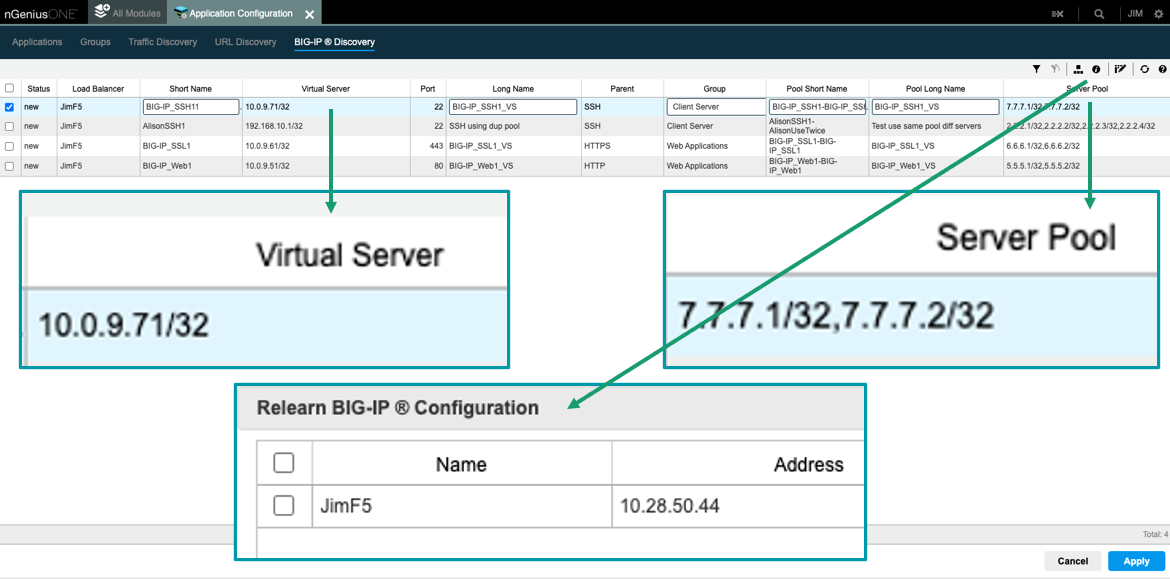
    The nGeniusONE platform supports more than 1,000 voice, video and business data applications using NETSCOUT InfiniStreamNG appliances in combination with nGeniusONE to provide visibility into any infrastructure environment, including data centers, private and public cloud and co-location facilities. The integration with F5 extends those capabilities to add support for custom applications via integration with F5 BIG-IP server pool definitions that can now be directly imported into nGeniusOne.

    Eileen Haggerty, area vice president for enterprise product and solutions marketing for NETSCOUT, said that approach enables nGeniusOne to access clear, unencrypted traffic from the BIG-IP Local Traffic Manager.

    As more cloud-native applications built using microservices are deployed across distributed computing environments, network latency is becoming a bigger DevOps challenge. A wide range of networking issues can adversely impact application performance, but without any visibility into network traffic, it can be challenging to determine the root cause of an issue. NETSCOUT has deployed a global network of appliances to surface those issues.

    A recent report published by Cloud Security Alliance (CSA) found the average enterprise uses 464 custom applications and expects to deploy 37 new applications in the next 12 months. At that rate, the number of organizations likely to encounter networking issues is only going to increase, noted Haggerty.

    It’s not clear to what degree network operations (NetOps) teams are becoming integrated with DevOps teams that build and deploy custom applications. The need for both teams to collaborate more effectively is becoming more apparent as more application code is deployed at the network edge. In some cases, developers are now programmatically invoking network resources directly, while other organizations provide developers access to a portal to self-service their requirements within the context of a set of pre-defined guardrails. Regardless of approach, the need for greater visibility into the underlying networks that custom applications depend on has become critical.

    Exactly how much that need will drive organizations to embrace one networking vendor over another remains to be seen. DevOps teams are starting to exercise more influence as organizations realize how much they depend on custom software to drive digital business processes. DevOps teams need to be able to understand whether an issue is the result of a networking problem or an inherent problem with the code written or the way an application has been deployed.

    Of course, DevOps and NetOps teams don’t share a common nomenclature so the cultural divide between these teams can be wide. The simpler it becomes for NetOps teams to share visibility into networking services the easier it becomes to bridge that divide. Developers should be able to see for themselves how changes to application code might potentially improve network performance. In the absence of any proof to the contrary, most DevOps teams will simply assume there is a fundamental flaw in the networking services being provided.

  • Improving the DevOps Process for Mobile App Developers

    Improving the DevOps Process for Mobile App Developers

    Development teams—perhaps especially mobile development teams—have heavily invested in systems to automate their processes and accelerate the delivery of mobile apps. From build, test and release to tracking and monitoring, the mobile DevOps team depends on systems like Fastlane, Bitrise, Jenkins, Azure Pipelines and GitLab—and really, that list just scratches the surface.

    The mobile app market moves so fast that automation is the only way mobile DevOps teams can keep up with their competitors and rapidly changing customer expectations. They have to iterate and release rapidly—the more frequently a publisher puts out new features, the more highly customers rate their app. In the GitLab 2022 Global DevSecOps Survey, 70% of respondents said their teams release code every day or every few days.

    Unfortunately, there’s one major component of mobile app development that sits outside of these automated processes in most mobile DevOps teams: Security. For the most part, developers still implement security manually, and the process for ensuring apps are secure mostly comes down to code scanning and penetration tests. Again, from the GitLab survey, 53% of developers are running static application security testing (SAST), but unfortunately, the data from those scans is often not feeding back into developer workflows. Less than three out of 10 teams (29%) pull scan results into a report for developers.

    Additionally, there’s still a large disconnect between the security and development teams. Nearly half (47%) of security pros said that developers miss more than three-quarters of the bugs in the code, leaving them for the security teams to find, and more than half (56%) said it was hard to get developers to prioritize fixing code vulnerabilities. In fact, prioritizing vulnerability remediation was security professionals’ biggest challenge. Additionally, it’s interesting that when it comes to shift left security, the emphasis appears to be on early code scanning, not actually building security into apps earlier in the process.

    Data-Driven Decisions and Security Automation

    First, DevOps teams need to integrate data about the security of their mobile apps early in the process so they can make informed decisions about what protections to incorporate into the next build. Scanning information and results from penetration tests clearly need to feed back to the development team as quickly as possible—there’s no point in doing these tests if the information remains unavailable and not acted on.

    But mobile devices have the capability to collect and send much richer data about the security threats apps are actually facing in the field. By collecting this data, DevOps teams can make data-driven decisions about which threats are the highest priority to combat.

    However, as noted earlier, it does little good to collect data if it’s never used. And the slow pace of manual security implementation does not allow DevOps teams to implement protections quickly or nimbly enough to keep pace with the rapidly changing threat environment. DevOps teams need to automate the build, testing, release, tracking and monitoring of security to the same degree as every other aspect of an app’s development. Specifically, they need:

    • A system that can store, provide version control and audit security in every release
    • An automated system that can build the desired protections into the app within the organization’s existing CI/CD processes
    • Automated verification that the protections slated for implementation are actually included in the release
    • A feedback system from data collected in the field, including data about the effectiveness of protections already implemented. This proves security measures are working and reinforces the value of the DevSecOps process.

    With this combination of data and automation, mobile app developers can transition from DevOps attempting to shift left security towards a DevSecOps process that is completely data-driven. Instead of reacting to the latest threat that’s making headlines in the news or working off gut feelings about the direction the threat environment is moving, DevOps teams can look at trending threat data from their very own apps, slicing it according to growth, geography, device, OS version and a multitude of other filters. As a result, the organization can pinpoint exactly which threats are emerging as the next big thing so they can defend against them early.

    And with the assistance of automation, the DevOps team can keep up with the trending data, building security protections into the app within days or even hours of making a decision on what to include.

    To improve the DevOps process, security has to shift left, but moving code scanning and penetration testing earlier in the process won’t do much good to harden protection without real-time data from the field and automation for security implementation. What DevOps needs is a transition to data-driven DevSecOps.

  • GitGuardian: 10M Exposed Secrets on GitHub

    GitGuardian: 10M Exposed Secrets on GitHub

    GitGuardian published an analysis of more than one billion commits to GitHub repositories that found 10 million occurrences of secrets, with one out of 10 developers exposing a secret.

    Mackenzie Jackson, a developer advocate for GitGuardian, said more than 80% of all the secrets caught by live monitoring GitHub were exposed through personal repositories, with a large share of them being corporate secrets. In fact, three million of the secrets discovered were unique instances, with 5.5 commits out of every 1,000 made exposing a secret.

    On a year-over-year basis, the report also found that the number of hard-coded secrets discovered in these repositories increased 67%. More than half the secrets discovered (56%) contained a generic password.

    There appeared to be no correlation between developer experience and the number of secrets exposed. Junior and senior developers are equally predisposed to making the same mistakes, said Jackson. The most common mistake is secrets left exposed because developers used them to simplify access to components and resources when building their applications and then forgot to remove them when the application was deployed in a production environment.

    Secrets management is, of course, getting more attention as more organizations review their software supply chain processes in the wake of a series of high-profile security breaches. The issue with secrets management is cybersecurity teams are usually a lot more focused on discovering vulnerabilities than looking for instances of poorly secured credentials. Once an application is deployed in a production environment, it may be months before anyone discovers an issue—if it’s discovered at all. In fact, the number of existing applications running in production environments that have issues with how secrets are managed could be staggering.

    In theory, at least, the adoption of DevSecOps best practices should be mitigating this issue, but as the volume of code stored in repositories continues to increase, it would appear more fundamental mistakes are being made. Cybercriminals, meanwhile, have a greater appreciation today for weaknesses in software supply chains, so many of them are scanning repositories for secrets that will enable them to breach an application.

    Of course, there’s a lot more attention being paid to secure software supply chains, especially in the wake of the Biden administration creating a National Cybersecurity Strategy that requires Federal agencies to, among other things, lock down software development life cycles on an end-to-end basis. Most enterprise IT organizations, if they have not done so already, are expected to follow suit.

    As a result, DevOps teams should expect to see more cybersecurity professionals focusing more on secrets management. Developers, naturally, will not want to be called out for mismanaging secrets, so over time, the overall state of application security should steadily improve. The issue, of course, is the volume of attacks against software supply chains is expected to increase. Many previous mistakes are likely to come back and haunt developers and the organizations that rely on their code and wreak havoc downstream.

  • Documentation in Agile: Challenges and Trends in 2023

    Documentation in Agile: Challenges and Trends in 2023

    Agile documentation refers to the creation and maintenance of documentation in an agile software development process. It emphasizes “just enough” documentation that is necessary for the current iteration, preferring documentation that responds to specific needs over extensive upfront documentation. The goal is to provide clear and concise information to support the development team while keeping the documentation flexible and updating it as needed throughout the development process.

    In this article I’ll present the state of Agile documentation and how it is expected to evolve in 2023 and beyond.

    What Does an Agile Approach to Documentation Look Like?

    An agile approach to documentation looks different from traditional, waterfall-style documentation practices in several ways:

    • Emphasis on just-in-time documentation: Agile prioritizes documentation that is created and updated as needed, rather than extensive upfront documentation.
    • Collaborative and iterative: Agile documentation is created and maintained through collaboration between the development team and stakeholders, with a focus on continuous improvement.
    • Flexible and adaptive: Agile documentation is designed to be flexible and adaptable, allowing for changes and updates as the project progresses.
    • Minimalistic: Agile documentation focuses on providing just enough information to support the development process, avoiding unnecessary detail.
    • User-focused: Agile documentation is centered around the needs and perspectives of the users and stakeholders, rather than the development team.

    In practice, an agile approach to documentation might involve user stories, wikis, and documentation that is integrated into the development process rather than treated as a separate task.

    7 Agile Documentation Challenges

    Teams attempting to write and update agile documentation can face several challenges, including:

    1. Balancing speed and detail: Agile documentation is meant to be lightweight, but it also needs to be detailed enough to support the development process. Striking the right balance between speed and detail can be challenging, especially as the project evolves and requirements change.
    2. Keeping documentation up to date: Agile projects are highly iterative, which can make it difficult to keep documentation up to date. Documentation that is not updated regularly can become outdated or irrelevant, causing confusion and slowing down the development process.
    3. Maintaining consistency: In an Agile development process, multiple team members may contribute to documentation, which can make it challenging to maintain consistency in style and format. This can result in documentation that is difficult to navigate and understand, which can slow down the development process.
    4. Managing collaboration: Collaboration is a key part of the Agile development process, and it is important for team members to be able to share information and feedback on documentation. However, managing collaboration effectively can be challenging, especially when team members are located in different locations or time zones.
    5. Prioritizing documentation: In an Agile development process, there is often a lot of pressure to prioritize development work over documentation. This can make it difficult to allocate sufficient time and resources to documentation, which can result in documentation that is incomplete or of poor quality.
    6. Dealing with changing requirements: Agile projects are highly iterative, and requirements can change rapidly. This can make it challenging to keep documentation up-to-date and relevant, as documentation that was created to support one set of requirements may no longer be applicable as the project evolves.
    7. Ensuring documentation is accessible: Agile projects often involve multiple team members and stakeholders, and it is important for documentation to be accessible and usable by everyone. Ensuring that documentation is stored in a centralized, easily accessible location can be challenging, especially in large or complex projects.

    Agile Documentation Trends in 2023 and Beyond

    Here are some of the key trends in Agile documentation that can help your organization improve your process and overcome the challenges above.

    Documentation Automation

    Documentation automation refers to the use of technology to automate the creation, maintenance and updating of documentation. This can involve the use of tools that generate documentation based on code, data or other sources, as well as tools that streamline the collaborative creation and review of documentation.

    In an agile development context, documentation automation can help to increase the efficiency and accuracy of documentation while freeing up time for the development team to focus on other tasks. It can also facilitate the creation of consistent, up-to-date documentation that is always in sync with the latest changes to the code or other project assets.

    Some examples of documentation automation tools include:

    • Automatic code documentation generators that extract documentation from the source code and generate reference documentation.
    • Wiki and documentation management tools that allow for the creation, editing and collaboration on documentation.
    • Automated testing and reporting tools that generate documentation on test results and project progress.

    Documentation-as-Code

    Documentation-as-code (DaC) refers to the practice of treating documentation as a first-class artifact in the software development process alongside code and other project assets. This approach aims to integrate documentation into the development process, making it easier to manage, version and maintain.

    Documentation-as-code can be achieved through a variety of methods, including:

    • Storing documentation in version control systems, such as Git, alongside the code to ensure that documentation is versioned and backed up along with the code. This is especially compatible with a GitOps development process.
    • Using markup languages, such as Markdown or reStructuredText, to write documentation, making it easier to format and display the documentation and to convert it to other formats if needed.
    • Automating the generation of documentation, such as API reference documentation, based on the code.

    The goal is to make documentation a more integral part of the development process, reducing the effort required to create and maintain documentation and improving the accuracy and usefulness of the documentation. 

    Continuous and Collaborative Documentation

    Collaborative documentation refers to the practice of involving multiple stakeholders, including developers, product owners and end users in the creation, maintenance and review of documentation. This approach emphasizes collaboration and communication as key elements of the documentation process.

    In an agile development context, collaborative documentation is seen as a way to ensure that documentation is relevant, up-to-date and meets the needs of all stakeholders. This can be achieved through a variety of methods, including:

    • User stories and other agile documentation techniques that involve end users in the documentation process.
    • Collaborative authoring and review tools, such as wikis and online document editors that allow multiple stakeholders to contribute to and review the documentation in real-time.
    • Regular retrospectives and other agile processes that provide opportunities for the development team to review and improve the documentation.

    The goal is to create documentation that is accurate, relevant and useful to all stakeholders, while also fostering communication, collaboration and continuous improvement within the development team. 

    Interactive Documentation

    Interactive documentation refers to the practice of creating documentation that is designed to be interactive, allowing users to engage with the information in a dynamic and engaging way. This can include elements such as interactive examples, simulations and tutorials, as well as tools that allow users to experiment with and explore the documentation.

    Interactive documentation can provide a number of benefits, including:

    • Improving the user experience by making the documentation more engaging and accessible.
    • Facilitating a deeper understanding of the product by allowing users to experiment with and explore the documentation in a hands-on way.
    • Improving the accuracy and usefulness of the documentation by allowing users to provide feedback and suggestions for improvement.

    Interactive documentation can be achieved through a variety of methods, including:

    • Interactive tutorials and examples that demonstrate how to use the product.
    • Simulations and prototypes that allow users to experiment with the product in a safe and controlled environment.
    • Tools for creating and maintaining interactive documentation, such as online document editors and wikis.

    Conclusion

    In conclusion, documentation is an essential aspect of the software development process, and agile development has brought about new trends in the way documentation is created, maintained and used. From documentation automation to interactive documentation, the agile approach is focused on improving the quality and usefulness of documentation while also reducing the administrative burden on the development team. 

  • Five Great DevOps Job Opportunities

    Five Great DevOps Job Opportunities

    DevOps.com is now providing a weekly DevOps jobs report through which opportunities for DevOps professionals will be highlighted to better serve our audience.

    Our goal in these challenging economic times is to make it easier for DevOps professionals to advance their careers.

    Of course, the pool of available DevOps talent is still relatively constrained, so when one DevOps professional takes on a new role it tends to create an opportunity for others.

    The five job postings shared this week are selected based on the company looking to hire, the vertical industry segment and, naturally, the pay scale being offered.

    We’re also committed to providing additional insights into the state of the DevOps job market. In the meantime, for your consideration:

    Monster.com

    Citibank
    Tampa, Florida
    Application Development Technology Lead Analyst
    $154,000 to $179,000

    Dice.com

    ZealTech
    San Jose, California
    DevOps Architect
    $150,000 to $200,000

    SimplyHired

    Musicnotes
    Remote
    DevOps Engineer
    $85,000 to $100,000

    Indeed.com

    Snowrelic
    Remote
    DevOps Engineer
    $82,486 to $173,694

    LinkedIn

    Oak Ridge National Laboratories
    Oak Ridge, Tennessee
    DevOps Engineer
    $78,000 to $137,000