Category: DevOps Practice

  • Webb.ai Launches AI-Based Continuous Root Cause Analysis

    Webb.ai Launches AI-Based Continuous Root Cause Analysis

    Webb.ai today opened an early access program access to a Continuous Automated Root Cause Analysis platform that uses artificial intelligence (AI) combined with a knowledge graph to dynamically keep track of and analyze changes to IT environments.

    Manish Gupta, CEO of Webb.ai, said the platform uses a mix of machine learning algorithms and generative AI capabilities based on large language models (LLMs) to aggregate alerts into higher-order insights that are presented in natural language to members of a DevOps team.

    That approach differs from legacy approaches because it tracks causal relationships between changes versus relying on probabilistic models that tend to create a lot of false positives, he noted.

    Webb.ai is also taking advantage of Kubernetes clusters to enable its platform to scale up and down as needed when analyzing data, added Gupta. That platform is also more efficient than other approaches to observability that require IT teams to store massive amounts of data. In contrast, the Continuous Automated Root Cause Analysis automatically surfaces anomalous events that DevOps teams can choose to save rather than requiring them to save all the metrics, logs and traces that would otherwise need to be tracked, he noted.

    Most IT incidents can be traced back to the most recent changes made to an IT environment. The challenge is as IT environments have become more complex, it’s not feasible for humans to keep track of those changes without relying on AI and a knowledge graph, said Gupta.

    As businesses become more dependent on software to drive digital processes, the cost of downtime is exponentially increasing. The need to identify the root cause of an IT incident as fast as possible has become a critical requirement, he added.

    Webb.ai doesn’t see AI technologies replacing the need for DevOps professionals and site reliability engineers (SREs) for at least another 10 to 15 years. In the meantime, many tasks that today are completed manually will be increasingly automated, said Gupta. A DevOps engineer dragged out of bed at 2:00 A.M. to address an issue does not want to have to sift through alerts. Instead, generative AI tools will summarize the issue at hand with recommendations on resolving it, noted Gupta. In effect, DevOps teams will be augmented by AI so they can manage IT environments at even higher levels of scale, he said.

    There is always going to be some sense of fear and loathing when it comes to AI, but ultimately, AI should reduce the burnout rates that today adversely affects any organization’s ability to retain DevOps professionals. Far too much time is spent trying to identify the root cause of a slowdown in a cloud-native application’s performance that could be caused by any number of issues involving one dependency or another. The frustrating thing, of course, is that while it may take days to identify the root cause of an issue, it often takes just a few minutes to resolve.

  • Splunk Goes Azure With Microsoft Partnership

    Splunk Goes Azure With Microsoft Partnership

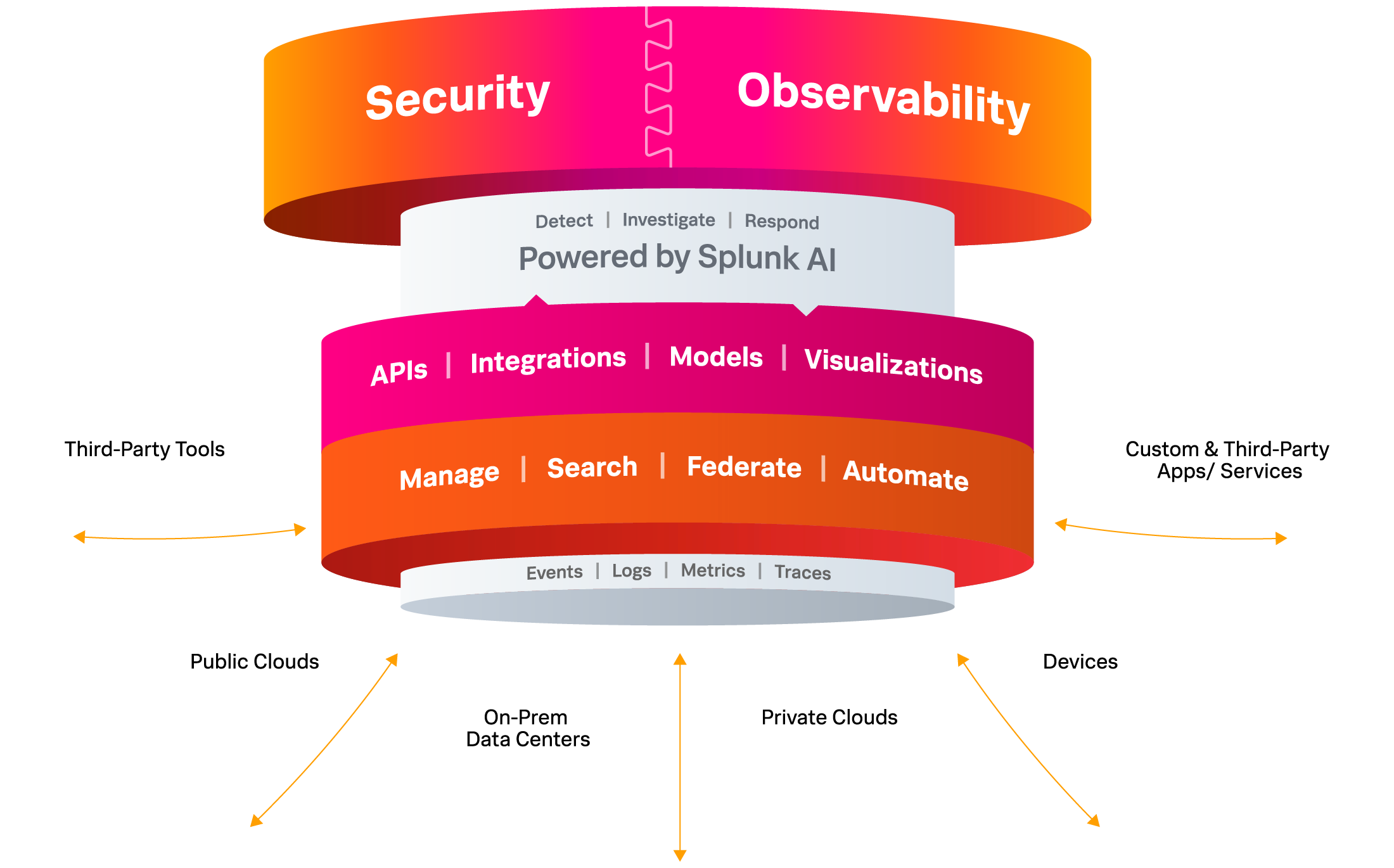
    It’s not every day that a well-established technology provider announces they are building their solutions on a new cloud technology stack, but that’s what Splunk announced at its .conf23.

    “…[O]ne of the most exciting [announcements] is Splunk’s new strategic partnership with Microsoft to build Splunk’s cloud solutions natively on Microsoft Azure. Together, our approach will enable our joint customers to migrate, modernize and grow their environments with end-to-end cloud and hybrid visibility at scale,” Splunk President and CEO Gary Steele said in a Splunk blog post this morning.

    Why such a bold move, might you ask? “Splunk’s strategic partnership with Microsoft to build Splunk natively on Azure demonstrates our commitment to advancing digital resilience and meeting our customers where they are…” Well, indeed, a big, big draw is the vast landscape of customers building and operating applications in Azure. While Gary didn’t share too many details about specific new capabilities or offerings yet, customers will get to use their Azure credits for Splunk offerings. I suspect two other important underlying factors made such a tech marriage happen: Open source and AI.

    First, Microsoft is far removed from the days of being viewed as a pariah by the open source community and is now a leader and contributor to well-known open source projects (OpenTelemetry, to name one); it abandoned its proprietary service mesh tech and got behind Istio (a recently-graduated CNCF project) and now owns the largest open source repository ecosystem with GitHub.

    While Splunk is by no means a noob when it comes to incorporating AI into products, the company continues to announce new AI capabilities, including a generative AI chat interface with a preview of Splunk AI Assistant, an improved version of the former SPL Copilot. Other AI-related announcements include Splunk App for Data Science and Deep Learning (DSDL) 5.1, which allows customers to leverage LLMs to build and train models with their domain-specific data for text summarization and text classification use cases. Stay tuned for more from .conf 2023!

  • Splunk Adds Generative AI Tool and OpenTelemetry Collector

    Splunk Adds Generative AI Tool and OpenTelemetry Collector

    At its .conf23 conference, Splunk today revealed it added a slew of capabilities to its portfolio of operational analytics tools, including an assistant that leverages generative artificial intelligence (AI) capabilities that use large language models (LLMs) the company developed to enable IT teams to use natural language to invoke the Splunk Processing Language (SPL).

    In addition, Splunk is also previewing OpenTelemetry Collector, an add-on that uses open source agent software being developed by the Cloud Native Computing Foundation (CNCF) to capture metrics and traces. It is designed to enable IT teams to use OpenTelemetry alongside existing agent software that Splunk uses to capture metrics.

    Tom Casey, senior vice president for products and technology at Splunk, said the domain-specific LLMs that the company created enable Splunk Assistant to write or explain customized SPL queries in a way that augments rather than replaces the need for IT professionals. Splunk Assistant is designed to surface recommendations to optimize IT environments to reduce toil rather than automate entire processes, he noted.

    Splunk is adding other tools infused with machine learning algorithms to its portfolio. These include the Splunk App for Anomaly Detection and an Outlier Exclusion for Adaptive Thresholding to detect and omit abnormal data points that has been added to version 4.17 of the Splunk IT Service Intelligence platform.

    In addition, Splunk is previewing an ML-Assisted Thresholding tool for Splunk IT Service that uses historical data and patterns to create dynamic thresholds with a single click.

    The company is making available a 5.4 update to the Splunk Machine Learning Toolkit (MLTK) 5.4 and a Splunk App for Data Science and Deep Learning (DSDL) 5.1 toolkit that provides access to additional data science tools that can extend MLTK to enable organizations to build their own custom LLMs and AI assistants.

    Finally, Splunk added Unified Identity to make it simpler to access Splunk Cloud Platform and Splunk Observability Cloud along with an update to Splunk Cloud Platform and Splunk Enterprise that make it simpler to ingest, route, search and export data.

    It’s still early days as far as the application of generative AI is concerned, but it’s already clear that the way IT is managed is about to be transformed. Coupled with tools such as OpenTelemetry that make it less expensive to collect massive amounts of data, the opportunity to train LLMs that streamline a wide range of processes is immense. Those capabilities won’t replace the need for humans to manage those processes, but they will most certainly cause staff realignments as many manual tasks become increasingly automated.

    In fact, it’s hard to imagine an IT team that would not want to take advantage of AI capabilities to simplify the management of complex IT environments that now function at a level of scale that few IT professionals can successfully manage on their own. One way or another, AI is going to be broadly applied to IT workflows. The only thing left to be seen now is the ultimate impact.

  • Shift Left With DAST: Dynamic Testing in the CI/CD Pipeline

    Shift Left With DAST: Dynamic Testing in the CI/CD Pipeline

    Dynamic application security testing, or DAST, is a process used to evaluate an application’s security while it’s running rather than while it’s in a static state. This method involves simulating attacks on an application, identifying vulnerabilities and analyzing the responses. DAST focuses on the exposed HTTP and HTML interfaces of web-enabled applications, making it an excellent tool for spotting security vulnerabilities that may occur during an application’s active runtime.

    DAST is a ‘black-box’ testing method, meaning it tests the application from the outside in—much like a potential attacker might. It doesn’t have access to the source code and instead focuses on the application as a whole rather than its individual components. This external perspective enables DAST to discover potential security threats that static testing methods might miss.

    While DAST is an effective security testing tool, it becomes even more potent when paired with a shift left approach.

    Understanding the Concept of ‘Shift Left’ in Software Testing

    Shift left is a practice in software development where testing is conducted earlier in the life cycle—that is, it’s ‘shifted left’ on the project timeline. Traditionally, testing was seen as the last phase before the release of a software product. However, with the shift left approach, testing becomes an integral part of every stage of the development process from planning to deployment.

    This approach has several advantages. It allows for the identification and resolution of issues earlier in the development process, reducing the cost and effort required to fix them later. It also encourages collaboration between developers and testers, fostering a more cohesive, efficient development environment.

    Shift left is not just a testing strategy but a philosophy that promotes preventive measures over reactive solutions. It’s about building quality and security into software from the get-go, rather than tacking it on at the end.

    DAST in the Context of Shift Left

    Importance of DAST in Early Stages of Development

    The integration of DAST in the early stages of development is crucial for several reasons. First, by conducting dynamic security testing from the onset, teams can identify vulnerabilities earlier, making them easier and less costly to fix. This proactive approach helps to prevent security issues from becoming ingrained in the code, which can lead to significant problems down the line.

    Second, early integration of DAST encourages a security-focused mindset from the beginning of the project, promoting a culture of security within the team. This cultural shift is crucial in today’s cybersecurity climate, where threats are increasingly sophisticated, and the stakes are higher than ever.

    How DAST Complements Other Testing Methods

    DAST doesn’t replace other testing methods; rather, it complements them. While DAST focuses on external vulnerabilities, other testing methods like static application security testing (SAST) can target internal issues. By combining these methods, teams can achieve a more comprehensive view of their application’s security.

    In a shift left approach, this combination of testing methods can be very powerful. By conducting these tests early and often, teams can ensure that both the external and internal aspects of their application are secure. This layered approach to security testing can help to catch any vulnerabilities that might otherwise slip through the cracks.

    Incorporating DAST Into the CI/CD Pipeline

    1. Understanding the Application Structure

    Before we can integrate DAST into the CI/CD pipeline, it’s crucial to understand the structure of the application we’re working with. This involves understanding the layers of the application, the technologies used and the data flows. By analyzing the application’s architecture, you can identify the critical components that need more attention during the security testing phase.

    Understanding the application structure is not just about knowing the technology stack. It’s also crucial to understand the business logic and the functionality of the application. This will allow you to create better test cases during the DAST process. Additionally, understanding the application structure will enable you to make better decisions when configuring the DAST tool, leading to more efficient and effective security testing.

    Finally, understanding the application structure will help you prioritize the vulnerabilities found during the DAST process. Not all vulnerabilities are created equal; some might be more critical due to the data they expose or the potential damage they could cause to the application. 

    2. Configure the DAST Tool

    The next step is to configure the DAST tool. This involves setting up the scanning parameters, defining the test cases, and tuning the tool to reduce false positives.

    When configuring the DAST tool, it’s important to strike a balance between thoroughness and speed. You want the tool to be able to identify all potential vulnerabilities, but you also want the scanning process to be fast enough not to slow down the development process. This balance can be achieved by carefully selecting the scanning parameters and continuously tuning the tool based on the results of the scans.

    Additionally, when configuring the DAST tool, you should consider the unique characteristics of your application. For example, if your application uses a specific technology or framework that is known to have certain vulnerabilities, you should ensure that the DAST tool is configured to test for these vulnerabilities. Similarly, if your application handles sensitive data, you should prioritize testing the components that process and store this data.

    3. Integrating DAST Into the CI Pipeline

    The next step is to integrate DAST into the CI pipeline. The CI pipeline is a sequence of steps that developers follow to merge their changes into the main codebase. By integrating DAST into this pipeline, we can ensure that every code change is automatically tested for security vulnerabilities.

    Integrating DAST into the CI pipeline can be achieved using various tools and plugins. Most DAST tools provide APIs that allow you to automate the testing process. By using these APIs, you can trigger a DAST scan every time a new code change is pushed to the repository. This allows you to catch vulnerabilities early in the development process, reducing the cost and time needed to fix them.

    However, integrating DAST into the CI pipeline is not a one-time task. It requires continuous monitoring and tuning to ensure that the testing process remains effective. You will need to update your DAST configurations as the application evolves, add new test cases as new features are developed, and fine-tune the testing process to reduce false positives. 

    4. Scan for Vulnerabilities

    After integrating the DAST tool, you can start scanning for vulnerabilities. The scanning process involves executing the test cases defined during the configuration phase and identifying potential security issues in the application. Depending on the size and complexity of your application, this process can take from a few minutes to several hours.

    During the scanning process, the DAST tool will interact with the application just like a real user would. It will send inputs to the application, observe the responses and analyze them for signs of security vulnerabilities. This dynamic approach allows the tool to identify vulnerabilities that static analysis tools might miss, such as runtime vulnerabilities and issues related to the application’s business logic.

    5. Analyze and Prioritize Findings

    Once the scanning process is complete, the next step is to analyze and prioritize the findings. The DAST tool will provide a report of the identified vulnerabilities, including their type, location and potential impact. This information should be used to prioritize the vulnerabilities based on their risk to the application and the business.

    Analyzing and prioritizing the findings is not an easy task. It requires a deep understanding of the application, the business, and the threat landscape. You need to consider various factors, such as the potential impact of the vulnerability, the likelihood of exploitation, the sensitivity of the affected data, and the complexity of the remediation process. By considering these factors, you can prioritize the vulnerabilities and focus your efforts on those that pose the highest risk.

    In addition, analyzing and prioritizing the findings should involve all relevant stakeholders. Developers, security teams, and business leaders should all participate in this process, as they each bring unique perspectives and insights that can help make better prioritization decisions.

    6. Remediate and Retest

    After analyzing and prioritizing the findings, the next step is to remediate the vulnerabilities and retest the application. Remediation involves modifying the application’s code or configuration to eliminate the identified vulnerabilities. Depending on the complexity of the vulnerabilities, this process can involve simple code changes or significant architectural modifications.

    After remediation, it’s crucial to retest the application to ensure that the vulnerabilities have been effectively addressed. This involves running the DAST tool again and verifying that the previously identified vulnerabilities are no longer present. Additionally, retesting allows you to check for new vulnerabilities that might have been introduced during the remediation process.

    Remediation and retesting is a continuous process. As new vulnerabilities are discovered and new features are developed, you will need to repeat this process to ensure the ongoing security of your application. This continuous effort is a critical component of the shift left with DAST strategy.

    7. Continuous Monitoring and Updates

    The final step in incorporating DAST into the CI/CD pipeline is continuous monitoring and updates. This involves regularly checking the effectiveness of the DAST tool, updating its configurations as the application evolves, and tuning it to reduce false positives.

    Continuous monitoring and updates are crucial to maintaining the effectiveness of your shift left with DAST strategy. As the application evolves and the threat landscape changes, the DAST tool needs to be updated to remain effective.

    Conclusion

    In conclusion, incorporating DAST into the CI/CD pipeline is a powerful strategy to enhance the security of your software. By understanding the application structure, integrating DAST into the CI pipeline, configuring the DAST tool, scanning for vulnerabilities, analyzing and prioritizing findings, remediating and re-testing, and continuously monitoring and updating, you can unleash the power of shift left with DAST. This comprehensive approach will allow you to identify and address security vulnerabilities early in the development process, leading to more secure and reliable software.

  • The Role of AI in ITSM: SLAs, SLOs, SLIs and Error Budgets

    The Role of AI in ITSM: SLAs, SLOs, SLIs and Error Budgets

    In my recent blog Revolutionizing the Nine Pillars of SRE with AI-Engineered Tools, I classified SRE into nine pillars of SRE practices, a comprehensive framework that covers the full scope of SRE practices and suggested how AI can help with each of the pillars.

    For SLAs, SLOs, SLIs and error budgets—arguably the most important pillar of SRE—I indicated that AI can assist by providing accurate predictions of system performance and identifying potential bottlenecks. In this blog, I’ll explain in more detail how AI-engineered tools can be used to improve SLAs, SLOs, SLIs, error budgets and error budget policies within IT service management (ITSM).

    AI for SLAs, SLOs, SLIs, Error Budgets and Error Budget Policies

    Service Level Agreements (SLAs): An SLA is a contract between a service provider and the end user. It outlines the metrics by which the service is measured as well as remedies and penalties if agreed-upon service levels are not achieved. Setting the right SLAs is crucial, as they directly impact on customer satisfaction and the service provider’s reputation.

    The challenges in defining SLAs often involve understanding the trade-off between the cost of providing the service and the level of service that customers expect. AI can assist in this process by providing data-driven insights to inform these decisions. By analyzing historical performance data, customer usage patterns and feedback, AI models can predict the impact of different service levels on both customer satisfaction and operational costs. This can help service providers to set SLAs that meet customer expectations without unnecessarily inflating costs.

    AI can also be used to proactively monitor the agreed-upon SLAs. By continuously analyzing performance data, AI tools can detect potential SLA breaches before they occur, allowing the service provider to take preventative action. This kind of proactive SLA management can help to improve customer satisfaction and reduce the risk of penalties for SLA breaches.

    Service Level Objectives (SLOs): Establishing SLOs involves making informed predictions about system performance, defining realistic yet challenging targets that align with user expectations and business goals. A common challenge in defining SLOs is dealing with the complex nature of distributed systems and their interdependencies, making it difficult to predict performance and set appropriate targets. AI can assist in this process by analyzing historical data to model system behavior and predict future performance trends. This allows SRE teams to set more accurate, data-informed SLOs that reflect the system’s true capabilities. For instance, machine learning models could identify patterns in traffic and use this information to predict periods of high demand, allowing SRE teams to define SLOs that account for these peaks.

    Service Level Indicators (SLIs): SLIs are quantitative measures of some aspect of the level of service such as latency, throughput, availability, error rates, etc. The challenge lies in identifying the right metrics that accurately reflect the user’s experience and the system’s health. Traditionally, these decisions are based on domain knowledge, experience, and sometimes trial and error. AI can assist by analyzing a broad range of metrics across the system, correlating them with issues, incidents and user satisfaction levels to identify which indicators provide the most meaningful measure of service quality. By doing so, AI can help teams select the most appropriate SLIs, thus providing a more accurate picture of their system’s health and performance.

    Error Budgets: An error budget represents the acceptable level of risk or unreliability in a service, providing a balance between reliability and the pace of innovation. Determining an appropriate error budget involves an understanding of system behavior, user tolerance for errors, and business needs. The challenge lies in predicting future performance and understanding the likely impact of potential issues. AI can help overcome these challenges by simulating different scenarios and predicting their impact on the error budget. Machine learning algorithms can learn from past incidents and understand the correlations between different factors, helping teams predict future performance, establish an appropriate error budget, and make better-informed risk decisions.

    Error Budget Policies: These are policies that dictate actions based on the remaining error budget. These decisions often involve human judgment, like deciding when to freeze releases due to an exceeded error budget or when to allow more risk for a new feature rollout. AI can support these decisions by using predictive models to estimate the likely impact of different actions on the error budget. For example, it could simulate the impact of a new release on system reliability, providing insights to help decide whether to proceed with the release or hold it back. By doing so, AI can help teams manage their error budgets more effectively and make more data-driven decisions.

    Implementation Roadmap

    Implementing AI tools for SLAs, SLOs, SLIs, error budgets, and error budget policies must be well-planned and executed systematically. Here’s a practical implementation roadmap:

    Assess the Current Situation: Start by examining the current situation, identifying the areas of need and understanding the existing process of how SLAs, SLOs, SLIs and error budgets are being managed. Also, evaluate the data you currently have available and its quality because AI tools rely heavily on data.

    Define the Goals: Clearly outline what you hope to achieve with the implementation of AI tools. This could include better prediction of system performance, quicker identification of potential bottlenecks, more effective allocation of error budgets, etc.

    Select the Right Tools: Research and select suitable AI tools. Examples of AI-engineered tools that could be useful include:

    • Nobl9 for SLO management: It can assist with setting, monitoring and managing SLOs with AI-driven predictions.
    • Dynatrace: This tool uses AI to detect and diagnose system anomalies, improving observability and helping to inform SLOs and error budgets.
    • Datadog: Offers machine learning-based features that can help forecast future infrastructure metrics, contributing to better SLA and SLO management.
    • New Relic: Its applied intelligence feature can help with incident detection and resolution, helping to better manage error budgets.

    Data Preparation: Aggregate data from various sources, clean it and possibly format it in a way that’s suitable for the AI tools.

    Integration and Deployment: Integrate the AI tools with your existing systems to ensure that the AI tools can effectively communicate with your existing systems.

    Training and Calibration: Many AI tools require a period of training and calibration where the tool learns from your data to make accurate predictions and recommendations.

    Monitoring and Evaluation: Once the AI tools are in place, continuously monitor their performance.

    Iterate and Improve: Based on the evaluations, make necessary adjustments to the tools, your data or your goals.

    Training the Team: They need to understand how to interpret the results and how to take action based on the recommendations of these tools.

    Summary

    In the complex landscape of ITSM, AI is emerging as a transformative force, enabling organizations to manage their systems with unprecedented precision and proactivity. Through smart analysis of historical data and predictive modeling, AI tools are elevating how we define and handle SLAs, SLOs and SLIs. Gone are the days of generic, one-size-fits-all service-level targets. Today, AI empowers us to set realistic, data-informed goals that accurately reflect a system’s capabilities and align with user expectations, ensuring high customer satisfaction and operational efficiency.

    Furthermore, AI brings remarkable improvement to the management of Error Budgets and Error Budget Policies. By simulating different scenarios and predicting their impact, AI helps teams proactively manage risk, making well-informed decisions about error allowance and guiding actions when error budgets are threatened. AI enables us to strike the perfect balance between reliability and innovation, allowing IT teams to continue pushing boundaries without compromising service quality. As the era of AI in IT service management dawns, we stand on the cusp of a new phase of efficiency, control, and excellence in system management. So, join us as we delve deeper into this fascinating intersection of AI and SRE practices.

  • Splunk Adds Hub to Extend Observability to Edge Computing Platforms

    Splunk Adds Hub to Extend Observability to Edge Computing Platforms

    Splunk today launched a platform for ingesting data from sensors, industrial equipment and internet-of-things (IoT) platforms so that it can be analyzed alongside data collected from IT environments.

    Announced at the company’s .conf23 conference, the Splunk Edge Hub extends the reach of the troubleshooting platform Splunk provides that increasingly involves various types of edge computing platforms.

    Tom Casey, senior vice president for products and technology at Splunk, said Splunk Edge Hub is designed to be deployed in those edge computing environments and reduce the total amount of data that needs to be transferred back to an instance of the Spunk analytics platform running in a data center or in the cloud.

    That approach makes it possible to remotely monitor everything from environmental conditions to identifying anomalies indicative of an outage that might be prevented. The overall goal is to unify visibility across IT and operational technology (OT) environments as these systems and applications become more integrated, said Casey.

    It’s not clear how quickly that integration is occurring, given the historic cultural divide that has existed between IT and OT teams. But with the rise of digital business transformation initiatives, the data collected from edge computing platforms is increasingly being incorporated into a wide range of applications deployed at the edge, in local data centers and in the cloud.

    In general, observability tools are being used to not only improve processes but identify and block suspicious activity. Of course, OT teams have been monitoring edge computing platforms for decades, but observability platforms make it feasible to interrogate logs, metrics and traces to hopefully discover issues before there is a disruption to services. The challenge, of course, is that not everyone on either the OT or IT team necessarily knows how to shape the queries required to discover the root cause of a potential issue. The Splunk approach essentially leverages the skillset of IT professionals that have mastered its platform to address that issue; something most OT professionals are not going to be able to do using their existing tools and platforms.

    One way or another, DevOps teams will soon need to be able to remotely diagnose edge computing issues as the number of workloads deployed on these platforms expands. IT teams are not going to be able to travel to the physical location of every edge computing platform every time an issue arises. In many ways, the rise of edge computing will force a transition to observability tools that will enable IT teams to more proactively manage IT environments rather than responding after a metric that OT teams are monitoring has already exceeded its threshold.

    In the event there is still an issue, observability platforms should also reduce mean-time-to-remediation (MTTR) as visibility into IT environments, including edge computing platforms, is improved.

    It’s not likely that OT and IT teams will ever be completely unified, but as observability platforms continue to evolve, there will be much greater opportunities for collaboration.

  • State of API Report Highlights Productization and Generative AI

    State of API Report Highlights Productization and Generative AI

    In today’s software landscape, an API-first strategy is increasingly popular. It’s the bedrock of how applications are built and connected. APIs help promote internal tech reusability, helping developers do more with less. Due to this increasing API reliance, maintaining quality control is increasingly important for internal and partner integrations and ensuring the reliability and security of these connections remains a top priority.

    Due to the rising API ubiquity, nearly half of the total development energy is spent working with APIs. And to continually improve these interfaces, taking a product mindset is proving helpful. In fact, 60% of API developers now view their APIs as products. Generative AI has also shown incredible promise and is now being used in tandem with traditional tools to increase API code quality.

    Postman recently released its fifth annual State of the API Report. The 2023 edition, which surveyed thousands of developers and API professionals, found subtle changes in tooling preferences and styles. It also sheds light on the ongoing API productization movement and API developers’ use of generative AI. Below, I’ll focus on these two key areas and review the report for its other key takeaways.

    API Productization is Hot

    The majority of API developers now view their API as a product, and this figure rises to 68% in large companies. A full 65% of respondents said their API generates revenue, too. This news is significant, as it demonstrates the industry is maturing its view of APIs. They are no longer offshoot developer toys but fully functional services contributing to overall business growth.

    But how much growth? Well, of those monetizing APIs, 43% now say APIs generate a quarter of company revenue. For some companies, APIs generated more than 75% of total revenue! There also appears to be a parallel between API revenue generation and large companies.

    Do you view your APIs as products? Most developers say "yes."
    Do you view your APIs as products? Most developers say yes.

    Other industry reports unearthed similar API productization potential. Rapid’s 2022 State of APIs report found that 42.6% of organizations are now monetizing APIs. And investment into API-first products remains strong even amidst a broader contracted tech investment climate. These findings come as social media giants like Reddit and Twitter attempt to monetize their APIs.

    That said, for 28% of companies, API revenue still equates to less than 10% of total revenue. APIs still don’t get the lion’s share, perhaps because they’re packaged with an existing platform or because of the many other indirect ways APIs might benefit the business. Furthermore, consumers are becoming more cost-conscious, as 60% cite pricing as a factor before integrating with an API. Still, the numbers are significant firsts for the burgeoning economy.

    Most API Developers are Using Generative AI

    Generative AI interfaces like ChatGPT and Bard have certainly taken the tech industry by storm due to their ability to generate code snippets, debug code and more. And for the first time, the State of the API Report spotlighted generative AI and its use within the API economy.

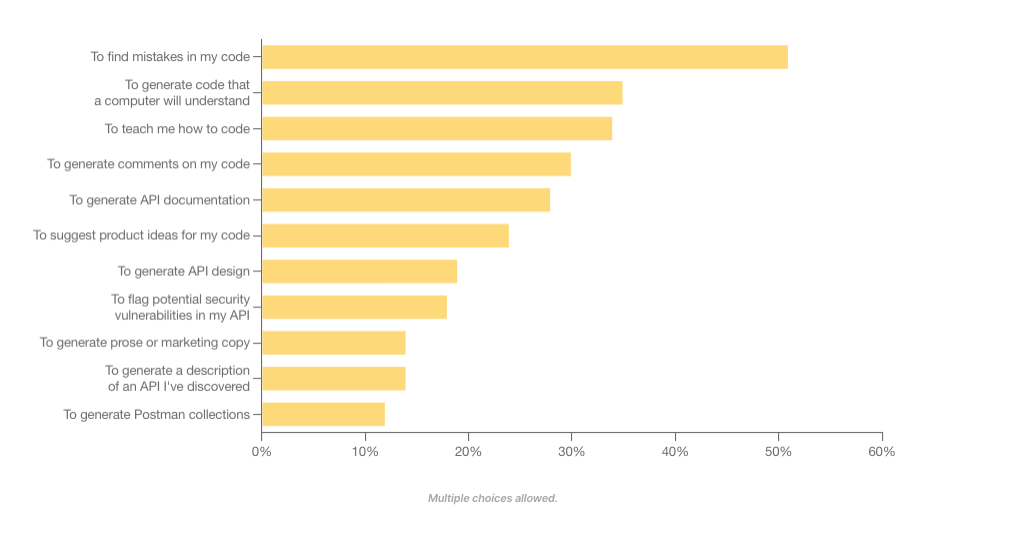
    Today, 60% of API professionals are using generative AI on the job. API engineers commonly use generative AI to find mistakes in code, generate machine-readable code and increase learnability around their programs. Some even use generative AI to suggest potential security flaws in their APIs.

    Compared with other app development endeavors, developers are by far most excited about building generative AI-powered applications in the year ahead. Yet, the efficiency gains are modest—many engineers forecast productivity improvements of 10% to 25%.

    How are API developers using generative AI in their work?
    How are API developers using generative AI in their work?

    Generative AI is set to accelerate many areas, including DevOps and API operations. Yet, contrary to some headlines, generative AI can’t automate all aspects of the software development life cycle. Rather, the technology is more likely to augment the API developer’s workflow than replace the need for seasoned professionals altogether.

    Other Key Takeaways

    Similar to last year’s report, integrating between internal applications, programs or systems remains a top concern for integrating an API or producing an API. The good news is that these integrations continue to increase in quality.

    The report found that deployment failures and times-to-recovery are improving on average. More than half (56%) of respondents said API security incidents occur less than once a year within their organization. This shouldn’t overshadow the significant impact API security breaches can have but signals that DevSecOps is beginning to respond to persistent API vulnerabilities.

    There are more API-first leaders than ever before. And API owners continue to evolve how their services are built and deployed. For example, REST is still by far the most common API style, used by 86% of developers. Webhooks made second place at 36%. However, GraphQL rose in usage, bumping SOAP into fourth position.

    SOAP slips on API architectural styles
    REST is still the dominant style, but GraphQL makes gains as SOAP slips.

    Other Quick API Factoids

    • More non-developers are becoming interested in APIs, as evidenced by 53% of survey takers being non-developers.
    • Most APIs are private—61% percent of businesses’ APIs are for internal use only.
    • After the technology group, business/IT services, financial services and health care are the most common sectors to adopt APIs.
    • Microservices is still the dominant architectural style of APIs, at 42%.
    • Performance, security and reliability are the top factors evaluated when integrating with a new API.
    • Improper authentication, authorization or access control is the most commonly cited API risk.
    • Common API tools include Postman, SwaggerHub, Datadog, SoapUI and Insomnia. Top gateway and API management platforms include AWS API Gateway, Azure API Management, Apigee and Kong.
    • JSON Schema is by far the most popular API specification.
    • The financial industry is a leader in API-first strategies—32% of respondents spend more than 20 hours a week working with APIs.
    • Most developers deploy APIs to production once a week to once a month.
    • When developers leave a company, their departure can cause outdated documentation, zombie APIs and a loss of institutional memory.

    API Obstacles Remain

    Looking to the future, investment in APIs is projected to climb. In fact, 92% of developers said their organization plans to invest the same or more time and resources into APIs in the coming year. Yet, some obstacles remain—a lack of documentation and poor service discoverability are still prominent roadblocks to API consumption. Furthermore, a lack of time and talent are major concerns that might stunt API development.

    The Postman State of API Report surveyed over 40,000 developers and API professionals, making it the largest study conducted on APIs to date. It should be noted that, given Postman’s specific focus in the market and its surveyed pool, figures may be skewed to represent increased API enthusiasm. For deeper insights, you can read the entire report here.

  • Five Great DevOps Job Opportunities

    Five Great DevOps Job Opportunities

    DevOps.com is now providing a weekly DevOps jobs report through which opportunities for DevOps professionals will be highlighted to better serve our audience.

    Our goal in these challenging economic times is to make it easier for DevOps professionals to advance their careers.

    Of course, the pool of available DevOps talent is still relatively constrained, so when one DevOps professional takes on a new role it tends to create an opportunity for others.

    The five job postings shared this week are selected based on the company looking to hire, the vertical industry segment and, naturally, the pay scale being offered.

    We’re also committed to providing additional insights into the state of the DevOps job market. In the meantime, for your consideration:

    Indeed.com

    ServiceNow
    San Diego, California
    Senior Software Engineer – DevOps
    $119,970 to $204,030

    LinkedIn

    Fox Tech
    New York, New York
    Senior DevOps Engineer
    $118,000 to $157,500

    SimplyHired.com

    GM Financial
    Arlington, Texas
    DevOps Automation Engineer III
    $113,000 to $143,000

    CareerBuilder.com

    Edward Jones
    Henley, Missouri
    DevOps Technical Architect
    $109,696 to $186,781

    Dice.com

    Suremind Solutions
    St. Louis, Missouri
    DevOps/Site Reliability Engineer (SRE)
    $100,000 to $140,000

  • Adopting a Low-Code GraphQL Approach to Build a Core Data Platform

    Adopting a Low-Code GraphQL Approach to Build a Core Data Platform

    Our education platform has relied on an outdated monolithic legacy application for years. It’s an outdated system built of a single service layer on top of a database designed for use cases that have evolved over the last decade. But we’re using the wealth of data in the monolith as a foundation for our current projects, thanks to our newly adopted tools.

    With our product line continually expanding, our need for a centralized API that can sit over commonly used data has become even more critical. This includes data related to our customers’ organizational units, purchased products, licensing information, and student, teacher and class rosters, among other things.

    The stakes are high since we have multiple downstream clients depending on us. Our goal is to move some functionality and data out of the main system while making sure our design is flexible enough to adapt to future product changes. We envision a hub-and-spoke model where all our products interact through a central hub to access shared data. Efficiency, security and reliability are all top priorities. Because we’re a small team, we need to move fast and be open to new ideas. That’s why we’re using a low-code backend solution to minimize manual coding and maximize our productivity.

    A few months ago, we adopted a tool called Hasura. Its core value proposition is that it places a production-grade GraphQL API over any database, saving teams months of recurring effort in building, shipping and maintaining their APIs. We put the open source Hasura community edition to the test and found that it lived up to its claims. In this article, we’ll show you how it worked for us and how it can work for you too.

    Converting GraphQL to SQL

    Before a team can convert GraphQL to SQL, they must undergo a data modeling phase. After this data modeling phase, backend teams must complete some unavoidable tasks. One of these tasks is to build an API that allows clients to read and mutate data. Hasura provides this instantly, freeing engineers from the toil of writing basic CRUD APIs. Hasura compiles a GraphQL string into a GraphQL abstract syntax tree (AST), which is then compiled into a SQL AST. This abstraction lets us do powerful things, like using a bulk GraphQL mutation to transactionally and atomically insert or update data. GraphQL provides a flexible way for us to query our data in the form of a graph. This means that, as engineers, we get to focus more on business logic.

    API Federation, Aggregation and Composition

    Hasura’s support for remote GraphQL schemas enables us to design a service-oriented architecture in which Hasura functions as an API federation/composition layer and delegates to other Go microservices that provide specialized business logic for a particular domain. This ability to federate doesn’t just end at remote GraphQL schemas—Hasura also supports remote data sources, opening multiple possibilities for how we traverse through the graph and explore relationships in our data, including how we might join remote databases to each other or to remote APIs (REST or GraphQL).

    In greenfield projects, teams typically spend months crafting a fully-featured API, a common language that all clients can share. With Hasura, we get this in seconds and can spend that saved time writing automated tests or implementing business logic.

    Developer Dashboard

    Hasura’s Dashboard/Console improves developers’ experience. Using the dashboard, developers can craft experimental GraphQL queries and mutations against our local instance of Hasura. The embedded GraphQL playground makes it a breeze for new developers joining the team to introspect and discover our API. We can also visualize our database schema in the UI directly and make changes to it with a few clicks of a mouse (if needed), generating source-controlled SQL migration scripts like you’d find in other web frameworks.

    Observability

    No production-ready system would be complete without observability, or the ability to gauge a system’s internal state based on external output, usually in the form of logs, traces and metrics. Hasura ships logs and traces to our New Relic telemetry platform for each database operation, allowing our team to identify bottlenecks and receive early alerts of unexpected or degraded system performance.

    Authorization

    Hasura’s role-based authentication support allows us to check an additional box on our production-readiness checklist. Clients with certain roles may have permission to execute specific GraphQL API operations or access particular database tables. Hasura can derive a client’s role in one of two ways: Either the client will send Hasura a JWT auth header (which includes a signature containing claims providing the client’s role), or Hasura will refer to an external webhook which, in turn, makes the auth decision. Without Hasura, we would need to write and maintain the code to perform all of this work.

    Change Data Capture

    The last way Hasura enables us to build our core platform is through change data capture (CDC), or the process of tracking changes to a database. Hasura provides this in the form of event triggers, which function like a transactional outbox system. When a record is inserted, updated or deleted, a bona fide database trigger will record this event in a table. Then, a reliable process in Hasura will guarantee that the event is delivered at least once to its intended webhook (one of our microservices). This is tremendously useful for our team since we need to sync data from our new database to the older legacy database.

    There are many tools we could use for CDC, such as AWS SQS or Kafka (some of which we use downstream to integrate our platform with individual products), but having this feature baked into Hasura makes the process simpler, as it frees us from having to provision any new infrastructure or deal with the complexities of bringing on additional tools.

    Conclusion

    For the Teaching Strategies platform modernization team, we’re just getting started. As we continue to evolve and improve our product, we’re considering Hasura for finer-grained authorization, such as attribute-based access control (ABAC) over coarser role-based access control (RBAC). We will also investigate real-time streams so other systems, such as users’ browsers, can see data changes as fast as possible.

    Using the functionality and features of Hasura community edition outlined above, our team is well on the way to building a strong core platform. By leveraging this tool, we can meet our milestones faster and provide even more support for educators and caregivers, making their lives easier.

    Interestingly, Hasura is a combination of the programing language Haskell and the Sanskrit word asura—or demon.  As far as tech choices go, this one feels much more like a guardian angel.

  • Is ChatGPT Helping or Hurting Your Developers’ Productivity?

    Is ChatGPT Helping or Hurting Your Developers’ Productivity?

    ChatGPT’s ability to translate natural language into working code has sparked tremendous interest in the programming community. Developers are exploring ways to use ChatGPT to reduce redundant tasks, from creating code snippets to analyzing and debugging programs. This also allows them to focus on more complex tasks like data analysis and monitoring with the help of a strong full-stack observability platform. Despite ChatGPT’s impressive capabilities, developers and their employers are split on whether the AI chatbot significantly boosts developer productivity.

    We will explore how to use ChatGPT to benefit your developers’ productivity and go over the advantages and disadvantages of ChatGPT to help you make the right decision for your business.

    How to use ChatGPT for Better Productivity

    ChatGPT has quickly become the most popular intelligence chatbot, with over a million user signups in its first five days and over 100 million in the first two months. Here are a few ways ChatGPT, developed by OpenAI, can help boost productivity in your organization.

    Improve Their Code
    Sometimes manually written code snippets consume additional CPU resources. Using ChatGPT, developers can optimize their functions for better performance. Additionally, ChatGPT can also write test cases and spot security vulnerabilities in their code, helping developers work faster.

    Simplify Documentation
    ChatGPT can give a simple explanation for the layman, avoiding technical jargon to a large extent. For instance, a developer at Twitter fed ChatGPT their code and it responded with a pretty detailed explanation. Using ChatGPT to generate the first draft of a company’s internal documentation would make knowledge transfers easier. New hires could quickly get up to speed on the company’s codebase. Further, ChatGPT could also be used for external-facing documents where other developers can learn how to use the company’s APIs and frameworks.

    Test and Understand Code
    ChatGPT can write automated tests for code that is fed into it. Although many developers consider testing boring and stressful—and sometimes a waste of time—it’s a critical step in ensuring that published applications are bug-free.

    With ChatGPT, developers can output reliable, well-tested code much more quickly and easily. ChatGPT can also give high-level and line-by-line explanations of code and even teach developers how to use external modules and APIs in their own code, helping them build much faster.

    Debug Code
    ChatGPT makes a great debugging tool for developers. It can take in error messages and output information on the likely cause of the error and how to fix it. This is typically a lot more time efficient than browsing forums and blogs for a solution.

    The tool can also suggest helpful code alternatives. Many developers claimed that ChatGPT can be much faster and less mentally challenging than the conventional approach of searching the web for a solution.

    As the CEO of Replit, Amjad Masad, put it, “ChatGPT could be a good debugging companion; it not only explains the bug but fixes it and explains the fix.”

    Code Comprehension
    ChatGPT’s terabytes of training data come from various sources, including common crawl and WebText2. This training data makes it easy for ChatGPT to simplify explanations of complex pieces of code for developers. Therefore, developers can save time deciphering any code’s underlying logic and structure.

    For instance, Stanford instructor and well-known developer Matt Harrison used ChatGPT to build a simple graphic design tool. He explained, “I’m using ChatGPT to create a GUI program for drawing lines. I haven’t used QT [a development framework] in years, yet I can throw this together really quickly.”

    Generate Documentation
    Writing code documentation is often considered a mundane task by developers. With ChatGPT, developers can significantly cut down on the amount of time needed for documentation. For instance, they can expedite the creation of troubleshooting guides, tool user manuals and test cases by asking ChatGPT to perform code analysis and generate detailed technical reports. Accelerating this documentation process allows for easier onboarding of new developers and faster product release times.

    Writing Tests
    ChatGPT can analyze code snippets and automate testing for them, saving developers lots of time and helping them output reliable code. Test coverage is an essential metric for most enterprises, and ChatGPT could help streamline the process.

    ChatGPT Disadvantages

    While many developers have praised ChatGPT for increasing developer productivity, others have criticized it as unreliable. Let’s understand some key areas where the tool falls behind.

    Outputting Buggy or Unusable Code
    Developers have complained that the chatbot would sometimes output plausible-looking code that doesn’t work. This might result from misunderstanding the user’s requirements or simply being unable to come up with a correct answer—then faking it.

    Programming Q&A forum Stack Overflow even issued a temporary ban on ChatGPT-generated answers. The ban was because the chatbot generated an influx of answers whose average accuracy was pretty low. ChatGPT sometimes uses nonexistent commands and outdated modules in its code, so while they theoretically might make sense, they don’t work in practice.

    Writing Outdated Code (and Forgetting Previously Written Code)
    Since ChatGPT’s training data cut off in September 2021, the chatbot has no knowledge of the recent developments in programming languages and modules after that. As a result, ChatGPT often needs to use outdated commands, modules and paradigms in its code.

    ChatGPT also occasionally forgets the context within which it is working, affecting code output. Some users have reported that ChatGPT sometimes forgets about the task at hand and begins generating incompatible code.

    Security Concerns
    Security concerns are the biggest drawback to having developers work with ChatGPT. Open AI uses the data users input into ChatGPT to train the underlying AI model.

    Research by cybersecurity firm Cyberhaven has shown that 11% of the data employees input into ChatGPT is confidential. This presents a significant risk, as such data can be used in the chatbot’s next responses. Corporations like JPMorgan and Verizon have even gone as far as to block employees’ access to ChatGPT because of these concerns.

    Lacks Problem-Solving Skills
    A developer’s job is to understand the business problem and develop customized solutions to address it. Although AI/ML tools like ChatGPT help developers code faster, they can’t help in problem-solving or implementing a software application.

    Furthermore, when developers become overly reliant on AI-generated code, they’re discouraged from upskilling on new programming frameworks and languages. This can hurt the organization in ways that might not be evident immediately.

    To ChatGPT or not to ChatGPT

    As Google’s head of developer experience Bret McGowen said, “While AI will transform software development in many ways, human judgment, intuition and creativity will remain essential to building great products.”

    While ChatGPT may not be a perfect solution for every aspect of software development, it can be a useful addition when combined with human problem-solving skills. However, companies should be careful while allowing the usage of AI in day-to-day processes. Guidelines educating in-house developers on the fair usage of AI are a must to protect sensitive information and maintain a high-quality control process.