Category: DevOps Practice

  • DevOps Guide to the Salesforce Summer 2023 Release

    DevOps Guide to the Salesforce Summer 2023 Release

    The second installment of Salesforce’s 2023 releases provides some great eye candy for DevOps pros. From new admin features to user enhancements and the anticipated Flow updates, a lot is covered in the nearly 700-page Salesforce Summer ‘23 release. Let’s break down the highlights of some appealing features, why these updates will save all Salesforce users time and energy and explore key details of the impending transition to Flows.

    First, we’ll break down notable updates from this release that will save you time, help DevOps teams automate faster and enhance the experience for both you and your customers.

    User Enhancements

    There are lots of great adjustments to some tools we know you’ve been waiting for and some we hope will be made available to all users.

    ● Mass Quick Actions on Related Lists: This is a beta feature that you can opt-in to try. You can now add and update records directly from a related list—a time and tab saver! This feature has been requested many times and will decrease the need for custom-built interfaces. For instance, if you’re on an Account and want to edit the related Contacts, you can add, edit or mass update directly from the Account screen. This saves clicks and stops new tabs from opening and losing your spot, etc. Allowing users to update in bulk is a major win!

    ● Einstein Search: Advance your search capabilities by having additional field types to search within, such as picklist, which were not previously searchable. For example, if you have a picklist field on Contact, you can search for one of the values and any records with that selected value will appear. Users will get more relevant results in their search. This new enhancement is in beta, so we’d highly suggest opting in to give it a test drive.

    ● Lightning reports and dashboards improvements, including:

    Enhanced reports and dashboards with images and text descriptions let you add visualizations to your dashboards with company logos, helpful imagery or clarifying text. Explain exactly what the Dashboard is providing with helpful messaging or encourage the sales team with positive feedback about their work. This will not only better guide end users throughout the dashboard but will also increase engagement and personalization.

    Additional dashboard filters permitted: Dashboard filter allowance jumped from 3 to 5, making dashboards more configurable and customizable for different views and end users.

    A new ‘post to Slack’ option on dashboards: share analytics across your Slack workspaces so your colleagues can view, share, and subscribe to dashboard details and view in real-time.

    Note: While all of these improvements to reports and dashboards are amazing features, they are only available to unlimited edition users. We hope Salesforce will trickle this down to enterprise users soon.

    ● MFA auto-enablement continues: Unless you’re using a single sign-on (SSO) solution like Okta, Salesforce mandates the use of multifactor authentication (MFA). Hard enforcement is coming by spring 2024 when Salesforce initiates a full rollout, so we’d suggest getting ahead of it by implementing this now.

    Flows

    With the forthcoming transition to Flows, we find that the more Salesforce does with Flows, the better. In general, it gives users better tools to deliver to customers and offers better experiences overall. These Flow Builder updates are key:

    ● Send API callouts without using code (this is in beta). This is like having Postman-like capabilities right in Flow!

    ● Create screens that react to changes from other components on the same screen. This is huge, since you can’t create reactive screens in Flows right now. Workflow optimization is all about reducing clicks, which users can now achieve with reactive forms (this is also in beta).

    ● Log emails and use email templates with the ‘Send Email’ action. This was rigid before, as users had to pull in their own templates or make very basic emails in Flows. This is a basic but hugely helpful upgrade.

    Honorable Mentions

    • The new Undo field change feature: A lot of you have been waiting for this (ourselves included) since there is no such thing as “undo” in Salesforce … until now!
    • New Salesforce connect adapter for GraphQL: Developers and system architects will be happy to see this feature that allows you to access your external data by connecting to AWS Aurora via GraphQL queries from Salesforce as if the data were native. This saves you from having to copy and store your external data in Salesforce with complicated syncs.

    We’re all always hunting for ways to save time and simplify processes. Once again, Salesforce delivered with the Summer ‘23 release. Fewer clicks, bulk actions and more sharing and collaboration capabilities. And this one has a little bit of excitement for everyone–admins, developers and end users.

    The best thing you can do is to experiment with ways to optimize. There’s a lot in beta, so roll your sleeves up and dig in! Happy summer!

  • 4 Salesforce DevOps Adoption Challenges

    4 Salesforce DevOps Adoption Challenges

    In today’s ultra-competitive digital landscape, adopting DevOps practices has become crucial for organizations looking to accelerate their development processes and enhance software delivery. Salesforce is no exception to this trend.

    Salesforce DevOps essentially refers to applying DevOps principles and practices to the development and deployment of applications and customizations on the Salesforce platform. When done right, it integrates development and operations teams and offers numerous benefits, including better collaboration, faster release cycles and improved code quality.

    Furthermore, Salesforce DevOps empowers organizations to adapt rapidly to changing business requirements, respond to complex customer needs faster and improve their experience via process automation (for instance, streamlining the product configuration and price quote generation process with CPQ automation) and drive innovation more efficiently on the Salesforce platform.

    However, while the advantages of Salesforce DevOps are evident, its adoption comes with its fair share of challenges. In this article, we will dive into the four core hurdles that organizations face when embracing Salesforce DevOps. Moreover, we will provide actionable tips to tackle these challenges head-on, helping you ensure a successful Salesforce DevOps adoption journey.

    1. Siloed Development and Operations Teams

    DevOps isn’t just about technology and automation; it is also about people. In the realm of Salesforce DevOps, one of the most significant challenges that organizations encounter is the existence of siloed development and operations teams. Traditionally, these two teams have operated independently, often with minimal interaction, leading to fragmented workflows and hindered collaboration.

    This disconnect between dev and ops can impede the delivery of high-quality Salesforce applications and features. The lack of timely communication and coordination can result in misaligned priorities, delays in deployment, and an increased risk of errors during the release process.

    Moreover, siloed teams can stifle innovation and limit the potential for continuous improvement. The development team may create features that do not align with the operational requirements or may not be feasible to deploy efficiently. On the other hand, the operations team might struggle to understand the intricacies of the development process, hindering their ability to provide valuable insights or feedback.

    To overcome the challenge of siloed development and operations teams in Salesforce DevOps, organizations must foster a culture of collaboration and shared responsibility. Here’s how:

    • Promote cross-functional collaboration: Encourage regular meetings and knowledge-sharing sessions between development and operations teams. Foster an environment where team members feel comfortable discussing challenges, sharing insights, and jointly working towards solutions.
    • Break down communication barriers: Utilize collaboration tools such as Slack and Asana that facilitate seamless communication and information sharing between teams. This can help reduce misunderstandings and keep everyone informed.
    • Align incentives and goals: Create shared objectives and metrics that encourage both development and operations teams to work together towards common goals such as improving product-market fit or feature adoption. Recognize and reward collaborative efforts to reinforce the importance of cross-functional teamwork.

    2. Version Control and Source Code Management

    Effective version control and source code management are vital pillars of successful Salesforce DevOps practices. However, many organizations with layered dev teams find it tricky, leading to complexities, inefficiencies, and potential risks in their development processes.

    Version control is essential for tracking changes to Salesforce customizations and configurations over time. Without proper versioning, development teams may find it difficult to collaborate, understand changes made by others, or revert to previous states in case of issues. Additionally, source code management allows for better organization and control of codebases, ensuring consistent and reliable deployments.

    To tackle the challenges related to version control and source code management in Salesforce DevOps, teams should implement best practices and use appropriate tools. Here’s how:

    • Adopt a version control system: Implement a robust version control system, such as Git, specifically tailored for Salesforce projects. Git allows teams to track changes, manage branches, and collaborate efficiently.
    • Establish clear branching strategies: Define clear and consistent branching strategies for different development scenarios, such as feature development, bug fixes, and releases. This helps manage parallel development efforts and ensures smooth collaboration.
    • Encourage code reviews and collaboration: Conduct regular code reviews to ensure code quality, identify potential issues, and ensure compliance with best practices. Encouraging collaboration during code reviews fosters knowledge sharing and enhances the overall development process.
    • Automate deployments and rollbacks: Integrate version control with your Continuous Integration and Continuous Deployment (CI/CD) pipeline to automate deployments. This reduces the risk of manual errors and facilitates easy rollbacks in case of issues.
    • Educate and train development teams: Provide training on version control best practices and tools to ensure all team members are familiar with the processes and benefits of using version control effectively.

    3. Continuous Integration and Deployment

    Continuous Integration and Deployment (CI/CD) are core principles in the DevOps methodology that aim to automate and streamline the software delivery process. However, implementing effective CI/CD practices for Salesforce development can be a daunting task for large-scale enterprise companies, presenting them with various challenges along the way.

    One of the primary challenges in CI/CD for Salesforce is the complexity of customizations and configurations. Salesforce projects often involve multiple components, such as Apex classes, triggers, Visualforce pages, and metadata configurations. Coordinating the integration and deployment of these components in a seamless and automated manner can be intricate, leading to potential bottlenecks and delays.

    Moreover, organizations may encounter difficulties in ensuring the stability and reliability of their CI/CD pipelines. Incomplete or inaccurate tests, improper versioning, and inadequate rollback mechanisms can result in the introduction of bugs or errors into the production environment.

    Here are a few ways to combat this challenge:

    • Automate the build and deployment process: Use Salesforce-specific CI/CD tools that automate the build and deployment process, reducing manual intervention and ensuring consistency in deployments.
    • Implement comprehensive testing: Incorporate automated testing into the CI/CD pipeline to validate changes and ensure code quality. This includes unit tests, integration tests and regression tests to detect issues early in the development life cycle.
    • Use sandboxes for testing and staging: Utilize Salesforce sandboxes to test changes in environments that mimic the production setup. This allows teams to identify and address issues before deploying to the production org.
    • Establish version control for metadata: Use version control for Salesforce metadata to keep track of changes and enable seamless collaboration among developers working on different features.
    • Monitor and optimize pipeline performance: Continuously monitor the CI/CD pipeline to identify areas of improvement and optimize the deployment process for speed and efficiency.

    4. Test Automation and Code Quality

    Test automation and code quality are critical aspects of Salesforce DevOps that directly impact the reliability and performance of applications. However, organizations often have a tough time when it comes to implementing comprehensive test automation and ensuring consistently high code quality in their Salesforce projects.

    Manual testing can be time-consuming, error-prone and insufficient to keep up with the speed of Agile and DevOps development practices. The lack of automated testing can lead to delays in identifying bugs, lower confidence in code changes and a higher risk of regression issues when deploying new features.

    Furthermore, maintaining code quality becomes challenging as Salesforce projects grow in size and complexity. Without adequate quality control measures, development teams may introduce code that does not adhere to best practices, leading to suboptimal performance, security vulnerabilities and increased technical debt.

    Here are a few tips to tackle this challenge:

    • Implement automated testing frameworks: Utilize Salesforce’s built-in testing capabilities, such as Apex unit tests and Lightning Web Component (LWC) tests, to automate the validation of code changes and functionalities.
    • Adopt test automation tools: Consider leveraging third-party test automation tools that can extend and enhance your testing capabilities, such as Selenium for end-to-end testing of Salesforce applications.
    • Create a comprehensive test suite: Develop a comprehensive suite of test cases that cover different aspects of your Salesforce application, including positive and negative scenarios, boundary testing, and integration testing.
    • Integrate testing into CI/CD pipelines: Incorporate automated testing into your CI/CD pipeline to ensure that code changes are automatically tested before being deployed to production.
    • Conduct regular code reviews: As mentioned earlier, establish a culture of code reviews to assess code quality, identify potential issues and ensure adherence to coding standards and best practices.
    • Invest in code analysis tools: Use code analysis tools such as SonarQube and CodeScan to identify potential bugs, security vulnerabilities and maintainability issues in your Salesforce codebase.

    Wrapping up

    Embracing Salesforce DevOps offers numerous benefits for organizations, including increased collaboration, faster delivery cycles, and improved software quality.

    From breaking down silos between development and operations teams to establishing robust version control and source code management practices, addressing CI/CD complexities, implementing test automation, and prioritizing code quality, a lot goes into driving successful Salesforce DevOps adoption. Armed with the solutions, it’s time to implement them, adapt them to your organization’s unique needs, and embark on a journey of unmatched quality and collaboration in your Salesforce projects.

  • Tricentis Adds Device Cloud Service to Scale Mobile App Testing

    Tricentis Adds Device Cloud Service to Scale Mobile App Testing

    Tricentis has extended its cloud service for testing applications to include the ability to emulate multiple classes of mobile computing devices.

    Mav Turner, CTO for DevOps at Tricentis, said the Tricentis Device Cloud (TDC) eliminates the need for organizations to acquire multiple physical devices to test mobile applications at scale.

    Capabilities include the tracking of key performance indicators (KPIs) such as blurriness, slow downloads, HTTP redirects and network or connectivity issues that adversely impact the user experience, in addition to performance issues such as load times and excessive consumption of CPU, memory and battery resources.

    The grid-based service also uses machine learning algorithms to apply artificial intelligence (AI) to monitor application performance and detect video and audio quality issues.

    Overall, the goal is to make it simpler for DevOps teams to build and deploy mobile applications faster and make sure they are thoroughly vetted rather than waiting for feedback from end users to discover issues that could have been easily identified before an application is deployed, said Turner.

    The launch of TDC follows the company’s acquisition of Waldo, a provider of a software-as-a-service (SaaS) platform that provides IT teams with a no-code tool for generating mobile application tests. Waldo uses a virtual environment to simulate iOS and Android devices in a way that eliminates the need for physical devices to conduct tests. Instead, DevOps teams record their applications and then use the no-code tools to generate tests directly from within a browser.

    In the meantime, the debate over how far application testing should be shifted left toward developers continues to rage. In theory, the more developers test applications themselves the fewer issues there should be once an application is deployed in a production environment. However, there is still going to be a need for dedicated testing teams to conduct tests across multiple stages of the application development process to ensure quality. In fact, as more routine tests are conducted by developers, it should free up application testers to focus more on edge use cases that might otherwise not be tested before being encountered by end users, noted Turner.

    Testing mobile applications is more critical than ever because the cost of failure—in terms of impact on the business—is now much higher as more organizations depend on software to drive business processes. The challenge is that many of these app developers don’t have a software engineering mindset, so they need testing platforms that automatically create and run tests on their behalf in a way that can be customized for specific use cases. In time, many of those tests will be automatically created by artificial intelligence (AI) models that should reduce the cognitive load required to manage the testing process, added Turner. In effect, application testing will soon be democratized by AI, he noted.

    Over time, the quality of applications should steadily improve as many of the low-level mistakes that developers make are eliminated. That should improve everything from application security to the user experience before mobile applications are initially deployed and then continuously updated.

  • Five Great DevOps Job Opportunities

    Five Great DevOps Job Opportunities

    DevOps.com is now providing a weekly DevOps jobs report through which opportunities for DevOps professionals will be highlighted to better serve our audience.

    Our goal in these challenging economic times is to make it easier for DevOps professionals to advance their careers.

    Of course, the pool of available DevOps talent is still relatively constrained, so when one DevOps professional takes on a new role it tends to create an opportunity for others.

    The five job postings shared this week are selected based on the company looking to hire, the vertical industry segment and, naturally, the pay scale being offered.

    We’re also committed to providing additional insights into the state of the DevOps job market. In the meantime, for your consideration:

    Indeed.com

    Salesforce
    San Francisco, California
    DevOps Engineer
    $183,310 to $183,900

    SimplyHired.com

    Sony Electronics
    Culpeper, Virginia
    DevOps Engineer
    $130,000 to $155,000

    CareerBuilder.com

    The Navy-Marine Corp Relief Society
    Arlington, Virginia
    DevOps Network and Infrastructure Engineer for Azure
    $120,000 to $140,000

    LinkedIn

    KPMG
    Fort Lauderdale, Florida
    DevOps Cloud Engineer-Remote
    $113,000 to $242,000

    Dice.com

    Steam IT
    Austin, Texas
    DevOps Engineer
    $100,000 to $120,000

  • How New Tech Elevates Release Management’s Quality Standards

    How New Tech Elevates Release Management’s Quality Standards

    Release management is a critical discipline within software development and IT operations that focuses on the planning, scheduling, coordination and deployment of software releases. It includes the procedures, plans and methods employed to guarantee that software updates or items are sent to customers in a secure and effective way. Release management’s main objective is to make it possible for software releases to be delivered reliably and smoothly while causing as little disturbance as possible for the company and its users. This entails overseeing a release’s whole lifespan, from preliminary planning through testing, deployment and post-release support.

    Challenges in Traditional Release Management

    Traditional release management approaches often face several challenges that can hinder the efficient and effective delivery of software releases. These include manual and time-consuming processes, lack of visibility and traceability, complex and fragmented environments, limited collaboration and communication and a lack of effective communication channels and collaboration tools. Manual processes can be time-consuming, error-prone and lead to delays in release cycles. Lack of visibility and traceability can make it difficult to track the status of releases, identify bottlenecks and troubleshoot issues effectively. Fragmented environments can be complex and differ widely from one another, making managing and synchronizing these environments manually challenging and prone to errors.

    Limited collaboration and communication can lead to miscommunication, delays and misunderstandings. Traditional release management can lead to silos between development, operations and other stakeholders, hindering efficient coordination. Inconsistent release practices can lead to variations in processes, documentation and quality standards, making it difficult to establish a standardized and repeatable release process. Lack of automation and continuous integration can slow down the release process, increase the chances of human errors and inhibit the ability to deliver frequent, small and reliable releases. Limited scale and adaptability can be addressed by adopting new technology and modernizing release management practices. Automation, continuous integration, deployment pipelines, collaboration tools and standardized processes can help overcome these hurdles and enable more efficient, reliable and quality-driven release management.

    Benefits of New Technology in Release Management

    Advanced Testing Techniques for Improved Quality Assurance

    1. Enhanced speed and efficiency
    2. Improved interaction and collaboration
    3. Improved stability and quality of software
    4. Reduced risk and downtime

    Using New Technology: Implementation Techniques

    1. Organizational readiness assessment
    2. Choosing the correct technologies and tools
    3. Developing an all-inclusive release management strategy
    4. Embracing the DevOps and Agile principles

    The Impact of New Technology on Release Management Quality

    Automation: Accelerating Release Cycles and Ensuring Consistency

    Automation plays a pivotal role in release management by significantly accelerating release cycles. It reduces manual effort and expedites the delivery of software releases, leading to a faster time-to-market. Automated workflows enforce standardized practices, configurations and environments, resulting in more reliable and predictable releases. Automated testing frameworks and tools enable faster and more comprehensive testing, while continuous integration and automated build processes facilitate seamless integration of code changes. Automation also enables better visibility and traceability, allowing release management teams to track the progress of releases, identify bottlenecks and analyze performance metrics.

    Continuous Integration: Early Detection of Issues and Improved Collaboration

    Continuous integration has revolutionized software development practices by emphasizing early issue detection and enhanced collaboration. By regularly integrating their code, businesses can spot problems early and fix them, decreasing the possibility of significant issues later in the development cycle. Additionally, increased developer collaboration encourages better coordination, communication, and information sharing, which results in a more effective and unified development process.

    Organizations can profit from continuous integration by utilizing automated build processes, extensive test suites and a collaborative development environment. Early problem identification and enhanced teamwork not only lead to better software quality but also enable development teams to build applications more quickly and consistently. Organizations can achieve improved efficiency, productivity and success in the dynamic world of software development by adopting continuous integration as a core practice.

    The Role of Innovation in Breaking Barriers: Future Outlook and Trends

    Machine Learning and Artificial Intelligence in Release Management

    Release management is not an exception to the way that machine learning (ML) and artificial intelligence (AI) are transforming numerous sectors. Technologies based on machine learning and artificial intelligence (ML and AI) provide useful capabilities that can significantly improve release management procedures, increase effectiveness, and promote improved software quality. The function of ML and AI in release management is described in more detail below:

    Automated Testing and Quality Assurance:
    In release management, ML and AI may automate and enhance testing and quality assurance procedures. Intelligent algorithms can examine enormous amounts of data to find trends, anomalies and potential issues in brand-new software releases. To cut down on testing time and effort while maintaining high standards, ML models can be trained to anticipate and prioritize test cases. AI-driven testing solutions can also suggest the right test coverage and offer insights into the effects of code modifications.

    Predictive Analytics for Release Planning
    ML and AI approaches can be used to create prediction models for release planning using past release data, such as metrics, logs and performance statistics. These models are able to predict potential dangers, predict release dates, and allocate resources more efficiently. Release managers may prioritize important tasks, make data-driven decisions and improve the planning process for software releases by employing AI-driven insights.

    Anomaly Detection and Continuous Monitoring
    ML and AI algorithms can continuously monitor the production environment, analyzing real-time data to spot anomalies and potential problems. Release management teams can proactively identify and respond to performance bottlenecks, security breaches, and other key occurrences by putting in place sophisticated monitoring solutions. A faster and more reliable reaction to production issues can be achieved with the use of ML-powered anomaly detection, which can decrease the mean time to detect (MTTD) and mean time to resolve (MTTR).

    Impact Analysis and Risk Assessment for Releases
    ML and AI approaches can be used to evaluate the hazards that may be involved in a release. ML models can estimate the effect of a release on several areas like performance, stability and user experience by assessing historical data, code modifications, dependencies, and environmental factors. Release managers can prepare mitigation methods, make educated decisions, and reduce the likelihood of unforeseen problems throughout the release process thanks to these risk assessment skills.

    Intelligent Release Deployment and Rollback
    ML and AI technology can help with intelligently choosing when to deploy and roll back a release. In order to recommend deployment tactics, machine learning (ML) models can learn from previous deployment experiences, including success rates, user input and mistake patterns. In order to ensure a more dependable and error-resistant deployment process, AI algorithms can track the deployment process, evaluate the system’s health and initiate automated rollbacks if anomalies or severe concerns are discovered.

    In general, ML and AI provide valuable capabilities to release management, boosting testing and quality assurance, streamlining release planning, enabling continuous monitoring, analyzing release risks and simplifying wise deployment decisions. Utilizing these technologies enables businesses to improve software quality, streamline release management procedures, and deliver high-performing applications more effectively and reliably.

    Microservices Architecture and Cloud-Native Technologies
    With the advent of cloud-native technologies and the adoption of microservices architecture, release management has been transformed, enabling organizations to leverage the benefits of scalability, agility, and flexibility. Let’s explore how cloud-native technologies and microservices architecture enhance release management:

    Containerization and Orchestration
    Release management has a solid foundation thanks to cloud-native technologies like containerization (like Docker) and orchestration frameworks (like Kubernetes). Application components are encapsulated in containers, which makes them very portable and independent of the underlying infrastructure. Release management can use containerization to streamline application packaging and distribution while ensuring consistent application deployment across a variety of environments. Frameworks for orchestration allow for automated container deployment, scaling and administration, speeding up release management procedures.

    Scalability and Elasticity
    Applications can use cloud-native technologies’ inherent scalability and elasticity to dynamically modify resources in response to demand. The modular and independent services of the microservices architecture make granular scalability possible. Release management can use these features to scale individual services or components on their own, ensuring optimal resource usage and effective handling of increasing user loads. This adaptability reduces downtime and enhances the application’s general performance during releases.

    Fault Isolation and Resilience
    Failures in one service do not affect the entire system, thanks to the fault isolation and resilience that the microservices architecture fosters. Release management can use this resilience to lessen the impact of any potential issues during releases. It is possible to roll back or replace a specific service if it develops issues without affecting other services. Release management may efficiently manage errors, improve fault tolerance and maintain service availability during the release process by implementing cloud-native technologies and microservices.

    Observability and Monitoring
    The enhanced observability and monitoring capabilities made possible by cloud-native technology allow for release management. Platforms for container orchestration include integrated monitoring and logging capabilities that give information on the efficiency of an application’s use of resources and the state of the system overall. With the use of this information, release management teams can proactively monitor releases, spot abnormalities and quickly resolve problems. Observability and real-time monitoring support the release process by ensuring the dependability and stability of programs.

    Release management greatly benefits from cloud-native technologies and microservice architecture. Organizations can improve their dependability, achieve faster and more frequent releases, achieve scalability, fault isolation, and observability, and produce high-quality software applications by leveraging containerization, orchestration, CI/CD methods and many other technologies. Organizations are better equipped to manage complex release cycles and adjust to the changing needs of the software industry when they adopt these cutting-edge methods.

    Conclusion

    In this article, we have explored new technology’s role in raising the bar for release management quality standards. Organizations may increase communication, optimize processes, and more quickly produce high-quality software by adopting automation, continuous integration and DevOps approaches. The advantages and revolutionary potential of new technology in release management are apparent, notwithstanding the risks and difficulties that may arise. Organizations may promote continuous improvement, adjust to market demands and succeed in today’s changing business environment by tearing down barriers and embracing innovation.

  • Low-Code/No-Code Testing: Prioritizing AI-Enhanced Test Automation

    Low-Code/No-Code Testing: Prioritizing AI-Enhanced Test Automation

    As organizations strive for faster application delivery and uncompromising software quality, traditional approaches to test automation fall short. With the emergence of low-code/no-code powered by Agile methodology and AI-enhanced tools, a new era of efficient and effective QA automation services has dawned. The expectations of the modern digital landscape require test automation services to undergo a profound transformation.

    Low-code/no-code QA automation services represent a paradigm shift in the software world. Its simplicity, agility and AI-driven capabilities enable organizations to embrace a more efficient and effective approach to testing.

    What Low-Code/No-Code Brings to the Test Automation Landscape

    ● Hassle-free test automation: Low-code/no-code platforms empower testers to automate regression and functional testing with remarkable ease, reducing the reliance on complex scripting and coding. This simplicity accelerates the testing process, enabling quicker iterations and faster time-to-market.
    ● Agile alignment and unparalleled speed: Low-code/no-code test automation seamlessly integrates with Agile methodology and ensures that testing keeps pace with rapid development cycles. This alignment enables organizations to deliver high-quality software within shorter timeframes, gaining a significant competitive edge.
    ● AI-enhanced QA automation tools: By harnessing the power of artificial intelligence, low-code/no-code test automation tools can intelligently analyze vast amounts of test data, identify patterns and make informed decisions. This enhances test coverage, improves efficiency and minimizes false positives, resulting in more reliable and accurate test results.
    ● Cost savings and optimal resource utilization: By significantly reducing the need for extensive scripting and coding expertise, low-code/no-code quality assurance testing reduces maintenance costs and frees up valuable resources. Organizations can allocate their testing budgets more effectively, achieving higher ROI on their quality assurance investments.
    ● Uncompromising Software Quality: Through comprehensive and automated testing, low-code/no-code test automation ensures robust software quality. By minimizing the risk of human errors and identifying defects early in the development life cycle, organizations can deliver superior products that consistently meet or exceed customer expectations. This focus on quality helps build trust, enhance brand reputation and drive customer loyalty.

    Why You Should Prioritize Low-Code/No-Code Test Automation Services

    DevOps teams that recognize the potential of low-code/no-code QA automation services and their ability to drive innovation will be well-positioned to lead their organizations to success.

    Here’s what AI-enhanced low-code/no-code test automation specifically brings to the table for DevOps:

    ● Agility for competitive advantage: Agile methodology combined with low-code/no-code QA automation allows organizations to respond quickly to market changes, customer feedback and emerging opportunities. DevOps teams can ensure that they embrace agility, enabling them to outperform competitors and capture new markets swiftly.
    ● Unleashing the power of AI: AI-enhanced quality assurance testing platforms leverage the capabilities of artificial intelligence to drive intelligent testing. DevOps teams can harness the power of AI to enhance test coverage, identify complex patterns and make data-driven decisions that optimize testing processes and ensure high-quality software.
    ● Resource optimization and cost efficiency: By adopting low-code/no-code test automation practices, teams can optimize resource allocation and testing budgets. The reduced reliance on specialized coding skills allows organizations to leverage the full potential of their testing teams, saving costs and achieving more efficient testing outcomes.
    ● Meeting the demands of software quality: In today’s competitive market, software quality is non-negotiable. DevOps teams must prioritize Agile methodology and AI-enhanced test automation to ensure that their organizations consistently deliver high-quality software that meets or exceeds customer expectations. This commitment to quality helps build trust, enhance brand reputation and drive customer loyalty.

  • How to Prevent Zombie APIs

    How to Prevent Zombie APIs

    There is a growing reliance on web APIs. A full 92% of organizations plan to increase their investments into APIs over the next year, the 2023 Postman State of the API Report found. APIs are powering everything from internal microservices strategies to partner strategies and fully-fledged products.

    Yet, this newfound API sprawl has consequences; a looming threat that might rise from the grave to haunt you …

    I’m talking, of course, about zombie APIs. Zombie APIs are endpoints that are no longer maintained yet are still active. They may be unused endpoints, old features never officially deprecated or forgotten development or testing environments. Regardless, zombie APIs are a type of technical debt that could pose a legitimate threat if left to rot.

    The sudden growth of APIs, along with immature inventory management and a lack of internal communication, can contribute to creating countless shadowy endpoints. Below, I’ll review some of the issues that zombie APIs might cause and consider some actionable steps DevOps teams can take to prevent them.

    Understanding Zombie API Risks

    Forgotten APIs can cause a number of issues. For example, suppose an insecure testing environment was accidentally left exposed to the public. An attacker using automated endpoint scanning could find authentication and authorization holes to exploit, potentially exfiltrating sensitive data.

    It’s also a bad idea to let any piece of technology go unmaintained, given the daily influx of new exploits and vulnerabilities. This point is accentuated by the connected nature of APIs, which may plug into a vast network of databases and allow both read and write privileges to the backend infrastructure.

    Insecure APIs can cause a business both economic harm and damage reputation. Just consider the high number of API-related data breaches in recent years, which occurred at companies like Optus, Dropbox, Twitter and Zendesk. It’s even estimated that somewhere between $12 billion to $23 billion was lost in 2022 due to compromises in web APIs.

    Zombie APIs are an easy target for these sorts of cyberattacks because they tend to have insecure designs that are easier to crack. They also tend to use immature monitoring systems, which means hackers can act under the radar more easily than with actively used endpoints.

    Tips to Avoid Zombie APIs

    Keep an Active Inventory of APIs

    As they say, you can’t secure what you don’t know about. In fact, OWASP lists improper inventory management as one of the ten top API security risks. Therefore, proper inventory management is a good first step to avoiding zombie APIs. Scan your service portfolio for forgotten endpoints, catalog them and update the catalog regularly.

    It’s also a good practice to thoroughly document your services to aid in internal discoverability. If possible, adopting specification-first practices can also ensure the documentation and implementation are based on a single source of truth, thus avoiding mismatched versions and documentation drift.

    “The key to preventing zombie APIs is visibility,” said Jeremy Snyder, CEO, FireTail. “Many organizations lack ongoing, up-to-date inventories of all the APIs that are running in either production or staging environments.”

    Use Proper Versioning and Life Cycle Strategies

    Another method to reduce the chance of zombie APIs is to adopt mature API life cycle management practices. The chosen API versioning strategy should be clearly defined and codified. And versioning changes should be clearly communicated to all stakeholders.

    On that note, it’s just as important to plan out a sunsetting, retirement and deprecation strategy from the onset. Then, remove deprecated services when they have reached their end of life! This is not a glamorous task, but it should be baked into someone’s assignments.

    “Good cyber hygiene is an often overlooked strategy,” explained Snyder. “A second requirement is to have a policy around versioning and how many versions of an API can exist at any given moment. For instance, that policy may state that only the latest version can exist or the latest plus the previous. However, this relies on having visibility in order to maintain compliance.”

    Other areas of proper life cycle management include employing governance around development and deployment and utilizing automated testing in continuous deployment (CI/CD) pipelines. Both of these could help set policies and security requirements, which should also bolster API safety.

    Share Knowledge of Internal and Third-Party Services

    Tribal knowledge is the antithesis of DevOps culture. As such, it’s a good practice to de-silo and share internal knowledge of API-powered services to limit the propagation of rogue endpoints. This could be done through private network repositories or even an internal Postman Collection or Workspace.

    “Internal processes like organizational coordination and communication are critical,” added Snyder. “If teams don’t tell each other about new APIs being developed and launched into production, security teams can’t assess or audit them. Conversely, if app teams don’t know about network infrastructure resources designed to cover various API security aspects, developers don’t know what security controls need to be baked into the API code.”

    Visibility is Required to Avoid Zombie APIs

    A recent CISO survey revealed that API security was the number one concern for CISOs. For many reasons, web APIs are still low-hanging fruit for attackers. This is underscored by the 400% spike in malicious API attack traffic recorded by Salt Labs earlier this year.

    Many of these attacks, we’ve also learned, are occurring over authenticated APIs. This shows that greater accountability and visibility are required to begin to stem the tide of API-related security incidents.

    To reach an adequate level of visibility, leaders should consider adopting tooling that helps determine if there are outdated APIs or APIs with multiple live versions, said Snyder. “These tools should help display what security live APIs have and provide recommendations around how to fix them, if not providing the necessary code or modules to secure the APIs directly.”

  • Datadog Adds Additional Generative AI Capabilities to Platform

    Datadog Adds Additional Generative AI Capabilities to Platform

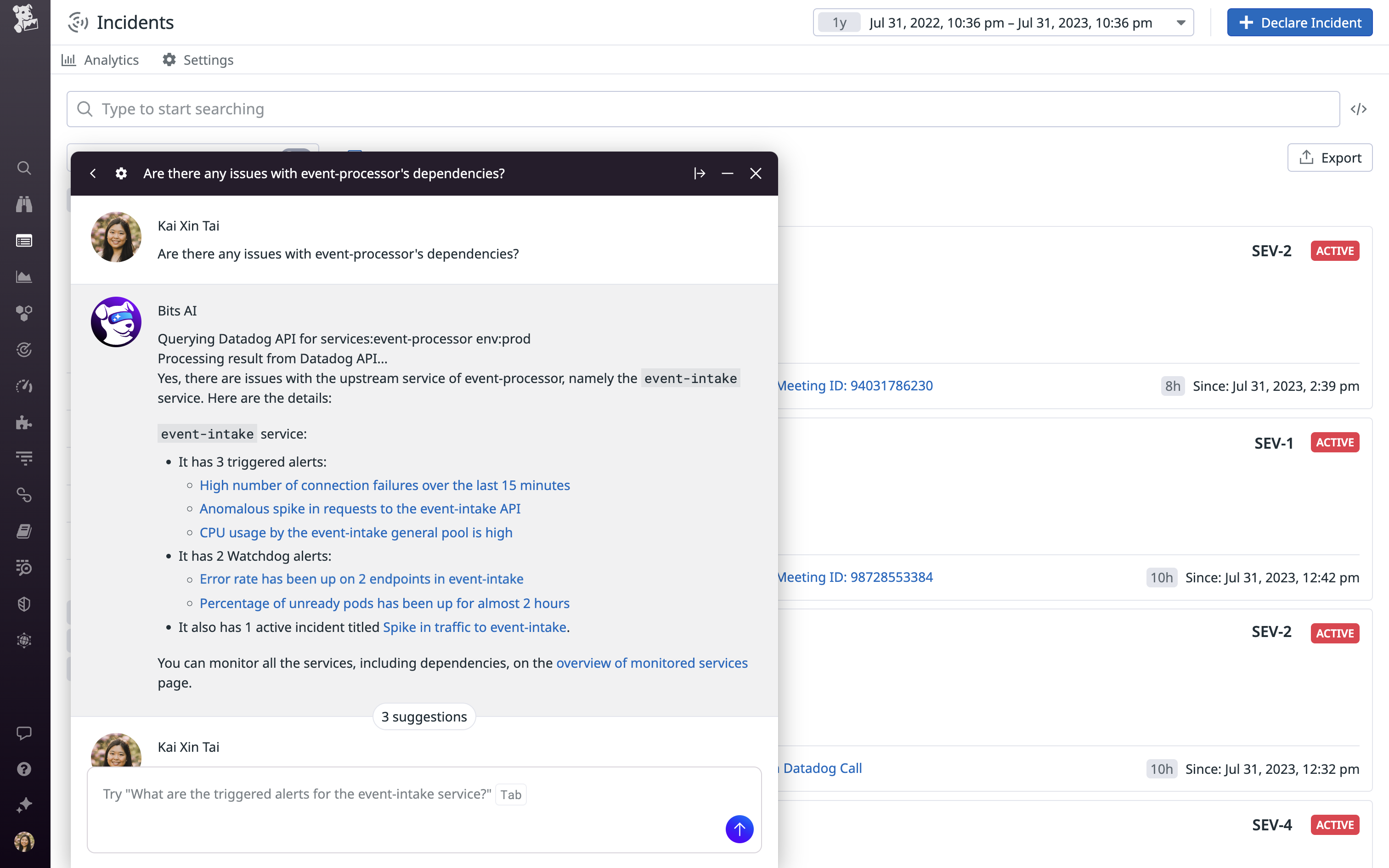
    At its DASH 2023 conference, Datadog today launched Bits, a digital assistant that uses generative artificial intelligence (AI) from OpenAI’s ChatGPT platform to provide real-time recommendations to resolve issues surfaced by the company’s observability platform.

    At the same time, the company announced it is extending the reach of that platform to enable IT organizations to monitor the large language models (LLMs) many are now embedding within custom applications.

    Datadog also released an LLM Observability platform in beta, which brings together data from applications, models and various integrations to help engineers discover and resolve AI issues in applications such as performance degradations, drift and hallucinations in real-time.

    Those extensions complement an existing ability to monitor the usage patterns of application programming interfaces (APIs) making calls to the OpenAI ChatGPT platform.

    Yrieix Garnier, vice president of product at Datadog, said the generative AI capabilities in beta are enabled by data the company used to extend the core capabilities of OpenAI’s ChatGPT platform.

    Bits AI learns from both customer data and other sources to answer queries via a natural language interface that makes the Datadog platform more accessible to a much wider range of IT professionals, noted Garnier.

    The overall goal is to reduce the mean-time-to-resolution for issues by, for example, explaining errors and suggesting code fixes that can be easily shared with developers via a Slack communication channel.

    Those capabilities extend the functionality of the machine learning algorithms that Datadog has already embedded within its platform, noted Garnier.

    While the generative AI capabilities added to the core Datadog platform will make DevOps teams more efficient, it’s not quite clear what role those teams will play in monitoring LLMs created by data science teams. In theory, DevOps teams should be responsible for optimizing the performance of any element of an application, but most DevOps engineers today don’t tend to have much experience with LLMs that are created by data science teams.

    At the very least, however, DevOps engineers should be able to share the root cause of an issue that is adversely affecting those LLMs with those data science teams.

    It’s not clear how quickly LLMs will be incorporated into applications, but most DevOps teams should expect them to soon be pervasive. In effect, Datadog is now providing DevOps teams with the AI tools they will need to effectively monitor applications infused with AI capabilities. The issue is not so much whether DevOps teams will be taking advantage of AI to better manage application environments but how quickly. Given the overall level of complexity DevOps teams regularly encounter, few are likely to want to take on that challenge without some level of AI augmentation.

    The challenge is determining exactly what DevOps tasks might be best handled by a machine that enables software engineers to focus on more complex issues they previously didn’t have the time to address.

  • 2024—Year of the Linux Desktop? ChromeOS Reflects its Inner Penguin ¦ GNOME Rethink

    2024—Year of the Linux Desktop? ChromeOS Reflects its Inner Penguin ¦ GNOME Rethink

    Welcome to The Long View—where we peruse the news of the week and strip it to the essentials. Let’s work out what really matters.

    This week: Can the Linux desktop installed base ever break the mythical 10% barrier? Google has been refactoring ChromeOS, and GNOME is working on new window manager ideas. (more…)

  • Agile Planning With Generative AI

    Agile Planning With Generative AI

    Generative AI will eventually impact the entire DevOps life cycle from plan to operate. I started as a developer but have been a product manager for most of my career; for me, the ‘Holy Grail of DevOps’ would be one where product managers (PMs) and business analysts (BAs) were able to define a future state of a business process and press a button to deliver it without any developers, designers or testers involved.

    This dream is not practical in the near term and is not really desirable in the long term, either. PMs and BAs are good at understanding the needs of users and translating them into features but aren’t interaction designers. AI may be able to generate code and tests, but the software architecture for both will still require a deep understanding of the system to structure the solution properly, especially in enterprise SaaS development. So my dream is to build a team where the BAs can define the changes and a small team of very talented architects and interaction designers can realize those changes in 10% of the time it takes today without requiring a large team to implement the details. This is similar to what has happened in manufacturing where robots and numerically controlled machines are able to do the heavy lifting with the help of operators.

    Planning is Key

    When generative AI is actually building the solution, proper planning will be the entire key to success. A well-documented, well-thought-out plan will enable the AI to finish most of the heavy lifting. So the majority of the focus for the dream team should be to get the plan right and to document it at just the right level of detail. Just like I was taught by my first Agile coach 20 years ago, when it comes to documentation, you need just enough just in time.

    In enterprise SaaS platforms like Salesforce.com and ServiceNow, the business starts with a newly implemented system in some initial implementation and then incrementally customizes this software to better meet their needs over time. So, instead of thinking about building a system from scratch, we must think of digital transformation as the continuous improvement of an existing system over time. That means the AI must start with a good model of the

    ● Existing business processes,
    ● Metadata configuration of the system and
    ● Dependencies between the settings.

    Development in the New World

    What does this mean in practice? Let’s look at a day in the life of the dream team.

    The BA will start by telling the AI what changes are desired at a high level. The AI will help refine the requirements by filling in missing details. This will happen through an iterative process of expanding, refining and summarizing until the requirements are clearly defined. Just as lint tools check source code today, the AI will examine the requirements to ensure the user stories are complete, with acceptance criteria well defined. During this process, the AI will do a detailed dependency and impact analysis to provide a heads-up to the BA when there are any unwanted side effects.

    This refinement session will be more of a conversation between the BA and the AI than a one-sided writing session. After several iterations, a complete set of user stories will be created with all of the necessary details spelled out.

    Once the requirements are complete, the BA will be joined by a user interaction designer and software architect.

    The interaction designer will define the interaction spec through a combination of natural language description of the new processes and a functional prototype. Both of these elements will be created and refined through interactions with the generative AI. Prototypes will no longer be simple graphic artifacts to be coded by front-end engineers. The AI will generate a working prototype in the framework of your choice on demand through a combination of verbal requests and traditional point-and-click.

    They will review the plan and begin designing the solution’s architecture which will result in a natural language software spec that documents the data model changes and high-level specifications for the classes that make up the solution. It is likely that the data model changes will be created in a dev environment on demand, with the ERD updated to reflect the new model.

    Depending on the type of changes, the architect and interaction designer may collaborate and iterate on the specs until the “how” is well defined. When the design is ready, the dream team will meet to review the design and sign off on the approach.

    Generate and Iterate

    Once the plan is approved, it’s time for the AI to generate a first-pass solution. We hope and expect that generating the solution will be something that happens in minutes. In this scenario, the dream team will take a coffee break and then come back to the meeting room to review the working solution.

    There is nothing like playing with the actual solution to remind you of the edge cases you forgot or to realize how tedious it is to actually use a new feature. But that’s okay because the team can quickly update the requirements to account for these changes and push the generate button again.

    In fact, they can tinker to their heart’s content. But like all great artists, they must decide when it is good enough to ship.

    In the near term, we will not be able to blindly rely on generative AI, so the architects will have to do code reviews, just as they do today with junior developers. Likewise, the AI may not understand all of the possible dependencies in a system. So there will be a transition period where the process is semi-automatic.

    Eventually, the notion of a two-week sprint will seem anachronistic and a daily cycle of define and release to production will be commonplace. Members of the dream team will spend more time worrying about the high-level usability and effectiveness of their designs and less time struggling with actual implementation, which should make their jobs much more rewarding and the work product much better. I am looking forward to it.