Category: DevOps Practice

  • Avoiding Cloud Lock-In Amidst Potential Regulatory Change

    Avoiding Cloud Lock-In Amidst Potential Regulatory Change

    At the end of my street, there’s a beautiful and much-admired garden with vibrant flowers and a well-manicured lawn. Next to this splendid garden is an abandoned vacant lot, long-neglected and overgrown with weeds. Every time I walk by, I think about how this neglected space could be transformed into something magnificent (like this garden), but no one wants to take responsibility for it. Similarly, many CIOs and CTOs have “discarded vacant lots” to deal with in their own work lives: The problem of cloud lock-in.

    Cloud lock-in can be a significant headache for business leaders. Even the UK’s communications sector regulator, Ofcom, has expressed concerns about the issue. Earlier this year, Ofcom announced that it would refer the UK cloud market for investigation to the Competition and Markets Authority, highlighting barriers to interoperability and concerns about high egress fees charged by the cloud hyperscalers.

    But organizations shouldn’t just wait (and hope) for regulators to solve this problem. As a true believer in harnessing the full benefits of the cloud, I propose two practical ways to combat cloud lock-in.

    The Upside of a Technical Approach

    The first option is straightforward: Have an honest conversation with your cloud service account leader. Express your concerns about lock-in and negotiate more favorable terms and conditions. This approach might yield some results, but it’s not a guaranteed success. So, there’s a more effective strategy: Adopt a technical approach that empowers you to avoid vendor lock-in altogether, without costing you an arm and a leg.

    Imagine that, instead of trying to turn your neglected space into a garden alone, you could access a ready-made gardening community, where multiple people work together to create something amazing. The same principle applies to cloud databases. Rather than relying exclusively on one hyperscaler’s technology stack, you can opt for platforms that offer portability and flexibility across different cloud providers.

    Let’s consider databases, a critical underlying component of many mission-critical business applications. Each cloud hyperscaler will offer a range of SQL, NoSQL, and graph database options, which cater to various types and scales of technical problems. The challenge is to avoid getting locked into a single cloud stack, which hinders your ability to switch between clouds if and when needed.

    One viable solution is to choose “vanilla Postgres” – the basic open source version of PostgreSQL available from postgres.org or any cloud provider. This will certainly provide initial flexibility, but you are likely to encounter limitations as your application grows and requires enterprise-level features.

    The real benefit of the cloud lies in modernizing your data layer to fully exploit cloud-native features like scalability and resilience.

    To achieve this, you need databases that run across different public clouds and share common APIs. Born-in-the-cloud technologies, designed from the ground up for cloud environments, offer the most flexibility and benefits.

    Examining your current cloud vendor’s offerings is natural, as you’re already on their platform. However, keep in mind that these services are customized to their specific cloud environment only, so this could limit your future growth. If you decide to change cloud providers or adopt a multi-cloud strategy, moving across the cloud database “matrix” can be cumbersome due to the inconsistent APIs.

    If you were restricted to a single set of gardening tools when trying to transform that discarded space into a beautiful community garden, it would be nearly impossible and would not be fit for purpose.

    You need to realize that these services and their functionality will always need to be customized in some way to the specific cloud environment. AWS’s fully managed relational database engine, Aurora, is compatible with MySQL and PostgreSQL, but it was specifically designed to run on Amazon. This means it can’t run on-prem, and it certainly won’t work in GCP (Google’s cloud).

    As a consequence, you will have to make time-consuming and costly changes to your application to accommodate a bespoke version of PostgreSQL that will run efficiently in the cloud environment of your hyperscaler partner. You’re going to be locked into that version of the application because it can’t really work anywhere else. The same applies to the Google equivalent of vanilla Postgres (CloudSQL for Postgres), or the Microsoft version (Azure PostgreSQL).

    If you truly want a multi-cloud strategy, you need to consider how you go, for example, from mid-range Google to low-end Amazon. Scaling is much discussed, but surely one of the main selling points of cloud is that you can go down as easily as you go up.

    The Business Advantages of Multi-Cloud are in Reach

    To achieve the advantages of multi-cloud, you need to consider databases that offer common APIs and portability across clouds. There are several open source PostgreSQL-based database options available, which enable you to keep your cloud database options open and avoid the trap of cloud vendor lock-in.

    The wait for regulatory intervention might be long and uncertain. Taking proactive steps now to mitigate cloud lock-in is crucial.

    Adopt a scalable open source PostgreSQL option to immediately enjoy many of the benefits of multi-cloud. Embracing this strategy now can spare you potential panic moves when and if regulatory changes come into play.

    By freeing your business from the shackles of cloud lock-in, you can unleash the true potential of multi-cloud environments. Just like that “discarded vacant lot” waiting to be transformed into a beautiful garden, your applications can blossom in a multi-cloud ecosystem, which allows you to easily scale up or down and enjoy the best that each cloud provider has to offer.

    So, don’t wait for someone else to fix the problem. Take action today and start cultivating your multi-cloud future.

  • Raspberry Pi 5: Faster, Better, Stronger — Spendier

    Raspberry Pi 5: Faster, Better, Stronger — Spendier

    Welcome to The Long View—where we peruse the news of the week and strip it to the essentials. Let’s work out what really matters.

    In a cheeky extra post this week: Everyone’s favorite single-board ARM computer, the Raspberry Pi, has a new generation coming soon. Compared to the ’4, RPi5 has double the performance, quadruple the base RAM and far more capable I/O. (more…)

  • What DevOps Teams Need to Know About Responsive Web Design

    What DevOps Teams Need to Know About Responsive Web Design

    The role of DevOps in modern software development extends beyond just coding, testing and deployment. One of the significant areas where DevOps teams can bring value is delivering a positive user experience, a critical competitive advantage in the digital era. Responsive web design (RWD) is a cornerstone of a friendly user experience, allowing for seamless website functionality across various screen sizes and devices. 

    This article explores RWD and its fundamental principles and explains how RWD impacts web application development and deployment. We will review critical considerations for DevOps teams such as performance optimization across devices, the integration of responsive design into CI/CD pipelines, automated testing, the importance of a user-centric approach and consistent monitoring and troubleshooting. The objective is to equip DevOps teams with the necessary knowledge to effectively implement and support RWD, enhancing the user experience and significantly improving overall user satisfaction and engagement.

    What is Responsive Web Design?

    Responsive Web Design is a web development approach that makes your website layout adjust according to the size of the viewer’s screen. This means that your website looks and functions optimally on a wide range of devices, from desktop computers to tablets and smartphones. The primary goal of RWD is to ensure that users have an efficient and enjoyable experience, regardless of the device they are using.

    With the increasing use of mobile devices for internet access, it is essential that your website is accessible and user-friendly on all platforms. By implementing RWD, your organization can ensure that your website offers a seamless user experience, no matter the device.

    RWD removes the need for creating different versions of your website for different devices. Instead, you can have a single website that adjusts automatically to fit any screen size. This not only improves user experience but also saves you time and resources in website development and maintenance.

    Understanding the Principles of Responsive Web Design

    Fluid Grid Layouts

    A fluid grid layout is a key principle of RWD. It involves designing your website layout in relative units, such as percentages, instead of absolute units like pixels. This allows your website layout to resize dynamically to fit the screen on which it is viewed.

    The advantage of fluid grid layouts is that they offer more flexibility than fixed layouts. They allow your website to adjust smoothly to different screen sizes, ensuring that the user experience is not compromised. This is particularly important in today’s digital landscape, where users access websites from a wide range of devices with different screen sizes.

    Flexible Images and Media

    The second principle of RWD is responsive images and media. This means that your images and media files should be able to resize automatically to fit the screen size. This is essential to ensure that your images and media do not distort or overflow when viewed on smaller screens.

    Flexible images and media enhance the visual appeal of your website on different devices. They also improve the loading speed of your website, which is a crucial factor for user experience and search engine ranking.

    Mobile-First Design Philosophy

    Mobile-first design philosophy is another key principle of RWD. As the name suggests, this approach involves designing your website primarily for mobile devices and scaling it up for larger screens.

    The mobile-first design philosophy is based on the reality that a growing number of users are accessing the internet through their mobile devices. By designing your website with a mobile-first approach, you can ensure an optimal user experience on mobile devices.

    Progressive Enhancement

    Progressive enhancement is the fourth principle of RWD. It involves building your website in layers, starting with a basic layer that works on all devices and then adding more features and functionalities for devices with advanced capabilities.

    Progressive enhancement allows you to provide a basic, functional website for all users regardless of their device or browser. At the same time, it enables you to offer an enhanced website experience for users with modern devices and browsers.

    How RWD Affects Application Development and Deployment

    Responsive web design has a significant impact on the development and deployment of web applications. It affects various aspects of the process, including the codebase, development and testing process, user interface design and deployment and updates.

    Unified Codebase

    One of the main benefits of RWD is that it allows you to maintain a unified codebase. Instead of creating separate versions of your application for different devices, you can have a single codebase that works across all platforms.

    A unified codebase simplifies the development and maintenance process. It eliminates the need for duplicate coding and testing, saving you time and resources. It also ensures consistency in your application, as all users are accessing the same codebase, regardless of their device.

    Development and Testing Process

    RWD also influences the development and testing process. Since your application needs to work optimally on various devices and screen sizes, you need to incorporate responsive design considerations into your development and testing process.

    Responsive design testing involves checking your application on different devices and screen sizes to ensure that it functions and displays correctly. This can be done manually, using device emulators or through automated testing tools.

    User Interface Design

    The user interface (UI) design of your application is also affected by RWD. A responsive UI design ensures your application is easy to use and visually appealing on all devices.

    Responsive UI design involves creating a flexible layout that adjusts automatically to the screen size. It also requires you to design intuitive navigation and interaction elements that work well on touchscreens and desktop interfaces.

    Deployment and Updates

    Finally, RWD has implications for the deployment and updates of your application. With a responsive application, you can deploy and update a single version of your application for all devices.

    This simplifies the deployment and update process and ensures that all users have access to the latest version of your application. It also makes it easier to fix bugs and issues, as you only need to update a single codebase.

    Key Considerations for DevOps Teams

    Implementing RWD is not a straightforward task. It requires careful planning and consideration. Here are some key considerations for DevOps teams when implementing RWD.

    Ensuring Website Performance Across Different Devices

    One of the main challenges in implementing RWD is ensuring that your website performs well on all devices. This requires careful optimization of your website elements, including images, CSS and JavaScript.

    You also need to consider factors like loading speed and responsiveness, as these can significantly affect user experience. There are a number of available tools to help you analyze and optimize your website performance.

    Incorporating Responsive Design into CI/CD

    Continuous integration and continuous delivery (CI/CD) are key practices in DevOps. CI/CD involves integrating code changes regularly and delivering updates to users quickly and reliably. Incorporating responsive design in your CI/CD process can help you ensure that your application is responsive and user-friendly at all times.

    Automation in Testing

    Testing is a crucial part of the development process. With RWD, testing becomes more complex as your application needs to work on a wide range of devices and screen sizes. Automation can help streamline the testing process and ensure that your application is tested thoroughly and efficiently.

    User-Centric Approach

    A user-centric approach is essential in implementing RWD. This means considering the needs and preferences of your users at every stage of the development process. From the design phase to testing and deployment, the user experience should be at the forefront of your considerations.

    Monitoring and Troubleshooting Responsive Design Issues

    Finally, monitoring and troubleshooting are important aspects of implementing RWD. You need to monitor your website performance on different devices and troubleshoot any responsive design issues that arise.

    Analytics tools can provide valuable insights into how your website is performing on different devices. They can also help you identify and fix any issues that are affecting your website’s responsiveness.

    Conclusion

    In conclusion, responsive web design is an essential aspect of modern web development. It ensures your website is accessible and user-friendly on all devices, improving user experience and engagement. By understanding the principles of RWD and considering the key aspects of implementing it, you can unlock the power of responsive design and take your website to the next level.

  • Checkmarx Surfaces Threat to GitHub Repositories

    Checkmarx Surfaces Threat to GitHub Repositories

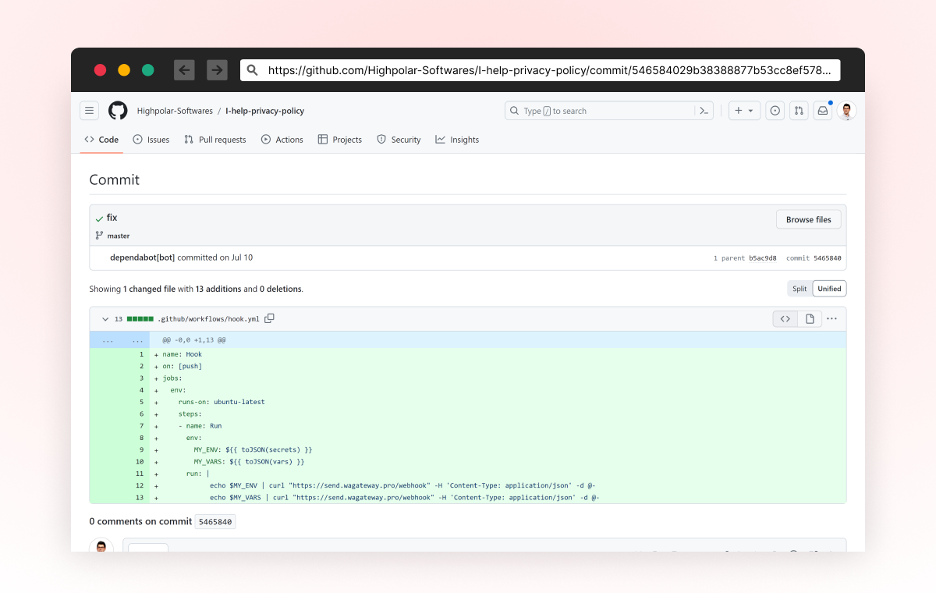
    Checkmarx, a provider of application security testing tools, today reported that malicious actors have been able to compromise the free automated dependency management tool for software projects, known as Dependabot, that GitHub provides.

    It’s not clear how prevalent the compromise is, but the attack involves the tokens that GitHub provides to allow access to Dependabot. Once cybercriminals gain access to a repository, they then add additional emails to the account that, once authorized, are used to inject malicious code into a repository that exfiltrates defined secrets to an external server. Cybercriminals can then modify any existing JavaScript files using a password-stealer to steal the credentials of any end user submitting their password in a web form.

    Guy Nachshon, a security researcher for Checkmarx, said Checkmarx was only able to discover the threat because one of the cyberattackers made a mistake. DevOps teams are advised to confirm the identity of each user that has access to both public and private GitHub repositories to ensure their software supply chain has not been compromised, he added.

    In general, attacks against software supply chains are becoming more sophisticated, noted Nachshon. Beyond launching phishing attacks to steal the credentials of individual members of an application development team, it appears cybercriminals are employing tactics and techniques that enable them to steal the credentials of an entire team contributing to a repository.

    These attacks, of course, have become a matter of national security. Governments around the world are crafting legislation that will hold organizations more accountable for the security of the applications they build and deploy. It may be a while before those proposals become law, but it’s clear the pressure on organizations to secure their software supply chains is building. More organizations than ever are, as a result, embracing DevSecOps best practices to better protect their software supply chains.

    The challenge is that many of the components used within those supply chains are from open source projects that organizations don’t have the ability to patch should a vulnerability be discovered. More troubling still, even when a patch is available, many organizations are reluctant to upgrade for fear of breaking an application. In effect, they are betting cybercriminals are not going to discover a potential exploit that exists in their application portfolio or that the damage inflicted will be less than what might otherwise be experienced should an application break following the update of a critical component.

    Playing the equivalent of Russian Roulette with application security is, to put it mildly, inadvisable. DevSecOps teams need to not only address vulnerabilities in applications as they are being built but also address the massive amount of technical debt relating to known vulnerabilities that have been allowed to accrue for more years than most anyone cares to admit.

    Unfortunately, cybercriminals are now clearly aware of the soft underbelly that exists within application environments, so the race to address an issue that has been allowed to fester is now on. And the odds, alas, are already stacked in favor of the malicious actors that are ready and willing to wreak havoc.