Category: DevOps Practice

  • Agile Service Management in Practice

    Agile Service Management in Practice

    It turns out agile and service management go together quite nicely. But how, and how do you translate the agile philosophy to actual changes in your work? There is much to learn on the topic.

    Agile Service Management: A Checklist

    Here are several practical examples on how to make your service management more agile:

    Make Sure Everything You Do Adds Value for the Customer

    IT departments usually place a good deal work into tasks that have little actual value for their customers. For example, a colleague of mine recently visited an organization where its IT department had written an extensive manual for a new smartphone it offered. While this might sound useful, most of the information was already available to users on the internet. That and next OS update would have made the manual outdated and useless.

    Plainly speaking, this is a waste of time and resources. There’s no need to replicate work already done and content that is readily available anywhere on the web. Taking a focus on agile, a better way to go may have been of documenting information to keep the manual limited to what is strictly necessary, and provide these instructions to a small test group. In doing so, only describe company-specific information, such as how to synchronize your work email with the new smartphone, and respond to the documentation based on the feedback you receive from your test group. Following this feedback, you are able to update the documentation before you officially begin to supply the smartphone, for example.

    Always Work Closely with Your Customers

    As it designs its services and processes, service organizations must make many assumptions about the needs of its customers. For example, for years a facilities organization encouraged its customers to log a call when something was wrong in the office building. Recently, it discovered that customers were annoyed to receive five or six status update emails after they log a call—one reason many customers stop logging calls altogether.

    In agile service management, you always involve your customers as soon as possible with everything you do. Using the example above, come up with a solution together with customers. When customers log a call, they can tick a box saying they want to receive status updates. One question and a single checkbox can spare a great deal of frustration.

    The Right People in the Right Place

    Many IT organizations lean heavily on processes, unfortunately, but their goal is to guarantee consistent quality of services, no matter who supplies the service. While good in theory, in practice it matters who supplies a service. For example, an unmotivated service desk likely probably leaves a less-than-positive impression on your customer than a happy, motivated employee. You simply can’t cover this outcome with a “process.”

    An important part of the agile mindset then is providing enough time and attention for your team members, which only functions well with people who are good at the work they do and when the work they do makes them happy. If a team member is no longer motivated, talk to the employee and see if you can find a role where they’ll be happier, and better able to support the organization as a whole.

    Make Your Processes as Flexible as Possible

    ITIL processes are usually not flexible, to say the least. Change management is a great example. A request for change must go through a set number of predefined steps. The only choice you usually have in the process is approve or decline the change. There’s no room to change plans and if you want to change them, you need to stop the process, make a new plan and get approval. Plan, change, stop with obstacle. Plan change and plan all over again. Not efficient in most cases.

    Your design and planning must remain flexible enough to address ever-changing organizational demands. This, however, doesn’t mean you need to implement every single planned change, and you also must allow your team to deal with new processes as they see fit.

    Design, Implement and Improve Your Services Step by Step

    New software or services implementations can take up months and even years. When the implementation is finally done, you’ve gained new insights and probably want to change many things, but by that time there’s likely little budget left or the project team members have moved on and it’s up to the application manager to process all the feedback on their own.

    Delivering new services in an agile way means you deliver something workable as soon as you are able, collect feedback and use this feedback to improve the product. The process isn’t perfect, but that’s okay. While you continue working on the next process, you can receive feedback to improve your incident management.

    Keep Your Services and Operations Straightforward

    Requests for services often contain a good deal of unnecessary management authorizations. In many cases, IT department leaders assume that department management wants control over every individual request or, alternatively, the IT department doesn’t carry any responsibility. This creates a process unnecessarily full of authorizations and a manager who gets loads of emails with authorization requests.

    Nothing should be this cumbersome. Things will be much smoother when the IT department members ask managers how much control they really want or need. They usually don’t really want to receive a number of emails, but there is an alternative solution: Requests don’t need to be authorized and managers can receive a monthly overview of the costs. This way, the manager still has control over costs, but he or she doesn’t have to process numerous emails. And the employee, the user, is helped much more quickly.

    Making Your Incident Management More Agile

    Where do you need to start when you want to work with agile? The response to this question depends on the organization. The best approach may be starting with taking a look at your current services and compare these with agile principles. For example, where’s the friction? What improvements are easy to implement? That’s where you begin. Then you start by making a small improvement, ask for feedback and move on to the next improvement.

    Incident management is the most important process of a supporting department. It’s also quite straightforward, but how can it be made more agile? Simply start by stripping out everything from the incident management process that has no customer value. Take a critical look at your current processes and evaluate each step by asking yourself if every step of the process adds value for the customer. To answer this question, you first need to know what your customer want, which is probably nothing more than a quick solution.

    Every step in your incident management process must contribute to how quickly an incident is processed. If there is a step along the way that doesn’t contribute to your goal, remove it. Eliminate everything wasteful from your process.

    — Nancy Van Elsacker Louisnord

  • Making the Database Key to DevOps

    Making the Database Key to DevOps

    Here are three best practices for doing DevOps with the database

    The speed of business today demands that the development and deployment of applications is fast-moving, with frequent yet error-free releases. That’s why the adoption of DevOps is trickling down from Amazon, Facebook, Google and the other usual suspects to every company that relies on technology to drive its communications or sales with users.

    The database is now entering the picture, too, because when front-end applications are changed, there often needs to be a change at the back end to accommodate it. Redgate’s 2018 “State of Database DevOps Survey” found that more than one-third (35 percent) of organizations are deploying database changes either daily or more than once a week.

    Some are working even faster, with companies such as online travel provider Skyscanner moving from releasing database changes once every six weeks to 95 times a day when it first introduced database DevOps—and increasing the frequency since.

    This accelerated speed of delivery is a key benefit of database DevOps, with 28 percent of respondents to the DevOps survey quoting it as the biggest advantage. But as releases become more frequent, so, too, does the chance of something going wrong, along with the difficulty of pinpointing the exact cause in a large, complex, fast-changing environment.

    Database DevOps Best Practices

    Even with the most comprehensive testing, issues can occur. And as more and more developers now work across both the application and database, and with larger, more disparate teams, companies need the ability for everyone to drill down quickly to identify and fix issues.

    Achieving this means bridging the database and application worlds by focusing on three key areas.

    Deployment Choice

    Different developers and database administrators will use specific tools to deploy database changes. This can depend on their experience, skills or simply that they have a preference for a particular way of working.

    You need to be able to allow this choice, but without affecting the ability to track down issues. Therefore, ensure that you have a monitoring tool in place that can pinpoint not just when and where changes were made, but which tool was used. This will help quickly find the root causes of any issues, by providing the full context around the problem.

    A Single View

    Data is the lifeblood of many businesses—companies now have more and more databases within their organization, often spread across different locations. However, no matter how complex your IT environment or the size of your estate, you need to be able to monitor database performance from a single place. That way, you can easily identify issues and pinpoint precisely which database is being affected.

    Wherever a database is, and whatever the distance it is being monitored from, the monitoring also needs to be in real time, with updates in seconds, not minutes, providing the reassurance that you always have the latest picture of what is occurring. This enables you to become more proactive, spotting developing trends and issues such as deadlocks or blocking processes, before they affect your users or overall performance. Having a single, up-to-date view is therefore essential when integrating the database into DevOps processes.

    Fast, Customizable Alerts

    The ability to make frequent, reliable, repeatable changes to the database as well as the application is integral to DevOps flows, and monitoring them means evaluating dozens of different parameters constantly.

    Clearly, it’s impossible to keep an eye on everything that is happening, even when events are condensed to a single monitoring screen. Therefore, ensure you’re able to easily create and customize alerts for specific parameters that are important to your business, so that they don’t get missed. This enables you to better understand DevOps processes and ensure that you have early warnings of potential complications, no matter where they occur.

    For the database to be an integral part of DevOps, organizations need a complete, interoperable view of their entire estate so  they can track down problems, monitor processes and spot issues before they affect users. That view should be equally available to the whole DevOps team, including developers, so they can see immediately what effect their latest change is having and take the appropriate action to fix any breaking change while it is still fresh in their mind.

    Only then can databases take their key place in DevOps flows, eliminating bottlenecks and speeding up development to meet fast-changing business needs.

    — Matt Hilbert

  • Picking a Git for the Enterprise

    Picking a Git for the Enterprise

    Some of my Agile and DevOps transformation work, not surprisingly, involves helping clients with tooling adoption—to set up, scale and operate across the organization. This blog piece is about a recent experience of setting up Git across a client organization.

    Git, as most of you are aware, is a fundamental building block for many of the modern engineering practices associated with Agile and DevOps. Software configuration management tools such as Git, in simple words, allow you to track and manage your software code and configuration changes in the most-effective, efficient and distributed way. Git, as the choice of source control, has remained steadfast over the years, while other tools across various categories of DevOps tools have seen their fortunes go up and down with the ever-changing technology landscape of DevOps tools. In fact, one new buzzword is GitOps—some even calling it the next stage of evolution for DevOps.

    Origins of Git

    More than a decade ago , the Linux community faced a challenge  because none of the existing revision control tools met their need for a distributed version control tool. And from that need Git was born. In the words of the creator of Git, Linus Torvalds, “The main issues with SCMs is the politics around who can make changes.” Ever since its creation, Git has radically changed the notion of software configuration management (SCM), by enabling engineers to work remotely and autonomously. (If you are new to Git and interested in exploring more about Git and its features, Atlassian has a tutorial and GitHub has a list of resources.)

    Git and More

    While Git as the core product is fundamentally the same whichever flavor your prefer—GitHub, GitLab or Bitbucket—the wrapper around it determines the important non-functional characteristics such as operatability, security, usability and maintainability. Our quest for an enterprise-scale Git focused on the wrapper and not the core product itself, as much has been written, debated and documented on the core product of Git itself already. The value and relevance to enterprises is in the wrapper that these productsplatforms provide.

    We looked at the core product and related offerings; as you can imagine, the three tooling vendors have different positioning and taking different directions with the future road map for their respective tools. Bitbucket’s strength lies in the fact that Atlassian is bundling the product with the omnipresent Jira Software and Confluence. GitLab’s road map seems to be taking the product beyond Git and into the idea of a single product for your entire pipeline automation, from concept to cash. GitHub, which is being acquired by Microsoft, is increasingly relying on the strength of integrations with other tools and the workflow capability the company is bundling with it.

    (I avoid an overemphasis on the commercial aspect in this blog; however, I’m not ignoring it completely. Part of the reason is due to the fact that enterprise pricing is not entirely transparent and may vary wildly depending on organization’s negotiating capability, the scale of usage, future potential and marketable track records as perceived by the tooling vendors. This blog is also not meant to be a feature by feature comparison, as this is something you can Google and find out yourself very easily.)


    The Verdict

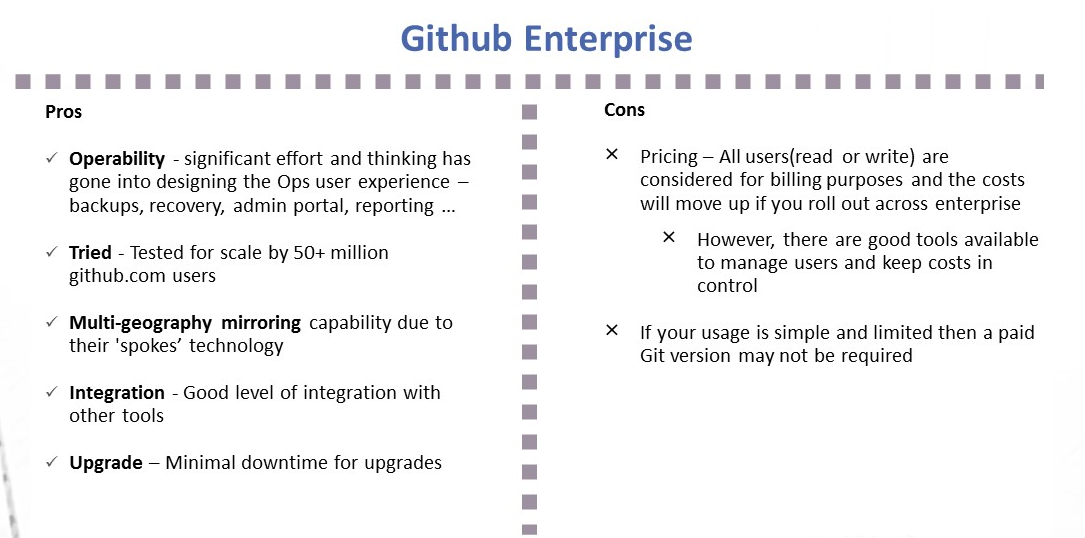
    Github Enterprise pros and cons
    Image1; Github Enterprise – Pros and Cons
    Gitlab Ultimate and features
    Image 2:  Gitlab Ultimate – Pros and Cons

    My Recommendation: It Depends

    1. I liked the vision of GitLab as a single-stop tooling platform for continuous integration/continuous delivery (CI/CD), which goes beyond source control. I think the tool is simple and intuitive to use and great for small to midsized setups or even large enterprises that are focused on having smaller and autonomous teams.
    2. GitHub seems to be well-suited for large and complex enterprises with significant outsourced and offshore-based technology teams.

    I would love to hear your views on what has been your thinking with regards to choosing a Git-based product for your enterprise or teams. Meanwhile, here are some links you might find useful in your decision-making:

    1. Why and how GitLab abandoned Microsoft Azure for Google Cloud – https://venturebeat.com/2018/04/06/why-and-how-gitlab-abandoned-microsoft-azure-for-google-cloud/
    2. Tooling integrations of GitLab – https://docs.gitlab.com/ee/integration/README.html#doc-nav%20for%20list%20of%20integrations
    3. GitHub add-ons are listed at Addons are listed at https://github.com/marketplace
    4. Security and scalability info of GitHub is at https://github.com/jonico/github_security_and_scalability_overview
    5. Products that integrate with GitHub platform – https://github.com/works-with
    6. Pricing of GitLab – https://about.gitlab.com/pricing/

    — Aditya Vadaganadam

  • Why Open Banking Should Consider DevOps

    Why Open Banking Should Consider DevOps

    There is a craze sweeping Europe, and rippling across the world—and no, I’m not talking about the next British Invasion. Open banking is a trend that’s significantly altering how banks work with fintechs and maintain agility in the global marketplace.

    A main enforcer is PSD2, a piece of EU legislation that sanctions access to personal banking data. It’s resulted in an explosion of EU banks providing public application programming interfaces (APIs) for fintechs to develop with. The implications aren’t limited to Europe; many banks all over the world are looking to PSD2 as a baseline, forcing some tough evaluation of how financial architecture should adapt.

    Banks are also under consumer threat to evolve or get out — a 2016 Accenture study found that 78 percent of respondents would bank with a tech firm such as Amazon or Google.

    As banks transition into savvy software providers due to market pressure, one thing is certain: they must adopt agile software development strategies that streamline the deployment and maintenance of these services. In other words, banks must adopt a DevOps philosophy to maintain a market advantage.

    Open Banking Evolves Bank Architecture

    The bank has become programmable. Many banks are now required to allow third-party authentication and access to payment, account information, fee details and other data. This involves support for various integration methods; SDKs, APIs and OAuth for authentication, as well as documentation, sandboxes and other developer tools. Whether they like it or not, banks are now SaaS providers.

    It should be noted too that open banking is not limited to the European Union. The UK’s open banking standard is the Competition and Markets Authority (CMA), and Australia, Japan and other countries are making similar inroads with regulating banking data. The excitement has also encouraged North and South American players to open up.

    The new bank APIs help bypass traditional methods, saving a ton of time. In an article in American Banker, BBVA noted that online e-commerce system Dwolla was able to slash the typical three-day to six-day deposit time frame using their payment APIs. “We’re allowing that all to occur in real-time,” said Chad Ballard, director of mobility and new digital business technologies at BBVA Compass.

    Letting FinTechs focus on web UI development helps banks focus on their core competencies: banking and authentication. Establishing connections via API-driven microservices is also a safer alternative to screen-scraping.

    Why DevOps for Banking?

    Banking Exchange defines agile banking as “the future of retaining relevancy for banking as a whole.” For open banking to be successful, the platform must be tested, monitored and secured for fintech consumers. Sounds a lot like the hallmarks of quality DevOps practice.

    Popular services Google Maps, Uber, Stripe, Twilio and others have adopted an API-as-a-product mentality. These programs adhere to best practices, iterative feedback and agile development methodologies to excel. Similarly, for banks to remain competitive, they must treat their platform architecture and public gateways with the same tenacity.

    For banks, uniting iterative development with stability testing—essentially the Dev + Ops mantra—for their APIs, microservices and frameworks will go a long way to help reach open banking goals and maintain future regulations on API performance standards.

    A DevOps mindset is crucial to consider early on in the open banking journey, as it can impact how banks address:

    • Iterative development and testing: By tying in iterative development with stability testing, organizations can surpass the time limitation often incurred between shipping versions between development teams and testing teams.
    • Continuous monitoring: Many tools are available to monitor the CI/CD pipeline, helping banks respond to issues and improve uptime.
    • Versioning strategies: DevOps in banking will see the larger picture, working in the REST mantra to build on the scale of decades to avoid breaking change.
    • Transition to microservices: As enterprises dispose old monolithic architectures, bitesize services are arguably more appropriate for modern banking; however, they come with unique caveats that DevOps can address.
    • Collaboration between silos: By pivoting to more point-to-point, collaborative processes, banks can reduce friction to meet the responsive expectations set by FinTech, who are becoming new public faces for banking.

    An end result of DevOps is to increase agility in an organization. Especially for large banks, this signifies drying up the traditional “waterfall” development life cycle known to stigmatize the corporate approval process.

    Case Studies: How Banks Are Utilizing A DevOps Cycle

    Many banks have been vocal about what they are doing to ignite positive technological innovation alongside third parties. For example, Capitol One’s DevExchange recently announced a new initiative called experimental APIs. “They are designed with the goal of getting early feedback from the community around API desirability and design before the product release,” the company noted in a blog post.

    In this experimental setup, operational cues inform development. Getting the two sides to talk and respond to community feedback is paramount for DevOps to succeed.

    For banks to adopt an agile makeup, Manfred Bortenschlager, Red Hat’s director of Business Development for API-based Integration Solutions and API Management, recommends what he calls an “agile integration.” This involves a distributed integration for greater flexibility, containerization for the ability to scale better and managed portals for reusability.

    Another interesting effort is that of CIBC, a Canadian bank that is responding to the open banking movement with a responsive microservices framework the company has developed using open source components.

    What’s evident is that many banks already acknowledge DevOps principles as key for innovation in their sector. Through the the use of iterative testing, innovative tooling and automated workflows, banks can achieve greater operational efficiency.

    Open Banking Must Follow Software Development Practices

    A result of the open banking movement is that banks must keep technological pace with fintech. Especially with regulatory pressure, banks must consider how best to approach new technological initiatives.

    DevOps is a way to mitigate concerns. As a philosophy for uniting technical procedures with responsive operations, it’s a prime strategy for banks to consider when readdressing their technology.

    In defining what “agile” embodies for banks, Steve Williams of Cornerstone Advisors said: “The idea is you need to start taking the management and operations of a financial organization and start adapting some of the things that have made technology companies viable.”

    American Banker echoes this, believing that “banks should be more like software companies.”

    Now prodded by open banking, it’s high noon for luddite banks to embrace contemporary software development practices; that means incorporating DevOps into the open banking agenda.

    — Bill Doerrfeld

  • Software Development: A Better Way to Measure Success

    Software Development: A Better Way to Measure Success

    Here’s a metaphor for software development you probably haven’t heard before: It’s like flying a plane. You have a starting point and a destination in mind, there’s a good chance you’ll change course midflight, and … sometimes you get a little nauseated?

    Okay, it’s not the best analogy. But there is one aspect of piloting a plane that offers valuable insight into how to measure your team’s performance more consistently. It’s called the performance-control technique, and it may be the best method you’ve never heard of for keeping your engineering teams aligned behind a common goal.

    Imagine for a second sitting in the cockpit of a plane, surrounded by clouds. Forget using the ground to orient yourself; you have nothing but your instruments and wits to guide you. It’s a situation I’m plenty familiar with, having taken flying lessons out here in rainy Seattle. In those cases, you use your altitude and power settings to set up a particular control scenario that results in your desired output, whether it’s ascending, descending, straight and level or turning. And then you monitor your performance—in this case via altitude, vertical speed and airspeed indicators—to verify that you’re achieving your desired output.

    Now unless your software development pipeline is irredeemably broken, you are probably not flying completely blind as you work to build and ship new features. But the technique still applies: Choose your control metrics (time to release, for example), and then set up a series of performance metrics to keep it on track.

    Cloudy Skies Ahead

    The greatest strength of the performance-control technique is its acknowledgement that any control can result in unintended consequences. Take reducing the time from check-in to release. It’s a fantastic goal: The quicker you get code into production, the quicker you deliver updates to your customers. The quicker you do that, the quicker you get feedback and respond to their needs. The quicker you do that, the quicker you can iterate on features. And the cycle continues.

    But it’s also a goal that can result in unintended consequences: When you single it out for attention, it’s only natural team members will want to do everything they can—at the expense of almost everything else—to achieve it. That’s not to say they want to do wrong; rather, they’re just trying to be good citizens. (And, okay, they don’t want their name to show up in a report about why the team didn’t meet its quarterly goal.)

    So people make compromises. Maybe they drop full regression passes and replace them with incremental feature and integration testing. It’s not that they don’t care about quality. But in their quest to help the organization meet its single-minded goal of reducing the time from check-in to release, they opt for the easiest change that could get them there, indirectly prioritizing speed over quality in the process. And that happens because there aren’t checks in place to keep it from happening.

    Taking Control

    How do you put this into practice at your own organization? Start by choosing your goals and then selecting the control metrics. For many, it could be as simple as increasing speed; it’s a natural goal to chase, for the reasons already discussed. But it may be something different; only you and your teams can decide by being intentional in how you evaluate your production environment.

    Then it’s time to choose your performance metrics for each of your goals. You can do that yourself, but it may be more illuminating—and, honestly, more fun—to get your software development team involved. That could range from encouraging them to brainstorm the negative consequences of implementing that goal to straight-up asking them how they’d game the system.

    The following chart offers examples of control goals, their resultant unintended consequences, and the performance metrics necessary to keep them in check.

    Desired Output Control Goal Performance Goal Unintended Consequences
    Climb to 4500’ Increase power, nose up Airspeed, Altitude Stalling
    Reduce bounce rate Reduce site latency Revenue, Conversions, Customer Engagement Smaller pages, poor experience, feature attrition
    Generate more conversions Increase availability Releases, Backlog Ticket aging. Lower frequency of releases, cherry picked work items, no risk taking.
    Reduce MTTR Speed up ticket closure Re-open rate, new ticket rates. Premature closure, delay in opening tickets for issues.

    It’s important to note that how closely you monitor each of these performance metrics will vary, and in some cases significantly. Rather than attempt to apply a one-size-fits-all approach, instead think of each in terms of how long it takes to detect that the metric is falling out of its control envelope and how long it would take to recover if it did. If it takes one day to detect that you’re outside of your envelope and three weeks to recover, then by all means, check in daily. But if it takes three months to fall out of the control envelope and just a day to recover, you may only need to check it once every couple of weeks.

    A Soft Landing

    As we’ve supported software development teams in their efforts to modernize their software delivery methods, we’ve heard time and time again, “What’s the best metric for measuring success?” And we struggle to come up with an answer because there is no golden metric that works for everyone. But more important, even the good ones can lead well-meaning engineers and team leaders to optimize for one thing while letting others suffer.

    So rather than search for a magic bullet, the secret is to find goals that work for your needs—and then build in metrics that keep you and your software development team accountable.

    — Rob Duffy

  • Serverless: What You Need to Know

    Serverless: What You Need to Know

    There are clear benefits to serverless architecture, with many enterprises already making or planning to make this change. Like any paradigm shift however, the move to serverless carries both benefits and risks. Here’s what you need to know.

    AWS pioneered the serverless space with its release of AWS Lambda back in 2014, with the other major cloud providers following: Azure Functions as a service, Google Functions and IBM Cloud Functions (Apache Openwhisk). Later entrants in this space took the form of container-based, fully-managed serverless frameworks such as Kubeless.

    The Good, the Bad and the Use Cases

    Some of the most common serverless use cases today include building batch processing like image compression, cloud job automation, serving IoT devices from edge to the cloud and building single page applications (SPA).

    On one hand, cloud-hosted serverless functions eliminate the overhead associated with managing actual infrastructure and introduce significant operational cost savings through efficient utilization of the underlying infrastructure. This allows developers to develop in their own comfort zone, using their language of choice: Python, JavaScript and, depending on the platform, even Go, Java, C#, PHP or others.

    On the other hand, delegating the infrastructure control to the provider means that serverless introduces new set of operational blind spots and observability challenges. It also complicates the placement and management of deep security controls, when compared to container, virtual machine (VM) or even bare-metal workloads.

    Serverless is Not the Answer for Everything

    Whether building new applications or migrating existing ones, serverless runtimes have significant restrictions. Cloud-hosted functions-as-a-service restrict the runtime duration of a function, require a “warm-up” time for function invocation and don’t guarantee local state preservation across function invocations. This means that application logic that is purely time-bounded, involves short functional transformation of input into output and can handle a slow starting time would fit the serverless paradigm perfectly.

    Migrating state-oriented applications or stateful microservices into serverless functions is a different story. This will typically make use of a database—either managed or as a service—or make use of an application cache such as Redis or object store such as S3 to store state across requests.

    While cloud-hosted serverless removes the burden of patching and maintaining infrastructure, the ephemeral nature of functions makes it extremely challenging when it comes to establishing perimeters and controls around sensitive data in flight and at rest.

    Build, Ship and Run Serverless

    Serverless, as young as it may be, is extremely promising. Adoption choices should be balanced around platform maturity for developers, testing, operations and what security and regulations require.

    If we take as an example what Docker did for container packaging, with its Container Image format, this is exactly what functions and serverless need: a common language for packaging. A common tool for building, shipping, running, operating and securing function-based workloads would serve as common ground for the variety of platforms already out there.

    From a security perspective, unification around secret consumption, service-to-service authentication and authorization between first and third parties, function workflows and access whitelisting, observability, security network monitoring, access policies to the network and access policies to data—all these would lower the friction of adoption.

    The Cloud Native Computing Foundation recently released version 0.1 of Cloud Events, the communication message format for function and event triggering. This emphasizes how far serverless is yet from maturity and cohesive standards.

    From a security perspective, Type A serverless workload protection systems must be able to inspect the serverless workload runtime. Type B workload protection systems are limited to what the serverless platform provider APIs make available for out-of-band data-oriented security analysis.

    Cloud-hosted functions makes Type A protection challenging to achieve, whereas fully managed serverless frameworks (for example, Kubeless), enables enterprises to adopt serverless and open the door for new developer experience. These also accelerate innovation velocity and, with security tools designed for microservices and modern virtualization technologies, can maintain full visibility and runtime control over network and data.

    Securing Functions as a Service: A New Arsenal of Security Tools

    Functions, just like any other web-based microservice implemented using containers, VMs or bare-metal server, are not free from the well-known top 10 OWASP web application vulnerability list.

    Functions, however, strongly rely on non-web, event-based communications and event-based networking channels. These, on public cloud providers, prevent inserting security controls to detect exploitation attempts or data exfiltration and enforce well-defined workload policies. This requires new arsenal of security tools that understand microservices, scale horizontally and coexist with the existing security operations and security stack.

    The ephemeral nature of functions-based workloads makes them more difficult to exploit, and it is definitely harder to persist a threat. Yet third-party code vulnerability or open source components gone bad can result in sensitive data flowing into the wrong hands, landing in a misconfigured object store.

    As serverless requires persistent data storage in external services, a scenario in which circumventing a running function to leak secrets makes that sensitive data one hop away from an attacker is not unrealistic.

    Controlling it all together: What private information can be processed, what sensitive data is in flight and through which event grid channels it’s being received and sent, along with how functions are invoked by API gateways and which API calls which functions make to internal and external services. This is where risk, regulation and modernization collide.

    Bottom Line

    Despite significant adoption and constantly growing interest, serverless is still in its infancy. When it comes to standards, operations, testing and orchestration tooling, workflows and  security, a flood of water must yet pass under the innovation bridge of cloud providers, with AWS Lambda leading the adoption curve, Azure FaaS making giant innovative leaps forward and community-driven frameworks built on top of Kubernetes.

    Innovation aside, serverless creates huge operational and security blind spots. Understanding those risks and having proper introspection and inspection capabilities is what should dictate the adoption and the choice of the platform.

    — Gadi Naor

  • Continuous Delivery is Not Continuous Deployment

    Continuous Delivery is Not Continuous Deployment

    Every once in a while, it is worth revisiting a topic that flies under most people’s radar. The differences between continuous delivery and continuous deployment is one of those topics. While those steeped in DevOps are well-aware that software can be delivered daily (or even more frequently), deployment is less frequent, and more dependent upon both development and marketing cycles.

    Most CI/CD tools can and do crank out “deployable” apps on a daily basis, or even each time that code is checked in. In theory, each of these builds is a candidate for deployment, and each has had at least some level of testing.

    But setting up the environment to host these apps is a separate step. Quite often today, it is a step that is handled by scripts that configure/move everything to build the app environment into a comprehensive system with knowledge of network, data sources, storage, etc.

    I’m revisiting this topic because new people often hear “CD” and assume that is the end state. Of course, it is not; the application has to be deployed—to Test and Production at least, and in many enterprises to Staging, also.

    While these environments are almost invariably different (Test does not share IP space with Prod, for example), the deployments must mirror each other as much as possible to make Test representative of what Prod will look like.

    As with any step in the DevOps toolchain, scripts to achieve continuous deployment are not a great solution. They are certainly a good first step—automating what previously was done by hand—but tools that make the experience easier and more dynamic are available, and should be considered.

    Whether an explicit continuous deployment tool or an application release automation (ARA) tool (or an ARA that calls a continuous deployment tool, as we’ve seen some used), something to remove dependence on hand-edited scripts is useful for many reasons, starting with the fact that separate scripts are maintained for Test and Prod and changes must be made in two places when a change is made to an application (such as changing where the DB is located or switching to a dedicated AAA server). This makes scripting fragile. Tools can offer shared deployment and custom deployment sections so that multiple changes can be restricted to those things that truly need to be handled separately.

    Deployment is very much a target exercise. The code has been built; deployment is simply giving it a home. Historically, this required agents be strewn about the data center to help target deployments. Increasingly, agentless tools are available that allow the adaptability of continuous deployment while not requiring agents to be installed on every machine that might participate in the deployment activity.

    The other major benefit of moving beyond scripts and into a continuous deployment tool is huge: Everything else is version-controlled, which provides built-in rollback. A developer made a mess of fixing that bug, and things are worse? Roll back the update until the issue can be addressed. Tools such as Git make that particularly easy to do. On the deployment side, the same functionality is required. “Release 7.2 has been deemed to violate GDPR” might require moving back to the previous release. But script-based deployments are always forward-looking. It is enough to modify scripts to reflect the current environment, and it is a rare organization that requires parallel development of backout scripts. However, this functionality comes for free with a continuous deployment tool—that which it has built it can undo, because it is versioned automatically.

    And the benefit of versioning goes beyond rollbacks: It allows multiple version deployments for AB testing and allows for skipping forward and back as far as necessary to meet current goals.

    Is it a panacea? Of course not. Each technology brings new challenges. But continuous deployment solves more problems than it creates. And most of the problems it creates—a desire for greater integration with networking and storage services in non-cloud environments, for example—will be solved in a consistent and repeatable manner by these tools long before any scripting does. Because the tools are designed to create consistent and repeatable results.

    While you are out there kicking it, consider implementing continuous deployment tools to tackle the DevOps last mile. They’ll make your life easier, and your environment less fragile.

    — Don Macvittie

  • DOES18: Discussing DevOps with Gary Gruver and Helen Beal

    DOES18: Discussing DevOps with Gary Gruver and Helen Beal

    It’s hard to believe that DevOps Enterprise Summit London ( DOES18 ) is right around the corner! The conference, which takes place June 25-26 at The InterContinental – O2, is guaranteed to provide two jam-packed days of learning around architecture, next-generation operations, spanning business and technology divides and much more. If you haven’t already registered, there is still time to secure your spot! Receive 20 percent off registration using the Friends of Gene Kim code (FOG20) at checkout. And, if two days of DevOps just isn’t enough, Electric Cloud is hosting post-conference workshops for a full immersion experience:

    • From New Learner to Executive Leader—Gary Gruver (Electric Cloud strategic advisor, author of “Scaling Agile” and “Leading the Transformation”) and Helen Beal (product owner at the DevOps Institute,) build up your knowledge and transformational leadership potential in this full-day, hands-on workshop geared toward business leaders.
    • You Build It, You Secure It: DevSecOps Workshop—John Willis (Electric Cloud strategic advisor, co-author of “The DevOps Handbook” and vice president of DevOps and Digital Practices at SJ Technologies) hosts this full-day, hands-on, technical workshop to help build and incrementally improve DevSecOps pipelines.

    Prior to DOES18 and upcoming workshops, we caught up with Beal and Gruver to learn a little more about their DevOps background and what attendees can expect during their workshop:

    Alan Shimel: First, for those who don’t know you, tell us a little about yourself?

    Gruver: Hi, everyone – glad to be here. In my professional career I’ve worn a lot of hats—I’ve been an engineering executive, a coach, an author. My experience in this space come from leading large-scale transformations in big organizations with complex tightly coupled systems. I think this gives me a unique perspective that is valuable to any managing large systems that aren’t in a position to just go and “re-architect everything to microservices in the next few months.”

    I started out by leading a group of 800 developers in the HP LaserJet firmware team through a transformation that delivered a 2-3X improvement in productivity. The results were so great that we decided to document the journey in my first book, “A Practical Approach to Large Scale Agile Development.” This book, coincidentally, echoed the same ideas and was finished about the same time that Jez Humble and David Farley published their book, “Continuous Delivery.”

    After that, I joined Macy’s.com as the VP of Release, QA and Operations to apply these same concepts to their very large-scale journey to CD. It helped that Jez worked down the street and we could share ideas back and forth over beers. During this period, the term “DevOps” started getting real traction, and I realized I was one of few people actually helping to roll out those practices in large, complex organizations. At the end of that experience, I published my second book, “Leading the Transformation,” where I documented everything I wish I had known to help others avoid the same mistakes I had made.

    After my experience at Macy’s, I began coaching executives in other large organizations in order to help them transform their own software development and delivery processes. Each one of these engagements was unique, with very different challenges—although I could definitely see commonalities among them. I compiled that knowledge into my third book, “Starting and Scaling DevOps in the Enterprise,” where I lay out the approach I use in working with these organizations.

    Beal: Hi, I’m Helen and I describe myself as a “DevOpsologist”—that is, I study DevOps. I coach, train, write and talk about all aspects of DevOps and help organizations use DevOps principles to deliver value outcomes faster, better and more reliably. I do this at Ranger4 through assessing capabilities, developing improvement roadmaps and then implementing those road maps through workshops, training and facilitating value stream-mapping exercises and games like The Phoenix Project Game. I’ve been working in the software industry for nearly 25 years and have spent most of them specifically focused on helping organizations make improvements in the software delivery life cycle. I also work with the DevOps Institute on content improvement and creation and am a DevOps editor at InfoQ.

    Shimel: How did you “get into” DevOps? Why is it so important to you?

    Gruver: I didn’t get into DevOps to “do DevOps,” because the term hadn’t yet been invented. Instead, I applied the concepts of what later became known as deployment pipelines to my particular situation because they were the process improvements we found had the biggest impact on our efficiency. The group I managed (at HP) was just starting a complete re-architecture of a 10M line code base when the economy crashed (2008), resulting in me being told I had 30 days to come up with a plan to drop my R&D spending by 50 percent but I still had to deliver the new architecture on time. This transformation was critical to the health of the business, so I took it as a personal mission to get this done so we could maintain staffing levels and keep the jobs of all my friends and co-workers.

    Every day I came in and got to work with an amazing group of people that were focused on doing everything possible to help the company survive by improving the efficiency of our software delivery process. We ended up implementing a lot of changes that were later called “DevOps.”

    It was such a huge breakthrough for the business that I have spent the next decade of my life trying to help others realize the benefits of these process improvements. And over time I have focused more on DevOps because I think it best represents the process changes that provide the biggest benefits for large organizations.

    Beal: Working on the whole software delivery life cycle led to four years closely focused on deployment automation just as DevOps was becoming a “thing.” At Ranger4 we decided to build our business around helping organizations understand how to use DevOps principles and practices to make improvements. At Ranger4 we like to say we are fanatical about making life on earth fantastic and that’s the core of why it’s so important to me—we are trying to take pain away from the work people are doing and make them more successful and their organizations more successful.

    Shimel: Tell us about your workshop. Who comes to your workshops? What will people coming to your workshop learn?

    Gruver: My workshop is a combination of the “Leading the Transformation” and “Starting and Scaling DevOps in the Enterprise” books. We start helping executives understand their roles in leading a successful transformation and provide a framework for that effort. Next, we deep dive on DevOps, helping executives understand how implementing DevOps in large, tightly coupled organizations can and needs to be different from what you hear about being recommended by the unicorns with loosely coupled architectures. The workshop also shows the executives how to analyze their current deployment pipelines to identify the biggest sources of waste because I strongly believe if you don’t start delivering real business benefits early your transformation will start losing momentum.

    This workshop gives people the opportunity to integrate everything they learned at DOES and put it together with an approach they can take back to their organization and start making changes that will improve the effectiveness of their software development and delivery processes.

    Beal: My workshop is the DevOps Institute’s “DevOps Essentials,” so kind of what it says on the tin: the fundamentals of DevOps in half a day. So we’ll be covering things like where DevOps has come from, why people are doing it and what they are actually doing; the Three Ways; CALMS; changing culture; the relationship between Agile, Lean and ITSM; and building DevOps toolchains. People that come to my workshop will leave with a solid understand of the core practices and principles and DevOps vocabulary.

    Extra insights from Beal:

    Shimel: What’s the hottest topic in DevOps for you right now?

    I’ve always been particularly interested in the cultural side of DevOps and right now I am most interested in the neuroscience of behaviors.

    What did you learn this week?

    I learned this thing about pigs and chickens in agile the other day which made me laugh, and also helped make an improvement in a particular team we are working with.


    Ready to get your hands on DevOps? Register now to join Beal and Gruver June 27 at The InterContinental London – O2.

    If you’re looking for a more technical hands-on experience, register for Willis’ workshop here.

    Plus, there is still time to register and save for DOES18! Gene Kim is giving out his “friends of Gene” discount – use code “FOG20” at checkout for 20 percent off the ticket price.

    — Alan Shimel

  • Spring Cleaning 101: Polishing Up Your DevOps Processes

    Spring Cleaning 101: Polishing Up Your DevOps Processes

    Dev teams should take time to tune up agile processes and continue advancing their shift toward DevOps

    Release cycles are accelerating, but not as fast as development teams want. Customers’ desired release rates are moving at an unimpressive pace; those looking to push out new updates on a weekly basis often find it looks more like a monthly basis—and that just isn’t going to cut it.

    As the frequency of execution increases, dev teams find themselves between a rock and a hard place. While the growing demand for faster turnarounds isn’t poised to slow down anytime soon, teams struggle to integrate a set of tools into an efficient pipeline to get the job done within the time allotted. With demand on the rise, how can teams work together to fast-track their release cycles?

    It’s time for dev teams to apply a little more elbow grease.

    With spring cleaning season upon us, dev teams across industries should take time this season to tune up agile processes and continue the work of advancing their shift toward DevOps.

    Dust Off Roles and Responsibilities

    A once very siloed practice, software development has since taken on a much more agile approach across teams as the need for faster release cycles rapidly grows. According to a recent VersionOne report, nearly 75 percent of respondents attribute the need to accelerate software delivery to their adoption of agile practices. While DevOps is meant to help dev teams deliver applications at a high velocity, managers encouraging the implementation of these processes often overlook the true meaning of DevOps and the effects these transformations will have on its current employees and their roles.

    At its very core, DevOps is the combination of development and operations, which covers a wide range of tasks once performed by developers, testers and operations at different stages throughout the software development life cycle (SDLC). However, a more agile approach means these different processes (building, testing, etc.) are in a more tightly coordinated execution, requiring each of the different silos to have a better understanding—and knowledge—of each process.

    Before jumping in to update any processes or technologies, it’s important to ensure all teams are aligned on their evolving roles and responsibilities. Sit down with individuals, teams and their managers to get everyone on the same page and provide guidance on best steps for moving forward this year.

    Shrink the Skills Gap

    Despite developers’ growing list of responsibilities, a 2018 report from LinkedIn found that there is a significant skills shortage when it comes to software engineers and other similar career trajectories. That gap shrinks even further when you consider the different roles within software engineering itself. For example, developers have recently taken on more responsibility as “full stack developers,” assuring high-quality outputs and confirming there are no bugs in their code, yet have very little knowledge of how to implement continuous testing.

    This spring, spend time with employees to brush up on their skills, refine their job responsibilities and uplevel their expertise. While this isn’t a task that can be performed and executed on overnight, some recommendations to kick start the process include:

    • Get leadership on board: To fund any of this, teams will need leadership buy-in. Be sure to sit down with those in senior positions to explain the benefits to teamwide training from both an organizational and economic perspective.
    • Try the buddy system: Pair up programmers of different skills and levels to mentor one another. Consider it as a coaching system in which team members can provide feedback and training in real time with real-world projects.
    • Consider augmenting software delivery practices to improve quality: acceptance test driven development (ATDD) is a proven accelerator and behavior-driven development (BDD) helps bridge varying skills and blind spots between the different personas across the SDLC.

    Pick up New and Improved Processes for Increased Productivity

    As release cycles accelerate, team leads need to take a close look at each of the stages throughout the SDLC to determine where the roadblocks occur and what exactly is holding employees back. Analyzing not only the quality of outputs, but also how quality assurance is embedded throughout continuous integration (CI) process is a good start.

    Throughout the DevOps journey, there are a number of developers across different feature teams adding to, editing, updating and continuously testing code at any given time. Establishing best practices and some basic ground rules can be a simple way to ensure visibility into each of the teams’ productivity. Everyone must constantly be aware of which teams are moving along and which are struggling a bit to make sure code is well-maintained (e.g. determining if your testing code blocking your CI integration) and that there are no memory leaks or poor code development practices throwing the process off. Continuous testing across different feature teams will also assure that every code component for different functionalities is working once they all finally merge.

    Getting everyone on the same page will also make it easier to simplify real-time decision making. Be sure to work with teams to define their dashboards, ensuring everyone is seeing the same actionable results at any given time.

    Revamp Your Tech

    While people and processes should be a main focus for spring cleaning, don’t forget about the tech. The different types of technologies utilized throughout the DevOps pipeline must integrate seamlessly with everything mentioned above.

    First, consider your lab environments. The lab is the glue that keeps the entire CI process together, supporting all platforms (whether mobile, desktop, web, etc.). If unstable or unavailable at any given moment, the entire process breaks.

    As more organizations begin to adopt these agile approaches to software development, it’s also important to remember that it’s nearly impossible to build a “one-size-fits-all” solution; every new process, tool or technology should integrate well within the existing toolchain, which will vary from business to business. For the most success, don’t jump to conclusions and totally overhaul your current stack. Today, there are very few vendors that offer solutions that address every step throughout the development process. Instead, develop new APIs or integration points that make it easier to diversify the set of tools you already have.

    Finally, consider your frameworks. When it comes down to it, there are material differences between the developer’s objectives around tests and the test engineers. Make sure the entire team has tools and access to different frameworks based on their needs. A developer, for example, would use a tool such as Espresso or XCUItest to run a small number of unit tests, whereas test engineers require end-to-end functional test frameworks, such as Appium or Selenium.

    Conclusion

    While it won’t always be easy, it’s important to take some time this spring to get your DevOps teams looking squeaky clean. Don’t forget to focus on polishing up your processes, training team members and sprucing up your stack to ensure release cycles are on time—and spotless—by the time the summer rolls around.

    — Eran Kinsbruner

  • Handing Your Software’s Source Code to Someone Else: When, Why and How?

    Handing Your Software’s Source Code to Someone Else: When, Why and How?

    While keeping a tight hold on your company’s valuable source code is often seen as the preferred option, there are times when you may be required to hand it over to someone else; there may even be times when handing over your software is actually hugely beneficial to business, too. However, in these scenarios, it’s always important to understand under what conditions this situation may arise, exactly why you may need to do so, and how you can transfer your source code to another party safely.

    When and Why to Transfer Source Code

    Quite simply, source code should never be handed to someone outside of your company unless there is a specific and necessary reason to do so. Here are some situations in which you may need to transfer code:

    Bespoke Development

    As a software company, you may be tasked with creating bespoke solutions to fulfill specific and/or niche business needs. Following development, both the software and its source code will be transferred to the customer, who will, in most cases, then own the intellectual property rights for the software in question.

    When: You will usually be required to provide the source code to the customer at agreed milestones.

    Licensing/Collaborative Development

    If your company (the licensor) opts to partner with another (the licensee) to extend development of one of your products, either with your branding or as a white-label, you will need to provide the licensee with access to the source code for the product they are licensing for the duration of the contract.

    When: Once again, you will usually need to keep providing updated source code at agreed milestones.

    Escrow

    If your customer purchases your software but wants to protect themselves from supplier contractual or business continuity issues, source code can be handed to a third-party software escrow provider. This means that, should the worst happen to your business, your customers can gain access to the code.

    When: Code will usually be transferred at agreed milestones; in many cases, following formal releases.

    Acquisition

    Mergers and acquisitions are somewhat common within many sectors, including the technology industry. Should you enter into an M&A process and are acquired by another business, your source code will be transferred to the new owner, who will then own the intellectual property rights to the software.

    When: Under merger and acquisition conditions, you will only need to hand over your source code once.

    Legal Discovery

    While this situation is very uncommon, there is the possibility that a business may be accused of intellectual property theft by a competitor. In this scenario, source code must be made available to intellectual property experts for analysis to determine if infringement has taken place.

    When: Again, in a legal discovery situation, source code will only need to be transferred once.

    How to Transfer Source Code Safely

    The safest way to hand over code will largely depend on when and how often you need to transfer.

    For a One-Off Delivery …

    … the safest option is usually in person, using multiple, highly durable, solid-state devices and secure, public-key encryption. With the addition of multiple drives, this method also provides the fastest way to exchange a large amount of data. It is important to manage the physical security of the transit and the exchange. However, a face-to-face exchange is often impractical due to scheduling, geography or a whole host of alternative reasons. If you need to undertake a virtual delivery, choose file-hosting services with rich access controls that allow you to explicitly specify who has access to which of the files.

    For a Recurring Delivery …

    … the face-to-face and virtual options of a one-off delivery can also be utilized for recurring deliveries, although a recurring physical delivery is usually not sustainable unless the two parties are geographically close. Therefore, virtual deliveries may be the preferred option and can be undertaken in the same way each time as necessary; either as complete releases of the source code, or alternatively as a delta since the previous delivery. If the data involved in the transfer is particularly large, it is recommended that an initial delivery is completed physically, followed by smaller deltas delivered virtually via servers.

    A Collaborative Approach

    In some instances, particularly when the relationship between the parties is two-way, rather than being a simple client-vendor setup, a collaborative approach to sharing source code may be more appropriate. The easiest way to achieve this would be for one side to host the code, providing the other with access rights to the repository. Alternatively, modern distributed version control systems offer each side the opportunity to have a copy of the repository, with changes synchronized between them, or for a common server to exist between the servers on both sides. A collaborative approach can be useful, but may also introduce complexities relating to reconciliation of changes from both sides of the equation.

    Protecting Your Code

    Depending upon the reason behind your need to hand your software to someone else, you may wish to take measures to protect your intellectual property. Patents can be used to protect the factual aspects of software, while software copyright can be used to protect the “artistic” side of things, including your code. While handing your code to another party is a relatively common behavior in the software world, it never hurts to be prepared, to be aware of the risks and to protect yourself throughout the process.

    — Jorge Sagastume