Category: DevOps Practice

  • Enterprise Service Management with Jira Service Desk and Confluence

    Enterprise Service Management with Jira Service Desk and Confluence

    Companies are looking to reduce cost, create efficiency and improve productivity of all internal and external customer services. In many organizations, different departments are using individual tools to provide their customers with the services they need. They can work in silos, can provide inadequate quality of service and not to mention that the portfolio of different tools can be quite costly.

    Enterprise Services Management (ESM) is a popular approach to implementing services within the organization. Departments such as human resources (HR), operations and marketing are seeing the value of Information Technology Service Management (ITSM) processes, and companies are looking to repeat that same value across the business. ESM allows all departments in the organization the opportunity to standardize tools and processes across all of their services departments. This standardization of tools and processes can create transparency, can improve the customer experience and in the end can reduce overall cost.

    There are quite few tools that can be used to support the implementation of ESM. Two components of an effective ESM implementation include a shared service desk and a knowledge base. 

    The shared service desk encourages the standardization of tools, and even paves the way for the alignment of processes. Departments should find tools that can be scaled up from just ITSM to support requirements across different service departments. There are quite a few applications available to companies for a shared service desk.

    In order to promote adoption, organizations must consider the ease of usability for both customers and customer service providers. Atlassian has two applications, Jira Service Desk (JSD) and Confluence, that together provide companies their shared service desk and knowledge base components of their ESM solution.

    JSD can be used as the foundation of an organization’s ESM implementation. Having JSD as the standardized service desk provides customers with a single customizable portal for all requests across the business. Unlike Jira Software and Jira Core, JSD licensed users are called agents. Companies only pay for agent licenses and do not pay for their customers.

    Below are just some of the features that are available with JSD:

    • A portal that can organize request types for customers. This provides them one place to submit all of their requests across the business.
    • Customizable workflows that include features such as custom statuses, conditions and post-functions.
    • Queues that provide the ability for agents to monitor and manage requests.
    • Service Level Agreements (SLAs) that help set time frames for agents to complete a certain step such as responding to the customer and even resolving the request.
    • The ability to automate certain workflow steps.
    • A plethora of built-in reports, to include one that shows overall customer feedback satisfaction.

    The next component is a knowledge-base. Why is a knowledge base valuable to both customers and agents? Confluence is a wiki that helps teams organize and share information. A well configured knowledge base can empower the customer to answer the questions they have without submitting a request. This can reduce the time agents spend on common requests. 

    Confluence has the ability to create a knowledge base, and seamlessly integrate it with JSD. Confluence is organized by pages, which are structured in a series of parent-child relationships—in the end form it’s called a page tree. To add/edit articles in the knowledge base, the person will require a Confluence user license. However, any customer can read the articles in a knowledge base without a license.

    Below are just a few of the available features with a Confluence knowledge base:

    • Built-in templates for how-to and troubleshooting articles.
    • Page labels that help serve as keywords for customers and service desk agents when searching for knowledge base articles.

    Below is a process flow for customers submitting a request in a typical ESM implementation using JSD and Confluence:

    1. User launches portal in web browser.
    2. In the portal, if a knowledge base is configured, the user can start typing keywords to search for articles that answer their question.
    3. If the user does not find the answer to their question in the knowledge base, they can navigate within the portal to the request type they wish to submit. The request types can be grouped by department.
    4. User completes the request form. Fields can be custom or out of the box. They can also be required or optional.
    5. Form is submitted and it creates an issue in JSD. 
    6. The issue is added to one or more agent queues. Agents can also receive notifications in email, and third party applications such as Slack, Opsgenie or PagerDuty.
    7. Agent communicates with the customer via comments in the Jira issue, and the customer communicates with agents via the customer request interface.
    8. Agent works on request in until its resolution.

    In summary, ESM is continuing to improve value in organizations for many reasons. One part of a successful implementation of ESM is which tools are selected for customers and customer service providers.

    — Evan Golden

  • What Is DevSecOps and How to Enable It on Your SDLC?

    What Is DevSecOps and How to Enable It on Your SDLC?

    For the past three to four years, all the companies around the IT world have adopted agile and different application development methodologies that leverage the work for different departments or areas and helps them to develop new products and release new features to improve their processes and infrastructure.

    In this new Agile and DevOps world where everybody on a team is involved in the rapid-changing and evolution of their application, we are promoting accountability for everybody in terms of security—this is when DevSecOps joins the party.

    What is DevSecOps?

    DevSecOps is a new model that provides accountability for the security implementation in the application; from the planning, design, development, QA/testing, to release and when operating on a production environment.

    When implementing DevSecOps on the Software Development Lifecycle (SDLC), an organization will experience the continuous integration and will notice that the costs for compliance are reduced, code is constantly being analyzed, tested, delivered and released properly.

    DevSecOps enables the process of implementing security to everybody and makes them accountable.

    Why Is It important?

    As I stated previously on this blog, on this rapid-changing era, everything is evolving at a very accelerated pace. We continue to discover vulnerabilities and breaches across platforms and operating systems, patches are released constantly but we—as part of the operating team of a company—cannot afford the risk of having a vulnerability on any side of our IT system/application.

    Main Benefits

    • Reduces vulnerabilities present on your code.
    • Reduces vulnerabilities present on your IaC technologies.
    • Reduces the number of ways to exploit your application
    • Reduces downtime.
    • Improves your application stability, availability and security.

    How Can I Enable DevSecOps on My Current DevOps Pipeline or SDLC?

    DevSecOps is a must-have methodology that needs to be integrated into your DevOps process/pipeline to help you improve your security on your SDLC.

    There are five important phases that need to be followed in order to enable DevSecOps on a current DevOps pipeline or in the SDLC. Here are the crucial phases to enable it:

    Phase 1: Secure Local Development. Start by implementing secure working-environments. When you are developing an application, in most cases you will use open source technologies. Docker is a great helper at this phase since it automates the infrastructure and services deployments on local machines. So when you are using this ready-to-go docker environment, make sure that you are using the most recent/updated versions of the Docker Images and scan them for vulnerabilities. Even the images from official providers have vulnerabilities that need to be patched.

    Phase 2: Version Control and Security Analysis. Enable Vulnerability while uploading your source code.  Having multiple hands or people working at a piece of code can lead to vulnerabilities, especially when they are remote. Git systems have been a great improvement for collaboration between team members and code. When a team member uploads a piece of code, I strongly suggest that you enable automated testing for security on your code dependencies and core. Some good alternatives to do it are Snyk or Sonatype’s Nexus.

    Phase 3: Continuous Integration and Build. When creating the development image/package, you’ll need to make sure that your build tool or system has the proper security in place. It uses https:// protocol, it’s properly hardened and secure, it’s available and protected for attack mitigation or even not accessible via the internet. The tools that you can use here are Jenkins, Circle CI, AWS CodeBuild, Google Cloud Functions, Azure DevOps.

    Phase 4: Promotion and Deployment. When deploying to an environment, insert the environment variables through your CI/CD tool and try to manage them as secrets. Proper encryption and management of these are recommended in order to enhance your security protocols.

    Phase 5: Infrastructure Security. When your app is deployed, make sure that you have an IDS (Intrusion Detection System). Tools such as OSSEC or Wazuh will help on this matter to protect all your hosts.

    Once your code gets to the production, it doesn’t mean that it will be 100% secure. New vulnerabilities are disclosed every day but this cycle will help you and your team to test your code against all the repository of known vulnerabilities, at the time of monitor, configure, reconfigure, adapt and deploy solutions to the environment.

    Tools and Processes

    These are the tools you will need to enable in your DevSecOps process:

    • CI/CD Tool.
    • Secrets Manager.
    • Version Control System.
    • Docker Orchestration tools.
    • Security Analysis tools.

    And these are the processes:

    • Automated regression testing.
    • Dynamic testing.
    • Automated Vulnerability Assessment.
    • Automated Integration.
    • Promotion.
    • Automated Deployment.

    What Is the Ideal Workflow for DevSecOps?

    1. A developer creates a new code and integrates it into the VCS.
    2. Members from the QA team retrieves the code to perform the static code analysis to identify security flaws or functional tasks.
    3. A test environment is created automatically using IaC such as Terraform, CloudFormation, Chef or Puppet and the security configurations are added to the system.
    4. The test automation suite is performed to the application with a tool usually Selenium or any other tool that performs backend, UI, integration, security and API tests.
    5. After the test suite is performed and successful the new changes are sent to the production environment.
    6. The new version of the code is now going to be monitored in the production environment using an APM or Cloud-native monitoring tool.

    Following these points you are ensuring that your application is following TDD practices improving the code quality, compliance, increasing the number of releases of code to production and reducing the time to market which is essential for any organization.

    What Are the Challenges When Enabling DevSecOps?

    • Enabling too Many Tools: Enabling too many tools can become a problem on your SDLC, especially when your team is not used to work and relate with DevOps/security tasks. The main recommendation here is to start slow. Start by enabling only the necessary tools to get your team familiar with the process and add more when you feel your team is prepared for it.
    • Getting Used to the Methodology: It will take some time for all the team to get used to the DevSecOps methodology/culture and also to keep following it in order to be compliant with the normative that your business demands. Try to always stay up-to-date and coaching your team for the newest technologies.
    • Chasing Perfection on the Process: Keep in mind that all the DevSecOps process won’t be perfect, but it will get mature over time. Teams always try to chase perfection and this only leads to more problems with even more integrations or dependencies.

    Conclusion

    In the end, I think every organization must make the effort to shift to a DevSecOps methodology or process and come up with a multidisciplinary team with a focus on security. That’s how an organization will transition from doing DevOps to DevSecOps. Allowing all their collaborators to have accountability on the part they are actively developing.

    — Guillermo Vélez

  • Survey Sees Little Progress in Drive to Shift Testing Left

    Survey Sees Little Progress in Drive to Shift Testing Left

    It looks like the drive to shift testing left toward developers to accelerate the development and deployment of applications has stalled. A survey of 102 IT professionals involved in application testing published by Perforce, a provider of testing tools, finds only 18% of organizations test applications solely within their development feature teams. The rest continue to rely on a separate team in one form or another.

    More troubling still, the survey conducted by Gateway Research finds more than half the respondents (56%) are automating less than a quarter of their test cases.

    Eran Kinsbruner, chief evangelist for Perfecto by Perforce, a set of testing tools, said the survey results make it clear that when it comes to automating testing within a DevOps environment there is still a lot of reliance on manual testing. In fact, the survey finds the rate of test automation is less than 50% on average. Almost 40% of teams are automating fewer than a quarter of their test cases, while only 9% automate three-fourths of their test cases, the survey finds.

    On average, only 14% of respondents said they are releasing code daily. Another 39% said they release code weekly, while 46% release code monthly.

    Kinsbruner said it’s clear most organizations are still engaging in a “Big Bang” approach to testing that results in most testing being conducted after large amounts of code has been merged versus being conducted by developers concurrently as code is developed. A total of 66% said they test code after a development project is ready, while 54% said they test when each build is ready. That compares to 43% who test upon each code change and 41% that test at the start of a software sprint.

    A major reason many organizations are not releasing code faster is clearly manual testing. The survey identifies manual testing as the most time-consuming element of the testing process (72%), followed by test environment setup (28%), script creation/maintenance (27%) and test cycle analysis (19%). In terms of biggest challenges organization face, achieving complete test automation (47%) tops the list, followed by test instability/false negatives (44%) and lack of scripting/coding skills (41%).

    In terms of overall priorities, survey respondents placed reducing regression testing time (46%), reducing the number of escaped defects (43%) and automated testing (43%) at the top of the list.

    It may not be possible to automate every part of the testing process, but Kinsbruner said it is clear many more organizations could be automating lower-level testing processes to accelerate application development and deployment. In fact, the survey notes 46% of respondents are looking to invest in test automation in 2020. Among organizations that are using testing tools, two-thirds are using open source software (68%), while 66% are using some type of automation framework.

    Regardless of the approach to testing, Kinsbruner said it’s clear testing teams need more visibility into the DevOps pipeline. Organizations are clearly underestimating how long it takes to thoroughly test an application, so the sooner those teams can see what is being developed the faster they can develop test suites, he said.

    Of course, there are still plenty of development teams that are giving short shrift to testing in the name of achieving delivery deadlines. The trouble with that approach, however, is the end customer all too often winds up being dissatisfied to the point where the application winds up being reject altogether. After the end of the day, nobody really wants more bad code faster.

    — Mike Vizard

  • How Integration Can Keep Up with Digital Demands

    How Integration Can Keep Up with Digital Demands

    Integration holds the key to accelerating innovation, but in many organizations, business systems and application integrations haven’t kept up with the demands of digital. Data still exists in a siloed blend of on-premises systems and unconnected cloud applications, and IoT has added another layer of complexity into the mix.

    Understanding the three trends below, and how to leverage them, will help organizations continue to drive innovation for years to come.

    The Rise of the Integration of Things

    It’s no secret that the adoption of IoT is increasing, generating massive amounts of data from devices and sensors. As the number of devices increases in response to the explosive growth of IoT, the amount of data increases exponentially. This explosion of devices–and its associated data–is driving the need to leverage that data for the benefit of the business, such as improved customer experience, cost and downtime reductions or efficiency and productivity gains.

    Integration is the key piece that will enable businesses to get control of this data and put it to work. Without the right integration tools, it’s only possible to leverage IoT at specific levels. Essentially, integration provides the ability to connect the data from IoT devices and enterprise applications, orchestrate workflow and enrich IoT data with contextual information from other systems for better decision-making.

    Organizations can even use integration to link IoT platforms together for a comprehensive view of data, analytics and actions–making it easier and quicker to analyze, draw conclusions from and determine how to use the data. On top of this, they can also create complex and sophisticated responses when something goes wrong by leveraging automated integration workflows.

    As we continue to connect our devices, the Integration of Things will be as important as the Internet of Things.

    Blurred Lines Between Application Development and Integration

    For cloud applications to survive and thrive, they require built-in integration with other apps and data sources. Otherwise, users are constantly switching contexts from one tool to another when trying to complete a task, and content is scattered across the organization in multiple applications and departments. Because of this, the lines between application development and integration will blur as apps are compelled to have integration embedded under the covers.

    There will be many benefits to this. First, organizations will easily create and deploy integrations directly within their products, fully baked into the user experience. These in-app integrations to third-party sources will unlock additional capabilities for users, empowering them to do more.

    Second, building integrations without the right tools and specialized integration know-how requires a lot of work. Embedded integration eases the pain of monitoring API changes and documentations so that maintenance is smoother and cheaper.

    Finally, business services can involve complex interactions with cloud apps and data that require ordering, have dependencies or may even need to be reversible on demand. Organizations can handle these sophisticated jobs by leveraging advanced integration orchestration to manage app interaction–meaning that instead of using manual code for complex data mapping, they can create a visual drag-and-drop data flow. 

    AI Powers Smarter APIs

    Businesses have already been leveraging intelligent automation to improve operations, drive innovation and personalize the customer experience. As we head into the new decade, API management will harness the power of AI with innovative ways of protecting and controlling APIs and the applications they serve.

    Service mesh, an increasingly popular way of discovering and observing services in distributed networks, will evolve into app mesh, an application-aware model of monitoring, managing and securing your APIs. API policies will be able to reconfigure dynamically based on traffic, security threats and identified patterns. Additional layers of defense will come from bots deployed in an organization’s network to constantly monitor behavior and these bots will use machine learning to improve automated threat responses for APIs.

    The integration landscape is changing, but understanding how to harness these trends will ensure organizations are well-equipped to take advantage of evolving technologies for innovation.

    — Ann Marie Bond

  • Positioning Compliance as a Differentiator

    Positioning Compliance as a Differentiator

    As the threat landscape has become more perilous and complex, regulators have imposed a wide array of mandates designed to protect sensitive personal information. For most organizations, compliance is seen as the cost of doing business. However, if executed strategically it can not only improve a company’s overall security posture but shortens sales cycles and open the business to new markets.

    In order to turn compliance from a check-the-box line item into a valued business initiative, businesses need to identify all global, local and industry regulations that apply to their business and, also, strategically implement the processes and technologies that keep them compliant. Whether you’re targeting specific industry verticals or going after international customers, entering new markets requires continuous education about the latest in compliance and regulatory standards as they relate to data privacy and security.

    A good way to get started is to put together a roadmap for how you will get, and stay, compliant with the regulations relevant to your business. What follows is an outline of such roadmap.

    Start with the Basics

    When you’re building a house, a foundation is the key to a safe structure. This holds true for building a compliance roadmap for an IT infrastructure.

    The first step is to ensure the infrastructure is configured in accordance with Center for Internet Security (CIS) benchmarks. If operating in Amazon Web Services (AWS), ensure all AWS best practices are met. Setting this foundation will help meet basic security and compliance requirements and will simplify the compliance journey from the very start.

    Once the foundation has been set, it’s then time for the compliance, IT and security teams to determine which regulations apply to their business. This is the backbone of the compliance roadmap. The good news is that many of these regulations overlap so businesses can complete requirements for multiple regulations at the same time.

    First Stop: SOC 2

    As a component of the American Institute of CPAs Service Organization Control reporting platform, SOC 2’s goal is to ensure that internal IT systems are configured for maximum security, emphasizing the privacy of customer data. It’s specifically designed for service providers storing customer data in the cloud, and this means it’s becoming increasingly relevant as companies continue their cloud migrations. SOC 2 goes beyond a simple technical audit though, requiring businesses to establish and follow stringent security policies and procedures that encompass the security, availability, processing integrity and confidentiality of any data stored in the cloud.

    In order to achieve SOC 2 compliance, the organization first will need to establish an understanding of what normal looks like in their environment. It’s critical to baseline typical activity in order to be able to monitor for anomalies. This enables detailed audit trails that allow for deep, contextual insight into root cause, allowing organizations to remediate issues and thus keep up with SOC 2 requirements.

    The Roadmap Focal Point: GDPR

    The General Data Protection Regulation (GDPR) brought compliance into the mainstream. When GDPR passed, it established strict regulations for how organizations with European customers must handle customer data. The regulation is so broad, stringent and complicated that it has motivated many tech companies to create new job titles to ensure compliance.

    However, while there have been strict compliance regulations before, it’s the high financial stakes attached to GDPR that set it apart. A business can be fined up to 4% of its global revenue if it’s found to be non-compliant. Very few organizations can afford to take that kind of hit which is why so many make it the centerpiece to their compliance strategy.

    The privacy implications of GDPR are extensive but one of the most important and challenging requirements is the data breach notification. Organizations must notify authorities or specific data subjects within 72 hours of a breach. Most organizations are unable to locate sensitive consumer information within their environment, making this requirement near impossible. However, if the organization bakes data controls into its systems and enacts continuous monitoring and real-time intrusion detection, it not only becomes achievable but improves internal processes. 

    Go Broad with Certification Add-Ons

    Once you’ve done the basics, like SOC 2 and GDPR, organizations can then begin looking for compliance regulations that they can actually use as business differentiators. ISO/IEC 27001, for example, is a standard that SaaS organizations often use to demonstrate an aptitude for managing information security risks. The regulation formally specifies an Information Security Management System, a suite of activities concerning the management of information risks and lays out an overarching management framework to identify, analyze and address risks. Certification requires a host of documentation, including a clear information security policy, a risk assessment process and evidence of information security monitoring and measurement. The standard spans industry type, organization size and market, so it applies to just about any company.

    Compliance can be a powerful differentiator and business driver that inspires trust and confidence amongst prospects, customers and external partners. Although the above standards and regulations require extensive resources, non-compliance can result in fines and other punishment that can cripple a company. It’s important to remember that these compliance standards and regulations may have to be revisited, but once put into place and assigned to a dedicated compliance team, the once daunting task pays for itself.

    — Lindsey Hardy

  • Report Finds Faster DevOps Adoption in Retail

    Report Finds Faster DevOps Adoption in Retail

    Conventional wisdom holds that when it comes to any IT advancement, technology companies lead the way followed by the financial service sector. However, Puppet has made available an industry scorecard based on the company’s 8th annual “State of DevOps” survey that suggests that when it comes to DevOps adoption, it’s the retail sector that is now the most advanced.

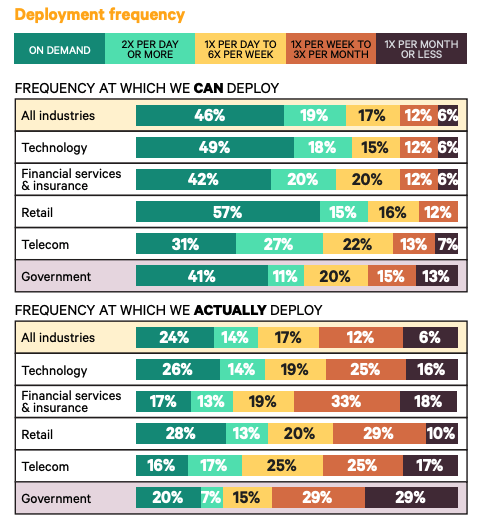
    The survey finds 28% of respondents working in the retail sector said they are deploying on-demand, while 57% said they can deploy on-demand. That compares to 26% doing so in the technology sector and 49% that are capable. In contrast, only 17% of the respondents working in the financial services/insurance sector said they are deploying on-demand, versus 42% who said they are capable.

    DevOps adoptionThe retail sector is also able to resolve critical vulnerabilities the fastest, with 53% reporting they can remediate a vulnerability in less than one day. However, the retail sector also ranks dead last in terms of reported “significant” or “full” security integration (32%).


    Alanna Brown, director of product marketing at Puppet, said the retail sector is embracing DevOps more aggressively largely because of the increased focus on digital transformation. Companies are differentiating themselves more by the quality of the application experience, she said.

    It’s also fair to note that application environments in the financial/life insurance sector tend to be more complex, she noted.

    Of course, DevOps expertise of any one organization in an industry sector is likely to vary widely. However, the Puppet survey makes it clear that the adoption of DevOps is becoming broader.

    In fact, in terms of year-over-year growth, the survey finds the media/telecommunications sector has made the second most progress after retail. The percentage of highly evolved telecom organizations increased by nine points from 8% to 17%. The number of organizations that scored in the low category dropped to 5% from 13%. A large proportion of telecom organizations are embedding a designated security expert in teams while maintaining a centralized security function (41%). However, in terms of DevOps adoption, only 16% said they do deploy on-demand, while 31% said they can. At that rate, that’s even slower than government agencies. A fifth of government agencies (20%) said they deploy on-demand, while 41% said they can. However, only 3% said they are able to remediate vulnerabilities in less than one hour and 24% are able to remediate in less than one day.

    Brown noted that while there is still a lot of room for improvement across all vertical industry sectors, when it comes to DevSecOps there is a definite shift to the left occurring. Many development teams are now designating a cybersecurity expert that advises the rest of the team on security issues versus waiting to engage with a cybersecurity expert from within the central IT organization who has little to no programming expertise.

    It may still be a while before DevOps is adopted pervasively across all vertical industry sectors. In the meantime, however, it’s clear that DevOps progress is finally starting to accelerate.

    — Mike Vizard

  • How to Successfully Adopt Mobile DevOps Practices

    How to Successfully Adopt Mobile DevOps Practices

    Mobile DevOps is more than simply adopting a new set of tools and practices. It also comes with the need to adopt a completely different mindset, in the form of a cultural-organizational change. The approach is based on the Agile methodology, but takes its practices further— not only by getting other teams more involved, but by replacing function-based teams with product- and project-oriented teams as well. The main idea behind this is that nothing inspires collaboration like having a common goal and working together towards reaching it. 

    Let’s take a look at the key elements of Mobile DevOps practices.

    Continuous Communication and Planning

    The goals and purposes of Mobile DevOps correspond with the original DevOps principles, such as customer satisfaction, sustainability, enhanced teamwork and shortened software development lifecycles. Similarly to DevOps, it aims to resolve problems by using common sense and implementing a culture of shared responsibility, transparency and shorter review cycles. In mobile development, constant and interaction-based communication between developers, website, product and QA teams is particularly important in order to accelerate feedback loops and consequently, resolve issues faster. In Mobile DevOps, there is more focus on transparent, traceable documentation, which can be achieved by using a source control system that helps keep track of documentation of code changes and details of the whole process. Raised visibility also helps teams share the workload—especially when it comes to unexpected work—and to fix incidents, and unblock the release pipeline rapidly. 

    Continuous Integration, Delivery and Deployment

    The Android and iOS operating systems are dominating the current mobile landscape, and both of them—especially Android—are incredibly fragmented. For this reason, it is necessary for developers to maintain separate builds, depending on the many supported versions, device types and platforms. A stable CI/CD tool ensures that the codes created by different teams are compatible with each other and new ones can be integrated into previous ones with no issues. These tools eliminate the manual aspects of app development from planning, code testing, integrations to deployment and monitoring, and automate as much as possible throughout the entire lifecycle of app development, which ensures the seamless merging of codes and reduces the risk of errors. Device fragmentation is the main reason why Mobile DevOps and CI/CD automation are inseparable in any team that wants to automate their app development, their testing and their monitoring processes. 

    Continuous Testing and Monitoring

    Mobile applications have to go through rapid iterations and more frequent releases than web applications. This results in new features in the app which are not always supported in the production environment at the time of the release. To understand the quality level and potential risk of each new release, mobile app companies can conduct different types of tests—ranging from automated unit and UI interaction testing, all the way to manual QA testing—depending on the maturity of the app and the size of the team. Besides implementing an iterative process for testing, adding monitoring and real-time performance tracking tools are all crucial in mobile app development. Not only do these enable teams to find the root cause of failures faster, but to save on hardware costs as well. Adding third-party SDK, performing crash reports and continuously monitoring both the app performance and the feedback in the app stores all help developers constantly improve the quality of the app. 

    Conclusion

    DevOps is just as much about the culture as it is about technology. Successfully adopting Mobile DevOps requires all teams at app companies to make important technical and business decisions, have a hard look at their processes, identify the bottlenecks and be prepared to make significant changes. The essence of Mobile DevOps not only lies in a mindset change and choosing the right tools, but also in close-knit teamwork that allows teams to focus on market needs, user behavior, feedback and other factors that significantly affect the product perception.

    — Nóra Bézi

  • SRE Is the Most Innovative Approach to ITSM Since ITIL

    SRE Is the Most Innovative Approach to ITSM Since ITIL

    For over a decade, ITIL has been the leading ITSM framework adopted by enterprises across the globe. So, what is driving a rapidly increasing interest in Site Reliability Engineering (SRE) as a service management alternative?

    In its own words, Google refers to SRE as its approach to service management: “The SRE team is responsible for the availability, latency, performance, efficiency, change management, monitoring, emergency response and capacity planning.”

    In traditional ITSM terms, the role of the SRE is responsible for service level, change, availability, event, incident, problem, capacity, performance, infrastructure and platform management. While the operational practice areas may be similar, there are significant differences in how the practices are approached.

    ITIL4 Framework Compared to SRE

    Released in 2019, the newest update to ITIL4 remains a complex governance model with four dimensions, seven guiding principles, a Service Value System and 34 processes (now renamed as practices). While ITIL4 pays homage to Agile and DevOps, there is little depth in the publications released to date—to be fair, several other publications in the series are in queue  for gradual release. The framework spans just about every aspect of software delivery and operations and seemingly is trying to be the single source of truth in both principle and practice for IT management.

    SRE Is More Closely Aligned to Agile and DevOps

    By comparison, SRE focuses specifically on the reliability and resilience of complex production system operations. As an engineering discipline, SRE more closely aligns with the Agile and DevOps patterns that are being adopted by product development teams including continuous integration, testing, delivery and deployment. SREs bring the wisdom of production into the teams thereby breaking down many of the silo walls that have impeded IT for so long.

    As a service management alternative, SRE also updates traditional ITSM activities with innovative and self-organizing concepts such as management to service level objectives, error budgets, toil reduction, release engineering, monitoring/observability and embracing risk as neutral approaches to service management. The core SRE book provides practical and actionable guidance for Site Reliability Engineers on managing incidents, learning from failure, testing for reliability, load balancing, handling different types of emergencies, software engineering and capacity planning. Related publications such as the Site Reliability Engineering Workbook and Seeking SRE provide additional insight.

    Most importantly, a Site Reliability Engineer is an actual hireable job with a defined role, set of responsibilities and skills. SREs and SRE teams are encouraged to be creative, accountable and must spend 50% of their time reducing toil by engineering automation in order to make tomorrow better than today. Like Agile and DevOps, SRE supports self-regulation with policies and consequences. In fact, some consider SRE to be the third piece of the Develop (Agile), Deploy (DevOps), Operate (SRE) feedback loop.

    What This Means for the “Humans of DevOps” in Operations and ITSM

    SRE is breathing new life and opening new career paths for operations and ITSM professionals who a few years ago were battling against the mantra of “NoOps.” According to Linkedin’s 2020 Emerging Jobs Report, SRE is the fifth fastest-growing job role with 34% growth.

    Services will always need to be managed. However, competing in a digital age requires new ways of working and thinking with speed and quality as key metrics. Agility must be instilled across the value stream spectrum in order to increase flow and deliver an exemplary customer experience. Your organization may not be as complex as Google’s, but the principles and practices of SRE are applicable to all environments.

    You can read the Site Reliability Engineering and Site Reliability Engineering Workbook publications for free from Google. For those wanting to learn more about the practices and patterns associated with SRE, DevOps Institute recently released its Site Reliability Foundation certification with accredited training being offered globally by its Global Registered Education Partner network. Either way, if you are an operations or ITSM professional, I would highly recommend learning more about SRE. It is the future of ITSM as we cross the digital divide.

    — Jayne Groll

  • Implementing DevOps Goes Beyond Technology

    Implementing DevOps Goes Beyond Technology

    The implementation of DevOps is primarily toward a change of process. All you need is to break down the feed store and bring in the competing individual inducements to acquire the actual benefits from DevOps. Regarding the change of process, it will either be embraced by those who are making the change and succeed, or it will get rejected and eventually fail.

    The hardest part of successful DevOps is not the implementation of technology but much beyond it. It is understood that without technology, you can hardly enforce the DevOps culture. The technology side is all about automation, focusing on the infrastructure in the form of codes and establishing the pipeline process.

    A survey found that among more than 2,000 of the IT industry executives, 54% of the respondents believed they had no access to self-service infrastructure; instead, they take some ticket-based approach toward infrastructure delivery. This also impacts productivity and increases time to market. The survey noted that only 23% of the experts said that infrastructures could be delivered in less than 24 hours. However, some 33% said it takes up to a month to give, while 26% responded it takes one month or more to do so. 

    Speaking in terms of technological perspective, we’re well aware of the fact that DevOps targets to achieve complete automation and integration, but practical implementation is not entirely possible. Establishing new aspects has been a great struggle, even if it is related to replace specific traditional methods with some new ones.

    Mentioned below are the best answer to why implementing DevOps goes beyond technology. Let’s discuss them one by one. 

    Lack of Proper Vision

    Without having a proper definition of the issue or solution, it becomes challenging to form a vision. Therefore, when experts become familiar with the process, they begin to follow a specific path to manage things in the correct order. Even though at some point they become stuck in the circle, too.

    With time, it becomes difficult to get out of this vague circle, be more responsive to current situations and discover new methods for betterment all at the same time.

    Without having a proper plan, it becomes not tricky but merely impossible to achieve some productive output. The lack of vision makes it challenging for the project owners to design a clear-cut plan when it comes to deciding milestones and deliverables.

    The industry experts find it a bit risky because there are honestly few people who possess skills and expertise in this domain when compared to the number of tools present in the market. This also gives rise to confusion, which ultimately leads to an increase in the risk factor.

    Cultural Defies

    Another significant challenge is the removal of traditional methods and to adopt new ones. Undoubtedly, people are more comfortable when they follow conventional techniques as long as the outcome is useful toward the end of the day.

    However, if the outcome is not what you’ve desired, or if you start realizing that your job requires various manual interventions, then it would be good to understand that this can hinder your overall productivity and leads to adverse effects in the long term.

    Absence of Tool Knowledge

    Previously, DevOps has introduced the principles of continuous deployment, testing and collaborative reporting. But, since most of the people prefer to continue working with traditional tools, adapting to the functionalities of the latest tools becomes a difficult job. This happens more when it comes to getting a hold on the changes made to the architecture based on cloud and on-premises during the entire process.

    Lack of tool knowledge leads to organizations making poor choices of tools.

    Risk Analysis

    It is challenging to alter old methods and techniques and get them replaced by the latest ones. While implementing DevOps, when it comes to risk analysis, business experts design their dashboards by scaling hundreds of different reports. It is based on calculations and most of the time, it is quite easy to start but hard to climb. It happens when things are being put into action. The workers face troubles in keeping up with the pace. Therefore, adopting the latest methodology involves risks to a significant extent.

    Ways to Minimize These Challenges

    After doing research, I have come up with six best ways to minimize these issues and increase your chances of DevOps success. Let’s discuss them.

    Boost Up Productivity

    As mentioned above, no proper vision is a severe issue, and it also leads to poor and low levels of productivity. With new IT services coming in the market, people will understand the need for shaping their vision. It is crucial because only then they’ll be able to compete in the marketplace. DevOps comes with specific tools ranging from automation to monitoring. These tools can boost up the functions of an organization. An organization can unlock benefits from these automated tools so their developers can have a lighter load. This reduces time on deployment and by default, errors and mistakes are reduced too, which results in more productivity.

    Encourage Diversity

    DevOps successfully brings people together from different backgrounds and with different skillsets, and it delivers the results when this diversity is embraced. Having diversity in a DevOps team leads to higher productivity. This is extremely important with the rise of full-stack developers and the need for every individual to possess a variety of skills.

    Learn From Mistakes

    In the slow-moving model of working, people get afraid to accept they’ve made a mistake or even share any lessons they’ve learned while committing an error because it’ll directly affect their career. In the DevOps world, it is believed that by sharing those experiences, you are encouraging innovation. DevOps often calls for identifying mistakes and ask everyone to consider it as a learning opportunity, instead of an issue to be blamed. The perfect approach is to embrace mistakes and make improvements.

    Review Security Practices

    Security is essential in DevOps implementation. If the developers fail to enforce proper security practices, then they’re solely responsible for the effects afterward. By implementing automated tools or software security services early in the development cycle, teams can test the code throughout their software development process. Also, developers must ensure the presence of security elements while they deliver software timely.

    Focus On the Usage of New Tools 

    The introduction of new tools has speed up the adoption rate of DevOps, and now it has become vital to ensure that these tools are correctly integrated within the existing infrastructure and meet all the security levels. But, much focus should be on the team rather than on devices because workers are the essential faction in the shift of DevOps.

    Educating and Training the Staff

    This area needs serious attention. It is crucial to conduct weekly seminars and training sessions to educate the employers on new methods and tools they might be using in the development process and prepare them for new challenges. This will not just boost up worker’s knowledge but will also foster DevOps success.

    Final Thoughts

    Successful DevOps implementation is not an overnight project. The entire process requires advocacy, time, effort and strong leadership in a way that is compatible with your organization’s goals and objectives. Prepare yourself for achieving DevOps success by overcoming the challenges and hurdles that were made by the people that came before you.

    — Farwa Sajjad

  • Latest Chef Habitat Release Embraces On-Premises IT

    Latest Chef Habitat Release Embraces On-Premises IT

    Chef today announced that the Chef Habitat automation framework for building and deploying applications can now be used in on-premises IT environments.

    Mike Krasnow, a senior product manager for Chef, said version 1.5 of Habitat makes it possible to now store applications packages and their dependencies locally in addition to the cloud. In addition, pre-built application packages and dependencies from the Builder service can be deployed across multiple on-premises instances.

    An Applications tab in Chef Automate now shows the service groups and instances that are deployed to make it easier to understand what’s deployed where and the health of each service. Both the Habitat Builder installer and the application dashboard are integrated with Chef Automate, which uses the same installer as Chef Habitat.

    Finally, the Habitat Supervisor module is now more stable, easier to configure and manage, and provides improved support for Windows applications.

    Krasnow said Chef has seen a 300% increase in the use of the software-as-a-service (SaaS) instance of Chef Habitat in the last year. Organizations that have embraced Chef Habitat include Alaska Airlines, Rakuten, and Walmart. That rate of adoption should increase now that an on-premises edition is available, he said, including among IT organizations in highly regulated industries that are not allowed to employ cloud services. In fact, at least 70% of all application workloads are still deployed in on-premises IT environments.

    Chef Habitat appeals most to organizations that have embraced best DevOps practices to programmatically deploy applications, said Krasnow. There are rival automation platforms that make use of declarative approaches to automation that appeal more to IT generalists. However, he noted, organizations that want to empower DevOps teams tend to prefer a more programmatic approach.

    For more than a decade now Chef has been driving adoption of IT automation. However, it’s only relatively recently that organizations have been employing IT automation at scale as part of their efforts to embrace best DevOps practices. As interest in IT automation frameworks has risen, so too has the number of options. Some organizations are even employing multiple IT automation frameworks within different business units. They may one day standardize on a single IT automation framework, but many DevOps teams will simply opt to employ the IT automation framework the members of their team already know. If the members of that team in charge of IT operations don’t have a lot of programming expertise, chances are high they will opt for a more declarative approach. DevOps teams that have developers who deploy applications on their own are likely to prefer a more programmatic approach.

    Regardless of the platform chosen, it’s clear the days of manually deploying applications using custom scripts are coming to an end. IT organizations now require an industrial approach to managing IT as a factory. The biggest challenge achieving that goal is no longer the technology but rather the culture of the IT organization.

    — Mike Vizard