Category: DevOps Practice

  • DevOps at Scale: Winning Strategy for Modern Enterprises

    DevOps at Scale: Winning Strategy for Modern Enterprises

    DevOps is a word that has generated massive interest over the last few years among the software-powered organizations and developers, yet many people don’t fully understand what it actually means. One thing is for sure, as cool as it sounds, DevOps is not some kind of top-secret developer army group, job profile or even a tool. It is a wonderful ideology that any firm can help itself to unite their tech crew and take the company to newer heights.

    As different departments grow, communication becomes difficult between the teams, mainly development and operations. Since communication is the key to avoid unproductive siloing, the DevOps movement started as a cultural phenomenon in order to bridge this gap between dev and ops. So firms started embracing DevOps principles to get everyone on the same page and create a sense of shared responsibility, and moving forward, firms believe that was the recipe for success.

    Where Does DevOps Come into Play?

    Automation is one of the things DevOps is most known for. Automation reduces the amount of work, and smaller batches of work are easier to understand, commit to, test, review and know when they are done. These smaller batch sizes also contain less variance and risk, making them easier to deploy and, if something goes wrong, to troubleshoot and recover from.

    With DevOps best practices like CI/CD, it is easy to understand which code has created bugs and make possible corrections wherever necessary. 

    Just like lean development, through automation and agile practice, firms can get feature development very close to single-piece flow, and this provides value to customers quickly and continuously by delivering features as quickly as possible. 

    More traditionally, DevOps is referred to as a means to break down the walls of confusion and chaos between the dev and ops teams and smoothen the flow of communication. In the DevOps model, development teams develop new features, and operations teams keep the system more reliable for customers, stable and running smoothly.

    Today, we will see some important elements that help firms to embrace DevOps with ease.

    Start a Cultural Shift, a DevOps Initiative

    This should flow from top to bottom, company management leaders should start the discipline of embracing DevOps. Usually, it is the CIO who should move the needle and make things start from scratch. A DevOps mindset is very crucial at this point to make sure the teams are all prepared for a change in the culture.

    Gartner predicted that through 2022, 75% of DevOps initiatives will fail to meet expectations due to issues around organizational learning and change. One of the main reasons why DevOps efforts fail is that most of the organizational leaders don’t understand Agile and DevOps. Leadership makes a huge impact on the organizational culture and its way of doing business, hence engineering leaders need to understand why this change is necessary and start a culture of collaboration, culture of experimentation and learning, and eliminate the blame game. 

    Train Your People

    Training is one essential aspect for team leads and the people involved under them so they understand what DevOps is, the fundamentals, and why it is important for the organization to embrace it. Training enriches knowledge, collaboration and communication processes between the people working in development and operations teams. 

    It helps them to get together and get their hands on, test the new technology practices and tools introduced. There are many group courses, boot camps and DevOps experts that can help people get trained in DevOps. It is the firm’s responsibility to set proper expectations and choose the right candidates to train their people. 

    Build a DevOps Plan with a Strategy

    All those engineering best practices that enhance automation, team collaboration, seamless integration and testing that facilitate new ways of software development with ease are key to a DevOps strategy. Firms have to set a common goal, track changes and align teams in a shared environment making them aware of each other’s responsibilities and duties. Implementing Infrastructure as Code (IaC), test automation, integration, deployment and release processes should be a part of it.

    Set Policies and Processes

    The policy is an integral part of any software powered organization. With security being the priority, this has become a supreme topic in the DevOps world. For every company that has adopted DevOps, the policy is critical. As we all know, policy-driven development is a fundamental concept that fits really well into the DevOps model. This model ensures that information security, ops, development practices, language standards, SRE, sysops administration and development, are all aligned with common goals.

    Containerize Applications

    Containers are well equipped with the IaC approach and are used in DevOps to instantly deploy applications across various environments. Docker provides the most popular container technology toolset. Docker image management technologies, such as Amazon ECR, have made it easy for developers to perform IT operations, collaborate with each other, share software and enhance overall software delivery productivity.

    Containerizing legacy applications will reduce the burden of handling the ever-growing overhead costs and it also increases developer productivity. Container deployment can be an effective solution as containers typically start in seconds. The container image holds all the dependencies, meaning there is no need to add environment-specific configurations. The same image is now portable across multiple systems and environments. The main idea is to make applications able to run anywhere, on any machine and at any given time. 

    Make Use of Microservices Architecture

    Decouple the legacy and monolithic application that involves thousands of lines of code into numerous small elements called microservices. With the idea of microservices, a company continues to innovate and stay agile as the products or the platform gets larger. With this approach, engineering teams focus on developing business capabilities and important features autonomously.

    Instead of having to orchestrate a large release after writing hundreds of lines of code, waiting for the perfect time to offer new features, a new business functionality can be added by just adding a new service. Eventually, firms end up creating microservices that can be easily and independently deployed, scaled and managed without having to worry about other parts of the application.

    Determine the Toolchain

    When companies initially start embracing DevOps they feel proud, but they find it hard once they really start working toward it practically. The simple logic for this is: DevOps is fragmented. 

    For many years, firms have tried to embrace DevOps and have found themselves making various mistakes by their custom scripts and logic. From source control to CI, to artifacts management to CD, as soon as one task is completed, the next step should proceed without any lag, and that is how the firms achieve their DevOps automation. But in practice, this doesn’t happen.

    There are many handovers that take place manually—that is not called DevOps. Custom scripts and practices might work temporarily for a startup but when the company grows, taking different tools and writing code to make them talk to each other becomes a complex task. For this reason, recently, JFrog has launched a unified DevOps platform for companies struggling with doing DevOps at scale. 

    Companies around the globe are in a race to innovate and release software and valuable features to their customers as early as possible to stay ahead of the competition. You need a platform to deliver software updates fearlessly from code to the edge. It would help if you had an end to end universal DevOps solution, like JFrog platform, to manage your entire DevOps pipeline. A highly scalable enterprise platform unifies the management of all services in a single pane of glass. The JFrog platform is Kubernetes ready to manage your Docker images and Helm repositories for your Kubernetes deployments. It has everything you need to do DevOps, from artifactory repository management to distribution.

    Continuously Monitor and Share Feedback

    Once we deploy the application in production and make it available for the end-users, the next step is continuous monitoring. This alerts the team if there are any misconfigurations or worse situations of an outage or of any application issues. You can monitor infrastructure health, or if would like to see and analyze logs over weeks and months, you should be able to do so.

    This step provides critical feedback, essential for the team to understand and work on the aspects of the application that require additional work and resources. Continuous monitoring enables you to find issues (if any) before any customer finds them. Having no visibility is just like getting your arms tied behind your back, you can’t really see what is going on. 

    Conclusion

    Other than easy collaboration, improved communication, an increase in productivity and effective feedback loops, the one benefit DevOps will bring is delivering software at speed without compromising on quality. DevOps is an ongoing effort and helps people in the organization fail early and learn early from their mistakes, and it builds confidence. DevOps implementation can look too overwhelming at times, but a prepared approach with a well-thought strategy can take your firm from zero to hero. Given that the teams have patience, persistence and ever-learning attitude, it is possible to scale DevOps to new heights. 

    — Pavan Belagatti

  • DataOps and Beyond: How DevOps Methodology Transformed Our Approach to Data Science

    DataOps and Beyond: How DevOps Methodology Transformed Our Approach to Data Science

    The DevOps methodology has become synonymous with forward technical thinking–a workplace culture that reinforces best cultural practice and promotes more, better quality output by synchronizing the functions of development and operations teams. As a testament to its popularity, the term has expanded in reach to refer to a broader set of transformational software-related practices. The list continues to grow: DevTestOps, DevSecOps, GitOps, DataOps. 

    In 2020, organizations are drawing upon thousands—if not tens of thousands—of data sources, which exist in hundreds of different formats and fall under unique sets of restrictions and compliance regulations. Figuring out where all this data comes from, what it means and how to ensure that the right teams can access it when they need to, are common data management challenges. To address these challenges, some solutions were borrowed from effective practices in software development; automating analytics for improved quality, and allowing data scientists to shift away from time-consuming tasks to focus on value-adding projects instead. 

    What happens when software development and deployment methods are applied to processing and integrating data? Does that mean that DataOps is exactly like DevOps, but for data? And what benefits do organizations expect from adopting this approach to data management?

    The xOps Mindset

    At their core, the ops practices are linked by fundamental characteristics that shape their goals and practices. Let’s explore some of these commonalities:

    • xOps ties together workflows from create to run: In an ideal environment, production and distribution don’t function as separate entities, but are synchronized to meet target metrics that can include hundreds, or thousands, of daily deployments. Culture changes have rewritten rules around internal communication and feedback loops in a development environment where the conditions or requirements for success are constantly changing.
    • xOps automates the mundane (non-creative) tasks: Automation not only increases an organization’s agility, but when executed correctly can eliminate communication gaps between teams—for instance, automating traceability and issue tracking within code changes. Within larger, more complex projects, automation can save on time and cost by executing and managing CI/CD—ensuring that software builds and changes reach their designated target environment with little to no human involvement.
    • xOps builds in best practice: Equally as important to the functions they perform, xOps tooling plays a key role in building in best practice from the top down and bottom up. Best practice might not look identical between organizations, but the common goal is delivering value for a range of stakeholders through continuous production, in an environment where it’s encouraged to learn through experimentation and to respond to problems as they occur.

    In short, DataOps loosely applies the DevOps process to data pipelines—using automation and Agile methodology to reduce the amount of time spent fixing issues in pipelines, and to get data science models into production quicker. There are also some obvious differences between DataOps and DevOps. While DevOps refers to the collaborative process between two technical teams, DataOps facilitates cooperation between data analysts, engineers, scientists and any members of an organization who use data. This makes DataOps a much more multifaceted process than its DevOps cousin. 

    xOps for the Big Data Age: Benefits of Running DataOps 

    We know that for many organizations, converting raw data into usable, accessible and relevant (that is, profitable) business intelligence has given rise to a plethora of data management issues. The sheer volume of most enterprise level datasets has simply outgrown many of the inadequate older systems and processes built to manage it, and we continue to produce new data at stunning rates. There is a general consensus among data scientists today that the amount of data in the world doubles every 12 months.  

    • Automation and Continuity: Within an organization, business data moves through a set process—akin to the software lifecycle for the DevOps analogy—where data is ingested in one form and exits in another. Engineers must build data pipelines, test them and change them before they are deployed. By adopting the standards for automation and best practices outlined above, you’ll ideally have a constant stream of data flowing through a pipeline. This unlocks the potential to obtain real-time insights from data, shortening the length of time it takes to turn raw data into valuable business information.
    • Cultural Shift: When completed correctly, DataOps changes who within an organization becomes a data user. A higher level of transparency and an assurance of quality means that data is more openly available to decision makers within non-technical teams. Consider the business value-add for a sales team who wants to expand into new markets and are able to access a wealth of customer data.
    • Machine Learning: We talked about the role of feedback loops in the xOps mindset. When machine learning modelling meets this mindset, you improve the quality of the model being produced because you’re unlocking a higher quality of data through version control, continuous integration and continuous deployment. Improved insights in machine learning offer nearly unlimited potential for extracting value from DataOps.

    — Hannah Leslie

  • We All Have to Have Standards

    We All Have to Have Standards

    I was working on an e-book recently about the state of the market for certain DevOps toolsets, and got really interested in how standardized organizations are becoming. We have been on this roller coaster of changing technology and different teams making different choices in language, libraries, platforms and toolchains. We all knew that couldn’t go on forever, but I started to really get into the idea of “How much standardization is being introduced?” While talking with vendors about their experience, it seems that enterprises are finally attempting to standardize, at least in the platform and toolchain areas.

    Not the type of “technology by edict” standardization we used to see, but a checklist of “If your project fits these criteria, use this platform. If it fits those criteria, use this toolset for your build chain.” Which is a good compromise between the days of “We’re a Cisco shop” or “We’re an Oracle shop,” and the days of “Yeah, first developer on a project chooses the language, database, etc.” You limit the amount of technical debt and vendor/OSS project dependency, while offering teams options for how best to get the job done.

    I’m excited about the change, and it is one of the things driving much-needed consolidation in core DevOps markets. I won’t go beyond that, as you’re supposed to read the e-book when it gets released, but it’s an exciting time to be in DevOps. We’re getting more and more tools, better integrations and even some full lifecycle toolsets starting to become clear.

    Our shop is small, and we’ve exercised standards all along, just because we don’t have the time for everyone to train on five different CI products, so we use one. But for larger organizations with more diverse needs, standardization will offer savings in both maintenance and cross-training.

    Consider that at one point there was no standardization on vehicles–everything from tires to engine oil was custom to the brand you owned. Now, it is quite often the case that the engine in your vehicle is the same engine as in a competitors’ vehicle (VW using Saab engines for years is a good example), and that means maintenance is streamlined. Tooling with onboard computers makes maintenance even faster, much like tooling monitoring/reporting is doing for the DevOps iteration. It’s a good time to be in the field, watching as things unfold.

    Stay aware of what your vendors are doing, and what their competitors are doing. One of the reasons DevOps exploded is because tools and processes became static and weren’t as productive as they could have been. Don’t repeat that mistake, keep an eye on rapidly changing developments and adopt what suits your organization. You’re rocking it now, take a bit of time to make sure it stays that way.

    And consider standardizing some of your toolset. The fewer tools to maintain, the more time to work on productive issues. And the fewer toolchains a DevOps team member has to know to be productive on multiple projects, the more productive they can be. Agility applies here also.

    — Don Macvittie

  • Akamai Extends Scope of DevOps Integrations

    Akamai Extends Scope of DevOps Integrations

    Akamai today extended its DevOps strategy to provide tighter integrations with continuous integration/continuous (CI/CD) platforms and IT automation tools such as Terraform from HashiCorp.

    In addition, Akamai is adding support for serverless computing functions to Akamai EdgeWorkers, a JavaScript-based framework through which application logic can be executed on the edge of the Akamai content delivery network (CDN) now as a microservice.

    Greg Griffiths, product marketing manager for DevOps solutions at Akamai, said the latest additions will make it easier for DevOps teams to view the Akamai CDN as a natural extension for deploying applications. Akamai launched its first DevOps initiative last year. The goal is to make possible for DevOps teams to spin up new properties and make configuration changes from within the context of their CI/CD workflows, he said.

    Terraform support, meanwhile, will make it possible for DevOps teams to programmatically provision and manage properties and DNS zones as code, added Griffiths.

    As part of that effort, the Akamai Pipeline can now synchronize with the Akamai Control Center to capture any manual configuration changes in a way that then allows them to be incorporated into a CI/CD workflow, he noted.

    Akamai has been making a case for deploying applications as close to the network edge as possible using its CDN to reduce network latency. As part of that effort, EdgeWorkers allows developers to spin up microservices as needed. Those microservices can now access data embedded in the function, including all the data from the HTTP request such as cookies, headers, URL and query parameters.

    DevOps teams can now also more easily conduct A/B testing and feature experiments using cached content in addition to delivering different application experiences by modifying the path to cached images and other content based on variables such as customer location or time of day.

    Other new capabilities being added by Akamai include the ability to modify both the path and query arguments for a request and determine to which origin any request should be routed.

    Griffiths said now that more organizations are leveraging the Akamai CDN as a vehicle for delivering applications at the network edge, the next big initiative will be to make it easier to leverage the company’s managed security services to embrace DevSecOps.

    It’s not clear to what degree DevOps teams have embraced CDNs as a vehicle delivering applications. Organizations have, however, been leveraging CDNs to deliver web applications for years now. By providing tighter integration with CI/CD platforms Akamai is essentially making the CDN just another target for deploying applications at the end of a DevOps workflow. That capability may prove critical as organizations move to deploy more application code on edge computing platforms involving use cases that require data to be processed and analyzed in near real-time.

    Of course, Akamai is not the only CDN providers with similar ambitions. It is, however, already the largest, so from a DevOps perspective most organizations will soon encounter an Akamai point of presence somewhere soon, if they have not already.

    — Mike Vizard

  • How to Upgrade Critical IT Infrastructure with Zero Impact

    How to Upgrade Critical IT Infrastructure with Zero Impact

    Modern problems require modern solutions. A problem might come up that your software isn’t equipped to handle. This is why enterprises around the globe are spending billions of dollars more today than they did a decade ago.

    It’s never a good idea to leave anything to chance, especially if we’re talking about essential software. Keeping critical infrastructure software up to date means it’s more stable and more secure with the latest bug fixes. Of course, this has to be done without affecting your customers.

    However, this may be easier said than done, especially if you have several years of backlogged software updates. The whole upgrade process has to be carefully planned and monitored. Some best practices have to be kept in mind.

    Plan Your Actions

    Achieving a zero-impact upgrade to critical software requires the utmost attention to detail. You need to know exactly where you are and where you’re going. You also need to make sure that you understand every step you’re taking to achieve your goal.

    • Catalog Your Current State: The first step to planning is to know the state of your software. You have to know where you are, in order to get to where you want to go.

    Check which version of the software you’re running and how old it is compared to the latest version. Your outdated software might prevent you from submitting bug reports if it’s no longer a maintained version. 

    • Read the Changelog and Ask Questions: This next step is as time-consuming as it is important. You’re probably aware that most open software has a changelog that’s available for public consumption. You’ll have to read it all. The changelog is a treasure trove of information and may even point back to specific pieces of code that implement the change.

    It will be time-consuming, and several breaks will be in order to ensure productivity. You may find that you don’t need most of the features and bug fixes you’re reading about, but now you know that much more about the software you’re managing in your infrastructure. 

    Remember to take down notes and questions or comments you may have while you’re reading through it all. You may be surprised to find a minor feature you never knew existed that may be very helpful in your current situation. Or you may find a fix for that one minor, but unfixable, bug that your team had to frustratingly find a workaround.

    Write it all down in your notes. That way you have your own little changelog that you can further trim into only the most crucial things. You can then decide if the minor things belong to the same scope or should be added to the backlog for later. 

    • Test Out Your Theories and Think of Edge Cases: Having a plan is well and good but you’ll have to try it out eventually. But, if it’s execution is done directly in an important environment, you’re doing it wrong.

    Similar to a software development life cycle, software upgrades need to be tested prior to actual execution. While brainstorming edge-case scenarios, take into account what might be different and cause problems in the other environments. 

    Document Everything

    This one goes without saying, but remember to document everything. Reading and documenting everything may sound like a lot of work, but when you need to pick up that work after a long weekend, you’ll be happy that you did.

    Document each and every single step, any caveats or issues you encountered, in a way that you can still understand later. This will help your team perform the upgrades and it also provides documentation to other readers who are interested in how the upgrade process was done.

    Execute Your Plan

    After you’ve done all that, it’s time to finally execute your plan. By this time, you should have already tested your plan so much that you know it will work without a shadow of a doubt.

    Still, it’s common for something unexpected to pop up and you may need to do some live debugging to fix it. Execute your plan with that expectation and assurance that your preparation will hold up to any situation.

    As always, remember to document everything as you may want to refer back to your documentation for the next upgrade or while debugging something later.  

    Conclusion

    Upgrading critical infrastructure software can be difficult if you don’t have a good plan. Check your current state, read the changelog, pay attention to every detail, write down notes, ask questions, test your plan, test it again and document everything. At the end of the day, you’ll be glad that you put in all that upfront work.

    — Robert Mardisalu

  • Six Steps Every Business Should Take to Protect Its Data

    Six Steps Every Business Should Take to Protect Its Data

    Data may or may not be the new oil but it is the growth engine of today’s digital age. Data about a company’s customers, products, services and sales is worth a lot to the company itself, of course, but also to its competitors, as well as to business-savvy hackers. This is why every business, regardless of size, needs to protect its data. 

    Once created, data never really dies, and it is used in multiple ways. In fact, the more data is used for making decisions, the more valuable this asset becomes to you and everybody else.  

    Protecting something of such value requires a different strategy–we need to start from the data itself. This may look complex but here is an easy way of thinking about that process.

    What Data Do You Have?

    Knowing what sensitive data your company is generating and storing sounds like a no-brainer, but many businesses don’t have a good handle on the different types of data they create, copy, use or store. You may not realize, but some of your data might include personally identifiable information (PII), healthcare data and financial data. As you are a custodian of such data, this requires special attention not only to protect your users, but also to satisfy compliance regulations. If you do not know your data, you cannot quantify your risk, and hence cannot prioritize your limited resources and time.

    Where Is Your Data?

    If you don’t know where your data is, you cannot protect it. And many times, even IT staff aren’t exactly sure where sensitive data resides. Your data could be in databases, file systems, applications or archives. For a hacker, these are all ripe targets, not to mention the four, eight or more copies of the same data distributed across less protected test, development, disaster recovery and backup systems. In addition, fragments of your sensitive data often get distributed across dozens of interlinked or even disconnected systems. If that sounds odd, think of your own personal information. Some of those bits may sit in email, Word and Excel, along with text messages, sticky notes and notebooks. Now, extrapolate this to a company of thousands of employees, and recognize that hackers need to get access to only one of those sources.

    Who Has Access?

    It is important to understand who your users are, and what access they have. Many companies give too much access to too many people, and worse, they do not know about how many keys have been distributed across the company, and to whom. Instead, companies should limit access to as little data as possible, and assign rights on a strict “need-to-know” basis. The fewer the people with limited access, the lesser the chance that they copy, share or contaminate that data. Even if a hacker were to take over their account, your loss would be limited.

    Who Touched Your Data?

    Understanding where your data is and who can access it is a great starting point, but you need to monitor actual data access to detect anomalies and unauthorized usage. Given that threats and vulnerabilities are always evolving, you may not be able to stop all of them, but detecting intrusion can allow you to intervene and limit the loss. Companies should audit users who log on to their systems, and track what they are doing, especially if they have administrative access to those systems or have broad access to sensitive data. It’s not that you do not trust them, but blind trust without verification can be exploited—especially by hackers masquerading as them.

    Why Keep Doors Open?

    A bank with broken windows or weak locks on side doors invites intruders. It is critical to lock down your systems by reviewing your configuration settings, patching your systems, closing unused services/ports and locking down critical data. Hackers today have sophisticated automated tools that can quickly scan systems for gaps and vulnerabilities. If they are going to map out your IT systems, don’t you want to scan them and fix them before they come probing? The more exploitable the holes in your system, the faster a hacker’s ROI.

    Why Use Real Data?

    It certainly is easy to test applications against real data, but doing so creates copies of data that your organization was already having trouble protecting. One simple way to reduce risk is to use fake-but-real-looking data for testing and development purposes. This means systematically replacing all occurrences of real social security, credit card numbers, email addresses, financial information and health data with unrelated random data. Using fake data not only limits exposure to the testers and developers, but also mitigates damage should someone gain access to the test system.

    Protecting data isn’t just about setting up the firewall or installing anti-virus software on your endpoints. To most adversaries, these are just speed bumps. Protecting data requires starting from the time of creating data, discovering what you have, knowing where it is stored, enforcing access rights and tracking its usage.

    As custodians of the valuable data that never dies, we need to have a strategy around completing these tasks in a scalable and repeatable manner. Status quo is not an option in an age where breaches are the stuff of near-daily headlines.

    We hope you never become a target of any attacks, but in case you do, understanding your sensitive data and being proactive in protecting it can make the difference between a quick recovery and a drawn-out nightmare.

    — Vipin Samar

  • Quick Base Makes Free Low-Code Platform Available for First Responders

    Quick Base Makes Free Low-Code Platform Available for First Responders

    Quick Base, a provider of a platform for building low-code applications, announced this week that it is making its platform available for free through Sept. 30 to first responder organizations that need to build applications quickly to address the COVID-19 pandemic.

    Jay Jamison, chief product and technology officer for Quick Base, said it’s apparent first responders soon will need applications to track things ranging from assets such as ventilators to heat maps that show the number of patients in a geographic area relative to the number of intensive care units (ICUs) available.

    Quick Base is also making available templates that can be employed to build the most common types of emergency response applications, such as ones already being employed by the City of New Orleans.

    Examples of other applications that will be needed include the ability to track businesses in real-time that may be flouting COVID-19 restrictions or landlords that are evicting tenants despite emergency decrees, noted Jamison.

    Most of these applications will need to be developed in days versus weeks or months. To that end, Quick Base is also making available to first responder organizations the expertise of its internal customer success staff as well as third-party consultants, he said.

    In addition, Quick Base plans to certify many of these applications for distribution via its online store, which will make it easier for a first responder organization in one locality to leverage an application that has already been developed by another first responder organization.

    In general, Jamison said first responder organizations will need to apply DevOps principles across their entire organization to adjust to highly fluid situations. Applications undoubtedly will need to be modified as processes evolve and new emergency decrees are declared, he noted.

    The biggest challenge from an IT perspective is many first responder organizations lack the process expertise needed to build an application on the fly. Volunteers with IT expertise will be needed to work alongside medical experts, who will need applications that most likely will be deployed in the cloud but made accessible via a range of mobile computing devices. The chances all those applications will work perfectly when first deployed is almost nil, so timely updates to applications will be critical.

    Of course, applications and IT processes are not always the first things that come to mind to combat a pandemic. However, the faster first responders can respond to changing conditions on the ground, the more lives that might potentially be saved. In some large cities, it’s probable first responders already have access to a range of applications that to vary degrees might scale to meet the current challenge. However, in smaller localities, the availability of such applications is nominal at best.

    Quick Base is not the only provider of low-code and no-code tools for building applications, so there are plenty of options for building applications quickly. Whichever the platform employed, time is going to be of the essence. Outbreaks in Italy, Spain and China have already shown how quickly events can spiral out of control. If any new application is going to be relevant in any other emerging CIVID-19 hot zone, the work to build that application needs to start immediately.

    — Mike Vizard

  • OverOps Allies With SonarQube To Improve Application Quality

    OverOps Allies With SonarQube To Improve Application Quality

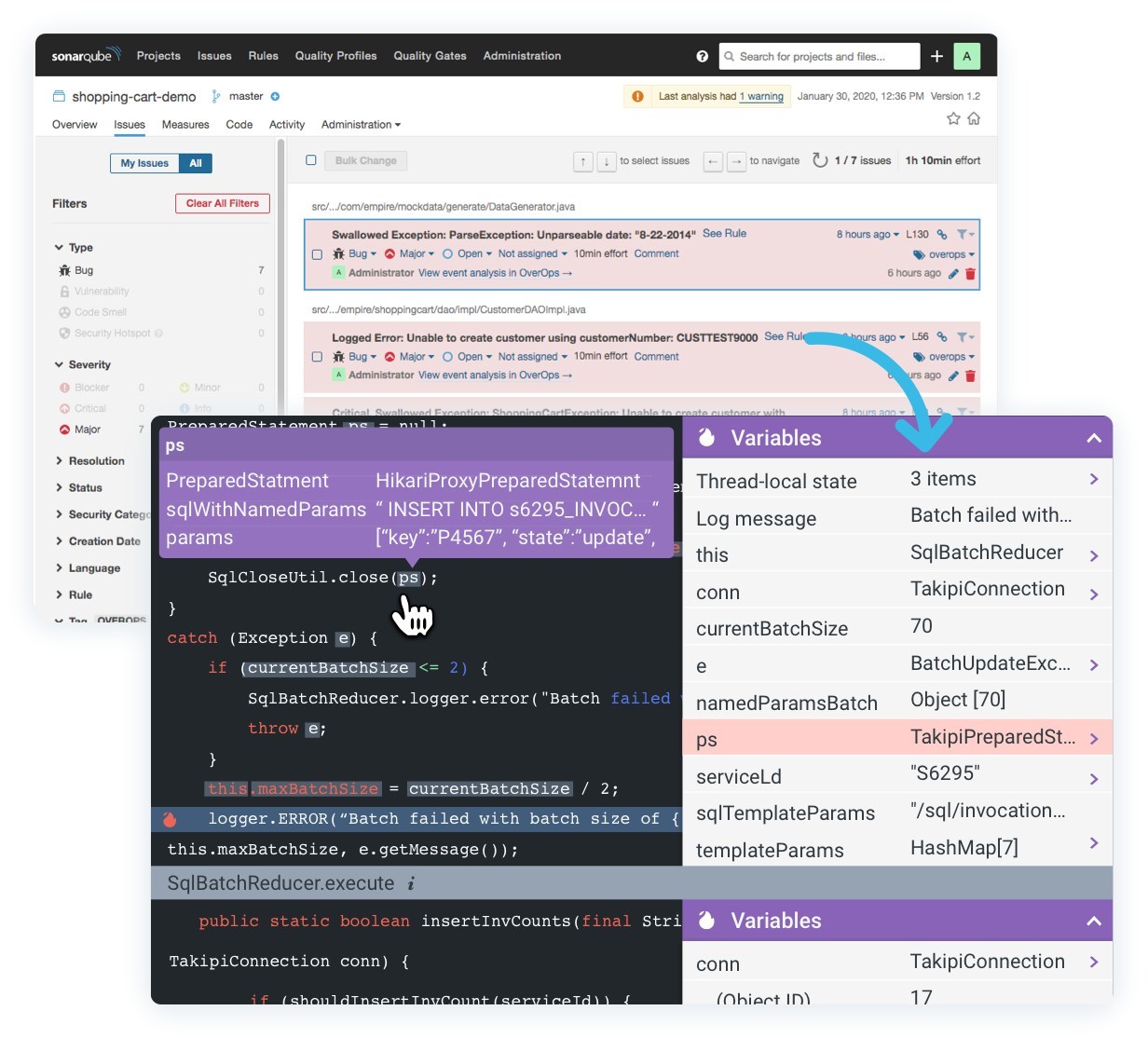
    OverOps, a provider of tools for dynamically analyzing code at runtime, has partnered with SonarQube, a provider of static analysis tools for source code, to enhance application quality by unifying code analytics.

    Chen Harel, vice president of product for OverOps, said the two companies have collaborated to create a plugin through which DevOps teams can now more easily analyze source code before it gets deployed in a production environment.

    The goal is to equip DevOps teams with the tools required to assure application quality as more responsibility for maintaining applications continues to shift left on to the shoulders of developers, said Harel. In the absence of tools to analyze code, he noted, developers are not going to be able to identify, for example, potential vulnerabilities in source code and errors at run-time.

    The plugin also allows issues identified by OverOps at runtime to be fed back into the SonarQube tools for analyzing source code to identify issues that previously would not have been discovered, he added.

    Specifically, when the OverOps plugin is installed, it automatically creates an event rule for Java code based on new, critical, resurfaced and unique runtime errors. When a quality gate fails a release based on these criteria, users can view the issues directly within their SonarQube dashboard. OverOps then provides a direct link to the event analysis containing the full context behind the error, including the stack trace, variable state and system state.

    As a result, Harel said DevOps teams are going to be able to reproduce an issue much faster, which should result in much shorter times to remediation. Without such tools, DevOps teams can spend weeks reproducing an error that only takes a few minutes to actually fix.

    Harel said with both the OverOps and SonarQube tools included as part of the gates set up within a continuous integration/continuous delivery (CI/CD) platform, it becomes possible to substantially improve the overall quality of the applications being developed. That’s critical because developing applications faster often results in more errors having to be addressed, said Harel.

    There’s a lot of debate these days concerning the degree to which the adoption of DevOps might be increasing the total cost of IT. It’s a lot more expensive to fix an application after it’s deployed in a production environment than it is to address issues as they arise in the application development process. As such, there’s a lot more focus on code analytics to help ensure that DevOps processes are churning out not just more code faster but also higher quality applications.

    Of course, the level of DevOps sophistication tends to vary widely by organization. However, as more gates that address application quality assurance are erected on CI/CD platforms, the better the DevOps outcome will become. The challenge is making sure the DevOps culture being fostered prizes application quality as much as it does how much code is being written and deployed how fast.

    — Mike Vizard

  • COVID-19 Pandemic: Appian Offers Free HR App

    COVID-19 Pandemic: Appian Offers Free HR App

    Appian, a provider of a low-code platform for building applications, has decided to make available a free application to help organizations with 1,000 or more employees track healthcare incidents stemming from the COVID-19 pandemic.

    Designed mainly for human resources (HR) professionals, the COVID-19 Response Management application is designed to track the health and work status of all employees by geography and department, including their travel history.

    Appian CEO Matt Calkins said that while Appian has built a handful of applications for customers before by request, the company decided to leverage its expertise to provide a free application to help organizations maintain business continuity during the COVID-19 pandemic that is forcing employees to work remotely for the foreseeable future. Organizations can either access the COVID-19 Response Management application as a cloud-based service provided by Appian or download and install it themselves, he said.

    Organizations in highly regulated industries that need to still comply with rules concerning personally identifiable information (PII) are likely to want to run the COVID-19 Response Management application in a local data center, noted Calkins. The cloud-based instance of the application runs in an environment that is already certified to be compliant with the Health Insurance Portability and Accountability Act (HIPAA).

    Calkins said the COVID-19 Response Management application is designed to be set up and configured in less than two hours. Because the application was built using low-code tools, COVID-19 Response Management application is highly customizable using the company’s namesake low-code platform, so as the crisis continues to evolve, organizations will be able to extend the application as they best see fit.

    Millions of individuals, unfortunately, may contract the COVID-19 coronavirus or may be unable to work because they need to care for loved ones who have fallen sick in the weeks and months ahead. As organizations race to implement business continuity plans, many of them are likely to discover their existing HR applications were not designed to help manage a highly distributed workforce, which may need to be augmented with little notice. The COVID-19 Response Management application provides a way to manage talent in addition to other HR functions, noted Calkins.

    The Appian application is also designed to enable HR teams to function as the hub around which organizations can build online communities that employees can use to interact and provide mutual support. For example, employees can connect with each other to volunteer their time to go shopping on behalf of employees who may be quarantined.

    As the COVID-19 pandemic intensifies, many organizations are clearly entering unchartered territory. Workforces may be sharply reduced or increased depending on vertical. The number of temporary workers may skyrocket in some cases. Regardless of the outcome, most organizations will need access to applications that enable them to be as flexible as possible to deal with whatever lies ahead. In some cases, organizations may have HR applications in place that enable them to achieve that goal. In most cases, however, it’s probable they don’t.

    — Mike Vizard

  • What the Best Developers Do to Be Great at Their Jobs

    What the Best Developers Do to Be Great at Their Jobs

    Good developers are in demand—great ones, even more so. With software development employment in the U.S. expected to grow by 21% by 2028, the need for engineers is only going to surge further.

    But this doesn’t mean that the labor landscape will become uncompetitive: Now more than ever, individuals with a passion for software are entering the field, and organizations will only be looking for the best. As the amount of people going into software development goes up—with global numbers expected to reach 27.7 million by 2023—it will become increasingly important to demonstrate your skills and dedication to the profession.

    The gap between a good developer and a great one is bigger than you may think. Here’s what the best developers do to excel at their jobs and lead in their field.

    The Best Software Developers Know How Their Skills Fit Into the Big Picture

    While a good coder handles the responsibilities they have within their role, the best coders make sure they see the big picture. They take the time to understand the foundations of how businesses work, including revenue, profit, bottlenecks and the strategies of departments other than their own. 

    This might mean investing extra time into general business self-education or holding meetings with other departments, but great programmers know it’s worth it in the long run. They recognize the importance of grasping how the cogs of an organization come together to keep things running—and exactly how they fit in.

    By having this 360 view, they can hold influence in areas outside their remit and clearly match the business’ mission to their own work. Valuable coders will use their problem-solving mindset to propose solutions to company-wide problems and put themselves in the shoes of other team members.

    Rest and Relaxation Is Vital for Productivity

    Far from the stereotype of frequently pulling caffeine-fueled all-nighters, the best developers know that, like the powerful systems they work with, they also need some downtime to recharge.

    Great coders challenge the stereotype of having a bad diet and inactive lifestyle and prioritize their own health and well-being. They recognize that as soon as you pass the threshold of 50 hours of work a week, you’re no longer productive. In fact, working too much can be counterproductive, as you’re much more likely to make mistakes.

    Great developers know when to shut down their computer and spend time with their families, do some exercise, spend time in nature and eat a healthy meal. This time to recharge is essential in order to go back to work refreshed and ready to tackle any problems with a clear and rested mind.

    Continuous Learning Is Crucial for Progression

    Ideally, all developers should be making efforts to advance their education in the field they’re in. As a developer, if you stop studying, you’re bound to get stuck at one point or another. The best coders make this a special focus in their lives, and make sure they’re always up to date with the latest developments in the technologies they work with.

    It could be a new coding language, new frameworks or a new technique. Great coders are constantly making a concerted effort to advance their own education. Ultimately, they are always asking “why,” and are unafraid to experiment using their newfound skill.

    Developers can easily find online courses to supplement formal education. Taking part in hackathons is another way to boost extra learning, as well as keeping up with technical blogs and podcasts.

    Great developers also follow other passions outside of coding. For example, the logical nature of software development allows coders to excel at learning other skills, such as languages, playing an instrument, martial arts or even flying a plane. It enables them to exercise the same part of their brain while enjoying something fun and non-work related.

    Personal Projects Show Dedication and Independent Thinking

    Coders know that the best way to learn how to build great products is through practice. Even if the project ultimately fails, building a product will always provide important lessons to apply the next time.

    Side projects that a developer might work on include personal tools, open-source libraries, a startup idea or a freelance project. These personal projects allow programmers to be in the driving seat: They are forced to solve problems independently instead of asking for help, equipping them with skills that might otherwise take longer to gain.

    Engaging in independent work also allows developers to explore and utilize the new languages and frameworks that they gain in their personal education efforts. When developers that have spent time working on their own projects try to prove themselves in the job market, they will stand out against those that have remained largely within the confines of their professional role.

    Ultimately, the vast majority of developers are in the game because they have a passion for building exciting and useful products. This makes it easier to find those who go the extra mile to really hone their existing skills and learn new ones. But, like in any profession, there will always be a certain percentage that remains a cut above the rest. Take a holistic approach to your career in software development with this advice and raise your game, and chances of landing that dream job.

    — Phil Alves