Category: DevOps Practice

  • Universal Code Search Combinations

    Universal Code Search Combinations

    More potential searches than there are stars in the universe.

    Source code search is not like searching for text on the web—it is more complex and has many more nuances. When we set out to create a Universal Code Search engine, we knew there were many permutations that we had to account for—so many. So we began speculating over how many search permutations we would have to account for.

    First, let’s cover what Universal Code Search is. Search today is not just “Grep and go.” The modern era of big code requires code search to cover many dimensions: repositories, file formats, programming languages, etc. Universal Code Search ties together information from many tools, from repositories on your code host to dependency relationships among your projects and application runtime information, to give developers a single place to quickly explore and better understand all code faster.

    A Universal Code Search must satisfy the following requirements:

    • Search through repositories on any major code host.
    • Search across all commits, making both the current (up-to-date) and past codebases discoverable.
    • Support all programming languages.
    • Support code intelligence for all major languages.

    To quantify how expansive Universal Code Search is, the best metric is the number of search combinations. 

    Developers can search across more than 18 dimensions of code to navigate, explore and understand code.

    Repositories

    Sourcegraph can search across any repository, spanning all Git providers in addition to other source code version control systems. GitHub hosts over 100 million repositories, so using a 17.31% market share, we can estimate there are 577,700,751 searchable repositories. 

    Commits

    Sourcegraph can search any repository, and any commit within the repository. For instance, if the average repository has five developers contributing five commits for 300 days per year over five years, Sourcegraph would be able to search all 37,500 commits using repo:<REPONAME>@<COMMIT>. 

    Branches

    As with commits, Sourcegraph can search all of a repository’s branches. Using the same methodology, we can assume that each of the five developers works on five feature branches per month over five years. This would lead to 1,500 branches on the repository that could be searched using repo:<REPONAME>@<BRANCHNAME>.

    File Type

    Sourcegraph supports all programming languages and developer files, in addition to other text files. Between text and developer files, we conservatively estimate this number to be 1,155 total file types supported.

    Pattern Type

    Sourcegraph allows your search to be interpreted three ways: literally, as a regular expression (regex) or as a structural search pattern. Structural search lets you match richer syntax patterns specifically in code and structured data formats like JSON.

    Search Type

    Four search types are permitted. Whether you need to search over all your code at a given point in time, changes to code or commit messages (diffs or commits), Sourcegraph gives you access to all depths, past and present, of your codebase. *file* *repo*

    Repo Forks and Archives

    Include repository forks in your search, or don’t. Include repository archives, or don’t. These are the four options for searching forks and archives among your codebase in Sourcegraph search. *yes, no, only*

    Case

    Sourcegraph search supports both case insensitive and sensitive search. And when performing a diff or commit search type, there are five more filters you can use.

    Developer

    Search for the author of the code, or for the committer. These are the two options when performing a diff or commit search.

    Time

    Sourcegraph supports searching both before and after a time frame, such as before: “last Thursday,” after: “6 weeks ago” or after: “November 1, 2019.”

    Message

    You can also search diff and commit searches for which the commit message contains a particular string.

    IDE

    Four IDE integrations are supported: VS Code, Atom, IntelliJ and Sublime Text. This helps improve developer productivity by reducing context-switching. The limitations on Sourcegraph’s IDE integrations are limited in performing structural searches, use filters and search past commits. Therefore, most of the dimensions described above don’t apply to IDEs.

    What does this add up to? 2,702,343,531,371,460,001,448 potential code searches across all repos, all programming languages, all code changes, all file formats and all code hosts. Universal Code Search makes it easier and faster to explore, navigate and better understand all code, everywhere. Don’t believe it? Go ahead and see for yourself. Change the assumptions to match your organization.

    — Quinn Slack

  • How to Improve Your Uptime Strategy

    How to Improve Your Uptime Strategy

    Outages happen, it’s inevitable. But, unplanned downtime often comes with substantial costs—not only in terms of recovery and revenue loss, but also customer happiness, brand reputation and employee morale.

    While there is no foolproof way for companies to avoid outages, there are steps they can take to help improve uptime. Development teams should determine what measurements and thresholds for uptime are sufficient for the company, take preventative actions to reduce the mean time between failures (MTBF) and implement tools that provide awareness of coding errors to minimize the mean time to repair or resolve.

    Defining and Measuring Uptime

    Uptime is defined as the time when an application or service is operational. A service-level agreement (SLA) between service providers and customers defines the level of uptime providers have to meet. But “operational” can mean different things to different organizations. For example, a provider may have an SLA for how long it takes its system to process an event. Events processed too slowly violate the SLA even though the system is still operational at some level.

    Companies that provide digital services and applications should clearly define SLAs with customers and then measure their performance against those objectives. Dropping below the agreed-upon expectations can lead to customer frustration and contract termination. Also, the time and effort development teams spend updating customers, tickets and status pages can distract them from working on new service features.

    In SLAs, uptime is measured by “nines,” with each nine hard to achieve as it means significantly less downtime. Here’s a common breakdown for measuring uptime:

    • One nine (90% uptime) is 36.5 days of downtime per year.
    • Two nines (99% uptime) is 3.65 days of downtime per year.
    • Three nines (99.9% uptime) is 8.77 hours of downtime per year.
    • Four nines (99.99% uptime) is 52.6 minutes of downtime per year.
    • Five nines (99.999% uptime) is 5.26 minutes of downtime per year.

    Not all companies need five nines. Because each additional nine requires increased effort and cost, development teams should determine how to balance this investment of time and resources in a way that best meets business needs, while focusing on resolving issues quickly when they occur.

    Preventing Errors in Production

    Validating code can prevent errors in production and minimize MTBF. This type of testing needs to be done in the early stages of the development cycle. To reach the three, four and five-nines levels of uptime, automated testing is necessary. While such testing involves an upfront investment in writing unit tests, it saves time and increases efficiency, as a failing unit test means a specific block of code is not working as expected.

    After validating code, another step developers can take is to use a canary deployment. This is a strategy where new code is pushed out to a subset of users. If something goes wrong, then only a small percentage of users are affected, and developers can roll back to a stable version. Once developers are comfortable with the results of the new version, they can gradually deploy the new code to all users.

    Uncovering Context with Errors 

    Receiving an alert for an error is not enough to enable quick remediation. Developers need to know when errors occur, what the impact was, and where the errors reside in the code. Having this level of awareness and context minimizes mean time to repair, and the best way to achieve this is through application monitoring.

    Monitoring provides developers with automated real-time insights into how their service is performing. When alerted to issues, developers can use source code management information with monitoring insights to identify the change that caused the problem and get the issue to the appropriate developer to resolve it. Developers can’t rely on manual processes and customer feedback to be alerted to issues. These methods are not fast enough. It can take hours to receive and understand an issue and then manually roll back to an earlier version or forward to a new version.

    Code can be complex and fragile. It touches virtually every aspect of business and life. When code stops working, it’s expensive and disruptive. Downtime, even for a brief moment, has a disastrous impact on reputation, retention and revenue.

    To improve uptime, developer teams should adopt code validation and monitoring strategies. By balancing prevention and awareness of errors, they can reduce broken code in production, decrease time to resolution when errors do occur and improve service uptime.

    — Neil Manvar

  • SRE (Part 1): A Modern Overview

    SRE (Part 1): A Modern Overview

    Site Reliability Engineering (SRE) is a topic that over the last several years has become a popular discussion across many companies I have interacted with. This article is the first of two that I’m passionate to share, as I’ve come across many organizations who are trying to build and implement this ideology, while all are asking the same questions—What is SRE? Who are SREs? How do we get it? Where do we start?

    I—just like everyone else—have opinions around this topic. However, there is a common ground between us all. SRE is not only about tooling and tech, it’s not only about the unicorn hires you can make, but it is primarily a cultural shift within companies. It changes the way developers, product owners, admins, general engineers, etc., all interact with one another. You have to shift your operating model and how you approach building in your organization.

    Now, just as a disclaimer these are just my opinions and experiences with building organizations like this and talking to other companies who have implemented or are currently implementing. There is no prescription for building SRE. Each and every company will implement at their own cadence and own internal philosophies. You will, over time, build it in a way that fits your organization and internal operating mode. Do not move too fast and attempt to force the model into your organization. Fail but fail gracefully and learn from those failure. You’ll get to your Narnia at some point.

    Definitions

    Let’s start with some quick definitions of the acronyms we will be using. These will be short explanations but give you the general outline. 

    • SRE: Site Reliability Engineer, an individual who possesses an interest in infrastructure and operations, with a software engineering background.
    • SWE: Software Engineer, someone who writes the application/service software. 
    • Infrastructure SRE: a variation of SRE that works on infrastructure related projects (monitoring, provisioning, IaaS, etc.).
    • Application/Service SRE: a variation of SRE that is dedicated to specific application/service group. These are the groups who are building the products that generate revenue for your company (hopefully).

    The definition of SRE is quite scattered and I don’t think anyone truly understands/knows what it means—and no, unicorn’s will not show up below.

    This is what SRE means to me:

    • SRE is a core group of individuals who have a wide array of skills. They are more of a technology generalist than specialist. These skill sets range from operations, infrastructure, networking, development, hardware, distributed systems, monitoring, stability, capacity planning, software engineering, etc.
    • SREs are responsible for architecture and implementation of technical infrastructure and supporting services, focusing on stability, security and scalability of those platforms.
    • SREs should be building standard best practices, platforms, services, infra, etc., that reach the global organization. 
    • SRE is not just about the technology. SRE is a mindset, thought process and cultural shift. 
    • SRE shouldn’t be made mandatory for everyone in your company. Teams will have the choice to fund SRE support if they need/want it.

    Areas of Responsibility

    Technology has so many different aspects that it may seem hard to narrow down what SREs should actually be spending their time and energy on. Since these individuals may not be directly building public facing products or features (depending on your company, of course), what exactly will they be doing?

    This by no means is limited to the list below, but should be the general areas in which you start to focus your SRE organization. Without these underlying infrastructure plumbing being properly built, monitored and scaled, it will be difficult to preach this new cultural mindset to the outside team members. The items below may seem very infrastructure heavy—and some may be. Many of these can be split between application SRE and infrastructure SRE. One is the primary producer, while the other is the primary consumer.

    • Monitoring.
    • Configuration management and automation.
    • Infrastructure services/networking/platforms/architecture (including hardware and gen compute).
    • Infrastructure tooling and capacity planning.
    • Big data/data warehousing/data analytics. 
    • Documentation and runbooks.
    • Incident response and incident management process.

    Is SRE a Single Team or Multiple Teams? 

    There is no prescription, and results will vary depending on multiple factors. However, I recommend that this is split logically into multiple teams if you have the staff to accommodate. You can start small and have a generalist team that covers multiple areas and eventually break into smaller, more manageable pieces. The areas are:

    • Infrastructure (hypervisor, storage, operating systems, containers, automation, SDN).
    • Observability (monitoring, telemetry, event correlation, trend analysis, IN&IM).
    • Tooling (custom tools, configuration management, developer experience tools).
    • Services (databases, message queues, orchestration, micro-services).
    • Apps (mostly application side knowledge and ability to support/troubleshoot).

    Even though they are split in some sense, the reporting chain must remain centralized throughout the organization. Decentralizing in my opinion will break the effectiveness and communication of the team and result in an unsuccessful SRE implementation. SREs should report to like-minded individuals whose mission statement is to push SRE agenda and philosophies. Agenda is not the only reason. A central hierarchy allows for governance around tooling, best practices and general technical/architectural guidance. From that, you can allow those folks to cross pollinate in other groups and teams and spread those standards across the board. A breakdown in structure and communication will inevitably cause a deterioration in the mission.

    Another reason for centralization is that it allows you to make sure your SRE hires do not become a dumping ground for operational work the app teams do not want to do or have pushed off. I have seen this happen in the past; it discourages the new hires and isolates them. They do not have a mission or a central team to work with and end up building things off on their own that only fit the needs of who they are supporting, instead of seeing the bigger picture.

    The application SWEs should still be doing operational related work, since they are the ones who created the need for it. The application SRE can help offload some of that work and find ways through the central chain on what tools others are using to offload. Operational issues can quickly turn into error budgeting for the application teams.

    Your SREs will likely be split into two disciplines: application SRE and infrastructure SRE. This allows you to cover both sides while pushing the same mission throughout all the teams. Infrastructure SREs are out there, and there are plenty of them. I have seen it come as a natural evolution of DevOps, system engineers and system administrators. You should focus on building your internal talent pool and then going outside for hires.

    Having some of the SWEs on the team volunteer and shift work over to SRE helps speed up the process for that specific application. You can leverage their knowledge of the code base and have them learn and understand the centralized mission and tooling to bring down to their stack. These individuals can also train the central team on the app stack.

    However, not every team in your company will need dedicated SRE support. Part two of this series will be a deeper dive into application and infrastructure SRE, and how to organize your teams from a management perspective.

    — Anthony Caiafa

  • How to Build a Home-Screen Worthy CX

    How to Build a Home-Screen Worthy CX

    I’ve built apps, in some shape or form, for about 20 years now. During this time, I’ve always started the same way—design the user interface, build the backend services and connect everything together, adding in appropriate logic along the way. Recently, however, I’ve noticed that my design philosophy has changed. It’s less about how screen A interacts with screen B and more about how the app works naturally with the way the user interacts with everything else on their phone and the world around them. 

    Consumer expectations of apps have changed to something far less rigid than individual app silos. It got me thinking, what does this new consumer experience mean for app developers like me? I realized that I had started designing apps based around this notion that I wanted my apps to be worthy of being on someone’s home-screen. The more I thought about it though, the home-screen was my way of defining a design philosophy that I had unknowingly been building for. 

    Get on the Home-Screen

    The Google.com homepage used to be considered the most valuable space on the internet. Today, this is the home-screen of mobile phones, with companies such as Facebook, Google, Apple and Amazon all battling for dominance. In fact,  2 in 3 users in the U.S. keep their most used app front and center on the home-screen, with 21% of 18-34 year olds deleting apps because they didn’t like the way it looked on their home-screen. That’s a scary thought.

    As much as we would love to create the next app which users can add to their home-screen, the likelihood of that is pretty slim. It doesn’t mean you can’t tap into the success of these apps, though. Rather than trying to build an app which competes against social giants, you can use their reach to get your service in the hands of more users.

    When designing your UI, don’t think of your app as a walled garden that users have to open to use. To be successful, think about the CX of your service as it may appear in other apps—specifically those already on the home-screen. Digital disruptors, such as Lime and Uber, are leading the charge through integrations with apps like Google Maps.

    We are also seeing more traditional companies like Spirit Airlines allowing airlines to buy flights and change reservations directly through WhatsApp. Vero, the new kid on the social media block with an estimated 3 million users since it’s launch in March 2018, offers app developers an amazing opportunity for their service to be discovered early, and secure a place on the home-screen.

    Build for the Message, Not the App

    With social media now a part of the fabric of our lives, it is no surprise that communications and social apps are the most popular category of mobile apps. This gives mobile app developers a huge opportunity to improve the CX of their apps—as it is a pretty safe bet that almost every user has the capability to receive some sort of social media message, and every single phone has the ability to send and receive text messages. 

    When building your next app, in addition to designing the screens, make sure you design the message flow. Ask yourself, is the message urgent? If so, utilize text messages or push notifications to immediately capture a user’s attention. If the message is not urgent and more likely something a user may want to search for, rather than forcing the user to log into your app to find an order or receipt, why not use email as that archival system of record? With nearly 4 billion email accounts worldwide, and 90% of users checking their emails at least once a day, even if a user doesn’t have your app installed, they will still be able to find important records about your service. What’s more, most customers want the option to choose which channel they receive messages on. Knowing a user’s preferred channel for engagement helps developers build a better experience.

    The Lock-Screen Is the Next Battleground

    Let’s take a step further. What happens if you design the app without a UI at all? Doing so removes all of the distractions and forces you to think about how a user will gain value from your app. What are the services you need? What is the process you would follow? How will you get users’ attention? This last point—attention—is critical. With people’s attention span lasting approximately 8 seconds, building your app to grab someone’s attention at the right time is important. We’ve all been bombarded with spam and robocalls that constantly fight for a slice of that 8 seconds. Our natural inclination is to block out all messages. To solve this, I’ve started designing my apps around the notion of getting on the lock-screen.

    If you think about it, the lock-screen is even more valuable than your phone’s home-screen. To have your app or message appear on the home-screen, the user has to explicitly allow it, thereby signaling the importance of your service. This is incredibly powerful for an app developer to consider, especially when wearables, smart homes, connected devices, cars, etc., continue to grow and expand the potential surface that your users could engage with your app. Next time you build an app, consider how your app will grab someone’s attention via the lock-screen, then challenge yourself to think how you would do it if there was no UI at all.

    Winning the CX Battle

    A home-screen worthy design breaks down the boundaries of traditional mobile app development. Gone are the rigid constraints that a user must do everything with your app. By approaching app design that leverages how users already expect to interact with their phones—preferred apps, preferred channels and immediate attention—developers can make something different, something more engaging, something that immediately adds more value to the customer. When consumer expectations change, you’ll already be two steps ahead of everyone else.

    — Quinton Wall

  • Why SaaSOps Pros Need to Manage the New Perimeter

    Why SaaSOps Pros Need to Manage the New Perimeter

    It’s a SaaS-driven world inside today’s workplace. Business users have taken control over their organization’s data within SaaS applications in search of a much more collaborative and responsive IT experience. This has caused a fundamental shift in the security paradigm. The user has become the new perimeter. IT and security must now monitor user activity and actions closely, while maintaining the high standard of productivity employees have become accustomed to as a result of SaaS.

    Security didn’t always fall on IT teams. During the days of defensible networks and firewalls, it was left up to security to protect the perimeter. But now, the dynamic nature of cloud and SaaS has created a new set of responsibilities for IT that didn’t exist before. Today, both IT and security teams require granular insight into user activities and interactions within SaaS applications—e.g., everything from sharing files, forwarding emails, granting elevated privileges, exporting reports, etc.—in order to automate visibility and affect action to protect the new perimeter.

    The task of proactively detecting and mitigating risky behaviors, such as confidential file downloads, could be significantly more effective if IT and security pros were able to receive real-time alerts—or have the ability to shut down access in a manner non-disruptive to employees. This is true for any user action taken within a SaaS application that could compromise data. An alert in those situations would trigger workflow approval or automatic remediation that could ward off dangerous security breaches.

    Luckily, this escalating security concern has given rise to a new movement in enterprise IT: SaaSOps. This paradigm introduces a new set of disciplines, processes, technologies and people required to successfully manage and secure SaaS applications. It’s an entirely new framework consisting of three parts: people and process, SaaS management and SaaS security—the latter being the most relevant to the topic at hand. 

    Here are the trends that led to the rise of this new perimeter.

    Shift in Control from Organization to User

    Access to cloud-based SaaS applications has created an entirely new business environment and opened up a completely new approach to performing daily operations. Business lines now leverage unprecedented opportunities to drive innovation, collaboration and overall employee experience; and can launch new products and services at speeds previously unimaginable. 

    Today’s workers expect seamless access to multiple PaaS, IaaS and SaaS services. The downside is that allowing access has significantly decreased IT’s ability to control user activities and interactions within these services and applications. The result is a dramatic weakening of their physical control over confidential company data. A failure to adjust to the shift in control from the organization to the user can lead to nightmarish consequences.

    New Status Quo Now in Effect for a Mobilized Workforce

    Today’s professionals work from anywhere, at any time, using multiple devices. This is having a profound effect on how businesses operate, with many now providing access to SaaS apps as part of their daily operations. SaaS allows organizations to compete, collaborate and remain engaged. But with devices and data living off-premises, protecting networks from security breaches must shift with the times.

    That means IT and SaaSOps teams must proactively account for the multiple unmanaged devices and entry points—from smartphones to mobile devices to tablets and wearables, and more—being used outside the LAN and from any number of locations. The proliferation of SaaS in the enterprise means work can now start on one device and continue on another, rendering the traditional perimeter obsolete. The new perimeter is in full effect and there’s no turning back.

    Insider Threats Driving a New Paradigm

    Insider threats must now be considered a major part of the new paradigm, according to recent reports and research, which show that 90% of organizations report feeling vulnerable. As company leaders take greater responsibility for cybersecurity, internal attacks must be kept top of mind. The business impact of an insider threat and/or attack can no longer be underestimated.

    The Dangers of Blind Trust

    Securing user access is a positive first step, but there’s so much more that can be done. As hackers continue to evolve and discover new ways to navigate around authentication efforts, trusting users without hesitation is a reckless mistake—especially given the proliferation of SaaS usage. Even users with no evil intent can act dangerously due to the openness and collaboration possible inside SaaS apps. 

    There’s also the harsh reality that some users are willingly conducting egregious activities. Being able to closely monitor their behaviors and interactions allows you to see in real-time if your data is exposed or if any suspicious activity is occurring. More importantly, it allows you to move quickly to shut it down.

    New Perimeter Created by Users

    The new perimeter in today’s modern security landscape is the user, as they are closest to the data assets today’s SaaSOps teams are trying to protect. Proactively monitoring all user interaction activities will help to stop any security threat from the get-go and prevent confidential business data, trade secrets, intellectual property and employee and customer data from being compromised.

    Data is a living and constantly shifting entity. With that always in mind, SaaSOps teams must focus on the users within their organization who have access to the most sensitive data. Always understand what they’re doing and stand ready to react quickly—whether files are being shared publicly or forwarding corporate email to a personal Gmail address with malicious intent.

    One key point to remember: Exerting control is critical to SaaS security, but not at the expense of employee and business productivity. That’s why it’s imperative to establish a healthy balance between user experience and control by instituting non-disruptive policies via the right set of SaaS management applications.

    — Jim Brennan

  • Bridging the Network Automation Skills Gap

    Bridging the Network Automation Skills Gap

    With the introduction of network programmability and APIs for everything from management systems to devices themselves, the modern network landscape has evolved to being managed like software. This shift from hardware-focused networks to software-centric functions has had a profound effect on network management techniques and skillsets required to keep pace with the changing ecosystem.

    A recent EMA survey notes that skills gaps associated with network automation are an issue for 96% of enterprises. Even respondents with significant network automation initiatives in place felt their solutions stretched the abilities of their network teams. Network automation can expose skills gaps where network engineers might lack experience with new tools and software development. At the same time, application development teams, who likely would be included in building an in-house network or automation software solution, will also lack networking skills. Hybrid skills with both development and networking expertise are rare and available only at a premium.

    This journey to network automation can be difficult, especially given the required technical skills that are not in abundance within many organizations. Simplifying network automation and empowering a broader set of participation through capabilities to easily create and manage automation workflows presents a key opportunity for organizations to not only mature efforts around network automation, but to also execute against broader business digital transformation objectives.

    Four Keys to Democratizing Network Automation

    The key to democratizing network automation and bridging the skills gap is to provide NetOps teams with the ability to easily design and build network automation without having to re-tool, build custom code or learn specialized software skills. There are four key elements required to effectively democratize network automation in the enterprise.

    Easy Onramp for Non-Developer

    Automation is typically accomplished through writing code in a particular programming language. For a person without any programming skills (or even minimal skills), they must first learn how to code before they can even attempt their first automation task. This is very difficult in terms of time and interest. Additionally, many network engineers see the amount of work it would take to learn to write code, and become disinterested. There has to be a new set of tools and methodology to empower these people to automate their work without the long road of learning to become programmers. It’s important to invite as many people to the automation table as possible including IT, security, cloud and NetOps teams, to streamline business processes.

    Capture Network Tribal Knowledge

    Within the organization, there is already existing embedded tribal knowledge that is incredibly valuable. By harnessing and transferring that knowledge into an automation workflow without a lot of programming, it provides an accelerated path to network automation. The goal is to leverage traditional network automation and management practices (Scripts, CLI) for re-use across the organization.

    Network engineers with years and years of experience have a valuable set of processes and procedures they’ve built up inside their heads, and this wealth of information is a valuable asset. Unfortunately, this information is rarely documented and is normally passed on by activity and word of mouth. This is the type of tribal knowledge that needs to be captured, preferably through automation workflows that can be used in a task, documented in the workflow and modified over time to improve it or change it as the infrastructure changes.

    Integrate DevOps Principles

    Augment network automation with CI/CD pipelines and API services. These are well known solid principles that are already used in other domains outside of networking and pay big dividends when applied to the automation of complex networks. When we look along the horizon of the network automation journey, these same CI/CD practices will be adopted by future networking teams and allow them the same advantages of reliability and velocity within the network.

    Enable Cloud Architect Participation 

    It is important to have networking people that can understand the networking constructs of the cloud, as well as cloud teams that understand how it integrates and operates within the network. Enabling cloud architect participation in network automation will allow for the real-time feedback and control of cloud-based applications and infrastructure critical to modern networks.

    Cloud networking is increasing in complexity and will soon require the skills and experience of network engineers to help solve the problems of cloud networking. Traditionally, cloud and networking teams have been separated because their technology domains have been siloed and there was very little interaction required between the teams. As technologies like SD-WAN have been adopted, the line of responsibility between cloud and network teams has blurred. Cloud and networking teams will need an automation platform that can be used by both to create workflows and automate between both domains. Business technology decisions are forcing these two groups together, and they must have a way to use their own tools, but also have a platform to collaborate automation between them.

    As applications and services are becoming more complex, distributed and require connectivity and policy enforcement across a diversity of domains (such as cloud, SD-WAN, data center, wireless and network applications), the management of these network concepts requires us to re-think how we have traditionally managed networks. As network automation plays an increasingly larger role in enterprise networks, a byproduct of the complexity is a skills gap that threatens to slow or stymie enterprise initiatives.

    By making the onramp to network automation easier for non-developers through capturing tribal knowledge, integrating DevOps principles and enabling cloud architect participation, enterprises better ensure a successful migration to network automation across multiple domains.

    — Rich Martin

  • Benefits and Challenges of Bug Bounty Programs

    Benefits and Challenges of Bug Bounty Programs

    Trying to get ahead of the bugs and vulnerabilities that cause security breaches and hacks has become an increasingly high priority in recent years across a variety of industries. With a growing cybersecurity skills gap and short-staffed security teams, many organizations are turning to bug bounty programs to expand their breach prevention capabilities beyond their internal teams. 

    How Do Bug Bounty Programs Work? 

    These programs represent reward-driven crowdsourced security testing where ethical hackers that are able to successfully discover (and report) vulnerabilities to companies are rewarded by the organization that was hacked.

    Further classification of bug bounty programs can be split into private and public programs. Public programs allow entire communities of ethical hackers to participate in the program. Usually, these wide-ranging programs can be either time-limited and open-ended. On the other hand, private programs are generally limited to a smaller, hand-selected sub-group of hackers that are scoped to specific targets. These private programs often take place through commercial bounty platforms, where hackers are selected based on their reputation, experience and skills.

    One company that exemplifies the growing bug bounty trend is Microsoft. It has consistently been involved in these types of efforts over the years, and the latest example is its new Xbox Bounty Program. It followed RockstarGames’ decision to make its bug bounty program public, inviting hackers to test its platform for a wider range of vulnerabilities. So what does a successful program look like?

    The Xbox Bounty Program

    The Xbox Bounty Program, for instance, invites gamers, security researchers and others from around the world to help identify vulnerabilities in the Xbox Live network and services, and share them with the Xbox team. Qualified submissions are eligible for bounty rewards of $500 to $20,000. If you find a major bug in an Xbox Live service and report it to them, you could get paid for it.

    The following are examples of vulnerabilities that may lead to one or more of the security impacts Xbox is looking to address: 

    • Cross site scripting (XSS).
    • Cross site request forgery (CSRF).
    • Insecure direct object references.
    • Insecure deserialization.
    • Injection vulnerabilities.
    • Server-side code execution.
    • Significant security misconfiguration (when not caused by user).
    • Demonstrable exploits in third party components.

    Bug Bounty Benefits

    Traditional penetration testing services sometimes generate a culture of fear due to meeting compliance requirements, but bug bounties are different. Bug bounties are about creating a culture of openness, transparency and responsibility.

    People are consistently looking to hack every game console on the market and many applications/websites as well, whether it’s for good or for bad. For organizations like Microsoft, it’s important to bring the dark side over to the light by making hackers ethical with their participation in the bounty programs.

    Ethical hackers help businesses detect vulnerabilities before the bad guys beat them to it. In other words, running a bug bounty program is getting ahead of the game by being proactive and predictive. A bug bounty is an alternative way to detect software and configuration errors that can slip past developers and security teams, and later lead to big problems.

    Bug bounty programs and responsible disclosure programs are extremely beneficial for Microsoft, and organizations in general, because they give curious people a legal and positive way to express their curiosity.

    In a previous life, I was a white hat hacker like this. I never reported anything I found, but if there had been a system in place like a bug bounty, I would’ve taken full advantage. Having these programs in general is great for organizations to find bugs, but it’s also important for them to ensure they are reported. 

    Bug Bounty Challenges

    While bug bounties have numerous benefits as outlined above, it’s also important not to over rely on bug bounty programs. Since these programs are incremental, they don’t eliminate the necessity of securing software development system scans or testing.

    Before diving into the program, it’s also important to define the scope of the bounty program. You must have unquestionable clarity about the authorized conduct framework, and you must decide what proof you’ll require to confirm a hack and how and when people should share that information.

    Bounty program legal rules can sometimes be written poorly as well, allowing hackers to stray outside of the boundaries–despite the potential legal risk. A lot of bug bounty reporters are just shoving their world’s view onto the organization holding the bounty programs. It’s nowhere near the majority, but you see it a lot with younger people.

    It will take advanced planning and agreement with security teams, operations and developers to ensure the procedures are in place to tackle such incidents when they arise. But all in all, the benefits of bug bounty programs significantly outweigh the challenges they pose. Every day around the world there are new breaches grabbing news headlines. Bug bounties are one of the ways to help keep organizations out of those headlines, and continue on the path to a safer digital life.

    — Bryan Becker

  • DevOps for the Rest of Ops

    DevOps for the Rest of Ops

    The IT pro gig usually includes a basic headwind. They’re part of a cost center, and budget for resources and staff are limited by design unless they’re managing a strategic initiative, which—at least for a while—is more generously funded.

    Early adopters of DevOps, Agile or site reliability engineering (SRE) teams have been budget beneficiaries when tied to transformation projects—as has always been the case for high-visibility IT initiatives. Fortunately, DevOps has proved more helpful and stickier than some other “next big things,” and for some organizations it’s the engine behind growth and even actual digital transformation success.

    IT pros—pragmatic as always—have taken note of DevOps potential, even while keeping lights on, systems up and reliably delivering the critical services businesses have depended on for decades. The question for IT leaders is, how can IT teams realize some of the benefits of DevOps, while operating inside traditional IT organizations?

    As DevOps has finally slid off the hype peak and into the shed of useful tools, experience has distilled out a couple of conclusions. First, the tenets of DevOps—breaking down walls, shared feedback loops and learning to love automation—don’t only apply to new or cool apps. They’re even more helpful in traditional IT. For example, the rise of automation isn’t driven by a conspiracy to replace admins with robots, it’s a necessity to shrink the toil of manually wrangling all the new complexity of cloud and cloud-native tech on-premises.

    Second, many of the ideas behind DevOps and resulting practices are a direct attempt to fix issues in IT that have frustrated IT teams for years. Ask any IT pro if they’d like to move all deployment to Monday through Thursday, 9 a.m. to 4 p.m., instead of midnight Saturday nights. That team will go nuts for CI/CD. Better, it turns out you don’t have to do all the DevOps things to get many of its advantages.

    But even if your business still operates from the C-suite down, entraining quarterly budget spending, waterfall models and lots of walled silos, there’s an opportunity to adapt DevOps processes and culture to deliver progress on truly transformative initiatives to help grow the business. The trick is figuring out which DevOps practices are valuable and which ones are more useful to developers.

    Luckily, focusing on just four can get your team most of the benefits without (much) disruption, and development teams are eager to share its growing body of new techniques and successes. We’re working in an interesting epoch of IT history, a potential democratization of DevOps for everyone, DevOps for the rest of ops.

    Continuous Delivery

    Until recently, some IT pros were skeptical, even suspicious that the development teams’ goal has been to automate them out of a career. Others felt developers were demanding everyone to learn how to program full-stack and invent a way to move fast and break things just as they can (more safely) do. A few admins have even had unpleasant encounters with some DevOps proponents when they showed interest. Nobody likes reflexive replies, such as “You use Oracle and DB2? Switch to MongoDB and come back later” to eager 101 questions, even if they’re just from a handful of community members. It’s especially unpleasant for developers and IT pros alike because that’s not how operations works. We share, we’re open, we’re helpful. We came to tech to help end users get more out of technology.

    Instead, successful teams often start by identifying tools supporting fundamental operations goals, without the distraction of any particular technology or vendor, and seek buy-in from both developers and ops. Because if you’re in operations, you’re the team that must:

    1. Find a way to get software into reliable production.
    2. Maintain functional, useful governance.
    3. Maintain apps for years more than anyone thinks they’ll possibly be online.

    Operations knows this because it has always been the last mile of delivery and deployment, it cares about availability and SLAs, and defines process for breakfast.

    One of the first tools associated with DevOps is CI/CD pipelines, which are literally implementations of automated policy about how code goes from origination to production. But, overlooked in many DevOps blogs is the last step of CD because it’s not for the faint of heart. That’s unfortunate—operations is good at figuring out that last mile.

    When operations teams embrace CI/CD/Continuous Deployment, they’re rewarded for investment in automation in the best possible way: less night and weekend work. As a result, the pipelines they build aren’t ephemeral experiments but production-grade CI/CD because it’s part of production itself. And as change velocity increases and error rates decrease, many teams refuse to go back to manual deployment unless they’ve exhausted all other options. Pipelines don’t replace IT pros, they improve work-life balance.

    When the operations teams present developers with standardized, battle-tested nozzles through which changes get more quickly deployed with fewer errors, the reaction is usually excitement. It allows developers to mate their build, unit test, packaging and delivery head ends to the typically complex delivery/deployment operations pipeline. Best of all, ops teams tend to include monitoring, security and even cost governance into their processes, resulting in effective controls being automatically and reliably applied. Further, ops metrics create and enrich the feedback loops dev need to improve code over time based on real-world performance, not dev or test data. In environments like that, culture change is more organic based on shared goals, success and the flexibility to let each team do what they enjoy most.

    Start Breaking Stuff Fast

    Operations teams can have a little envy when it comes to breaking things. They’re technologists just like developers, and like most people attracted to technology, they like to learn by disassembling, recombining and otherwise hacking tech to learn the intricate details of how it works. But unlike a developer testing code, experimental configurations or other normal laptop environment one-offs, operations absolutely can’t experiment. IT is risk-averse by commandment, for good reasons.

    “Get a lab!” sounds like an obvious suggestion, and it is—but it’s a great example of easier said than done. Because IT is a cost center, labs are often seen as duplication and waste because their value is harder to justify in a budget presentation. But with a little unconventional use of the monitoring data you already have, that’s not necessarily true. Operations regularly correlates change events with performance histograms in the ongoing search for improved reliability. Consider adding before and after metrics to changes tested in a lab environment first. You’ll likely find you can prove the more realistic the pre-deployment testing, the lower the error rate and higher the performance of that system.

    But the mechanism behind improved quality isn’t the lab itself or data it produces. It’s the team’s experimentation—and some blood, sweat and tears shed—impossible in a production environment. IT also allows operations to invite developers to go on deployment and tuning ride-alongs. Developers can use whatever tools they prefer, make changes, probe and otherwise disassemble the lab stack as needed. And from a communications and culture perspective, this can be helpful.

    Operations lab environments also allow IT pros to separate hype from reality on their own. They can install the latest shiny new tools for evaluation, try new methodology or even test significant platform architecture redesigns. In short, they can break whatever they want without affecting production and provide both feedback to developers and a place for dev to experiment with changes. Here again operations can be the lead, with new avenues for communication, cooperation and culture change.

    Monitor Your Success

    Most developers aren’t data driven, they’re functionally driven. They love data-informing design and are good with tools that wrangle it into something useful, but at the end of the day their job is to build code that does things. IT pros have monitoring in the DNA because detailed performance data collected over time is how they initially validate hunches but also break down conclusion bias. But while everyone seems to understand the value of metrics and data, it’s not usually considered a tool for DevOps communication.

    As mentioned earlier, feedback loops are a fundamental principle of DevOps. Changes go into production, production generates data sent back to developers to guide future changes to further improve service quality. It’s a virtuous cycle, and both teams value it highly. The trick is in creating a language between dev and ops about what to collect, how it’s used and the stewardship of feedback over time. Step one is to sweep away preconceptions on both sides and start fresh.

    A common approach is to bring a small—one-pizza small—team together and start with a blank whiteboard. The goal is to matrix the inventory of what’s already available with what’s helpful, then identify gaps for both teams. Development teams are hungry for the incredible richness of coverage operations can offer, while operations is eager to mine new instrumentation the development team relies on for troubleshooting and internal application performance monitoring (APM).

    APM for hybrid applications is a great example of both teams learning how to create ensemble visibility into hybrid on-prem/cloud-native services. High performing operations teams ensure they add metrics dev teams need, and developers discover that the “impossible” information to debug pesky apps has been collected for years and is an API call away. Once again, a little conversation can lead to relief, and earned changes to hearts and minds.

    Reward Success With Big Dreams

    The final common experience of developers and IT pros both are never really done. Code can always be improved, and service delivery can always get better. But because we’re human, sometimes we get tired, stuck or bored, and it’s easy to take a break, especially after a big win. That’s natural. There are years of deferred work and technical debt lying around, and no time for perfectionism, especially in enterprise IT. This critical aspect of DevOps needs to remain a focus of any team adopting DevOps techniques—remembering DevOps is never done. It’s a culture of continuous, collaborative improvement and evolution. This shared understanding sustains the bonds between dev and ops.

    When teams innovate, when they continue forging closer relationships and when they share improvements as the team culture changes, they start asking bigger questions. We’re conditioned in IT to accept that certain things can’t be achieved because, reasons. As a result, sometimes suggestions and questions that could finally resolve the team’s most bedeviling challenges might not always be made or asked.

    Track your “impossible” ideas which drive progress, then promote successful ones while sharing details of why they worked. This in turn helps socialize the value of success resulting from openness and encourages great ideas that may have been sitting on the bench for a long time.

    Again, you’re investing in more metrics and signals, but not limited to performance data. When you dream big, especially as you untangle the enormous expectations of digital transformation into operations changes, you’ll start to rely on new metrics. For example, business metrics tied to corporate objectives, behavior signals accurately reflecting CSAT, change and error rate data helping teams decide when to add new versus when to fix and new ways to assure leadership operations have everything under control. When managers are confident IT pros can safely transform gear, services and staff without interrupting the business, the most sought-after DevOps goal can come into focus: A new freedom to innovate at speed.

    — Patrick Hubbard

  • Four Metrics Every Engineering Manager Needs to Monitor for Success

    Four Metrics Every Engineering Manager Needs to Monitor for Success

    Engineering managers and leaders are charged with a challenging task every day: How do they support engineers to do their best work, and how do they know if their engineers are doing their best work? 

    The former is easier than the latter. To enable an engineer’s best work, you’ll want to make sure they are clear on their goals, focused on the right priorities and have the information they need to do their work. A critical role of the manager is to eliminate any blocks that get in the way, too.

    Yet, despite those efforts, engineering managers struggle to identify if their engineers are actually doing their best work. Should they measure how many items they complete? Or how much code they write? Or the quality of their work?

    All of these are relevant puzzle pieces, yet they’re hard to objectively measure, and don’t indicate the full picture of an engineer’s work.

    One revelation from our productivity research at Uplevel is this: Instead of focusing on output, managers can find more success in focusing upstream. When we consider the conditions that support or block work in the first place, we give engineering teams the best chance to do their best work.

    Here are four upstream metrics worth tracking.

    Time to Focus

    While it seems pretty straightforward to focus, we live in a distracted world of work. Office layouts are open, calendars get filled, Slack sends notifications all day long (and thanks to APIs and integrations, you can be notified about anything from the status of a Jira ticket to when lunch will be delivered). Effective engineers need uninterrupted blocks of time—at least two hours or more—to do deep work and focus on challenging problems. A manager can help enable this in two ways: by serving as the shield so that the team is in fewer meetings, and by creating a culture where developers feel empowered to block off focus time, either individually or as a team.

    Meeting Volume and Distribution

    Managers can ensure that their teams meet when they need to, but no more than that. These meetings are needed so that people can collaborate, problem-solve and follow engineering-related rituals in the world of agile development. However, it is easily possible to have too many meetings, or ineffectively run meetings. When occurring at inconvenient times, just two meetings a day can take up most—if not all—of a developer’s deep work time. Monitor your team’s meeting levels and distribution so that there’s optimal time for deep work before, after or in between.

    Avoid Multitasking

    If your developers are going to be in a meeting, it’s important that they are focused on the goals of that meeting—and not multitasking. Managers can lead by example and keep laptops closed, unless they need to share or present. Past and emerging research points to evidence that manager behavior shapes individual contributor behavior. That role modeling can lead to new habits, good or bad.

    Too Much Context Switching

    Are your developers focused on a small number of high priorities? Or are they jumping across epics, project phases, focus areas and code bases? Keeping each developer focused on just a few areas helps reduce context switching—a costly obstacle to effectiveness. Every context switch—like, say, shifting focus from a 10-minute standup, to a cluttered inbox, to a fire-drill Jira ticket—requires time to switch out of the first context, into the new context and back to what they were working on in the first place.

    — David Youssefnia

  • How to Secure Online Coding Platforms

    How to Secure Online Coding Platforms

    Threat Modeling for Online Coding Platforms

    The evolution of DevOps teams and a greater reliance on cloud-based computing has completely changed the coding process. Now, with Integrated Development Environments (IDEs), coding can be done entirely online. This is convenient, but are online IDEs secure? To answer this, we will focus on two popular cloud-based IDEs: AWS Cloud9 and Visual Studio Online.

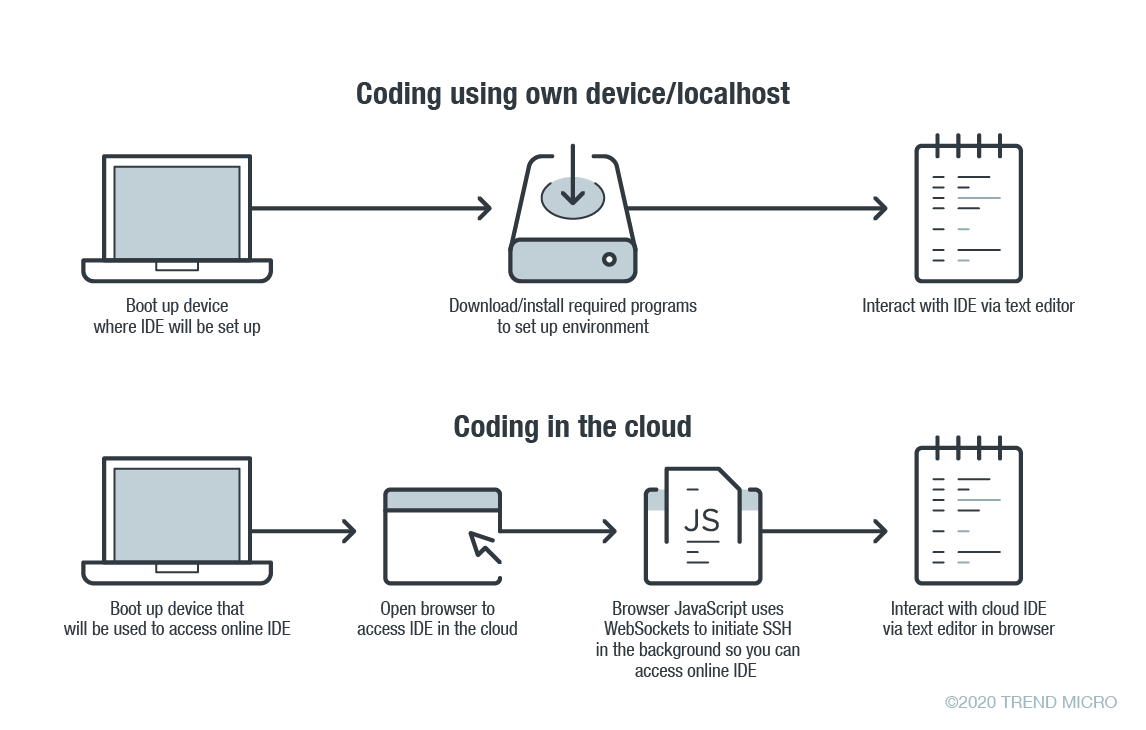
    In online coding, the IDE is rendered inside your browser, the browser JavaScript engine uses WebSockets to initiate an Secure Shell (SSH) connection to your linked device in the background—e.g. virtual private server (VPS)—providing you with the familiar terminal interface to execute commands. The environment—meaning the linked cloud VM/VPS or SSH-accessible device—includes tool configurations (like which tokens are included, or cloud configuration files), a copy of the source code, compilers and other tools that you want to use.

    Figure 1. Local versus cloud-based IDE. Source: Trend Micro.

    The main difference between local and cloud-based coding platforms is where the bulk of the environment resides. In cloud IDEs, the environment is a virtual machine instance inside your cloud provider. In terms of security, this means you are delegating trust to the cloud provider, but you are responsible for preventing any backdoors from opening or introducing misconfiguration issues to the VM. In the case of using your own device with AWS Cloud9, you are responsible for configuring the device securely.

    Linked Devices/VMs Are Not Always Secure

    What is running on the backend often dictates whether linked devices and VMs are secure. As previously described, an SSH-linked device is necessary to use these online coding platforms. In the case of Visual Studio Online (still in preview mode as of this writing), we can find a Visual Studio (VS) Code server running on the machine.

    The code server itself is a Node.js application to which your browser will connect. You can also download the whole ~/.vscode-remote folder and run the server inside your local environment.

    As the owner of the linked device, you have permission to promote yourself to root and install or configure whatever you think you will need. You also have, by default, both Docker and Git pre-installed.

    In the case of AWS-hosted Cloud9, the situation is a little more complicated. The backend necessary for platform communication is located inside the linked device while the frontend remains hosted on a different location. But, like in VS, you can also promote yourself to root.

    This brings us to our first security concern: How secure or private are linked devices/VMs?

    The linked device contains confidential information—access tokens, application configurations, source code, etc., which should be protected against unauthorized access.

    By default, the platform is secured by the provider. However, you should keep in mind that, together with your root access availability, you are also responsible for preventing misconfiguration issues, especially when using third-party plugins. AWS does not provide plugin support for plugins not developed by them.

    There are possible misconfigurations you might make that can lead to security issues. For example, if you set your IDE to be accessible from outside, either intentionally for ease of sharing, or unintentionally, that change can have major consequences.

    In addition, it is not common for access tokens to be stored in encrypted token vaults. A lot of them can be viewed via plaintext configuration files. Without additional security measures, your access tokens can end up exposed to outsiders.

    Once unauthorized access is acquired by cybercriminals, they can compromise your code for their own gain. An example would be the supply chain attack against a software company that modified software updates with malware.

    Browsers Can Introduce Malicious Extensions or Vulnerabilities

    The next security concern is the browser itself. As online coding platforms are accessed from web browsers, you should be very careful when accessing these sites from public, non-domain, shared or unprotected computers.

    Malicious browser extensions are a well-known phenomenon. While an untrusted computer possibly infected with malware presents an obvious risk, it is also possible for an attacker to steal code using a malicious web browser extension.

    Code Extensions and Plugins Can Also Contain Malware

    The main advantage of Visual Studio Online and, generally, the VS Code platform, is the number of extensions available. This in and of itself is yet another possible attack surface.

    Let’s imagine a malicious VS Code extension—a useful-looking extension with an embedded backdoor. The lack of permission checking (such as disk access, network access, process access, etc.) for extensions during installation or use, becomes a security problem. The extent of security checks during extension publishing is limited to having a valid publisher ID and a few image-related restrictions. This means you have to trust the extension developer entirely.

    No Software Application Is Error-Free

    The ever-present possibility of vulnerabilities in any kind of software must be considered as well. In the case of online coding platforms, they can be affected by web-class vulnerabilities since IDEs are web applications. For example, a vulnerability that allows an attacker to execute their own JavaScript code can have control of the IDE or remote linked devices.

    A recent vulnerability affecting the Visual Studio Live Share extension, which is also available for VS Code, shows that we can expect to see another vulnerability affecting online coding platforms in the near future.

    Securing Cloud IDEs Is a Must for DevOps

    Threat modeling allows us to understand the different factors at play that can affect the overall security of a computing environment. Cloud IDEs should be no different from other software, if not more critical to secure.

    Here are some recommendations for each of the security issues we raised:

    • For linked device security — Install trustworthy software. Keep that software updated. Don’t indiscriminately open ports to the internet.
    • For browsers — Work inside trusted and secured environments. Try to avoid using shared computers. Install browser extensions from trusted vendors only.
    • For VS Code extensions — Avoid installing extensions from unknown sources or authors.
    • For vulnerabilities in general — Make sure your environment is updated to the most recent version.

    — David Fiser