Category: DevOps Practice

  • Apollo GraphQL Makes Federated Server More Accessible

    Apollo GraphQL Makes Federated Server More Accessible

    In advance of its online GraphQL Summit this week, Apollo GraphQL announced today it has updated its Apollo Federation offering that enables a GraphQL Server to span multiple platforms, making it more accessible to a wider range of developers using different tools.

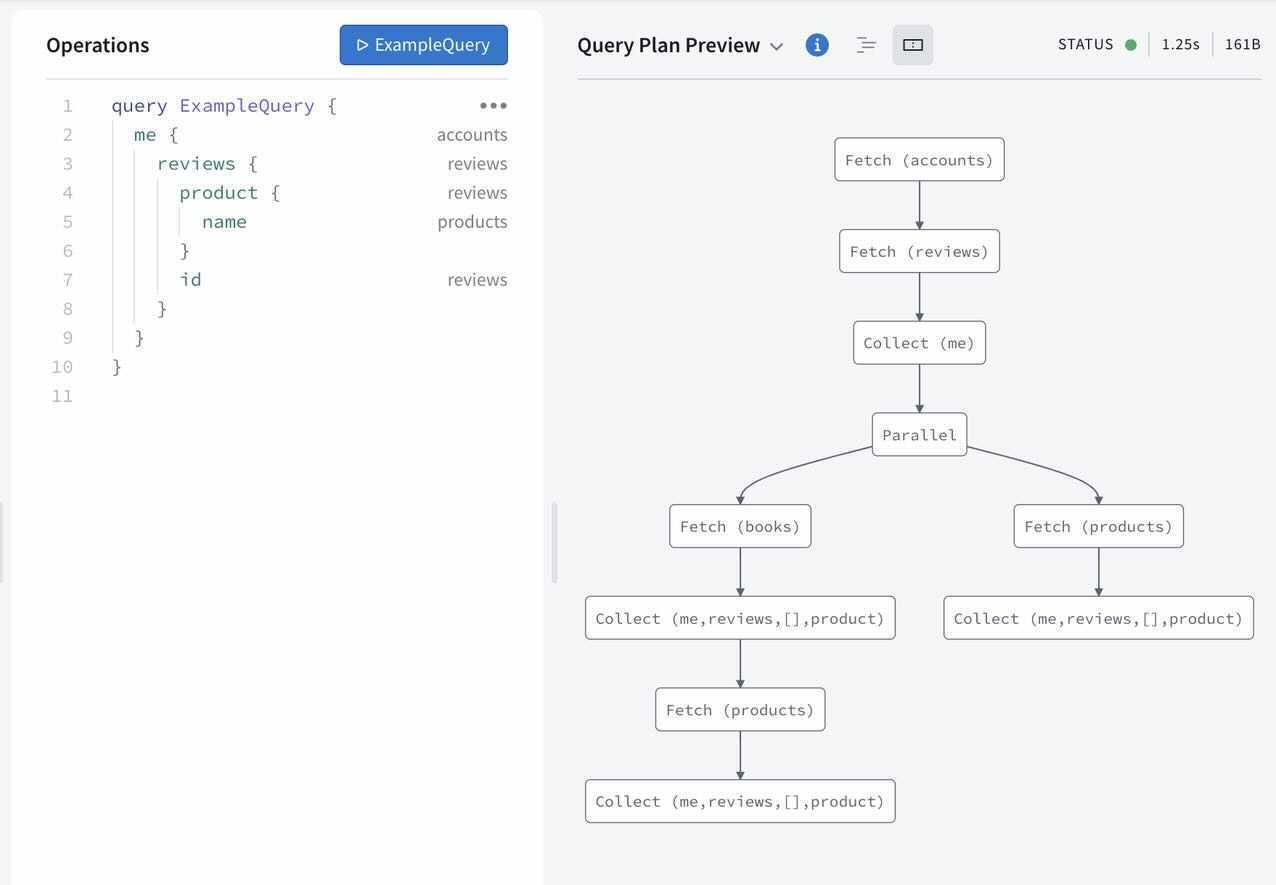
    Apollo Federation is now integrated with both Apollo Studio, a web-based tool for navigating GraphQL application programming interfaces (APIs), and Apollo Workbench, a plugin for Microsoft Visual Studio.

    At the same time, Apollo GraphQL is making available a command line interface (CLI), dubbed Rover, that makes it simpler to integrate Apollo Federation within a DevOps workflow.

    Matt DeBergalis, CTO, Apollo GraphQL, said GraphQL is continuing to gain traction as an alternative to more rigid REST APIs as more organizations begin to appreciate how dependent they have become on software. REST APIs may be simpler for developers to create, but APIs based on GraphQL are easier to update and manage, DeBergalis noted.

    Apollo GraphQL

    The challenge organizations encounter is that a GraphQL Server can become too large to easily navigate. Apollo Federation provides a mechanism that enables of subset of those APIs to be managed on multiple platforms that make up a federated instance of a GraphQL server, DeBergalis explained.

    DeBergalis also noted that IT vendors that have embraced GraphQL are also starting to add support for Apollo Federation. DataStax, a provider of a curated instance of the open source Cassandra database, has added Apollo Federation to the open source data gateway Stargate it provides to access data stored in a Cassandra database.

    At its core, QraphQL provides an open source data query and manipulation language for APIs along with a runtime for fulfilling queries. Originally developed by Facebook, the GraphQL Foundation is now an arm of the Linux Foundation. As more organizations embrace APIs to construct applications based on microservices, GraphQL adoption has steadily increased. It’s not likely GraphQL will completely replace REST APIs any time soon, however, given how pervasively deployed REST APIs already are.

    However, DeBergalis said that organizations that require a more agile approach to building and deploying software are voting with their feet for GraphQL APIs that are easier to update. As the rate of change in software environments continues to increase, the need for a more flexible approach to deploying and updating APIs becomes that much more apparent, added DeBergalis.

    GraphQL is also more efficient than REST APIs in terms how much data is shipped back and forth between a client and a server. At a time when the amount of data that is being consumed is steadily increasing, the need to give clients more control over how data is returned from a server has become more pressing. Apollo GraphQL claims more than two billion queries per day are now being launched against instances of its GraphQL Server.

    Regardless of what types of APIs are employed there are more of them with each passing day. As the number of digital business transformation initiatives increased in the wake of the COVID-19 pandemic, so too did the number of internal and external facing APIs. Developers may have their own individual preference for the type of API they want to use, but as developers are increasingly being tasked with both building and managing APIs after they are deployed, the appeal of GraphQL becomes harder to ignore.

  • Report: The State of DevOps Automation

    Report: The State of DevOps Automation

    In the race to accelerate digital transformation initiatives, organizations are encountering more incidents, more downtime, and longer resolution times. In fact, 90.4% of organizations saw an increase in incidents since the pandemic began, according to a recent Transposit report.

    In a completely digital economy, service downtime takes a higher toll. For ITOps teams, working remotely also requires new strategies to organize a team’s response to issues. Amid rising incidents, 94.1% of organizations have increased their focus on service reliability engineering (SRE) practices.

    Transposit just released their 2021 State of DevOps Automation report, which surveyed over 500 IT, DevOps, and SRE professionals across the U.S. The report sheds light on the state of remote work as it relates to incident response processes, reveals increased demand for SREs and highlights the automation they’re using to narrow the resolution time gap. Below, we’ll explore the report’s key takeaways and discover what sort of DevOps automation is trending.

    Remote Work Slows Incident Response

    Try as they might, videoconferencing and group chat solutions like Zoom and Slack just can’t compete with in-person collaboration. According to the survey, 93.6% of ITOps and software teams reported it takes longer to resolve incidents while working remotely.

    Since the pandemic began, 97% of teams have adopted remote work, and 90.4% have experienced increased service incidents. It doesn’t bode well that incidents are increasing as incident response time lags.

    The report findings frame remote work as a top hurdle to resolving issues — 46.1% reported that not being physically in the same room to collaborate on fixing issues was a top concern. But remote work is only one element; others cite changing processes and a lack of visibility into who’s responsible for maintaining code as another challenge.

    Incident Response Hangups

    To make up for these concerns, organizations are investing in incident response strategies. The report found that 56.4% of companies are adopting communication and collaboration tools, with automation tools at 52.3% and integration tools at 43.9%.

    Though the report showed greater investment in those tools, it also identified a persistent communication gap. When conducting postmortems, it can be challenging to correlate human action to incident responses. More than half (57.4%) of respondents felt it’s hard to piece together human actions and team communication during incidents. This context is essential to make sense of mean-time-to-response (MTTR) metrics.

    Interestingly, the report found 96.4% of respondents believe mining insights from human data, like Slack channels or group emails, could help improve incident responses. It appears that having a clearer way to harvest and query incident-related data throughout the entire response process is a universal concern.

    SRE Goes Mainstream

    As I previously reported, the SRE role continues to evolve and gain favor. The report similarly hypothesizes that, based on the survey results, the SRE title is going mainstream. Out of 295 respondents surveyed, 98% said they increased SRE practices in the last 12 months, and 62.4% said they would be expanding SRE efforts in 2021.

    In 2021, SREs will likely remain a hot commodity in hiring. However, these individuals will face mounting complexity in addressing real-time incidents for complex distributed systems. They will also likely be tasked with automating manual processes, as 51.7% of respondents reported that a lack of automation is the top cause of slow incident resolution.

    Automation Goals and Barriers

    40% of companies surveyed now have at least one dedicated full-time staff member working to create in-house tools or bots to automate incident responses. So, what sort of automation is common in the SRE field? The report shows SREs constructing custom scripts to automate things like:

    • Customer communication
    • Recording MTTR metrics
    • Automating infrastructure
    • Corporate communication
    • Auto-generating runbooks
    • Creating or updating tickets

    But, automating these processes is not all that easy. As a top barrier to automation, DevOps professionals collectively cite a lack of documentation. It seems by replacing tribal knowledge with up-to-date, shared documentation, teams could quickly unlock some gains. So, make documentation accessible, and provide copy-and-paste abilities for sample scripts.

    SRE and Automation to the Rescue

    The study demonstrates how the remote economy has increased both the number of incidents and the mean response times to address them. To fill this gap, organizations increasingly turn to site reliability engineering practices to automate incident responses. By leveling up DevOps with SRE, teams could reduce errors and improve overall availability as development teams progressively deliver new features.

  • Enterprise ML Investments on the Rise

    Enterprise ML Investments on the Rise

    The second wave of enterprise artificial intelligence and machine learning (AI/ML) adoption is building, and is expected to crest in 2021, as many organizations increased and accelerated their investments in tools and people.

    That was one of the unmistakable conclusions of our 2021 enterprise trends in machine learning report: 83% of the companies we surveyed said their AI/ML budgets had increased year-over-year, and we found that the average number of data scientists they employ has increased by 76% year-over-year. These changes came even as many organizations tightened their overall spending and refocused their strategic priorities amidst all of 2020’s disruption and uncertainty related to the COVID-19 pandemic. These companies aren’t simply moving forward with their AI/ML initiatives in spite of the pandemic; they’re doubling down on their investments because of it.

    Many organizations have begun to understand just how critical ML is to remaining competitive in uncertain and rapidly evolving conditions. When we ran a separate survey during the summer of 2020 to find out how businesses adapted to the pandemic’s impacts, it revealed a renewed sense of urgency around AI/ML investments: 43% of respondents said that AI/ML mattered “way more” to their business than they’d previously realized.

    Our independently conducted 2021 report included input from more than 400 leaders and practitioners across a diverse mix of technical and business functions, all of whom have a stake in their organization’s AI/ML strategy. They’re not just increasing their spending and staffing, either – they’re accelerating their pursuit of a growing number of enterprise ML use cases, with customer experience and automation leading the way.

    You need to be doing this, too. The second major wave of enterprise AI/ML adoption is underway, and you can still capitalize on the immense opportunities ahead. But the time to act is now. Organizations that take a “wait-and-see” approach are at risk of being left behind, particularly as so many other companies are scaling up their investments. Not only are your competitors increasing their AI/ML budgets (evident in the 83% YoY increase mentioned above), but they are moving their initiatives to the top of their strategic priority lists. Approximately three out of every four respondents (76%) in our 2021 report said they are prioritizing AI/ML over other IT initiatives, with 28% reporting that it is their top priority overall. These companies have realized that their success is directly tied to their ability to adapt to rapidly changing business conditions — and that AI/ML is the key to doing so.

    This is no longer the sole purview of elite technology companies. Companies of all sizes, across just about every industry, can get up and running with AI/ML, thanks in large part to the spread of easy-to-use tooling. The opportunities are more accessible than ever. You don’t need a ton of time or resources to get started — and it’s absolutely crucial that you do so soon.

    Your competitors are actively pursuing AI/ML initiatives today, regardless of your specific industry. We’re seeing many longstanding enterprises begin to drive huge transformations of their businesses and industries with AI/ML. More and more use cases are being pursued in legacy industries, from insurance to agriculture, healthcare to financial services and more. The bellwether financial firm JPMorgan Chase, for example, has even built an entire AI research program and data platform. There are virtually no industries where this is irrelevant. So, you need to act with urgency, as this second wave of enterprise adoption intensifies.

    You also need to build for operational efficiency and scale. We think of this as industrializing your machine learning operations (MLOps). While easy-to-use tools reduce the barrier to entry, they only get you partway to your destination. Invest in repeatable, automated processes or you’ll hit a wall of technical debt and other potential issues. MLOps paves the road to tightly integrated, well-aligned technology stacks, processes and teams that make it easier, not harder, to deploy more models in the future. This isn’t something you can wait on; if you’ve manually bootstrapped the deployment of even a handful of models to production, you need MLOps. Without it, you’ll quickly accrue unnecessary technical debt that will inevitably hinder your organization’s ability to scale and deliver meaningful business value.

    This is already a significant issue. Our 2021 report found that, while many organizations are increasing budgets and prioritization, it’s taking them longer to get models into production. Data scientists are still spending too much of their time on operational tasks, a problem that worsens as the number of models in production increases. This tells us that even as many organizations increase their spending and hiring, they’re actually allocating more of their growing resources toward manually scaling their AI/ML initiatives instead of investing in the operational efficiency that will maximize results.

    There’s a better way. Organizations no longer need to take a DIY approach to MLOps. There are robust solutions that can simplify many of the complex issues involved in scaling your AI/ML initiatives in production. Our report found that companies that use third-party MLOps solutions see improved outcomes compared with companies that go it alone and build and maintain everything themselves. They spend less on infrastructure, deploy models to production faster and tie up less of their data scientists’ time on model deployment.

    The pattern here is clear. Regardless of your particular industry, more and more businesses are identifying a growing list of use cases for AI/ML that can help transform their businesses and boost their competitiveness. They’re industrializing their AI/ML initiatives with MLOps to ensure their technology stacks, processes, and people are well-aligned. And, by doing so, they’re positioning themselves to rapidly adapt to and act on changing signals in their businesses.

    Don’t make the mistake of thinking AI/ML doesn’t apply to you or your industry. Doing so would mean missing out on potentially massive strategic opportunities, from new or growing revenue streams to increased efficiencies throughout your business operations. Your competitors are doing it; it’s easier than ever to get started and third-party MLOps solutions can help minimize technical debt and other operational complexity that will otherwise limit the positive business impacts of your initiatives.

    You can absolutely get in on the second wave of enterprise adoption, but the time to act is now. You can’t afford to wait.

  • BMC Tightens Integration Across DevOps Tools for Mainframes

    BMC Tightens Integration Across DevOps Tools for Mainframes

    BMC has extended its BMC Automated Mainframe Intelligence (AMI) and BMC Compuware portfolios as part of an ongoing effort to make mainframes just another platform for DevOps teams to build and deploy applications on.

    John McKenny, senior vice president and general manager for Intelligent Z optimization and transformation at BMC, said the DevOps technologies that the company gained last year with the acquisition of Compuware have now been fully integrated with the rest of the BMC mainframe portfolio.

    The BMC Compuware continuous integration/continuous delivery (CI/CD) platform has been integrated with Visual Studio Code, a free tool from Microsoft that is employed widely by developers, he added.

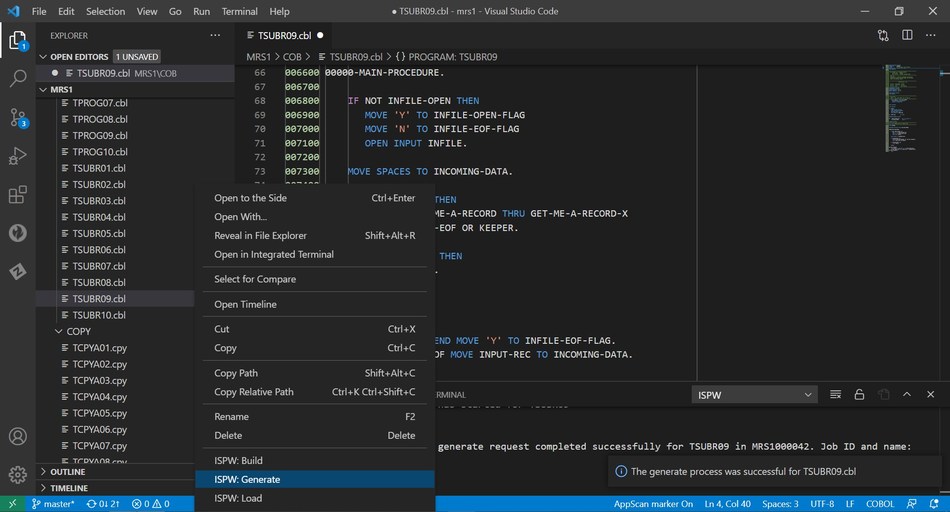
    The BMC Compuware ISPW solution integrates with Visual Studio Code to enable developers to compile changed code on the mainframe with a right-click.

    In addition, the BMC Compuware Topaz platform for applying DevOps practices to the development of mainframe applications has a new command-line interface (CLI) along with support for multiple application programming interfaces.

    A BMC Compuware File-AID 21 tool now makes it possible to reduce the time required to search billions of transactions and log files on a mainframe, while the BMC AMI Security tool has been integrated with the BMC Helix IT service management (ITSM) platform.

    Finally, the BMC AMI Ops Insight tool has been updated to provide diagnostic capabilities to more easily identify the probable cause of an issue, while the BMC AMI SQL Performance for DB2 tool now includes a plug-in for the open source Jenkins continuous integration/continuous delivery (CI/CD) platform.

    McKenny said the goal is to integrate mainframes with any DevOps workflow as part of an effort to either deploy new applications or modernize legacy applications already running on the platform. Modernization of mainframe applications is being driven by the need to add application programming interfaces (APIs) to mainframe applications that need to be integrated with a much broader array of distributed applications, he noted.

    Much of the demand for those APIs is being driven by digital business transformation initiatives that require applications to be able to access backend transaction processing and analytics applications running on mainframes, added McKenny.

    It’s not clear at what rate IT teams that build and deploy applications on mainframes are moving away from waterfall-based processes to embrace best DevOps practices. However, McKenny noted, the rate of changes being made to mainframe applications has accelerated significantly over the last few years.

    While large numbers of applications have been migrated off mainframes over the last decade, the number of enterprise IT organizations that continue to rely on the venerable platform to process transactions remains considerable. Many organizations aren’t convinced that it’s worth rewriting the applications they have relied on for decades when it’s easier to make them more accessible to other applications by adding an API. In effect, McKenny noted, mainframe applications are becoming just another microservice that can be invoked by a developer.

    Regardless of the motivation, it’s clear mainframe applications will continue to run well into the next decade. The challenge IT teams now face is finding a way to make those mainframes just another platform on which to deploy applications at the end of a DevOps toolchain.

  • GitLab Survey Surfaces Advances in DevOps Education

    GitLab Survey Surfaces Advances in DevOps Education

    As more organizations clamor for employees with some type of DevOps education, higher education is responding in kind, according to survey findings.

    A survey of 843 students and teachers at various academic institutions who have had some exposure to the GitLab continuous integration/continuous delivery (CI/CD) platform suggests the number of individuals with DevOps skills graduating from these programs soon might increase significantly.

    The survey, which was conducted by GitLab, identifies the top four use cases for the platform as learning (28%), teaching (22%), research (20%) and information technology/professional use (19%). Nearly a quarter (22%) also indicated they had a secondary use case on campus.

    Certification (57%) was ranked highest in terms of interest, followed by e-learning (49%) and virtual instructor led-training (35%). Students and graduate students are more interested in certification at 58% and 67%, respectively, while administration, faculty and staff were more interested in e-learning.

    The primary benefit of teaching and learning GitLab was identified as the ability to teach operations competencies (57%) and the ability to teach with an end-to-end tool for learning DevOps competencies (51%). For students specifically, the top benefit cited was the ability to teach operational competencies (49%), followed by the ability to build a portfolio and record of contributions (45%). Workforce readiness was cited at 40% and 46% of students and faculty, respectively.

    Dr. Christina Hupy, senior education program manager at GitLab, said the teaching of best DevOps practices within an academic environment is critical because it takes on average six years for IT professionals to master DevOps in the workplace. To help increase the overall pool for DevOps talent, GitLab has been making its software available for free via individual licenses to students and teachers. That program is now being extended to include a GitLab for Campuses offer, which makes the GitLab platform available to multiple users at a reduced price.

    In general, higher education programs have not been meeting the needs of organizations that are looking to hire IT professionals with proven DevOps skills, noted Hupy. Since launching the GitLab for Education Program in 2018, GitLab is trying to help fill that void, issuing more than $2 billion worth of GitLab software licenses in more than 75 countries. In 2020, the organization added 340,000 seats across 250 institutions to the program.

    More than a third of survey respondents (37%) reported they had access to a GitLab subscription at their institution and used it. The most common use case for GitLab cited was source control management (55%); followed by verification, also known as continuous integration, at 36%; planning, at 30%; and management and release, also known as continuous delivery, at 27% each.

    There is also significant use of GitHub among survey respondents, with 85% reporting using it. A distant second was Jenkins (21%), followed by BitBucket (17%), Travis CI (11%) and GitHub Actions (15%).

    IT organizations, of course, have a vested interest in helping educational institutions develop DevOps programs as the number of application development projects being launched simultaneously continues to increase. Otherwise, they will find themselves paying top dollar for DevOps talent that is difficult to find and retain. The challenge, of course, is identifying the institutions that have access to the DevOps tools and platforms that are going to be a pre-requisite for a successful DevOps career those students might eventually enjoy.

  • Low-Code Makes API Testing More Accessible

    Low-Code Makes API Testing More Accessible

    APIs are rising both in quantity and business value. But with that growth comes an increasing number of vulnerabilities, which could affect cloud service dependencies and internal APIs. Functionality and uptime could also suffer as cloud services evolve their APIs with new versions. Thus, API endpoint testing is critical to ensure a reliable back end. With growing interest across the organization to stabilize these integrations, how do we test APIs in a reproducible way that non-developers can grasp?

    Low-code platforms — tools that enable workflows with visual programming models — are opening doors for citizen developers to construct applications in a visual mode. Similarly, the low-code concept could aid API testing by providing an easier method to create API tests to verify functionality and uptime. This could arm quality assurance, DevOps and site reliability professionals with an easier means to test high-value integrations and their UI representations.

    Amid a growing headless movement, APIs are now powering many end-user experiences. However, during a developer drought, it may be challenging to find talent with integration know-how.

    I recently met with Dan Belcher from Mabl to discuss combining low-code and API testing. Here, we’ll uncover why it’s difficult for non-engineers to conduct API testing and consider what API testing must address to ensure today’s software meets tomorrow’s digital innovation demands.

    A Low-Code Approach to API Testing

    The software landscape has evolved rapidly in recent years. “Many forces have combined to create an incredible amount of change,” said Belcher, citing DevOps, CI/CD, the API economy and agile enterprises as examples. In this era, applications are becoming more dynamic, disrupting the way teams conduct end-to-end quality testing.

    API-based cloud services are part of this new frontier, becoming popular building blocks within modern applications. Yet, integrations require upkeep as cloud services evolve and version. Without continuous testing of API-based cloud services, organizations could easily suffer from breaking change and poor usability.

    Unfortunately, as it stands, typical QA teams aren’t well-equipped to handle ongoing regression testing for APIs. Instead, “developers, historically, have been the only ones that understood API testing,” explained Belcher. For years, API testing has been relegated to the realm of developers, who use tools like Postman to perform unit-level testing. But why is API testing so difficult for others?

    What Makes API Testing Difficult?

    Well, to start, non-engineers are typically more accustomed to UI-based testing. These environments use a structure designed for anyone to consume, making it easy to locate fields and confirm values, Belcher explained. When it comes to API testing, you often must handle massive chunks of JSON responses to match fields and surface issues. Testing API responses typically requires writing code, parsing JSON and writing it to variables, Belcher explained, which may be difficult for non-developers to implement.

    Or, difficulties could arise when testing asynchronous endpoints, Belcher added. Asynchronous APIs often involve background server processes that take a while to respond. This comes at a moment when event-driven architecture (EDA) is a growing trend. Take AsyncAPI, a standard API specification for EDA APIs, which recently joined the Linux Foundation. A recent report found AsyncAPI production usage tripled from 5% in 2019 to 19% in 2020. According to Belcher, testing such asynchronous services requires an infrastructure for continuous testing to anticipate these emerging scenarios.

    Four Crucial Areas For API Testing

    So what should API tests be focusing on? Belcher highlighted four areas that warrant close examination throughout the API testing process:

    • Functionality: This is the core functionality. Does the API do what it promises? Does it return the correct data?
    • Uptime: What is the API’s availability? Are all endpoints available in production?
    • Speed: This ensures cloud dependencies meet SLAs. What is the latency? Is there drift in API performance over time? Though API monitors like Api.expert help aggregate industry performances, they might not always reflect your specific customer-level realities. Belcher recommends not placing faith in supposed performance and instead, clocking your own.
    • End-to-End: Belcher stresses the role APIs now play across customer-facing presences. An end-to-end workflow should involve API endpoints, how they interact with one another, and the resulting visual representations. “Just like we have end-to-end testing for UIs, we should have end-to-end testing for APIs,” he said.

    API testing isn’t always combined with other parts of the user experience, but Belcher believes, going forward, end-to-end testing will be critical to ensure all workflows function in concert. For example, if a user profile is created within a browser, teams should verify the user profile has been created at an API level, as well.

    Low-Code API Testing and Shift Left

    APIs are beneficial to avoid reinventing the wheel. However, 100% operational uptime is impossible. Applications will inevitably encounter API problems, including outages, technical failures and functional misrepresentation. Developers also often come to rely upon production behaviors that may not be officially documented, an effect known as Hyrum’s Law. This can cause unstable integrations as APIs version over time.

    Thus, for these reasons and more, it’s a good practice to adopt continuous API testing. With the surging interest in site reliability engineering, spotting API errors early on will become an important aspect in reducing mean time to recovery (MTTR). Testing third-party APIs could also expose production latencies to inform cloud investments.

    “As the pace of change is going up, how do we deliver great quality to our customers?” Belcher asked. API testing is one answer to address this rapid change, and is growing in importance for the software delivery life cycle. It especially rings true for headless frontend experiences, where the API-driven backend isn’t transparent to QA testers.

    Low-code capabilities for API testing could help tear down silos inherent in the development process, enabling more people to participate in testing integrations. Belcher also stresses the importance of improving the usability of API testing for developers and non-developers alike. “We need to integrate with tools developers are already using for verification,” he added.

  • Languages and DevOps: Can’t be Contained

    Languages and DevOps: Can’t be Contained

    The evolution of platform is an interesting study. From physical to virtual to cloud to containers, the progression has been steady, and each successive platform has benefits for both Dev and Ops that make them appealing. In the case of containers, portability is the word.

    As easy to fold into your DevOps toolchain as cloud, yet able to be deployed wherever you need, containers have absolutely taken the industry by storm. While all cloud vendors offer container options these days, their “value add” capabilities are thinly veiled attempts at vendor lock-in, so most organizations have avoided them.

    Development languages are as diverse as they are for physical or cloud; you can pretty much find containers hosting every language imaginable. That makes perfect sense, since one use of containers is to keep an otherwise-obsolete environment alive. That’s certainly not the primary use of containers, but it is an important one. The catch with containers is that the primary languages depend greatly on usage. A container that is persistent and intended to last months or even years will tend toward a different set of languages than one that is ephemeral and intended to last only minutes.

    The big weaknesses of containers – security, persistent storage, and management – have been addressed more and more as container usage has grown. Complexity of environments is now the big issue, but that is not inherent to containers; merely enabled by the ease with which new machines can be spun up.

    For longer-term containers, Java and C# are still the languages of choice, though others are certainly making headway. A combination of how new container technology is, and the extra layer between applications and hardware in the current popular container solutions make C/C++ less popular than on physical machines. They are still used because like other targets, containers still have operating systems that are linked to more easily in these languages.

    Shorter-lived containers tend to use languages that grew up in the Agile environment – from Python to JavaScript to Go. The ability to quickly crank out the code and get to test is useful for Agile and DevOps environments.

    Hooking into DevOps toolchains is at least as easy as it is in a cloud environment. There are even a fairly large number of companies that have moved to spinning up a container to build, then destroying it, only to do it all again on the next build. This is not mainstream yet, but the ability to completely configure the container and its loaded toolset makes it an appealing option.

    The kicker – one that cannot be overstated – is that it is simple and easy to get developers running with a copy of a complex system that once would have required several physical boxes. I, personally, have worked on a seven-plus server client system that I had a complete copy of on my (admittedly beefy) development laptop. It wasn’t the most performant, but it was enough to do unit testing.

    The security weaknesses of cloud come along with containers too – there is a lot more than just configuring an IP to directing traffic, for example – but mitigating tools and processes are available.

    This pundit truly believes that containers are the future of DevOps. They have the best of previous iterations, while offering mobility that just didn’t exist in other solutions. The ability to move an entire infrastructure from one deployment target to another (data center to cloud, for example), or from one cloud vendor to another makes this option the king for organizations that require (for business objectives, compliance or finance reasons) the ability to move their applications quickly.

    Meanwhile, rock on.

    Containers are the cutting edge of wherever it is we are headed. They are more agile than any other solution, they do not limit programming or networking options, can be run wherever the organization needs them and can be modified or redeployed easily. There is more complexity, but most of it has been obfuscated; only when things go terribly wrong is the complexity really an issue. Development for containers, with a few exceptions, is development for the target OS. That makes it easy to keep the organization’s systems preferences while enabling developers. All good. And many (I daresay most) of you are already taking advantage of them. Keep rocking it. Use what the org needs, and don’t forget to check every once in a while to make certain what is in use is what needs to be in use.

  • The Surprising Secret to DevOps ROI

    The Surprising Secret to DevOps ROI

    As a result of my many years of DevOps consulting, I have discovered a simple, but not well-understood, secret ingredient that drives ROI for all the Three Ways of DevOps.

    Measuring and optimizing return on investment (ROI) for DevOps is not well-understood. It is a proven fact that DevOps, when engineered well, delivers tremendous value to organizations by way of continuous delivery practices. Reduced lead time, more frequent releases, lower failure rates and faster time to restore services are well-accepted indicators of DevOps value. It is not a secret that the combination of engineering DevOps practices for people, processes, and technologies around the Three Ways of DevOps – continuous flow, continuous feedback and continuous improvement – gets results. As valuable as these things are, they are not a measure of ROI, and do not tell you what to do to improve the return on your DevOps investments.

    How Do You Calculate and Optimize DevOps ROI?

    First, it is important to understand that ROI for DevOps is best measured using a simple ratio of return (R) divided by investment (I). (OK – for the accounting purists out there; I know the real ROI formula is actually (((R-I)/I)*100%) but that is a technicality that we don’t need for this argument.)

    The “return” of DevOps value is the important factor in the numerator of the ROI ratio. While there are many values that can be attributed to DevOps, the most direct value that can be measured and justified for legitimate comparison purposes is the cost savings associated with accelerating software delivery value streams. Application developers, and others, can get more applications released faster because of DevOps, which has a dramatic effect on valuable cost reductions. The “investment” in DevOps projects is the denominator of the ROI ratio. To optimize ROI, simply increase return by getting more application releases out faster, while reducing the investment required for a DevOps project. Sounds easy enough. But wait! How do you do that?

    The primary factor in the return is derived from reducing bottlenecks. I have found, in more than half of the thousands of DevOps value streams I’ve studied, that the biggest bottleneck is testing! It is a myth that continuous testing is just the execution of automated tests. I am talking about the whole range of ‘testing things,’ including test strategy, test planning, test resource scheduling, test design, test implementation, test environment management, test execution, test results reporting, test result analysis, troubleshooting, fix, retest and test management. That is a lot! In fact, testing things are a source of bottlenecks for every stage of a DevOps pipeline, for all three ways of DevOps. The point is that ROI can be greatly improved by improving testing.

    As it turns out, the primary factor in reducing investment costs also has to do with testing! Putting ‘testing things’ in place is expensive in terms of labor and capital costs for both people and systems. The primary factor to reduce total investment cost is to standardize, share and use ‘testing things’ with as many application pipelines and stages as possible.

    What is the secret ingredient that I have discovered? After all, the importance of testing itself is not much of a secret. I have isolated the key ingredient that is the heart of all ‘testing things.’ The purpose of a test is to determine a verdict. A test verdict is the codified representation of a pass, fail or inconclusive result state of a test, assessed relative to the purpose of the test. Test verdicts are essential, no matter what kind of test it is; no matter the stage in the pipeline a test is used. Without a verdict, all the ‘testing things’ in the world are not valuable.

    So – the secret ingredient for optimizing DevOps ROI is to optimize test verdicts. Those that know how to optimize test verdicts hold the key to optimizing DevOps ROI.

    As I indicated in this eBook I authored for the DevOps Institute, verdicts from properly engineered testing at each stage in the pipeline are essential for assessing the artifacts produced in each stage.

    How Can You Optimize Test Verdicts?

    As I have pointed out in prior articles, well-engineered DevOps requires balancing the nine pillars of DevOps.
    Surprisingly, test verdicts play a crucial role in optimizing all nine pillars of DevOps, and are vital to accomplishing the best return for the least cost investment in DevOps. Here are some examples of how this works for each pillar:

    Leadership – Leaders tend to underestimate the importance that ‘testing things’ have on DevOps ROI, and that the central ingredient of test effectiveness is the optimization of test verdicts. By sponsoring DevOps projects and training programs that drive improved test verdicts, leaders will have a direct and lasting impact on ROI.

    Collaborative Culture – How often have you seen people wasting time arguing over the meaning and importance of a test? Collaboration between application developers and QA and Ops teams is more effective when test verdicts are clear and based on a common understanding of the purpose and importance of each test.

    Design – The creation of excellent tests, designed to efficiently resolve to clear verdicts during the design phase, makes for reusable test assets in all subsequent stages and releases, and can be reused with other applications.

    Continuous Integration – The validation of builds is faster when all integration tests are arranged to get clear verdicts quickly during the build process.

    Continuous Testing – Test verdicts associated with each test are the key information ingredient that test management systems can key off to optimize test selection and test execution for each stage in the continuous delivery pipeline.

    Elastic Infrastructure – Test environment management (TEM) systems can optimize the orchestration of test resources better when test verdicts are clearly understood. Knowing a history of verdicts for a group of tests indicate which resources and how much of each resource are needed to run each test. This knowledge is essential to drive test environment management systems that have scaling algorithms for optimizing the use of ephemeral test environments, and to ensure test resources are used optimally.

    Continuous Monitoring – Reporting and analysis of test results can be a major bottleneck in the pipeline, but can be dramatically accelerated when the test verdicts are clearly defined.

    Continuous Security – Security tests are not much use without a clear verdict. While there is no such thing as 100% security assurance, the aggregate set of security test verdicts helps to profile security for applications and releases.

    Continuous Delivery – Algorithms that govern the ‘doneness’ of an application release candidate, and decisions to promote a release to production, depend on analysis of service level objectives (SLOs) derived from service level indicators (SLIs), including test verdicts. The fidelity and quality of those verdicts is essential for operations and site reliability engineering (SRE) teams to be confident enough to not bottleneck an application release.

    What This Means

    Measuring and optimizing DevOps ROI requires strategies that deliver value by improving returns through reducing bottlenecks and reducing investment costs. ‘Testing things’ are a dominant factor contributing dramatically to both the return and investment components of the ROI equation. A comprehensive strategy for optimizing test verdicts is the secret ingredient for optimizing and leveraging investment in ‘testing things,’ which, in turn, has a dramatic effect on improving DevOps ROI.

  • Getting Started With Continuous Monitoring

    Getting Started With Continuous Monitoring

    DevOps continues to gain traction among organizations as demand grows for digital product and platform development. According to Gartner, 87% of business leaders believe digitalization is a priority. Every DevOps transformation requires a dedicated, continuous learning process and effective implementation to reach maturity. If a practice or pattern is passed over or ignored, it can put a damper on DevOps success. Continuous monitoring, for example, is a very important part of every DevOps life cycle that is often overlooked.

    Through effective continuous monitoring efforts, organizations can scale and deliver digital products and platforms faster and more securely. In fact, these continuous monitoring advantages tie directly to modern customer needs. If they haven’t already, business leaders must embrace continuous monitoring along every point of the DevOps life cycle. These best practices can help you get started.

    Understanding Continuous Monitoring

    The practice of continuous monitoring helps to collect and analyze outcomes, statuses, exceptions and key metrics within each step of the DevOps process – from development to deployment and production. Additionally, it offers deep insight for DevSecOps teams by enabling compliance triggers and security alerts configuration. It allows the organization to detect issues or security concerns throughout every phase of the DevOps lifecycle.

    Understanding what continuous monitoring does is a good start. However, to effectively adopt continuous monitoring, the organization must know what to monitor.

    What Should Be Monitored

    An effective continuous monitoring process collects enough data to gain sufficient understanding of both successes and failures of the organization’s systems and processes. Some of the events collected by the continuous monitoring systems will require immediate attention, while others may lead to longer-term strategy discussions.

    Collecting the right information is always tricky considering the number of endpoints that generate logs and events. One should rank the significance of each source in relation to the type of data it produces, the functional area it supports and the impact it has on the system’s performance, as well as on organization’s goals and commitments (requirements posed by SLA’s, regulations, contracts, etc.).

    A combination of technology and strategy helps ensure that the right data is collected at the right time. The next step, and perhaps one of the most significant challenges, is finding the balance between monitoring and analysis.

    How to Achieve Balance

    Balance is, by far, one of the most difficult decisions in log monitoring and analysis. Gather too little data and risk missing early trouble indicators or important alerts. Collect too much and get buried in analysis paralysis – essentially, leading to the same situation of overlooking items of significance. Striking the right balance requires understanding the system’s continuous monitoring processing capacity and using its full potential. This may also involve data preparation steps during intake to ensure optimal processing and storage of the collected material.

    Offloading mundane tasks and parts of the analysis to machine learning and artificial intelligence (ML and AI) and fuzzy logic systems will enable big data processing gains. With this approach, the continuous monitoring capacity can be significantly increased, along with the semantic quality of the alerts and notifications produced by the system. As a result, security operation center (SOC) staff can devote their attention to the analysis of events which are more meaningful to the system and operations, leading to a more efficient continuous monitoring process.

    A DevOps transformation will likely not reach full maturity unless the organization applies continuous monitoring to the DevOps life cycle. Although often overlooked, it remains central to DevOps success. With this in mind, a basic understanding of continuous monitoring, what to monitor and finding the balance between log monitoring and analysis, serve as a foundation for getting started with continuous monitoring.

  • Achieving Reliable Observability Part 1 – Making Cloud-Native Observability More Robust

    Achieving Reliable Observability Part 1 – Making Cloud-Native Observability More Robust

    I was having a conversation with a CxO level customer as part of an AIOps/Observability workshop, and from what I could tell, most are confused about how to properly operationalize cloud-native production environments – especially the monitoring/observability portion. Here is how the conversation went.

    “Andy, we are thinking about getting [vendor] to use for our observability solution based on your recent research. What do you think?”

    “Well, I don’t want to endorse any specific vendor, as they are all good at what they do. But let’s talk about what you want to do, and what they can do for you, so you can figure out whether or not they are the right fit for you.” The conversation continued for a while, but the last piece is worthy of being called out specifically.

    “So, we will be running our production microservices in AWS in the ____ region. And we are planning to use this particular observability provider to monitor our Kubernetes clusters.”

    “Couple of items to discuss. First, you realize that this particular provider you are speaking of also runs in the same region of the same cloud provider as yours, right?”

    “We didn’t know that. Is that going to be a problem?”

    “Not particularly. However, you may get into a ‘circular dependency’ situation.”

    “What is that?”

    “Well, as an enterprise architect, I always call for separation of duties as a best practice. For example, having your developer testing the code is a bad idea, having your developer figuring out how to deploy is a bad idea. In much the same way as when your production services run in the same region as your monitoring software – how would you know about a production outage if the cloud region takes a hit, and your observability solution goes down at the same time your production services do?”

    “Should we dump them and go get this other solution instead?”

    “No, I am not saying that. Figure out what you are trying to achieve and have a plan for it. Selection of an observability tool should fit your overall strategy.”

    For those who don’t understand the above conversation, here is the reason why this scenario could be a problem.

    Coming from an enterprise architecture background, we were taught, as a best practice, to operationalize production systems to avoid circular dependencies. This includes not having two services depend on each other, or not to colocate monitoring, governance and compliance systems as part of the production systems themselves. If you were to monitor your production system, you would do it from a separate and isolated sub-system (server, data center rack, sub-net, etc.) to make sure that if your production system goes down, the monitoring system doesn’t go down, too.  The same goes for public cloud regions – although it’s unlikely, individual regions and services do experience outages. If your production infrastructure is running on the same services in the same region as your SaaS monitoring provider, not only won’t you be aware that your production systems are down, but you also won’t have the data to analyze what went wrong. The whole idea behind having a good observability system is to quickly know when things went bad, what went wrong, where the problem is and why it happened so you can quickly fix it. You can check out this blog where I explain this in detail.

    The best practice would be to either:

    1. Consider an observability solution that runs in a different region than your production workloads. Better yet, consider something that runs on a different cloud provider altogether. Although it is exceptionally rare, there have been instances of cloud service outages that cross regions. The chances of both cloud providers going down at the same time would be slim.For example, if the cloud region goes down (a region-wide outage in the cloud is quite possible, and seems to be more frequent of late), then your observability systems will also be down. You wouldn’t even know your production servers are down to switch to your backup systems unless you have a “hot” production backup. Not only will your customers find out about your outage before you do, but you won’t even be able to initiate your playbook, as you are not even aware that your production servers are down.
    2. Consider having your observability solution in a different location/region, yet still close enough to your production services so latency is very low. Most cloud providers operate in close proximity, so it is easy to find one.
    3. Another option is to get a solution that gives you deployment flexibility. For example, there are a couple of observability solutions that allow you to deploy it in any cloud and observe your production systems from anywhere – both in the cloud and on-premises.
    4. You can also consider sending the monitoring data from your instrumentation to two observability solution locations, but that will cost you slightly more. Or, ask what the vendor’s business continuity/disaster recovery plans are. While some think the costs might be much higher, I disagree, for a couple of reasons. First, because monitoring is mainly time-series metric data, so the volume and the cost to transport is not as high as logs or traces. Second, unless your observability provider is VPC peered, the chances are your data will be routed through the internet even though they are hosted in the same cloud provider. Hence, there will not be much more additional cost. Having observability data, all the time, about your production system is very critical during outages.
    5. A very commonly overlooked consideration is monitoring your full-stack observability system. While it is preferable to have the monitoring instance in every region where your production services run, it may not be feasible either because of cost or manageability. On such occasions, monitor the monitoring system. You could do synthetic monitoring by checking the monitoring API endpoints (or do random data inputs and check to ensure it worked) to make sure that your monitoring system is properly watching your production system. Better yet, find a monitoring vendor that will do this on your behalf.

    When/if you get the dreaded 2 a.m. call, what is your plan of action? Just think it through thoroughly before it happens and have a playbook ready, so you won’t have to panic in a crisis.