Category: DevOps Practice

  • New Relic Adds SLO Tools to Observability Platform

    New Relic Adds SLO Tools to Observability Platform

    New Relic this week made a service level indicator (SLI) and service level objective (SLO) capability generally available within the New Relic One observability platform. The new capability makes it possible for DevOps teams to customize metrics, unified health reports and alerts.

    Alex Kroman, general manager and senior vice president for product engineering for New Relic, said the goal is to enable DevOps teams to more easily optimize services that span multiple applications and software components at a time when more organizations are relying on software to drive digital business transformation initiatives.

    IT teams have, of course, been tracking SLOs for decades. However, as application environments have become more distributed—thanks, in part, to the rise of microservices—achieving and maintaining SLOs has become more challenging. DevOps teams often lack an understanding of which metrics are most relevant to the business and even when they do, they have historically relied on manual processes and ad hoc tooling, noted Kroman.

    In contrast, New Relic is providing those capabilities in a way that makes it simpler to manage service levels at no additional cost, he added. DevOps teams can, for example, create SLIs in one click to automatically establish a baseline of desired performance and reliability. The platform also provides recommendations based on historical data to both establish benchmarks and customize and configure SLIs and SLOs.

    Those capabilities make it simpler to set service boundaries and track reliability across teams based on benchmarks, tags and reports that include bespoke views for both service owners and business leaders. In effect, via an application programming interface (API) exposed by New Relic, it becomes possible to employ dashboards to gain visibility across an entire business process, said Korman.

    It’s still early days as far as the modernization of SLOs is concerned, but it’s clear that, over time, they will be managed as code along with everything else in a DevOps workflow. The more organizations become dependent on applications to drive digital business initiatives, the more critical it will become for DevOps teams to track SLOs. The decision that must be made is the degree to which it makes sense to manually implement some form of SLO-as-code versus relying on an observability platform that can be accessed as a cloud service.

    Observability, of course, has always been a core tenet of DevOps. Few organizations are able to really achieve it, however, because most IT teams have been monitoring little more than a pre-defined set of metrics. Modern observability platforms make it easier for site reliability engineers (SREs) to launch queries against aggregated instances of metrics, logs and distributed traces to ascertain the root cause of an issue. The issue then becomes how to correlate the results of those queries against the service levels that businesses expect from a set of applications that might be driving, for example, an order-to-cash process. After all, knowing what occurred within an IT environment doesn’t always easily translate into a report that the average business executive can easily comprehend.

  • Facebook Bans Innocent Users | Azure and ARM/Ampere | ‘Great Resignation’—No End in Sight

    Facebook Bans Innocent Users | Azure and ARM/Ampere | ‘Great Resignation’—No End in Sight

    Welcome to The Long View—where we peruse the news of the week and strip it to the essentials. Let’s work out what really matters.

    This week: No remedy for banned Facebook users, new ARM-based VMs on Microsoft Azure, and The Great Resignation will still be a Thing for the foreseeable. (more…)

  • Security Debt: Speed vs. Common Sense

    Security Debt: Speed vs. Common Sense

    A couple years ago, we had some spectacular security events that involved DevOps and Kubernetes, where the managing team simply redeployed containers whenever one crashed. It turned out that many organizations were doing the same thing, and, what’s worse, they were not talking about it because they knew it was not a long-term solution to crashing issues.

    At the time, I thought these high-profile lessons would teach people to actually fix code issues, even in high-throughput Agile-meets-DevOps shops. I admit I also laughed, yet again, at The Phoenix Project’s expense, thinking, “Yeah, but the CISO isn’t holding things up by demanding that get fixed!” I wish that would ever get old, but it won’t.

    It seems I was wrong. Or at least partially so. Some—perhaps many—shops seem to have missed the message that these issues sent. Anecdotally, we heard this was still happening, so we started asking questions. Yep. There are shops out there (since we started with ‘anecdotally,’ I won’t pretend to put numbers around it) that still take an “If it isn’t causing disruption in core systems, don’t fix it” mentality.

    Ouch. We’ll be revisiting some of those in the future, I’m sure—when it’s listed as a vulnerability or breach somewhere.

    I’m not a security professional. Because the vast majority of enterprises do not have dedicated security and even more don’t have anything close to enough security staff, I have done security as a part of almost every job I’ve taken—because it was what needed doing the most. Many, if not most of you, are in the same boat.

    That said, I can tell when you are blatantly asking for a security incident. And running code known to be faulty or misconfigured to the point that it repeatedly crashes is deliberately asking for a security incident. “But it isn’t exposed to the Internet!” is only a valid rebuttal until an attacker gets inside the perimeter and uses your fault for something like privilege escalation. Then no one cares if it’s connected to the internet or not; they want to know how the attacker did it. And that’s on you.

    So for those organizations in which speed has overridden common sense, let’s be very clear and to the point.

    It is a best practice not to run crash-level faulty software.

    Since you must not have one, write a policy that explains this and lays out a process and/or timeline to fix these problems. Then drive it home. Make certain it is known that this policy will be enforced. For that huge majority of my readers that don’t have the level of authority that “create and promulgate a policy” implies, convince those who do. Point out the issues to them in writing. “Notified in writing of faulty practices that could bite the company in the rear,” tends to get even the most unfriendly management to click into CYA mode and do something about it.

    When we all watched those spectacular failures back in the day, I assumed that this was all about growing pains; you can do so much more with Agile/DevOps/cloud and/or Kubernetes that this type of thing would crop up and, eventually, get addressed. I still believe that. You all are still testing the boundaries and pushing the limits and making all of IT look good. It’s just going to hurt getting there sometimes. Fix the apps, make the policy, keep kicking butt and know you are killing it (as an industry. If you aren’t, stop laughing at my blanket compliment and fix yourself).

  • ACCELQ Further Automates Testing of Low-Code, No-Code Apps

    ACCELQ Further Automates Testing of Low-Code, No-Code Apps

    ACCELQ today unveiled the cloud-based ACCELQ Live test automation platform that is continuously integrated with a wide range of low-code and no-code application development and deployment platforms.

    ACCELQ CEO Mahendra Alladi said the goal is to make it simpler to run complex tests across a multi-cloud computing environment.

    Usage of low-code and no-code tools has greatly expanded since the start of the COVID-19 pandemic. Many organizations are now relying on these tools to accelerate a wide range of digital business transformation initiatives. The challenge they encounter is that many of these processes depend on multiple applications that have lots of interdependencies across which it is difficult to conduct tests, noted Alladi.

    The ACCELQ Live platform reduces testing complexity by automatically updating itself as, for example, Salesforce or ServiceNow platforms are updated. It also provides access to pre-built codeless automation assets modeled on business processes via a live link. The company is also moving toward creating a marketplace where software vendors and service providers can build and deploy pre-built testing assets, as well.

    Gartner predicts the adoption of low-code and no-code technologies will nearly triple by 2025. Testing those applications creates a major challenge as the pace of application development increases. The only way organizations will be able to keep pace is by embracing test automation platforms infused with artificial intelligence (AI) capabilities, said Alladi. In effect, ACCELQ’s ACCELQ Live represents an effort to democratize the testing of cloud and enterprise apps, he added.

    As organizations increasingly appreciate their dependence on software, the way tests are being conducted is rapidly evolving. In addition to dedicated testing teams, developers and application owners are becoming more involved as responsibility for testing applications continues to shift further left. The challenge organizations face is the volume of applications that are simultaneously being constructed has significantly increased. Platforms that automate many lower-level testing functions are gaining traction as a means to enable humans to focus more of their time and energy on testing more complex functionality. The goal now should be to first rely on test automation platforms as much as possible and then employ humans to fill in the gaps as necessary, said Alladi.

    It may be a while before most organizations achieve that level of test automation. However, with each passing day, it’s apparent that AI will play a larger role in application testing. The issue that many DevOps teams are now working through is how to incorporate test automation platforms within the context of a larger workflow.

    In the meantime, the rate at which application testers become burned out should decline as more routine errors are uncovered by machines. It’s not likely AI will eliminate the need for dedicated testing teams any time soon, but as more rote tasks become automated there is going to be more time to focus on enhancing overall quality at a time when application environments have not only become much more distributed but also a lot more complex.

  • How to Get Started With Low-Code/No-Code

    How to Get Started With Low-Code/No-Code

    Software development is complex. It can take years of practice to become an experienced developer. But the good news is that you can build many applications without ever learning to code.

    Low-code/no-code development is the practice of using a visual interface and drag-and-drop elements to build applications for business processes without coding.

    These types of tools can be used by non-technical users to build many types of applications; these can then be integrated with other software systems. By learning low-code/no-code development, you will be able to create software for yourself or your business much faster than if you were to learn how to code the traditional way.

    In this post, we’ll cover why you should learn no-code development, along with some great learning resources and communities you can join to get started with low-code and no-code development.

    Low-Code/No-Code is Gaining Popularity

    The internet is a very different place today than it was even a short 10 years ago. In the past, websites simply aggregated information to an audience on the web. Today, websites are designed to engage and encourage visitors to take action, from filling out sales forms to education and training to shopping and scheduling appointments.

    Fortunately, the tools available on the market today have made it possible for individuals without coding experience to build beautiful websites, useful business applications and productivity and automation enhancements to workflows using no-code tools. In fact, 26% of executives say that no-code, low-code development platforms are their most vital automation investment.

    Forrester Research believed that by 2022, the market for no-code and low-code development platforms will increase to $21.2 billion. Another report from Gartner estimated that by 2024, 65% of application development activity will be credited to no-code development.   

    No-Code is For Everyone

    While there is still a place for code and professional developers, no-code development gives individuals a way to build applications and boost their productivity and their effectiveness faster, cheaper and better than ever before. In addition, it relieves the burden on IT, software development and DevOps teams who can offload the work of creating applications to the actual users of those applications.

    No-code also allows for collaboration of citizen developers with other cross-functional teams in the business, while developing apps that can solve for their unique challenges.  

    Better Agility

    No-code can also accelerate digital transformation. The most important advantage of no-code development is speed. On average, it takes a few minutes to build a simple app or a website using no-code tools. When you’re developing more complex projects such as an entire business management system, this speed can be a major competitive advantage. It lets you quickly test your ideas and iterate until you get the results you want.

    Since most development is done with a drag-and-drop interface that is built visually using pre-built modules, you can create apps faster. Usually, even testing is automated, which further speeds up development time. In fact, no-code platforms can reduce development time by 90%.

    Reduced Cost

    Forrester reported that when one company passed up hiring two IT developers and implemented low-code tools instead, they saw an increase of about $4.4 million in business value from the resulting apps over three years. Naturally, since low-code/no-code technology removes the need for and additional cost of developers, it helps you cut those costs as well. 

    Increased Productivity

    People who make the switch from traditional coding to no-code development often say that it feels like a new world. It’s fast, easy and efficient—and you can create beautiful results with relatively little effort. 

    It is estimated that 71% of organizations that leverage citizen development could speed up app development by at least 50%. And 29% of companies noticed delivery speed doubled. These numbers suggest that citizen development and no-code development can increase productivity tremendously.

    No-Code Apps Are Customizable and Scalable  

     If a company wants to add a new feature or change existing ones, many no-code apps are flexible enough to adapt. The majority of no-code app development platforms allow you to add new features and customize your app. Low-code apps, on the other hand, are slightly less flexible and often have predefined components that make it difficult to customize the app.

    Plus, because of the drag-and-drop elements, no-code app development platforms allow you to build an app quickly. You don’t need coding skills to create an app. Instead, you will rely on prebuilt modules and templates.

    Getting Started With Low-Code/No-Code 

    There are lots of great resources out there to help you learn how to build your apps and workflows without code. Here are some of our favorite places to start!

    1. No Code HQ

    No Code HQ is a great resource for learning how to build your website or app without the need to code.

    It is a community of no-code builders, where they showcase their newest projects, share news and experiences and engage with and learn from each other. You will get tutorials about no-code development, templates and tools to start your no-code project.

    2. Nucode 

    This community has more than 5,000 no-code builders and experts. They learn and share experiences and showcase the progress of creating no-code products.

    3. No-Code Makers

    This forum is for no-code experts to learn, interact, share and collaborate with other no-code community members and creators. They regularly update the community with news about no-code tools and experiences. 

    4. Nocoders Academy

    This is another space for no-coders that arms you with valuable information. You will find many tutorials, learning materials and over 200 free resources on various tools. Soon, the site said there will be a formal traning academy with mentors and tutors. 

    5. NoCode.Tech 

    This is a directory of over 200 tools and strategies implemented by developers and no-code makers. Even a novice can learn how to build no-code software and receive community support. 

    The idea of learning to code can be overwhelming, even for experienced designers. This is why no-code is so appealing to so many people—it is essentially instantaneous, which allows you to create projects without worrying about the coding process. Have fun!

  • The Missing Link in Continuous DevOps Cycles

    The Missing Link in Continuous DevOps Cycles

    Delivering software quickly, reliably and safely is at the heart of technology transformation and organizational performance regardless of industry. As part of overall technology transformation, many companies are recognizing the benefits of applying DevOps methodologies to areas outside of software development, such as general product development, IT expansion and scaling and new business processes. However, some organizations—and even software development teams—may be missing a crucial step in the product development life cycle. 

    The Missing DevOps Link

    DevOps methodologies are nothing new. In fact, part of the reason organizations are adopting DevOps practices for initiatives outside of software development is because of its tested and proven success when it comes to developing and deploying new processes and features. The exact steps involved in DevOps processes can be debated by reasonable people, but there are three generally agreed-upon factors involved: Continuous integration (CI), continuous deployment (CD) and continuous release (CR). 

    Continuous Integration

    CI refers to a strategy of constantly updating products with new features and code on a regular basis. The cadence of the updates varies from weekly to monthly, but the strategy remains the same: Detect problems early before they can snowball and impact further development down the line. 

    Continuous Delivery

    CD is related to continuous integration but is focused on the delivery stage. CD is executed when new features and development updates are deployed to production. The most critical factor of CD is consistent management of the product’s end environment. To maintain the consistent functionality of a product in the end-user environment, it must be regularly deployed and tested to ensure performance doesn’t suffer as a result of product updates and new features.

    Continuous Release

    CR is the final step before the product development life cycle starts over again. CR refers to the practice of continually releasing new product updates, features and capabilities to end users. The tricky part of CR is that you must execute CI and CD flawlessly to ensure the end user doesn’t experience any bugs or issues caused by an update. 

    But what’s missing? The answer lies in continuous exploration (CE). 

    Why CE is Critical to Product Development Success

    CI, CD and CR are often-discussed product development strategies, but they don’t tell organizations where to start with the DevOps life cycle. To begin developing new products or features, organizations must first identify what exactly they’re building and for whom. As I often say to my product team, you need to get the kitchen ready before you can cook a great meal, but you need to know what meal you’re making before you start cooking the wrong thing.

    CE refers to the continuous exploration of a company’s markets, target audiences and customers to understand their requirements and preferences. This may sound like the job of a marketing department, not product developers, but the two should work together in a coordinated fashion that helps to achieve both teams’ goals. For example, product development teams don’t know what new product features their customers love, which ones they hate or which ones they really need. On the other hand, marketing teams don’t know how to market products if they don’t understand the ins and outs of the new features and how they can be of service to customers. 

    Even departments within an organization that don’t develop products can benefit from CE. For example, if an organization is pursuing a cloud migration of on-premises software, they will likely hire an expert consultant or vendor to help them execute their cloud vision rather than developing their own cloud environment.

    However, simply moving all of the on-premises systems and data to the cloud at once could be a catastrophe. What if you migrate systems and processes to the cloud and they suddenly stop working? Unless you’ve performed the migration at a gradual pace by following CI, CD, CR and CE strategies, you don’t know what, specifically, is causing the system error in the cloud.

    In the same vein, by performing CE internally, organizations can determine which processes and on-premises systems would benefit most from cloud capabilities and execute the migration accordingly. This not only prioritizes technology transformation initiatives based on the needs of the business but may also let the business know which on-premises systems may no longer be needed in a cloud environment.

    Many organizations interested in improving customer experience (CX) and internal processes by leveraging DevOps strategies would benefit greatly from leveraging CE. Products and businesses processes should be designed to meet the needs of customers and drive bottom-line revenue. So, it stands to reason that the first step in meeting the needs of customers is understanding those needs. This cannot be done without CE as the foundational building block of product development life cycles. 

  • Essential Ingredients For a Remote DevOps Team

    Essential Ingredients For a Remote DevOps Team

    Enterprise business processes are run on evolving applications, and the DevOps team needs to be as efficient as the applications they create. Unfortunately, the COVID-19 pandemic has had a profound impact on DevOps productivity—and that impact hasn’t always been positive.

    Tracking the performance of the DevOps team has become more challenging in a remote and hybrid world. Like everyone else, developers have become remote workers throughout the pandemic which means adapting to a new way of working. There has been a lot of research done on the impact of work-from-home on productivity. Of course, measuring any developer’s productivity was already a complex task. It’s not as though you can use a simple metric like the number of lines of code produced per day; it’s a lot more complicated than that.

    Working from home has made it even more challenging for developers to stay productive. There are dozens of distractions when you work from home, and research shows that it can take even the most skilled developer 15 to 20 minutes to resume work once they have been interrupted. There’s also more stress associated with balancing work and home life when working remotely. According to Catalyst, 92% of workers say they are feeling burnout from the stress of remote work.

    Software Development Thrives on Remote Work

    In many ways, the trend toward remote work has been a windfall for developers. The nature of coding has always lent itself to a hybrid or remote work environment, but unfounded concerns about securing intellectual property have always been an impediment.

    A recent Gartner survey revealed that employees are three times more likely to become high performers when given flexibility as to where, how, and when they work. Remote work also enhances flexibility and eliminates wasted time commuting. And work-from-home reduces childcare responsibilities. Catalyst found that 32% of women with child-care concerns are less likely to leave their jobs if they have work-from-home as an option.

    Remote work also eliminates geographic barriers, which is a well-understood benefit in the software industry. Being able to hire programmers working from home anywhere in the world increases the size of the talent pool and makes it easier to find developers with the right skillset.

    Of course, there are challenges for DevOps teams that embrace a remote work model. Communication is probably the biggest challenge. Zoom meetings may not be as effective as in-person meetings since it’s harder to read facial expressions and pick up non-verbal cues. It’s up to the team leader or senior manager to promote effective communications. It’s also important to have the right tools, have the right communications channels and maintain respectful interactions. Even with a remote work environment, the team dynamic can be adversely affected by the misuse of responsibility, behavioral issues and disrespectful behavior.

    Building a Remote DevOps Team

    Supporting collaboration in a hybrid work environment requires new processes, new guidelines and new tools. The best place to start is by choosing the right collaboration platforms and procedures. For example, email is a poor channel for immediate requests, but you don’t want to be answering continuous phone calls. Establish protocols for using email, chat, teleconferences and meetings. Adopting cloud communications tools also gives you more agility and scalability. 

    When choosing the right collaboration tools consider security. Working off-site gives you less control over enterprise access. Remote workers access enterprise systems using different devices and public and private networks. To reduce vulnerability to cyberattacks provide safe and secure network access with multiple security layers. Adopt virtual private networking (VPNs), remote desktop protocol (RDP) clients, and malware protection. Workers tend to be less security conscious when working remotely so take what steps you can to reduce risk.

    In addition to having the right tools, you must have the right approach. To continuously improve efficiency you need transparency, inspection and adaptation, just as you do with DevOps. Start by establishing and documenting a clear set of expectations for the remote team. Also, create a leadership hierarchy. Even though they are working from home, everyone needs a work structure. It’s up to the team leaders to create a stable work environment. Lack of clarity removes that sense of structure and safety and can undermine the team.

    Maintaining transparency is the best approach for any remote work culture. Establishing a workplace fueled by honesty and openness and where every voice is heard ensures everyone is working to achieve a common goal and keeps morale high.

    Maintaining a successful remote work environment depends on respecting the four Cs: Communication, collaboration, connectivity and culture. The four Cs are interdependent and work together to create an effective digital work environment, providing an employee experience across locations, devices, channels and situations.

    Creating a Productive Environment

    Once you have laid the foundation for remote collaboration, the next step is to monitor productivity. There are a few ways to look at DevOps team productivity. You can look at the final output of the overall effort, assessing the application that is the end product. You also can measure overall team productivity. 

    To monitor key metrics to assess team productivity, project managers must be prepared to drill down to evaluate hot spots:

    • Measure output for specific developers and see how it stacks up against the productivity of other team members. 
    • Maintain leaderboards highlighting top contributors. Using gamification creates healthy competition and can inspire greater productivity when top performance is recognized.
    • Create a conducive environment by providing the right set of tools and motivating engineers to be at their best.
    • Monitor distractions. Coding is an intensive activity and disruptions harm productivity.

    Don’t measure productivity based on coding. Developer contributions also include designing new features, functional discussions, code review, documentation, testing and bug fixes, meeting with customers and other tasks.

    Improving DevOps productivity is also a product of automation. In addition to streamlining real-time collaboration with tools such as instant messaging and Microsoft Teams, shortening development time with automated testing tools and AI-powered test frameworks eliminates manual processes and frees time for more productive tasks.

    If you are looking for a silver lining from the pandemic, consider the evolution of the remote work environment. Supporting remote DevOps developers is nothing new, but forcing employees to work from home has made the hybrid work environment more efficient. DevOps teams continue to invent better ways of working that promote flexible work hours, higher productivity and a better work-life balance.

  • GitLab Updates CI/CD Platform to Improve Dev Productivity

    GitLab Updates CI/CD Platform to Improve Dev Productivity

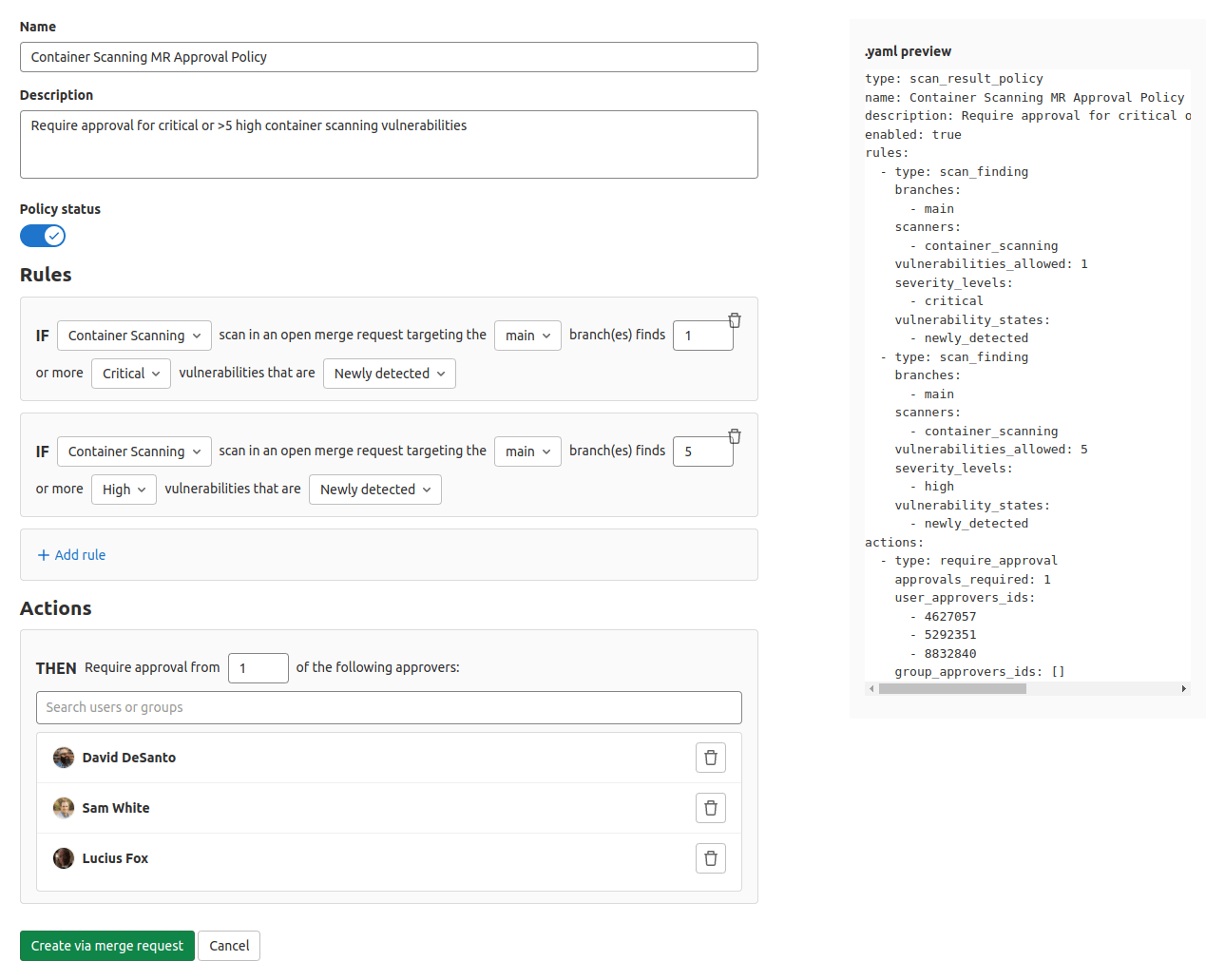
    GitLab has made available a 14.9 update to its namesake continuous integration/continuous delivery (CI/CD) platform that adds epic-linking, integrated security training, rule mode for scanning result policies and a revamped design, among other capabilities. The updated environment makes it easier to discover the state of the application development projects, GitLab said.

    Cindy Blake, director of product marketing at GitLab, said these updates are part of an ongoing effort to embed technologies within the CI/CD platform that will make applications both more secure and compliant with various mandates before they are deployed in a production environment.

    For example, DevOps teams can now take advantage of a user interface through which they can use a rule mode to design and edit policies without the need to access YAML files directly.

    GitLab has also partnered with Kontra and Secure Code Warrior to provide content that will drive security training functionality. This content can be accessed via the GitLab platform whenever a vulnerability is discovered.

    The overall goal is to make it simpler for organizations to shift left because expecting every developer to become a security expert is not especially realistic, noted Blake. The ability to automate many of the security tasks that developers face is a way of showing empathy for the daunting challenges they face.

    In general, as application development becomes more complex, GitLab is moving toward making its CI/CD platform more accessible to a wider range of organizations, including those that might only be starting to embrace DevOps best practices. The epic-linking capability, for example, makes it easier to identify “related”, “blocking,” or “blocked” relationships to better track and manage epic dependencies across GitLab groups.

    The two biggest challenges organizations face today are securing their software supply chains and improving the overall productivity of the developers. In most cases, those two goals are tightly coupled; every minute a developer spends on security is one less minute they spend writing code. In fact, many organizations are finding that, in addition to salary and benefits, many developers are using the level of friction they will encounter when building and deploying applications as a guide to decide which organizations they want to work for. As a result, many organizations are now looking to modernize their application development and deployment environments with an eye toward attracting the best developer talent.

    At the same time, of course, organizations are looking to improve the productivity of the developers they do have. In the age of digital business transformation, there are many more application development initiatives being launched. The challenge organizations face is that hiring and retaining developers remains a major challenge.

    It’s not clear how eager organizations are to replace their existing CI/CD platforms. However, the pressure to improve the overall developer experience is mounting at a time when organizations are increasingly dependent on software. Arguably, going forward, the ability of any organization to compete will be dependent on the productivity of application development teams. Platforms and tools that get in the way of enabling organizations to build and deploy more secure software faster will be discarded.

  • Positioning ML Devs and Teams for Success

    Positioning ML Devs and Teams for Success

    Intelligent applications are (by their very nature) complex. While conventional software basically consists of one thing (code), intelligent software involves code, models and data. As previously discussed, three distinct fields—DevOps, MLOps and DataOps—have evolved to govern each of these interconnected disciplines. 

    Moving through the ML life cycle quickly and efficiently requires collaboration between teams in each of the above disciplines. Organizations should strive to make this collaboration as frictionless as possible to position their ML efforts for success. What follows are four places where we believe organizations should focus: 

    • Infrastructure
    • Team structure
    • Tools 
    • Project ownership and KPIs

    Build Dedicated Infrastructure for Each Pillar

    Infrastructure software is not one-size-fits-all across the three pillars of code, model and data. For example, DevOps teams have historically played the infrastructure role in software development, supporting application or product services. Think of regular software engineering teams who are supported by DevOps, producing different kinds of application services. App infrastructure is so baked-in to software development that most of us take it for granted.

    Just as regular software services require DevOps, data and model services require corresponding infrastructure. Data infrastructure is typically concerned with managing tools (such as Airflow installations, Spark clusters and feature stores), building data pipelines and ensuring that data services remain smooth and operational for data consumers. 

    On the other hand, model services are chiefly concerned with creating, running and organizing models in such a way that others can use them efficiently. Since the AI/ML life cycle is incredibly complex, a host of factors need to be considered (e.g., hardware, parallelization libraries, model packaging formats, etc.) to help data scientists and engineers do their jobs efficiently. Robust ML infrastructure along with a dedicated ML infrastructure team goes a long way in helping organizations scale their AI.

    Optimize Team Structure

    Best practices for ML and AI are continuously evolving, and organizations have tried a host of team structures over the years. We have noticed two popular structures for intelligent application development teams emerged in recent years:

    • Pods

    Pod structures involve smaller teams—usually a data scientist, a data engineer and an application software engineer—working together closely to deliver an intelligent feature or product. Due to their tight-knit nature, these teams are positioned to iterate extremely quickly, which often leads to better products and features. However, the closely-knit nature of pods also comes with a downside, as knowledge sharing between pods with different objectives can be difficult.


    • Center of Excellence

    In a center of excellence (or COE) structure, all data scientists or data engineers are “pooled” and then assigned to different products or features depending on project requirements and circumstances. In contrast to pods, COE structures tend to share knowledge very easily. However, this arrangement can lead to slower iteration cycles because team members are not dedicated to particular products or features. 

    In our opinion, both pod and COE arrangements can be effective depending on the realities of an organization. Choosing an optimal team structure depends on how the rest of the organization is structured and how reporting relationships are set up. 

    Select Appropriate Tools

    To select the best possible tools for your organization, choose those that foster collaboration and uphold safety across code, model and data teams. 

    The right tools help teams work quickly and efficiently. Teams should be able to discover pertinent information for themselves without having to pull others off of whatever they are working on. For example, a data science team should be able to discover what data access or learn what features exist. Similarly, application teams should be able to discover what models exist, what versions are the latest or how and when to use models. The more that you can make your code, model and data self-serve, the faster teams will be able to build products that are ready to be put into production. 

    Furthermore, proper tools make debugging faster and easier. If you’ve been around ML-enabled features or products for any length of time, you’ve probably been bitten by undeclared dependencies and apps breaking due to upstream changes. In an intelligent app, finding the root of a problem can be extremely difficult because the root cause can exist in any of the three pillars or any combination of the three. Robust tools provide logs and information to help discover what went wrong more easily.

    Finally, governance should play a key role in tool selection, as safety should be a chief concern for ML teams. For example, consider a model that predicts the demographics of a user based on their app usage. While these predictions might be considered acceptable in certain applications, if a model is being used to make financial recommendations or approve credit applications, use of certain demographics may violate various consumer protection laws. Since a software engineer using this model might not be aware of the nuances related to its use, baking in safety checks on model and data use becomes vitally important. 

    Establish Ownership and Determine Appropriate KPIs

    Whether we are working at a company or in an academic lab, our goal always remains the same: build the best product. 

    But “best product” can mean a lot of different things depending on the use case. For example, sometimes teams may be willing to trade a bit of accuracy if a model fails in predictable ways (e.g., in health care applications.) By contrast, an e-commerce recommendation system can optimize for overall model accuracy even if a model isn’t quite as stable. As a result, choosing the appropriate KPIs for model optimization requires careful attention.  

    Similarly, choosing appropriate metrics that make sense for the product and business usually requires a high-level view of a number of factors — user expectations, revenues, user complaints, etc. In our experience, product owners are usually in the best position to make these decisions. KPIs for each of the pillars supporting the intelligent app should be based on key metrics determined by product owners. While these can range, we’ve seen the following KPIs work well:

    • Code — Number of releases, number of bug fixes, number of features that have shipped, mean time to resolution
    • Model — number of model iterations shipped, model quality in production, model performance SLAs 
    • Data — frequency of data refreshes (e.g., every day or every month?), number of data quality issues, speed of access to data

    The key point here is to drive all of these based on the product KPIs and to focus on the agile principle, which is how quickly are you moving and how many deploys are happening. 

    Know what metrics your team is looking to optimize so that you can invest your resources in the right spot. 

  • Designing Your DevOps Ecosystem for Multi-Cloud

    Designing Your DevOps Ecosystem for Multi-Cloud

    As companies grow and expand to become global enterprises, IT infrastructure inevitably becomes more complex. When it comes to cloud computing, that usually means maintaining multiple clouds. There are many reasons for using different cloud service providers (CSPs)—some by choice and others by mandate. 

    For instance, a large enterprise with operations around the world may choose to use an in-country cloud vendor to be closer to the customer, therefore reducing latency and increasing application performance for operations in that country. Alternately, in some countries, data residency laws require that certain kinds of data reside on cloud providers within the country’s borders, which means companies with local operations can only use a cloud provider in that country. Both circumstances lead companies to maintain multiple clouds to facilitate operations at scale. Additionally, a company may decide to use two or more cloud providers as part of a fallback strategy to automatically reroute network traffic to another provider if a major outage occurs.   

    Regardless of whether the use of multiple CSPs is a choice or a mandate, enterprise IT leaders—and DevOps teams in particular—need to think strategically about multi-cloud environments and design their software delivery ecosystem from the outset to accommodate a multi-cloud strategy. 

    Best Practices for Multi-Cloud Environments

    An effective multi-cloud DevOps strategy is essential for allowing businesses to easily scale application delivery across many different cloud assets and is therefore vital for enterprises operating globally. To create an effective strategy, consider these best practices.

    Use a Centralized Software Delivery Platform

    With many CSPs—each with different requirements and tools—companies too often create siloed software development and delivery teams by vendor (AWS, Azure, GCP, etc.) or functional role (security, compliance, etc.). To avoid this pitfall and maintain control and visibility across all cloud providers, it’s important to implement a centralized software delivery platform, ideally one that’s environment agnostic. This will give your DevOps leaders the intelligence and insight they need to manage the entire software delivery ecosystem across multiple clouds anywhere in the world. At the same time, automated delivery processes can ensure quality checks and other milestones aren’t missed regardless of the cloud destination and that reporting, analytics and metrics from a centralized platform can identify and eliminate bottlenecks across different clouds. 

    Use Cloud-Agnostic Tools

    Most cloud vendors have their own tools. However, maintaining a multi-cloud environment using vendor-specific tools can lead to lock-in and which can be costly and time-consuming to remediate. Too often, when companies move to the cloud, they use a set of vendor-specific tools for their software delivery processes. That works well initially, but as the company scales and requires a multi-cloud approach, the teams either find themselves heavily siloed without visibility across the whole ecosystem or there is significant technical debt that needs to be overcome. To avoid this, companies need to plan for the use of cloud-agnostic development and deployment tools from the outset so you can easily shift applications to different cloud providers as necessary to keep pace with changing business needs.

    Create Cloud-Agnostic Templates

    As developers assess and use tools and applications for different clouds, environments and use cases, they can create templates and abstracts to share lessons learned across teams, increase productivity and speed development cycles regardless of the destination CSP. For enterprises with more advanced DevOps practices, self-service capabilities—like a shared module catalog—can further speed development processes. 

    Make the Most of a Multi-Cloud Environment

    Once your enterprise has embraced a multi-cloud approach and the DevOps systems and processes are in place to efficiently deploy applications across different CSPs, a multi-cloud environment can be used to your strategic advantage—to increase flexibility, speed software delivery and reduce costs. Here’s how:

    Align Application Destinations to Specific Clouds

    When you’re not dealing with the confines of country-specific cloud providers, IT and DevOps leaders can strategically align applications to specific cloud providers by region or country to reduce latency, optimize workloads or take advantage of specific service offerings from a particular CSP.

    Use Application Features in Different Clouds

    This concept is a great way for DevOps to leverage a multi-cloud architecture. If an application is run in one cloud and you want to add a feature that uses an application from a different cloud in your IT footprint, you can create a multi-cloud cluster using the same underlying cloud database to support both workloads. In this scenario, a production node resides in cloud A and runs in parallel to the read-only node in cloud B. This helps developers avoid the headaches that come with custom scripting as well as the costs of maintaining a backup and restore scenario.

    Reduce Costs and Improve Performance with Cloud Arbitrage

    This strategy is somewhat new, but it’s becoming more and more mainstream as competition increases among cloud providers. Here, you use a multi-cloud cluster to shift your workloads among several cloud providers to optimize your cloud environment and take advantage of negotiated discounts, specialized support, higher availability, lower latency or other unique features offered by a specific CSP.

    To keep pace with our rapidly changing world, enterprise-scale organizations must be able to manage software delivery across multiple clouds. If your DevOps systems and processes aren’t designed for flexible development and delivery across different CSPs, you could limit your ability to adjust and successfully manage major disruptions or scale to take advantage of new opportunities.