Category: DevOps Practice

  • Why App Dependency Mapping Is Critical for Cloud Migration

    Why App Dependency Mapping Is Critical for Cloud Migration

    Software dependencies are a crucial part of efficient, component-based programming. At the same time, they can be a hurdle for fast-paced agile development teams, because they can make it more difficult to deploy, update and migrate software applications. Many applications have dozens or hundreds of dependencies, each with its own transitive dependencies, making the problem worse.

    Dependencies are components that provide required functionality that a main component depends on. They can be incorporated into code using package managers like npm or Maven, Git-based code repositories like GitHub and container image registries like Docker Hub. 

    Application dependency mapping involves discovering and identifying dependencies and interactions between application components, their dependencies and underlying infrastructure. Creating a map of application dependencies is an essential part of gaining visibility over complex application structures and understanding the impact of deploying them in different environments.

    Why Application Dependencies Are Critical for Cloud Migration

    Application dependency mapping ensures you have identified all the components you must migrate to the cloud. You may not need to migrate all components to the cloud, but you do need to ensure all dependencies are identified and migrated together. Otherwise, your application may suffer performance issues because important dependencies remain on-premises.

    For example, if you move an application server to the cloud but keep the application’s database on-premises, your application will experience severe performance degradation and may also cause related applications to fail. Once a dependency is disrupted, all related applications suffer. Therefore, when migrating applications to the cloud, you must include all associated dependencies. 

    How Application Dependency Mapping Tools Can Help

    Application dependency mapping can help you avoid poor application performance and service outages. It is a critical component of the migration process, but is also difficult without automated tools. Application dependency mapping tools check an application and help with the following:

    • Modeling all inter-server relationships 
    • Identifying inbound and outbound connection latency
    • Determining the necessary TCP ports
    • Detecting running processes 
    • Application performance monitoring over time

    Cloud vendors offer specific application dependency mapping tools developed for their environments. For example, Amazon Web Services (AWS), Google Cloud and Microsoft Azure offer proprietary tools to help manage this process. However, these tools are tied to each provider, which means you should use the vendor tool that matches your chosen target cloud environment.

    Alternatively, you can use open source tools that provide similar services but are vendor agnostic. Use these tools if you want an assessment that is not specific to a single cloud vendor environment.

    Mapping Application Dependencies to Prepare for Cloud Migration

    An application consists of a hierarchy of dependent APIs and tools. The hierarchy starts with the application’s interfaces and then goes down through platform tools. Dependency management helps identify combinations of related versions and ensures that the development team recognizes new application dependencies when changes occur.

    Versioning application components

    The first step in this process involves versioning application components. If you intend to deploy a specific software component independently, you need to assign a version number for every revision and then track the dependency chain for this version. 

    This technique ensures you know the specific platform tool versions associated with each application version. If you need to roll back, you know what additional components you need to roll back to ensure version compatibility.

    Changing platform components

    This technique requires changing some platform components, such as middleware, which also requires synchronizing each application’s platform version. You should start from the top of the application dependency chain.

    Each application is designed to use specific operating system and middleware features, expecting “version Y or later” of the tools. As a result, you must validate each tool with a specified version against the tool’s dependencies and continue validating each of these dependencies until you reach the bottom of the dependency chain.

    However, some application dependencies are not as obvious and explicit as others. You may encounter problems if you expect to run a guest operating system in a virtual machine (VM) on a hypervisor platform in a different source. 

    You may also encounter issues if a cloud stack release, like OpenStack, requires a certain scripting language version. You can mitigate this issue by testing every dependency chain against the standard middleware and operating system combination, ensuring that all dependencies are recognized.

    Rebuild the dependency tree

    Once you are ready to move to the cloud, you need to supplement the dependency tree for applications and include all the references to the cloud provider’s APIs and features. Make sure to determine how the provider notifies of changes to tools and APIs and prepare to validate new dependencies these changes can create.

    For a multi-cloud or hybrid deployment, you must compare cloud dependency trees across all the components and applications planned to migrate beyond a cloud platform boundary. Note that having a different dependency tree for each provider can result in problems when scaling or failing over between providers’ platforms. You can avoid this by synchronizing components in advance.

    You should also rebuild your dependency trees whenever you change software platform components. A basic update could undo all the mapping and work you have done, and you can easily overlook a change to a small middleware component. You can mitigate this by setting up a life cycle management process to ensure dependency problems do not arise when incompatible elements are introduced. 

    Conclusion

    In this article, I explained the basics of application dependency mapping, and showed how application dependency tools can make cloud migrations safer and easier:

    • Versioning application components—Understanding what version your application expects for all dependent components.
    • Changing platform components—Determining the impact of switching out certain platform components. 
    • Rebuild the dependency tree—Use the map of your existing dependency tree to rebuild a matching dependency tree in the cloud environment.

    I hope this will help you evaluate the use of dependency mapping and make your next migration a success.

  • Who Controls Your Build Process?

    Who Controls Your Build Process?

    We have come a long way in a short time in IT, and are currently in a ‘digestive’ state, where we take a bit of a break and prepare for the next wave of changes. Okay, not really a break, just a change in what we’re looking at.

    In the old days, CPU, memory speed, network throughput and disk access times would be in constant flux; one would be the server performance bottleneck and, when that was resolved, another would be the bottleneck. We’re in that kind of relationship right now. The majority of organizations are now using DevOps and our focus is currently on DevSecOps along with multi-cloud. Along the way, by unwritten consent, vendors have started calling Kubernetes “cloud.” This is totally amusing to me as a pundit, because Kubernetes is really a “cloud killer.”

    All public clouds are based upon the premise that they will have massive lock-in. And Kubernetes breaks that premise—unless an organization uses a cloud vendor’s customized version of Kubernetes; then they have other issues. No, I’m not blind, I am well aware that there are other reasons that cloud lock-in occurs, but there is a difference between “We chose this bit of custom functionality, well aware it locked us into our chosen vendor,” and “The act of using this vendor locks us in.” Multi-cloud and repatriation are things that would not be popular enough to talk about if not for tools like Kubernetes.

    So the next bit, IMO, is that once cloud portability is an established fact at most organizations, we’ll circle back to another iteration of build management. Many organizations are still on CI/CD iteration 1.0 and using Jenkins to manage their build process. While companies like GitLab and Atlassian have taken a bite out of the Jenkins-as-build-management phenomenon, they are also solid lock-ins through value add, and both of these vendors (plus most others in wave 2.0 of DevOps-centric build management) are heavily invested in the cloud. While the ability to build in the cloud is a very good thing, the requirement that a tool which is central to your toolchain be run from the cloud is not.

    That means we’ll be circling back to visit this issue again. And probably sooner rather than later. There is no denying that budgets are going to decrease for the bulk of us in the coming months, and I have no idea when they’ll rebound. That means that recurring expenses—like mandatory monthly subscription fees—will take a hit in B2B the same as they are in B2C. Don’t shy away from those assessments. Actually look objectively at your monthly payment plans and determine the ROI of each subscription your organization uses. Years ago, organizations centralized and reduced the number of development tool subscriptions they managed; this is just a continuation of that process in modern times. Spend your organization’s money where it will reap the most rewards instead of “where we always have.”

    You also want to make sure that you trust the company in charge of your builds, and that you believe they are stable. Over the years, we’ve seen several examples of companies that appeared stable when they were not; actually making the assessment is important.

    You’re building and maintaining the systems that keep the organization online and productive. Don’t hesitate to cut the fat. And don’t hesitate to maintain control. If the tool and its lock-in are forcing the org to work in ways that don’t fit the culture, look at alternatives.

    In short: Keep your options open. We know that money will be tighter in the near future, so let’s be sure we’re set up for that and retaining control of our build process. And keep rocking it.

  • A Guide to Cloud Migration Trends and Strategies

    A Guide to Cloud Migration Trends and Strategies

    For several years, we have witnessed widescale cloud adoption as a software infrastructure growth and maintenance strategy. Spending on cloud application services (SaaS) continues to grow as monolithic applications are replaced by microservices-based apps and monoliths become relics of the past. In 2021 alone, companies spent $410.9 billion on public cloud services, and Gartner expects this number to rise by 20.4% in 2022 to reach $494.7 billion. But as this movement continues to evolve, engineering leaders preparing their cloud migration strategy must be up to speed on the latest key trends.

    Is Migrating to the Cloud Cost-Effective?

    For companies migrating to the cloud now, the process is no longer a simple transition from on-premises to remotely hosted servers. Cloud service providers now offer a wide variety of options, and companies run the risk of overspending in the cloud marketplace.

    A lack of clarity of their business and product needs or submission to shiny object syndrome can drive companies to spend on non-essential services, especially during migration. It is easy to fall into this trap; companies only realize it after they have committed and try to undo the damage by reversing the process.

    Although many public cloud providers offer pay-as-you-go pricing, companies often purchase more services than they use. When companies are unclear about their objectives, such expenditure is more extravagant than the utility. This awareness of cloud spending has encouraged companies to take stock of their needs and expenses, and when they do not add up, to consider partly shifting back to on-premises.

    But Isn’t On-Premises a Thing of the Past?

    Not yet, but gone are the days of mindlessly unloading entire infrastructures into the cloud. Increasingly, companies are aware of the costs of pulling their data from the cloud.

    For many, security and control concerns motivate them to keep data on-premises. The public cloud has its benefits, but private storage has its place, too, especially for some components of your software. All in all, on-premises is here to stay, as companies continue to acknowledge and appreciate its value despite their reliance on public cloud environments.

    Why Do Companies Choose Cloud Migration in 2022?

    Cloud technologies can potentially deliver faster and better-performing experiences to end users, while innovations are giving rise to new services that cloud vendors can capitalize on. Various use cases are surfacing as companies understand the cloud better and see its potential. They are pushing the boundaries on how they can use the cloud, and cloud service providers are keeping track of the changing nature of the demand.

    For example, cloud-based gaming platforms like Amazon Luna are seeing significant growth. The cloud is also of great value to artificial intelligence and machine learning efforts, and these are often intertwined.

    The Great Resignation phenomenon also drives some companies towards the cloud. Although some knowledge is needed when moving to the cloud, cloud services offer automation and require less employee supervision in the long term.

    The COVID-19 pandemic has also been a catalyst for accelerating cloud adoption, making resiliency a priority. Companies can stay afloat in an emergency if their workloads are moved to the cloud. It comes at a cost, sure, but allows companies to outsource time-consuming responsibilities and focus resources elsewhere. While this was most significant in 2020 and 2021, this logic remains relevant.

    Cloud computing is also helping companies improve performance, efficiency and scalability. In addition to AI, the cloud will be instrumental in the development of more powerful augmented and virtual reality apps.

    Approaches Defining Cloud Migration Today

    The possibility of these approaches or facilities also motivates companies to migrate to the cloud:

    Containerization: The process of compiling and storing a service, along with its dependencies, in a container. Due to their small size, multiple containerized applications can run on a server, allowing for easier and cheaper shipping of the service. According to CNCF’s 2021 Annual Survey, containerization is now a mainstream practice, and Kubernetes, for instance, is a heavyweight in this domain, with 96% of companies employing or evaluating it.

    Security: In Q1 of 2022 alone, 90% of data breaches had their origins in cyberattacks. Mindful of this alarming trend, companies are factoring security concerns into their cloud adoption strategies. We are also witnessing a shift in businesses’ approach to security via DevSecOps: Incorporating security as a continuous practice from the beginning of the software development life cycle instead of relegating it to the back-burner until the last moment. Additionally, frameworks like secure access service edge (SASE) and customized cloud disaster recovery strategies are becoming essential elements of cloud adoption.

    Sustainability: Sustainability is becoming a key component in most business models. Companies are eager to adopt practices and models that reduce their carbon footprint. This impetus is also emerging from business partners and investors who are beginning to employ sustainability as a critical factor when deciding which companies to work with. When a cloud migration is planned carefully, chances are that you will retire certain services in your infrastructure and make decisions about what to migrate and what to retain. By optimizing your migration strategy, you are likely to only run and pay for the services you need, ensuring that your energy expenditure is under control.

    Edge computing: Edge computing, a $176 billion market in 2022, emphasizes the importance of building data centers locally; i.e., closer to where they are needed for storage and computational purposes. It solves any bandwidth and latency issues. Improved security is another added benefit of this practice. Edge computing has a bright future as it attempts to compensate for some of the pitfalls of using centralized servers in the cloud.

    Cloud-native applications: Cloud-native applications are easier to work with on the cloud, as they are designed and built on the cloud itself, not rearchitected to ensure compatibility with cloud services. When compatibility is not a concern, they can leverage various benefits offered by cloud services. As a result, scalability, flexibility and resilience are built into these applications. With cloud adoption, companies are increasingly in favor of cloud-native applications. This subsequently informs their migration strategy as they decide which services to retire, rearchitect or build anew once the actual migration is complete.

    How Does the Hybrid Cloud Fit In?

    Hybrid computing is on the rise as it leverages the public and the private cloud to deliver maximum benefit to companies with little to no compromise. The public cloud offers scalability, flexibility and speed, while the private cloud provides cost-effectiveness, security and compliance with regulations. While sensitive data can rest on the private cloud, frequently accessed data can be stored in public servers like AWS and Google Cloud. Investing in a hybrid cloud strategy from the point of migration itself can go a long way in giving companies access to the best of both worlds.

    Similar to a hybrid cloud environment, a multi-cloud strategy where companies distribute workloads across multiple clouds put some control into the company’s hands and ensures additional flexibility. By working across cloud services, companies can pick and choose which services are most compatible with their application’s components. These can include services offered by different cloud providers.

    Cloud Providers Seeing Growth, and What They are Doing Differently

    Serverless cloud environments: Cloud vendors like Amazon, Microsoft and IBM are pushing serverless cloud services. Although these continue to rely on servers (despite the name), companies don’t rent servers or pay fixed charges. Instead, the storage and bandwidth infrastructure scales with the software as and when it requires it. Companies do not need to concern themselves with technicalities and can focus on innovation and improving their existing applications. An added advantage is the provision of safe testing environments that encourage developers to tinker with cloud services and develop solutions for potential failures or outages. Serverless cloud solutions are also beneficial for smaller companies that need not invest large amounts of capital to ensure growth.

    Partnerships: To meet the soaring demand for cloud services, partnerships among cloud providers are also on the rise. By partnering with other service providers, companies can offer more services by leveraging the resources and reputations of one another while strengthening their competitive edge in the cloud market.

    Industry optimization: Cloud adoption is not limited to software companies. Businesses across industries like healthcare, finance and retail are migrating their infrastructures to the cloud. This variety in demand has encouraged providers to customize their services to meet the specific requirements of each industry. Often, these include regulatory compliance needs in these sectors.

    The cloud is only getting bigger and better. You can develop a well-curated transition strategy with the knowledge of current cloud migration trends. Additionally, identifying your requirements at an early stage will go a long way in leveraging the cloud to your advantage.

  • API Gateway Vs. Service Mesh: What’s the Difference?

    API Gateway Vs. Service Mesh: What’s the Difference?

    In the average microservices architecture, app programs trade the stability and rigidity a call stack offers for the network’s flexibility. Consequently, latency, security and traceability issues that were previously absent become a service call concern. 

    Service mesh is the resulting solution to eliminate these issues and allow developers to focus on more important business solutions. The caveat is the functionality overlap that exists between a service mesh and an API gateway. But while the two are similar, there are also key differences between both options. Here’s what you need to know.

    Defining a Service Mesh

    A service mesh is a comprehensive architectural pattern set designed to deal with enterprise concerns like instability, debugging and security. These concerns arise when a team moves from a call stack to network calls. 

    For instance, a function call via a call stack recognizes the constant availability of the requested function. On the other end of the equation, a network call doesn’t offer this functionality. 

    A service mesh is the preferred option because it assists the system’s client endpoint in managing network instability. The primary method for solving this network instability is frontrunning retries transparent from the client app’s viewpoint. 

    The service mesh also assists the server’s endpoint by rerouting incoming requests to the server node that’s best able to deal with the incoming request. The choice of server node is a function of previously determined policies for routing incoming traffic.

    The ideal service mesh is installed with two layers: The control plane and the data plane. The latter is a proxy for any connection’s server and client endpoints. 

    The data plane also enforces policies from the former while running operation metrics to a monitoring tool. Conversely, the control plane layer manages all attending service policies alongside the data plane’s operation. 

    service mesh

    Image Source

    Key Features of a Service Mesh

    The average service mesh has a number of primary features. 

    But there are a few things that bear mentioning. Say your app development team is working on a small business phone system. This particular service implementation doesn’t need every feature listed below. It depends on your team’s specific needs and traffic setup.

    Traffic Routing

    This feature enables the service mesh to route requests based on preset configuration or a predetermined policy. The system may prioritize traffic from specific client applications. Alternatively, a service mesh can re-route traffic to different service versions for:

    • A/B testing
    • Canary release
    • Service versioning

    Observability

    Service mesh implementations feature proxies that record service calls for individual clients and services. This feature takes the manual burden of the call-logging process away from the developers. 

    Plus, teams can leverage downstream analysis and monitoring tools to report on system availability and overall performance. These monitoring tools also provide a framework for basic tracing across all call chains. 

    The observability capabilities of a service mesh extend beyond the above. For example, some coding work can allow developers to improve call chain monitoring to allow for accurate tracing for enterprise business transactions.  

    Common service mesh observability features include: 

    • Latency, error rate and throughput alerts
    • On-demand service dashboards and graphs depicting the connection between individual services
    • Tracing the journey a business transaction or request makes through the service mesh

    Image Source

    Security Policies

    An application with multiple independent services has a huge attack surface. Essentially, each independent service is a vulnerable entry point that requires protection. A service mesh has proxies on both the server and client endpoints to secure any communication between both terminals. 

    A service mesh also improves security by eliminating the dependence on developers to manually program security into every service. Instead, the server proxies will handle authorization, authentication and encryption for each independent service. The resultant effect is a zero-trust security framework.  

    Identity

    A service mesh manages who can access individual services. It also maintains a real-time log of stakeholders accessing each service and when they did so. The system validates identity through JSON Web Tokens (JWTs) while allowing authorization depending on the requesting service and the stakeholder. 

    Encryption

    Compliance, security and data protection are key considerations. Well, communication between all services in a service mesh is fully encrypted. The control plane is responsible for certificate management functionality including certificate rotation and generation. 

    Furthermore, a service mesh uses mutual TLS where both server and client endpoints whitelist the certificates that can operate on the other side of any connection. A service mesh provides robust mutual TLS authentication, allowing for seamless system authentication and encryption. 

    Resilience

    This feature defines the ability of a service mesh to insulate developers in scenarios where the principal service function goes offline. In some instances, the proxy may follow an alternative service path or switch to a backup framework. 

    For illustration, streaming giant Netflix has a personalized user recommendation feature that suggests titles to its users. If this service goes offline, a service mesh system can ensure a switch to a default recommendation feature with zero personalization. Only when this backup fails will the system return an error code. 

    A service mesh assures developers that when a service fails, the proxy has done all it can to manage communication errors. In some cases, the mesh can ensure optimal performance by switching to a different service with the lowest latency.

    Examples of configurable resilience patterns for a service mesh include 

    • Circuit breaker patterns
    • Rate limiting
    • Retry policies

    Another illustration of a service mesh’s resilience is the ability to build chaos engineering capabilities. The service mesh can inject itself into the endpoints within the network, providing the observability required to monitor a chaos test. 

    Image Source

    What an API Gateway Entails

    Whether the team is working on contract management software for small business or an expense calculator app, the choice of API can determine the results of your team’s app development efforts. But more than the choice of API, proper management is another crucial talking point. The best results come with a system that identifies incoming calls, directing them to the appropriate resource. 

    API gateway is the future of DevOps and is the solution to that need. It’s the technology framework for routing API client calls to the ideal application. It also processes the call, forwarding resulting responses to the client’s network.

    At the technical level, an API gateway isn’t a must-have. Find a developer with a digital business card, hire them, and they can always program an embedded code responsible for call request routing. The only caveat to this alternative is the manpower and resources necessary to program and insert codes for individual call requests. As such, it’s always better to have an API gateway to handle this task. 

    An API gateway is a more innovative solution because extensive coding always holds the possibility of risks and errors. Furthermore, these errors can complicate app development stages like maintenance, bug fixing and application testing. 

    The API gateway ensures all API requests reach their intended destination with zero diversion. Plus, it also offers the following added functionalities:

    • API request monitoring
    • Shifting API requests between individual nodes
    • Request balancing for multiple instance situations

    The Major Differences Between API Gateway and Service Mesh

    An important digital workplace definition that differentiates both frameworks is the placement location. The API gateway is necessarily present on public-facing systems. Other key areas where an API gateway and service mesh differ include:

    Observability

    Observing the performance of the average API gateway is a more concrete task. The framework can provide actionable data insights like how long the API takes to respond to requests, problematic features, and their impact on network traffic. 

    With the service mesh, the ability to spot performance issues is a given. However, the system can’t ascertain any effects of performance lags on end-user response and experience. Therefore, while troubleshooting is easy, gauging the extent of the problem’s impact is more complicated. 

    The Communications They Handle

    Both frameworks manage different communication nodes—one handles internal discussions and the other external ones. The API gateway is the component responsible for routing external communications. For example, the API gateway handles chatbot connections, purchase orders and visits to specific pages. 

    Conversely, the service mesh is responsible for internal communications in the system. For illustration, a discussion between multiple microservices under the same app environment will fall under the service mesh’s purview. 

    In other words, the API gateway manages client-server discussions. Meanwhile, service-service communications are for the service mesh. 

    Management

    Both frameworks may have some areas of overlap, but the amount of management each one requires isn’t one of them. API gateways are simpler to manage and develop. As such, they’re easier for your app development team to manage. 

    The deployment for an API gateway happens just once, regardless of the service app. Plus, post-deployment centralization and monitoring are easy tasks. 

    In contrast, a service mesh is more complicated and tedious to manage. Your app development team must deploy the service mesh function for individual app systems. 

    Compatible Tools

    Most API gateway tools and software resources are highly expensive. Plus, they’re compatible with every popular app architecture. 

    The other end of the equation offers more accessibility. There are countless service mesh tools and resources for varied functionality. Plus, the majority of these support tools come at zero cost because they are open source.  For example, there’s Envoy and Istio, both of which are free and open source. 

    However, you shouldn’t expect to enjoy cross-platform compatibility across these service mesh tools. For example, Istio is only compatible with Google. On the other hand, AWS App Mesh—another service mesh tool—is compatible with AWS Cloud. 

    Image Source


    Difference  API Gateway  Service Mesh
    Existing Functionalities
    • Useful for API requests between the client and server
    • Compatible with external API requests and internal calls. 
    • Handles internal communications 
    • Best for improving the portability of service-to-service calls 
    Digital Transformation Functionality
    • Longer app delivery cycles 
    • Zero security risks
    • Useful for effective microservices management 
    • Speeds up the network’s delivery cycle 
    • Security risks due to open loopholes when the program runs alone
    Operations Reroutes API calls present outside of the given application environment  Works within the application architecture 
    Maturity Level API gateway is mature technology. It has been a core developer tool for several years now Service mesh is still a relatively new technology and requires more research and development
    Security Processing Automated security protocol Manual security systems 
    Usage Complexity Application complexity remains constant with endpoints remaining unchanged  Business scalability can be complex as each update comes with new endpoints 

    Can Service Mesh and an API Gateway Be Used Together?

    The unlikeliest of brands often form marketing partnerships. In the same way, there are instances where using both a service mesh and an API gateway is a logical and feasible idea. 

    While differences exist between an API gateway and a service mesh, it’s not an “either/or” situation.

    Cloud contact center teams looking to streamline communications at both the internal and external levels are already leveraging both technologies. And you can also leverage both systems to achieve the following:

    Improved Innovation

    Effective API use, especially during external interactions, requires internal resource optimization, which is better when teams deploy a service mesh alongside an API gateway. 


    Image Source

    Accelerated Digital Transformation

    Leveraging both resources improves enterprise digital transformation rates. Plus, any application with both technologies will enjoy a unified API gateway for internal service mesh management. If there are any linked applications, the unified API makes them simpler to handle.

    Increased Security Scalability

    Scalable container security is achievable when you deploy a service mesh and API gateway together. The service mech will boost the system’s interservice connectivity while the API gateway acts as a central point for all client-server requests. 

    The API gateway also provides the much-needed technical support for increased proxy security. It also fosters quick threat detection and resolution at the proxy level. 

    API Gateway and Service Mesh are Different

    Both the API gateway and service mesh are designed to simplify communication while also reducing any coding responsibility on the app development team. While both systems can ensure network calls through an enterprise contact center reach the target destination, they’re structurally different.

    Above, we’ve highlighted the key differences between both frameworks. But despite these differences, both systems are compatible and can work together for improved app development. We recommend leveraging a service mesh and an API gateway together for better security, innovation and app scalability.

  • Iterative Adds Registry to GitOps Portfolio for ML Models

    Iterative Adds Registry to GitOps Portfolio for ML Models

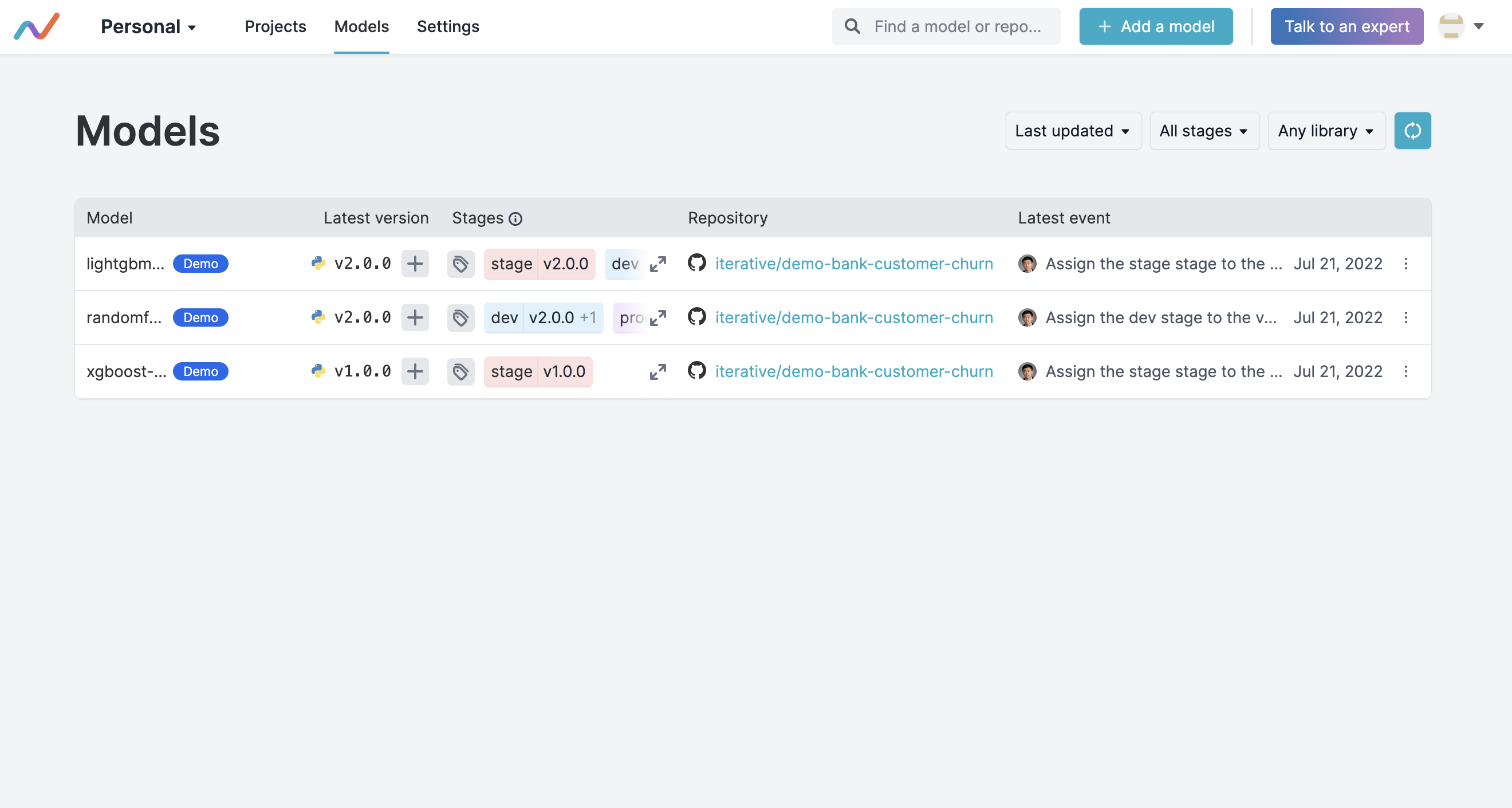
    Iterative added a registry for machine learning models to its portfolio of Git-based tools for infusing artificial intelligence into applications.

    Iterative CEO Dmitry Petrov said the Iterative Studio Model Registry is intended to make it easier for application development teams to track which models are being used as the number of applications infused with AI capabilities continues to grow.

    The Iterative Studio Model Registry, accessible via a graphical interface, command line interface or application programming interface (API), makes it simpler to explore models, including history, versions and stages, via a central dashboard. Teams can also identify the experiment that produced the model and track how, when and by whom a model version was created.

    The Data Versioning Control (DVC) platform created by Iterative exposed a Git-like interface to enable organizations to track multiple versions of data sets, models and pipelines across a machine learning operations (MLOps) workflow. That approach enables those models to be stored in a Git repository alongside other software artifacts versus requiring organizations to deploy a separate platform just to store ML models.

    Providers of platforms used by data science teams have been making a case for separate repositories for tracking the artifacts used to construct an AI model. Iterative contends it is more efficient to employ Git repositories where other types of software artifacts are already being stored because, after all, an ML model is just another type of software artifact.

    That approach also makes it simpler for DevOps and data science teams to collaborate because the DevOps team will have more visibility into what AI models will eventually need to be incorporated into an application, noted Petrov.

    The challenge organizations face is the cultural divide between data science and application development teams. Data science teams today typically have defined their own workflow processes using a wide range of graphical tools. However, as it becomes obvious that almost every application is going to be infused with machine learning and deep learning algorithms to some degree, the need to bridge the current divide between DevOps and data science teams will become more acute.

    In fact, DevOps teams should assume that many more AI models are not only on the way but that those models will need to be continuously updated. Each AI model is constructed based on a set of assumptions; however, as more data becomes available, AI models are subject to drift that results in less accuracy over time. Organizations may even determine that an entire AI model needs to be replaced because the business conditions on which assumptions were made are no longer valid. One way or another, the updating and tuning of AI models are likely to soon become just another continuous process being managed via a DevOps workflow.

    No IT organization can, of course, manage what it can’t track. Registries have become an essential component of a DevOps workflow as the volume of types of artifacts that make up application environments has increased. It remains to be seen to what degree ML models become just another software artifact but one way or another someone in the IT organization needs to know what model is being employed in which application for what purpose.

  • Myth Busting: 5 Misconceptions About FinOps

    Myth Busting: 5 Misconceptions About FinOps

    Over the years, moves to the cloud have happened in several different ways and at various speeds. The reality is that today most enterprises are spending massive amounts on their cloud environments, and many teams are struggling to contend with the governance implications of this reality.

    Fundamentally, teams struggle with an either-or proposition: Either they give development and engineering teams free rein in terms of how they use cloud models, and, in the process, they leave the business exposed to a wide range of risks or they try to enforce central controls and restrictions on cloud usage and, in the process, stifle speed, flexibility and innovation.

    FinOps is a Necessary Discipline

    Teams are struggling with cloud governance in general, and one particularly vexing aspect of governance relates to cloud cost management. Quite simply, the procurement models and approaches that worked in the days of on-premises data centers simply don’t cut it today. At all.

    For these reasons, FinOps is emerging as a necessary discipline. At its root, FinOps is about establishing the people, process, and technology for establishing financial accountability in pay-as-you-go cloud environments.

    Here’s how the FinOps Foundation defines it:

    “FinOps is an evolving cloud financial management discipline and cultural practice that enables organizations to get maximum business value by helping engineering, finance, technology and business teams to collaborate on data-driven spending decisions.”

    Recently, I started preparing for the FinOps certification, and in the process, I have had the chance to talk with quite a few practitioners. Along the way, I’ve heard several misconceptions about the discipline. I’ll list and dispel a few of the most common myths in the following sections.

    Myth: FinOps is a Buzzword, not a Discipline
    While the term may still be new to some, the need for FinOps is clear, real, and not going anywhere. Consider that in a survey of more than 800 professionals, the FinOps Foundation found FinOps team sizes grew 75% in the last 12 months, and respondents are expecting 50% more growth in the next year. Today, the FinOps Foundation has more than 5,300 members. Further, on any given day, a search on career sites for roles specifically referencing FinOps will typically yield hundreds of opportunities.

    Myth: The Sole Goal of FinOps is Saving Money
    More than just tracking and controlling spending, FinOps offers a way to optimize spending, so each dollar invested ultimately yields the most business value. Rather than simply helping save money, FinOps is about making money.
    FinOps teams should advocate and lead with value-based discussions rather than focusing on cost. For example, if additional spending on a certain cloud service increases marginal value, FinOps teams help justify that additional investment.
    FinOps helps teams reduce wasted spending, but it also enables teams to invest more in services that allow the business to innovate, adapt, and scale. Ultimately, it offers teams a way to capitalize more fully on the advantages of cloud pricing models.

    Myth: FinOps Teams are Responsible for FinOps
    To be successful, organizations need to build a central FinOps team. These teams establish guidelines and best practices and facilitate unified reporting and visibility. However, FinOps doesn’t start and end with a single team.

    Those that succeed with FinOps are the ones that effectively break down silos. Individuals from leadership, finance, operations, development, and more all have a role to play. In a FinOps-driven organization, a range of teams collaborate, and in the process, they all benefit. For example, development teams can innovate more quickly and make more intelligent, data-driven decisions around balancing speed, quality, and cost.

    Through FinOps, everyone takes ownership of cloud usage. Cross-functional teams work together to establish more effective management of cloud vendors and rates. Ultimately, rather than creating conflict, friction is reduced. The end goal is to establish alignment around business objectives.

    Myth: FinOps Teams Stifle Innovation

    With traditional procurement models, central teams retained visibility and control over expenditures. While this would add layers of time and effort to purchases, this was accepted as a worthwhile tradeoff.

    Part of the reason for FinOps has come into existence is that it enables teams to break away from the rigid, centrally controlled procurement models that used to be the norm.

    Rather than having a finance team that acts as a central gatekeeper and bottleneck, FinOps enables teams to fully leverage opportunities available for automation in the cloud. Compared to rigid, monthly, or quarterly budget cycles—and being blindsided by cost overruns long after the fact—teams move to continuous optimization.

    Real-time reporting and just-in-time processes are two of the core principles of FinOps. Fundamentally, FinOps is about removing obstacles, and the focus is on enabling development teams to speed up their ability to deliver new features and capabilities.

    In the cloud, the reality is that teams can spin up a cloud resource with the click of a mouse. FinOps is about bringing real-time visibility to teams so, along with this instant access, there can also be informed decision making and ultimately accountability—all while fostering agility.

    Myth: FinOps is Only for the Largest Enterprises With the Biggest Cloud Budgets

    Clearly, the larger the business’ cloud investments, the larger the stakes. In addition, the larger investments, the bigger the problems that silos between technology, finance, and procurement can create.

    The goal for FinOps is to establish the people, processes, and technologies that enable more intelligent decisions about cloud investments. Ultimately, FinOps enables teams to ensure that each dollar spent in the cloud is delivering the most business value. Given that context, it is clear FinOps is invaluable for any organization making investments in cloud services. This is particularly true as organizations become more reliant on more cloud vendors and service types and more internal teams begin to access services.

    Establishing a strong FinOps practice can support growth in cloud investments while equipping teams to ensure better those bigger investments will yield maximum business value.

    In my experience, it seems that most organizations take on the creation of a FinOps practice after encountering significant issues, such as massive cost overruns or major snafus that impede operations. It is far better to make this move proactively before issues and obstacles arise. Further, the sooner the move is made, the sooner the business benefits.

    Conclusion

    As organizations’ investments in cloud services continue to grow, FinOps is becoming an increasingly vital discipline. FinOps offers teams a way to make more informed cloud investments and ultimately ensure those investments yield maximum business value. Consequently, FinOps represents a key aspect of cloud governance, which also requires teams to ensure security, compliance, and operational policies are constantly adhered to.

  • RapidAPI Adds Tool to Make Building APIs Simpler

    RapidAPI Adds Tool to Make Building APIs Simpler

    RapidAPI today added a free RapidAPI Studio offering to its portfolio that makes it easier for developers to build, consume, manage and monetize application programming interfaces (APIs).

    Wade Wegner, senior vice president and head of product at RapidAPI, said RapidAPI Studio, available in beta, makes it simpler for developers to move between design and development, testing and management without losing context.

    It is also designed to be slipstreamed into developer workflows by either being accessed via a browser, as a desktop application, a macOS-native application or as an extension to the VS Code tools provided by Microsoft, added Wegner.

    That approach also makes it easier for teams of developers to collaboratively work on API projects, he noted.

    APIs are foundational to every modern application development initiative. Each microservice included in a modern application has its own API. As a result, the number of APIs—internal and external—that organizations are building and exposing has increased exponentially, especially as the number of digital business transformation initiatives continues to expand. While the bulk of APIs employed today are internally facing, the number of external-facing APIs being employed tends to rise sharply as more business processes become digitized.

    Less clear is who within the organization is responsible for managing those APIs after they have been deployed. In some cases, developers assume responsibility for them along with every other component of an application. Developers, however, tend to move on to other projects; DevOps and cybersecurity teams are being tasked with managing, securing and updating APIs. This is part of a larger effort to better secure software supply chains in the wake of a series of high-profile breaches.

    Unfortunately, documentation of those APIs has been somewhat lax within many organizations. In many cases, organizations are not even sure how many APIs have been deployed. Many organizations also discover, to their chagrin, that so-called zombie APIs previously abandoned by developers can still be exploited by cybercriminals to exfiltrate data.

    At the same time, the management of APIs is becoming more complex. Along with existing REST APIs and legacy web services based on XML, organizations are now deploying GraphQL APIs. The result is a mix of API schemas that require different levels of expertise to manage and secure.

    It’s not clear how the increased focus on securing software supply chains might impact API management. However, it’s apparent that cybercriminals are becoming more adept at discovering insecure APIs through which they can exfiltrate data. The challenge organizations face is that it’s not feasible to secure those APIs without first having a framework in place for managing them.
    One way or another, an API management crisis will soon come to a head as it becomes even simpler to build and deploy APIs. The only thing that remains to be seen is to what degree organizations will get ahead of that issue before it spins out of control altogether.

  • Applying TestOps to Cultivate a Quality Culture

    Applying TestOps to Cultivate a Quality Culture

    Quality assurance is a universal concern, especially when it comes to application development. Enterprise applications are faster and more reliable than ever before. However, in addition to performance, application developers also must consider data security, regulatory compliance and cost-effectiveness, among other things. Organizations are embracing quality engineering (QE) as a foundation to create a software quality culture to address these challenges. Creating a quality engineering or TestOps environment is not simple, especially when QE departments must test for hundreds of applications across multiple enterprise environments. Whether it is a solution provider or a multinational corporation, applications often need to be tested across platforms, industries and geographies.

    TestOps encompasses a broader concept than just QE. With TestOps, there are testers and engineers using automated and manual testing to validate software for flawless application performance. In enterprise DevOps, the TestOps team serves as the bridge between development and deployment since they have a good understanding of the applications and a better perspective on the context and variables that can affect performance.

    Continuous testing is an integral part of any software development cycle. Quality engineers must be brought in early as part of Agile development to keep development on track and head off any problems that could escalate or become harder to resolve later. In Agile, testing becomes more crucial and frequent to ensure flawless performance.

    It pays to think horizontally when setting up a TestOps approach. For example, testing should be performed across different vertical environments such as media, manufacturing and finance. The goal is to create a test environment that can accommodate various industries.

    TestOps Across Environments

    In the age of SaaS and universal data access, it is essential to test across multiple platforms. In addition to ensuring enterprise performance, mobile web and remote data access must be tested. For streaming services, it is vital to test across mobile platforms, over-the-top (OTT) platforms such as Roku, Apple TV, Android TV and Fire TV, and even gaming consoles like PlayStation and Xbox.

    When shipping software updates, geography matters (especially when shipping across time zones), as one may never know when the software will be used or have control over the environment where they plan to use it.

    For instance, consider the challenges a leading mortgage lender faced with mobile application testing and how geography was a factor. First, Google Analytics was used to assess specific device and user requirements and ascertain performance in various parts of the United States since different regions use different carriers. Testing was then done across mobile platforms such as iOS, Android and combinations and across carriers since most banking and mortgage applications required one-time passwords (OTPs) and SMS-related capabilities. Further tests were implemented for new identity authentication strategies such as biometrics and facial recognition. Finally, performance testing by geography was conducted to determine whether a new feature or version would create issues.

    Testing for Geographies and Regional Compliance

    Localization testing is important since every region and every country has unique compliance issues and laws. To ensure proper localization, it is essential to perform complete testing, including lower environments and production systems.

    In any TestOps environment, the philosophy of continuous testing should already be part of the design environment, including understanding the nuances of production. Release readiness does not mean there are only a few known bugs in certain regions. It means the application has been tested for compliance in every geography where it could possibly be utilized.

    Testing Across Industries

    Testing application performance in specific industry settings brings along its own set of unique challenges. In manufacturing, for example, each sensor in an IoT device must be modeled against a conformance specification to determine if it can be automated using simulations. In media, one needs to test for different platforms, content management systems and business workflows.

    To accelerate time to market, one would want to support a dual-shift development lifecycle to gauge the consumer experience and get continuous feedback and also need a test environment with multiple automation tools such as Selenium, Appium, Cypress, Tricentis, UiPath, Test Complete and Winium.

    Artificial intelligence (AI) plays a larger role in testing, shortening time to market, and ensuring superior quality software. AI-driven test tools are optimized for domain-specific applications, such as testing for industries like media, manufacturing and fintech. AI can fill in the gaps to achieve optimization and offer a quicker turnaround with limited manual intervention.

    Any organization cultivating a TestOps culture needs to have specific technologies and tools in place. When assessing your testing technology stack, it is important to create an end-to-end testing ecosystem. This means the environments must be inclusive and capable of incorporating testing for unique applications, environments and scenarios. To support the needs of today’s Agile application development environment, one must plan for an agile testing infrastructure to keep development on track.

  • CircleCI Integrates CI/CD Platform With GitLab

    CircleCI Integrates CI/CD Platform With GitLab

    CircleCI today announced it has integrated its continuous integration/continuous delivery (CI/CD) platform with a rival software-as-a-service (SaaS) offering from GitLab.

    DevOps teams can now, for example, trigger pipelines in CircleCI from GitLab forked merge requests in addition to merging requests and making commits for specific branches. Other capabilities include the ability to access testing capabilities on the CircleCI platform and integrate permissions to ensure security.

    CircleCI CEO Jim Rose said the company routinely integrates its CI/CD platform with other offerings because organizations typically have multiple teams using different version control platforms at different times. The goal is to give those teams access to capabilities and best practices regardless of which specific platform they are using.

    In general, Rose said organizations are trying to strike a balance between the standardization of DevOps platforms and the need to enable development teams to innovate by adding new tools. Standardization tends to create more opportunities to automate more tasks in ways that reduce costs. However, developers will eventually rebel against any effort to limit the choice of tools they use to improve productivity, noted Rose. Too many senior IT leaders are quick to assume that a plethora of tools is an indication of a problem rather than the result of ongoing experimentation, he added.

    In the wake of the global economic downturn, many organizations are also revisiting their existing DevOps workflows to try to increase overall efficiency by automating more tasks. Those organizations realize they can’t afford to continue throwing labor at manual DevOps tasks, Rose added.

    The challenge, of course, is that building and deploying modern software is becoming more complex. Organizations are embracing microservices to make applications more resilient as they realize how dependent they are on software. The issue is that as the number of microservices continues to expand, it becomes apparent that legacy manual processes will not scale, said Rose. As a result, the impetus to automate DevOps processes becomes that much greater, he added. Less clear is to what degree organizations that have already embraced DevOps platforms might be willing to swap out their current CI/CD platform to achieve that goal.

    In the meantime, more organizations are embracing DevOps to manage software development projects that drive a wide range of digital business transformation initiatives. The applications driving those processes typically need to be continuously updated as business requirements change. That becomes much easier to achieve when using processes optimized around continuous development and deployment.

    Regardless of which underlying CI/CD platform organizations choose, they should assume that, eventually, some level of integration between those platforms will be necessary. After all, in the event of an acquisition, for example, it’s not likely both companies will have standardized on the same DevOps platform. Given the amount of time required to migrate from one DevOps platform to another the amount of time required for interoperability is inevitably going to be measured in months if not years.

  • VW CEO Fired for Dev Fails | Fiber Shortage Hits | Google Fires Blake Lemoine

    VW CEO Fired for Dev Fails | Fiber Shortage Hits | Google Fires Blake Lemoine

    Welcome to The Long View—where we peruse the news of the week and strip it to the essentials. Let’s work out what really matters.

    This week: Herbert Diess is out at VW because software is hard (yo), fiber optic cable is hard to find, and the guy who said LaMDA was sentient is dumped by Google. (more…)