Category: DevOps and Open Technologies

Editorial Calendar for February 2016

  • Updating and Managing Infrastructure-as-Code (IaC)

    Updating and Managing Infrastructure-as-Code (IaC)

    Infrastructure-as-code (IaC), often embodied by open source Terraform, is an essential ingredient to cloud and cloud-native strategies. But without the ability to scale, secure and manage IaC, you very quickly experience drift. Tim Davis, DevOps advocate with env0, pronounced “N zero”, discusses establishing a single source of truth and reigning in drift by updating and managing infrastructure as code. The video is below, followed by a transcript of the conversation.

    Announcer: This is Digital Anarchist.

    Mitch Ashley: I have the pleasure of being joined by Tim Davis. Tim is DevOps Advocate with env0, and so, we’re going to be getting into some infrastructure as code type discussions, so, looking forward to that. Welcome, Tim—good to be talking with you.

    Tim Davis: Same for you, Mitch. Great to meet you. Thanks for having me.

    Mitch Ashley: You, too. I love your cloud off to your right shoulder, by the way. [Laughter] Anyways, so—introduce yourself, tell us a little bit about env0.

    Tim Davis: Absolutely. So, I am the DevOps Advocate with env0. dnv0 is a TACoS platform, if you will, the Terraform Automation and Collaboration Software space. We really focus on infrastructure as code, automation, teams and governance, and other tools to help you with the life cycle of your infrastructure as code environments.

    Mitch Ashley: Cool. Good. Well, you know, it’s a great conversation to have, because something that I observed always happens in our industry is, you create a new technology, it’s kinda easy to get started and starting to use, sometimes it isn’t always easy, but the complexity comes—alright, how do I scale this? How do I do this across a larger development team or multiple development teams? How do I operate it? How do I secure it through the day two kinda stuff?

    Tim Davis: Right.

    Mitch Ashley: And I wouldn’t be surprised if you told me the same is true for infrastructure as code, and in fact, I know that to be true.

    Tim Davis: [Laughter] Exactly right.

    Mitch Ashley: Let’s talk about that. What are some of the challenges once people get into doing infrastructure as code, particularly with Terraform? What are some of the challenges that you run into?

    Tim Davis: Yeah, and most of those kind of lie around the visibility and kind of the control space of that. Infrastructure as code is great. It is a fantastic way of speeding up, kind of pushing yourself into the future for DevOps, getting into that real GitOps life cycle. But with that, you know, if it usually just starts out with either one developer or one infrastructure person that starts running it locally on their laptop and figuring it out, it’s great, it does what they want.

    As soon as you start to scale that methodology and doing it locally to multiple people, that’s when you start losing that visibility of, “Where are my state files stored? Who just deployed something into the cloud? What variables might they have used for that?”

    So, it really becomes kind of an, “I don’t know who’s doing what in my cloud anymore.”

    Mitch Ashley: Mm-hmm.

    Tim Davis: So, really making sure that you’re staying on top of that, kinda centralizing everything to maintain that visibility is very important when you’re scaling it.

    Mitch Ashley: Let me ask you, then—is it fairly typical that within one software Dev team you have a person or sort of a close enough coordinated group of people that are doing the software as code, infrastructure as code. And then the confusion may exist as you start to go across multiple teams, or does it also occur within one team, just sometimes, it’s every developer for themselves and so—

    Tim Davis: Yep.

    Mitch Ashley: – you could have a wild, wild West kinda situation before you know it.

    Tim Davis: [Laughter] And the answer of that, of course, is yes, I mean, it’s all of the above. It could be even just two people on a small team that start to use these tools and they start to step on each other’s toes by having deployments that kind of counteract each other. Or you have it where somebody is deploying out into the cloud using your infrastructure as code and somebody else is just going into the cloud and clicking around and deploying stuff manually where you get something called drift, where what the infrastructure as code says is out there isn’t necessarily matching with what’s actually there.

    Mitch Ashley: Mm-hmm.

    Tim Davis: So, it can be across a single team, multiple teams—any time you really scale it past a single person on a laptop is really where you start to see those issues.

    Mitch Ashley: Yeah, okay. It’s a familiar problem, right?

    Tim Davis: [Laughter] That’s exactly right.

    Mitch Ashley: We’ve had this in other things, too. Well, what are some of the best practices or kind of good infrastructure as code hygiene to keep your worlds at least sane to start with so you—the first question is always, “What’s there?” If you don’t know what’s there, then—

    Tim Davis: Right.

    Mitch Ashley: – everything is up for grabs, or you question everything because you just don’t feel like you have a good grounding of what you’re looking at and what you’re dealing with. What are some of those best practices?

    Tim Davis: And I really—I try to stay away from the best practices thing, because sometimes what’s good for somebody isn’t great for somebody else, but that—

    Mitch Ashley: Well, and I say that as best practice is not universal, right?

    Tim Davis: Absolutely. And there are some things that you can do to help yourself out, for sure. If you’re using infrastructure as code, having the single source of truth can be very helpful for everybody, essentially stopping that drift that I just mentioned. So, if you are using infrastructure as code, save them in a repository somewhere. Make that the single source of truth where whatever’s in there, whatever’s in those infrastructure as code files, that’s what’s there.

    So, whenever you decide to go for infrastructure as code, stop using the cloud UI, stop going around and click, click, clicking and adding resources and things. Do it by updating the infrastructure as code file and then re-deploying. That can really help you make sure that you’re not causing any problems, nobody’s stepping on anybody’s toes, and you know if I see it in the files here in this one spot, that’s what’s out there.

    Mitch Ashley: Mm-hmm. Yeah, I totally agree with you. That makes a lot of sense to me. What are some of the complexities, then, you have to deal with? Because now we’re working an environment where infrastructure, the stack, the distribution of that, the locations, whether geographic or service provider really can change instantly without necessarily the full development team, which is an advantage, right? You want that sort of abstraction.

    Tim Davis: Exactly.

    Mitch Ashley: But it also can be—introduce new variables and maybe even new problems.

    Tim Davis: Yeah, and it could be new problems, it could be the same old problems, or it could be new problems that you kinda deal with the same, old way. And, you know, adding controls of making sure you’re adhering to policy, like, you’re only allowed to deploy to certain regions or you’re only able to deploy a certain number or size of instance, making sure that you have some form of role based access control there to know, you know, this person is allowed to deploy straight out to development, no problem, but if it’s going to production, it needs to wait for approval and somebody from either the DevOps team or the SRE team needs to validate everything first before we actually make that push.

    Mitch Ashley: Mm-hmm. I think something else that always happens, too, is in—you know, I’m a security guy as well as a software guy, so, I always worry about the security side of it. Now, automation can make that, you know, much better.

    Tim Davis: Exactly right.

    Mitch Ashley: Much more reliable, less human error. There’s a lot of good things that come with infrastructure as code from a security standpoint, but it also can be, it’s sort of security is in the eye of the scripter and the person who’s—

    Tim Davis: Right. [Laughter]

    Mitch Ashley: – doing, you know, configurations or doing the scripting, too, which can be good or bad. How do you address security in this kind of a world?

    Tim Davis: Yeah, and this is just one of those things where we’ve all heard the term shift left, and shifting all of these different things—security, performance, you know, billing—everything, if you shift it left into the deployment process, it really helps if you foster that communication. I mean, we know that old school term of silos where one hasn’t isn’t talking to the other hand. If everybody gets involved, if the security team is involved with writing the policy, they’re involved with double checking that it is implemented into the deployment process so that you don’t have to go and fix a problematic deployment later, it’s just stopped before it starts. That can really make sure that everybody kind of gets what they want, but security folks still have to be involved. They are still in charge of the overall process and procedure and policy, it’s just, it’s kind of a new way of getting that implemented and at what stage of the life cycle you’re implementing it.

    Mitch Ashley: Do you think it shifts—and this is actually, I just did a talk on this about shifting left of, we wanna shift everything left, which is generally a good idea, right?

    Tim Davis: Right.

    Mitch Ashley: To be able to address some of those things early and design it in, design security in, et cetera. Oftentimes, it’s interpreted as, “Let’s put that on the developers, too. Let’s have them—the developers will worry about that. The developers will worry about all those.” Now, it’s pretty much, it could be everything, sort of a ridiculous request, right?

    Tim Davis: Right.

    Mitch Ashley: Because that’s not a developer’s expertise to necessarily know all those things. What is your—when you say shift left or infrastructure as code—

    Tim Davis: Right.

    Mitch Ashley: – in practical terms on a software team, what does that look like?

    Tim Davis: Yeah, and a lot of folks think that that just means, “Hey, I’m taking away your job as the security guy and I’m gonna give it to the developer” and that’s not the case. The developer, they may be a little security conscious, they may understand the infrastructure or the networking piece, but nowhere near as much as the career security guy or the career networking and infrastructure guys. It just kind of brings them in and fosters that conversation.

    I definitely think the developers are going to be part of the conversation, because it is bringing it into their tooling, into their languages, into their life cycle, but it still requires that expertise to be able to make sure that it is done correctly, it’s implemented correctly, and that it’s being checked the way it needs to be done.

    Mitch Ashley: Mm-hmm. So, does it look like security engineers, to use that as a term, they’re sitting down with the developers, saying, “Okay, how are we configuring the environment?” and, “Here’s how you’re building your Terraform configurations”—going through that with them?

    Tim Davis: I think so.

    Mitch Ashley: Is it saying, “Here’s the principles we want you to follow”—

    Tim Davis: Yeah.

    Mitch Ashley: – “and as you’re creating this, please do these things, and then we don’t have to sit on your shoulders”?

    Tim Davis: I definitely think there’s lots of different ways you can do that. I mean, obviously, you know, having your standup meetings, making sure that they are kinda telling them, “This is what the policy should look like, however you want to implement it is fine, but this is the kind of processes and procedures, these are the rules that we need to check.” So, it can definitely be done however works best for everybody, but as long as you’re having that communication and you’re making sure that everything’s going through—yeah, you know, you can always do it different ways and be successful, still.

    Mitch Ashley: Mm-hmm. Interesting. What are some of the things that you’ve seen change? You know, there’s been a lot of acceleration over the last 12 to 18 months.

    Tim Davis: Right.

    Mitch Ashley: And, you know, I’ve heard people talk—of course, you always hear about the, as much digital transformation happened in the last year that was planned for five years.

    Tim Davis: Yeah.

    Mitch Ashley: And there is some truth to that, and I’m sure some exaggeration, too. But there’s a strong belief that, you know, people are now thinking they can deploy applications much, much faster and they’ve proved it in this last window. Have you seen that happening?

    Tim Davis: Yeah, absolutely, and you know, technology changes. They used to say it doubles every six months or what have you, and really, we are iterating and changing and kind of moving forward very, very quickly. A lot of times, we get a new tool and it’s great and then people are like, “Alright, I’m gonna pull this tool in and automate it” and then they figure out, “Oh, there’s some extra complexity here and we’re having to go back through and figure it out.”

    I definitely think there’s a lot changing, you know, even just the shift from on prem legacy, I guess, enterprise architecture through to new, like, cloud native architectures and things like that. We’re moving fast, we’re able to change and pivot and do what we need to do, but as long as we make sure that we’re kind of keeping grasp of what we’re supposed to be doing from either a security or an infrastructure construct, we can make sure that we can iterate and change and adapt as fast as possible without causing any major issues down the line.

    Mitch Ashley: Mm-hmm. Cool. What do you think the next 6 to 12 months look like? If you had to put on your crystal ball, your Magic 8 Ball, that says, “Ask Again”?

    Tim Davis: [Laughter] Yeah, I love to look into that. Obviously, it’s good to see, you know, what am I gonna have for lunch next week, but also, you know, looking into the industry of what’s gonna happen. We’re seeing more and more X as code. We’ve got infrastructure as code, you’ve got security as code, you’ve got policy as code tools. I think we’re gonna see more and more and more, you know, performance as code and things like this that just are able to bring those day two plus operational tools closer left into the deployment cycle and have all of these single source of truth in the repositories of, we know exactly what our infrastructure is supposed to look like, we know how it’s supposed to be secured, we know how it’s supposed to perform. All of this is just declaratively set up there. I think we’re gonna see a lot more of that going forward.

    Mitch Ashley: Mm-hmm. Well, certainly, as you said, it follows the “everything as code,” right?

    Tim Davis: Exactly right.

    Mitch Ashley: And if we’ve learned nothing else, I think that’s been a lesson of the past 12 to 18 months, right? It is software, it’s all about software.

    Tim Davis: It absolutely is.

    Mitch Ashley: What do you think some of the skill challenges are for people as we continue to evolve this and move into this rapid world, shifting things left, doing more infrastructure as code, and maybe asterisk as code—everything? You know, it’s always the self-learners can be at the edge of the curve, other folks have other ways of learning. How do we bring everyone along in terms of their skills and their learning, their development?

    Tim Davis: Yeah, and that’s definitely something. I mean, I ran into myself. I’m an infrastructure guy at heart, that’s where I’ve been, you know, my whole career, and eventually, someone was telling me, “Hey, this Python thing might take off” or, “I’ve heard of this thing called Terraform and it’s basically like code, but it’s our job.” And, you know, just realizing that nobody’s trying to take away your job as a security guy or an infrastructure guy or girl or what have you. They’re not trying to take it away from you and move it over to a developer, it’s just one of those things where you need to adapt to move forward faster.

    Now, it’s not just infrastructure folks that are learning to code, it’s also developers that are kind of learning infrastructure and figuring out how can I optimize my application against this infrastructure a little better? How can we work together to move forward faster? So, it’s kind of a melding of skills from different, you know, old school silos now to work together to solve the problem.

    Mitch Ashley: I made that recommendation to a network and security engineer about 10 years ago. It’s like—learn Python, and he looked at me like I had six eyes instead of two.

    Tim Davis: [Laughter]

    Mitch Ashley: And he came back from the Cisco conference, he goes, “Now I know why you said that.” [Laughter]

    Tim Davis: Exactly right. And that’s a great piece of advice even today in 2021. I mean, if you’re in infrastructure or you’re a network tech or you’re a security person, look into Python. It’s not as hard as you think and you can do so much with it. It’s a fantastic way to kind of break into that DevOps automation type space.

    Mitch Ashley: I like that, too, and not that we’re trying to make everybody a developer, but if it’s not a skill you have, it sort of leaves out this whole domain of things that you can either do to understand what’s happening—

    Tim Davis: Right.

    Mitch Ashley: – or do to automate or et cetera. It’s sort of like you’ve got one arm tied behind your back, why don’t you have two out in front where you can fully work?

    Tim Davis: Yeah. And it also helps from a cohesive understanding between groups. Back when I was a dedicated infrastructure person, myself and the development team didn’t care for each other, because we all were trying to get in each other’s way, it seemed. We were trying to solve the same problems, just going about it in different ways, because we didn’t necessarily understand the methodologies or how those people were trying to get their work done.

    If you as an infrastructure, security, or other operations person start to kind of learn the development methodologies and figure out how things work, it’ll help you to communicate and solve problems across teams better, simply because you kinda see where they’re coming from with their tool sets and the way that they do business.

    Mitch Ashley: Great. Well, it’s been a great conversation. I’m glad we got to explore this path together.

    Tim Davis: Absolutely.

    Mitch Ashley: Where can folks find out more about env0? I know you have a kind of funky spelling of env0.

    Tim Davis: [Laughter] Yes. We are at env0, E-N-V and the number 0.com. You can find us on Twitter @E-N-V-Z-E-R-O and on YouTube at E-N-V-Z-E-R-O.

    Mitch Ashley: Great. So, environment zero, right?

    Tim Davis: Exactly right.

    Mitch Ashley: Perfect. Well, hey, it’s been fun talking with you and hope you’ll come back again.

    Tim Davis: That sounds great. I look forward to it. Great to meet you, Mitch. Thanks for the time.

    Mitch Ashley: Alright, take care.

    [End of Audio]

  • Netlify Leverages GraphQL to Simplify Access to Backend Services

    Netlify Leverages GraphQL to Simplify Access to Backend Services

    Netlify this week added a Netlify Graph tool to its portfolio that makes backend services available to developers via a single click. The tool aims to simplify DevOps teams’ access to those services when building their applications.

    Netlify Graph is based on the GraphQL query language for application programming interfaces (APIs) and enables developers to integrate services such as GitHub, Salesforce and Stripe within frontend and web application development tools without any direct intervention required from a DevOps team.

    Netlify provides an application development framework based on JavaScript, application programming interfaces (APIs) and markup languages, otherwise known as a JAMstack, to isolate frontend and backend components of an application.

    Netlify CEO Matt Biilmann said Netlify Graph is based on the GraphQL technology the company gained when it acquired OneGraph. The overall goal is to make it simple for frontend developers to invoke backend services accessed via either GraphQL or REST APIs, he said. Services based on GraphQL can be especially complex for developers to invoke as they navigate the management of tokens and application secrets, Biilmann added.

    It’s not clear to what degree GraphQL APIs will supplant REST APIs. However, developers tend to prefer GraphQL APIs because they provide more granular control over what data is accessed. The challenge is the number of backend services that expose GraphQL APIs is still comparatively limited. As GraphQL becomes more widely adopted, the level of effort DevOps teams now need to expend to expose backend services should decline as tools such as Netlify Graph are employed by frontend developers.

    As a result, at least theoretically, the rate at which new applications are built and deployed to drive digital business transformation initiatives should increase. Most IT teams will not be replacing REST APIs with GraphQL-based APIs overnight, but the percentage of new applications that rely on GraphQL APIs will steadily increase. DevOps teams looking for easier ways to provide developers with simpler access to backend services now have an incentive to embrace GraphQL.

    Ultimately, Biilmann said, the goal is to enable developers to build applications without having to directly engage anyone on the IT team. Each backend service can be managed in isolation from the frontend of any application. It’s not clear how long it might take to achieve that goal, but as responsibility for the end-to-end management of the application experience continues to shift left toward developers, the need to surface backend systems-as-a-service becomes more pronounced. In fact, given the current focus on improving developer productivity, IT organizations might soon face a mandate to embrace GraphQL more broadly. After all, every minute that a developer spends on plumbing is time they’re not spending writing actual business logic.

    Naturally, it may take time for enterprise IT to be truly transformed into a set of services that developers can easily consume. But as progress continues to be made, that dream may finally be realized.

  • The Past, Present and Future of OpenStack

    The Past, Present and Future of OpenStack

    OpenStack, described as the world’s most widely deployed open source cloud software, will mark its 12-year anniversary milestone later in 2022. In September 2012, the OpenStack Foundation launched as an independent organization to manage and promote the technology—a watershed moment for a project announced just two years earlier.

    Today, with contributions from more than 34,000 people at 550 companies, OpenStack is one of the three most active open source projects, alongside the Linux kernel and the Chromium web browser, according to the group now known as the Open Infrastructure Foundation (OIF). More than 25 million OpenStack cores are running in production worldwide.

    It’s easy to forget that only a few years ago many predicted OpenStack’s demise. Initially, OpenStack was positioned as a general-purpose private cloud platform that offered an open source alternative to Amazon Web Services (AWS), but it never stood much of a chance in that matchup.

    Then, after OpenStack regained momentum and pivoted to become a platform for telco network function virtualization infrastructure (NFVI), it was rumored that it would be overtaken by the new ‘next big thing’—Kubernetes, the open source orchestration and coordination system for containerized applications. 

    The Kubernetes-as-OpenStack-killer talk was silly, in retrospect, because the technologies are complementary, not competitive. In fact, more than 70% of OpenStack users reported running Kubernetes on top of OpenStack for container coordination, according to the OIF.

    And OpenStack adoption should continue to flourish in 2022. Gartner forecasted that global spending on cloud services will exceed $480 billion this year, up from $313 billion in 2020, as more organizations invest in hybrid cloud: A mix of pay-as-you-go public clouds and private clouds that can offer lower, more predictable operating costs and greater customization. As the hybrid cloud market expands and open source continues to become more firmly entrenched in development and IT organizations, OpenStack is more relevant than ever.

    If you’re not familiar with OpenStack, here are 10 things you should know about its past, present and its future.

    1. OpenStack began in early 2010 as a collaboration between Rackspace and engineers at NASA’s Ames Research Center in Mountain View, California. Rackspace wanted to rewrite the infrastructure code running its cloud servers and the NASA team wanted to standardize the space agency’s websites. Their original mission was “to produce the ubiquitous Open Source Cloud Computing platform that will meet the needs of public and private clouds regardless of size, by being simple to implement and massively scalable.”

    2. The first OpenStack design summit was held in Austin, Texas in July 2010, and the project was officially launched at the O’Reilly Open Source Convention (OSCON) later that month.

    3. A whopping 80% of OpenStack clouds are used in production, while 13% are under development and 8% are in the proof-of-concept stage, according to the OIF. With that level of adoption, no wonder OpenStack is considered the most widely deployed open source cloud software.

    4. An OIF survey showed that nearly half of the organizations using OpenStack have deployed at least 1,000 cores. The breakdown: 29% of organizations have 1,000-9,999 cores, 13% have 10,000-99,999 cores, 6% have 100,000-999,999 cores and 1% have one million or more cores.

    5. An enormous corporate ecosystem supports OpenStack, including IBM, Red Hat, HP Enterprise, Intel, Huawei, NEC, Cisco, VMware, AT&T and Canonical, whose Ubuntu Linux distribution is the most popular operating system for OpenStack deployment (used by about 40% of OpenStack clouds globally).

    6. OpenStack has a great resource guide available on openstack.org with all kinds of helpful information for developers, including for those new to the platform.

    7. One of the main qualities people love about OpenStack is that it’s a modular architecture with interconnected components including, for example, services that expose API endpoints and handle basic cloud functions, a dashboard, SQL databases that store records created by OpenStack services and message queues for facilitating inter-process communication. 

    8. OpenStack jargon includes several special terms. A tenant, for example, is a user or group of users with isolated cloud resources. (OpenStack is multitenant.) An image is a template containing an OS for instance provisioning. A flavor is a template defining cloud resources for instance provisioning. An instance is a virtual machine (VM) provisioned from the image and flavor. And so on.

    9. The platform has expanded through the years to include a panoply of core services, such as the Keystone identity service that manages domains, projects, roles, groups and user accounts, the Glance service that manages the catalog of cloud images, Nova for instance provisioning, scheduling and termination, the Neutron network service and the Cinder block storage service.

    10. Beyond these core services, several newer services are seeing increased adoption. For example, according to the OIF, use of Ironic, a project that provisions bare metal, nearly tripled between 2016 and 2021. Others with growing traction include Octavia, which provides load balancing capabilities, Manila for file system sharing between instances and OpenStack Charms which provide rich life cycle management capabilities for services.

    As these 10 points show, far from being on its deathbed, OpenStack has survived, sometimes against the odds, and thrived as a unique force in open source and cloud computing. Given its journey over the last 10 years, it will be interesting to see what lies ahead in the next decade.

  • IBM ‘is Ageist and Sexist’ | IBM Mainframe-aaS | IBM Vaccine Mandate

    IBM ‘is Ageist and Sexist’ | IBM Mainframe-aaS | IBM Vaccine Mandate

    Think! Welcome to Big Blue Week here at The Long View—where we peruse the news of the week and strip it to the essentials. Let’s work out what really matters.

    This week: IBM’s employment practices scrutinized, IBM z/OSaaS breaks cover, and IBM encourages staff back to the office.

    1. ‘Dinobabies’ and ‘Dated Maternal’ Workforce Woes

    First up this week: IBM’s defense in an employment age discrimination lawsuit looks to be shredded. Internal emails “appear to show high-level discussion about paring the ranks of older employees.”

    Analysis: Not a good look

    According to one of the plaintiff’s lawyers, unnamed “top IBM executives were explicitly plotting with one another to oust older workers … to make room for millennial employees.” On the face of it, they seemed to be doing the polar opposite of the Age Discrimination in Employment Act.

    Noam Scheiber: Making ‘Dinobabies’ Extinct: IBM’s Push for a Younger Work Force

    Top IBM executives were directly involved in discussions about the need to reduce the portion of older employees … sometimes disparaging them with terms of art like “dinobabies.” … Documents made public by a Federal District Court … show executives discussing plans to phase out older employees.
    …
    The newly unsealed documents, which quote from internal company emails … show top IBM executives specifically emphasizing the need to thin the ranks of older workers and hire more younger ones. [One] email refers to IBM’s “dated maternal workforce,” an apparent allusion to older women, and says: “This is what must change. They really don’t understand social or engagement.”
    …
    Adam Pratt, an IBM spokesman, [claimed,] “IBM never engaged in systemic age discrimination.” [He] said that some of the language in the emails “is not consistent with the respect IBM has for its employees” and “does not reflect company practices or policies.”


    Yikes, ageism and sexism? Experienced staff are valuable, says MrBanana:

    I did some time at IBM [and] remember being invited to a meeting with a new group, headed by a new “thinker,” who had something to present to myself and a colleague. We walked past the foosball table to the meeting room. Naturally the room had no chairs, and was covered in multi-coloured Post-it Notes. Once they had gone through their mood boards and the non-linear presentation of this new idea, I turned to the other old geezer in the room. “Didn’t we look at something like this 8 years ago?”

    “Yeah, we worked out that compute power just to run the UI for one session wouldn’t be available for a couple of decades.” The children were somewhat disappointed, and (fortunately) we were never asked back to their romper room.


    But experience can be both a blessing and a curse, learned aahortwwy:

    I experienced both sides of this in five years at a company in hypergrowth. … I learned so much at that job: … In year 1, I was determined to accomplish X and ignored the skeptical comments of some colleagues who’d been at the company longer than me. I failed and wasted some time. In years 4 and 5, new colleagues were determined to accomplish X and ignored my skeptical comments.


    2. IBM Wazi as-a-Service Confusion

    “Mainframe” is not a dirty word. It’s secure, vertically scalable, and it put the VM in VMware. Now, what IBM Wazi did for on-prem LPARs, Wazi aaS promises to extend to hosting z/OS instances.

    Analysis: Mainframe-as-a-service reinvented

    Mainframes and cloud-native DevOps need not be incompatible. To modernize legacy apps using hybrid cloud instances for dev/test—and even prod—can be a big productivity boost. But isn’t it weird that IBM spun out its mainframe-as-a-service zCloud offering only a few months ago?

    Mike Vizard: IBM Shifts Mainframe App Testing to the Cloud

    While many workloads over the years have been migrated off mainframes or simply retired, the applications that run on z/OS today are still among the most mission-critical that organizations run. … IBM this week revealed it has added the ability to set up testing environments on the IBM Cloud for z/OS mainframe applications.
    …
    IBM plans to make IBM Wazi as-a-Service (Wazi aaS) for z/OS generally available in the second half of this year, [which] will enable DevOps teams to self-provision an instance of a z/OS virtual server on a secure private space running on IBM Cloud. … At the same time, it will become easier to modernize mainframe applications by making them more accessible to other applications via a set of secure APIs … using a cloud-native set of DevOps tools that run in a Kubernetes environment.
    …
    Modernizing mainframe applications is a less complicated endeavor than migrating them. The challenge is that building, deploying, maintaining and securing all the APIs required to do so represents a significant amount of effort.


    OK, boomer, why are we talking about 1960s mainframes on devopsy.kinsta.cloud? Here’s ArchieBunker:

    Mainframes are different beasts altogether, almost alien when you compare them to PC hardware. You have binaries written for the S/360 system in the 1960s? Good news you can still run them natively without a recompile.

    You think virtualization and containers are a hot topic? IBM was running multiple OS instances inside a VM in the 1970s. … The engineering is incredible.


    But z/OSaaS? It’s déjà vu time for Beleagured Greybeard:

    “Cloud Managed Services for z” AKA “zCloud” has been around for over 10 years. … IBM offloaded it with the Kyndryl spin, so its odd that they now want to re-invent it.
    …
    If it’s a strategic platform, why didn’t they hold onto it instead of spinning it off to Kyndryl? Sounds like yet more daft leadership decisions.


    3. IBM’s Return to Work Plan has Vaccine Mandate

    IBM wants to “keep employees safe” as they return to office work after being fully remote. In practice, this means a vaccine mandate.

    Analysis: IBM Digital Health Pass is divisive to vocal minority

    Although there are exemptions on medical or religious grounds, IBM has promised to place dissenters on unpaid leave. As you might expect, the policy has a few employees up in arms.

    Cassie Werber: How Salesforce, IBM, and HSBC are approaching return to work

    When the pandemic hit, and IBM moved 95% of its workforce to fully remote, it was pleasantly surprised to discover no drop in productivity. … Still, they planned to return to offices.
    …
    The company saw this as a way to keep employees safe. … One example … is its development of the IBM Digital Health Pass as an alternative to vaccine cards or paper vaccine certificates, which they use to make sure all the staff that come into their offices are vaccinated.
    …
    Arvind Krishna, IBM’s CEO, meanwhile came up with what he called the IBM Work From Home Pledge. [It] included commitments to flexibility, kindness, sensitivity to family, setting boundaries, and acknowledged video fatigue. It concluded with a commitment to “be connected.”


    Tricky to “be connected” if you’re not allowed back in the building. Anne D’Innocenzio, Heather Hollingsworth, Tali Arbel, Mae Anderson, Ken Sweet, Matt O’Brien and Dee-Ann Durbin:

    IBM software engineer Justin Albano said his company recently notified employees that it would be revoking badge access to workers who aren’t vaccinated or haven’t proved that they are. “We’re not able to enter an IBM office at this time,” said Albano.
    …
    He said some workers have successfully sought religious exemptions but “my thought process was I shouldn’t have to explain to my company my faith” to get out of a policy that’s “immoral in its foundation.”


    What’s the alternative? With a perspective, it’s Chris Haney:

    Or, get the vaccine. Protect yourself and the people around you. You people really are detached from reality.


    The Moral of the Story: Those who know do not speak; those who speak do not know.


    You have been reading The Long View by Richi Jennings. You can contact him at @RiCHi or tlv@richi.uk.

    Image: Marcin Wichary—cc:by; leveled and cropped (ask your parents)

  • Cloudify Integrates DevOps Automation Platform With Terraform

    Cloudify Integrates DevOps Automation Platform With Terraform

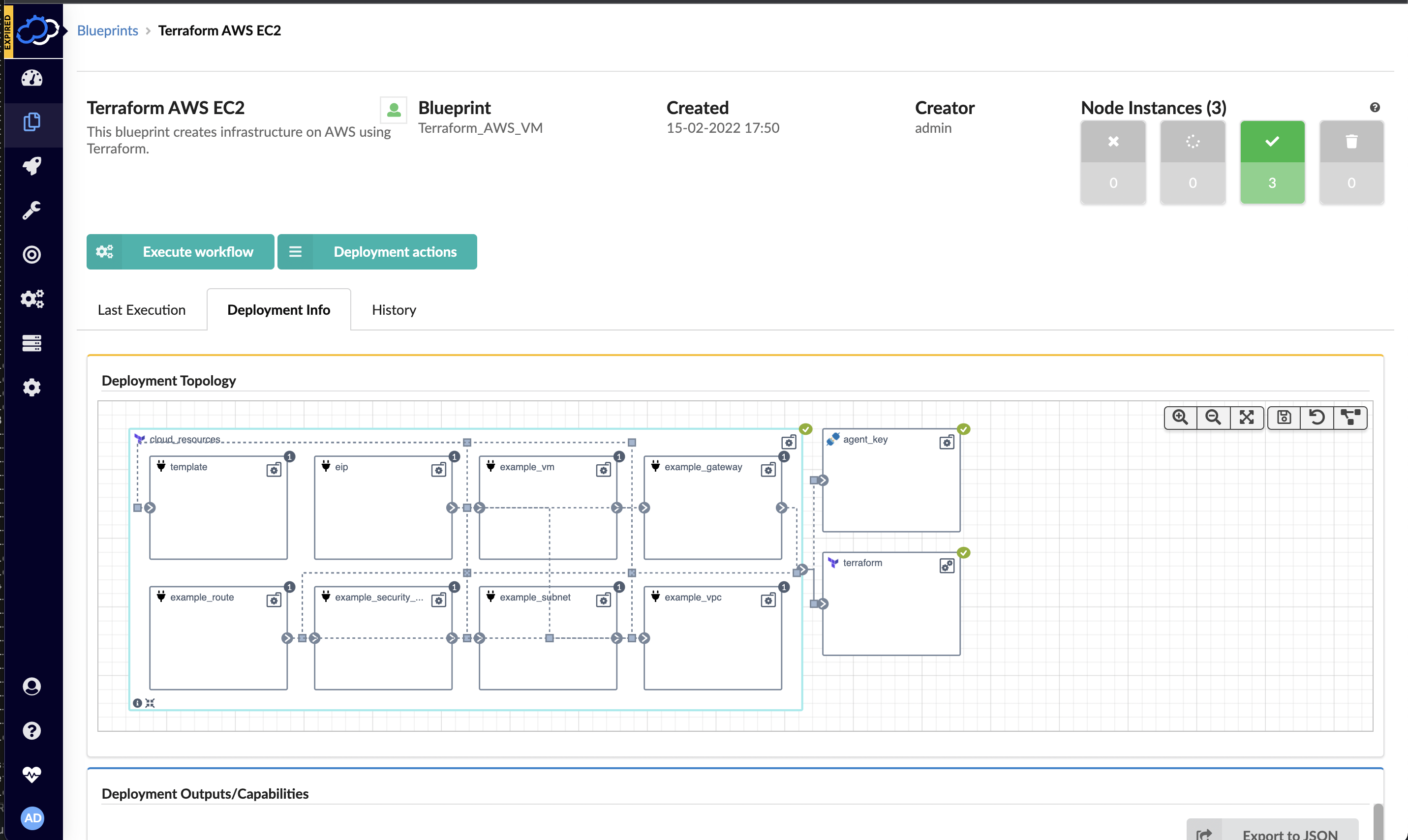
    Cloudify this week announced a free user interface (UI) module that extends its infrastructure provisioning platform and enables DevOps professionals to integrate unlimited Terraform modules.

    Nati Shalom, Cloudify CTO, said Terraform UI provides a familiar construct for DevOps teams using the open source DevOps automation platform to provision infrastructure-as-code (IaC). The module enables DevOps professionals to seamlessly import Terraform modules to Cloudify without writing blueprints or any additional glue code, he said.

    Cloudify now automatically generates the wrapper required for each Terraform template to enable DevOps teams to collaboratively manage secrets, execute concurrent deployments, store states remotely and monitor deployments, users and versions via any Git repository. Those Terraform modules can then be integrated with application programming interfaces (APIs) and continuous integration/continuous delivery (CI/CD) platforms as DevOps teams require.

    DevOps teams can also import existing automation modules and scripts into Cloudify. Those modules and scripts can be automatically converted to environments that can be centrally managed via the Cloudify console or via export to ServiceNow’s IT service management (ITSM) platform as a software-as-a-service (SaaS) application.

    That approach provides the added benefit of enabling DevOps teams to centrally manage all Terraform modules and versions via a single console as part of an effort to reduce misconfigurations that lead to security breaches, he added.

    Cloudify enables DevOps teams to create a self-service catalog and portal through which infrastructure can be managed. Many DevOps teams have built their own portals to manage this process. However, Shalom noted those DevOps teams then need to devote resources to maintaining that portal when those resources could be allocated to other critical tasks.

    DevOps teams can not only use Cloudify to apply patches, change topologies, add security features, make configuration changes or make additional resources available, Shalom added, they can also now integrate Terraform tooling with platforms such as Kubernetes or other automation frameworks such as Ansible. Cloudify also makes available an enterprise-grade version of the platform with these integrations.

    It’s not clear how much time and effort IT organizations are investing in building and maintaining DevOps environments. In many cases, however, organizations should probably revisit decisions about building capabilities that, at the time, didn’t exist. That doesn’t necessarily mean that replacing custom DevOps tools makes sense across the board, but it is likely that, in the intervening years, the range of tooling made available via DevOps platforms has greatly expanded. Relative newcomers to DevOps, meanwhile, are enjoying the benefit of platforms they did not have to construct themselves.

    In fact, Shalom noted that, in terms of DevOps adoption, an inflection point has been reached as more organizations launch digital business transformation initiatives that require applications to be both built and deployed faster than ever. The challenge, of course, is enabling that to occur both safely and at a reasonable cost.

  • How to Automate PKI for DevOps With Open Source Tools

    How to Automate PKI for DevOps With Open Source Tools

    Historically, DevOps and security have been diametrically opposed practices. DevOps wants to move fast and break things, or so they say, but security policies tend to slow things down. However, it has become clear that this school of thought has evolved, as both practices have something to learn from the other. Organizations have embraced a “shift left” approach to integrate security earlier into application development, while security teams are learning to embrace the automation, flexibility and scalability of DevSecOps.

    For example, consider public key infrastructure (PKI), a security technology that is commonly used to authenticate identities, devices and software. There are many valuable use cases for PKI in DevOps such as authenticating services and infrastructure (instead of hard-coded secrets) and validating software and third-party applications. Likewise, there is a worthwhile use case for DevOps to automate manual and ticket-based certificate management; especially since this can create unacceptable bottlenecks for DevOps.

    In this example, PKI and DevOps are like two sides of the same coin:

    • PKI for DevOps – Leverages DevOps to efficiently deploy PKI-based credentials for business applications and services
    • DevOps for PKI – Automates the deployment and configuration of PKI with DevOps

    In either case, these processes use a lot of similar techniques and tools. Best of all, many of them are available through open source communities.

    EJBCA – Open source PKI

    EJBCA is an open source certificate authority that provides a full life cycle certificate management solution, from registration and enrollment to certificate validation and revocation. The project’s source code is available under the terms of the GNU Lesser General Public License (LGPL). EJBCA is used to install a private certificate authority which is highly scalable. In comparison, public certificate authorities are monolithic and expensive, which makes them poorly suited for agile DevOps.

    Ansible – Open source IT automation

    Ansible is an IT automation tool that can install and configure software (in this example, EJBCA). The process is easily repeatable through the creation of playbooks, roles and tasks. Ansible is simple to use because it is YAML-based, a language that is designed to be easily understood, which makes it ideal for DevSecOps environments that have implemented infrastructure-as-code (IaC). Ansible is also highly scalable because it is modular and agentless, which makes it lightweight and fast. Additionally, Ansible playbooks can secure the deployment of other software with keys and certificates from EJBCA, making it possible to leverage Ansible as a universal automation tool, PKI for DevOps and DevOps for PKI.

    HashiCorp Vault – Open source secrets management

    HashiCorp Vault is a secrets management solution, which can be used to secure, store and control access to tokens, passwords, certificates and encryption keys. Its use cases include secrets management, data encryption and identity-based access. As organizations have shifted to more dynamic cloud and hybrid infrastructure, secrets management has become integral to ensure that keys are not exposed in applications and APIs and that certificates are securely issued to the right machines.

    Jenkins – Open source continuous integration

    Jenkins is an automation server for building, testing, delivering and deploying software. Jenkins may be used to automate the deployment of certificates and keys as part of a continuous integration and continuous delivery pipeline (CI/CD). Essentially, a playbook defined in Ansible may be streamlined by Jenkins in the CI/CD pipeline that is a hallmark of DevOps. 

    PKI for DevOps and DevOps for PKI

    The ultimate goal of PKI for DevOps is to provision PKI credentials for business applications without hard-coded secrets, which is one less risk to concern the security team. The goal of DevOps for PKI is to automatically deploy a completely configured PKI solution, which is one less roadblock for DevOps teams. Organizations can leverage a collection of open source Ansible playbooks to automate the installation of EJBCA, which makes this process easily replicable.

    The nature of DevOps is to embrace automation and flexibility at scale. That means that PKI certificate provisioning needs to be integrated and automated into DevOps. When this is done correctly, security and DevOps don’t need to be diametrically opposed—organizations can achieve the best of both worlds: Security and efficiency.

  • Credit Karma Looks to Open Source Distributed App Platform

    Credit Karma Looks to Open Source Distributed App Platform

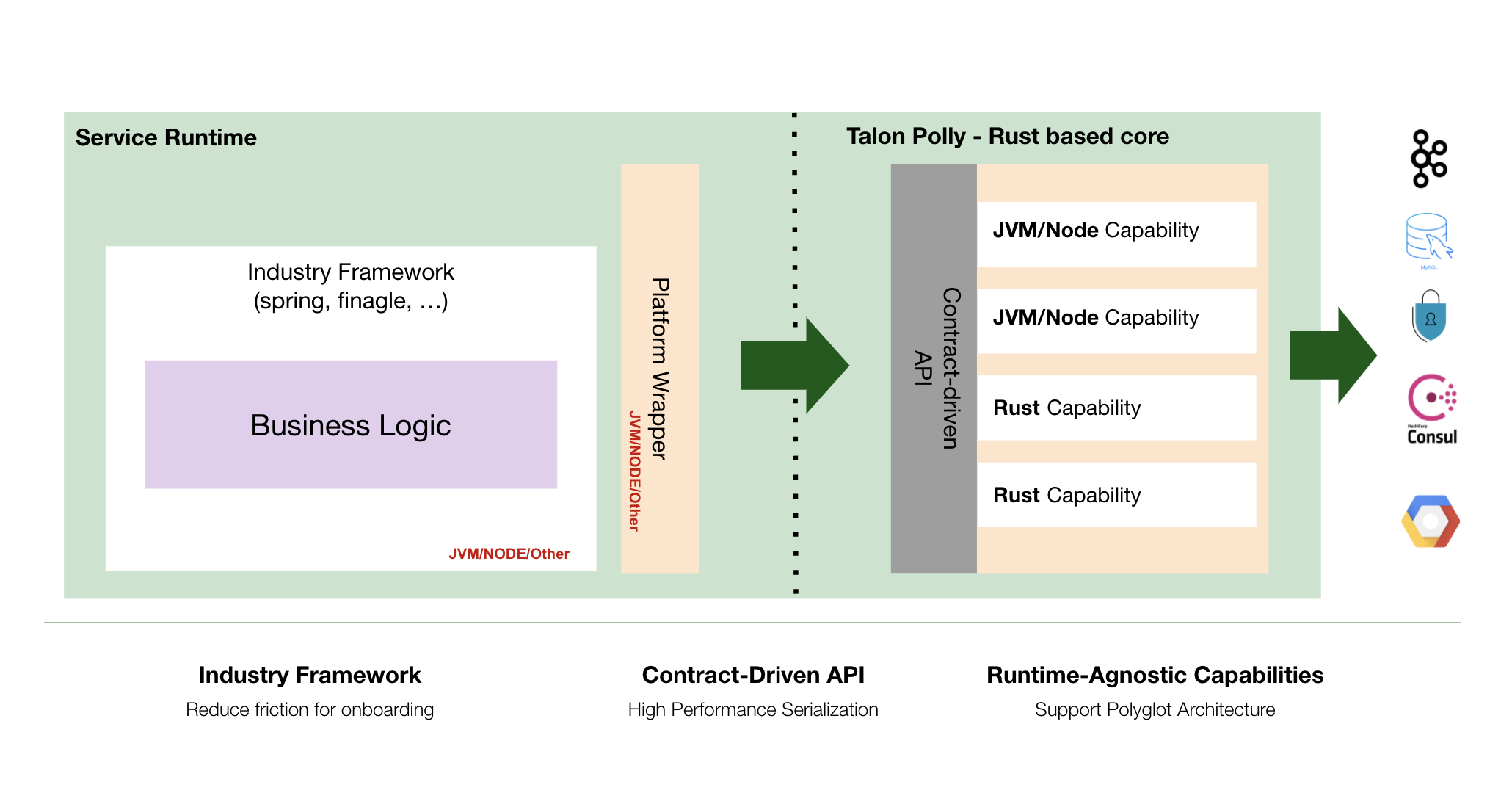
    Credit Karma has launched an application platform, dubbed Talon Polly, that makes it simpler to deploy microservices across multiple runtime environments.

    Richard Pounder, principal software engineer at Credit Karma, said the consumer financial services provider expects to make Talon Polly available as an open source project next year.

    Written in the Rust programming language, Pounder said Credit Karma created Talon Polly to provide its developers with a language-agnostic platform for building and deploying applications. Talon Polly can be deployed as a sidecar using containers or as a process running within a software environment.

    While there is no shortage of frameworks for building and deploying software, Pounder said Talon Polly is designed to make it easier for development teams to reuse code and components across multiple applications using, for example, a contract-based library included in the framework. That approach also enables Credit Karma to ensure a common set of security policies are enforced across those application environments, he noted.

    Ultimately, the goal is to enable developers to spend more time writing business logic rather than mastering the nuances of multiple application development frameworks created for specific application environments, said Pounder.

    It’s not clear to what degree other frameworks may emerge to address the same issues at Talon Polly. Odds are good that other organizations that need to deploy distributed applications built using multiple programming languages have faced similar challenges. The Cloud Native Computing Foundation (CNCF) has also adopted Dapr, a set of application programming interfaces (APIs) created by Microsoft that are deployed as container sidecars to make it simpler to build distributed applications, as an incubating project.

    Regardless of approach, the rise of distributed microservices-based applications is creating a significant management challenge for DevOps teams. Each microservice is built by different development teams that prefer one programming language over another for any number of reasons. Deploying and updating those microservices across a distributed computing environment requires more sophisticated orchestration of workflows, given all the dependencies that exist between microservices.

    Of course, it’s not quite clear yet the degree to which microservices-based applications will supplant legacy monolithic applications. Most new applications are being constructed using microservices to make applications more resilient. However, the number of legacy monolithic applications running in existing IT environments means it could be years before microservices-based applications will ever outpace them. As such, DevOps teams will be managing a mix of monolithic and microservices well into the second half of this decade.

    The paradox is that while microservices-based applications are more resilient because calls to services can be rerouted in the event of a disruption, the overall application environment becomes more complex as the dependencies between distributed microservices increases. As such, many organizations are opting to use microservices to build applications only when a certain level of resiliency is required or it’s been determined that a function likely to be used by multiple applications is more easily accessed via a microservice that has its own API.

    One way or another, going forward, it’s not so much a question of whether microservices will be employed but rather to what degree and across how many applications.

  • Unreliable Server Scare | Information Batteries | ARM IPO PDQ

    Unreliable Server Scare | Information Batteries | ARM IPO PDQ

    Welcome to The Long View—where we peruse the news of the week and strip it to the essentials. Let’s work out what really matters.

    This week: We worry about chips failing randomly, we ponder a new way of thinking about workload shifting, and we grok Arm’s IPO.

    1. Smaller Features Lead to Random Failures

    First up this week: Could cosmic rays be causing increasing numbers of errors in cloud servers? As chips get faster and more densely packed, the worry is that undetected bit-flips could cause serious problems.

    Analysis: How can you mitigate the problem?

    As workloads grow in number and complexity, this is becoming a real issue—not merely theoretical. (See also: DevSecOps worries such as Rowhammer.) Think about where the critical data are and how to detect random errors. Even consider running important workflows in lockstep pairs.

    John Markoff: Tiny Chips, Big Headaches

    Imagine for a moment that the millions of computer chips inside … the largest data centers in the world had rare, almost undetectable flaws. … As the tiny switches in computer chips have shrunk to the width of a few atoms, the reliability of chips has become another worry for the people who run the biggest networks. … There is growing evidence that the problem is worsening with each new generation of chips.
    …
    Both Facebook and Google have published studies describing computer hardware failures whose causes have not been easy to identify. … Facebook researchers noted that some processors would pass manufacturers’ tests but then began exhibiting failures when they were in the field. … Smaller transistors, three-dimensional chips and new designs that create errors only in certain cases all contributed to the problem … according to Google.
    …
    Intel executives said they were familiar with the Google and Facebook research papers and were working with both companies to develop new methods for detecting and correcting hardware errors. [But] computer engineers are divided over how to respond to the challenge.


    Have we hit a wall? So asks Thutmose V:

    For more than 50 years, semiconductor manufacturers have been trying to keep up with Moore’s Law, which … has effectively served as the target for semiconductor engineers to push them forward. … The size of some parts of the transistors is now 10 nanometers or less. 10 nanometers is about equal to the width of 100 silicon atoms—100 atoms is not very many.
    …
    When things are that small, does quantum randomness start to be noticeable? Normally if the odds of something failing is a trillion to one, you don’t need to worry. But if you have 10 billion transistors operating at a clock speed of 3 billion times a second, a one in a trillion chance of failure is nowhere near good enough. … It is a miracle these things work as well as they do.


    We’ve known about the problem for years, but only now is it becoming reality, says dsgrntlxmply:

    We observed certain network failures to be caused by corruption of an on-chip routing table memory in a SoC that lacked parity protection for these tables. The failure rate was low, but was higher in units that were deployed at higher altitudes. … The problem was eventually mitigated by software table sweeps, and in newer SoC generations, by parity in critical tables.

    These Single Event Upsets are said to be caused by muons generated by high energy cosmic ray interactions in the upper atmosphere. Third semester undergrad physics.


    2. Mind-Bending Speculative-Compute Research

    Many of us are familiar with delaying a workload until a time when servers are idle—or when energy is cheap. But some fascinating research asks: What if we could predict a future workload and perform it in advance?

    Analysis: “Information batteries” can be cheaper than Li-ion

    The researchers argue that pre-caching even parts of a workload’s output when energy costs are low—or even negative—can save far more money than traditional grid-scale storage such as batteries or pumped hydro. For example, speculatively transcoding video versus generating it on the fly, or predicting future machine learning training workloads.

    Caitlin Dawson: A New Way to Store Sustainable Energy

    Renewable energy has an intermittency problem. … What if surplus renewable energy could be stored as computation? … That’s the thinking behind “information batteries,” a new system proposed by … Barath Raghavan, an assistant professor in computer science at the USC Viterbi School of Engineering … and Jennifer Switzer, a Ph.D. student from UC San Diego.
    …
    When renewable energy is available in excess, it is used to speculatively perform computations. … The stored computed results can then be used later when green energy is less plentiful. … For instance, every day, YouTube data centers transcode more than 700,000 hours of videos to different resolutions. Many of these computations are predictable and can be performed at a time when there is excess green energy.
    …
    [But] computations that are completed in advance do not need to match exactly with the computations completed at a later time. … The challenge, said the researchers, is determining what computation to perform, where and when, and how … to efficiently retrieve the results later. … It is only possible in some workloads and in some contexts. But Raghavan believes with improved prediction and integration into large systems, the technology points towards a promising future alternative.


    This isn’t just batch computing with a fancy name. cognizant_ape explains:

    On AWS we do a lot of batch processing when the data centers are low on traffic. This is just the standard SPOT instances which you can trigger once the cost goes below a certain amount and then end when it goes about a certain amount.

    The big issue is being effective with I/O and setup time. The article seems to be getting ambitious to the point of a distributed compiler with a flexible optimization metric.


    Cut to the chase. It hinges on prediction, says bradley13:

    Predicting loads is easy, but predicting the computations that will make up those loads? Not so much. … Imagine: Most employees start work in an hour — let’s predict which database queries they will generate. Your success rate better be high.


    3. Confirmed: Arm will IPO, Not be Sold to Nvidia

    SoftBank and Nvidia have bowed to the inevitable. Arm, designers of ubiquitous chip cores, will IPO sometime in the next 12 months.

    Analysis: The only sane choice, but ecosystem risk remains

    As I’ve said before, it seemed everyone was against the idea of Nvidia owning Arm. It put the kibosh on Arm’s open licensing stance, dooming the ecosystem to scraps from the table as Nvidia grabbed first dibs on everything. Now regulators must turn their attention to the very real risk that Nvidia will still acquire Arm anyway—via the stock market.

    Richard Waters, Arash Massoudi, James Fontanella-Khan and Antoni Slodkowski: $66bn sale of chip group Arm to Nvidia collapses

    The deal, which would have been the largest ever in the chip sector, was set to give … Nvidia control of a company that makes technology at the heart of most of the world’s mobile devices. A handful of Big Tech companies that rely on Arm’s chip designs, including Qualcomm and Microsoft, had objected to the purchase [arguing] that Nvidia would get an unfair advantage by having first rights to Arm’s technology.
    …
    Jensen Huang, Nvidia’s chief executive, hoped to use Arm’s processor designs to cement his company’s growing role in data centres. … Nvidia abandoned its pursuit of Arm at a board meeting on Monday, said a person familiar with the discussion.
    …
    The deal’s failure brought an immediate management shake-up at Arm, with chief executive Simon Segars replaced by Rene Haas, head of the company’s intellectual property unit. … In the UK, where politicians view Arm as a strategic national asset, attention is set to shift to whether the company will be listed in London [but] Haas said … no decisions had been made on where Arm would be listed.


    Reminding us why this matters to DevOps, here’s Timothy Prickett Morgan:

    Now there is no question that Arm Holdings will be going public. … The plan is to do so before the end of [its] fiscal year in March 2023. … Arm Holdings will be returning to its IP licensing roots, having spun off some uncore business back into SoftBank, and seeking out new markets as it has been able to do with hyperscalers [and] cloud builders.
    …
    When Intel was worried about AMD Epyc chips, what it really needed to worry about was boosting price/performance to keep Arm CPUs out of the hyperscaler and cloud builder datacenters. [But AWS] has Graviton Arm server chips on a pretty regular schedule, and you can bet Masayoshi’s last yen that Graviton4 will debut at re:Invent 2022 this year.


    But what happens next? Pun it up, HereAndGone:

    If Softbank is going to take ARM public, Nvidia will find it much cheaper simply to acquire a controlling interest. … Looks like a duck, walks like a duck, but cheaper than a duck—while ducking regulatory issues. This plan is not quacked up to solve what it pretends to solve and will likely prove most fowl.


    The Moral of the Story: Fall seven times and stand up the eighth


    You have been reading The Long View by Richi Jennings. You can contact him at @RiCHi or tlv@richi.uk.

    Image: Nicole Geri (via Unsplash; leveled and cropped)

  • How Stream Processing Goes Beyond Real-Time

    How Stream Processing Goes Beyond Real-Time

    How fast is real-time? According to Robert Miller’s 1968 seminal study on human-computer interaction, we perceive a response time of 100 milliseconds or less as instantaneous. This is much quicker than the average human reaction time, which one online test clocks at 273 milliseconds.

    Nowadays, customer-facing applications need to respond in as close to real-time as possible to win our attention and meet standard requirements. For example, 100 milliseconds is a golden rule for credit card processors to meet SLAs. Especially in our new remote-first economy, other areas like media, health care, retail and manufacturing need to take full advantage of real-time data processing to enhance digital business and stay relevant. Yet, leveling up with real-time requires some technical nuances that might be challenging to implement with the current developer skills gap.

    According to Manish Devgan, chief product officer at Hazelcast, the problem with most data management techniques is that data isn’t being processed in-stream at the edge. Instead, data gets stored and thrown into a data lake where it accumulates, unfulfilled. To make matters more complicated, decentralized data management means organizations may be overseeing many different data lakes, adding to the potential for unused data and increased latency.

    I recently met with Devgan to learn how in-memory stream processing goes beyond real-time data. According to Devgan, the secret sauce is processing incoming data in-stream while tying it to persistent storage to create context. By doing so, companies could unlock more innovative real-time experiences, he said.

    Use Cases For Real-Time

    Real-time presents many opportunities for business operations and end-user customer engagements. This is especially true in the financial sector. For example, Devgan explains how one bank was able to use real-time data at the moment of customer interaction at their ATMs. The system was able to fetch a history of the user account and extend an offer for a low line of credit, increasing their total loans by 400%. Capturing value at the moment of user intent is a golden opportunity, said Devgan.

    Capital One is another example of a financial institution leveraging advanced technology to improve the product experience. “They’re one of the leading banks in terms of technology,” said Devgan. Capital One’s threat detection system calls a machine learning model in real-time to detect and prevent fraud. Only by acting on incoming data in the moment of interaction can preventative responses like these be signaled.

    Other scenarios are also beginning to incorporate increased real-time analysis. “This split-second preemptive decision-making is important for many other use cases,” said Devgan. Physical retail might loop into customer loyalty programs at point-of-sale systems to increase in-store spending. Or, automobile manufacturers may want to use real-time processing to detect a problem with their robotic arms sooner rather than later.

    Real-time vs. Stream Processing

    When an event comes in, it usually has very little information. But when you look up a customer profile and connect it to a greater context, you can direct further actions. “Correlating data in motion with data at rest is where the magic happens,” Devgan. This distinction uncovers the difference between real-time data and stream processing.

    The real-time label tends to get thrown around a lot, and it’s quantified differently for different groups. Real-time might be five minutes for some applications but 10 milliseconds for others. Real-time could simply mean that a system accesses data at rest very quickly, delivering perceivably “real-time” results.

    On the other hand, stream processing incorporates data at rest and data in motion. It computes incoming, in-stream data and correlates it with data at rest. “You don’t let the data land — you process it as it comes in,” Devgan said.

    For years, enterprises have been collecting and storing exorbitant amounts of data. A survey by Seagate and IDC reveals that 43% of data collected is largely unleveraged and other studies estimate the amount of this “dark data” is over 50%. And, not acting upon data effectively makes it just another pile on top of the growing mountain of technical debt.

    There is a significant storage expense for holding on to too much data, whether on-premises or in the cloud. But, the paradigm is shifting a bit, said Devgan. Organizations don’t want to hold onto everything. The attitude is beginning to shift toward “garbage in, garbage out.”

    Technology Behind Real-Time Processing

    So, what sort of technology does stream processing require? Processing data at the edge requires some fundamental changes to design thinking. For one, since data must be computed in-stream, there’s more emphasis on in-memory processing. Devgan explained this as “pushing compute around instead of pushing data around.” To enable this, Devgan pointed to open-source projects like Jet that provide powerful distributed batch and stream processing.

    SQL has a storied history of acting upon data at rest. Now, Devgan said, he noticed the reemergence of SQL in a stream processing context. Though the industry is still defining how the SQL dialect will conform in a streaming world, he’s bullish on the prospect of SQL guiding this area. “Streaming SQL will be the lingua franca for streaming,” he insisted. We’re also in an early era of determining how to bridge the stateful and serverless worlds, Devgan added.

    But regardless of computing location, it will come down to the net customer experience outcomes. “People want to build their business applications and are less worried about the operational management of the system,” said Devgan. Whether it’s building real-time offers for e-commerce or implementing fraud detection, it will come down to the numbers. There is also a role for stream processing in health care to optimize physical resources and enhance patient experiences with real-time data. In all these scenarios, rapid access to data and processing at the edge will determine much of their success.

  • Codenotary Launches Cloud Service to Generate SBOMs

    Codenotary Launches Cloud Service to Generate SBOMs

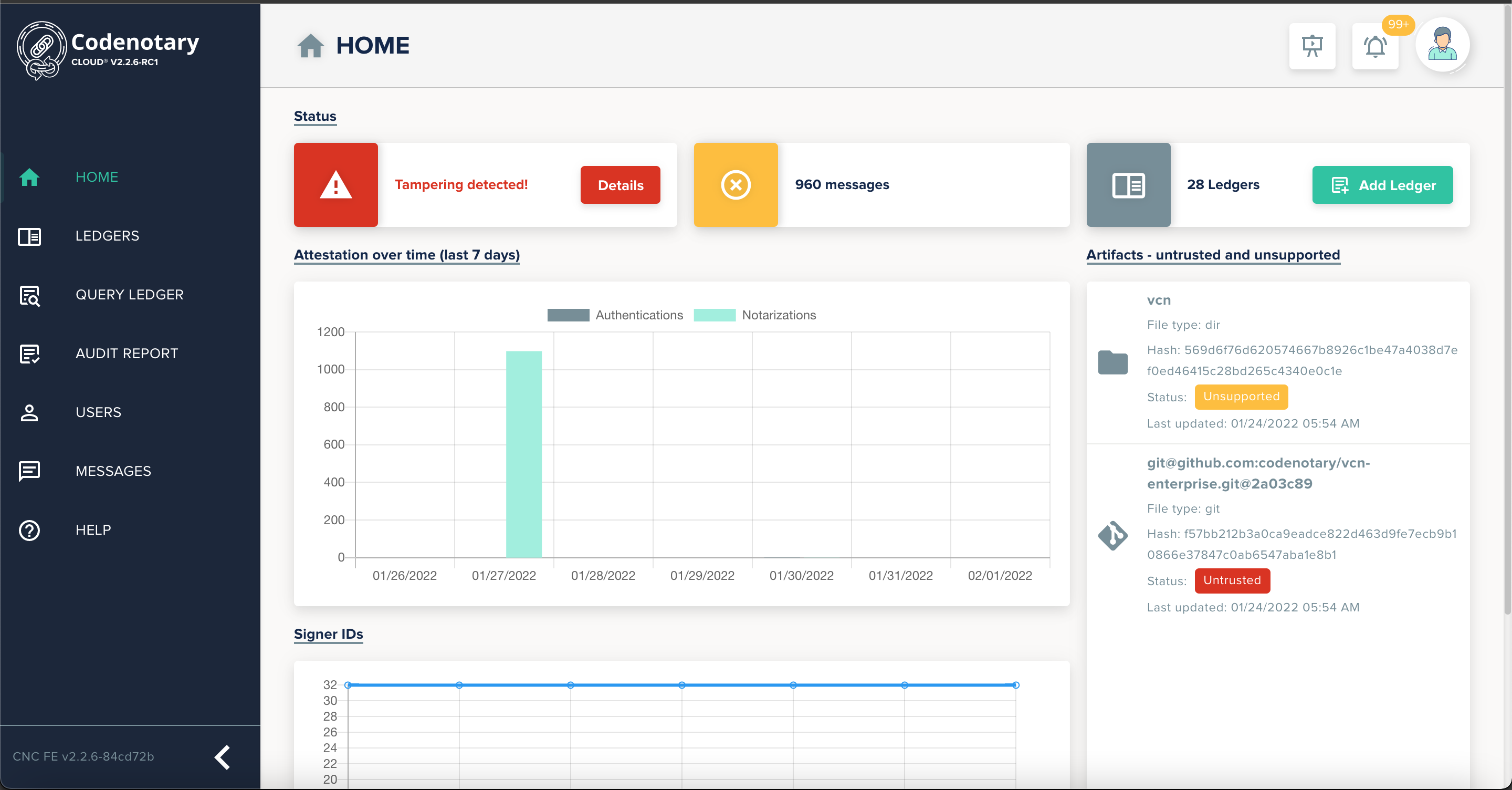
    Codenotary has launched a Codenotary Cloud platform that can automatically generate a software bill of materials (SBOM) and make it easier to discover what components have been included in an application.

    Moshe Bar, Codenotary CEO, said that capability can also play a key role in identifying which components in an application might contain, for example, the Log4jShell vulnerabilities that were recently discovered in Java applications.

    That capability can reduce the time required to remove insecure artifacts by as much as 80% simply because organizations are not dependent on scanning tools to search for vulnerable components, added Bar.

    Codenotary Cloud is based on an immutable open source immudb database that cryptographically attaches an identity to each software artifact. In the wake of a series of high-profile breaches, there’s now a lot more focus on the integrity of software supply chains. In fact, the Biden administration recently issued an executive order requiring all federal agencies to, among other things, make sure an SBOM is available for all the software they use.

    Codenotary claimed Codenotary Cloud can scale to millions of integrity verifications per second across source code, builds, repositories, Docker container images and Kubernetes deployments in a way that doesn’t require DevOps teams to upload data to a centralized platform, noted Bar. That makes it possible to notarize and verify the provenance of all the code being employed, he added.

    Codenotary Cloud can also be fully integrated with most vulnerability scanners and popular cloud-native continuous integration/continuous delivery (CI/CD) systems running on any cloud or on-premises host via a managed service. Pricing starts at $5,500 for a workgroup of 10 developers.

    It’s not clear to what degree the Biden administration’s executive order will improve overall software security. There have been multiple vulnerability issues over the years that have not resulted in any material change in how organizations manage their application development processes. However, the executive order issued by the Biden administration, coupled with a recent summit on the state of open source software security, means more senior business and IT executives are at least aware of growing concerns.

    The one thing that is certain is there will be more zero-day vulnerabilities discovered. Developers today routinely reuse open source software and free components maintained by a small number of volunteer programmers. Like any other developer, the amount of security expertise those individuals have is limited. Many organizations reuse that code without contributing anything meaningful back to the project—either in terms of financing or vulnerability identification and remediation support. Contributors to these projects freely donate their time and expertise to build these components. Many of those contributors feel the onus for securing the software they created is on the organizations that decide to deploy that software.

    Regardless of who is responsible for security, it’s apparent cybersecurity teams are going to be reviewing application development processes. Theoretically, that should benefit all concerned and lead to DevSecOps best practices being more widely adopted.