Category: Doin’ DevOps

  • What Building a March Madness Bracket Teaches About DevOps

    What Building a March Madness Bracket Teaches About DevOps

    Applying the lessons learned from the NCAA tournament to DevOps in your organization.

    ‘Tis the season for filling out brackets, secretly checking your favorite team’s livestream at work and watching your ranking rise and fall in the office pool.

    Unless you’re this guy, your bracket is already busted. However, there’s always hope for next year, especially if you pay attention to five key indicators that experts say predict the success of teams in the NCAA championship.

    But you don’t have to wait until 2020 to put these tips into action. In fact, carefully constructing a March Madness bracket can actually teach you a lot about DevOps.

    The following five tips can be applied to your next bracket, as well as your software development team:

    Don’t Rely on Offense Alone

    A great offense is key to scoring, but the gap between offensive and defensive efficiency can make all the difference when it comes to a team’s chance at the championship. Over the last 17 years, only one national champion didn’t finish in the top 20 for both offensive and defensive efficiency. Similarly, software teams have to rely on multiple team members including the programmers focusing on new features and fast plays, as well as the QA and operations teams ensuring that there are measures of testing and monitoring in place, so those same features aren’t released with bugs and breakages. To be successful, you need to aim for a balance of speed and quality. In DevOps, your efforts will fall short if you’re only thinking about your offensive strategy while underestimating the importance of strategic defensive plays.

    Coaching is Crucial

    Coaching experience has become a strong predictor of future success, as 15 of the last 17 NCAA title champions were led by a coach who had been to the Final Four previously. Similarly, leadership and management in DevOps and the transition to DevOps is paramount to creating an environment that is supportive of the necessary changes. In fact, according to a Forbes Insights and PMI survey, 85 percent of respondents said that change management is critical to their success in times of disruption. As teams attempt to speed up their processes to meet consumer demands, it’s evident that leadership is going to be a defining factor of the success of the team. Additionally, amid a cultural shift, management needs to have the right mindset to get the entire team on board, adopting new tools and practices. Just as coaching influences college basketball, experience, skill and vision all come together for transforming a team and creating a culture of DevOps.

    Expect Upsets

    Upsets happen—that’s the beauty of March Madness! While teams are seeded to indicate the likelihood of success in the NCAA tournament, you might think that it’s always best to pick the highest seed. But according to the NCAA, you should be aiming for around 16 upsets in your bracket. Just ask anyone who had UVA in their Final Four last year, when the No. 1 seeded team lost to 16-seed UMBC, how important it is to expect an upset. Sometimes, all your systems are perfectly in place and everything is performing as it should, and something will still break. What’s more important than aiming for perfect software delivery is having the processes in place to patch bugs, handle downtime and fix errors when they inevitably occur.

    Teamwork Will Tell You Everything

    There’s always talk of the star players, but success comes down to much more than one person’s free throw percentage, shooting efficiency and steal rates. Most of the statistics you look at to build your bracket revolve around teamwork—the team’s strength of schedule, the team’s winning streak, the team’s loss margin, even the measurement of explosiveness and competitiveness. None of these points can be attributed to one person; they change from season to season, and they’re all about how the entire team works together. Selection Sunday is needed every year to seed the teams because performance changes every year based on the team dynamic. Similarly, your organization will not be successful in DevOps if there is not a focus on communication, collaboration and teamwork.

    The Absence of Key Players Will Trip You Up

    While you can’t depend on one star player to determine the outcome of an entire team, you’ll also run into trouble if key players are out for the season. Just think: You probably wouldn’t pick Duke to win as quickly without Zion Williamson. Just the same, when there are key teams and team members missing or not committed to a changing culture, it will hinder others. There are various roles that every organization needs to succeed in DevOps, and this requires everyone to be on the same page whether you’re in development, operations, QA or are a business stakeholder. People are one of the most important parts of the transition to DevOps; if the entire team doesn’t show up, new technology and approaches won’t be able to make up for it.

    There’s a strategy to everything, and it just so happens that your approach to DevOps may be similar to your approach to filling out your bracket.

    By following these five pieces of advice, your software team will be more prepared to win it all when it comes to attaining a faster delivery of high-quality products.

    — Alexandra McPeak

  • 6 Examples of Digital Transformation at Adobe Summit Keynote

    6 Examples of Digital Transformation at Adobe Summit Keynote

    We’re attending Adobe Summit 2019 to research the intersection of DevOps and marketing. Follow along for more stories.

    In a recent article, we described how DevOps is transforming retail from brick and mortar into an omnichannel “brick and click.” At Adobe Summit, we garnered more insights, discovering how other institutions are implementing an innovative convergence of physical and digital spaces.

    The result is impacting all sectors, creating new hybrid environments within home tech, banking, apparel, and more. Let’s see which ones Adobe decided to highlight in its opening keynote to discover how companies of all types are reinventing themselves through digital transformation.

    Best Buy: Evolving 1 Storefront into 3 Services

    Best Buy is a prime example of digital transformation for retail. At Adobe Summit, Best Buy CEO Hubert Joly described how the company is reinventing the “New Blue” to enrich lives with the help of technology; a sense of purpose is a mobilizing factor that affects innovation.

    For $200 a year, Best Buy in-home advisers will be your No. 1 on-call tech support. The company is also using AI to monitor seniors to trigger assistance when they are in need. Lastly, an app that compares features is bringing new in-store customer experiences.

    Not solely a brick-and-mortar retail anymore, Best Buy is transforming with subscription services and online presences, bringing in multiple new touch points to stay competitive with eCommerce.

    Best Buy CEO Hubert Joly sits down with Adobe CEO Shantanu Narayen March 26 in Las Vegas. (Jeff Bottari/AP Images for Adobe)

    Intuit: Reinventing the SaaS Platform Model

    Atticus Tysen, SVP & CIO at Intuit, described, how, over the years, Intuit has transformed its platform-based SaaS offering. Intuit is now utilizing ML and AI to improve its customer experience process. Doing so requires great data, as well as powerful data structures. As Atticus mentioned: “It all comes back to data…You need to monitor your data pipelines just like you monitor your offerings.”

    According to Atticus, a core component of curating data infrastructure is democratizing it. Opening such data to all employees dismantles silos to increase the speed of IT. It’s this sort of horizontal thinking that fosters the collaboration digital transformation requires.

    Atticus Tysen, SVP & CIO at Intuit talks with Cynthia Stoddard, SVP & CIO at Adobe, March 26 in Las Vegas. (Jeff Bottari/AP Images for Adobe)

    Zumiez: New Zero-Code Methods to Build Online Shopping

    Jennifer Small presented how the newly Adobe-owned Magento can be utilized to build and personalize shopping experiences. She walked through a theoretical Zumiez implementation, demonstrating how to make visual edits to develop cross-channel retail applications.

    With the rise of eCommerce, traditional retailers such as Zumiez must create lean digital spaces to interact with end users. Not only must such environments be agile, but every point along the customer journey also must be individually personalized.

    Online presences are adopting new tools such as AI-driven photo search, mobile A/B testing, user-driven optimization, responsive layouts, instant purchase and more. It’s only with the use of innovative tech that traditional retailers can stay relevant in a competitive landscape.

    Foot Locker: AR-Driven Demo

    David Nuescheler, Adobe Fellow & VP of Enterprise Technology at Adobe Systems, has been working hard in the lab using Adobe Sensei AI to take physical retail to new heights. In his demo featuring Foot Locker products, he painted an augmented reality that may be closer than we think for storefronts.

    Using a catalog of cloud-aware assets, David demonstrated how a storefront could render innovative user-facing views in real-time. Using AR, his live demo rendered a custom shoe to appear on an empty shelf. He scanned and identified shoes on a product stand, and overlaid warehouse inventories on top of products in real-time.

    Though demonstrated as a futuristic work-in-progress, such AR-infused digital experiences will likely arise in retail soon, adding a sense of magic to typical storefronts.

    David Nuescheler, Adobe Fellow & VP of Enterprise Technology at Adobe, demonstrates some cool storefront AR March 26 in Las Vegas. (Jeff Bottari/AP Images for Adobe)

    Chegg: From Textbooks to Online Tutoring

    Textbook rental and academic platform Chegg also made an appearance at the Adobe Summit keynote. Chegg CEO Dan Rosensweig detailed the company’s initial fear when its IPO plummeted, and the frantic reorganization that followed. If any digital transformation story has a positive end in sight, it’s Chegg.

    Now valued at $4.5 billion, Chegg was pressured to make a complete 180-degree pivot from shipping textbooks to embracing online subscription-based services. Though the company still ships about 5 million books a year, Chegg now has 1 million digital users. Academics from high school through to continuing education are leveraging Chegg’s tutoring and online study communities.

    Chegg is deeply tapped into its consumer base, placing great emphasis on responding to “who [the customer] is, and not who they used to be.” For Chegg, using consumer analytics to architect the new digital business is a continuous, and necessary, commitment.

    Chegg CEO Dan Rosensweig discusses with Adobe CEO Shantanu Narayen March 26 in Las Vegas. (Jeff Bottari/AP Images for Adobe)

    Adobe: An Integrated, Impressive Services Catalog

    A sure-fire case study in digital transformation is Adobe itself. Adobe CEO Shantanu Narayen kicked off the Adobe Summit 2019, its annual conference full of 17,000 tech-leaning CMOs and digital transformers in attendance.

    Shantanu transparently outlined how, years ago, innovation in the Adobe product line had become stagnant. Compared to the infinite growth of content creation across the world, its static products weren’t doing the trick. This began to change rapidly with the introduction of subscription-based formats including Creative Cloud. Again, Adobe had found a foothold.

    He demonstrated the company’s new Adobe Experience Platform, a holistic customer experience management platform. With many of the tools having been used as dog food at Adobe itself, the platform unites a large suite of applications dedicated to advancing the customer journey.

    Discover, Try, Buy, Use, Renew

    Discover, Try, Buy, Use, Renew. Adobe’s creed for customer experience management was reiterated many times at the Summit’s keynote. Such insights ring true in the agile transformation tactics taken by the businesses showcased above.

    Adobe Summit—or, as Marketo’s Steve Lucas calls it, “the Woodstock of marketing”—showcased how successful agile companies placed customer experience as the driver for product design. In tandem, the future of retail holds an interesting future that meshes both traditional physical and digital experiences.

    With customer experience now the No. 1 driver, should we place a “Mar” in front of the DevOps to create the triumvirate MarDevOps? The dogs are out.

    — Bill Doerrfeld

  • The New AI Overseer Role in DevOps

    The New AI Overseer Role in DevOps

    Robot overlords are the stuff of science fiction fantasy. Today, with more teams implementing artificial intelligence (AI), DevOps teams need a hard, continuous look at reality. An AI overseer watching apps at work could make the difference between sadness and euphoria in your efforts.

    We’re seeing AI misses more and more often. Facebook recently admitted its algorithms failed to stop uploads of a particularly heinous live-streamed video. Autonomous vehicles have struck cars and people. Jaywalkers in China have been misidentified and publicly shamed in error. It’s not for lack of effort in development. The adage “If it were easy, anyone could do it” applies.

    A few weeks back, I was in a Twitter chat session on AI led by Kirk Borne, data scientist at Booz Allen Hamilton. The question came up of what organizations should consider when creating guidelines for use of data and bias-free AI. Here’s my response:

    A4: DevOps teams should have someone whose role is AI oversight—actually watching what it’s doing and constantly testing/validating its findings #MITSMRChat

    — Don Dingee (@StratisetDon) February 14, 2019

    Common Problems

    Most fails are due to fire-and-forget, wherein AI systems are trained, tested against training and turned loose. Even a well-designed AI system is subject to several problems:

    Errors: This is where AI makes a factually incorrect decision. False positives and false negatives are in this category, along with miscategorization problems.

    Gaps: There are situations in which AI understands conflicting options and is unable to choose. Then, there are situations in which the AI doesn’t recognize what it sees.

    Bias: Maybe the system prefers green M&Ms or German shepherds because there was some subtle trend in the training data for “candy” or “dog.”

    Ethics: This can be a higher level of bias, where preference is given based on age, gender or race. Sometimes it’s the classic no-win scenario in which both options are harmful.

    An AI overseer guards against these types of problems in near real-time, every day, for as long as it takes to weed them out. Some problems are easier than others. An example of a more difficult problem came when autonomous vehicle researchers realized that not all traffic signs are brand new and well-lit. Shade, branches, wind, scratches, dings, bullet holes, stickers, graffiti and many more types of defects exist in the real world.

    Increased Complexity

    Inevitably, part of the solution the AI overseer leads is better scenario-planning and more training data. Retraining becomes a way of life and at some point, bigger data sets also lead to more complex implementations and another challenge: speed—after retraining to correct issues, the reloaded real-time classification engine runs like it’s stuck in molasses, producing correct results too late to be useful.

    While the A system is running, a B version should be in development with new training and classifier boxes. For very large data sets, teams should consider designing a workload-optimized training server complex instead of relying on elastic cloud resources. This was behind NVIDIA’s recent acquisition of Mellanox—using InfiniBand for more bandwidth between GPU clusters in AI server complexes.

    Where training systems often scale, real-time systems usually don’t. They are optimized for size and power consumption and can only accept so many additions. When a bottleneck emerges, it can kill the entire application. New generations of CPUs, GPUs and FPGAs keep pushing the envelope for designers tackling AI challenges.

    Human-in-the-Loop

    In many use cases, the job of the AI system is not to make every single decision autonomously. Instead, the system should make routine decisions and lead the AI overseer to look at exception cases. Directing humans quickly to areas needing attention is often more valuable than risking bad decisions. Human-in-the-loop is something DevOps teams should architect into systems more often.

    This may all sound obvious, but it points out a big difference in developing AI versus developing code-based algorithms. If there’s a bug in code, you can debug it and find the offending lines of code to fix. But debugging AI is a lot more difficult. Digital twin implementations come into play using playback of real-work inputs to look at what happens inside the classifier black box. There are usually hints of problems developing before catastrophe strikes. Running data both good and bad can help spot issues.

    Ideally, the AI overseer is a hybrid of a data scientist plus a systems architect. Look for someone who understands both data sets and hardware implementations, at least at a high level. They may have to call in other resources on the team for detailed investigations.

    The last thing you want after all the hard work in developing a system is to have it run amok months or years later. It’s just Murphy’s Law. AI systems will do something entirely unexpected at the worst possible time. An AI overseer can help a DevOps team get ahead of AI problems.

  • How CI/CD Can Fast-Track Next-Gen Media Rollouts

    How CI/CD Can Fast-Track Next-Gen Media Rollouts

    Using CI/CD can help digital service providers move as quickly as over-the-top content providers

    Online video consumption has been increasing tremendously with rapid change in consumer expectations to have seamless viewing experience across various digital devices. To capture this growing demand, it is critical for digital service providers (DSPs) to deliver fast-track rollout of next-gen media services. Moreover, to counter the growing influence of over-the-top content providers (OTTs), DSPs must deliver media services that are high quality, right the first time and consistent, along with creating competitive advantage through speed to market. However, unlike OTT players, DSPs are challenged by extremely long development and rollout timelines for new services and offerings, primarily because of vendor-specific hardware and software applications that do not support rapid changes.

    Figure 1: Rapidly changing landscape of consumer video consumption.

    Embracing an effective continuous integration and deployment (CI/CD) setup can enable DSPs to achieve the same service innovations and delivery agility that OTT providers are offering. An important characteristic of an effective CI/CD setup is to create a fully automated deployment that is easy to operate and visualize. The setup also should have remote accessibility to ease parallel deployment at multiple geographic locations and a robust monitoring toolchain to monitor each step in the deployment process.

    However, implementing a CI/CD setup with these characteristics for next-gen media landscape comes with its own challenges; it requires end-to-end CI/CD orchestration, which is operationally complex. This involves stitching together different types of video services such as live TV streaming, VoD, electronic program guide (EPG), 4K/HDR, user personalization and profiling. These services need to be rolled out in multi-geographic locations and multi-tenant environments, catering to multiple vendors. The service must offer a seamless viewing experience across all digital platforms including TV, mobile, tablet and desktop.

    In setting up such complex processes, cross-functional and cross-geographic teams own different parts of the process, which can create gaps in design, infrastructure setup, configurations and eventually deployment. The CI/CD pipeline created can be costly and ineffective.

    Setting Up Effective CI/CD

    One-click automated delivery pipeline tool for predictable rollouts/rollbacks

    Create a one-click automated delivery pipeline tool that can facilitate automated change requests (CRQ) to initiate CI/CD jobs. The tool triggers the entire deployment of all the app components in the respective tenants across multiple geographies.

    Key considerations in setting up a one-click automated delivery pipeline:

    • Track CRQ approvals over systems such as JIRA to trigger the automated delivery pipeline.
    • Build pipeline as a code with intermediate CI/CD stages using open source tools such as Jenkins.
    • Design a master job to accept component and configuration details. This performs multi-job configuration and triggers contextual deployment/rollback simultaneously across tenants.
    • Interconnect different aspects of networks, infrastructure, components and applications to run the entire process smoothly.

    Setting up an automated delivery pipeline provides greater accuracy and predictability by reducing the human error factor.

    Automated snapshots, pre- and post-validation scripts to ensure consistency

    Create a fully automated snapshot management process that includes automated snapshot creation, rollback and deletion across respective tenants. Automated snapshots before deploying the new version of application facilitates rollback to the previous consistent version with zero downtime, if any failure occurs.

    Ensure automated multiple validation checks at every deployment stage to ensure consistency. These checks include validation of network connectivity, memory usage, CPU utilization, running applications, error and debug log files, license files, binary file size and configuration files. These validations can be done via tools such as groovy, ansible, Jenkins, python or shell scripts with proper libraries that match industry standards.

    Auto-scaling tool to optimize resource usage

    Ensure the application always has the right amount of capacity to handle traffic demands. This requires integrating an auto-scaling tool with predictive machine learning (ML) models and change request process to dynamically scale up/down the infrastructure.

    Key considerations in setting up auto-scaling tool:

    • Identify external and internal influencing factors to analyze system throughput.
    • Leverage insights derived from a monitoring dashboard to manage changes in current payloads.
    • Leverage triggers from a ML model to plan future expected system throughput.
    • Create automated configurable scripts to support dynamic scaling based on the inputs received from change request and ML model.

    Creating such tool enables better infrastructure availability with efficient cost management.

    Tool-agnostic and on-demand environment creation framework built on open source

    Leveraging open source tools provide flexibility and control over the entire exchange-to-exchange deployment process. Using customized framework with a layered approach makes the delivery pipeline tool-agnostic. It gives flexibility to easily replace/plug in any tools in the DevOps chain without much dependency.

    This ensures increased reusability, as the same toolchain can be used for multiple environment setups. Further, a customized framework dynamically handles the resources and utilizes the infrastructure effectively.

    Service assurance dashboard for stability and monitoring end-to-end processes

    A service assurance dashboard can provide glimpse of end-to-end CI/CD performance in a single window. It provides real-time graphical insight into failures/blockages in the pipeline, highlighted in the context of the overall flow. The dashboard should dynamically fetch data from the deployment pipeline for respective components and monitor how the upgrade/rollouts are processing. It should provide insight into resource usage, which can trigger dynamic auto-scaling and give a visual comparison of previous firmware with the new one.

    Implementing such a service assurance dashboard can provide greater visibility and help in easy diagnosis and error prevention.

    Benefits

    • Accelerated time to market with nearly 60 percent reduction in waiting time with parallel deployment across multiple tenants.
    • Improved predictability with significantly reduced fallouts and downtime/failure rates.
    • Optimized cost with approximately 50 percent lower IT spends in the deployment process and resource usage.

    This article was co-authored by Sumit Thakur, manager, strategic insights at Prodapt; Vijay Ramachandran, senior project manager at Prodapt.

    — Lakshmiprasad A

  • The Power of a Game: What I Learned from Facilitating The Phoenix Project Simulation

    The Power of a Game: What I Learned from Facilitating The Phoenix Project Simulation

    I recently had the opportunity to become certified to lead a simulation based on the best-selling IT book, “The Phoenix Project.” The Phoenix Project simulation is not a product as much as it is an experience. The realistic scenarios, challenges and pain points embedded in the game built a creative tension in a safe environment and allowed everyone (including me) to discover new insights into applying DevOps to improve flow throughout the value stream—from the business request through IT and to customers.

    DevOps and Agile practices are built on the back of Lean principles that go back decades before the Toyota Production System. As someone who attempted to apply Lean to IT long before DevOps came into existence, I have always said that DevOps is about creating an environment where it is safe to observe, experiment and learn based on outcomes. I was fortunate to meet with Gene Kim many times while he was writing “The Phoenix Project.” We always talked about Lean thinking, Lean systems and Lean tools. Those discussions eventually morphed into The Three Ways—the core principles of DevOps.

    Alignment with the Business Changes the Feel of Work

    The simulation put people in a position where it was easy to see and feel the impact of not being aligned with business and not being coordinated with all the elements of it (AppDev, engineering, IT Ops, change management, etc.). In each round, the team was able to reflect and learn from the experience and experiment with new ways of working. What we all experienced was profound: The DevOps principles, systems and tools are effective only when the team directly experiences the frustration of a broken work system and they work together to solve the problem.

    It was amazing to see how quickly people took on the personas of the functional role they had been assigned. The woman who took on the role of retail operations—you may remember Sarah in “The Phoenix Project”—became rather aggressive as she demanded results. The CISO—John in the book—constantly nagged people about SOX-404 issues. And of course, the CEO was a royal pain to everyone. Although we all knew this was a simulation game, everyone reported the stress and tension they felt as we embarked on round one with no real plan of how we were going to transform into a DevOps team.

    You Can’t Improve What You Can’t See

    Among the chaos of trying to get the work done, it became instantly apparent that the team had no visibility of all the work or priorities. True to life, there was more work that our people could handle so we needed a way to see the work, compare it to our capacity to do the work, identify trade-offs and then work with the business and other stakeholders to set priorities. Once the team was able to accomplish this (through some trial and error) we all could feel the alignment of purpose, see the smiles on people’s faces as we created value and feel what collaboration between silos is really like.

    This discovery was just the tip of the iceberg. As a coach and facilitator, I was able to ask the team questions that positioned them to reflect on what had just happened and see within themselves additional changes that needed to take place to improve the quality, speed and volume of our deployments. Some of the other topics, which were experienced and later expanded on, include:

    • A recipe for coordination among silos.
    • Making time for improvement, learning and technical debt.
    • DevOps without Value Stream Mapping can be hazardous to your health.

    At the end of the day, DevOps is about creating an environment where it is safe to observe, experiment and learn based on outcomes. The Phoenix Project Simulation creates an environment to give everyone that experience. From there, they return to work and begin their journey.

    — Mike Orzen

  • Is Your Digital Product Ready for International Prime Time?

    Is Your Digital Product Ready for International Prime Time?

    When a digital product is developed in and for a particular geography and market, the enterprise and developer/architect function is focused on getting it to market first. Once it matures and receives greater engagement, enterprise is then looking to continuously add and develop a stable product that is feature-rich, scalable and robust. So, when the opportunity to take the product global arises, the design and development of the product encounters a whole set of challenges that is not accounted for in the initial stages of development. This is when the localization-versus-internationalization challenges take root.

    We have compiled a few quick hacks that you can use as your checklist for a smoother transition.

    Let’s first define internationalization and localization. As per the World Wide Web Consortium (W3C), localization is defined as “the adaptation of a product, application or document content to meet the language, cultural and other requirements of a specific target market (a “locale”).” Internationalization is defined as “the design and development of a product, application or document content that enables easy localization for target audiences that vary in culture, region, or language.”

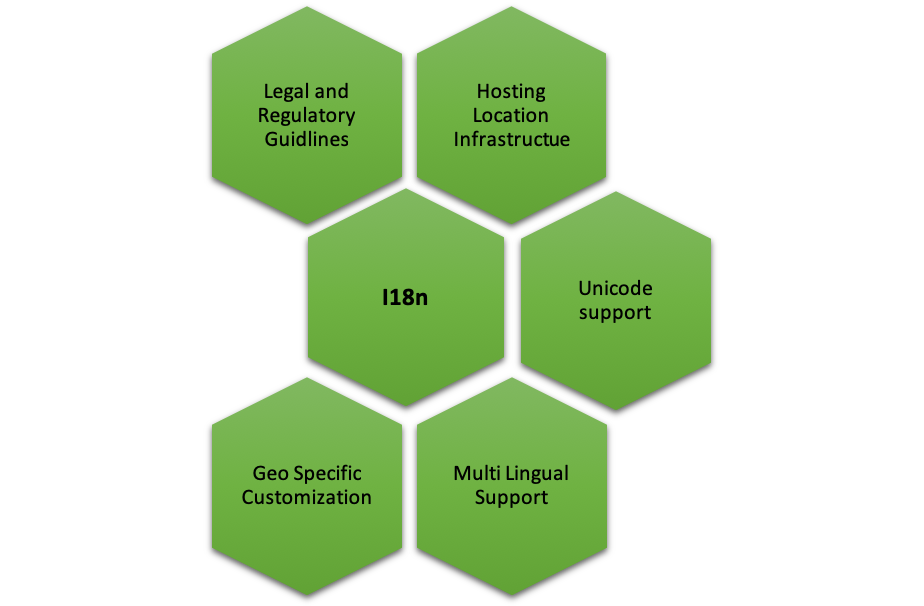
    So, what are the typical factors that teams of designers, architects and developers need to first establish, foreseeing internationalization?

    Legal and Regulatory Guidelines

    Different regions, geographies, countries and markets have different regulatory guidelines that can extend to several facets including organization practices, trademark requirements, currency repatriation, tax compliance, regulatory compliance, duties and corporate agreements and contracts, currency repatriation and so on. If you’re working on a product that you need to go-to-market in China for instance, then it is important to understand the legal and regulatory framework within which you can operate.

    Hosting Location, Global Distribution/Content Delivery Network Infrastructure

    Different geographies, different networks and different internet speeds are factors one must consider when taking your product global. How can a product be designed to ensure that it “loads” quickly for customers across regions? Should there be a central database or should it be distributed? Who, where and how will distribution of data be managed? These are critical questions to ensure there are no customer drop-offs.

    Unicode Support

    Today, Unicode allows support in most of the world’s writing systems. Enabling its proper usage that can support local, regional or even cultural context is critical. For instance, supporting special characters from different languages that are outside the ASCII boundaries (defines 128 characters in a typical English keyboard) is extremely important. Unicode defines 221 characters (characters from all recognized languages in the world), thus, UTF-8/16 encoding format should be supported when you’re planning to release your product in different geos. This is a crucial requirement for database, DB connection, build setup and server startup options—just to name a few.

    If you’re fond of hard coding text, think again. Creating text and media that is easily editable, gives you the flexibility to easily localize and adapt your product for different regions.

    Multi-Lingual Support

    English may be one of the most spoken languages in the world, but that doesn’t necessarily mean every region or market thinks, reads and speaks English. For instance, if you’re releasing a product in Japan, China or even India (with its plethora of scripts for different languages), multi-lingual support for your product is essential. Here are a few things to follow:

    • Maintain language-specific resource files for each support language (eg. en-us.properties, ar-sa.properties) with key value pairs—the key is used in the code to place the text, and value is the language specific translated text.
    • All text on the screen, messages and label text must be sourced from resource files, and there should be no referencing of text directly in the code.
    • Choose to keep the resource files at the back end/front end. Front end is recommended as it helps improve performance, and by avoiding calls to the back end and toggling, it moves fast.
    • UI framework should support translation features.

    Think about text expansion in different languages, in terms of number of characters and how it can affect the UI and UX of your product. The same holds good for languages that are written from left to right, as well as translations.

    Scalable Framework for Geo-Specific Customization

    Development framework must consider the UI/UX, branding, orientation and size of the product when going i18n. For instance, the color red could mean different things in different countries and cultures—in China it could mean endurance, in India it could mean purity, in Europe it could mean self-sacrifice or in South Africa it could mean grief and sorrow. Therefore, it is extremely crucial to understand different nuances of cultural significance while designing the UI for a great UX. A few other factors to keep in mind:

    • Tag-based framework for content picks up where the content is tagged to language/country, and gets picked for users having matching profiles, for the tag values. This way, you may have content for various languages, but a user in Spain gets to see only the Spanish content just by setting his language preference in your system.
    • Orientation and sizing adjustments—specific CSS to handle alignment/size specific customization.
    • Navigation (left to right), enable/disable certain options through CSS customization.
    • Localization-based content.
    • Language-based content.

    Developing a framework for rapid transition to international markets requires a thorough think-through from a product enablement perspective, keeping in mind operational efficiency without impacting product behavior. Using this checklist will help you save time, money and rework when you finally decide to go i18n.

    — Ruchi Vaidya Tomar

  • Smashing the (DevOps) Stack for Fun and Profit

    Smashing the (DevOps) Stack for Fun and Profit

    Most organizations that I deal with have a similar story for the promulgation of DevOps in their data center. The story is similar for bringing in most new technology and techniques: A team that usually does a new project without any attachments—relatively small compared to projects at the center of the business—adopted DevOps from the start. A smaller (by far) number shoehorned DevOps into an existing project as a first taste. Some decided to go “all-in” and “convert” IT to DevOps. This is a painful method; I can’t say I recommend it. I suspect my friends at those organizations wouldn’t recommend it, either.

    When I say “DevOps” in this sense, I am talking more about process and procedure changes, even cultural changes, rather than tools. My experience is that most companies that have been around longer than the last spring shower started adopting the tools of DevOps before they started looking at ways to streamline the process. And that isn’t a terrible thing at all. It doesn’t matter what marketing spin is used to sell the product; if it makes your life better or allows you to react faster, implementing it is worth consideration. I just wanted to be clear what we’re talking about here.

    Those companies that started small generally grew small, also. It is a big deal to move that 20-year-old codebase with a ton of processes that touches everything into DevOps when compared to saying, “New projects will use DevOps.” This, too, is in line with what we’ve always done. Iterative replacement has always been the case, where the large, important systems are concerned. In a couple of industries I am familiar with, I’d even argue that those large, important systems weren’t completely upgraded to Customer Information Control System (CICS), so don’t hold your breath on seeing them completely upgraded to DevOps. But that is a different blog.

    Once a critical mass has been hit, these shops start referring to themselves as a “DevOps shop” or “DevOps first shop.” This is the point I want to talk about today (though it took me a bit to get here).

    You’ve got a bunch of apps or a couple of application portfolios that are now running under DevOps. In most organizations, the tool sets are not a perfect match. Indeed, in some organizations the DevOps toolchains look like they were assembled on opposite day. Teams tend to be more standardized, but even team composition varies from project to project, as do communications.

    This is the next point of inflection in DevOps growth. You have it in your grasp to jump again, from amazing to truly amazing.

    Time to smash the DevOps stack.

    Get the teams together, build a list of each system used at each step in the process for each app, each manual intervention, each communications channel—essentially each difference between DevOps teams—and start to look for synergy. If one team is using ChatOps, check out what benefits they perceive from doing so and if ChatOps fits all teams. Does one team have a standard process to roll from continuous delivery to continuous deployment? Check it out. If you have several disparate DevOps teams, it is almost guaranteed that one team will handle DevSecOps better than the others. Take a look at what/how they’re doing and promulgate it to less security-intensive projects as needed.

    Basically, build the corporate process/toolchain from what is successful. That sounds like simple advice, but it isn’t. Teams often love their tools and processes, and are certain their choices are better than others. It takes work to get to a common understanding and there are always exceptions in a complex environment: “Well, yes that works, but for our app, we have this thing over here that makes it not possible/feasible/affordable.” It requires extra work, but that’s always true. Because the environment is complex and has been for a long time, these issues have always existed; you’re just dealing with them with new processes.

    Keep kicking it! Keeping the virtual lights on is as important as keeping the physical lights on in today’s environment. Unless your company is listed in “haveibeenpwned” emails, or your website has been suffering catastrophic outages, you are kicking it.

    — Don Macvittie

  • SauceCon 2019 Speaker Profile: Wim Selles

    SauceCon 2019 Speaker Profile: Wim Selles

    This is the fifth in a series of articles highlighting speakers at SauceCon 2019. SauceCon brings together the global community of Sauce Labs users and continuous testing experts to learn from each other and level up their automated testing and continuous delivery skills. This year’s event will be held April 23-25 in Austin, Texas.

    SauceCon 2019 speaker Wim Selles is passionate about front-end test automation and his enthusiasm is infectious.

    He started manual testing back in 2007, then began dabbling in web development to challenge himself. He soon fell in love with front-end web development, deciding that if he truly understood how code works, he would become a better tester.

    While employed at Tele2, a large telecom company in the Netherlands, Wim realized the need for an image compare tool for native apps, but he couldn’t find exactly what he needed. So he decided to roll up his sleeves and build an open source module himself.

    Wim’s SauceCon presentation, “Building Your Own Native App Visual Testing Module with Appium,” will focus on exactly how he did this. He will share the things he learned about Appium in the process, as well as how he managed to create a cross-platform solution to answer this need.

    Wim wants to make people as enthusiastic about test automation as he is. As a solutions architect at Sauce Labs, he helps customers successfully implement the Sauce Labs Continuous Testing Cloud. He conducts trainings, shares best practices and travels the world speaking (and learning!) about coding and testing.

    In addition to his passion for test automation, Wim enjoys contributing to the open source community and spending time with his family and two young daughters.

    You can hear from Wim and more than 30 other expert speakers at SauceCon 2019, the third annual Sauce Labs user conference. To see a full list of presentations or to register, visit the SauceCon website.

    — Rebecca Cramer

  • Electric Cloud Aims to Make DevOps More Accessible

    Electric Cloud Aims to Make DevOps More Accessible

    Electric Cloud today unfurled the Winter 2019 edition of the ElectricFlow platform for managing DevOps, which makes it easier for different classes of users to tailor the platform to meet their specific needs.

    Sam Fell, vice president of marketing for Electric Cloud, said the latest release of ElectricFlow allows end users to choose from different personas based on their role in the organization, and each persona has a user interface crafted to surface the level of detail they most likely require. That approach is intended to make the company’s DevOps platform more accessible to wider variety of end users, he said.

    The latest edition of ElectricFlow also adds a customizable customer login experience that is more task-oriented. Users can now add bookmarks/favorites to access specific pages faster.

    Finally, Electric Cloud is now including release and pipeline templates that make onboarding easier, based on user created events/triggers and code check-ins in a Git repository.

    Fell said that while DevOps platform such as ElectricFlow increasingly have incorporated higher levels of automation by relying more on machine learning algorithms, humans should not be left behind. Electric Cloud has been focusing more of its development effort on making it easier for DevOps professionals of all skill levels to derive value from the platform, he said, noting current DevOps platforms tend to make available far too much information than the average IT professional can ingest, added Fell.

    Less clear is how the complexity inherent in DevOps processes extends the time it takes for an organization to employ DevOps pervasively. While DevOps platforms are undoubtedly powerful, they also can be intimidating. In many instances, it’s simply easier for IT administrators to continue to rely on tools they already know to manage a specific task even when that tool is not as robust or rich as what might be accessible in a more modern DevOps platform. What often is ascribed to cultural IT inertia may have its roots in the simple fact that IT professionals are not always equally excited about having to learn and master new tools.

    The number of IT organizations that have been able to employ DevOps processes across their entire organization are still a comparative minority. Most organizations today have what can best be described as pockets of DevOps processes, usually driven by a small, cross-function team that is highly motivated to update a specific set of applications continuously. IT organizations are, of course, hoping to replicate the success of those teams across the rest of the organization. However, the rest of the IT organization doesn’t always have the same level of engineering skills—the spirit may be willing, but the initial DevOps hurdles needed to be overcome are simply too high.

    It may be a while before IT organizations sort this all out. More accessible tools are only one part of the equation. But IT leaders almost inevitably find that giving their teams access to easier tools will, at the very least, start moving their organization in the right direction.

    — Mike Vizard

  • SauceCon Speaker Profile: Jenny Bramble

    SauceCon Speaker Profile: Jenny Bramble

    This is the fourth in a series of articles highlighting speakers at SauceCon 2019. SauceCon brings together the global community of Sauce Labs users and continuous testing experts to learn from each other and level up their automated testing and continuous delivery skills. This year’s event will be held April 23-25 in Austin, Texas.

    Jenny Bramble started out her career in test engineering as a waitress. Of course, she didn’t realize it at the time, but the skills she gained from waiting tables have served her well throughout her professional life. Learning how to communicate needs between several wildly different groups turned out to be an especially valuable skill in test engineering.

    Even now, after making the jump from support to DevOps to manual and then automated testing, Jenny believes that the human element is foundational.

    At Willowtree, Jenny works as the test lead on a project team of five to eight developers and three to six test engineers. She leads their testing efforts and works with clients to create products that delight their end users. The concept of delighting users truly guides Jenny’s day-to-day work. “Creating products that make you happy to use them feeds the part of my personality that loves people and wants to make an impact on their lives. It’s a reason I got into testing in the first place,” she said.

    At SauceCon 2019, Jenny will present, “Creating Automation Engineers from Scratch.” She will share her personal experience in adopting and embracing automated testing. “Automation is an incredible tool, but creating automation engineers from manual testers is hard,” she said. “Even if testers are willing, they have a lot of hurdles to get over to feel like the same kind of subject matter experts in automation as they are in manual testing.”

    When she isn’t working on delighting clients through automation, Jenny has many hobbies that keep her busy. She quilts, crochets, knits, weaves, cooks and even recently took up axe-throwing! Her two cats, Dax and Dante, keep her company through it all.

    You can hear from Jenny and more than 30 other expert speakers at SauceCon 2019, the third-annual Sauce Labs user conference. To see a full list of presentations or to register, visit the SauceCon website.

    — Rebecca Cramer