Category: Doin’ DevOps

  • What It Really Takes to Build a Reliable App

    What It Really Takes to Build a Reliable App

    What makes an app reliable? If you ask most IT professionals that question, their minds immediately go to uptime. That’s not surprising; after all, it’s fashionable for software and infrastructure vendors these days to boast about how many nines of uptime they guarantee.

    To be sure, uptime is one component of delivering a reliable application experience for developers and end-users. But it’s only one. In order to build reliability into your application patterns, you must think beyond uptime alone.

    Keep reading for an overview of all the factors that go into achieving reliability.

    What Is Reliability?

    A reliable application is one that meets the needs and expectations of everyone it serves. While those needs and expectations will vary from case to case, reliability is characterized by the ability of an app to:

    • Be accessible when needed.
    • Respond within the time frame needed.
    • Be updated or modified as needed.
    • Provide security and privacy to the extent needed.
    • Meet the needs and expectations not just of end-users, but of everyone else who helps create or support the app.

    Maximizing Reliability for Cloud-Native Apps

    Achieving these features for modern, cloud-native applications requires a multi-pronged approach. The following are the core considerations to address in order to build reliability into an app pattern:

    Uptime

    We’ll start with uptime, which is the most obvious aspect of reliability. Uptime refers to the amount of time that your application is available, at least to some extent (as we’ll discuss below, merely being available does not necessarily mean that the app satisfies other requirements of reliability).

    Maximizing uptime typically involves solutions such as distributing workloads across different servers or data centers (so if part of your infrastructure fails, others remain available) and using automated failover to move a workload to new infrastructure if it fails in one location.

    Culture and processes are part of the picture, too, since you need to make sure your team is prepared to respond quickly to any incidents that arise, in order to minimize downtime.

    It’s worth noting, by the way, there can be such a thing as too much uptime. If you reach the point where adding more uptime doesn’t deliver any additional value to your organization, then it’s probably time to stop. Adding another nine to your availability, just because you can, might be a poor use of resources. So, be sure to factor this part of the equation into your uptime calculations and strategy.

    Performance and Efficiency

    In order to meet stakeholder needs and expectations, an application must not only be available, but also able to respond within the time frame required by those stakeholders. A website that is up 100% of the time but takes 20 seconds to load each page is not a very reliable website.

    This is why performance testing and monitoring must be built into your application delivery chain. You should also ensure that you rightsize infrastructure (for example, by choosing the right types of cloud instances) in order to guarantee that your applications have enough resources available to perform adequately. (Of course, this priority must be balanced with cost-control.)

    Accessibility and Usability

    An application that is available all of the time and responds quickly may still fail to meet stakeholder needs if it is difficult to work with due to poor design.

    From an end-user’s perspective, user-experience testing is the most obvious way to help mitigate the risk of poor accessibility or usability within your applications. But keep in mind that you also need to think about usability from the perspective of your own team. Make sure that access-control systems, infrastructure architectures and documentation can be navigated easily. You don’t want an application or a delivery chain that is too complex for your team to be able to support effectively.

    Security and Data Privacy

    A reliable application is a secure application. There are many obvious ways to help secure applications, such as using vulnerability monitoring tools. But remember security is not just about finding vulnerabilities as they arise or deploying certain tools. You must also build security into the design of your infrastructure, processes and culture.

    Backup and Recovery

    You don’t need to be a seasoned IT professional to know that backing up data is important for achieving reliability. When something goes wrong–which it occasionally will, despite your best plans and efforts–having a backup in place often means the difference between experiencing a blip in service and a major catastrophe.

    The thing that can be easier to overlook is the importance of having a disaster recovery plan in place as well as a backup routine. Simply backing up your data isn’t enough; you must also know how you’re going to restore it to new application instances quickly if disaster strikes. If, for example, all of your cloud-based virtual machines go down, what is the exact process you’ll follow for standing them back up? Identifying the steps ahead of time–and, ideally, scripting them so the recovery process can be as automated as possible–is crucial.

    Also important is quantifying how often you need to back up data, which is determined by a metric called Recovery Point Objective (RPO), and how quickly you need to be able to recover it to avoid serious business disruption–determined by Recovery Time Objective (RTO). Along similar lines, error budgets, which define how much time you can tolerate your production systems being down, can help you define the available time monthly for making system improvements.

    Modifiability

    Few apps are deployed and then never modified again. Instead, they must be updated or scaled constantly to meet changing needs and demands. That’s why designing an application pattern that can be easily modified is critical for achieving reliability over the long term.

    In practice, modifiability entails having the right tools (such as automated deployment solutions) and the right processes (such as clear feedback loops between ITOps and developers) in order to decide efficiently what modifications to implement. It might also involve taking advantage of infrastructure technologies (such as containers) that make it easy to update a running application without imposing downtime on users.

    Conclusion

    Reliability is more complex than it may seem. No matter how many nines are included in your SLAs, you are not guaranteeing true reliability unless you also address requirements such as performance, usability and modifiability.

    This sponsored article was written on behalf of Eplexity.

    — Chris Tozzi

  • Load Balancing: Round Robin May Not Be the Right Choice

    Load Balancing: Round Robin May Not Be the Right Choice

    Based on our experience, we believe Round Robin may not be an effective load balancing algorithm, because it doesn’t equally distribute traffic among all nodes. You might wonder, how is this possible?

    How Does Round Robin Algorithm Work?

    Round Robin algorithm sends requests among nodes in the order that requests are received. Here is a simple example.

    Let’s say you have three nodes: node-A, node-B and node-C.

    • First request is sent to node-A.
    • Second request is sent to node-B.
    • Third request is sent to node-C.

    The load balancer continues sending requests to servers based on this order. It makes it sound like traffic would get equally distributed among the nodes. But that isn’t true.

    What is the Problem with Round Robin Algorithm?

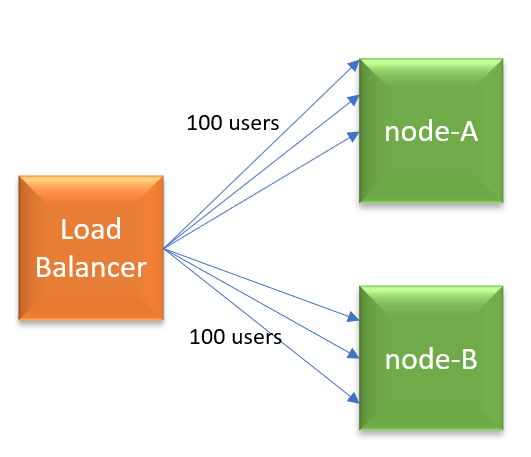
    Figure 1: Load Balancer with 2 nodes (Round Robin).

    Let’s pick up a simple example: Let’s say you launched your web application with a load balancer and it has two nodes (node-A, node-B) behind it. The load balancer is configured to run with Round Robin algorithm, and sticky-session load balancing is enabled. Let’s say 200 users are using your application currently. Since the Round Robin algorithm is enabled in load balancer, each node will get 100 users requests.

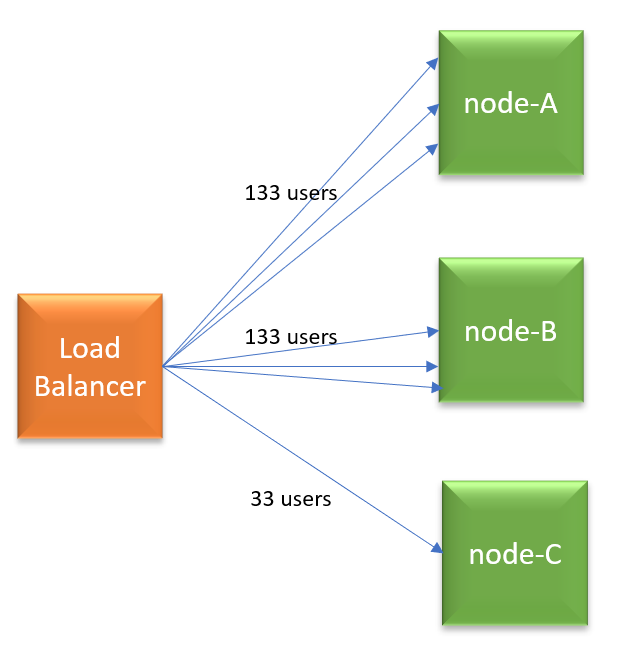
    Figure 2: New node added. Newly added node gets less traffic in Round Robin algorithm.

    A few minutes later, you are adding node-C. Now, an additional 100 users start using the application. Since it’s Round Robin algorithm, load balancer will distribute new users’ requests equally to all 3 nodes (i.e., 33 users request to each node). But remember node-A and node-B is already processing 100 users requests each. So now node-A and node-B will end up processing 133 users requests each (i.e., 100 original users requests, plus 33 new users requests), whereas node-C will process only 33 (new) users requests. Now, do you see why Round Robin isn’t equally distributing the traffic?

    In the Round Robin algorithm, the older nodes in the pool will always end-up processing more requests while newly added nodes will end up processing less amount of traffic. The load is never evenly distributed. For maintenance, patching and installation purposes, you have to continually keep adding and removing nodes from the load balancer pool. If you instrumented auto-scaling in place it gets worse, because in auto-scaling nodes are more dynamic. They get added and removed even more frequently.

    What Algorithm to Use?

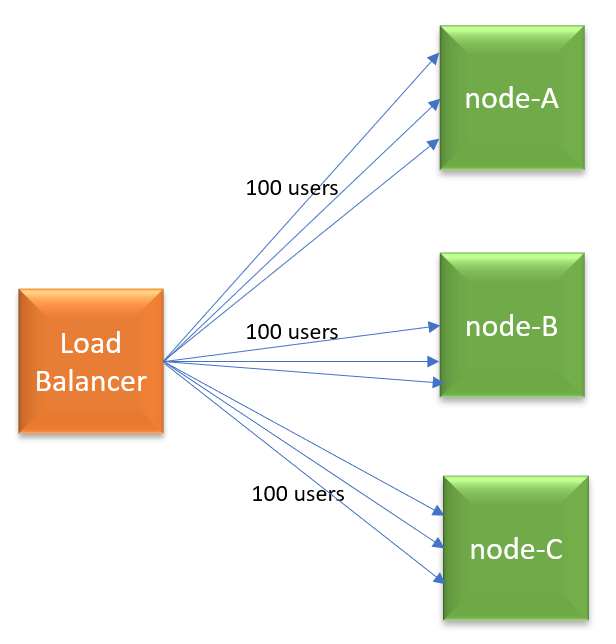
    Figure 3: New node added. Traffic is evenly distributed in Least Connections.

    There are a variety of load balancing algorithms: Weighted Round Robin, Random, Source IP, URL, Least Connections, Least Traffic, Least Latency. Given the shortcoming in Round Robin, you can consider trying other choices. One choice you may consider is: Least Connections algorithm. As per this algorithm, the node which has the least number of connections will get the next request. So, as per our earlier example, when 100 new users start to use the application, all new user requests will be sent to node-C. Thus, load will be equally distributed among all nodes.

    — Surya Baby

  • Mario’s Adventures in Tekton Land

    Mario’s Adventures in Tekton Land

    Tekton is an open source, cloud-native CI/CD pipelines engine. The project has its roots in the Knative project, where about a year ago it started under the name “Knative Pipeline,” with the aim of providing an extension to build Knative’s own “source to image” service. About eight months ago the project was reborn as Tekton and it moved out of the Knative space to its own GitHub organization and it joined the newly formed CD Foundation with a new mission: becoming the common denominator for CI/CD in the cloud-native space. But how is Tekton going to achieve its new aspirations?

    For it to be successful, we wanted Tekton to be intuitive, reliable and easy to operate and maintain. This was discussed in the Tekton working group, and we thought it would be useful if we started using Tekton ourselves as part of our day-to-day jobs, using it to provide CI/CD services to the community.

    Diving into Tekton

    Tekton pipeline aims to provide a set of components used to create a full-fledged cloud-native CI/CD system on top of Kubernetes.

    The core project of Tekton (tektoncd/pipeline) defines a set of Kubernetes custom resources (CRD) as standard constructs for creating CI/CD pipelines. The following is a brief introduction to these CRDs:

    • Task: A sequence of commands (steps) that are run in separate containers in a pod.
    • Pipeline: A collection of tasks executed in a defined order.
    • PipelineResource: Inputs (e.g. git repo) and outputs (e.g. image registry) to a pipeline.
    • TaskRun: Runtime representation of an execution of a task.
    • PipelineRun: Runtime representation of an execution of a pipeline.

    Those pipeline building blocks can be reused, version controlled and curated in a catalog (tektoncd/catalog) that embeds best practices.

    In addition, the Tekton community works on providing more components:

    • Tekton Triggers (tektoncd/triggers) to be able to act upon events (for example: GitHub webhooks, CloudEvents and more).
    • Tekton CLI (tektoncd/cli), which provides a command-line interface focused on the Tekton APIs and features (like getting the logs of your run, starting pipelines and more).
    • Tekton Dashboard (tektoncd/dashboard) which provides a simple dashboard (à-la-kube-dashboard) to view pipelines and logs from your browser.

    Re-Plumbing Test Infrastructure

    We designed Tekton to be intuitive, reliable and easy to operate and maintain. We started using Tekton ourselves as part of our day-to-day job, using it to provide CI/CD services to the community. But we didn’t start from a blank canvas.

    Tekton inherited a few features from the Knative ecosystem, including the CI setup. This was great as it allowed the project to relatively easily kick-start its CI using tools shared with several other projects in the Kubernetes ecosystem (including Kubernetes itself)–a combination of Prow, Tide, Boskos, a few tools from k8s.io/test-infra and several bash scripts contribute to tasks such as running E2E integration test.

    Deployment of the various CI services is manual and the same is true about their configuration. Releases are crafted mostly manually. Since Tekton is made of several projects, we set up tektoncd/plumbing repository to host the shared CI/CD infrastructure: prow configuration, shared test scripts and tools, test docker images. Mario adventure started!

    Mario’s Adventures

    We started to work on what we are calling the Dogfooding project, which is basically using Tekton to build Tekton. And like a ball of wool and a cat, the more we thought about it, the more questions we had. How is Tekton going to integrate with the existing prow-based CI infrastructure? How are we going to test changes to the plumbing repo in isolation? How are we going to deploy the instance of Tekton used to run Tekton CI pipelines? How are we going to do all that with no disruption to our CI service?

    Testing code continuously is essential infrastructure, even more so for cloud-native software, and re-plumbing all at once could leave us without running water. We decided to proceed with baby steps, reducing the area of impact as much as possible and starting our journey tackling the release automation work first.

    Here is an excerpt of the work we did on this journey:

    1. Run our releases using Tekton. That was the initial work, using Tekton to at least release itself, even if it gets triggered manually.
    2. Integrating Tekton and Prow. Prow is able to create Tekton resources since April of this year (#11888 if you are curious), although it took a few iterations to be able to use it on our own CI.
    3. Looking at solutions without using Prow at all. This one was (and still is) the trickiest:
      • We needed something that is able to react based on events (from GitHub), this is where the tektoncd/triggers project comes into place.
      • Prow comes with a UI and tooling to capture and store logs. This piece is missing from the Tetkon project as of today. We do have the tektoncd/dashboard project but it’s early days, there is no support for authentication yet.

    Mario’s Adventures at KubeCon

    Mario’s adventures will continue at KubeCon in San Diego. If you’re attending the conference  and you’re curious to know more, come and listen to our talk, or watch it on the CNCF youtube channel after the conference.

    This article was co-authored by Andrea Frittoli is a developer advocate at IBM and an open source enthusiast. He is a contributor to the Tekton project and he has contributed to OpenStack for several years. He’s a strong advocate for transparency in open source. Andrea has previously been a speaker at FOSSASIA, FOSS Backstage, OpenStack summits, Open Source Summits, Devoxx Days and various meetups.

    — Vincent Demeester

  • The NVMF Boogie: How Kubernetes and NVMF Will Rock

    The NVMF Boogie: How Kubernetes and NVMF Will Rock

    I recently wrote a blog about how Kubernetes creates a global computing grid that delivers unprecedented compute flexibility. Then I wrote a blog about the importance of going fully Kubernetes-native. In today’s blog I would like to drill down into the role that the NVMe over Fabrics (NVMe-oF or just NVMF) standard will play in enabling Kubernetes infrastructure flexibility.

    What is NVMe?

    NVMe is a protocol that dictates how a CPU, moves memory via the PCI bus to a storage device. NVMe communicates over a set of rings (per CPU) where commands get submitted from any CPU to the underlying NVMe device. The design of NVMe eliminates intermediate layers between the CPU and the storage device. NVMe devices consist of a controller, queues, namespaces, namespace IDs and the actual storage media with some form of an interface.

    Storage media can be grouped into sections called namespaces with an ID. In the context of NVMF, namespaces provide a way to enforce access control for the disks/consumers. Namespaces are analogous to an OS partition, except the partitioning is done in hardware by the controller and not the OS (you can still have OS partitions on namespaces). Some NVMe namespaces might be hidden from a user (e.g. for security isolation). A controller connects to a port through queues and a namespace through its namespace ID. A controller is allowed to connect to multiple namespaces and a namespace is allowed to be controlled by multiple controllers (and thus also, multiple ports).

    Imagine smearing out this NVMe device across multiple computers and you get to the next important concept, a storage fabric.

    What is NVMF?

    When you put a network between the PCI bus and the storage device, you use NVMe over Fabric (aka NVMe-oF or simply NVMF). NVMF enables fast access between hosts and storage systems over a network. Compared to iSCSI, NVMF has much lower access latency, in practice adding only a small latency difference between local and remote storage. NVMF delivers a breakthrough in throughput and seek time relative to traditional device attached storage:

    Source: Samsung.

    This is possible because NVMF uses RDMA to efficiently access the memory of another computer without using the CPU or operating system of either. RDMA is a transport protocol that bypasses the kernel stack, offloading the workload to network hardware. This means the transport layer takes place in the RDMA NIC itself, so data is transferred directly to or from application memory without having to involve the normal OS-level network stack, achieving low latency with low CPU consumption.

    Of course, NVMF performance is gated by the networking infrastructure used, whether Ethernet, Infiniband or Fibre Channel. The November 2018 final ratification of the NVMe/TCP transport specification has accelerated adoption of NVMF because it allows storage fabrics to be deployed on standard network hardware.

    NVMF can be used with white label storage systems (JBOD), feature-rich block storage systems (SAN), and storage systems built with previous generation (SATA) devices. This means data centers can simultaneously leverage low latency devices while also using more traditional storage subsystems. NVMF also supports using storage class memory as a cache in the data center compute hierarchy.

    Why is NVMF Important?

    Think of NVMe as a replacement for SCSI, and NVMF as a replacement for iSCSI and iSER. NVMF has several distinguishing technical attributes that add up to huge performance scalability at the storage infrastructure layer:

    • Protocol Efficiency: The NVMe-oF protocol is designed specifically for efficient memory transfers at scale. Designed from the ground up for scalability, the NVMe-oF protocol dramatically reduces the internal locking needed to serialize I/O and improves the efficiency of interrupt handling. NVMe-oF also supports MSI-X and interrupt steering, which prevents bottlenecking at the CPU level and enables massive scalability as systems scale. Combined with the large number of cores in modern processors, NVMe-oF delivers massive parallelism to connected devices which increases I/O throughput and lowers I/O latency.
    • Command Set Efficiency: NVMe-oF has a streamlined and simple command set that uses less than half the number of CPU instructions to process an I/O request that SAS or SATA does, providing higher IOPS per CPU instruction cycle and lower I/O latency in the host software stack. NVMe-oF also supports enterprise features such as reservations and client features such as power management, extending the improved efficiency beyond just I/O. NVMEOF devices can approach DDR4 performance levels and, with SCM, become an integral component of the computing memory hierarchy.
    • Queue Parallelism: With 65,535 parallel queues, each with a queue depth of 65,535 entries, NVMe-oF supports massive parallelism. Every CPU has a private queue to communicate with a data device and is capable of achieving high speeds because there are no locks between queues that live on separate cores. Because each controller has its own set of queues per CPU, I/O throughput increases linearly with the number of available cores.
    • Integrated Security: NVMe-oF includes a tunneling protocol that provides security features produced by the Trusted Computing Group (TCG) and other related communities. Features planned for NVMe-oF devices and systems include simple access control, data at rest protection, crypto-erase, purge-level erase and others. Additional information on NVMe-oF security is available in the Trusted Computing Group and NVM Express Joint White Paper: TCG Storage, Opal and NVMe.

    NVMe-oF is designed not only to solve the limitations of scale-out storage, but also to lay the foundation for a storage fabric that dynamically shifts as workloads demand.

    What Makes NVMF Important to Kubernetes?

    Kubernetes applications implicitly need the infrastructure flexibility enabled by NVMF. NVMF and Kubernetes makes distributed computing within sites easier.

    The key point of my Kubernetes-native blog was “(Kubernetes-native) applications break apart into their constituent elements and can deploy and scale across the latency pyramid where they fit best. The elements dance across the infrastructure following their constituents in what I imagine as a containerized ‘ballet’ focused on delivering the best possible user experience at the lowest possible latencies.”

    However, multi-cloud, multi-site and edge deployments introduce significant additional complexity for organizations operating Kubernetes at (or beyond) enterprise scale. Business needs are pushing IT teams to move workloads between sites, clouds, WAN edge and rapidly be able to clone, burst and then destroy workloads anywhere around the world as needed. Yet Kubernetes deployment across multiple regions, sites, clouds and WAN edge remains problematic.

    OpenEBS is the solution for latency sensitive stateful Kubernetes workloads that need universal data agility. A NVMF-based disaggregated storage physical fabric mates perfectly with the disaggregated data agility software infrastructure offered by OpenEBS. NVMF allows data to physically float across a single storage fabric while OpenEBS allows stateful workloads to be loosely coupled across multiple storage infrastructures. And the OpenEBS MayaStor project natively integrates to NVMF to simplify the developer experience.

    Together, NVMF and OpenEBS become the dance floor for those Kubernetes-native application components to do their infrastructure-aware (and infrastructure-intelligent) ballet. Given its performance and scalability, however, perhaps this is better called the NVMF Boogie.

    To learn more about containerized infrastructure and cloud native technologies, consider coming to KubeCon + CloudNativeCon NA, November 18-21 in San Diego.

    — Charles Piercey

  • What Are AWS Application Patterns?

    What Are AWS Application Patterns?

    The cloud-native approach is not just about compute power and cloud services. A “set it and forget it” attitude won’t work with cloud native; there are far too many moving pieces and there is just way too much complexity. Instead, this approach requires constant testing, optimization and improvement. This is epitomized in the two key phrases of the DevOps methodology: continuous integration and continuous delivery.

    To make this a reality, however, it takes a strategic approach to defining application patterns that will govern the way in which cloud-native applications are built and shipped, rather than a one-off effort. Since AWS is the leading cloud provider, we should discuss which application patterns are relevant to the AWS platform. There are many aspects to consider when it comes to AWS application patterns, and we will cover them here.

    Operational Excellence

    The best starting point for application patterns is a commitment to operational excellence. Typically, the term “Ops” is used to identify the IT team, but in this case, operational excellence rests on the shoulders of Dev, QA and Ops teams. In cross-functional DevOps teams, every member should strive for operational excellence at every step–even in the smallest of tasks.

    In their white paper on operational excellence, AWS encourages its users to manage operations as code. This helps avoid human error, enables automation of complex processes and allows for quick and easy rollback when errors occur. Failure, according to AWS, is an opportunity for learning. They even advise performing “pre-mortems” that try to anticipate potential points of failure before a deployment.

    AWS Trusted Advisor is a useful tool that enables this type of accountability and shared responsibility within a team. It checks and reviews your new and existing AWS workloads looking for opportunities to save costs, improve performance, tighten security or follow best practices for scaling operations.

    Security

    Security is a pattern that is non-negotiable. The term “DevOps” has inspired another variation called DevSecOps that signifies this fact. Security operations take center stage when talking about DevOps.

    The interesting thing about DevSecOps is it actually results in more freedom, flexibility and trust across teams when done right. This is unlike traditional approaches to security which created silos, stifled creativity and slowed down innovation. Security is now a key piece of the puzzle, not an afterthought. AWS has many machine learning-based security solutions such as Macie which automatically identifies and secures personally identifiable information (PII).

    Along with this, configuring role-based access controls using AWS IAM is essential to have greater control over who or which applications access data and for how long. Access Control Lists govern access to data stored in AWS S3 buckets.

    The news is full of instances of data breaches due to weak security policies and access controls. Capital One is a recent example of a data breach that affected 100 million of its users. While security in the cloud is more complex than before, AWS has the necessary tools and systems in place. It’s up to organizations to implement a security strategy that prevents misuse of their data.

    Reliability

    Today, there is a low tolerance for downtime because of the potential loss of revenue. With the stakes so high, reliability is a pattern any application custodian would have high on their list of priorities. AWS has multiple reporting and health monitoring tools to keep you constantly on the pulse of your applications.

    Architectural patterns like microservices enable better resilience by decomposing monolithic applications into more manageable chunks called services. This “divide and conquer” approach leads to higher availability, which is critical for SaaS applications.

    Patterns like chaos engineering seek to intentionally kill random instances and services and force the DevOps team to figure out workarounds and backups for every scenario.

    Application Performance

    With the explosion of data, applications are always dealing with lots of data to transfer, store and process. An application’s performance depends on three factors: the backend data storage layer, the middleware components and the frontend.

    The backend data layer is the most critical component when it comes to performance. Choosing the right storage formats, database types, storage devices and organization patterns all contribute to the speed of data access. AWS has an amazing array of storage services, including S3, RedShift, Aurora and Glacier. AWS gives its users every type of storage solution, all of which should be considered to improve data management.

    AWS is devising new ways to query large datasets without bearing the load on your existing systems. RedShift Spectrum is one example of this. It is a great way to “minimize the need to scale Redshift with a new node, which can be expensive.” If you’d still rather not have to manage any RedShift clusters on your own AWS Athena is a great serverless alternative

    That gives you all the power you need to query large datasets in S3 without having to maintain any clusters of your own.

    This pay-per-use model is making its ways across the entire AWS stack with services such as ECS and Fargate offering completely serverless experiences when operating containers at scale. What started out with AWS Lambda is catching on fast, and many AWS services like the ones mentioned above enable serverless experiences with a focus on application performance.

    Cost Optimization

    When moving to the cloud, pricing is completely different. Rather than paying for perpetual licenses, you now pay a small fee for every small resource that you use. Though small on its own, you’ll soon realize that cloud costs can shoot up easily if you’re not paying close attention to your spending.

    Cost optimization is necessary as you scale operations in the cloud. Cost optimization includes looking for more efficient services, whether that’s within the same vendor platform or a different platform. At a minimum it may require a lift-and-shift approach to transition from expensive old infrastructure to inexpensive new alternatives. For example, shifting workloads from VMs to containers to serverless within the same platform can show great cost savings, since containers and serverless are generally more cost-effective than VMs.

    It pays to leverage the expertise of experts in this area. They should ideally be people who have spent years using AWS, understand Well-Architected best practices and have found ways to cut costs and derive more value from the same budget.

    Application Patterns Enable Extensibility

    Microservice applications adopt a pluggable architecture. This enables them to be easily integrated with external applications. Typically, API-based communication patterns are most common. AWS API Gateway is a service that manages API design for AWS applications. In some cases, an SDK is the better choice–for example, when you need more control over the developer experience and integrations. It’s important to know when to choose either option.

    Application Patterns Enable Portability

    Portability is the ability to move workloads across instances without interrupting their functioning. As instances change, the workloads which they support shouldn’t be affected. This is only possible if there is a clear separation layer between the workloads and the infrastructure that runs them.

    Application Patterns Enable Shift-Left

    The DevOps methodology is known to encourage a shift-left approach to software delivery. This means that not only Dev, but also QA and Ops contribute to the design and development stage of an application. This fosters deeper collaboration across teams and breaks down silos.

    A shift-right approach holds true as well. Shift-right means developers are responsible for the code they write. They are equal owners with operations teams for the resilience of the apps they build and also the bugs they introduce into the system. This practice of putting ownership and responsibility where it belongs is very healthy for a DevOps team.

    AWS facilitates pipeline management using tools such as CodePipeline, CodeCommit and CodeDeploy. They each perform similar but complementary roles and help build a CI/CD pipeline. They make it easy to get started with CI/CD within the AWS platform.

    For organizations further down the line in their cloud journey, AWS’ pipeline management tools may seem too simplistic for something like GitOps. Instead, they’d want to look outside AWS for tools such as Jenkins X or Weave Flux which are designed with GitOps automation in mind. Whether it’s the simple or advanced route, a pipeline brings great benefits over a manual development process.

    Conclusion

    Though tools enable the implementation of helpful application patterns, on their own, they are ineffective. Application patterns need a deliberate strategy and an approach for a start. Only after a strategy is in place, can you move to deciding which tools to use. With a strong strategy in place, any of the tools mentioned here can be swapped out for other better tools and the results will be the same. It’s important to not be distracted by the next shiny tool but keep a keen focus on the strategy for implementing AWS application patterns.

    As we’ve seen here, application patterns are diverse, but they all build upon each other. Without even one of these pillars, organizations would not be able to realize the goal of cloud-native applications. On the other hand, if they give careful thought to each of these application patterns, organizations would deliver cutting-edge applications that can only get better with the passing of time.

    This sponsored article was written on behalf of Eplexity.
    — Twain Taylor

  • When Gateways Go Away with Cellular IoT

    When Gateways Go Away with Cellular IoT

    Gateways have been an essential piece of three-tier IoT architecture for years. Their traditional spot between the edge and the cloud is in flux as cellular IoT technology rolls out. When are gateways still the right approach? How will gateways go away with cellular IoT? Here’s the trade-off between traditional three-tier and cellular IoT architecture for DevOps teams.

    Spanning the Gaps

    IoT edge devices and enterprise networks are often incompatible. Enterprises and clouds run on IP packets and heavier protocols such as HTTPS, TLS and XML. It takes processing power to run these–power often beyond the reach of smaller battery-powered edge devices. Even with improvements, Wi-Fi is enterprise network compatible but too heavy for many edge devices.

    That’s why wireless sensor networks such as Bluetooth, Thread, ZigBee, Z-Wave and others evolved. These compact, efficient stacks run on tiny microcontrollers, sipping power as sensors send data in small bursts. Alongside wired control networks are more wireless technology such as 6LoWPAN, ISA100 and WirelessHART. Real-time protocol conversion in a gateway brings data from these devices into IP-based enterprise networks.

    In some cases, a gateway might be as simple as a smartphone, tablet or a small board. Some gateways have faster processors, AC power, better cooling and packaging for harsh environments. Faster gateways can also pre-process data streams in an edge computing role. This reduces network traffic and speeds up decision-making without relying on cloud analytics.

    Setting up a few gateways inside an industrial facility is easy. Clusters of far-flung sensors call for many gateways spanning the gaps. As IoT applications grow, gateways carry development and deployment costs. Every time another gateway drops, DevOps must secure and update it.

    A Towering Alternative

    There was no alternative to three-tier IoT architecture until recently. Wireless sensor networks appropriate for edge devices lack range for many use cases. What if instead of extending device range one could extend network coverage? Low-power, wide-area network (LPWAN) technologies take on that challenge.

    Three main classes of LPWAN technology exist today: Sigfox, LoRaWAN and cellular IoT. Sigfox is a low data rate uplink solution connecting devices and Sigfox towers within 30 to 50km in rural areas. LoRaWAN uses unlicensed spectrum limiting its duty cycle to around 1% and requires a wireless gateway for a five to 7km rural range. Urban ranges are shorter for both technologies, still a few kilometers. Both work for sensors that mostly sleep and transmit small amounts of data.

    Cellular IoT technology got a late start, with good reason. Specifications for faster, yet low-cost, low-power radios with cellular-grade range and security was a massive undertaking. The 3GPP defined two paths: LTE-M and NB-IoT. LTE-M offers a 1Mb/s data rate and lower latency. NB-IoT concentrates on lower data rates without duty cycle limitations. With about 200kb/s data rates up and down it is still much faster compared with Sigfox or LoRaWAN. NB-IoT also penetrates buildings better, avoids interference and targets a 10-year battery life in devices.

    Mobile network operators (MNOs) worldwide are racing to get NB-IoT and LTE-M networks deployed. In the latest GSMA Mobile IoT Rollout Report, NB-IoT is leading in adoption. These rollouts are not tied to expensive 5G infrastructure, so MNOs are investing incrementally.

    After towers are ready, the last piece is support for Remote SIM Provisioning (RSP). Cellular IoT devices typically work with an eSIM like in the latest Apple iPhones, with one major difference. An iPhone user scans a QR code, pulling a profile over RSP.

    Pushing Across Networks

    Cellular IoT devices use a push model for RSP. When an edge device with an eSIM powers up, it uses a bootstrap network profile. It can then communicate with an RSP server to load an operational profile of choice. With this over-the-air profiling one device configuration can go practically anywhere in coverage. It opens powerful use cases such as agriculture or oil and gas, with wide-spread sensors in both indoor and outdoor settings.

    All this happens without a DevOps team planning and investing in infrastructure. MNOs are making the major investment. The variables for IoT application developers are network coverage, operator profile creation and setting up devices for streaming. If one MNO proves costly or unreliable in a specific location, devices can receive another profile over the air.

    Cellular IoT can deploy one sensor, or many, without a gateway. The cellular IoT advantage becomes even stronger with more dispersed locations. A simplified network architecture looks more like the IoT should look–with every device addressable.

    Alternatives exist because they serve some use cases well, with some persisting for years after new technology arrives. For some DevOps teams risk is a strong factor, and they may prefer the control a gateway-based architecture offers. In tight sensor clusters, the life cycle costs for a few gateways may turn out lower. If gateways aren’t cutting it for an application, they may go away quickly with cellular IoT rollouts.

    I see ubiquitous coverage driving cellular IoT momentum. Providing IoT services is a priority for mobile network operators as consumer growth flattens. There are plenty of resources for understanding cellular IoT technology in depth–get in touch with me if I can help point you in the right direction.

    — Don Dingee

  • Learning Production Troubleshooting Techniques in Microarchitectures

    Learning Production Troubleshooting Techniques in Microarchitectures

    One of the great things about our industry is the ability for anyone to get started doing development with a minimal amount of tools. Anyone can learn to do development with just a computer of some sort, a text editor, a tutorial and their brain.

    In fact, the initial basics of how to think through a development problem don’t require a computer at all, reducing the cost of getting started even further. Having such an easy way to get started that doesn’t require a lot of tools lowers the bar for entry, enabling more people to join in on development teams and contribute new ideas and perspectives, which enriches the entire industry.

    Getting into containerization and building modern microarchitectures is a slightly higher bar, but only slightly higher. There are a number of wonderful tutorials out there for getting started with Kubernetes, Docker, OpenShift Origin and other free and open-source tools.

    The only differences in getting started between general software development and microarchitectures specifically are: needing a computer that has the processing power and memory to run containers, and enough of a grasp of a development language to have a basic application to play with. Even that last difference isn’t as crucial because there are so many sample applications people have built for the express purpose of teaching new folks to deploy microservices onto various systems.

    However, when it comes to learning from the DevOps, SRE or ops side of managing Kubernetes deployments or other modern architectures, there’s no solid free tutorial I could find that dumped a bunch of broken sandboxes in front of the student with the express purpose of building their troubleshooting knowledge.

    To gain insight into understanding how to bring microarchitectures back from failures or fall-overs requires access to larger applications and clusters and more senior, or more experienced, mentors–unless you are lucky enough to be able to build large interconnected applications and send traffic to them regularly enough to cause failures.

    This lack of strong tutorials and a requirement for more resources makes breaking into DevOps or SRE work on microarchitectures particularly difficult if no one is willing to take a chance on a less experienced candidate. I want to see that change. We are missing out on hearing from new voices, people who may look at a problem from a different perspective or who may have unique solutions to problems we all face.

    I decided to create a repository full of deliberately broken Kubernetes builds for new practitioners to build progressively more advanced troubleshooting skills. The basic idea is to build a pyramid of environments. The base level should be easy to understand and figure out. These environments will be bare-bones simple, with only one cause for failure.

    We need to build the baseline recognition of common causes in isolation. Many of us that have debugged production systems have an almost unconscious grasp of when a common cause has appeared simply because we recognize that faint signature in the pattern of the data we’re analyzing. If you’ve never seen that signature, though, and you don’t have a mentor with you on these debugging challenges, learning to find that signal in the haystack of your data is much harder. These initial environments should make it easier to learn what those signals look like.

    The next level of environments would have some additional factors unrelated to the actual problem causing additional logs, additional spikes in traffic or additional activity. In short, these environments would have noise. We can add another layer of complexity for some of these environments by adding another service or application that runs just fine on the same cluster. This level would train the ability to rule out sections of a system that aren’t broken, to identify systems that aren’t interconnected and to work on one system without disturbing the rest of the environment.

    Further environments up the pyramid would have multiple contributing factors, red herrings or complex structures. At this point, some of the environments will need to be hosted outside of the local system. I’m still debating how to do these environments so the tutorial could still be free and easy for new folks to work with–I’m open to suggestions.

    Ideally, there would also be a written guide with answers and tips a student wouldn’t look at until they’ve solved the problem on their own, but they certainly can look up and learn regardless of whether they solved the problem. After all, troubleshooting isn’t a closed-book exam by any stretch of the imagination.

    So how do you start? Find the repo at GitHub. It’s free–open source with an MIT license–and open to contributions. There’s a contribution section of the README on the repo that explains how to get started if you want to send commits. If you want to try using these environments yourself and practice or learn troubleshooting skills, the initial environments are built on Minikube, a tool to run small Kubernetes clusters on your local machine. Follow one of the many excellent tutorials for getting Mikube up and running on your local machine, then follow GitHub’s tutorial on cloning down a repo.

    Alternatively, you can download the repo directly. Once you’ve gotten Minikube up and running and you have a copy of the repo on your local machine, follow the instructions in each environment’s directory to deploy the environment to your local cluster, and start trying to figure out exactly what went wrong.

    Want to help make this project a reality? I would love to have more contributors! In addition to being available online for help, I’m going to be at KubeCon North America 2019 in San Diego. At the conference, I’ll have a Hackers’ Corner set up in LogDNA’s booth for most of the conference, and I’ll be sitting there working on this project, among others, waiting for you. Bring your ideas, your stories, your broken environments, your laptops, your willingness to write docs, your Kubernetes knowledge, yourself—anything that can help enrich this project is welcome.

    To learn more about containerized infrastructure and cloud native technologies, consider coming to KubeCon + CloudNativeCon NA, November 18-21 in San Diego.

    — Laura Santamaria

  • An Embarrassment of Riches

    An Embarrassment of Riches

    History says people rarely appreciate what they have in the heat of the moment. Our highly connected and high-speed world is no exception to this rule. The things that frustrate us are in our faces, while the things that make nearly everything better/safer/faster are taken for granted.

    That is every bit as true in IT as it is in life. We expect our deploys and releases to go easily, because life is far easier in that regard than it was even 10 years ago. We get frustrated when things don’t work out, because they so often do.

    The one area Agile has addressed is that most shops don’t beat the person responsible for an issue until they leave. That’s not to say no one is judgmental, it just isn’t official policy to brow-beat even stupid mistakes. The goal is to get better, not to bash the person responsible for the mistake. Most of the time this is a downright positive change. Particularly since, in complex systems, it is often not one individual’s error, but many.

    Before Agile, I rushed out a fix to a piece of software used by several large banks. They needed the fix, and I was most qualified to do it. I used the file handle for the printer to open a printer, and wrote to it. All went well in test and we shipped it out. The results were catastrophic corruption of one set of databases for several large banks.

    Unknown to me, someone had re-used the printer file handle if certain conditions were met, and opened it on the database. It being reserved for printers, that never occurred to me, and I simple reopened it and used it. The strange conditions that pointed it at the database were never encountered in test, and I was responsible for some serious damage to our reputation and the banks in question’s confidence in our software.

    Thankfully, our development team was already on “do it fast, don’t point fingers,” so it was mentioned that better testing could have been done, and we implemented plans to do just that, using scrubbed customer data. And the root cause–using a reserved file handle for access to something else–was fixed. My own angst as having created the mess made me sit with operations while they rebuilt the destroyed databases one at a time, using some astounding Unix command line wizardry. In the end, the software and the team were better off for the experience. And I got an early lesson in not trusting that code would behave as-expected.

    The point being, bashing me for a mistake that put us all on high-stress because our biggest customers were rightfully angry would not have solved the problem. Letting me work through, identify root causes with the test team and get things straight worked better.

    We’re facing a similar hill in DevOps today. Do you test in production? How much do you test in production? What if you have similar totally unforeseen issues crop up?

    The answer is you must test in production. Inevitably, there will be errors in production, it is far better to find them early and fix them than to test in production because the app is live and there were things you couldn’t test outside of production. Either way, you’re testing in production, the question is how much control do you have.

    This is one of the strong suits of DevOps. Using things such as feature flags, monitoring and AIOps, you can spin up a small percentage of production servers with changes. Or deploy parallel servers in production for low-server-count apps, then just stream a few customers to them to test out new changes. Yes, those customers might have a terrible experience if there is some unforeseen issue, but better a few customers than all of your customers if you rolled out without testing. For some industries, building a list of people willing to be used to test new features like this can be a marketing ploy.

    Our frustration at things going wrong will still be there, but the joy of catching those problems before major catastrophe hits our production servers should be there, too. Not long ago, you rolled it out to everyone and dealt with the consequences. Crashes were big and even more frustrating. Better to have a few customers impacted and the ability to fix issues before it’s an emergency.

    I’ve said it before, we work in astounding times with giant leaps forward in responsiveness. Take advantage of them. And take time away from making and running great software to appreciate them, if only for a moment.

    Then add more features and fix more bugs. We are in the heat of the moment after all.

    — Don Macvittie

  • Achieving Application Health Through Integrated APM

    Achieving Application Health Through Integrated APM

    Performance and availability mean everything to application users at both the enterprise and consumer level. Think about how much we rely on technology for our everyday communication—when Slack suffered from an outage this summer, it affected thousands of business professionals across the globe who use Slack to communicate, organize tasks and share information. In a sense, we are only as efficient and effective as the technology we use.

    With this in mind, it’s clear achieving and maintaining application health is paramount to overall business success. In part one of this series, we explored how creating and maintaining a healthy app involves not only ensuring it’s performing well via lifecycle APM, but also making sure it’s available when needed—making a log management solution that monitors availability, enables proactivity and reacts quickly to overcome problems is crucial.

    In order to help ensure a healthy application, we must first consider a few defining characteristics.

    Understanding a Healthy Application

    Even for humans, health is more than just being alive—if we’re not performing optimally, we’re not having the best experience possible. Optimum health for an app or website doesn’t mean it’s just up, but that it’s also performing in the way the market demands. For this, organizations need to implement an integrated APM solution to ensure top performance and continuous availability.

    However, achieving application health is easier said than done. Issues that arise for teams working in silos can lead to digital war rooms and blame storming. Organizational structure can get in the way of disparate teams working together to achieve performance and availability. How can organizations overcome this issue?

    Optimizing Performance and Availability

    As we know, each piece of the APM puzzle must be incorporated to achieve full-stack visibility and ultimately top performance: user experience, metrics, traces and logs. Following a few key best practices can help achieve overall application health.

    • Early Adoption: Implement application performance and logging tooling as early in the application development lifecycle as possible. Without integrating these tools from the beginning, organizations run the risk of having errors in availability and performance when they deploy the app. This is because one of the key benefits of a full-stack APM solution is the ability to analyze the performance characteristics of the application code and logic itself. If an application isn’t properly written, it can be so inefficient that no amount of resource in production can assure appropriate service delivery.
      Another critical benefit of early lifecycle APM adoption is the knowledge it delivers about app performance can be reviewed with business stakeholders to ensure complete alignment against shared goals—before going live in full production.
    • Integrated Solution: As mentioned above, the biggest challenge to achieving availability and performance is typically organizational structure. For most organizations of a reasonable size, separate teams monitor performance and availability; in some cases there may even be multiple teams monitoring performance and availability, specifically aligned with the individual technologies (e.g. compute, storage, network, web, cloud, etc.) underpinning each application. To get around the obstacles this creates, it’s key to have an integrated solution where every team is looking at the same set of information—the so called single pane of glass. The ability to share information proactively with management across teams is paramount to overall success and avoiding digital war rooms, or at least minimizing time spent in them.
    • Implement High-Value and Appropriately Priced Solutions: Powerful, easy-to-use solutions that will achieve integrated application performance and availability management for any type of organization operating either on-premises and/or cloud-based applications are key. Traditional APM solutions were either so complex to deploy or so expensive that ubiquitous adoption was not operationally or fiscally possible—depriving much of the organization and its applications the benefits of APM by restricting its application to only the most important subset. As a result, quick-to-value and affordable solutions are needed to enable tech pros who may be working in the organizational performance silo to get running quickly and show success to the organization.

    Conclusion

    Although apps serve their own unique purpose—whether that’s for consumer use enabling us to watch TV and movies on-the-go or at the business level to streamline work and communication—they’re all connected by a universal need: performance and availability. Companies must therefore prioritize application health, and in turn creating and delivering an exceptional user experience.

    — David Wagner

  • Low-Code Meets DevOps: A Smart Way to Manage Modern App Delivery Demands

    Low-Code Meets DevOps: A Smart Way to Manage Modern App Delivery Demands

    In a fast-moving and often fiercely competitive marketplace, companies need to embrace technology to stay relevant and drive growth. To this end, the business community is increasingly placing a high priority on digital transformation. In fact, more than 80% of organizations believe that digital transformation is crucial to business success.

    Digitally driven processes can power increased business speed and agility, as well as enhance competitive differentiation. Many organizations are now focusing on tools and methodologies that allow them to optimize more processes through accelerated internal application development efforts. Their goal is to be able to create, test and deploy the volume (and variety) of applications required to elevate performance and unlock more opportunities.

    In response to these growing needs for rapid app delivery, DevOps practices are evolving and becoming more critical to the success and agility of a business. According to a study conducted by Verified Market Research, the global DevOps market was valued at $3.62 billion in 2018 and is projected to reach USD 20.01 billion by 2026. Today, many businesses are combining DevOps approaches with low-code or no-code app development platforms, because these solutions provide them with the tools to build applications faster and more efficiently. This strategy helps to alleviate the immense pressures placed on developers today, by streamlining their workloads and responsibilities, while simultaneously enabling them to reduce their development cycle times.

    The Business Benefits of Fast, Agile Application Development

    Due to combining the roles, practices and culture of software developers and ITOps teams, DevOps allows a business to deploy apps more rapidly and with a higher degree of consistency. This is essential in organizations where there’s more pressure than ever before to deliver applications at the speed of internal and external demand.

    Often, the goal of adopting DevOps within a company is to reduce the tedious manual tasks that monopolize developers’ time and lead to app delivery backlogs. Solutions that help lighten and streamline the workload of DevOps–through automation and low-code development environments–are becoming more critical as a growing number of demands are being put on this still somewhat evolving, yet increasingly prioritized, team role and culture.

    Outlined below are a few examples of how low-code app development platforms can enhance the growing role of DevOps and improve the bottom line. This approach helps to:

    • Broaden the app development space to non-technical professionals: As mentioned before, low-code platforms enable a wider pool of less-technical users to work on and improve the speed at which applications can be built. Instead of the traditional app development team being solely responsible for a growing number of application requests, business users are now able to support digital transformation efforts by building and modifying their own processes, without writing complex lines of code.

    This approach makes the process of development more accessible to non-technical professionals. As a result, businesses can liberate their developers from routine coding work and redeploy these highly skilled individuals to more strategic projects that are critical to core business processes.

    • Facilitate faster application building: In addition to making application builds more accessible and less complex, the low-code environment also speeds up the entire development and deployment process. With this approach, companies can reduce development timelines from weeks or months to hours or days. Accelerating this cycle is crucial in any business that aims to outpace competitors.
    • Streamline consistent application deployment: Low-code platforms can integrate into toolchains (or a set of programming tools) that can automate the deployment of applications across various business environments. This ensures that apps created by non-developers can be deployed in the same manner as traditional, developer-based applications. This consistency provides a lower cost of ownership because it allows a low-code platform to more easily integrate into the business processes and workflows the organization already has in place. This minimizes the risk of disruption and irregularities.

    As businesses embrace innovation and elevate performance across the enterprise through agile, accelerated app delivery, the role and function of DevOps will continue to grow in influence and priority. Businesses that strategically leverage low-code solutions in combination with modern DevOps practices are likely to position themselves for growth, competitive differentiation and sustainable business success.

    — Holly Anderson