Why are enterprises and startups alike turning to the cloud? At the forefront is its sheer scalability and how it enables rapid time-to-market. Instead of waiting weeks or months for hardware systems to arrive, cloud infrastructure can be launched and put to work within minutes. Moreover, cloud-based resources such as managed cloud databases reduce the complexity of deploying new services, thereby enabling smaller teams of developers to do more.
New cloud-centric methodologies have also emerged with the maturity of the cloud. For instance, infrastructure as code (IaC) makes it possible to automate the management and provisioning of an entire technology stack with configuration, replacing error-prone manual deployments. Among others, IaC also supports CI/CD deployments and disaster recovery plans with the ability to easily deploy test environments or even the entire infrastructure stack.
Cloud proficiency varies across organizations, however. For most, the journey to the cloud began with low-hanging, lift-and-shift migrations or relatively straightforward cloud implementations, such as a website or an online shop. Other enterprises might have started with cloud-native applications within their organization as part of an effort toward rapid experimentation.
Like most IT projects, cloud deployments are probably implemented with the technologies of the day and by developers and architects who prefer quick results over efficiency. Although this laissez-faire approach yields quick results, it can be inefficient and culminate in systems that are hard to maintain. The situation is worsened over time as additional services or new features are built on top of the initial design.
Cloud-amplified complexity
It’s no surprise that deploying well-designed cloud systems is getting more difficult. As organizations look to leverage the cloud in more advanced ways, some are forced to re-architect existing systems, preventing them from realizing the benefits of reduced time-to-market.
Other factors that increase the complexity of the cloud include the following:
Rapid evolution of the cloud: The breakneck growth of the public cloud has birthed new cloud technologies and strategies that did not exist before. For instance, serverless architecture and containers entered the mainstream only in recent years.
Deep expertise matters more than ever: While there are more qualified cloud engineers today, there remains a dearth of experts given the sheer demand for them. A team of “been there, done that” experts can enable an organization to move ahead much faster.
Larger attack surface: As more systems and workloads are moved to the cloud, IT teams are under increasing pressure to keep up with the dramatically increased attack surface. From catching configuration drift to patching software libraries that are used within the technology stack, having team members with the right mix of experience is invaluable.
Modern public cloud platforms offer nuanced, broad capabilities that continue to evolve at a rapid pace. Leveraging the right features can bring forth immense rewards not just in terms of cost, but also offer greater reliability and maintainability. Conversely, ignoring good design can lead to cloud sprawl and ballooning cloud costs, tangling the organizations in a web of spiraling complexity that hinders new cloud implementations.
A Better Cloud Infrastructure Design
Ultimately, the cloud journey does not end with the successful implementation or migration of individual systems to the cloud. The breakneck pace of development in the cloud means that best practices and optimal strategies are constantly evolving, making it highly challenging for in-house IT to pin down. Moreover, as new cloud capabilities become available, the onus is on enterprises to leverage the right features for the best cloud solution possible, which necessitates constant optimization.
Getting this right requires the involvement of experts who are well-versed with the latest cloud practices and automation strategies that can be gleaned only from experience, a deep understanding of the latest cloud methodologies, and the evolving capabilities of each public cloud platform. As these cloud experts focus on core designs, in-house IT can keep doing what they do best: keeping users happy and improving productivity and user experience.
For instance, Indonesia’s streaming service provider Genflix wanted to migrate its video-on-demand (VOD) workflow to Amazon Web Services (AWS). With a library of 10,000 hours of VOD content, efficiency and seamless processing were vital. CloudCover helped Genflix architect an end-to-end media workflow with a serverless computing design in a span of just three months.
Whether you are rolling out a new cloud-native system from scratch or looking to improve an existing cloud deployment, a review of your cloud deployment might be in order. This isn’t as daunting as it seems and can be initiated through a simple discovery and analysis phase.
This article is part of a series of articles from sponsors of KubeCon + CloudNativeCon 2020 North America
The four integrations add native support for Microsoft Azure Pipelines, a Jenkins Plugin, GitHub Actions and GitLab pipelines. A continuous integration/continuous delivery (CI/CD) Spoke capability on the ServiceNow platform makes it possible for developers to build automated pipelines using the Flow Designer tool.
Marcus Torres, vice president of product platform management at ServiceNow, said these latest integrations build on a DevOps integration initiative that ServiceNow launched last year. Rather than building its own DevOps platform, the company has opted to focus on integrating ticket-based ITSM processes with DevOps processes as the management of IT continues to evolve and mature.
In some cases, best DevOps practices for rapidly deploying applications is an absolute requirement, he noted. However, there are plenty of IT processes that are still best served by a ticket-based approach based on best practices defined within the widely adopted ITIL framework.
Since the initiative was launched, the number of organizations that are employing the low-code ServiceNow App Engine platform to build custom workflows that integrate DevOps platforms is also steadily increasing, said Torres. ServiceNow will continue to add other integrations with DevOps platforms based on customer demand with each successive update to its platform.
Torres said early tensions between ITIL and DevOps proponents are subsiding in favor of a more practical approach, which seeks to leverage the best of both approaches. The goal is to enable developer agility in a way that internal IT teams can support more reliably. The goal is to reduce to mean time to resolution whenever an incident arises from a recent change to the IT environment in real-time, noted Torres.
Overall, the rate at which IT management platforms have shifted to the cloud has accelerated in the wake of the COVID-19 pandemic. With more IT professionals working from home, remotely accessing management platforms via virtual private networks (VPNs) has shown itself to be cumbersome at best.
Longer-term, that shift to cloud will also enable IT teams to leverage artificial intelligence (AI) and robotic process automation tools to automate most low-level IT processes. The challenge IT organizations face today is on-premises IT management platforms are not able to aggregate enough data to automate IT processes reliably. However, AI capabilities will not replace IT administrators, but rather free them to address a wide range of more complex challenges, said Torres.
Arguably, more IT organizations are re-evaluating their existing IT processes now than at any other point in IT history. The shift to supporting employees who will be working from home much more frequently is seminal moment. Each IT organization will need to determine its own best path forward, but the one thing that is for certain now is, like it or not, there is no going back.
If you were asked to name the most important cloud-based tools and services for doing DevOps, chances are that cloud desktops would not make it on the list. Your mind would probably instead go to IAM frameworks, cloud-based CI/CD suites and cloud IaC tools.
But for DevOps practitioners, as well as the end users they support, cloud desktops offer just as many advantages as these other types of cloud-based solutions. By moving your entire desktop to the cloud, you can achieve stronger collaboration across teams, gain security benefits, streamline app deployment and more.
What is a Cloud Desktop?
A cloud desktop is a desktop environment that is hosted by a virtual machine running in the cloud. Just as you can use VM instances on a cloud platform such as Azure Virtual Machines or AWS EC2 to host virtual servers, you can do the same thing with desktops.
Cloud desktops have been around for a while. Amazon, Azure and Google Cloud all offer versions of this type of service. So do companies such as Citrix and VMware.
Chances are, however, that these types of cloud services have remained under your radar if you work in DevOps. They haven’t received nearly as much fanfare as trendier types of cloud solutions, such as virtual servers or serverless functions.
How They Can Benefit DevOps
Cloud desktops can be just as useful to DevOps teams as other types of cloud services. There are a number of reasons why:
Universal access: First, cloud desktops ensure that you can access your apps and data from anywhere and at any time. You don’t need physical access to your development PC to modify code and you don’t need to worry about using a VPN to log into on-premises management tools. This anywhere, anytime access is especially useful if you are troubleshooting an issue from out of the office. During downtime, you don’t want to have to travel on-site to access your tools.
Scalability and performance: When your desktop is hosted in the cloud, you get all of the scalability and performance that the cloud brings. Do you need to add more RAM or CPU power to make your CI/CD tools run faster? Do you need more storage? These resources are just a click away for a cloud desktop. You can even use specialized configurations such as GPU-arrayed cloud instances if you need to run special workloads. The flexibility that virtual desktop hardware offers is a huge advantage over physical workstations, which require costly and disruptive hardware upgrades (or migration to new hardware) if you want to add resources.
Deploy to the cloud: If your DevOps tools and code live in a cloud desktop, you can deploy and manage applications to the same cloud without letting network bandwidth limitations get in the way. In other words, there is no need to upload code to a cloud platform before you can deploy it or to connect an on-premises tool to the cloud. Everything is running in the cloud already if it’s hosted on a cloud desktop.
Shared development environment: If you wish, you can share a single cloud desktop among multiple developers or DevOps engineers. This is advantageous if you have multiple people on a team who are working on the same project or app or who need to access a shared toolset to help manage CI/CD processes. Instead of trying to coordinate efforts across multiple machines, everyone can literally use the same device—although you can maintain security by assigning a different account to each user, of course.
Security: Whether you share cloud desktops between users or assign one desktop to each member of your team, you gain security advantages compared to on-premises workstations. You don’t need to worry about someone stealing your laptop and gaining access to all of your data or development tools when they are hosted in the cloud instead of on a local device. You can also use cloud IAM policies to control access to your cloud desktops, which makes it easier to streamline and consolidate security operations. You don’t have to maintain separate security regimes for your workstations and your cloud resources; instead, you can manage the security of both types of assets from the cloud.
Run on-premises tools in the cloud: In some cases, you may have a development or management tool that doesn’t run natively in the cloud. Your favorite IDE might run only on-premises, with no cloud IDE equivalent, for example. With a cloud desktop, you can host any app you want in the cloud by installing it within the cloud desktop environment. That way, you get the accessibility and performance benefits of the cloud, even for software that can’t run directly as a cloud service.
These are the advantages that apply to DevOps teams in particular. The list would be longer if we were discussing the benefits of cloud desktops in general, which also include things such as a reduced need to maintain physical hardware and the avoidance of upfront capital expenses to purchase desktop hardware.
Even though cloud desktops haven’t traditionally been thought of as a solution for DevOps teams, they offer a range of advantages for DevOps professionals. CI/CD tooling, storage management solutions and other DevOps tools have moved to the cloud, why not the entire desktop as well?
What cloud providers do you work with? Google Cloud Platform (GCP)? Amazon AWS? Microsoft Azure? Which services? Are you using a managed Kubernetes such as GKE, AKS, Openshift or EKS? How do you manage your cloud resources? How do you manage the release cycle of the infrastructure and applications that you deploy?
If the above questions are the basic introduction to describe your work, then you are probably also familiar with the console, API or both of a major cloud provider. You probably know how to use a configuration management tool such as Ansible or Chef, Terraform or CloudFormation, or some other similar tool. Additionally, you are familiar with the languages of one of these tools. You probably have opinions on those languages, which inform your attraction to the tools you choose.
Kubernetes and Ansible use YAML. CloudFormation and Azure ARM can be JSON or YAML. Chef and Terraform have their own languages. (To be precise, Terraform can also be expressed in JSON.)
A comparison of cloud orchestration languages
Whenever you start learning a new tool, it is helpful to already know the tool’s language. The strength of using a standard language is that new users will feel more at home learning to use a language if they already understand the basics of its syntax. In the same way that many English speakers will relate to cognates in French, German or Latin than in Greek or Sanskrit without using transliteration, developers that know YAML will find it easier to learn Ansible than a tool that relies on XML. However, just because you know the language doesn’t mean you know the DSL. A DSL might use a language in a novel or even strange way that contradicts what you believe is proper.
A number of variables may come into play when a user develops an opinion of a tool. The most important is, “How simple is it for me to create something that does what I want and minimizes frustration later on?” The next often are, “Which I venture is dependent on the first, are apparent scientific and analytical reflections? Does it lend itself to convoluted data structures? Do efforts to remain readable flounder because of inefficient use of space or punctuation?”
Some projects, such as HashiCorp’s (Terraform), abandon a standard language to avoid such issues and instead create their own languages. The main drawback here is that it is more difficult to integrate the tool with existing projects and software libraries (although, providing for input and output in standard languages such as JSON can alleviate such problems).
Cloudify has a DSL, which is based on YAML. Cloudify uses YAML, because it is easier to read than JSON, but powerful enough to define new types when necessary.
Whether using a general language such as YAML or a proprietary one, certain designations are necessary: the type of resource, the name of the resource and often even whether the line refers to a resource, a parameter or a dependency.
To illustrate the differences between the languages, and associated products that have been mentioned, let’s take a look at a few examples. Let’s use a relatively simple example, an AWS VPC, named “myVPC.” This is a simple resource to define in any language because it has relatively few parameters and no dependencies aside from an AWS account.
Terraform:
resource “aws_vpc” “myVPC” {
cidr_block = “10.0.0.0/16”
instance_tenancy = “dedicated”
tags = {
foo = “bar”
}
}
Terraform, or HCL, is notable for two reasons. First, the HCL “block” syntax recalls method definition syntax in a number of familiar programming languages. This is a nod to how Terraform, among all of these tools, relates to packaging infrastructure definition as code. Second, Terraform is the most concise. It only takes seven lines.
Also, Terraform syntax infers significance from string position through the use of identifiers, such as “resource,” “aws_vpc” and “main.” HCL knows that block type comes first, followed by type and then name. For readability, this may be an ideal and certainly elegant method for defining components. Inside of the block definition is the API payload accepted by AWS EC2 Service for the creation of a VPC.
One drawback of HCL is the punctuation requirements. Braces are required to enclose blocks as well as dictionaries. Arrays require square brackets.
Let’s compare HCL/Terraform to CloudFormation:
myVPC:
Type: AWS::EC2::VPC
Properties:
CidrBlock: 10.0.0.0/16
InstanceTenancy: dedicated
Tags:
– Key: foo
Value: bar
CloudFormation utilitizes YAML as well as JSON. These are data serialization languages. So, we are looking at our resource definition, less as code and more as information. This results in greater verbosity and decreased readability. Less concise, CloudFormation is eight lines.
Whereas HCL uses “blocks” for resources. CloudFormation templates just call them “resources.” Instead of positional arguments, we have keys and values. “Type” defines the type. Properties introduce the resource API payload accepted by AWS EC2 service. However, YAML reduces the need for punctuation. Dictionaries are introduced by indentation and lists with hyphens. This can result in improved readability, and if someone really likes to use braces and brackets, no one is forcing them not to. However, it increases the number of lines and characters needed, because even abstract sections of the DSL require keys for introduction. This is because YAML accepts JSON.
Ansible also has a module for creating a VPC in AWS.
– name: create VPC.
ec2_vpc_net:
name: myVPC
cidr_block: 10.10.0.0/16
region: us-east-1
tags:
foo: bar
tenancy: dedicated
Ansible also uses YAML; however, there is no separation between API payload and other parameters. For example, authentication parameters are on the same level as payload parameters. Ansible uses modules for infrastructure management the way it uses modules for managing applications, which, while novel, is implemented in a clunky and relatively useless way. For example, you need a playbook for creation and a playbook for deletion.
Cloudify:
myVPC:
type: cloudify.nodes.aws.ec2.Vpc
properties:
resource_config:
CidrBlock: 10.10.0.0/16
InstanceTenancy: dedicated
Tags:
– Key: foo
– Value: bar
Cloudify also uses YAML. It also works with key-value pairs. Cloudify is even more verbose than CloudFormation.
A node template can be a resource or a group of resources. In Cloudify, there are three types of properties. The resource_config, which contains the API Payload; the client_config, which contains the API Authentication; and orchestration properties,which are additional properties that enable you to describe how Cloudify will interact with the resource. For example, all resources have the use_external_resource, which means that Cloudify can use resources that Cloudify did not create.
Whereas Terraform/HCL uses “resource blocks” and CloudFormation uses “resources,” Cloudify uses “node templates.” Node templates can be a VPC or other cloud resource, or even a CloudFormation Template or a Terraform template.
Azure also sports an orchestrator, Azure ARM, and has its own DSL to describe Azure resources. This is how a virtual network is defined in Azure ARM:
type: Microsoft.Network/virtualNetworks
apiVersion: ‘2019-11-01’
name: myVPC
location: “[parameters(‘location’)]”
properties:
addressSpace:
addressPrefixes:
– 10.0.0.0/24
subnets:
– name: “[parameters(‘subnet_name’)]”
properties:
addressPrefix: 10.0.0.0/24
One notable difference in Azure ARM is that the resource entry in the YAML does not have a key name with the definition being the value of the name key; instead, the entire dictionary is a list item. This is perhaps more concise, but it may forfeit a modest amount of readability. Also, Azure is similar to Cloudify in that the resource definition “properties” is not on the same level as other more general details, such as “apiVersion” or “location.”
The syntax for accessing a parameter is also a tad obtuse. Accessing a key in a dictionary via square brackets and parentheses is probably one of the most unreadable methods in the DSLs we are looking at.
Like Cloud Formation, ARM can be written in JSON or YAML.
Terraform can define the same Azure resource using fewer lines.
Azure and Amazon expose ARM and CloudFormation as API objects respectively. This enables orchestrators to manage those resource stacks as single resources.
You can define an ARM deployment in Terraform like this:
Cloudify can also orchestrate ARM deployments. Here is a simple infrastructure stack in ARM using Cloudify:
deployment:
type: cloudify.azure.Deployment
properties:
location: { get_input: location }
name: { get_input: resource_group_name }
template_file: ‘resources/arm/environment.json’
Cloudify can also accept a file or inline JSON (or YAML).
Having defined the source code for our infrastructure components, we can now connect other resources and processes to this infrastructure dependency. We can use the Terraform template to a CICD workflow or a networking application.
Using the same approach, Cloudify can also call Terraform stacks:
infrastructure:
type: cloudify.nodes.terraform.Module
properties:
resource_config:
source: resources/terraform/template.zip
variables:
access_key: { get_secret: aws_access_key_id }
secret_key: { get_secret: aws_secret_access_key }
aws_region: { get_input: aws_region_name }
aws_zone: { get_input: aws_zone_name }
admin_user: { get_input: agent_user }
admin_key_public: { get_input: public_key }
Cloudify also utilizes other Cloudify deployment stacks as service components:
infrastructure:
type: cloudify.nodes.Component
properties:
resource_config:
blueprint:
id: my_deployment
blueprint_archive: { get_input: infra_archive }
main_file_name: infra.yaml
deployment:
id: my_deployment
To summarize, there are many DSLs for orchestrating cloud resources. Each has its own focus: Terraform on simplicity and repeatability, CloudFormation on Amazon, ARM on Azure, Ansible on setting up applications and Cloudify on enabling users to automate any task, including automating Cloudify. We call this “orchestrating the orchestrator.”
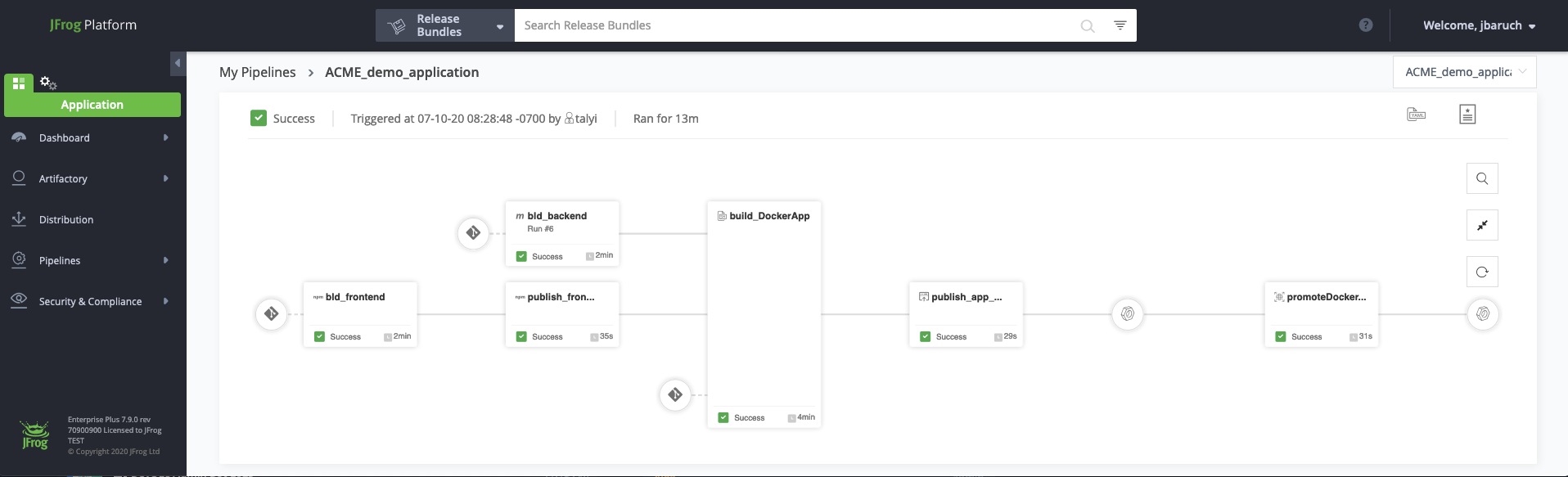
JFrog announced today it is making a free tier of its namesake DevOps platform available on all three major public cloud service providers.
Stephen Chin, senior director for developer relations at JFrog, said a free subscription to JFrog Platform running on Amazon Web Services (AWS), Microsoft Azure and Google Cloud Platform (GCP) is now generally available across 18 cloud regions. DevOps teams are provided with up to 2GB of storage, 10GB of monthly data transfer and 2,000 CI/CD pipeline minutes per month free of charge.
The subscription spans JFrog Artifactory, an integrated software package management tool for binaries and container registry; JFrog Xray, a vulnerability scanning tool; and JFrog Pipelines, a continuous integration/continuous delivery (CI/CD) platform.
Chin said the best way to further DevOps adoption is always going to be to make it as easy as possible to get started. There is no substitute for hands-on experience, he said.
Fresh off raising additional capital via an initial public offering (IPO), JFrog is looking to expand its customer base. JFrog has more than 5,800 customers currently. The free tier will make it easier for JFrog to achieve that goal in a way that allows a nascent DevOps team to upgrade to a paid tier as their project scales, he said.
It’s not clear to what degree organizations that have already embraced DevOps might be willing to replace their CI/CD platform or, in some cases, consolidate the multiple CI/CD platforms they already employ. However, as the number of organizations that are embracing best DevOps practices continues to grow, there appears to be plenty of opportunity for providers of CI/CD platforms to expand as organizations move to accelerate various digital business transformation initiatives in the wake of the economic downturn brought on by the COVID-19 pandemic.
Less clear as the competition among DevOps platform providers heats up is the degree to which the total cost of DevOps could decline. Most IT organizations are under more pressure than ever to contain costs even as they are being required to accelerate software development. The challenge is striking a balance between open source tools and platforms that IT teams need to deploy and support versus relying on DevOps platforms that are managed on their behalf. In theory, the fewer IT staff dedicated to managing infrastructure, the more money there is to hire developers.
DevOps adoption historically has been driven from the bottom up within most organizations. However, as more organizations appreciate the importance of software within their organization, senior IT and business leaders are revisiting software development processes. As part of those efforts, more organizations are looking to standardize on a specific set of DevOps platforms across their entire organization regardless of what cloud platform they may be deployed on.
The challenge, is as often the case with any journey, is making that first step.
After raising $35 million in seed funding, Observe Inc. has emerged from stealth with early access to a namesake observability service that leverages the database-as-a-service (DBaaS) platform created by Snowflake Inc.
Company CEO Jeremy Burton said rather than build another data lake platform, it makes more sense to make an observability platform available using a software-as-a-service (SaaS) application model based on an existing cloud service.
Burton said Snowflake, which is based on a relational database running on the Amazon Web Services (AWS) cloud, has already proven it can scale to ingest logs, traces and metrics. The Observe platform leverages that platform to correlate that data to monitor application and infrastructure environments in a way that provides more context than legacy tools that monitor software components and infrastructure in isolation.
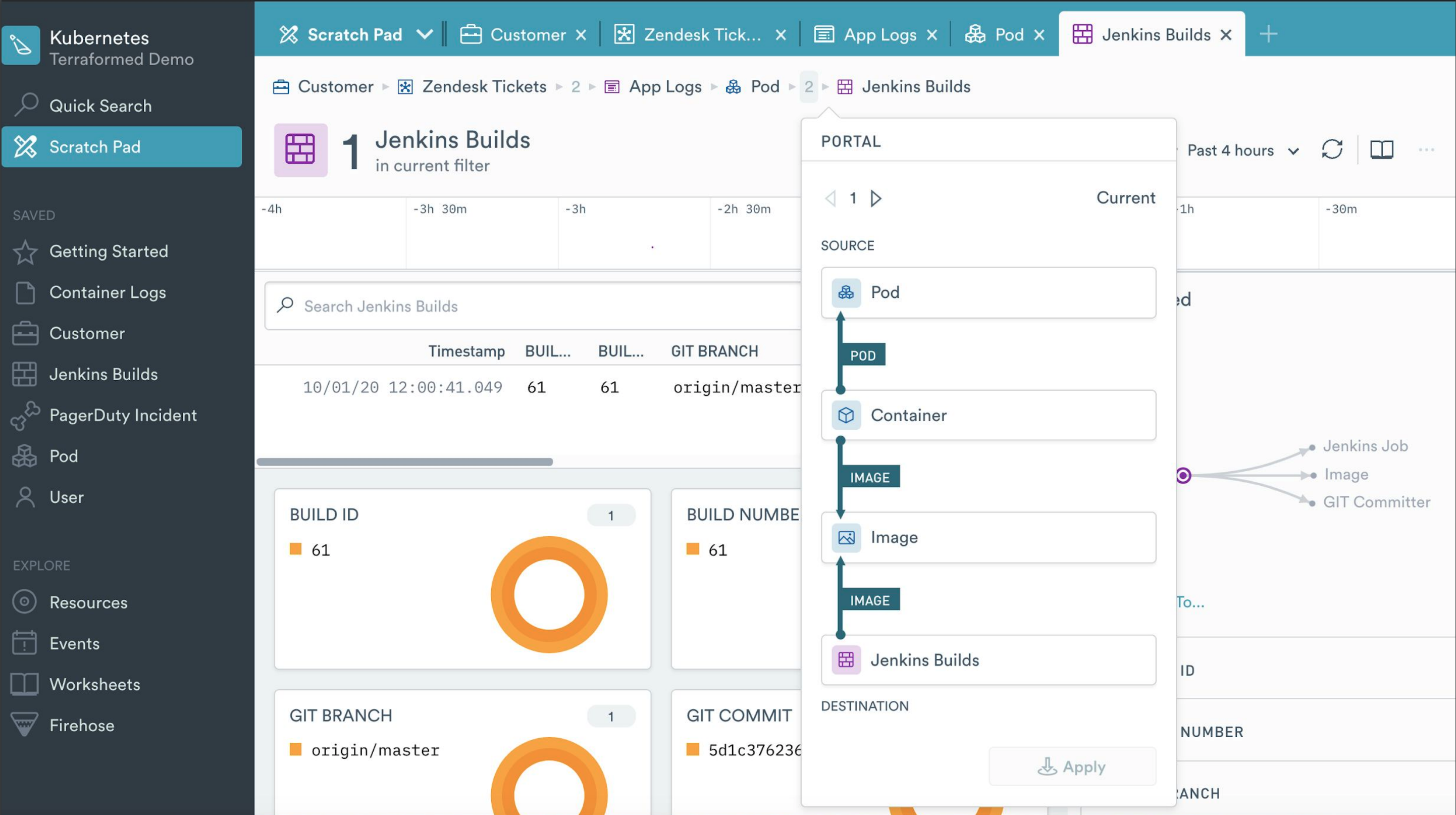
The context is achieved by creating a “resource” to represent, for example, a user, a session, a shopping cart, a pod, a container, a help-desk ticket or a build. Observe then enables IT teams to also track relationships between resources in a way that the average IT administrator can query without having to tag each resource, said Burton. IT teams can also track how the attributes of a resource change over time, which Burton noted can be employed to reconstitute the state of an entire IT system at any point in time.
That approach can be applied just as easily to existing monolithic applications and emerging microservices applications because all the data required is ingested into the Snowflake service without requiring IT teams to first instrument and then update each application, added Burton.
The pricing model for Observe will be based on the amount of data stored in the AWS S3 bucket and the number of queries launched. IT teams will purchase Observe credits that are billed only when the platform is actually used, noted Burton.
While observability is a core tenant of best DevOps practices, Burton said there is a need to democratize observability in a way that allows any member of an IT team to troubleshoot any issue. There shouldn’t be a requirement to assemble every member of an IT team to diagnose an issue, said Burton, noting over time, that just aggravates developers who don’t really need to deal with, for example, an infrastructure issue.
IT teams will be provided access to dashboards that enable novice or intermediate users to quickly ascertain the root cause of an issue, while more seasoned engineers with be provided access to worksheets based on a spreadsheet-like interface through which they can manipulate data, said Burton.
Competition among providers of observability platforms is already fierce. However, as organizations look to rationalize existing legacy monitoring tools in favor of platforms that add more context, the overall size of the observability market will be measured in billions of dollars. Each IT teams will need to decide what type of platform makes the most sense for them based on costs and their preference for one capability a vendor might have that another doesn’t provide.
Available as a private beta, Kong Konnect promises to make it easier for developers to create complex workflows spanning API gateways, Kubernetes Ingress controllers and service mesh runtimes.
Company CTO Marco Palladino said Kong Connect makes it possible for developers to consume integration runtimes as a service via an interface that allows them to invoke only the specific services they require.
Scheduled to be generally available early next year, Kong Konnect is based on a ServiceHub platform that creates a single source of truth for all services via a catalog that any organization has developed. Kong Konnect also provides access to a runtime manager that enables self-service provisioning based on roles in addition to enabling IT teams to manage Kong runtimes across hybrid cloud computing environments.
Kong Konnect also integrates the company’s API Gateway, Ingress Controller and Kong Mesh, a service mesh based on open source Envoy proxy software, and Kong Vitals, a tool for monitoring Kong services and transactions in real-time. Kong Konnect is also integrated with Insomnia to design APIs using a tool that integrates with any Git-based repository and the Kong Developer Portal, through which developers can publish their own services.
Palladino said the goal is to provide a turnkey service that automatically provides all the Layer 4 through 7 networking services that developers require to integrate both monolithic applications running on virtual machines as well as emerging microservices-based applications running on Kubernetes clusters. Kong Konnect makes available universal service connectivity on-demand via a single API to any class of developer, he said.
As application environments become more distributed, developers are spending more time than ever on basic connectivity issues. The company is making a case for a cloud service that unifies all those services under a common control plane it manages on behalf of developers. That service will then free up developers to spend more of their time writing code versus integrating application services, said Palladino.
That capability will be especially critical as IT organizations begin to deploy more applications on edge computing platforms that need to be integrated with a wide array of application services running on public clouds and on-premises IT environments, added Palladino.
It’s too early to say to what degree IT organizations may be ready to rely on a service versus continuing to manage connectivity themselves. In effect, Kong is making a case for abstracting all the underlying complexity of connectivity and networking using an API to invoke everything from a simple API gateway to a service mesh designed to integrate hundreds of microservices.
Regardless of the path chosen, the one thing that is clear is a new application connectivity as a service era has finally arrived.
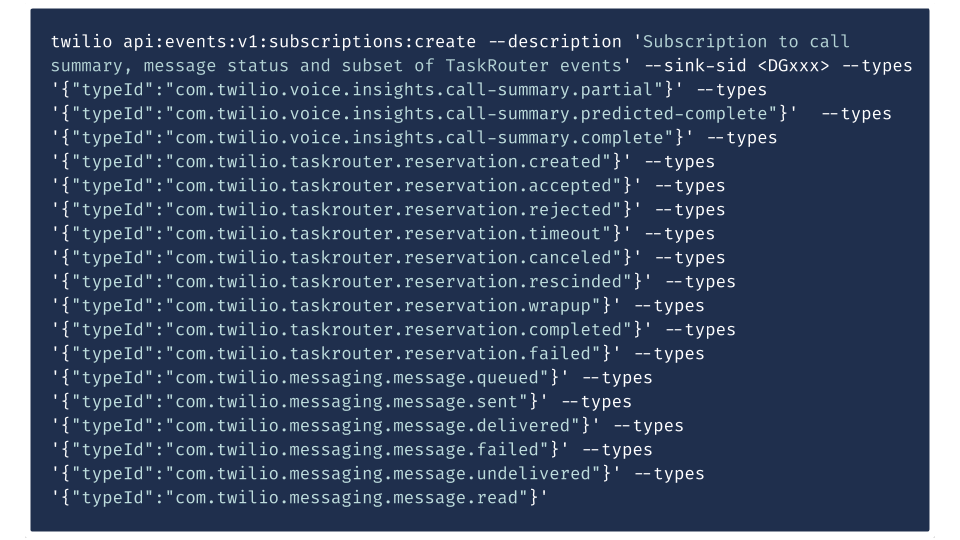
Twilio today at its online SIGNAL 2020 conference launched Twilio Video Web RTC Go, a free toolkit that makes it easier to embed video within an application, and exposed an Event Streams application programming interface (API) through which the management of streams of messaging and voice can be centralized using the Amazon Kinesis platform.
At the same time, Twilio debuted Twilio Frontline, a mobile application that enables all incoming and outgoing customer conversations occurring over any channel or medium to be sent to a single application running on an IoS or Google Android device.
Finally, Twilio also launched Microvisor, a turnkey connectivity and device management platform for developers building and updating internet of things (IoT) applications.
Quinton Wall, senior director of developer marketing at Twilio, said Twilio Video Web RTC Go will play a critical role in enabling organizations to take control of digital business applications that now typically include a video stream. Rather than having to rely on a video service provided by Zoom, for example, an organization can provide an interactive video experience under their own brand by invoking application programming interfaces (APIs) that connect applications to Twilio Video running on the Amazon Web Services (AWS) cloud.
In a similar vein, Twilio Frontline enables organizations to also take control of the communications channels that end customers are likely to employ. It may not be feasible to require every customer to employ a specific communications channel but at the very least all communications occurring over WhatsApp, SMS/MMS, webchat and other channels can be centralized, noted Wall. The Events Stream API, which will be expanded to include other processing engines other than Amazon Kinesis, enables developers to apply that same capability within their own applications.
Twilio is also making it easier to build and deploy applications in IoT environments via a Microvisor platform through which Twilio provides constant monitoring of vulnerabilities and applies security patches to both IoT devices and any associated cloud components. Developers can also debug and update devices remotely and push out code updates as often as they see fit.
Developers can also reuse any existing embedded code and develop IoT applications in the language and embedded OS of their choice using the TrustZone hardware isolation technology made available by Arm on processors that are widely employed in IoT devices.
Collectively, Twilio is making a concerted effort to convince developers to programmatically invoke a range of cloud services that are exposed via an API. Rather than employing separate services for each video, audio, text or in the case of IoT application an IT management function, Wall said the goal is to enable developers to spend more time on writing code versus integrating external services.
In general, the point where applications that don’t include embedded collaboration tools, including video, are considered antiquated has arrived. End users that have become accustomed to using services such as Zoom expect to be able to instantly communicate with the owner of that application or other end users. Twilio provides those capabilities in a way that doesn’t require developers to rely on a service such as Zoom that introduces yet another brand into the application environment, noted Wall.
It’s too early to say just how capabilities such as video will be surfaced within applications. However, the one thing that is certain is video is now expected to be pervasive both inside and out of application environments.
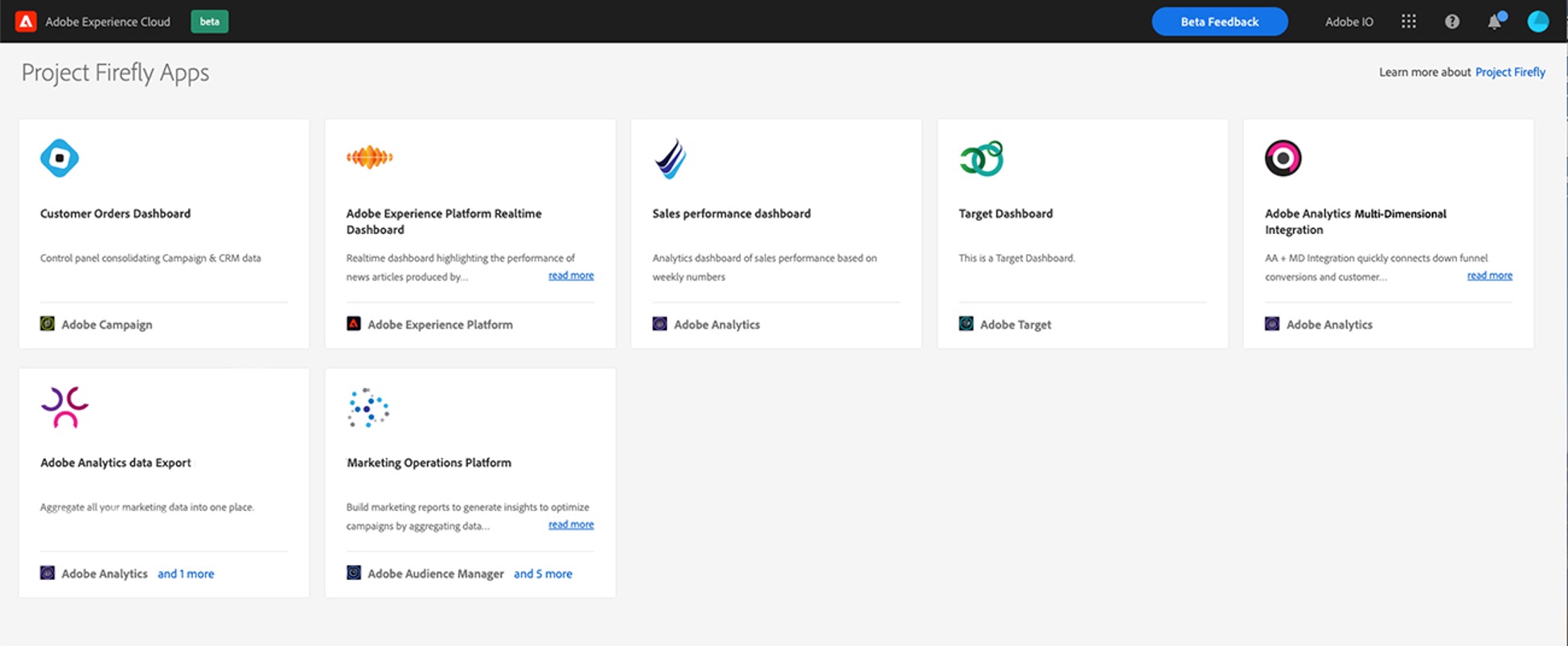
Adobe this week launched a series of tools intended to make it easier to build custom applications that can be deployed on a serverless computing platform on the Adobe Experience Cloud.
Announced at the online Adobe Developers Live event, the Project Firefly framework promises to make it easier for developers to build cloud-native applications that leverage the open source Apache OpenWhisk serverless computing framework.
The Firefly framework will make it easier for developers to, for example, invoke Adobe Analytics capabilities from within a custom application using functions, said Jason Woosley, vice president of developer experience and commerce for Adobe.
Adobe this week also launched React Spectrum, an open source collection of libraries and tools for building interactive applications using the React framework. Based on JavaScript, React Spectrum makes it easier to build front-end interactive applications in a way that scales consistently.
Finally, Adobe added Adobe Experience Platform Launch Server Side, which makes it easier to collect data via Adobe Web and Mobile software development kits (SDKs).
Woosley said interest in building custom applications on Adobe Experience Platform has accelerated in the wake of the COVID-19 pandemic. Organizations of all sizes moving timetables for digital business transformation initiatives forward to engage customers online. Those initiatives frequently begin with marketing applications that are extensions of the software that Adobe makes available via its cloud platform, he said.
Once those applications are built they also typically need to be integrated with any number of back-end systems that act as systems of record for the business. Those tasks have become easier for developers to accomplish using any number of application programming interfaces (APIs) that providers of those platforms expose.
Most of the digital business applications are being built by professional developers employing best DevOps practices, Woosey said. As the Adobe strategy for enabling developers to build applications evolves, Adobe it evaluating to what degree it needs to embed DevOps capabilities within its cloud platform, he noted.
The Adobe Experience Cloud platform provides organizations with access to a series of applications that they can extend using Firefly, which eliminates the need to build every custom application from the ground up. As digital business transformation projects become a higher priority, the rate at which organizations need to build and deploy these applications has increased to the point where many of those organizations require a systematic approach based on best DevOps practices to build, deploy and update applications at scale.
It’s not clear to what degree the rise of digital business transformation initiatives will eventually act as a forcing function for adopting DevOps more widely within organizations. However, given the strategic importance of many of these projects, it appears all but inevitable that most organizations will need to modernize the way applications are built and deployed if they hope to remain relevant. In fact, embracing best DevOps practices is nothing less now than a matter of survival for many of those organizations.
A very easy (and free) way to get the get your money’s worth on the AWS Cloud platform is autoscaling. Autoscaling allows for better fault tolerance, better availability and better cost management, quickly scaling up and down to meet traffic demands while keeping your costs within budget by detecting and replacing the components that are not healthy enough to be present in the infrastructure.
Meeting the traffic requirement on-demand and scaling accordingly.
Adjusting scaling group capacity through the scheduled actions on the autoscaling groups.
Reducing resources and costs.
Increasing application availability by deploying across the availability zones.
AWS has several services that help autoscaling the infrastructure components and reduce the management associated with scaling. They are mediated through the CloudWatch monitoring and observability service. CloudWatch provides up to 1-second visibility of metrics, 15 months of data retention (metrics) and the ability to perform calculations on metrics. This allows digital engineering teams to perform historical analysis for things such as cost optimization, for instance. On top of the specified metrics, teams can create alarms and alarm trigger the autoscaling policy to perform predefined steps, either to scale out or scale in.
Autoscaling Services on AWS Cloud Platform
EC2 Instance Auto Scaling
EC2 instance autoscaling helps us to keep the correct number of EC2 instances available to handle incoming traffic requests for the application. We can create an EC2 autoscaling group, which is a collection of EC2 instances. In that group, we can specify a minimum, making sure that the group never goes below a specified size. We can also specify a maximum number of EC2 instances, which ensures that the group never goes above the specified size. This keeps capacity at a minimum and maximum range and ensures that your autoscaling group has EC2 instances specified in the desired capacity. Autoscaling also allows us to configure scheduled actions that can change the minimum, maximum and desired auto-scaling group capacity at a specified time.
EC2 instance autoscaling allows for the configuration of scaling policies that will scale up or down according to the policy to increase or decrease EC2 instances in your infrastructure.
There are two types of scaling: manual, in which we can attach and detach EC2 instances from the autoscaling group, and dynamic scaling, in which we can define how to scale the autoscaling group capacity in response to the incoming request or changing demand in terms of specific resource utilization. This allows us to configure policies that can take care of scale-up and scale-down and acts according to the policy for factors such as the number of requests, CPU and memory utilization.
Below are the three types of dynamic scaling policies:
Target-tracking: This policy will increase or decrease the autoscaling group’s current desired capacity based on the target value for the specific metric. This policy maintains the capacity to match specified target metrics like CPU or memory utilization. Let’s assume that you have set 60% utilization of your autoscaling group—the target-tracking policy will add or remove EC2 instances to meet the specified utilization.
Step Scaling: This policy increases or decreases the current capacity of the autoscaling group based on a set of scaling adjustments (EC2 instances) that vary based on the size of the alarm breach. Let’s assume that the autoscaling group has three stages for tracking CPU utilization—the first alarm would be triggered when 40% is reached and would add one EC2 instance, the second alarm would be triggered when 60% is reached and two EC2 instances are added, and the third alarm is triggered when 80% is reached and three EC2 instances would be added.
Simple Scaling: This is a simple scaling policy option that increases or decreases the current autoscaling group capacity based on a single scaling adjustment. Here we can add one EC2 instance when specified alarm breaches.
EC2 autoscaling provides on-demand instance scaling and spot fleet instance autoscaling, through which we can automatically increase or decrease the current capacity of the spot fleet based on the demand. It can launch (scale out) or terminate (scale in), within the specified range.
ECS Container Service Auto Scaling
Elastic Container Service (ECS) Auto Scaling works on published container CloudWatch metrics such as CPU and memory usage. It increases or decreases the desired capacity of container tasks in ECS service automatically. CloudWatch metrics can be used to scale out (add more tasks) to handle a high degree of incoming requests and scale in (remove tasks) during low utilization.
ECS Auto Scaling allows us to configure policies including target tracking, step scaling and scheduled scaling actions.
RDS Storage Auto Scaling
Amazon Relational Database Services (RDS) for MariaDB, MySQL, PostgreSQL, SQL Server and Oracle support storage autoscaling, with zero-downtime RDS storage autoscaling automatically to scale the backend storage volume attached to the RDS database in response to growing database size.
RDS monitors current storage consumption and scales storage capacity up when current consumption reaches near the actual provisioned size, without affecting current database operation and disturbing current database transections.
Aurora Auto Scaling
AWS Aurora autoscaling adjusts the number of Aurora replicas dynamically. You can define the scaling policy and Aurora acts accordingly. It scales Aurora replicas to handle a sudden increase in the database connectivity or the workload. As and when database connections or workload decreases, Aurora Auto Scaling removes unwanted Aurora replicas automatically, so customers are not charged for the unwanted replica instances.
Just as we were able to define scaling policies in other services, so we can define them in Aurora Auto Scaling, and it also allows us to configure the minimum and the maximum number of Aurora replicas that can be managed. Aurora Auto Scaling is available for both of the Aurora engines MySQL and PostgreSQL.
DynamoDB Auto Scaling
The most difficult part of the DynamoDB workload is to predict the read and write capacity units. If an application needs high throughput for a specific period, it is not necessary to overprovision capacity units for the entire time. Amazon DynamoDB Auto Scaling dynamically adjusts provisioned throughput capacity on your behalf in response to actual incoming traffic request patterns.
As and when the workload decreases, application autoscaling decreases the provisioned throughput capacity units, so that customers do not pay for any unnecessary capacity.
With DynamoDB Auto Scaling, we can create scaling policies on the table or global secondary index. We can specify within the scaling policy whether we want to scale read capacity or write capacity (both), and the minimum and maximum provisioned capacity unit settings for the table or index.
Prime Your Infrastructure For Autoscaling
For these AWS autoscaling services to function as they should, organizations need to ensure they have:
Specified application user session state and persistence when using EC2 instances.
Tested, monitored and tuned their autoscaling strategy to ensure that it functions as expected.
Decision-making logic in place that evaluates these metrics against predefined thresholds or schedules and decides whether to scale out or scale in.
Service-specific limits in place before configuring autoscaling.
While using EC2 autoscaling, teams have specified cooldown time as well as which application to start up, and are ready to serve in a defined time.


 In some cases, best DevOps practices for rapidly deploying applications is an absolute requirement, he noted. However, there are plenty of IT processes that are still best served by a ticket-based approach based on best practices defined within the widely adopted ITIL framework.







 Adobe this week also launched React Spectrum, an open source collection of libraries and tools for building interactive applications using the React framework. Based on JavaScript, React Spectrum makes it easier to build front-end interactive applications in a way that scales consistently.


 Below are the three types of dynamic scaling policies:
 RDS Storage Auto Scaling
 DynamoDB Auto Scaling