Category: DevOps in the Cloud

  • Get Comfortable with Shifting Right to Improve Resiliency

    Get Comfortable with Shifting Right to Improve Resiliency

    The operations team receives a page at 2:00 a.m. Something isn’t working correctly. Do they know how to fix it? Perhaps more importantly, do they know whether it matters to customers or how it impacts the business? There are different techniques that companies implement to maximize the quality of their software. We talk about shifting left or right, chaos engineering and others. While they each have their own goals to improve quality, there’s an underlying common goal as well: All three techniques increase your team’s knowledge of the system and their ability to resolve problems quickly.

    Here, we’ll walk through the software life cycle and discuss the common challenges to software quality, running complex systems and managing dependencies between teams. The common thread is a proper observability strategy which can help software quality, hand-offs between different teams and resolve problems quickly by ensuring whole-system resiliency from design to maintenance.

    Techniques for Improving Quality

    Shift left is a concept that has attracted much attention recently. The practice revolves around the idea that detecting and correcting problems sooner minimizes their impact. As the thinking goes, they’re easier to fix, they wind up costing less and there are fewer ongoing issues with bad code.

    The rise of DevOps and DevSecOps has propelled the popularity of shift left. Yet, there’s a fact that development teams often miss: no matter how early an organization spots errors, problems will inevitably remain. Early testing can’t catch everything. As a result, some organizations have begun to rebel and move to a shift-right framework. It normalizes errors and aims to better resolve issues across the development process, including post-production.

    Shift right is the perhaps less-extreme cousin to its rebellious relative, chaos engineering. With chaos engineering, team members cause problems on purpose to keep everyone on their toes and test the limits of the system. They shut down servers, disconnect wires, delete files, etc. The goal is to confirm system resilience–from a user perspective, there should be no impact even with all of this chaos. A resilient system means that teams can fix failed components at their leisure during the day. With a resilient system, critical failures are less likely to happen and it becomes second nature to fix them when the dreaded 2:00 a.m. page does occur. Unlike chaos engineering, shift right doesn’t explicitly break things–it just makes the assumption that broken things will exist so teams need to be ready to handle them.

    Both concepts (and yes, even chaos engineering) are valid—but each company needs to carefully analyze which is right for them. One variable to consider is the complexity of the system you’re building. Working on a rocket launch or a surgery robot? Probably should shift left as much as possible. Changing the color of a button? Maybe it’s not the end of the world to verify the fix in production. For most of us, projects fall somewhere between these two extremes–so sometimes shifting left is necessary, and other times shifting right is pragmatic. A careful analysis of the risks should be performed to determine what kind of testing is needed.

    Although teams tend to be pretty good at analyzing the complexity of their software and making development process decisions, they often forget the complexity of other companies’ code which they depend on. Even a simple web application deployed today has tons of dependencies: The server it’s running on, the local ISPs, transit ISPs, load balancer, DNS provider, TLS certificate, CDN and browser, just to name a few! After analyzing the complexities of all of the dependencies across the internet, it becomes clear that finding every possible issue that might impact their application is a daunting task.

    The goal, again, is to find any issues before they reach production. Or if they reach production, fix them before they impact customers. Or if they impact customers, fix them as soon as possible after that. To do any of these things quickly, the level of observability of the overall system is paramount. With simple systems—or even complex systems that are entirely under one company’s control—tools such as application performance monitoring (APM) are common. But when the scope of the system is as big as the internet, internet performance monitoring (IPM) tools are necessary instead.

    With both APM and IPM tools, the goal is to know as much about the system as possible – enabling teams to identify problems quickly, pinpoint the root cause, and fix it. When an organization is equipped to monitor development and operational processes effectively from application to delivery, there’s a shift toward higher quality code, fewer errors, improved security and lower costs for the enterprise. There are also fewer disruptions and distractions for engineers, DevOps teams and others.

    Dealing With Disconnects

    Whether shift left or shift right is used, there will be problems that enter production. There is an invisible wall in many organizations–where engineering teams “throw code over the wall” to the team which is now responsible for running it. In some companies, this is the operations team; in others, it’s site reliability engineering or production engineering–the common trend is that in most companies, it’s not the same team who created the software.

    These operations teams often lack the nuanced information they need to resolve production issues. They might spend hours or even days attempting to track down the source of the problem. There’s often finger-pointing between different teams who created or own different portions of the system. Things can quickly devolve into chaos—and tempers can fray. After all, these kinds of problems always happen at 2:00 a.m., right?

    That’s where end-to-end observability enters the picture. Imagine a framework with proof that the development team has performed sufficient knowledge transfer to the operations team. That the operations team has asked all of the relevant questions about running and maintaining the application. Using the right tools, engineering and operations teams need to monitor every aspect and every component of the system. Creating this monitoring strategy means that everyone involved also builds an understanding of the system–everyone is on the same page. All of a sudden, there is a common language to discuss problems, and teams operating the software in production can take debugging a lot further before they need to ask for help.

    Ultimately, shifting left or shifting right is a personal choice for every organization. Even if every possible test case is executed before deployment to production though, issues will happen–so take the opportunity to implement a robust system-level monitoring strategy that can be used to solve technical questions during that 2:00 a.m. call.

  • Migration to AWS Cloud: Do’s and Don’ts

    Migration to AWS Cloud: Do’s and Don’ts

    What if one day, you were told to migrate to AWS/GCP/Azure/any other cloud provider? It would likely introduce some stress, to understate the case, right?

    I’ve seen quite a few migrations in my career and, in this article, I would like to share some thoughts to help DevOps engineers, architects, managers or anyone else who might be involved in such a migration. I’m focusing on migration to AWS mostly because I have a specialization in this subject and because it’s fairly common, but I think these experiences are applicable to any other cloud provider. For this case, I’ll cover migration from on-premises to a cloud because these types of migrations are much more difficult (in my opinion) than cloud-to-cloud migrations. I’ll also share my own perspective on do’s and don’ts of migrations. But please filter them through critical thinking and remember that everybody has their own background and experience. What’s good for one might be bad for another.

    What is a Cloud Migration?

    Let’s start by defining what migration is. How do you know if it’s a migration? I like the following definition: 

    Cloud migration is the process of moving a data center’s capabilities to IaaS providers.

    “Capabilities” is the keyword. A business does not migrate servers/virtual machines/hardware/data or anything else. A business migrates its capabilities.

    There are seven migration strategies (or seven Rs): Relocate, rehost (lift and shift), replatform, repurchase, rearchitect/refactor, retain and retire.

    For example, I’ve seen situations when a company was creating a new product that would replace an existing one hosted on-premises. The product would be designed to be well-architected and cloud-native from the very beginning and would be hosted in a cloud. Is that migration or greenfield project type? From the definition above, we can say that this is a migration. This is a rearchitecture strategy for migration.

    What if we buy a new SaaS subscription instead of some software we host on-premises? This is also a migration: A repurchase strategy.

    Let’s dig deeper into these seven migration strategies:

    Relocate. We host some workloads on-premises and move them as-is into the cloud. This is possible in limited cases; when we migrate cloud-agnostic workloads or when a platform might be cloud-native. Examples: Relocate a Kubernetes cluster from on-premises to the cloud or relocate VMware machines with VMware Cloud.

    Rehost. This is also known as lift and shift. We convert virtual machines/servers on-premises to virtual machines in the cloud. Examples: Migrate on-premises virtual machines to EC2 instances with CloudEndure, or create EC2 instances, install the software and apply the same configuration as on-premises.

    Replatform. We migrate a workload to a cloud-native platform without rearchitecting systems. Examples: Migrating PostgreSQL to AWS RDS or Docker containers to ECS.

    Repurchase. We replace some custom/legacy system with SaaS. Example: Replace custom on-premises email system with SendGrid or replace CRM with Salesforce.

    Rearchitect. We change your application’s architecture to be cloud-native and use managed cloud services. That also includes rebuilding from scratch. Examples: Change the code of your apps to upload files to S3 instead of local storage or containerize an app and migrate to ECS.

    Retire. We decide that a piece of the workload will be eliminated if not needed. Example: Log servers are no longer needed as migrated applications use CloudWatch.

    Retain. We leave it on-premises. Usually, it’s temporary. Example: A huge Oracle database with a lot of functions and customization is not moved to AWS because of the massive costs. It’s decided to keep it on-premises until it’s replaced with another solution in the modernization phase.

    I like the following picture that shows the high-level stages of each migration type. It may be a helpful cheat sheet to approach migrations.

    Picture Source: https://aws.amazon.com/blogs/enterprise-strategy/new-possibilities-seven-strategies-to-accelerate-your-application-migration-to-aws/

    Migration Don’ts

    I don’t recommend the following when performing a migration:

    Migrating too quickly. A business might think, “We have to migrate to the cloud quickly. Let’s do lift and shift right now!” It’s better not to start right away. Are you sure that rehosting strategy will really be faster than some other strategy? In one instance, we tried to migrate on-premises VMs, but it didn’t work because the OS on the machines was quite old. Some OS-level dependencies didn’t work on AWS’ hardware. This required a lot of configuration work, custom code and testing and the initial estimates were completely wrong. It eventually turned out to be a replatform. 

    Assess what you have, analyze it, analyze the business case and think. During this engineering work, we should stop and think before we act.

    Migration without clear goals. Why are you migrating? If you can’t answer the question, you probably need to find an answer or not migrate at all. I’ve seen situations in which businesses wanted to migrate to the cloud to reduce costs. They performed a lift and shift migration without doing a total cost analysis. Only after the fact did they realize that it cost even more than when it was in a colocation center. This migration may be considered unsuccessful.

    To avoid this, define clear goals and define the target state that achieves these goals. If costs are the driver, make the proper calculations and plan accordingly. Cost optimization will be the main thing to focus on when you plan your target state. If availability is the reason, measure it, define SLOs and focus on availability in a target state.

    Black box migration. Don’t treat workloads you migrate as a black box. It is almost critically important to know what exactly you migrate, what technical requirements it has, what dependencies it has and how it works. That information will allow you to choose the correct strategy for workload migration. If this is not done, there’s an excellent chance that you will choose the wrong path and the result will be lost. Capturing information about your systems is the most important task when planning.

    Don’t forget well-architected. Migration is stressful. That’s why people tend to try to get through it quickly on as short of a timeline as possible, focusing on the only thing: Making everything work in the cloud ASAP. They set aside well-architected framework pillars. This is a mistake; it may lead to a different set of negative consequences of different severity. Don’t ignore well-architected framework pillars, or you won’t know about potential issues or risks until they have already materialized.

    Use one strategy for everything. It’s always easy to make a single overarching plan for all workloads. For example, deciding to do lift and shift and then rehost everything in the cloud. But what if some things could be retired? What if some components could be replatformed with little effort? You will save significant resources by analyzing all of the components of the workload and deciding on a unique strategy for every component. Collect data and plan properly.

    Cloud Migration Do’s

    Do perform a cloud readiness assessment. If a person migrates to a new location, they should consider:

    • That the climate will be different
    • The language spoken in that location may be different
    • The cost of living will be different and perhaps more expensive

     When a company migrates to the cloud, they should ask questions including: 

    • Have we considered all the risks?
    • What must be changed for the workload to actually work?
    • Do we have the human resources required for all of the work?
    • Do I have the budget to accomplish everything? 

    The Cloud Readiness Assessment is a long-form interview about varying processes in the company that identifies whether a company is ready to live in the cloud. It’s based on the Cloud Adoption Framework (CAF) and allows us to understand what should be changed so that a migration can happen successfully. AWS has a Cloud Readiness Assessment tool which covers all of that. I urge you to use this process for all workloads being considered for migration.

    Create a business case. Describe the business case. What are the drivers for migration? What problems are resolved with the migration? What goals should be achieved by migration? Be specific: If you intend to reduce costs, then calculate the sum. If you intend to improve availability, then define a clear SLO. That will be the number-one driving force for your migration. All other artifacts should be based on it.

    Automate discovery and data collection. Use automated data collection and analysis to create a portfolio for migration. Don’t base your analysis on manually created spreadsheets or verbal communication. Let machines collect data about inventory and usage statistics. The more precise data you collect, the better. AWS Migration Evaluator service will help you to do this in most cases.

    Portfolio management. Create a portfolio of workloads to migrate, analyze them, choose a migration strategy for each, choose some for the pilot/first wave migration, estimate timelines and prepare a plan. Execute the migration after that. Repeat until the migration portfolio is empty. Share the data. Have subject matter experts review it.

    Found CCoE. This is part of the CAF mentioned above. Before executing the migration, create a team of people responsible for creating a strategy and defining a good standard of living in the cloud: A Cloud Center of Excellence. It should include people with a variety of subject matter expertise including management, operations, platform, people, finance and every other department consuming or providing services in the cloud. These people will prepare a landing zone for the migration, hard policies and softer policies for the landing zone; preparing the company for life in the cloud. Don’t fear revisiting any policy.  Make changes as new factors come to light.

    Well-architected framework reviews (WAFR). Do well-architected framework reviews (WAFRs) during migration waves and after them. That will allow you to avoid foolish mistakes and to get a high-level overview of what you have done from a technical perspective.

    Modernization plan. Prepare a modernization plan along with the migration plan. Migration isn’t the end of the story. To be effective in the cloud, you will have to do well-architected reviews and modernization. The first modernization is likely to be huge; that’s why it’s important to plan and to schedule budgets and resources in advance. Failure to do this will lead to increased operational costs, not decreased costs.

    Summary

    If we want to reduce the risk associated with a migration and to make it less stressful, we do not rush. You may believe that rushing will save you time and other problems will be managed later, but experience tells us that this is wrong. The most likely outcome is that you will end up resolving all the issues encountered in the most stressful situation possible: When you cut over to your new cloud-based production environment. Instead of resolving issues in a well-considered way and in advance, the choices will be made under duress. Proper engineering principles must be applied here. Picking up a bridge and moving it from one river and plunking it down on another never works. The key to migration success is to measure, analyze, design and plan. Migrating a workload to the cloud is hard, but I hope these do’s and don’ts will make it easier.

  • Introduction to MACH Architecture

    Introduction to MACH Architecture

    In recent years, the need to construct end-to-end digital experiences has become increasingly important. But to deliver new features and services promptly, organizations must double down on agility and reusability. As part of this trend, applications have become increasingly modular, often constructed using pre-built microservices and integrating common SaaS to avoid reinventing the wheel.

    MACH is an architectural style that fits into these trends quite well. It stands for Microservices-based, API-first, Cloud-native, and Headless. The locus of the movement is The Mach Alliance, a group of API-first companies abiding by these principles. At the time of writing, MACH is gaining mindshare as more API-first companies enter the market and the appetite for cloud-native technology grows.

    I recently chatted with Gary Ballabio, VP of technology partnerships, Cloudinary, about the ongoing MACH trend. According to Ballabio, MACH delivers “best of breed” technologies that avoid the bloat of larger platforms. Yet, for software consumers, building in a MACH style will require stitching together individual components and orchestrating them effectively. Below, we’ll explore MACH and consider the benefits and drawbacks of utilizing tools that conform to this approach.

    What Is MACH?

    MACH is an emerging software architecture style adopted by a number of commerce and digital experience tools. To understand MACH a bit deeper, it’s necessary to understand the underlying concepts of microservices, API-first, cloud-native and headless. So, let’s first break apart these familiar terms:

    • Microservices: Unlike monolithic development, a microservices architecture organizes functionality into self-contained, specialized components. This improves reusability and allows for more frequent, targeted software updates.
    • API-first: API-first takes design-first one step further. It means putting the consumption model, the API, ahead of other concerns, like the application or UI. Web APIs have become ubiquitous for connecting a microservices ecosystem and exposing data and functionality to partners and public consumers.
    • Cloud-native: An umbrella term for projects purpose-built for the elasticity and scalability of the cloud.
    • Headless: Headless means separating the front end, or “head,” from the back end. By decoupling development this way, websites and apps are better equipped to cater to multiple platforms and devices.

    According to Ballabio, companies can leverage cloud-ready best-of-breed functionality by integrating tools that adopt MACH principles. Incorporating one single SaaS to fit a specialized need can also be considered an alternative to using large, comprehensive enterprise commerce suites like Salesforce, Adobe or SAP, said Ballabio.

    There are many examples of specialized SaaS services built in the MACH style. Some include Algolia for search and recommendations, Cloudinary for media management, Builder.io for mobile experiences, or Contentstack as a headless CMS. All these tools are members of The MACH Alliance, a group of over 70 vendors, partners, startups, systems integrators and other ambassadors dedicated to fostering the MACH approach. And although the emphasis has been on commerce and digital experiences, MACH is expanding beyond that scope to other areas.

    MACH technologies support a composable enterprise in which every component is pluggable, scalable, replaceable.

    Some readers may wonder, “How is this different than Jamstack (JavaScript, APIs and markdown)? In a way, MACH is similar to Jamstack, as both approaches aim for headless frontend experiences and a modular backend powered by APIs. But a key difference, said Ballabio, is that MACH doesn’t dictate the use of specific programming languages.

    Benefits and Drawbacks of MACH

    MACH combines many development trends we’re seeing in the software landscape. Digital applications are becoming more composable, cloud-first is rising, and headless models can deliver customization benefits. Yet, there are some potential drawbacks to introducing this style too. So, let’s weigh some of the positives and negatives of adopting MACH architecture.

    Benefits

    • Flexibility: The most significant benefit of MACH is the flexibility it offers, said Ballabio. “There’s value in being able to choose the services you want to use based on your own unique requirements.” Looping in a specific API-first tool for something like e-commerce, payments, CMS or email can enable a lot of customization.
    • Reduced waste: This can create less waste, too, as you create a leaner footprint by acquiring only what you need for each project, and freemium models enable consumers to pay for only what they use. This is helpful when you want a single component but don’t require the bells and whistles of a more holistic platform.
    • Best-of-breed: Niche API-first products are focused on doing one thing really well, and this particular focus can improve quality and agility. It also releases engineers from being at the whim of an extensive product’s development life cycle.
    • Developer-first: Lastly, most digital experiences share common functionalities that developers shouldn’t have to reinvent. MACH supports being developer-first, says Ballabio, which is an asset to companies investing in developer experience.

    Drawbacks

    • Increased maintenance: Consuming many third-party cloud services will inevitably bring new maintenance hurdles. These include tracking, monitoring and securing all integration points. It also requires responding to new version updates.
    • Stitching together: Naturally, when you add a cloud-based abstraction layer to the services you consume, the onus is on the consumer to then to stitch them together to make components talk to one another.
    • Startup costs: Due to the coordination between services, initial costs and engineering time could be more than implementing a holistic suite, admitted Ballabio. “But you get more long-term benefits,” he said.
    • Assistance may be required: Those unaccustomed to microservices development and API integration may need help. This may require the support of systems integrators or middleware to orchestrate connections.
    • Lack of standards: MACH is more of a general architecture rather than a standard specification. Thus, the precise technologies under the hood and the specific behaviors may differ from service to service.

    Future of MACH

    A recent MACH Alliance study found 79% of tech leaders plan to invest more in MACH technologies in the next year. Although the style has been primarily trending in Europe, Ballabio predicts the U.S. will soon pick it up. The MACH Alliance presents and advocates for an open and best-of-breed enterprise technology ecosystem.

    Along with the rise of composable architecture, the MACH approach is gaining interest among cloud-native leaders who see the advantage of assembling applications using pre-fabricated building blocks. MACH is especially a good fit for greenfield development, where the slate is clean to integrate new technology.

    MACH represents a new category of companies that are growing together. Ballabio remarks that he feels part of a movement, part of an industry—and, arguably, this movement can potentially disrupt larger commerce ecosystems.

    But although MACH gives a name to a face, most techies still aren’t aware of the acronym. While the concept may, for now, live in the domain of vendor-speak, Ballabio foresees it becoming a more common parlance for consumers and end developers.

  • Dead Downtown: It’s YOUR Fault | Pentagon’s FOUR Cloud Vendors | Apple Adds MORE Price Flexibility

    Dead Downtown: It’s YOUR Fault | Pentagon’s FOUR Cloud Vendors | Apple Adds MORE Price Flexibility

    Welcome to The Long View—where we peruse the news of the week and strip it to the essentials. Let’s work out what really matters.

    This week: Home working is ripping the heart out of cities, the DoD’s bizarre cloud strategy, and Apple adds a $10,000 app price option. (more…)

  • AWS Makes Economic Case for Graviton Processors

    AWS Makes Economic Case for Graviton Processors

    Amazon Web Services (AWS) is making available in preview a C7gn instance on the Amazon Elastic Compute Cloud (Amazon EC2) based on AWS Graviton processors. The C7gn instances provide up to 200 Gbps network bandwidth and as much as 50% higher packet-processing performance compared to previous-generation C6gn instances.

    Announced at the AWS re:Invent 2022 conference, these instances are based on Arm processor architecture that AWS provides as an alternative to x86 processors.

    Rahul Kulkarni, director of product management for Amazon EC2, said interest in more efficient AWS Graviton processors has spiked sharply as the overall economic outlook softened. More IT teams than ever are being tasked with finding ways to reduce costs as the overall number of applications being deployed in the cloud continues to grow, he added.

    While it’s not clear how many applications are being developed to run natively on Arm processors, Kulkarni noted that the process of refactoring existing applications to run on Arm processors is not as intensive for most applications as it was when previously moving applications from one class of processors to another.

    Overall, AWS now offers more than 600 types virtual machine instances on its cloud platform, including a set of Inf2 instances, available in preview, based on custom AWS processors that are optimized for processing workloads that include machine learning algorithms that drive artificial intelligence (AI) models.

    Every AWS instance takes advantage of a set of AWS Nitro Cards that offload the overhead virtualization creates so IT organizations can take full advantage of compute resources without having to allocate any resources to run virtualization software, noted Kulkarni. That virtualization tax is instead absorbed by AWS to reduce total cloud costs for the customer, he added.

    In addition, more customers are taking advantage of tools such as AWS Cost Optimizer and AWS Karpenter for Kubernetes clusters that employ machine learning algorithms to identify opportunities to reduce the cost of cloud infrastructure by, for example, shifting workloads to different classes of services.

    There are, of course, multiple strategies for containing cloud costs that range from committing to consuming a specified amount of compute resources annually at discounted rates to relying more on spot instances that are available for limited amounts of time. Less effective is moving workloads from one cloud provider to another simply because the total cost migrating workloads can be substantial depending on the number of proprietary application programming interfaces (APIs) that have been invoked.

    Regardless of approach, the days when developers were allowed to invoke cloud resources at will appear to have come to an end. Enterprise IT organizations are a lot more conscious of the total cost of IT in the cloud era. As a result, many of them are adopting financial operations (FinOps) best practices to maximize utilization of cloud infrastructure resources.

    It’s not clear how readily IT organizations will embrace AWS Graviton alongside other classes of Arm processors to achieve that goal, but as the economic outlook continues to remain uncertain, there is no doubt all options are now on the table.

  • How to Select the Right Volume Type/Storage for Your Workload

    How to Select the Right Volume Type/Storage for Your Workload

    AWS services are at the top of the cloud services food chain, and a hot topic for nearly every business considering migrating to the cloud. Along any cloud migration journey, many hidden traps await the unprepared. The volumes you’ve already provisioned might seem like a perfect match—but are you sure they suit your workload and carry the best price for performance delivered? Today, we’ll make the difficult task of choosing a storage class for your workload a bit less complicated.

    In the World of EBS

    AWS EBS currently provides three categories of considerable storage: Hard disk drives, general purpose SSD, provisioned IOPS, and one that you will most likely never need to use—magnetic. Although I’ll provide brief descriptions of each, I’ll focus on the most widely used volume types—general purpose.

    GP Storage – the Common Choice

    This is the staple storage for pretty much all AWS users. It gives you the best bang for your buck and is commonly used for tasks that don’t require heavy lifting from a drive perspective. GP storage ranges from 1 gibibyte (GiB) to 16 tebibytes (TiB), providing from 128 to 1,000 mebibytes per second (MiB/s) of throughput, which will most probably fit your use case, unless the workload is significantly specific.

    There are multiple types of GP storage, each with different pricing and characteristics that I’ll provide a few details on below.

    GP2 – Old-Gen SSDs for the Masses

    GP2 is the typical solution for boot volumes of EC2 instances, development environments, and lighter/less important databases. This is one of the most popular options out there, although its popularity comes from old habits rather than actually being a perfect shot. GP2 volume performance scales with its size—the bigger they are, the faster they go. Still, these might seem a good option, but to be honest, they aren’t so perfect. And the biggest elephant in the room is the term you’ll have to remember – “burst credits.”

    Burst Credits – Math Homework for Your Business Work

    Provisioning a GP2 volume, you get a one-time grant of 5.4 million burst credits, which you can use to make it handle input/output better during spikes in demand. More of those tokens means you’ll be able to sustain bigger performance demand for longer, boosting your storage up to 3,000 IOPS as long as you have enough of them in your pocket.
    While depleted when you go “turbo,” they accumulate when you’re not using your disks at full speed—saving up unused performance for when you need it most. Burn them all, and your IOPS performance drops to base value and throughput falls to the baseline IOPS multiplied by max I/O size.

    The performance of GP2 storage volume can be calculated with this formula:
    Throughput in MiB/s = ((Volume size in GiB) × (3 IOPS per GiB) × (I/O size in KiB))

    Until you reach the point where your volume is so big that its base performance exceeds burstable, you’d have to learn them by heart. Where is this point? Quite high, at about 1.1 TB (1024 GiB)—a lot of disk, even for a medium-sized business, especially since those volumes can’t be mounted to multiple targets.

    Figure 1: Graph of Max IOPS available for certain volume sizes (Source: AWS documentation)

    Unless you’re deploying a disk-devouring monster such as an EC2 host instance for dozens or hundreds of Docker containers, or you plan to run an enormous Elasticsearch node for the next few years with no clean-up routines in place, you’re not likely to need this much space. Also, in either of the two cases mentioned, you’d probably run out of CPU and RAM first; there are better alternatives for these cases as well, not to mention that the lack of maintenance is definitely not a good practice.

    In addition, for practically every use case—web serving, web applications, databases, casual EC2 instances for use with Docker, and more—pretty much anything is better than GP2.

    Luckily, in 2014, the introduction of GP3 brought some great improvements.

    GP3 – The “Newcomer”

    While not really a “new” player, GP3 volumes are a welcome improvement after experiencing the inner workings of GP2. They perform better and cost less in comparison, allowing you to easily scale your operations according to your needs much easier. Gone are the days of burst credit balances.

    The golden rule of this storage class is “mix n’ match.” Baseline performance here is the maximum burst performance of a GP2 volume, 3,000 IOPS, and 125 MiB/s. If your business needs more, you can purchase additional amounts of either, paying extra only for what you’re interested in.

    The limits are quite generous. You can purchase up to 500 IOPS per GiB (for at least 32 GiB volumes, capping at 16,000 IOPS), or up to 0.25 MiB/s per GiB (for volumes of at least 8 GiB, 4,000 IOPS or more, capping at 1,000 MiB/s).

    If you were previously happy with your GP2 volume, it’s almost guaranteed your company will be just as happy with GP3, and you’ll save a decent percentage of the storage cost, even up to ~20%.

    Assuming that you don’t need more than what GP2 provided you with, make the switch. To make it even easier to cut those costs down, AWS is now automatically setting the IOPS and throughput of your new GP3 volume to the exact same as your GP2. Less guessing, less messing around, more good stuff. Just click a few buttons and save some cash, no strings attached.

    This is the storage class I would recommend for every “generic” or “typical” workload. It’s a good starting point for almost every business use case that doesn’t expect huge amounts of disk operations, but is ready to scale up when the dreaded flood of demand for disk power comes.

    GP3 can easily handle the role of boot volume for EC2 instances. It can host both simple and a bit more complex applications, databases such as MySQL and PostgreSQL, or a blend of those in a containerized environment, especially in a multi-node configuration or as part of a Kubernetes cluster. Zesty Disk for Kubernetes handles this switch automatically if you have the CSI driver installed

    When the time comes, it can scale in tandem with demand. In certain cases, it might even be cheaper to provision high-speed storage with GP3 than the IO1/IO2 types, which are dedicated to speed and next on our list.

    IO Storage Class – Need for Speed

    The IO storage class was introduced to cater to the needs of businesses based on extreme durability, high read/write speeds, and the lowest latency available. It requires certain criteria to be met to show its true potential and costs significantly more. But, in turn, it provides unmatched speeds and reliability, as well as some features you won’t find in any other storage type.

    This volume type is great if you seek a volume to provision for your high-speed disk-based database, for example, or to create a single MySQL database host for multiple large-scale e-commerce instances, although there are multiple options available for this from RDS to multi-instance DBs (e.g., MySQL Galera). It’s also a fit if you need to accept a lot of data fast to process with an ML algorithm.

    IO1/IO2 Vs. IO2 Block Express – Which Type of “Fastest” do you Need?

    IO2 Block Express is pretty much IO2 on extremely potent steroids. You get limits that are four times as high for IOPS and throughput, latency of less than milliseconds, and surprisingly, no additional fee. Yes, you read that right, they’re priced the same. Plus, provisioning additional IOPS/throughput above the limit of a standard IO2 instance actually costs less.

    If you decide to use IO2 and meet the requirements (a certain type of EC2 instance), you should definitely consider Block Express—if it’s not already running by default.

    And when would you run IO2 anyway? Well, with its power and hefty price tag, this class is dedicated to the most disk-dependent, throughput-hungry, and IOPS-dependent monstrosities. For example, a data-crunching machine for a stock exchange, a global log-ingestion mainframe, or a multi-pod Kubernetes node prepared for very demanding workloads—the titans of storage, no doubt. It’s a go-to when you need a single machine that’s going to pack as much punch as you can get.

    How about IO1 then? It’s a compromise between low latency, high IOPS, and price. A good choice when you need a bit more than general purpose, but still not enough to go for the fastest storage out there. Keep in mind there’s also one additional drawback—less durability. A 0.2% failure rate annually does not sound like a lot, but if you’re thinking about dozens or hundreds of drives, absolutely critical workloads, or both, it definitely makes a huge difference.

    So, Which Should I Choose for my Workloads?

    As you can see, the world of EBS is quite complex, to say the least. So, I made a chart that should ease the selection process for your use case:

    Fantastic Disks and How to Tame Them

    Choosing the right storage class is a tough decision to make—but the benefits are worth it. With just one shot, you can both improve the performance of your instances and save on costs as soon as your next invoice.

  • AWS Previews Amazon CodeCatalyst to Automatically Create Dev Environments

    AWS Previews Amazon CodeCatalyst to Automatically Create Dev Environments

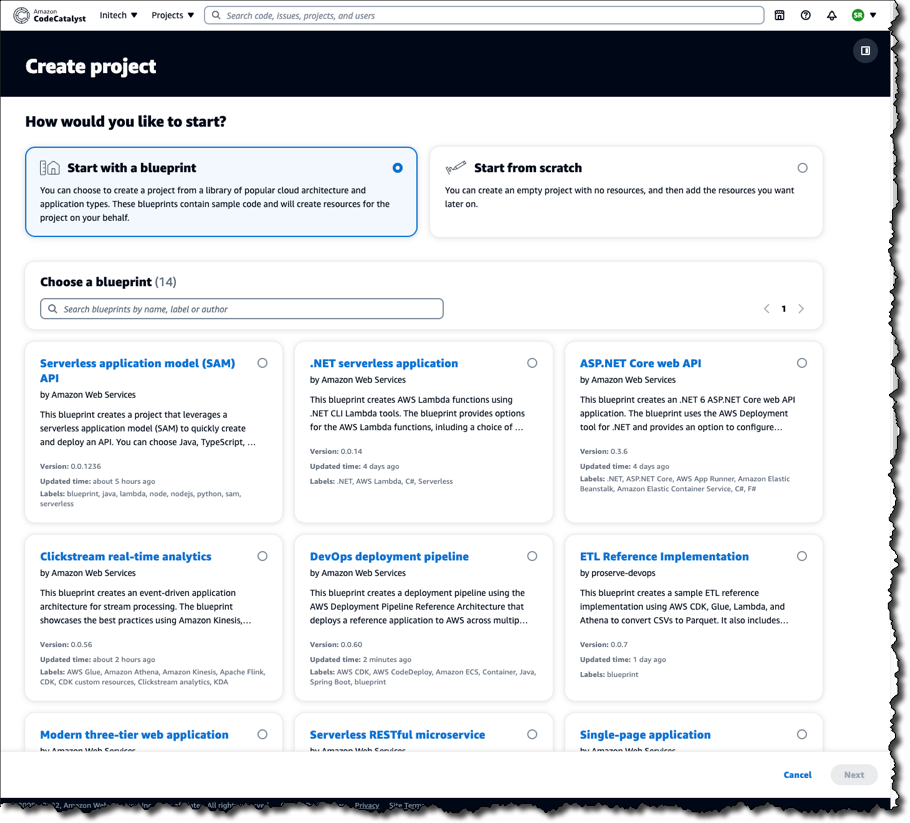
    Amazon Web Services (AWS) this week launched a preview release of the Amazon CodeCatalyst framework that leverages blueprints to automatically provision and configure developer environments in its cloud.

    Announced at the AWS re:Invent 2022 conference, Amazon CodeCatalyst takes advantage of a Project Blueprints tool to launch a source code repository and a project management tracker that are then used to create build and release pipelines. DevOps teams can use either the tools provided by AWS or substitute an instance of, for example, GitHub or the Jira project management software.

    Amazon CTO Werner Vogels told conference attendees the goal is to reduce the friction that developers currently encounter whenever they need to launch a new development project. As part of that effort, Amazon CodeCatalyst promises to make it simpler to consistently replicate development environments using scaffolds in addition to providing dashboards and search capabilities for tracking changes across commits, pull requests and deployments.

    Amazon CodeCatalyst uses a devfile to define the configuration of an environment that comes in four resizable instance options made up of two, four, eight or 16 virtual CPUs. The devfile defines and configures all the resources needed to code, test and debug a project. Devfiles, which are added to the source code repository by the selected blueprint, can also be modified.

    Collectively, those capabilities make it possible to deploy sample TypeScript, Python, Java, .NET, JavaScript, React, Angular and Vue code running in a few minutes. Developers can work with the AWS Cloud9 integrated development environment (IDE) or use tools such as JetBrains IntelliJ IDEA Ultimate, PyCharm Pro, GoLand and Visual Studio Code on their local machine. Developers, as a result, can simply switch between multiple codebases or collaborate with other developers as needed.

    The pipelines can be run on pre-provisioned builds in the cloud or organizations can opt to deploy their own container environments. Developers can incorporate build actions that are built in or provided by AWS partners in addition to incorporating GitHub Actions to compose fully automated pipelines that can be configured using either a visual editor or YAML files. Build and release pipelines enable deployment on Amazon Elastic Container Service (Amazon ECS), AWS Lambda and Amazon Elastic Compute Cloud (Amazon EC2) services.

    In general, Vogels advocated that IT teams should build event-driven applications that are loosely coupled to make it simpler to add new capabilities to existing applications running at scale without impacting the entire codebase. To make it simpler to build those types of applications, AWS added an Amazon EventBridge Pipes tool that creates point-to-point integrations between event producers and consumers in a way that eliminates the need to write that code. AWS also made available in preview a graphical AWS Application Composer tool that makes it simpler to design, configure and build serverless applications using infrastructure-as-code (IaC) definitions.

    It’s not clear to what degree developers will be embracing event-driven applications. As a programming model, event-driven architectures have been around for decades. The issue has been those applications also have tended to be among the most challenging to build and maintain. AWS is now clearly signaling its intent to make building those applications a lot easier.

  • AWS re:Invent — Top 4 Things We Learned This Week

    AWS re:Invent — Top 4 Things We Learned This Week

    Welcome to The Long View—where we peruse the news of the week and strip it to the essentials. Let’s work out what really matters.

    This week, four things that caught my eye from Amazon Web Services’ re:Invent 2022 conference: SnapStart turbocharges Lambda, Graviton3E ARM HPC SoC, AWS continues hiring, and AWS’s origin story. (more…)

  • Implementing Shift Left Security in the Cloud

    Implementing Shift Left Security in the Cloud

    While ransomware has been the leading concern for enterprise security teams over the few past years, software vulnerabilities are nipping at its heels. The boom in cloud-based apps and services and increased digitization of work have been a boon for hackers, who are taking advantage of developers’ and DevOps teams’ attempts to work faster and smarter to keep up with demand. One estimate says that four out of 10 zero-day attacks carried out in the last decade happened in 2021 alone.

    Many things account for this increase. Developers are stretched and are reusing code, which allows for misconfigurations and vulnerabilities to reappear unexpectedly in different programs, and the use of multiple cloud services fragments security measures and reduces visibility into the code running many enterprise functions. This is why developers and security professionals alike are paying more attention to security throughout the software development life cycle (SDLC), particularly in the early stages.

    Shift Left Security Principles and Challenges

    The zero-day surge has led to an increased interest in shift left practices as a way to make security a priority in the development process. Shift left culture brings security into the equation much earlier in the software life cycle, before the software is deployed, rather than patch bugs after users report them. This preemptive approach helps head off vulnerabilities that can affect an application’s security posture unbeknown to its defenders.

    Shift left principles can also enhance security when developers build applications for cloud platforms—such as Amazon Web Services, Microsoft’s Azure or Google Cloud—where visibility into the proprietary code and security tools of the platform can be limited. In a shift left culture, DevOps embeds least privilege policies as part of the daily work on cloud workloads, to protect network infrastructure and avoid granting excess permissions on those workflows.

    For example, setting up role-based access control (RBAC) on Kubernetes containers enforces a least privilege model on those clusters and avoids excessive permissions that can lead to a breach, while removing admin credentials from continuous integration/continuous delivery (CI/CD) workstations shuts off hackers from using those pipelines as an attack vector.

    Shift left security is a great concept, but runs into hurdles in execution, mainly the internal conflict between development teams who want to move at the speed of business while security staff takes a more cautious approach. This leads to friction, with developers warning about access denials affecting their work and causing deployment delays, while the security analysts worry about data breaches caused by too many users with unchecked admin privileges.

    Working out this friction requires a mindset shift, where DevOps understands that security is part of the development process, and management can trust that developers have security in hand. This also requires tools and training to integrate shift left practices, such as platforms that can bridge the security needs of the CISO (by granting greater visibility into the network infrastructure code, for example) and the agility needs of the DevOps teams (by automating security guardrails and entitlements, for example). The ultimate goal is creating what is known as a DevSecOps model, bringing together development, security and operations into one agile, safe and efficient workflow.

    How to Adopt Shift Left Security on the Cloud

    Four best practices can help:

    ● Gain deep visibility: With enterprises often working in multiple cloud environments—and mixing public and private clouds into hybrid infrastructures—visibility into assets typically suffers, which makes getting a clear view of risk difficult. Being able to discover all identities, permissions, configurations and resources in the environment and all the access paths to specific resources can help build a contextual inventory of cloud assets to better manage them and carry out policy analysis.

    ● Prioritize risk: Risk management is a key practice of any security program, but the flood of alerts from multiple cloud providers and systems can overwhelm security operations centers, which are often short on talent and time. Automation tools can now search and prioritize risks across an entire cloud environment, from development to production, spotting problem combinations and alleviating the workload of sorting manually through alerts across multiple silos, freeing the staff to work on higher-priority mitigation and remediation tasks.

    ● Just-in-time access: Zero-trust architecture has become the standard to aspire for most security defenses, but it is often challenged by the difficulties of managing access privileges. Just-in-Time (JIT) access, granting limited-time revocable rights, is a useful tool for building a zero-trust security architecture and enforcing least privilege policies to maintain it. Technology tools that actively manage and monitor developer access to cloud environments, including a strong audit trail of privileged activity, give security a means to enforce JIT access and zero-trust in turn.

    ● Find and prevent vulnerabilities and misconfigurations: Infrastructure-as-code (IaC) has made software deployment in the cloud (much more agile and efficient with the use of virtual machines, containers, microservices, etc. However, security is often an afterthought both pre- and post-production when standing up cloud infrastructure. Organizations should scan code for security policy violations and other risks in order to mitigate flaws before they reach production and to detect and fix problems in production environments. With feedback and automated guardrails built into development workflows, DevOps and security teams can reduce security risks in their code.

    Like zero-trust, shift left is on its way to becoming a standard practice for cybersecurity assurance. But building a DevSecOps model takes more than good intentions. It requires practices, tools and training to execute that model, and a mindset of partnership across the enterprise and with outside cloud and security partners. Only a group effort will provide the cloud security assurance an agile business needs.


  • Datadog Dives Into Universal Service Monitoring

    Datadog Dives Into Universal Service Monitoring

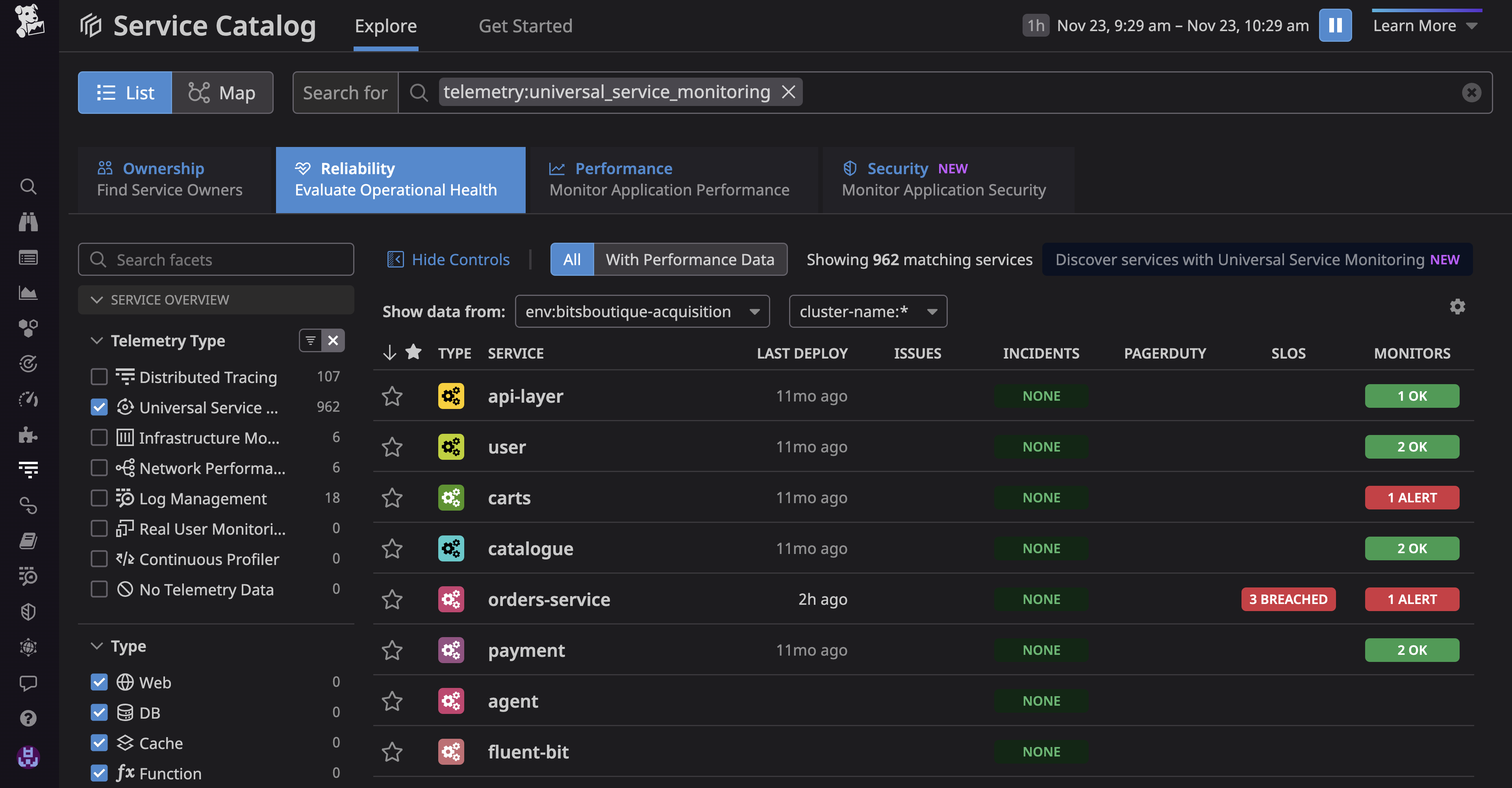
    Datadog, Inc. today made generally available a Universal Service Monitoring service that takes advantage of the extended Berkeley Packet Filtering (eBPF) microkernel in a Linux operating system to automatically detect all the services that make up an application environment without changes to the code used to construct them.

    Yrieix Garnier, vice president of product at Datadog, said as application environments continue to evolve IT teams are now trying to track not just individual microservices but also entire business processes such as order-to-cash. Before those services can be instrumented, however, DevOps teams need a simple way to discover them, he noted.

    Within the Linux operating system, eBPF makes it possible to employ a sandbox environment to identify and map the services that make up an application environment, including both internally developed and third-party services regardless of what programming languages were used to build them, added Garnier.

    DevOps teams also gain visibility into the health of every service and deployment through real-time request rate, error and duration (RED) metrics and correlated infrastructure metrics and application logs. They can then expand monitoring capabilities provided via Datadog agent software to employ distributed traces that can be correlated with observability data.

    The Datadog Universal Service Monitoring service is also integrated with the Service Catalog that Datadog makes available to determine which development team created a specific service.

    The goal is to close a visibility gap that has emerged as more IT organizations align their management efforts around specific application services in the age of digital transformation rather than the components that make up a service, noted Garnier.

    DevOps teams today are simultaneously being tasked with diving deeper into application environments to discover issues before services are disrupted and also tracking the services that span multiple application components. Collectively, the expectation is that DevOps teams will be able to ensure that application services are not just available but also consistently delivered. Ultimately, IT organizations are being tasked with removing much of the guesswork that has historically characterized the management of IT.

    Less clear is how much those shifts will ultimately drive the reorganization of IT teams that are still mostly organized around the platforms they support versus the services being delivered. However, as business leaders increasingly appreciate how dependent the overall organization is on application services, the need to manage them in a more comprehensive manner becomes apparent.

    In the meantime, DevOps teams are evaluating whether their existing tools and platforms enable them to accomplish that goal. Datadog is making a case for employing a service it manages on behalf of DevOps teams versus each DevOps team having to construct and maintain its own observability platform. Datadog, most recently, extended the reach of its namesake cloud-delivered monitoring and observability platform to address continuous testing, application security and cost management.

    It will be up to each organization to decide how best to achieve their observability goals. One thing that is certain is the current level of visibility they have into application environments is not nearly sufficient.