Category: DevOps in the Cloud

  • Policy-Based Governance: Modernizing Authorization for the Enterprise

    Policy-Based Governance: Modernizing Authorization for the Enterprise

    As we’ve moved away from on-prem environments to cloud-based ones and policy managed via code, we’ve inadvertently changed the way the infrastructure is managed. The infrastructure that used to be managed by IT/security teams has now shifted to being managed by the engineering operations teams. With that shift, engineering teams have found themselves now in control of new environments, including the access management part. This new change of control and management of access in the privileged environment requires a new approach to the solutions we use for privileged access governance.

    Shift to Cloud-Based Environments

    Cloud adoption has grown rapidly in the past few years, and while many organizations were already moving to the cloud from on-prem, the COVID-19 pandemic accelerated the transition, causing remote working to become the norm and changing the way responsibilities are managed.

    These organizations found they needed to adopt new ways of working to be able to support and provide critical services to off-site workers. As a result, more than 90% of organizations have adopted some form of cloud-based infrastructure, changing the way they work.

    The cloud is prevailing for tech stacks that need to elevate access governance over the cloud infrastructure. In fact, a whopping 94% of enterprises report they are using cloud services today, and 75% say security is a top concern.

    Cloud Shift, Worldwide, 2019 – 2025

    “The shift to the cloud has only accelerated over the past two years due to COVID-19, as organizations responded to a new business and social dynamic,” said Michael Warrilow, research vice president at Gartner.

    Shift to a Fast-Paced, Customer-Value Mindset

    Since switching to a new agile working environment, customers have gotten used to expecting very fast service. Instead of having a change management process that deploys to production once every few weeks, it’s now common to deploy hundreds of times to production every day.

    Access: required more often, more dynamically.

    Dynamic Changes: With the shift to the agile pace in which the new company works, access has been complicated a hundredfold. (Being able to support customers, fix bugs and being able to move very quickly. Needs to support these hundreds of changes to the customer’s product in their hand.

    Scale of Access has Increased: With the shift to cloud-based infrastructure, it’s now possible to create 5000 databases, for example, with a click of a button. All of them require access management because each one requires an understanding of who needs access and in what way.

    New Solutions are Needed

    The cloud providers, AWS, Azure and GCP, are now the way that people work. And most resources, whether databases or the machines that are running are doing so in the cloud environment. However, companies that shifted to the cloud are dissatisfied with what their legacy PAM solutions can provide them for the cloud resources. These solutions are ill-suited for their new needs. Instead, they need a solution that is agile and scalable to match their new working environment.

    With a perceived lack of options, companies are choosing to have the engineering team put in time to create new solutions. These solutions are meant to provide the following benefits: A frictionless way to gain permissions, an easy way to integrate with the tools their team uses today, and instead of manual provisioning and manual access requests, these solutions should automate those tasks.

    They are creating these in a variety of ways, including the following examples:

    1. Dev Portals: Dev portals are internal developer portals that act as a storehouse of information for the developers in a company. They work by centralizing the data in an internal portal, which offers developers and managers the ability to construct a system that facilitates monitoring of the software ecosystem, receiving alerts about alterations, and visually representing interconnected details. This portal additionally simplifies the task of overseeing diverse facets of the software development lifecycle, encompassing aspects like microservices interconnections, ownership statuses, dependencies, resource allocation, and beyond. By utilizing these, companies are delivering and gaining permissions to cloud environments.

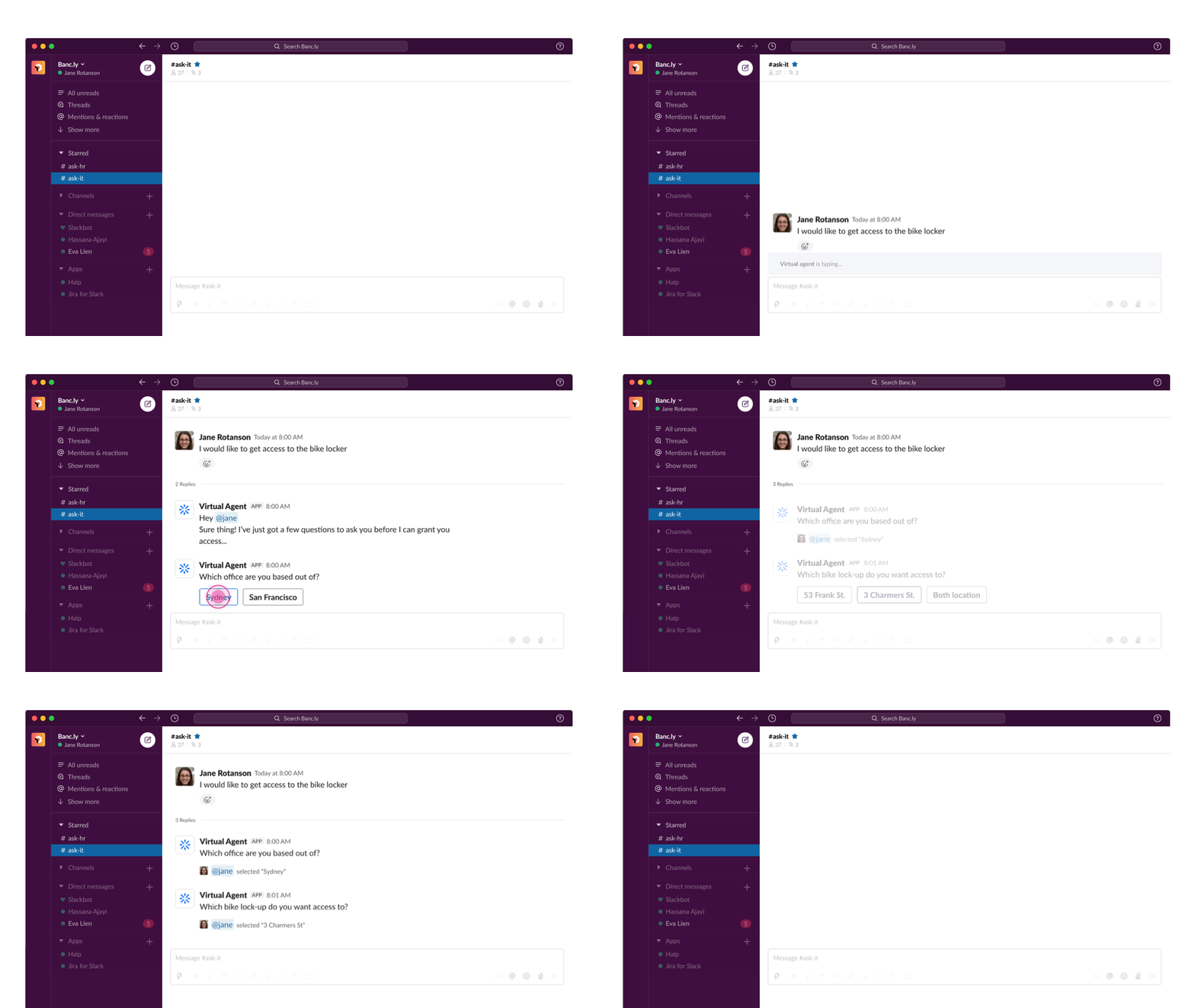
    2. Slack Bots: Many times, a developer will need elevated access to resources or databases, so they need an easy way to request and be granted the permissions they need when they need them.

    3. Terraform Automation: Terraform is an infrastructure-as-code tool that lets you build, change, and version cloud and on-prem resources safely and efficiently. Terraform policies and infrastructure code/policies could also be leveraged to define access control policies. The way it works is that engineers or support teams are required to request a change in the Terraform code in order to gain the access they need. If there is a Terraform code in place describing the policy of groups to role access to the relevant infrastructure they would like to gain access to, they can request that access by requesting a Terraform code change. They would need to understand which parts of the code to change and submit a “pull request” to make the desired change which will resolve in the permissions change. Once a Terraform code change is approved, it changes the policy of access to that infrastructure which will change the permissions that the group has.

    (a) Static: The Terraform state is static, meaning that permissions granted in this way are essentially meant to be long-lasting, standing permissions. In addition, these permissions are usually granted to a role and are very coarse-grained(not granularly defined, as they need to suit the whole role’s needs). This creates an environment of over-privileges. That is why, in many cases where the permissions should be granted to a specific task or person or for a limited time, teams choose to use one-off permission granting to manually grant the permissions. However, these one-off permissions create drifts in the environment essentially if they are not revoked. And since there is no process in place for these one-off just-in-time (JIT) permissions, the revocation needs to also be manual and needs to be remembered to be done.

    (b) “Drifts”: (A drift in Terraform is when the environment isn’t accurately reflected in the Terraform policy). Therefore, by changing the access outside of Terraform, you’re creating a drift because it doesn’t match up correctly, making it a poor answer to one-off permissions. For anything needing high privileges, you want it to be dynamic instead of remaining as part of Terraform.

    4. Jira Service Management With Your Cloud Provider: Integrating Jira with GCP (as a cloud provider example), allows the IT security team the ability to automate servicing access tickets by creating forms where teams can request a certain role or be granted access to a certain project.

    5. Manual JIT Cloud Role: This is a method that allows self-serve permissions to engineers to get the permissions they need on demand. The role needs to be predefined, and essentially, as long as the engineer is part of the group, he or she will be able to gain those privileges on-demand. This reduces the standing privileges in the environment at any given point; however, roles granted are usually for a generic cloud admin rather than being granular, as it’s hard to determine ahead of time exactly what permissions will be needed.

    Problems With DIY Solutions

    Because of the lack of the right tool, companies are spending expensive resources creating their own solutions for access control. Team members know they need something that leverages cloud capabilities rather than their PAM for on-premises. These solutions are time-consuming; companies need to build then maintain the infrastructure. They are also very limited in what they can do since they are not the company’s main concern.

    Policy-Based Governance

    With the growing adoption of cloud-based tools, it’s more important than ever that companies learn to adapt. Engineers have now found themselves in control of permissions in new environments they were not looking to manage. It’s clear that a new approach to access governance is necessary.

    The quickest and most sure-fire way to do this is by utilizing tools deliberately made for the new cloud-based era that address the challenge in a way that is suited to the new, fast-paced, dynamic cloud environment. These new solutions are policy-based and leverage the fact that with the shift to new ways of managing infrastructure, it’s necessary to give the IT and Operations teams more control, granularity and automation.

    Platforms such as Apono for cloud-based permissions management allow organizations to benefit from centralized permissions management, enforce dynamic role-based access controls, monitor and audit privileged user activities and mitigate security risks effectively.

    Final Thoughts

    In addition to the shift we have witnessed in the control of the environment and access governance, organizations are also shifting to delegating more ownership to the engineers themselves. This means providing engineering teams more control of their code — all the way to production. However, with that comes the need to give them only granular control over the environment and provide access management to their specific scope without creating a burden on the teams in managing/granting the access. This leads the operations teams to search for solutions to address the need for access management delegation in the environment. New solutions and platforms addressing the new environment’s privileged permissions management challenge need to take that into consideration as well.

    As a final note, I believe the shift in mindset occurred a few years ago already. However, we are only now realizing some of its effects. One of them is the shift in privileged access challenges and all that comes with that. Seeing the many internal solutions that small-to-large companies have created for themselves gives us an understanding of how this evolved market isn’t being addressed with the same platforms that have existed for well over a decade.

  • Evolution of Toil Identification and Mitigation – A Classic SRE Challenge

    Evolution of Toil Identification and Mitigation – A Classic SRE Challenge

    Ingo Averdunk, leading architecture and solutions for cloud service management and site reliability engineering for IBM Cloud, contributed to this article.

    Christine White, architect at IBM Consulting, also contributed to this article.


    When many people think of operations, they often associate it with manual, labor-intensive work. This is because operations traditionally encompass a wide range of activities that involve managing and executing tasks related to producing, distributing and maintaining goods and services. Information technology (IT) is not different: Manual work has traditionally been a significant component of various tasks and processes. Examples are server maintenance, software installation, troubleshooting and network configuration, which historically required manual intervention and human expertise. Much of the work is inherently repetitive by nature, time-consuming and prone to errors. We call this work “toil”, the kind of work tied to running a production service that tends to be manual, repetitive, automatable, tactical, devoid of enduring value and that scales linearly as a service grows.

    Toil

    This toil has always been there. And toil leads to burnout, increased errors and reduced scalability. Only how we have addressed it has changed. While toil remains, toil mitigation has evolved.

    In the beginning, toil was addressed through labor arbitrage. Between 2000 and 2010, we leveraged labor arbitrage to reduce the cost of manual work by outsourcing and out-tasking activities to near-shore and later off-shore countries. When there is a problem, the person who can solve it steps up. Then, to manage it better, we started to do workload or work item management. You have systems, like prioritized backlogs, and we started putting a structure on how we solve these problems. But still, it was all resource-based; everything was resource-intensive. And that is why the engineers became more of the subject matter experts (SME). Being a subject matter expert took time, and being critical to operations became exhausting. And the repetitive manual activities required took time and effort they didn’t have.

    As issues became repetitive, we started thinking about scripting. We evolved from a complete labor arbitrage mentality to writing spot scripts. Engineers began to use scripts to solve a small part of the most oppressive problem.

    Tools started to be developed to enable and automate some of the work. Organizations purchased tools, and education of the tools commenced. It became important to be an SME in your area and an SME of the tools in your area. However, the tools were specific to certain functions and features that they provided, and the software development life cycle (SDLC) had a lot of nuances that many of the tools did not capture. So even when the tools helped, it created this mass of white spaces that could not be integrated easily. Tools were very format-specific and didn’t have the flexibility end to end integration. Newer problems emerged as formats were different, speeds were different, and other differences manifested. Even as this initial approach was an improvement over the labor arbitrage mentality and reduced the amount of manual effort required, it often resulted in complex and brittle systems that were difficult to maintain and debug.

    Automation

    From 2015 to 2020, automation became more prevalent. On one side, the cost levers of labor arbitrage were reduced, and due to low skill, quality suffered. Thanks to technological advancements, automation in various flavors became a viable alternative: Runbook automation, robotic process automation, etc.

    Aligning tool isolation with SDLC nuances required an end-to-end automation philosophy. We need to do automation across the board. Toil elimination was a goal of end-to-end automation, and that obsession led to SRE thinking and the principle of capping operational load. An SRE spends only 50% of his time on operational activities, and the other 50% on “engineering” (improvements): Identification and elimination of problem areas, improving and integrating tooling, etc. And thus, the genesis of the next wave of reliability engineering principles began.

    Parallel to this, adopting DevOps and Agile practices as well as cloud computing enabled IT teams to define and manage infrastructure and application configurations through code, allowing for automated provisioning and scaling. Applications are designed for reliability and instrumented for observability, providing insights into the production use. Traditional organizational barriers are broken down and teams cooperate across the entire SDLC with a shared goal that balances velocity and quality.

    The new focus on leveraging cloud-native technologies and practices to build scalable, flexible and resilient systems allowed SRE teams to adopt cloud-native technologies such as Kubernetes, containers and serverless computing to build systems that are designed to be highly available, fault-tolerant and easy to maintain.

    Toil mitigation and the SDLC lifecycle have evolved from reactive handling of problems to a proactive approach to operations, where alerting is maturing, and other sophisticated instrumentation is implemented. A proactive approach underlined the importance of observability and monitoring. SRE teams are using observability tools such as Prometheus, Grafana and New Relic to monitor their systems in real-time. The ability to identify potential issues before they become incidents emerges.

    AI Infusion

    The next step is being more prescriptive and predictive. That calls for a good bit of AI infusion. We have historical knowledge management systems that will tell us what went wrong, how it went wrong, how it got resolved and how long it took. We can augment that knowledge base with publicly available and curated knowledge.

    Starting in 2020, AI and machine learning are being used in IT for tasks such as anomaly detection, predictive maintenance, risk assessment and automated incident response, reducing the manual effort required for monitoring and maintaining systems.

    AI systems can learn from all this and not only predict issues, but when issues happen, they also auto-resolve. An extension of AI, Generative AI, will disrupt this event more. Prediction of a problem will also lead to the generation of executable runbooks and playbooks, which are agnostic to specific types of automation or automation tools. New challenges such as data quality, model training and explainability have arisen simultaneously and human intervention is still required until we can reach a certain comfort level. There will need to be a manual effort to look at Generative AI proposed solutions, approve them and prove the solutions in lower-level environments, before applying them into production environments.

    In the next 18 – 36 months, we will see that morph into risk-taking, where Generative AI will become digital operations. If we look at an Ops team or a SRE team, there are different personas, and we firmly believe that those personas will be assisted by an AI bot. These bots will participate in daily standups, and they will learn. They will participate in issue-resolution processes, and they will learn. They will start participating in retrospectives, and they will learn. This “AI persona” will become a digital worker in a highly integrated digital team. The manual tasks that once were solved through AI are now becoming complex decision-making processes. We are entering the 4th wave of automation improvements using Generative AI.

    Be Prepared

    Just as the invention of fire, tires, the printing press, the telephone and the lightbulb, what we do with this advancement will greatly shape our future. We must be prepared. And the best way to be prepared is to upskill our practitioners with newer technology skills like AI. The upskilling needs to include all the core and peripheral benefits and concerns to help them manage and improve upon the current day. We need to clarify roles amongst practitioners so there is not an “I’m being replaced by a bot” mentality, and most importantly being open-minded about the possibilities, building on those possibilities and embracing risk rather than fighting it!

  • How to Navigate App Modernization Strategies for the Cloud

    How to Navigate App Modernization Strategies for the Cloud

    In today’s fast-paced digital landscape, organizations continuously seek ways to innovate and enhance customer experiences while optimizing efficiency. One of the most transformative strategies is modernizing applications for the cloud. App modernization isn’t just a technology upgrade. It’s a holistic business transformation. The cloud’s elasticity and scalability present opportunities to create deeper customer engagement, foster seamless partner integration and unlock valuable data insights. However, this requires a thoughtful approach that aligns with business goals and technological aspirations.

    Let’s look at some best practices for modernizing apps for the cloud and navigating potential challenges.

    The App Modernization Process

    It’s important to determine whether the cost of migration will lead to better efficiency and customer engagement that will yield an increase in return on investment (ROI). This approach allows businesses to address current issues and future-proof their data stacks.

    After assessing the cost and ROI considerations, organizations need to follow a systematic process to successfully modernize an app for the cloud. The first step is to evaluate the existing app’s strengths, weaknesses and areas for improvement. It’s crucial to assess an app’s compatibility with cloud platforms and set clear modernization goals.

    Following the assessment, design a cloud-native architecture that aligns with the cloud’s scalability, elasticity and distributed nature. This may involve rearchitecting the app to include such cloud-native components as microservices, containers, or serverless computing. Once the architecture is in place, migrate the app’s data from on-premises or legacy databases to cloud-based storage solutions to ensure data availability, scalability and ease of management in the cloud environment.

    The next step involves rewriting or modifying the app’s codebase to take advantage of cloud services and APIs. Specific modules or functionalities may need to be re-engineered to enhance performance, scalability and integration capabilities. Perform comprehensive automated load and security testing to verify reliability and performance in the cloud.

    Once the modernized app has been tested, deploy it on the selected cloud platform. Implement monitoring and logging mechanisms to gain insights into the app’s behavior, performance and user experience so it operates effectively in the cloud environment.

    Navigating App Modernization Challenges

    While the benefits of app modernization are significant, challenges can arise during the process.

    One of these hurdles involves dealing with legacy constraints. Legacy applications often have complex architectures that complicate modernization. Careful planning is required to update outdated technology stacks and move from a tightly coupled system to a loosely coupled one.

    Another obstacle pertains to data migration complexities. Transferring large amounts of data from on-premises systems to the cloud demands meticulous planning and execution to maintain data integrity, security and minimal downtime.

    Integration presents another potential difficulty. Modernized apps often need to integrate with other systems, both on-premises and in the cloud. Many cloud vendors offer tools and programs to aid in migrating data. These, coupled with credits to be used as apps are migrated, can significantly reduce costs.

    Security and compliance are critical considerations when moving to the cloud. Cloud environments require robust security measures to protect sensitive data, and organizations must comply with relevant regulations and industry standards.

    Effective change management strategies are another aspect to consider to ensure a smooth transition for users and stakeholders. App modernization is a business process modernization representing a significant change in business operations.

    In-House Vs. Outsourced App Modernization

    Choosing between in-house and outsourced app modernization depends on several factors.

    First, if an organization has skilled developers with cloud expertise, handling app modernization in-house is a viable option. On the other hand, if a team lacks the necessary skills, it may be more practical to outsource the task to a cloud service provider or a specialized development partner. It should be noted that if the development work is outsourced, it’s important to keep the app business owners involved to ensure that the modernized solutions yield the expected benefits.

    Another consideration is the availability of resources, such as time, budget and staffing. App modernization projects require dedicated efforts, and outsourcing becomes appealing if internal resources are limited. By entrusting the project to external professionals, organizations can ensure it receives the attention and resources needed without burdening the internal team.

    Evaluating whether app modernization aligns with an organization’s core competencies is also essential. If the application is not directly related to the core business, outsourcing can free up internal resources and redirect them toward more strategic initiatives. This allows an organization to concentrate on areas in which it has a competitive advantage and expertise while still benefiting from the app modernization expertise of external partners.

    Pioneering the Future

    Modernizing an app for the cloud is a transformative journey that holds the potential to enhance customer experiences, optimize processes and unlock valuable insights. Navigating challenges through meticulous planning, robust testing and adherence to standards are crucial, whether opting for in-house expertise or external collaboration. By embracing cloud-native principles and using advanced technologies, organizations can position themselves at the forefront of innovation, ensuring lasting success in the dynamic landscape of the digital era.

  • Avoiding Mistakes in Multi-Cloud Configurations

    Avoiding Mistakes in Multi-Cloud Configurations

    The digital sky is bursting with clouds of every kind, and organizations are reaching out to grasp several at once. They seize the opportunities offered by diverse cloud providers, breaking free from the confines of a single vendor. Their approach is a powerful strategic move. Its promise—slashed costs, bolstered resilience and unmatched data back-ups; its bottleneck—configuration issues. And the tightrope between reaping multi-cloud benefits and stumbling into cybersecurity risks is thin.

    “The foremost area where IT leaders have to adapt is cybersecurity,” said Aleksandr Morozov, a cloud security researcher and CTO at Oasis Defender. “As digital interactions multiply, so does our vulnerability to cybersecurity threats. We have to defend against attacks, safeguard data privacy and adhere to international regulations. The adequacy of cybersecurity measures we take directly impacts business integrity and consumer trust.”

    Given these stakes, multi-cloud configuration seems to be an even more tricky aspect to stay on top of. Any slip-ups can spiral into escalating costs, performance hitches and glaring security vulnerabilities. Knowing how to configure multiple clouds mistake-free is essential to keep the promise of multi-cloud alive.

    Multi-Cloud Adoption is Escalating

    On the brink of adopting multiple clouds, a question arises: Why pay more when you can pay less and get more? Organizations steer towards the most cost-effective cloud services, making sure each application finds its optimal cloud match to optimize performance and costs.

    The global march toward digital transformation results in a whopping 92% of organizations already using a multi-cloud approach or in the process of adopting one. Statistics suggest an average usage of 2.6 public clouds and 2.7 private clouds among organizations.

    The multi-cloud setup beckons organizations to distribute their workload across a spectrum of cloud services, each boasting unique benefits. This distribution not only fuels innovation but also provides organizations with robust data recovery mechanisms to use in the event of breaches.

    Multi-cloud also flings open the gates to escape vendor lock-in. No longer shackled to the offerings of a single cloud provider, organizations go for cherry-picking cloud features, explore diverse pricing options and choose geographical locations for sensitive data storage.

    In many regions worldwide, stringent local data regulations dictate the storage of sensitive data within that region’s borders and within specified cloud environments. By leveraging multiple clouds, global organizations can stay compliant with relevant regulations and data governance policies.

    With digital transformation beckoning, organizations are just beginning to harness the benefits of multi-cloud. However, with multiple clouds come multiple risks. Configuring and orchestrating several clouds typically pose challenges, and businesses across industries require robust multi-cloud tools and strategies in place.

    These Industries Need Multiple Clouds More Than Others

    The shift towards a multi-cloud paradigm among businesses isn’t merely a trend chase. It’s a strategic move to elevate operational processes.

    Although the use of a multi-cloud approach is bound with configuration and data breach risks, employing multiple cloud services from different providers brings game-changing benefits. This approach allows businesses to enhance flexibility and improve service monitoring and cost-efficiency—all while helping them better adapt to market changes and technological advances.

    On top of that, a multi-cloud strategy lays a solid groundwork for implementing advanced analytics and AI solutions. Businesses handling vast data, requiring high computational power, or having strict regulatory compliance needs stand to benefit most from this approach.

    “IT leaders must prioritize the infrastructure for remote work. It’s essential that this infrastructure supports seamless collaboration, regardless of geographical boundaries,” Morozov says.

    The global insurance sector is clearly betting big on multi-cloud, with statistics indicating an average use of 11.4 clouds in 2023. Insurance businesses handling massive amounts of sensitive customer data employ multiple clouds as the key to operational efficiency and compliance with data regulations.

    Banking and finance organizations stick to strict industry regulations and use multi-cloud environments to save costs, improve data security, and recover data easily. They seek to use the best features offered by multiple cloud providers to meet data storage rules and avoid reliance on a single provider.

    Besides, financial service organizations often experience rising costs and growing operational issues. That urged them to shift to a multi-cloud approach — their great strategic move. With this transition, they can see a 40% drop in spending by having a clear view of cloud activities across various regions.

    Similarly, health care businesses embrace multi-cloud to distribute workloads across different cloud services and keep their critical and sensitive data secure. They need a reliable backup in case of system failures to improve and maintain high standards of patient care and operations.

    The telecommunication sector is no less in need of a multi-cloud approach. In this field, escaping vendor lock-in and optimizing costs by combining a variety of vendors serve as the propelling forces.

    Retailers typically use around eight clouds from multiple vendors. Their multi-cloud strategies are cost-efficient, help improve scalability, and enhance customer experience by tailoring different cloud services to specific workloads and geographical locations.

    Configuration Mistakes: Why They Occur While Managing Multiple Clouds

    Managing many clouds means juggling a set of rules and systems from various cloud providers. Different settings in each cloud platform can lead to errors, especially when getting clouds to work together. Even a minor mistake can cause issues affecting performance, security, and costs.

    Besides, handling multiple clouds requires special talent. To err is human; common errors involve setting up access controls incorrectly, mismanaging user permissions or incorrectly configuring workloads. Small oversights lead to huge security and operational problems, and without the right training or experience, the chances of making errors increase.

    Configuration mistakes often come from the complex nature of multi-cloud setups. Moving into many clouds means dealing with different infrastructures, APIs, databases, networks, and security systems daily.

    The complexity of multi-cloud makes getting a full view of the whole setup tricky. This lack of clarity can hide configuration mistakes, letting them linger undetected or delaying fixing processes.

    Last but not least, different policies across cloud environments also complicate things. Each cloud setup might have its specific policies and configurations. Without reliable tools, clear rules and ongoing learning, configuration mistakes are imminent.

    How to Avoid Multi-Cloud Configuration Mistakes With AI

    Navigating through multiple clouds can feel like sailing in stormy seas, and organizations need robust tools and reliable solutions to mitigate performance issues and stay safe.

    AI-driven software allows for unified visualization and configuration of multi-cloud security. Let’s see how it aids in the journey.

    Unified Dashboard

    Multi-cloud management solutions bring together data from different cloud providers onto a single dashboard. This makes it easier to see and manage security across an organization’s cloud setup, making the process less complicated.

    Smooth Integration

    A unified interface helps different cloud systems work together smoothly. That means fewer errors and better cooperation between cloud environments.

    Better Visibility

    Having data put together, organizations get a better view of security setup across different clouds. They can see and fix issues faster while keeping multiple clouds secure.

    AI and Machine Learning

    Solutions hinge on using intelligent technology to spot potential threats quickly. Fast actions help reduce the negative impact of any security issues and keep multi-cloud setups shielded from breaches.

    Compliance Monitoring

    The cloud setup has to align with industry rules and standards, which becomes more complicated while using multiple clouds. Using a unified system, organizations can stay compliant and avoid legal issues.

    AI-driven solutions offer an intelligent way to untangle the complex knots of multi-cloud configurations while assuring a safer and more efficient multi-cloud experience.

    Final Thoughts

    The multi-cloud trend is on the rise, offering both opportunities and challenges for organizations. It allows businesses to pick cloud features from multiple providers, easily comply with regional data rules and avoid being tied to just one vendor.

    Different sectors like finance, health care and retail are adjusting their cloud strategies to adopt multi-cloud. Yet, configuring multiple clouds is a tough nut to crack. Diverse policies, different settings across cloud platforms and possible human error complicate multi-cloud configuration.

    However, AI-driven tools can offer a unified dashboard for a better view and management of security across cloud platforms, simplifying multi-cloud setups. Using AI and machine learning for managing clouds leads to quicker threat detection and resolution and helps organizations keep their strategies within legal limits.

    In the multi-cloud discourse, careful configuration supported by AI is a key to receiving multi-cloud benefits while managing the risks efficiently.