Category: DevOps in the Cloud

  • Migrating to the Cloud? Some practical advice

    Migrating to the Cloud? Some practical advice

    Oh if the world was only Greenfields. If everything was new and we didn’t have to worry about legacy systems, what a wonderful world it would be. But that is not the way of it unfortunately. More times than not using the cloud for our applications and infrastructure means migrating some existing infrastructure from an on premises install up to the cloud. How do you do that successfully?

    You have to break some eggs to make an omelet, but migrating to the cloud isn’t like whipping up breakfast. We can’t afford down time, broken links or broken apps. As more and more apps are moved to the cloud, a solid process needs to be put in place. I asked a few people I know to help me put together a checklist of things to consider and do in moving from on prem to the cloud or more likely deploying a hybrid environment with both on prem and cloud.

    I asked my friend JP Morgenthal who knows a thing or two about cloud migration and DevOps and I dug in a bit with Alex Rosemblatt from Datadog. Datadog actually has quite a bit of experience in this area. Their product/service monitors both cloud and on prem servers side by side, so they deal with this very situation quite a bit. Taking what both of these gentlemen had to say, here is a checklist that should help you:

    1. Evaluate application for functional limitations to running in the cloud. This could include operating system dependencies, storage performance, network bandwidth/performance. Some of the key requirements to note:
      CPU
      Memory
      Storage
      Attached storage vs block shares
      IOPS
      DR
      Performance
      Underlying hardware
    2. Choose your method of migration: Lift-n-drop or re-platform. Lift-n-drop is simply porting the application to the cloud without modifying the architecture and providing all the application components. Re-platforming takes into account using cloud services where possible in place of existing application components.

    3. Pick an IAAS vendor, some criteria to use:
      Available functionality – auto-scaling, additional services etc
      Instance type/AMI availability
      Regional zone distribution
      Support SLAs
      API availability
      Performance metrics/log access

    4. Put in place a migration project management plan that includes:
      Cutover date selection
      Testing project plan
      Acceptable performance benchmarks
      Cutover day ops
      Internal communication and additional training
      Ops team
      Dev team (s)
      Changes in app dev to account for new functionality?
      QA team
      Management
      Non-tech org teams affected

    5. If hybrid architecture (and it should probably be hybrid), select how the existing data center will integrate with the cloud service. This could be Layer 2 networking through telecommunications provider or Layer 3 through Internet. Now would also be a good time to think about how you will monitor both on prem and in the cloud. Again Datadog does this side by side.

    6. Establish the network scaffolding for the application. Develop the allowed pathways for various application components to communicate. This will simplify the deployment of application components later. Test that the right ports are open for sending and receiving.

    7. Deploy the application in a single subnet with full Internet access. Remove any barriers to ensuring the application will operate on the cloud service provider’s resources. This is simply a test environment to make sure the baseline components will operate and communicate with each other.

    8. Deploy the application into the appropriate subnets to ensure servers are not available via the public Internet.

    9. Port the data from the current application environment

    10. Perform a complete regression test of the system

    11. Add additional testing to see how the system will perform if cloud services become unavailable

    This is obviously not an exhaustive list, but should give you a start in your planning. Eventually you are going to have to make a cloud migration if you have’nt already. Better to start planning for it now.


  • The Internet of APIs

    The Internet of APIs

    The Internet moves at the speed of light. Not only that, but the terminology used when describing The Internet seems to change with the tides. One of the newest phrases to start making the rounds is “The Internet of APIs.” In an attempt to understand exactly what it is, I went looking for a definition and was unable to find anything at all. As such, it’s time to put a definition out there.

    There are two important words in the phrase: “Internet” and “API”. Let’s start with the last word first and work backwards. What exactly is an API? Luckily, the definition of API is pretty settled. For our purposes, I like the definition given to us by API Evangelist:

    An API, or Application Programming Interface, at its most fundamental level, is how software applications talk to each other using the Internet. An API allows you to open up data and other digital resources, to public developers, businesses, or even between departments and locations within a company. APIs are increasingly the way in which companies exchange data, services and complex resources, both internally, externally with partners, and openly with the public.

    And while we’re at it, let’s look at the popular definition of “Internet” given to us by Webopedia:

    The Internet is a global network connecting millions of computers. More than 100 countries are linked into exchanges of data, news and opinions.

    So we’re narrowing down on a definition of The Internet of APIs. But we’re not quite there yet. Let’s look back at recent history to see if we can clarify things a little bit. The modern-day web API has been around since Salesforce introduced it’s API at the turn of the century. In the year 2000, they introduced an XML-based API that kicked off the web services API era. And while there were a few other web services APIs that came out afterwards (including eBay and AWS); but things didn’t really start getting serious until Flickr launched their API in 2004. The social network revolution, sparked by companies like Friendster, MySpace and Twitter, brought about a real need to securely exchange information between multiple applications. So when Facebook and Twitter announced their own APIs in 2006, that was when the usage of APIs grew to include identity management in addition to the exchange of data it had become known for.

    And then came smartphones. APIs exploded in popularity once the smartphone industry took over the continent thanks to Palm and Blackberry; then came iOS and Android. Why the popularity explosion? Well, applications needed to be made for these new (popular) form factors. However, these new form factors had very specific requirements around data usage, drastically different screen sizes than application developers were traditionally used to, along with previously unseen device capabilities. Add to that the fact that mobile applications needed to figure out a way to share data with each other securely and a perfect storm of needs presented itself.

    While all of this was going on, the wireless capabilities available to the consumer also changed. In the year 1999, one year before Salesforce released their web services API, 802.11a and 802.11b hit the market. WiFi was still a growing technology, but the introduction of 802.11a and 802.11b changed everything. The prior iteration of 802.11 had a transfer rate of 2 Mbps; while a allowed for short range speed of 54 Mbps and b allowed for longer range speed of 11 Mbps. The cost of b was also a lot lower than a.

    Also in 1999, the first full Internet service available on a phone was launched in Japan by NTT Docomo. This was during the days of 2G networks. In the US, around the same time, cell phones became affordable to everyday consumers. It was a time of incredible growth in the wireless industry and over the following years, cellular networks were stretched to their limits.

    This is the environment that led to the growth of the web service API. There were a few things that were extremely important to the upcoming boom:

    1. A speed boost in wireless networking was required; and
    2. Wireless networking hardware needed to get into the hands of more people; and
    3. The cost of wireless networking hardware needed to drop; and
    4. Cell phones needed to get in the hands of more consumers; and
    5. Internet service needed to hit the cell phone.

    Add all of that to the growth of social networking and identity management via API, and a perfect storm of circumstances presented themselves. More and more APIs were built utilizing a person’s identity for personalization and security.

    Thus the Internet of APIs was born.

    So, based off of the existing definitions as well as recent history, what exactly is “The Internet of APIs”? The Internet of APIs is:

    A global network of structured data, digital resources and commands accessible via a growing interface that allows applications and devices to exchange information using any and all communications protocols available.

    Since the creation of the ARPANET (arguably, the Internet’s predecessor) packet-switching networks have been utilized as an efficient and reliable way to exchange data. So what’s different about the Internet of APIs since at its core it’s about exchanging data? The main difference lies in the fact that the data provided by the Internet of APIs is data with structure. It’s data that is being shifted around and meant to be consumed in ways that may not possibly have even been foreseen by the creator(s) of the data. The Internet of APIs allows data that may have been designed for one thing to be used for something completely different; thus facilitating the connection of two completely different applications in ways sometimes unimagined.

    The Internet of APIs is the underlying foundation to the Internet of Things. Without the capability for connected devices to personalize their usage according to the individual, as well as share data, the Internet of Things could not exist. Without the improvements in specifications in both wireless and cellular hardware, the Internet of Things could not exist.

    The Internet of Things is powered by the Internet of APIs; and as the Internet of APIs grows in scope and capability, the same will happen to the Internet of Things. Without regularly updated data and personalization, a hardware device is dumb. A thermostat is just a thermostat without the underlying API. But with the API, a thermostat becomes a Nest. Without an API, a light bulb is just a light bulb. But with the API, a light bulb becomes a Philips Hue light bulb. Without the Internet of APIs, a person walks in to their home, walks in to their living room, flicks a light switch and turns their heat up. With the Internet of APIs, a person walks in to a warm, well lit home because their thermostat turned on five minutes before they got home and their lights turned on one minute before they walked through the door.

    Data and personalization: that is the power of the Internet of APIs.

    About the Author/Kurt Collins

    Kurt-Collins-devopsdotcomKurt Collins is Director of Evangelism at built.io (link). Before that, he started his engineering career as an intern at Silicon Graphics (SGI) where he worked on debugging different parts of their UNIX-flavored operating system. Two years ago, Kurt co-founded The Hidden Genius Project along with eight other individuals after they all saw the screaming need to increase the amount of Black men in the technology industry. Mentoring young people interested in the technology industry is a personal passion of his. Today, he continues his work with tech startups and non-profits alike.

  • Optimize your spend on AWS through Reserved Instances

    Optimize your spend on AWS through Reserved Instances

    Over the last few years Amazon has gradually raised its compute capacity and provided the user with a set of advanced analytical and structural services. For each service, you can expand precisely for the amount of resources you actually need and shall pay for each resource usage at the end of each month.

    In the spotlight, Amazon EC2 instances which carry along an entire surplus of attributes to help you in deploying, managing and scaling up your applications, Reserved Instances(RI) are another feature making itself really useful in resource management. In this blog we will see what actually are these Reserved Instances also known as RI and why are they named so and how are they cost effective.

    Reserved Instances:

    Reserved Instances are the best money saving technique considering cloud costs. Here’s the catch ” they  require  no methodological optimization effort, no Devops wizardry and no auto scaling structure”.

    RI gives you the power to escalate the roof of your savings by encountering all your business’s call.

    1). Term: 1 or 3 years is time period proposed by AWS for Reserved Instances usage.

    2). Region: Reserved Instances are accessible in all AWS regions. They are also obtainable in Amazon VPC and Dedicated Instances.

    3). Operating System: Platforms for which Reserved Instances can be purchased are Microsoft SQL Server, Amazon EC2 running Linux/UNIX, Microsoft Windows Server, SUSE Linux and Red Hat Enterprise Linux.

    4). Payment Option: There are three payment alternatives provided by RI which are as follows:

    a). Upfront Option: With upfront payment you pay in once for whole RI and you get an extensive discount over On-Demand Instance pricing.

    b). Partial Upfront Option: In this payment option, you are charged a discounted hourly rate as a low upfront payment for the Instance for time span of the RI term.

    c). No Upfront Option: This option provides a discounted hourly rate for the time span of the term and does not require any upfront payment.

    Why Is It called “Reserved”?

    These Instances are named as “Reserved Instances” as they reserve the server capacity. They provide you with a formal assurance that you will be able to launch these RI fully whenever you need them without a popup of insufficient capacity, any time you attempt to start an EC2 instance.

    HOW RESERVED INSTANCES WORK:

    I assume the information above makes you well acquainted with what Reserved Instances are and why they are named so. Now lets consider their functioning.

    To work with your reserved capacity, directly launch an EC2 instance with the same configuration as the reserved capacity that you are capable of purchasing. Instance comprises of varying combinations of platform type, memory, storage, availability zone and instance type. As long as you have an active Reserved Instance, AWS will automatically apply the discounted hourly rate for your EC2 instances. If at any point your purchased Reserved Instance gets expired, then at this situation you will be charged on the basis of On-Demand pricing until and unless you purchase new Reserved Instance of the same capacity.

    All these reservations are applied at the infrastructure level. Once you have a single account, your reservation will be shared amongst the different instances based on run-time. Incase you are a multiple account holder under the same parent account, your reservation gets shared across all accounts.

    There’s also an option available to purchase as well as sell these Reserved Instances through the EC2 Reserved Instance Marketplace thus providing you with the flexibility to sell unused Reserved Instances to any other businesses and organizations.

    Benefits:

    1). Cost Effective: RI equips you with a sufficient discount which is nearly around 75% when compared to On-Demand Instance pricing.

    2). Modifiable: If there arises a situation where you are required to change the zone of your RI then it can be easily done by moving your RI to another available Zone within the same region, by changing its Network Platform as well as instance size of your reservation to another size of the same instance type at no extra cost.

    3). Reliable: To build up your confidence, RI supplies you with a capacity reservation to launch the number of instances you have stockpiled when you need them.

    4). Easy to use: RI usage is similar to that of EC2. While evaluating the bill , system will undoubtedly apply RI rates to reduce your costs.

    5). Marketplace Available:If you want to impose any sudden or planned changes than RI marketplace gives you the opportunity to sell these Reserved Instances.

    Reserved Instance Pricing:

    It’s pretty undoubted that if used with a fair setup, RI helps you to save dollars on AWS in many ways. But if you purchase a massive number of RI in an AWS region, you will automatically be receiving discounts on your upfront fees and hourly fees for future purchase of RI in that AWS region.

    The figure below represents the RI Tiers pricing list:


    RI

           Fig: 1

    So far Amazon Web Services has created exceptionally compelling and powerful features with the Reserved Instances. They not only provide cost benefits but even warranty on the capacity. Though, to be flexible it requires cautious guardianship of your cloud substructure and reservation inventory. So go ahead with reserved instances if you’re looking to deploy a wide scope of apps and websites with a long term no hassle approach.

  • Confident Financial Solutions is cutting edge with ChatOps for log monitoring

    Confident Financial Solutions is cutting edge with ChatOps for log monitoring

    cfs-logo-retina-c0cdab06f0c380b5877a5bf0c779acafIf I told you a company named Confident Financial Solutions is on the front line of adopting DevOps methods to better serve their customers you might say, “Come again?”  Let’s face it Confident Financial Solutions doesn’t sound like the type of company that would be stretching the envelope of technology. But don’t let the name fool you.  Confident Financial Solutions is a web-based SaaS auto repair loan company and part of the Boulder startup scene. Tech is in their DNA as much as finance and cars are.  So the fact they are using ChatOps to monitor and alert based on their logs should not be suprising.

    What CFS does is offer consumers instant approval on auto repair loans. If your car breaks down and the bill is more than what your budget can handle right now, they allow you to finance the repair. Using a web app interface the entire process is handled online. In that regard they are no different than many other SaaS based apps. So why shouldn’t they use the latest and greatest tools.

    Among the tools they use are Slack for ChatOps and Logentries for log and analytics. Using Slack really sped up the communication among the team according to Kyle Lamy, lead software engineer at CFS. So much so that the email alerts and information generated by their cloud based log management system actually slowed the team down.

    Lamy says that communicating via email versus Slack was just dragging everything down. Email with its long threads and back and forth was just not operating at the speed that CFS business demands. Also switching back and forth from email to Slack was a major time drag. He lobbied both Slack and Logentries to integrate.

    Slack and other ChatOps programs of course recognize that the value they deliver is tied to APIs and integrating with 3rd party tools. Otherwise they are little more than instant messengers.  That is the real pay off for ChatOps. Slack is hard at work with API development as well as acquiring new features.  They just announced that they have acquired Screenhero, a YCombinator spawned screen sharing app that will be integrated into Slack. At virtually the same time it was announced by Logentries that they were now integrating with Slack as well.

    In my conversation with Lamy he said having Logentries alerts and analysis in Slack allowed the team to stay in one tool and more importantly put the responsiveness of his team up to warp speed compared to email.

    Kyle says he sees even more ways that ChatOps applications can integrate with other tools to continue to accelerate team performance. He has already given both Slack and Logentries suggestions on things to do to make the integration even better.

    Based on Kyle’s recommendation I signed up and have set Slack up here for our devopsy.kinsta.cloud team. Being virtual and spread out ChatOps has immediately helped. I set up several different groups so as not to overload the entire team and we are already using it. For ongoing communications it is just so much more efficient than long email threads. It really is a no brainer.

    So if you are not using ChatOps at your company what are you waiting for? Go download Slack for free and give it a try. If you don’t see how it helps please tell me why not.

  • Turn IT into a Service Catalog

    Turn IT into a Service Catalog

    Unless you live under a rock in the world of cloud computing, you’re probably aware of a growing generational gap between public clouds and enterprise IT. (more…)

  • Containers Are Designed For an Antiquated Application Architecture

    Containers Are Designed For an Antiquated Application Architecture

    In his most recent GigaOm article, “We’re finally headed towards autonomous, self-migrating containers for cloud-application automation“, David Linthicum discusses the value that containers, such as Docker and CoreOS Rocket, are bringing to DevOps and cloud systems management. For the record nothing Dave states in the article is incorrect with regard to the expressed value that containers provide for portability, however, there is an issue with the big picture view discussed for the role of containers in cloud application delivery.

    Containers are predicated on the goal of deploying and managing n-tier application designs. By their nature, containers manage n-tier application components, e.g. database servers, application servers, web servers, etc., at the operating system level. Indeed, portability is inherent because all operating system and application configuration dependencies are packaged and delivered inside a container to any other operating system platform. Containers are…


    –THIS STORY HAS BEEN MOVED TO CONTAINER JOURNAL–


  • Webinar:  Managing CoreOS Container Performance for Production Workloads

    Webinar: Managing CoreOS Container Performance for Production Workloads

    As containers grow in importance, Linux distributions focused on container performance and management also are becoming mainstream. One of the most prevalent of these distributions is CoreOS. But how are real businesses using containers and CoreOS, and how are they monitoring container performance. After attending this webinar, you will have a better understanding of: * What is CoreOS and how does it work with containers * The trends in container usage and CoreOS * The key performance metrics you need to keep an eye on * How to manage performance as the container deployments grow This webinar will be led by Kelsey Hightower from CoreOS and Matt Williams from Datadog and they will leave plenty of time for all of your CoreOS, Containers, and Performance questions. By the end of the session, attendees will have a list of key performance metrics for containers on CoreOS they can start monitoring today.


    Video

    Slides

    [seoslides embed_id=”e307162e07b0″ script_src=”https://devopsy.kinsta.cloud/embed-script/coreos-datadog-slides/4095/” overview_src=”https://devopsy.kinsta.cloud/slides/coreos-datadog-slides/4095/” site_src=”https://devopsy.kinsta.cloud” site_title=”devopsy.kinsta.cloud” title=”coreos-datadog-slides” /]


     Date: Tuesday, January 27th, 2015

     Time: 2pm eastern standard time

    REGISTRATION LINK:(CLOSED) 

    About Speakers:

    kelseyHightower

    Kelsey Hightower is Developer Advocate at CoreOS.  has worn every hat possible throughout his career in tech and enjoys leadership roles focused on making things happen and shipping software. Kelsey is a strong open source advocate focused on building simple tools that make people smile. When he is not slinging Go code you can catch him giving technical workshops covering everything from Programming, System Administration, and his favorite Linux distro (CoreOS).


    mattWilliamsDatadogMatt Williams is the DevOps Evangelist at Datadog. This means he speaks, writes, and codes the technology to get everyone to believe in monitoring events and metrics using Datadog. In the past he has been the Evangelist at other startups including Placester and Yottaa, a Linux guy at Microsoft, and all sorts of other roles at Sun, Oracle, OpenText, and more. You can find Matt on Twitter at @Technovangelist.


  • Native support for Docker apps coming soon to Parallels

    Native support for Docker apps coming soon to Parallels

    When I think of Parallels, the first thing that comes to mind is virtual machines. I have used Parallels for years as a means of running a virtualized instance of a Windows operating system from within Mac OS X. In addition to virtual machines, though, Parallels was also doing containers before containers were cool, and announced last week that it will soon include native support for Docker applications as well.

    Parallels was working with container technologies years ago with Virtuozzo and the open source OpenVZ platform. The company claims to be the most widely-deployed containers platform in the world, with over one million instances. With the launch of native Docker support, service providers will be able to provide container-based virtual private servers on the Parallels Cloud Server platform to customers that want to build with Docker applications. Parallels

    “A challenge customers face today is running Docker images in a virtualized environment based on a hypervisor,” explained James Bottomley, chief technology officer of virtualization for Parallels. “This takes a core benefit of Docker—that the applications run in containers at higher density and performance—and reduces that benefit considerably.”

    Bottomley added, “With Parallels solution, the service provider can offer the customer an environment where Docker is running on top of Parallels Cloud Server containers-based virtualization for optimal performance and at high-density.”

    Why does this matter? I spoke with Bottomley myself to get more information. He told me that the primary advantage of containers—particularly in the cloud—is they have different elasticity and density capabilities than a hypervisor. It is faster and easier to scale containers than entire virtual machines.

    There is a disadvantage as well. Bottomley stressed that container technology requires that all of the containers share the same kernel. So, it’s not possible, for example, to launch a Windows-based container on a Linux kernel, or a Linux-based container on a Mac OS X kernel.

    The inclusion of native Docker support in Parallels Cloud Server will be significant for smaller companies. Large enterprises like Microsoft or Amazon have virtually unlimited resources to invest in scalability. They can simply run container apps in separate hypervisor instances, and just continue to add more hypervisor instances to meet demand, but that is a costly and inefficient way to address scalability.

    With Docker apps running on Parallels Cloud Server, smaller cloud service providers will have a secure, high-density virtual server environment with the elasticity and scalability to compete with much larger public cloud providers. Bottomley told me that the Parallels solution with Docker containers reduces the physical server overhead by a factor of one-third.

    Philbert Shih, managing director, Structure Research agrees there is significant market opportunity for cloud service providers to deliver a cost-effective platform for developing and deploying Docker applications. “The answer lies in building an optimized infrastructure environment that is dense and scales, while being able to maintain high levels of performance and facilitate portability of workloads.”

    The Parallels announcement is just the latest in a string of victories for Docker. Microsoft added support for Docker containers on Linux virtual servers in Azure earlier this year, and recently announced a partnership with Docker to bring native container support to the next iteration of Windows Server.

    As the container concept gathers mainstream steam, though, Docker also faces increasing competition from rivals like Rocket. Expanding Docker’s sphere of influence with native support on popular, and widely-used platforms will help to cement it as the de facto leader of container apps.

    The update to Parallels Cloud Server to introduce native Docker support is expected in the first quarter of 2015.

  • AWS Key Management Service

    AWS Key Management Service

    Security of data and applications whether stored on-premises or in the cloud has always been a supreme issue of influence. To date AWS has provided it’s customers with services that help in securing and encrypting the data e.g., Amazon S3, Amazon Elastic Block Store(EBS) which is a server-side encryption service, Amazon Redshift, Amazon RDS for SQL and many more. All these services make use of the “master keys” that are created, stored and managed within the AWS.

    Recently AWS launched a new and even more secure option for Key Management which will help in managing the keys for the applications and services running both in the cloud and on-premises.

    Introduction to AWS Key Management

    AWS Key Management Service is a fully managed service that helps you in providing a uniform, centralized control over your encryption keys. It makes use of the Hardware Security Modules (HSMs) to protect the security of your keys and empowers you to easily encrypt your data across your AWS infrastructure plus within your own applications by providing a highly available key storage facility, management where you can create, rotate, disable, define the usage and perform auditing solution to examine carefully the use of encryption keys used to encrypt your data.

    AWS Key Management service provides:

    1. One click encryption
    2. Full control over your encryption keys
    3. A centralized place to manage keys
    4. Forced-key rotation policies

    AWS KEy Management

    Key Management Service components:

    There are three major components of AWS Key Management Service and they are:-

    1. Create and Manage keys:

    All the encrypted keys of your organization are stored and viewed in a single place thus easy to implement creation, rotation, usage policies and auditing.

    2. Use Keys to encrypt your data:

    AWS Key Management Service works with SDK for simple integration of encryption into your application. It integrates with AWS services like Amazon S3, Amazon EBS and Amazon Redshift.

    3. Audit Key usage:

    It provides all the audit trail information to CloudTrail that helps in meeting the regulatory and compliance requirement by providing logs that examines and verifies who used which keys, on which resource and when.

    Key Benefits:

    AWS Key Management Service provides high accessibility, low latency and a high level of persistence for your keys. Following are some benefits provided by AWS Key Management Service:

    1. Centralized Key Management

    It provides you with a uniform, centralized control over your encryption keys. You can easily create, rotate, disable, define the usage and enable logging either from AWS Management Console or by using API. The entire keys that are being used in the organization KMS provides a single view of them.

    2. Integrated with AWS services

    AWS Key Management Service (KMS) is unified with Amazon S3, Amazon EBS and Amazon Redshift so to simplify encryption of your data within those services. With these integration encryption and decryption are done automatically. You just have to choose the KMS master key with which you want to do the encryption or decryption.

    3. Encryption for all your applications

    AWS Key Management Service integrates with the SDK and the Command Line Interface. It provides a programmatic integration of your encryption and key management into your applications. Regardless of the storage of the data, KMS makes it easy to organize the encryption key used to encrypt data.

    4. Built-in Auditing

    AWS Key Management Service operates with AWS CloudTrail that supply you with logs of API calls made by or made to KMS which even helps developers in auditing. These logs helps you in examining and verifying who used which keys, on which resource and when.

    5. Fully Managed

    Accessibility, physical security and hardware maintenance of the infrastructure is managed by the AWS. Whereas AWS key management prime attention is on the encryption needs of your applications.

    6. Low-cost

    You just have to pay for the supplementary master key that you have created and for your key usage. Storage of the default keys in your account is charge free.

    7. Secure

    AWS Key Management provides you a secure location so that no one access to your master keys. It makes use of the hardened systems where your unencrypted keys are only used in the memory. Any update on the service is managed by a multi-level approval process that is examined, verified and evaluated by an independent group within Amazon.

    AWS Key Management Use with the example:

    In this example and usage we will

    1. Create a key in AWS KMS
    2. Use this key to encrypt a file in S3 bucket
    3. Modify access permission of this key
    4. Audit all activity related to this key

    Example:
    Here three IAM users are called which are named as

    1. Admin1- An Administration
    2. User1- A user of Financial Report
    3. User2- A compliance officer

    Creating Keys Using AWS Key Management Service

    Sign in to an AWS management console and click on IAM.
    On the IAM dashboard you will see the encryption key at the bottom of the detail section

    clicking on this option you will reach to AWS KMS console.
    AWS KMS keys are region specific and can only be used in the region they are created. For this example we click on US West (Oregon).

    Next click on create key to start the three step process of creating a master key

    1. First step is to give a name to a master key called Allias. Allias is display name of the master key and is required field. Here we define

    Allias name – “Financial_Report”

    Description key option is also displayed with the name option. This key is used to give a meaningful description and what master key will be protecting. We define it as

    Description key -Protected_Corporate_Financial_Data

    We Click on Next Step.

    2. Here in this step we define Key Administrators for the Financial_Reports master key we are creating.

    After you click on next step a screen appears where you can define which IAM users are allowed to administer the new key by choosing one or more IAM users and/or roles. Users added here can edit, enable, disable and rotate the master key. They can also encrypt and decrypt data with the help of this master key. From this screen we select Admin1 and make him/her enable and click on next step option.

    3. In this step we decide which users, roles and other AWS accounts are allowed to use the key to encrypt and decrypt data. Users, roles we select can use the Financial_Report key within their applications or within AWS KMS.

    Here we select the option of User1.
    If you want to allow another AWS account to be able to use this key then you can enter the account or Amazon resource name in the external accounts option.

    To complete key creation process we click on Finish button. Once this master key is created we will use this Financial_Report key to protect the file that we have uploaded to Amazon S3.

    Using Key with Amazon S3

    1. Now once we are in Amazon S3 console our foremost step is to create a bucket and upload a Financial_Report document in the bucket and encrypt this document using Financial_Report key that you have created.

    We will click on create bucket to get started and enter

    Name – Finance.Reports.US.2014

    Region – Oregon

    Make sure that region you select should match the region you have created for master key. Now click on create bucket option.

    2. Once bucket is created we have to upload this document. To do so we click on Action button and then click on upload.

    Click on set details button to select the encryption option we want for this file. Two options will appear on the screen out of which first is default key option so we choose second key option.

    When we choose second option a drop down list appears which will ask for your master key name. Once you write your master key name Financial_Report, all the other details like description, account, key ID will automatically get filled. After filling and checking all details click on Start Upload Button.

    Modify and Audit all activity related to this key

    Now let’s assume that compliance officer who is User2 also needs to use encrypted file to Audit and he needs access to the Financial_Report key to decrypt the file in that bucket. We can grant bucket access to him by using Amazon S3 console. This can be done by making few simple changes.

    For this first go back to AWS KMS console. When screen appears click on Financial_Report key on this page under the key usage section click on ADD button and a list of users and roles appears click on User2 and then click on attach.

    User2 will now have access to encrypt and decrypt files using the Financial_Report master key. When User2 no longer want access of the key you can come back to the same page and click on User2 and click on Remove.

    AWS KMS master key can be disabled and enabled according to your own need. All the data that is protected with that key becomes inaccessible as long as the key is disabled thus removing your charge from the key. To do this we first go to the encryption page and select Financial_Reports option and then go to Key Action option and select disable and same way you can make it enable.

  • AWS Lambda – Useful for DevOps Automation?

    AWS Lambda – Useful for DevOps Automation?

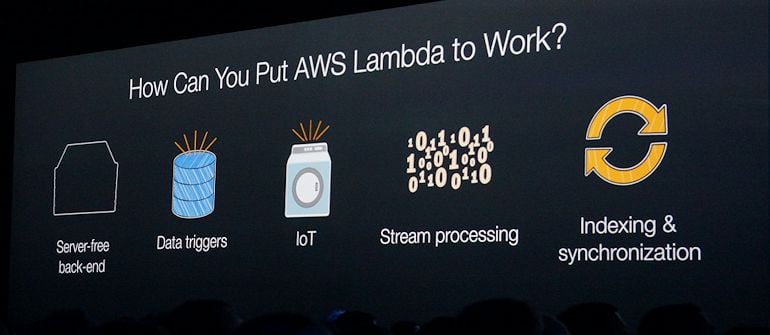
    One of the highlights of AWS re:Invent, judging by the twitter stream and the points emphasized in Amazon CTO Werner Vogel’s Day 2 keynote and blog post, was the launch of Lambda.

    In his blog announcing Lambda, Vogel calls the solution “the easiest way to compute in the cloud.” He goes on to describe it as both a way to run arbitrary code on AWS with complete abstraction away from the underlying infrastructure including EC2 instances, AND as a fundamentally better way to compose applications through the use of Lambda as an event-driven approach to intra-application behavior.

    What struck me as interesting was Vogel calling Lambda “an event-driven computing service for dynamic applications.”

    In his twitter feed, he has this to say about it:

    So Lambda is cool, and is getting a massive amount of interest. And it has a lot to do with being event-driven.

    A natural question that has arisen is could AWS Lambda be used for the automation of operations? And how does Lambda compare to the home-built scripts that are used by many operators to tie events to actions or to broader automation projects like StackStorm?

    So, what is similar and what is different?

    Deployment model:

    The easy and obvious comparison is that scripts and projects like StackStorm or Chef for example or others are open source software used on premise or by users on their public clouds, whereas Lambda is of course an AWS service.

    What events:

    AWS Lambda comes already able to listen to a few different publishers of events from within AWS – “either a particular Amazon S3 bucket, Amazon DynamoDB table, or Amazon Kinesis stream.” By comparison, your own scripts or other automation software are of course completely agnostic: you can integrate with anything you want, you just need to write that software.

    Scheduling:

    AWS Lambda does not currently enable you to run events on a particular schedule, whereas some solutions like StackStorm come with such an ability built-in. Or you can leverage chron itself or, if you are Mesos aficionado, you might select chronos as did AirBnB for example.

    What code:

    Lambda today needs JavaScript / node.js; this is a real restriction however AWS says they will likely expand the range of supported software.

    By comparison, Python is extremely common in home-made automation systems. Also many solutions including Ansible and StackStorm support the use of YAML to define workflows and other automation.

    Method of execution: Workflow included or abstract?

    Speaking of workflow, some automation solutions include workflow to tie together underlying atomic events. Like the use of YAML, workflow can simplify the process of authoring and then maintaining automation.

    You could do the same with Lambda; however, it would require you to write your own workflow within JavaScript. Corner cases in workflows are unfortunately often exciting resulting in a lot of important code to write and maintain so the lack of workflow would seem to be an important difference; presumably AWS will eventually address this by integrating their own simple workflow into Lambda.

    Abstraction of underlying resources:

    Lambda enables you to auto scale and to not worry about what the underlying resources are when you run it: “AWS Lambda seamlessly deploys your code, does all the administration, maintenance, and security patches, and provides built-in logging and monitoring through Amazon CloudWatch.”

    By comparison, scripts and other automation projects are just code. You can run them in an autoscaling group, but then you have to manage that.  Lambda is also free up to a certain volume as AWS is betting on it further increasing the stickiness of your usage of AWS.

    Community:

    It is pretty easy to argue that open source projects have larger communities than AWS. And also easy to argue that by being dependent on AWS and Lambda you are locking yourself in ever tighter. On the other hand, Amazon continues to cut prices and their development pace is incredibly fast.   I tend to believe in the power of open innovation however especially as Amazon regularly strip mines open source projects – exploiting those advances and adding their own – it could well be that Amazon is going to be able to progress at least at the pace of open source projects.

    Summary:

    On the whole, AWS Lambda is pretty clearly intended to be the internal wiring for AWS based software by tying together many loosely coupled services into an overall application. By comparison, automation software including your own scripts are used in operations to improve efficiency and frankly to eliminate some of the annoying manual work that otherwise would need to be done; also, home-built automations and automation projects are increasingly built to be easy to author and maintain whereas you have to be a java script coder to use Lambda; last but not least, enterprises are extremely heterogeneous so they must have a broad range of integrations available or easy to add including multiple public cloud providers and on premise technologies as well.

    That’s not to say that AWS Lambda and open source automation projects will not converge. It seems likely that there is enough demand on the part of users to support multiple approaches to automation as automation is increasingly seen as one of the fundamental pillars of DevOps, along with all important cultural and skills improvements.