Category: DevOps Culture

  • BMC Adds More Tools to Modernize Mainframe Applications

    BMC Adds More Tools to Modernize Mainframe Applications

    BMC this week added a BMC AMI DevX Code Insights tool that makes use of machine learning algorithms to break apart monolithic COBOL mainframe applications into subprograms that are easier to update and refactor.

    In addition, BMC is now making available BMC AMI zAdviser Enterprise, a commercial instance of a previously announced free tool that uses machine learning algorithms to collect telemetry data from mainframe applications. The commercial version of the tool adds a dashboard built and maintained by BMC that makes it simpler to consume that data.

    John McKenny, senior vice president and general manager of Intelligent Z Optimization and Transformation at BMC, said BMC AMI DevX Code Insights visually maps a mainframe application to analyze data flow and debug applications made up of millions of lines of code in real-time that would otherwise be too complex to unravel. Armed with the insights gained, IT teams can then isolate business logic, refactor subprograms, add application programming interfaces (APIs) or remove dead code as they see fit, he added.

    BMC AMI DevX Code Insights also makes it simpler for organizations to onboard new developers to a project at a time when many of the original developers of COBOL applications are retiring, said McKenny.

    In the coming year, BMC is also committed to adding generative artificial intelligence (AI) tools to its portfolio for reengineering mainframe applications, added McKenny. Those tools, for example, will make it simpler to create documentation for legacy applications, he noted.

    It’s not clear how quickly organizations that have mainframes are looking to re-engineer applications, but as more of them adopt DevOps best practices, they are being updated more frequently. The less monolithic the application, the simpler that task becomes. The issue is that mainframes tend to run large applications that access large amounts of data, so many IT teams are naturally fearful of breaking them if they are reengineered, noted McKenny.

    While there is no doubt that the process of reengineering applications will become more automated in the years ahead, software engineers will still be needed to manage the overall process, said McKenny. The role of the software engineer will undoubtedly evolve, but it’s not likely software development and deployment will be wholly automated any time soon, he noted.

    In the meantime, IT organizations that manage mainframes continue to embrace DevOps best practices to varying degrees. There may be some applications that they continue to build and deploy using waterfall methodologies, but as mainframe applications become integrated into digital business workflows, the need to update them faster becomes more apparent.

    The challenge, as always, is not only providing IT teams with the tools to make that transition but also navigating the cultural issues that inevitably arise any time a change of this magnitude is made to the software development life cycle (SDLC). Regardless of the approach, the building and maintenance of mainframe applications are evolving. The only issue that remains to be resolved is finding ways to reduce the level of friction that transition creates as quickly as possible.

  • KubeCon 2023: Internal Developer Platforms and Developer Productivity


    Mitch Ashley: Hey there, everybody. Welcome back to Chicago to KubeCon 2023. We are on day two of our live-streaming on Techstrong TV across all of our sites, devopsy.kinsta.cloud, Security Boulevard, Techstrong.TV, and Cloud Native Now. So, we’ve got more great interviews. Alan’s just finished a couple and I’m teed up now with Amit Gorvin. Nice to meet you.

    Amit Eyal: Very nice to meet you.

    Mitch Ashley: And you are with, say the name.

    Amit Eyal: Kubiya AI.

    Mitch Ashley: Kubiya AI, okay. That’s a lot of syllables there, but okay. I’m just kidding you.

    Amit Eyal: We do this on purpose to confuse.

    Mitch Ashley: You know what? Once you hear it, it’s unique, right? You remember those [inaudible 00:00:45].

    Amit Eyal: Hundred percent.

    Mitch Ashley: Exactly. Okay, so I know you’ve talked with this before and you’ve talked about IDPs. It’s a really fast-growing area, right? Everybody’s focused on-

    Amit Eyal: Absolutely.

    Mitch Ashley: How do we help developers, platform engineers, the people all working together to make lives easier, self-service, that kind of thing, portals and all of that. I know you had some announcements recently. Talk about that, but maybe set it up of what you all do and why that’s a little different.

    Amit Eyal: Sure. I think maybe to take one step back, one of the things that I think a lot of companies in the industry, including ourselves are doing is, how do you create a better exchange between the developers and the DevOps, the operators on one side, developers on another hand where you have the golden path towards productivity. IDPs, internal developer platforms, have been known backstage being the primary leader in this space to unlock lab productivity.

    One of the things that we, at Kubiya, have discovered, and this is what we’ve tried to essentially address, is the self-service is only as good as the interaction between the users and the tools. And where often it does break down is on the fact that it’s a one directional exchange between the user and the tool. If you fail on authentication, fail on permission, don’t know the variables you need to pass or anything just doesn’t work as expected, you have a question, you have to go back and do a Jira ticket queue in order to go and to essentially get assistance from a human being.

    So, what has come to fruition in the last year, obviously ChatGPT doing the market education for this, is conversational AI, having a two directional exchange between machines and humans. We’ve married these two worlds together. We’ve created that exchange between your users, developers, and operators with the tools in a way where you can have a full-on conversation with it.

    You can go and spin up a Kubernetes deployment, it will ask you how many you replicated. You can scale it up, scale it down. You can have for your Jira ticket queue, for example, and ask it questions about who owns what, where they’re assigned creation, notating, anything that you would be able to do as a human, only in this case, you’re just having a conversation. Because imagine having on the other side, someone like Fred, John, Bob on the on-call channel having a conversation with you. We’re replacing that with the virtual assistant.

    Mitch Ashley: Interesting. So, replacing the virtual assistant model. It sounds like also you were maybe describing, if I got this right, that the developer technical staff can interface through ChatGPT to say… I mean the nice thing about ChatGPT is you can talk to it like a programming language just in conversational logic, right? I want you to create this for me with blah, blah, blah. Is that part of what you’re saying? You can give it instructions or requests?

    Amit Eyal: One minor information, we’re not using ChatGPT. It’s a ChatGPT-like experience.

    Mitch Ashley: I see.

    Amit Eyal: It’s probably the best way to anchor people to-

    Mitch Ashley: I jumped that.

    Amit Eyal: Which is fine. We’re using about eight different language models, both large and small. We’re actually using conversational AI piece with GPT-4 for Azure, just a FYI, but that’s separate. The experience is ChatGPT-like. Only here, it’s your tools, your programs, your scripts, essentially a personalized IDP, if you may, for each and every persona in organization, each and every individual in the organization.

    Mitch Ashley: Okay. So, are you using generative AI large language models underneath, or that’s just the experience that you’re delivering with whatever technology?

    Amit Eyal: Certainly. So, large language models are giving that natural exchange, essentially the benefits of large language models and the generative piece we’re using. But we’re also harnessing and scaffolding it with rule-based systems, with sound engineering practices. So, that’s how you get the benefit of an expected outcome on one hand. Our users would expect an expected outcome. Essentially, it has to be deterministic what they’d get on the other end.

    Mitch Ashley: I’m glad you said that because I was thinking down the ChatGPT line. It’s nice, but you don’t get the same response, same outcome. It’s not necessarily guaranteed to be consistent, to be accurate. So, it makes sense on the backend scaffolding part.

    Amit Eyal: And there’s permissioning and rule-based systems in place to harness the LLM to function the way you would expect it to.

    Mitch Ashley: Very nice. So, you talked about the developer experience, and I totally get the cognitive dissonance between I’m working in my IDE and doing my developer thing, and then I got to go to this ticketing system or go to some weird operating portal that wasn’t built for developers, but I still got to use it in a huge sense.

    Amit Eyal: Maybe it is, but it’s only as good as how it’s been upkept, maintained or what you’ve actually input into there. So, you still have to go in to program it to act the way you expect it to.

    Mitch Ashley: And it’s part of the flow too, right?

    Amit Eyal: Yeah.

    Mitch Ashley: I might not know answers to all 10 questions at the start of the interaction, but I need to get it started, and then finish it at some point in the process. But it’s about in the flow of the developer work, not I’m a form, fill me out. Right?

    Amit Eyal: A hundred percent.

    Mitch Ashley: Great. So, the announcement then, summarize again for us because I stepped on it with the GPT stuff.

    Amit Eyal: Sure, yeah. No, it’s fine. So, we came out last year actually with our initial platform, which was more resembling next generation of workflow automation because it was more so to get people connected to the world of conversational AI into the world of IDPs. Where we took it from there, and especially with the evolution of large language models, is an agent-based approach where we’re using different models and different agents trained on different models in order to map out effectively different functions within a transaction, almost like the human brain and the lobes interacting with each other.

    So, when you go and interact with the system, depending on how you approach it, it could be, show me how I do something. Say, set up a VPN. That may be in your docs. So, we’re using RAG techniques obviously to go into a train on your knowledge base. But if you’re going to go and run a query against a data source or a database, or maybe show me all my Jira tickets for current sprint for certain… That’s a different language model that’s interacting with you.

    And then if you’re going to go and create a Terraform, create a Kubernetes deployment, destroy Terraform, that’s an action base that’s also needing to go into verify permissions. We’re using open policy agent. We’re also using all the techniques to or data masking, and then we obviously have the orchestration there, a state machine that will go in to orchestrate all of those with the business logic of the organization. So, there’s a lot going on behind the scenes.

    Mitch Ashley: There is. Well, a lot of different kinds of users’ requests.

    Amit Eyal: To the user, it’s seamless. You have a brain emoji thinking and then reading back to you what it’s doing. So, it’s actually very fun interaction, human-like interaction, but then behind the scenes, there’s a lot that’s going on.

    Mitch Ashley: Very cool. Do you integrate at all with IDEs and go that far with it or is it a separate portal?

    Amit Eyal: Users can integrate with their IDEs. They can go and plug in. We have a SDK and it’s all open API based. So, essentially, you can connect to any tool.

    Mitch Ashley: I think it’s really nice and important because for one, it’s right there handy. And also, if you’re delivering any information that you can deliver in the way the code looks like or structured or auto-fill, you can mimic the behaviors of what you do in an IDE that… Very natural. So, I don’t have to go look up an API or what that call is; it’s right there. Or I don’t have to go look up what that thing’s called on my request; it’s right there.

    Amit Eyal: Agreed. So, I think maybe the one call-out I would love to make is people are thinking about the co-pilot approach or ChatGPT approach as a code completion tool. What we’re doing is, we’re doing an operations’ completion tool. Essentially, all of the next step, what would you do, how would you deploy the code, run your CI/CDs and maintain it for day two operations, so that’s where you can think about us filling that gap.

    Mitch Ashley: Okay, interesting. So, congratulations on the announcement.

    Amit Eyal: Thank you.

    Mitch Ashley: That’s fantastic. And every time you come, you’ve got new, in progress and things happening. I’m curious, maybe you’ve talked to Alan about this or Mike, your backstory, you’re CEO, founder of the company. How did you get going down this path? Was that, I was doing this at a big company and this is like a huge need, I’m going to go forward or?

    Amit Eyal: It’s a great question. So, the first time we came on it was myself and my co-founder, who he himself is an operator who built a self-service platform for his platform team in his previous company at Bluevine, and I came from AWS where I was managing partnerships for all the DevOps and DevSecOps-

    Mitch Ashley: Nice couple.

    Amit Eyal: Tier one players. So, I saw where they were possibly struggling with some of this self-service, and where I was in the middle of trying to assist them. And that’s where the thesis on the business side, which is this is a much larger problem and how we’ve actually solved this ourselves came together.

    Mitch Ashley: Interesting. Talk a little bit about your experience in the partnership side of it. Has that come to fruition as an important part of the business? I would imagine when you’re integrating with lots of things, just to look up the API, you can do it. You want to build relationships, partnerships with other companies.

    Amit Eyal: So, we have a very strong ecosystem of partners really looking to have the conversation. I experienced essentially that assistant experience on top of their platform. And right now, we’re letting into queue a few of the strategic ones that we feel that we can both have a strong alignment with, but also maintain. As we grow our team, we’re going to have a much larger ecosystem. We’re already at probably 10, 15 very strong players in the industry who want to have a partnership in place. So, I feel it’s only going to grow from that point.

    Mitch Ashley: Good, good. Amit, you already know this. I learned that lesson on one of the products I worked on where you didn’t design it with you were going to have a partner ecosystem in mind. You get to a point like, okay, we can’t do what we want to do. We got to go back and add that in. So, having that perspective upfront, if that’s a place you’re going to want to go at some point in the life cycle, it’s-

    Amit Eyal: That’s exactly it. Our ecosystem is built to be two-way conversation with all tools. So, if our customers are asking for it, there’s no reason why the vendor on the other side wouldn’t have a stronger alignment so we can have a better user experience for both sides.

    Mitch Ashley: I’m curious, do you sell to the engineering development community? Do you sell more to the platform engineering, operational DevOps tool folks? Where do you tend to focus?

    Amit Eyal: I would say usually that decision is made jointly. The platform teams typically have to have a handshake with the engineering managers. So, whether it’s an engineering manager taking us to the platform team, platform team taking us to the engineering manager, typically, we see both sides involved at least in validating this. But the easiest way to get started is really with the platform teams because they’re the power users typically of the system. They’re the ones creating and scaffolding the configurations of these systems, so it’s easiest for them to get started, test it internally on themselves. And very easily, we usually see that they roll it out to the rest of the engineering team.

    Mitch Ashley: They already have a good idea of what kind of requests come their way.

    Amit Eyal: Precisely.

    Mitch Ashley: And it would make that easier for people.

    Amit Eyal: Otherwise, the other way around would be, let me go and bring in a platform team. So, it’s a more direct approach [inaudible 00:13:09].

    Mitch Ashley: That makes sense and it’s nice. I could totally see. It’s starting, “Well, hey, something might make it easier to take a load off-

    Amit Eyal: Precisely.

    Mitch Ashley: The platform engineering team” or them saying, “Hey-

    Amit Eyal: We’re here to augment them.

    Mitch Ashley: … that’s an easier way to work with this.” Right?

    Amit Eyal: We’re here to augment them. Not everybody has a luxury of hiring three to five more headcounts for next year, but if you could do so with one or two headcounts and then Kubiya, now you can scale.

    Mitch Ashley: Great. If you look forward a little bit, maybe this next six months or maybe 12 months, six months or so, what things are happening in the industry, maybe where you’re heading, what are you thinking about next?

    Amit Eyal: The most recent announcements by OpenAI have been very interesting, because from our perspective, it’s giving us even more tools in order to get to our end goal, which is, in my opinion, a self-driving operator. A self-driving operator that will be able to take end-to-end tasks away from human beings and really free them up to do the highest and best use of their time. It’s still going to require human-in-the-loop interaction and we don’t expect it to be overnight. But I think a lot of the things that was announced recently is already in line with what we’ve been doing, but it’s only making it easier and again unlock more and more use cases.

    Mitch Ashley: Seems like OpenAI have done a pretty decent job of, don’t throw it all out there, incrementally add capability when you’re ready to handle it.

    Amit Eyal: Yes. Because we’ve been in this space a couple of years, we’ve been thinking about, we’ve already been architecting our platform to be conversational native. That’s allowing us to move very fast in this space.

    Mitch Ashley: Great. Well, tell folks where can they go check it out?

    Amit Eyal: Absolutely.

    Mitch Ashley: Can they get a demo online or what can we do to help?

    Amit Eyal: That’s a beautiful part. We open our platform up for self-service. So, you could actually sign up at Kubiya.ai, www.kubiya.ai. Sign up for a free trial. We also have a sandbox where you could, without needing to put in organizations credentials, anything. It’s a gated experience. Obviously, it’s a bit more limited, but you could go and have that nice exchange with Kubi, our DevOps assistant, and really enjoy the experience before committing to going into a trial.

    Mitch Ashley: Appreciate the sandbox. You don’t want to quite turn it loose on your infrastructure quite yet. Let’s kick the tires and then get there.

    Amit Eyal: Mostly read only. We have a few write actions in there, but typically, we want to make sure it’s rated PG for what people can do.

    Mitch Ashley: Exactly. Exactly. Great. And it’s spelled K-U-B-I-Y-A.ai.

    Amit Eyal: Y-A.ai.

    Mitch Ashley: Great.

    Amit Eyal: Thank you very much.

    Mitch Ashley: It was on the… I’m sure on your title but-

    Amit Eyal: Yes, it would be there.

    Mitch Ashley: Amit, pleasure talking with you and congrats on the new progress, new release and capabilities, where you’re headed next. Great market to be in.

    Amit Eyal: I appreciate it and I appreciate your time here today.

    Mitch Ashley: Of course. Great to have you on. For our folks, for the people in the audience, Amit’s representative of some of the great things that are happening not just at KubeCon but in our industry, and progress that’s happening overall. So, stay tuned. We’ve got more great interviews coming back up. Don’t go away. We’ll be right here in a few minutes. So, we’ll be back.

  • 10 Ways to Increase Productivity by Improving Your Developer Experience

    10 Ways to Increase Productivity by Improving Your Developer Experience

    Developer experience is inextricably linked to productivity. The ease with which developers can work on their code and product greatly impacts the speed and quality of software development.

    But this goes deeper than just giving them the right tools. It’s about setting up an environment where developers can thrive, an environment that prioritizes clear communication, continuous learning and collaboration among team members. It’s about cultivating a space where creativity and innovation are encouraged and where developers feel valued and motivated to do their best work, both individually and creatively as a team.

    Let’s look at 10 ways your enterprise organization can improve the developer team experience and, in turn, increase their productivity and ability to support the business objectives.

    1. Choose the Right Languages and Frameworks

    Selecting languages and frameworks that are well-suited to the project requirements and the team’s proficiency can significantly reduce development friction. It streamlines the coding, testing and debugging processes, allowing developers to focus on crafting high-quality solutions rather than grappling with syntactical nuances and unnecessary complexity. Additionally, adopting languages and frameworks with abundant resources and documentation helps to swiftly resolve issues and innovate effectively, which subsequently leads to enhanced productivity and job satisfaction among the development team.

    Picking the right language or framework really is a matter of aligning with the project’s requirements rather than choosing what is cool right now or what worked for the project a few years ago. Common languages like JavaScript, Python and Ruby are renowned for their flexibility and extensive community support, which collectively contribute to an enriched developer experience. Languages like Go, Rust and C++ are more efficient and robust but come with trade-offs around ease of use.

    2. Provide Access to Quality Developer Tools

    Developer tools that put developer experience first are a critical part of improving the overall experience for your developers.

    • Good IDEs, such as IntelliJ IDEA or Visual Studio Code, provide an enriched coding environment with features like intelligent code completion, syntax highlighting and integrated debugging.
    • Linters like ESLint or Trunk automate the process of identifying and fixing code inconsistencies and errors, ensuring code quality and reducing the likelihood of bugs.
    • Security tools, such as Snyk, are paramount for identifying vulnerabilities early in the development cycle, allowing teams to address security concerns proactively and reduce the risk of breaches. These tools aid in maintaining a secure and robust codebase, fostering confidence among developers. Other security tools, such as API gateways like Emissary-Ingress or Apigee can also help beef up security measures.
    • Kubernetes tools such as Telepresence streamline the local development process with containerization and allow developers to share their development work more efficiently with their colleagues for faster feedback loops.

    Incorporating such tools seamlessly into the development workflow enhances the development pace and the quality of the output, leading to a more gratifying and productive developer experience.

    3. Document Everything

    Proper documentation serves as a roadmap to the codebase, allowing developers to understand the software architecture, functionalities, and interaction between different components swiftly and accurately. It minimizes the cognitive load on developers by providing clear and concise information, reducing the time spent on deciphering the codebase.

    Good documentation is especially pivotal when onboarding new team members, as it accelerates their acclimatization to the codebase and workflows. This means they can contribute more effectively and quicker. It also aids in the clarification of complex concepts, system behaviors, and business logic, preventing misinterpretations and ambiguities.

    Keeping the documentation current and aligned with the code changes is equally vital. It ensures the relevance and reliability of the information provided, aiding developers in making informed and sound decisions throughout the development lifecycle. This synchronization between documentation and codebase evolution fosters a more coherent and efficient development environment, directly impacting the overall productivity of the development team.

    4. Reduce Cognitive Load

    Reducing the cognitive load on developers is paramount for enhancing productivity. One practical approach is to minimize the number of meetings, allowing developers more uninterrupted time to focus on coding and problem-solving. Unnecessary or inefficient meetings can fragment developers’ concentration, leading to decreased productivity and extended development cycles due to the time required to regain focus.

    Establish clear meeting objectives, agendas and ensure that only essential personnel are involved to make the necessary meetings more productive and less disruptive. It’s also crucial to foster an environment where asynchronous communication is encouraged, utilizing tools like Slack to allow developers to address queries and discussions at their convenience without impeding their workflow.

    5. Encourage AI Use

    AI tools and technologies can assist developers in various aspects of the software development lifecycle when used responsibly, such as code generation, bug fixing, and performance optimization, allowing for more efficient and effective development processes.

    For instance, AI-powered code completion tools, like GitHub Copilot, enable developers to write code faster and with fewer errors by providing intelligent suggestions, while AI-driven testing tools like Codacy can automate and optimize the testing process, identifying issues and vulnerabilities that might be overlooked manually. This leads to higher code quality and reliability.

    6. Foster the Freedom to Innovate

    Giving developers the freedom to explore and experiment with new ideas is fundamental in cultivating a positive developer experience. This autonomy stimulates creativity, fosters a sense of ownership and encourages developers to seek better solutions to complex problems, contributing to the continuous improvement and evolution of the product.

    In an environment that values exploration, developers are more likely to engage in learning new technologies, methodologies and best practices, elevating the collective skill set and knowledge base of the team. This continual learning cycle enables the adoption of more efficient and effective development strategies, leading to the creation of high-quality, sustainable, and forward-compatible software solutions.

    Create a supportive atmosphere where experimentation is embraced and failure is considered a stepping stone to innovation. This enhances developers’ morale and motivation, leading to increased productivity and better outcomes.

    7. Implement Developer Playbooks

    Alongside giving developers room to roam and experiment, you should give them clear guidelines for workflows that are already well-thought-out. Playbooks provide structured, reusable solutions and best practices for common tasks and challenges, eliminating the need for developers to reinvent the wheel or spend excessive time on routine activities. They serve as a valuable reference guide, offering standardized procedures, coding standards and templates, ensuring consistency and efficiency across the development life cycle.

    By reducing ambiguity and decision fatigue associated with repetitive or mundane tasks, playbooks allow developers to focus their cognitive efforts on more complex, value-adding aspects of the project. This contributes to quicker implementation and less error-prone solutions, fostering a more streamlined and focused development process.

    Implementing playbooks also facilitates knowledge transfer within the team, allowing developers to leverage collective experience and insights, leading to better-informed decisions and solutions. Having access to well-curated playbooks not only accelerates development cycles but also enhances code quality and maintainability, culminating in a more productive and satisfactory developer experience.

    8. Automate Any Repetitive Tasks

    Automation alleviates the manual effort involved in tasks such as code integration, testing, deployment and monitoring, allowing developers to concentrate more on creative problem-solving and innovation.

    Continuous integration and continuous deployment (CI/CD) pipelines exemplify effective automation, ensuring that code changes are automatically integrated, tested, and deployed to production, reducing the risk of human error and enabling quicker release cycles. Automation of testing through frameworks and tools ensures that every code modification is validated rigorously, enhancing the reliability and stability of the software.

    Moreover, automation of environment setup and configuration management through infrastructure-as-code (IaC) tools like Terraform guarantees consistent and reproducible environments, minimizing discrepancies between development, testing and production stages.

    By delegating routine tasks to automation, developers can focus their expertise and time on developing new features, optimizing existing systems and exploring new technologies, ultimately leading to improved job satisfaction and higher productivity levels.

    9. Set Clear Objectives, Then Allow Autonomy in Execution

    When developers understand the expected outcomes and the impact of their work, it instills a sense of purpose and motivation, aligning individual efforts with organizational objectives.

    Provide clarity on what needs to be achieved, but allow flexibility on how to achieve it. This approach empowers developers to leverage their expertise and insights to devise optimal solutions. Autonomy promotes problem-solving, encourages initiative and fosters a culture of continuous improvement and learning within the team.

    10. Reinforce Growth

    A learning-rich environment encourages developers to acquire new skills, adapt to evolving technologies and refine their problem-solving capabilities, thus contributing to both personal growth and the advancement of the team’s competency.

    Mentorship, on the other hand, plays a crucial role in knowledge transfer and professional development. Experienced developers sharing insights, experiences and best practices with less experienced team members accelerate learning curves and foster a collaborative and supportive team culture. This mutual exchange of knowledge enriches the skill set across the team and ensures that knowledge is retained within the organization, even as individual team members advance.

    Offering resources for learning, such as access to online courses, workshops and conferences, combined with a structured mentorship program, not only enhances the technical proficiency of the team but also improves job satisfaction and retention. In such an enabling environment, developers are more likely to be engaged, motivated and productive, driving the team to higher levels of innovation and excellence.

    Happy Developers are Productive Developers

    Really, it’s obvious: You want your team to want to come to work every day. To do that, you need to give them an environment that supports their work, allows them to think and be creative and removes unnecessary burdens. You want them to think, talk and code to build the best product possible. That is true productivity, and it only comes from giving them a great developer experience.

  • Microsoft Previews Additional Copilot Tools for Azure

    Microsoft Previews Additional Copilot Tools for Azure

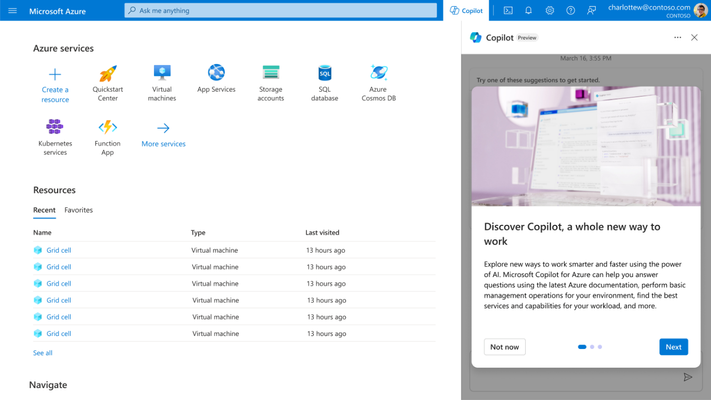
    At its Ignite 2023 conference, Microsoft this week previewed Copilot tools to simplify the management of the Azure cloud service along with a tool that streamlines the building and deploying of artificial intelligence (AI) applications on the Azure platform.

    In addition, Microsoft launched Microsoft Copilot Studio, a low-code tool that automates the process of creating data integration plugins and adding custom copilots within the Microsoft Copilot for Microsoft 365 tool that Microsoft previously launched.

    Microsoft Copilot for Azure leverages large language models (LLMs) to enable IT teams to use natural language to create, configure, discover and troubleshoot Azure services. It also enables IT teams to create complex commands, ask questions and optimize costs.

    Erin Chapple, corporate vice president for Azure Core at Microsoft, told Ignite attendees that Microsoft, along with a handful of customers, is already using Microsoft Copilot Azure to manage Azure infrastructure.

    In the long term, it’s clear that Microsoft is moving toward streamlining the building and deployment of AI applications using Azure AI Studio, a framework for invoking the AI models that Microsoft makes available on the Azure platform. The goal is to make it possible for organizations to create their own copilots based on AI models they have trained.

    It’s still early days in terms of organizations leveraging AI models to build applications, but it’s already apparent that DevOps and machine learning operations (MLOps), along with data engineering and cybersecurity best practices, will need to converge. Microsoft is making a case for Azure AI Studio as the framework that will enable IT organizations to achieve that goal.

    Of course, Microsoft is not the only provider of IT infrastructure resources with similar ambitions, but thanks to its investments in OpenAI and the acquisition of GitHub, it is furthest along in terms of defining a framework for building AI applications at scale. Last week, GitHub previewed an extension of the Copilot tools it already provides to help developers write code that leverages generative AI to automatically propose an editable plan for building an application based on natural language descriptions typed into the GitHub Issues project management software. Copilot Workspace will generate editable documents via a single click that can be used to create code that developers can then visually inspect. Any errors discovered by application developers or the Copilot Workspace platform can also be automatically fixed.

    At the same time, GitHub has extended the scope and reach of Copilot Chat to make it simpler for developers to use natural language to discover issues in their code base.

    Generative AI is already having a massive impact on the rate at which applications are developed, but that code still needs to be reviewed. Chat GPT is based on a general-purpose large language model (LLM) that is trained by pulling in code of varying quality from all across the web. As a result, code generated by the platform might contain vulnerabilities or be inefficient. In many cases, professional developers still prefer to write their own code.

    Of course, not every programming task requires the same level of coding expertise. In many instances, ChatGPT will generate, for example, a script that can be reused with confidence across a DevOps workflow. There is no shortage of mediocre developers who are now writing better code thanks to tools such as GitHub Copilot, and soon, domain-specific LLMs will make it possible to consistently write better code based on validated examples of code.

    The next challenge is going to be finding a way to manage increased volumes of code. There is no doubt that AI will be applied to the management of DevOps pipelines, but for the moment, at least, the pace at which AI is being applied to writing code is already exceeding the ability of DevOps teams to manage it.