Category: Continuous Testing

Continuous testing is the process of executing automated tests as part of the software delivery pipeline to obtain immediate feedback on the business risks associated with a software release candidate.

  • Why QA and Monitoring Need to Merge

    Why QA and Monitoring Need to Merge

    Customer expectations for speed and reliability have upended the software development life cycle. Whereas developers used to develop a product and send it to quality assurance engineers for testing before widespread release, customers now demand new versions and features on a quicker timeline. In an era with little available time to run QA in the traditional development process, what’s the alternative?

    Fortunately, modern automated infrastructure provides a solution. Infrastructure-as-code (IaC) toolchains that deliver continuous observability with AIOps let SRE teams overlook the entire process, from the first piece of code through the software product’s public release.

    This merger of the traditional roles of QA and monitoring is enabling quicker speeds within the delivery cycle, a development that improves the customer experience but also ignites business innovation.

    The Benefits of Speed in the SDLC

    Observability delivers the data necessary to eliminate traditional QA, but teams still need help. With intelligent observability — where you apply AI to the data — teams can better focus their efforts and analyze information much more quickly.

    Finding and fixing software issues after deployment unnecessarily stresses SRE teams. But through observability with AIOps, DevOps practitioners and SREs monitor from early development through daily performance. QA is omnipresent. Teams can identify root causes of issues instantly, and AI surfaces the most actionable steps to quickly resolve impacts on the infrastructure.

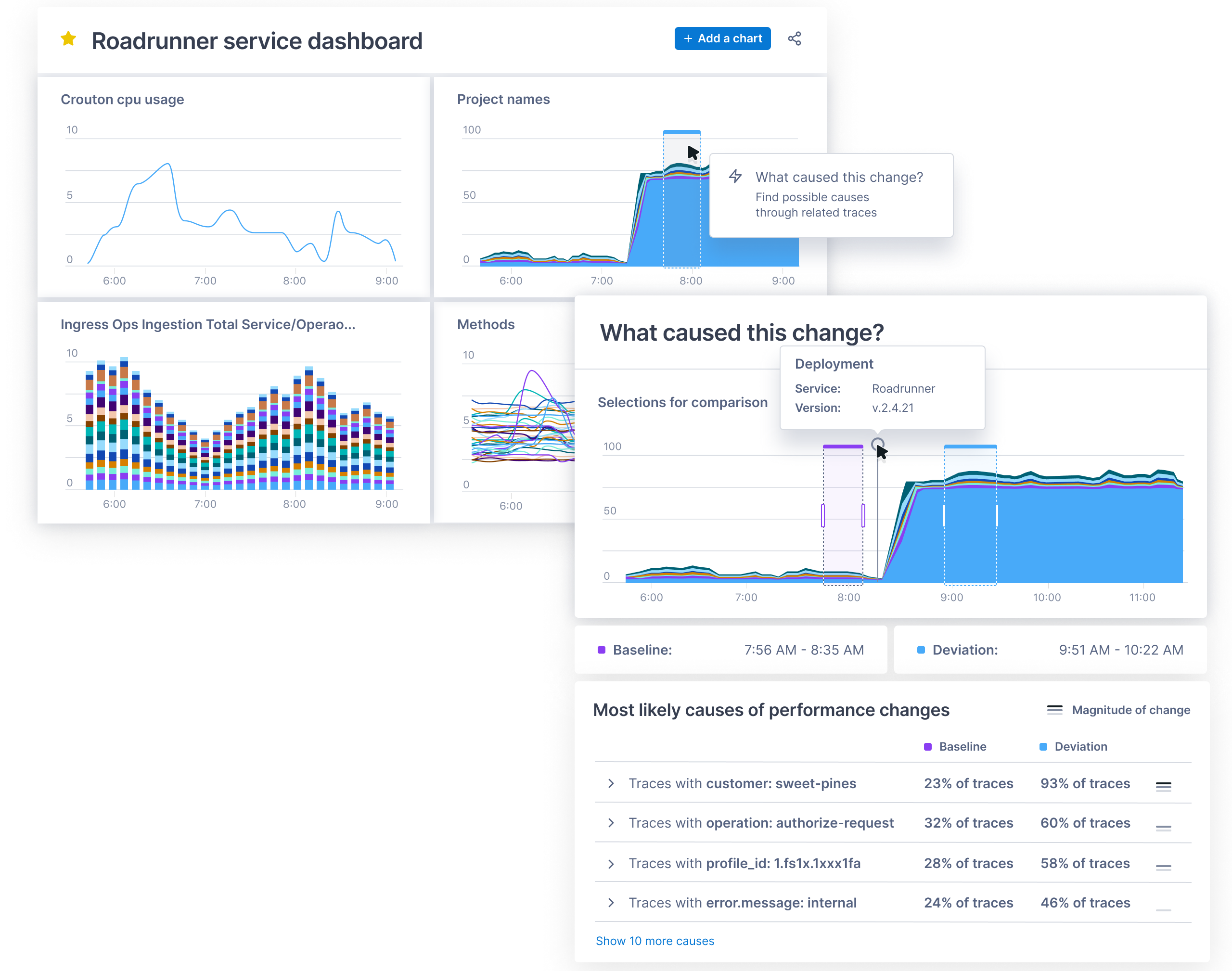
    The DevOps team used to leave QA engineers with the tedious and time-consuming task of pinpointing issues amid a sea of data, creating a bottleneck within the development process. The continuous learning and intelligent collaboration approach, on the other hand, merges traditional QA and monitoring and yields a CI/CD pipeline that actually works.

    Integrating observability with AI into the development cycle allows teams to spot change almost instantly. If the platform starts acting oddly after its release, SREs and DevOps practitioners can jump in immediately without the need to wait for a QA team. If the issue is where a change in performance is expected, AI and machine learning often still can reduce what’s needed from your teams. If, for instance, you’re monitoring with an adaptive thresholding algorithm, you can let the algorithm retrain and learn the new behavior instead of relying on the DevOps team to communicate the expected change in performance to the QA team.

    As QA shifts left – as evidenced by the growth of software development engineers in test (SDET) – it’s natural that monitoring and assurance capabilities should shift left, too.

    A Principled Approach to QA

    The merger of quality assurance and monitoring throughout the software development cycle follows the three guiding principles behind DevOps practices.

    • Flow/system thinking. The approach eliminates workflow silos and instead creates a holistic view of the development process. The continuous oversight negates typical quality hazards, such as the handoff that can occur despite a known issue or the optimization for local efficiency only.
    • Amplifying feedback loops. A merging of QA and monitoring eliminates the need to loop feedback through multiple teams with various processes because teams are given consistent feedback throughout software development and delivery.
    • A culture of continual experimentation and learning. DevOps teams, no longer in a position to just pass software down the line to QA, will build constant improvement into their processes as they learn from bugs along the way. This also provides more opportunity to take risks and experiment. The approach is a more holistic product cycle versus quick development.

    Improving the Q in QA

    Removing QA as a singular step in the software development process initially may seem like removing quality assurance itself. But QA is actually heightened by integrating observability with AIOps into the development cycle.

    Observability with AIOps allows teams to see into systems as they are being built but also allows them to gain actionable insights to resolve issues on the overall structure. Actionable insights empower the merging of traditional QA and monitoring to drive a whole new speed of delivery, which yields better customer experiences and gives businesses the ability to quickly launch competitive, innovative services.

  • Empowering BizDevOps Teams With SLOs

    Empowering BizDevOps Teams With SLOs

    When BizDevOps teams are drowning in logs and false alerts and are spending more time on manual processes than on building and deploying new applications and features, the work suffers, morale suffers and the organization as a whole suffers. Releasing better and more secure software, faster and with real business impacts starts with a robust BizDevOps practice. A crucial step IT leaders can take to align the developer, operations and business teams is to create a shared language of service-level objectives (SLOs).

    SLOs are metrics for validating that software is meeting its technical and business objectives. Defining and implementing SLOs help align developer, operations and business teams, not only ensuring everyone is moving toward the same goals, but also providing a way to reliably measure how BizDevOps teams are progressing toward these goals.

    Here are three of the most impactful ways SLOs can empower your BizDevOps teams.

    1. Establish a Common Language Across the Delivery Cycle

    The best SLO gives you precise and actionable insight into your system. Take performance and resiliency engineering, for example. By defining SLOs for performance and error rates, teams can use common measurements to track progress toward meeting their quality criteria to ensure they are staying within their error budget.

    In this way, teams can use SLOs as a common language across the delivery cycle – something everyone from developers to operations to business teams can rally around, ensuring everyone is working toward the same outcomes. This aligns teams into a coordinated BizDevOps practice, where all sides have better insight into how each piece of the business feeds into the others. If an incident occurs, operations can use an AI-based observability platform to observe its trends and impacts across different product or service releases and automatically feed that information back to the developers, who can modify their builds accordingly. When everyone is using the same SLOs to speak the same language, BizDevOps teams can coordinate and communicate more easily and effectively.

    2. Creating a Culture of DevOps Resiliency by Shifting SLOs Left

    BizDevOps isn’t just a technical practice defined by tools and platforms. It’s also a culture change and a shift in mindset. SLOs can play a major part in this change. Shifting SLOs left into the delivery pipeline means giving developers feedback about the outcome of their work and real-time visibility into their business KPIs using consistent SLO measurements – ideally, on every code commit. This consistency gives them answers at their fingertips to make data-backed decisions that consistently deliver better business outcomes. Using SLOs for developer feedback is a fundamental building block of DevOps, but it’s also key to creating a culture and mindset of resiliency within BizDevOps.

    A resilient BizDevOps culture is more than just making changes to your technology stack; it’s about changing the mindsets of individual engineers and developers. Resiliency means strength and reliability; the trust that when something goes down, it’ll go right back up. It’s about building the processes and systems that guarantee flexibility for anything from managing crisis events to delivering service continuity. Shifting SLOs left helps facilitate this culture change by giving developers greater exposure to the impact their work has when it’s in production and when it’s deployed. It makes everyone feel they’re in the same boat, and recognizes developers, operations and the business teams as one cohesive unit.

    3. Integrating SLOs Into Remediation

    BizDevOps teams can use SLOs to enhance remediation and incident response efforts. With everyone working with the same metrics, BizDevOps knows with certainty when something is broken, can identify root causes more quickly and can develop agreed-upon incident responses to accelerate time to resolution. BizDevOps teams can then feed this incident response knowledge back into quality gates earlier in the development cycle to avoid future problems. This develops SLOs that have been “battle tested” and can be easily automated to make quality gate testing better on the development side, and incident response better and faster for the operations side.

    SLOs bridge the gaps between BizDevOps

    SLOs already serve a useful role in production, but they also can influence the ability to create a robust, resilient BizDevOps practice. Shifting SLOs closer to developers and using them as a shared language across the delivery cycle provides space for greater experimentation, more innovation and a culture of resiliency. SLOs can also be defined along business-relevant metrics, such as conversion rates, user experience or feature adoption. As a result, SLOs empower BizDevOps teams to respond more quickly to issues and deliver better digital experiences and business outcomes.

    SLOs aren’t just performance metrics – they’re a powerful tool for bridging the divides between the developer, operations, and business teams. SLOs can help cultivate a BizDevOps culture that delivers innovative, secure software faster and with tangible business value.

  • CircleCI Acquires Vamp to Apply AI to CD

    CircleCI Acquires Vamp to Apply AI to CD

    CircleCI today announced it has acquired Vamp, a provider of an orchestration platform for automating application releases. CircleCI at the same time revealed it has garnered an additional $100 million in financing to attain a $1.7 billion valuation.

    Jim Rose, CircleCI CEO, said Vamp will play a significant role in advancing the capabilities of the CircleCI continuous integration/continuous delivery (CI/CD) platform at a time when the rate at which applications are being deployed continues to steadily increase. In fact, CircleCI claims its platform is now being employed to process 2.5 million jobs processed per day.

    The Vamp platform makes it easier to construct and orchestrate a multi-stage release cycle involving, for example, canary releases of an application. It then employs machine learning algorithms to validate the impact, performance and quality of releases based on the service level objectives defined by an IT team. If anything is determined to be amiss, the platform will then automatically roll back a release.

    CircleCI

    While many organizations have successfully implemented CI best practices, the ability to continuously deploy application releases has proven to be a more elusive goal. Each platform on which an application is deployed has unique attributes. The addition of machine learning algorithms that can provide continuous validation of deployments should help drive a sea change in the way applications are being developed and deployed to improve the overall state of CD, noted Rose.

    Those machine learning algorithms, along with other forms of artificial intelligence (AI) won’t replace the need for DevOps teams as much augment them at a time when IT environments, thanks in part to the rise of microservices, are becoming more complex. In fact, with the arrival of containers, Kubernetes and serverless computing frameworks, it’s becoming next to impossible to manage an IT environment without the use of AI.

    Rose added that, as the line between pre-production and production environments continues to blur, it’s critical for IT teams to more closely align CI and CD workflows. Rather than isolating CD from CI within the context of a GitOps workflow, the goal should be to integrate those processes more closely. It is becoming more apparent that the elements of what constitutes an application are more empirical thanks to, for example, configuration files that are now stored in a Git repository along with application code. That tighter integration ultimately makes it easier to test and validate applications before they are deployed. Metadata that can be analyzed to optimize application development and deployment can also be more easily captured as part of a continuous feedback loop.

    That approach is more critical than ever, because the days of the “Big Bang” deployment of an application update are over. In its place are now a steady stream of updates that deliver new capabilities, which need to be continuously vetted, noted Rose.

    Each successive era of DevOps is, naturally, going to be more automated than the previous one. The challenge is recognizing when those new eras arrive before rivals gain an advantage in speed and agility that becomes too big to overcome.

  • Why Browser and API Testing is Shifting Left

    Why Browser and API Testing is Shifting Left

    For developers working with cloud-native technologies, software testing and quality assurance is a key part of product development. For most teams, testing has “shifted left,” so the quality of the code can be assessed as it moves through the CI/CD pipeline. This approach to quality assurance reflects the rise of DevOps and other modern development practices – developers today own their applications from end-to-end, and conducting testing early in the product life cycle is how they find potential bugs, save their organizations time and money and build products that delight their customers.

    More recently, developers have added end-to-end API and browser tests into their CI/CD practices, extending the scope of their testing and quality assurance practices. By testing how code performs on different browsers and how it interacts with important data sources, developers have added another layer of quality testing to the early stages of their development processes. This has brought added benefits to other “shift left” practices, such as unit testing and security testing, and has led to a new understanding of quality assurance.

    Traditional Approaches to QA Can’t Support the Pace of the Cloud

    As companies have migrated to the cloud and adopted agile development methodologies that align with DevOps practices, they’ve encountered conflicting priorities between releasing code quickly and maintaining the highest level of quality on each release. Traditional manual testing techniques were not built for agile workflows, but instead supported older waterfall methodologies, in which testing could be conducted as a discreet instance before code went to production. With agile development, having a specific team in charge of all testing right before production is not the most sustainable approach, as it hinders the rapid pace of development that the cloud enables. This is why testing is “shifting left” to earlier stages of the development process, and why manual testing is being done by people embedded within each engineering team.

    Cloud-Native Teams Have Shifted Left Into CI/CD Pipelines

    As part of these agile methodologies, companies have moved toward leveraging CI/CD practices to ensure code is always in a state where it’s ready to be deployed. As code moves through these pipelines, developers want to ensure they are able to catch bugs earlier in the development cycle. To do this, they’ve taken to testing earlier and more often.

    In particular, developers have increasingly recognized the value of end-to-end testing throughout their CI builds. API tests allow teams to verify end-to-end workflows by chaining HTTP requests and API calls, so they can validate all the layers of their systems from worldwide locations. Browser tests capture the user’s view during critical transactions, so teams can understand how UI changes are impacting web applications. Shifting both left into CI/CD pipelines saves time and money, as fixing a bug earlier in the development lifecycle is much less expensive than trying to fix it at the last minute, when it has grown in complexity and scope.

    It also means many issues are caught by the developers, without the intervention of another engineer manually validating their work. This reduces the number of cycles required to find a bug, allowing the code to be circled back to developers, fixed and re-deployed to a testing environment. When regressions are caught early, developers can focus on the details that will make the product great.

    Visibility of Metrics, Traces and Logs Drives Value

    Running browser and API tests in your CI pipelines is beneficial, especially when teams can correlate these tests with data from across their stack – front end and back end, application and infrastructure. With correlated metrics, traces and logs that can be accessed easily without toggling between different products, teams will have the full context necessary for both detecting and troubleshooting failed tests. Detecting the failed tests allows for the rollback of bad code before it goes to production, and the correlated full stack data can be used to troubleshoot and fix any issues not caught during the development stage. This creates a new culture of quality assurance, in which maintaining quality is a holistic process that involves every part of the development cycle, and draws on data from every part of the stack.

    Consistent Quality Requires Collaboration

    This change in quality assurance goes beyond the practice of shifting browser and API testing left, and represents a fundamental change in how engineering teams collaborate within an organization. Testing happens before code goes to production, continues with robust monitoring once code is live, involves data from across the stack and is the responsibility of teams from various parts of the business. With this collaborative approach, for example, a front end engineer can easily identify an issue in the integration of their latest changes with the way the back end APIs are structured. They can then engage with the back end team owning this service to collaboratively iterate and find the best solution to resolve the issue. It may start with a shift left, but, ideally, it ends with the removal of silos and the opening of communication channels among teams.

    Automated QA Delivers Customer Value Faster

    A fully operational approach to quality assurance means that issues are resolved faster, or even resolved while code is still in development, so they never become issues at all. This creates a virtuous cycle – fewer regressions means less downtime, which makes customers happy, and frees up engineers to build new products, which makes customers happier still. That baseline of reliability and customer experience enabled by effective quality assurance is what allows for new innovation that delivers value to customers.

  • ServiceNow Acquires Lightstep to Gain Observability Platform

    ServiceNow Acquires Lightstep to Gain Observability Platform

    ServiceNow today announced it has acquired Lightstep as part of an effort to add an observability platform to its IT operations portfolio. Terms of the deal, expected to close this quarter, were not disclosed.

    The Change Intelligence observability platform from Lightstep is based on a time-series database that is capable of processing a trillion events each day. It was built by the same team that created Monarch, the globally distributed in-memory time series database system that Google employs to monitor its applications and systems. Lightstep team members also co-created both the OpenTracing and OpenTelemetry open source projects for collecting traces, metrics and logs.

    Pablo Stern, senior vice president and general manager for IT workflow products at ServiceNow, said ServiceNow will employ Lightstep to enable IT organizations to observe both monolithic and microservices-based applications as IT operations and DevOps teams continue to collaborate more closely with one another. The goal is to provide a single pane of glass through which IT teams can observe their entire IT environment via the Now platform that ServiceNow makes available via a software-as-service (SaaS) delivery model.

    That approach will enable DevOps teams to programmatically manage IT environments alongside IT administrators employing graphical tools, noted Stern.

    Lightstep CEO Ben Sigelman added that, in time, the number of users of that observability will only increase as more application stakeholders start to track software development projects that are at the heart of various digital business transformation initiatives.

    ServiceNow

    Thanks mainly to the rise of microservices that are now being deployed across highly distributed computing environments, it’s become more difficult to discover the root cause of an IT issue. Microservices-based applications have lots of dependencies that, while serving to make the overall application more resilient, conspire to make it difficult to determine which specific microservices might be adversely impacting the performance of an application.

    The time-series database that lies underneath the Change Intelligence observability platform makes it feasible to go beyond logs and metrics to process distributed traces that provide more insight into application behavior. Ultimately, the goal is to enable organizations to innovate faster with a higher degree of confidence in the IT environment, said Sigelman.

    As far as the march to observability in the enterprise is concerned, it’s still early days. While observability may be a core tenet of any DevOps practice, most IT organizations rely on myriad tools that surface data the teams then attempt to correlate. Whenever there is a major issue, those IT teams typically convene in a “war room” to compare reports generated by the various IT monitoring tools employed. Observability platforms that collect and process distributed traces used to instrument an application using a consistent set of specifications, frameworks and libraries. The OpenTracing and OpenTelemetry tools are significant because they provide an open source approach to instrumenting applications that reduces the total cost of observability. In comparison, many legacy application performance management (APM) platforms employ proprietary agents to instrument applications.

    Naturally, each IT organizations will be moving down the path toward an observability platform that provides greater application context. At this point, however, it’s not clear to what degree observability platforms will need to be installed before making the transition to microservices versus being a capability that only gets appreciated once the trouble with microservices finally becomes apparent.

  • SAST, DAST, SCA: What’s Best For AppSec Testing?

    SAST, DAST, SCA: What’s Best For AppSec Testing?

    According to the most recent Verizon Data Breach Investigations Report, almost 90% of data breaches are driven by financial gain, up from 71% in last year’s report. Most noteworthy, however, is that cloud platforms are particularly at risk, with web application attacks increasing by 43%. As more information is stored within cloud infrastructures, and as more enterprises rely on web applications to maintain business continuity, security teams should consider how security controls can be integrated to DevOps without impacting productivity. However, the security market is often shrouded by acronyms and buzzwords. With the increase in automated security testing tools, such as SAST, DAST and SCA, it’s important to understand the difference between each of these practices, and when to use them in the development cycle.

    DevOps is the convergence of software development and IT operations that aims to continuously build, test and release software. Understandably, DevOps is becoming an integral part of any business as it facilitates delivering new products to end users faster and driving increased revenue. However, failure to secure these digital assets can open organizations to cyberattacks resulting in operational downtime, loss of customer trust and even hefty fines from a regulatory body. The sharp rise of application layer attacks proves that enterprises must proactively address security issues earlier in the software development stage.

    The evolution of DevSecOps takes the concept of DevOps one step further, putting security where it should be: at the heart of the development life cycle, using automation. DevSecOps has helped security professionals understand how they can successfully integrate automated security processes without slowing down development while allowing DevOps to focus on what matters most – building and creating software.

    There are a host of automated application security testing tools out there, each with unique benefits, that are commonly used in the agile software development cycle. This raises the question: what tools should we use, and when, to ensure a secure software development life cycle (SDLC)?

    The Difference Between SAST, SCA and DAST

    The most popular application security testing tools businesses implement in their development cycles are static application security testing (SAST), software composition analysis (SCA) and dynamic application security testing (DAST). Knowing the differences between them and when to use them is crucial to enhance your DevSecOps strategy and secure your web applications.

    Static Application Security Testing (SAST)

    As the pressure to deliver high quality and secure code increases, and DevOps embraces new agile methodologies and technologies, integrated static analysis within the continuous software development pipeline can help detect vulnerabilities early in the software development process from the inside out (white box testing). The benefit of a SAST solution is it doesn’t require a running system to perform code security checks and won’t slow you down like a manual code review or penetration test.

    One aspect that makes SAST unique is that it automatically checks for vulnerabilities within the application source code, byte code or binaries, line by line. This ensures security weaknesses – such as those listed in the OWASP top 10 and the 2019 CWE top 25 – in the proprietary code are detected from the start and during development. As a result, developers can identify the risks and fix any vulnerabilities before they make it into production. They are empowered to shift left and recognize early code defects in the development cycle, a security best practice, which also reduces the cost of fixing security issues.

    However, SAST does have some disadvantages in that it requires access to source code and the underlying framework, making it unsuitable for testing commercial off-the-shelf software (COTS) or working with outsourced development. It is also unable to identify runtime and environment-related issues, which makes it difficult to determine the actual and contextual risks of security flaws and suggest meaningful remediation.

    Dynamic Application Security Testing (DAST)

    Unlike SAST, dynamic application security testing (DAST) is done from the outside in (black box testing), and identifies vulnerabilities when the application is running. DAST tools crawl web pages, locate web services endpoints, inputs and outputs; it requires a working version of a web application for the testing to work. Without looking into the source code, dynamic analysis works to simulate penetration testing to uncover exploitable vulnerabilities and business logic issues from a hacker’s point of view, with reliable results.

    Yet, because this scanning occurs towards the end of the SDLC (running applications), the findings can be substantial and often put additional pressure on DevOps teams to fix these runtime vulnerabilities on short notice, creating friction between the security and development teams. Further drawbacks of DAST include the risk that vulnerabilities can be found too late in the SDLC, resulting in rushed or delayed remediation.

    Software Composition Analysis (SCA)

    Releasing new features on a deadline means that developers often don’t write all their own code. The use of prepackaged open source code is commonplace in modern DevOps practices, and so is the need for security governance. Some SAST solutions now include software composition analysis (SCA) functionality to locate weaknesses in proprietary code and vulnerabilities in open source code.

    SCA tools are designed to analyze the open source components by detecting software licenses, deprecated dependencies and known vulnerabilities and potential exploits in a codebase. SCA enables DevOps teams to manage their security exposure and license compliance while still allowing the use of prepackaged code to speed up development processes. In addition, composition analysis can be run and expanded to newer architectures, including containerized environments, to automate detection for publicly disclosed vulnerabilities within your containers and prevent those disguised in public registries, such as Docker Hub, from being brought into the project.

    With open source components now present in 96% of commercial applications, the ability to spot software supply chain vulnerabilities in development, in and out of the cloud, are vital to reduce web application risks – all of which can be a potential entry point for malicious actors, as we’ve learned from the Equifax and SolarWinds breaches.

    Choosing the Best Application Security Testing Tool

    There is no shortage of application security testing tools. The real conundrum arises when decision makers are presented with a host of various options and pressured to choose. However, these tools are not mutually exclusive. Instead, they form a holistic, almost linear, approach to the entire DevOps pipeline from plan to implementation. What does vary, however, is the application development model. Which tool(s) should you choose for your specific use case? Here are some general guidelines:

    Outsourced Development and Commercial off-the-shelf (COTS) Applications: When it comes to critical business applications for prepackaged code, black box testing is advised for enhanced security peace of mind. Without access to the source code, DAST scanning and/or penetration testing are ideal to test the running application for any critical software vulnerabilities before deployment and to monitor security compliance in the long run.

    Internal Development and Software Customization: For businesses with the resources and infrastructure to create applications in-house, it’s important to build security testing into the SDLC from the beginning. Doing so can help protect against application vulnerabilities including cross-site scripting. For true DevSecOps, arm your development teams with SAST/SCA tools to ensure code security in the ‘code and build’ stage, and apply black box testing (DAST) for security assurance before deployment. Once deployed, regular penetration testing and continuous vulnerability assessment of the underlying infrastructure are also recommended to keep security issues in check with each new release.

    As cyberattacks targeting web applications increase, it is essential for organizations to have complete application security across the SDLC, providing maximum security coverage for development and ensuring they can keep up with business operations.

  • Using RPA for DevOps Process Automation

    Using RPA for DevOps Process Automation

    Modern operations teams today are at the cutting edge of automation. DevOps and SRE practices are entirely based on an automation-first philosophy. CI/CD is fully automated and the next generation of automated testing is now being adopted.

    However, these same teams are still running their human processes based on hastily thrown-together wiki pages. The increase in remote work over the last year has amplified the problem. Engineering teams that were used to quickly getting the right people physically into a war room now struggle to find the people with the right knowledge to troubleshoot or resolve a problem.

    Teams with ample resources have built tools and bots for DevOps process automation and orchestration. These tools can help automate things like getting communications channels set up quickly, with the right people, the moment an incident is identified. Or, they may automate actions across the DevOps toolchain that would otherwise live as static documentation for an on-call engineer to try to decipher and execute. But only a handful of organizations have the resources to build this kind of automation technology in-house.

    These higher-level DevOps processes are ripe for innovation similar to robotic process automation (RPA). Companies like UiPath and Automation Anywhere have shown that there’s an enormous market for this in every business unit and industry. Process automation for DevOps needs to be another layer of automation available to any engineering team. Automated remediation of incidents and resolution of service desk tickets has to be the future of this space. However, there are important differences in how automation is optimized for DevOps versus the application of RPA for business functions.

    Where RPA Fits on the Automation Spectrum

    RPA is great for solving deterministic problems – those that can be resolved in the same way every time you run into them – which are fully automatable. An example of this type of end-to-end automation is any back-office task, which are consistently good candidates for the application of automation. It’s the reason why fields like HR and finance have made some of the greatest progress in automating business processes to date. Every time you close the books, for example, the steps are pretty similar.

    Process automation for DevOps and SRE, however, is on the other end of the spectrum. Although teams may benefit from RPA for simplistic, repeatable tasks, many DevOps processes are dynamic and unpredictable, making full end-to-end automation too often fallible. The complexity of modern technology stacks and infrastructure requires processes to be agile and adaptable to change, rather than deterministic. This is where it’s important to enable humans to step into the spectrum of automation. Human-in-the-loop automation – the idea that lets humans be in the cockpit while letting machines provide guidance and support – is the future of DevOps automation.

    Applying Process Automation to DevOps

    To use automation in a meaningful way, DevOps teams need a mix of what RPA provides with the added element of human judgment. Human-in-the-loop automation can be applied to numerous DevOps processes including incident management, service requests and continuous deployment and delivery.

    Rather than automating from end-to-end right from the start, DevOps teams should use incremental automation to strengthen and build trust in automation. This starts by codifying free-form processes so teams can more easily identify predictable steps that can be automated. Then teams can mature to more complex workflows, automating pieces within processes and incorporating human checkpoints for areas that will need judgment or approvals.

    As teams incrementally automate, they build up sustainability – in their systems and their roles – in high-stress environments and are able to orchestrate processes across the continuum. The goal is to find the right balance between leveraging machines to make lives easier while creating room for human judgment and adaptability.

    Level-Up DevOps Automation

    Looking ahead to the next few years, what the RPA movement did for back office tasks will also happen for DevOps and SRE. Technology leaders can take notes from the RPA movement and apply them to eliminating the toil of modern production operations. The issue is that, in DevOps, many problems are unique.

    The next evolution of DevOps automation will force us to look at how we can model the real world in a more holistic way, which includes incorporating human judgement and manual execution of non-repeatable tasks while automating repetitive steps.

  • Splunk Unveils Unified Observability Platform

    Splunk Unveils Unified Observability Platform

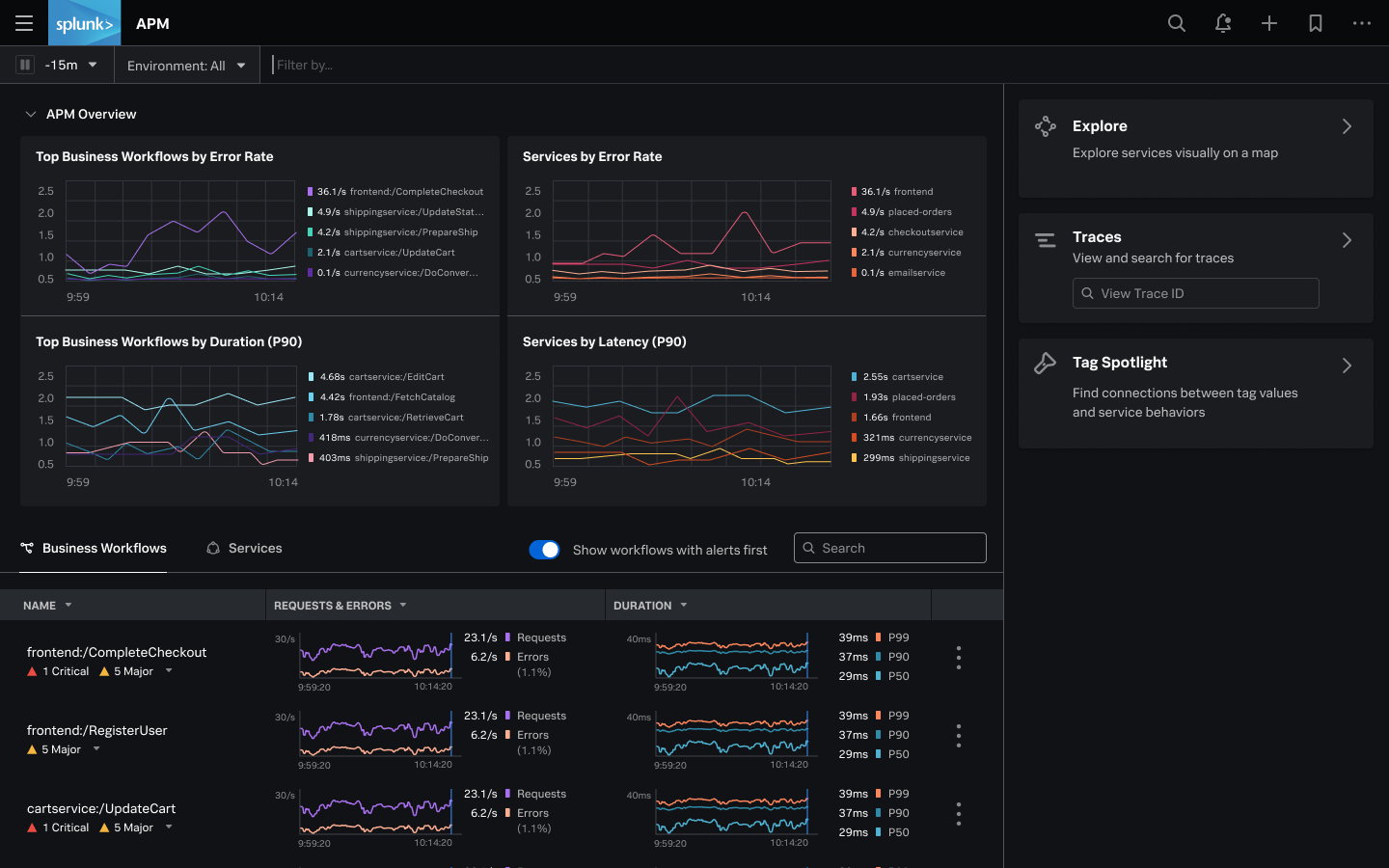
    Splunk today unveiled an observability platform delivered as a cloud service that captures all metrics, traces and logs in real-time without relying on sampling.

    Spiros Xanthos, vice president of product management for observability and IT Ops at Splunk, said Splunk Observability Cloud collects all that data via a single agent based on open source OpenTelemetry software to instrument an application.

    Historically, application performance management platforms (APMs) have only analyzed samples of data to identify a potential anomaly. Splunk Observability Cloud analyzes all the streaming data captured by its agent software to enable IT teams to pinpoint the root cause of an issue faster, said Xanthos.

    As a result, Xanthos said the signal-to-noise ratio dramatically improves compared to legacy monitoring platforms. It will then be up to each IT team to decide how much of that data they want to store after it’s been analyzed, added Xanthos. Pricing for Splunk Observability Cloud is based on the number of hosts employed rather than the amount of data collected.

    The Splunk Observability Cloud unifies a Splunk analytics portfolio by including capabilities provided via Splunk Log Observer, Splunk Real User Monitoring (RUM), Splunk Synthetic Monitoring, Splunk Infrastructure Monitoring, Splunk APM and Splunk On-Call. Splunk Synthetics Monitoring is based on technology Splunk gained with the acquisition of Rigor last year.

    Splunk

    The Splunk Observability Cloud is one of the first such platforms to rely solely on OpenTelemetry agent software being developed under the auspices of the Cloud Native Computing Foundation (CNCF) to collect data. That project not only reduces the cost of instrumenting applications, it also reduces the number of agents an IT team might have to deploy to collect metrics, traces and log data.

    Many rival observability platforms can collect data from OpenTelemetry agent software, but also tend to encourage DevOps teams to deploy proprietary agent software that they claim is easier to install and collects data at a more granular level. Splunk has decided OpenTelemetry has matured to the point where those proprietary agents are no longer required, said Xanthos.

    The rise of observability platforms presents an opportunity for IT teams to rationalize a raft of monitoring tools that often surface conflicting analyses. IT teams today spend an inordinate amount of time convening so-called “war room” meetings to determine the actual source of an issue. Those meetings can go on for hours, only to eventually discover an issue that only takes a few minutes to fix.

    While observability has always been a core DevOps principle, the level of visibility most IT teams have into their application environments is limited. There is no shortage of monitoring tools, but because there is no unified approach to observing an IT environment, there simply isn’t enough context being provided. As IT environments become more complex – thanks primarily to the rise of microservices-based applications that have lots of dependencies – that lack of context is rapidly becoming a major issue. A microservices-based application is designed to degrade gracefully if one microservice suddenly become unavailable. The issue is that it can take a very long time to discover the root cause of performance degradation.

    It may be a while before most IT teams achieve true observability, but once they do, many will wonder how they previously managed IT without it.

  • Debugging is Broken – Here’s How To Fix It

    Debugging is Broken – Here’s How To Fix It

    Let’s face it, debugging is broken.

    Whether you wholeheartedly agree or vehemently disagree with that statement, I think we can all agree that debugging, at the very least, has room for improvement. In fact, the way software developers debug their code hasn’t changed much. Of course, there are now a wide array of observability and monitoring tools available to make a developer’s life easier, but when we look at the process developers typically follow when debugging code, it’s stayed relatively unchanged over the years.

    Having the right tools available definitely improved the overall debugging experience, but they’re not the only factor. Internal organizational processes are equally as important, and should be adapted to make developers’ lives as smooth and stress-free as possible while still maintaining the proper levels of organizational security and compliance. Inefficient or highly restrictive processes, while great for the compliance team, can adversely affect the velocity of getting to the bottom of issues quickly. The right solution is typically a combination of adapting those processes to fit the company culture, along with a combination of tools that allow for compliance with industry standards and best practices.

    How Developers Debug Code

    When you talk to developers today about how they debug their applications, the process is typically not all that different than it was many years ago. The standard approach to debugging is still through the use of logging frameworks. Of course, teams are taking advantage of things like application performance management (APM) tools and other tools in the monitoring and observability space, but when you look at the primary method of debugging issues that require developers to dive into the code, logging is typically the main approach.

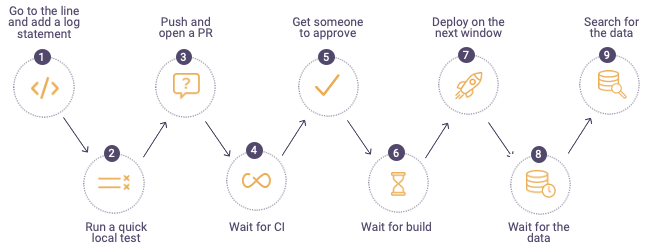
    The process typically looks something like this:


    debugging process

    When a defect is found, developers will first go to the log files on the production or pre-production servers in the environment where they are debugging. If they can’t find information in the logs to help them get to the root cause of the issue, they go back to their code and add additional log lines, finally sending their code through the process shown above. For highly advanced organizations, the process can take minutes or hours, but more often than not, this process drags on for days – or even weeks. It becomes especially time-consuming when the defect developers are trying to find and remediate is in production. In these cases, the cost to the business can be staggering; there’s got to be a better and more efficient approach to debugging.

    Where Tools Can Help

    While new and shiny tools don’t always solve all debugging problems, they can often ease some of the pain developers face and, in the process, make their lives a little bit easier. Debugging, observability and monitoring tools can get developers the data they need to solve problems faster than the more traditional method of digging through logs and using trial and error.

    The place many organizations start when considering diagnostic tools is with APM. These types of tools focus specifically on monitoring and management of the application availability, and can help to collect metrics and other relevant application information that can aid in pinpointing infrastructure issues. Most often, these tools are not actually used by developers themselves, but rather operations or production support teams to ensure availability and performance thresholds of applications.

    Another critical category of telemetry are tracing tools, which can help developers better understand how requests flow through multiple tiers of applications and even help identify error rates and latency. There are many vendors selling this category of tools, but there are also open source options which allow developers to integrate tracing into their applications via a vendor-neutral approach.

    After diagnosing an issue with an APM solution, there is often a handoff to development to remediate the issue. When developers need to debug, they often use their local IDEs or, even better, a remote debugging solution. Remote debuggers are used directly by developers to simplify debugging of applications in remote environments. These tools helps developers get to the bottom of customer issues faster by giving them direct access to the underlying application data in a safe and secure way while the application is running without stopping it or having to redeploy it. A major benefit of remote debuggers is that they can give developers the data they need from production environments without compromising security or requiring developers to have direct access to sensitive environments. While remote debuggers and other debugging tools are not a silver bullet, they can be a critical component that empowers developers to better address critical issues.

    Fixing Organizational Problems

    If solving customer issues is taking longer than expected or is potentially hurting your brand, it’s critical to sit down with your development team and use a data-driven approach to identify where the problems lie. Do a deep dive into your issue tracking or ITSM system to identify trends or recurring issues within particular application components. Development teams can often become so overwhelmed tackling issues and building out new features that valuable information in these internal systems can go untapped. Customer issues and defects should be reviewed periodically to assess things like business impact, cost to fix and alignment with the product roadmap. There is valuable information that can help focus the team’s effort on time-saving activities as well as improving the product, making for happier customers.

    Another area to look at is your software delivery process. Are there bottlenecks in your delivery pipeline that could be made easier or more efficient but have been overlooked? The speed and efficiency of your software delivery pipeline has a direct impact on developers’ ability to debug effectively and can contribute to a broken or slow debugging process. Developers should have the ability to push code into new environments as quickly as possible to remove slowdowns from too much context switching. This means automating as much of the delivery pipeline as possible, removing unnecessary manual deployment approvals and shifting left as many activities as possible.

    When it comes to empowering developers and fixing broken debugging processes, organizations should focus on fixing organizational bottlenecks as well as equipping developers with tools that can save them time and improve their daily workflows. Focusing on these areas can increase development team velocity and eliminate costly day-to-day slowdowns which add up over time and negatively impact productivity. With a few key changes, debugging can be a much more manageable and predictable process.

  • Blips and Downtime: Incident Management 101

    Blips and Downtime: Incident Management 101

    Nothing gets the blood pumping like seeing an IT incident alert flash across the screen. Is the network traffic anomaly a potential intrusion? Are we about to have an outage? Is it just a random blip on the radar? The implications of these different potential incidents vary wildly, and each requires a different set of response tactics.

    Responding to incidents both large and small is essential for every team. Especially in a remote-first world, it is more important than ever to ensure that all developers are in the same war room to tackle the problem as efficiently and effectively as possible. It’s also critical to have a single view that aggregates data from all of the systems and services used to monitor and respond to incidents. But not every team has invested in a fully fledged incident management strategy.

    In fact, it’s not uncommon for incident management to be completely ad hoc. Teams wait for something to happen and then take a “dive and catch” approach to incidents. Some teams have some processes in place, but those plans may be missing key components. In both cases, teams struggle with slower time to resolution and often waste resources in the process of responding to incidents. Critical stakeholders often suffer from a lack of clarity in communication around an incident.

    Depending on the type of incident, the consequences can be challenging to overcome. Running afoul of a compliance law, like GDPR, can result in business-ending financial penalties. Incidents that impact uptime can keep an organization from meeting SLA terms and potentially losing customers and revenue. Regardless of the size of your company or customer base, formulating an effective incident response begins with people.

    People are the Cornerstone of Incident Response

    Companies should assess their business needs and the risk profile of their applications and services. With those barometers in place, leaders can then determine the appropriate staff levels to ensure 24/7/365 incident management coverage. The size and breadth of the team will depend on the size of the company and the structure of response plans, but the team should attempt to cover a few areas.

    Ideally, a team has at least three responders.

    1. Incident owner. This is the team’s quarterback. They coordinate everything, make sure the team follows runbooks, involves the correct people and removes roadblocks.
    2. Incident investigator. The investigator has their hands on the keyboard. They run the investigation, pull and analyze logs, review metrics and generally try to determine how to best mitigate the issue.
    3. Incident communicator. Smaller teams may not have the personnel to have a designated communicator in every incident. On those teams, the incident owner will often assume this role, as well. Communicators focus almost exclusively on two tasks: documenting the incident via an “incident timeline” and communicating with stakeholders when appropriate. It’s critical that a complete timeline is built during the incident. It’s nearly impossible to put together a properly documented incident timeline after the fact. Critical details will get lost or forgotten, and your retrospectives and RCAs will be low quality.

    Runbooks offer Muscle Memory During Incident Management

    The incident response team, no matter how experienced, will need a set of runbooks—a compilation of processes and steps to take when incidents arise. Runbooks will help guide teams as they perform everything from analyzing and mitigating common problems, to post-action investigations. They represent the process portion of incident responses, and act as a guidebook for the team when the pressure is high.

    Typically, an alert system will ping the on-call engineer about a metric that doesn’t look right. The runbook will help that on-call person determine if the alert should be categorized as an incident or not. When that person determines the alert indeed represents an incident, they must estimate the severity of the incident. Different teams may use different definitions for severity, but here is an example:

    Severity one – Production down or highly degraded.
    Severity two – Serious bug impacting customers or system stability.
    Severity three – Important bug. Requires tracking until mitigation, but likely not a 24/7 workstream.

    Runbooks can also guide teams through analysis of the situation. After a root cause is determined, the book will remind teams to perform an immediate post-action investigation to see if specific processes worked well, if gaps exist, and if communications were sent out to customers or other stakeholders.

    Tools are Important; Tying Them all Together is Crucial

    People and processes are important for responsive incident management. Without the right tools, even seasoned incident-management veterans may struggle with the complexity and pressure of an incident. Tooling can prevent a lot of mistakes and omissions when the heat is on.

    There are numerous platforms that address different components of incident management response. Depending on the size of the organization, teams will need some or all of the following:

    • On-call rotation management
    • Observability and alerting
    • Ticketing system
    • Communication system

    One of the biggest challenges in incident management is having the ability to tie together the data and actions defined by this broad toolset. If you’re working a severity level one incident, teams will likely rotate people into and out of the incident based on their geographic location and timezone. How does the next person in the rotation come up to speed on what’s been done so far? How do we document a detailed timeline that can be used for an RCA investigation later? How can we provide an up-to-the-minute view of the status of an incident for key stakeholders? Ideally, teams will have a single place where all of this data is collected and managed and where the data can be filtered and exported at the end of the incident.

    Effective Incident Management: People, Processes and Tools

    Is that traffic spike a sign of impending doom, or just another meaningless bump? Without the proper people, processes and tooling, answering that question becomes very difficult. Unfortunately, the wrong answer can lead to disastrous consequences. Only with the right set of tools and processes can companies develop an incident response system that provides maximum stability and keeps customers happy.