Category: Continuous Testing

Continuous testing is the process of executing automated tests as part of the software delivery pipeline to obtain immediate feedback on the business risks associated with a software release candidate.

  • A History of Distributed Tracing

    A History of Distributed Tracing

    Organizations are increasingly using distributed tracing to monitor their complex, microservice-based architectures. Distributed tracing has become essential in microservice applications, cloud-native and distributed systems. Microservices and serverless applications can grow exponentially, which makes observing them at scale very challenging. The traditional logging method becomes expensive, and if there’s an issue, time-series data can reveal symptoms but not the root cause(s). With modern usage patterns of Kubernetes service mesh like Istio and Envoy, for example, there can be billions of microservices calls daily.

    What is Distributed Tracing?

    Traces describe the progress of a transaction or workflow through a system. Distributed tracing provides visibility into service dependencies and their interdependencies by providing end-to-end visibility. Visualizing transactions in their entirety allows you to compare non-normal traces with normal ones to determine differences in behavior, structure and timing. Through distributed tracing, you can identify bottlenecks in your system. As a traced request flows through a network, it can be tracked. 

    As requests flow from frontend to backend and to databases, traces provide diagnostic techniques that reveal how a set of services coordinate to handle an application request. Using distributed tracing, developers can troubleshoot requests with errors and high latency. A single trace typically shows the activity of a request or transaction within an application. A trace shows what has changed at each step. As you aggregate the traces, you can see which backend service or database has the most significant impact on performance. 

    The History of Distributed Tracing

    Dapper, a large-scale distributed systems tracing infrastructure, was introduced by Google in 2010. Two years after Dapper was made public, Twitter open sourced Zipkin, which was designed for application performance tuning. Zipkin was the first open source distributed tracing project. Zipkin trace data can be collected and visualized using a UI. In 2015, Uber launched Jaeger, which was inspired by Dapper and named after the German word for hunter. Later in 2017, Uber published a blog post, called Evolving Distributed Tracing at Uber Engineering, explaining the reasons for the architectural choices in Jaeger. In addition to creating Jaeger, its author, Yuri Shkuro, wrote a book about distributed tracing called Mastering Distributed Tracing. 

    In 2016 Ben Sigelman, founder of Lightstep, wrote a blog post called Toward Turnkey Distributed Tracing, describing OpenTracing as a single standard. Some people refer to this as the OpenTracing Manifesto. OpenTracing allows developers of application code, open source packages and open source services to instrument their code without binding themselves to any particular tracing solution. The goal of OpenTracing was to solve a standardization problem. Trace context must pass through all the components, including application code, dependent libraries, standalone open source services (Nginx, MySQL) and other vendor-specific libraries and services, to collect a complete distributed trace. Collecting a full path without a standard API to define the collection and passing of trace context is difficult. OpenTracing aims to solve this problem by defining a standard API that can be implemented by components from different tracing solutions, allowing the collection of end-to-end tracing data. The Cloud Native Computing Foundation (CNCF) accepted OpenTracing as its third project in October 2016. Two months later, OpenTracing 1.0 was released. After OpenTracing, Jaeger joined the CNCF. 

    W3C tracing context specification was proposed in November 2019, bringing distributed tracing closer to standardization. Over ten years, distributed tracing evolved from one paper to an active community. With standardization on all the layers, it is moving from just tracing to overall observability, ranging from latency optimization to root cause analysis and application performance management. It is moving from a single backend system to an end-to-end solution that spans multiple systems. 

    OpenTracing and OpenTelemetry merged in 2019. Using OpenTelemetry, distributed tracing can be implemented end-to-end. It released version 1.0 in 2021. CNCF’s OpenTelemetry project is one of the fast-growing projects, and OpenTelemetry has become the de facto standard for tracing, metrics and logging.

    How it Works

    Traces in distributed tracing consist of tagged time intervals called spans. It is possible to think of a span as a unit of work. Traces are directed acyclic graphs (DAGs) composed of segments known as spans. According to OpenTelemetry, There are four major components of a trace:

    • traceID
        • A unique 16-byte array to identify the trace that a span is associated with
    • spanID
        • Hex-encoded 8-byte array to identify the current span
    • Trace Flags
        • Provides more details about the trace, such as if it is sampled
    • Trace State
        • Provides more vendor-specific information for tracing across multiple distributed systems. Please refer to W3C Trace Context for further explanation.

    The spans in a trace consist of contiguous segments of work that are named and timed. There are start and end times for spans, as well as metadata such as tags or logs that help classify them. Parent-child relationships may be present between spans to show how particular transactions traverse the application’s numerous services and components. 


    A trace represents an end-to-end request; it can contain one or more spans. Spans indicate work performed by a single service with associated time intervals and metadata. The purpose of traces is to provide a request-centric view of spans through tags. Despite microservices enabling teams to work independently, distributed tracing offers a central resource that allows all teams to understand issues from a user’s perspective.

    Conclusion

    In distributed systems, response latency can have a significant commercial impact. Identifying bottlenecks and understanding how a request moves through a complex system is complicated. Other techniques, like logging and monitoring metrics, don’t provide insight into distributed applications such as those created with microservices architecture. Several open standards and tools are emerging within the distributed tracing space, like OpenTracing and commercial tools that could compete with existing APM solutions. Implementing distributed tracing for modern cloud-native services poses several challenges. OpenTelemetry tracing is necessary for processing high volumes of trace data while generating meaningful insight.

  • Securing Open Source Components in a World of Mixed Committer Motivations

    Securing Open Source Components in a World of Mixed Committer Motivations

    Our world runs on software that contains open source components. This places an increased burden on developers, as the primary consumers and deployers of those components, to use code that is fully up-to-date and secure. The vast majority of open source committers with write access to project repositories remain focused on maintaining and making positive improvements to that code, while also helping to benefit the open source community as a whole. However, the sheer complexity of many open source projects has opened the door to different, more insidious and concerted types of attacks which could cause widespread and serious harm.

    Developers Have to Move Fast and Reuse Gives Them That Speed

    One complicating factor is the prevalence of reuse of third-party open source elements across the majority of open source projects through two main types of dependencies. With direct dependencies, an open source component links straight to a third-party code library, while transitive dependencies occur when a component calls out to a library that is, in turn, communicating with another dependency.

    Dependencies enable developers, under ever-increasing corporate pressure to deliver new software rapidly, to move faster by building on top of existing work by their peers. The downside is that those dependency foundations are vulnerable to attack, with some libraries perhaps under the aegis of a single committer for whom the code collection may be a side project and perhaps not attended to on a regular basis.

    Sonatype research and that of other organizations tells us that developers working with a Java application may be dealing with a staggering 1,500 dependency changes every year, with the average Java application containing 148 dependencies and the average Java project being updated 10 times annually. While the number of open source projects isn’t ballooning, the amount of versions of those projects is skyrocketing. The majority of vulnerabilities today impacting open source projects result from transitive dependencies, the more complex type of dependency.

    In an area where multiple projects may exist effectively solving the same issues, developers need to be aware of which projects are being actively maintained versus those that are either poorly nurtured or no longer in operation. On the other hand, successful open source projects may have tens or hundreds of committers with write repository access, which address a whole different set of issues, including reaching agreement on what a vulnerability consists of and how to fix or patch it.

    Amid a Community for Good, Bad Actors and Incidents of Self-Sabotage Emerge

    The reasons why individuals choose to commit to open source software are wide-ranging; a strong desire to give back to the community to a passionate and, perhaps very single-minded, hobby to an integral and paid part of a developer’s role and responsibilities at work. A few years ago, the concept of a malicious open source committer was an abstract theory. The thought back then was that perhaps a handful of ‘bad apples’ might exist within a community of millions of developers. However, since 2019, researchers’ tools and those of other organizations have identified over 100,000 malicious, suspicious or proof-of-concept packages, pointing to a much higher degree of behavior by cybercriminals.

    Bad actors are deliberately taking advantage of the complexity of open source software to knowingly introduce exploitable vulnerabilities. These attacks are growing in sophistication particularly in relation to malicious code injections into the source code of an open source library. These attacks can often appear as harmless code changes and remain hidden before delivering a malware payload. There is the recent example of a crypto heist that stole over $3 million in cryptocurrency which leveraged compromised access to a private GitHub repository.

    Protestware, where a code maintainer chooses to self-sabotage their open source project often to draw attention to a cause, whether geopolitical or specific to that individual, has become an issue over the past year. In this case, although the stated goal is not malicious hacking, real harm, in terms of major disruption, to developers using that code can occur.

    To counter both the impact of bad actors and of self-sabotage on open source components, developers need to take advantage of release integrity features to help protect themselves and their organizations from harm. They must be able to have full visibility and control over the software they build and the open source components that they are sourcing as part of that development work. At the same time, governments around the world, including in the U.S., are weighing into issues related to the security of software supply chains, so increased regulations and penalties should also factor into how developers and their organizations behave moving forward.

    We’re only one step away from the next potential Log4j attack, and every developer and organization needs to up their game and be ready to move fast on vulnerability identification and remediation. The gathering and sharing of data is what will help to increase everyone’s safety.

  • AWS Previews Amazon CodeCatalyst to Automatically Create Dev Environments

    AWS Previews Amazon CodeCatalyst to Automatically Create Dev Environments

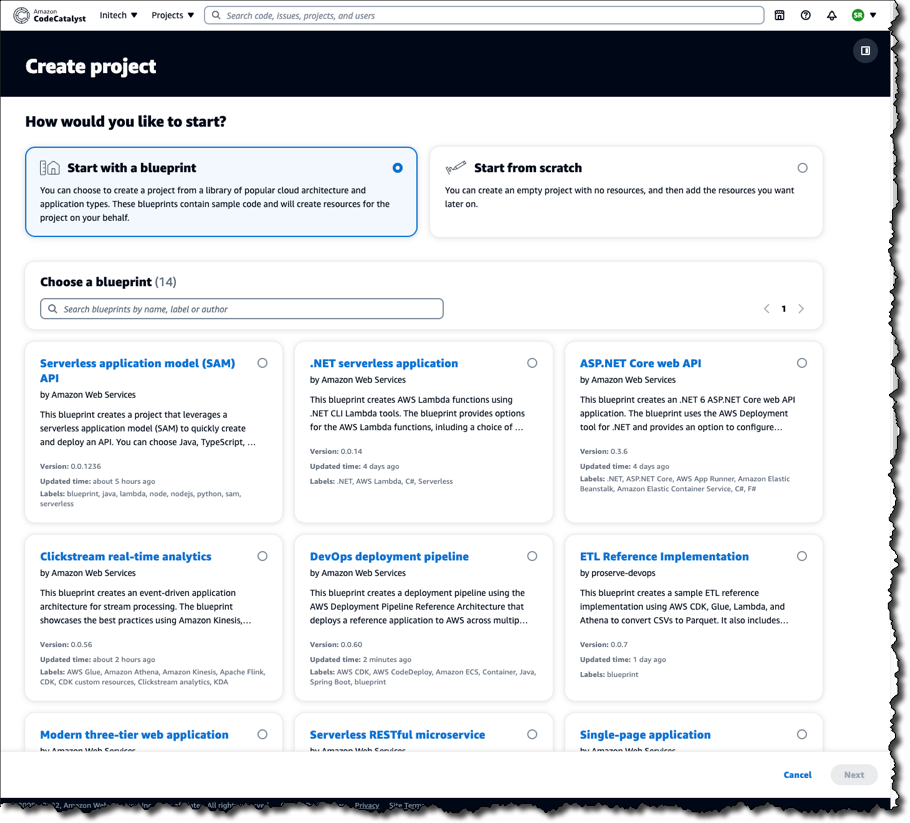
    Amazon Web Services (AWS) this week launched a preview release of the Amazon CodeCatalyst framework that leverages blueprints to automatically provision and configure developer environments in its cloud.

    Announced at the AWS re:Invent 2022 conference, Amazon CodeCatalyst takes advantage of a Project Blueprints tool to launch a source code repository and a project management tracker that are then used to create build and release pipelines. DevOps teams can use either the tools provided by AWS or substitute an instance of, for example, GitHub or the Jira project management software.

    Amazon CTO Werner Vogels told conference attendees the goal is to reduce the friction that developers currently encounter whenever they need to launch a new development project. As part of that effort, Amazon CodeCatalyst promises to make it simpler to consistently replicate development environments using scaffolds in addition to providing dashboards and search capabilities for tracking changes across commits, pull requests and deployments.

    Amazon CodeCatalyst uses a devfile to define the configuration of an environment that comes in four resizable instance options made up of two, four, eight or 16 virtual CPUs. The devfile defines and configures all the resources needed to code, test and debug a project. Devfiles, which are added to the source code repository by the selected blueprint, can also be modified.

    Collectively, those capabilities make it possible to deploy sample TypeScript, Python, Java, .NET, JavaScript, React, Angular and Vue code running in a few minutes. Developers can work with the AWS Cloud9 integrated development environment (IDE) or use tools such as JetBrains IntelliJ IDEA Ultimate, PyCharm Pro, GoLand and Visual Studio Code on their local machine. Developers, as a result, can simply switch between multiple codebases or collaborate with other developers as needed.

    The pipelines can be run on pre-provisioned builds in the cloud or organizations can opt to deploy their own container environments. Developers can incorporate build actions that are built in or provided by AWS partners in addition to incorporating GitHub Actions to compose fully automated pipelines that can be configured using either a visual editor or YAML files. Build and release pipelines enable deployment on Amazon Elastic Container Service (Amazon ECS), AWS Lambda and Amazon Elastic Compute Cloud (Amazon EC2) services.

    In general, Vogels advocated that IT teams should build event-driven applications that are loosely coupled to make it simpler to add new capabilities to existing applications running at scale without impacting the entire codebase. To make it simpler to build those types of applications, AWS added an Amazon EventBridge Pipes tool that creates point-to-point integrations between event producers and consumers in a way that eliminates the need to write that code. AWS also made available in preview a graphical AWS Application Composer tool that makes it simpler to design, configure and build serverless applications using infrastructure-as-code (IaC) definitions.

    It’s not clear to what degree developers will be embracing event-driven applications. As a programming model, event-driven architectures have been around for decades. The issue has been those applications also have tended to be among the most challenging to build and maintain. AWS is now clearly signaling its intent to make building those applications a lot easier.

  • GitLab Unfurls Dedicated SaaS Edition in the Cloud

    GitLab Unfurls Dedicated SaaS Edition in the Cloud

    GitLab today made available to a limited number of customers a single-tenant version of the software-as-a-service (SaaS) edition of its continuous integration/continuous delivery (CI/CD) platform.

    David DeSanto, vice president of product at GitLab, said the GitLab Dedicated option provides all the benefits of a cloud platform without running afoul of any potential compliance issues.

    Designed to be deployed on a cloud platform selected by the customer, DeSanto said the single-tenant edition of the platform makes sure that all the data stored in the cloud is isolated. In addition, the access to GitLab Dedicated is provided via a private network connection, he added.

    Initially, GitLab Dedicated is being made available on the Amazon Web Services (AWS) cloud with support for other cloud platforms planned for 2023 once it becomes generally available.

    GitLab is, in effect, trying to strike a balance between a lower-cost multitenant edition of the platform or, alternatively, requiring organizations to deploy an on-premises edition of the platform themselves, DeSanto said.

    In general, GitLab expects this latest version of the platform to appeal most to organizations that operate in highly regulated industries. However, the number of organizations looking to isolate their data in a private cloud to better protect their software supply chains is expanding, he noted.

    In the wake of a series of high-profile breaches and vulnerability disclosures, the number of organizations that are reviewing their software supply chains has increased. Less clear is the degree to which organizations will look to lock down their existing CI/CD platform versus replacing it with a more secure modern alternative that can be more easily accessed via the cloud.

    The challenge, of course, is replacing a CI/CD environment is not trivial, so organizations will need to consider the time and effort made over the years to customize their CI/CD environment. In some instances, that customization provides a meaningful competitive advantage. In other cases, however, the weight of maintaining all those customizations has become more troublesome than it’s worth.

    Each individual organization will need to decide to what degree they will want to manage the DevOps platforms used to construct applications. More organizations are deciding they prefer to devote as much of their resources as possible to writing code instead of managing the underlying CI/CD platform used to create their applications, said DeSanto.

    Regardless of approach, the number of organizations adopting DevOps best practices to build and deploy applications faster continues to increase. A CI/CD platform accessed via the cloud lowers the barrier to entry for smaller organizations that typically don’t have the skills and resources required to manage DevOps platforms.

    In the meantime, SaaS-based approaches should significantly increase the number of applications being constructed using DevOps workflows. The level of DevOps adoption will naturally vary by organization. However, the total number of custom applications being used to drive, for example, digital business transformation initiatives should considerably expand in the months and years ahead as more applications are built and deployed at incredible speed.

  • 4 Best Practices for Entertainment App Testing

    4 Best Practices for Entertainment App Testing

    Entertainment apps represent a broad category of software, ranging from mobile games, to social media platforms, to streaming video apps and beyond.

    However, all entertainment apps share a few key traits in common:

    They typically host dynamic content that is unique for each user. This makes entertainment apps different from apps where most or all of what each user sees is the same.

    They host rich multimedia content including, in many cases, streaming audio and video.

    They are often created by vendors operating in highly competitive markets, where a poor user experience can send users flocking to competitors’ apps. There is no shortage of apps out there for gaming, video streaming and so on, and if your app fails to perform, your users can easily convert to a competing solution.

    For these reasons, teams responsible for testing entertainment apps must develop a testing strategy tailored to the unique challenges of these applications. Traditional testing tools and methodologies aren’t enough for running tests that support an excellent end-user experience for entertainment software.

    With that reality in mind, let’s take a look at four best practices to follow when testing entertainment apps. These strategies go a long way toward ensuring that entertainment apps deliver the end-user experience that is necessary for maximizing user engagement and retaining users, no matter how complex or dynamic the apps happen to be.

    Testing for Video and Audio Syncing

    An easy – and all too common – way to shred the user experience in an entertainment app is to stream videos where the visual and audio streams go out of sync with each other. Videos need to be perfectly in sync with audio to keep users happy.

    Of course, the challenge that testers face is that most testing frameworks don’t offer an easy means of evaluating whether visual and audio content are in sync with each other, especially when the content is streamed. Frameworks that let you evaluate when content initially loads or when it updates aren’t enough for analyzing sync between visual and audio streams. As a result, teams have traditionally resorted to testing for sync manually, or not testing it at all.

    Fortunately, there’s a better way. Using AI, you can run tests that automatically identify lag between video and audio. In turn, you can detect problems that may cause streams to go out of sync, then fix them before your users experience sync issues.

    Minimize Test Latency

    When you have an entertainment app where content changes in real-time, your tests need to be able to execute and display results in real-time, too. But that’s difficult to do if network latency issues prevent data from moving between your test cloud and your testing tools quickly enough to provide real-time results.

    There are two ways to solve this challenge. First, you could run tests on on-premises devices in order to avoid network latency problems. Alternatively, if you want to take advantage of a test cloud while still achieving real-time results, you can optimize network traffic in a way that minimizes latency and allows test data to flow between your test cloud and your testing tools in a few dozen milliseconds–as opposed to the hundreds of milliseconds traditionally required for packets to flow from tools to the device cloud, and then back again.

    Test Across Geographies

    The way a user based in, say, Barcelona experiences an entertainment app might be quite different from the way one located in New York or Tokyo experiences the same app. The reason why is that the network hops over which data needs to travel, as well as the efficiency of the carrier network that delivers the data, which can have a major impact on how quickly content loads and is streamed. For media-rich entertainment apps, latency and bandwidth limitations can be particularly problematic.

    For this reason, you should be testing your entertainment apps from the perspective of users spread across the world. Doing so allows you to represent multiple geographies and carrier networks in your tests, ensuring that your app performs properly not just from the location where your testing team is located, but from all of the locations where your actual users reside.

    Test for Multiple Screen Resolutions

    Variations in screen resolution can have a significant impact on how content is rendered. Attempting to display content at a screen resolution that software developers didn’t plan for can result in pixelated images, distorted images or images that aren’t fully visible.

    That’s why you should be testing how content on your entertainment app is rendered under different screen resolutions. Testing for just one or a handful of resolutions isn’t enough.

    You can perform these tests manually, by reviewing content rendering by hand. A better approach, however, is to take advantage of AI tools that can automatically compare renderings of the same content under different screen resolutions to detect inconsistencies. That’s a much faster, more efficient, and more scalable way to ensure your content appears as users expect it to.

    Conclusion

    Entertainment apps are a unique category of software, and they require a unique testing strategy. Testing teams need to test for factors that aren’t important for most other types of apps, such as evaluating whether video and audio streams are in sync. They also need to minimize latency during testing and test across multiple geographic locations and screen resolutions. Practices like these are the only means of ensuring that entertainment apps deliver the user experience necessary to succeed in highly competitive niches.

  • Rezilion Adds Windows Support to Dynamic SBOM Tool

    Rezilion Adds Windows Support to Dynamic SBOM Tool

    Rezilion has added support for Windows applications to its tool for dynamically generating software bills of materials (SBOMs).

    Rezilion CEO Liran Tancman said in addition to existing support for Linux applications, it’s now possible to analyze all the components that make up a Windows application runtime environment in real-time.

    That capability also makes it possible to search for and pinpoint the location of components, such as the Log4j vulnerability, across millions of files and on thousands of hosts, containers and applications, he added.

    Rezilion has created a searchable proprietary next-generation vulnerability database (NGVDB) that identifies which issues impact specific classes and functions. In addition to surfacing remediation suggestions, the capability also reduced the number of false positives that IT teams would otherwise have to track down.

    The SBOM tool the company provides builds on that capability to provide insights into the complete attack surface of an application that could be exploited by cybercriminals.

    In general, the components of a Windows application are more challenging to track and analyze because of the many different frameworks created to build them over the last few decades. However, with more than half of all applications running on Windows, the need to create SBOMs for those applications has become a more pressing concern, especially in the wake of an executive order issued by the Biden administration that requires federal agencies to provide SBOMs for every application they use.

    It’s not clear how many enterprise IT organizations will be following suit, but the general expectation is that SBOMs will soon be a lot more prevalent than they have been. In the wake of a series of high-profile cybersecurity breaches, there is now more scrutiny of software supply chains than ever.

    The challenge, of course, is determining which vulnerabilities to remediate first once they are identified in an application. There are simply too many vulnerabilities to patch all at once, so DevOps teams need to be able to identify which vulnerabilities are the most severe. For years, cybersecurity teams have been creating spreadsheets filled with long lists of vulnerabilities, but there is usually no context provided in terms of how severe a vulnerability is. As a result, developers would allocate a small portion of their time to applying patches that are prioritized based on intuition and level of complexity rather than severity.

    It may still be a while before most organizations that build software are able to consistently create accurate SBOMs. It may be even longer before the organizations that consume those SBOMs have the processes in place to operationalize them. In theory, an organization, if necessary, should be able to prevent software from being deployed based on the list of components included in the SBOM. However, that decision is not always straightforward. There is usually a range of reasons for including a potentially vulnerable component in an application that needs to be considered.

    One way or another, the overall security of applications is about to steadily improve. The only issue is how much pain will need to be experienced to achieve that goal.

  • CircleCI Will Use AI to Increase Collective DevOps Intelligence

    CircleCI Will Use AI to Increase Collective DevOps Intelligence

    CircleCI has committed to adding additional collective intelligence capabilities to its continuous integration/continuous delivery (CI/CD) platform that will leverage machine learning and other forms of artificial intelligence (AI) to optimize application development and delivery.

    CircleCI CEO Jim Rose said that as the company’s namesake CI/CD platform continues to collect more telemetry data from multiple customers, it becomes feasible to create AI models that will optimize everything from application testing to reliability and performance.

    As part of that strategy, CircleCI has also added capabilities such as test splitting recommendations that employ machine learning algorithms to estimate the expected time savings of enabling parallelism on test jobs.

    In addition, CircleCI is creating a team of analysts and data scientists to develop additional AI capabilities based on the data collected via the cloud version of the company’s platform.

    The decision to invest more in developing AI capabilities follows the acquisition of Ponicode, a provider of a unit testing platform, earlier this year. That platform uses AI to augment application testers by providing capabilities such as syntax validation, on-hover hints and autocompletion capabilities to improve the accuracy of software developed using Visual Studio Code. The goal is to integrate that AI testing technology within the CircleCI platform to make it possible to apply algorithms to individual developers’ code as well as to code aggregated from multiple developers within a build as it is continuously updated across a DevOps workflow.

    The workflows make up a software supply chain that, in many regards, functions like any other type of supply chain, noted Rose. As such, there is plenty of opportunity to apply AI models to optimize those workflows in the same way AI is being applied to optimize other types of supply chains, he added.

    It’s still early days as far as applying AI to DevOps processes is concerned, but it’s clear there is a need to further automate a wide range of manual processes. It’s not likely that AI is going to replace the need for DevOps engineers any time soon, but it will reduce a lot of the toil that currently hinders productivity. The challenge, of course, is that it takes a lot of telemetry data to train an AI model, which typically can only be efficiently gathered and stored with a cloud platform. Less clear is whether AI capabilities might drive more organizations to shift away from legacy CI/CD platforms deployed in an on-premises IT environment where there might not be enough telemetry data available to effectively train an AI model.

    The one thing that is certain is there is now a race to apply AI to DevOps workflows. Organizations that have adopted DevOps typically are highly committed to automation, but the amount of AI applied to those workflows has been limited thus far. In the coming year, however, chances are good the amount of AI being applied to DevOps workflows will steadily increase, especially as many DevOps teams struggle to keep pace with complex application environments.

  • 5 Tips for Securing DevOps: What You Wish You Knew Sooner

    5 Tips for Securing DevOps: What You Wish You Knew Sooner

    Foundations and frameworks, concrete and steel—not exciting. But that’s the foundation and framing of pretty much every modern building. Everything else that is part of a building–flooring, wiring, lighting, room placement and so on—is made possible by the foundation and the framework. If you want DevOps to succeed in your organization, you have to start by building a solid foundation and a framework, including security. What’s below is a suggested approach to the concrete and steel of DevOps.

    Three Foundational Needs

    1. Leadership and Governance
    Someone has to make the decisions, be responsible for leading the team(s), give direction and provide operational governance. Securing DevOps is not just about compliance with a set of security concepts; it’s also about setting the right tone for the workplace. Leadership and governance are key enablers of development success.

    The pressure to deploy software faster and more often is real—but so are the security, regulatory and many other concerns around automation that may uncover bugs or defects in software before it gets pushed to production. In an environment where there’s pressure to release code faster, how does one balance these competing priorities? What’s more important: Speed or quality? This tension between speed and quality remains one of the main challenges faced by organizations adopting DevOps practices today.

    Organizational leadership and governance regarding people and data must be in place to keep people working on the right things, keep up morale, provide direction about project prioritization and budget the right tools for getting the job done.

    An important subcategory of governance is data classification. Where does the data reside? Over which channels does it flow? What kind of data is it? Classifying the data has long-term implications for resource procurement such as what storage to use and if it needs to be encrypted, how stringent access control for the environments needs to be and interoperability of the various technologies.

    2. Regulatory Compliance
    It wasn’t too long ago that if a business remained only national, then there weren’t necessarily many regulatory requirements. Presently, if a business has a website (and who doesn’t?), then international and cross-border data transfer is a given unless one takes the course of geo-restriction, which in itself can be a major undertaking with repercussions.

    Determine regulatory needs. From where do people or other services access the data? What cross-border transfer is involved? To paraphrase the late 1960s-1980s public service announcement, “It’s 10:00 p.m. – do you know where your data is?” Design and implement accordingly.

    3. Risk Management
    One cornerstone of technology management is that it’s all about risk. If there’s a serious incident such as data intrusion or theft, what will the cost be to the organization and was the company part of the problem (e.g., negligence)?

    What are the technical vulnerabilities, threats and risks presented by the product or service? What kinds of testing (e.g., regression, penetration, vulnerability, CTI) would it take to assess and address the risks? What does the patch cadence look like?

    On the personnel side, what are the risks of key players leaving? What’s the morale of the team regarding aspects such as culture and pay? What’s being done to address those risks? Included are third-party, contractual, and privacy risks (remember data classification above?).

    NPM packages are a growing trend as an avenue of exploitation; uptime is a common requirement for meeting obligations, and privacy is considered by many to be more than a privilege but a human right, and not something to take lightly.

    Two Framing Activities

    The foundation activities undergird the entire structure of DevOps, but also consider what shapes the structure.

    1. Software Development Life Cycle (SDLC)
    The SDLC is vital. Without it, where do all personnel (team, contractors, consultants) know how to proceed with designing and implementing the product? What model is used, and who’s responsible for what? It’s all here in the SDLC. Of course, things like references for API architecture specifics and corollary application documentation would make one feel like wandering in the Library of Congress (and make developers want to burn it down like the ancient Egyptian Library of Alexandria!).

    Speaking of APIs: Due to the enormous rise of API use in all industries, including health care and retail, any use of APIs must be part of the SDLC.

    Not only are APIs on the rise for public use and interaction, but microservices use within an org has increased drastically. APIs are necessary internally and externally for businesses to reach, maintain and accelerate the speed of innovation, so including them as critical resources is crucial. The average API usage per company increased by 221%, so attending to that ecosystem by ensuring proper activities, especially security, are included is needed for developers.

    The SDLC is there to make workflow and production consistent (and concomitantly easier) by codifying what needs to be done for both company and customer, not to make work more difficult by presenting nauseating tedium. Like any corporate policy, it needs to remain useful, while not watered down.

    Here are a few specific aspects to include:

    ● Threat modeling in some form needs to be included. It doesn’t have to be a magnanimous effort, but the realities of threats will play a major part in development.
    ● Testing. Regression, stress, pentest, security – these and others will help guide what kind of testing environment one will need and lead to any need to increase items such as capacity and scalability.
    ● Secure coding. If it’s being done, take steps to improve. If it’s not being done, just get started. It’s always hard to go back and fix insecure code, but it’s a necessity due to the many risks and regulations involved in providing software to the public.

    2. Training
    Training is required because businesses have to adapt as technological changes create new opportunities that lead to continuously changing customer demands.

    Training is everywhere! There’s no one right place or right approach – just get training and change as needed (specifics should be handed down by leadership).

    On a strict and lowball budget? One option is OWASP membership (which costs $50 per person per year) and includes several types of AppSec and DevSecOps training. That small investment can help raise the level of clean and secure coding, threat and security consciousness and professional reputation.

    Setting the Course and Always in Motion

    An issue with setting any course in business is that it’s semi-permanent. A DevOps model put in place becomes part of the foundation, which can make one reticent to commit. The only way to prove the chosen methods is to set them in stone and do them consistently for a long time. Aspects of the model may change over time, but once that foundation is put in place, it takes an enormous amount of work, time and money to change it. The change wouldn’t be a remodel, but a reconstruction, so the model takes proper consideration at the outset to chart the right course.

    While DevOps needs a solid foundation, it’s an always-in-motion model. There are new technologies, new people, business changes, customer demands and societal and cultural shifts. These concepts can be included in calculations, but what those changes will be is incalculable. Hire and train the right people and the necessary steps and adjustments will be possible.

  • Fiberplane Notebook Tool Fosters DevOps Collaboration

    Fiberplane Notebook Tool Fosters DevOps Collaboration

    Fiberplane today announced it is making available a public beta of a namesake real-time collaboration notebook specifically designed for DevOps teams that need to quickly debug IT infrastructure.

    Fiberplane CEO Micha Hernandez van Leuffen said in the wake of the COVID-19 pandemic, it’s clear that the structure of DevOps teams has permanently changed now that more members of those teams work remotely. The challenge is that the tools provided to DevOps teams to manage IT environments were not designed to foster the level of collaboration that is now required, he added.

    Dashboards that were designed in a different era need to be replaced with tools that make it simpler for DevOps teams to collaboratively debug infrastructure in real-time, noted Hernandez van Leuffen.

    The Fiberplane notebook achieves that goal by using the same operational transformation algorithm used in Google Docs to enable teams to easily collaborate around a document or spreadsheet. The core platform itself is built in Rust and WebAssembly (Wasm), which Hernandez van Leuffen said makes it simpler to integrate Fiberplane as a plug-in into an existing DevOps workflow. Inside a Fiberplane Notebook, DevOps teams can, for example, write and run PromQL queries and display Prometheus charts alongside other data presented via an integrated graph.

    Fiberplane Notebook’s initial integrations are for Grafana Loki, Elasticsearch and Prometheus monitoring tools. It also exposes both an application programming interface (API) and command line interface (CLI) to automate notebook creation based on specific external events, such as monitoring alerts.

    In effect, Fiberplane is taking the concept of notebooks used for collaboration by data science teams and applying it to DevOps workflows, said Hernandez van Leuffen. The goal is to improve DevOps teams’ productivity by reducing the amount of time it takes to resolve any issue, he added.

    As IT environments become more distributed in the age of the cloud and microservices, troubleshooting issues invariably spans the responsibilities of multiple members of an IT team. Fiberplane, in effect, makes it possible to spin up a virtual war room that enables the members of an IT organization to collaborate until the issue of the moment is resolved.

    The speed at which any IT issue is resolved has become a crucial metric. Given the complexity of IT environments, it’s inevitable that incidents will arise. Ideally, IT teams would discover those issues before they disrupt the business. However, in reality, the metrics organizations use to evaluate the effectiveness of a DevOps team are, unfairly or not, how quickly IT issues are resolved once they are discovered. The longer it takes for a distributed DevOps team to marshal its resources the more likely it becomes that team will be perceived as being inefficient—regardless of what level of application availability is actually achieved.

    Savvy DevOps teams, of course, have implemented a wide range of incident management best practices that create a level of muscle memory for responding to a wide range of issues. The trouble is there will always be unforeseen issues that arise. DevOps teams, as a result, need to find ways to quickly focus on an issue that, for one reason or another, were simply too unpredictable to anticipate; they need to expect the unexpected.

  • Why IT Teams Need Continuous Improvement

    Why IT Teams Need Continuous Improvement

    In the dynamic world of software delivery, an ‘if it’s not broke don’t fix it’ philosophy won’t get you very far—even when your software and systems are working as planned. 

    Software is more complex than ever and innovation is exploding across markets. To keep up with constant innovation from your competition in a global marketplace, you should always be thinking about how to improve your products and services. 

    The teams and organizations focused on continuous improvement simply outperform those who settle for the status quo and fear the unknown. Let’s look at why continuous improvement is important in IT organizations; how to avoid common mistakes when measuring success and tips for getting started. But first, let’s define what continuous improvement is.

    Defining Continuous Improvement

    Continuous improvement is incrementally improving a project or process several times based on feedback. Feedback can come from various sources, including users and automated testing.

    Advantages of Continuous Improvement

    Making small changes over time offers many benefits when compared to a “big bang” change. Often, a “big bang” change is made with little to no feedback until it is almost too late. 

    By making smaller changes, a team can try something, listen to feedback and adjust. If a change is poorly received by end users, little time was spent working on it, so it can more quickly be completely reworked or scrapped altogether. This encourages experimentation with the safety net of knowing nothing is permanent.  

    Think of it like swimming from one end of a murky lake to another. You could dive underwater and not come up until you hit land and, hopefully, you are in the right place. Or, you could periodically pop your head above water, check your bearings and adjust course.  

    Who Benefits?

    Today, it’s hard to imagine a situation where IT teams wouldn’t benefit from adopting a continuous improvement methodology.  Any IT team whose responsibilities include writing software and delivering it to users benefits from continuous improvement. Smaller, incremental changes generally mean a smaller risk of something going wrong. Making a small change to a piece of software or tweaking the software delivery pipeline to shave 30 seconds off the time it takes for each deployment environment adds up over time.

    What do IT Leaders Get Wrong?

    Continuous improvement is all about incremental changes over time to streamline workflows and cut back on waste. In the moment, those changes and improvements can be very subtle, making them harder to justify. When IT leaders don’t look at the big picture, it’s easy to miss how these small changes contribute to overall improvement.  

    For example, let’s say a team is completely focused on measuring deployment time. But the first fully automated deployment to production took just as long as a manual deployment. With a proper feedback loop, the team sees that it took just as long because there were a few misconfigured items. The next deployment takes less time, but only by a few minutes. 

    Each subsequent deployment takes less and less time. But it took several months and multiple attempts to go from two-hour manual deployments to 15-minute automated deployments. With an intensive focus on deployment time, this may not seem like a significant improvement given how long it took to get there. However, in this scenario, the team was so focused on deployment time that it missed other important measurements, such as the number of emergency fixes created after the team started automating the deployment. 

    If they examined those numbers before automation, they would have realized that they pushed out a handful of emergency fixes after a manual deployment—but, almost overnight, those emergency fixes stopped after introducing automation. Critical measurements and improvements like these are easily overlooked when leadership focuses too narrowly and avoids the “big picture” view.

    Getting Started

    When working in IT, there are many problems to solve with a finite number of people and limited time to fix them. It’s tempting to try and solve the problems at the same time. After all, you are only making small changes. 

    However, for real change to occur, you must make several small changes over time. Pick one or two problems to solve and focus on them until you reach a good stopping point; then, move on to the next problem.

    Also, know what and where to measure. With data in hand, you can take an informed approach to designing improvements. Never settle for thinking there are no further improvements because, inevitably, you will be proven wrong when your competition does it better and faster. 

    Ensure that your organization or team is dedicated to lifelong learning, perhaps by experimenting with chaos engineering to see how the system responds. This will spark important conversations and justification for improvement, as well as invaluable feedback. 

    Every IT organization benefits from adopting continuous improvement and will find that it promotes innovation and helps maintain a competitive advantage. It is easy to take too narrow a view of the small changes. But with a high-level, strategic view of continuous improvement, leadership will see the benefits.