Category: Continuous Testing

Continuous testing is the process of executing automated tests as part of the software delivery pipeline to obtain immediate feedback on the business risks associated with a software release candidate.

  • Swimm Adds Generative AI Chat Tool for Documentation

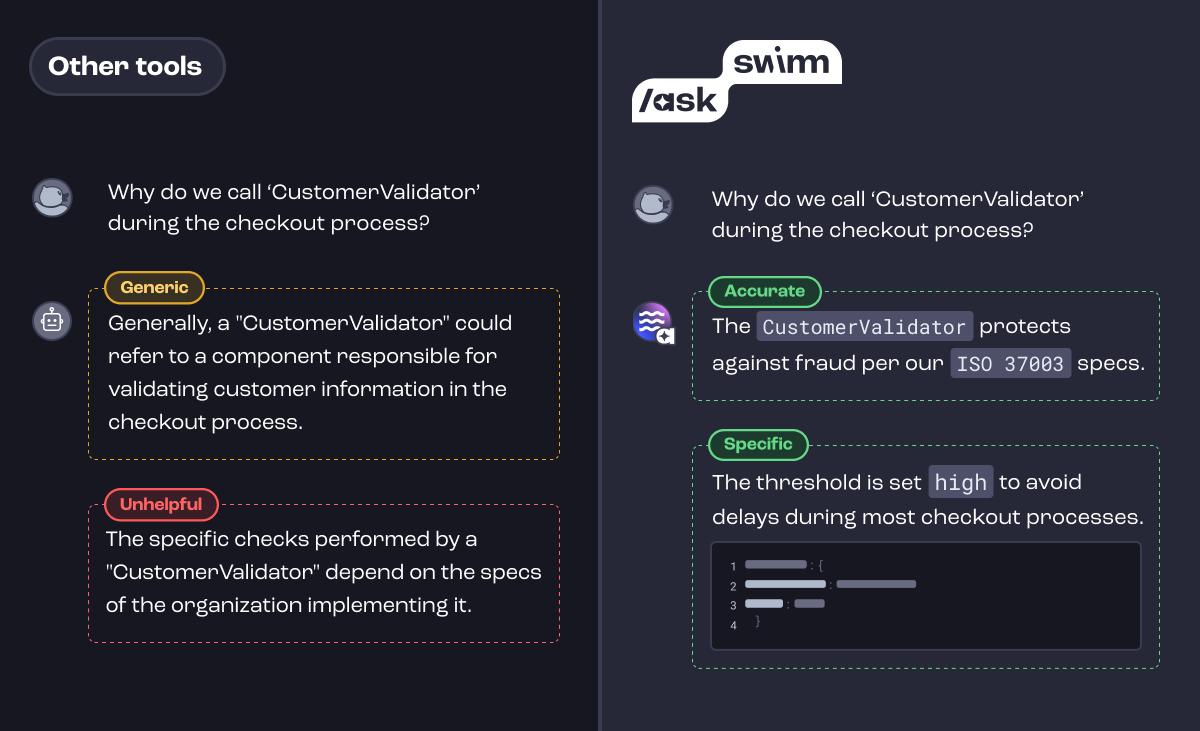
    Swimm today announced it has added a chat tool that enables developers to use natural language to surface insights into code.

    Company CEO Oren Toledano said the /ask Swimm tool makes it simpler to launch queries that enable developers to better understand how code was constructed.

    The /ask Swimm tool aggregates documentation along with other related data to surface factors that are not evident in the code itself, such as documentation of business decisions, product design considerations and decisions concerning why specific architectural choices were made. It automatically captures and updates code-related knowledge to provide a continuous feedback loop as code, documentation, files and repositories are created and updated to provide deeper insights into code that goes beyond what might have been actually documented.

    The overall goal is to provide a mechanism that enables developers to understand how and why code was constructed within the context of an integrated development environment (IDE), said Toledano.

    Swimm has previously made available a platform that uses generative AI platform to create a static analysis of documentation. That capability should make it simpler for organizations to track documentation at a time when generative AI platforms such as ChatGPT are exponentially increasing the amount of code being written. In theory, those platforms should be able to also create documentation for that code, but there will still be a need for tools to track and analyze it.

    In the longer term, Swimm plans to continue to extend its usage of generative AI to provide deeper levels of insights across entire applications and software ecosystems to address that challenge, noted Toledano.

    In the short term, however, it’s clear that AI is making developers more productive than ever. In fact, the volume of code being generated might soon overwhelm existing DevOps pipelines and workflows. Most DevOps teams will need to revamp those workflows as the pace at which more applications than ever are being developed and deployed faster than ever.

    It’s still early days as far as generative AI adoption is concerned, but it’s clear many developers are already using it to write code. How much of that code makes it into a production environment is difficult to determine, but a lot of that code is going to be of varying quality. A general-purpose AI platform such as ChatGPT was trained using code collected from all across the web. The code generated by these platforms is only as good as the examples used to train it, all of which were created by human developers who may have made mistakes, such as including code that has known vulnerabilities.

    Regardless of whether code was generated by a machine or a human, the probability that documentation will need to be analyzed as part of a code review process is always high. The challenge and the opportunity is to determine the best way to apply AI to a longstanding challenge that is now being exacerbated by the existence of AI tools that, with each passing day, are only becoming more accessible to developers.

  • Broadcom Survey Surfaces Raft of IT Automation Challenges

    Broadcom Survey Surfaces Raft of IT Automation Challenges

    A survey of 501 IT leaders published today by Broadcom suggested that islands of automation that operate independently of each other are major contributing factors to organizations failing to meet service level agreements (SLAs).

    The survey found that 98% of respondents encountered at least one automation issue, with 61% noting that SLA issues are a monthly occurrence. More than a third (35%) said these issues occur weekly. A full 88% indicated SLA breaches directly impacted customers in a significant way.

    The survey also found nearly three-quarters (74%) lacked visibility across their data center and cloud environments, with an equal number lacking end-to-end visibility of their automated business processes. Only 28% possessed tools that could predict automation issues, and more than two-thirds (68%) were unable to model or predict whether a new or updated automation job would actually meet SLAs. A full 69% said they are unable to properly size automation workload resources, with 61% having no way to simulate automation workloads before implementation, the survey found.

    Only slightly more than half (55%) of respondents, however, could provide SLAs and key metrics in a format that is appropriate for business stakeholders.

    Aline Gerew, head of automation for the Agile Operations Division at Broadcom, said that while it’s routine for IT teams to leverage a range of automation tools and platforms to manage IT, it’s clear they are challenged to manage those platforms in a comprehensive fashion. As a result, whenever there is an issue with one tool or platform, it creates a bottleneck that impacts customer experience in a way that ultimately adversely impacts revenue, she noted.

    In fact, many IT teams are now starting to identify automation architects within their IT teams to enable DevOps teams in a more holistic manner, added Gerew.

    Overall, the survey found that 80% of respondents are using three or more automation platforms, with just over a quarter (27%) using six or more.

    Nearly three quarters (74%) are also relying on three or more observability solutions, with just under a quarter (24%) using six or more. Just under three-quarters of respondents noted they are consequently subjected to alert storms that ultimately serve to make it more challenging to resolve issues. More than half (56%) of respondents are blind to the downstream effects of an initial alert and, as a result, do not inform response teams of which systems, jobs, applications and business processes are affected.

    In some ways, IT automation has become too much of a good thing. Every provider of an IT platform makes automation tools available, but as they are invoked, each one creates yet another island that IT teams are expected to manage in isolation. However, all it takes for an SLA not to be met is for an issue to arise that IT teams can’t easily determine the root cause of because one or more automation platforms obscure the underlying issue in the absence of any standardization, noted Gerew.

    Given the complexity of modern IT environments, automation is now a requirement. The issue, as always, is finding a way to apply it all in the most transparent way possible.

  • 5 Time-Saving and Problem-Solving Technologies for DevOps Teams

    5 Time-Saving and Problem-Solving Technologies for DevOps Teams

    DevOps has transformed almost every aspect of software development, taking us from the dark ages of big-bang deployments every 12 months to the reality of releasing software multiple times per day. However, DevOps professionals have to overcome several hurdles to successfully implement and sustain the DevOps culture within the organization. Let’s review some of these challenges—and five technologies that can help.

    Cultural and Organizational Differences

    One persistent challenge for DevOps teams in a mature setting is navigating cultural and organizational differences. These differences often manifest in varied working styles, communication methods and priority management across teams. For instance, development teams might prioritize rapid innovation, while operations teams focus on stability and security, leading to conflicts. Managing these diverging priorities requires constant negotiation and alignment, which can be time-consuming and complex. 

    Furthermore, as organizations grow and incorporate diverse teams, including remote and international members, ensuring cohesive communication and understanding becomes even more critical. This diversity, while beneficial, brings challenges in terms of aligning on common goals and working practices, often leading to delays and misunderstandings that impede efficient workflow.

    Complexity of Automation

    In mature DevOps environments, the complexity of automation can become a significant day-to-day challenge. As the infrastructure and application landscape grows, the automation scripts and tools that were once efficient can become unwieldy and difficult to manage. Keeping these automation processes up-to-date with the constantly evolving technology stack is a never-ending task, requiring significant time and resources. 

    Additionally, the integration of new tools or updates to existing ones often introduces complexity, leading to potential errors and downtime. This complexity not only slows down the deployment process but also requires DevOps teams to invest time continuously in learning and adapting to new tools and methodologies. Ensuring that automation is both robust and flexible enough to handle a dynamic environment is a delicate balance that DevOps teams must constantly maintain.

    Cross-Team Collaboration

    Effective cross-team collaboration is vital for DevOps teams but can be challenging in day-to-day operations. The interdependence between various teams–such as development, operations, QA and security–requires a high level of coordination, often hindered by differing goals, tools and terminologies. Communication barriers can lead to misalignment on project objectives, causing delays and inefficiencies. 

    Moreover, in a fast-paced DevOps environment, keeping everyone on the same page regarding updates, changes and issues requires meticulous attention. This is compounded when teams are distributed geographically, as time zone differences and cultural nuances add another layer of complexity. Regular synchronization meetings, clear communication channels and shared tools are necessary, but managing these effectively without causing meeting fatigue or information overload is a continuous challenge.

    Consistency and Standardization

    Maintaining consistency and standardization across various projects and teams is a significant challenge for mature DevOps teams. As the number of services and microservices increases, ensuring that each adheres to the same set of standards for coding, security and deployment becomes increasingly difficult. Inconsistencies can lead to significant problems in integration, testing, and deployment, slowing down the entire delivery process. 

    Furthermore, as different teams may prefer different tools and practices, creating a standardized environment that accommodates everyone’s needs without compromising on efficiency or quality is a complex task. Regular audits, effective governance and a balance between flexibility and standardization are essential to manage this challenge, but they require constant effort and vigilance.

    5 Lesser-Known Technologies That Can Help

    While there is no one technology that can completely alleviate the above challenges, there are several tools that can help. Let’s review five technologies that can make the life of a DevOps team just a little bit easier.

    Chaos Engineering Platforms

    If you’re part of a DevOps team, you’re probably all too familiar with the panic that ensues when a system fails unexpectedly. Chaos engineering platforms aim to save you from such unforeseen surprises by embracing the philosophy of ‘breaking things on purpose.’

    Chaos engineering involves intentionally introducing failures into systems to understand how they respond and to identify potential weaknesses. By doing so, DevOps teams can proactively find and fix issues before they manifest in production, thereby saving significant time and preventing potential downtime.

    Platforms like Gremlin and Chaos Monkey offer controlled environments for running these chaos experiments, providing teams with valuable insights and recommendations. In the long term, this can not only save time but also instill a sense of confidence and resilience in your systems.

    Application Dependency Mapping

    Application dependency mapping (ADM) is a process that helps DevOps teams visualize and understand their applications and their dependencies. It is a crucial technology that aids in quickly diagnosing and rectifying application performance issues, thereby saving time.

    ADM provides a holistic view of the application architecture, showing how different components interact with each other. This comprehensive visibility is invaluable during troubleshooting as teams can easily pinpoint problematic areas and rectify them without having to sift through mountains of code.

    Furthermore, ADM is crucial when planning for application changes or upgrades. Understanding how changes in one component may affect others helps in preventing potential disruptions, leading to smoother and faster software delivery.

    Policy-as-Code Solutions

    Policy-as-code is a practice where policy definitions are codified and managed as code files within version control systems. This approach offers a host of benefits that can save time for DevOps teams.

    Policy-as-code solutions enable automatic enforcement of policies, eliminating the need for manual checks. This significantly reduces the time taken to ensure compliance and allows teams to focus more on developing and delivering quality software.

    Moreover, since policies are managed just like any other code, they can be versioned, tested and reviewed before being deployed. This allows for a more streamlined and error-free policy management process, saving valuable time and effort. Tools like Open Policy Agent and HashiCorp Sentinel are commonly used to implement policy-as-code in DevOps environments.

    Service Mesh Technologies

    Next on the list is service mesh, a dedicated infrastructure layer for managing service-to-service communication in a microservices architecture. Service mesh technologies offer a range of features that can save time for DevOps teams.

    One of the primary benefits of a service mesh is its ability to offload common communication concerns from individual services to the mesh itself. This includes functionalities like load balancing, service discovery, and traffic management. By doing so, it saves DevOps teams the time and effort required to implement these functionalities within each service.

    Additionally, service mesh technologies provide detailed observability of the service communication, making it easier for teams to monitor, troubleshoot and optimize their applications. Istio and Linkerd are two common open source options for implementing service mesh.

    Codeless Test Automation Tools

    Codeless test automation tools represent a significant shift in the way DevOps teams approach software testing, offering a more efficient and less time-consuming method. These tools allow the creation of automated tests without the need to write extensive code, making test automation accessible to team members who may not have deep coding expertise.

    Using a graphical user interface, codeless test automation tools let users design tests by simply dragging and dropping elements into a workflow. This approach not only accelerates the test creation process but also simplifies the maintenance and updating of tests as applications evolve. Additionally, these tools often integrate seamlessly with various CI/CD pipelines, ensuring that automated tests can be easily incorporated into existing DevOps workflows.

    With the speed at which technology is advancing, it’s crucial for DevOps teams to stay updated on the latest tools and technologies that can help them optimize their processes. The technologies listed in this article can significantly save time for DevOps team and make complex DevOps workflows a little smoother.

  • AWS re:Invent 2023: Cloud Development Environments

    AWS re:Invent 2023: Cloud Development Environments

    Speaker 1: This is Techstrong tv.

    Shira Rubinoff: My name is Shira Rubinoff. I’m the chief cybersecurity officer with the Techstrong Group. I’m here with Rob Whiteley, CEO of Coder. Rob, it’s a pleasure to be with you here today.

    Rob Whiteley: Yes, thank you so much for hosting me. This is great.

    Shira Rubinoff: Rob, we’ve had some great conversations, and I’d love you to share with the audience who is Coder, what is your story? Please explain who you are, how you came about. Let’s go from there.

    Rob Whiteley: Yeah, I hope you have about two hours. No, I’m just kidding. I’ll give you the short version.

    Shira Rubinoff: Sure.

    Rob Whiteley: Coder is a cloud development environment solution or CDE is sort of the industry terminology. What that basically means is we’re trying to solve the problem of helping enterprises shift their development from local laptops to more of a cloud native where you’re asking developers to access the cloud and develop there.

    The idea is developing locally on laptops is expensive, it’s error-prone, and you often end up with the, “Well, it worked fine on my machine, but then when I ship the code, it doesn’t work.” So we try to solve that. We’ve been around for about seven years, and we actually started life as an open source project called Code Server, which is an IDE. We’ve since grown to have a more complete solution in this CDE space.

    Shira Rubinoff: Well, that’s wonderful and certainly very needed. Let’s dive into the security benefits of this because there are many and much are needed. I’d love to for your audience to understand that.

    Rob Whiteley: Yeah. Yeah. No, I’m super excited to be here because I think it’s an underappreciated element, right? So to me, if I step back, the reason why companies are investing in cloud development is for developer productivity, right? Only about a third of a developer’s time is actually spent coding. The remaining two-thirds is doing operational stuff, administrative. By going to the cloud, you get productivity gains. Great. That’s why I came.

    Why I stay is usually a security benefit. What I mean by that is so many of our customers have told us that, “Well, a developer left his laptop in a cab,” or, “She did not have access when she was on the road.” So by putting things in the cloud, it allows you to connect from any device, and it gets source code off of laptops. That’s now a major source of intellectual property for most companies. The applications run your business, and so to get source code off laptops is a huge benefit.

    That’s just the beginning. That’s usually what triggers. So for example, one of our large banks, it was actually the CISO that brought us in solely to solve that problem of getting source code off laptops.

    Shira Rubinoff: That’s a huge problem.

    Rob Whiteley: It is. I think that alone is worth it, but once you’re in the cloud, I have better access controls, I can do role-based access, I can be more thoughtful about encryption and how I secure it and whether I enforce certain forms of SSH. So there’s a lot of benefits, and I don’t think customers realize that until they’re underway. Part of what we’re hoping to do is front end that conversation a bit more. Security is actually a major driver on shifting to the cloud. It’s not just the productivity gains.

    Shira Rubinoff: Certainly. Let’s talk about the no extra steps that we were discussing earlier. The human factors piece of security is a massive piece that organizations and technology companies and all types of security, and certainly with coding there’s many different steps to do in order to get to what you want to do. Where there’s extra steps and people are in a rush, they don’t want to do that. They want to circumvent it, they want to break it, they want to leave it open so they don’t have to think about it, leave passwords around, all sorts of things. So please tell me what Coder does and why.

    Rob Whiteley: Yeah. No, it’s great. In fact, Coder’s co-founder Ammar, has a phrase that developers are inherently lazy. He doesn’t mean any disrespect by that. It’s just they’re-

    Shira Rubinoff: It’s everybody, right? It’s the multitasking. I wouldn’t just call it coders. Coders are fabulous.

    Rob Whiteley: But I think part of the coding ethos is do things as elegantly and simply as possible. That’s what makes good code. If you shift the security burden to the developer, like we in the industry love this concept of shift left, which basically means shift things earlier in the development lifecycle. What that really means is you’re asking the developer to do more, to take on more steps, to build security into his or her workflow. But that is against that ethos of being lazy and trying to do things efficiently.

    I think one of the things that we’ve noticed is, let’s flip that on its head a little bit. Let’s shift to the developer right. What if we could make the developer more productive and just make security seamless built into it? They’re not having to worry about it. How does that work? Well, if I’m logging into a cloud to do my development, I’m inheriting the entire security infrastructure I’ve already put in place for my cloud, my firewalling, my access controls, my encryption, my backups, everything that keeps that environment that I’ve probably already put in production. I now automatically shift those security controls to my development environment, which again, used to be laptops, and I was very dependent on making sure my antivirus or my mobile device management kept that device secure. My developer had to battle that. They had to toil, they had to update things, they had to make sure.

    We reduce that toil, but more importantly, we take the security off the plate, off the mind. If you access the cloud, it is more secure. Period. Full stop. So that’s what makes I think this work better as opposed to having to send developers through more security training. Yeah, you’ve got to write clean code and have fewer bugs, but that is what the developer should be focused on, not complying with your security policies, which is too much toil.

    Shira Rubinoff: Certainly. My background is heavy in security, and I will tell you the best technologies out there have the security built in and have the no extra steps. You want something that’s better, stronger, faster, without the onus being on the user, which is the developer or somebody who has to be responsible for it. You want to make sure they’re doing their job great and they’re doing their job well without having to burden them with thinking about those extra pieces.

    Just think about our daily lives. Moving a million miles an hour, and certainly the developers, that’s something they have to keep on top of mind, they have to be answering everything, running around and traveling, everything they’re doing. The last thing you want them to think about is, “Wait a second, did I do all these steps?” Because most of the time they haven’t. So that’s an excellent thing that you had certainly built in.

    In terms of the competitors out there that you see or you come face when you’re at the marketplace, what would you say your main differentiators are in the marketplace?

    Rob Whiteley: Yeah, sure. I think for us, there’s two primary ways these solutions get deployed. They’re self-hosted, which means you download the software, that’s Coder. So we start as open source, and you can upgrade to the commercial if you want, but you own the software, you deploy it. Or you can consume it as SaaS. The problem with this space in particular when deployed as SaaS, which is pretty much all of our competitors, is I now have a lot of very sensitive metadata about my developers. What environments are they using? What tools are they using? How often are they in those? What languages? What versions? That all could be used to exploit the application. So that metadata is now flowing out to some third party cloud, which by the way, I had to poke a hole in the firewall just to do, only for them to poke a hole right back into my environment in order to provision the developer workstation.

    For us, keeping it all hosted inside your cloud, whether it’s on-premise or public, we don’t care, is what has been the biggest inherent differentiation. I love SaaS. SaaS is the future, but in an early adopter market like this, there’s a clear leaning towards self-hosted. Most of these organizations can run software as well as a cloud provider anyway, and so they would rather just do it themselves. So that’s difference one.

    The second one I would just say is the majority of solutions in this market, and again I’ll call this the CDE or cloud development environment, is they’re designed with the operator in mind, the backend DevOps team that has to own the infrastructure. We’ve tried to approach it from the developer. What’s going to create the best developer experience? Because one of the things that you hinted at is if you make things difficult, it will not get adopted.

    Shira Rubinoff: Correct.

    Rob Whiteley: We don’t live in a world where we can force developers anymore. They pretty much have to opt in. So if it’s not a good experience, they just won’t adopt that structure.

    Shira Rubinoff: Well, that’s the mindset of developers, and it’s very good that you’re honed in on that. A lot of people are like, “Well, this is what we do for everybody else.” I like the fact that you’re really honed in to what do the developers do? How do they like to work? And work along the path of that. When they talk about security in general or how operating anything really works is think about your user base, work the way they work, and build the security around that.

    Rob Whiteley: Exactly.

    Shira Rubinoff: Don’t try to force them into something. So that’s key.

    Rob Whiteley: Yeah, exactly. So our mindset’s simple. If you make the developer experience clean and you take security friction out of it, they will adopt it. Then you finally benefit from all those advantages we talked about. The worst thing I think you could have is you deploy the solution and they just continue to work on their laptop as if nothing’s changed because they found the new thing too difficult.

    Shira Rubinoff: Right. True. I know you had some really interesting announcement that came out in September. I’d love you to reiterate that and tell our audience a little bit about that and also hint about some new things coming down the pike.

    Rob Whiteley: Yes. Yes. We’re very excited.

    Shira Rubinoff: If you could give us a little bit of a sneak peek here.

    Rob Whiteley: Yeah, back in September we announced something called the Coder Registry. Think of that as a marketplace for Coder plugins. The reason why that’s important is because we believe in developer choice. Developers should choose the tools that make them most productive. What we’ve done is we’ve created this registry so that anybody in the developer tooling ecosystem can write a plugin to Coder. If you want to be able to provision your tool to a developer … Because we sort of own that developer eyeball, if you will … We are the thing they log into to do their work so we can merchandise different tooling. If you want to use a code gen AI tool for assistance, we can make that. By doing these plugins, we’ll create a much more, I think, robust ecosystem where it is not on the developer to do that integration.

    We’re just a tile they can click on now to say, “I want that tool.” But we still give the platform team the chance to curate that. If they don’t want to introduce that tool, then they can just kind of exclude that from the developer’s pick list. That registry is what we announced. We’re building more and more third party support for that. That’s sort of the big thing. So that was big announcement.

    What I can say for next year that I think is going to be most exciting is we’re really trying to focus on how do we make these platform teams that are responsible for making developers productive, for helping secure source code, and really equip them with a much more advanced set of insights. One of the things that Coder does is we collect a lot of that metadata, and like I said, we don’t beacon it to the cloud. It stays local to your environment.

    Shira Rubinoff: That’s important.

    Rob Whiteley: Well, that’s a rich data set. There’s a lot we could do with that data set to help make operators’ lives easier. One of the things we’ll be looking at next year early is how do we expose that in a way where maybe you can figure out, “If I increased the amount of compute, what would that correlate to for an outcome?” By kind of front-ending that we can make it a lot easier for operators. Again, if we can remove friction from the developer experience, they will adopt it. So that’s part of what we’re looking at.

    Shira Rubinoff: Well, that’s very exciting. Everyone stay tuned for that announcement coming up. Anything else you want to add for our audience? Anything that they should take note of or any helpful hints around anything around the AWS Conference or your company itself that you’d like to share with us?

    Rob Whiteley: Yeah, I think the biggest thing would be … So the cloud development environment is new. It’s an emerging market. I think a lot of companies are not necessarily investigating it because they think it’s not right for them, or they don’t want to fit force developers to change behavior. I think what we’ve experienced is every customer that does it has quickly expanded. To me, my biggest call to action is just go look at it. I mean, it’s free. It’s open. You can get started. I’m not even asking you to purchase anything.

    But I think just shifting the behavior from local to cloud, getting those security benefits and demonstrating that win back to the business is the first step in I think what’ll be a sea change in arguably the last mile the cloud has not effectively touched yet, which is developers. Production environments have been in the cloud for a while now. Development environments are next. So I think now’s the time to get started.

    Shira Rubinoff: Well, that’s wonderful. Thank you so much for sharing your insight with our audience.
  • Digibee Adds AI Tool to Accelerate Migration to Integration Platform

    Digibee Adds AI Tool to Accelerate Migration to Integration Platform

    Digibee is leveraging artificial intelligence (AI) to make it simpler to migrate to its integrated platform-as-a-service (iPaaS) environment by converting code into a JavaScript Object Notation (JSON) format.

    A translator tool created by Digibee invokes large language models (LLM) to convert that code into a JSON file that can then run on the Digibee Integration Platform.

    Initially, that capability is being made available to facilitate migrations from the Mulesoft integration platform made available by Salesforce, with support for other legacy integration platforms planned for 2024.

    Digibee CTO Peter Kreslins Junior said this approach reduced the level of time and effort required to switch platforms by using generative AI to map and refactor legacy integration code. That refactoring process doesn’t completely automate the reverse engineering of workflows, but it does substantially reduce the total cost of switching platforms by, for example, automating data migration and simplifying the transfer of configurations, he noted.

    Generative AI also eliminates the need to rely on documentation or maps that either may be limited or non-existent, added Kreslins. Instead, all the integration patterns used can now be automatically discovered by an LLM, he added.

    IT teams will still need to vet and test the code created by the translator tool, but overall, the speed at which any migration effort is made should be accelerated, thanks to the rise of generative AI, in 2024. Many organizations are locked into various platforms today simply because the effort required to rework the code that has been created to extend them has required either too much effort on their part or the contracting of expensive consultants. A migration project that might have taken a year or more can now be accomplished in a few days, said Kreslins. The overall goal is to reduce the current level of pain IT teams experience when migrating between platforms, he added.

    It’s not clear if the rise of generative AI platforms that make converting code into other formats and languages simpler will drive a wave of migrations, but there are many organizations relying on legacy platforms that are not nearly as easy to use as more modern alternatives. As the time and effort required to make those transitions is reduced, more IT teams will be, at the very least, more open to considering their platform options. The providers of those legacy platforms will naturally have to invest in new capabilities much faster to discourage customers from migrating to another platform.

    In the meantime, the amount of code that will need to be integrated is about to exponentially increase as developers rely more on LLMs to generate code. The downstream implications of that increased pace of application development for DevOps teams are profound. It’s not clear to what degree those teams can increase the level of scale at which they today manage application deployments.

    The one thing that is clear is there is no going back because, so far as application development and deployment are concerned, the proverbial AI genie is out of the bottle.