Category: Continuous Delivery

Continuous delivery is a software engineering discipline that allows organizations to consistently develop and release quality software at a rapid pace. It is achieved by automating the software development lifecycle, enabling tasks such as development, testing and release to occur concurrently and continuously.

  • Oracle Adds AI Services to Cloud Portfolio

    Oracle Adds AI Services to Cloud Portfolio

    Oracle today unfurled Oracle Cloud Infrastructure (OCI) AI services, a collection of services that make it easier for developers to use application programming interfaces (APIs) to invoke a wide range of services based on algorithms trained by Oracle on their behalf.

    Elad Ziklik, vice president of product management for AI services and data science at Oracle, said the primary goal is to offload the data engineering tasks associated with machine learning operations (MLOps) from organizations that simply want their developers to include AI capabilities within their applications without having to necessarily hire and then retain a dedicated data science team.

    However, organizations also have the option of uploading their own data into OCI AI services to retrain the models provided by Oracle, he noted.

    Ultimate, the goal is to make OCI AI services a simple extension of DevOps workflows by making it simpler to employ AI models; these models become just another software artifact that can be stored and updated in a Git repository alongside all the other artifacts managed by a DevOps team, said Ziklik. In effect, Oracle wants to make AI ‘boring’ in the sense that these capabilities can now be readily invoked by any development team, he added.

    The OCA AI services include OCI Language, a text analysis capability that enables developers to add sentiment analysis, key-phrase extraction, text classification, named entity recognition and other similar capabilities to their applications, and OCI Speech, which converts file-based audio data containing human speech into text transcriptions.

    Oracle has also included OCI Vision for image recognition and document analysis tasks, OCI Anomaly Detection to create models that flag irregularities in processes, OCI Forecasting for tracking business metrics over time and OCI Data Labeling for creating datasets to train AI models.

    These services are designed to address the most critical AI requirements of the average enterprise rather than attempting to outperform on a set of AI benchmarks that don’t reflect the requirements of business development teams, said Ziklik.

    In addition, Ziklik noted Oracle has also made it easier to address AI compliance requirements that will eventually require organizations to document precisely how their AI models work.

    At some point soon, just about every application will be invoking AI capabilities to one degree or another. That shift creates a major workflow challenge for DevOps teams. AI models are typically created by data science teams that typically don’t successfully deploy an AI model in a production environment more than a handful of times a year. Those AI models, however, need to be integrated with applications that, in many cases, are being continuously updated via DevOps workflows.

    Oracle said that goal becomes easier to achieve using models it creates versus allowing data science teams to build out a set of custom MLOps workflows on platforms that then need to be maintained by IT professionals. Instead of having to set up, for example, a feature store to track and manage AI models, the models created using OCI AI can be stored in an existing Git repository.

    Naturally, each organization will need to determine the degree to which they will converge MLOps and DevOps best practices. Oracle, however, is betting that the simplest way to achieve that goal is via AI models surfaced via a cloud service that developers can readily invoke whenever required.

  • Organized Architecture

    Organized Architecture

    I’ve mentioned IT pendulums plenty of times before, but today I’m going to use them to explore a different angle on IT: The age of containers and microservices. It’s time to ask yourself if the current architectural design of the overall product offering of IT is the best one you can afford to offer.

    Agile and the whole “developer is king” movement brought us a whole lot of independent app teams running off and doing their own thing. While the core of that movement was short-lived, we got a lot of good and bad out of it. The good included breaking the traditional “We change at glacial rates” process that some IT shops had—because a team absolutely wants the tools that will make their job easier, not the ones pre-approved by committee or whatever process a given org used. And the bad included the very things those of us who’ve seen this type of thing play out before warned about. Suddenly, we had critical apps and infrastructure relying on tools that one dev used in his hobby development. Sometimes that was good, and for sure it happened before Agile came along, but now we had an avalanche of it. Stuff that hadn’t been through security; often code/libraries/apps that no one outside the team (or the individual) knew was running in the organization. Some of that stuff is still happening.

    And then we hit true uptake of microservices. That drove us to break things up in non-traditional ways. A lot of good came of that process, but a lot of complexity did, too. Complexity shared across applications with a huge spike in API calls and operations with a spike in deployed processes and routing. Perhaps the worst thing to come out of the combination of the two is “Who cares why it failed? Just spin up another!” That movement is mostly dead (thank goodness), but it only died because of the number of high-profile “Oops” issues that it caused. It allowed attackers to go unnoticed; it caused paying customers to spread security details across the web; it caused users to suffer crashes that would have been fixed in any sane development environment … and some of those are still out there. Cases where there’s a script to restart an app or service every X hours because it crashes randomly. Not acceptable. Make all the excuses you like, but if you don’t know what’s causing the crash, you’re wrong to leave the app or service running.

    And we introduced a huge amount of complexity. Now we have double the infrastructure—one physical, one virtual (container or cloud). We have applications spread across a lot more systems (be they instances or physical systems) and often across platforms; even across data centers. We live in a very cool time, with some sweet stuff going on. But complexity is a very real problem we need to solve. One app/app portfolio may have limited complexity, but we still allow teams too much leeway in defining the environment the application lives in. We need to offer a happy medium—a world where there are options, but those options are defined, manageable, and secure.

    So we’re likely to see a resurgence in the importance of enterprise architecture teams again, with their focus being on organizing the mess we’ve made. Indeed, I know this is underway in a couple of Fortune 500 companies I stay in touch with. And I know of one organization that isn’t doing this and has all their UI functionality running through a single container … for multiple applications. That is no better architecture than each using a completely different UI toolset. So, I expect they’ll want coordinated solutions also. Just so something like that can’t happen again.

    You all are doing it, day in and day out. As I often say, just don’t let this bit drag you down. Confront it head-on, approach standardization with “Yes, where it is good; no, where it is not” as your credo. Security is the big one, but maintainability is another. Even with tools like Ansible at their disposal, managing 50 different environments is a bit much for ops if it could be done with five. And keep rocking it. Through a pandemic, meeting increased demand, giving users more and more. Thanks once again, from all of those users who don’t know to thank you.


  • FinOps 101: Demystifying Cloud Financial Operations for DevOps

    FinOps 101: Demystifying Cloud Financial Operations for DevOps

    In an ideal world, all organizations would have a dedicated FinOps team—or at least a single specialist who could work to ensure that the cloud was operating in a financially savvy way. Of course, in reality, most organizations are strapped for skills and are operating lean teams where responsibilities are spread thickly across employees. In that case, DevOps professionals are likely to get left holding the FinOps bag and tasked with implementing FinOps best practices into their everyday cloud operations. If that sounds familiar—here’s your guide to getting started.

    The Cultural Shift of Considering FinOps

    In many ways, it’s not that great a leap for DevOps to start thinking about FinOps. After all, the underlying goals of both strategies are to optimize, improve and streamline operations. The difference is that DevOps is focused on software development and technical skills, while FinOps looks at the financial costs of operating on the cloud.

    The biggest challenge is that sometimes these goals may be at odds with each other. If DevOps teams are tasked with getting new software releases and fixes out of the gate as quickly as possible, that can often come at the expense of the most cost-effective solution. Think, for example, about AWS on-demand instances in the cloud. It’s arguably more FinOps-friendly to look for reserved instances, savings plans and committed use discounts and to put into place right-sizing opportunities where possible. However, with the pressure on DevOps teams to keep up an agile release cycle and offer quick fixes, anything that stands in the way of their flexibility and freedom can feel worth the price tag.

    As a result, it can be a true paradigm shift for engineers and DevOps teams to start thinking about FinOps first, especially if they already feel that their plate is full. Here are some best practices that can help to smooth over any bumps in the road.

    Make Engineers Accountable

    Don’t simply add new stakeholders who are responsible for cost management and FinOps, as they will quickly become adversaries of your engineers. Instead, ensure that your technical teams and developers realize that they are responsible for their cloud costs. They need to know what they are using and they need to codify and document how they are looking to use their budget more effectively.

    Of course, the business has a role in this too, showing engineers best practices for FinOps, such as shutting down idle resources, right-sizing instances or making smart architecture decisions. 

    Explain That FinOps Isn’t a Cost-Cutting Initiative

    If DevOps teams have been given the equivalent of a blank check thus far, it can be a tough sell to start tightening the purse strings. Explain to DevOps teams that you aren’t looking to cut their budget. In fact, you might even be increasing it!

    FinOps is all about smarter financial operations, so if engineers can show that they can save money in one direction, they can channel that to new features, technologies and tools that make them happy. Giving DevOps teams control over FinOps decisions offers more autonomy and control—and that’s a great thing.

    Ease the Mental Load With Low-Hanging Fruit

    Once DevOps teams get much-needed visibility over their cloud usage and realize that they are gaining responsibility and autonomy over their behavior, you want to guide them to recognize where they can make changes. Challenge all your DevOps stakeholders with the same KPIs, and see who can come up with innovative ways to incorporate cost savings into business-as-usual. Some KPIs that could be a great start include:

    • Coverage: Use of reserved instances, savings plans, spot instances or committed use discounts.
    • Right-sizing: The opportunity value of downsizing or terminating instances that are idle or underutilized.
    • Orphan/idle status: Tracking the percentage of orphaned EBS volumes or snapshots; you can drill down into a specific time period, such as over one month.
    • Forecast metrics: Consider using the variance between a forecasted bill and the actual costs and aim to reduce this as much as possible.
    • Incorrect assignation: This would highlight oversized or incorrect instance types, S3 or EBS storage on the wrong tier, unattached elastic IPs or poorly tagged/ untagged resources.
    • Peak hours: What percentage of development resources are running during peak hours or running when they could be shut down; for example, on weekends?

    Automation Incorporates FinOps Best Practices in a Hands-Off Way

    If this all sounds like a full-time job in and of itself—you’re not wrong. You’d be forgiven for wondering when DevOps teams are meant to actually develop and build! To keep engineers and technical teams productive, make sure that you’re offering the right tools and technology to lighten the load where possible, especially where automation and AI can do a better job than a room full of DevOps or FinOps experts.

    One example is automating the purchasing and selling of reserved instances in real-time, so that you’re never left buying on demand. Another is automating the removal or rightsizing of idle or underutilized resources, respectively. When your DevOps teams see that you’re offering the technology to make FinOps simple, they are much more likely to do their part elsewhere.

    DevOps and FinOps

    In recent years, security teams have championed the idea of DevOps ‘shifting left’ on security best practices to get security included in the process of agile software development during the build stages.

    Well, you heard it here first: It’s time for a similar shift for finance and cost optimization.

    Just as engineers can no longer get away with ignoring security in the way that they work, financial optimization needs to be front and center of DevOps teams’ day jobs. For this to work and for DevOps to incorporate FinOps goals seamlessly, businesses need to champion visibility for cloud usage, a culture of cost-optimization and a strong foundation of automation that bakes best practices into everyday work.

  • Choosing the Right Software Testing Metrics

    Choosing the Right Software Testing Metrics

    A software testing metric is a criterion to track the effectiveness of quality assurance efforts. First, you establish success indicators throughout the planning stage. Then, compare them with the received metric after the completion of the process.

    However, many software QA and test experts tend to focus on how the tests will be executed rather than on the actual information produced by the tests. By this I mean testers often focus on the mere satisfaction of completing all the tests. But is this always a good thing? You can have a 100% pass rate with all green indicators on your dashboard and it is still possible that your tests aren’t strong enough.

    This article will discuss five software testing metrics that might assist QA professionals in evaluating their success.

    Characteristics of a “Good” Testing Metric

    Let’s talk about the features a metric should ideally have.

    Relevant to Business Goals

    Critical KPIs should reflect the primary mission and purpose of a business; for example, monthly revenue growth or the number of new users. Each company chooses its metrics based on what they intend to achieve with their product. While it may seem attractive to succeed in all tests, focusing on the wrong goals can be deceiving. This may impact the app’s work and the entire complex system, such as headless commerce architecture.

    Allows for Growth

    Every metric should allow for improvement. What if you’ve achieved a 100% success rate? The goal may be to keep the metric at this level or to improve it further.

    Encourages Development of a Strategy

    When a metric gives a team a goal, it also motivates them to ask questions to develop a plan. Suppose you need to increase revenue. Consider whether the product requires new features to encourage more purchases. Is it necessary to create a new acquisition channel? Has the competitor launched any new products or features that are attracting new buyers?

    Trackable and Comprehensible

    Good metrics are simple to comprehend and follow. Otherwise, how will the people gathering them make informed decisions? Employees must understand what they can do to improve the outcome.

    Three Tips for Choosing and Measuring Software Testing Metrics

    1. Start by Asking Questions

    Your questions should cover three topics:
    1. What you’re measuring
    2. Strategies and tools to measure it
    3. Reasons to track it

    To avoid analyzing useless metrics, pay attention to the metrics definition process. Sometimes, a small number of backlog bugs means your QA team is doing its job. However, when you break down these bugs into high/medium/low priority issues, you’ll be able to better see the overall program quality and make the needed adjustments.

    2. Don’t Neglect Automation When Calculating QA Metrics

    Automation saves you time on manual data collection and helps ensure your metrics will always be relevant. Let’s assume you use Jira. Set up a Jira Query Language (JQL) request on your Confluence page if you need data on critical bugs every sprint. It will be updated frequently. Or you can employ other tools based on your preferred test management/task tracking system.

    3. Collect Comments and Gradually Improve Metrics

    Once you’ve set up and gathered all the metrics, the feedback and improvement processes start. Pay attention to feedback to improve the efficiency and clarity of your metrics and reports.

    Five Software Testing Metrics to Track

    Now let’s look at some specific examples. Note that different quality aspects matter to varying degrees depending on circumstances.

    1. User Satisfaction

    Here, you’ll want to see the client’s reaction to the product. You use user satisfaction surveys and support tickets that reveal bugs. If you track these quality metrics and work to improve them, the business will grow as you’ll see more satisfied and returning customers. If something’s wrong, you’ll have to do a causal problem analysis and remove the roadblocks.

    2. Process Metrics

    These are internal measurements that have a significant impact on your product quality. For example, you can track lead time and the time it takes between setting the task and code deployment and production.

    One more metric you could use is cycle time. It means time to build a feature after being given the approval to begin working on it. Finally, you can track the time it takes to solve difficulties. This could refer to the speed of resolving tickets or bugs once they’ve been reported.

    As these metrics can be hard to measure, another method to improve process efficiency is to detect where unfinished work starts to pile up in the queue. It can highlight a bottleneck that, if removed, could help your teams become more productive.

    3. Coverage Metrics

    Another indicator of test quality is test coverage. It informs us of the amount of tested code. It’s a method of ensuring that your tests check the code and how much they operate. In this case, it’s better to use a top-down strategy. The first step is analyzing module coverage. Then you consider functionality and, finally, data coverage in each functionality. It means how many different combinations of the potential data inputs you’re covering with tests.

    This group includes such metrics as:
    ● Requirements coverage percentage
    ● Unit test coverage
    ● Manual or exploratory test coverage
    ● Test cases by requirement category
    ● UI test coverage
    ● Integration and API test coverage

    4. Code Quality Metrics

    Evaluating code quality means categorizing the value of code into two categories: Good and bad. There is no single notion of quality because practically every developer defines for themselves what constitutes good code. How can you assess code quality? Tools like SonarQube let you reveal how much technical debt is in a system. You’ll need to classify issues and vulnerabilities, organize them by priority and select what you’re going to focus on.

    5. Bug or Incident Metrics

    Each issue differs in severity, so don’t give all issues equal weight. Some problems are simply suggestions for improvement. Determine which components of quality are more important than others for your company. That said, go beyond just the amount of defects when analyzing the metrics you’ll use.

    What can you extract from incident reports? These results can include:

    ● Total number of bugs
    ● Open defects
    ● Closed defects
    ● The time to close each incident report
    ● Changes since the last release

    Rules for Measuring Software Testing Metrics

    Evaluating metrics in software testing and estimating their success can be frustrating and vague. Here are some tips and suggestions you can use:

    1. Correlate your metrics with project, process and product goals. Keep in mind that a single indicator is not enough for a complete view of your software quality.
    2. Track the progress (or regress) throughout time. Streamline the data collection process through automation, store data in a collaborative resource like a Wiki/Confluence and review outcomes regularly.
    3. Report the statistics to the customer and the team to show your progress. Reports should be easy to understand, so make them helpful and user-friendly.
    4. Check to make sure if the metrics are valid. Keeping track of irrelevant metrics and displaying inaccurate data is out of the question.

    Measurement is an important activity in software testing, such as determining the number of successful tests against how many have failed. All the information you get comes to stakeholders. As a result, they can make informed decisions such as when to release an app.

    How can you monitor your test activities? You need to determine relevant software testing metrics. Choosing the correct testing metrics can be difficult. Frequently, teams opt for metrics that are out of sync with the overall business.

    What can the lack of adequate benchmarks cause? Stakeholders fail to measure progress, identify possibilities for development or control which testing tactics have the most positive impact. All things considered, QA teams need to track individual progress, skill level, and success, as well as code quality, bugs, and coverage.

  • Securing Your Software Development Pipelines

    Securing Your Software Development Pipelines

    Earlier this year, it was announced that the attack on IT management software provider SolarWinds had been used to compromise other organizations, including parts of the United States government. There were several reasons for alarm because of this news, but one of the biggest was the revelation that attackers breached SolarWinds’ software development process and pipeline. The level of concern was such that it led to a first-of-its-kind executive order on cybersecurity.

    The security of the software development process has been a concern for development teams for decades, beginning with Ken Thompson’s thought experiment around hacking compilers to inject vulnerable code (PDF). As the software development process becomes increasingly automated, this means there is more to secure. Indeed, the biggest difference between Thompson’s “Reflections on Trusting Trust” and today is that much of our concern stems from just how much we, as development teams, must trust code that was not written by us.

    The issue of code ‘not written here’ is bigger than just open source libraries – though those are a big part of the issue since a typical Java application is 97% third-party code by weight, according to the Veracode State of Software Security, 2020. Moreover, modern cloud-native applications are also comprised of additional types of code written by others, including container images, serverless code and other cloud-native artifacts.

    As a result, an attacker could compromise a development pipeline by one of a variety of means:

    • Poisoning an upstream open source repository by taking over an open source project, or by typosquatting
    • Compromising a container image repository
    • Gaining access to the continuous integration server and making changes in the pipeline to incorporate malicious code
    • Gaining access to the source repository, identifying an existing vulnerability (zero-day) in an application, and exploiting it in production

    So, what must be done to mitigate these threats? A lot of the answer comes down to testing, managing the chain of custody and monitoring access to internal resources.

    • Managing access—Systems that touch your software development process provide a door that, if not properly secured, may allow an attacker to walk in and compromise the software you ship to your customers. Things to be aware of here include the source control system, the continuous integration server and other tools (including quality and security tools) that have access to the source repository. Similarly, any activity that touches the source code, especially commits to the source code repository, must be properly authenticated with a developer GPG key. This prevents spoofing a user’s identity by setting git configuration parameters (this blog post from Alessandro Segala describes the problem nicely) or by stealing credentials.
    • Manage the chain of custody for software dependencies—Most modern software dependency managers allow connections to multiple software registries, including public registries that can be easily attacked or compromised. Configuring dependency managers to only allow connections to an authorized list of registries can help keep compromised packages from entering the build pipeline. This can also help to ensure that only dependencies that are free of critical and high vulnerabilities can be used in the application. This topic also relates to the next one on testing for vulnerabilities. Part of managing code coming from other parts of the software supply chain is looking for security vulnerabilities in the code. Consider a security scanning tool that can look for vulnerable open source libraries or container images with vulnerabilities and security misconfigurations.
    • Testing for vulnerabilities —Code introduced by an attacker may introduce new vulnerabilities. Using static application security testing (SAST) can help to identify serious security issues, including poor cryptographic practices, hard-coded credentials, and injection vulnerabilities. Performing SAST in the pipeline allows for the identification of critical and high severity defects early, enabling you to fail a pipeline upon their discovery and preventing insecure code from being deployed into production. Likewise, as noted above, testing for vulnerable containers and open source libraries can prevent vulnerabilities from being introduced via the software supply chain. Finally, using dynamic application security testing (DAST) to perform an end-to-end runtime test for a web application in a pre-production environment can help identify other exploitable issues in the end-to-end application. It can also find problems with application configuration that are only observable in the deployed environment. Both SAST and SCA might identify weaknesses in software that, while indicative of poor coding processes, may not be vulnerabilities. So, selecting tools that allow you to set a baseline of acceptable findings can help to ensure this control is adopted successfully.

    Solving all these problems requires thinking about different parts of the application development process as a complete system. To that end, Veracode collaborated with Venafi, Sophos and CloudBees earlier this year to put together a proposed blueprint for secure software development pipelines. The proposal is maintained on GitHub and is available for users to raise issues or propose pull requests on the blueprint—all input is welcome.

    The importance of getting this right cannot be underestimated. Hacks and breaches continue to hit the headlines, and putting in place the right tools, technologies and processes to minimize security risk in the software development pipeline is more critical than ever. 

  • Dynatrace Survey Sees Continuous Delivery Challenges Ahead

    Dynatrace Survey Sees Continuous Delivery Challenges Ahead

    A global survey of 1,300 application development and DevOps leaders conducted by the research firm Coleman Parkes on behalf of Dynatrace finds, on average, organizations expect to increase the frequency of their software releases by 58% over the next two years.

    Andreas Grabner, director of strategic partnerships at Dynatrace, an observability platform provider, said that while it’s clear organizations are embracing DevOps best practices to achieve that goal, the survey also found that more than a quarter (27%) of DevOps teams’ time is spent on manual continuous integration/continuous delivery (CI/CD) tasks. Nearly a quarter (22%) admit they’re often under so much pressure to meet the demand for application deployments that they must sacrifice code quality.

    In response, nearly two-thirds of respondents (62%) are investing in automation to eliminate manual tasks, while a similar percentage are looking to automate incident response processes. Another 45% are investing in observability tools, with nearly three-quarters (74%) noting that end-to-end observability will be essential to DevOps in the future.

    A full 98% also noted that extending DevOps to more applications will play a crucial role in driving digital transformation and optimizing customer experience. A total of 71% said a unified platform that seamlessly integrates their toolchains will be critical to scaling DevOps, while 79% said extending artificial intelligence to IT operations (AIOps) into the realm of DevOps is critical for their future success.

    Survey respondents, however, also identified siloed team cultures (75%) and application complexity (70%) as the primary barriers to achieving DevOps success. Organizations, as a result, are investing in the automation of manual CI/CD tasks (62%), eliminating manual incident response (62%) and end-to-end observability (45%).

    Grabner noted that, as more organizations build and deploy next-generation applications based on microservices constructed using containers and application programming interfaces (APIs), it will only become more challenging to automate DevOps processes. As part of an effort to reduce the cost of delivering those applications, Dynatrace donated Keptn, an open source enterprise-grade control plane for automating the continuous delivery of cloud-native applications, to the Cloud Native Computing Foundation (CNCF), added Grabner. The overall goal is to reduce the total cost of implementing DevOps as part of an effort to instrument more applications, he noted.

    While most organizations that have embraced DevOps have a good handle on how to implement continuous integration, achieving the continuous delivery side of the DevOps equation has proven to be more challenging. In the absence of standardization among the platforms, each application deployed on individual IT systems is a “snowflake,” in that it is unique to that platform. That issue, in part, is why so many IT teams still rely on manual processes to deploy applications.

    It’s only a matter of time before organizations begin to more aggressively automate the deployment of applications. That may become even easier to achieve if they standardize on a Kubernetes application programming interface (API) that can be implemented across any platform.

    In the meantime, however, it’s clear that, as the pace of digital business transformation increases, one of the most limiting factors organizations will encounter is the pace at which applications can be deployed and updated.

  • Postman Survey Shows Focus on Building and Deploying APIs

    Postman Survey Shows Focus on Building and Deploying APIs

    A survey of more than 28,000 developers and application programming interface (API) professionals published today by Postman found nearly half of respondents (49%) are now spending the majority of their time developing APIs. More than a quarter (28%) now spend 20 or more hours per week working with APIs.

    Kin Lane, chief evangelist for Postman, a provider of a platform for building APIs, said that shift reflects an increase in software development and integration activity that began at the start of the COVID-19 pandemic. Almost two-thirds of respondents (63%) said the pandemic somewhat or significantly affected their work, with almost half of those respondents noting that changes made with their organization were enabled and supported by APIs.

    Additionally, a full 94% of respondents said the investment of time and resources into APIs will increase or stay the same for the next 12 months. The biggest obstacle to creating APIs is lack of time (45%) while the biggest obstacle to consuming an API is lack of documentation (55%). In terms of API goals, the survey found that quality (80%), agility (66%) and reliability (65%) are the top three goals among survey respondents.

    However, the survey also noted only a third of respondents said they could build and deploy an API in anywhere from a single day to a week, with most requiring one week to a month. About one-third also said they deploy APIs to production between once per week and once per month. More than 80% of respondents noted that less than 25% of their changes fail while a similar percentage said they can recover in less than a day with a third reporting they fully recover in less than an hour.

    The Postman survey also found that more than three-quarters of respondents (76%) have less than five years of experience with API development. Only half of respondents indicated that they agree or strongly agree that the leadership of their API team has a clear sense of where their API practice should be in five years. However, microservices (58%) and Kubernetes (50%), containers (46%), serverless architecture (44%) and GraphQL (35%) were ranked among the technologies that respondents were most excited about heading into 2022.

    On the plus side, more than 60% of respondents felt their API leadership and governance teams demonstrated a “willingness to change” as well as duly considering “the interests and opinions of employees.” When it comes to regularly providing feedback and process, more than half of leadership and governance teams (53%) scored well.

    The top two ways API teams collaborate is via a dedicated collaboration platform (50%) or by publishing API artifacts to repositories such as GitLab, GitHub and Bitbucket (45%), according to the Postman survey. The most widely used DevOps tools are Jenkins (37%), Azure DevOps (26%), GitHub Actions (25%), AWS DevOps (23%) and GitLab Pipelines (22%).

    In terms of deploying APIs, continuous integration/continuous delivery (CI/CD) platforms are the most widely employed (57%), followed by deploying APIs in the cloud (38%), frameworks (34%) and custom-built deployment methods (27%).

    Just over 70% of respondents ranked security and performance as the top factors considered when integrating with an API. When producing an API, however, the top factors are integration with internal systems, integration with external systems, adding functionality to an internal system and enhancing functionality for an end customer. Similarly, when consuming an API the top factors are integration with external systems, adding functionality for end customers, adding functionality to internal systems and integration between internal systems.

    In general, Lane noted that, as more APIs are developed and deployed to drive various digital business transformation initiatives, organizations will need to pay more attention to API discovery and management. There’s a tendency for different teams within organizations to not only create redundant APIs but also forget about so-called zombie APIs that are no longer supported but can still be exploited by cybercriminals.

    Overall, Lane said the survey makes it clear more organizations are pursuing an API-first approach to digital transformation. The challenge now is managing all the APIs that can quickly become too much of a good thing.

  • GitHub Expands Developer Productivity Tools Portfolio

    GitHub Expands Developer Productivity Tools Portfolio

    During the online GitHub Universe 2021 conference, GitHub today unveiled a bevy of updates intended to boost developer productivity by making it easier for developers to write code faster and collaborate more easily.

    The GitHub Copilot tool that GitHub developed in collaboration with OpenAI, a research and development lab, to help developers write better code faster is being extended via a technical preview to add support for Java and the integrated development environment (IDE) JetBrains.

    In addition, the Codespaces tools that GitHib makes available to pre-configure development environments is being extended to include support for devcontainer feature composition, the GitHub command line interface (CLI) and REST application programming interfaces (APIs) along with additional access controls.

    GitHub Actions has also been updated to add support for deployments using the OpenID Connect standard in addition to providing access to deployment environments to simplify approvals, improvements to reusable workflows and auto-scaling functionality for self-hosted runners.

    There is also now a Command palette tool in beta to help developers navigate GitHub along with a public beta of a GitHub Issues tool that makes it simpler for developers to filter, sort and group issues and pull requests. Additional features that have been added since GitHub Issues was first previewed include iteration support, reporting and data visualization tools and the ability to employ it across public projects.

    Finally, GitHub is adding, in beta, support for Ruby as a programming language that CodeQL analysis engine can now scan for vulnerabilities along with the ability to customize permissions for accessing GitHub Enterprise Cloud.

    Ryan Salva, vice president of product management for GitHub, said collectively GitHub is committed to making developers more productive by, for example, autocompleting code as developers write. Support for additional programming languages will also be forthcoming in the months ahead. The goal is not to leverage AI to replace developers but, rather, eliminate the drudgery that gets in the way of developers becoming more creative, noted Salva.

    There won’t come a day any time soon when developers won’t have to type to write code, but it is possible to leverage AI to provide a type-ahead capability that reduces coding errors, added Salva.

    The goal should be to enable developers to create more application experiences at a time when more organizations than ever are consuming applications that drive a wide range of digital business process transformation initiatives, said Salva.

    As part of that effort, Salva noted it’s also critical to reduce the amount of friction developers encounter writing code starting with setting up the development environment itself.

    It’s not clear yet what impact all the focus on developer productivity and collaboration will have on the rate at which applications are being built and deployed. However, as developers become more productive, the number of application development projects that can be launched simultaneously should increase. In fact, there may come a day when applications are being built faster than organizations can deploy them without adopting continuous delivery best practices that rely on higher levels of automation to install software.

    Regardless of that application delivery challenge, however, it’s a problem most organizations right now would consider themselves fortunate to have.

  • Codenotary Uses Immutable Database to Verify Software Artifacts

    Codenotary Uses Immutable Database to Verify Software Artifacts

    Codenotary today unfurled a free notarization and verification service for open source artifacts and containers to enable IT organizations to track the provenance of the components that make up their applications.

    Dennis Zimmer, Codenotary CTO, said the Community Attestation Service is based on an immutable open source immudb database that cryptographically attaches an identity to each software artifact. Additionally, the Community Attestation Service can be integrated with the continuous integration/continuous delivery (CI/CD) platform that DevOps teams employ to build and deploy applications using those artifacts, added Zimmer.

    The identities created by the Community Attestation Service can then be used to verify a software bill of materials (SBOM) that will soon be required by not only every U.S. federal agency but also organizations that are trying to better secure their software supply chains in the wake of a series of high-profile breaches, said Zimmer. The Community Attestation Service will also encourage developers to reuse source code, builds, repositories and Docker container images that they know they can reliably employ within a zero-trust IT environment, noted Zimmer.

    Some developers have, of course, been signing their code for years, while others simply didn’t see the need. With its free service, Codenotary is trying to expand the pool of developers that will not only sign their code but do so in a way that can’t be tampered with later, noted Zimmer.

    Unlike blockchain databases that are employed to provide immutable records of transactions, Zimmer said the immudb platform was created to provide an immutable database capable of processing millions of transactions per second. That database is also being used to build a wide range of applications that go beyond the scope of the Community Attestation Service so DevOps teams can have confidence in the viability of the underlying platform, noted Zimmer.

    In the wake of some troubling security breaches, it’s now only a matter of time before security teams start to ask more difficult questions about how applications are built. Developers could wait for those cybersecurity teams to eventually create policies that DevOps teams would be required to enforce, or they can more proactively embrace a service that tracks the provenance of code that hopefully, has been scanned for all known vulnerabilities. In fact, it may not be too long before organizations decide not to employ code that has not been verified. There may even be a backlash against using code that is unsigned that could result in many existing applications either being updated or outright replaced.

    On the plus side, Zimmer noted there’s a lot more awareness of the need to sign code. The challenge is most organizations don’t have the processes in place. Fortunately, there’s a lot more interest in DevSecOps best practices to ensure the integrity of code. However, awareness of the need for something doesn’t always result in concrete actions being taken unless DevOps teams can simply make it easy for developers to do the right thing. After all, it’s not as though developers want to employ insecure code, it’s just that they are often simply too busy to make sure every last artifact employed is verified as secure.

  • InfluxData Simplifies AppDev for Time-Series Databases

    InfluxData Simplifies AppDev for Time-Series Databases

    During an online InfluxDays North America 2021 Virtual Experience conference, InfluxData today expanded the capabilities of its application development tools using its Flux query language on top of its time-series database.

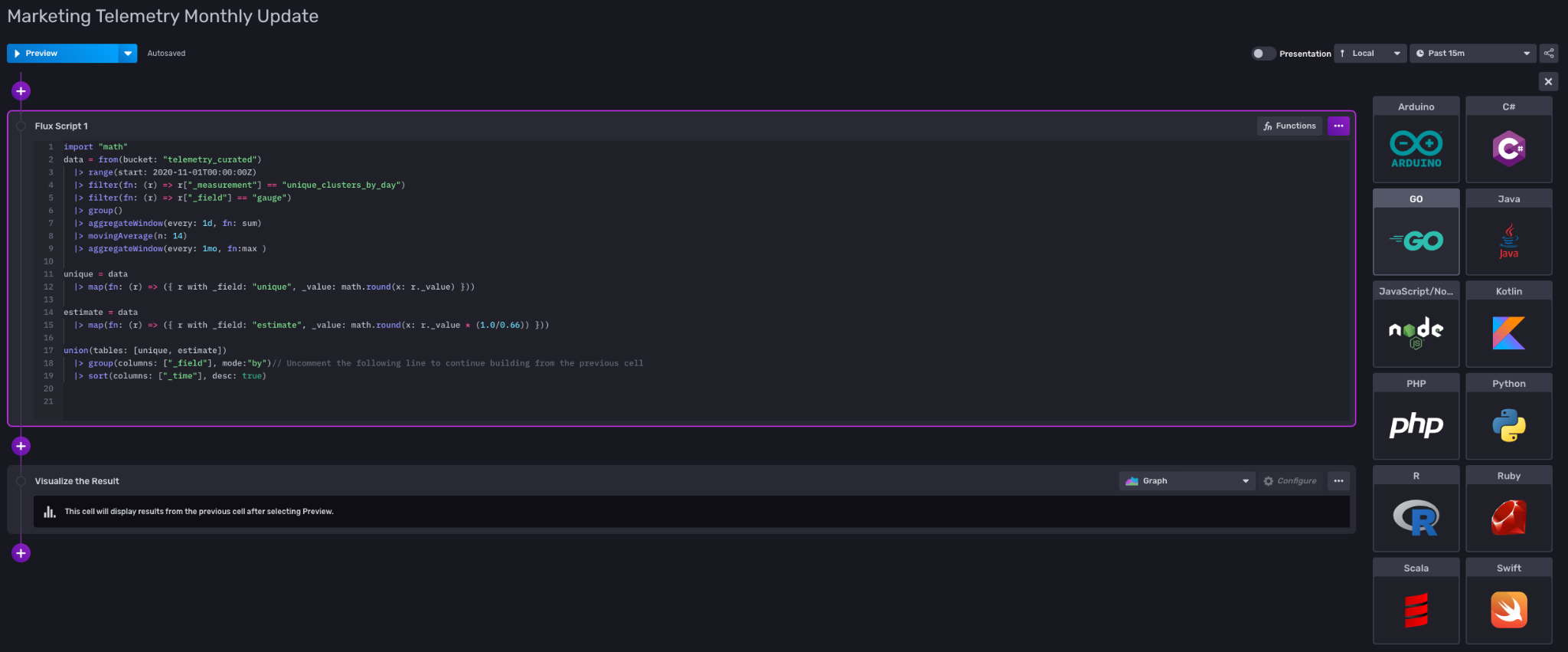
    The company has enhanced its InfluxDB Notebooks tool to enable developers to quickly set up an alert, build a task or write a Flux script without having to leave their browser.

    In addition, developers can compose Flux queries to be included in client code that can then be autogenerated within applications written in more than 10 different programming languages. There is now also an extension of Visual Studio Code that makes it simpler to create Flux scripts, query InfluxDB, create Flux tasks and manage buckets.

    Finally, InfluxData added the ability to explicitly define the schema of a bucket within InfluxDB to safeguard against unwanted changes; an application programming interface (API) tool, dubbed API Invocable Scripts, to make it simpler to define parameterized Flux scripts and the ability to send notifications from Alerta, WebEx Teams and ServiceNow to the InfluxDB Cloud platform.

    Tim Hall, vice president of product for InfluxData, said the overall goal is to reduce the level of complexity developers encounter when building applications that run on a time-series database. Many of those applications are now core to digital business transformation initiatives that require data to processed and analyzed over time. In effect, time-stamped data adds yet another dimension to any application, noted Hall.

    Time-series databases are typically employed by either an independent software vendor (ISV) to create, for example, a monitoring application, or an enterprise IT team that is building an application that lends itself to data that needs to be tracked over some period of time.

    In most instances, applications built on a time-series database are being deployed alongside, for example, relational databases that are generally invoked using SQL. As a result, InfluxDB has made it simpler to join data across relational and time-series data via SQL integrations the company added to Flux, noted Hall.

    DevOps teams, of course, are not always anxious to add another database they need to support, but as applications continue to evolve, more organizations are employing a mix of purpose-built databases to develop applications as the volume of data that organizations are trying to manage and analyze continues to grow.

    In the longer term, it’s clear time-series databases will play a critical role in driving digital business transformation initiatives. The challenge most organizations are now struggling with is determining which of these initiatives to prioritize. A time-series database coupled with the developer tools provided by InfluxData will enable IT teams to build the applications that drive those processes much faster, said Hall.

    In the meantime, IT teams would be well advised to at least become more familiar with time-series databases, because knowing the time when an event occurred is becoming a bigger application requirement. After all, knowing when something happened is now just as important as the record of what actually occurred.