Category: Continuous Delivery

Continuous delivery is a software engineering discipline that allows organizations to consistently develop and release quality software at a rapid pace. It is achieved by automating the software development lifecycle, enabling tasks such as development, testing and release to occur concurrently and continuously.

  • Get Testing Bottlenecks Out of Your Pipelines

    Get Testing Bottlenecks Out of Your Pipelines

    I first learned the term “deployment pipeline” when I read “Continuous Delivery: Reliable Software Releases through Build, Test and Deployment Automation,” by Jez Humble and David Farley back in 2009. End-to-end automation of the build, deploy, test and release processes kick in each time a team member commits a change to the source code repository.

    Chapter 5 of the book notes that the forms of testing common to all projects include manual test stages which “… assert that the system is usable and fulfills its requirements, detect any defects not caught by automated tests, and verify that it provides value to its users. These stages might typically include exploratory testing environments, integration environments, and UAT (user acceptance testing).”

    Humble and Farley include these manual stages in the deployment pipeline, also known as a continuous integration (CI) pipeline, build pipeline or delivery pipeline. However, from what I observe, I think a lot of times people forget about these important manual stages.

    Though we can do more and more with test automation, thanks to improving technology, manual testing activities are here to stay in most business domains. My own previous team realized this as we started to move toward continuous delivery (CD) a couple of years back, with twice-weekly deploys to production. Smaller changes and more frequent deploys means lower risk of regression failures. Yet, we still struggled with how to fit in important manual testing activities.

    Whenever my cross-functional delivery team has a problem, I look for a way to make it visible, to help us talk about it and brainstorm ideas to solve it. My “aha” moment around manual stages came when I learned techniques to visualize our pipeline from Abby Bangser and Ashley Hunsberger. My team knew we had these manual testing activities and that we wouldn’t feel confident about releasing changes without them, but we weren’t really thinking about them as stages in the pipeline.

    Visualizing Your Pipeline – Including the Manual Stages

    Continuous Delivery Pipeline
    Figure 1: A Continuous Delivery Pipeline (my diagrams are inspired by Katrina Clokie’s pipeline diagrams in “A Practical Guide to Testing in DevOps”)

    Getting your team together to visualize your pipeline is a great method to find ways to improve it. Gather around a table with cards or sticky notes, or draw on a whiteboard—what are all the steps in your pipeline, including the manual ones? In Figure 1, the manual stages in a team’s CD pipeline are shown in yellow. All the automated and manual things need to happen before the business decides to push the button and deploy to production. It’s easy to see that these manual stages can become a bottleneck. Manual exploratory testing is likely to take longer than the automated test suites. If user acceptance testing needs to be done by certain business stakeholders and they aren’t available at the right time, that holds up the release. If the team is looking to move to continuous deployment, where every change to the product goes out to production as soon as all stages complete successfully, these manual stages will be in the way.

    When you get your whole team including developers, database experts, operations specialists and product owners involved in solving these problems, you may discover innovative ways to approach them. In my team’s case, we decided everyone on the team needed to help with exploratory testing so we could do it in a timely manner. Testers helped the developers learn exploratory testing skills with hands-on workshops and by pairing with them. Then, each developer pair working on a story was tasked with doing the exploratory testing at the story level before declaring the story finished. We wrote exploratory testing charters at the epic or feature level as stories in our backlog. When enough stories were complete, anyone on the team, including testers and product owners, could pick up those charters.

    If we couldn’t complete all the necessary exploratory testing before the next production deploy, we used feature flags to hide the changes from customers until we could complete the testing. We could go ahead and deploy the changes and wait to release them once we felt confident they would not cause any customer pain.

    Asynchronous Testing Stages

    Using feature flags or toggles is a good way to allow the team to approach some manual testing activities asynchronously, so they don’t hold up the deployment pipeline. If some required manual accessibility, testing takes an extra day to complete or the UAT has to be postponed for a week, the deploy still happens. A change could be toggled on for a small percentage of users and observed in production to see if any unexpected behavior occurs. Whatever activities are needed to safely release a particular change don’t have to hold up other changes that are ready for customer use.

    Asynchronous stages in a deployment pipeline
    Figure 2: Asynchronous stages in a deployment pipeline

    Figure 2 is an example of a continuous deployment pipeline, but this asynchronous approach to the manual stages works for continuous delivery as well. Each time a team member commits a change, if all the automated stages in the pipeline pass, the release candidate build will be deployed to production. The manual testing activities are not inline with the other steps and don’t hold back the deployment.

    If we’re ready to deploy a feature but need to finish those manual testing stages before we release it, developers can put in a feature flag set to “off” to prevent it from being exposed to customers. When the asynchronous manual stages are all complete and successful, the feature flag can be flipped on in production. This is the actual release, customers can now use the feature. The feature flag should be removed as soon as possible, as too many feature flags at once has serious risks.

    Using feature flags or toggles to permit deploying changes to production before all testing stages are finished is one way to avoid bottlenecks and succeed with continuous delivery or deployment. Continuous delivery and deployment success depend on doing frequent small changes, not big-bang releases. A lean approach to feature flags, keeping the inventory low, is advisable.

    Visualize It With Your Team

    We’ve looked at one way to keep manual pipeline stages from holding up deploys, but there may be other solutions for your team. And there are lots of other key success factors for CD, such as keeping changes small and frequent. There’s lots to discuss and brainstorm about as your team, or a representational cross-section of it, gets together and experiments with a visual model of your pipeline. Talk about what you need to learn from each pipeline stage, who needs to know it and whether the pipeline is providing actionable feedback.

    As a tester, I’ve sometimes questioned aspects of the pipeline that nobody else had thought about. Having team members with development, operations, database and other skills present means more potential for creative solutions. Our pipeline provides a major feedback loop and we want that feedback as fast as we can get it. Writing each stage on a card and arranging them on a table or wall often triggers ideas for parallelizing more stages or realizing a particular stage isn’t necessary or can be done locally by developers.

    Automate all the things where it’s feasible. Use the time you save to optimize the way you accomplish manual testing activities and possibly automate more of them. Master techniques such as feature flagging so that you can take the time needed to feel confident about every new feature you release.

    References

    “Continuous Delivery: Reliable Software Releases through Build, Test and Deployment Automation,” Jez Humble and David Farley, https://continuousdelivery.com

    “A Practical Guide to Testing in DevOps,” Katrina Clokie, https://leanpub.com/testingindevops

    “Feature Toggles, AKA Feature Flags,” Pete Hodsgon, https://martinfowler.com/articles/feature-toggles.html

    — Lisa Crispin

  • CircleCI Adds Integration With Atlassian Jira

    CircleCI Adds Integration With Atlassian Jira

    One of the trickier issues IT vendors in the age of DevOps are dealing with is that very few organizations have standardized on a platform from a single vendor. Not only do organizations mix and match tools as they see fit, but different departments within the same organization also embrace different tools to automate the same tasks. That DevOps reality requires collaboration between IT vendors that normally would prefer to not work together, whether they like it or not.

    Case in point is a move by CircleCI, a provider of a continuous integration/continuous delivery (CI/CD) platform, to provide integration with the Jira project management software developed by Atlassian. While Atlassian makes its own CI/CD platform, customers and business partners alike have made it clear they needed CircleCI to support Jira, says Tom Trahan, head of business development for CircleCI. In some cases, those organizations have adopted Jira without having Atlassian’s CI/CD platform in their environment, while in other cases, a department within one part of an organization has opted for CircleCI while others are employing a CI/CD platform from Atlassian.

    At the same time, Trahan notes that many DevOps projects now span multiple organizations that have standardized on different DevOps platforms. Jira provides a way for teams in differentorganizations to manage those projects collaboratively, he says.

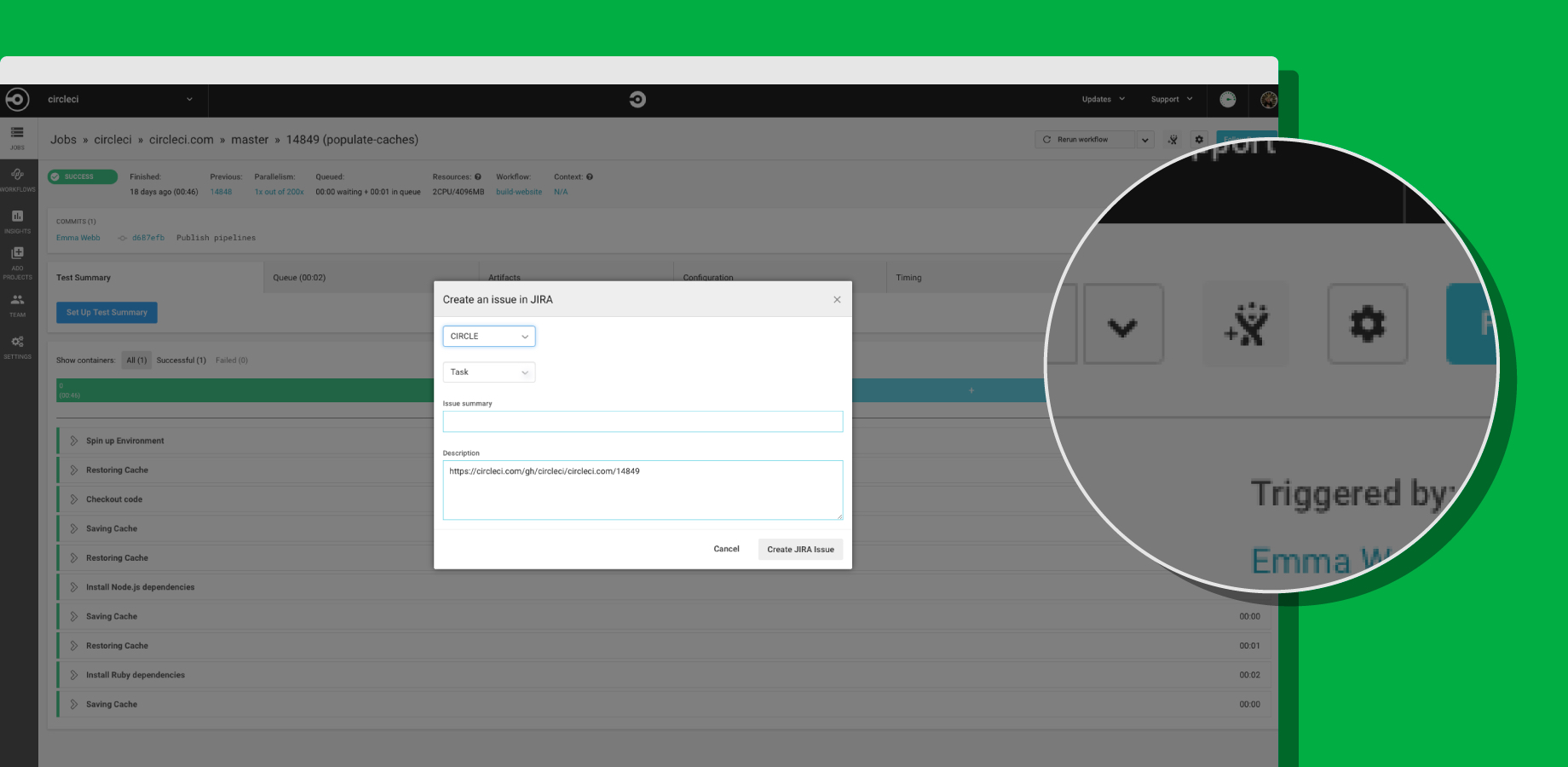
    To achieve integration with Jira, CircleCI now offers its CircleCI for Jira module, through which teams can assign new tasks and fixes based on job status with CircleCI orbs, a set of reusable configuration packages that allow CircleCI customers to integrate external tools into their workflow. That capability also makes it possible to launch new Jira issues directly from the job page within the CircleCI user interface.

    CircleCI Integrates with Jira

    Trahan says that in the polyglot world of DevOps, it is apparent vendors are being required to expose open application programming interfaces (APIs) that enable organizations to build and integrate various DevOps platforms anyway they want. Organizations won’t consider IT vendors that are too rigid in terms of what level of integration they enable, he says.

    As DevOps continues to evolve, it’s clear that a wave of merger and acquisition activity is makeing the IT vendor landscape somewhat volatile. Providers of DevOps tools that organizations have standardized on are being acquired at a rapid rate. IT organizations can’t be certain that any given tool or platform they are using won’t be scooped up by a vendor they might not want to engage. In that kind of environment, it’s critical for IT organizations to leverage open APIs that not only make it easier to collaborate, but also replace elements of their DevOps stack whenever they deem necessary.

    The challenge, of course, is that IT vendors are always trying to lock customers in as much as they can. Those efforts are not as heavy-handed as they once might have been. But almost inevitably, the extension being offered to access functionality will disappear if the underlying platform that enables it suddenly disappears. IT organizations, therefore, need to determine whether those extensions are worth any potential trouble they might cause somewhere down the DevOps road.

    — Mike Vizard

  • Survey Finds CI/CD Adoption Has Long Way to Go

    Survey Finds CI/CD Adoption Has Long Way to Go

    At the KubeCon + CloudNativeCon Europe 2019 conference, Codefresh published the results of a survey of 130 developers that finds not only are nearly a third (32%) not using any type of continuous integration/continuous development (CI/CD) platform at all, but 60% said their organization has yet to take full advantage of automation to accelerate application development and deployment.

    In fact, according to the survey, it takes more than two weeks for two-thirds of developers (64%) to push a commit into a production environment. Additionally, the survey finds that for 39% of respondents, less than 10% of their company’s processes are automated from Git commit to code to production.

    Not surprisingly, only 19% of developers said they deploy code at least once daily. Roughly a third said they release code into a production environment only once a quarter. At that rate, it may be difficult for those organizations to justify investments in a CI/CD platform.

    Dan Garfield, chief technology evangelist for Codefresh, which develops a CI/CD platform, said that while much progress still need to be made in terms of spurring adoption of CI/CD platforms and best DevOps practices, the shift toward microservices-based applications inevitably will force the issue. The inherent complexity associated with building and maintaining applications consisting of hundreds of microservices based on containers, which regularly are ripped and replaced, will require all development teams to adopt a CI/CD platform. Right now, however, the shift to microservices is even less nascent than DevOps—21% of survey respondents said they are not employing cloud-native architectures because they are overwhelmed by the prospect.

    Garfield said once organizations more aggressively embrace microservices to increase the rate at which applications are developed and deployed, Codefresh is betting most will opt to standardize on a CI/CD platform based on Kubernetes. Most organizations have come to realize they will be building and deploying applications across multiple clouds. A CI/CD platform based on Kubernetes, such as the one offered by Codefresh, enables organizations to consistently apply the same set of best DevOps practices, he said Garfield. As such, competition among vendors that provide CI/CD platforms based on Kubernetes is sure to be fierce in the months ahead.

    In the meantime, a 10-year effort to convince organizations to employ best DevOps practices more broadly appears finally to be on the cusp of becoming mainstream. Organizations of all sizes have embraced DevOps unevenly. In fact, while most organizations have been able to achieve continuous integration with a handful of development teams, very few organizations are anywhere near close to achieving continuous delivery of application code within a production environment.

    The shift to modern applications based on containers, however, will require most organizations to standardize on a set of best practices across the enterprise. Pressure to deliver applications faster in the age of digital business transformation is mounting with each passing day. The only unknown at this point is to what degree will organizations be able to automate those processes.

    — Mike Vizard

  • ‘DevOoops’ Moves: Deploying Code Out of Step

    ‘DevOoops’ Moves: Deploying Code Out of Step

    ‘Everything as code’ can create opportunities for misadventure for DevOps teams

    DevOps’ ultimate aim is to create efficiencies in the software delivery process. But it doesn’t always work out that way. Sometimes DevOps initiatives lead to mistakes—something we lovingly call “DevOoops.” CloudBees recently polled some colleagues and came up with five examples of a DevOoops in action. Following is a discussion submitted by Director of Engineering Laura Frank Tacho about deploying code out of step.

    Scenario:

    Running in parallel during CI/CD can speed up your automated testing and shorten your feedback cycles. Just make sure deployment is not executing as a parallel step. That misconfiguration will cause your code to deploy at the same time the tests are running, regardless of their exit codes, pretty much defeating the purpose of automated testing before a deploy.

    This scenario touches on a theme we’ve seen throughout most of the “DevOoops” stories our colleagues have come up with. The theme is how the emerging concept of “everything as code” can create opportunities for DevOps teams to slip on proverbial banana peels.

    In this case, we’re talking about sequencing problems in a process we can call pipeline as code.

    To be successful, teams need to extend a quality-first approach in automated testing throughout their continuous delivery life cycle—from code to commit to test, as well as through the various tiers of the development life cycle. And with a quality-first approach, you need to apply testing and quality management to your environment configurations and infrastructure as code.

    Laura’s example highlights how teams need to treat their CD pipelines as applications themselves. They need to check for and eliminate bugs and errors in CD pipeline code to ensure that code is operating as expected. Failure to properly manage the creation and evolution of complex CD delivery pipelines will result in significant cost or risk.

    So, if you don’t have proper test coverage on application code, you could end up releasing an application that hasn’t been tested at all. If the app doesn’t pass through a security gate, as it’s supposed to, you could release unintended preproduction data.

    While there are always risks with untested code, we have to give unique consideration to untested or unmanaged CD pipelines. We need to consider the risks of what missed gates could mean for our developers, our organization and our customers.

    Teams should do the following as they release their CD pipelines:

    • Build: Start from the left-hand side of process and work through the defining and coding of CD pipeline left to right in the direction your apps and development artifacts flow: from dev to test to deployment. While we may not be able to define an ideal automation solution completely on the first pass, going left to right encourages teams to focus on what the life cycle of an artifact looks like.
    • Manage: Define your CD pipeline using an everything-as-code or pipeline-as-code approach. For this to add value, you must manage development of your CD pipeline as you would your application code and apply software best practices. Check your CD pipeline code into a source code repository and leverage language-specific technologies that can check your syntax. (If you’re using Groovy-based code or Jenkins-based code, there are versions of Lint that can perform these functions.)
    • Create staging environments: You should establish staging environments or test pipelines to validate your CD process. These pipelines should go through all checks and gates against your real tools, using reference code that is representative of the applications your pipeline would be servicing but stops short of production into environments.

    This will give you an opportunity to iterate changes against your application code, do some initial scans and checks to collaborate to define your CD pipeline in code-managing SCM. Execute initial validation on scans as pipeline as code and then validate expected operations in a staging environment before you deploy it as the basis of the pipeline for your production of business-critical applications.

    Key Takeaways

    • This story highlights how crucial it is to ensure that your application code and environments pass through certain gates and checks before being deployed out to the customer.
    • You need to construct your CD pipelines so your parallel testing is managed as a gate to production, ensuring that properly tested and validated changes are not automatically deployed.
    • Deployment happens at the end of all the processes within a pipeline, and all required tests, validations, checks and approvals have been done before any change is deployed to the customer.

    To read our previous “DevOoops Moves” post, click here.

    — Brian Dawson

  • With YAML Support, Puppet Dives Deeper Into DevOps

    With YAML Support, Puppet Dives Deeper Into DevOps

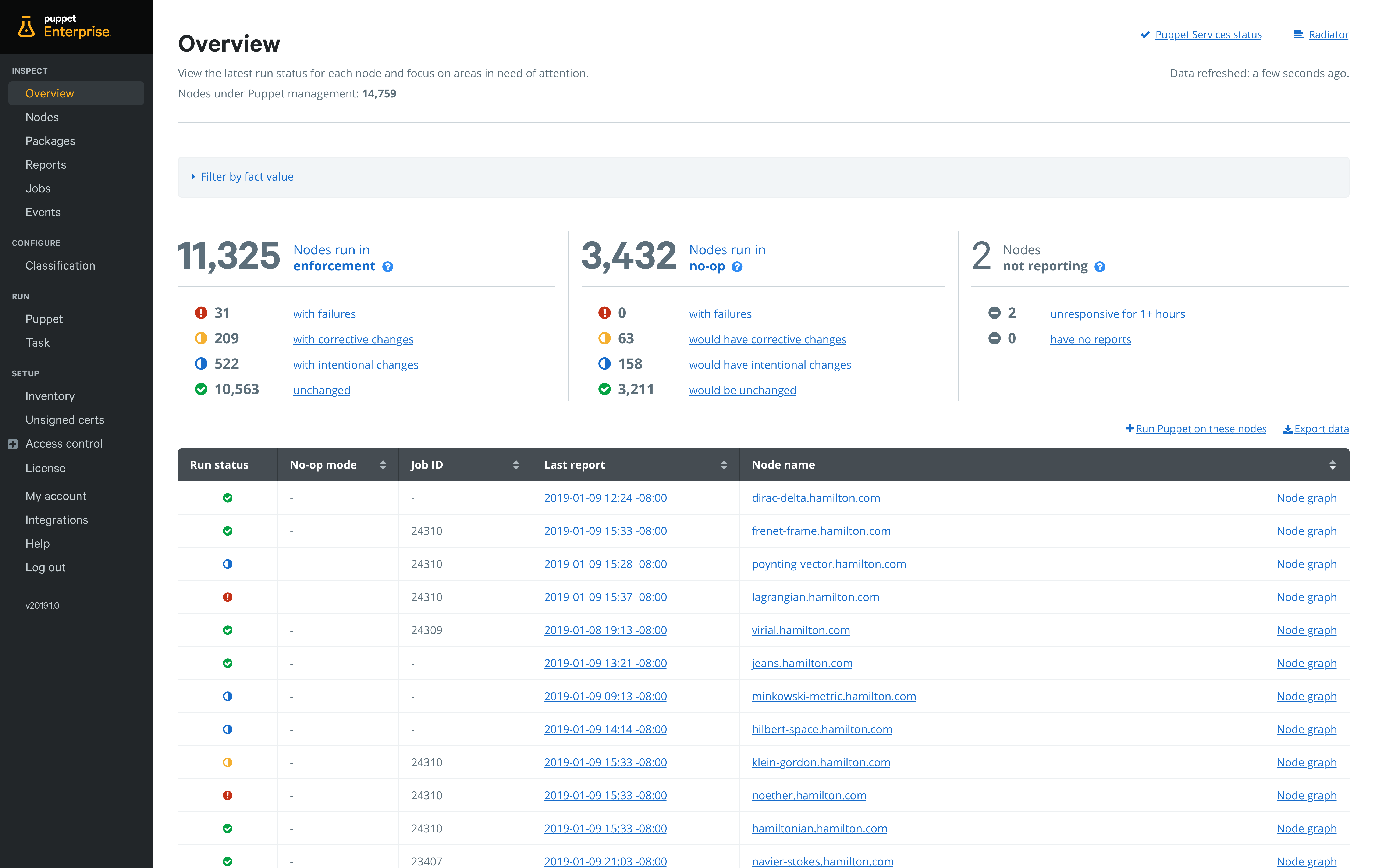
    Puppet this week announced an update to Puppet Enterprise that adds additional DevOps capabilities, including integration with Bolt, an open source agentless task runner that Puppet employs to make IT automation more accessible to IT administrators.

    Matt Waxman, vice president of products at Puppet, said adding integration with Bolt will make it easier to integrate DevOps processes that rely on YAML to deploy applications.

    Available this month via a Puppet Enterprise 2019.1 update, Bolt provides an agentless approach to automation that enables IT teams to execute existing commands and scripts written in any language within the context of an IT automation framework that is designed to be accessible to the average IT administrator, Waxman said.

    At the same time, Puppet is providing the ability to set up pipelines for deploying automation code directly from within Puppet Enterprise. Rather than having to set up a separate continuous integration/continuous deployment (CI/CD) platform, Puppet is embedding the capability it acquired from its purchase of Distelli in 2017. In doing so, Puppet is making it possible to accelerate deployment of automation software in a way that doesn’t  require every change to be approved by a master Puppet administrator. Default pipelines guide organizations new to continuous delivery practices through setting up their first pipeline in less than 30 minutes.

    Puppet is also including an Impact Analysis capability that enables teams to assess the impact of a proposed Puppet code change before it is deployed.

    One of the issues that has held back adoption of DevOps practices has been the simple fact that most IT administrators have limited programming skills. By making available an IT automation framework that provides the ability to manipulate YAML files at a higher level of abstraction, it should become easier of organizations to incorporate IT administrators into any set of DevOps process they care to define, Waxman said.

    Puppet via this upgrade is also extending the reach of the agentless Bolt framework to include support for network devices running Cisco NX-OS and Cisco IOS, as well as firewalls from Palo Alto Networks. As network operations continues to be more integrated with DevOps processes, IT organizations increasingly need to be able to apply workflows across compute, storage and networking platforms, Waxman said.

    The challenge many IT organizations now face in terms of achieving that goal is each provider of a platform creates their own automation framework, which winds up creating islands of automation across the enterprise. Longer term, Waxman said that, in addition to invoking the application programming interfaces (APIs) that many platforms already expose, Puppet will be working toward integrating domain-specific automation frameworks with its cross-platform framework.

    Overall, Waxman said Puppet remains committed to providing a mix of agentless and agent-based approaches to IT automation based on the nature of the IT tasks that need to be automated. It will be up to each IT organization to determine when to employ one of those options. But regardless of the path chosen, Puppet is clearly trying to make its core automation platform a lot more accessible to everyone in IT.

    — Mike Vizard

  • Best Practices for DevOps in the Cloud

    Best Practices for DevOps in the Cloud

    DevOps is commonly defined as a methodology that combines software development with IT operations. The goal is to shorten a system’s development life cycle while delivering features, fixes and updates frequently in close alignment with business objectives. Putting DevOps into practice is an ongoing experiment for many organizations.

    Developers often struggle with continuous integration (CI) or continuous delivery (CD) performance, testing delays and other bottlenecks. In fact, one survey reported that only 34% of projects finish on time and only 42% come in on budget. Security and development teams must collaborate to keep up with the rapid development life cycle without sacrificing security with every update.

    Enterprise SaaS apps are not distributed like traditional software—they are continuously running services. So, CD is all about updating the service with a set of changes. In public clouds such as AWS and Heroku, this is done through pipeline stages (e.g. dev, test, staging and production). In platforms such as Salesforce, stages become sandbox environments, ephemeral scratch orgs and production instances.

    How can development teams shorten the development life cycle without sacrificing the integrity of the features and updates? In this article you will learn key DevOps practices to achieve predictable, reliable release management.

    Advanced Planning Ensures All Boxes Are Checked

    Agile planning is now de rigueur for enterprise development. It is best used if:

    • The product itself will most benefit from flexibility.
    • Regular face-to-face interactions and collaborations are needed between team members.
    • The end product requires regular updating, monitoring and continuous delivery to the client throughout the life cycle.

    For CD, ensure your user stories are sized correctly and that each story rolls up to an Epic that represents a standalone feature. This enables your team to release bite-sized pieces of functionality that are consumable by users and traceable back to your release plan. Also, define acceptance criteria for use in the verify stage so you know when something is done-done.

    Manage the Source Code, Especially When Working in a Shared Environment

    There are a few practices of app creation that impact CD. First, source code is not the only element of an enterprise solution. Schema, user interface, access control rights and static resources such as icons and images are all part of the creation process and should be managed just as diligently as source code. They should all be checked in to a version control system (VCS) as a single source of truth.

    Second, ensure that developers are making changes in a segregated environment. In some low code platforms, such as Salesforce.com, this becomes a challenge, but even in a database, multiple database administrations (DBAs) can step on each other’s changes when working in a shared environment.

    Functional Testing

    Automated quality processes are difficult to implement, but essential Selenium is a great tool for testing functionality and should be part of your DevOps practice. But there are several verifications that should be made before you get to functional testing. Static code analysis tools, such as PMD, are essential to ensure your development team is coding against a single style.

    Define a team style and enforce its use. Unit test coverage is also essential—incorporate them with a coverage of at least 75%. Finally, after these automated tests pass, implement a manual peer review. Old hands are able to spot opportunities for performance improvement where automated tools may not.

    Changes Should be Released in a Defined Pipeline with Strict Quality Gates

    Packaging for CD is about capturing changes that can be incrementally released into the next stage or environment. Development teams should dedicate a branch for each stage and bundle incremental changes into a promotional branch to leverage the merge conflict detection in your VCS.

    Changes should be released in a defined pipeline with strict quality gates that ensure the verification steps and enforce the order of release stages. Developers should not be able to bypass key stages throughout the development cycle—for example, moving from development to production.

    Focus on making smaller changes, which result in reliable, predictable releases. Finally, be sure to automate promotions. This enables your team to validate the promotion scripts in integration, test and staging before releasing to production, which decreases the likelihood of an unhappy surprise.

    Automate Configuration, Especially for End User Access Rights

    Make testing for proper configuration part of your verification process. Platforms such as Salesforce have powerful profiles and permission sets that enable user access to only the right information. Improper configuration can expose personally identifiable information (PII), credit card numbers or medical health data.

    Monitor for More Than Just Service Availability and Performance

    Most SaaS companies monitor service availability and performance. But excellent companies also monitor data access to detect improper configuration changes and monitor end user feature usage, which gives product managers visibility to their usage.

    — David Brooks

  • How DevOps Can Help Speed Go to Market

    How DevOps Can Help Speed Go to Market

    With continuous evolution of IT systems, speed and flexibility have become of paramount importance for businesses. This requirement has caused a massive shift in the IT delivery system. Now, building and releasing a better product in the market is not enough for businesses to stay ahead of the competition. Organizations need an agile approach to understand and adapt to information, trends and new developments, and to meet the demands of time-to-market features.

    DevOps is one such cultural shift in the IT field that shows how software development and IT operations can work together to reduce time to market. It has attained such a great profile in the market that people have started measuring the outcomes for businesses that adopt it.

    If you’re just beginning with DevOps, here are some tips that will help you understand how you can accelerate time to market for your product and services.

    How Can DevOps Accelerate Time to Market?

    There are many ways in which DevOps helps organizations accelerate time to market for their product. Some of the most effective ways are:

    Faster Delivery of Features and Modifications

    When development teams build software, they connect with IT operations to send the software for testing. If the product is completely new, operations need to create a testing environment. If the software is an updated version of the current product and there is already a testing environment for it, operations still need to configure and add interfaces and side applications. So, a developer can only deploy code to the software when the operations team tests the product, which is a very time-consuming process.

    However, DevOps eliminates such time-consuming tasks from the software development process. For example, with automated testing of web apps developers get quick feedback and automated integration allows them to make changes in the code base more quickly. Therefore, organizations can release small or incremental updates of the software while delivering new features to market faster.

    Enhance Efficiency

    DevOps encourages development teams to give more time to value-creating work. When businesses use automated testing and integration, developers don’t have to waste their time waiting for machine configuration or code integration. Both tasks can be achieved by clicking a button on the self-service portal.

    For example, many European banks have implemented DevOps in their software process, which resulted in 25% efficiency improvements in providing updates for their online banking applications. It also reduces the workload for the IT operations team so that they can work on more challenging tasks to add more value to the company.

    Improved Quality Code and Quick Recovery from Failures

    When software is released to the market, developers often start working on their next project. So, they usually don’t have any motive to predict or prevent future problems related to software; it’s all up to the operations team. But DevOps keeps developers involved during the entire life cycle of a software product for updating any feature or application, which results in improved quality code. Also, it requires only a few fixes as developers can track and eliminate potential problems while writing code.

    As developers work with smaller chunks of code, when a failure occurs in any product, bugs can be tracked easily to their resources. Also, human errors are reduced thanks to the automation that DevOps provides to the software life cycle, while allowing companies to deliver fixes faster.

    Best Practices for Using DevOps

    Just like agile approaches, DevOps doesn’t have any pre-planned implementation model. But, most companies that use DevOps follow these best practices:

    Set a Business Standard

    The improvements in an organization can never be measured without having a business standard. If you want to reduce time to market for your software development process, then have a look at the current development process and find out which areas need improvement. For example, you can review the steps involved in making a project live and identify any defects, inefficiencies and constraints in the project.

    After reviewing these processes, you can set a business standard that shows the current software development process and the improvements that are required to reduce the time to market. With DevOps, you can set a business standard more quickly and improve your software deployment process.

    Optimize and Eliminate Unnecessary Inputs

    While reviewing your software deployment process, you might encounter some inputs that don’t add value to the process and reduce its speed. Eliminating such inputs from the development process is crucial, but make sure there is open communication between you and your team so efforts are not wasted.

    What you can do is set up the right team structure and use tools that provide transparent and fast communication between the teams. For example, you can structure a team that includes marketing managers, right analysts and, most importantly, DevOps resources.

    Allow Continuous Deployment in Software Process

    Continuous deployment is one of the essential key factors of DevOps that helps in reducing time to market. It is the continuous delivery pipeline that doesn’t involve any manual intervention in-between. In continuous deployment, automation stimulates and simplifies communication and validates the software process to ensure timely releases.

    However, not every company implements continuous deployment in its software development process. Usually, the organizations that need to move faster to provide new features, applications or security channels for their product use continuous deployment. For example, media companies and online retailers use continuous deployment in their software development process.

    Improve the Quality of Automated Tests

    One straightway to reduce time to market with DevOps is improving the quality of automated tests. In any organization, testers test the application for its functionality and other factors. But this testing process can be enhanced by engaging with clients and a targeted audience in the development process. Taking input on the overall functionality and user interface will not only improve the testing process, but also help you find bugs and defects earlier.

    It is proven that if bugs are not tracked and eliminated in the early stages, it can greatly impact the time to market for your software product. For example, if you want to test your web application browser compatibility, then consider cross-browser compatibility testing. With end-to-end automated testing, the overall testing process can be improved, which will result in reducing time to market. Some other benefits of automated testing that can improve your DevOps are:

    • Track and eliminate bugs and errors in the early stages to improve the system’s capacity.
    • Improve the security of your software product.
    • Enhance custom engagement and satisfaction with a high QoE score.
    • Less cost of ownership.
    • Meet the industry standards and compliance regulations in a better way.

    An improved automation strategy helps move your product to market faster and allows your resources to do more high-value tasks. Also, the development teams will be more encouraged and confident to add new features to the application, as it will be tested more thoroughly.

    Conclusion

    Today’s businesses heavily rely on applications to collaborate, communicate, complete sales and operate more proficiently. Therefore, they strive to bring these applications to market more quickly so they don’t miss any opportunities and easily adjust to the market standards. To achieve these objectives, organizations must adopt the right DevOps practices in their software development processes to reduce time to market.

    — Junaid Ahmed

  • Harness Invests in Automating Continuous Delivery

    Harness Invests in Automating Continuous Delivery

    Fresh off raising an additional $60 million in funding, Harness plans to make more investments in machine learning algorithms to advance continuous delivery through automation.

    Harness CEO Jyoti Bansal said the startup, which he co-founded with Rishi Singh, a former DevOps platform architect at Apple, is now in a position to invest more aggressively in additional engineering and sales resources needed to expand adoption of the cloud-based service, which provides a level of abstraction through which much of the continuous delivery process can be automated using drag-and-drop graphical tools. Bansal and Singh co-founded Harness after AppDynamics, provider of an application performance management (APM) platform Bansal also co-founded and served as chairman of the board, was sold to Cisco Systems.

    Bansal said Harness takes advantage of YAML files and machine leaning algorithms to present DevOps teams a set of visual tools accessed via a cloud service that enables them to build sophisticated pipelines as quickly as 10 minutes. That approach promises to significantly advance DevOps adoption by making it easier for IT operations teams to set up those pipelines as part of continuous delivery process without needing deep programming expertise.

    While there’s been a lot of progress made in terms of driving adoption of best continuous integration practices among developers, the continuous delivery side of the DevOps equation has proved much more difficult to achieve. Most IT organizations rely on multiple platforms that have their own unique attributes. As such, IT operations teams typically have created their own scripts or rolled out automation frameworks such as Ansible to allow them to automate some aspects of the application deployment process.

    However, Bansal noted, custom scripts typically don’t scale very well and usually have not been well-documented. What’s more, frameworks such as Ansible are still too low-level to enable DevOps teams to build pipelines in minutes. The approach Harness has designed enables DevOps teams to describe their intent using a set of visual tools, which then employs machine learning algorithms to automate the deployment process regardless of the underlying platform, he said.

    That approach is further augmented by a set of rules that can be added to make sure security and compliance requirements are met, he noted, adding Harness also provides views into how processes are being automated to provide DevOps teams with the confidence required to trust a highly automated platform.

    Bansal said the goal is to not just make it simpler to build and deploy pipelines, but also maintain them in what have become highly dynamic IT environments where there is simply too much data that needs to be tracked for human administrators to effective manage relying on low-level tools and frameworks. Rather than having to build and deploy the framework needed to achieve that goal, he said, Harness is making it possible to automate the continuous delivery process using a cloud service on demand.

    It may take a while for IT organizations get comfortable with the level of automation being enabled by machine learning algorithms. But like it or not, it’s already becoming apparent the ability to dynamically manage IT at scale is clearly on the cusp of making another significant leap forward.

    — Mike Vizard

  • XebiaLabs Injects Predictive Analytics Into DevOps Platform

    XebiaLabs Injects Predictive Analytics Into DevOps Platform

    XebiaLabs is moving to take the guesswork out of DevOps following the launch of a set of tools that leverage machine learning algorithms to predict when and how the release of an application is most likely to go awry.

    The Risk Prediction Module being added to the XebiaLabs DevOps platform comes on the heels of XebiaLabs’ move to make its XL JetPack software for automating application deployments available on the Amazon Web Services (AWS) Marketplace. XL JetPack is an automation framework based on YAML files and a declarative programming framework that enable DevOps teams to push applications into production on a cloud platform in as little as 15 minutes.

    XebiaLabs CEO Derek Langone said that while DevOps advancements have been made in terms of achieving continuous integration, the goal of achieving continuous delivery has proven to be more elusive. As automation frameworks such as XL JetPack become more accessible, however, IT operations teams will be better able to keep pace with the rate at which organizations want to be to deploy and update applications, he said.

    It’s becoming increasingly apparent that a combination of automation frameworks and machine learning algorithms will enable DevOps teams to make a significant leap forward in terms of application release lifecycle management. Because of all the nuances of the different platforms that IT organizations are trying to leverage, it’s become a major challenge to roll out an application manually. As the number of applications that need to be released at roughly the same time increases, managing the release cycle process is moving beyond the capabilities of an IT team made up of mere mortals.

    The Risk Prediction Model from XebiaLabs promises to increase the odds of success by applying predictive analytics infused with machine learning and other proprietary XebiaLabs algorithms to identify DevOps bottlenecks before they are encountered. Capabilities provided by that module include alerts that warn the team when a release is likely to be delayed or to fail before the release pipeline starts running; a Risk Forecast view that summarizes predicted delays and failures for every task in the release process; an overview of statistics for similar releases to provide historical context; and forensics tools that uncover flaky automated tests, problematic build setups, long-running deployments and time-consuming manual tasks. That Risk Prediction Module is meant to complement the risk scoring capability that XebiaLabs already includes in its platform.

    Arguably, the biggest barrier to DevOps adoption today continues to be the level of expertise required to succeed. But as the combination of predictive analytics infused with machine learning algorithms and algorithms that can discern instantly how changes to the IT environment will impact applications become more common, the level of expertise required to master DevOps processes should decline. As that transition occurs, the number of organizations embracing DevOps more broadly should increase.

    In the meantime, DevOps teams would be well-advised to consider to what degree they might next want to rely on predictive analytics to prescriptively automate processes with eye toward eliminating the need for as much human intervention as possible.

    — Mike Vizard

  • Tax Day IT Lessons, or How to Avoid Wiping Out on Your Biggest Day of the Year

    Tax Day IT Lessons, or How to Avoid Wiping Out on Your Biggest Day of the Year

    This time last year, as the Internal Revenue Service (IRS) geared up for its biggest day of the year, a firmware bug deep in its storage network was waiting to take down the system. When Tax Day arrived, the onslaught of last-minute filers triggered a systemwide outage that lasted 11 hours and forced the IRS to extend its filing deadline by a day.

    The IRS has another chance to get it right next week, but its IT team is far from alone in having dropped the ball on its most important day of the year. In 2015, the government’s Healthcare.gov website was plagued by crashes on the day Obamacare launched. Last year, Amazon’s website crashed just as Prime Day kicked off, and a few months later, Walmart’s systems fumbled at the start of Black Friday.

    These glitches can cost organizations millions, not to mention the hit to their reputations and inconvenience to customers. As Tax Day approaches, it’s worth looking at some steps any organization can take to avoid embarrassing or costly glitches when a big day arrives. These occasions are fraught with risk due to sudden traffic spikes or untested code.

    Here are steps organizations can take to minimize the chance of disruption.

    Have a Deployment Process You Trust

    People often talk about a code freeze as a solution, but this shouldn’t be your first instinct. A code freeze ties your hands from making last minute changes, and let’s face it, few teams have their code buttoned down months ahead of time. Far better is to have a rock-solid deployment process that gives you confidence that what you’re shipping won’t break. Here are some elements it should include:

    • Trusted testing gate before production. You and your team need confidence that you’re shipping code that works on the devices and browsers your customers use. There are many ways to do this but focus on these elements: speed of throughput needed, the level of risk you are willing to tolerate and the cost to your business of bugs making it to production.
    • A totally automated process with no human bottlenecks. There’s nothing like trying to ship a fix to production, only to realize the engineer with permission to approve the release is on PTO.
    • Proper environment escalation. Contrary to the above, never ship direct to production! Have a proper staging server that is a good enough replica of production, so you can test your application in conditions that match production.
    • Good test data management. This is one of the areas where software companies fall down. Stale data, data that doesn’t have edges or nuances like in production and data that contains personally identifiable information (PII) are all very common culprits—this is one of the most difficult things to get right with testing.

    Stress Test for Robustness

    In high-traffic periods, new stuff breaks. Stress testing helps to ensure services will continue running under a heavy load, but you need a realistic approach grounded in actual user behavior. Can you handle 20,000 users, all trying to register at once when your new app goes live? What pathways will customers take through your website or application? What features have caused problems in the past? Identify common pathways and potential problem areas and stress-test the hell out of them.

    Build a Culture of Quality

    One reason big events are scary for engineers is the sudden emphasis on accountability and quality that was lacking before. Solving for quality at the eleventh hour is guaranteed to be less effective and efficient than building a culture of quality from the start. Much like most management, the only way to do this well is to create accountability for your teams and give ownership of quality directly to them. A few quick ideas: Add a functionality review to your code review step, provide tooling to your team so they can drive testing themselves on pre-production features and make them feel the pain of bugs getting into production by having an engineering support rotation.

    Measurement and Metrics

    Achieving this culture of quality depends partly on good measurement and metrics. Sadly, this is one of the weakest and least-defined areas of development today. Since it’s impossible to directly observe quality in production—since you can only know about the bugs that are caught—it’s more productive to create some measure for QA process coverage and tie that off to the business. One way to do this is to look at the differences between how your customers are using your application in production, versus how you are testing it pre-production. This can give you a lot of insight into the areas that are under-covered or over-covered and can be a useful way to measure whether incremental investments in QA will actually be ROI-positive.

    If You Can’t Do Any of That … Fine, Resort to a Code Freeze

    If you don’t have a bulletproof deployment process, a code freeze is a brute-force option. It ties your hands from making last-minute changes, but at least ensures you won’t add new risks without adequate time to discover them. The duration depends on how long it takes your team to surface production issues, based on past experience. If you don’t have that data, six to eight weeks may be a safe period. But really, if this is your main strategy for avoiding problems on game day, you’re probably in the wrong job.

    Review Patch Management Policies

    This one might have helped the IRS. Its storage vendor, IBM, had issued a patch for the bug that brought down the system months earlier, but the IRS didn’t apply it because it was part of a code bundle that didn’t meet its production testing requirements. A government report concluded that the IRS needs to vet those decisions more effectively and document the process. Bottom line: Have a structure and process in place that ensures you’re making informed, sensible decisions about whether to apply new patches.

    Other issues contributed to the IRS meltdown: Its storage system had no automatic fail-over or built-in redundancies, creating a single point of failure. It was unfortunate that several factors conspired against it, but luck isn’t something you should depend on. Executing successfully for a big event isn’t achieved in a few short months beforehand. It involves building the right culture and practices to guide your development and operations year-round. This will greatly minimize risk and the work you need to do to be prepared.

    — Fred Stevens-Smith