Category: Containers

  • Red Hat CEO: Out | Blind Users: Revolt | ARM: Google Joins Party

    Red Hat CEO: Out | Blind Users: Revolt | ARM: Google Joins Party

    Welcome to The Long View—where we peruse the news of the week and strip it to the essentials. Let’s work out what really matters.

    This week: Matt Hicks is the new Red Hat CEO, visual accessibility is in focus, and Google Cloud rolls out ARM instances. (more…)

  • Rust in Linux 5.20 | Deepfake Hiring Fraud | IBM WFH ‘New Normal’

    Rust in Linux 5.20 | Deepfake Hiring Fraud | IBM WFH ‘New Normal’

    Welcome to The Long View—where we peruse the news of the week and strip it to the essentials. Let’s work out what really matters.

    This week: Linus says next release will support Rust, FBI warns scammers are getting hired in deepfake interviews, and 80% of IBM staff stay at home. (more…)

  • Survey Reveals High Cost of Application Modernization

    Survey Reveals High Cost of Application Modernization

    A survey of 250 software developers and architects in the U.S. found nearly three-quarters of respondents (74%) reported that the average cost of an application modernization project is nearly $1.5 million, with 79% noting that at least one of these projects has failed.

    Conducted by Wakefield Research on behalf of vFunction, a provider of a platform that automatically converts monolithic applications into microservices, the survey polled developers and architects at organizations with 5,000 or more employees that have been in business for at least 15 years and are maintaining Java applications. The survey found that the primary reasons application modernization projects failed were expectations not being set correctly (43%) and the need for organizational structural changes (37%).

    Despite the cost and inherent risks, however, the survey also found a full 92% of respondents planned to or are currently modernizing applications. Nearly two-thirds (62%) said having the right resources and tools is the key to application modernization success.

    Well over half of the respondents (58%) also noted that, on average, it takes 16 months to complete these projects, with more than a quarter (27%) noting it takes two years or more. Not surprisingly, a full 97% said they expected someone in their organization would push back on a proposed project.

    Application modernization, of course, is something of a catch-all phrase that can involve everything from providing applications with a web frontend to lifting-and-shifting them into the cloud or completely refactoring them to run natively on a cloud platform.

    vFunction CEO Moti Rafalin said that regardless of the scope of the initiative, most organizations should first pick these projects based on what makes the most sense for the business. Once identified, it then becomes critical for IT teams to have a deliberate strategy in place to achieve that goal given the high cost of failure, he added.

    Organizations would also be well-advised to determine how job roles will evolve, because one of the biggest inhibitors to application modernization is concern over how any job might be impacted, noted Rafalin.

    It’s not clear how quickly organizations are opting to modernize existing applications versus replacing them outright. However, as more organizations opt to run applications in the cloud, the level of interest in using microservices to build applications has risen sharply. The goal is to employ microservices to make applications both more resilient and secure. The tradeoff is that microservices-based applications tend to have lots of dependencies that make them more challenging to manage and secure.

    Regardless of approach, it’s more a question of when an application will be modernized or retired versus if. The level of technical debt that accrues over time for each application eventually becomes unsustainable. The issue, of course, is that most organizations don’t have the resources required to modernize every application at once, so it may take a decade or more to work through an entire application portfolio—even as that portfolio continues to grow. In fact, as technologies continue to evolve, it may turn out that application modernization is not a task to be completed as much as it is a permanent state of IT affairs.

  • Saying Goodbye to Legacy Systems

    Saying Goodbye to Legacy Systems

    Are you still using a rotary phone, tube television or Rolodex? Probably not. But if you were, you’d still be using newer technology than what many enterprises still rely on every day to drive mission-critical applications that we use every day when shopping, banking or hundreds of other normal tasks. 

    At least two-thirds of large enterprises are running mainframe-based apps that date back 10 to 20 years and more than 25% of businesses feature applications that are between 20 or 30 years old. Today, businesses are often running and maintaining legacy applications built on traditional databases while simultaneously building microservices-based apps to accelerate new services and innovations. The mantra “If it ain’t broke, don’t fix it” certainly applies here; and while there are many reasons organizations continue to rely on mainframes and legacy systems, there are also many organizations that want to begin modernization initiatives but don’t know where to start.

    However, the past few years saw a wave of new digital-first companies in all industries putting pressure on legacy systems-based businesses—from retail to finance to manufacturing to technology. The COVID-19 pandemic accelerated many organizations’ modernization plans and made clear that for those that wanted or needed to modernize to stay competitive, avoiding the problem just wasn’t an option. Companies found that if they weren’t proactive about modernizing, the cost of being reactive when they needed to update and evolve was exorbitant.  

    Accelerating IT modernization initiatives can be a major challenge: Safely modernizing those legacy apps and mainframe systems and the critical data in them can seem impossible, but it can be done. Companies like Kroger, for example, have already made that jump and there’s a lot to learn from them. Here are three things that can help any enterprise on their journey to say goodbye to mainframes and legacy systems:

    You Need a Frictionless Path for Legacy Apps

    Many modern solutions are only focused on greenfield applications and helping newer born-in-the-cloud companies and projects; however, the reality is most Fortune 1000 companies have a lot of existing applications they can’t afford to ignore or completely rebuild all at once. Supporting existing applications with standard interfaces like Postgres while delivering the scalability and resiliency to support modern applications is critical to providing a bridge from where companies have been to where they are trying to go. Distributed SQL databases provide a seamless path forward to modernize existing apps while supporting new and current initiatives. 

    Embrace Automation

    It’s time to stop relying on complex code or fragile systems with bolted-on third-party tools. Being able to rely on intelligence and automation in the data layer for distribution, resiliency and availability is critical to minimizing changes and impacts on current applications. Doing so will reduce risk, offload legacy app tasks and ensure systems have the intelligence to work properly. With a distributed SQL database, you can deliver a single logical database that appears to applications like a monolithic, single-server database but with the underlying intelligence to allow it to stretch across hybrid, private and public clouds. 

    Finding Flexibility and Becoming Future-Proof

    To avoid being tied to specific systems or architectures, it’s time to adopt a future-proof mindset. Businesses can achieve this through:

    • Multi-cloud/hybrid cloud: With a distributed SQL database, you can deliver a single logical database that looks like a monolithic, single-server database but with the intelligence to stretch across hybrid, private and public clouds—providing the flexibility to be deployed wherever the application is needed or is best served.
    • Any hardware: No two data centers look alike and there are a wide variety of hardware needs, from bare metal to VMs and containers. The right modern distributed database provides ultimate flexibility in where the data layer can be installed to match whatever hardware and configurations are already in use. 
    • Any deployment: Existing organizations have a wide variety of environments and deployment types, from single data centers to two or more private data centers to more and more hybrid environments that span on-premises and public clouds. A modern distributed database provides the freedom to support a wide range of deployment options, including synchronous replication, geo-partitioning and cross-cluster asynchronous replication.  
    • Open source freedom: While many databases provide some open source components, there are still a few 100% open source solutions committed to the Apache 2.0 license. Users can benefit from the full set of enterprise features and capabilities in these open source solutions as well as benefit from the security and transparency that comes with a 100%-open source solution. 

    It’s time to update the old adage, “If it ain’t broke, don’t fix it” to “If it ain’t fixed, it could be broke,” with regard to modernizing legacy systems. If you’re considering starting a modernization journey, save time, resources and money now to make upgrades that might later be costly, time-consuming and overwhelming for your internal teams. 

  • Go Language is Popular? | VMware Sells to Broadcom? | Unlimited PTO?

    Go Language is Popular? | VMware Sells to Broadcom? | Unlimited PTO?

    Welcome to The Long View—where we peruse the news of the week and strip it to the essentials. Let’s work out what really matters.

    This week: Golang goes from zero to hero, will Broadcom buy VMware? And limitless vacation is still a Thing. (more…)

  • Container Storage for DevOps: New Options With NVMe

    Container Storage for DevOps: New Options With NVMe

    The DevOps world is ripe for a storage paradigm change, both in how it operates within the enterprise and how it implements applications. 

    NVMe, especially NVMe-over-fabrics (NVMeoF), is both a tool and a host target that can provide such a change—especially in the new world of microservices and containerization. NVMe can drastically improve application performance over classic implementations and, given the right tools, transform the process of writing those implementations to be faster, more robust and more flexible. 

    I/O-Intensive Work

    A quick recap shows why this is so. The DevOps build toolchain, especially for large codebases, has always been heavily I/O-dependent and storage access has classically been the biggest bottleneck for building an image. The ability to cluster small, inexpensive Linux x86 servers connected to SANs twenty years ago was a first step in separating storage hardware from compute, but I/O latency was pretty awful. Build/link operations could actually take longer than the compilation of object files. 

    Virtualization helped make hardware utilization better and cheaper but didn’t really improve throughput. Cloud infrastructures such as OpenStack and CloudStack made those infrastructures simpler and more elastic to manage but, again, the IOPs bottleneck remained. 

    Containerization for DevOps made it even simpler from the applications level—just deploy the app and ramp up container instances as needed—no more dedicated infrastructure needed. And it’s cheaper for incremental functions. 

    However, not much was done to clear the I/O bottlenecks for largescale storage and increasing overall performance. 

    When the new nonvolatile memory technology of NVMe came to market in 2014 for the single server world, it delivered two game-changing capabilities. 

    1. An increase of 5x disk access I/O speed. This was, arguably, the biggest single performance improvement since multicore processors with onboard cache (think Opteron) emerged. With Linux adding support for standard, open source NVMe drivers in 2021, the options increased beyond Windows and Mac users.However, SANs and their protocol stack were still an issue. SATA- and SCSI-based SANS performance was gated to the 1.2GB limitations of those technologies and big iron to head-end the SAN still dictated high-cost infrastructure.
    2. Unlike SATA or iSCSI, NVMe has the native capability for TCP/IP or fibre channel addressing. This allows NVMeoF to be an autonomous point for data storage in a normal network. A user can now keep control of their data but use network-attached compute as a utility with roughly 6Gb speed for I/O—greatly lessening the big penalty for disk I/O.  

    Applying Containers

    The dramatic uptick in container deployments and the debut of container attached storage (CAS)—software that includes microservices-based storage controllers that are orchestrated by Kubernetes—represented another industry milestone. These storage controllers can run anywhere that Kubernetes can run, which means any cloud or even bare metal servers or on top of a traditional shared storage system. Critically, the data itself is also accessed via containers as opposed to being stored in an off-platform, shared scale-out storage system. 

    Since container-attached, cloud-native storage enables the use of small, disaggregated architecture without the need for large-scale SANs or storage controllers dovetails nicely with DevOps work. 

    Container-based applications can benefit enormously from NVMe-based storage. As experts have pointed out, since DevOps applications are all about scalability, the parallelism embedded in the NVMe spec fits nicely to support them. 

    While SANs are good for large-scale contiguous operations, they’re expensive chunks of capacity and not nimble to deploy. They’re also bound to the slower I/O storage protocols, which can negate performance gains possible by adding NVMe to that array (as opposed to discretely).

    Container-based storage with NVMe gives DevOps teams the opportunity to add storage at low cost with deterministic management of that stateful storage—in theory, of course. In practice, the temptation to add like infrastructure to current infrastructure is powerful, even with all its limitations.

    To make that theory a reality, a control plane with the fast data plane is necessary—and the market is beginning to address this need.  

    As one example, OpenEBS recently introduced an upgraded engine, MayaStor (now part of DataCore Software), which enables use of NVMeoF at impressive speed: Benchmarks with Intel SPDK architecture show a 5x read/write speed improvement over SATA.

    OpenEBS debuted a few years back as a containerized storage solution for Kubernetes-based applications. With an optimized storage engine, Kubernetes has the opportunity to perform like other, more specialized hosting and development solutions. 

    Impact for DevOps

    What does this mean for DevOps teams? Firstly, using NVMe in containerized DevOps applications speeds up the time required for large builds, thereby speeding iterations of writing software. It also removes the need for complex and expensive SANs to host build environments. This double whammy of benefits means that development is quicker and cheaper and, in turn, applications can deploy faster while using more flexible tools.

    Second, NVMe greatly mitigates I/O concerns for how application code is designed and how environments are implemented. No more being beholden to the storage trunk—NVMeoF drops the performance penalty for I/O ops and distributes traffic across a normal TCP/IP network. This is now a triple whammy—faster, cheaper and more flexible containers built atop a fast, flexible virtualized infrastructure.

    Backed by innovations in container-attached storage, DevOps teams can achieve the agility and flexibility that are paramount to its mission—and act as a proving ground for the rest of the IT team to consider alternative paths to greater efficiency and performance.


    Join us for KubeCon + CloudNativeCon Europe 2022 in Valencia, Spain (and virtual) from May 16-20—the first in-person European event in three years!

  • How to Secure CI/CD Pipelines With DevSecOps

    How to Secure CI/CD Pipelines With DevSecOps

    Many companies are adopting a DevOps approach in their workflows as IT moves toward a more automated and cloud-native world—but for some industries, this migration isn’t easy. Many of these companies—in finance, health care, government—are obligated to meet compliance requirements. For these organizations, DevSecOps adds necessary security focus to the DevOps methodology.

    Compliance means adhering to certain standards and controls to ensure that applications are secure. But compliance only goes so far. How many applications contain third-party dependencies inside? How expensive would it be for a company in the financial industry, for example, to fail to meet compliance standards?

    Initially, containerizing an application while complying with requirements of whichever framework or standards apply to your organization could seem close to impossible. Within the cloud-native landscape, however, technologies are also rapidly evolving to enable healthy migration and ensure that applications can meet compliance standards without being rewritten from scratch.

    First, let’s look at the standards organizations must adhere to in terms of compliance.

    CIS Benchmarks for Kubernetes and Docker

    The Center for Internet Security (CIS) benchmarks offer guidelines for the correct use of containers in applications. The CIS benchmarks specifically discuss Docker and Kubernetes.

    NIST SP 800-190

    The U.S. government’s National Institute of Standards and Technology (NIST) defines containers as a form of virtualized operating systems within its application container security guide.

    PCI

    The payment card industry (PCI) standards are a framework that helps protect data in the e-commerce and retail areas.

    HIPAA

    The Health Insurance Portability and Accountability Act (HIPAA) sets the compliance standard for patient data protection in health care.

    Securing Infrastructure via CI/CD Pipelines

    All these standards guide organizations to keep their infrastructure secure and compliant with their specific industry best practices, but security doesn’t end (or even start) there.

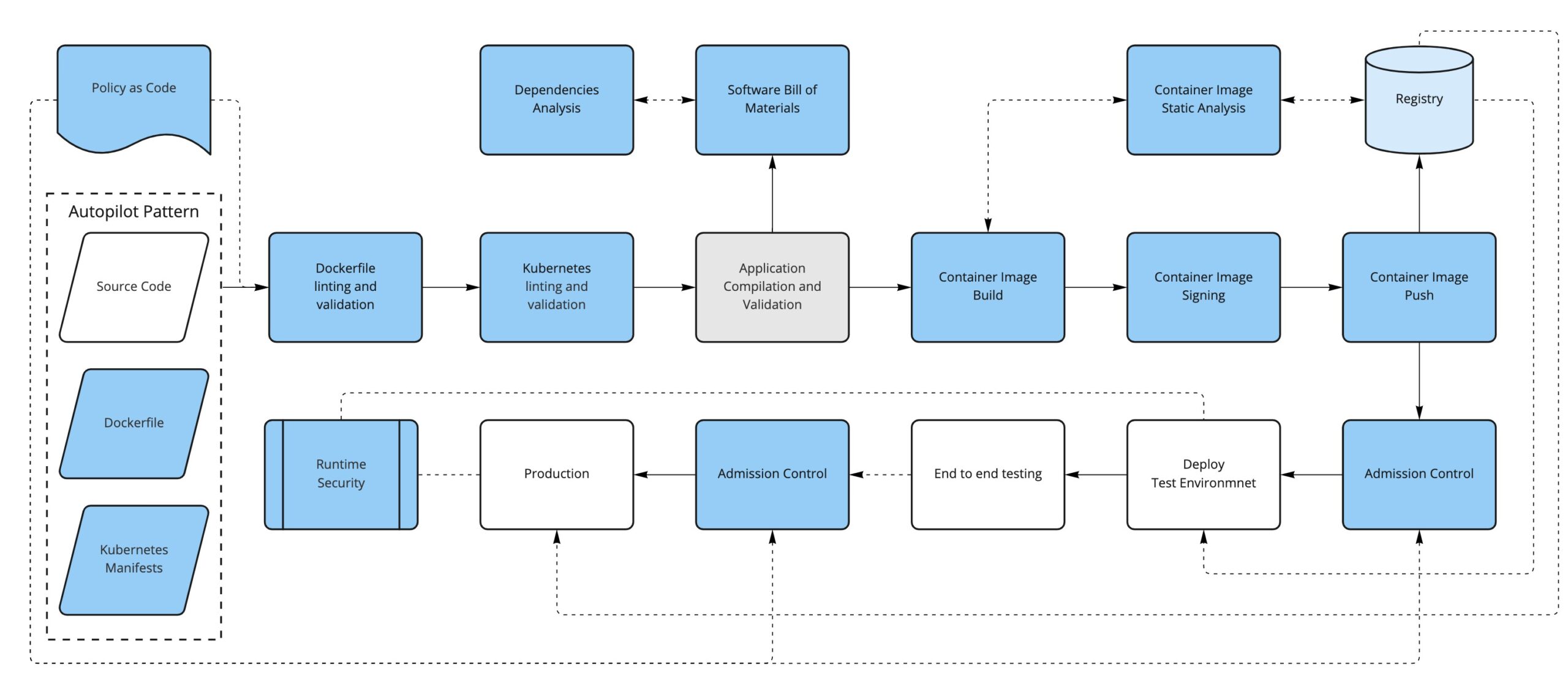
    Secure systems start from the design stage and from the code itself; you should aim to have security controls and enforcement built in as early as possible in the development life cycle. The practice of moving security checks earlier in the development pipeline (and, thus, nearer the source code) is known as shift left.

    You likely already have CI/CD pipelines in place for your application(s), and this is a great place to shift left your security checks. There are some great tools in the CNCF portfolio to help you achieve this.

    Enter Containers

    In the cloud-native world, containers are first-class citizens. From the DevSecOps point of view, containers represent a new attack surface to consider, starting with how the container image is defined and what ends up inside the container (the Dockerfile) to how the container evolves over time in response to new vulnerabilities that might be found.

    The first thing we can do is to convert our written policies to something that we can automate (such as code); for example, using a tool like OPA/conftest and a Dockerfile linter like hadolint, we can validate that the Dockerfile is compliant with our security policies.

    For instance, we could have a policy in place to limit the base images used to build new containers (limiting the FROM directive in the Dockerfile, for example).

    The second thing to consider is that, depending on how it has been built, a container image can have not only our application but also additional software included, like dependencies and operating system binaries.

    This additional software could have new vulnerabilities discovered in the future, so we should monitor the images that we have already built and pushed to our registry by periodically scanning them to find if they are open to any vulnerabilities that weren’t known at the time of building the container image.

    Just as before, we could sign our application artifacts. Now, our deliverable artifact is a container image, so it is preferable to be able to sign container images. In this way, we can trust that the container image we run comes from us and that it has been through our security process. There are projects like Notary, Grafeas and sigstore/cosign that can help with the container signature process.

    Running Containers in Kubernetes

    If we are running containers, the next logical step is to consider how we run them. Kubernetes use is on the rise as a solution to orchestrating containers across several machines. Introducing Kubernetes into the equation requires considering yet another attack surface in our DevSecOps workflow.

    Manifests

    Alongside our application’s source code, we will have the Kubernetes manifests that define how to deploy our application into a Kubernetes cluster.

    We can take the same approach as the container definition: Define some policies-as-code to enforce early in the process so our manifests are aligned with our security policies (not running untagged images, running images only from our trusted sources, ingress must have TLS, not using node port services, for example) and lint the YAML files to fail early if there are syntax problems, for example.

    We could also enforce most of the same policies and some additional ones at runtime when the manifests get applied to the cluster via a Kubernetes Admission Controller.

    Some tools that can help us with these enforcements are OPA/conftest, kubeval or kubelinter for linting and validation and, for the admission controls, we can use OPA/Gatekeeper or Kyverno, in addition to the API server admission plugins.

    Secrets

    Secrets require special attention since they contain sensitive information.

    If you’re using a GitOps approach, application secrets are often stored in repositories. Here are some resources that discuss sealed secrets in GitOps and Kubernetes secrets. 

    RBAC

    Do not use default service accounts: Define explicit service accounts associated with their permissions so you know exactly who can do what.

    Avoid the use of wildcards in roles and cluster roles; with RBAC you can define fine-grained permissions for users and for service accounts, as well.

    Know Your Dependencies

    Another attack surface that we need to consider is the application’s dependencies. It is important to first know what they are and if they have any known vulnerabilities. To help us with that, we can create a software bill of materials for the application and run an analysis on it.

    Finally, just like we periodically check for the images stored in the registry, we can continuously analyze what’s running in our Kubernetes cluster. This will ensure that there is no suspicious activity like abnormal network requests, images with critical CVEs running, etc.

    Conclusion

    By now, you should have a better idea of what it takes to secure your pipeline. Keep in mind, however, that this is mostly about process and cultural change.

    First of all, you need to know your attack surface—that is not only a technological choice, it’s also about what you think is important.

    These concepts are hard to apply from the beginning, so a better approach is to introduce changes, get used to them and think about how to improve the existing process step by step.


    Join us for KubeCon + CloudNativeCon Europe 2022 in Valencia, Spain (and virtual) from May 16-20—the first in-person European event in three years!

  • The Argo Project: Making GitOps Practical

    The Argo Project: Making GitOps Practical

    If you’re a DevOps engineer, chances are you have at least heard the name “Argo,” seen the friendly squid logo, and wondered: What the heck is this tool everyone is talking about? 

    In a nutshell, Argo is a popular open source tool that is making GitOps practical for anyone who uses Kubernetes. But it’s much more than that because, by enabling GitOps, Argo will also make Kubernetes environments more robust, secure and reliable than ever before. 

    Let’s find out why the combination of Argo, GitOps and good DevOps engineers is a recipe for production panacea.

    What is GitOps and Will it Replace DevOps?

    GitOps is a new(er) process and paradigm used by development teams to manage infrastructure and deploy applications. The “Git” in GitOps refers to the popular open source version control system. GitOps uses Git as a single source of information for declarative configuration. Based on this declarative configuration, it works its magic.

    GitOps automatically manages the configuration and deployment of infrastructure using Git pull requests. When development teams make a change to Git configuration, a GitOps agent deployed in the environment automatically reconciles the changes with the live state. Every change to the live environment is captured in the Git repository, so teams have unprecedented visibility and auditability over system changes. Most importantly, it is trivial to roll back to a previous working version in case of fires in production.

    GitOps builds on the developer experience, enabling teams to manage their infrastructure using the same tools and processes they use to develop software, extending those tools to the realm of software deployment and infrastructure management.

    While some have touted GitOps as “DevOps 2.0”, many experts disagree, saying that GitOps is not a better version of DevOps, nor is it something that will replace DevOps altogether. GitOps is a technical practice that can be highly beneficial to DevOps teams. The DevOps engineer will not, as some fear, be replaced by a Git-triggered robot. But GitOps will make her and the developers she supports happier and more productive.

    What is the Argo Project?

    Argo is an open source project hosted by the Cloud Native Computing Foundation (CNCF) for building and managing continuous delivery workflows in Kubernetes, GitOps style. The unique aspect of Argo is that it is Kubernetes-native—designed from the ground up for a modern containerized environment.

    The Argo project consists of four main sub-projects:

    • Argo CD—A GitOps continuous delivery engine with a powerful GUI and CLI.
    • Argo Workflows—A workflow engine that supports workflows and directed acyclic graphs (DAGs) in which each process stage is a container.
    • Argo Rollouts—An advanced Kubernetes deployment engine that supports progressive delivery strategies like canary and blue/green deployments, which are difficult to implement in plain Kubernetes.
    • Argo Events—A Kubernetes event-based dependency management system, which can be used to trigger automated workflows in CI/CD pipelines.

    Requirements for Kubernetes in Production

    Kubernetes is an orchestration platform that can help deploy, scale, and manage containerized applications. It can manage containers and the underlying infrastructure—scheduling containers and managing their workloads. This capability integrates software development and platform management to improve application management and portability. 

    Kubernetes in production can offer many advantages. For example, it makes it possible to release frequent changes to a high-availability application while keeping them online and enables you to move applications from one cluster to another. However, you need to configure Kubernetes correctly to realize its potential.

    Configuring Kubernetes for production involves implementing requirements according to each use case. As a result, what constitutes “production ready” in one Kubernetes project may vary greatly between different use cases. However, there are still minimum requirements that should be applied to most use cases. Here are key requirements for Kubernetes in production:

    • Security—When securing Kubernetes for production, you need to minimize the attack surface. This means locking down the Kubernetes control plane, applications, and their associated data. You need to keep secrets secured, harden nodes, use role-based access control (RBAC), and keep your Kubernetes version up-to-date with the latest security updates.
    • Portability and scalability—You can maximize cluster performance by maintaining portability and scalability. There are many Kubernetes capabilities that can help you achieve this goal, including self-healing nodes and auto scaling the infrastructure.
    • Deployment velocity—Kubernetes makes infrastructure and applications management faster by automating related processes. You can use Kubernetes’ automated features with GitOps to increase deployment velocity across your CI/CD pipelines.
    • Disaster recovery—You can significantly minimize your mean time to recovery (MTTR) by using Kubernetes and GitOps together. GitOps can help you reduce MTTR to minutes and quickly and easily recreate your container infrastructure in case of a complete cluster meltdown. 
    • Persistence—To support stateful production applications you will need to configure Kubernetes persistent volumes, provision storage devices with multiple storage tiers, and ensure they are efficiently utilized.
    • Observability—Observability enables you to gain a high-level view into running services, helping you make informed decisions before deployment to mitigate risk. GitOps can help you continuously monitor Kubernetes deployments, ensuring you can act immediately when issues occur.

    Benefits of Argo Tools for Production Environments

    Argo CD

    Argo CD is a continuous delivery (CD) tool native to Kubernetes. While most CD tools only support push-based deployment, Argo CD works in pull mode, retrieving updated code from a Git repository and deploying it directly to Kubernetes resources. This allows developers to manage infrastructure configuration and application updates in one system.

    Argo CD key features include:

    • Automatically synchronizing application state in a Kubernetes cluster with the current version of declarative configuration in a Git repository (==GitOps).
    • Ability to visualize deployment issues and detect and fix misconfigurations.
    • Convenient web-based GUI and CLI.
    • Role-Based Access Control (RBAC) and single sign-on (SSO), including login via GitHub, LinkedIn, Microsoft, etc.
    • Support for webhooks triggering actions in GitLab, GitHub, and BitBucket.

    How does Argo CD make Kubernetes production ready?

    GitOps can help you achieve a true GitOps workflows in Kubernetes, which provides the following benefits in production environments:

    • Minimize failed deployments and rapidly recover from downtime—Argo CD lets you instantly revert and rollback easily if anything goes wrong in production, reducing recovery time to seconds. 
    • Built-in auditing history—Argo CD ensures that every change to a Kubernetes cluster ia audited in the form of a Git configuration change log. This provides a complete audit trail of who changed what in the cluster, enabling consistent operations and supporting compliance requirements. 
    • Greater visibility on the lifecycle of developed features—Argo CD provides traceability from every change to infrastructure or applications directly to the code commit that caused those changes.
    • Improved security—Argo CD provides strong security guarantees, leveraging strong cryptography to manage changes and verify authorship, and creating a complete separation between CI environments and production systems, eliminating many types of supply chain attacks.

    Argo Rollouts

    Argo Rollouts is a set of Kubernetes controllers and CRDs that provides advanced deployment features such as blue/green and canary deployments, experiments, and progressive delivery in Kubernetes environments. It can integrate with input controllers and service meshes to incrementally transition traffic to new versions during updates. 

    A key capability of Argo Rollouts is that it can query and interpret metrics from many sources to validate that a deployment works properly and perform automatic upgrades or rollbacks.

    How do Argo Rollouts make Kubernetes production ready?

    By default, Kubernetes provides the Deployment object which updates applications using the “rolling update” strategy. In large production environments, rolling updates are considered too risky because there is no control over rollout speed and no way to automatically roll back in case of failure.

    Another limitation is that out of the box, Kubernetes deployments cannot query external metrics, such as real user measurements of performance or engagement, to determine the success of a deployment. 

    Argo Rollouts can address all these challenges and enable full progressive delivery in a Kubernetes environment, without requiring complex configuration.

    Argo Workflows

    Argo Workflows is an open source container-native workflow engine for orchestrating parallel tasks on Kubernetes. Argo workflows are implemented as Kubernetes Custom Resource Definitions (CRDs).

    Key features of Argo Workflows include:

    • Defining workflows where each step in the workflow is a container.
    • Modeling multi-step workflows as sets of actions or DAGs to capture dependencies.
    • Running CI/CD pipelines natively on Kubernetes without configuring complex software development products.

    How do Argo Workflows make Kubernetes production ready?

    Argo Workflows lets you automate production workflows in any Kubernetes environment, whether on-premises, hybrid cloud, or multi-cloud. It eliminates manual processes and ensures automation is represented as declarative configuration, making it consistent, repeatable, easy to rollback, and easy to troubleshoot.

    Argo Events

    Argo Events is a Kubernetes event-based dependency manager that defines multiple dependencies for different event sources (e.g. webhook, S3, schedule, stream, etc.) and Kubernetes objects after event dependencies are successfully resolved. Help the trigger.

    Argo events by themselves are not very useful. To deliver value, you need to integrate with a system that can execute workflow steps. So you can use Argo workflows to set Argo events. This helps orchestrate parallel Kubernetes jobs.

    How do Argo Events make Kubernetes production-ready?

    Argo Events provides several capabilities that enable dependency management in production Kubernetes environment:

    • Manage dependencies for various event sources.
    • Ability to customize business-level constraint logic to resolve event dependencies.
    • Manage everything from simple linear real-time dependencies to complex multi-source batch job dependencies.
    • Compliance with the CloudEvents standard.
    • Ability to manage event sources at runtime.

    Conclusion

    In this article, I covered the basics of GitOps and the Argo project and showed how each of the Argo project’s key modules can help make Kubernetes production-ready with minimal effort from developers and DevOps engineers. The magic of Argo is its simplicity and the way it fits seamlessly into existing Kubernetes workflows. I hope this will encourage you to try it out and see if it can help with your organization’s production issues.

  • Facebook Bans Innocent Users | Azure and ARM/Ampere | ‘Great Resignation’—No End in Sight

    Facebook Bans Innocent Users | Azure and ARM/Ampere | ‘Great Resignation’—No End in Sight

    Welcome to The Long View—where we peruse the news of the week and strip it to the essentials. Let’s work out what really matters.

    This week: No remedy for banned Facebook users, new ARM-based VMs on Microsoft Azure, and The Great Resignation will still be a Thing for the foreseeable. (more…)

  • Dagger: Standardizing CI/CD is the Holy Grail of DevOps

    Dagger: Standardizing CI/CD is the Holy Grail of DevOps

    Continuous integration and continuous delivery (CI/CD) has become a hallmark of quick software release life cycles. Nowadays, many teams support CI/CD pipelines for their software, offering a repeatable pathway to build, test and deploy code. A CI/CD pipeline is necessary to support an iterative, rapid deployment approach—yet, maintaining one is not an easy task.

    Enter Dagger. Dagger is a utility that aims to streamline how developers create and manage their CI/CD pipelines. Dagger, led by founders of Docker, recently unveiled their public beta launch along with a Series A $20 million funding raise led by Redpoint Ventures. While many open source CI/CD projects already exist on the market, Dagger is unique in offering easier configurations, pre-built components and more reusable actions.

    Akin to traditional supply chain management, software supply chain management is an increasingly complex endeavor involving many third-party dependencies. Development teams truly require a set of standard building blocks to piece it all together. For this reason, Solomon Hykes, co-founder and chief executive of Dagger, told SiliconANGLE that “solving this problem is the holy grail of DevOps.”

    Below, we’ll look at the common stressors inherent in creating and managing modern software delivery chains. We’ll also take a peek into the Dagger beta to see what it’s attempting to accomplish.

    Issues Facing CI/CD

    Software development supply chains are growing larger and larger to support a complex network of software architectures. But DevOps engineers, who must automate this chain, are drowning in tool sprawl—and stitching these components together to make custom pipelines can become a big bottleneck.

    Especially as an organization expands its distributed microservices architecture into the cloud, it can be tricky to scale a repeatable CI/CD pipeline across various department and disparate tech stacks. This often results in many bespoke CI/CD pipelines. Even within the same team, nuances between codebases can complicate each CI/CD process and require engineers to rewrite scripts.

    Simultaneously, organizations are under intense pressure to deliver to meet new digital innovation demands. But, until DevOps can make the release process more efficient, software development automation risks introducing more toil than it takes away.

    Diving Into Dagger

    So, how is Dagger alleviating these concerns? Well, Dagger creators described it as a “portable devkit for CI/CD pipelines.” Using Dagger, DevOps engineers can use a standard set of building blocks to assemble their CI/CD pipelines and then run them on their chosen cloud. It’s like a better developer experience for CI/CD pipeline creation.

    So, how does Dagger work under the hood? Dagger is powered by Buildkit, the Dockerfile-agnostic builder toolkit. Developers then use Cue to specify how their code is run in a container and to link up actions. Cue is an open source configuration language developed at Google.

    According to the docs, it takes about five minutes to install Dagger and the necessary dependencies. Dagger also provides boilerplate code to integrate with pre-existing CI environments. In essence, Dagger doesn’t need to replace your CI tool—it adds “a portable development layer on top of it.”

    Then, there are the actions themselves. Dagger supports a growing library of actions that it calls Universe. At the time of writing, the Universe of actions is limited and is being staged in the main Dagger repository. These actions are reusable Cue packages. For example, this package details how to run and deploy the Nginx web server in Cue:

    package nginx
    
    import (
        "universe.dagger.io/docker"
    )
    

    And then,

    #Build: {
        output: docker.#Image & _pull.image
    
        _pull: docker.#Pull
        *{
            flavor: "alpine"
            _pull: source: "index.docker.io/nginx:stable-alpine"
        } | {
            flavor: "debian"
            _pull: source: "index.docker.io/nginx:stable"
        }
    }
    

    Benefits

    CI/CD can certainly benefit from standard building blocks and more fluid wiring between tools. There are several potential benefits from Dagger’s proposition:

    • Unification: Unifying developer and CI environments could avoid headaches.
    • Localization: Dagger enables testing a closed-loop pipeline locally. This helps for debugging.
    • Reusability: Building blocks help avoid rewriting automation scripts repeatedly.
    • Multi-cloud: Easier ability to migrate a pipeline from one cloud to the other, thus avoiding vendor lock-in.
    • Compatability: Dagger can run in any environment compatible with Docker, meaning it’s probably workable with your current toolset.

    Final Thoughts: Lego Blocks For CI/CD

    Docker revolutionized the software industry by easing the process of managing containerized applications. And now, Docker founders Solomon Hykes, Sam Alba, Andrea Luzzardi and others at Dagger are tackling another meaningful problem within today’s complex software ecosystem. Given the success of their previous endeavors, it’s not too difficult to imagine a network of reusable CI configurations emerging with an excitement similar to Docker Hub.

    Of course, Dagger is still in its early stages and there’s much development ahead. It will undoubtedly be an interesting project to follow in the years to come. Dagger is being built as an open source project on GitHub. The company has also opened a Discord channel to engage with the community.