Category: Containers

  • Know What You Want and Need

    Know What You Want and Need

    Over the years, what we purchase from vendors has changed significantly. It used to be that IT would define a need, go out and find a bit of software to solve it, install and configure the software and, in most cases, spend the majority of time on the project getting it to work correctly in their environment. Those days are largely gone. First, we started buying appliances for some functionality, then we started using MSPs for some or all functionality, then some vendors wanted to deliver in a VM where they could make configuration much easier by controlling the environment. That was the first step to virtualizing purchases. Then we started looking at infrastructure-as-a-service (IaaS), then SaaS, then some vendors offered PaaS … Currently, all of the cool vendors are offering containers—which are an improvement over VMs, and offer a virtual appliance that is quick to get running and tested to do what it was purchased for. Or at least tested to do what it was sold for. We’ve all got stories about what we did with these purchases that were “off label”—things that a product really wasn’t designed for. Along the way, we also introduced open source vendors; a bit of an oxymoron that really described service orgs that base their product on an open source project. Some far more successfully than others.

    And all of that, dear reader, is why we are here. Before purchasing, there is a lot more to find out than there used to be. What, actually, is the product this software vendor is selling? In the end, IT is looking to solve a problem. Most of the time, whether that problem is solved by SaaS, local install or cloud instance is less important than how well the problem is solved. But implementation—and licensing—are important to an organization if not immediately, then over the long term.

    When purchasing an open source “product”, you’re … actually not. You are getting the product and purchasing support. Since open source can be hacked to run just about anywhere given enough time, more than one OSS vendor has pretended that makes them superior to commercial products targeted at a specific platform. That is blatantly untrue—unless the OSS vendor is supporting the product anywhere and everywhere which, of course, they are not. I can port the OSS project MyFunApp to any platform I want without paying for support that won’t do a thing for me when I get it up and running on OS/2 (as an extreme non-existent example).

    SaaS has more issues when it comes to TCO. While pay-as-you-grow is cool and all, locking in a monthly payment forever is a big step and should be considered. And at an enterprise, “forever” needs to be considered realistically. Implement a particular SaaS CRM and you are unlikely to move to another, even if you claim that you will in a heartbeat. It’s work. A lot of work. It is definitely possible, but for most organizations, unlikely. So know what you are getting into. And while you are evaluating, don’t forget to consider variable charges, which most SaaS products have. Make certain you understand what the actual monthly costs are likely to be. IaaS suffers this same variability problem, as many of us have learned.

    Containers are a very sweet solution to appliance-like functionality—drop a container into your Kubernetes flavor of choice and move along. The problem here is a combination of proliferation—how many are required? One per pod can get expensive over time, for example. Those resources aren’t free, no matter the platform. The other issue is updates. Automatic updates are the norm for container instance-delivered products. From a security perspective, you should have questions. Updating things in your network should probably require your approval.

    I’m not suggesting that one delivery method is better than others here; I’m simply suggesting that we all need to be more deliberate about those choices than we’ve needed to be in the past. Knowing not just SLAs but the cost and support implications of every choice is important both today and down the road.

    Keep kicking it, and keep picking the solutions that best solve the organization’s problems. Just be aware that sometimes, the issues a delivery method introduces undermine the effectiveness of the solution.

  • Meta Income Down by Half | Will Apple Make it Worse? | Linux Secure Boot Fix

    Meta Income Down by Half | Will Apple Make it Worse? | Linux Secure Boot Fix

    Welcome to The Long View—where we peruse the news of the week and strip it to the essentials. Let’s work out what really matters.

    This week: Meta’s latest results are very bad, Apple wants its cut of Facebook ads, and Lennart Poettering proposes a new Secure Boot for Linux. (more…)

  • Fermyon Adds Managed PaaS for Building Wasm Applications

    Fermyon Adds Managed PaaS for Building Wasm Applications

    Fermyon Technologies this week launched a hosted platform-as-a-service (PaaS) environment, dubbed Fermyon Cloud, that promises to make it simpler to build WebAssembly (Wasm) applications.

    Announced during the Cloud Native Wasm Day event during the KubeCon + CloudNativeCon North America conference, Fermyon Cloud is now available in open beta.

    Fresh from raising $20 million in funding, Fermyon CEO Matt Butcher said IT teams can quickly build and deploy Wasm applications using a Fermyon Spin development tool and a Fermyon Platform the company launched earlier this year.

    Fermyon Cloud adds an opinionated PaaS environment managed by Fermyon that can start up Spin applications in less than a millisecond. It uses a serverless application programming interface (API) that makes it possible to cache and optimize applications as they are loaded, noted Butcher.

    Originally developed more than five years ago by the World Wide Web Consortium (W3C) to create a common format for browsers executing JavaScript code, Wasm is now used to rapidly build lighter-weight applications that can be deployed on any server platform. In effect, the promise of being able to write an application once and deploy it anywhere is finally being realized some 25 years after the initial introduction of the Java programming language.

    Wasm isn’t necessarily going to replace existing approaches for building applications, at least not any time soon, but it does provide an alternative to serverless computing frameworks for developing lighter-weight applications that run faster.

    In addition, at a time when organizations are becoming more concerned about application security, the appeal of Wasm is clear. Existing approaches to building applications rely on the aggregation of software components that tend to lack distinct boundaries between them. As a result, it becomes relatively simple for malware to infect all the components of an application. In contrast, Wasm code runs in a sandboxed environment that isolates execution environments to eliminate the ability of malware to laterally move across an application environment.

    Wasm is especially well-suited for building lightweight applications that previously might have been deployed on a serverless computing framework, noted Butcher. The issue developers are encountering when using a serverless computing framework is that those frameworks are based on containers that have comparatively slow startup times, he added.

    It remains to be seen how much traction Wasm gains in the months ahead, but Butcher said he expects most backend services, such as databases, will continue to be built using containers. Fermyon is betting, however, that many future cloud-native applications built by the average developer will be constructed using Wasm. In the longer term, Wasm will also soon be used to build applications infused with machine learning algorithms, said Butcher.

    In the meantime, DevOps teams should get ready for more Wasm code to move through continuous integration/continuous delivery (CI/CD) pipelines. The challenge, of course, is that code will need to be managed alongside all the other software artifacts moving through those pipelines, as well.

  • Google Looks to Secure Software Supply Chains

    Google Looks to Secure Software Supply Chains

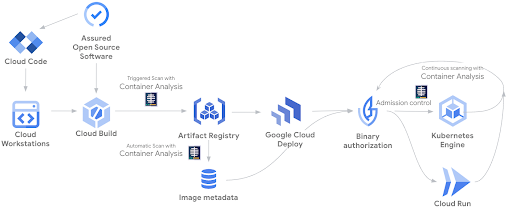
    At the Google Cloud Next ’22 conference, Google today launched a managed Software Delivery Shield (SDS) service to enable DevOps team to store, manage and secure the build artifacts in Artifact Registry. At its core, SDS is based on a trust-based policy engine to establish, maintain and verify a chain of trust across the software supply chain.

    In addition, Google has updated its container analysis tool to include vulnerability scanning for Maven and Go containers along with preview support for non-containerized Maven packages.

    The managed Software Delivery Shield service spans a range of Google runtimes environments, including Google Kubernetes Engine (GKE), Cloud Code, Cloud Build, Cloud Deploy, Artifact Registry and Binary Authorization. Cloud Build also now officially supports Supply chain Levels for Software Artifacts (SLSA) Level 3 best practices by default in addition to generating authenticated and non-falsifiable build provenance for both containerized applications and non-containerized Maven and Python packages.

    GKE, in preview now, provides detailed assessments, assigns severity ratings and surfaces the security posture of the clusters and workloads, including insights into operating system vulnerabilities, workload configurations and other actionable insights. Log data can now also be captured while security event information can be routed to, for example, a security information and event management (SIEM) platform.

    The Google Cloud Run serverless platform can also, in preview, display software supply chain security insights such as SLSA build-level compliance, build provenance and vulnerabilities found in running services.

    At the same time, Google is also making available in preview Cloud Workstations, which provide fully managed secure development environments on Google Cloud that can be accessed via a browser. Built-in security capabilities include virtual private cloud (VPC) controls, no local storage of source code, private ingress/egress, forced image updates and identity access management (IAM) policies.

    Finally, the Cloud Code plug-in for integrated development environments (IDEs) now includes a preview of Source Protect to give developers real-time security feedback in the form of vulnerability dependencies and license reporting as they write code.

    Collectively, Google claimed it now provides more than 250 curated packages across Java and Python with verified provenance. It also automatically generates a software bill of materials (SBOM) to create an inventory of all components and dependencies.

    Historically, cloud service providers have been advocating a shared responsibility approach to cloud security that required organizations to not only secure their applications but also the way cloud infrastructure is provisioned. The challenge is developers generally provision cloud infrastructure themselves even though they generally have limited cybersecurity expertise. Too many developers assume the underlying cloud infrastructure is more secure than it actually is.

    Now, cloud service providers are extending the security services they provide at a time when organizations are making security a bigger factor in determining where to build and deploy applications.

    Sunil Putti, vice president and general manager for Google Cloud Platform, said Google is attempting to make cybersecurity invisible to developers in the sense that guardrails will automatically be embedded within the platform.

    The issue is that cloud computing environments are becoming more complex as new classes of cloud-native applications are deployed alongside legacy monolithic applications. Complexity, as always, is the enemy of cybersecurity.

  • Microservices Explained: Not Your Father’s SOA

    Microservices Explained: Not Your Father’s SOA

    Microservices are frequently referred to as a variant or derivative of service-oriented architecture (SOA), if not essentially the same thing. While there are similarities and both are designed around the concept of services, that’s where the similarities end. Each was created around a different set of principles and intended to address different problems.

    Microservices architecture is built around key concepts that, when applied, not only differentiate it from other architectures but deliver advantages that accelerate software delivery and help to scale large, complex applications. To deliver on the promise of cloud-native, microservices must be loosely coupled so that, ultimately, they are independently deployable. Any microservice can be updated and deployed—just that containerized microservice—without requiring changes to other microservice(s). Loosely coupled microservices mean they are not sharing databases or maintaining state, for example.

    How big should a microservice be? Or, in other words, how much should it do? The answers range from ‘a single thing’ to ‘a small set of related code with high cohesion’. Another factor is that getting too granular can overrun a microservices-based application with large numbers of microservices, increasing complexity and making triage through observability and tracing very challenging.

    Scaling microservices-based apps is another important factor. Autonomous microservices can be replicated and scaled for performance and workload using container orchestration tools such as Kubernetes.

    Microservice communications are achieved through well-thought-out APIs created around the business or operational capabilities the microservice provides to anyone or anything engaging through the API. The API, and data provided through the API, are often referred to as ‘technology-independent.’ It’s probably better stated that microservice APIs are built using approaches like RESTful and GraphQL over networks that are not tied to any one specific operating environment, technology or programming language. JSON, YAML and XML similarly represent data that is transferable across technologies.

    The following diagram of a media application demonstrates the principles of microservices architecture. Microservices for scheduling media, digital rights management, tracking impressions and adding new ad insertions are loosely coupled, autonomous and have well-defined API interfaces. Each microservice can be changed, enhanced and deployed rapidly and independently of other microservices.
    Microservices SOA

    Service-oriented Architecture, or SOA, emerged to solve a very different problem; the overwhelming size and complexity of monolithic applications. Monolithic applications have very large codebases that often don’t do a good job of compartmentalizing functional or business logic. This makes changes to the codebase challenging even to developers who know much of the codebase well.

    Services in SOA were often used to gather a collection of similar business logic together and then share them as a service with other parts of the application, as needed. Technologies like message buses are used to make requests of a service and operate as traffic managers for requests across multiple services and other parts of the application. While reusability was a critical design consideration, SOA services were still quite large, and deploying services at high velocity was not an important design consideration. SOA services often take considerable time to code and test the service including interdependencies across other parts of the application before deploying as part of a larger software release.

    One important note: There are benefits and drawbacks to microservices and SOA architectures; neither is ‘better’ than the other. Which architecture to use when mainly depends on the purpose of the application you are building. For larger, more complex enterprise application environments that require integration with many other applications, you might choose SOA. That’s a better fit than for smaller applications that don’t require middleware elements for managing the requests within the app or between other applications. Microservices, on the other hand, are better-suited for smaller and well-partitioned web-based systems. They are becoming the standard for today’s cloud-native applications, and also are a great fit for developing a mobile or web application because they give developers more control.

  • The Benefits of a Distributed Cloud

    The Benefits of a Distributed Cloud

    The way applications are created has changed dramatically in just a few short years. It’s now all about rapid assembly and integration; applications built using microservices and containerized. Containers and the cloud have certainly been the catalyst for this progress and will continue to be the infrastructure on which developers create new and innovative applications. 

    As workloads are moving to the cloud, however, more and more businesses are realizing they need a cloud that can be rapidly adapted to their specific needs. Computing environments may be a blend of server types: On-premises, bare metal, colocated and distributed across multiple continents. No single cloud architecture can offer consistently exceptional application performance for all users.  

    Between hybrid, on-premises, multi-cloud, colocated, centralized and distributed clouds, it can be hard to keep all the terminology straight. What are the differences between these cloud architectures? Why use one rather than the other? In this article, we’ll focus on just one of these: The distributed cloud. 

    What is a Distributed Cloud?

    As opposed to the large public cloud where all computing is done in a central location, a distributed cloud consists of a system of servers that are not all in the same place—even though they are managed through a single cloud provider. The servers in a distributed cloud can be actually anywhere in the world. This allows for computing to be done closer to the end user, which improves the user experience in a multitude of ways.

    What Are the Advantages of Using a Distributed Cloud?

    Below are six of the key benefits of using a distributed, rather than a centralized, cloud.

    One Size Does Not Fit All

    Computing environments may be a blend of server types: On-premises, bare-metal, colocated and distributed across multiple continents. Cloud providers need to offer flexibility to customize a cloud for their end users and their business needs.

    Data Regulation Compliance

    Many countries have specific compliance requirements for their citizens’ data and do not allow for personal/financial data to be hosted outside of their borders. Thus, having a distributed server within those countries alleviates that issue. 

    Reduced Latency

    In a distributed cloud model, servers can be placed in a wide array of locations, including in an edge cloud. When servers are placed closer to end users as opposed to in a centralized location, data does not need to travel as far to get back to the server. 

    Improved CDNs

    A distributed cloud can be used to deploy content delivery networks, or CDNs, to speed up content and service delivery. Heavy content (e.g. videos) can be stored and delivered by the distributed cloud closer to end users, which enhances the user experience.

    Network Resilience

    Network connectivity is always a worry for cloud providers. If their system goes down, none of the user’s workloads will run. In a distributed cloud system, however, the network is at a reduced risk of failure because if the system crashes, cloud services can reside in a local subnet.

    Location Flexibility

    A distributed cloud can always become more distributed. More locations can be added to the network, broadening the global compute zones available within that cloud. Companies that want to reach users in specific locations around the world can use a distributed cloud to reach them.

    Changing How People Think About Cloud Computing

    To address the demand for versatility, a new type of cloud has emerged: The unified distributed cloud (UDC), in which workloads can run in thousands of locations anywhere on earth. Such a cloud connects to existing infrastructure around the world via one API. Businesses can enjoy the benefit of running workloads in multiple locations without needing to maintain any of the distributed infrastructure. From a single UI, users pick an existing data center to send their workloads to and, within minutes, begin deploying. 

    A UDC transforms heterogeneous infrastructure into a homogeneous cloud computing platform, which can then be leveraged to support the delivery of cloud services in proximity to end users. It is designed to be interoperable with any private, hybrid cloud or multi-cloud architecture. As a result, enterprises can create an optimized cloud computing strategy, taking advantage of existing and available infrastructure in the location—or locations—of their choosing.  And because it sits on existing infrastructure, it doesn’t require any additional capital expenditure.

    As opposed to the traditional cloud model, the UDC can change the way people think about the public cloud. While the large public cloud providers benefit from economies of scale, a distributed cloud takes advantage of the economies of locality and distribution and thus has the flexibility to handle emerging location-dependent apps, such as the new wave of internet-of-things applications.

  • Cloud-Native: It’s One Thing

    Cloud-Native: It’s One Thing

    This Wednesday, August 10, 2022, starting at 9:00 a.m. ET, Techstrong Group is hosting an awesome virtual conference: CloudNativeDay. I am sure most of you already know a lot about the many cloud-native solutions out there; are familiar with the great work the Cloud Native Computing Foundation (CNCF) does and that you have Kubernetes clusters running in your environments. But for me, at first, the interest and enthusiasm people showed for anything and everything cloud-native defied my understanding.

    We do about one virtual conference a month here at Techstrong Group. That may sound like a lot, but when you divide it up among topics in DevOps, cybersecurity, cloud-native and digital transformation and then further segment who in an organization is targeted by those events, it doesn’t give us a lot of room to dive as deeply into some topics as we would like. We pick the topics of our virtual events carefully and we depend on feedback from you, our audience, to guide us.

    Tim Hockin, Principal Software Engineer: Kubernetes, GKE, Anthos at Google

    This is the fourth year we are producing a cloud-native virtual event, so the topic has obviously resonated with many of you. But it wasn’t until this past year that I had the “Eureka!” moment and realized why.  You see, to discover the reason why cloud-native was so popular, I looked in the usual spots: Software, applications and solutions. I felt confident that Kubernetes’ popularity was one of the reasons cloud-native was so popular. Over the last 24 months, observability burst on the scene. Maybe that was driving the continued popularity of cloud-native. Heck, the CNCF has over 40 projects; perhaps the sheer quantity is what makes cloud-native so popular. But none of that felt exactly right—yes, all of these things drive cloud-native’s popularity. But they aren’t the key driver.

    Once again this year, I had the pleasure of recording a fireside chat with Tim Hockin. If you don’t know him, Tim is a principal software engineer at Google and an original member of the team that brought Kubernetes out from Borg (if you don’t know Borg, then you need to learn some cloud-native history). This is the fourth year we have Tim keynoting this virtual conference, and chatting with him is always a highlight of the event for me.

    Tim said something in our conversation this year that finally made it click for me. Suddenly, I had found it. The “one thing”, in the immortal words of Curly from the movie City Slickers.


    You see, the secret to cloud-native isn’t how great and powerful Kubernetes is; it’s not what observability or service mesh or any of those great cloud-native or CNCF-developed software tools can do for you. Cloud-native is a state of mind. As much as it is about software, it is also a state of mind. Cloud-native is about building powerful, applications at scale using the entire ecosystem that was created as a result of that state of mind.

    Sound a little too zen for you? Well, I hope to change that thinking. You do not want to miss my conversation with Tim Hockin that kicks off our show this year. We’ll discuss the belief and help you understand why cloud-native is a state of mind. And, while you’re listening, Tim and I also talk about what is new in fleet and multi-cluster Kubernetes.

    The entire virtual event program is chock full of great sessions. Head over to the event site and see for yourself. Panel discussions, speakers, demos. Great exhibitor booths you can visit and ask questions. Games, prizes, a DJ, a mixologist and more. We can’t wait to see you there!

    And if you remember anything from the event, let it be this one thing: Cloud-native is a state of mind.

  • Learn Something New Every (Cloud-Native) Day

    Learn Something New Every (Cloud-Native) Day

    Being the new guy at Techstrong Group, the first couple of weeks was spent trying to find things. Like the bathroom when I’m at HQ in Boca Raton or the login to the SurveyMonkey account so I could check on the status of our various in-flight research projects. 

    I also realize I have to learn the vernacular, especially around DevOps and this cloud-native stuff. To be clear, I’ve been researching DevOps and how to integrate security into the process (yes, DevSecOps) for a while. But this cloud-native terminology is something I need to learn more about.

    You’re probably a bit confused about why I’m perplexed by the term ‘cloud-native.’ My work in cloud security for the past 10 years gave me some opinions about vernacular. When I say “cloud-native,” I’m typically referring to the native services you use in your cloud provider. Like AWS Fargate or Azure Container Registry. Those services are “native to the cloud (provider).” 

    But I’m realizing that native cloud services are only a portion of the larger cloud-native revolution. Like DevOps, cloud-native is a state of mind, not a service you buy from a cloud provider. It’s about openness. It’s about portability. It’s about agility. It’s also humbling as I realize I have a lot more to learn.

    That’s why I’m looking forward to our CloudNativeDay event on August 10, 2022. I get an opportunity to dig in and learn about some topics germane to my new coverage areas. For instance, the session on cloud-native challenges in traditional enterprises caught my eye. I’ve been involved in born-in-the-cloud companies, so we didn’t have any installed base to consider. But how would you embrace new and disruptive technology when your company has extensive legacy infrastructure? I can’t wait to hear about those more traditional enterprises’ opinions and experiences.

    Observability is also high on my list of things to learn more about. I’ve been working with customers on advanced security monitoring strategies for decades, but looking at the application layer and associated infrastructure is a different animal. I suspect there will be some technical similarities (collect data, analyze data, alert on data, etc.), but the use cases are fundamentally different. 

    I’m also excited for the last keynote of the day. However, I’m a little biased since it involves an excellent conversation Mitch Ashley and I had with Donald Lutz of Taos (an IBM company), where we dug into some of the enterprise migration challenges he’s seen in the field. 

    They say that when you’re young, you know everything. But as you get older, you realize you don’t know anything. I’m definitely in the latter camp, which is why I’m not going to squander a great opportunity to learn—and neither should you. Register and check out the event. I’ll see you there.

  • Orgs Struggle to Get App Modernization Right

    Orgs Struggle to Get App Modernization Right

    A survey published today found 93% of IT leader respondents admitted that application modernization efforts are either extremely or somewhat challenging.

    The survey, which polled 150 IT leaders at organizations with at least 1,000 employees, was conducted by Asperitas, an IT services provider. The survey found the primary issues respondents identified were identifying the right tools and technologies (30%) followed by finding staff with the right experience (20%), choosing the right external partner (18%), getting users trained on new systems (17%) and securing the support of management (11%).

    More than three-quarters of respondents (78%) said the top priority for organizations taking on application modernization should be “getting it right.”

    The definition of application modernization is, like many things, in the eye of the beholder. One-third of respondents defined modernization as the use of cloud-based infrastructure while 32% said it was moving legacy systems to the cloud. Another 22% defined it as using cloud-based tools.

    More than half of respondents (54%) said employing microservices meant that they were modernizing, while 59% said the use of any cloud-native services indicates as much.

    Scott Wheeler, practice lead at Asperitas, said that while there are a lot of definitions of application modernization, it’s clear that the lift-and-shift era of moving applications to the cloud is coming to an end. Organizations are instead preferring to build and deploy applications using a wide range of cloud-native platforms and platform-as-a-service (PaaS) environments they don’t have to manage.

    The challenge is many of these applications are being built and deployed on multiple clouds. More than a quarter (27%) said the biggest multi-cloud challenge was securing applications, followed closely by integration with on-premises systems and other cloud platforms (26%). Another 20% identified ensuring portability between platforms as the biggest challenge.

    A total of 80% also noted upskilling of internal staff and making improvements to antiquated processes were extremely important to application modernization. In fact, one of the major issues that organizations still need to address is the degree to which “bad DevOps” practices are being applied to modern application environments, said Wheeler. Much of that issue stems from the simple fact that many IT teams still don’t know how to effectively manage cloud computing platforms, he added.

    Well over a third (36%) said that a key application modernization best practice was giving yourself ample time to complete the project while an equal percentage identified avoiding shortcuts, distractions and/or partners that over-promise. Another 34% said the most important lesson was choosing the best tool for the job, while nearly a quarter (24%) identified waiting too long to modernize a system that’s clearly in need of modernization.

    A full 100% of respondents said application modernization was very or somewhat important to their business, with 45% reporting the applications they had chosen to modernize were critical. A little more than a quarter (28%) also noted modernization has enabled them to innovate faster and scale more rapidly, while 25% said it could improve end user productivity and 11% said it might make their company more attractive to employees and customers.

    Regardless of the motivation for modernizing applications, just about every organization is engaged in these efforts to varying degrees. The issue doesn’t seem to be the willingness to start these projects as much as it is making sure they are completed quickly enough to be relevant to the business.

  • API Gateway Vs. Service Mesh: What’s the Difference?

    API Gateway Vs. Service Mesh: What’s the Difference?

    In the average microservices architecture, app programs trade the stability and rigidity a call stack offers for the network’s flexibility. Consequently, latency, security and traceability issues that were previously absent become a service call concern. 

    Service mesh is the resulting solution to eliminate these issues and allow developers to focus on more important business solutions. The caveat is the functionality overlap that exists between a service mesh and an API gateway. But while the two are similar, there are also key differences between both options. Here’s what you need to know.

    Defining a Service Mesh

    A service mesh is a comprehensive architectural pattern set designed to deal with enterprise concerns like instability, debugging and security. These concerns arise when a team moves from a call stack to network calls. 

    For instance, a function call via a call stack recognizes the constant availability of the requested function. On the other end of the equation, a network call doesn’t offer this functionality. 

    A service mesh is the preferred option because it assists the system’s client endpoint in managing network instability. The primary method for solving this network instability is frontrunning retries transparent from the client app’s viewpoint. 

    The service mesh also assists the server’s endpoint by rerouting incoming requests to the server node that’s best able to deal with the incoming request. The choice of server node is a function of previously determined policies for routing incoming traffic.

    The ideal service mesh is installed with two layers: The control plane and the data plane. The latter is a proxy for any connection’s server and client endpoints. 

    The data plane also enforces policies from the former while running operation metrics to a monitoring tool. Conversely, the control plane layer manages all attending service policies alongside the data plane’s operation. 

    service mesh

    Image Source

    Key Features of a Service Mesh

    The average service mesh has a number of primary features. 

    But there are a few things that bear mentioning. Say your app development team is working on a small business phone system. This particular service implementation doesn’t need every feature listed below. It depends on your team’s specific needs and traffic setup.

    Traffic Routing

    This feature enables the service mesh to route requests based on preset configuration or a predetermined policy. The system may prioritize traffic from specific client applications. Alternatively, a service mesh can re-route traffic to different service versions for:

    • A/B testing
    • Canary release
    • Service versioning

    Observability

    Service mesh implementations feature proxies that record service calls for individual clients and services. This feature takes the manual burden of the call-logging process away from the developers. 

    Plus, teams can leverage downstream analysis and monitoring tools to report on system availability and overall performance. These monitoring tools also provide a framework for basic tracing across all call chains. 

    The observability capabilities of a service mesh extend beyond the above. For example, some coding work can allow developers to improve call chain monitoring to allow for accurate tracing for enterprise business transactions.  

    Common service mesh observability features include: 

    • Latency, error rate and throughput alerts
    • On-demand service dashboards and graphs depicting the connection between individual services
    • Tracing the journey a business transaction or request makes through the service mesh

    Image Source

    Security Policies

    An application with multiple independent services has a huge attack surface. Essentially, each independent service is a vulnerable entry point that requires protection. A service mesh has proxies on both the server and client endpoints to secure any communication between both terminals. 

    A service mesh also improves security by eliminating the dependence on developers to manually program security into every service. Instead, the server proxies will handle authorization, authentication and encryption for each independent service. The resultant effect is a zero-trust security framework.  

    Identity

    A service mesh manages who can access individual services. It also maintains a real-time log of stakeholders accessing each service and when they did so. The system validates identity through JSON Web Tokens (JWTs) while allowing authorization depending on the requesting service and the stakeholder. 

    Encryption

    Compliance, security and data protection are key considerations. Well, communication between all services in a service mesh is fully encrypted. The control plane is responsible for certificate management functionality including certificate rotation and generation. 

    Furthermore, a service mesh uses mutual TLS where both server and client endpoints whitelist the certificates that can operate on the other side of any connection. A service mesh provides robust mutual TLS authentication, allowing for seamless system authentication and encryption. 

    Resilience

    This feature defines the ability of a service mesh to insulate developers in scenarios where the principal service function goes offline. In some instances, the proxy may follow an alternative service path or switch to a backup framework. 

    For illustration, streaming giant Netflix has a personalized user recommendation feature that suggests titles to its users. If this service goes offline, a service mesh system can ensure a switch to a default recommendation feature with zero personalization. Only when this backup fails will the system return an error code. 

    A service mesh assures developers that when a service fails, the proxy has done all it can to manage communication errors. In some cases, the mesh can ensure optimal performance by switching to a different service with the lowest latency.

    Examples of configurable resilience patterns for a service mesh include 

    • Circuit breaker patterns
    • Rate limiting
    • Retry policies

    Another illustration of a service mesh’s resilience is the ability to build chaos engineering capabilities. The service mesh can inject itself into the endpoints within the network, providing the observability required to monitor a chaos test. 

    Image Source

    What an API Gateway Entails

    Whether the team is working on contract management software for small business or an expense calculator app, the choice of API can determine the results of your team’s app development efforts. But more than the choice of API, proper management is another crucial talking point. The best results come with a system that identifies incoming calls, directing them to the appropriate resource. 

    API gateway is the future of DevOps and is the solution to that need. It’s the technology framework for routing API client calls to the ideal application. It also processes the call, forwarding resulting responses to the client’s network.

    At the technical level, an API gateway isn’t a must-have. Find a developer with a digital business card, hire them, and they can always program an embedded code responsible for call request routing. The only caveat to this alternative is the manpower and resources necessary to program and insert codes for individual call requests. As such, it’s always better to have an API gateway to handle this task. 

    An API gateway is a more innovative solution because extensive coding always holds the possibility of risks and errors. Furthermore, these errors can complicate app development stages like maintenance, bug fixing and application testing. 

    The API gateway ensures all API requests reach their intended destination with zero diversion. Plus, it also offers the following added functionalities:

    • API request monitoring
    • Shifting API requests between individual nodes
    • Request balancing for multiple instance situations

    The Major Differences Between API Gateway and Service Mesh

    An important digital workplace definition that differentiates both frameworks is the placement location. The API gateway is necessarily present on public-facing systems. Other key areas where an API gateway and service mesh differ include:

    Observability

    Observing the performance of the average API gateway is a more concrete task. The framework can provide actionable data insights like how long the API takes to respond to requests, problematic features, and their impact on network traffic. 

    With the service mesh, the ability to spot performance issues is a given. However, the system can’t ascertain any effects of performance lags on end-user response and experience. Therefore, while troubleshooting is easy, gauging the extent of the problem’s impact is more complicated. 

    The Communications They Handle

    Both frameworks manage different communication nodes—one handles internal discussions and the other external ones. The API gateway is the component responsible for routing external communications. For example, the API gateway handles chatbot connections, purchase orders and visits to specific pages. 

    Conversely, the service mesh is responsible for internal communications in the system. For illustration, a discussion between multiple microservices under the same app environment will fall under the service mesh’s purview. 

    In other words, the API gateway manages client-server discussions. Meanwhile, service-service communications are for the service mesh. 

    Management

    Both frameworks may have some areas of overlap, but the amount of management each one requires isn’t one of them. API gateways are simpler to manage and develop. As such, they’re easier for your app development team to manage. 

    The deployment for an API gateway happens just once, regardless of the service app. Plus, post-deployment centralization and monitoring are easy tasks. 

    In contrast, a service mesh is more complicated and tedious to manage. Your app development team must deploy the service mesh function for individual app systems. 

    Compatible Tools

    Most API gateway tools and software resources are highly expensive. Plus, they’re compatible with every popular app architecture. 

    The other end of the equation offers more accessibility. There are countless service mesh tools and resources for varied functionality. Plus, the majority of these support tools come at zero cost because they are open source.  For example, there’s Envoy and Istio, both of which are free and open source. 

    However, you shouldn’t expect to enjoy cross-platform compatibility across these service mesh tools. For example, Istio is only compatible with Google. On the other hand, AWS App Mesh—another service mesh tool—is compatible with AWS Cloud. 

    Image Source


    Difference  API Gateway  Service Mesh
    Existing Functionalities
    • Useful for API requests between the client and server
    • Compatible with external API requests and internal calls. 
    • Handles internal communications 
    • Best for improving the portability of service-to-service calls 
    Digital Transformation Functionality
    • Longer app delivery cycles 
    • Zero security risks
    • Useful for effective microservices management 
    • Speeds up the network’s delivery cycle 
    • Security risks due to open loopholes when the program runs alone
    Operations Reroutes API calls present outside of the given application environment  Works within the application architecture 
    Maturity Level API gateway is mature technology. It has been a core developer tool for several years now Service mesh is still a relatively new technology and requires more research and development
    Security Processing Automated security protocol Manual security systems 
    Usage Complexity Application complexity remains constant with endpoints remaining unchanged  Business scalability can be complex as each update comes with new endpoints 

    Can Service Mesh and an API Gateway Be Used Together?

    The unlikeliest of brands often form marketing partnerships. In the same way, there are instances where using both a service mesh and an API gateway is a logical and feasible idea. 

    While differences exist between an API gateway and a service mesh, it’s not an “either/or” situation.

    Cloud contact center teams looking to streamline communications at both the internal and external levels are already leveraging both technologies. And you can also leverage both systems to achieve the following:

    Improved Innovation

    Effective API use, especially during external interactions, requires internal resource optimization, which is better when teams deploy a service mesh alongside an API gateway. 


    Image Source

    Accelerated Digital Transformation

    Leveraging both resources improves enterprise digital transformation rates. Plus, any application with both technologies will enjoy a unified API gateway for internal service mesh management. If there are any linked applications, the unified API makes them simpler to handle.

    Increased Security Scalability

    Scalable container security is achievable when you deploy a service mesh and API gateway together. The service mech will boost the system’s interservice connectivity while the API gateway acts as a central point for all client-server requests. 

    The API gateway also provides the much-needed technical support for increased proxy security. It also fosters quick threat detection and resolution at the proxy level. 

    API Gateway and Service Mesh are Different

    Both the API gateway and service mesh are designed to simplify communication while also reducing any coding responsibility on the app development team. While both systems can ensure network calls through an enterprise contact center reach the target destination, they’re structurally different.

    Above, we’ve highlighted the key differences between both frameworks. But despite these differences, both systems are compatible and can work together for improved app development. We recommend leveraging a service mesh and an API gateway together for better security, innovation and app scalability.