Category: Containers

  • VMs, Containers, Cloud, Cluster: Scheduling Differences

    VMs, Containers, Cloud, Cluster: Scheduling Differences

    Scheduling is a large part of making the data center go, and more to the point of making the virtualized (be it VMs, cloud, containers, or clustering) portion of the data center work.

    While there are a lot of variables to virtualization performance, scheduling impacts performance all of the time. And yet we only really talk a lot about it in clustering (where a robust scheduler on par with an OS scheduler is required).

    There’s a reason for that, and it is worth exploring.

    (Side note: I was talking about this blog with Lori while I was writing it, and she reminded me of when we took our Masters’ courses, the Operating Systems class used Homer Simpsons greedily wanting donuts as our scheduling project. So whenever we think scheduling, we mentally hear one of the many Homer processes being denied a donut and going “D’oh!”)

    For virtual machines, scheduling is largely forgone in favor of other resource utilization. Virtualization only cares about CPUs and memory requirements when the virtual machine is created. You tell it then, and the only time you worry about it again is if you demand more CPU cores than the physical hardware can provide—and in some cases, CPU virtualization will allow you to keep spinning up VMs even after that. Only the real scheduling mechanisms actually can be at odds with each other in a heavy load situation. The host OS scheduler, for example, could swap out your VM’s active thread at the same time the guest OS has raised the level of importance for an app to “insanely high, do it now.” Although this only begins to show if basic rules about servers and loads are ignored, it does happen.

    You get the same issues with private clouds. Why? Because even though everyone in the marketing world pretends it isn’t true, private cloud and VMware ESXi essentially are the same underlying toolset. And usage patterns in the enterprise show not only does everyone know that, but also the differences are less substantial than any of the organizations involved want to admit. Not that they are the same code, but in practice, they do the same things.

    The one place where these two (and public cloud for that matter) really make use of scheduling is when automatically responding to spikes in usage that threaten to bury a system. However, solutions to usage spikes are not part and parcel of these systems; they are crafted by DevOps (or Dev, or Ops) folks who work at places where dropped connections are lost money and, thus, a quick response of growing the pool of available servers and then later shrinking it is important. But because they are using their own metrics to determine the need, more of these systems are implemented in application provisioning tools than in cloud or virtualization software. We could argue about where this functionality actually belongs, but not really where it is implemented today.

    I kind of bled into public cloud there, so will address it. When people talk about it being more “agile” or “adaptive,” they mean “with this quasi-scheduling code we wrote to spin up instances at need.” It doesn’t matter if the “code” is a python script or an Ansible playbook—they did the scheduling, not the system.

    That leaves clustering software (such as Mesos). Because clustering software treats many machines as one big thing, it requires a scheduler to manage the resources. In the case of Mesos, the central scheduler really isn’t that smart, and I think that is a genius implementation. It knows what resources (CPU, memory) each machine has available, it knows what resources have been assigned from that machine, and for each of the “frameworks” (think of them as job executors; though that’s a bit simplistic, it’s perfect for this discussion) what it needs to get its work done. Then it does a best match, offers resources to frameworks and waits for more resources to come available from finished executions.

    So in the world of VMs, if you have 50 unique applications that need resources, you create 50 VMs to service them. In either cloud environment, you do the same. It is a joke we like to make that because of microservices, containers are treated like VMs, except if you have 50 unique applications, you create 500 containers, but the reality is that they are exactly like VMs in many use cases, and make 50 containers when containerizing existing apps. Taking a look at MesoSphere’s 2016 survey of clustering users, you can see that a fair number of clustering users are using containers with Mesos and DC/OS, while many of them are not doing it exclusively with microservices.
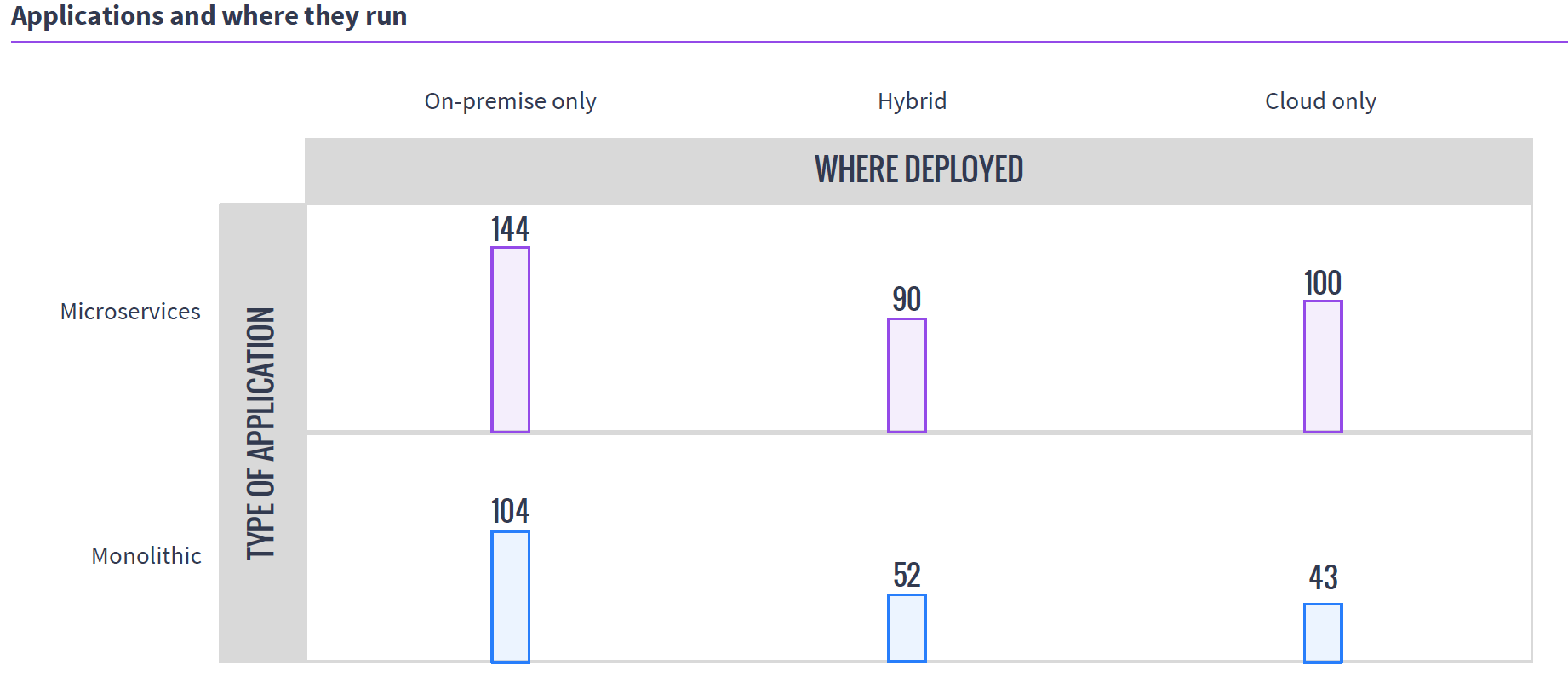
    Source: MesoSphere user survey, August 2016

    In the clustering world, you have what presents as one big monster machine that is going to run these applications as resources come available, so if your 50 applications require fewer resources than the cluster offers, they simply execute in parallel; if you don’t have enough hardware to run them, unlike with VMs, you can just queue them up and, assuming the cluster isn’t over-burdened, eventually they all will run.

    This gets more interesting when containers are added to clustering (a common environment), because then you do have discrete containers, but the scheduler still manages how many resources are available/in use, and the container architecture allows the app to carry its requirements with it across the cluster.

    Why do we care? Because you know what your workloads are and which scheduling methodology is more important to your organization. If there are 50 applications that all have steady resource needs and run all of the time, then virtualization might be right for you, but if the organization’s workloads are shifting constantly and resources need to be cycled at a high rate, clustering might be right for you. Either way, knowing what’s out there is never a hindrance.
    — Don Macvittie

  • Addressing Container Security Challenges

    Addressing Container Security Challenges

    From month to month or even week to week, more organizations are developing with containers. The concept of containers isn’t all that new, but the dramatic rise in adoption of container technologies and the support from major tech vendors and platforms has helped containers become mainstream quickly. As with most emerging technologies, now that containers are hot there is a greater focus on some of the security issues of containers. So devopsy.kinsta.cloud worked with leading vendors to address that issue.

    A new report from devopsy.kinsta.cloud, sponsored by Aqua Security and Microsoft, examines the weaknesses of containers and that the security concerns introduced by using containers, and provides a look at some of the approaches to addressing those issues. “Containers: Security Challenges and How to Address Them” contains insights from DevOps and containers experts to help you understand the challenges and how to solve them.

    The report explains, “There is a general lack of awareness of existing container security concerns and best practices. Organizations need to understand the security issues that arise due to the differences in how VMs and containers function. Enterprises need to prepare for the glut of additional files that need protection with containers and the unwieldy nature of third-party libraries that containers use. Businesses also must consider configuration mistakes including those that grant root status to containers or simply make containers overly complex. Most importantly, organizations that adopt containers need to accept responsibility for security them, and should expect to keep tabs on new container vulnerabilities as the industry discovers them.”

    “Containers add a layer of obscurity that reduces visibility,” warns Amir Jerbi, CTO of Aqua Security. “You have an operating system running a container engine, which in turn runs containers. The OS is not aware what containers are running—it only sees the container engine. The container engine knows what containers are running, but has no clue what the containers are actually doing. So, if you’re running a host-based security tool to monitor the OS, you will not see what containers are running and what they’re doing.”

    Thankfully, there are solutions and best practices you can employ. The report describes how to use a combination of preventive measures, active detection and active response to protect container environments. It also covers some of the approaches to creating a more secure container in the first place using concepts such as isolating the containers with virtualization, as Microsoft does with Hyper-V Containers.

    “What’s really important about Hyper-V Containers is that rather than trying to close existing holes, now we can implement a solution that is secure by default and already meets compliance requirements,” explains Taylor Brown, principal lead program manager at Microsoft.

    You can download the free report from devopsy.kinsta.cloud by clicking here: “Containers: Security Challenges and How to Address Them.”

    — Tony Bradley

  • Mesos Usage Survey: Big Clusters, Big Workloads

    Mesos Usage Survey: Big Clusters, Big Workloads

    Mesosphere, purveyors of DC/OS, recently released a survey of Mesos users focused on Mesos deployment information.

    There were some interesting results, and a few things I wish they’d dug a little deeper on. If you’ve ever given a survey, then you know that the results inevitably spawn more questions. No doubt Mesosphere has the same new questions I do.

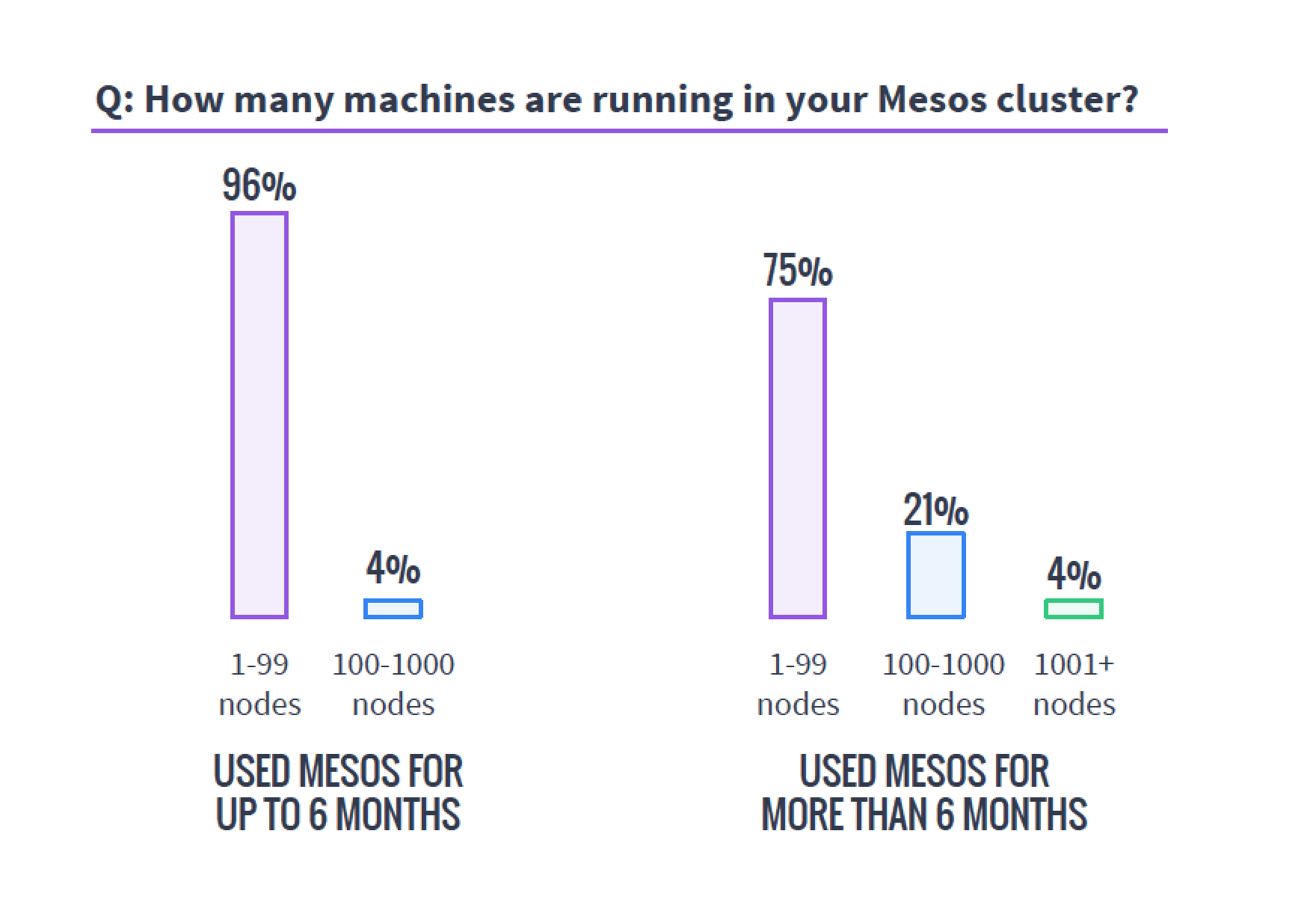
    The first important tidbit I would like to highlight is a cautionary tale. I’ve been around clusters—big data, cloud and, more recently, Mesos-style clustering—for years, and there is one truth this survey shows that is far more global than just Mesos. Clusters always end up bigger than you’d planned. The survey shows that of those using Mesos for more than six months, 25 percent have more than 100 servers backing the cluster.

    mesosservercountsWhen planning a cluster, always assume it will be bigger than you plan and grow faster than you think. Organizations that need this type of technology need it to perform and find themselves using it more than they’d planned, so the clusters always grow. I’ve seen orgs do a 20-server cluster that within six months numbered well over a hundred servers and headed to 200. I’ve heard of faster/larger unexpected growth rates, but not seen it or talked to those responsible. Plan for bigger than you think you need—worst case, you’ll have overplanned, which is easier to handle than being caught with too small a cluster.
    This is one of the areas I think it would be interesting to have a follow-on question delving into how big survey respondents had planned their clusters to be versus how big they were at this point in their deployments.

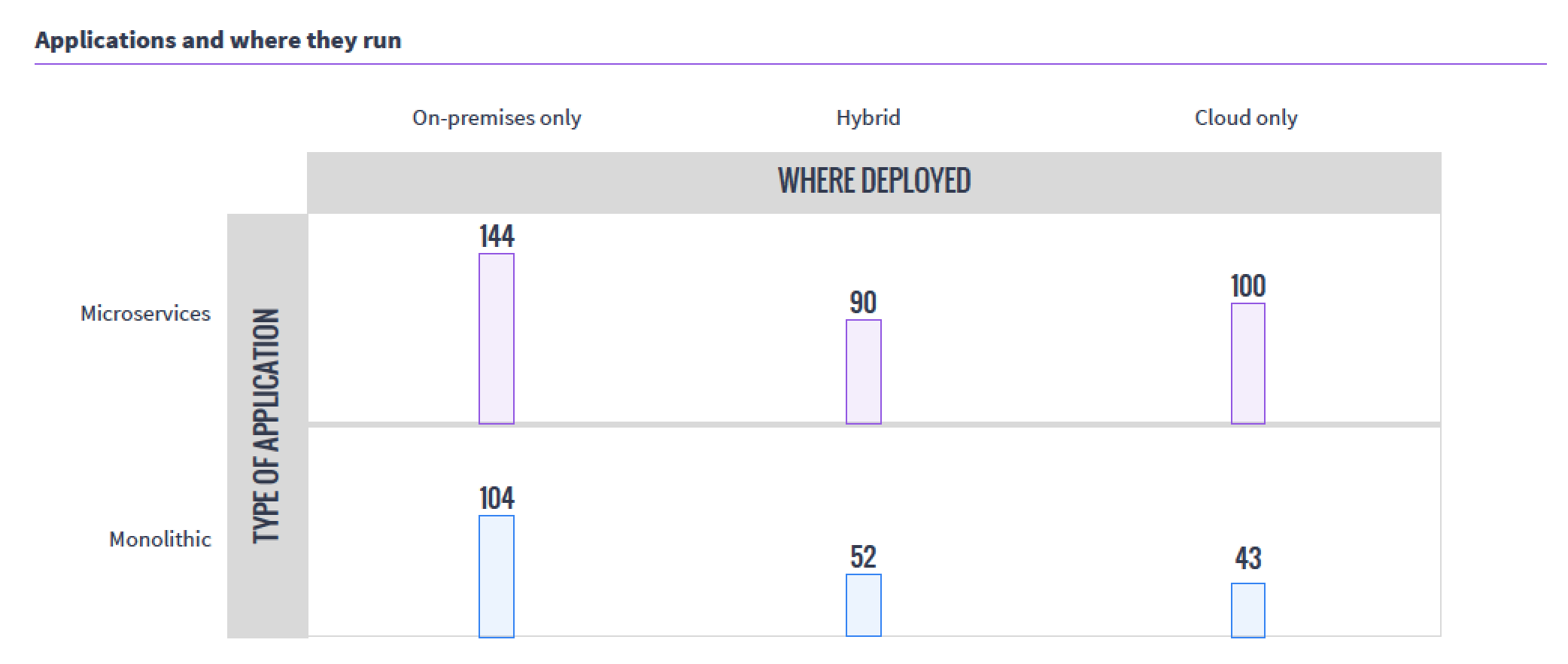
    The next interesting takeaway from the survey was the usage patterns. While internal/external/hybrid cloud is not a surprising distribution, the fact that so many organizations have moved monolithic workloads to Mesos was a bit of a surprise. The sample size of the survey was relatively small, but still, that’s a lot of “We have Mesos, let’s start running it there” going on.

    mesoswhereappsrun

    I think I’ll work with Mesosphere to talk to one of the organizations running monolithic apps on Mesos and see if we can’t get an interesting interview.

    For the health of open-source projects, I like to see what is happening with those involved—is the audience growing? Are the number of developers growing? Supplemental survey data says yes.

    mesoscontributors

    I double-checked this information, since it should be available publicly, and although the move from GitHub to Apache Git made it more difficult to track down, this Apache post from July does verify the graph above, and offers even more interesting data.

    The thing that still intrigues me about Mesos is that instead of allowing users to pool servers to create virtuals, it pools servers to make a massive parallel system. But running containers on it (as this data indicates most are for resource isolation) carves it up into virtuals, of sorts. Very esoteric.

    I won’t bore you by going over what I think of each and every question. Follow the survey link at the top of the article and you can get the survey response summaries to support your work.

    — Don Macvittie

  • To DevOps Or Not To DevOps

    To DevOps Or Not To DevOps

    Although enterprises today all claim to be software companies, there remain four distinct groups of organizations: the technology leaders, the technology followers, the technology hopefuls and the technology laggards.

    The first group are the industry leaders who are paving the way. These are the organizations coming up with new technologies, processes and cultural shifts. They write articles and books and present at conferences, and despite perhaps working at smaller companies, they are the names you may recognize. These are the companies the rest of us aspire to be—the Googles, the Amazons and the Microsofts that keep the rest of the industry hanging on to every word.

    The technology followers typically are smaller organizations that tend to adopt the latest and the greatest technologies. They are the leaders’ first wave of followers who are not afraid to try new things, nor afraid to fail. They have cultures that allow them to experiment and adapt and are given a lot of free time to invest in learning and implementation, after they watch the big guys successfully implement.

    However, the first two groups are the minority of software organizations, since not everyone can lead the way, nor can everyone have the luxury of spending a significant portion of their time experimenting with new methods. After all, most of the new technologies do not have a long lifespan. They appear, generate some attention and then disappear.  Front-end frameworks provide a great example of this: new ones pop up and exist for a few months before being superseded by other frameworks.

    Another example of technology followers is containers—few doubt their usefulness and most of us are convinced they are the best solution. The only question is which cluster orchestration framework to choose. These frameworks are evolving so rapidly, with new ones introduced on a weekly basis, that it’s almost certain most will be defunct within a year. So, if you are into experimenting with the latest offerings, chances are you could make a wrong choice. Will it be Kubernetes? Docker Swarm? Mesosphere Marathon? Rancher OS? Cloud Foundry’s Diego? CoreOS Fleet? The question is not whether to adopt one of those tools, but rather, which one has the best shelf life.

    Most of us fall under the third group, the technology hopefuls. We don’t have the ability to lead the way, nor do we have the luxury to explore the latest and greatest technologies. Yet, we cannot allow ourselves to become obsolete. The industry is moving so fast that just a few years can leave you at the back of the pack where no effort or investment can get you back in the game.

    The technology laggards are the software companies that have fallen behind. This group includes businesses that are struggling to remain intact and run the risk of disappearing. These are the organizations that do not innovate, do not adapt, do not invest (enough) in improvements and do not even understand the current industry trends. They are the organizations that do not comprehend that becoming obsolete doesn’t take decades, but years—sometimes even months.

    Based on the definitions of these groups, chances are, unless you are Google or Microsoft, you are not in the first or even second groups. By reading this article you are making the effort to be informed so you don’t lack the self-awareness that places you in the fourth group. Like most software organizations, you fall into the third group of technology hopefuls.

    As part of this group, you have to balance between the latest and the greatest technologies and the chance of becoming obsolete. You cannot try every new solution that comes along, nor you can let years pass by until you jump on the train. The big questions you have to ask are, How can I distinguish what will stay and what will disappear? How do I make a choice between what to adopt and what to ignore?

    There may not be a one-size-fits-all answer, but one process you absolutely cannot ignore is DevOps. If you’re asking yourself whether your organization should adopt DevOps, the answer is a resounding “yes.” And I encourage you to adopt it now, before you are replaced by other companies that are already living and breathing DevOps. Otherwise, you’ll be unable to adapt to the speed needed to keep up in today’s market and understand the cloud and scale accordingly when an avalanche of users come to your site after a successful marketing campaign. Lacking preparedness could cost you your business, especially in a competitive market.

    DevOps is here to stay, evolving similarly to Agile by providing value and answering many of today’s challenges. The only problem is that adopting DevOps can be difficult. To implement DevOps, you might have to change your company’s culture; you might need to adopt new tools; you might need to change processes; and, you might need to change your software architecture. Changing any of those aspects is hard, but changing all of them is very hard.

    Your culture and company structure need to be agile (in the literal meaning of the word). The old, monolithic tools need to be replaced with smaller, much more dynamic ones that will work well with the ever-changing nature of cloud infrastructure. Processes need to be automated, since there is no time to pause for manual intervention. To accommodate the needs of automation and frequent deployments, your applications and services will need to be relatively small for continuous delivery or deployment to become a standard process. Your teams need to be highly specialized and fully capable of working on all aspects of the software development life cycle, from requirements to post-production support.

    It’s a harsh and challenging road ahead, but at the end of it lies success. You’ll experience faster time to market, greater reliability, high availability and faster adaptability to market changes. Some are already there, while others already embarked on the journey. Don’t be left out—the alternative will leave you obsolete.

    To DevOps or not to DevOps is not the question. For most organizations, adopting DevOps is the answer.

    About the Author / Viktor Farcic

    viktorfarcicViktor Farcic is a Senior Consultant at CloudBees, a member of the Docker Captains group, and books author. He coded using a plethora of languages starting with Pascal (yes, he is old), Basic (before it got Visual prefix), ASP (before it got .Net suffix), C, C++, Perl, Python,ASP.Net, Visual Basic, C#, JavaScript, Java, Scala, etc. His big passions are Microservices, Continuous Integration, Delivery and Deployment (CI/CD) and Test-Driven Development (TDD). He published “The DevOps 2.0 Toolkit: Automating the Continuous Deployment Pipeline with Containerized Microservices,” and  “Test-Driven Java Development.” He is currently working on his third book, “The DevOps 2.1 Toolkit: Docker Swarm.” Connect with him on Twitter.


  • Docker On Windows, Are You Serious? Microsoft’s Hands-on Lab Show’s You How

    Docker On Windows, Are You Serious? Microsoft’s Hands-on Lab Show’s You How

    You have probably heard or read about the availability of Docker on Windows and Azure. Both Docker and Microsoft have turned up the noise on their collaboration. But have you really looked into what these two are up to? If not, now is your chance. Microsoft has put up a great free hands on lab all about Docker, containers and Windows.

    In this hands on lab there are modules that feature Docker on Windows Server, Windows Nano Server and managing them with Windows 10. You can use Microsoft’s HyperV or not. It really is a great way to learn about containers, Docker and the Windows platform. You can play with this hands on lab by clicking here or if you prefer to cut and paste here is the link: http://msftdevops.learnondemandsystems.com/?wt.mc_id=AID557152_QSG_BLOG_22879. (Editors note: pop up blockers may stop the lab from loading. If you have an issue try disabling the pop up blocker.)

    Here is what the lab covers in a bit more detail:

    screen-shot-2016-10-27-at-1-02-39-pm

    I took the opportunity to play with the lab myself. While I am far from a developer or even an Ops person, I have to say Microsoft got this one right. Even I could complete it! The lab is supposed to take you 30 minutes but they give you 8 hours to complete. There is a great set of introduction videos that give you a full picture of what you are going to be doing. Here is an example in a still shot:

    screen-shot-2016-10-27-at-1-02-03-pm


    The lab is actually broken down into several modules that don’t have to be completed in one sitting. The lab requires no set up on your part at all. It runs right in your browser. The lab has you run two different Windows machines, one Win10 and one Windows Server. You can switch and log in right from the browser. The lab also has you log into PowerShell:

    screen-shot-2016-10-27-at-1-00-19-pm

    screen-shot-2016-10-27-at-2-24-52-pmIt literally gives you the CLI commands that you have to type, tells you when to switch between machines and guides you step by step through each of the several tasks. There is a great info bar on the bottom that has context sensitive instructions that walk you through the entire thing. There is also a sidebar which gives you a great oversight of the entire lab, where you are in the process and options to move around. All in all I thought they did a great job with the UX to make what could be a complex set of tasks easy.

    The whole Docker and containers on Windows theme is one has been bubbling up for some time now. While many doubted that it could ever happen, the new Microsoft seems to have made Docker right at home.

    From what I have been told there will be similar hands on labs offered for free on the Azure platform and more on containers. We will be working with Microsoft to dig in deeper here, so stay tuned for more soon!

    — Alan Shimel

  • All Day DevOps

    All Day DevOps


    Over the past year, I have traveled to and delivered presentations at 18 DevOps events. I’ve also heard that over the past several years, John Willis has participated in more than 200 DevOps events. But not all of us have the time or budget to get ourselves and our teams out to these events where we can learn from other practitioners.

    This is why we’ve assembled the All Day DevOps Conference for Nov. 15.

    Free DevOps

    All Day DevOps will deliver 57 practitioner-led sessions over 15 hours and 15 time zones. No vendor pitches are allowed. To break the travel and budget barrier for you and your teams, we are delivering every session live, online and free of charge. Every session will also be recorded. We are doing this because we want to share global DevOps expertise with everyone.

    All Day DevOps

    DevOps Brains

    More than 3,500 people have now registered for the conference. We have an awesome speaker lineup covering three tracks: Modern Infrastructure, CI/CD and Automated Security. Here is a sample of some of the great sessions being delivered:

    • CI/CD
      • Meta Infrastructure as Code: How Capital One Automates our Automation Tools with an Immutable Jenkins, by George Parris (Master Software Engineer at Capital One)
      • Speaking for the Dead: Critical Positive Lessons from Waterfall and Monolithic Architectures, by Michael DeHann (Former CTO & Founder of Ansible)
      • I, For One, Welcome Our New Robot Overlords, by Mykel Alvis (DevOps Computational Demonologist at Cotiviti)
    • AUTOMATED SECURITY
      • Stop Changing Your Password, by Chris Swan (CTO Global Infrastructure at CSC)
      • System Hardening using Ansible: Application Deployment + Configuration Management + Continuous Delivery, by Akash Mahajan (Lead at OWASP Bangalore)
      • Building Codes for Building Code, by Josh Corman (Director of Cyber Statecraft at Atlantic Council)
    • MODERN INFRASTRUCTURE
      • Terraforming Your Infrastructure: From Beginner to Semi-Pro in 30 Minutes, Britt Treece (Production Engineer at PhishMe)
      • DevOps Friendly Doc Publishing for APIs & Microservices, by Mandy Whaley (Director of Developer Experience at Cisco)
      • Monitoring, Hold the Infrastructure – Getting the Most out of Lambda, Michael (DevOps Evangelist at DataDog)

    Don’t Just Listen, Talk DevOps

    One of the big pieces of input we have received from the community is that everyone wants an opportunity to interact. This is why we are building a dedicated team room in Slack for you. Every attendee will have the chance to interact with the speakers in the Slack room. Q&A will be live, online and freely accessible. We will also have Birds-of-a-Feather channels set up for those with questions to be helped by those with answers.

    Register Now

    If you would like to join us, can you register for free.  A big thanks goes out to Alan and his team at devopsy.kinsta.cloud for helping us spread word of the event here. We are really excited to have teams from North America, Europe, Asia, and Australia joining us for the event!

    www.AllDaydevopsy.kinsta.cloud

    screen-shot-2016-10-24-at-12-35-39-pm

    — Derek E. Weeks

  • So Long to Configuration Management Systems?

    So Long to Configuration Management Systems?

    When I was an operations architect at Ning way back in 2009, we were struggling to manage our deployments and configurations of more than 50 different application servers, or what the cool kids today call microservices. Applications were deployed across three distinct environments: development, staging and production. None of these environments were exactly the same as another, and differences in these dependencies, together with human errors, frequently broke our deployments.

    Ning was nowhere near the first company to encounter such problems. In the mid-1990s, as the public internet emerged, much of what was understood at the time about IT operations was challenged by the need to scale internet-facing systems. For many years preceding the internet boom, the maximum number of users was strictly limited to the number of employees in a company. That all changed with the World Wide Web, where the need to serve thousands and millions of simultaneous users easily exceeded the computing capacity of even the largest and most expensive computers.

    As three-tier application architectures were broken down into services and distributed across dozens or hundreds of individual servers, this proliferation of servers proved to be far too much for operations teams to handle. The worst problems lived within application deployment processes, where environments and requirements were ever-changing in successive releases of software. The lifetime of a server was a long one. Once deployed, servers were subjected to repeated changes by operations and developers in what would come to be called “configuration drift.”  The combined effects of changes, human errors and unknown states would create disastrous outages that damaged brands and destroyed online revenue. It would take sites days and even weeks to recover from these outages. Some would never recover.

    It was in the midst of this chaos that modern configuration management systems were born. CFEngine was the first to emerge in academia, where the need to manage multiple UNIX systems was felt early on. Later, Puppet, Chef, SaltStack and Ansible emerged directly from web-scale systems. Configuration management systems fulfilled several important needs. First, they abstracted the differences between operating systems, providing a high-level language for the system administrator to describe the desired state. Second, they automatically synchronized the desired state across large numbers of servers, reducing costly human errors. Finally, they provided idempotency to ensure that destructive operations were not applied unnecessarily.

    There is never a free lunch. The benefits of better abstraction were offset to a degree by the need to build and maintain evermore complicated recipes. Recipes frequently broke from time to time as package management features were updated, renamed or otherwise changed from the time the recipe was first written. Even when recipes worked, they were frequently broken by differences in environments or runtime errors. The configuration management systems themselves began to suffer from scale challenges, and evolved message bus architectures to improve their speed and responsiveness. By overcoming many of these obstacles, configuration management systems have now become a first-line tool for managing web-scale systems.

    But back at Ning, modern tools such as Puppet and Chef were still in their infancy and simply could not cope with the scale of our 60,000+ node virtualized environment. Ning had a lot of brilliant software engineers floating around, and they set about creating their own deployment automation system called Galaxy, and later a meta-orchestrator called Cosmos. Galaxy and Cosmos were great tools, but they required constant care and feeding and suffered from severe scale problems. There was just a lot of complexity in dealing with these automation systems while also trying to scale a top-tier social network for a hot startup company.

    As we began to analyze and post-mortem our deployment failures, it became clear that a majority of the problems stemmed from host and environment configuration errors. We needed a simpler way to deploy our software. Virtual machine images were a promising way to ensure consistency between environments with the tried and true “gold master image” approach. The problem with this approach was that building full system virtual machines was difficult in automation terms. Once deployed, virtual machines are also subject to configuration drift. Furthermore, while we were eager to adopt virtualization to get better resource isolation, we were wary of the overhead that hypervisors would create. Our benchmarks showed that if we adopted virtual machines, we would need to increase our physical server capacity to accommodate the overhead.

    At the time, Linux containers were already available in the kernel, but the distributions had almost no support for managing them. At the insistence of our VP of Operations, I cooked up an alternative solution based on jails, writing a small hack of a program called Warden to build and manage them. (Note: Totally unrelated to the Warden in Cloud Foundry). Jails gave us bare metal performance, resource isolation and a way to consistently deploy the entire environment for each application server.  With Warden, we could build jail images on the fly automatically and deploy them consistently with our existing tools, galaxy and cosmos. Hey, it was a Band-Aid for a difficult situation, but my experience with building Warden flipped a switch in my brain. I had seen the way lightweight virtualization could eliminate complexity, and I knew right then this was the way of the future.

    Today, with the success of Docker we are finally experiencing sweeping changes in the processes and tools we use to build, deploy, and manage distributed applications. At the same time, we are about to enter a brief period of containers disillusionment as early stage solutions get washed out. When that is over, what comes afterward is something of a golden era for distributed applications. I call it the container application platform, and its somewhere between what we think of as platorm as a service (PaaS) and Serverless today. In that not-too-distant future, containers will be the default output of the software build process, and where that container gets deployed will hardly be an afterthought. This unicorn magic will come from the ability to introspect containers to determine their environment dependencies, and a fully integrated tool chain that deals with deployment, scaling and dependency resolution automatically. I will give you just one guess which company is in the best position to own that future. “One ring to rule them all.”

    What happens to our beautiful configuration management systems? There has been much debate about this among smart people over the last few years. Most of these arguments boiled down to some kind of coexistence model. Indeed, configuration management systems are useful for dealing with a wide range of operational problems outside of the container platform. While it’s no surprise that Chef, Puppet, Salt and Ansible all moved quickly to include Docker support, I think we will see these tools begin to focus more on what Rob Hirschfeld calls achieving “ready state”. That is to say, everything that still needs to be done before you can lay down your container platform also still needs to be automated. Right now, that is still a great deal of work, and it’s a pretty safe place to draw the line on using the right tool for the right job.

    About the Author / James Thomason

    james-thomason_dsc0492James Thomason is chief technology officer at HyperGrid from Dell, where as CTO he led the vision, technology strategy and product road map for Dell Cloud Marketplace. He joined Dell through the acquisition of Gale Technologies in 2012, where as CTO he headed the product road map, architecture and engineering of the company’s flagship cloud and converged infrastructure automation software, GaleForce. Prior to joining Gale Technologies, Thomason was the CTO and Founder of Virtiv, a San Francisco cloud automation startup focused on Linux virtualization, acquired by Gale Technologies in 2011. For over 17 years, as a specialist in distributed systems and large-scale infrastructures, Thomason has been an entrepreneur and innovator at a number of notable Silicon Valley startups, including Exodus Communications, Digital Island, Netli, NetVMG, Netscaler, 3Leaf Systems and Ning. Connect with him on LinkedIn / Twitter.

  • Getting Ready for All Day DevOps

    Getting Ready for All Day DevOps

    DevOps Practitioners Unite

    On Nov. 15, we’ll be broadcasting 54 live sessions across 15 hours and 15 time zones. The All Day DevOps conference will be live, online and free. Anyone who registers can watch.

    We have invited some top-notch practitioners from around the world to speak at the event on topics ranging from DevOps transformations, to CI/CD, to automated security, to modern infrastructure (think serverless, microservices and containers). The speaker lineup will include:


    www.alldaydevopsy.kinsta.cloud

    Don’t Watch Alone – Host a Viewing Party!

    One of the best parts of attending a DevOps conference is getting to interact with others in the community. We have had many organizations including Capital One, Intuit and Fannie Mae approach us about hosting viewing parties at their offices—and opening the party to the public. Sound intriguing? Here’s how to do it:

    Secure the location. Pick your corporate auditorium, cafeteria or open meeting space. Secure it all day for Nov. 15. Make sure you have at least one internet-accessible viewing screen.

    Promote the session: One you have the approved locations and times, share them here with the All Day DevOps Conference organizers. We will help you promote your party on AllDaydevopsy.kinsta.cloud and through social media postings, directing them to your registration page.

    Invite People to Register: Set up a place for people to register for your location. You’ll want to know how many people to expect because you need to know how much pizza to order. Meetup.com and Eventbrite.com make event registration easy.

    Make it Fun. Order some pizza and drinks. We’ll send along some cool laptop stickers from the conference and some of the sponsors. Share pictures from the event online (@AllDayDevOps). Join the conversation in the conference Slack channels. Set up birds-of-a-feather stations. Play some music during breaks. Set up viewing screens for each of the conferences three tracks.


    Just to be clear: the All Day DevOps Conference is not a collection of vendor pitches.  In fact, we have tried our darnedest to ensure the agenda is purely focused on real DevOps practitioners sharing their craft.  Take a moment to look at the speakers participating in each of the tracks and you’ll see what we mean.

    Register today. Invite your colleagues to attend.  Then plan a viewing party at your office.

    — Derek E. Weeks

  • All Day DevOps: Bringing DevOps to the World

    All Day DevOps: Bringing DevOps to the World

    An Audacious Plan: Deliver DevOps to everyone.

    The global audience for DevOps is expanding faster than any one person or company can keep up with. While DevOps Days and other regional events provide invaluable support to their local communities, we wanted to create a global event, offering the very best lineup of speakers across North America, Europe and Asia.

    We also wanted to make sure that anyone, anywhere can attend. So, we set a high bar for our organizing team, and they delivered: $0 registration.

    By creating All Day DevOps as an online event, we are able to get many people to attend and present—many of whom ordinarily would not be available because of time or travel restrictions. We expect well over 1,000 people to attend throughout the day.

    15 Time Zones, 15 Hours, 3 Keynotes, 54 Sessions

    Nov. 15 will see the first truly global, online DevOps Conference: All Day DevOps. Starting at 9 a.m. Greenwich Mean Time/5 a.m. Eastern Standard Time and continuing through midnight GMT/8 p.m. EST, there will be three simultaneous tracks, each track containing 18, 30-minute presentations, for a total of 27 hours of presentations.

    Call for Papers

    We are inviting speakers from around the world to participate in this first-of-its-kind event covering 15 time zones. Timing for the conference is set for the EMEA sessions to begin at 9 a.m. GMT, then, at 9:30 a.m. EST, move the concentration of presentations to the east coast of the United States and ending with presentations on the west coast of the United States starting at 11 a.m. PST. All sessions will be recorded, but you will need to register for the event to have access to the recordings.

    The Call for Papers is now live. Please submit your paper soon. The deadline for submissions is Sept. 21.

    Conference Tracks

    The conference will host three tracks: Modern Infrastructure, Automated Security and CI/CD. We’ll have 54 sessions plus three keynotes on three tracks, running continuously for 15 hours.

    Track One: Modern Infrastructure

    Modern Infrastructure Track Hosts and Moderators: James Wickett, Signal Sciences, joined by Ernest Mueller, AlienVault and Karthik Gaekwad, Oracle

    In this track, we will be discussing novel architectures, approaches and tools for building out software and services. We are not looking for the standard approaches, but the way Infrastructure will be in the next three to five years.

    Track Two: DevSecOps & Automated Security — Living the Dream

    Automated Security Track Hosts and Moderators: Milton Smith, Oracle, and Shannon Lietz, Intuit

    You have a well-tuned development and delivery environment or you’re in the process of building one. AppSec is a top business concern. You moved DevSecOps from Big Foot and UFOs to reality, you sold the dream to staff, and now it’s beginning to pay off. This track explores DevSecOps tools and techniques to build a successful automated security program.

    Track Three: CI/CD — Continuous Everything

    CI/CD Track Hosts and Moderators: Derek Weeks, Sonatype, and Andi Mann, Splunk

    Continuous delivery is not magic, but it does take the right effort. The most successful practitioners have taken pragmatic steps to reduce cycle times, improve collaboration and build quality in without burning people out. This track asks you to share your frontline experiences of building CI/CD pipelines, aligning key stakeholders and measuring the results. Remember, what’s now an everyday experience for you is awesome to another pursuing that path.

    Conference FAQs

    How to I register to attend?

    Registration is open now at AllDaydevopsy.kinsta.cloud. The site will be constantly updated, sometimes multiple times per day, with the latest information. You can also follow us on Twitter under the handle @AllDayDevOps and using #AllDayDevOps.

    screen-shot-2016-09-12-at-4-44-16-pm

    How will the sessions be delivered?

    The sessions are delivered over Google Hangouts, allowing us to have an unlimited number of attendees on each of the three channels. All you need to deliver a presentation is a reliable internet connection.

    We are also arranging Slack channels for all sessions to host interactive Q&A sessions for everyone.

    If my talk is selected, can I post a notice or an article about the conference on my site?

    Not only is it OK, we would thank you profusely if you did. You’re welcome to use the banner and the conference icon if you need graphics for the article. Let us know when it goes up and we’ll give you a shout-out.

    Who is organizing All Day DevOps?

    The All Day DevOps Conference is organized by advocates in the DevOps community. We are working together to deliver a diversity of vendor-neutral sessions and speakers from around the globe to show practical usage and technical solutions of DevOps in small and large enterprises.

    • James Wickett, Signal Sciences
    • Derek Weeks, Sonatype
    • Shannon Lietz, Intuit
    • Milton Smith, Oracle
    • Andi Mann, Splunk
    • Mark Miller, Sonatype
    • Ernest Mueller, AlienVault
    • Karthik Gaekwad, Oracle
  • DevOps and Automation Abstraction?

    DevOps and Automation Abstraction?

    Similarity breeds consistency, giving way to predictability and, thereby, dropping costs of operations and quality from a lower number of incidents and a shorter duration to resolve them. But at the heart of this chain of events is the recognition that we tend to do certain tasks the same way, over and over again, for a given type of technology. Variability then becomes our enemy.  Consistency becomes our ally.  So the question: How do we as DevOps service providers instill a level of consistency in what we do that is not engineer-specific (i.e. only one guy knows how it is supposed to work) and will still scale at the enterprise level?

    From a people perspective, we use teams, whether co-located in person or virtually using the same backbone of tooling over wide geographical separation. From a process perspective, we use governance and education to ensure the same processes and approaches are taken at a fundamental level across different types of technologies. And finally, from a tooling perspective, we use templates or frameworks (or pick your synonym) that allows us to construct a shell that guides the automation construction to be consistent from parent to child. The combination of these three fundamental elements leads to consistency that scales. But is that all?

    What Are We Missing?

    Could there be another fundamental element we have overlooked—namely, abstraction? Case in point: Consider the effect of a drag-and-drop interface versus a typed one to accomplish a given task. Both look to accomplish the same outcome. One could argue the typed text approach offers more flexibility and customization to get the task done. But the drag-and-drop method offers a consistent, simplistic way of doing a similar task, the same way, over and over again. Examining both methods objectively, the drag-and-drop method offers a level of consistency the typed method never could. For the typed one, you would always have to check to ensure punctuation and lack of changes (additions or deletions) to “know” it was the same script as last time. The drag-and-drop method on the other hand, is “canned” or largely unalterable; it may limit customization (by design), but it excels at consistency.

    The drag-and-drop method achieves this consistency by effectively abstracting the typed or scripted code within it from the user who employs it. The user only makes the choice to use it, when desired (or needed); the rest of the mechanics are abstracted from the user. The reason drag-and-drop methods exist is beyond just consistency, however; it is for simplicity. Apple computers would appear to be founded on this idea. For those of you old enough to remember DOS on PC computers, the parallel here immediately becomes clear. DOS was a typed-based command-line operating system (OS) fully capable of operating a PC many years ago. But Apple’s graphical interface made the same functions “intuitive” and forced the PC industry into Windows to stay competitive. Nobody chooses a command line OS like DOS when something as elegant as iOS exists, or Windows (or pick your graphical poison here).

    A graphical OS abstracts core functions from the user, and makes every attempt to make an elegant intuitive packaging of the same functions. Users “get” an iPhone, which accounts for its sales. You don’t need formal education classes or an eidetic memory to use an iPhone. Users effectively have been abstracted from all the typed code it takes to create an OS like this, millions of lines of such code packaged up into swipes, beeps and elegant graphical displays. Keep in mind, at its core this OS abstracts users from variability that might exist if hundreds of companies created their own versions of iOS. The simplicity is paired with consistency, and the quality of Apple is a result (for better or worse). But whatever the quality of Apple is, it is far better than if a wide degree of variability were permitted in the vendors of iOS or the construction of it.

    Extending Abstraction in DevOps

    Now enter DevOps. Containers are a level of abstraction widely popular in our discipline for keeping hardware particulars away from what are typically software engineers. The value of this abstraction is well-understood. My challenge is simply to extend this thinking into the next tier of DevOps tooling. What if the ability to include database DevOps automation was simply a product of drag-and-drop methods that every build tool understood perfectly? Granted, you may have to limit the expression of this idea to say Oracle or SQL Server at first to capture the nuances and particular capabilities of products and technologies in this space. But if someone built a “container” for Oracle, I would wager the choice to use Oracle would rise substantially over its competitors, at least until those containers or abstraction layers were just as effective with other database products.

    The abstraction phenomenon need not be limited to hardware, or as I have proposed to database platforms. It also could apply to .NET or Java development efforts at the top of the stack. The steps needed to take an idea, code it and put it through the build process are going to be largely similar when working in a .NET shop or a java shop (or pick your particular development tool of choice here). Even the top of the stack—that is to say, the development of applications itself—could be a viable candidate for abstraction from the mundane details as it relates to a build construction or a deployment to a given class of environment.

    Creating effective containers for the application layer in effect limits variability, and increases predictability. I realize it has to be technology-type sensitive. The .NET shops have their own container. The java shops have theirs, and so on. The only question is whether we are able to include enough of the common core steps we take to produce a build with a given technology type to form an abstraction construct of value. Over time, this would include every type of technology widely in use today.

    The effort to simplify through abstractions ultimately would result in our ability to include technologies such as WebSphere at our pleasure. It would also allow us to switch out WebSphere for a new competitor using the same abstraction constructs, universally, just by rebuilding all our apps one time. This kind of power is alluring to development teams. It drives application developers and operations engineers to begin to work together to look for the most cost effective technology that can perform a given spec. Being the best at something is no longer a cage from which there is no escape later.

    Technology components would be selected based on performance and cost of ownership (i.e. operations) later. Switching is ultrasimplistic if all we ever used to include it in our build routine was a drag-and-drop style method with universal, well-defined parameters. A customer’s ability to switch products to the best of breed through easy or simplistic means keeps pressure on vendors to actually be the best of breed. If the performance suffers or a new release is full of bugs, developers just switch it out through abstraction (not long, complicated scripts where everything has to go right, including a full moon on the third Tuesday of the month with a Gregorian chant in the background).

    Impacts to the Bottom Line

    The selection of DevOps tooling often is a cantankerous one in large organizations. Debates ensue about flexibility, extensibility and whether a given tool can be customized to accommodate the unique little snowflake of my development teams. Perhaps these debates are headed in the wrong direction. Perhaps instead of prizing and valuing the extensibility or customization a given tool affords, we should be looking closer at how that extensibility is achieved.

    For an enterprise to make an unwitting choice to get into the script business, is effectively stating: “I will be maintaining the scripts I use to construct a build with as much rigor as I maintain the code these scripts are designed to create builds out of.” So, we just doubled our programming staff without realizing it—one half working on the application code and the other half working on the scripting code that “automates” the delivery of a build during construction. While overall speed may be increased, it comes at the cost of doubling already expensive headcount.

    As an alternative, what if enterprise customers were asking tooling vendors how simplistic their tools are to use, and how standardized are their approaches. While we may not enjoy losing a degree of flexibility as we may be unable to customize a drag-and-drop method construct, the payoffs to the business are simplicity of use and scale at an enterprise level. Not only do I refrain from doubling headcount, I can actually free resources to focus on the disciplines and areas they enjoy most instead of performing script maintenance. Abstraction as a construct: From the hardware layer up through the application layer, it may be a driving fundamental that keeps DevOps scaling and lowering the cost of innovation for many years to come—but only if you begin to ask for it.

    To continue the conversation, feel free to contact me.