Author: Debarghya Pandit

  • DevOps and Security: Be Ready to Shield Your Application

    DevOps and Security: Be Ready to Shield Your Application

    All of us have heard of continuous improvement/continuous delivery (CI/CD). There are many benefits to implementing CI/CD, as it helps seamless integration from end to end for development and deployment processes. CI/CD helps in rapid improvement, shorter release cycles and more, but it also helps with the challenge of handling security effectively at DevOps speed.

    Tools for Securing DevOps

    There are thousands of DevOps security tools available in the market that help us at HCL Technologies secure our software development at various stages of the CI/CD pipeline. There are new vulnerabilities rolling out daily, and so we must be alert and keep our applications safe and future-ready.

    These are the DevOps security tools we use (most tools are open source with an option of enterprise edition):

    1. OWASP SonarQube
    2. OWASP ZAP
    3. OWASP Dependency-Check
    4. OWASP Glue
    5. Anchore
    6. Clair-CoreOS
    7. FOSSA
    8. Cyberark Conjur

    Our DevOps Toolchain Diagram

    Securing CI/CD

    Let’s consider a job in which we check out the code from GitLab/GitHub with auto-commit (a Jenkins job will be triggered as soon as the developer makes any changes in the code). You can refer to this link for  more information about Jenkins GitLab automation.

    Now, in Jenkins, we can run a security test and present it in the form of reports and dashboard to meet our needs. To get started, we can use OWASP SonarQube for static analysis. OWASP SonarQube includes found bugs, PMD and several security plugins bundled out of the box. Next, for dynamic analysis and penetration testing, we can use OWASP ZAP, which presents reports in XML/HTML format that can be used to create Jira issues.

    In the above scenario, we can also use ZAP through custom tools integration. In our case, we have installed ZAP on our local machine. We can also use OWASP ZAP installed in a remote machine.

    Steps for Remote OWASP ZAP Connection

    Windows Command: C:Program FilesOWASPZed Attack Proxy>zap.bat -config api.disablekey=true -config api.addrs.addr.name=.* -config api.addrs.addr.regex=true

    Linux Command: Zed Attack Proxy>zap.sh -config api.disablekey=true -config api.addrs.addr.name=.* -config api.addrs.addr.regex=true

    OWASP Configuration in Jenkins

    The reports will be generated in .xml and .html format. Now, with the reports generated by ZAP, we developed a Java program to create Jira issues for every vulnerability detected and assign it to the concerned person.

    Next, we have OWASP Dependency-Check analysis on our project. To configure for Jenkins, follow these steps:

    First, we need the OWASP dependency-check plug-in (which I have already installed). This process may take several minutes, as it downloads from NVD server.

    Here are the next steps:

    Alternatively, we can use the OWASP Glue plug-in, which runs OWASP ZAP, OWASP Dependency-Check and other security automated tests.

    We have also used FOSSA in our projects for license audits and vulnerability management for OS dependencies. We can use FOSSA as on-premises, but it is available only for use on Ubuntu machines.

    At HCL, we are currently working on container security with Anchore and Clair-CoreOS. We have also integrated identity access management (IAM) to our CI/CD jobs. As for IAM, we are working on CyberArk Conjur and HashiCorp Vault.

    CyberArk Conjur

    The Conjur Jenkins credentials plug-in:

    HashiCorp Vault

    Conclusion

    I have worked on various tools for security with DevOps. Below is a quick comparison of the tools that can be used for application security.

    Now that you have an idea of which tools to use, embrace security instead of worrying about it. DevSecOps can help improve and increase the outcome and effectiveness of any organization.

    — Debarghya Pandit

  • Threat Modeling: The Why, How, When and Which Tools

    Threat Modeling: The Why, How, When and Which Tools

    You may have heard of threat modeling as a structured activity for identifying and managing threats. Threat modeling can be applied to a wide range of things, including software, applications, systems, networks, IOTs and business processes.

    Threat modeling’s motto should be, “The earlier the better, but not too late and never ignore.” Without threat modeling, your security is a gamble—and in today’s business environment,  you’re sure to lose.

    When you design an application, you will face several security issues during different phases of the software development life cycle (SDLC), and so having threat modeling in the SDLC from the beginning can help to safeguard that applications are being developed, with security built in.

    Simply put, threat modeling is a procedure to identify threats and vulnerabilities in the earliest stage of the development life cycle to identify gaps and mitigate risk, which guarantees that a secure application is being built, saving both revenue and time.

    Why Threat Modeling?

    • It is better to find security flaws when there is time to fix them.
    • It can save time, revenue and the reputation of your company.
    • To build a secure application.
    • To bridge the gap between developers and security.
    • It provides a document of all the identified threats and rated threats.
    • It offers knowledge and awareness of the latest risks and vulnerabilities.

    How To Do Threat Modeling

    Many people think only security engineers can do threat modeling. That’s not true. Anyone, from developer to software project manager, can threat-model. In fact, I would suggest they should also know a little bit of threat modeling as part of their work.

    Let’s look at the elements of threat modeling:

    Assets: What valuable data and equipment should be secured?

    Threats: What the attacker can do to the system?

    Vulnerabilities: What are the flaws in the system that can allow an attacker to realize a threat?

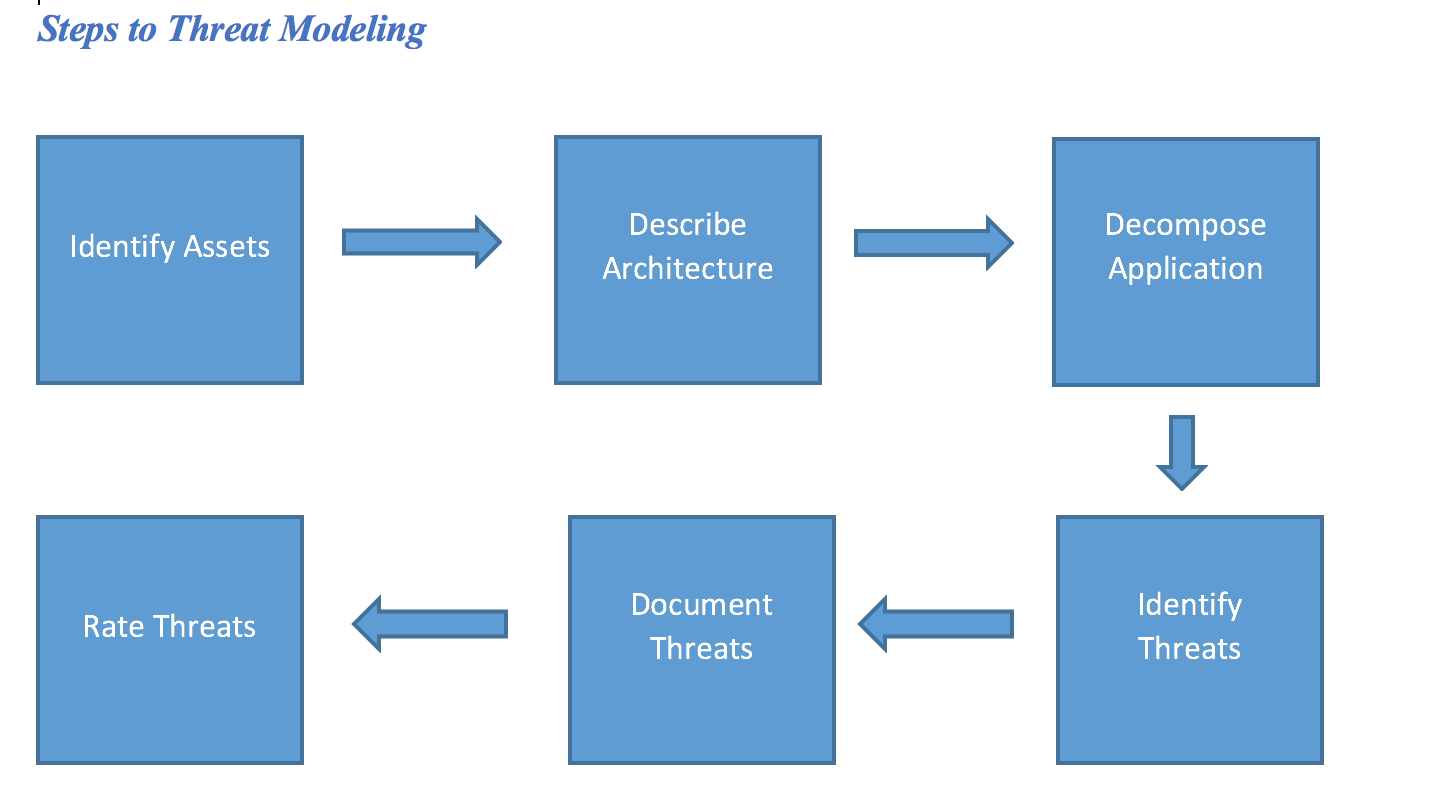
    Steps to Threat Modeling

    Step 1: Identify the assets (database server, file servers, data lake stores, Active Directory, REST calls, configuration screens, Azure portal, authenticated and anonymous web user, Azure AAD client apps, database users, DB administrators)

    Step 2: Outline details of architecture on which the valuable asset is being processed. It may include the software framework, version and other architectural details (ASP.net web application connection to cloud data stores and third-party services using JWT tokens).

    Step 3: Break down the application regarding its process, including all the sub-processes that are running the application. We create a data flow diagram (DFD).

    Step 4: List identify threats in a descriptive way to review to process further.

    Step 5: Classify the threats with parallel instances so that threats can be identified in the application in a structured and repeatable manner.

    Step 6: Rate the severity of the threat.

    Threat Modelling Methodologies

    STRIDE (Uses application-centric approach)

    PASTA (risk-centric approach): Process for Attack Simulation and Threat Analysis

    TRIKE (risk-based approach with unique implementation and risk-modeling process)

    VAST (Visual, Agile and Simple Threat modelling)

    OCTAVE (focused on assessing organizational (non-technical) risks that may result from breached information assets.)

    When to use Threat Modeling

    In simple words, at the early stages of the SDLC, perform threat modeling:

    • Every time there is a change in the system’s architecture.
    • After a security incident has occurred or new vulnerabilities are introduced.
    • As soon as the architecture is ready.

    It is not a mandate to perform threat modeling at the early stages of the SDLC; you can still pick up threat modeling at any stages even if it is close to deployment.

    Threat models are continuously changing, and the models you prepared today may not be efficient tomorrow. And it is difficult to say that you are covered from all the threats. But if you have performed threat modeling and done whatever it takes to minimize your exposure to security risks, at least the impact of something very bad happening will be manageable (again, hopefully, but not a guarantee).

    Tools to Perform Threat Modeling

    I have used two tools for threat modeling, both of which are free to use.

    1. OWASP Threat Dragon
    2. Microsoft Threat Modelling Tool 2016.

    Let’s take a look at both the tools:


    Microsoft Threat Modelling Tool 2016         OWASP Threat Dragon


    Full version available for free (as of now) Alpha version available, flaws are still there. It is an OWASP incubator project, so it is at its early stage.
    Installable desktop application available. The tool comes in two variants: an online web application for GitHub and second an installable desktop application.
    Documentation easily available on Microsoft website. Default threat template is available. You have to search, default threat template is present
    I found the UX better, unique methodology available, the user can understand threats better. Guidance and feedback in drawing a model. Good UX. Fun and engaging user experience.
    Presently using this tool for threat modelling. Maybe I will use. I think will continue to improve.
    End-user documentation is available. End-user documentation is also available. Automated threats.
    Threat Grid, Template editor, Mitigating existing DFDs. Mitigating existing DFDs. Powerful threat mitigation. Rules have not yet been coded as it is the Alpha stage.
    Comes with a base set of threat definitions using STRIDE categories. Even in its current stage (alpha), you can create threats from those STRIDE categories.


    — Debarghya Pandit