Author: contributor

  • What happened to the “Ops” in “DevOps”?

    The wave of digital transformation that has been enabled by cloud computing has provided both new opportunities and fresh challenges. On one hand, it is now possible for application developers to provide innovative new functionality to end-users almost instantaneously. One the other hand, this agility has created an environment in which users expect constant improvements and demand ever-higher levels of service. Indeed, the need to increase agility and quality simultaneously is largely responsible for the growing popularity of DevOps practices.

    When I ask customers who say they are “doing DevOps”, the conversation always seems to revolve around speed. Iterate faster. Turn out more innovations and new features – multiple times a week. Pull in microservices from this cloud provider over here, program in polyglot languages over there, virtualize and automate everything on no-name infrastructure, and do it all as quickly as possible. Leverage continuous builds and immediately push to production in a perpetual beta model. Test only at code-time, or even not at all and instead let the end-users test it for you. Forget about run-time instrumentation and monitoring — just get the feature out the door, wait for social media to report any problems, and in the meantime, move on to coding the next feature.

    It all sounds fun and productive, in the same way that dot-com-era rapid application development was fun and productive. And it certainly can reduce the cycle time on new features and provide opportunities to introduce new innovations. But that scenario as described isn’t truly DevOps, and it is built around a dangerous assumption about unlimited end-user tolerance for failures.

    Take a break from coding the next feature, stop, and read the first paragraph again. If you look at it, the only actual “Ops” in it is the automation used to enable the development process and push to production. In other words, it’s all “Dev” – as if all important activities stop the moment an actual user touches the application. But does that make any sense? After all, aren’t we building all of these cool new features for end-users? And isn’t the reason that we want end-users to consume these features that the applications support a business goal of some kind? And for end-users to consume these features, isn’t it important that our applications actually work and provide high levels of service in production scenarios?

    Here are a few tips to ensure there is some “Ops” in your DevOps efforts.

    1. Stop denying there is a problem. IT Operations is “so ten years ago,” many say, because the infinite elasticity of cloud and built-in exception-handling of modern programming environments renders all of that old-school NOC stuff as antiquated as the pager those folks used to wear. But that assumption is patently incorrect – just look at November 2015’s “Black Friday” shopping season, which was a mess for many online retailers, as noted in the Wall Street Journal, Business Insider, CBC, Express and the Independent. IT Operations is more important now, not less. DevOps without Ops is not sufficient.
    1. Eliminate operational information silos so you eliminate finger-pointing. Collaboration is a central tenet of DevOps and yet most people troubleshoot through inefficient “war rooms” full of individual component owners who are feverishly looking through their individual consoles to try and ensure the problem isn’t with “their” stuff. Many of those well-intentioned component owners bang their own heads against the table in frustration about how hard it is to even access the information they need in the first place, not to mention the fun job of trying to manually correlate timestamps and hostnames between their and others’ individual operational data stores. There’s no reason to perpetuate the silos of yesteryear – instead, put your operational data in one place, and let today’s machine-learning-powered management tools do the heavy lifting for you. You will certainly reduce finger-pointing, troubleshoot faster, and you may be able to eliminate the “war room” entirely.
    1. Monitor what (really) matters – your actual end-users. The concept of real end-user monitoring (monitoring the actual activity inside of browsers, mobile devices, etc.) has been around for a while, yet remains an under-utilized capability in most DevOps organizations – perhaps because it used to be technically hard to implement. But that was in the past – today’s next-generation application performance monitoring tools make end-user instrumentation simple to deploy. It’s important to see real user activity not only because end-users are the whole point of the exercise, but because server-side monitoring alone doesn’t tell you what’s actually going on. As late as June 2014, in an Oracle Applications User Group/Unisphere survey entitled “Performance Under Pressure: The State of Enterprise Web App. Quality and Availability,” 85% of customers reported that usually learn about application problems from end-user complaints – a staggering number which is actually up from 79% in 2009. There is simply no excuse for such a reactive view of monitoring.
    1. It’s in the logs! Logs are everywhere, but most organizations don’t use them because they are overwhelmed – logs contain too much data, they are too widely dispersed and too hard for humans to decipher. However, logs represent one of the best ways for development and operations to collaborate together, since the logging that is enabled by application and platform developers only becomes full of information in production. Next-generation management clouds that are designed to ingest big data at enterprise-scale can cope with today’s log data volume and velocity – which can be on the order of terabytes per day. Once the information is collected, your unified management regime automatically takes you to the few individual rows in the few individual logs that correspond to the exact problem you’re looking for (at the moment you’re troubleshooting), this mountain of data can become a treasure trove of information. Similarly, if machine learning algorithms can discover patterns and anomalies automatically, your logs can become ongoing sources of high-value IT and business insights. The data is there, you just need to use it.
    1. Planning is an everyday activity. DevOps organizations are necessarily often focused “in the moment” – but future business results depend on accurate advance planning. In most organizations, planning takes place in artificial time windows (calendar year, budget year, off-season, etc.) with incomplete information and a whole lot of guessing – and is often performed by analysts with no direct connection to the operational context. Instead of viewing planning as a once-a-year exercise in an ivory tower, regularly leverage analytical capabilities against your unified store of operational information to answer a variety of forward-looking questions. Your DBA wants to know if she has enough database capacity for next year? Analyze at the individual instance level. Your marketing people are worried that you can’t support their upcoming launch? Analyze at the application level. Your CIO wants to know where people are spending their troubleshooting time and the corresponding health of your entire infrastructure? Analyze across your entire estate. If you’ve followed my advice in steps 1 through 4 above, you have all the data you need already available. Now it’s time to use it.

    But hang on a minute, you say. Let’s not forget that we are doing DevOps for speed – and all this management, while clearly useful, could take forever to implement and slow everything down in the process. A few years ago, you might have been right. But technology marches on and today’s cloud-based management regimes can be leveraged instantaneously, with no changes to your infrastructure, and start providing the kind of value you need within minutes. With cloud-based IT Operations Management, your DevOps efforts can truly combine development and operations best practices while still delivering the speed you need.

    No more excuses. Put the “Ops” back in DevOps.

    About the Author/Dan Koloski

    UntitledDan Koloski is a software industry expert with broad experience as both a technologist working on the IT side and as a management executive on the vendor side. Dan is a Senior Director of Product Management for Enterprise Manager – Oracle’s integrated IT operations and Hybrid Cloud Management product line. Dan holds a B.A. from Yale University and an M.B.A. from Harvard Business School.

  • DevOps and IT Support: 4 Principles to Keep Your Team Ahead of the Curve

    DevOps and IT Support: 4 Principles to Keep Your Team Ahead of the Curve

    Here’s the million-dollar IT question: what is DevOps and why does it matter to IT support?

    Short answer: DevOps advocates collaboration between Development and IT Operations. It’s about constant communication, breaking down silos and a culture of collaboration. The DevOps movement has made great headway and many companies have adopted and are employing DevOps practices – Netflix, Amazon and Google to name a few.

    But where do IT support teams fit into a DevOps environment? 

    When developers launch new features and services, it’s the support team that deals with issues and interactions with frustrated customers. Change is often the enemy of stability. But because innovation can’t be stopped, IT support teams need to catch up. That means making their operational environments resemble the way their software is developed. The problem is that IT agents and developers have different methodologies, work in different systems, and practically subscribe to different technology religions.

    The silos only exacerbate the challenges that the support team ultimately faces:

    • Scattered data limits incident and problem understanding.
    • Deployment failures have a high risk of downtime. And too often, changes are made that IT support doesn’t know about.
    • Support feedback often represents customers, and doesn’t always get communicated to development, product owners and product managers.

    DevOps is ultimately a culture change. When all teams commit to a collaborative approach and common goals, it can shift the entire mindset from silos to working together to deliver better services. Agile, Lean and Kanban are popular approaches that facilitate rapid iteration, learning and information sharing. This means you shorten the feedback loop necessary to drive business agility.

    CAMS, DevOps and IT support

    How do we put DevOps principles into practice for IT support? Over the past 20 years, IT has built up a strong governance model based on ITIL and that can’t be forgotten overnight. While putting new practices isn’t easy, the best way to make big concepts real is a model that covers people, processes and systems. Luckily the CAMS mode coined by Damon Edwards and John Willis at DevOpsDays Mountainview 2010 [1].

    It stands for Culture, Automation, Measurement and Sharing.

    Principle 1: Culture

    The model leads with culture, as it’s the most important facet to DevOps. Support teams learning from and supporting DevOps practices requires a cultural shift. While command and control is comforting, DevOps calls for speed and agility. Daily or weekly rituals can facilitate this cultural shift. Some rituals you can apply to your IT support team include:

    Be sure to focus on results, not just the activities. It’s not about the number of changes but the results of those changes.

    And finally, understand team behaviors. Culture is a result of habits. You need to understand how your team works together, and what you can improve.

    Principle 2: Automation

    To move fast, you can’t do everything by hand. Automation is another principle of DevOps, but is most effective when it supports the people and processes in place.

    Go from trapped knowledge to shared knowledge

    • Known errors should be tracked at the time of deployment and communicated to support. Sound simple? You’ll be surprised how often it doesn’t happen.
    • Support should link articles to incidents and problems, so everyone understands what’s causing the issues

    Shift from orphaned tickets to linked tickets

    • All teams should be responsible for ticket linking and documentation- including the service desk, admins, developers, and operations, so everyone knows what’s going on.
    • Link incidents, problems and requests to all associated changes and releases.

    Don’t just deploy, but support

    • Continuous integration, continuous delivery, and continuous deployment are core to the First Wave of DevOps – thinking about the performance of the overall system. Support needs to be prepared to support, operate and ensure their ability to restore services. They need to know what’s being deployed and when, so they can give the right answers to the customer.

    Help with testing

    • Automated testing is key to a DevOps environment. Every time a developer commits code, they need to make sure all the code is operating the way it is expected to. If it breaks, tests can catch failures before anything is deployed and delivered. Support teams hold data about various customer environments that should be continuously fed back to testing.

    Keep up with monitoring data

    • Proactive monitoring helps developers stay ahead of problems before they snowball. In the same vain, support teams can identify customer problems faster by keeping aware of proactive monitoring and linking it back to their own incident management systems.

    Principle 3: Measurement

    Keep track of metrics that matter. Once you’ve established your individual and team goals, It’s important to measure how you’re tracking to those common goals. How long does it take to recover from failure? Try measuring ‘Mean Time To Repair’ (MTTR) and whether it increases or decreases over time. Here are a few other metrics your support team should keep in mind:

    • How many repeated issues do you have? Measure repetitive incidents and how often they occur in a period.
    • Are you meeting your targets? Measure service level targets in your service level agreements and operational level agreements in the context of deployments.
    • What are your costs? What’s your cost per incident, along with the total cost of support? Take this in context with downtime costs. In some cases, increasing support costs may be the best thing to do to minimize impact to the business.

    Principle 4: Sharing

    And lastly, when it comes to sharing, ask yourself these questions:

    • Does the organization understand what we’re doing? Do we share that understanding?
    • Do all teams understand each other’s goals, hardships and priorities?
    • Does your team’s outputs of processes flow with other team’s processes?
    • Is knowledge shared across teams? If it’s in a system, is it accessible?
    • How is your team collaborating with others? Are there unbarred channels for communicating?
    • Are the right stakeholders kept in the loop of your projects, even if they’re not in your immediate group?
    • Do your IT groups – development, operations, testing, support and even the business – share ownership of successes, failures and learnings?
    • Do teams share tools and information? If not, do those tools integrate with each other?

    Faster, better IT service is about culture, sharing and tools that enable your teams

    A collaborative culture is critical to success in DevOps. Aligning support and development can help your organization understand what services the business wants and needs to be productive.

    About the Author/Sid Suri

    Sid Suri-2Sid Suri is the Vice President of Marketing for JIRA Service Desk. He’s worked in various technology marketing roles over the last fifteen years at Salesforce.com, Oracle (CRM), InQuira (acquired by Oracle) and TIBCO Software. He has an MBA from the Haas School of Business and a bachelors in Economics and Italian from Middlebury College. He lives in San Francisco, California.

  • How do you identify gaps in your testing?

    How do you identify gaps in your testing?

    Every piece of software ships with some defects in it, but major gaps in your testing coverage can be disastrous, and they can occur for a variety of different reasons. Part of the problem with a typical root cause analysis is that it comes after the fact. Perhaps the customer has complained, there’s been a big outage, or the software quality simply isn’t where it should be. But reactive firefighting like this isn’t the most effective use of your resources.

    What if you could identify those gaps earlier in the testing process and dynamically shift strategy to close them before they cause major issues?

    The best possible start

    Lack of domain knowledge and an incomplete understanding of the purpose and intent of a piece of software is enemy number one. There are two ways you might consider mitigating this risk in order to get a good start:

    1. Automated Testing – Identify critical core functions and automate mundane repetitive tests in order to free up your testers to leverage their experience and domain knowledge to break the system.
    2. Exploratory Testing – Context driven testing encourages critical thinking and collaboration. Testers have to understand what the application is trying to do, they have to learn about the intent and direct their efforts at the most important areas.

    Making sure you build a solid foundation, understand the software, and define your scope at the outset can take time, but it will be time well spent.

    Communication and assessment

    The traditional approach with gap analysis is to start with a problem and trace it back. In theory, you should learn from your mistakes and avoid repeating them in the future, but it doesn’t always work that way. It’s also a great deal more time-consuming and expensive to identify and fix problems when they’re already released. There’s no reason you can’t apply the same logic from root cause analysis earlier in the process.

    The earlier testers are involved, the better. There should be wide-ranging discussions during the planning phase that include the development team, the business team, and the test team. This is an excellent opportunity to ensure that everyone understands the workflow of the new software, what it’s supposed to deliver for the end user, and where the priorities lie for validation and testing.

    By including testers from day one, you reduce the chance of misinterpretation and give yourself an opportunity to spot potential gaps or misunderstandings. But the communication and assessment has to be continuous throughout the project, the second it slips, you’re running the risk of a gap opening up. You need to make sure that communication, collaboration, and mitigation are an integral part of your process for each new sprint or cycle.

    Developing process oversight

    In order to ensure that your coverage is tight, and to immediately flag possible gaps, you need to have a good test data management strategy in place from the beginning. You need to be using analytical tools, like Jira, QMap, or VersionOne. Regardless of the tool in play, what you want is a complete record of all your manual testing activities. The ability to generate reports or visualizations of your coverage, and to analyze it from different business perspectives, is absolutely vital.

    Where are most of the defects coming from? How did you find them? How critical are they? Where are your efforts being concentrated? What topics are trending in tester’s comments? Are you seeing the same questions or recommendations popping up over and over again?

    There’s a good chance that you’re collecting this data anyway, but keeping an eye on all of it in real-time should enable you to strategize effectively about where to focus your resources. The best approach is never carved in stone, it should continually evolve throughout the development lifecycle. Rigorous and regular analysis presents an opportunity to identify gaps as soon as they begin to form, instead of waiting until they cause a problem and then tracing it back. It’s about taking a proactive approach instead of a reactive one.


    About the Author/Mush Honda

    fixed_Mush_Headshot-cropMush Honda is QA Director at KMS Technology, a provider of IT services across the software development lifecycle with offices in Atlanta and Ho Chi Minh City. He was previously a tester at Ernst & Young, Nexidia, Colibrium Partners and Connecture. KMS services include application management, testing, support, professional services and staff augmentation.

  • Bridging the gap between DevOps and Security

    Bridging the gap between DevOps and Security

    Security should be baked into the DevOps process, from tools to skills to collaboration. DevOps and security are not mutually exclusive.

    The problem with digital innovation is that considerations for compliance come later, after the product or service is on the market. From public cloud infrastructure to Internet of Things to mobile apps and even to DevOps, tough requirements like security aren’t built into innovators’ plans. Entrepreneurs are thinking primarily about shiny, new, fast and disruptive. Yet for the CIO and other chief executives accountable to customers, laws and financial markets, managing risk around sensitive data is top priority.

    DevOps processes are at the heart of business innovation: think Netflix, Facebook, Etsy and Nordstrom, all leaders in their sectors. Yet many of the popular DevOps tools and methodologies, whether commercial or open source, haven’t been optimized for the needs of enterprise security. An application running in a container, for instance, will still require attention around configuration to ensure application security.

    As well, many security professionals haven’t yet made the leap to understanding the changing best practices for security in this new world of cloud/agile/mobile IT. Some security experts have imposed barriers to DevOps, by resisting the switch to faster, more iterative development along with the public cloud.

    On the surface, the speed at which DevOps teams are approving and releasing code would suggest an increase in security risks to end users by eliminating rigorous security review phases. Yet managing security, as with testing, is in fact optimal when performed side-by-side with developers as code is being written. By integrating security, people and processes tightly within the continuous delivery cycle, DevOps can do a better job of eliminating loopholes and gaps in the code before production. DevOps tools emphasize the use of frequent and automated processes to improve software quality: also an ideal model for handling security testing and fixes. Determining the best way to merge security with DevOps is a work in progress. The following concepts can provide a framework for getting started:

    1. Use the best of DevOps for security: DevOps, with its focus on automation and continuous integration, provides a more holistic framework for security management. Start by considering security through every step of the development and production cycle. Security professionals can help developers root out design problems in the beginning – such as ensuring all data transport is encrypted. Integrate automated security checks into development, testing and deployment phases, and educate all team members about the importance of incorporating security thinking in their specific job roles. Security should no longer be the last process before committing the code to production.
    2. Investigate new DevOps and Cloud security tools: Fortunately, the security technology industry is ramping up quickly to the needs of DevOps security. Static Application Security (SAS) tools test for security when code is being written while Dynamic Application Security (DAS) tools test for interface risks. A few of the reputable systems include Checkmarx, Veracode and Parasoft. The third area of security automation tools covers penetration vulnerability testing, such as Nessus, developed by Tenable. Other contenders in this area include Qualys and OpenVAS. These tools can integrate smoothly into the software development lifecycle, such as by plugging into Jenkins. By adding automation, security is not only built-in, but doesn’t slow down the DevOps process.
    3. Getting buy-in from security teams: This might just be the hardest part. While developers are incentivized to go faster and do more, security professionals are incentivized to control, monitor and reduce risk. Meeting in the middle is definitely possible – but it will require some opinion shifting on both sides. Developers and product managers will need to understand the importance of working collaboratively with the security team, and in an accountable way. Security people can benefit from a more comprehensive understanding of security in the cloud. This should include continuous education on the new tools and services available today to manage risk and to deliver even higher levels of security than in the past – from better reporting, to API-based security and easier encryption at rest.
    1. Manage tool sprawl: The concept of self-organization is an important one in DevOps, because it fosters a spirit of flexibility and rapid collaboration. Yet this same principle can also lead to environments of dozens or even hundreds of different tools in use to manage deployment, configuration, QA and orchestration. That creates risks for visibility and monitoring as well as standardizing around security controls and access. Engineering leads should help strike a balance between too much and too little governance when it comes to tools and workflows by providing guidelines for tool selection. The DevOps automation infrastructure itself can introduce risks. If a hacker gains access to a tool like Puppet or Chef, he can modify any number of configurations and add new user accounts. Configuration and change management tools must be adequately secured and governed, lest they become a new attack plane.

    With the advent of DevOps, there’s an opportunity at last for security to become an integral and seamless aspect of innovation. We think it’s not only possible but critical to give security the attention it demands in the world of fast IT.

    About the Author/Kris Bliesner

    Kris BliesnerKris Bliesner is CTO and co-founder of 2nd Watch, where he oversees strategic and technical development of 2nd Watch’s cloud-based products and solutions. Prior to co-founding 2nd Watch in 2010, Kris held many top IT positions with companies including Microsoft and Ambassadors Group.

    Connect with Kris: LinkedIn, Twitter, 2nd Watch Blog.


  • Avoiding Database Migration Pitfalls with Continuous Software Delivery

    Avoiding Database Migration Pitfalls with Continuous Software Delivery

    When people talk about continuous software delivery, they often focus on the delivery mechanism itself, such as automation tooling or branching strategies. What is frequently overlooked is the simple truth that continuous software delivery is worthless without continuous service availability. In other words, if you’re going to frequently update your service, your customers shouldn’t frequently experience disruptions.

    Despite all good intentions, the cause of many unintentionally-disruptive deployments are database migrations. This makes sense, as all other components of a service infrastructure are fairly easy to swap out or to roll back. Software directory symlinks can be easily changed, EC2 instances can be easily started, DNS entries can be easily updated, but performing a breaking change on a multi-million row table in a database that’s under heavy load? Not so easy.

    Successful Migrations

    There are three necessary requirements for a database migration to be considered a success:

    1. The delivery of the service was not disrupted or degraded
    2. The database migration must be repeatable (re-entrant)
    3. The software version can be rolled back to the previous release if needed

    The first seems obvious, but can be surprisingly difficult to achieve. The chief reason for this lies in the vagaries of how different database technologies, and even versions of the same technology, handle things like table locking during an ALTER statement. The other reason is a hidden complexity within your application code. For example, a JOIN statement that causes a frequent query to be blocked by a seemingly unrelated table change.

    The second criteria means that if a migration fails for some reason, it cannot leave the data in such a state that the migration cannot be run again – essentially, running the same migration twice should not result in a negative outcome.

    The third criteria absolutely precludes ever doing a “one way” release where rollback is made impossible due to data destruction. It’s okay to have a release that rules out rolling back several releases; without that, the database would become a giant pile of discarded data. That said, it’s never a good idea to paint yourself into a corner with a release that you cannot possibly revert.

    Avoiding Service Disruption

    The simplest way to avoid service disruptions is to never perform a database migration. But, that just isn’t feasible, so how do we avoid stepping on a landmine during a migration?

    First and foremost, implement a policy of strict database migration reviews. This doesn’t need to be burdensome or time consuming. It just means that someone who is best equipped to understand the impact to the database technology actually gets eyes-on the migration before it is run. This is a role often served by your database administrator, chief architect or most senior developer.

    Another good idea is to set up a hook in your code versioning repository, or a test that’s part of your build process, that examines database migrations and looks for certain keywords – and the lack of other keywords. For example, it might “fail the build” if it finds an ALTER TABLE statement that is not accompanied by the word CONCURRENT.

    If you’re dealing with a lot of legacy code, or a monolithic application with significant complexity, then there are two very important safeguards you can put in place: load testing and SQL statement logging.

    Load testing means having a development environment setup where you can apply a database migration to a database that is under load, i.e., experiencing a level of usage that roughly approximates your production database load and which contains an amount of data similar to production. Then, while your database migration is running, you can run an application smoke test or similar to see if production-like load combined with the migration results in any unexpected slowness or errors.

    Remember, all database migrations are fast when they are the only thing running on your database, and faster yet when the testing database is a tiny fraction of the size of the real thing. Going into production feeling confident that a migration took only ten milliseconds to complete on a half-empty database with zero active connections is a fool’s errand.

    When you have a poorly-understood or monolithic application, it can be a very enlightening experience to enable SQL statement logging on your production database server. Remember that MyISAM table that never seems to change and against which it should be safe to run a giant blocking migration? SQL statement logging might reveal that every single page load executes a long-forgotten JOIN statement that scans that entire MyISAM table. Or that the user login process looks in that table for reasons nobody can remember. This is also an area where using a solid application performance tool like New Relic can make a very big difference.

    Repeatable Database Migrations

    This one sounds simple but can actually be a bit tricky to implement. Consider the following scenario, you have a table that contains three columns: id (integer), username (string) and password (string).

    As it currently stands, the passwords are stored in plaintext in the database, and your application does a simple string comparison between what the user enters and the results of a SELECT statement. The next version of your application is going to hash the password entered by the user, and compare the hash against a hash returned from the database by SELECT.

    There are two possible ways of getting from where you are now, to where you want to be – one is dangerous, and the other is safe.

    The dangerous way would be to create a database migration that iterates through the password column and replaces each plaintext value with a hash of that value. Basically a SELECT; md5(); UPDATE; loop. This is dangerous for a number of reasons:

    If the migration stops before completing, the database will be left in an unusable state where neither the old nor new code can make use of the entire table.

    1. If the migration fails to complete for any reason, it cannot be run again without corrupting all the previously-migrated values.
    2. If the new code has to be reverted to the old code for any reason, the table is now in a state that cannot be used by the old code.

    The safe, and repeatable way of performing this migration actually involves three releases:

    Version 2.0 migration adds a new column (pass_hash) and migrates password to it, and new application code must INSERT and UPDATE to both

    1. Version 2.1 application code must now use only the pass_hash column, and ignore the password column.
    2. Version 2.2 migration removes the password column, and new application code continues to use only the pass_hash column.

    You can rollback from the first release (2.0), as all the original, unencrypted password data still exists in the database, and the previous code release won’t care about the new column (pass_hash) being present. You can also run that first migration multiple times – just have it remove the pass_hash column if it exists prior to creating it.

    Next, you deploy code (2.1) that makes use of the new column only. You might be tempted to bundle the database cleanup migration with it, but don’t – if you need to rollback for any reason, you won’t be able to if you’ve removed the password column. It’s always a good idea to delay breaking changes, like a column deletion or dropping a table, by at least one release.

    And finally, run a migration (2.2) that drops the password column, if it exists. That latter condition is so you can run the overall migration more than once if needed. If the password column exists, remove it; otherwise, merrily continue with the rest of the release. Note that at this point in time, the live application code is ignoring the password column entirely. This is important, since the current application code will be using the database while your migration is running. In other words, any migration must be safe to run under both the current and the about-to-be-deployed code version.

    In case you hadn’t already guessed, this approach to migrations does take a bit more conscious thought and effort than the old, dangerous way. You’ll need to keep track of “deprecated” bits of your database for future removal. And you’ll need to occasionally write code to intelligently update two columns or tables in lockstep, and then remember to remove that code in the future. That said, it’s definitely worth it in the long run when you’re able to release frequently with zero downtime.

    Release Rollback

    Nothing produces longer outages and greater negative customer impact than being unable to rollback or revert a release. If you’ve accidentally deployed a major bug into production, you want to quickly revert to the previous version that didn’t have that bug, and then reproduce and fix the bug at your leisure in your development environment. Being unable to reproduce the bug in your development environment is not a valid reason to fail to rollback a release, and it’s an entirely separate discussion apart from migrations.

    The essence of rolling back is speed. It must be a fast and reliable process. The number one way to ensure it is anything but fast and reliable is to have a breaking or one-way database migration in the release you wish to roll back. Thus, anytime you are creating a new database migration, ask yourself two simple questions:

    1. What would happen if I ran this migration with the current application version?
    2. What would happen if I ran this migration twice?

    If it would change the database in a way that would cause the current application version to explode, then it needs fixing. And if it would change the database in such a way that it can’t be run again, then it needs fixing.

    The End Results?

    In a nutshell, this approach to migrations means that each migration will be very small and very simple. Expect to get from state A in your database to state B via many safe steps, instead of one giant, dangerous step. Your customers, and your application uptime, will thank you!

    About the Author/Nate Lindstrom, VP solutions engineering

    highres_250316251Nate Lindstrom is the VP of solutions engineering for NS1, an intelligent DNS and traffic management platform with data driven architecture and a unique Filter Chain routing engine. NS1 is purpose-built for the most demanding, mission-critical applications on the Internet. NS1’s comprehensive platform technology leverages infrastructure, application, and network data to make intelligent routing decisions in real time, ensuring optimal application performance and reliability.


  • In-App Messaging: The Key to a Better User Experience

    In-App Messaging: The Key to a Better User Experience

    As the mobile device obsession grows, enterprise IT departments are learning the hard way that today’s Web applications, will in fact, not live forever. Enterprise developers are now forced to turn their focus to mobile app development – not just repurposing a Web API for mobile, but embracing what is inherently different about the mobile platform.

    Mobile isn’t just a smaller screen size, but for companies, it’s a whole new device for interacting with stakeholders in real-time. With in-app messaging, brands now have a powerful new channel to foster a private conversation between themselves and their customers. Further, companies can leverage data directly from interactions in the app to create more authentic and beneficial messages for the customer.

    Using in-app messaging has a big pay-off for brands, too. According to a June 2015 report from app marketing and analytics firm Localytics, apps engaging in messaging have a two to three-and-a-half times higher retention rate and more uses per month than apps not using in-app messaging.

    But for even the most experienced enterprise developer, integrating new features in a mobile application can be a tough process. The technical challenges alone can be too much for an in-house IT department, and developers could be stuck scratching their heads due to a lack of replicable use cases. We believe there are three simple steps that a developer can start with to incorporate in-app messaging to help build the foundation for a dramatically improved and far more engaging mobile user experience.

    1. The simplest in-app messaging application is using chat as a help feature. Imagine on-demand customer service from the palm of your hand – in store or in the comfort of your home. Think about how direct communication can improve customer experience. Is there a glitch in the app hindering the use of a feature? A question about an in-app purchase or pricing on a product in store that can be answered in the moment? There are many current scenarios that could be supported by using chat as a help feature, but the real possibility is in things that aren’t common today. Picture connecting chat to an in-store server, and joining a real customer service specialist to a customer needing assistance within minutes. Perhaps one day, in-app messaging could replace customer service calls all together.
    1. Another great way to utilize in-app messaging is by using chat as a way to share announcements. Instead of focusing on creating a private conversation between just two parties, sharing an announcement via chat is great way to spread communications to a group of people within an app. Share information about an upcoming event or sale, or send a cancellation update immediately (eliminating the frustration from those who didn’t check their email or voicemails!). And think outside of the box – these announcements don’t need to be text string, but rather HTML, JSON or images. Think about this as a push notification, but more personal and intuitive. However, while you may want to share announcements with all users, like a push notification, be aware that these messages can seem less targeted, like getting spammed. Alternatively, use a messaging platform that can sift through backend data to grab the intel required to customize announcements to specific audiences, all on its own.
    1. Finally, evolve your messaging a bit further by sharing images or content through chat. Facebook and WeChat are great examples of how to create more context within in-app messaging: share a link using in-app search or send animated emoticons to create sentiment. And again, think beyond a personal conversation, but how to engage a whole group. Perhaps you drop a pin on Google Maps and direct a group to a certain location or share a digital coupon to a set of customers. And while smaller images can be sent as binary payloads across the messaging transport, developers should consider size and performance implications and may want to use a different approach. There are even ways to use a URL in the message payload to transfer any kind of file (including an image!). The key to engaging customers with this feature is with powerful insights: integrate with different workflows and data using an end-to-end tool to deliver meaningful content to individual users.

    These use cases could seem like simple additions or advanced ideas depending on the current state of your mobile app, but either way, they’re just the tip of the iceberg.

    The ever-evolving mobile world full of consumers seeking cooler, better, faster mobile experiences means one thing for enterprise developers: change. We must move beyond the traditional thinking to consider not only app design, but how users want to interact with their apps, and what value new features add for customers.

    Whether you’re starting out with chat as a help feature or shooting for the stars with another intuitive messaging tool on the horizon, it’s safe to say the future of in-app messaging will be transformational for user experience.

    About the Author/Shannph Wong

    UntitledShannph Wong is the Head of Engineering at Magnet Systems. Magnet Systems is powering the next generation of mobile applications with an open architecture to enable businesses and developers to create more engaging and productive enterprise-class mobile applications.

  • Making Over the Mainframe for DevOps

    Making Over the Mainframe for DevOps

    Introduction

    As a discipline, DevOps emphasizes mitigating any and all constraints in order to roll out high-quality, high-performance software, faster. Constraints can be man-made – such as lack of communication between developers and IT operations teams – or technical in nature, such as an overcommitted testing environment. DevOps teams are only as strong as their weakest link. Ironically, the strongest computing platform available in the

    world – the mainframe – can be an Achilles heel in DevOps.

    Since the 1990s, the mainframe has been a target of many jokes, being far less “en vogue” than its modern, distributed architecture counterpart. But the reality is, no computing platform comes close to matching the speed, reliability, security and cost-efficiency of the mainframe. When managed properly, the mainframe can unleash tremendous competitive advantage as the transaction-processing engine at the heart of modern applications. But if it is not properly evolved and left to languish, the mainframe can quickly rear its head as an unwelcome bottleneck.

    This article will explore the current state of the mainframe; why mainframes have the potential to hamper even the most nimble DevOps teams; and how mainframes must continue to modernize in order to keep up with the pace of DevOps and today’s hyper-competitive application delivery landscape.

    Mobile Means The Mainframe Remains Firmly Embedded

    In contrast to many industry prognostications, the mainframe isn’t going anywhere, due to the unparalleled strength of the platform and the billions of lines of code that dictate much of an organization’s business processes. Consider this:

    • IBM’s new z13 mainframe is capable of handling 100 Cyber Mondays every day, 365 days a year.
    • The volume of CICS (mainframe-based) transactions on any given day dwarf the number of Google searches, Twitter tweets, YouTube views and Facebook Likes combined, according to IBM.
    • Mainframes currently process 30 billion business transactions per day, and enable $6 trillion dollars in card payments annually.

    Most organizations find that moving off the mainframe is too risky, too costly and too time-consuming – and with the technology advances in the platform, just plain unnecessary. Numerous instances have shown mainframes to be more cost-efficient than distributed commodity infrastructures, because reductions in commodity server pricing have not kept up with the growth in computing loads spurred by mobile.

    Mobile computing loads are growing at a dizzying pace. Recent research from the global payments industry shows that more than 27 percent of global online transactions are now conducted on mobile devices. And increasingly, these mobile transactions need to pass through mainframes. Consider a mobile banking application, where users snap a picture of a check in order to instigate a series of steps leading to a deposit. Ultimately, this transaction takes place on the mainframe and must connect through it.

    How Mainframes Can Pose a Challenge to DevOps

    Traditionally, mobile/distributed teams work in very different silos from mainframe teams. Each with their own distinct culture. Unfortunately, the characteristics of mainframe systems can cause an overall software development effort to encounter slowdowns, or even come to a screeching halt.

    As one example, consider a mobile developer working on a hybrid application needing test data that resides on a mainframe. Developers and testers must be able to access test data quickly and easily, in order to adhere to compressed go-live schedules. Any challenges to accessing this data – such as not understanding how and what data flows through the program – leads to unnecessary delays. At a micro-level, this negatively impacts the effectiveness of DevOps. But at a higher level, ongoing obstacles like this can quickly snowball, and in an era where “software defines the business,” the organization’s competitive position can be compromised.

    What’s more, mainframe experts (primarily baby boomers) are expected to retire en masse over the coming years. According to industry research, 55 percent of today’s enterprise apps still touch the mainframe, and more than five billion new lines of mainframe code are being added each year to a base already exceeding 230 billion code lines. A sudden loss in the expertise responsible for this intellectual property can expose a company to major risks, or even disasters, and managing it cannot be left to chance.

    Evolving the Mainframe to Keep Up with DevOps

    For organizations looking to distinguish themselves through cutting-edge mobile transactional applications, the mainframe can be a key competitive differentiator. But in order for this to happen, it must be continually nurtured and non-mainframe trained resources must be enabled to support it.

    Over the past year, mainframe ISVs have driven tremendous advances in this area. These ISVs are adopting Agile development processes themselves, in order to help their customers bring the mainframe into the DevOps fold; extend the value of their legacy investments and in the process, become more competitive in today’s fast-moving markets.

    These advances include:

    • Windows-like interfaces and functionalities (for example, copy and paste) on the mainframe: This allows modern developers to work in an environment they’re familiar with, while providing tools that enable them to easily and quickly complete such tasks as dragging and dropping mainframe data from one host to another. Mainframe-specific expertise is no longer required to complete simple tasks.
    • Program and data visualization on the mainframe: These capabilities enable developers – both mainframe and non-mainframe experts – to better understand program and data interdependencies; find and fix mainframe code issues and build the highest quality mainframe code possible.
    • Insights into the performance of code created with the world’s most common programming languages, such as Java: Java developers can truly “write once and run anywhere,” including the mainframe, and ensure the smooth connectivity of applications traversing numerous platform types.
    • Visibility into the often-complex interactions between mainframe programs: This makes it easier and faster for developers to understand, modify and troubleshoot even the oldest, most complex and/or poorly documented mainframe code. Developers can shave days or even weeks off mainframe software updates, while reducing unintended mistakes.

     Conclusion

    When barriers to enabling DevOps on the mainframe are removed, the positives benefits extend beyond creating a more agile DevOps team. Newer generations of developer talent become attracted to mainframe careers, drawn in by the prospect of working on the some of the most exciting, new mobile transactional applications that feed the world’s economy. And with everyone working in a common, visual, intuitive and modern environment, the knowledge transfer between newer developers and more experienced generations of mainframe experts becomes more fluid and seamless, protecting much of a company’s DNA – its mainframe code.

    The mainframe has a very real place in modern application delivery and DevOps. However, mainframe users require support in bringing fast and agile DevOps best practices to bear on their mainframe-resident applications. With new advances, the mainframe can successfully evolve from yesterday’s computer, to an innovation engine suited to modern DevOps teams.3

    About the Author/Chris O’Malley

    Chris OMalley2Chris O’Malley is CEO of Compuware. With nearly 30 years of IT experience, Chris is deeply committed to leading Compuware’s transformation into the “mainframe software partner for the next 50 years.” Chris’s past positions include CEO of VelociData, CEO of Nimsoft, EVP of CA’s Cloud Products & Solutions and EVP/GM of CA’s Mainframe business unit.

    Follow Chris on Twitter: https://twitter.com/chris_t_omalley and LinkedIn: https://www.linkedin.com/in/christophertomalley

  • A 6-pack for building a business case for CD

    A 6-pack for building a business case for CD

    There are all sorts of compelling business benefits awaiting those who adopt Continuous Delivery. It has the potential to reduce operating costs, reduce defects and redundant work, improve efficiency, and result in a much faster delivery speed. By releasing applications to market faster, you boost your chances of success and gain a competitive advantage. But how do you get from the theory to the practice?

    If you really want to scale up and realize the benefits of CD, then you’re going to need money to retool, retrain, and change the existing culture. In order to secure the budget you need, all of the key players in your organization have to buy into the change. A strong business case is essential. Here are six key areas to look at when you build yours. 

    Production incidents

    A natural place to start with building a business case for CD is with production incidents, because they’re very visible. When you perform a root cause analysis on an incident, you’ll often find that the software worked fine in the development environment. By standardizing the environment configurations you can reduce the number of incidents, free up resources from the provisioning process, and reduce wasted time.

    It’s possible to calculate the cost of data center downtime for your company, and you can use root cause analysis to find out where provisioning errors were to blame. From that, you can extrapolate the potential savings made by reducing these outages with standardized environment configuration. You also have to consider the reduction in wasted time and effort, resources that can now be productively employed. 

    Deployment failures

    Take a look at your past deployment failures and work out the average cost to the business of rolling back the deployment, diagnosing the cause of failure, and remediating. By automating deployment you can cut these costs completely.

    Manual testing

    To employ an API-based testing model that can be integrated into your delivery pipeline will pose an upfront cost, but that cost per build decreases with each new build. With manual testing, the cost rises with each new build. Automated testing gives you better coverage, earlier. If you can find defects earlier they tend to be quicker and easier to fix, which reduces the potential knock-on impact in terms of production incidents, and, ultimately, reduces costs. You’re also cutting manual labor costs and overhead.

    Manual build process

    If someone on your team is writing scripts to automate your builds, there’s a labor cost involved and they may cause a potential bottleneck. If you can switch to a centralized delivery pipeline where the build is automated and which development teams can customize for their needs, you can reduce the time and effort required. You also free up the developer who would have written the scripts to work on improving the product instead. At the same time, you’ll boost oversight, control, and reliability in the build process.

    Better analytics

    A lot of development time is wasted on building features that don’t add value. According to research by Forrester, only around a third of the ideas implemented result in a measurable improvement in the customer experience, a third have no obvious effect, and the final third actually have a negative impact. By building analytics into your code, and constructing a strong feedback loop, you can find out what really improves the customer experience and focus your efforts there. The earlier you can get feedback, the easier it is to prioritize and maximize the value you’re adding.

    Focus on the big picture

    Most business cases might focus on some of the benefits we mentioned above, and that’s because they’re easier to measure. But it’s the intangibles, such as improved competitiveness, goodwill, and revenue, which are harder to quantify, but which have the greatest impact.

    You want to present the potential cost savings, but this is about more than cost cutting. The long term benefits filter through as you ramp Continuous Delivery up. Faster feedback loops and a greater understanding of your customer are laudable aims for any business. You’ll have to delve into specifics to generate the persuasive numbers you need, but it’s important that you keep those intangible benefits front and center as part of the business case you’re constructing.

    About the Author/Andrew Phillips

    AndrewPhillipsAndrew Phillips heads up product management at XebiaLabs, a provider of continuous delivery automation. Andrew is an evangelist and thought leader in the DevOps, Cloud and Continuous Delivery space. He sits on the management team and drives product direction, positioning and planning.

  • What approach to application hardening is right for your organization?

    What approach to application hardening is right for your organization?

    There’s no shortage of readily available hacker tools and techniques and stories in the news about mobile app hacks for both the iOS and Android platforms.

    Fortunately, security solutions providers have responded swiftly and there are many approaches that one can leverage to harden an app that is “out in the wild.”

    For those of you who may not be familiar with the term, hardening is a key step at the end of any secure software development lifecycle process which:

    • Confirms that the app is running as designed at runtime
    • Thwarts hackers’ efforts to reverse engineer the app back to source code

    Which hardening approach is right for your app? To the uninformed purchaser, simple obfuscators are attractive because they are low in cost, require little training and are quick to implement. However, given the sophistication of today’s hackers, it is important for app developers to look beyond the surface and take a more strategic approach to choosing an application hardening solution.

    Below are four key factors that IT Security professionals should consider when evaluating application hardening solutions:

    #1: Value of your applications

    A key factor to consider is the level of investment your company is making in an app in terms of R&D and maintenance costs.

    • If valuable proprietary intellectual property such as algorithms or monetizable content is embedded within the app, you should consider the potential revenue loss to your company if the app is successfully hacked.
    • If the app processes sensitive information such as financial transactions, account information or authorization credentials, you should consider the potential loss of revenue through fraud and potential collateral damage that could occur if the app is hacked or Trojanized. Collateral damage may include penalties for non-compliance with regulations, expenditures on security upgrades, and even costs associated with crisis management communication campaigns to manage adverse publicity and restore brand value.

    There is a prevalent belief that encryption and basic obfuscation techniques in and of themselves are adequate measures to protect apps against hacking. String encryption and variable renaming form a beneficial security layer, but they are inadequate when used in isolation.

    Also, it is important to understand that not all obfuscation and encryption tools are created equal. Obfuscation is often confused with simple method renaming techniques and basic string obfuscation technologies, which can be quickly broken and easily reversed. Further, any encryption wrapper that applies the same measures of protection across all the apps it secures can be easily broken by determined hackers. Remember that once a wrapper technology is broken, every application secured by that vendor will be compromised.

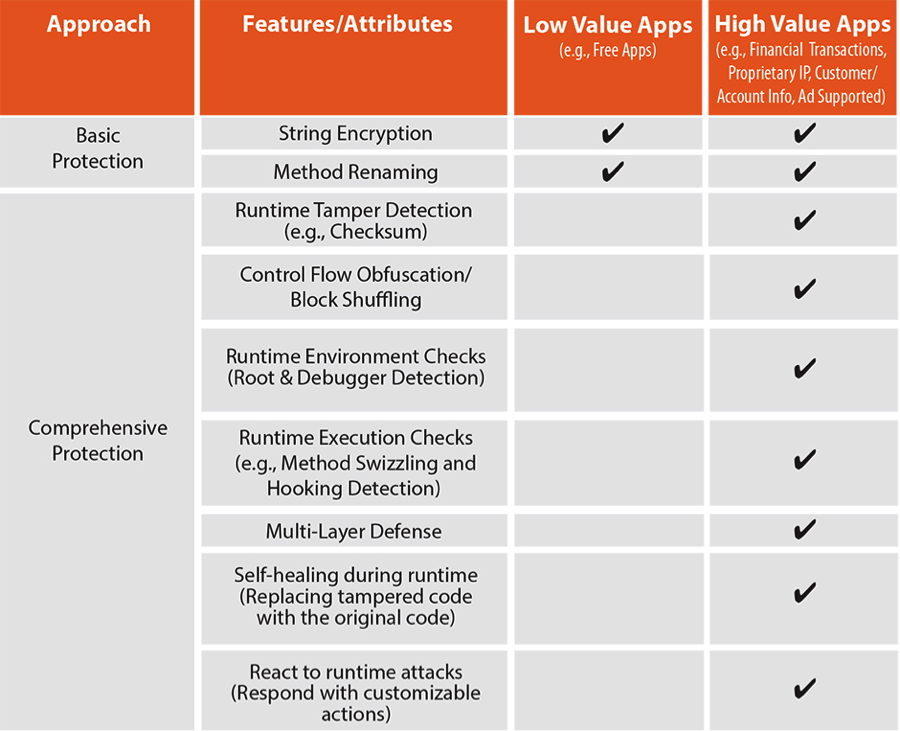
    See chart 1 below for recommended protection techniques for Low and High Value apps

    Chart 1: Recommended Protection Techniques

    chart1

    #2: Scale and Sophistication of Attacks Your Apps Will Likely Face
    Minimal protections against counterfeiting and repackaging are built into the app distribution ecosystem — including measures such as:

    • Detection of jailbreak or root conditions that enable side-loading of applications, many of which are Trojanized.
    • Monetization libraries to confirm that only legitimate applications are downloaded through an app store and that they are correctly purchased or licensed. However, these libraries can and are often breached by cybercriminals.
    • Audit processes to validate that only legitimate and harmless apps are placed in the app store. Audit mechanisms to block illegitimate apps from distribution to users are far from perfect, as seen by recent iOS malware, including XcodeGhost.

    Consequently, it is important to determine the scale and sophistication of attacks that you anticipate for your applications, and validate that the security solution you rely on is capable of meeting the challenge. For small-scale developers with free- or ad-supported apps, typically basic application protection will suffice, even though ad revenue may be subverted through Trojanization.

    In contrast, for business-critical enterprise applications, it is safe to assume that an organized army of hackers will be actively looking for ways to subvert your app as quickly and as comprehensively as possible. Since such attacks are designed to be covert, it can take weeks or even months until evidence of a successful hack surfaces. For that reason, measures of defense against attacks have to be complemented by measures of detection and reaction. For example, deeply instrumenting an app to detect attempted attacks and react with functions such as “phone home” can provide long-lasting and durable protection.

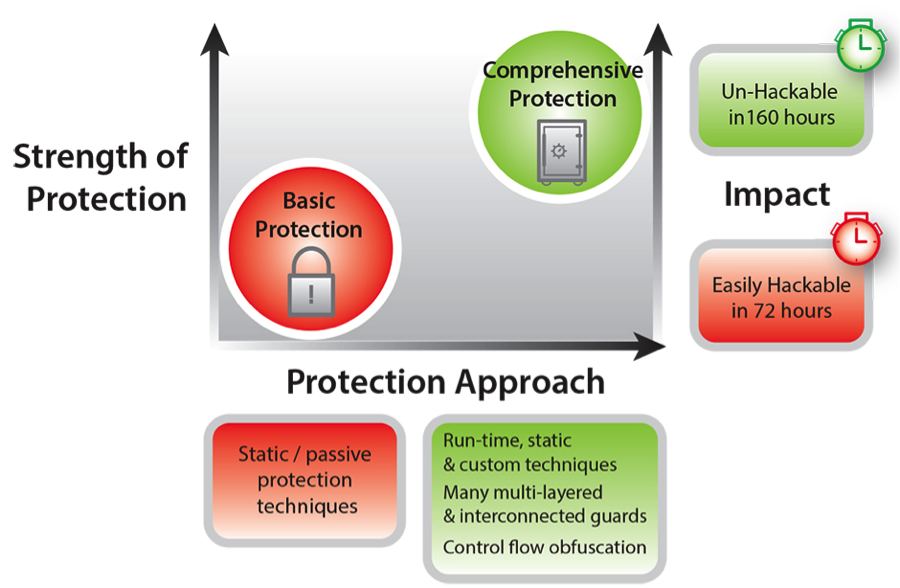
    Consider the recent benchmarking study that analyzed an Android Java mobile payment application that was hardened with a comprehensive protection solution against the same application with a Basic Java protection solution. Key findings from the study appear in the chart below:

    Chart 2: Strength of Protection of Basic and Comprehensive Hardening Techniques

    chart2

    Attacks that systemically compromise the underlying libraries an app relies on are the fastest growing class of attacks – and presently the most dangerous. This makes it imperative that high value apps are able to verify the pristine nature of their entire execution environment before unlocking sensitive functionality. Obfuscation solutions that focus solely on variable renaming or string encryption can deter static reverse engineering but are not able to protect against the full spectrum of high-intensity attempts to compromise the app.

    #3: Agility and Portability

    The portable device ecosystem, spanning smartphones and tablets and wearable devices, is among the fastest growing and fastest evolving. In stark contrast to the PC ecosystem — which is dominated by only a few chipset and operating system combinations, the portable ecosystem is a combinatorial nightmare of chipsets, OSs, programming technologies and hardware functionality.

    Because it is likely that mobile platforms will continue to evolve at their current breakneck and unpredictable pace, choosing a solid security partner with a history of innovation- that can keep pace with evolving ecosystems- is crucial. Additionally, selecting a security tool that is designed for cross-platform portability and extensibility will go a long way in helping you adapt to new platforms that become available.

    #4: Overhead and Performance Impact

    Memory footprint, power consumption and performance are important considerations in portable devices, where resources are limited and battery life is precious. All security technology will impose an additional memory footprint in storage and at run-time. It will also impose process overhead in terms of programming effort, compilation complexity and run-time execution characteristics.

    That said, more sophisticated application hardening solutions can offer a stronger trade-off between performance impact and protection strength relative to free- or low-cost solutions. For example, brute-force simple obfuscation can quickly cause memory bloat and diminish execution speed, while basic check summing can adversely impact run-time performance while retaining single points of protection failure.

    When apps are deployed to millions or billions of users, and/or where transaction volumes are expected to be high, it is crucial that the security solution chosen be as robust and reliable as your own app code. Obfuscating sections of the code that are sensitive to performance degradation, such as computation-intensive functions or graphics rendering routines, has an impact on runtime performance. It’s paramount to choose a protection solution that offers tunable performance vs. security tradeoff measures, and provides developers better control on size and performance of their code.

    The rise of mobile computing and soaring app usage has companies of every size and caliber scrambling to keep up. With customer loyalty and revenues at stake, developers are scrambling to release cutting-edge apps with little thought for long-term security considerations. In these conditions, it is tempting to treat code hardening as a checkbox and select the cheapest, most readily downloadable tool to do the job – but let the buyer beware. If you take the time to assess the value of your applications and the available options, you’ll realize that if you have a high value app and focus solely on cost, you are likely to be “penny wise and pound foolish.”

    About the Author/Patrick Kehoe

    PatrickPatrick joined Arxan in January 2014 as Chief Marketing Officer. Mr. Kehoe has over twenty years of experience building and managing sales and marketing capabilities for software, hardware, and service providers in the High Tech industry. Over the past three years, he held leadership positions at Siemens Enterprise Communications (SEN) – a global provider of communications software and services. Most recently he was responsible for North American marketing and partner business, where he oversaw the development of the strategic plan and drove Market Awareness, Pipeline Generation, and Sales results. Previously, he managed SEN’s Global Marketing Strategy, Intelligence, and Operations. Prior to SEN, Mr. Kehoe held positions at Booz Allen Hamilton and MarketBridge, a Sales and Marketing Professional Services Firm, where his clients included: IBM, SAP, Symantec, and VeriSign. Among other areas of focus, he was responsible for market expansion, new product marketing, digital marketing, and social media. Mr. Kehoe has a track record of success in North America, Europe, South America, and Asia, and has spoken at conferences and corporate events on a variety of sales and marketing topics. He holds a degree in Computer Science from Vanderbilt University and a MBA from the Darden Graduate School of Business, University of Virginia.

  • DevOps Impact on IT Operations Management

    DevOps Impact on IT Operations Management

    Most of the focus of the DevOps movement is on the application development to deploy cycle, and that’s appropriate.  When folks talk about the IT Ops side of DevOps, you’ll hear talk about IT process management tools like Puppet, Chef, and Ansible that are used to automate the deployment, update and remediation of software and VMs.  Yet, DevOps is widely acknowledged to be more than just one process—it is a culture of collaboration, enabled by automation that results in high quality outcomes.  As such, more IT disciplines are looking at how to apply DevOps principles to their domain.  These domains include those that can be put under the umbrella of IT operations management (ITOM): network engineering and operations, disaster recovery, and infrastructure operations management.  Many of these disciplines and organizations are currently highly siloed in traditional IT organizations, and tool suites are from an era that precedes the current emphasis on API automation.  Some may wonder whether these IT arenas can adapt and adopt DevOps.  The more pertinent question may be “can IT organizations afford not to?”

    ITOM is a huge topic, and there’s no way to do an exhaustive treatment of how DevOps is impacting it in one article.  However, we can at least take a look from a couple of angles.  The first angle is to consider DevOps impact in terms of functional areas of operational management.  ITOM can be roughly broken down into managing provisioning, capacity, availability and performance.  Of these, provisioning is probably the area where DevOps has had the most impact.  This only makes sense, since without automated provisioning of infrastructure and application components, it would be very hard to achieve the continuous processes that are a hallmark practice of DevOps teams. The trend of all IT infrastructure to become “software-defined” aligns with this provisioning automation movement.

    Once we stray outside of provisioning, the reach of DevOps becomes more sparse.  In the win column for DevOps is Application Performance Management (APM).   Five years ago, there was a tremendous dissatisfaction level felt by engineers trying to understand application performance.  So much so that a #monitoringsucks meme developed.  Since then, APM has significantly modernized and moved profoundly towards DevOps-friendly approaches.  Open Source Software (OSS) options such as the ELK stack (ElasticSearch + Logstash + Kibana) are seeing increasing adoption.  Meanwhile, commercial SaaS offerings from New Relic, AppDynamics, BMC and Riverbed are offering nextgen, highly API-enabled options.  Note that even though APM is considered a category of ITOM, it’s certainly the most dev-centric.

    Infrastructure monitoring has lagged by comparison.   The typical operations center arranges itself in a multi-level skills hierarchy.  Practices are shaped around monolithic, GUI-driven tools, and manual processes are the norm.  In fact, it’s fair to say that much of the institutional knowledge in many ITOM practices is literally “muscle memory.”  That is to say, knowing where to click on the screen.  Stovepipes of these hierarchies are formed around different types of infrastructure–compute, storage and network.  Collaboration between stovepipes is the exception, and ‘hot potato’ troubleshooting routines are the rule.  Rather than emanating from organizational DNA, collaboration often requires top-down pressure, usually to respond to crises. On the tools side, monolithic, enterprise software deployments and appliance-based architectures are common.  These products have been primarily designed to deliver a GUI experience.  Their APIs are usually second or third class citizens from the vendor point of view, and aren’t meant for end-users.  Rather, APIs primarily exist for vendor to vendor partnership integration and high cost custom integration projects. Clearly, this picture is not DevOps nirvana—so how is DevOps impacting it?  The answer is, so far, incrementally.

    One of the clear signs that an IT arena is getting primed for DevOps is cloud and open source disruption, and by disruption, I mean going beyond narrow, point tools to general purpose platforms.   Those same open source tools used for APM are making their way into systems management, and to a lesser degree in network management.  We’re also starting to see “green shoots” of change in systems and network management tools, with new SaaS offerings, though we’re far from a tipping point in these segments.  However, an interesting challenge for true conversion to cloud-based DevOps approaches is the need to address a Big Data problem.  The amount of data generated by IT infrastructure and networking equipment is now so voluminous that traditional systems and approaches can’t keep pace.  Legacy systems that have their architectural provenance in the 1990’s are based on scale-up models, and were never built for today’s data volumes.  Even cloud-based solutions may not necessarily be scoped to address IT Big Data. Until ITOM faces this technology challenge broadly, it will remain an impediment to transformational change.

    About the Author/Alex Henthorn-Iwane

    AlexAlex Henthorn-Iwane is the Vice President of Marketing at Kentik . Henthorn-Iwane has more than 20 years of experience bringing new technologies in networking, security and software to global markets. Henthorn-Iwane leads the global marketing strategy for Kentik and help the company bring its innovative story and solutions to network-dependent organizations around the world.

    Prior to joining Kentik, Henthorn-Iwane was VP of Marketing at QualiSystems, where he oversaw worldwide marketing at the industry’s leading supplier of DevOps cloud orchestration software for hybrid IT infrastructure, and Packet Design Inc., a provider of network management software founded by serial entrepreneur Judy Estrin. Prior to that, he held product management roles at CoSine Communications, Corona Networks, Lucent Technologies and Livingston Enterprises.

    Through his roles at QualiSystems, Packet Design, CoSine Communications, Corona Networks and Lucent Technologies he has acquired expertise in cloud computing and the opportunities presented through virtualization. He has written for Embedded Computing, Virtual Strategy Magazine, Datamation, SDN Central, Datacenter Knowledge and InformationWeek.

    Connect with him on LinkedIn, Twitter, or SlideShare.