Author: contributor

  • What Every Front-End Developer Needs to Know

    What Every Front-End Developer Needs to Know

    One of the hardest things about being a front-end developer is the fact that everybody has very different expectations of what it means to be one. This, along with a technology stack that changes at the speed of light, makes interviewing for a front-end position tricky.

    To help you out, and to give you an idea of our views on the role, we have prepared some points on what we consider to be essential knowledge for a front-end developer.

    Be Able to Solve Problems

    This sounds quite abstract, so let’s talk about what it means. Unlike many other developer positions, a front-end developer wields the power of multiple languages and technologies. Being able to look at a task, split it up into necessary steps and choose the right technologies for the job is an essential skill—some things need just a line of CSS, but implementing them in JavaScript would require a 100K library or vice versa.

    Sometimes you won’t know the perfect tool for the situation at hand, and this is also fine. However, you are still expected to provide a solution. This solution may not be the nicest in terms of code quality or speed, but it needs to work—at least for the cases presented at hand.

    JavaScript

    React and Angular, along with other front-end frameworks, are quite impressive pieces of engineering and it is important to know them well if they are the primary frameworks you are using for the job. That said, knowledge of JavaScript, its core libraries and browser APIs will support you no matter which framework you use. Additionally, JavaScript is a general-purpose programming language, so doing some simple array or tree processing shouldn’t cause you any problems and shouldn’t immediately trigger the reflex to include that nifty 100k library that you would barely use.

    One more thing to pay attention to is the asynchronous but single-threaded nature of JavaScript. You should be comfortable with scheduling pieces of work into the future in various ways and know how to execute some code after those asynchronous calls.

    CSS

    In the world of component-based frameworks and living style guides, you can get away with minimal CSS knowledge most of the time. Yet, when something goes wrong with your layout, or when you need to implement something unique, you need to know how browser layouts work. In short, we want you to understand CSS, but not necessarily keep all the flexbox properties or browser-specific hacks in your head—although it is certainly a plus if you do.

    Know Thy Standards and Keep Up To Date

    Nothing gives you as much appreciation of the complexities involved in making the front end work as reading the standards does: HTML, CSS and ECMA. It’s easy to get overwhelmed with more than 2,000 pages of quite dense and very specific reading, so start small. Websites such as SmashingMagazine, PonyFoo, HTML5Rocks and others will keep you up to date on the latest developments and might trigger an urge to understand things deeper.

    Network

    Every awesome front-end application needs to get to the user’s browser somehow. It’s also likely that you will have to make some asynchronous fetch requests to back-end services. All of this makes use of network, which means you should be aware of what is involved in making an HTTP request, at least on the level of Wikipedia with a sprinkle of cache-related topics, as well as what request latency is composed of.

    While it is not a requirement for a front-end developer, knowing the connection on a TCP level is a nice thing to have, as is awareness of HTTP/2. Knowledge of REST services, at least from a consumer perspective, is certainly helpful as well.

    Debugging

    This goes back to the initial section on problem-solving, but also touches on every other front-end topic. Browsers are extremely complicated pieces of software with years of legacy, but still evolving at great speed, and this software is our domain as front-end developers. So whenever something goes wrong there, it’s our job to figure out why.

    Sometimes it means looking for JavaScript errors, other times you may need to profile your code to check for slow code paths, and occasionally you may need to use CURL to fire off some requests from your terminal.

    Security

    Web, being an open platform, is constantly under the threat of various attacks, targeting both users and companies. Every piece of code and every call the browser makes is a potential source of security vulnerabilities—initial load of the page, AJAX request, external scripts or iframe, and even a simple DOM manipulation can be vulnerable to XSS, CSRF and various other vectors of attacks. Being aware and vigilant is an essential requirement for the safety of the data of your customers and your company.

    Testing

    QA, as a department or a position, hasn’t existed at Zalando since we brought in Radical Agility in 2015. We believe that it’s each developer’s responsibility to ensure the quality of their produced code, and front end has some very specific strategies for testing and asserting non-functional properties of the code.

    We believe that unit testing is a must for any project, and we highly encourage TDD, especially for a dynamic language such as JavaScript. Generally, you also would want to supplement this with some end-to-end or functional tests to make sure users can do what we expect they should be able to do.

    Tooling/Automation

    All of the topics discussed here also require very specialized tooling. You definitely should be comfortable with the concept of resource bundling and the tools available for this purpose. As mentioned above, testing by hand is not our thing, so a setup with automated tests is a must for every project.

    Ideally, tooling and automation should be complemented by continuous integration/continuous delivery to make sure no code slips past without running those tests. Depending on the project, you also might want to use a transpiler such as PostCSS or Babel to help you write more modern code.

    Conclusion

    What we’ve collected above is obviously an enormous amount of knowledge and will rarely exist in a single mind; however, the strongest candidates have at least a general understanding and a keen insight with a select few to stand out as a front-end developer.

    About the Author / Dmitriy Kubyshkin

    dmitriykDmitriy Kubyshkin is a front-end architect at Zalando SE, helping delivery teams with the migration of their front-end features from a legacy monolith to their new microservices architecture. Connect with him on LinkedIn / Twitter.

  • Creating a Continuous Integration Delivery Pipeline

    Creating a Continuous Integration Delivery Pipeline

    This article will provide an example delivery pipeline used through continuous integration, as well as the DevOps tools involved in the automation of building, testing and deploying code through your software development life cycle (SDLC).

    Background

    These days, it’s almost impossible to go anywhere without hearing about DevOps. In short, DevOps is the effort to improve communication and synergies between development organizations and operations organizations—hence the term, “DevOps.” The main focus is to improve the efficiency, quality and speed to market within the software development world.

    Today, you also may hear and see a lot about continuous integration and continuous delivery/deployment. There are differences between the two for sure, but for simplicity’s sake, this blog focuses on breaking down the different stages of the process. This way you can get the basics and hit the ground running with a delivery pipeline in your organization. The delivery pipeline can be broken down into a few major buckets of work, or stages, as mentioned below.

    In my opinion—and, again, trying to keep things simple for now—the stages can be broken down as follows:

    1. Source Code Control (Management)
    2. Build Automation
    3. Unit Test Automation (could also include Integration Testing here as well)
    4. Deployment Automation
    5. Monitoring – not included in this discussion, and can be added at any time

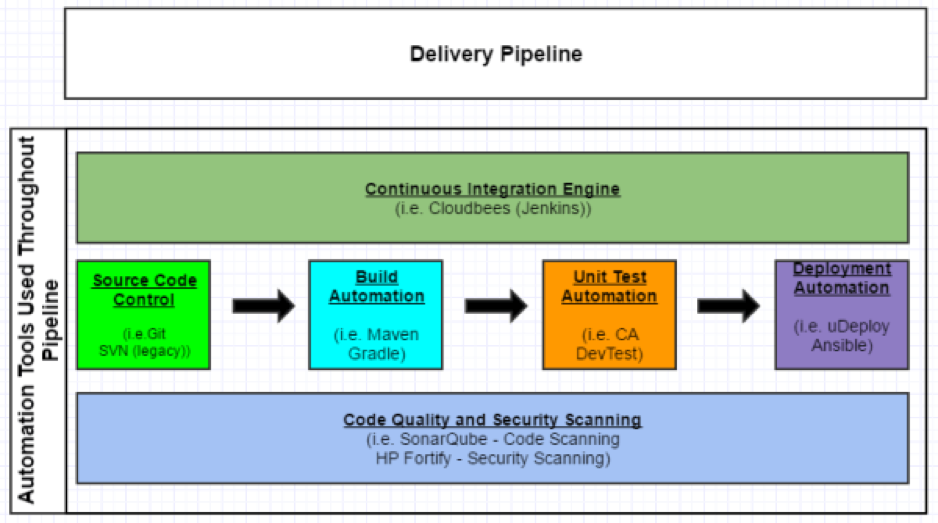
    I have outlined the progression of these stages in Figure 1 below. Let’s review each of the stages in a little more detail.

    picture1

    Figure 1 – Continuous Integration Delivery Pipeline Sample

    Source Code Control (Management)

    Background

    Source code management, or source code control, certainly is not a new topic. This has been around for decades and has evolved over time. In a nutshell, an organization stores its code in a source code control system or repository so it can be tracked, maintained, versioned and audited. Developers should not store the code on their laptops or virtual machines and trust that will suffice for managing the code.

    Possible Tools

    1. Git is probably the most widely used SCM system out there. It is an open-source system.
    2. Subversion (SVN) has been around for quite some time. It is also an open-source system and is heavily used in many organizations, but there has been more of a push toward Git.

    Git and Subversion comparison can be found here.

    Build Automation

    Background

    Once a source code management system is in place and actively being used by a development team, the team will need to be able to compile and build their code. This is probably the first step in the whole chain of continuous integration events—it’s what gets the ball rolling. The code needs to build cleanly before an organization can even think about deploying out to its environments for testing and production.

    Possible Tools

    1. Gradle is an open-source build automation system used by top companies including Netflix, Google and LinkedIn.
    2. Maven is another open-source build automation system.

    Gradle and Maven comparison can be found here and here.

    Unit Test Automation

    Background

    Developers unit test their code to ensure the functionality they are building works as expected. In an ideal world, the development team should be saving these unit tests so they can be reused and put into a regression test bed.

    Possible Tools

    There are multiple tools out there for helping developers unit test their code. Many of these tools are open-source and can be used freely.

    1. JUnit is an open-source unit test framework pretty widely used.
    2. CA DevTest allows for the automation of unit testing, as well as a few other bells and whistles, such as service virtualization.

    Deployment Automation

    Background

    For the last stage in the process, delivery teams need to deploy their code/applications out to various test environments and, of course, production. To reduce errors and overhead in the deployment process, while increasing speed to market, this step can be automated through a variety of tools and methods.

    Possible Tools

    1. IBM Urbancode uDeploy allows users to model a process and orchestrate their deployment. This process then can be repeated across all an organization’s environments, and tweaked for each environment as needed.
    2. Ansible is an open-source IT automation tool. It can be used for everything from configuration management to product installation to application deployments.This tool is rapidly gaining acceptance and momentum in the DevOps community.

    Conclusion

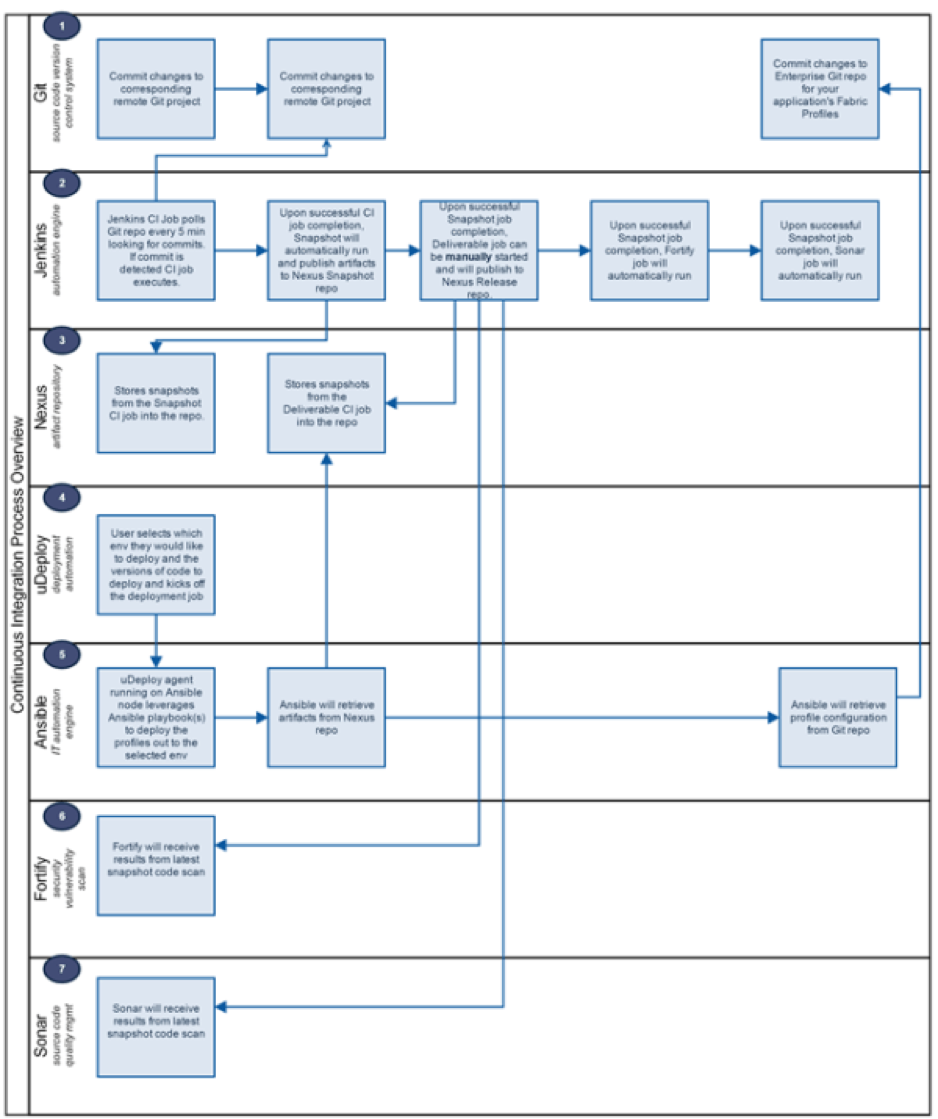
    This was simply a quick overview for companies to get started down the path of continuous integration and the DevOps world. Figure 2 is an example of what the whole flow looks like from committing the code to repo to deploying the code to an environment, to help put things into perspective. It’s easy to see how the tools interact with each other on the journey to production.

    picture2

    Figure 2 – Continuous Integration Process Flow

    About the Author / Seth Gagnon

    seth-gagnon-head-shotSeth Gagnon is a Middleware / Infrastructure / DevOps architect with more than 12 years’ experience in the field. Please visit sethgagnon.com for additional related articles. Connect with him on LinkedIn and Twitter.

  • Get to Know the New DevOps Stack

    Get to Know the New DevOps Stack

    Deploying software has always been manual and labor-intensive. That’s fading into the past as continuous innovation has become a competitive differentiator for companies of all stages and sizes across every industry.

    DevOps has become a hot investment market in recent years. The mega-rounds we’ve been seeing show the massive demand for tools that enable optimal runtime. Moreover, IT leaders are ready to spend to promote the DevOps culture.

    Companies increasingly are turning to DevOps processes and tools to automate the development life cycle and position themselves to adapt and scale nimbly. But for some companies, the idea of completely overhauling their IT operations processes can seem daunting—they don’t know where to begin. The thing is, adopting DevOps is actually quite simple.

    Examining the Stack

    Developers should bake in automation and agile development from the beginning. The good news, though, is that a defined set of tools to automate each step of the deployment process has emerged. Here’s a breakdown of the new DevOps stack, layer by layer:

    Source Code Repository: Let’s start from the bottom of the stack—from the moment you write the first line of code. Before the open-source movement took off and the cloud enabled easy sharing, developers had to work much more slowly to ensure that the necessary improvements were inserted in the right version of a product. Companies such as GitHub, Atlassian and GitLab provide source-code repositories that facilitate collaboration. Now, engineers can work on the same projects at the same time from halfway around the world without worrying about duplicating efforts.

    Continuous Integration: Newer tools such as CircleCI and TravisCI, as well as older tools such as those offered by Jenkins, automate testing and integration and provide repeatability in the deployment process. Using these tools, developers are able to test their code for failures and bugs as they write it so the code can be fixed before users ever experience the bugs. CI tools give developers something they desperately need to succeed in today’s competitive marketplace: timely feedback. By spending less time waiting on feedback for new code, engineers can resolve software bugs before they grow into full-scale crises.

    Binary Repository: Jfrog and Sonatype provide an end-to-end solution for storing and managing binary artifacts. The binary repository is the system of record closest to the production runtime environment. When something goes wrong, a binary repository such as Artifactory is the first port of call for operations teams. In addition, these tools scan for security vulnerabilities and make it easy to seamlessly distribute software to every corner of the globe.

    Continuous Development: Companies including Chef, Puppet and Ansible automate the next phase of taking data into production. The holy grail for software developers is zero downtime; continuous development tools allow developers to update software while everything remains up and running. These tools also streamline the delivery process by automatically configuring servers and ensuring repeatability of the deployment process.

    Production Environment: Google Cloud, Amazon Web Services and Microsoft Azure are in a war over runtime market share in the public cloud. Behind the firewall, Mesosphere, Kubernetes and Docker are trying to dominate the orchestration layers of enterprise private clouds. Customers want the agility and automation that comes from a cohesive DevOps stack but are refusing to be locked into a single vendor at any level. Whichever stack emerges as the default DevOps stack will have to ensure compatibility across public and private clouds.

    About the Author / Andy Vitus

    andyvitusAndy Vitus is a Partner at Scale Venture Partners. He has been investing with Scale for over 12 years and focuses on next-generation enterprise software and new data center technologies, including virtualization and cloud computing. Andy sits on the boards of Arena, Crittercism, DataStax, JFrog, PubNub, Realm Stormpath and Treasure Data. Connect with him on LinkedIn and Twitter.

  • DevOps: Using Games to Make it Practical

    DevOps: Using Games to Make it Practical

    This blog stems from my experience of being one of the earliest DevOps Foundation trainers of DOI and successfully completing 19 batches of DOI Foundation course in the last year.

    In retrospect of the year starting when TaUB Solutions signed up as a registered education partner (REP) of DOI, my opinion is this has been the best service portfolio offering for our customers and partners.

    There are few things that appeal best when it comes to DOI Foundation course and I can summarize them with the collective feedback I’ve received so far:

    “Challenges the preconceived myths and practices around DevOps with practitioner stories.”

    “Gives a holistic overview of philosophy behind DevOps. Philosophy should precede science and science should precede engineering.”

    “This course maintains the discipline to be truly advisory in nature by illustrating tool chain without recommending vendor-specific tools.”

    “The group exercises during the class and the facilitator practical insights helped us to put the aspects in to our organizational context of delivering products and services.”

    “We have never seen a course such beautifully designed that could be the first basic building block to know ‘Do’s’ and ‘Don’t’s’ of DevOps across application developers, infrastructure operations, project managers, infosec professionals and business leaders.”

    To enhance the overall learning curve of the audience, we put them in to the third day of experiential learning using the Phoenix Project Business simulation. The simulation was divided into four rounds and played with maximum of 12 people per batch. The Team was entrusted to achieve a target of $300,000 within four rounds and take the share value from $21 to $45.

    While the target milestones were clearly laid down at the beginning of game it was difficult for the teams to get hold of the situation due to various unknown parameters. It took them quite sometime to understand the different moving parts of flow, dependencies, business impact of projects, issues and features that came up in every round and make  appropriate choices and decisions.

    The teams experienced significant learning, sharing and collaboration over the four rounds and had loads of fun. One common feedback from the teams was for the game to be mandatory after every two-day DevOps Foundation course.

    The consolidated feedback after playing the DevOps business simulation after the two-day course:

    “It demonstrated that it is not easy to build collaboration, communication and integration. It takes time and there is a lot of patience and team work needed to make this a reality. The DevOps culture had to be nurtured through self-organizing teams with mutual respect, sense of pride and collective ownership to work toward a common goal.”

    “It gave a working knowledge on how ITSM and DevOps are complementing each other [Ex. Change Management and Improved Flow].”

    “The Principles of DevOps, namely the First Way (Improve Flow from left to Right), Second Way (Shorten Feedback Loops) and Third Way (Repetition through Mastery) was visibly evident over the course of four rounds.”

    “The speed of execution improved over the rounds using short feedback loops, continual improvement and applying lessons learned from previous rounds.”

    “It gave a good understanding of how different roles and responsibilities in the organization contribute to the overall success of the project.”

    Finally, the teams made over and above the required target of revenue and stock price. The winning moment was enhanced by the significant learning opportunity and ability to bond with diversified cross functional teams.

    The experience of playing the business simulation reinforced practical understanding of DevOps and also transferred skills that they could implement immediately at their workplace.

    About the Author / Suresh GP

    sureshSuresh GP is the Managing Director of TaUB solutions and Regional leader of BRMI (APAC). He has more than 15 years of experience in IT Service Management, IT Governance, Program Management and Organizational Change Management. He is regular blogger and International speaker at itSMF UK, itSMF Australia, itSMF USA, itSMF Finland and itSMF Norway. He is a Certified DevOps, Agile Service Manager, Business Relationship Management Professional, PMP, CGEIT, ITIL V2 Service Manager, ITIL V3 Expert,  ISO 20000 practitioner. He was awarded the ITSM contributor of the year by itSMF Singapore in 2013.
  • Alerts Keep DevOps Teams Responsive, in Sync

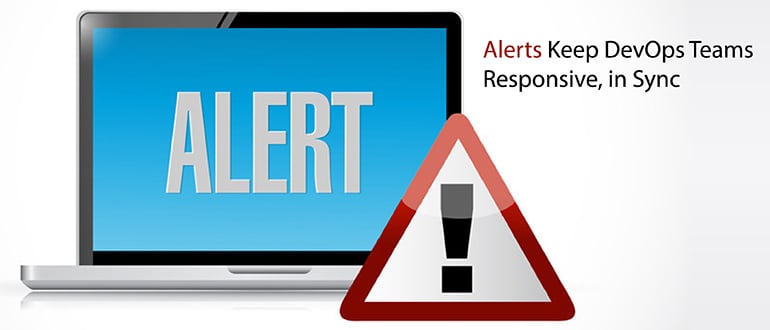
    Alerts Keep DevOps Teams Responsive, in Sync

    Continuing our five-part series on “Continuous Monitoring: The Role of DevOps and APM,” this blog post will talk about how alert notification can help DevOps teams be more productive and agile.

    Amid the constant, rapid change and fluidity typical in DevOps organizations, there are some undeniable absolutes. These absolutes, present at each stage of the DevOps life cycle, demand your teams’ attention: A build or test succeeds or it fails; an outage of an app in production is restored to service or it lingers unavailable; users applaud or they blast out complaints. And with each of these states throughout the DevOps life cycle there are absolutes common at every step: Your team is either communicating or they are isolated, and, subsequently, either in sync or operating in confusion and chaos.

    This is still common, but avoidable. The means of communication are more abundant than ever. We can text, email, use collaboration apps or even the obscure method of speaking into a telephone to another human in real time. Yet, despite all these methods, DevOps teams still find themselves taking too long to become aware of issues that need immediate attention or action. Or, we realize too late that multiple people are responding to or chasing down the same issue. Ironically, the easier it is to communicate and even automate communication across all of the different methods, the more likely we get inundated and saturated by what we really need to be paying attention to.

    What’s the best way to cut through all the noise? DevOps teams can:

    1. Filter the junk and cut down on the noise to begin with—without missing something important.
    2. Direct the relevant info only to those people that need to take action, and only when it’s the appropriate time.
    3. Require an acknowledgment that the recipient is taking ownership of the issue.
    4. Or, of course, all of the above.

    There have been tools available over the years to tackle these noise-slaying objectives. Some do a great job getting info to our team’s pertinent DevOps information, but with no way to filter out the irrelevant or redundant stuff. And others can do some of everything, but are complex to set up and maintain and expensive to use.

    DevOps teams I’ve talked to want to be able to:

    • Immediately and automatically send critical, actionable alerts.
    • Route alerts to the right people immediately, but only when it is the appropriate time to do so (don’t wake up the wrong teammate!).
    • Speed alert response with automated acknowledgment and escalation.
    • Automatically communicate through text, email, voice mail and mobile app, all custom-designed for DevOps use cases.

    The prevalent expectation goes beyond easy-to-use, simple to start and maintain solutions. Effective tools also must meet the increasing demand for agile and efficient collaboration among DevOps team members who often use multiple communication tools.

    • Filter out the noise, but don’t miss the important stuff:
      • Filter alerts, (e.g. by problem severity), so you can focus on real problems and disregard IT operations noise. Create custom groups of contacts to make sure the right notifications reach the right team member, and streamline the process of determining who to contact when specific problems occur and how to contact them.
    • Notification channels:
      • Define experts who can respond to problems and store their contact details so they can be notified automatically of problems in their area of responsibility. Users should be organized into groups and so you can send notifications to several users at once. Notifications should able to be sent by email, SMS, mobile app, voice message and chat apps.
    • Alert management and notifications:
      • Tools with policy-based notifications can let you define which type of subject matter you want each person or group to be notified about. You should be able to create filters based on the alerts that occur, customize the filters and assign users and groups who are notified when matching problems occur. Unacknowledged alerts should be escalated automatically after a set time period to the appropriate contact. Filters such as the severity and status of alerts can be created for your IT monitoring requirements.
    • Scheduling:
      • You’ll want to be able to easily set up on-duty and on-call shifts. The process of scheduling is considered to be one the most time-consuming tasks that prevent users from utilizing a notification tool. A good scheduling capability should be intuitive and require minimal steps to use. Users should have the ability to customize or use out-of-the-box templates. Users also should be able to manually create shifts or build in shift patterns, such as follow the sun, to get their scheduling done faster. Scheduling capabilities also should be smart enough to schedule users or groups for weeks in advance.
    • Alert viewer:
      • You’ll also need to be able to monitor alert and notification status in management views, perform actions on alerts, and track them in real time. Seeing key alert information such as alert severity can help you enable to easily prioritize your to-do list. You should be able to track alerts from their receipt by the system through acknowledgment to resolution and changes in an alert history, and use predefined and real-time filters to designate alerts you want to see.

    Utilizing the capabilities such as these can empower you to improve responsiveness, save resolution time and focus on actionable notifications requiring immediate attention.

    About the Author / James Moore

    james-mooreJames Moore is responsible for offering management and strategy for IBM IT Service Management hybrid cloud-based solutions including Runbook Automation and Alert Notification. James joined IBM from the Candle acquisition in 2004, where he was product manager for Candle’s Application Response Time product lines.  James has more than 15 years’ experience in business service management, application performance management and event management. Connect with James on LinkedIn and Twitter.
  • Phoenix Rising: The DevOps Keys to Business Rebirth

    Phoenix Rising: The DevOps Keys to Business Rebirth

    In “The Phoenix Project,” a 2013 novel about an IT manager rescuing a late, over-budget IT initiative, Gene Kim demonstrates how collaboration between IT operations, development and business users can impact the business. In the era of digital transformation, the need to bring development and operations together—in what is often called DevOps—is more important than ever, as IT is now more than an enabler of the business. IT is the business.

    What’s at stake today is more than just a project or someone’s position or even the viability of an in-house department versus outsourcing the function. Instead, it may be the very existence of the company. According to Gartner, 25 percent of companies will lose business due to digital incompetence by 2017 while IDC predicts that 75 percent of the S&P 500 will be replaced by 2027. To avoid the fate of becoming an industry has-been, today’s market leaders need to ensure they won’t be overtaken by more agile competitors that respond faster to a rapidly changing marketplace.

    Automate Everything

    Today’s businesses need to transform into digital enterprises to thrive in today’s digital economy, and this transformation needs to be far more profound than simply investing in the latest digital technology. Because the pace of the digital economy requires companies to roll out new services faster than ever before, businesses are challenged to move from idea to revenue as soon as possible. This need for speed leads to a desire—really a requirement—for agile applications.

    For many of today’s enterprises, this means they have to stop thinking that a successful future depends solely on a traditional strategy of product innovation, using data analytics to better understand and serve their customers or building a higher quality, more profitable product portfolio. Instead, like the mythical phoenix, their survival may well depend on a complete rebirth around making the practices of agile application delivery and DevOps a core competency.

    DevOps teams need the ability to efficiently develop, test and deploy new releases faster, with high quality and stability. Using automation technologies to design-in this speed, quality and scalability within the development life cycle is critical.  The continuous integration and delivery processes at the core of DevOps and agile practices are enabled by many new automation tools and capabilities. Each of these tools typically targets discrete elements or steps in the entire process and DevOps teams use them as such, finding the right tool for the job. In addition to faster and higher-quality development throughput, building automation into the code of the application ensures better application services delivery in the production environment.

    The good news is that 60 percent to 70 percent of these enterprise application services or jobs within most organizations are micro-batch, batch or event-driven—and can be managed with a comprehensive job scheduling solution. By automating jobs as part of the application code and subjecting the job artifact to all the other automation processes, companies can substantially reduce time and effort during and after the application delivery process.

    According to Enterprise Management Associates, companies with workload automation reduce application outage time by about 70 hours annually, raise service level agreement standards, free 41 percent more IT staff for strategic projects, and defer or eliminate an average of 50 percent of IT staffing requirements.

    Traditional vs. Innovative IT

    Too many companies intent on being agile and innovative believe that a successful DevOps organization must be free of the trappings of rigorous change management. Business innovation and increased employee productivity, however, can’t exist without a stable IT foundation. The goal is to have a balance of both strategies in an organization. Gartner refers to this as Bimodal IT, which has two modes: “Mode 1 is a traditional, plan-driven approach that emphasizes safety and accuracy in the pursuit of reliability. Mode 2 is iterative, being largely outcome-focused and emphasizing agility and ‘just enough’ with respect to areas such as planning and process.”

    By committing to balancing the two strategies, organizations can increase agility without sacrificing stability. More importantly, companies can increase employee satisfaction by different teams successfully doing the jobs they are paid to do, whether it’s to drive innovation or keep the lights on. It’s worth noting that Gartner believes many elements in DevOps apply to both modes and that by 2020, at least 80 percent of practices identified today with DevOps and Mode 2 will be adopted by traditional Mode 1 groups.

    While thinking of your company as a phoenix may be essential for survival, the benefits go way beyond that. Just like the revitalized bird, your company can once again be youthful and vibrant, capable of soaring to new heights. This is a strategic goal worth investing in.

    About the Author / Gur Steif

    gursteifGur Steif is the president of the Workload Automation product line for BMC Software. Under Steif’s leadership, the Workload Automation business has more than doubled in size. Previously, Steif was the general manager and vice president for both the Workload Automation product line and the Performance & Availability business line. During this time, he grew the Workload Automation business at triple the market growth rate while also delivering a double-digit increase in customer satisfaction for Performance & Availability. In his 25-year career in technology, Steif has held leadership roles in strategy, product management, R&D, sales, marketing and M&A in IT operations management, application management and workload automation. Connect with him on LinkedIn/Twitter.

     

  • Network Resilience and Security from A to Z

    Network Resilience and Security from A to Z

    An observer watching a bunker shot by legendary pro golfer Gary Player was heard to say: “I’ve never seen anyone so lucky in my life.” The player retorted: “Yes, and the more I practice, the luckier I get.” Yet, when it comes to cybersecurity, nearly half of organizations are solely relying on luck to get them through a cyberattack.

    There is not enough practice or training in terms of incident response, and testing happens haphazardly depending on the developer and organization—obfuscating baselines and the context necessary to ensure security and resilience. Particularly in terms of testing, we’ve noticed that despite awareness of its importance, bugs and vulnerabilities routinely slip through. In fact, a recent Ixia survey found that 34 percent of developers have deployed products that have had a few bugs. Worse, 31 percent said products harbored significant vulnerabilities that required patching later in the cycle when shipped.

    The problem has been exacerbated by the rapidly growing normalization of agile development processes. Groups of developers are tasked to build products piecemeal, leading to application development that is often incremental and happens in iterative cadences. Testing and oversight happen at each step of the process, but the segmented nature of the development cycle means that bugs and vulnerabilities often arise when the code is assembled, and are routinely missed. For instance, the average IT web application had 32 vulnerabilities, according to recent WhiteHat Security report. It’s clear that more than a local test—a comprehensive end-to-end test—and relevant training are critical.

    A Change in Culture

    Improvement begins by changing the culture that minimizes security testing for the sake of launch timelines. Too often, the product development team will come together just to be told they need to move up their release date. The habit results in products that walk a thin line of performance, as they may contain unknown security holes due to not being fully tested. Just consider the slew of IoT devices and services that have been proven to be vulnerable because of this habit—from cars to coffee machines to cameras. It’s a major reason for security incidents, even with multiple layers of security tools.

    This also requires the right training. Having seemingly secure code and the right security measures is not enough for a strong security stance if proper training is not implemented. Organizations need to learn how to respond. Yet, recent SANS Institute research into the incident response capabilities of companies worldwide found that 43 percent of respondents did not have a formalized incident response plan, and 55 percent didn’t even have an incident response team.

    This less-than-vigilant approach to system-level security can have worse implications once a product goes live in the network. For instance, updates, patches and configuration changes applied when a new feature is added can reset an organization’s security posture, and this sometimes goes unnoticed—leaving gaps for threat actors to exploit. Or sometimes a machine fails to update and becomes and entry point, as experienced by JPMorgan Chase. Continuous testing and training from the very onset of operation and throughout a tools lifespan are imperative for all employees, especially IT and security pros—even in its simplest iterations.

    What to Look For

    Successful and continuous testing and training expose security and IT pros to anomalous activity they’d not be able to recognize otherwise. It’s necessary to be able to answer questions such as, “What does suspicious activity look like on my network?” or “What security alerts require immediate action?” The more they see, the more refined their eye becomes—it’s all about a proactive approach paired with repetition.

    Which raises the question, what is considered a good test? It starts with accurately reflecting the widest range of attack types in live operation. It is also important to create an accurate sandbox to test in so that it can be as close to reality as possible. The more accurate the environment, the better prepared IT and security teams will be. Realistic depictions better prepare employees as new malware, phishing and DDoS attack types emerge every day—not to mention it helps keep up with evolving typical application behavior.

    More specifically, function and system testing should be at the heart of any program following the development cycle test process. Quality of service, performance and resilience all benefit, along with security, as a result.

    Some companies take shortcuts, such as using internally generated attacks or crowdsourced probes to attack their networks. Just as bad, some have the development team create and run their own test scenarios. While this can give the illusion that everything is good, it creates a false sense of security—a single scenario only protects you from one type of attack.

    The key is not to stop at the minimum when it comes to security testing and training. Developers spend lots of time building great features; why not spend time training teams on how to use them? Limited or biased tests can easily overlook glaring flaws.

    Ultimately, the right approach to testing can make networks robust and prepare IT teams for real-world attack situations, helping minimize response times and the negative impact on the business. As breaches now seem to be coming from every direction, testing needs to come to the foreground, from the development stages to when products sit directly in the line of fire.

    About the Author / Jeff Harris

    jeffharrisJeff Harris is VP, Solutions at Ixia, leading solutions marketing for Ixia’s security portfolio of products and capabilities. As a former product development leader of advanced networking, communications, and surveillance products for commercial and military applications, Jeff has a deep appreciation for security implications that occur in development and operation. Jeff has led first to market product teams in personal area networks, mobile ad hoc networks, and a wide range of surveillance equipment and platforms. Connect with him on LinkedIn and Twitter.

  • Is Your Company’s IT a Disaster Waiting to Happen?

    Is Your Company’s IT a Disaster Waiting to Happen?

    Recent IT disasters suggest gaps in hardware testing, backup system testing and inadequate disaster recovery plans.

    Although the summer often is the most profitable season for most airlines, this past summer wasn’t great for several of the largest carriers. In July, Southwest Airlines suffered a 12-hour IT outage, triggered by a router malfunction that quickly took down many of its core operating systems like a house of cards. Worse, backup systems failed to deploy. Flight delays and cancellations continued for a few days.

    A similar disaster unfolded at Delta in August, when a power control module at the airline’s central data center malfunctioned, creating a surge to the transformer and loss of power. Delta’s systems didn’t switch over to backups as planned, causing scheduling mayhem as agents couldn’t access key systems. For both companies, the outages resulted in tens of millions of dollars in lost revenues.

    Sure, both of these outages affected businesses running more traditional IT infrastructure, but even if your company is running in the cloud, your business isn’t immune from a damaging outage. In September, Microsoft Azure experienced two outages lasting several hours each, one in Europe and the other affecting U.S. customers across several key services, including SQL Database, Virtual Machines, Service Bus and Visual Studio team services.

    As software developers and testers, we often focus narrowly on the application and the server it is running on—but there’s a lot more to consider. Hardware and components, backup systems and third-party providers all come into play when testing applications for stability and reliability. Of course, there’s no way to prevent all bad things from happening but there are some steps you can take to cover the bases more thoroughly.

    Look Beyond the Software

    If there were three main lessons learned from these recent IT disasters, they would be:

    1. Assess risk of the whole environment. The quality of your software is only as good as the components it runs on—the hardware, network, power, storage, and other third-party applications are often required. Understand the full picture and all of the dependencies. Categorize applications based upon business criticality and failure rate to focus attention on the pieces that really matter.
    1. Backup systems and processes are not “set and forget.” Spend more time documenting them, testing them and training staff. Make sure that the processes are up to date as IT adds new components and vendors to the system or if the company goes through a merger or acquisition.
    1. Invest according to your risk profile. If your company can’t operate for more than a few minutes without access to certain systems, plan on budgeting for warm or hot failover systems which enable near 100 percent uptime with always-on, parallel systems continually synchronized and ready to go. It’s too expensive to enable this failover capability for your entire environment—you will need to be picky. Some IT assets, such as an airline’s scheduling and reservation systems, deserve top priority and resources, while other assets such as the HR system, can do with less. IT directors also need to frequently investigate the need for upgrading old, unstable infrastructure technologies. Most companies also don’t spend enough time monitoring and testing backup and recovery systems.

    To minimize the risk of a major IT outage bringing down your business and alienating customers, the recipe is as follows: Analyze the points of failure, determine what is reparable and what is not easily fixed (for example, installing software usually can be done much more quickly than building a new server environment) and, finally, install and test failover systems and processes that can maintain basic operations with minimal customer disruption.

    Delta & Southwest: A Quick Analysis

    In both cases, Delta and Southwest had backup systems that did not deploy properly—or, at least, in a timely fashion. The first point of action would include conducting thorough, regular testing of those backup systems and locations and upgrading capabilities if necessary. Second, since no disaster recovery system is foolproof, create manual workarounds for critical system outages. That would have helped tremendously so that customers weren’t completely stranded. Third, create a fully redundant second data center that switches over automatically when the primary data center goes down. Naturally, this is the most expensive option, but depending upon the outcome of the risk analysis, it may be worth the money.

    With Southwest, a router failure caused a cascading effect that brought down the network altogether. It’s not clear if a secondary network was available for failover, although it appears the answer is no. Again, better, more frequent monitoring could have isolated the router problem and alerted IT to fix or replace the hardware before disaster struck.

    Any company with technology from many different vendors should work closely with vendors and partners whenever possible to mitigate possible risks. Vendors often are able to provide insight into how they test their own systems and can even share test cases to assist in validating the end-to-end system. Keep in mind that aging technology is not the only problem—sometimes new technology brings untenable risks. A recent example is the Samsung Galaxy Note 7 and its overheating battery problem and recall. As well, it’s smart to understand how the local utility handles its outages and what if any help it provides to customers in the event of service disruption.

    Planning Ahead

    Large companies with complex IT infrastructures should take a holistic view of critical system availability, considering all of the possible ripple effects from a single point of failure. Today’s systems and networks are increasingly interconnected and interdependent. For both airlines, the effect on customers and employees lasted far beyond the actual outage, as managers struggled to get agents and planes reorganized and rescheduled. Take that risk into any spending calculations for the disaster recovery plan. Companies that have gone through mergers and acquisitions have additional complexities from IT integrations—or lack thereof. Failover strategies should ideally be incorporated upfront as part of any acquisition plans.

    Comprehensive testing strategies are paramount, although sometimes overlooked, in preventing outages. Request information from core vendors, such as the networking equipment provider, on testing processes and ask to see their test cases. Though the vendor should be responsible for ensuring thorough testing of their own products, the customer is always the one to suffer the costs of a downed system. Development and testing teams should get clear on how external systems and providers handle down time and equipment failure. Strive to align the company’s disaster recovery processes with those of partners.

    Finally, for companies running mission-critical systems in the cloud, there are ways to mitigate the effects of an outage. Multi-cloud management tools such as CliQr (now owned by Cisco) allow IT to quickly redeploy workloads from one cloud service to another whenever needed. Containers are also helping in this regard due to the inherent portability benefits of the technology. Companies are using containers to move applications and workloads from region to region within one cloud provider; from cloud to cloud, such as from AWS to Azure; and even from the cloud to an on-premise data center.

    There are many causes of IT outages today, and as IT environments become more multifaceted, supporting more technologies, data and applications all the time, those risks grow. We don’t have an answer to the problem, but there is one strategy: leave no stone unturned. Involving testers and developers in outage prevention and disaster recovery planning is a wise move, indeed.

    About the Author / Kevin Dunne

    Kevin Dunne picKevin Dunne is vice president of strategy and business development at QASymphony. Prior to joining QASymphony, Dunne was a business technology analyst at Deloitte. He can be found online at Twitter and LinkedIn.

  • Empower Developers to Build Security into DevOps

    Empower Developers to Build Security into DevOps

    Over the past 10 years, as more organizations have made the transition to DevOps, there has been a cultural shift in which security and development teams agree quality is a priority. Yet, even with a shared quality focus, Development, Security and Operation teams still find themselves at odds on the road to continuous delivery of secure software.

    Some people claim developers don’t care about security. The reality is they want to write great code that’s secure code, but often they don’t have access to tools that fit with the way they work.

    There’s also tension between different sets of expectations and performance metrics for different teams. Developers are graded on their ability to deliver features and functionality to market as quickly as possible, while security engineers focus on prevention and detection. Operations teams, meanwhile, focus on reliability, uptime and stability.

    Development managers feel pressure from senior management to avoid project delays. At the same time, security managers aren’t rewarded for reducing risk and may be asked to turn a blind eye and give the application a temporary pass so the project can move forward.

    Prioritizing delivery to customers over security creates real dangers for the business. Veracode has found that 63 percent of internally developed applications are out of compliance with the Open Web Application Security Project (OWASP)’s Top 10 standards when initially assessed for security. And, attackers increasingly target the application layer, with web application attacks now the most frequent pattern in confirmed breaches, according to the 2016 Verizon Data Breach Investigations Report.

    Empowerment = Security

    Regardless of where your team is in the DevOps journey, you’re likely aware that detecting and fixing quality issues as early in the software development life cycle (SDLC) as possible increases efficiency and reduces costs. According to the Puppet 2016 State of DevOps Report, “high-performing development teams spend 50 percet less time remediating security issues” when they address security throughout the SDLC, instead of “retrofitting security at the end.”

    While you want to find and fix bugs early in the SDLC, early detection of coding flaws has the unintended consequence of distorting an application’s risk posture. Development is once again in the hot seat, despite trying to do the right thing and testing new versions of an application early in the life cycle.

    There is a middle path that can allow development to deliver more secure code at DevOps speed, but it requires automating security into the SDLC and into a continuous integration or continuous deployment (CI/CD) pipeline. Integrating security into the pipeline ensures that security testing happens with every release, and avoids the problem of bolting on application security late in the process.

    This method has the ability to scale easily as more applications are developed. The release engineer adds a step in the CI/CD build workflow for an application security scan from the master branch. The assessment can take place in parallel to the CI/CD workflow process and any security issues can be loaded automatically into the defect tracking system that development teams already are utilizing for functional testing. Security issues are prioritized and resourced just as any quality issue.

    The best way to catch software defects quickly is to analyze code as close to the time that it was written as possible. Security assessment, such as functional testing, “follows the code” through the application life cycle. During the development phase, developers analyze code in the IDE and develop unit tests that will find issues relative to their individual code changes. At this phase, developers receive immediate feedback while coding a feature, allowing developers to remediate basic issues when they are least expensive to fix.

    During the build and integration phases, when a development or feature branch is merged into the master branch, compilation and integration tests are executed automatically by the CI/CD workflow. Issues detected at this stage are visible to the larger development team. No developer wants to be the one who “breaks the build” or has a basic defect that should have been detected during development phase. The integration testing is critical because functional and security tests are able to detect issues resulting when data and control flows between components. Coverage of the application expands and developers still have the time to fix before code goes moves to the next phase.

    Enter Infrastructure as Code

    “Infrastructure as code” (IAC)—the concept of managing, provisioning and configuration of development, QA, pre-production and production environments in a repeatable automated methodology—provides consistency that previously was challenging when each system was provisioned and configured independently. Product teams using virtual machines (VMs) or containers are able to advantage of this model more easily.

    Even for those product teams that cannot take advantage of IAC, teams can still automate the deployment and configuration of the application. This becomes particularly important during systems/pre-production testing, where finding issues takes longer to remediate and the complexity increases as the application integrates with other systems. At this point in the life cycle, system and pre-production tests are automated when possible, and QA engineers and user acceptance testers may run end-to-end tests. Running security assessments at this stage is just as important as functional tests. True, fixing issues at this stage will be more costly to fix than during the development phase. But by this point the developers have been incorporating quality throughout the process and the number of high-priority issues will be significantly reduced.

    Empowering developers to find and fix quality issues earlier in the life cycle provides them with the knowledge and skill set to more efficiently fix defects where it is less expensive and disruptive to their coding.

    About the Author / Janet Worthington

    janetworthingtonJanet Worthington is senior product manager at Veracode,  working on solutions to help developers and development teams smoothly incorporate security into the application development life cycle. Janet joined Veracode in 2012 as senior program manager, delivering Veracode’s secure development solutions to Fortune 100 companies. Prior to joining Veracode, she led software quality assurance test teams at a number of startup technology companies. Janet has over 19 years of experience in software product development and services. Connect with her on LinkedIn and Twitter.

  • Mainframes and the Myth of Bimodal in DevOps

    Mainframes and the Myth of Bimodal in DevOps

    Rewind 20 years ago when we lived in a business world where big companies with unlimited resources beat out smaller, more strapped companies. The digital era—also known as the “age of the customer”—is changing all that. Where big once beat small, fast now beats slow. The DevOps approaches of startups often make them more adept at continuously delivering the innovations and conveniences that earn customer raves. Bigger, established companies often feel disadvantaged‚ shackled by an outdated culture and inflexible processes that haven’t kept up with the pace of change.

    Gartner coined the term “bimodal IT” as a way for older IT establishments to keep pace with agile startups. In the bimodal model, IT teams are separated into two distinct styles of work—one focused on supporting predictable, well-understood workloads with legacy systems and another that is more fast-moving, experimental and adaptable in meeting users’ constantly evolving demands and flourishing digital expectations.

    But the bimodal concept is not well-aligned to the spirit of innovation underlying modern application development and delivery. This is especially true for bigger organizations using mainframes. Here’s why.

    Successful DevOps Depends on Mainframe Agility

    The goal of DevOps is to roll out high-performing software and updates, ahead of the competition and with maximum speed, ease and cost-efficiency. In a DevOps model, software delivery can only happen as quickly as the slowest team. Modern web and mobile applications tend to span multiple platforms in their end-to-end transaction—from front-end web servers (systems of engagement) all the way back to mainframes (systems of record). IT places a lot of emphasis on systems of engagement, often taking back-end systems of record for granted. The reality is, the value in systems of engagement cannot be realized without the systems of record—making it essentially all one system. Developers supporting modern applications must be able to maneuver across and between all platforms, especially within mainframe code and data.

    Let’s look at a tactical example of this. According to industry research, 80 percent of the world’s corporate data—including customer data—continues to reside on mainframes. When a mobile web application is used to make a bank deposit, or purchase a product, for example, the transactional component of those applications typically is executed on back-end mainframes.

    This means mainframe applications are crucial to development efforts. What happens when mainframe developers and testers are locked into waterfall processes or don’t have the modern tools necessary to understand application logic or access mainframe data for testing? Frustration mounts and the overall innovative effort is unnecessarily stalled.

    Stability and Agility are not Mutually Exclusive

    The longstanding myth that stability and agile cannot co-exist is simply untrue. Unfortunately, it’s at the core of negative perceptions surrounding the mainframe today—people think the mainframe environment is too slow and cumbersome to support agile development. Development teams may think if they have mainframes, the only approach it can support is waterfall.

    The reality is, though, no customer will accept poor availability and performance in exchange for new features delivered quickly.  People with hands-on experience painfully understand that slow, waterfall delivery methods produce far greater quality issues and missed expectations, resulting in competitive risk. Additionally, large enterprises taking the “slow and stable” route give startups a head start in beating them to market, with offerings that customers want now.

    Alternatively, Agile process and DevOps tool chains enable scrum teams to test quality in terms of usability, function and stability early and often in the development cycle—when the time to remediate is the fastest and the cost the lowest. Agile process and DevOps tool chains build higher quality applications and enable continuous improvement in quality over time.

    Re-Platforming is not Necessarily the Answer

    Some DevOps proponents believe moving off the mainframe—to a supposedly more modern, commodity server-based distributed architecture—is the best way to circumvent perceived challenges to nimbleness and agility. But this is almost never the best answer. The mainframe retains its distinction as being the most powerful computing platform on the planet. It remains deeply embedded in large organizations, setting the standard for reliability, security and availability for mission-critical data and transactions. The new IBM z13 mainframe, for example, can handle the load of 100 Cyber Mondays every day, 365 days a year. Currently, mainframes process 30 billion business transactions per day. The post-modern mainframe is an engineering marvel unequaled as a system-of-record, business compute platform.

    The mainframe also offers cost advantages. Studies have shown that the mainframe is more cost-effective than commodity servers in handling the massive computing volume increases instigated by mobile applications. This is because decreases in commodity server pricing have not kept pace with the increase in computing volumes. In addition, leading vendors have worked together to deliver intelligent cost management on the mainframe, enabling workloads to be distributed in a way that keeps mainframe licensing costs (MLCs) down.

    In our view, “biomodal” advocates for the exact problem that must be solved. We think the answer is not replacing the mainframe, although if mainframe development is left unaddressed, this can present obstacles to DevOps. Rather, the answer is to evolve the mainframe to keep up with the pace of DevOps. There are mounting examples from large, high-performing organizations that it is possible to apply modern practices to the fullest extent, including mainframe applications. These organizations do this by giving developers the tools they need to work on mainframe code and data just as they would with any other programming language on any other platform, while meeting the escalating quality expectations of the digital age. For example:

    • Mainstreaming the Mainframe Environment – Mainframe users need to move away from the antiquated “green screen” mainframe environment, adopting state-of-the-art interfaces and tools. This is the first step enabling developers to work more fluidly on the mainframe, in an environment that’s much more familiar and comfortable to them. Organizations that fail in this adoption will have a very difficult time enabling the next generation of development talent to leverage invaluable and irreplaceable mainframe code and data. This will place a huge hindrance on DevOps success.
    • Leveraging Tools from the Java Development World – One example is visualization capabilities, which enable developers to quickly and easily identify critical interrelationships between apps and data. This helps them to sidestep unintended, undesirable impacts as they modify applications, increasing confidence and mitigating unnecessary delays.
    • Make it Easier to Identify Mainframe Code-Level Issues – Developers need tools that enable them to identify problems with mainframe code; for example, when it is the source of a widespread user performance issue, or when it is consuming too many resources and driving up costs unnecessarily.

    Conclusion

    In our view, “bimodal” is not the solution, but a broken state of disadvantaged affairs for too many organizations. From a competitive vantage point, bimodal will only hurt DevOps teams and hold back the innovative efforts of the organizations they support.

    The bimodal IT model is a road to inevitable failure for those enterprises seeking success in the digital economy. This is especially true for organizations that rely on mainframes. A smartly leveraged mainframe is an extremely valuable competitive asset that needs to be removed from its silo, evolved and smoothly integrated into modern, heterogeneous development environments.

    It is possible for big, established companies to adopt DevOps, become agile, and move as fast as startups. But the ability to think and act like a startup requires some major fundamental changes, particularly at the level of software development. The good news is, the legacy technologies that are often perceived as impediments can actually be a tremendous competitive advantage, if they are harnessed and evolved in the right manner.

    About the Author / Christopher O’Malley

    chris-omalley2Christopher O’Malley is CEO of Compuware. He has nearly 30 years of IT experience with past positions including CEO of VelociData, CEO of Nimsoft, EVP of CA’s Cloud Products & Solutions and EVP/GM of CA’s Mainframe business unit, where he led the successful transformation of that division. Connect with him on LinkedIn and Twitter.