Author: contributor

  • An IT Practitioner’s Guide To DevOps

    An IT Practitioner’s Guide To DevOps

    Two technology innovations of the past decade have fundamentally changed how IT works and given rise to the “DevOps” phenomenon. Before we dive into what DevOps is and how IT organizations should adopt this culture, let’s review what gave rise to it in the first place.

    Pull from Agile Development

    The last decade has seen many organizations abandon the traditional “waterfall” software development process in favor of “agile” development. Agile is all about small, specific user-centric stories, described by a product owner and delivered in short sprints of two to four weeks by small, focused development teams.

    Agile development led to the emergence of more frequent code drops from software engineers, which needed to be deployed more quickly. No longer was it okay to take days or weeks to deploy a new software version; developers working in two-week sprint cycles want deployment to work within minutes with a high degree of predictability.

    Enabled by the Cloud

    Before the cloud came along, access to infrastructure required human interaction and manual operations. Processes typically could not be automated effectively. This meant that operations were slow and error-prone and created a huge point of friction in the software development life cycle.

    Around the same time that developers were adopting agile development, the cloud became real, and infrastructure could be orchestrated effectively using APIs to provision everything from machines and networks to storage, routing policies and firewalls.

    DevOps: Closed Loop Automation Between Development and IT

    Agile development and cloud computing created the perfect storm in which DevOps was born: this new way of doing IT is all about ensuring closed loops, with 100 percent automation.
    picture2

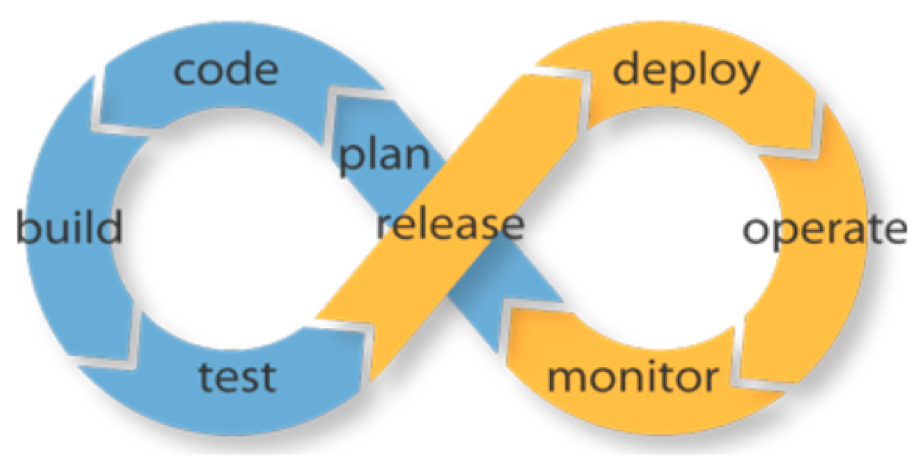
    Figure 1: DevOps is about ensuring a closed-loop, fully automated workflow between software development and deployment.

    In the simplest terms, this meant that each of the steps outlined in Figure 1 need to be fully automated, and integrated with preceding and following steps. Doing this ensures software can be developed faster, deployed quickly, and iterated upon more rapidly.

    Benefits

    Done right, DevOps leads to a virtuous cycle of greater productivity across development and IT, greater agility in bringing new experiences to market and greater impact on the business.

    Adopting DevOps: You Can Phase It In

    Organizations looking to adopt DevOps should do so in phases and define metrics for each phase. Here’s a typical phased approach that you can use as a baseline and customize to your organization’s unique needs.

    Phase 1: Adopt Agile Development and Cloud Computing

    Agile development and cloud computing are profound technology shifts and create the underlying culture in which DevOps can thrive. So, the first step is to ensure organizational buy-in for both of these trends:

    1. Agile development can be adopted in stages. The most important is to agree that software will be built and shipped in short, two-to-four-week sprint cycles, and with a focus on user stories.
    2. Cloud computing can be adopted no matter what your IT infrastructure looks like today. Use hybrid cloud platforms such as OpenStack to provide programmatic access to a VMware or Linux environment, or use a public cloud platform such as Amazon Web Services.

    Phase 2: Commit to a CI/CD Workflow

    Continuous integration (CI) systems such as Jenkins or TeamCity provide a way to pipeline and integrate the various steps in a DevOps workflow. The choice of system doesn’t matter as much as ensuring that all steps of the workflow will be integrated (eventually) into this workflow.

    Phase 3: Repeatable, Automated Software Deployment

    Many organizations tend to have some manual steps in the packaging and deployment of their software, especially for getting it into production. This often reflects underlying assumptions about manual oversight and intervention, and it breaks the closed-loop philosophy of DevOps.

    To succeed with DevOps, you need to fully automate the software packaging and deployment process. In addition, ensure that production builds are deployed in the exact same manner as developer builds, using identical environments.

    Cloud technologies such as orchestration (OpenStack HEAT or AWS CloudFormations) and configuration management tools such as Ansible, Puppet or Chef can be used to implement this phase.

    Phase 4: Automate Software Testing (Continuous Delivery)

    Once software deployment has been automated, the next phase is to automate the validation process for new software releases. If you’re like most organizations, testing involves several rounds of back and forth with QA teams and product managers, and it often takes weeks to resolve the last few bugs in each release. To reach the next level of DevOps automation, this process has to be completely lights-out and automated.

    This requires a fully automated software test suite, across the back-end and front-end, so that product managers have confidence in the quality of the software being released. Once implemented, you finally have a closed loop between the critical elements of the DevOps life cycle. While release to production may still require someone to approve it or “push a button,” this is a very respectable state in the DevOps journey.

    Phase 5: Continuous Deployment

    To get to the most advanced DevOps phase, you need to automate the “go live” process for software releases. This in turn will allow you to take even smaller, more frequent code drops and push them into production.

    The most advanced software teams in the world now operate this way, and the organizational implications can be transformative: Developers come into work feeling that they can implement a feature and have it go live immediately, and product managers can make commitments to the business with the confidence they can deliver, because they have this incredibly efficient software delivery machine backing them. Most importantly for you, IT is no longer seen as a cost center; it’s seen as the fundamental enabler for business productivity and time-to-value.

    Closing Thoughts

    Getting to Phase 5 represents the state-of-the-art in the industry today. However, another significant breakthrough promises to raise the bar even higher.

    In each of the prior phases, the DevOps workflow is integrating software development with IT operations; but there is nothing influencing software architecture to take operations into account.

    In other words, we’re still bolting IT operations automation onto software development.

    This is about to change. We’re on the cusp of a new era in software: instead of bolting operations onto the software development process as an afterthought, a new framework promises to bring development and operations together by design. With declarative, infrastructure-agnostic constructs to describe how applications are composed, interact and managed, Kubernetes promises to increase the operability of modern software systems by an order of magnitude.

    Everyone interested in the DevOps journey should be learning about Kubernetes and evaluating how it will improve your software development and operations workflows.

    About the Author / Sirish Raghuram

    sirishr_platform9Sirish Raghuram is co-founder & CEO of Platform9. As CEO, Sirish quarterbacks the team at Platform9 in realizing the company’s vision, which, on a given day, can range from strategy and road map to shipping code and running tests. Before co-founding Platform9, Sirish was an early engineer at VMware, where he held technical and management leadership roles and helped ship multiple vSphere products. Sirish’s work was reflected in several patents, VMworld talks and internal product innovations within VMware Engineering. Sirish has a B.E. in Computer Science from the University of Pune, India. Connect with him on LinkedIn.

  • Four Inspiration-Killing Concepts That Need Redefining

    Four Inspiration-Killing Concepts That Need Redefining

    Software engineering is a creative process, and creativity cannot be measured by the hour. It can be measured only by the value of the contribution. Yet, a majority of companies still measure productivity by hourly contributions. Companies treat the development process as if it still existed in the days of the assembly line, and all we needed to do was to affix 100 widgets a day. This mindset pisses off developers, kills inspiration and causes developers to quit.

    So, how do we measure progress in our companies? How do we ensure that we can increase our probability of success? These are necessary questions for businesses, and it’s easy to see why companies cling to the rules of the past. It’s all we know. And it is a big gamble to change. After all, shareholders and such.

    It will take true visionaries to rewrite the rules. And although many new companies are doing wonders for changing the way we define work, we still have a long way to go. So the question now stands: What does the ideal dev process look like in the future? It might be helpful to attribute new words to the dev process to help us gain better understanding.

    New definitions for the Internet Era

    Task → Contribution

    Approval → Collaboration

    Workplace → Remote

    Workers → Culture

    Task → Contribution

    Remove the worker from the assembly line, and give them a seat at the decision makers’ table.

    This trend has already started in the open-source community. What used to be a to-do or a task is now an “issue” on GitHub or GitLab. If you think about it, task implies, “You got to do this whether you like it or not!” It’s involuntary but necessary involvement; you being creatively engaged with the task is optional. We embraced this unnecessary definition and are justifying it for no reason.

    We have established that creative workers don’t like to be told what to do and how. We should have contribution meetings where creative workers decide what they would like to work on. Unfortunately, many decisions are made in meetings where business owners pre-decide needs and delegate to managers to distribute tasks among engineers. If you want to lose creativity in your team and make everyone feel bad, this top-down approach works exceptionally well. We see the Band-Aid solutions to this top-down approach all over the place now. The manager needed to find ways to motivate workers. How? Ping pong tables! Free laundry! Ice cream! You get the idea. Most creative people see right through that garbage. It’s only novel to inexperienced recent grads who have yet to understand how the real world works.

    You will not have an engaged workforce unless you empower them and let them decide how to give value to the company. The easiest way to achieve this is to communicate transparently to the company what the business requires and give a detailed description as to the reasoning. From there sit back and watch the engineers chime in and say, “Hey, can I do that?” or, “What about this other problem we have?” I believe we could then change the perception from, “This is what I’m expected to do,” to “This is what I’m contributing to the company and I’m passionate about it.”

    Approval → Review

    This change is also apparent in the open-source world, when you submit your changes to a source code repository, your peers can take a look at it and see if they can contribute to its quality. In the past, this process was called “approval” and now is called “review,” where in fact your peer is approving the piece of code you’ve written. Approval implies. “I have authority over you,” whereas review says, “I’m going to help you get this done.”

    Workplace → Remote

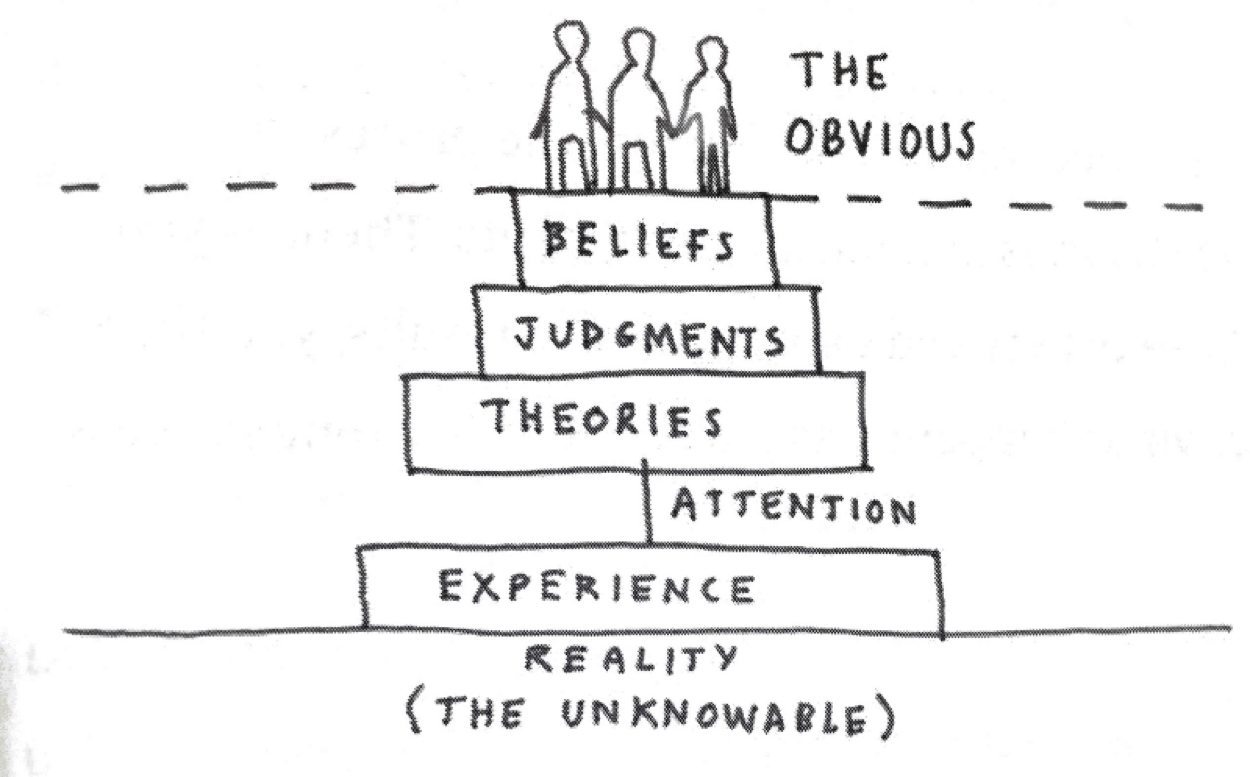
    Dave Gray makes some really interesting points about how we make decisions in his book, “Liminal Thinking: Create the Change You Want by Changing the Way You Think.” He suggests that we only have the ability to make theories, judgments and beliefs based on our personal experiences. And even in our experiences we are only able to process a minuscule sliver of the information available.

    picture1David Gray’s diagram of how we come to our understanding of what the obvious choices is in a situation.

    If we apply this idea to the way we feel about our workplace, then we can quickly see the we are reducing the number of creative solutions available to our workforce. If everyone one of your creative workers gets to work from 9 to 5 at the same desk doing relatively the same thing daily,  they will start narrowing their understanding of what is possible. Just imagine what different solutions might arise if your employee is sitting outside at a lake or in a crowded bar. Their experience would change, thus their well of experience deepens, and their concepts of what is possible, multiplies. Make sure your developers experience new things, both as individuals and as teams. This doesn’t just mean offsites for team-building. It means, let them follow their gut, and work from wherever they need from time to time. This doesn’t mean let them go solo and unplug for days at a time. They need to stay plugged into the team and be a contributing part to the culture, but they need to balance that with building fresh perspectives so they can contribute to the collective experience of the whole.

    Workforce → Culture

    Yes, I know. “Culture” is one of those buzzwords that now cause people to roll their eyes so far back in their head that they fall out. But it’s important to know why the concept is important in relation to the old idea of “the workforce.” When management thinks of its developers as “workers,” the developers are immediately dehumanized and turned into pawns. They are expendable and indistinguishable as creative minds. They act out of fear from punishment and rarely take chances.

    We are no longer cogs in the corporate machine. Our ability to take risks can make the difference between being one of the 99 startups that fail, or the one tech company that succeeds. Managing culture as opposed to a workforce means that we can focus on enabling workers to be as creative as possible. We can focus on nurturing collaboration and honest feedback. A healthy culture is one that is transparent and communicative. A workforce could give a rat’s ass about making positive change. A culture is a living breathing thing that everyone contributes to and improves. A culture is owned by the collective. A workforce is owned by a man in a suit at the top of the tower. Screw the man. Power to the people.

    Conclusion

    Now that we have an understanding of why we must redefine our terminology, it’s time to start defining practical ways to make the switch for each term. In my upcoming writings I will start to lay out practical ways to make the switch in your company.

    About the Author / Devrim Yasar

    devrim_yasarDevrim is the CEO of Koding, a San Francisco-based software development automation platform vendor. Connect with him on LinkedIn and Twitter.


  • Deep Art of Scaling for Cloud Environments, Part 2

    Deep Art of Scaling for Cloud Environments, Part 2

    In Part One of our two-part series on scaling for cloud environments, we looked at some of important factors for scaling and best practices for code storage. Let’s continue the discussion.

    Auto Scaling for Next-Generation Applications

    There are a few very good-looking cloud hosting service providers that provide the features mentioned in Part One: AWS, Google Cloud Platform (GCP) and Microsoft Azure. If you are going to auto scale, it’s best to use one of these cloud hosting services. There are other cloud hosting service providers in my knowledge that follow similar approaches, but they are not widely used or are platform-as-a-service (PaaS) ecosystems so we will not cover them.

    Also, it’s important to remember that in auto scaling, all app nodes are changing and created dynamically, with a new host, new IP, etc., so your synchronization mechanism needs to determine how to update the code with the new nodes that may change or be deleted later.

    Options to Auto Scale and Not Die Trying

    Lsyncd

    Lsyncd allows you synchronize nodes across the cluster that are spinning up/down new instances, Work using this script, which monitors the auto scaling group for new nodes and updates the Lsyncd master with new auto scaled slaves. Discovering which IPs or instances are within the auto scaling group is the preamble auto scaling faces, but this script will help resolve the discovery.

    GlusterFS

    Another approach is to use GlusterFS, which ensures high availability and syncs between your web nodes. You need a minimum of two instances in case one fails. The other instance can jump in and still be tolerant for failures. Once the failed instance is back online, it’s added again to the cluster. GlusterFS works similarly to master/master or master/slave. I won’t cover how to configure GlusterFS, but I’m sure this approach was a very good option before AWS EFS was released. If you are not using AWS, this is an awesome option.

    On the other hand, if you are using AWS environments with EFS, consider registering your web node to the master node using “AWS User data,” so every time a new EC2 instance is created by the ASG, it will register this new volume to the master and keep data synced with the rest of the nodes.

    Pre-Baked AWS AMIs (Old Approach)

    Given the fact that your code won’t change or barely changes, baking an AWS AMI and updating the auto scaling launch configuration will do the trick—this is an older but still-used approach. When you have a defined code release schedule and a defined development workflow, you could bake an AMI for every new code release and, once ready, recycle the nodes to use the new AMI with the latest code update. There are plenty of tutorials on this method.

    Admin Server (mainly used for WordPress, Drupal, Magento and CMS-based apps)

    Another wild approach is to use an admin or master server out of your auto scaling group. This is used commonly to sync code from the master to the scaling group, but I believe this a waste of server resources that can be used inside the auto scaling group. I would recommend this approach for WordPress or Magento sites; in addition to this, consider proxying the wp-admin or administrator URL to the admin server, or update the CMS directly to the admin server. As with NFS, AWS EFS will facilitate everything with WordPress, Magento, joomla and CMS-based apps. Click here for an example of what I’m talking about.

    Implement AWS EFS

    Finally, the easiest approach is AWS Elastic File System – EFS. Amazon Web Services released EFS a few months ago as a very promising technology—a distributed file system similar to NFS but improved—think of it as a sophisticated NAS solution. During AWS Re:invent, the company said EFS is based on NFSv4.1 but with better network performance, and is a pNFS workaround. I have waited for such a component in the arsenal of AWS for months, though early access was only available for the Virginia region. Today, though, it is supported across all AWS regions – Yay!

    EFS can be mounted as a local mount point within fstab, similar to NFS, and you can share your code across your AWS auto scaling group: Set your EFS volume in/etc/fstab to load automatically in each reboot. Therefore, If you are in AWS, use EFS; it will facilitate everything—really. To accomplish this approach, make sure to update your user data in each EC2 instance with the EFS mount point, so every time a new instance is created it automatically will have the EFS volume.

    Note 1: All EFS mount points should be in the same region; if an EC2 instance tries to mount from another EFS region, it won’t be allowed.

    More Details can be found here.

    Google Cloud Platform

    Well, what do we have for Google Cloud Platform? I suggest GlusterFS, Lsyncd, rsync or Google Cloud Storage—although it shares a lot of features with Amazon S3, it is faster. Google states that its cloud storage is faster than Amazon S3 due to its infinite edge points across the world and, yes, it is correct. The easiest way to share the code across your auto scaling group is to use Google Cloud storage and GSutils. Additionally, you could use GSutils and call the bucket in each Google Instance—just make sure the visitor/user does not change the code or static content in the instances. Also, Gsutils helps sync the bucket data to your instance data to stay in sync. If your code changes dynamically with your traffic, you need to use gluster or Lsyncd, given that it is very complicated to deploy since Google auto scaling is always recycling instances/IPs and needs some workarounds.

    Don’t Forget Scaling Databases!

    Another topic that we didn’t touch was scaling a database, for AWS RDS, DynamoDB, Postgresql, Mysql and Nosql databases. All these modern databases are easy to scale; some of them are PaaS such as DynamoDB or RDS. For Postgresql, MySQL exists only for manual scaling, which is adding new database nodes to the master/slave cluster. In AWS RDS, with some clicks you can get a slave “replica” and you are scaling already. But I won’t go further about it as it’s out of scope for this piece.

    Scaling Microservices and Serverless Apps

    Definitely, these topics need another talk. There will be another time to explore this new architecture approach of splitting your application into pieces. Microservices is changing the IT paradigm, but to survive for this new paradigm, you need to understand first scaling for cloud before evolving to microservices with Docker, Consul, Compose, RancherOS, AWS ECS, Kubernetes and Serverless apps architectures.

    Conclusion

    diagram

    As you can see, scaling an application can be challenging when you are dealing with a custom app or CMS-based application. With this article,  you have the options and their pros and cons in tackling this constant preamble of how to scale with custom apps. Everybody uses their own scaling process and seriously, they never fit with other applications’ needs. Now that AWS EFS is out there, I’d recommend it every time you can, but in case you are not using AWS, implement Lsyncd or GlusterFS, but don’t forget the other methods that also can help accomplish your scaling goals.

    About the Author / Alfonso Valdes

    alfonsovaldesAlfonso Valdes is the CEO and Founder of ClickIT Smart Technologies, a IT agency focused in the architecture and implementation of Modern Cloud Applications highly resilient in Linux and Open Source technologies. He combines more than 8 years of IT experience in the field of scalable architectures, distributed systems and developing cloud-native applications, and has worked for different U.S companies such as: Sprint Nextel, Texas Instruments and Nike USA. Nowadays he is encouraging enterprises to join the cloud. Connect with him on LinkedIn.
  • A DevOps Checklist for Traditional Service Providers

    A DevOps Checklist for Traditional Service Providers

    As companies such as Amazon and Google rapidly innovate to deliver new services, traditional service providers recognize that change is necessary to keep up with shifting customer expectations. Given the pace at which technology continues to morph, creating better, faster and more innovative solutions is a necessity, and if this isn’t achieved, even longtime customers will eventually look elsewhere.

    For younger businesses, taking a collaborative approach to IT and product development often comes naturally as it’s built into the company’s DNA. However, for more established service providers, adapting to this new way of doing business can prove challenging. Traditional service providers have spent years perfecting their technology and require multiple layers of review prior to rollout. While these checks and balances are in place to ensure a level of quality customers have relied on for years and expect to receive from traditional providers, it also can hinder their ability to react quickly to client demands. However, the adoption of the principles embedded in DevOps can allow traditional service providers to work more like a startup by accessing their technology and human skills in a new way, while also continuing to deliver products which meet the expectations of their established customers.

    Now the question is, how can traditional services providers successfully implement this DevOps approach? While it can (and has been) done successfully, there are five critical steps that need to be taken into account:

    1) Establish a clear goal. The most important step is the first: Management must have a clear understanding of what they are looking to accomplish with the DevOps transition. Service providers have a long legacy of well-defined, reliable services, so all changes must complement their current product offerings and live up to the quality their customer base has come to expect. If an overall goal is not defined, customers will be left confused and disappointed, and ultimately, there will be no impact on the bottom line.

    2) Set a timeline. While creating an unrealistic timeline is never advised, it is critical to set an aggressive, pragmatic and adjustable one. As mentioned above, without aggressively pushing forward, an organization will find itself continuously playing catch up to its competitors. The timeline is meant to push an initiative forward even when there are setbacks or changes that need to be made along the way. The right timing is a balancing act: too fast and you have a poorly crafted product rollout; too slow and you are stuck behind the competition. The key metric to measure progress is the degree of evolution to the DevOps model within key stakeholder organizations. If solutions are delayed due to existing processes, then either the scope of the team needs to be adjusted to encompass those processes or the goal needs to be changed so they are no longer an issue.

    3) Collect necessary resources. Typically, the biggest gap that needs to be filled to move forward is with human resources. For many established companies, having design and architecture skills—core capabilities needed to develop a new product—hasn’t been a priority. Creating the right team that consists of new talent that have these missing skills, along with the addition of current employees who have a more intimate understanding of the company and customer, is a critical aspect in making sure this more collaborative and innovative approach to solution development and delivery works. And it doesn’t stop once the team is created, it is important to continue to foster an environment that encourages the new team to work together and promote their process within the broader organization.

    4) Create benchmarks. To ensure the established timeline is being met and that there is an opportunity to change course if necessary, it is important to set clear deliverables at various stages of the process. These benchmarks must look to what people are doing today, not just the end goal. Initial measures should focus on the pace at which progress is being made, and later, focus on the end products being delivered.

    5) Get the entire company on board. Changing an embedded philosophy isn’t easy, especially one that has worked well for so long. No matter the organization there is almost always resistance on some level when fundamental changes are being made. It is up to leadership and the DevOps team(s) to demonstrate internally and externally that the changes being made are not just for the sake of change, but in the end will benefit the entire company, as well as the customer.

    While taking a deeper look at an organization’s “people, process, technology and information” and moving to a new mindset doesn’t happen overnight or come without its hiccups, the status quo is no longer sufficient to compete. The reality is, a more collaborative and faster delivery model is necessary to be successful in tomorrow’s marketplace.

    About the Author / Tim Pearson

    timpearsonTim Pearson is the director of product line management at Ciena. In his role, Tim leverages DevOps practices to break barriers in network delivery to meet the demands of mobile, VR and video applications.  Driven by challenge and fueled by deep industry knowledge, he has built a reputation for developing innovative business and product strategies to drive growth and open new markets. Tim holds a Bachelor degree in Electrical Engineering from Memorial University, a Masters degree in Management Science from the University of Waterloo and an MBA from the MIT Sloan School of Management. Connect with him on LinkedIn and Twitter.

  • Deep Art of Scaling for Cloud Environments, Part 1

    Deep Art of Scaling for Cloud Environments, Part 1

    The number of resources to scale an application are abundant, but every application has its own challenges to scale successfully, and the solution to this problem doesn’t come handy. This two-part article focuses on the best approaches to build a scalable application, software-as-a-service (SaaS) application, mobile app, or WordPress-, Drupal- or Magento-based website. The scope of the approach extends to both auto scaling and manual scaling.

    In my experience, there are two types of applications: ones that use an admin and Admin panel to modify the code, layout and functionality (WordPress, Joomla, Drupal, etc.) and modern, next-generation applications that are stateless and follow the 12-factor app approach.

    But first, we have to decide whether to use auto scaling or manual scaling. It is an important decision to make in the very beginning, as it changes the whole approach and complexity of developing your app. We will be discussing both, but in essence of auto scaling, you will need to consider how to maintain the code synchronized across the web nodes and how to maintain new web nodes that constantly are being created/deleted in the auto scaling group. (With stateless apps this is not an issue, as the images or static content can go to Amazon S3, CDN or isolated services. Later on will explain a bit about these technologies.) Working with manual scaling will facilitate your work—you just need your code synced across all the web nodes. All of the approaches mentioned below apply to manual scaling.

    But on the other hand, auto scaling with an admin application is a headache for some common reasons: Every time a front-end developer  changes something in the admin, code will be inconsistent across multiple web nodes along with the Git versioning.  Because of this issue, I don’t  recommend using Git for such applications—there are always discrepancies between the last commit/version in Git and the last update in the admin CMS, which makes auto scaling with admin even more complicated.

    Let’s cover some approaches to solve this problem. Using an NFS distributed file system will resolve everything for a CMS app, but as everybody knows, this approach pulls down the performance.

    What’s Important for Scaling:

    • Designing a deployment workflow that is easy for your team, your manager and developers—that’s why you are here, to improve development productivity by defining a good mechanism to deploy code to your cluster or auto scaling group. Here, you can think of Webhooks, rsync cronjob, bash scripts, Jenkins, CircleCI, DeployBot, manual pulls or AWS CodeDeploy.
    • Isolating and centralizing all services. Databases, caching session, integrate s3 for static content, implement CDN, worker servers, cronjobs, Load Balancer, app server, web server, etc., to name a few.
    • Dynamically synchronizing code in a live application with many web nodes behind a load balancer or AWS auto scaling Group.
    • Ability to use the 12 factor approach for next generation applications, or stateless apps. You may be using this approach already but you don’t know it!
    • Bootstrapping your application with a stateless approach—this will facilitate all your work when you implement a scalable infrastructure. There are many ways to bootstrap your base application using bash scripts, docker files, vagrant file, AWS code deploy, git, user data file from AWS and baked AWS AMI, among others.
    • Using immutable servers in your environment. Make sure your applications and servers are in a pre-configured image state. Every moment a new server/instance is created in an auto scaling mechanism, the instance should be identically cloned of any other instance in production without any further configuration. As you know, AWS, Docker, Google Cloud, and cloud-based providers are much more easier for immutability. This really helps to deliver software faster and decrease time to market.
    • For CMS based apps, stay out of git for now, unless you have a very good code change control with your CMS admin and a very good discipline to push your changes with every dashboard/back-end change in the CMS.
    • A load balancer for auto scaling, such as AWS ELB, Google Cloud LB, Nginx or HAProxy.

    Advised Practices for Code Storage

    Understanding how your application works in terms of how visitors dynamically change your application data is very important. It’s imperative to understand how the session is saved, either locally or in Redis/Memcached. If it’s saved locally, you need to add this data to your synchronization mechanism. Another storage change is the user image uploads for WordPress or Magento-like CMS-based websites; use of plug-ins such as Wp super cache or w3 total cache makes image upload configuration easy. Plus, the option to integrate with a CDN, Amazon s3 or a cloud storage pushes the boundaries even further.

    But if you have a modern application, you need to understand and guide your development team how to change local image uploads path to a cloud storage or CDN. Make sure all your dynamic data is saved in a SQL or NoSQL database, and all cached database data (db queries, objects, sessions, keys, etc.) is saved to redis/memcached, Taking care of these factors will facilitate your scaling journey.

    Why not use NFS?

    Well, we hear a lot around the internet that the easiest way to achieve scalability is integrating NFS. Though it is the simplest way to look for and implement a fix, reducing the work for a service provider/developer  by almost 50 percent, it’s a real sacrifice in terms of application performance. Autoscaling an environment with a slow response speaks against the whole cause of the setup! It is very irritating to a client whose application speed is 1 second to 2 seconds when switching to a scalable environment with NFS slows the application by at least 50 percent.

    It’s also very disappointing when your small EC2 instance is much faster than your auto scalable environment with NFS. Additionally, using NFS has a point of failure, unless you have a failover in the cloud that is rarely used. It is just not worthwhile to have a complete standby environment waiting for a failure, and it’s better to use this environment within your cluster and have more resources to consume your traffic, or even better use this redundant environment to balance between different regions or data centers.

    Why not use Amazon S3 to Share Code?

    What about using Amazon S3, Google Cloud Files or any cloud storage to share code?

    Implementing Amazon S3 to share code between nodes will slow down your site similar to NFS. There’s not much of a difference accessing the S3 URL to mounting the S3 to a Linux directory, so don’t use Amazon S3 as the document root or code base folder. Keep the use of S3 limited to static content that needs to be fetched over time. Yes, there are websites that can survive and work decently using Amazon S3 for static web pages, but from my experience, I don’t recommend it for websites that support an application responsible for driving revenue to the company.

    Stay tuned for Part Two of our conversation on scaling for cloud environments.

    About the Author / Alfonso Valdes

    alfonsovaldesAlfonso Valdes is the CEO and Founder of ClickIT Smart Technologies, a IT agency focused in the architecture and implementation of Modern Cloud Applications highly resilient in Linux and Open Source technologies. He combines more than 8 years of IT experience in the field of scalable architectures, distributed systems and developing cloud-native applications, and has worked for different U.S companies such as: Sprint Nextel, Texas Instruments and Nike USA. Nowadays he is encouraging enterprises to join the cloud. Connect with him on LinkedIn.

  • How Agile Are Your User Stories?

    How Agile Are Your User Stories?

    Around the world, enterprises are adopting the concept of Agile development. This methodology is based on a set of principles for software development by which requirements and solutions evolve through the collaborative effort of teams. User stories form the foundation of the Agile requirements process, and teams gather to create them by exploring how users will interact with their solutions. To facilitate planning and discussion, teams typically jot down stories on pieces of paper and then physically arrange and rearrange them. It is a curiously old-school process for such a forward-thinking method.

    User stories are so vital because they give developers just enough information to estimate the level of effort needed to implement the functionality described by the story. When written well, they can be powerful, because they help developers and testers view requirements from a customer’s perspective. They provide context and an understanding of what motivates the people who will use the solutions they deliver.

    Struggles with Stories

    Agile represents a significantly different workflow than developers have previously used. As enterprises work to expand and mature their Agile practices across their projects and teams, they struggle to figure out how user stories fit, because:

    • Developers and testers may prefer user stories over a lengthy, text-heavy business requirements document, but user stories are new to most business stakeholders and business analysts. As organizations try to transition to Agile, these individuals struggle to write high-quality user stories that accurately and sufficiently describe all customer needs. They get bogged down writing and managing them and lose focus on the bigger picture.
    • The number of user stories can get out of hand quickly due to complexity. Most enterprise projects involve the development and enhancement of multiple, integrated systems to deliver functionality for a variety of roles. Users can take many paths that often interconnect and overlap with other processes. This can mean hundreds of user stories for a project of any size. Manually recording and managing the wealth of information that the development team needs is not feasible, and user stories can be missed or misinterpreted in the process.
    • Critical nonfunctional requirements—such as those for compliance, security and performance—complicate the adoption of user stories because they weren’t designed to represent those types of requirements. User stories scribbled on sticky notes or created in an Excel spreadsheet don’t support the rigor enterprises need for audits, change management, history and traceability.

    Enterprises want to reap the benefits of Agile for their complicated, expensive, high-risk projects, but they want to manage complexity and risk as well. They need a robust Agile requirements tool to help them, especially for the creation of reliable, consistent and high-quality user stories.

    Making the Shift to an Agile Requirements Tool

    Just as approaches to development have changed, so has the workplace, necessitating a new approach to teamwork. PricewaterhouseCoopers noted in its paper, “Adopting an Agile Methodology, Requirements Gathering and Delivery“: “As companies shift from small projects and teams engaged in Agile to more complex projects and potentially distributed teams, there is a need to shift from paper and spreadsheets to tools that provide workflow, persistence and traceability.”

    The power of best-in-class requirements management tools is that they enable teams to use user stories for development while making it easier for business stakeholders and business analysts to create them. These tools eliminate the need to manually create user stories within the development teams’ Agile tools. They bridge the gap between traditional and Agile requirements, enabling enterprises to scale Agile while managing enterprise concerns.

    The powerful capability sets of tools such as this help teams to:

    • Generate high-quality user stories and tests automatically from process flows. Product owners and business analysts use customer journeys to automatically generate user stories and acceptance criteria with the click of a button. They push these artifacts into the development teams’ Agile management tool of choice, where developers and testers also have access to related requirements information, such as regulatory information, visual models and constraints, supporting a comprehensive understanding. User stories are reliable and consistent, and there is no longer a need to spend time and money to teach business stakeholders or business analysts to write them.
    • Work together to visually define customer journeys. This allows stakeholders to “tell their stories” as they work with product owners and business analysts to collaboratively define customer journeys. Using the familiar construct of user models—with steps, decision points, actors and condition statements—the entire team collaborates to record and analyze processes in a shared workspace. Teams maintain a focus on strategic objectives when making prioritization decisions and spend less time managing a huge list of user stories manually.
    • Reap the benefits of Agile while using enterprise-level capabilities for visualization, traceability and reuse. Support for visual models and the ability to relate them to one another and other requirements artifacts helps teams establish the precise traceability they need to ensure full requirements and test case coverage. It also supports improved change management and decision-making, ultimately leading to higher-quality software. Customer journey models can be reused across projects and teams, as can user stories and other requirements artifacts, saving time and improving consistency.

    Great strides have been made in Agile requirements management tools recently, but many enterprises are still using sticky notes to create and organize their user stories because they don’t know about what these tools can do. A next-generation tool enables organizations to scale Agile across the business and create a common ground for IT and business to meet. With capabilities including visualization, collaboration, traceability, management analytics and reuse, teams are more effective and applications are delivered faster.

    About the Author / Ruth Zive

    ruthziveRuth Zive is Vice President of Marketing at Blueprint. She is a metrics-driven marketing strategist who has worked for two decades serving B2B clients in the technology, healthcare and financial services industries. At Blueprint, Ruth is responsible for product marketing, analyst relations, branding, demand generation and inside sales initiatives. Connect with her on LinkedIn and Twitter.

  • Bucking Bank Bureaucrats: From Convergent Thinking to Divergent Doing

    Bucking Bank Bureaucrats: From Convergent Thinking to Divergent Doing

    As customers, longstanding and new, the way we interact with banks and manage our personal spending, borrowing and saving is experiencing drastic change. New digital offerings in the form of apps and online banking show commitment to customer centricity, but overall, banks are slow to adapt to the pace of change. The vast majority of bankers do recognize the strategic need to respond to their industry’s digital disruption, and are busy assessing and developing transformative technologies such as mobile, blockchain and artificial intelligence, trying to find an emerging market need and a robust business model.

    How Should Banks Adapt?

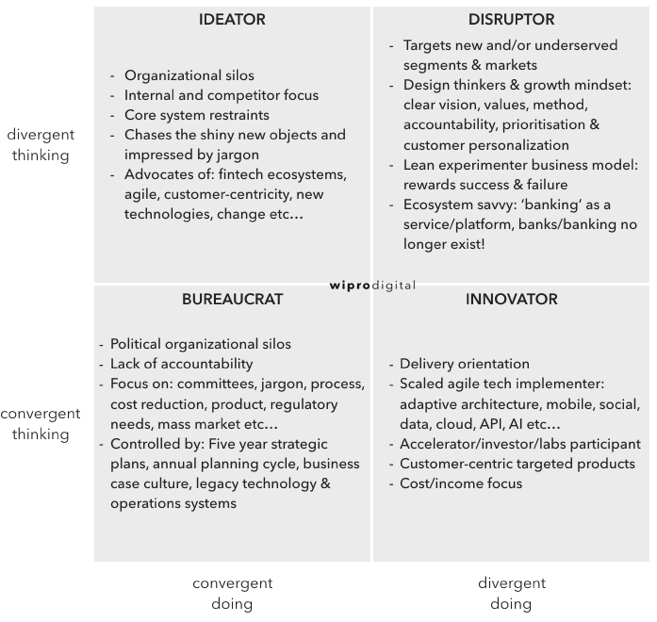
    The operating environment of banks is unpredictable and, therefore, requires organizational agility. This agility requires a careful analysis of customer needs and (potential) capabilities. Bankers must ask, “How can my bank move from convergent thinking to divergent doing?”

    picture1

    From a strategic perspective, it’s essential to understand whether the person/organization wants to be a disruptor, innovator, ideator or bureaucrat. This differentiation defines the right strategic options available to them.

    N.B.: A quick proxy answer to the above question is the design of the bank’s reception and organization of the people working there, to see if it is like every other bank, or is in some way distinctive.

    Value Triangulation and Differentiation

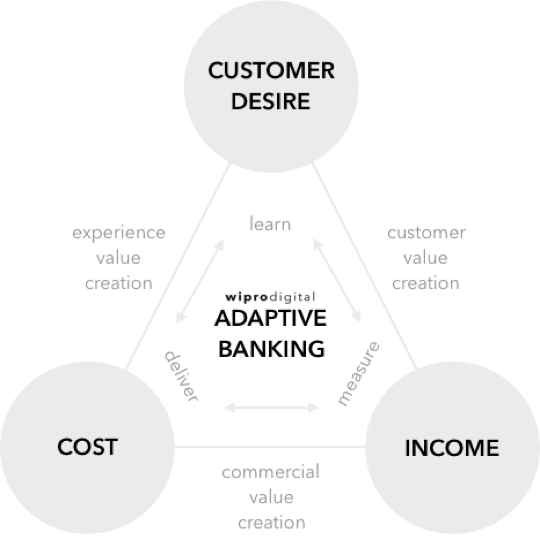
    Every banking CEO needs a clear strategy that addresses their organization’s internal and external challenges. There is one global commonality for a strategic foundation: Every bank needs to deliver change rapidly and frequently. The better a bank is at improving customer experience, the more likely it will survive the onslaught of disruptors and innovators. Additionally, most banks must deliver cost reduction and drive income. Customer desire, the third corner of the triangle, is not a familiar banking concept, but a successful value triangulation delivers customer desire in the most efficient way possible.

    picture2

    This isn’t about value chain mapping and cost re-engineering; it’s about creating great customer experiences with adaptive capabilities and capital-light business models. All three values must be understood and practiced throughout the entire organization, especially among boards, chief executives and key decision makers to make adaptive banking possible.

    Customer Experience Comes First

    A culture of centralization, product-centricity and control-via-process stifles change. To be adaptive and create their own Digital DNA, banks must form new work spaces and ways of working. When bank employees don’t use their own company’s products, they are out of touch with the customer experience. They also may excuse customer complaints based on their organizational knowledge. Employees need to be the bank’s most critical customers, and ought to feel fully connected to other customers and their experiences.

    New, lean business models should flow through the organization and align to the desired customer experience. The business leaders who identify the “priority customer experience features” will focus the organization on accelerating delivery momentum. Rather than requesting large-scale, product-led programs, leaders need to focus on continually launching and redefining small-scale features.

    picture3

    Doing so moves away from the grand strategies or silver bullet approach so often prevalent during annual planning cycles and shifts toward agile, customer-centric strategies. Organizational change is fundamental for creating adaptive banks with Digital DNA.

    Fail Fast, Succeed Even Faster

    To accelerate growth, adaptive technology architectures and agile software delivery methods need to be available to deliver the relevant features. A “deliver, measure and learn” approach will amplify feedback across the organization to drive commercial decision-making. This will allow banks to fail fast, yet succeed even faster. The ongoing cycle—ideating, designing, building, shipping, measuring, learning and (of course) adjusting customer features—needs to become the norm.

    By becoming adaptive, the bank’s capabilities (people, methods, technologies, values) become more attuned to customer needs, making it far easier to deliver personalized offerings. For example, the bank’s data can be used to create feature personalization, allowing customers to pick and choose the right features for their needs. A customer should always be able to overwrite the choice an algorithm provides.

    Innovation, Transformation and Beyond

    Currently, the most apparent transformation desire and delivery exists in IT departments as opposed to business departments. Agile ways of working are often still alien to most bankers in product, finance, compliance, marketing and front-line teams.

    The banking playbook has already been rewritten for the digital age. It’s an exciting time to realize great change and how disruption/innovation can become commercial reality—this means bucking the system.

    About the Author / Darren Oddie

    Alistair Bayliss

    Darren Oddie is strategy director at Wipro Digital, where he works with global financial services companies on digital transformation and innovation. He’s had hands-on experience of designing and building financial services brands from a blank sheet of paper to industry leading propositions in both corporates and startups. He’s delighted that banking and customer experience are now regularly mentioned in the same sentence. Connect with him on Twitter.

  • So Long to Configuration Management Systems?

    So Long to Configuration Management Systems?

    When I was an operations architect at Ning way back in 2009, we were struggling to manage our deployments and configurations of more than 50 different application servers, or what the cool kids today call microservices. Applications were deployed across three distinct environments: development, staging and production. None of these environments were exactly the same as another, and differences in these dependencies, together with human errors, frequently broke our deployments.

    Ning was nowhere near the first company to encounter such problems. In the mid-1990s, as the public internet emerged, much of what was understood at the time about IT operations was challenged by the need to scale internet-facing systems. For many years preceding the internet boom, the maximum number of users was strictly limited to the number of employees in a company. That all changed with the World Wide Web, where the need to serve thousands and millions of simultaneous users easily exceeded the computing capacity of even the largest and most expensive computers.

    As three-tier application architectures were broken down into services and distributed across dozens or hundreds of individual servers, this proliferation of servers proved to be far too much for operations teams to handle. The worst problems lived within application deployment processes, where environments and requirements were ever-changing in successive releases of software. The lifetime of a server was a long one. Once deployed, servers were subjected to repeated changes by operations and developers in what would come to be called “configuration drift.”  The combined effects of changes, human errors and unknown states would create disastrous outages that damaged brands and destroyed online revenue. It would take sites days and even weeks to recover from these outages. Some would never recover.

    It was in the midst of this chaos that modern configuration management systems were born. CFEngine was the first to emerge in academia, where the need to manage multiple UNIX systems was felt early on. Later, Puppet, Chef, SaltStack and Ansible emerged directly from web-scale systems. Configuration management systems fulfilled several important needs. First, they abstracted the differences between operating systems, providing a high-level language for the system administrator to describe the desired state. Second, they automatically synchronized the desired state across large numbers of servers, reducing costly human errors. Finally, they provided idempotency to ensure that destructive operations were not applied unnecessarily.

    There is never a free lunch. The benefits of better abstraction were offset to a degree by the need to build and maintain evermore complicated recipes. Recipes frequently broke from time to time as package management features were updated, renamed or otherwise changed from the time the recipe was first written. Even when recipes worked, they were frequently broken by differences in environments or runtime errors. The configuration management systems themselves began to suffer from scale challenges, and evolved message bus architectures to improve their speed and responsiveness. By overcoming many of these obstacles, configuration management systems have now become a first-line tool for managing web-scale systems.

    But back at Ning, modern tools such as Puppet and Chef were still in their infancy and simply could not cope with the scale of our 60,000+ node virtualized environment. Ning had a lot of brilliant software engineers floating around, and they set about creating their own deployment automation system called Galaxy, and later a meta-orchestrator called Cosmos. Galaxy and Cosmos were great tools, but they required constant care and feeding and suffered from severe scale problems. There was just a lot of complexity in dealing with these automation systems while also trying to scale a top-tier social network for a hot startup company.

    As we began to analyze and post-mortem our deployment failures, it became clear that a majority of the problems stemmed from host and environment configuration errors. We needed a simpler way to deploy our software. Virtual machine images were a promising way to ensure consistency between environments with the tried and true “gold master image” approach. The problem with this approach was that building full system virtual machines was difficult in automation terms. Once deployed, virtual machines are also subject to configuration drift. Furthermore, while we were eager to adopt virtualization to get better resource isolation, we were wary of the overhead that hypervisors would create. Our benchmarks showed that if we adopted virtual machines, we would need to increase our physical server capacity to accommodate the overhead.

    At the time, Linux containers were already available in the kernel, but the distributions had almost no support for managing them. At the insistence of our VP of Operations, I cooked up an alternative solution based on jails, writing a small hack of a program called Warden to build and manage them. (Note: Totally unrelated to the Warden in Cloud Foundry). Jails gave us bare metal performance, resource isolation and a way to consistently deploy the entire environment for each application server.  With Warden, we could build jail images on the fly automatically and deploy them consistently with our existing tools, galaxy and cosmos. Hey, it was a Band-Aid for a difficult situation, but my experience with building Warden flipped a switch in my brain. I had seen the way lightweight virtualization could eliminate complexity, and I knew right then this was the way of the future.

    Today, with the success of Docker we are finally experiencing sweeping changes in the processes and tools we use to build, deploy, and manage distributed applications. At the same time, we are about to enter a brief period of containers disillusionment as early stage solutions get washed out. When that is over, what comes afterward is something of a golden era for distributed applications. I call it the container application platform, and its somewhere between what we think of as platorm as a service (PaaS) and Serverless today. In that not-too-distant future, containers will be the default output of the software build process, and where that container gets deployed will hardly be an afterthought. This unicorn magic will come from the ability to introspect containers to determine their environment dependencies, and a fully integrated tool chain that deals with deployment, scaling and dependency resolution automatically. I will give you just one guess which company is in the best position to own that future. “One ring to rule them all.”

    What happens to our beautiful configuration management systems? There has been much debate about this among smart people over the last few years. Most of these arguments boiled down to some kind of coexistence model. Indeed, configuration management systems are useful for dealing with a wide range of operational problems outside of the container platform. While it’s no surprise that Chef, Puppet, Salt and Ansible all moved quickly to include Docker support, I think we will see these tools begin to focus more on what Rob Hirschfeld calls achieving “ready state”. That is to say, everything that still needs to be done before you can lay down your container platform also still needs to be automated. Right now, that is still a great deal of work, and it’s a pretty safe place to draw the line on using the right tool for the right job.

    About the Author / James Thomason

    james-thomason_dsc0492James Thomason is chief technology officer at HyperGrid from Dell, where as CTO he led the vision, technology strategy and product road map for Dell Cloud Marketplace. He joined Dell through the acquisition of Gale Technologies in 2012, where as CTO he headed the product road map, architecture and engineering of the company’s flagship cloud and converged infrastructure automation software, GaleForce. Prior to joining Gale Technologies, Thomason was the CTO and Founder of Virtiv, a San Francisco cloud automation startup focused on Linux virtualization, acquired by Gale Technologies in 2011. For over 17 years, as a specialist in distributed systems and large-scale infrastructures, Thomason has been an entrepreneur and innovator at a number of notable Silicon Valley startups, including Exodus Communications, Digital Island, Netli, NetVMG, Netscaler, 3Leaf Systems and Ning. Connect with him on LinkedIn / Twitter.

  • 5 Ways to Ensure IT Service Desk Agility

    5 Ways to Ensure IT Service Desk Agility

    The agile approach is everywhere. Born in the software development world, agility means adaptive planning, ongoing development and continuous improvement. Rapid and flexible response to change is critical. It is not surprising that the best practices of agile software development penetrated into other areas, and IT service management (ITSM) is no exception.

    The Service Desk Can Be Agile

    Unless you’ve been away from ITSM for the last 10 years, you know that an agile IT service desk is flexible, automates processes for quicker incident resolution and emphasizes collaboration between technicians and interactions with users.

    But how do you adopt these seemingly tough principles to make your IT service desk truly agile? We’ve put together five simple ways to help you assess your IT service desk and move toward agility.

    Keep Interactions in Real Time

    IT service desks are constantly nestled in webs of interactions between technicians and users. It’s easy for technicians to get lost in endless emails and delay resolution. To avoid chaos and ensure timely ticket resolution, interactions should stay in real time and communication should be as proactive as possible.

    Let’s say the sales department of a company uses a sales application. But the application crashes, and the department’s users are unable to connect to it. So, they raise a ticket, and the IT admin immediately checks the server and realizes it’s down. They then check the code management database (CMDB0, which indicates that the application is also used by the finance department. Before attempting to resolve the incident, the IT admin should send a notification to the sales and finance departments to inform the users of both departments that the application is down and that the IT team is working on resolving the issue. That way, they can prevent duplicate tickets and focus on fixing the issue.

    Eliminate Productivity Leaks

    Most IT service desks are built on ITIL processes, which means that they are already efficient. But to become agile, you have to track IT service desk performance with key performance indicators (KPIs) such as lost business hours, SLA compliance and cost per ticket—all of which monitor both cost and productivity. While KPIs help you measure productivity leaks, reports help you identify their root cause. For example, your service desk KPIs indicate that there have been a lot of SLA violations. A quick look at your reports shows that a lot of time is spent gathering information rather than on finding solutions. By creating a template for common incidents or service requests, all the information you need is gathered in one place, making it easier for technicians to quickly resolve issues and meet service level agreements (SLAs). Similarly, you can reduce the time spent on routine tasks, such as assigning tickets and tasks to technicians, sending notifications to users and more, by automating these processes.

    Encourage Collaboration Among Stakeholders

    Every IT service desk has stakeholders across various disciplines and geographies. And IT service desks are often rated on how seamless the flow of information is between stakeholders. Therefore, it’s important to have a service desk that provides visibility and encourages collaboration. Let’s say that a company is running its financial application on a legacy server. To cope with increasing transactions, IT proposes a server upgrade. Since this application impacts everyone in the organization, any disruption in service will impact the business significantly. So, IT should keep all business groups and admins in the loop, ask them for recommendations on scheduling the change, ensure backout plans and inform users about the change schedule and expected downtime. An IT service desk application that provides room for this collaboration ensures a smooth upgrade with minimal interruptions.

    Establish Self-Organizing Teams

    An IT service desk is incomplete without its team. And since IT is essentially the command center of a company, it’s imperative to establish a self-organizing IT team. This starts with looking at the current team’s structure and creating workflows around it. In most IT service desks, the technicians are grouped based on their skill sets and level of expertise. So, you can easily assign a technician (or group) to a workflow that requires a certain type or level of skill. You can also auto-assign tickets to technicians or groups, assign a change manager to coordinate with different teams, automate escalation rules for complex issues, configure a backup technician when a one is not available and more.

    Learn Through Iterative Increments

    IT service desks are expected to meet the changing demands of their organizations. This means that they have to make a number of small changes over a period of time. In agile terms, this is called iterative increments. Let’s take, for example, a growing organization that has several employees joining every week. A typical employee onboarding and provisioning process requires the IT team to coordinate with different teams including HR, maintenance and administration. This can take up to 10 hours for each new employee. But, you can simplify this process by dividing the request into smaller tasks and assigning the tasks to corresponding departments. You can also automate this whole process, significantly reducing the time it takes to onboard a new employee.

    Just follow these simple steps and you will be on your way to creating an agile IT service desk that delivers quicker resolutions, increases user satisfaction and evolves with rapidly changing technologies.

    About the Author / Aparna TA

    aparnaAparna TA is a product analyst at ManageEngine, the real-time IT management company and division of Zoho Corp., and works in the ITSM products division for the flagship product ServiceDesk Plus. She keeps an eye on various IT practices and studies their impact on IT service management. In her free time she likes to relax on a couch and read the latest crime novels. Connect with her on LinkedIn and ManageEngine on Twitter.

  • Last-Mile DevOps: How to Keep Employees Happy

    Last-Mile DevOps: How to Keep Employees Happy

    Chances are that your company is embracing DevOps to make sure you can get fresh, new digital capabilities to your customers ASAP. That’s because in today’s market, you either have to be first—or quickly close any gaps between you and your more digitally innovative competitors.

    But when it comes to getting new capabilities into the hands of your own employees, things probably move much slower. That’s because your internally facing apps have to clear a hurdle that your customer-facing apps don’t: administration of access privileges that often are poorly defined and inadequately automated.

    That’s a problem. People can’t be productive if they don’t have access rights for the IT resources they need, when they need them. The growing Millennial workforce is going to be especially unhappy if IT is slow to meet their digital needs. And from a security perspective, slow administration of access privileges is also a problem—because your company must be able to automatically and immediately revoke employee access privileges the moment they’re fired or they quit.

    This automated, accelerated management of internal users’ access rights is the missing “last mile” for DevOps. And it’s something you have to address if you’re going to fulfill the needs of the business with the same excellence as you fulfill the expectations of your customers.

    What Makes the Last Mile So Tough?

    If you bank with Chase or ride with Uber, your access to your personal data is gated by your personal login. But, as a customer, you essentially use the same app as everyone else.

    Application privileges within your own company are entirely different for two reasons:

    • Privileges for your internal workforce are much more complex than for customers. Salespeople have sales apps. Your finance department uses finance systems. Your service reps may be allowed to see RMA numbers, but not SSNs. So you must quickly give each person access to only the resources appropriate to their specific role and responsibilities—or risk consequences that include lost productivity, security breaches, compliance failures and excess software licensing costs.
    • Management of internal privileges is an ongoing activity. Productivity, security and compliance demand that you provision each user account for each application with the right privileges at the right time. Privileges must be immediately and appropriately modified every time an employee is promoted or transferred. Privileges must be terminated immediately when someone leaves your company. Privileges may also have to be temporarily modified in real time due to session context—such as use of non-secure public WiFi or an access attempt from a questionable location or at a questionable time.

    Simply put, for internally facing apps, getting code onto a production server isn’t enough. You also need to automate and accelerate management of the “last mile” between servers and employees.

    What Are ‘Last-Mile’ DevOps Requirements?

    DevOps toolchains automate and monitor the software life cycle from design and development through testing and deployment on a production server. What’s missing is automated provisioning and governance of the “last mile” between the server and the individual worker.

    These tasks include:

    • Capture of current user role/responsibility profiles from HR
    • Provisioning of application-specific accounts with profile-appropriate privileges and controls
    • Self-service inputs from authorized LOB managers
    • Detection of session context (network connection, time of day, location, etc.)
    • Real-time modification of privileges based on that session context
    • Automated revocation of access privileges upon termination, transfer, etc.
    • Employee self-service for permitted optional applications and services
    • Monitoring and reporting on employee account activities and events

    Your team probably performs many of these “last mile” tasks manually. Some may also be automated using homegrown scripts. Excessive dependency on scripts is a bad practice, though. Scripts usually are poorly understood by anyone but the original writer—which makes them difficult to maintain and update over time. They also don’t typically integrate well with DevOps, HR systems or other key pieces of the app delivery puzzle. This lack of integration slows your processes down and opens the door for human error.

    Automation of last-mile DevOps makes much more sense. Automation speeds processes, reduces cost and optimizes accuracy. Integrated automation also gives you a dependable, centralized point-of-control for defining and editing policies—as well as for capturing the event logs necessary for compliance and security reporting. The right automation solution will also integrate with the rest of your operations environment (including directories, VDI, and mobile management tools) to ensure secure, reliable application access.

    Why is ‘Last-Mile’ DevOps Important?

    Most business leaders already understand why rapid rollout of customer-facing applications is so important. Unfortunately, many fail to recognize the importance of being just as fast and accurate when it comes to supporting their own workforce.

    The truth, however, is that automation of last-mile DevOps benefits your business in several important ways:

    • Improved employee productivity and engagement. Your workforce will be much more productive and more engaged when everyone has immediate access to the digital tools they need. That improved employee performance will benefit your customers as well.
    • Higher IT efficiency. The sooner you automate the many everyday service provisioning tasks that your skilled IT staff now performs manually, the sooner they can to shift their precious time and energy from routine work to higher-value projects.
    • Enhanced security and compliance. Well-defined access policies, diligent enforcement of those policies with rules-based automation and centralized logging of access provisioning activities all reduce your IT-related risks—as does immediate, automatic and complete revocation of all access privileges the moment any employee or contractor is terminated.
    • Reduced “Shadow IT.” When IT is more responsive to people’s needs, they are far less inclined to turn to alternative digital resources that aren’t properly monitored, governed or secured.
    • Greater business agility. M&A, reorgs and other organizational moves are chronically bottlenecked by manual execution of mass changes to the workforce’s digital access privileges. Rules-based automation of last-mile DevOps eliminates this agility-killing process friction.

    The bottom line: To achieve true digital agility, your company must automate the “last-mile” tasks that give your people access to the IT resources they need—when they need them.

    About the Author / Stacy Leidwinger

    stacy-leidwingerStacy is the VP of Products at RES where she is responsible for defining overall product direction, roadmap and positioning, to drive product excellence, company growth and customer success in the areas of end user computing and security. Her background is in both product marketing and product management helping to positioning B2B software companies for growth and market leadership. Prior to RES, Stacy led the product management team at Directworks, a cloud-based sourcing and supplier management solution. Before Directworks, she managed the roadmap, product positioning, and go-to-market strategy for Vivisimo, an enterprise search solution, which was acquired by IBM. While at IBM, Stacy was responsible for the integration of Vivisimo’s product line into IBM’s big data portfolio. Connect with her on LinkedIn / Twitter.