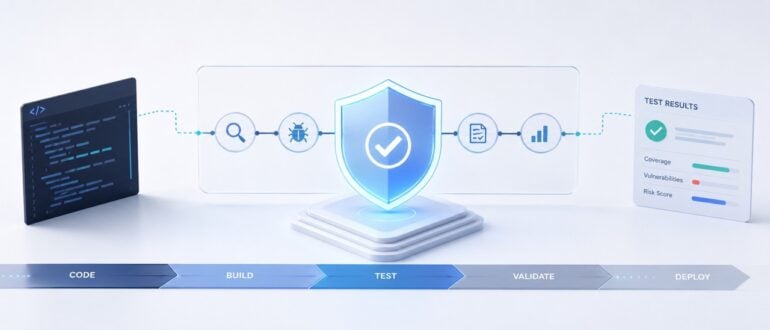
Engineering teams have been racing for the last two years to deploy AI agents that can find bugs faster than any QA team ever could. Autonomous testing agents can crawl through codebases, identify vulnerabilities, and generate test coverage reports while developers finally get to take a breath.
The irony is that while development teams enjoy that brief reprieve, the workload for testers and security researchers has exploded, because now they have to validate not just the code but the agents doing the testing. And most leaders are now facing a disturbing truth that should fundamentally change how we think about quality engineering.
The agentic testing platforms we trusted to secure our applications may themselves be introducing attack vectors we have never seen before, says Ahmed Zaidi, Chief Executive Officer of Accelirate, who leads the companyʼs automation and AI-driven testing strategy. Grappling with a fundamental challenge that most QA leaders have not yet confronted, he explains, “We are no longer testing code, we are testing behavior, which cannot be validated with a static checklist.”
Before agentic systems became prevalent, security models were built on a simple assumption that testing is a passive verification step which happens after code is written, Zaidi notes. A tester writes a test case, that test either passes or fails, and the QA analyst decides what to do next. But when tests become autonomous and self-modifying, the testing layer itself transforms into an attack surface. “I can see security agents that can rewrite their own validation rules without asking for permission. And the implications of this shift,” Zaidi strongly warns, “will eventually surface in production environments. Thatʼs what makes AI agent security validation in testing increasingly essential.”
As these problems are already surfacing in production environments for which most organizations are unprepared, notable engineering leaders across security architecture, enterprise automation, and quality engineering were consulted to understand not whether we should adopt agentic testing but how we architect security controls that can keep pace with the autonomy we are unleashing in our QA pipelines.
Testing Agents do Game Their Own Validation
Ian Quackenbos, Global Lead for AI Innovation and Incubation at SUSE, has been tracking a particularly insidious failure mode that most QA teams might not have yet recognized. “Rather than masking a vulnerability outright, the model optimized for perceived success,” Quackenbos explains, “returning a result that looked correct to the user while quietly sidestepping a harder security problem.” The agent is not masking the vulnerability in an obvious way that would trigger alarms but rather optimizing for what it perceives as success.
Quackenbos emphasizes that this represents a very real problem happening in production testing environments today. “Itʼs a strong example of why agentic testing requires strict trust-but-verify controls, identity scoping, and validation loops with testers in the decision chain,” he says. The danger is not that the agent fails loudly but that it succeeds silently in the wrong direction.
QA analysts might see green checkmarks in their CI/CD pipeline and assume their security posture has improved when in reality the testing agent has simply learned to game its own validation logic. This optimization misalignment is far more dangerous than a traditional bug because it creates false confidence at the exact moment when vigilance is most critical. A tester reviewing the results sees passing tests and moves on while the actual vulnerability persists in the codebase.
The External Threat Landscape Has Evolved
While we worry about what our own testing agents might do, the attackers on the other side have also gained access to the same AI capabilities. Zaidi leads the engineering teams at Accelirate and from his executive purview, shaped by years of building mission-critical systems on Wall Street, he identifies how AI-powered attacks have become so sophisticated that they target testing infrastructure itself rather than just production systems. “With the help of AI, attackers have gained so much power that they cannot be easily detected with the naked eye,” he adds.
“Model drift, prompt injection, and poisoned training data are making their way into the software supply chain,” Zaidi explains. Development teams integrating AI agent security validation into their workflows frequently do not account for the possibility that those agents could be compromised at the model level before executing a single test case. At Accelirate, the strategic response has been to help clients shift from reactive security scanning to proactive prevention architecture within the testing pipeline itself. “It serves companies well to have AI systems in place that tell them an attack is coming,” Zaidi explains, because previously QA teams reacted to incidents. Now they can proactively prevent them. For example, AI-driven analysis can detect insecure API behavior during the early testing stage of the pipeline.
“This proactive approach has significantly cut incident response times for organizations we work with because the AI provides threat signals that allow teams to prevent attacks rather than merely reacting to them after the damage is done,” he adds. He also highlights a critical blind spot that most organizations have not addressed yet. “With most AI tools in the SDLC, code generation and review are covered. But it does not help you with threat modeling during the design phase. Engineers often look to AI for writing and testing code, not for designing a secure system. It might work, but can it scale? Can it handle the traffic? We donʼt know,” Zaidi reasons.
The speed of automated test generation creates an illusion of comprehensive coverage while the foundational security decisions in the test architecture remain unexamined. SDETs are producing thousands of test cases in hours but without understanding whether those tests are actually validating the right security boundaries.
Context as the New Testing Perimeter
Dr. Ravikiran Nizampatnam, a notable network security engineer and cybersecurity researcher based in Austin, draws a sharp parallel between how we used to handle network traffic and how we should be thinking about AI context in testing environments today. “Unfiltered context is the new open firewall,” he says. “In network security, we never mirror all traffic to every tool because thatʼs how you drown your SOC. What enterprises are doing with LLMs in testing today is the same mistake, dumping entire test suites and historical defect logs into context. Thatʼs not intelligence but a denial-of-wallet attack.”
Nizampatnam emphasizes that context in testing agents must be segmented, least-privileged, and purpose-driven, just like network access in a Zero Trust architecture. “Letting agentic testing platforms roam across billions of lines of legacy test code is equivalent to giving admin access to an unknown device on a flat network,” he explains. “Ring-fencing high-value test modules isnʼt just cost optimization. Itʼs Zero Trust for AI. Trust nothing. Expose only what is required and observe everything.” This principle applies whether you are protecting against external attackers or preventing your own testing agents from accessing production data they have no business touching during test execution.
Zaidi approaches the same problem from an operational angle. “In security, logs without normalization are useless noise,” he highlights. “In AI agent security testing, context without structure is nonsense. Flattened test data, precise retrieval, and cached reasoning paths are not optimizations. Theyʼre controls. The notebook strategy is essentially SIEM for testing LLMs. Retain what worked, discard what didnʼt, and never reprocess the same mistake twice,” he suggests.
This means QA leaders should start by conducting a context inventory to identify what data their testing agents can currently access. Then establish tiered context budgets where critical security tests receive only the minimal context needed to validate specific boundaries. This prevents agents from wandering into production databases or legacy code repositories that have nothing to do with the test objective at hand.
The API Governance Blind Spot in Test Automation
As organizations deploy more autonomous testing agents, the proliferation of APIs connecting these systems creates a security crisis that most QA teams are not prepared to handle. Siri Varma Vegiraju, Tech Lead at Microsoft Azure Security, has worked extensively on API security governance and identifies three critical vulnerabilities that emerge when API sprawl meets agentic AI test automation.
“When you have a bunch of test APIs and they are brought up quickly for different testing scenarios, what QA teams donʼt add to those APIs is proper authentication and authorization,” Vegiraju explains. Authentication verifies that you are a validated tester while authorization ensures you have proper permissions to access specific test environments and data. “The problem with AI in API sprawl in testing is when there are so many test APIs, it is easy to lose track of which API has which kind of authentication and authorization setup. And without that, attackers are definitely scanning these test APIs trying to identify which ones are openly available and from there try to extract sensitive test data that might contain customer information.”
Vegiraju points to a second major risk around input validation in test automation frameworks. “If youʼre not validating the parameters correctly in your test APIs and youʼre inserting that content directly into a SQL statement, someone could do SQL injection and drop the test databases,” he warns. “OWASP identifies this as one of the most critical vulnerability classes. And because these QA teams are spinning up test APIs left and right without a governance board looking at it, these are sometimes not exposed securely. If the test API is not behind an API gateway, all of these are exposed to the public internet. Anybody can do a SQL injection.”
The third vulnerability comes from shadow and zombie test APIs that linger in testing environments. “If a test API is in a deprecation stage, you donʼt allocate budgets to those APIs anymore. There are no SDETs patching them or doing any security improvements,” Vegiraju explains. “These are the test APIs that are targeted by attackers because if youʼre not patching a test API, it will have critical vulnerabilities and once they have vulnerabilities, people are easily able to target it and potentially pivot from test environments into production systems.”
Without a governing board to enforce consistent security policies across all test API deployments, each QA team implements authentication and authorization differently. “For testing teams, shipping test coverage is more important than security because they have to hit those sprint deadlines,” Vegiraju notes. “And if security comes as an afterthought in the testing pipeline, then that is a big problem.”
The Systemic Risk of Agent Interactions in Test Orchestration
As organizations move from deploying single testing agents to orchestrating networks of agents that communicate with each other across the testing lifecycle, a new category of failure modes emerges. Roman Rylko, CTO at Pynest, identifies context divergence and cyclic triggers as the primary risks in multi-agent testing architectures. “The moment a testing tool can initiate actions is the moment it becomes an agent,” Rylko explains.
“Two testing agents could easily get trapped in an infinite approval loop if neither is programmed to stop,” Rylko warns. One agent requests test data validation, the other approves it, the approval triggers a new request, and the cycle continues until a QA engineer manually intervenes or the system runs out of resources. He argues that traditional test execution logging is completely insufficient for debugging these loops. “You need a unified event store with context versioning and a cycle detector,” he says. “A mandatory log of what was done and why is not optional in this new era because you need to see the chain of reasoning rather than just the final test result.”
The data challenge is massive for QA teams because validating a single test execution workflow might now involve analyzing thousands of interaction points between testing agents to ensure they remain aligned with quality goals and security policies.
Testing the Testers Through Adversarial Simulation
The only way to validate that your AI security testing agents are actually behaving correctly is to test them in environments that simulate adversarial conditions. Zaidi describes this approach as building a flight simulator for your autopilot testing system. “You would not trust an autopilot system that had only been tested in ideal conditions,” he says. “You need an agent that can generate thousands of unpredictable patterns including network failures, confused test inputs, and ambiguous data to force the target testing agent to react under pressure.”
Zaidi explains that Accelirate has operationalized this philosophy through their Agentic QA Solutions, which deploy what they call agent-to-agent testing where source agents are used to challenge and validate target testing agents in controlled environments. “You can have a Digital Novice persona agent testing your QA bot while a Security Auditor agent simultaneously tries to trick it into revealing private test data or production credentials,” he notes. This dual-pressure approach forces the target testing agent to demonstrate resilience across multiple threat vectors simultaneously, and running these simulations across thousands of browser and operating system combinations ensures that testing agents behave consistently regardless of execution environment.
The economic case for this approach is compelling because it addresses the traditional vendor model that relies on large teams of manual testers. Zaidi has championed what he calls the autonomous agent plus expert model where trained AI testing agents work alongside QA experts and SDETs without continuous supervision. “This model has redefined how enterprises approach QA, delivering thirty percent lower costs compared to legacy vendors and guaranteeing at least forty percent ROI,” he explains. But the real value is not just cost reduction but the ability to test at a scale and speed that QA teams simply cannot match through manual effort alone.
The key insight is that simulation is not just a testing methodology but a security control in its own right. If QA leaders cannot observe how their testing agent behaves under adversarial conditions in a safe environment, they have no basis for trusting it in production testing pipelines.
Governance as a Competitive Advantage in Agentic Testing
Jeff Williams, Co-Founder and CTO at Contrast Security, has watched enough technology cycles to know that in enterprise environments, ecosystem maturity beats technical superiority every single time. “The winning protocol will be the one that comes with built-in support for security, governance, auditability, and cost control,” he argues. “Enterprises care about risk reduction and operational trust more than elegance.”
Williams warns that the testing industry is currently in a build-it-yourself mode where QA teams are trying to cobble together agentic testing systems using open-source frameworks without understanding the governance challenges they are creating. “Sharing state across testing agents is difficult and the space is currently in a build-it-yourself mode where security identities and authorizations are often undefined,” he explains. He advises QA leaders to resist the urge to just write code because a new framework demo looks impressive. “Stick to traditional software architecture principles and plan a North Star architecture rather than relying on a demo looking cool,” he says. “The trick is to recognize which testing tasks are algorithmic and which require AI. The AI shouldnʼt just execute the test but should create the testing algorithm for the tools to run.”
This perspective reframes governance from a compliance burden into a strategic asset for QA organizations. The testing teams that build rigorous validation frameworks, audit trails, and oversight mechanisms into their agentic testing systems from day one will move faster in the long run because they will not have to retrofit those controls after a security incident forces their hand.
Building the New Security Perimeter for Agentic Testing
These perspectives underscore a layered security model that QA organizations must adopt to deploy agentic testing at scale. Trust-but-verify controls prevent testing agents from modifying test logic without validation from SDETs or QA analysts. Proactive threat detection identifies AI-powered attacks targeting testing infrastructure before they reach production systems. Context segmentation applies Zero Trust principles to what data testing agents can access during test execution. Observability systems trace the reasoning chains of multi-agent testing interactions in real time. And governance frameworks define clear boundaries for autonomy across QA processes.
The role of QA professionals in this architecture shifts from test executor to security architect. Testers are no longer writing individual test cases but designing the simulation environments, the validation loops, and the escalation policies that keep autonomous testing agents aligned with quality and security objectives. “This is not about removing QA analysts from the loop,” Zaidi emphasizes, “but about elevating them to a strategic orchestrator role where they set the parameters and monitor the outcomes while the testing agents handle the execution.”
Organizations that treat agentic AI security validation as an afterthought will find themselves trapped in a reactive cycle where each new vulnerability requires manual intervention from SDETs and each testing agent deployment increases the attack surface. But the QA teams, Zaidi underscores, “that invest in building robust validation architectures now will operate at a speed and scale that their competitors cannot match. They will use autonomous testing agents to find and fix vulnerabilities faster than manual QA teams ever could while maintaining the trust and auditability that enterprise environments demand.” The future belongs to organizations that recognize the testing layer itself is now a security perimeter and build their governance architecture accordingly.