Tag: workloads

  • Nebulon Unveils Hybrid Cloud Computing Platform

    Nebulon Unveils Hybrid Cloud Computing Platform

    Nebulon has emerged from stealth to launch a hybrid cloud computing platform that enables workloads to be processed in the cloud while data continues to be stored on a local application server.

    Company COO Craig Nunes said the Cloud-Defined Storage platform employs PCIe cards embedded with a Nebulon Services Processing Unit (SPU) based on an ASIC to connect local storage systems to a cloud-based control plane dubbed Nebulon ON that can span Amazon Web Services (AWS) and Google Cloud Platform (GCP) services.

    The PCIe card is installed in an application server residing in a local data center, where it connects to solid-state drives (SSDs) installed on the server. The Nebulon SPU offloads compression, encryption, deduplication, erasure coding, snapshots and data mirroring.

    The Nebulon SPU also transmits storage, server and application metrics to Nebulon ON, where machine learning algorithms are applied to surface recommendations to improve performance.

    Nunes said both Hewlett Packard Enterprise (HPE) and Supermicro have already agreed to resell the Cloud-Defined Storage platform.

    At its core, the Cloud-Defined Storage platform takes hyperconverged infrastructure (HCI) to another level. Instead of combining compute and storage in a local data center, however, compute processing is shifted to the cloud, said Nunes. That approach, he noted, makes it possible to take advantage of inexpensive compute resources in the cloud without losing control over data.

    In addition, Nunes noted, the Cloud-Defined Storage platform ensures application service levels are maintained while reducing costs by eliminating the need to transfer massive amounts of data into and out of the public cloud.

    Organizations that work within highly regulated industries can now take advantage of cloud resources while continuing to meet compliance requirements, he added.

    Finally, the Nebulon Cloud-Defined Storage platform can support both monolithic and microservices-based applications regardless of the type of virtual machine or container employed.

    At a time when many organizations are under increased pressure to reduce the total cost of IT, there’s a lot more interest in ways to leverage cloud computing to reduce costs. However, for many organizations, moving data into the cloud is problematic for a host of performance, security and compliance issues.

    A hybrid cloud computing architecture that doesn’t require data to be stored or moved into and out of a cloud could provide a way for organizations to re-evaluate their overall cloud computing strategies. Organizations beyond those in highly regulated industries could conclude they would prefer to retain control over their data.

    Cloud service providers are, of course, banking on massive amounts of data being stored in the cloud. They have long argued that as the amount of data stored in the cloud exponentially increases, the more sense it makes to deploy applications in the cloud as close as possible to that data. Each new application deployed in the cloud then increases the amount of data gravity that cloud exerts on other application deployment decisions.

    It’s not likely hybrid cloud platforms such as the Nebulon Cloud-Defined Storage system will completely reverse that trend. However, it does signal that data gravity in the cloud may not be as inexorable a force as many cloud service providers have long assumed.

  • AWS Looks to Accelerate Windows Migrations to the Cloud

    AWS Looks to Accelerate Windows Migrations to the Cloud

    Amazon Web Services (AWS) is ratcheting up pressure on Microsoft by devoting more resources to enable IT organizations to migrate Windows workloads to the cloud.

    Fred Wurden, general manager for enterprise engineering at AWS, said a Migration Acceleration Program (MAP) for Windows, now generally available, provides IT teams with prescriptive guidance, consulting support, tools, training and service credits to help reduce the risk and cost of migrating to the cloud.

    The service is being delivered in collaboration with partners including Rackspace, 2nd Watch, Accenture, Cloudreach, Enimbos Global Services, Onica and Slalom. Wurden said AWS has been migrating Windows workloads to the cloud for more than a decade now and claims to have more than half of all Windows workloads deployed in the cloud.

    Microsoft has clearly been making strides in recent years to close the gap between it and AWS by running both Windows and Linux workloads on its cloud alongside instances of Microsoft Office 365. Microsoft most recently reported a 39% year-over-year growth in commercial cloud revenue, reaching $13.3 billion for its fiscal third quarter. However, Microsoft does not break out Azure revenue from Microsoft Office 365 revenue or disclose what percentage of the workloads running on Azure is based on Windows versus Linux.

    At the same time, Microsoft now charges more for instances of SQL Server that run on other clouds. AWS contends that decision will only accelerate the rate at which organizations are transitioning to open source databases deployed on Windows or Linux.

    Competition for Windows workloads is growing in ferocity in the wake of the COVID-19 pandemic because more workloads are being lifted and shifted into the cloud as organizations realize that on-premises IT environments can be rendered inaccessible. IT staffs in many geographies will be working from home at least through the end of the year. Many organizations are also moving workloads to the cloud in anticipation of a second potential outbreak of the pandemic.

    At the same time, the rate at which new workloads are being deployed in the cloud is also accelerating. Many of those cloud-native workloads are based on containers running on Kubernetes. Support for containers on Windows platforms is still relatively nascent when compared to Linux platforms.

    AWS and Microsoft, along with a host of rival cloud service providers, are focusing on legacy workloads because the expectation is that monolithic workloads running on Windows will be re-engineered to run as a set of microservices that can be updated more flexibly within the context of a larger digital business transformation initiative. It may be a while before that transformation fully manifests; however, it’s clear the battle for control over millions of workloads in anticipation of that transition is reaching a higher level of intensity.

    There’s no doubt many of those workloads will run on the Microsoft Azure cloud. However, the degree to which Microsoft might be winning in the cloud era may not be as great when everything that is being lost to AWS and other cloud service providers is taken into consideration.

  • VMware Looks to Accelerate App Migration to the Cloud

    VMware Looks to Accelerate App Migration to the Cloud

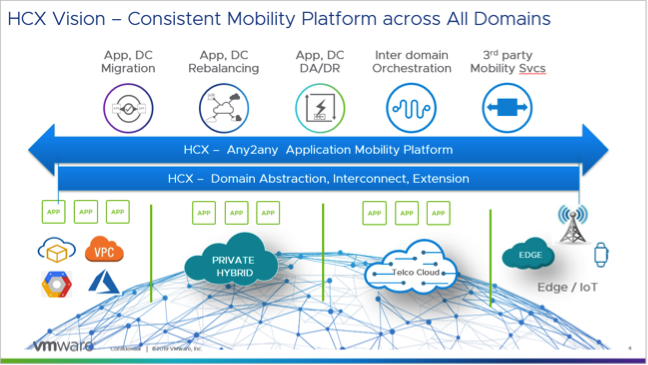
    VMware this week expanded the scope of its cloud migration efforts to include workloads that aren’t running on its virtual machine. VMware HCX leverages replication and virtual machine mobility technology to make it easier to automate the migration of either VMware-based workloads or those running on rival platforms to the latest generation of VMware platforms.

    Previously, VMware only offered this migration capability as part of larger services offerings that were focused on only migrating workloads running on VMware platforms. Allwyn Sequeira, senior vice president and general manager of the Hybrid Services Business Unit at VMware, said VMware HCX not only extends that capability to orphaned platforms such as Open Stack and Kernel-based Virtual Machines (KVM), it also marks the first time VMware has offered this migration tool as a separate, standalone offering.

    Sequeira said VMware HCX provides an opportunity for organizations that have committed to a platform other than VMware to reconsider their options. VMware HCX provides a way to migrate thousands of virtual machines at a level of scale that significantly reduces the amount of time to make that transition, he said.

    In some cases, Sequeira said customers have already employed VMware application migration tools to lift and shift thousands of virtual machines into cloud computing environments such as Amazon Web Services (AWS) in a few weeks. Overall, the rate at which those migrations are occurring has doubled every quarter for the last six quarters, he added.

    VMware HCX is based on virtual machine mobility technology developed by VMware combined with a similar cross-platform workload migration technology the company gained in its acquisition of CloudVelox early last year. VMware HCX now provides organizations with the option of migrating virtual machines programmatically via an application programming interface (API) or via a graphical user interface (GUI).

    VMware HCX

    There exist multiple tools for migrating workloads into any number of cloud computing platforms. Many organizations are also taking advantage of Docker containers to encapsulate entire workloads so they can run on any platform. Deciding which path to pursue most often comes down to the level of integration required with the various services available on the targeted cloud migration platform.

    In the meantime, as workload migration tools become more sophisticated, decisions regarding where workloads need to run are becoming less concrete. Competition for new workloads between platform vendors has always been especially fierce, and it used to be that once an IT organization made its decision, it was unlikely it would change its mind, given the effort needed to swap one platform out for another. Now, however, as application workloads become more portable, competition among platform vendors will only increase as they seek to convince IT organizations to shift existing workloads onto a different platform.

    In general, that increased level of competition bodes well for DevOps teams, who are usually among the strongest advocates for change within any IT environment. The issue now is deciding which platforms within those already-cluttered IT environments make the best candidates for rationalization.

    — Mike Vizard

  • VMs, Containers, Cloud, Cluster: Scheduling Differences

    VMs, Containers, Cloud, Cluster: Scheduling Differences

    Scheduling is a large part of making the data center go, and more to the point of making the virtualized (be it VMs, cloud, containers, or clustering) portion of the data center work.

    While there are a lot of variables to virtualization performance, scheduling impacts performance all of the time. And yet we only really talk a lot about it in clustering (where a robust scheduler on par with an OS scheduler is required).

    There’s a reason for that, and it is worth exploring.

    (Side note: I was talking about this blog with Lori while I was writing it, and she reminded me of when we took our Masters’ courses, the Operating Systems class used Homer Simpsons greedily wanting donuts as our scheduling project. So whenever we think scheduling, we mentally hear one of the many Homer processes being denied a donut and going “D’oh!”)
    For virtual machines, scheduling is largely forgone in favor of other resource utilization. Virtualization only cares about CPUs and memory requirements when the virtual machine is created. You tell it then, and the only time you worry about it again is if you demand more CPU cores than the physical hardware can provide—and in some cases, CPU virtualization will allow you to keep spinning up VMs even after that. Only the real scheduling mechanisms actually can be at odds with each other in a heavy load situation. The host OS scheduler, for example, could swap out your VM’s active thread at the same time the guest OS has raised the level of importance for an app to “insanely high, do it now.” Although this only begins to show if basic rules about servers and loads are ignored, it does happen.

    You get the same issues with private clouds. Why? Because even though everyone in the marketing world pretends it isn’t true, private cloud and VMware ESXi essentially are the same underlying toolset. And usage patterns in the enterprise show not only does everyone know that, but also the differences are less substantial than any of the organizations involved want to admit. Not that they are the same code, but in practice, they do the same things.

    The one place where these two (and public cloud for that matter) really make use of scheduling is when automatically responding to spikes in usage that threaten to bury a system. However, solutions to usage spikes are not part and parcel of these systems; they are crafted by DevOps (or Dev, or Ops) folks who work at places where dropped connections are lost money and, thus, a quick response of growing the pool of available servers and then later shrinking it is important. But because they are using their own metrics to determine the need, more of these systems are implemented in application provisioning tools than in cloud or virtualization software. We could argue about where this functionality actually belongs, but not really where it is implemented today.

    I kind of bled into public cloud there, so will address it. When people talk about it being more “agile” or “adaptive,” they mean “with this quasi-scheduling code we wrote to spin up instances at need.” It doesn’t matter if the “code” is a python script or an Ansible playbook—they did the scheduling, not the system.

    That leaves clustering software (such as Mesos). Because clustering software treats many machines as one big thing, it requires a scheduler to manage the resources. In the case of Mesos, the central scheduler really isn’t that smart, and I think that is a genius implementation. It knows what resources (CPU, memory) each machine has available, it knows what resources have been assigned from that machine, and for each of the “frameworks” (think of them as job executors; though that’s a bit simplistic, it’s perfect for this discussion) what it needs to get its work done. Then it does a best match, offers resources to frameworks and waits for more resources to come available from finished executions.

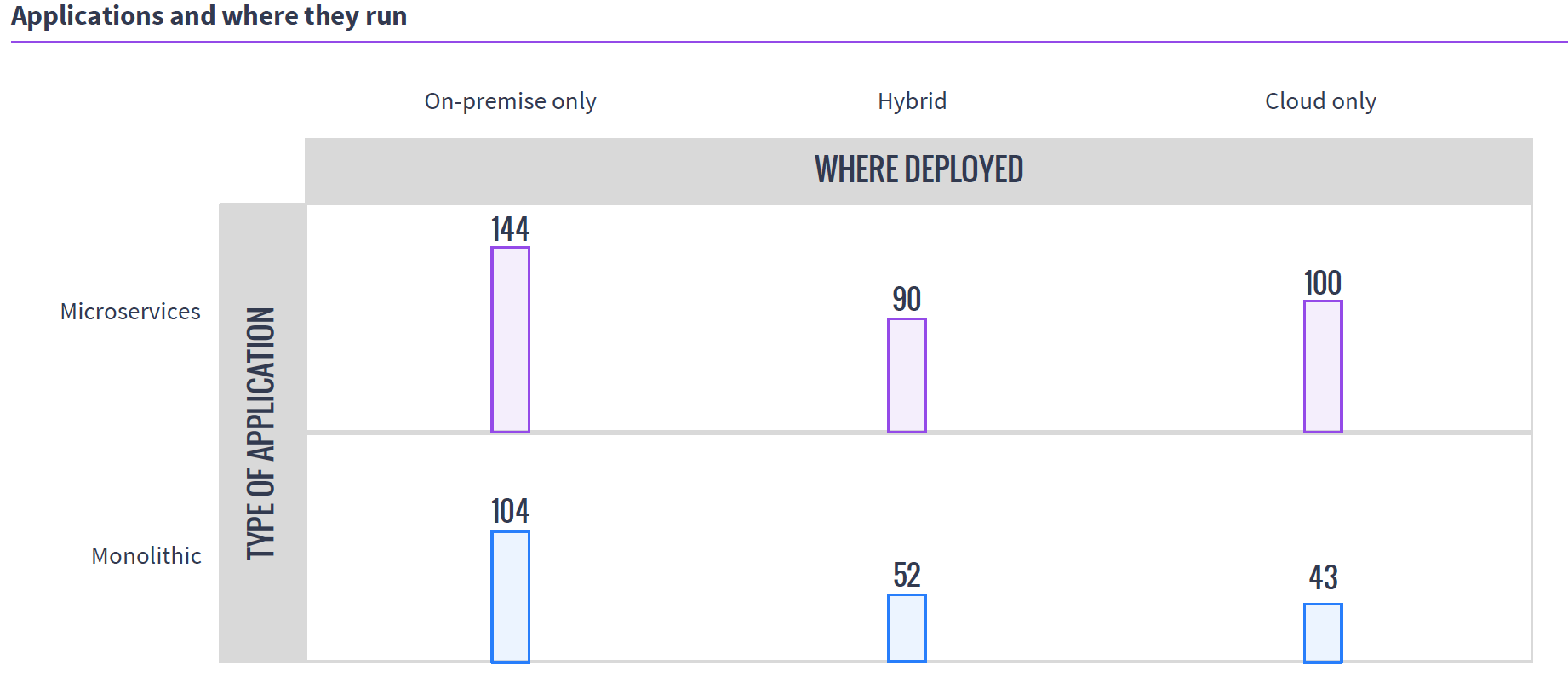
    So in the world of VMs, if you have 50 unique applications that need resources, you create 50 VMs to service them. In either cloud environment, you do the same. It is a joke we like to make that because of microservices, containers are treated like VMs, except if you have 50 unique applications, you create 500 containers, but the reality is that they are exactly like VMs in many use cases, and make 50 containers when containerizing existing apps. Taking a look at MesoSphere’s 2016 survey of clustering users, you can see that a fair number of clustering users are using containers with Mesos and DC/OS, while many of them are not doing it exclusively with microservices.

    Source: MesoSphere user survey, August 2016

    In the clustering world, you have what presents as one big monster machine that is going to run these applications as resources come available, so if your 50 applications require fewer resources than the cluster offers, they simply execute in parallel; if you don’t have enough hardware to run them, unlike with VMs, you can just queue them up and, assuming the cluster isn’t over-burdened, eventually they all will run.

    This gets more interesting when containers are added to clustering (a common environment), because then you do have discrete containers, but the scheduler still manages how many resources are available/in use, and the container architecture allows the app to carry its requirements with it across the cluster.

    Why do we care? Because you know what your workloads are and which scheduling methodology is more important to your organization. If there are 50 applications that all have steady resource needs and run all of the time, then virtualization might be right for you, but if the organization’s workloads are shifting constantly and resources need to be cycled at a high rate, clustering might be right for you. Either way, knowing what’s out there is never a hindrance.

    — Don Macvittie